/
Tags: electrical equipment instruction sheet
Year: 2016
Text
                    COMMSC'9PE®
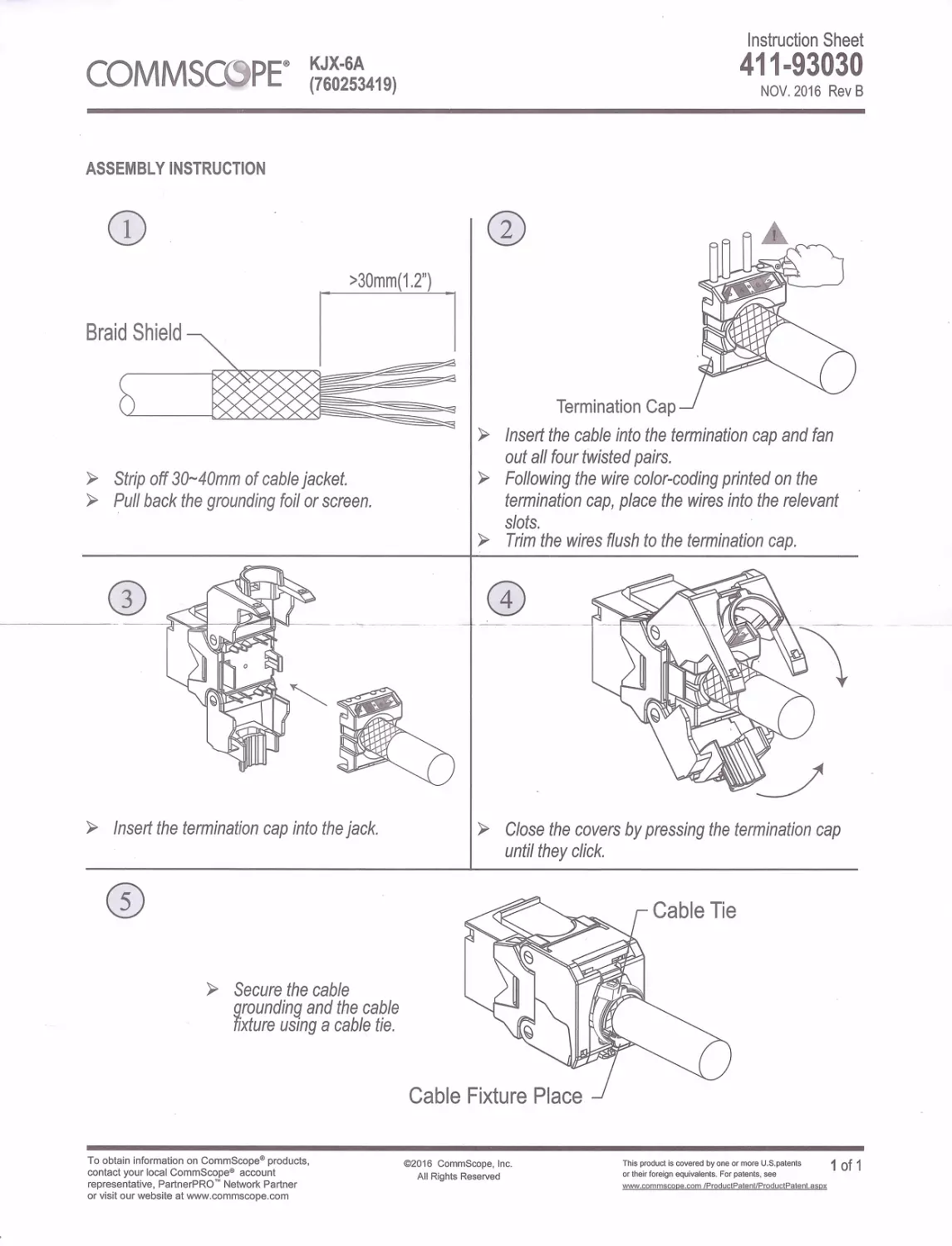
ASSEMBLY INSTRUCTION
G)
KJX-6A
(760253419)
Instruction Sheet
411-93030
NOV. 2016 Rev B
0
>30mm(1.2")
5
► Strip off 30~40mm of cable jacket.
► Pull back the grounding foil or screen .
► Insert the termination cap into the jack.
CD
► Secure the cable
grounding and the cable
fixture using a cable tie.
To obtain information on CommScope® products,
contact your local CommScope® account
representative, PartnerPRO'" Network Partner
or visit our website at www .commscope.com
Termination Cap
► Insert the cable into the termination cap and fan
out all four twisted pairs.
► Following the wire co/or-coding printed on the
termination cap, place the wires into the relevant
slots.
► Trim the wires flush to the termination cap.
0
► Close the covers by pressing the termination cap
until they click.
Cable Fixture Place
©2016 CommScope, Inc .
All Rights Reserved
Th is product is covered by one or more U.S .patents
1Qf1
or their foreign equivalents. For patents, see
www .commscope .com/ProduclPatent/ProductPatent.aspx