/





Text
                    Tuesday 9 April 2024

X10ca0mVeraIin history.
Fujimfioslm
t pre-ordered
It’s the
d out why
Read our in-depth test to fin

PREMIUM
EDITION
APRIL 2024

your

Passionate about photography since 1884

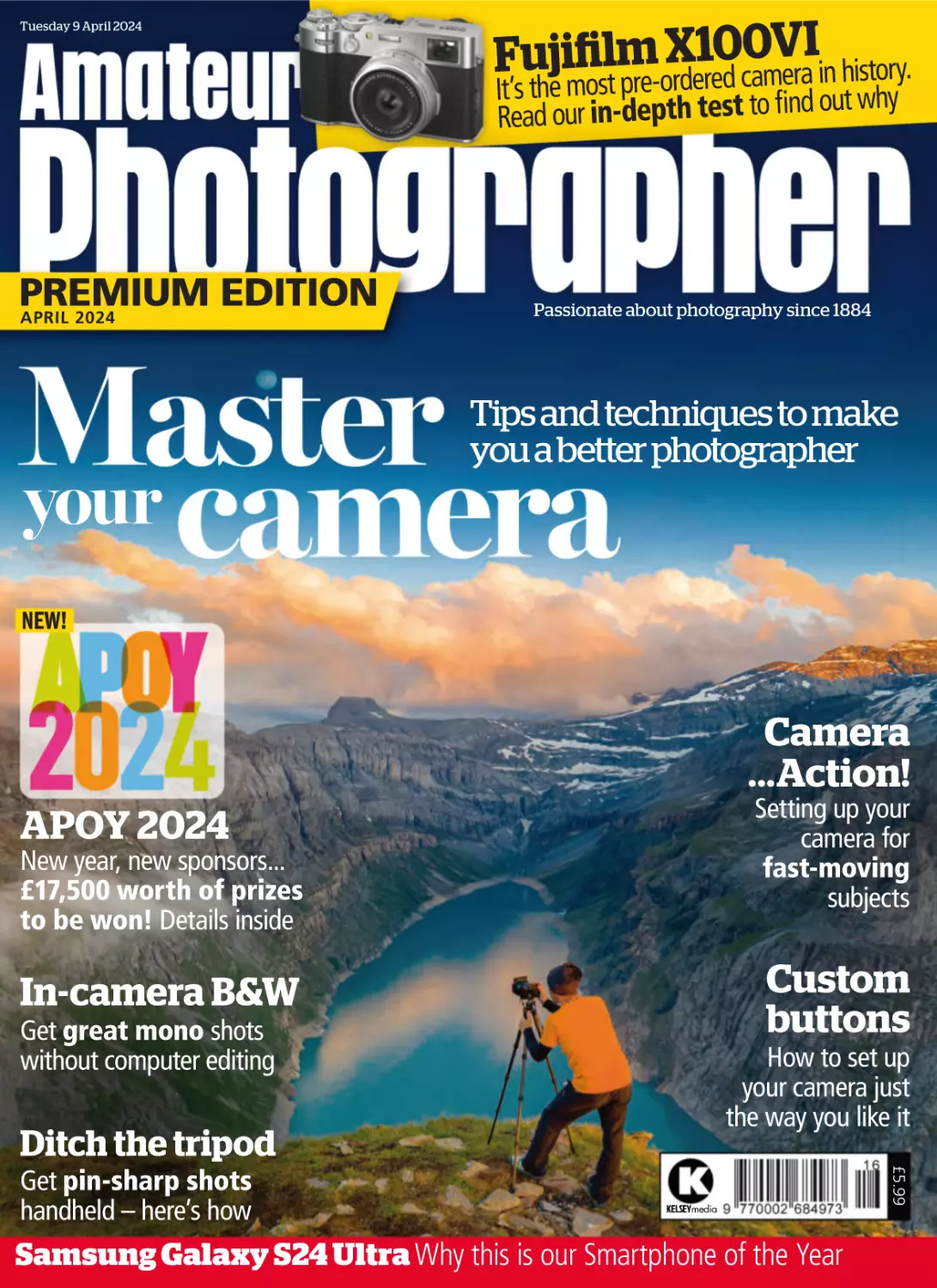
Tips and techniques to make
you a better photographer

NEW!

Camera
...Action!
Setting up your
camera for
fast-moving
subjects

APOY 2024

New year, new sponsors...
£17,500 worth of prizes
to be won! Details inside

Custom
buttons

In-camera B&W
Get great mono shots
without computer editing

How to set up
your camera just
the way you like it

Ditch the tripod
KELSEYmedia

Samsung Galaxy S24 Ultra Why this is our Smartphone of the Year

£5.99

Get pin-sharp shots
handheld – here’s how

Used gear you can trust.
Our experts check everything with a full
inspection. See unique images of each unique
item. Get the full picture.
Get a free warranty for total peace of mind,
every time.

Buy MPB
Approved

Used Fujifilm XF 18-55mm f/2.8-4 R LM OIS

7days

Welcome

Inside this issue
3 7 days

34

8 Books
10 It’s good to share
14 APOY 2024 launch
18 Winning ways
22 When Harry met
26 Photo Insight
29 Inbox

© FRANCIS BOMPARD

30 Working-class
mess
34 How to set up your
camera for action
44 Metering modes
46 OM System
48 Is it time to ditch
the tripod?

56 Custom buttons
– tips for every
photographic
genre
64 Software tutorial

77

56

30

68

© ANDY WESTLAKE

52 Monochrome
made easy: Incamera b&w

There’s always
something new to
learn about the art
of photography,
which keeps it
interesting – it’s a
brave person who claims to have
mastered everything. So this issue,
we focus on essential camera
techniques and I’m sure you’ll find
it useful, whether you need to
brush up existing skills or acquire
learn ones. From metering to
monochrome, all you need is here.
Other highlights include the
definitive review of the most
eagerly awaited camera of the year
so far, the Fujifilm X100VI; and we
also test a power-packed, high-end
smartphone, the Samsung S24
Ultra. And last but not least, APOY
2024 is now open for entries, with
over £17,500 worth of prizes from
Camera Centre UK, Adobe and
ViewSonic. We can’t wait to see
your entries!
Geoff Harris, Deputy Editor

66 Reader portfolio
68 Fujifilm X100VI
review
COVER PICTURE © ROBERTO MOIOLA/GGETTY IMAGES

77 Samsung
Galaxy S24 Ultra
smartphone
review
82 Accessories
87 BuyingGuide:
Cameras
98 Final analysis

© SERENA BROWN

84 Tech talk

THIS ISSUE’S CONTRIBUTORS

Our cover shot is by Getty Images and
illustrates the theme of our bumper
issue about mastering your camera

Connect with us
US at ap.ed@kelsey.co.uk with your
@ EMAIL
letters, send us a link to your online gallery, or
attach up to 5MB of low-res sample images

RICHARD SIBLEY
The former AP
technical editor
explains how to
set your camera’s
custom buttons for
different genres

STEVE
FAIRCLOUGH
The AP regular
talks to six action
pros about the
best ways to
capture action

WILL CHEUNG

ROD LAWTON

Mono master Will
Cheung shares all
you need to know,
to capture your
finest black &
white images yet

Top pro Rod
explains when you
can be free of your
tripod, and the
situations when
you still need one

JOSHUA WALLER
Online Editor
Joshua reviews the
Fujifilm X100VI,
and also tests the
Samsung Galaxy
S24 Ultra

PETER DENCH
The documentary
photographer talks
to the curator of a
touring exhibition
on working class
life today

JOIN US ONLINE in one of these AP communities:
WEBSITE: www.amateurphotographer.com
FACEBOOK: amateur.photographer.magazine
TWITTER: @AP_Magazine
INSTAGRAM: @AP_Magazine
FLICKR: flickr.com/groups/amateurphotographer

Keenly priced Nikon Z
superzoom lens
IT’S been another good week for
competitively priced lenses – hot on the
heels of the £1,299 Sigma 50mm f/1.2 Art
lens comes the Nikkor Z 28-400mm f/4-8 VR,
for just £100 more.
This new superzoom lens for Z mount
packs a 14.2x zoom into a compact and
lightweight body that weighs just 725g,
making it the lightest Z-series lens to go as
far as 400mm (the focal length ranges from
28mm at the wideangle end to 400mm at the
super-telephoto end). In addition, the lens
features 5 stops of image stabilisation/
vibration reduction,
which increases to 5.5
stops when the lens is
attached to a Nikon Z
camera with
Synchro VR capability.
Nikon is also
stressing the lens’s
close-up versatility,
with a minimum focus
distance of 0.2m at
the wide end, and
1.2m at 400mm. The
maximum reproduction
ratio of 0.35x further
The Nikkor Z
facilitates close-up
28-400mm f/4-8 VR
and macro shooting.
weighs just 725g
Other features

include a stepping motor for finding focus
quickly and quietly, a customisable control
ring and dust and water sealing around the
mount and moving parts. The lens hood is
interesting too – its squared design can be
inverted to save space when storing the lens,
and it’s possible to shoot with the hood still
inverted. ‘(The lens) is perfect for people who
want to carry just one lens and be ready for
any photo opportunity, near or far,’ said Nikon
Europe product manager Zurab Kiknadze.
The Nikkor Z 28-400mm f/4-8 VR is
available mid-April for £1,399.

Affinity’s Ashley Hewson (left) with Canva’s
Duncan Clark

Affinity sold to Canva
WEB-BASED design platform Canva
has bought the Affinity creative
software suite, which includes the Affinity
Photo editing software. Back in January,
Canva reported that it had around 170
million monthly users worldwide. ‘The one
thing Canva don’t do is actually produce
any tools for creative professionals – and
that’s really why they ended up
contacting us now,’ said Affinity CEO Ashley
Hewson in a video. ‘And the great thing
with this is that really nothing changes. All
of our team is still here, there are no
layoffs.’ Affinity is based in Nottingham,
while Canva is a Canadian company which
opened a European HQ in London last year.

Music photographers honoured
THE SO.CO Image of Music Awards 2024,
designed to ‘celebrate the unsung heroes
behind the lens,’ have been announced, with
Fearghal McGlinchey winning top prize for a
dramatic shot of Greta Van Fleet’s Josh
Kiszka. Greta Van Fleet are famed for their
on-stage pyrotechnics, and as Fearghal
recalls: ‘As soon as I saw their pyros go off,
I thought to myself, I have to be in the perfect
position for these later on. Josh’s harmonica
even looks like it could be a lighter!’
New York-based photographer Grace
Prachthauser was Young Music Photographer
of the Year, a category designed to reward
emerging talent under the age of 23. AP’s
Lifetime Achievement winner, Jill Furmanovsky,
was named the So.co Legend, in recognition
of her sterling 50-year career. Innovation of
the Year went to the Canon EOS R50,
selected by the judges for squeezing high-end
tech into an entry-level camera. So.co was set
up to connect photographers, musicians and
fans with images and stories from concerts,
Fearghal McGlinchey’s overall winning image
festivals and events. Visit so.co/awards
4

Paulo Sousa won last year’s competition
with his image, ‘Glacier Requiem’

Scientific approach
THE ROYAL Society of Biology’s
annual photography contest is now
open, with the theme, Transforming Life.
‘We invite submissions that explore the
profound changes occurring across our
planet, highlighting the resilience and
adaptability of life in response to
environmental changes, human
intervention, and scientific innovation,’
said the society. There is a £1,000 prize
for the over 18s category winner, while
the under 18s winner gets a £500 prize.
Entries close on 20 June. Visit:
rsb.org.uk/get-involved/rsb-competitions
www.amateurphotographer.com

The SIGMA 50mm F1.2 DG DN | A is the new definitive
ultra-fast-aperture standard zoom for mirrorless
cameras, delivering incredible optical performance, an
F1.2 aperture, dual HLA motors for extremely rapid AF
and a remarkably compact build. Available from 18 April.

A Art

50mm F1.2 DG DN
Designed exclusively for mirrorless cameras
Protective Case, Lens Hood (LH782-03), Front Cap
(LCF-72mm III), Rear Cap (LCR II) supplied.
Available mounts: L Mount, Sony E-mount
L-Mount is a registered trademark of Leica Camera AG.

Sigma Imaging (UK) Ltd, 1 Little Mundells, Welwyn Garden City, Hertfordshire AL7 1EW | 01707 329999 | info@sigmauk.com | sigmauk.com | youtube/@sigmauk

of four images per round.

Photographers
win prizes

APOY 2024
now open for
entries
OUR prestigious
annual photography
competition, Amateur
Photographer of the Year,
has launched for 2024.
Amateur photographers
from all over the world are
invited to enter the
competition, known as
APOY, and the same goes
for Young Amateur
Photographer of the Year
– which is free to enter for
photographers aged 21
and under. This year’s
APOY has ten rounds, and
the first is Black & White,
which closes on 22 April.
Photographers can

choose to enter all
rounds, or pick and
choose. Regardless of
how many rounds you
enter, you will be in with a
chance to win prizes,
along with points that go
towards the final leaderboard. A shortlisted entry
can give you ten points,
so it’s all to play for.
You can enter up to five
images in each of the ten
rounds, with one free
entry per round using a
code published in AP
before the round closes.
Without the code, you’ll be
able to enter a maximum

This year, Amateur
Photographer of the Year
is joined by Camera
Centre UK as headline
sponsor, with Adobe and
ViewSonic also providing
great prizes. In total, more
than £17,500 worth of
prizes is being provided.
The APOY 2024 grand
prize winner gets a
£1,000 voucher to use at
Camera Centre UK, while
round winners each get
a £500 Camera Centre
UK voucher and an ‘All
Apps’ Adobe Creative
Cloud annual subscription,
worth £660.
The runner-up in each
round will win a one-year
subscription to the Adobe
Photography Plan, which
comprises Lightroom and
Photoshop (worth £120).
There are also generous
prizes for the Young APOY
overall winner and round
winners, as well as for
camera clubs.
To enter, and for full
details of the terms and
conditions and prizes, go
to bit.ly/APOY2024.
We wish everyone the
best of luck!
l See page 14 for the
brief, and full details.

Follow AP on

YouTube

Don’t miss our videos for the latest
kit, tutorials, behind the scenes
tours and exclusive interviews
with top photographers

SOME RECENT VIDEOS

Bold claims by Yashica tie-up
I’M Back and Yashica have announced the tiny MiMi Micro Mirrorless camera,
described as the ‘smallest mirrorless ever’, on Kickstarter. The camera
promises image quality ‘superior to most smartphones,’ which is quite a claim, and
reached its funding goal in less than 30 minutes. The new camera has been
designed with vloggers and content creators in mind and is designed for people
looking for an alternative to smartphones.
The kit includes three different
types of lenses: a wideangle, a
standard lens and a telephoto
lens. There is also a Wi-Fi feature
for transferring photos to a
smartphone.
To support the MiMi Micro
Mirrorless camera’s Kickstarter
page, and for more information
about it, visit bit.ly/yashicacam.
Kickstarter contributions start at
$199 (around £157) and
packaging and shipping are
The MiMi Micro Mirrorless camera aims to offer
image quality ‘superior to most smartphones’
scheduled to start in November.
6

To find our channel simply
point your smartphone
camera at this QR code or
type our name into Google:

YouTube/AmateurPhotographerTV
www.amateurphotographer.com

THE ULTIMATE SMO KE MACH IN E
FOR CONTENT C REAT ORS

“SMOKE NINJA IS ONE OF THE HOTTEST
ACCESSORIES IN THE CREATOR UNIVERSE RIGHT NOW”
- JASON LANIER PROFESSIONAL PHOTOGRAPHER

FOG

DRY ICE

WWW.SMOKENINJA.CO.UK

STEAM

ALL IMAGES BY DOROTHY BOHM ©ESTATE OF DOROTHY BOHM

Caption???

About Women: Photographs
by Dorothy Bohm

House in Hampstead, the part of London in
which she lived from the 1950s onwards. It
shows a wide range of her photos of women,
Until 15 December 2024.
taken both in the UK and on her worldwide
travels over her seven-decade career.
Burgh House, New End Square, London NW3 1LT
Bohm said that women were a natural
subject for her, ‘because women often
express more in their faces, and are less
inhibited in showing emotion’, but also
because ‘women are less threatened by a
woman, so it is easier for me to approach
them without seeming intimidating. I can win
Dorothy Bohm (1924-2023) had a gentle,
she wanted. She was happiest when
their trust, move closer.’
understated photographic style but in her own photographing people in their everyday lives,
The women in her images are shown in
quiet way was a pioneer of photography. Born as she said, ‘photographing what I saw’, in
their ever-evolving role in society, on streets,
in what was then eastern Prussia, she arrived sometimes informally posed but more often
in pubs and shops, sometimes at work but
in the UK as a refugee from Nazism at the
candid images.
more often at leisure. Frequently, they are
age of 15. Drawn to photography as a
From the late 1960s, her work was
shown at moments when their social mask
teenager, she began by working as a studio
exhibited in major galleries including the
slips and their real feelings are on display.
portrait photographer before setting up her
Victoria & Albert Museum and she herself
These often wry, observant photographs
are never critical of their subjects, but instead
own business in 1946.
was involved in the founding of the
However, she far preferred the spontaneity
Photographers’ Gallery. She was an Associate display warmth, empathy and affection for
them. This exhibition represents only a
of working outside to the formal and
Director of the gallery for 15 years.
fraction of Dorothy Bohm’s vast output as
controlled environment of a studio, and after
This exhibition occupies two rooms and
a hallway in the peaceful and elegant
a photographer, but it captures the essence
her husband Louis established a successful
surroundings of the 18th-century Burgh
of her work.
business, she was able to pursue the work

Dorothy Bohm’s observant, empathetic images
give an insight into women’s everyday lives over
her seven-decade career, writes David Clark

8

www.amateurphotographer.com

Books & exhibitions
The latest and best books and exhibitions
from the world of photography

All images: Dorothy Bohm © Estate of Dorothy Bohm

Prospect Cottage: Derek
Jarman’s House by Gilbert
McCarragher
£25, Thames & Hudson, hardback,
192 pages, ISBN 978-0500027233

Prospect Cottage, the home and garden of
the late director Derek Jarman, has in
many ways attained more of a cult status
than the man himself. On the bleak yet
wildly beautiful Dungeness shingle beach,
the cottage and its garden is familiar to many. Fewer,
however, have seen the interior. Gilbert McCarragher,
an artist and photographer, was a neighbour of
Jarman and his partner Keith Collins, who died in
2018. Invited to document the house, McCarragher
reveals the details, punctuated by the very particular
light of that region, of the cottage. Everything from a
pot of brushes to the blue-painted electrical trunking
paints a picture of the minutiae of life there. A quietly
beautiful tribute to the pair who made the place what
it was, and a must for fans of the unique environment.

The Camera Bag Companion:
Your Personal Photography
Tutor By Benedict Brain
£22, Ilex Press, paperback, 192 pages,
ISBN 978-1781579299

All images: Dorothy Bohm © Estate of Dorothy Bohm
www.amateurphotographer.com

For many people starting a serious
interest in taking pictures with a camera
rather than a smartphone, photography is
a minefield of technical terms and
techniques to master. Benedict Brain
ARPS is a highly experienced photographer, author,
workshop leader and photography journalist, and
here he distils all the essential information needed
to really get to grips with photography, from camera
basics to post production. Instead of being a weighty
tome filled with photographs, this is an easily
portable book with hand-drawn illustrations.
Everything is explained in a clear, jargon-free,
accessible style. It’s not only a great introduction
for newcomers but also offers a range of useful
reminders to more experienced photographers.
9

Our favourite photos posted by readers
on our social media channels this week

AP picture
of the week
Llandudno Pier
by John Wakeling
Nikon Z 5, Nikkor Z 24-120mm f/4, 2.5sec
at f/13, ISO 100
‘This image was taken in Llandudno, north Wales, just
after sunset in blue hour. I knew I wanted to make the
pier the main feature for this photo, using the incoming
tide and a long exposure to capture the water flowing
between the rocks to make sure there was an
interesting foreground.’
Instagram: @johnw_photograph
YouTube: John Wakeling Photography

#appicoftheweek
*UK AND IRELAND ONLY

Win!

The AP Pic of the Week winner will
receive a beautifully framed print of
their winning image worth up to £100.
If you Love it, Frame it!
ThisPicture.com is an experienced,
high-quality framing company with a
unique, easy-to-use website. Build single or multi-image frames
with a few clicks of your mouse and select from a wide range of
frames, window mounts and glazing options. Each frame comes
with a three-year guarantee and FREE P&P within the UK.
Visit thispicture.co.uk
10

www.amateurphotographer.com

www.amateurphotographer.com

11

Stonechat on Lookout
by Sally Sherfield
Nikon D7100, Sigma 150-600mm,
1/1000sec at f/6.3, ISO 1000
‘I shot this image on a bird watching/
photography trip to Ormskirk in February.
We visited Burton Mere Wetlands and after
a very misty start the weather cleared and
the birds started to show. I spent about an
hour in the hide waiting for a cetti’s warbler
when this stonechat arrived and posed
perfectly for me.’
Instagram: @sally_sherfield_photography

We also
liked...

Emerald Seas
by Max Warner-Tate
DJI Mavic Mini Pro 3, 1/80sec at f/1.7,
1/80sec, ISO 100
‘We recently relocated to the Isle of Lewis,
Outer Hebrides. Flying the drone and
seeing the island from a different
perspective just adds to the beauty of the
coastline. The image was taken at
Mangersta Beach during sunset. The waves
viewed from above looked incredible.’
Instagram: @maxwarner_tate
Youtube: WarnerTatePhotography
Website: www.warner-tatephotography.com

Want to see your pictures here? Simply share them with our
Flickr, Instagram, Twitter, or Facebook communities using the
hashtag #appicoftheweek. Or you can email your best shot to
us at ap.ed@kelsey.co.uk. See page 3 for how to find us.
12

www.amateurphotographer.com

Introducing

EVERYDAY
CARRY
FOR
EVERYDAY
EXPLORING
Shimoda Design

@shimodadesign

@shimodadesigns

uk.shimodadesigns.com

© TONY NORTH

© MOHAMMAD RADI

© ALAN EDWARDS

© MARK LETHEREN

COMPETITION

Enter
today!

Amateur Photographer
of the Year Competition
of prizes to be won

Enter our annual competition for the chance to win some fantastic prizes
and be crowned Amateur Photographer of the Year 2024
14

www.amateurphotographer.com

© JOHN SEAGER

In association with

© CHARLES ASHTON

About Camera Centre UK

© STEVE SANTEL

Based in South Wales, Camera Centre
UK is a family business that prides
itself on providing first-class service to
its customers and stocks a vast array
of the latest digital cameras, lenses,
camcorders, drones, and photographic
accessories both online and at the
flagship store in Cardiff. Thanks to its
part-exchange service, it also has a
huge selection of used equipment
including a wide range of film cameras
and lenses as well as many exciting
hidden gems. Camera Centre’s
knowledgeable team is dedicated to
offering expert advice tailored to its
customers’ needs, whether seasoned
professional or amateur enthusiast.
Visit www.cameracentreuk.com

A

mateur Photographer has
always championed the best in
image-making, and nowhere is
this clearer than in our annual
Amateur Photographer of the Year award
(APOY), where the best non-professional
photographers in the world compete over
ten rounds to win some fantastic prizes.
This year, we are excited to announce
three new sponsors: Camera Centre UK,
Adobe and ViewSonic. Together, they are
giving away some £17,500 worth of
vouchers, software and products.
As always, the categories cover everything
from black & white, to close-ups, to people
and more, so there’s something to suit every

photographic interest. And this year, we
have a new category. Round Ten is ‘Open’
– so anything goes!
You might submit images to only one or
two rounds, or you might set yourself the
challenge of entering them all, with the aim
of taking home the main prize – a £1,000
voucher to spend at Camera Centre UK.
Once again, we are running our Young
APOY competition, open to photographers
aged between 13 and 21 by the closing date.
And we are also delighted once more to
encourage camera club members to enter
and accumulate points for their society.

Turn over for details on how to enter Round One

To enter, visit
www.amateurphotographer.com/apoy
www.amateurphotographer.com

In the 40 years since Adobe was
founded, the firm has become a
watchword for creativity, innovation and
excellence. Adobe Photoshop is the
industry-standard image editor for
ultimate creative control. Adobe
Lightroom is aimed at photographers,
with its useful combination of editing
tools and organisational capabilities.
With Lightroom, photographers can
manage workflows, retouch photos and
create easy-to-navigate catalogues of
images. Photoshop specialises in
image manipulation, creation, and
enhancement, while Lightroom focuses
on editing, organising, and processing
photos. Visit www.adobe.com/uk

About ViewSonic

Founded in California in 1987,
ViewSonic has become a major player
in the visual display market. With a
commitment to innovation and forwardthinking, ViewSonic offers complete
hardware and software solutions,
including monitors, projectors, pen
displays, LED displays, interactive
displays, and software suites. Its
ColorPro monitor range, designed to
for photographers, videographers and
other artists, offers unparalleled colour
accuracy and award-winning ergonomic
design for outstanding visual
performance. Visit www.viewsonic.com
15

*PLEASE NOTE THAT FOR 2024, THE CAMERA CENTRE UK VOUCHERS ARE AVAILABLE ONLY TO WINNING PHOTOGRAPHERS WHO ARE BASED IN THE UK

About Adobe

COMPETITION

Amateur Photograp h
Your chance to enter the UK’s most prestigious com

Round one
Black & White
A black & white picture has a certain something that a colour photo
simply can’t emulate, and the pursuit of a great monochrome picture
is something many photographers devote their whole lives to. The joy
of this category is that it is completely open – any subject goes, as
the medium is equally stunning whether you shoot landscapes,
portraits or street photography. It’s always worth shooting with a
conversion to black & white in mind – don’t make it an afterthought.

Your guest judge

Your guest judge for Round One is Aneesa
Dawoojee. Winner of AP’s Power of
Photography award in 2023, the portrait
and social documentary photographer is
from south London. Her images aim to
break stereotypes, celebrate community
and initiate social discussion with
historical references. She has been
published in Portrait of Humanity volumes
4 and 5, is an associate lecturer and a
Fellow of the RPS. aneesadawoojee.com

Plan your APOY 2024 year
THEME

OPENS PHOTOCROWD

OPENS AP

CLOSES

RESULTS

Black & White

26 March

9 April

22 April

4 June

Animal Kingdom 23 April

23 April

20 May

2 July

Urban Life

21 May

21 May

17 June

30 July

Action

18 June

18 June

15 July

27 August

Landscapes

16 July

16 July

12 August

24 September

People

13 August

13 August

9 September

22 October

Macro

10 September

10 September

7 October

19 November

Dusk to Dawn

8 October

8 October

4 November

17 December

Travel

5 November

5 November

2 December

14 Jan 2025

Open

3 December

3 December

31 December

11 Feb 2025

YOUR FREE ENTRY CODE
Enter the code below via Photocrowd to get one free
entry to Round One – Black & White

APOY32674441

16

© BORIS BEKELMAN

Below is a list of all this year’s rounds, including when they open,
when they close and the dates the results will be announced in AP

Boris Bekelman won the
Black & White round of
APOY 2023 with this
imaginative still life

To enter, just

ALL ABOUT APOY 2024
The camera club award

Do you belong to a camera club? You can accumulate points
for your society when you enter APOY, and after all the ten
rounds are complete, the club with the most points will win
a superb ViewSonic X1-4K projector worth
£1,500, with image quality powered by
advanced 3rd generation LED technology
that offers a 60,000-hour lifespan without
lamp replacement. In addition, the member
of the winning club who contributed the
most points to their club’s overall tally will
win a ViewSonic ColorPro VP2786-4K
monitor worth £1,000.
www.amateurphotographer.com

her of the Year
petition for amateur photographers

£17,500

In association with

worth of
prizes

What you win

visit www.amateurphotographer.com/apoy

The winner of each round of APOY
receives a voucher for £500 to
spend at Camera Centre UK*. In
addition to this, the winner of each
round will also receive a one-year
subscription to Adobe’s All Apps
plan, worth £660. The runner-up of
each round will receive a one-year
subscription to Adobe’s Photography
plan, worth £120.
The overall winner after ten rounds
wins a £1,000 voucher to spend at
Camera Centre UK.

Young APOY prizes
The Young APOY award

© POLLYANNA VENTURA/GETTY IMAGES

For the fourth time, we are running an APOY
Young Photographer of the Year competition, to
encourage our up-and-coming snappers. Entrants
should be 21 or younger by the competition’s
final closing date of 31 December 2024. All the
categories are the same as for the main contest
– simply select the Young APOY option on
Photocrowd when you upload your images. Entry
is free. Each category winner receives a one-year
Adobe Photography Plan subscription, worth
£120. The overall Young APOY winner receives a
£500 voucher to spend at Camera Centre UK*.
www.amateurphotographer.com

The winner of each round of Young
APOY receives a one-year subscription
to Adobe’s Photography plan, worth
£120. The overall winner of Young
APOY will receive a £500 voucher to
spend at Camera Centre UK*.

Camera club prizes

The camera club with the highest
number of points after ten rounds
will receive a 4K ViewSonic projector
worth £1,500, while a ViewSonic
monitor worth £1,000 will go to the
club member who contributed the
most points to the winning club’s
final points tally.
17

*PLEASE NOTE THAT FOR 2024, THE CAMERA CENTRE UK VOUCHERS ARE AVAILABLE ONLY TO WINNING PHOTOGRAPHERS WHO ARE BASED IN THE UK

APOY prizes

APOY

Winning
The winner of APOY 2023 was
Daniel Sands. Here, he shares his
thoughts about his success, and adds
some advice for this year’s entrants
When did you start taking
pictures?
I’ve been interested in photography
since I was very young. I studied
photography at A level years ago,
but didn’t own a camera until 2008
when I started my current job as a
programmer. The camera spent most
of its life in a bag not being used,
until I started taking photography
a little more seriously in 2016 and
bought a Canon EOS 5D Mark III.
What are your preferred
subjects to photograph?
I’ve flirted with most genres of
photography, especially during
lockdown when I tried out macro,

toys, creative portraits, etc but
I think I’ve settled recently on
landscape and low light.
You have a quite distinctive
style – how did it develop?
My introduction to ‘more serious’
photography was social media –
I set up a page on Facebook and
quite quickly became hooked on
capturing mass-appeal type images.
I craved likes and followers, and
attributed higher follower counts
to being more successful. More
likes made my images better. This
was completely unsustainable of
course, so in 2018 I made the
decision to shoot for myself

Above: Long
exposure of the
famous Cobb at
Lyme Regis, taken
during blue hour
Left: A drone with
a strobe attached
was flown in a
circle around the
lighthouse, for
something a little
different

regardless of reception. This freeing
of the shackles (as it were) led to
me exploring many different
techniques in my work – from
Intentional Camera Movement
(ICM) to blending Multiple
Exposures (ME) both in-camera
and in post. Ultimately, as I was
shooting for myself I was
producing work that I liked, so
I guess my style has developed
based on my own tastes more
than anything.
www.amateurphotographer.com

APOY

What was your plan?
As I knew I’d get a free entry to each
category, I looked at each of the
months and picked an image from
my collection that I thought might
suit. None of the entries changed
except for the low light one,
ironically, which I had a last-minute
change of mind about! [Daniel won
the Low Light category.]
Which categories did you feel
were best suited to your style?
At the start of the year, when laying
out my entries, I felt my strongest
contenders were in the B&W and
landscape rounds. I was a bit
stumped by wildlife, though,
because this is an area I’ve not had
much experience in. In hindsight, in
a review of my images, I think I’m
drawn naturally to low light.

when I received the email letting me
know I’d won. I read it over and over
and it still didn’t feel quite real!
What advice would you give
to someone entering APOY for
the first time?
I would strongly recommend that
you try to enter something into
every round. Even if you don’t feel
it’s your strongest area, try to assign
an image to each category now, and
perhaps use the time before a round
opens to improve any areas you feel
are your weakest. But above all else,
shoot for yourself. Even if your
image doesn’t get shortlisted,
remember to have fun with
photography and try new things –
we’re amateurs after all and have
nothing to prove, so we can
afford to be experimental.

What might you do differently
next time?
As a personal challenge to myself to
try new things, I might try to take a
new image each month to meet the
corresponding APOY category.

What were you hoping for
when you entered APOY?
The hope was to get a top ten
place in one of the categories, to
see my image printed in Amateur
Photographer. I never really
dreamt of winning a category,
never mind finishing top overall!
Having been a subscriber to AP
for some time, I thought I might
as well use the entry code from
the magazine – nothing to lose,
as it were.
www.amateurphotographer.com

Top right: A
portable fog
machine adds
atmosphere to
the tunnels at
Portland Higher
Batteries

What did you spend your
MPB vouchers on and why?
I’m a long-time lover of the Canon
EOS 5D series of camera bodies,
having owned a 5D Mark III since
2016, so the vouchers went on a
long-overdue upgrade to the 5D
Mark IV. I’ve already found the
upgraded features immensely
useful, not least the built-in
intervalometer and bulb timer.

Right: The new
building at the end
of Summer Street What were your feelings when
in London reflects you learned you’d jumped
the golden light
from tenth place to first?
of dawn
Honestly – disbelief. I remember
19

ORDER FORM
UK DIRECT DEBIT (13 issues) for £26 – saving 70%*
UK CREDIT/DEBIT CARD (26 issues) £49.99 – saving 63%*
For international offers, visit shop.kelsey.co.uk/AMP424P
YOUR DETAILS
Mr/Mrs/Miss/Ms Forename

LETTER FROM
THE EDITOR

Surname
Address

Dear reader,

Postcode/Zip code
Country

Looking to improve your photography? Amateur

Mobile

Photographer is the magazine for you, so subscribe

Email

IF DELIVERY ADDRESS IS DIFFERENT, COMPLETE BELOW

today and pay just £26 for your first 13 issues! You

Mr/Mrs/Miss/Ms Forename

will be joining our community and enjoy convenient

Surname

home delivery every week plus you will receive our

Address

free weekly newsletter. Amateur Photographer is the
perfect read for both amateur and professional photo-

Postcode/Zip code
Country

enthusiasts providing news, reviews and advice to

Mobile

help improve your skills..

Email
We may wish to contact you regarding our special offers that we believe would be relevant to you.
Please tick the boxes below to tell us all the ways you would prefer to hear from us. Email Post
Phone Text message. We will not pass your details on to third party companies.

Nigel Atherton, Editor

PAY BY DIRECT DEBIT
I wish to subscribe by Direct Debit payments of
£26 for my first 13 issues. I understand that my
subscription will continue at the rate of £34.99,
with payments taken every 3 months – unless I
write to you to tell you otherwise.
Instruction to your Bank or Building Society to pay by Direct Debit
Address

Guarantee you never miss an issue
Postcode

Receive the Amateur Photographer newsletter
every week**

Account Name
Acc. No

Sort Code
Signature

Date

Originator’s ID number

8 3 7 3 8 3

Direct Debits from the account detailed in this instruction subject to
the safeguards assured by the Direct Debit guarantee. I understand
that this instruction may remain with Kelsey Publishing Ltd and, if
so, details will be passed electronically to my Bank or Building Society.

PAY BY CHEQUE / DEBIT / CREDIT CARD
UK CREDIT/DEBIT CARD (26 issues) £69.99 - saving 60%*
Please debit my: Visa Visa Debit Mastercard

Security no
Signature

/

/
Valid from

/

/
Expiry date

/

Date

I enclose a cheque for £69.99 made payable to Kelsey Publishing
Limited (must be from a UK bank account. Please write your name
and address on the back of the cheque).

(UK ONLY) PLEASE SEND COMPLETED FORM TO:
FREEPOST KELSEY MEDIA
Lines are open Mon-Fri 8.30am to 5.30pm. Calls are charged at your standard network rate. Offers available for UK
customers only. You will pay £26 for your first 13 issues then continue to pay £34.99 every 3 months. Savings are
calculated based on the Basic Annual Rate using the standard cover price plus a standard postage price per issue.
Offer ends 31 June 2024. Prices correct at time of print and subject to change. For full terms and conditions visit shop.
kelsey.co.uk/terms. To see how we use your data view our privacy policy here shop.kelsey.co.uk/privacy-policy. You
may unsubscribe at any time.

AMP424P

Every issue delivered directly to your door
Save up to 70% on your first 13 issues

Name of Bank

Card no

Join us and enjoy these great benefits:

One FREE entry per round into Amateur
Photographer of the Year Competition
Additional PREMIUM content every 4 weeks
at no extra cost

SU B S C R I P T ION OF F E R

Improve your
photography
with a subscription to Amateur Photographer magazine!
IN EVERY ISSUE

NEWS

REVIEWS

SAVE
UP TO

INSPIRATION

70%

*

JUST £2 PER ISSUE

FEATURES

ADVICE & TUITION

3 EASY WAYS TO SUBSCRIBE
Visit shop.kelsey.co.uk/AMP424P
Call us on 01959 543 747 and quote AMP424P
Complete FREEPOST coupon
Lines are open Mon-Fri 8.30am to 5.30pm. Calls are charged at your standard network rate.

When Harry Met...

Daniel Radcliffe

Harry Borden looks back on photographing actor Daniel Radcliffe at a
pivotal moment as he made the transition from child star to adult actor

T

he massive success of
the Harry Potter movies
catapulted their star,
Daniel Radcliffe, to
international fame at the age of
12. Most child actors struggle to
establish themselves in adult roles
and Radcliffe was in great danger of
his career ending with the franchise.
To avoid this fate, in February 2007
Radcliffe made the bold move
of starring in the revival of Peter
Shaffer’s controversial play Equus at

London’s Gielgud Theatre.
It was a particularly brave choice,
because he was playing the character
of a disturbed teenager who had a
psycho-sexual obsession with
mutilating horses and the role
required him to appear naked on
stage for a full ten minutes. At the
time, he was just 17, so it was a high
jeopardy move that could have been
seen as taking a step too far.
A month before the play opened,
I was commissioned to shoot his

Far left: The shoot
was at Jasmine
Studios in
Shepherd’s Bush,
where Harry asked
Daniel to stand in
a lift, as Harry
likes to use the
local environment

Left: The shoot
was to promote
Daniel’s role in
Equus so Harry
had been
commissioned to
take some shots
of him with his
shirt off. Daniel
kept his trousers
on, but in
Photoshop Harry
took out the tops
of his trousers
www.amateurphotographer.com

portrait for a feature in the Observer
magazine. From the outset, as the
shoot was all about promoting his
role in Equus, it was arranged that it
would involve some pictures of him
with his shirt off. Sex does sell, and
this rather strange and esoteric play
needed all the publicity it could
get. I don’t normally shoot people
with their clothes off, but as
Radcliffe knew what was being asked
of him, I didn’t particularly have a
problem with it.
The shoot took place at the
now-defunct Jasmine Studios in
Shepherd’s Bush, west London. It
was a terrific little complex of small
studios with great daylight and I had
photographed quite a few celebrities
there previously. Also present at the
shoot were Radcliffe’s publicist and
my assistant, Chris Owens.
Radcliffe was clearly a nice and
well-brought-up young man. Given
that his life had been irrevocably
changed by the huge juggernaut that
was Harry Potter, he seemed very
down-to-earth and well-adjusted.
However, I was a man in my 40s
who had never seen any of the Harry
Potter films and beyond the initial
pleasantries I was struggling to
maintain a conversation with him.
Luckily, Chris was in his early 20s
and chatted easily to him about the
bands they liked, which really
helped make a convivial
atmosphere. I don’t normally
encourage my assistants to talk to
the subject too much, but on this
occasion, Chris saved my bacon.
We started off with some
straightforward portraits. I was
shooting with my Canon EOS-1Ds
Mark II and a 50mm lens, and lit
him with a bare Profoto studio light
coming from the right which gave
hard, contrasty light with dark
shadows. While doing these
portraits, I noticed that he had
unusually large, piercing blue,
owl-like eyes with long eyelashes, so
decided to go in close to make the
most of them. For that reason,
I attached an extension tube (a
piece of kit I rarely use) to the
23

Above: Harry
noticed that
Daniel had
piercing blue,
owl-like eyes with
long eyelashes, so
decided to take
this close-up shot
to make the most
of them
Left: Harry took
shots of Daniel
removing his shirt
and it was like a
visual metaphor
for his evolution
as an actor

50mm lens, which gave a
macro effect.
After that, I asked him to take his
shirt off for the agreed shots, which
felt awkward despite the good
atmosphere that had developed
thanks to Chris. I took some shots as
he removed his shirt, and it was
almost like he was emerging out of
it, like a butterfly coming out of a
chrysalis. I immediately saw the
shot’s potential, because it was like a
visual metaphor for his evolution as
an actor – a child actor making the
transition to being taken seriously as
a character actor.
However, I was only able to get a
couple of frames of him in the act of
24

removing his shirt, because the
publicist stepped in and said she
didn’t like him being photographed
like that. It was a puzzling decision,
because afterwards she was perfectly
happy with him being
photographed completely shirtless.
For those pictures, I lit him with a
single light from above the camera,
diffused with a large octa softbox. He
kept his trousers on, but the final,
edited pictures make it appear that
he was naked because I took out the
tops of his trousers in Photoshop.
For the final set of images, I asked
him to stand in a lift in the studio
building. I prefer using the local
environment when possible as I

think it’s more interesting and offers
more of a narrative. I just used
ambient lighting because I liked the
atmosphere. I also liked the idea of
playing with his celebrity status and
showing him in an everyday
situation; it’s as if you’ve just got
into a lift and you’re not really sure
if the person in front of you is really
Daniel Radcliffe.
However, of course the picture that
was used in the Observer and got the
most attention was the shot with
him bare-chested. Looking back,
I feel I was lucky to have
photographed Radcliffe at that time
and to capture a compelling image
of him, vulnerable and apparently
naked. He went on to star in Harry
Potter films for four more years
afterwards, but this was undoubtedly
a pivotal moment in his career.
As told to David Clark

Harry Borden

Harry Borden is one of
the UK’s finest portrait
photographers. He has
won prizes at the World
Press Photo awards
(1997 and 1999) and in
2014 he was awarded an
Honorary Fellowship by
the Royal Photographic Society. The National
Portrait Gallery collection holds over 100 of
his images. His new book, On Divorce:
Portraits and Voices of Separation, was
published by The School of Life in 2023.
www.amateurphotographer.com

THE EISA PHOTOGRAPHY
MAESTRO CONTEST 2024
This year’s theme:

Sports and Games
Scope and Contest Rules:

SHUTTERSTOCK.COM

Entrants should provide 5-8 photographs
on the theme of ‘Sports and Games’. Your
subject matter may include professional and
amateur sports as well as games. All entries
must be in digital format (camera or scanned
film originals) and must be taken by you
between 1 May 2023 and 30 April 2024
(EXIF data will be checked as proof). Older
portfolios and AI-generated images are
excluded.

1ST PRIZE
€1500 & EISA
Maestro Trophy
2ND PRIZE
€1000 & EISA
Maestro Trophy
3RD PRIZE
€750 & EISA
Maestro Trophy

NATIONAL DEADLINE: MAY 1ST 2024
AP is running this EISA contest in
conjunction with Photocrowd. To enter your
portfolio, go to bit.ly/maestrosport
AP will choose the top 3 and publish them
in a June or July issue. The winner will
ners will also be
National Maestro win
at the end of June
ok
published on Facebo
lic’s Choice
2024 for the EISA Pub
winner : €1000.
the
for
competition. Prize

Don’t forget to visit bit.ly/eisa-maestro for tips
on creating a successful portfolio. The winning
International photos will be published in the Sept/Oct
issues of all 16 EISA photo magazines/websites. For
details, terms & conditions, see www.eisa.eu/maestro

receive a one-year digital subscription to AP
and go forward to the International round.

INTERNATIONAL JUDGING: JUNE 2024
The winning entries from all 16 participating
EISA countries will be judged together at
the Association’s General Meeting in June
2024. The International results will be
celebrated at the EISA Awards Gala in Sept
2024 and revealed, online, alongside the
EISA product Awards on 15 August 2024.

Check out Photocrowd and take part in some great
photo contests, including APOY24. It's a great way
to get your best work seen
and appreciated.
www.photocrowd.com

© NIMA SARIKHANI, WILDLIFE PHOTOGRAPHER OF THE YEAR

Ice Bed by Nima Sarikhani, UK,

Canon EOS-1D X Mark III, 70–200mm f/2.8 lens at
200mm; 1/500sec at f/5, ISO 400

26

Photo Insight

Ice
Bed
by Nima Sarikhani
www.amateurphotographer.com

Jessica Miller finds out more about the Wildlife
Photographer of the Year People’s Choice winner

M

ore than 50,000 images were
entered into the Wildlife
Photographer of the Year
competition last year and of
these, 25 were shortlisted by the judges
for the People’s Choice Award – decided
by a public vote. After a record number
of votes (over 75,000 people worldwide
voted) British amateur photographer Nima
Sarikhani came out on top.
www.amateurphotographer.com

Nima had gone on a two-week-long
expedition in the search for polar bears in
the far north off Norway’s Svalbard
archipelago. Only met by thick fog in the
first three days, the expedition vessel
changed course. Perhaps a disheartening
moment on board having spent three days
seeing nothing but fog in front of you, but
as the vessel turned and headed to the
southeast, they made a promising

discovery of more sea ice.
This is where Nima and the rest of the
vessel encountered two polar bears, a
younger and an older male, among the
drift ice. Polar bears need drift ice to
hunt seals, and Nima noted there was
minimal ice around. Excess stress from
swimming makes the bears liable to
weaknesses and illness.
Around eight hours were spent with the
bear, which Nima described as ‘magical’.
Likely already exhausted from swimming
and finding his rest spot, just before
midnight the young male clambered onto
a small iceberg. He clawed away at the
iceberg to carve out a bed for himself before
drifting off to sleep.
Nima captured this peaceful and tranquil
moment against the stunning pink and
blue sky. A dreamy image that, while
beautiful, has a twofold meaning and acts
as a bleak reminder of habitat loss and
survival. Out of many photos taken in this
time, this one captured Nima’s heart the
most. Likewise, across social media upon
the announcement of Nima’s win, the
image has understandably been met with
strong emotion.
Director of the Natural History Museum,
Dr Douglas Gurr, said, ‘Nima’s breathtaking
and poignant image allows us to see the
beauty and fragility of our planet. His
thought-provoking image is a stark
reminder of the integral bond between an
animal and its habitat and serves as a visual
representation of the detrimental impacts
of climate warming and habitat loss.’
Of his win Nima said, ‘I am so honoured
to have won this year’s People’s Choice
award for WPY, the most prestigious
wildlife photography competition. This
photograph has stirred strong emotions in
many of those who have seen it. While
climate change is the biggest challenge we
face, I hope that this photograph also
inspires hope; there is still time to fix the
mess we have caused.’

You can see Nima’s photo and other images shortlisted for
the People’s Choice Award at the Wildlife Photographer of the
Year 59 exhibition, on display at The Natural History Museum
until 30 June 2024. Visit www.nhm.ac.uk/wpy. Nima’s work
can be seen at Instagram: @nsarikhani
27

Nikon Wanted for Cash
Sell us or trade in your equipment:
Nikon Cameras & Lenses: Mirrorless,
DSLRs & 35mm SLR cameras

Call us today on:
0207 828 4925

SCAN ME
40 Churton Street, London SW1V 2LP, England Tel: 020-7828 4925 info@graysofwestminster.co.uk www.graysofwestminster.co.uk
Grays of Westminster

Grays of Westminster

@nikonatgrays

@nikonatgrays

Grays of Westminster

YOUR LETTERS

Inbox

Amateur Photographer
Email ap.ed@kelsey.co.uk

Editorial

Group Editor
Nigel Atherton
Deputy Editor
Geoff Harris
Technical Editor
Andy Westlake
Features Editor
Amy Davies
Acting Features Editor
Ailsa McWhinnie
Acting Features Editor
David Clark
Technique Editor
Hollie Latham Hucker
Online Editor
Joshua Waller
Deputy Online Editor
Jessica Miller
Online Writer
Isabella Ruffatti
Staff Writer
Musa Bwanali
Production Editor
Jacqueline Porter
Design
atg-media.com (Calum Booth)
Photo-Science Consultant
Professor Robert Newman

Write to the Editor at ap.ed@kelsey.co.uk and include your full postal address. Please don’t send letters in
the post as there is no one in the office to receive them. Replies are from the Editor unless otherwise stated

LETTER OF THE WEEK

Advertisement sales & production

Head of Investment: Photography
Mike Pyatt
Production Manager
Nick Bond
Publishing Director
Mark Winterton
Retail Director
Steve Brown
Subscription Marketing Manager
Nicholas McIntosh
Print Production Manager Georgina Harris
Print Production Controller Hayley Brown
51 issues of Amateur Photographer are
published per annum.
UK annual subscription price: £379.62
Europe annual subscription price: £430.62
USA annual subscription price: £430.62
Rest of World annual subscription price: £456.12
UK subscription and back issue orderline
01959 543 747
Overseas subscription orderline
0044 (0) 1959 543 747
Toll free USA subscription orderline
1-888-777-0275
UK customer service team 01959 543 747
Customer service email cs@kelsey.co.uk
Customer service and subscription postal
address Amateur Photographer Customer
Service Team, Kelsey Publishing Ltd,
Kelsey Media, The Granary, Downs Court,
Yalding Hill, Yalding, Maidstone,
Kent ME18 6AL
Find current subscription offers on
our website shop.kelsey.co.uk/AMP
Already a subscriber?
Manage your subscription online at
shop.kelsey.co.uk/site/loginForm

Classifieds

Telephone 0906 802 0279. Premium
rate line, operated by Kelsey Publishing
Ltd. Calls cost 65p per minute from a BT
landline; other networks and mobiles may
vary. Lines open Mon-Fri, 10am-4pm
Email ads@kelseyclassifieds.co.uk
Kelsey Classifieds, Kelsey Media,
The Granary, Downs Court, Yalding Hill,
Yalding, Maidstone, Kent ME18 6AL
Distribution in Great Britain
Seymour Distribution Limited
2 East Poultry Avenue, London, EC1A 9PT
Tel 020 7429 4000 www.seymour.co.uk
Distribution in Northern Ireland
and the Republic Of Ireland
Newspread. Telephone +353 23 886 3850
Kelsey Media 2024 © all rights reserved. Kelsey Media
is a trading name of Kelsey Publishing Ltd. Reproduction
in whole or in part is forbidden except with permission in
writing from the publishers. Note to contributors: articles
submitted for consideration by the editor must be the
original work of the author and not previously published.
Where photographs are included, which are not the
property of the contributor, permission to reproduce them
must have been obtained from the owner of the copyright.
The editor cannot guarantee a personal response to all
letters and emails received. The views expressed in the
magazine are not necessarily those of the Editor or the
Publisher. Kelsey Publishing Ltd accepts no liability for
products and services offered by third parties.
Kelsey Media takes your personal data very seriously. For
more information of our privacy policy, please visit www.
kelsey.co.uk/privacy-policy. If at any point you have any
queries regarding Kelsey’s data policy you can email our
Data Protection Officer at dpo@kelsey.co.uk.

LETTER OF THE WEEK WINS A SAMSUNG 256GB PRO ULTIMATE SDXC CARD. NOTE: PRIZE APPLIES TO UK AND EU RESIDENTS ONLY

Subscriptions

www.kelsey.co.uk
www.amateurphotographer.com

Further to John Wade’s
‘Film Stars’ (AP 26 March),
in the summer of 1963 I
purchased an Olympus Pen
S 35mm half-frame camera,
and upgraded to an
Taken on Kodachrome 25 in 1967
Olympus Pen F, 35mm
half-frame SLR in 1966.
I shot mainly colour slides, and from
a number of international awards.
January 1967 to July 1968, I
Since 1975 I have used Olympus
documented the city of Cambridge,
35mm OM-series film cameras, and
whilst working and living there.
now have a digital OM Systems OM-1
In 2008, my wife and I began
camera which we use to produce our
making digital audio-visual (AV)
AV sequences. As one of the world’s
sequences. Using a Nikon 9000 ED
leading optical companies, the
film scanner we digitised the half
technology behind Olympus and OM
frame transparencies and produced
Systems cameras and lenses is, in
an AV sequence based on our
my opinion, second to none.
memories, entitled ‘Cambridge
Malcolm Gee
Remembered’. The quality of the
scans was exceptional, considering
Thanks for this interesting letter,
the age of the original transparencies Malcolm, looking back on your
(see above Kodachrome 25 image of storied photographic career. It’s great
King’s College Cambridge taken on
to see Olympus’s camera and lens
23 March 1967), and is a testament division reborn as OM System, which
to the technology of Kodachrome 25
continues to bring out world-class
and Ektachrome 64 films. The AV
products. There are indeed many
sequence was very well received,
passionate and long-term Olympus/
winning us a PAGB Silver Medal, and
OM System users, as you exemplify.

© MALCOLM GEE

Everyone
chant OM…

Management

Win!

A Samsung 256GB PRO Ultimate SDXC memory card.
The PRO Ultimate card offers read speeds of up to
200MB/s and write speeds of up to 130MB/s. Plus 6 proof technology: Water,
Temperature, X-Ray, Magnet, Drop, Wearout & Shock. Limited 10-year warranty.
Visit www.samsung.com/uk/memory-storage-devices/

Smartphone scenics
One of AP’s
articles on
smartphone
photography

Pop the corks, raise a
glass, and give three
cheers to Jeff Carter and
Amy Davies for the
excellent nine pages given
to smartphone
photography in AP 19

March. What a great read,
adding lustre to another
quality issue.
Jeff’s standout work on
his landscapes was an
eye-opener and also a
spur to countless readers
wanting to get more from
their smartphones. As
ever, the expertise of Amy
Davies was to the fore in
her round-up of top picks,
written in style, with
thought-provoking
comments. All-in-all, bonus
points to AP for
recognising the growing
role of smartphones in the
photography spectrum.
Perhaps even diehards will
take another look at the
immense potential?
Shaun Parker
Glad you enjoyed the
features, Shaun.
Smartphones are now
getting to the stage where
even experienced
photography pundits
would struggle to tell the
difference between a
landscape taken with a
high-end phone, and one
with a decent camera.

Focus, please

In your buying guides, it
would helpful maybe to
add a column to your lens
charts to indicate which
lenses have autofocus.
Sometimes the fact that a
lens is manually focused
is stated in the summary
but not consistently. After
all, you do have a column
for Image Stabilisation, so
why not for autofocus?
Mike Appleyard
Technical editor Andy
Westlake replies: A good
point, but space is at a
premium in our buying
guides, as there is already
so much information to
pack in and we need to
keep it manageable for
readers to navigate. The
majority of lenses now
have AF, and it’s mostly
specific manufacturers
that don’t – Laowa and
Voigtländer being the
primary examples.
29

PHOTO STORIES

Working
class mess
Peter Dench talks to curator Johny Pitts
about a new exhibition attempting to piece
together complex and counterintuitive
expressions of working-class life today

‘A

t the beginning of last
year Brian Cass [senior
curator, Hayward
Gallery Touring]
approached me and said we want
to work with you. He’s a very
thoughtful and enigmatic man. I
said in what kind of capacity? He
said would you ever think about
curating and I said yeah, so they
gave me complete carte blanche.
I said what do you have in mind?
They said we just want to know
what your ideas are,’ explains selftaught photographer, writer and
broadcaster Johny Pitts.
In 2021 Pitts collaborated with
poet Roger Robinson on the
exhibition and book Home is Not a
Place (William Collins, Sept 2022).
The product of an African-American
musician father and a white
working-class mother, Pitts began to
question what is black Britain today.
Together they travelled around the
British coast in search of an answer.
Pitts’s black experience around

Britain became the jump-off point
for After the End of History, British
Working Class Photography
1989-2024, an exhibition which
moves between Coventry, Southend
and Nottingham throughout 2024.
‘Within the photography world I
noticed that so many of the ‘black
photographers’ and people who
control the industry were actually
from very different places to the one
I grew up in,’ he says.
‘I started to get more interested, or
at least as interested, in notions of
class. As soon as I wanted to
incorporate class into the curation,
that’s when everything started to
take form for me.’
The title references Francis
Fukuyama’s influential 1989 essay,
The End of History? in which he
announced that the great ideological
battles between east and west were
over, and that western liberal
democracy had triumphed. Pitts left
behind the British
documentary photographers he

COURTESY OF THE ARTIST © RICHARD GRASSRICK

Harold and Elsie Walton feeding
sheep, 1993, by Richard Grassrick

Clayponds by Serena Brown, 2018
30

COURTESY OF THE ARTIST © SERENA BROWN

COURTESY OF THE ARTIST © KAVI PUJARA

Steve in his kitchen, 1993-96, by
Elaine Constantine

COURTESY OF THE ARTIST © EWEN SPENCER

COURTESY OF THE ARTIST © ELAINE CONSTANTINE

Neighbours, Dundonald Road, 2018,
by Kavi Pujara

Lean, Twice as Nice, Ayia Napa,
2001, by Ewen Spencer
32

www.amateurphotographer.com

PHOTO STORIES

admired in the era they helped
define – Martin Parr, Paul Graham,
Chris Killip – and began his selection
process post-1989 and looked at
what happened after he came of age.
‘What became of working-class
culture when it became harder to
pin down, where you had even
people on the so-called left saying
we’re all middle class now; and what
does it look like?’ he says. ‘For me, I
found out it was more complicated
than this more coherent aesthetic of
protests and miners and industrial
landscapes of the 1980s. I found that
when you get into the 1990s,
unfortunately in some ways, brand
names start to colonise the working
class; and club culture becomes more
multicultural, less of a white
working-class experience. New
fashions start to emerge and it just
becomes messier.’

The search for photographers

For the exhibition, Pitts searched for
working-class photographers who
had or were producing interesting
work within this time frame. He’d
then have a matter-of-fact
conversation about whether they
were working class, if they’d grown
up in a precarious situation,
experienced life with little money

and how and where they grew up.
‘This is a weird thing for me to say
because my thing is usually about
inclusion; this project I think
became a project about exclusion,’
he explains. ‘Who did I want to
exclude? I wanted to exclude the
hedge fund kids. I wanted to fan out
across the UK and not make it too
London-centric. It’s very
complicated but for the most part I
was very blunt – I’m working on this
show about working-class
photographers, is that how you
would describe yourself?’
The exhibition includes some 30
photographers: Richard Billingham,
Joanne Coates, Elaine Constantine,
Rene Matic, Jim Mortram, Eddie
Otchere, Khadija Saye and Hannah
Starkey are featured, among others.
Mortram works as a carer and
records the lives of disadvantaged
and marginalised people living near
to his home. Billingham
photographed his parents, who lived
within the effects of alcoholism and
poverty. Coates explores issues
around class and the countryside
using photography to question
stories around power, identity,
wealth, and poverty. Most of the
work is made out of necessity, taking
photos while working multiple day

jobs or when socialising, using
whatever affordable technologies are
to hand. ‘This show is really diverse,’
enthuses Pitts. ‘You have members of
the LGBTQ+ community dealing
with notions of non-binary, you
have black photographers, white
photographers, female
photographers, photographers
working in the city, photographers
working in the countryside. I felt
really lucky because by the end, I
was like, “well, where are the gaps?”.’
Artists, authors and film directors
can help the working class
understand themselves. Some are
arguably guilty at times of reducing
the working class to avatars of
oppression to make a moral point.
After the End of History is political
in a way that’s not. ‘The thing I kept
saying to all the photographers I
wanted to include, which probably
didn’t inspire massive confidence,
was that I wanted the show to be a
mess,’ Pitts states. ‘I wanted people
to walk into a show that was just an
absolute mess of working-class
culture. That was never too
coherent, that clashed, an explosion
of colour and incoherence in some
ways because that’s what I feel was
the working-class experience
that I knew growing up.’

After the
End of
History
l Herbert Art

Gallery &
Museum,
Coventry: 29
March to 16 June
2024

l Focal Point

Gallery, Southendon-Sea: 3 July to
14 September
2024

l Bonington

Gallery,
Nottingham: 27
September to 15
December 2024

Left: Untitled,
1993, by Richard
Billingham

COURTESY OF THE ARTIST © JIM MORTRAM

COURTESY OF THE ARTIST © RICHARD BILLINGHAM

COURTESY OF THE ARTIST © KELLY O’BRIEN

Right: Nana’s
Bathroom, by Kelly
O’Brien

Right: From a
series titled Small
Town Inertia, by
Jim Mortram
www.amateurphotographer.com

33

© FRANCIS BOMPARD

Technique

ACTION PHOTOGRAPHY

Get set for
To discover the best ways to capture action AP
examines the variables and speaks to six pros
about their favourite modes and methods
34

T

he thrill of freezing a splitsecond moment of fast-moving
action is one of the great joys of
photography but it’s important to
always be aware that if you fail to prepare,
you must be prepared to fail. It’s a cliché
but, as with many genres of photography,
capturing action requires you to prepare
well to give yourself the best chance of
getting great shots. If you’re looking to
freeze fast-moving motorsport or a bird
soaring in the sky, you’ll need to set up
your camera and equipment to help to
ensure you can shoot what you want.
There’s nothing worse than turning up
to a sports event, airshow or game drive
without being prepared. The benefit of
setting everything up in-camera before
you venture out, is that you can relax and
www.amateurphotographer.com

Adrien Theaux of France during
the Audi FIS Alpine Ski World
Cup Men’s Downhill Training on
December 16-17, 2020 in Val
Gardena, Italy

Sony A9 II, 70-200mm, 1/60sec at f/16, ISO 160
Canon EOS R3, EF400mm f/2.8L IS III USM,
1/1600sec, f/2.8, ISO 800

control over shutter speeds and dual
memory card slots to handle rapid-fire
shooting bursts.
You’ll also need either a telephoto lens or
a telephoto zoom as most action tends to
happen some distance away from you and
your camera. As a general rule, for each
10 metres you are away from your subject
you’ll need 100mm of lens focal length. So,
if you are around 30 metres away you’ll
need the equivalent of 300mm in 35mm
format and so on...

and tracks the eyes, face and whole body of
animals. For Vehicles the mode is best for
sports cars and motorbikes, but some
cameras can also detect trains and aircraft.

Picking speeds

There are two major decisions to make
when choosing speeds for shooting action
– your camera’s shutter speed and the
frames per second you want to shoot at. As
a rule you can start shooting a sport like
athletics from around 1/250sec, as even the
world’s fastest sprinters are ‘only’ travelling
Focusing choices
at around 23mph. Consider that a cheetah
In many cases when you’re dealing with a
can sprint at up to 75mph so shutter speeds
fast-moving object a great focusing choice
will need to be increased significantly. In
is continuous autofocus (C-AF), which is
such cases it’s usually best to start at a
sometimes known as AI Servo/Focus. In
minimum shutter speed of 1/1000sec.
continuous mode cameras will continue to
You will want to keep control of shutter
hunt for focus when the shutter button is
speeds – so choose shutter priority setting
half-depressed. Alternatively, you can
or pre-program your camera with custom
choose to set your camera to auto AF mode, settings that allow for this added control.
which will switch between single AF (S-AF) When you feel more confident about
and C-AF if it detects a moving subject. But, capturing action subjects you can then
basically, C-AF is probably the most
experiment with slower shutter speeds to
effective option to select when you’re set to add creative blur in backgrounds and
track and shoot moving subjects.
motion in panning shots.
Beyond choosing C-AF you’ll need to
With regards to frames per second
decide which autofocus areas to deploy. A
shooting rates the choice will, again, be
solid choice is Dynamic-Area AF mode,
down to your subject. Basically, the fasterwhich allows you to choose a focus point
moving your subject, the higher you’ll
within the frame where you expect your
have to push the frame rate (usually at
subject to be. If the camera’s AF system
10fps and beyond). The payoffs are that
detects any movement it will automatically you can quite quickly fill up a memory
switch to the neighbouring autofocus
card and will face a large editing task. The
points in order to keep up with the subject. plus side is that it’s more likely you’ve got
As a general rule, larger focus areas are
the action shot you wanted.
the best choice when capturing action
subjects that are on the move. Many
The Canon EOS R3
offers subjectmodern cameras have an auto-area mode,
detection tracking for
in which the camera does the work and
people, animals and
automatically detects the subject and
vehicles
selects the focus point. This is useful if your
moving subjects have erratic movements
and you can’t predict where they are going.

concentrate on what’s unfolding in front of
your camera and lens.
The variables are pretty standard –
focusing/AF choices, control over shutter
speeds, the ability to choose high ISO
settings, ensuring you get stable images,
making decisions on customising your
camera, deciding on custom buttons, lens
choices, whether to deploy burst modes
and making other creative choices (such
as whether to capture creative blur).
Without going into a deep dive about
which are the best cameras for shooting
action, do bear some basic ‘must haves’ in
mind. It’s best to use a camera that offers a
wide range of AF modes, customisation
options that include button assignments,
menu settings for action, good frame rate
options (ideally, at least 10fps if not more),
www.amateurphotographer.com

Detecting subjects

For shooting sports and/or wildlife, subject
detection and deploying eye detection are
significant weapons in any photographer’s
armoury. For example, you might be trying
to lock on to an eye through a motor
racing helmet or be looking to ensure you
get an animal’s eye in sharp focus.
In a similar vein to eye detection,
selecting subject-detection mode means the
camera automatically hunts for the subject
and locks focus on it. This frees up your
creativity to compose your action pictures
and ensure you’ve got all your exposure
settings spot on, whilst the camera makes
sure the subject is sharp.
Within subject-detection systems – for
example, Canon’s R-series cameras – there
are menu settings to detect people, animals
or vehicles. For Animals the camera detects

To find out some of the best ways to set up your camera for
shooting action across a variety of genres and using different
cameras, AP spoke to six photographers who revealed their
favourite settings and approaches to action. Just turn
the page to find out more…
35

ACTION PHOTOGRAPHY
ALL IMAGES ON THIS PAGE © MARC ASPLAND/THE TIMES

Technique
Sports

Marc Aspland,
The Times
Canon

Marc Aspland is
the chief sports
photographer for
The Times
newspaper and
has worked for the
paper for over 30
years. He has shot all of the summer
Olympics since Atlanta 1996 and all of
the winter Olympics since Albertville
1992. He has won numerous Sports
Photographer of the Year awards and
was made an honorary fellow of the
Royal Photographic Society in 2014.
He is the author of the book The Art
of Sports Photography. Follow him on
X at @MarcAspland and Instagram at
@marc.aspland
Shooting with Continuous AF is
my preferred choice on all my
camera bodies as sports
photography relies on having
fast-moving subjects sharp.
I use subject detection and I
actually really like this function.
I’ll often use it to accurately
track and hold focus on a
person when both the
foreground and background are
moving around the subject.
Focus tracking on the Canon
EOS R3 and R5 cameras has
been a game-changer. It gives
the photographer complete
trust that the camera will track
fast-moving subjects – this is
perfect for shooting sport and
wildlife, for example. I always
have my cameras set at the H+
which offers me continuous
shooting that allows multiple
frames to be taken in a tiny
time-frame and in ultra-fast

The full-frame mirrorless Canon
EOS R3 is Marc Aspland’s favoured
camera for shooting action
36

Luton Town v Manchester United,
18 February 2024. Luton’s Carlton
Morris scores past United keeper
Andre Onana

Canon EOS R3, 400mm, 1/1600sec at f/2.8, ISO 800

succession. I do use a faster AF
setting and it is very good. I
prefer to use the back button for
focusing and the shutter button
to shoot.
For sport my general ‘go-to’
shutter speed is 1/2000sec – this
includes shooting sports such as
football, rugby, horse racing
and cricket, for example. I’m a
photographer who often uses
very slow shutter speeds – for
shooting all of the above sports
I mentioned – to create a
pan-blur effect, thus giving the
subject movement and colour.
I always use the camera’s
electronic shutter. For me, this
has been part of the mirrorless
revolution – it means I can be
freezing subjects at up to
1/64,000sec and in silence!
I assign the custom buttons
on all my cameras to be exactly
the same – that’s the focus
button, separate eye-detection
button, change of shutter
speeds and ISO using different
buttons too. I don’t really have
any specific items saved to a
‘My Menu’ as all my camera
bodies are configured exactly
how I like them.
I tend to shoot in JPEG on the
R3 for everyday sports action
etc and then shoot raw on the
R5 for portraits and features
work. I don’t really need dual
memory card slots as I prefer to
use just one CFexpress card in

one slot. I also do use image
stabilisation when the situation
arises – for example, when
shooting with slow shutter
speeds or in very low light. I’ll
use a monopod when using
400mm and 560mm – the
560mm is a 400mm lens tele
fitted with a 1.4x converter.
My best tip for shooting
action would be to configure
your camera exactly to your
individual needs and habits.
You should be able to pick up
your camera with your eyes
closed and know exactly how it
will perform. Today, these
cameras are incredibly
technically advanced and we
simply should use their
capabilities to enhance and
stretch our ability as
photographers.

H+ high-speed
setting

Marc Aspland sets up his
Canon EOS R3 camera on the
H+ drive setting, aka Highspeed continuous shooting+,
which gives him continuous
shooting to allow for up to
30 shots per second when
shooting with the electronic
shutter. In low-light situations
he pushes the ISO setting up
to around ISO 5000.

A punch lands full in the
face of heavyweight
boxer Anthony Joshua

Canon EOS R3, 400mm, 1/1250sec at
f/2.8, ISO 5000

www.amateurphotographer.com

The ultimate in photography websites

“When you have gone to great lengths
to capture an image it deserves the
best in website design to show it. If
you're passionate about your work
then look no further than Amazing
Internet, their skill, knowledge and
expertise are exceptional. They are, in
my opinion, the best at what they do!”
– robertthompsonphotography.com

Bringing you the very best in web
design no matter how large or small.
We service the individual photographer
right through to small to medium
businesses with anything from a single
page to a bespoke e-commerce website.
Get in touch today for a
free consultation.

020 8977 8943
contact@amazinginternet.com
www.amazinginternet.com

Multi
awardwinning

SECONDHAND ITEMS
*
UPDATED DAILY
Ask the secondhand experts
*Based on average number of items listed

Search in-store or online
to discover your next
pre-owned bargain.
IN-STORE

ONLINE

www.lcegroup.co.uk/Secondhand-Search

Looking to upgrade?
Outstanding deals on all the latest equipment
when you trade-up! We also buy an extensive
range of photo and optical equipment.

www.LCEgroup.co.uk
D E L I V E R I N G T H E B E ST I N P H OTO G R A P H Y S I N C E 195 6

26 Stores Nationwide

FREE UK
DELIVERY

on online purchases over £100.
E & O E. Subject to availability.
Images are for illustrative purposes only.

ALL IMAGES ON THIS PAGE © ALEX DENHAM

Alex Denham’s tips

Frozen motocross action, Peaty’s
Steel City downhill 2023, Sheffield

Practise, is my top tip. I started
at a shutter speed I felt
comfortable at and then I’d go
one stop slower at a time. Once I
could confidently get sharp
images at that new speed on
repeat, I’d go down again to the
next speed. Don’t put too much
pressure on yourself and try new
angles and viewpoints. That’s the
magic of creative arts, there’s no
100% right way or wrong way, just
the way you view the world
through the lens.

Fujifilm X-H2S, 11-20mm, 1/500sec, f/2.8, ISO 800

For motorsport I usually shoot
Diego Elias v Karim Abdel
at 10fps but for other sports,
Gawad, PSA World
such as squash, it ranges from
Championship, May 2023
10fps to 20fps depending on
Fujifilm X-H2S, 16-55mm, 1/1000sec at f/2.8,
the shot I’m trying to achieve.
ISO 2000
For motorsport my ‘go-to’
Alex Denham is a reliable shutter speed for
global automotive panning, and just getting the
and motorsport
editorial shots, is 1/125sec or
photographer who 1/100sec. However, when I’m
has covered
shooting creatively, it can range
events such as the between 1/60sec to one second.
Goodwood
Within other sports, such as
Festival of Speed and the Monte Carlo squash, I’ll usually sit at around
Rally. She says she is ‘driven by
1/640sec or 1/800sec. I’d also be
adrenaline to capture a photograph
around these speeds if I’m
that you will never see again but
shooting a car head on or
always remember’. She is an official
if shooting things in the
Fujifilm Ambassador and has been
fast access to certain settings.
pitlane, such as refuelling.
honing her craft for over a decade.
For example, I have Eye
I switch between using the
Follow her on Instagram at
Detection set to one of the top
mechanical and electronic
@the_denham and check out more of shutter. I find both of them
buttons so I can switch it on
her work at www.alexdenham.com
really reliable, but the electronic and off quickly. I like how the
menus are laid out on the
shutter allows me to use the
I shoot with the Fujifilm X-H2S 20fps and faster settings. For
X-H2S, so I haven’t felt a need
body and my ‘go-to’ lenses are
to change anything. I shoot in
shooting motorsport I tend to
the 16-55mm f/2.8, the
raw uncompressed to retain
use the mechanical shutter as I
50-140mm f/2.8, the 56mm
quality and my camera has
don’t need the frame rate to be
f/1.2 and a couple of other
both SD card and CF card slots.
quite as quick.
telephotos. I use all of my lenses
I have a few of the buttons on I mostly use a fast SD card, but
for shooting sport, depending
sometimes use the CF card due
the camera set up to give me
on the situation, but it’s the
50-140mm zoom for me for
The 26MP Fujifilm X-H2S is Alex
Denham’s camera of choice. It can shoot
pitlane, track shots and detail
up to 40fps with its electronic shutter
shots in other sports.
I usually use Continuous AF,
due to the erratic movements in
sport, but for some of my more
creative ideas I’ll use manual
focus. I don’t use subject
detection for sports
photography, but I do use focus
tracking. I’ll use it on the X-H2S
when shooting sport with
erratic movements and when
there’s an obvious main focal
point, such as a car or athlete.

Motorsport & squash

Alex Denham
Fujifilm

www.amateurphotographer.com

to its superior speed.
On some of my telephoto
lenses – for example, the
50-140mm – there’s the
secondary option of switching
OIS [Optical Image
Stabilisation] on, which I
usually do. Most of the other
lenses I have don’t have this
option as it is built in. On the
camera there is an ‘IS Mode’,
which I set to ‘Continuous’.
Over the years, for motorsport,
I have used a focus distance
limiter on some of my
telephoto lenses but I don’t
usually use it outside of that
environment.
I learnt to shoot motorsport
handheld, so I’ve always stuck
to that. I almost always have a
battery grip on the camera due
to using telephoto lenses and
I find it helps the camera feel
balanced. I have always used
shutter button focusing and
have been happy with that, but
maybe it’s time to try out
back-button focusing!
39

Technique

ACTION PHOTOGRAPHY

Wildlife

Konsta Punkka is
a nature and
wildlife
photographer who
hails from Finland.
His work has been
featured by
dozens of outlets, including National
Geographic and the BBC, and he is a
Nikon Ambassador. He spends around
200 days a year abroad working on
commissions and is probably
best-known for his images of bears
and wolves close to the Finland/
Russia border. Follow him on
Instagram at @kpunkka and see more
of his work at konstapunkka.com
I carry a fair amount of gear
with me when I’m out
shooting. My kitbag includes
two camera bodies – a Nikon
Z 9 and a Nikon Z 7II or a Z 5.
The Z 9 is my main camera and
the Z 7II or Z 5 work as my
second camera – either
remote-controlled or as a
motion-triggered camera. I tend
to switch between a 70-200mm
and 400mm for wildlife action
shots. When it’s a flying bird or
a running mammal I prefer to
use my Z 9 with a 400mm f/2.8
lens to nail the action sequence.
The animal-detection mode
also comes in handy. I normally
use the Wide-area AF
(L-animals) mode to detect
animal eyes to focus on – it
does the job almost every time.
There are a few occasions when
shooting – for example, eagles
– I also use the camera’s 3D
tracking or customised C1 or
C2 autofocus areas to capture as

ALL IMAGES ON THIS PAGE © KONSTA PUNKKA

Konsta Punkka
Nikon

Dancing eagles, Lofoten Islands 2021

Nikon D850, 800mm, 1/3200sec at f/5.6, ISO 1000

much of the bird’s flight as
possible. Sometimes the camera
can keep up with the focus
faster when you have preselected an area where it should
focus. This helps when
capturing flying birds in a snow
storm or any other challenging
weather conditions.
Sometimes when shooting
very fast-moving subjects I
again prefer to customise the
autofocus area, so that the
camera doesn’t need to try to
find the animal from the whole
area but within a closer range.
This can help to cut down the
possible errors and gives you
more chance to capture all the
shots you had in mind.
I use the focus tracking every
time I’m following the subject.
I was once photographing a fox
who was hunting voles in a

Konsta Punkka pictured with some of his favourite kit
40

field. I tracked down the animal
to make sure when the fox
jumped the focus was locked on
the subject. I normally use the
halfway shutter release press
instead of the AF-On button...
I just react faster using that.
If it’s a rare moment I might
go to 20fps. If it’s an eagle flying
towards me I often go 5fps, so
as not to have too many shots
to edit. One learns what are the
precious moments and which
moment needs more frames
than others.
To freeze moments, I
normally shoot between
1/1600sec and 1/5000sec. But
if I want to capture some
beautiful panning shots of a
bird in flight I might go as low
as 1/250sec and move the lens
along with the bird’s flight path
to keep the bird sharp while the
background gets thrown out of
focus for a nice blurry effect.
With Nikon’s latest mirrorless
cameras, I use the electronic
shutter in every situation. It’s
nice for wildlife photography as
it’s silent, so you don’t disturb
the wildlife with shutter
sounds. I’m quite traditional, so
I normally don’t have many
custom buttons. The Z 9’s focus
mode button is nicely
positioned in the front of the
camera so I can quickly switch
between different AF/
continuous modes, helping me

to freeze the action moments.
I always shoot raw when it
comes to wildlife photography.
When I’m shooting wildlife in
action I use compressed raw
because it gives me the chance
to shoot continuously at the
maximum speed possible.

Continuous AF
mode

Nikon’s AF-C Mode (aka
Continuous Servo) allows the
photographer to keep focusing
on track by continuously
focusing on the subject whilst
the camera’s shutter button is
half-depressed. In AF-C mode if
the main subject moves
towards or away from the
camera predictive focus
tracking is automatically
triggered. This calculates the
most likely position of the
subject (based on its speed
and direction of travel) at the
moment of capture and adjusts
focus accordingly.
www.amateurphotographer.com

Wildlife

Tesni Ward
OM System

My current kitbag includes an
OM-1 Mark II, an OM-1 and an
Olympus OM-D E-M1X body. I
also have a 150-400mm zoom,
a 40-150mm, a 90mm macro, a
12-40mm f/2.8, a 7-14mm f/2.8
and 1.4x and 2x TC converters.
For capturing action my
preferred set-up is the OM-1
Mark II paired with a 150400mm zoom and a 1.4x TC.
I always use continuous AF
mode and deploy back button
focus to give me the complete
flexibility between switching
between shooting a static and a
moving subject. I prefer
back-button focusing, though
I do change to front button
[focusing] for birds in flight.
My AEL button, which is next
to my back button focus, jumps
me to C1 which is for birds in
flight… this is manual with the
appropriate shutter speeds –
around 1/1600sec and typically
auto ISO, in case of rapidly
changing conditions. I use
subject-detection autofocus
most of the time, except when
there are too many subjects in
the frame, which could confuse
the tracking. I never use
focus tracking, just subjectdetection/tracking.
If I’m shooting general birds
in flight I’ll use SH2 with a
lower frame rate, around 25fps.
For rapidly moving subjects I’ll
move up to around 50fps. My
shutter speed choices really
depend on the light, but I’ll go
up to 1/500sec or faster, unless
I want to introduce intentional
www.amateurphotographer.com

C1 mode for birds
in flight

Within the menus of her OM
cameras Tesni has assigned her
AEL button, which is next to her
back button focus, to jump her to
C1 custom setting for capturing
birds in flight. In this case she’s
set it for manual with the
appropriate shutter speed
(1/1600sec) and Auto ISO
(6400) to cope with any rapidly
changing conditions.

ALL IMAGES ON THIS PAGE © TESNI WARD

Tesni Ward has
worked as a
full-time wildlife
and nature
photographer
since 2016. She
regularly works on
projects with specific species and
uses her images to promote
conservation and respect for wildlife
and nature. She also runs regular
workshops and tours to share her
knowledge of fieldcraft, tracking and
wildlife. Follow her on Twitter/X at
@Taznii and check out more of her
work at www.tesniward.co.uk

The Narrow Beam

Olympus E-M1X, 150-400mm,
1/1600sec at f/7.1, ISO 800
motion blur. I always use my
camera’s electronic shutter as it
has no impact on image quality
and it achieves a faster frame
rate without disturbing wildlife.
In My Menu I have C-AF
Sensitivity in case I need to
increase or reduce this. Increase
for rapid, unpredictable
subjects, reduce if shooting
through obstacles. I also use AF
Limiter to stop the focus
jumping to the background.
I don’t use a focus distance
limiter function on my lens as
I’m using the digital limiter (AF
Limiter) instead.
I always shoot raw and just
use Auto switch on my dual
memory cards, so if one fills,
the other automatically takes
over. There’s normally no need
to use a camera support, as I
have 8.5 stops of IS, but if I’m
static throughout the day with
a very specific shooting corridor
I’ll use a support for
convenience. I just use Auto IS
as it is intelligent enough to
detect the movement and adapt
accordingly. This includes lens
and in-body stabilisation.
As for my best advice for
shooting action? Make sure you
use a custom mode so that you
have a preset ready for when
you need it… which, often, is
when you least expect it!

The Steady Landing

OM-1, 40-150mm, 1/1250sec at f/2.8, ISO 200

Tesni Ward’s current kit includes an OM-1 Mark II, an OM-1 and an
Olympus OM-D E-M1X, a 150-400mm, a 40-150mm, a 90mm macro, a
12-40mm f/2.8, a 7-14mm f/2.8 and 1.4x and 2x TC converters
41

Technique
Extreme sports

Jonas Borg
Panasonic

ACTION PHOTOGRAPHY
Mountain biking action
shot from below

Panasonic Lumix S5, 14-24mm,
1/1000sec at f/2.8, ISO 2000

For shooting action, I currently
use the Panasonic Lumix S5
and S5II cameras. I’ll usually use
them with a 70-200mm f/2.8
zoom and a super-wideangle
12-24mm Sigma lens. Also, to
help freeze movement, I have a
very old Elinchrom Quadra
ELB400 flash system that really
helps to isolate the action from
the background.
The focus modes that I use for
action depend on what I’m
shooting. If it’s a scene where
the action will suddenly appear
I use manual focus and pre-set
focus where I anticipate to be
the ‘right’ place. If the action is
visible, and ‘trackable’, I’ll use
continuous autofocus. I prefer
shutter button focusing to using
back button focus.
I switch between using very
high shutter speeds to freeze
movement or I’ll deliberately
use slow shutter speeds to

Jonas Borg’s kit with his Lumix S5
cameras and some of his lenses
42

ALL IMAGES ON THIS PAGE © JONAS BORG

Jonas Borg is a
Sweden-based,
international,
prize-winning
freelance
photographer and
filmmaker. He has
worked all over the world and with
major international daily newspapers,
as well as many companies and
organisations. His background is in
photojournalism and he shot the
wedding of the Swedish Crown
Princess in 2010. Follow him on
Instagram at @jonastborg and check
out his work at www.jonasb.org

achieve motion blur. It’s a very
nice, but difficult, effect when
panning. Sometimes I use
slower shutter speeds to get
motion blur, but I freeze the
subject with flash. If I’m not
using flash, I tend to use high
speed burst mode when
possible. If I need really high
shutter speeds such as
1/8000sec, I will make use of
the electronic shutter. This is a
great tool when capturing really
quick movements.
I don’t really configure any
custom buttons or shooting
modes to help me to capture
action. I usually just manually
adjust the ISO and aperture in
order to get the shutter speeds
needed for a specific shot.
Sometimes I have clients who
want video as well as still
images. When filming I have an
array of custom settings
assigned to different buttons.
I always, always, shoot
JPEG+raw. Safety is key for me
when using dual card slots. I
mirror the information on the
two memory cards. In case a
memory card breaks down, it
means I’ve got the same
information on the other one.
Since the Lumix cameras have
great stabilisation built-in to
their bodies, as do most
telephoto lenses, I see no reason
not to use it to my advantage.
I don’t use a focus distance

limiter function on my lenses,
but sometimes perhaps I should
in order to get a slightly quicker
autofocus. I don’t use any
camera support or a vertical
grip as I prefer to have my gear
as light as possible.
My best advice when
shooting action is: it is most
important to get shutter speeds
that are as fast as possible. To
achieve this, it’s helpful to have
a higher ISO setting to get those
high shutter speeds. Also, if you
have access to brighter, ‘faster’
lenses it’s much easier to get the
required shutter speeds… even
in difficult lighting conditions.
When showing your images
always think about editing the
images to black & white. So
many images come alive once
converted to monochrome and
I do miss this in action shots.

Mountain biking action

Panasonic Lumix S1, 135mm,
1/1000sec at f/1.8, ISO 1250

Manual or
Continuous AF?

Jonas Borg varies his focusing
modes for action, depending
on the subject he’s shooting. In
this menu he’s using manual
focus ‘for action that will
suddenly appear’, almost like
predicting the likely point of
action. He’s gone for a faster
shutter speed of 1/3200sec at
f/2.8 with ISO of 1000. If
action is visible and ‘trackable’
he deploys Continuous AF and
prefers shutter button focusing
to back button focusing.

Francis Bompard:
top tips

Lara Gut of Switzerland during the FIS
Alpine Ski World Championships
Women’s Downhill, Corina D’Ampezzo,
Italy, 12 February 2021

l Use your camera’s electronic

shutter to get the max frame/s.

Sony A1, 200-600mm, 1/3200sec at f/9, ISO 640

ALL IMAGES ON THIS PAGE © FRANCIS BOMPARD/AGENCE ZOOM

l Use a high shutter speed (over

Winter sports

Francis Bompard
Sony

Francis Bompard
is a French sports
and wildlife
photographer who
has been working
for over 40 years.
He is currently a
Sony Ambassador and is arguably best
known for his winter sports and skiing
imagery. He spends his winters
shooting sports and his summers in
Africa photographing wildlife. His
wildlife pictures have helped to raise
money for charities, including the WWF
and IFAW. Follow him on Instagram at
@francisbompard and check out his
work at www.francisbompard.org
My cameras are a Sony A1, an
A9 II and an A7R V. All my
lenses are also Sony – a
12-24mm f/2.8, a 24-70mm
f/2.8, a 70-200mm f/2.8, a
200-600mm f/5-6.3 and a
400mm f/2.8. My Sony cameras
are always in AF Continuous
mode. When it’s easy to move
your AF point with the joystick,
you don’t need to use Singleshot AF any more.
I don’t use subject detection
www.amateurphotographer.com

so much… only when there is
only one subject to shoot and
you have a clear view on it.
For example, no trees or grass
for a wildlife photograph. I tend
not to use focus tracking,
mainly just eye tracking for
portrait shots.
I often use the maximum
frame rate capacity of my
camera for action shoots – that’s
30fps with the A1. There are
lots of shots to select from
afterwards, but you get always a
perfect picture, which can be
between two frames with a
slower frame/s speed.
For sport and wildlife, it’s
approximately the same in
terms of choosing shutter
speeds. If you want to freeze

The Sony Alpha 1 is Francis
Bompard’s ‘go-to’ camera
for action. It shoots up to
30fps at 50MP resolution

action, then you have to use
speeds over 1/1000sec or, for
other effects in lower speeds, it’s
often 1/60sec or even slower.
I use my camera’s electronic
shutter most of the time, but it
depends on which camera
body I’m using and whether
I’m using flash, etc. You can
only reach the higher shooting
frame/s with the electronic
shutter and also you can get
silent shooting, which is
especially good for wildlife.
I use a custom button
accessible with my right thumb
on the A1. I save different
parameters than my camera’s
one. That allows me – by
pressing the button and the
trigger together – to take, for

1/1000sec) when the subject is
full face and often a low-speed
shutter (1/60sec or less) when
the subject is on the side of the
frame, to give a real idea of the
velocity.
l Use big tele-lenses, with a full
aperture, for face shots. It gives
power to your shoot, the subject
seems to get directly in your face.
l Use your camera in Manual,
with Auto ISO set on 100 to
3200, for example (depending on
the light), and make the light
adjustment with the + or –
adjustment ring or button of the
camera body. That gives you a
very fast responsive way if the
light changes. With this method
you can always get the speed and
aperture that you need.
example, a front shot at a high
speed, around 1/2000sec. Then
I just have to release this
button, push the trigger, and
I can take a panning shot with
the low speed, around 1/60sec,
already selected in my camera.
That gives me two different
shots of the same subject.
In My Menu I have the
raw+JPEG choice, the memory
card format and the AF
sensibility speed, but you often
have to change it, depending
on what kind of picture and
place you are shooting. I use
Compressed raw for wildlife
and Compressed raw and JPEG
for sport, so I can send the JPEG
directly from my camera on the
field of play to my editor’s
office. When one memory card
is full the pictures start going
on the second one.
I use a monopod, but only in
a few situations, when I have to
wait a long time with my eye
still on the viewfinder. I’d rather
shoot without one. I also use a
vertical grip with the Sony
cameras as it gives me the
ability to get power from two
batteries instead of one. I prefer
shutter button as opposed to
back-button focusing. It’s just
personal, with no real
explanation about that.
I’ve always shot like that.
43

Technique

METERING MODES

Metering
patterns
explained
Why do cameras have different
metering patterns, and what do they
actually do? Rod Lawton explains

G

etting the exposure right is both an art and a science.
The art lies in working out how you want your picture
to look and the interplay of light and shade, while the
science is getting your camera to measure the light in
the scene in the way you want.
To help measure and understand the light, cameras come with a
variety of metering modes. The default option is multi-pattern
metering, and most of us probably use this all the time without
even thinking about it.
But while this is the most sophisticated way of measuring the
light, it’s also the one where the camera’s own algorithms play the
biggest part. Camera makers have gone to a great deal of trouble
to train their cameras to understand and deal with a variety of
lighting conditions, so that most of the time they will arrive at a
very good outcome.
However, it’s not clear how they’ve done it, and results may vary
with even small changes in framing. So while it’s very clever,
multi-pattern metering is also very difficult to second-guess. It’s
not always predictable. You can just use regular multi-pattern
metering and your camera’s EV compensation control to make
your pictures look right. But this won’t teach you very much

about exposure or what’s happening with the light in the scene.
This is why more-experienced photographers often prefer to
swap to a simpler or more precise metering mode that puts all the
control in the hands of the photographer.
Just about all serious cameras will offer multi-pattern metering as
a default, with centre-weighted and spot metering as options.

METERING PATTERNS EXPLAINED

1 Multi-pattern metering

Multi-pattern metering (or ‘Evaluative
metering’ for Canon users) measures the
light at multiple points across the scene and
then uses algorithms to match the light
distribution to a database of typical scenes.
This is how Nikon used to do it at least
– camera makers are typically quite coy about
technical details like this.
44

2 Centre-weighted

The camera averages the light levels across
the scene but assigns more prominence to
the central area. On many more advanced
cameras you can change the size of this
central area. Centre-weighted metering is like
a blend of average metering and spot
metering so that you get some of the
advantages of both without the weaknesses.

3 Partial metering (Canon)

This one is unique to Canon cameras, and it’s
similar to spot metering. It measures the
exposure from part of the frame only, just like
spot metering, but using a much larger area.
It’s very effective because you still get to
narrow down the exposure measurement to
specific areas of the scene, but it’s more
forgiving than true spot metering.
www.amateurphotographer.com

Left: Your DSLR or
mirrorless camera
will have several
different metering
modes, each with
its own icon to
convey its function

But these are not the only metering modes you might encounter.
Depending on your brand of camera you may get other metering
options which are even more useful.
We’ve shown what these do and how they work below, using
generic icons that you’ll probably recognise from your
camera, though they can vary from one model to another.

4 Averaged metering

The simplest method of light measurement
and closest to old SLR metering systems
where a single photosensitive cell measured
the light from the whole scene. Average
metering is notoriously susceptible to bright
areas but, conversely, it’s easy to secondguess its behaviour. It’s only available on a
few cameras as a ‘centre-weighted’ option.
www.amateurphotographer.com

5 Spot metering

A reading is taken from a small area, which
sounds like the perfect way to pinpoint
exposure measurements, but in practice it’s
all too easy to read from a subject with its
own intrinsic light or dark tones or, if you’re
shooting handheld, to accidentally drift off the
area you’re measuring. Some cameras will
link the spot area to the focus point.

What makes
handheld
meters unique?
Given the incredible
sophistication of
modern camera
metering
systems, why
would anyone
still want to use
a handheld light
meter? That’s
because many
can do
something that
in-camera meters
can’t. They can
measure the
‘reflected’ light in
the scene just as
a camera would,
but they can also
measure the ‘incident’ light falling on the
subject, which can give a much more
accurate rendering of colours and tones
that’s not affected by intrinsically light or
dark-toned objects. This is achieved with a
diffuser dome that slides over the meter’s
sensor. You then stand at the subject position
to measure the light falling on it rather than
standing at the camera position – the usual
approach – to measure the light bouncing off
it. Sometimes the old ways are the best!

6 Highlight and Shadow

Unique to Olympus/OM System cameras, this
enables you to ‘peg’ the exposure for
shadows and highlight areas, so that they
come out dark or light, but with detail. For this
shot, for example, we could use the Spot-HI
mode and peg the exposure for brightest sky
detail (left) or darkest shadow detail (right) we
want to record.
45

ADVERTISEMENT FEATURE

OM System

Once-in-a
Lifetime

explore.omsystem.com

Wildlife and landscape
photographer Andrew
Fusek Peters tests the
stunning new AF and
Pro Capture capabilities
on the new OM-1 Mark II
with 150-400mm and
12-100mm IS PRO lenses

I

have been having fun with frogs
this week and wanted to test
the focus stacking and push it
to the limit. I began with the
150-400mm PRO lens to get a
close-up of a pair of frogs and their
eyes. The improved stacking
algorithm, allied with the newly
uprated IBIS (in-body image
stabilisation), meant I could get a
beautifully detailed result in-camera.
Wanting to challenge the OM-1 Mark

46

II even further I paired it with the
incredible 12-100mm PRO lens. So
I crawled nearer to the pool the
animals were in, until the lens was
only a couple of centimetres from
another pair of obliging frogs. Again,
IBIS was my friend and gave me a
wonderfully rendered habitat shot
where the frogs and the far buildings
were both in focus.
Next up, a bird fight; again in the
lovely morning light, a pair of siskins

were having a go at each other. My
confidence in the new body rises
again – the eyes are perfect and the
camera I will no doubt be using
non-stop for the next few years
delivers consistent and
beautiful results.
OM System needed to add more
Below: The uprated
memory to the camera to cope with
IBIS helped with a
the new AF capabilities and all I can
habitat shot with
say is that it works: over and over
the frogs and the
far building in focus again and is blazingly fast.
Below left: The
improved stacking
algorithm and the
IBIS gives
beautifully detailed
results using the
150-400mm lens

www.amateurphotographer.com

When a once-in-a-lifetime opportunity
comes along, you don’t want your
camera to let you down. I have been
photographing my garden birds for the
past ten years and can count on one
hand the number of visits by
bramblings. In this instance, two
males popped up out of the blue and
seemed to like the seeds hidden in a
stick taken from a local wood.
I was in my neighbour’s garden
photographing and when one
brambling dropped down to feed, I was
ready. The upgraded AF on the new
OM-1 Mark II has given me confidence
to be able to capture even the fastest
of birds. Attached to my 150-400mm
lens and with Pro Capture set to SH2
and 50 frames per second with full
autofocus, I hoped that when the bird

took off it would capture the moment.
Of course, it coped admirably!
This is easily the highlight of my
year so far, to get the spread wings
at 1/4000th of a second – and of
course the eye of the brambling is
tack-sharp. I am working on a new
book of garden wildlife and this
image will be undoubtedly one of my
lead shots.

Top: Male
brambling taking
flight, captured on
the new OM-1
Mark II with the
150-400mm Pro
lens

Right: Fighting
siskins captured
with the 150400mm PRO. The
body and the eyes
are perfectly
captured thanks to
the upgraded AF

Prices
■ OM-1 Mark II

£2,199 body only
■ M.Zuiko Digital ED 150-400mm F4.5 TC1.25x IS PRO

£6,799 lens

■ M.Zuiko Digital ED 12-100mm F4.0 IS PRO

£1,199 lens

www.amateurphotographer.com

Andrew Fusek Peters
Andrew is a wildlife and landscape photographer who
works on commission for the National Trust. His images regularly
appear in the national and specialist photographic media. His books
including; Butterfly Safari, Flight, Hill and Dale: My Shropshire Year
and Upland. He is an OM SYSTEM Brand Ambassador.
47

PHOTO BY KAMERON KINCADE ON UNSPLASH

Technique

HANDHELD SHOOTING VS TRIPODS

Do we really need tripods any more?
They’re heavy to carry, they slow us
down and they get in the way

Is it time to ditch
the tripod?
Tripods are a nuisance. Do we even need them
any more? Rod Lawton explains when handheld
photography can take over but also explains those
times when you do still need a tripod

W

hy do we use tripods at
all? Traditionally, it’s been
to keep the camera steady
during the exposure so
that we don’t get blurry shots. However,
over recent years there have been huge
improvements in camera sensors and
high-ISO image quality that allow much
faster shutter speeds in low light. Not only
that, many cameras now have in-body
stabilisation to reduce the effect of camera
48

movement, so that camera shake can be
eliminated even with slower shutter speeds.
What this means in practice is that there
are almost no everyday circumstances in
which we can’t expect to get a sharp,
good-quality handheld shot, even in dimly
lit interiors, even after dark. It’s a win-win.
We can keep shutter speeds up by
increasing the ISO and get shake-free shots
even at slower shutter speeds.
So, what’s the catch? Well, although

high-ISO image quality has come on in
leaps and bounds, you do still pay a price
in image quality when you shoot at higher
ISOs. It might not be enough to matter,
and it might even be hard to see, but it’s
still a consideration.
And while IBIS systems can be very
effective at combating camera shake, they
are not a guarantee, any more than
so-called ‘safe’ shutter speeds are a
guarantee. They certainly increase your
chances of getting a sharp shot at much
slower shutter speeds than normal.
It’s safe to say, though, that for a lot of
low light or long-range shooting, modern
camera technologies have made tripods
look redundant. But that doesn’t
necessarily mean they are. We might not
need tripods to reduce camera shake in the
www.amateurphotographer.com

ALL PICTURES © ROD LAWTON UNLESS OTHERWISE STATED

way that we used to, but there are many
areas and styles of photography where they
still make a difference.
So, let’s take a closer look at how
handheld and tripod photography
compares for practicality and image quality,
and whether we can ditch the tripod once
and for all.

How long an exposure can you do
handheld with IBIS?

In-body image stabilisation can be
remarkably effective. I remember being
present at the launch of the Olympus
OM-1 Mark II, where photographers were
capturing sharp handheld exposures of 1
second, 2 seconds or longer as darkness fell.
Everyone was amazed. The truth is,
though, that not everyone is good at steady
handholding. I’m pretty poor, so I didn’t
get the same long-exposure results the
other photographers did.
So, when camera makers quote a
compensation figure for their own
stabilisation systems, think of this as the
advantage that you might gain over
your own ‘safe’ shutter speeds and not as
any kind of absolute guarantee. For
example, my ‘safe’ shutter speed with a
50mm lens is probably 1/125sec.
Meanwhile, other people might say that
for them it’s 1/60sec – this is the usual way
of working out safe shutter speeds,
dividing the lens’s focal length into 1 to get
the nearest equivalent shutter speed.
Now if a camera’s in-body stabilisation
offers 5 stops of compensation, that
means that instead of shooting at 1/125sec,
I should be able to get similarly sharp shots
at shutter speeds 5 steps slower, which
would be 1/4sec. That’s impressive!
Not all IBIS systems are equal, however.
It’s important to remember that while

This was shot at ISO 25,600 and developed in the latest AI noise-reduction software. The image
quality and detail is remarkable. It looks more like ISO 200 than ISO 25,600

Can a photo taken handheld in low light

match the quality of a picture taken on a
tripod? If you have to shoot at a higher
ISO, then technically the answer must be
no. But photography is about what’s
possible, not what’s perfect, and is there
really enough noticeable difference to
worry about it any more?
It’s tempting to say no. With modern
camera sensors and IBIS, it’s now possible
to take handheld pictures of city streets at
night and magnificent but dimly lit
interiors without worrying about image
quality. Besides, try taking a tripod into the
Doge’s Palace in Venice or the British
Museum in London and see how far you
get with it.
There’s a third factor – AI noise-reduction
software. DxO PureRAW 4 is just one
example of a number of programs that can
use deep learning to identify and remove
noise during the raw denoising process and
‘reconstruct’ details and textures that
would normally be lost at high ISOs.
However, while you may be able to
achieve similar levels of image quality by
shooting handheld – or quality so
good that the difference doesn’t

First, with the camera’s IBIS disabled, choose
a ‘safe’ handheld shutter speed without IBIS,
say 1/125sec for a 50mm lens, and take
three shots so that you can get an idea of the
‘hit rate’ rather than relying on one result.
Drop the shutter speed to 1/60sec and take
three more shots. Repeat this at 1/30sec,
1/15sec and as far as you want to take it.

Turn on the in-body stabilisation and repeat
the experiment. Afterwards you can compare
your images to see which are sharp. When all
three shots at a specific shutter speed are
sharp, you can probably call this ‘safe’. If only
two are sharp, then that’s a marginal shutter
speed that might be okay, and if only one is
sharp, then that’s a pretty poor hit rate.

stabilisation compensation figures are
measured by independent testing body
CIPA, these will typically be achieved with
specific lenses and camera settings. They
are a best-case scenario. Others may have a
different experience, but whenever I test
camera and lens IBIS systems, I rarely get
more than about half the claimed
compensation reliably.
Reliability is the key word here. Image
stabilisation is not an absolute guarantee.
While you may be able to get sharp photos
with ridiculously long exposures now and
again, can you rely on it?
There’s also a fundamental difference
between faster shutter speeds and in-body
stabilisation: subject movement.
Stabilisation systems can counteract camera
movement, but they can’t stop subject
movement. If you need to ‘freeze’ moving
subjects at night – in street photography,
for example, or an indoor basketball game
– a higher shutter speed is required.

How close are handheld low-light
shots to tripod shots?

TEST YOUR OWN IBIS

Find a subject or a scene with clear fine
detail, where you have time to take a series
of shots undisturbed and where the light is
low enough to allow longer shutter speeds.
The idea is to take a series of shots at
different shutter speeds, with and without
IBIS, to get a proper sense of the ‘safe’
shutter speeds with that camera and lens.
www.amateurphotographer.com

49

Technique

HANDHELD SHOOTING VS TRIPODS

PHOTO BY ZHANG KAIYV ON UNSPLASH

Sometimes the whole
point of a night-time
shot is to capture
movement, like the
long, luminous trails
of traffic in this shot
by Zhang Kaiyv. If so,
a long exposure and
tripod combo is the
only answer

matter – you won’t necessarily get the
same kind of shot.
There’s a very obvious example. If you
take pictures of a busy city at night, you
might be aiming to capture an
instantaneous moment in time, in which
case high ISOs and image stabilisers are
perfect for this.
But you might be capturing the rivers of
light created by moving traffic, and you
might want to blur pedestrians and
passers-by so that they are less distracting.
That’s a different technique. Long
exposures bring their own particular
look to night shots, and that’s when you
need a tripod. We’ve yet to see an IBIS
system that can capture a sharp twominute exposure.

Can you use ND and grad filters
handheld?

Long exposures are often used as a
deliberate creative effect, and not
necessarily something you’re forced into by
low light. How many landscape shots have
we seen with impressionistic smoky surf, or
silky-smooth waterfalls? It’s a ‘look’ you
can only get with long exposures, and that
makes a tripod essential. IBIS systems do
not look as if they will ever be able to reach
this level, and who wants to hold a camera
still all that time?
There is perhaps a small ‘window’ of
exposure times where IBIS can make a
difference. If you’re photographing
fast-moving water, you can often get
enough blur with an exposure of 1/4sec or
50

1/2sec, and that’s within the range of a
good IBIS system. It’s worth trying this if
you don’t have a tripod with you, or if
you don’t have the time or the room to
set one up.
Sometimes an ND filter can help,
especially in bright daylight, so there are
circumstances where ND filters could be
used handheld. Usually, though, ND filters
are employed for much longer exposures,
which is where IBIS won’t help, and a
tripod becomes essential.
Other filters work perfectly well
handheld. There’s no reason why you
would need a tripod for a polarising filter,
for example. You could even shoot
handheld with graduated filters for
controlling bright skies. I’ve done it plenty
of times myself. It can be a little more
difficult to get the grad transition in the
right position and keep it there, but it’s
perfectly do-able.
Perhaps the point is, though, that a
tripod can make it much easier to manage,
adjust and swap filters. If you’re trying to
do this handheld, it constantly feels as if
you need another pair of hands. If the
camera is on a tripod, then your hands are
free for swapping filters.
Using filters involves a certain amount of
planning, consideration, and detailed
adjustment. This tips it into tripod territory.
Tripods aren’t just there to prevent wobble
– they are part of a more considered
approach that gives you time to think
about what you’re doing and how to
compose the shot.

Can you shoot macro handheld?

Does improved high-ISO image quality
and IBIS make handheld macro
photography practical? If there’s one
instance where ditching the tripod really
could save a lot of trouble it’s here,
especially if you’re photographing tiny
subjects in the wild.
There is a specific issue with macro
photography, however, that can make
handheld photography more difficult –
focus ‘drift’. When you’re this close to your
subject, you are fighting tiny but constant
changes in distance just from the natural
movement and sway in your body. IBIS can
fix a lot of things, but not this. The tiniest
of movements can throw your whole
subject out of focus, or at least the part
you’re trying to get sharp.
For pinpoint focus and composition, a
tripod is still the best answer. But try it and
see. A lot of what we call ‘macro’
photography is really more like ‘close-up’
photography which will probably work
perfectly well handheld. If handheld
macro photography is tricky one shot at a
time, it might be hard to see how IBIS can
help – but actually it can. If you have a
camera that offers in-built focus stacking,
you can capture a close-up as a sequence of
pictures at different focus points then
merge these images into a single image.
This neatly gets around the issue of
achieving and maintaining precise focus in
close-up shots because you’re capturing a
whole focus range.
Where IBIS comes in is that it will enable
www.amateurphotographer.com

Here are some other
tripod ‘values’ which
may not be obvious

you to use slower shutter speeds in lowlight conditions and it could also improve
your chances of getting a set of images that
align well enough for the camera to merge
them effectively.

l Photographer Joel

Meyerovitz once
remarked that ‘a
tripod remembers
your last decision’.
That’s a very powerful
insight right there.

Tripods do more than you think

So... can you ditch the tripod? Very
probably, but not necessarily. It depends on
your style, approach and photography
genre. We may no longer need tripods
simply to keep the camera steady, but there
are still situations where tripods are
essential, desirable or just make your
life that much easier.

Above: I took a chance and risked a 1sec exposure handheld for this
photo to try to blur the cascading water. I got away with it. The rocks
and foliage are sharp, and the water is blurred

l A tripod leaves your
hands free to fetch a
filter, drink a coffee,
eat a sandwich, make
a phone call.
l Tripods allow the

kind of precision
needed for panning
shots, panorama
‘stitchers’ and video
movements.

l Tripods allow

precise framing that
doesn’t ‘drift’ once
you’ve chosen your
framing – and allow
framing consistency
between shots.

l Tripods can take

the weight of heavy
gear and make life
easier on shoots with
lots of waiting

But for silky-smooth water you really
need longer exposures. This one took
15 seconds, and a tripod was essential
– there are no IBIS systems to handle
exposures this long

l Tripods aren’t just

about stability, they
are also about time
– the time it takes to
step back and think.

IBIS AND MACRO PHOTOGRAPHY

Image stabilisation can certainly help with
close-ups, where you often need to stop down
the aperture to get enough depth of field.
This really slows down the shutter speed so
the extra stability from a good IBIS system
can make all the difference when you’re
shooting handheld.
www.amateurphotographer.com

Without focus stacking, it may not be
possible to keep subjects at different
distances in focus. Focus stacking, and this
can be carried out handheld with remarkable
success. In-body stabilisation will reduce
camera shake and might even keep your
focus stack frames better aligned.

Here’s the ‘stacked’ version of our close-up.
Handheld focus stacking can work just as
well on ‘serious’ subjects as it does on our
novelty astronauts here. We used an Olympus
E-M1 Mark III in focus stacking mode. The
sequence took a second to shoot and about
half a minute to process.
51

Technique

MONOCHROME MODES

Black & white
made easy
Colour photography is wonderful, but now is the time to
start exploring black, white and all the greys in between –
and the only kit you need is your digital camera and the help
of mono master Will Cheung

D

igital capture has made the journey
to black & white photography totally
painless. No need for coloured filters,
chemicals or even film! All you have to
do is select the monochrome picture style for lovely
out-of-camera mono pictures, and you don’t even
have to switch on the computer.
But if shooting awesome monochrome pictures is
that easy, you are probably wondering why we have
allocated four pages to the subject. Well, it’s time to
come clean and admit that while shooting
monochrome is easy, to make the most of the
medium you have to get your brain out of first gear.

Which format?

Let’s kick off with camera format. Set the camera to
shoot raw, select monochrome and take a shot. The
preview image will be in black & white and when
you get the file into the computer it can still look
mono depending on the software, but it’s a full data

raw so you can go full colour if you want. The only
standard cameras that shoot monochrome raws are
the dedicated black & white cameras from Leica and
Pentax.
Repeat the process with JPEG only set, and the
result is black & white, as you’d expect, but now you
can’t go to colour. All the raw data was discarded
when the JPEG was written to the memory card, but
the upside is that the file is ready to be printed,
shared and stored as a mono image with no further
editing work needed.
So, for the ultimate flexibility on your mono
journey, set the camera up to shoot both formats.
The raw file gives the ultimate editing flexibility
especially with white balance, shadow and highlight
recovery and you can go colour or mono, while the
JPEG is a lovely monochrome ready to share and use
out of camera. There is no real downside to this belts
and braces approach except that you eat up
memory, but there are more upsides.

Above: Some scenes look
better in black & white
than in colour. The
Cellarium at Fountains
Abbey is a great example

Nikon Z 8, 28-75mm, 1/30sec at f/11,
ISO 400

Left: Colour can be a major
distraction in street
photography, which is why
mono is ideal

Canon EOS R5, 24-105mm, 1/320sec at
f/5.6, ISO 400

www.amateurphotographer.com

ALL IMAGES © WILL CHEUNG

Left: The sun was low
down giving a lovely warm
light – perfect for the
mono approach

Canon EOS R5, 24-240mm, 1/160sec at
f/11, ISO 400

53

Technique

MONOCHROME MODES

Menu matters

Just selecting monochrome mode and both file
formats is the beginning. JPEG files are much smaller
and the opportunity to edit is very limited, and that
means you have to get it as right as possible at the
time of capture. This is imperative in colour but it
helps in mono shooting too. This is why you must
dig into the camera menu to explore the options on
offer and fine-tune the result.
What parameters you have available to tinker with
depends on the camera but expect to see settings
such as contrast, sharpness, and fineness. Once you
find a recipe that produces the look you want, it can
usually be saved as a custom preset. You might find
one combination that’s best for street work and
another for scenics, so just keep a note of the various
settings unless you have custom modes to call on.
For me, I find the default monochrome setting
lacks contrast so I play with the options to give more
punch and richer shadows. If your preference is for a
more delicate, softer look then lower the contrast
and sharpness settings.
The other camera parameter to play with is ISO.
Setting a higher ISO gives the usual freedom with
camera settings, but there’s another benefit too. Film
comes with grain and it is quite evident even with
medium speed films. That is not the case with
digital files which can be very clean at ISO 800 and
1600. Some cameras have a grain option but
another way is to shoot at super-high speeds, ISO
6400 and above, depending on the camera. Noise on
digital pictures does not look the same as film grain
but it’s worth trying if you want a gritty, less crisp
out-of-camera result.

Filter it

A common setting in monochrome shoot mode is
the option to use virtual filters. In film photography
single-coloured contrast filters are used to control
what colour light reaches the film. Fitting a yellow
filter absorbs blue wavelengths to give a more
pronounced sky, while a red filter keeps out blue and
green light so a blue sky and grass appear darker.
Of course, you can’t add a coloured filter to the
lens of a digital camera because the image will come

out the colour of the filter, so digital cameras have
virtual filters, usually yellow, orange, red and green.
Their effect is not usually as vivid as actual filters on
film but they do have an impact, so if the need is for
a stronger sky, try the orange and red filters.
Filters that do work for in-camera monochrome
are the polariser and neutral density (NDs),
graduated and solid. Polarisers cut down glare and
help clouds stand out against darker blue skies so

Creativity on tap. This
was taken with the Grainy
Film I setting, an art filter
available on OM System/
Olympus cameras

OM-1, 12-40mm, 1/160sec at f/11,
ISO 200

HOW TO SHOOT SUCCESSFUL BLACK & WHITE IMAGES
Black & white works successfully with most
subjects and scenes, probably more than
many photographers expect, so don’t hold
back when you’re out there with the camera
and try the mono way.

Contrast for impact

The ambient light had almost gone from this
scene so the sky and unlit sections of the
building were very dark while the illuminated
areas were bright. Sunny days also give great
conditions and if you expose for the highlights
that will make the shadows very deep indeed.
54

Use the light

Great lighting is essential. A low evening sun
picked out the re-enactor from the
background and owing to the angle of the
light, it meant the shadows were not too
harsh. The crisp light also did a great job
bringing out the uniform detail and props.
www.amateurphotographer.com

Why it works

that increases contrast while graduated ND filters
can be used to tone down bright skies. Solid NDs are
used to cut down the amount of light reaching the
sensor to enable longer shutter speeds so they are
equally valid for in-camera mono photography.
Many cameras also let you add colour to your
pictures with settings such as sepia, green and purple
toning, which is another option to add an
individual finishing touch.

Enjoy textures

Mono works well with textures, especially
when the light is hitting the subject obliquely.
In this case, the sun was shining and diluted
by thin cloud so it gave lovely modelling on
the rocks. Dark subjects can fool the camera
into overexposing, so meter carefully.
www.amateurphotographer.com

The Cambridge American Cemetery and Memorial contains the remains of 3,811
servicemen lost in WWII.
Hoping to capture the mood of the location, I used a Canon EOS R5 in its
default monochrome picture mode. The first shot was rather flat and lacked depth
and while there was some sky detail on show, it lacked punch. Delving into the
monochrome menu, for the next shot the red filter was selected and the Strength
and Contrast parameters set to their maximum. The stronger settings and filter
darkened the grass so
the contrast was
greater, with the
crosses looking more
prominent; and the sky
gained depth too.
The difference might
not be huge, but it
showed that adjusting
the monochrome
settings was worthwhile
to achieve a little more
contrast and detail.

Shape and form

Bold shapes make for striking images
especially if you take an unusual viewpoint.
This shot works because the bold struts take
the viewer into the picture and there’s plenty
of detail to explore. The side-lighting and
interesting sky play their part too.

The reportage look

Black & white naturally gives a newsy,
reportage feel to your shots, making it the
perfect choice for street photography. Using
the camera’s monochrome picture style with
the contrast at a higher level than default
gives a little more punch, which also helps.
55

Technique

CUSTOM BUTTONS

Custom made

As camera menu systems get deeper and more advanced, so do the
possibilities of options that can be added to camera custom buttons.
Richard Sibley offers some suggestions for different types of photography

I

f you aren’t changing your camera’s
custom buttons, are you missing
out? Many photographers will
leave these extra buttons set to
whatever the manufacturer has set them
to be by default. Still, regardless of your
photography type, there is almost certainly
a way to get more out of custom buttons
than merely allow them access to an
exposure or basic shooting setting.
As camera menus have become more
56

complex and offer many different, often
obscure settings, it is possible to tailor a
camera to your shooting needs. However, it
can be a challenge to find that setting again
when you need to change it quickly; this is
where custom buttons come into play.
In many cameras, the buttons can be
used to change almost any of the settings
found in the menu, allowing
photographers to assign one or more
buttons to their particular type of

photography. Wildlife photographers could
quickly change the AF area or shooting
rate, so when that lion goes from stalking
to attacking, they can react just as speedily.
Wedding photographers can quickly switch
on eye-detection autofocus, videographers
can turn zebra patterning on and off to
check exposure settings, and event
photographers can switch to a silent,
electronic shutter during speeches – there
are many possibilities.
www.amateurphotographer.com

Many camera manufacturers allow you to reassign features of certain buttons

Which button to use

It’s impossible to recommend which
custom button you should use without
going through each camera, but there are
some common places on a camera where
custom buttons are located.
Usually, you will find one or two on the
camera’s top plate, possibly one or two on
the camera’s rear, and some cameras will
also have one on the front, close to the
handgrip; even the AF button found on

lenses can usually be customised. Many
manufacturers will also let you override the
default buttons, with things like AF-ON,
AEL, and even the cursor control buttons
often being customisable – you’ll just need
to remember that they will no longer
operate as indicated on their label.
Logically, you should assign a feature that
you need quickly to a button you can
access quickly. If you are a wildlife or sports
photographer where things can change

rapidly, you want to avoid fumbling
around trying to find a button and having
to take your eye away from the viewfinder.
Put the main custom feature on a button
you can find instantly. If you don’t shoot
video, this could be the video record
button, which is often close to the shutter
button (you can always assign the
shutter button to start video recording
when in movie shooting mode). Similarly,
the AF button on a telephoto lens is an
excellent choice as your finger can be held
on the button ready to go.
Put less-often-used functions on buttons
that may require you to move your whole
hand or may take a fraction of a second
longer to find. Most importantly, hold your
eye to the viewfinder and practise; know
where the buttons are and what they do, so
that you won’t be struggling to find them
when you need them.
Over the following pages, we’ll discuss
various photography genres and suggest
how different custom button options could
work for each. However, many of the
suggestions in this feature will work across
multiple genres. For example, there are
obvious similarities between sports and
wildlife, or street, wedding and event
photography, so it is worthwhile reading
them all as they may spark an idea
that you may have overlooked.

© ANDY WESTLAKE

Custom shooting modes
Nearly all cameras will allow you to
create one or more custom user
settings modes. By going into the menu
and changing all the settings you need,
you can create a custom shooting mode
of your choice for a specific style or
scenario. A wedding photographer may
have a custom mode set with all their
flash and portrait settings for taking
shots of the bride and groom, a second
set for shooting the wedding service
itself, and possibly even a third set for
the evening festivities. By simply turning
the shooting mode dial or selecting the
appropriate custom user mode in the
menu, the photographer can quickly
switch all of their settings to deal with
different eventualities.
The same is true for enthusiast
photographers. You could save your
favourite landscape settings to one
mode and then have your portrait
settings on another.
Try combining some of the settings
you find over the next few pages to not
only create your own custom buttons,
but your very own shooting mode to suit
your style of photography.
www.amateurphotographer.com

Turn the mode dial to access a set of custom shooting settings or head to the camera’s menu
57

Technique

CUSTOM BUTTONS
Adjusting the AF tracking to your
needs means your camera can stay
locked on to the subject, even if
something else enters the frame

Sports and action
Face detection off

This may seem counterintuitive, but bear
with me. You are photographing a runner
warming up and you’re holding your finger
down on the shutter to focus. Suddenly,
the AF locks on to a different runner or a
person in the crowd. I have even known
face detection lock onto a still image of
someone’s face on an advertising hoarding.
Face detection is becoming increasingly
powerful with the latest AI algorithms in
cameras. It can lock on to a subject and
stay locked on, so it is advantageous and
accurate in many situations. However, on
older cameras, for all the previous reasons
there are times when you may want to
switch it on or off quickly. It may not be
necessary to assign it to the most accessible
button but have it somewhere you can
access to change it fairly quickly.

Shooting rate

There are times when shooting sports (and
58

wildlife) when you don’t need to shoot at
10, 20, or even 30fps a second. You can
save memory card space and time by
shooting at a slower rate or even in
single-shot mode.
For example, if you are photographing
the 100m sprinters, you may want to shoot
a few shots individually whilst they are
warming up or waving to the crowd, but
when they are crossing the line, you want
to capture as many images as your camera
is capable of. By using a custom button,
you can swap between single shot and
continuous shooting speeds in an instant.

Tracking speed

Different sports, even different moments in
a game, may benefit from different tracking
sensitivity – the speed at which tracking AF
recalibrates the target. For example,
suppose you are photographing a team
sport such as football or rugby, where
players may run in front of the subject of

your shot. In that case, you may want to
use a slow tracking mode that allows the
focus to be stickier to your initial subject
and not switch or, worse still, hunt for
another subject.
Where the subject is easily picked out
against a solid background – for example, a
dancer on a stage or in a studio – you can
afford to select a faster tracking speed,
knowing that nothing will get in front of
the dancer or in the background that will
distract from them.
Having access to the tracking speed
settings allows photographers to quickly
alter the responsiveness of the tracking if
they find that it isn’t working for them in
any given situation.

www.amateurphotographer.com

Expand or change AF area

As wildlife photography is so varied, it is
vital to use different autofocus settings
depending on the animal being
photographed. Quickly changing settings
can be the difference between getting the
shot and missing it altogether. For
precision, many will set their autofocus to
autofocus area or point, but when you

Switching to APS-C crop mode allows wildlife photographers to compose their shots in-camera
need to quickly photograph a bird in flight,
these pinpoint precise settings may not be
ideal for the situation in hand.
You can solve this problem, and make
sure you can adapt to the wildlife around
you, by setting a custom button to change
the AF to a larger zone or expanded AF
area. Then when you notice that the
animal you have been photographing is
about to sprint, or you spot a rare bird
flying overhead, you can press the custom
button and give your camera’s autofocus a
better chance of locking on to the subject
so that you get the desired shot.

button to switch to bird detection, for
example, while shooting in a more general
animal-detection mode by default.

© ANDY WESTLAKE

Wildlife (and sports) photographers will
want to get as close to their subject as they
safely can, but what happens if you still
can’t get close enough? Most wildlife
photographers will use a high-resolution
full-frame camera. That means that even
when switching to an APS-C crop mode,
they will get a 1.5x crop in-camera, and still
have a high enough resolution to produce
images that can be used in print.
Yes, wildlife photographers can always
take the full-resolution image and crop
when editing the raw image. But like most
photographers there is something more
satisfying, and often easier, about
composing the shot you want to capture
through the viewfinder.
So, find a suitable button on your camera
to set to APS-C crop mode to quickly toggle
between a cropped mode and full frame. It
is a good option for sports photographers
too, and can also be used when shooting
video, which we will come on to later.

© RICHARD SIBLEY

APS-C crop mode

Change subject detection

It may seem obvious, but if you are lucky
enough to have a camera with advanced
subject detection, you can set a custom

Some cameras offer specific animal-detection
modes, such as bird detection for accuracy

Landscape
Zebra patterning

Preserving highlights can be vital to
shooting a good landscape image. Most
cameras have a highlight priority metering
mode, but one of the features designed for
video, zebra patterning, can be useful for
helping with manual exposure.
Before setting zebra patterning to a
custom button, change its threshold to 100
and assign it a custom button. By pressing
the button, you can quickly see any
highlights in the image that have become
completely blown out and adjust the
exposure accordingly. Equally, it allows you
to ‘shoot to the right’ and push the
exposure so that the shadow areas have as
much detail as possible.

Focus magnification

Your camera may already have focus
magnification set by default so it’s activated
as soon as you use manual focus and turn
www.amateurphotographer.com

© ANDY WESTLAKE

© RICHARD SIBLEY

Wildlife

Zebra patterning shows the highlights in a scene that have become blown out
the lens’s focus ring. However, if you have
turned this feature off or are using a vintage
lens, you can set focus magnification to a

custom button. Being able to magnify the
area you wish to focus on enables you to
manually focus more accurately.
59

Technique

CUSTOM BUTTONS

Street photography
Monochrome

It may not be for everyone, but if you want
a more classic street photography look, you
can set a custom button to quickly switch
to shooting black & white images.
Some cameras may allow you to switch
to monochrome or another style directly.
However, you may only be able to pull up
the image style options menu quickly.
Either way, it should save time compared to
searching out the option in the menu
system. For those who regularly shoot black
& white street photography, it may be
worth setting a whole custom bank of
settings, including black & white, an
aperture of f/8 and an appropriate shutter
speed, say 1/250sec, and have the
sensitivity set to Auto ISO. When you pull
your camera out to shoot all you have to

do is make sure your camera is set to your
Custom 1 mode and you will be ready to
shoot, regardless of what your camera was
previously set to.

© RICHARD SIBLEY

© ANDY WESTLAKE

Left: Set up a custom
button to quickly
switch to shooting in
black & white

Silent shooting

The last thing you want when taking street
photographs (or a wedding or any other
type of event) is the beeping sound of
autofocus confirmation or a loud shutter
firing. Assign a button to switch your
camera to silent shooting mode, knowing
that you can switch out of it quickly when
you want those reassuring sounds or the
mechanical shutter.

Area/zone AF

A lot of street photography requires
waiting. Rather than waiting for the light
like landscape photographers do, you may
be waiting for something to happen. You
have found the perfect scene, and now you
wait for someone or something to happen
within a specific area of it.
In these situations, it can be helpful to
quickly select an area of the image that you
wish to focus on. Then, when someone
walks into that area, the camera won’t be
distracted by looking for a subject in other
parts of the scene.
Set a custom button to select either the
AF area menu or even a specific area, if
possible, on your camera.

Having a button assigned to Eye AF will allow
you to quickly lock focus on to the eyes

Assigning a button to switch your camera to
silent shooting mode is handy for events
60

www.amateurphotographer.com

Before

PORTRAITPRO24 OUT NOW
Bring the power of Generative AI
to your workflow.
Using the latest techniques, PortraitPro 24 has
exclusive, custom-made generative AI modules to
intelligently enhance specific areas of your portrait.
Fine-tune the strength of enhancements with intuitive
sliders, offering a novel approach to creating
stunning portraits.

Key new features:
Mouth Inpainting and Teeth Replacer,
Glasses Reflection Remover, Face Recovery,
Skin and Hair masks, Improved workflow,
new Gender and Age detector and more.

EXTRA 10% DISCOUNT CODE: APV24
Free trial at portraitpro.com

See “Upgrades” & “Offers” tabs on site to save extra on Bundles.
APV24 Discount also works on LandscapePro and PortraitPro Body.

Video

Manual image stabilisation

If there is one thing filmmakers love, it is
shooting with vintage lenses. Without
communication between the vintage lens
and camera, the camera won’t know the
focal length of the lens attached, which
helps the in-camera stabilisation know how
much to compensate.
If you regularly use a vintage prime lens
for filming, you can set a manual focal
length and, depending on your camera,
have a button to select this focal length or

Set the focal length of a vintage lens with a custom button to improve in-camera stabilisation
switch between auto and manual lens focal
lengths for stabilisation.

Focus peaking

One of the most valuable functions for
shooting video is focus peaking. It
highlights the edges it believes are in focus
and is surprisingly accurate.
Focus magnification is also an option,
but depending on where the subject you
wish to focus on is in the frame, it can be
awkward to use while recording. Focus
peaking can be switched on and off while
recording, making it an extremely useful
tool for manually focusing.

© ANDY WESTLAKE

We’ve already mentioned this as an option
for wildlife (and sports) photographers, but
it deserves a special mention for those
shooting videos. The vast majority of
contemporary full-frame sensor cameras
can still shoot in 4K in an APS-C crop
mode, meaning that you can get a valuable
1.5x crop without any drop in resolution
(although there may be other
considerations, depending on your
camera). This is useful if you are travelling
light with limited lens options. A 16-35mm
focal length can offer you a 52.5mm
equivalent at the longer end, which is an
excellent range for many styles of video.

© ANDY WESTLAKE

APS-C crop mode

Focus peaking is very useful for video so it’s a
good idea to have a button assigned for it
© ANDY WESTLAKE

Other
Flash

How the camera operates with flashguns
depends on which brand you are using and
the type of flash. Flash can be very fiddly,
with many different options, but you can
make things easier by setting a custom
button to pull up the flash compensation.
This allows you to make quick adjustments
to the power of the flash.
Another useful custom button for flash is
the ability to fire any compatible wireless
flashguns without taking a photo. This
allows you to check that everything is

Set a custom button
to adjust flash
compensation so you
can make quick
adjustments
communicating and working without
committing to taking a picture.
Have a search through your flash menu
and see if any other flash options could
save you time.

Image rating
A handy custom button in Playback mode
allows you to add an image rating
www.amateurphotographer.com

A handy custom button in Playback mode
allows you to add an image rating. While it

is possible to have one button that cycles
through various options from 1 to 5 stars,
we recommend selecting one rating, let’s
say 4*. By pressing the custom button
when viewing the image, you can rate it as
4*. This rating gets embedded in the EXIF
for that image, making it easy to find your
initial selection of good shots when
using your image browser software.
63

Technique

SOFTWARE TUTORIAL

Design a
book

Many of us have thought about writing a book, but
with Affinity Publisher you can design one too –
and it’s easier than you might think

I

n our previous Affinity Publisher
walkthroughs we’ve shown how to
make a business card, letterhead and
compliments slips, a banner for your
website and an email signature. We’ve used
the same building blocks and branding to
create an exhibition poster and a leaflet
describing your business. We’ll finish with
something which could actually earn some
money – an ebook.
In fact, this could be either an ebook or a
regular printed book – or both. The
document we create in Affinity Publisher
can be sold via your website, used as a
promotional giveaway, or as training
material if you teach photographic courses.
But you can also send it to a commercial
printer for regular printing – you just need
to get proper print and sizing specifications
from them first. Be aware, though, that
book printing is an expensive business that
takes a good deal of cash up front for
uncertain returns – that’s why ebooks are
so popular.

Creating a book in Affinity Publisher is
no more difficult than creating some of the
documents in our earlier videos. Publisher
is perfect for long-form content like books
and also has all the tools you need for
contemporary and inspiring covers.
To go along with this, we’ll introduce two
final ideas in this tutorial. One is text
auto-flow and the other is text styles.
So far in this series we’ve been putting
text in individual self-contained text
frames, but in a book the text runs on from
one page to the next, and you want it to
reflow automatically if you make text
changes. This is easy to do, and we’ll show
you how. The idea of text styles is
important too. You may use them already
in word processing documents, but they’re
even more useful in professional
publications, where text styles can
dramatically speed up text formatting and
also give the consistency of appearance
that professional publications need. To get
a free trial, see affinity.serif.com/en-gb/

STEP BY STEP WALKTHROUGH

1 Creating a new document 2 Items for the Master Page
Let’s start right from the beginning by creating
a new document. We have to choose a size,
so let’s go for A5. There are some more
things to check. There is an A5 option near
the top of the list, but we need the pages to
be in the vertical format. Next, in the Pages
tab, make sure the Facing pages box is
checked. We don’t need to worry about the
Colour, Margin and Bleed tabs right now.
64

There’s some regular page furniture that we
need to think about, such as the page
number and the book title, and the logical
place for all this is on the Master page. To
add the page number, we create a new text
frame at the bottom and use the Text>Insert
>Fields>Page Number command to insert a
special character which will automatically
display page numbers in our document.

3 Adding our text

So let’s go back to our document. Now we
just need some text! For this we can start by
dragging out a new text frame to match the
main margin guides, then use the File>Place
command to locate a text file we prepared
earlier. Here’s the imported text. What you
can see straight away is that there’s too
much text for the box – there’s overflow. The
text is still there but is not yet visible.
www.amateurphotographer.com

IN PARTNERSHIP WITH SERIF AFFINITY PUBLISHER

Top tip

Working with text styles

With longer documents it’s important to apply
text styles so that you can modify fonts,
colours, text alignment and more globally.
First, with all our text selected, we can
choose the ‘Body’ style from the drop-down
menu on the top toolbar. Now we can use the
menus to select the Avenir Next font we’ve
been using in our other documents, and we
can set the size to 10pt, which looks about
right here. This means we’ve overridden the
existing ‘Body’ style, and we’ll lose our
changes if we apply it again. What we actually
need to do is redefine the Body style with our
alterations, and that’s easy. There’s an
Update Paragraph Style button just to the
right of the paragraph style drop-down, and
one click updates the existing Body style with
our new font and size settings.

Here’s our book layout so far. Hopefully you can see that once
you’ve worked out the basics of master pages, styles and the
page panel, creating whole books can be remarkably
straightforward

4 Auto flow text

Never fear. Take a look at the right-hand edge
of the text frame and you’ll see a small red
arrow and eye icon a little way up from the
bottom right corner. If we move the mouse
pointer over the tiny arrow icon, hold down the
Shift key and click, Affinity Publisher will
automatically add enough pages and linked
text frames to hold all the text. Perfect. We
still have to style up the text, though.
www.amateurphotographer.com

5 Assigning text styles

First, we need to assign a text style to all our
words. So let’s carry out a select-all
command on the text, then go up to the top
toolbar, open the Paragraph Style drop-down
and choose the pre-defined ‘Body’ style. The
box above has more detail on this. We’ve
also used Text>Insert>Breaks>Page Break, to
force a page break after our chapter heading
so that we can add a picture.

6 Adding a cover

We’re not going to add more chapters to our
document to create a whole book because
that would take an age and would mean
repeating the same steps over and over.
Instead, let’s think about the cover. We need
to add some pages before the first chapter
with the Add Pages button in the Page panel.
Now we can add a cover using text and photo
elements from our earlier tutorials.
65

Reader Portfolio
Spotlight on readers’ excellent images and how they captured them
1

Andy Compton, Herefordshire

About Andy
Andy especially enjoys photographing
people, but also has four or five
mini-projects running at any one time.
They vary from church interiors to
street art, local characters and cats and dogs.
See www.instagram.com/andycompo.
How and why did you get into photography?
When I was 15 I watched a film about a
photographer who was travelling the world, taking
pictures. I thought, ‘That looks fun, and I’d get
paid!’ I then decided I would be a photographer.
What do you love about photography?
Photography enables me to keep my mind active
in a positive way. It gives me focus (pun
intended) and helps divert my mind away from
the stresses of life. We all have tough times in
one way or another. I make a concerted effort to
divert my imagination away from stresses to
prospective photographs and projects. It also
gets me out and about meeting people. In the
early days I had to confront my shyness when I
approached people to ask to take their picture.
Favourite photographers
When starting out, I wrote to AP columnist Vic
Blackman to ask how to be a press photographer.
He advised me to ‘Work hard and not to give up!’
Other favourites: Martin Parr, David Hurn, Philip
Dunn and photographer friend Leslie Jarrett.

66

2

What was your first camera?
I was 15 in 1979. My dad loaned me £54 to buy
a Praktica EE2 Camera. I worked on two paper
rounds (morning and evening) to pay him back!
Current camera kit
Sony A7 for studio work. Nikon D300S for press
work (I take the occasional picture for my local
paper, the Mid Wales Journal). Panasonic Lumix
GX80 for travel because it is compact and light.
Favourite lens
Nikon 80-200mm and Lumix 20mm f/1.7
About your photos
While on holiday with my wife Karen we were
both fascinated with the colourful houses,
windows and doors in the villages surrounding
Lake Garda in Italy. I like the colours, patterns
and simplicity of the designs. I used a long
45-150mm Panasonic zoom lens, which enabled
me to stand further back from the buildings to
lessen converging verticals. Then I used the
perspective correction tool in Corel Paintshop Pro
to straighten the vertical lines in some images.
Favourite tips
Take pictures of what you enjoy, not what you
think other people will like or for social media
likes. Photographs are like a good meal, it is a
matter of taste, if somebody doesn’t like your
image don’t take it to heart. As long as you
enjoyed the process of taking it and the result,
that is all that matters!

3

www.amateurphotographer.com

NOTE: PRIZE APPLIES TO UK AND EU RESIDENTS ONLY

YOUR PICTURES IN PRINT

Reader Portfolio winners receive a one-year subscription to a Gold
Portfolio Series website worth £300. UK domain name included.

Amazing Internet designs, builds and hosts amazing websites for creative people and companies. It has specialised in creating websites for
photographers since 1999 and has services to suit all budgets. Whether you need a simple template-based site for £60 per year or a fully
bespoke site, they’ve got you covered. www.amazinginternet.com

Submit your images

See page 3 for details of how to submit. You
could see your photos here in a future issue!
Please note: the prize is subject to change.

A Window, a Lamp and Two
Colours

1 Taken in Riva Del Garda, northern Italy.
All the images on these pages are from
my mini-project on windows on Italian
buildings.
Panasonic Lumix DMC-GX80, 45-150mm
lens, 1/1300sec at f/8, ISO 400

Six Windows, One Colour
2 Taken in Riva Del Garda.

Panasonic Lumix DMC-GX80, 45-150mm
lens, 1/640sec at f/9, ISO 400

Twenty-four Windows,
One Colour

3 Taken in Riva Del Garda, northern Italy.
Panasonic Lumix DMC-GX80, 45-150mm
lens, 1/400sec at f/10, ISO 400

Two Windows, One Colour

4 Taken in Riva Del Garda, northern Italy.
Panasonic Lumix DMC-GX80, 45-150mm
lens, 1/160sec at f/7.1, ISO 200

One Colour, Two Windows
5 Location unknown.

Panasonic Lumix DMC-GX80, 45-150mm
lens, 1/000sec at f/7.1, ISO 200

4

www.amateurphotographer.com

5

67

Testbench

CAMERA TEST
At a glance

£1599
l 40.2MP APS-C X-Trans CMOS 5

HR sensor

l Fixed 35mm equivalent f/2 lens
l In-Body Image Stabilisation
l Hybrid optical / electronic

viewfinder

l Two-way tilting touchscreen
l ISO 125-12,800 (standard)
l 6.2K 30p, 4K 60p, and 1080 240p

video

l Available in silver or black

Fujifilm X100VI
Joshua Waller reviews the X100VI – successor to the
cult-classic X100V – which gains a 40.2MP sensor and,
for the first time in an X100-series camera, in-body
image stabilisation
For and against
In-body image
stabilisation
Detailed, crisp
images
Unique design and
handling
One-of-a-kind hybrid
viewfinder
6.2K video recording
Fixed lens will not be for
everyone
ALL PRICES ARE APPROXIMATE STREET PRICES

Full weather-sealing
costs extra

68

Data file
40MP X-Trans, 23.5mm x 15.7mm
6864 x 5152
35mm equivalent, f/2
30 sec – 1/4000sec (mechanical);
30sec – 1/180,000sec electronic
Sensitivity
ISO 125-12,800 (standard);
ISO 64-51,200 (extended)
Exposure modes PASM
Metering
Multi, spot, average, centre
weighted
Exposure comp +/- 5EV in 0.3EV steps
Continuous
11fps; 20fps with electronic
shooting
shutter and 1.29x crop
Screen
3in, 1.62-dot tilting touchscreen
Viewfinder
Optical or 3.69m-dot, 0.66x EVF
AF points
117 or 425
Video
6K 30p, 4K 60p, or Full HD 240p
External mic
2.5mm stereo
Memory card
UHS-I SD
Power
NP-W125S Li-ion
Battery life
450 shots
Dimensions
128x74.8x55.3mm
Weight
521g
Sensor
Output size
Lens
Shutter speeds

T

he Fujifilm X100VI,
pronounced ‘Six’, is the
firm’s latest X100-series
camera. The previous
X100V was infamous for a
multitude of reasons, notably for
combining gorgeous retro styling
with modern high-spec digital
imaging. It’s been featured on
numerous videos, gone viral on
TikTok, and due to high demand,
has been incredibly hard to find.
Fujifilm’s new X100VI includes
several major updates, and
importantly, the firm says it has
increased manufacturing capacity,
which should mean you might
actually be able to buy one!
The X100V itself has been
discontinued.

Features

With the same 40.2MP X-Trans 5
sensor and X-Processor 5 as in
the excellent Fujifilm X-T5, you get

a number of new features in the
X100VI. These include subjectrecognition autofocus and
tracking, with birds, planes, and
automobiles all being detected.
There’s also human face and eye
detection, but this is configured
using a separate menu setting,
which is a shame.
Thanks to that 40MP sensor,
you can now use 1.4x and 2.0x
digital teleconverter options and
still get useful resolution images.
The 1.4x teleconverter gives
20MP files at a 50mm equivalent
view, whilst the 2.0x teleconverter
gives 10MP at 70mm equivalent.
The new processor promises
20% reduced power consumption.
However, the new in-body image
stabilisation system, which gives
up to 6 stops of shake reduction,
does take back some of this
power. Overall, this means that
battery life is slightly improved at
www.amateurphotographer.com

The addition of in-body
stabilisation aids handheld
shooting in low light

Fujifilm X100VI, 1/34sec at f/2, ISO 200

450 shots vs 420 shots on the
X100V, when using the OVF.
However, it’s shorter when using
the EVF or LCD screen. The same
NP-126S battery is employed as
in many other Fujifilm models,
including the previous two
generations of X100.
The new IBIS system adds 48g
to the weight, which is now 521g
with battery and memory card,
compared to 473g for the X100V.
The camera is also 2mm thicker
overall, with a slightly more
prominent lens that’s 1.5mm
longer at the front. The body is
only 0.5mm thicker.
Other dimensions remain the
same, and this means that the
camera is still compatible with all
the same accessories as before,
including cases, straps, and so
on. It’s also compatible with the
existing screw-on wideangle
and teleconverters.
www.amateurphotographer.com

Waterfall shot using
Velvia film simulation

Fujifilm X100VI, 1/140sec at f/2.8, ISO 125

69

Testbench

CAMERA TEST

The fixed 35mm equivalent
lens delivers impressive
levels of detail

Fujifilm X100VI, 1/160sec at f/3.2, ISO 125

The camera body retains the
same level of weathersealing as the X100V, which
means it’s still necessary to add
a lens adapter or filter kit for
complete protection.
You can shoot at 11fps using
the mechanical leaf shutter, or up
to 20fps with the electronic

shutter. The fastest shutter
speed is an incredible
1/180,000sec when using the
electronic shutter.
Like the X-T5, the camera
features AI Auto White Balance,
which uses AI deep learning to
give you improved colour
reproduction. You also get the
Cherry blossom close-up

Fujifilm X100VI, 1/160sec at f/3.2, ISO 125

70

option of Warm, Auto and Cool
auto white balance to suit the
mood of the scene, or simply your
preferred look. There are now 20
Film Simulation colour modes
available, with REALA ACE being
the latest to join the line-up.

Design and handling

Externally, the X100VI uses much
the same classic styling and
layout as before. It has dials on
top for shutter speed, ISO and
exposure compensation, plus
aperture and manual focus rings
around the lens. There’s a small
joystick on the back to move the
focus point and change settings,
and a fairly minimal array of
other buttons.
As with the X100V, you can
either use the dedicated dials to
change shutter speed, ISO, and
exposure compensation, or
alternatively you can control
these settings with the front and
rear command wheels as
needed. The top-right button

can be customised.
The shutter speed dial is found
on top, with timed settings from
1/4000sec to 1 with A
(automatic) as well as T/B. With
this set to T, you can adjust the
shutter speed using the
command wheel.
The exposure compensation
dial is not locking, and therefore
can potentially be knocked
accidentally. However I didn’t find
this a huge problem. Set the dial
to its C position, and you can
change exposure compensation
using a control dial.
To adjust the ISO speed, you
pull the shutter speed dial up,
and the window shows you the
setting. You can leave this set to
A for automatic, or C to control
the ISO speed using the
command wheel. As you need to
pull up the dial to adjust the ISO,
this means that when it’s down,
it’s locked into place. If you do
use the shutter speed dial
to set the shutter speed,
www.amateurphotographer.com

4.9 out of 5

based on over 60,000 reviews

Don’t miss out
on a used bargain
with a 12-month warranty*

STOCK
UPDATED
EVERY
WEEKDAY§

All stock is quality
checked and graded
accordingly

45-day returns
policy†

All used items come
with a 12-month
warranty*

Used item

Condition

Price**

Canon EF 300mm f2.8 L IS II USM Lens
Sony FE 200-600mm
f5.6-6.3 G OSS Lens
Sony A7 III Body
Canon EF 100-400mm
f4.5-5.6L IS II USM Lens
Nikon D500 Body
Nikon 200-500mm f5.6E
ED VR AF-S Lens

9

Excellent

£2,745

9
9

Excellent
Excellent

£1,298
£1,045

9
9

Excellent
Excellent

£1,049
£849

9

Excellent

£662

T&Cs: E. & O. E. §Online only. **Prices may change. †Faulty items are 30-day policy. Proof of purchase must be supplied. *Exception is ‘for spares only’ items.
Further T&Cs apply, visit wex.co.uk/terms for more details. Wex Photo Video is a trading name of Warehouse Express Limited (Company Reg. No: 03366976).
Registered in England & Wales. Registered Office: 13 Frensham Road, NR3 2BT. VAT Number: 108237432. ©Warehouse Express Limited 2024.

View the full range at wex.co.uk/used
or call us on 01603 486413 7 days a week

CAMERA TEST
switching from the photo menus
to the setup menus, as the
camera will pause for a split
second to close the shutter and
OVF. There’s also an even longer
delay when switching into the
video resolution settings. This
was the same on the X100V, and
it seems strange that these parts
of the camera still feel slow and
not as polished. Like other
cameras, there’s a ‘MyMenu’
section where you can add your
favourite settings, for quicker
access. However, it’s a shame
there’s no search function.

Focal points
In terms of design, the X100VI closely resembles
its predecessor, but is fractionally thicker

IBIS

5-axis in-body image
stabilisation has been
added with very little
change in size, and
only a slight increase
in weight.

Sensor

Viewfinder

Connectors

Power

The camera gets a boost
in resolution thanks to
the same 40.2MP sensor
as used in the X-T5 and
the X-H2.

The hybrid optical /
electronic viewfinder
continues to offer a
unique shooting
experience.

Viewfinder and screen

Probably the X100 line’s most
distinctive feature is its unique
hybrid viewfinder, which can be
switched between electronic and
optical views. The latter gives an
experience much like a classic
rangefinder camera, but with the
latest AF features.
The optical / electronic
viewfinder is a truly unique
experience, letting you choose
between a great optical viewfinder
or a great electronic viewfinder,
with the added bonus of an
electronic overlay over the optical
view if you want. You can even
have a small digital EVF in the
corner of the optical viewfinder
showing a magnified view of the
focus area. The switch on the
front of the camera lets you
select between the different
viewfinder modes and displays,
and its central button can also be
customised.
In comparison there are very
few current digital cameras with
any kind of optical viewfinder
outside of DSLRs and digital
rangefinders. This means

55.3 mm

then the window can end up
in the wrong place, making
it harder to read this setting.
When taking pictures, the
camera gives a pleasingly quiet
and sophisticated shutter release
sound, thanks to the leaf shutter.
You can also choose from three
electronic shutter noises, and
adjust the volume level.
The aperture ring gives direct
markings from f/2.0 to f/16, with
one-third steps in-between, and at
the end of this is the A (for
automatic) setting. When both
the aperture and shutter speed
are set to A, you can adjust the
shutter speed/aperture setting
with a command dial.
The manual focus ring can be
customised to your own tastes,
as needed, so you can set it to
adjust the film simulation mode,
or the digital zoom/crop setting,
for example. This is an electronic
focus-by-wire control, so when
using it for manual focus, there is
no physical stop at the end of
each focus point.
The Q/Quick menu button is
quite small, but something you
soon get used to. When you
press this, you bring up the quick
menu, and this gives fast access
to a number of different settings.
As the camera has direct access
to the main shooting controls,
you shouldn’t need to use this
too much, but if you do then you
can quickly navigate using the
joystick and command wheel to
change settings. You can also
use the touchscreen to select
and adjust settings, however, this
feels a little bit slower.
The menus are relatively clear,
but can take a while to navigate.
There’s some slowness when

Testbench

Classic design

The X100VI has the
same sensor and
processor as the X-T5,
but with the analogue
soul that’s the hallmark
of the X100 series.

On the side there are
2.5mm mic/remote,
USB-C, and mini-HDMI
ports. The shutter
button accepts a
screw-in cable release.

Fujifilm has used the
same NP-W126S battery
as before, with a
450-shot rating.

A green garden scene, shot
using the Velvia film simulation

74.8 mm

Fujifilm X100VI, 1/120sec at f/2.8, ISO 250

128 mm
www.amateurphotographer.com

73

Testbench

CAMERA TEST

Verdict

A photoshoot in Tokyo

Fujifilm X100VI, 1/240sec at f/4, ISO 125
your choices tend to be at
the very budget end of the
market, with the charming Camp
Snap Camera, or at the very
top of the budget, with the
somewhat eye-wateringly
expensive Leica cameras.
Below the viewfinder is a
super-slim and flush-fitting tilting
screen, which is great for discreet
shooting. This makes the X100VI
an absolute delight to use.

Performance

With in-body image stabilisation
(IBIS), the camera moves the
sensor to compensate for any
camera movement. I was able to
get sharp shots when shooting
handheld at shutter speeds as
slow as 1/8 or 1/4sec. At slower
speeds than this, images were
blurred for me. However, your
own results may differ depending
on how steadily you can hold
the camera.
It’s impossible to talk about
Fujifilm colour without mentioning
the film simulation modes, of
which there are now 20, with
REALA ACE joining the collection.
You also have black & white
filters, for the vintage look.
However, the film simulations
are just part of the conversation,
as you can go beyond this and
adjust a whole host of other
settings that affect the colour
and look of images, with options
to add grain, etc.
74

If this sounds like a daunting
task, then you can look up film
‘recipes’ online, where you’ll find
the settings to change, in order to
recreate your favourites from film
days from other film companies,
and beyond.
I was wondering whether the
Fujinon 23mm f/2.0 II lens would
be able to work well with a 40MP
sensor, as the higher resolution
sensor is likely to make any lens
weaknesses all the more
obvious. However, my concerns
were very quickly gone, and I can
confirm that the lens is capable
of resolving an impressive level of
detail across the entire frame.
When viewing close-up onscreen,
fine details remain crisp and
clear even into the corners.
If you do view images at 100%,
then you can see some signs of
chromatic aberration, with purple
fringing becoming visible towards
the corners of the frame.
However, this was not a huge
problem, and is easily corrected if
needed in image-editing software.
You can focus on subjects
that are 10cm away from the
front of the lens, and this gives
some pleasing results. The
background blur/bokeh looks
very pleasing as well, helping to
separate the subject.
There’s a 4-stop ND filter built
in, and this can be used when
needed to reduce the shutter
speed for both stills and video.

When using this, there does
appear to be a slight colour shift,
with the photo produced having a
cooler tone.
Exposure is reliable, with very
little need to adjust the exposure
compensation except for your
own personal preferences.
Dynamic range captured in JPEG
images straight out of the camera
is good. But if you do want to
capture more highlight detail,
then you can adjust the DR
settings with DR100, DR200 and
DR400 options available.

Video recording

You can record 6.2K video at
30fps, and you can also record
4K 30fps video downsampled
from 6.2K for maximum detail.
Alternatively you can shoot in 4K
up to 60fps, if you want regular
4K, not downsampled from 6.2K.
The stabilisation system works
fairly well, but for best results you
do need steady hands, and it
does not appear to match other
camera systems. An additional
electronic stabilisation can be
switched on which helps.
Without a mode dial on the
camera, to switch to the video
mode you use the drive mode
button and scroll to the video
mode. It’s not the most elegant
way to switch to a video mode,
and it feels like the X100VI’s
primary aim is to be a stills
photography camera.

THE FUJIFILM X100VI is,
without doubt, a gorgeous and
highly desirable camera, and
one that remains up there with
one of the most beautiful
digital cameras ever made. But
with the new model, you also
get Fujifilm’s latest
technological advancements,
including advanced subjectdetection autofocus tracking.
The X100 series has already
reached cult status with the
four-year-old X100V, and it’s
difficult to see how this will
change with the X100VI. It’s an
enjoyable camera to look at,
an enjoyable camera to hold,
and an enjoyable camera to
shoot photos with. The photos
you get back look great too,
although whether you need
40MP rather than ‘just’ 26MP
will be up to you.
With Fujifilm’s track record of
beautiful colour science, via its
Film Simulation modes, this
will be a camera that’s capable
of delivering the goods, time
and time again. If you are
looking for a stylish and
high-performing fixed-lens
compact, then there’s very
little to dislike here, and a
whole lot to love.
Whilst the compact 35mm
equivalent f/2 lens isn’t the
fastest in the world in terms of
focusing speeds, it is plenty
quick enough for the majority
of shots, and gives an
improvement over the X100V’s
focusing speeds.
If you are happy with a fixed
lens, then you’ll be rewarded
with something special.
If you’ve been turned cold
by cameras
that have no
soul, then
this is one
hell of a
GOLD
camera.
www.amateurphotographer.com

MISSED AN ISSUE?

OR D
TOD E R
AY!

COMPLETE YOUR COLLECTION

18 JULY 2023
COVER STORY Best fixed-lens
cameras INSIDE OM System 90mm
Macro field test, Nik Collection 6

24 JANUARY 2023
COVER STORY How photography has
helped readers in tough times INSIDE
Nikon Z lens, Samyang lens tests

16 MAY 2023

23 AUGUST 2022

COVER STORY Get great bird images
on a budget INSIDE Leica M11
Monochrom test, Nikon Z 26mm f/2.8

COVER STORY Better shots from
your phone INSIDE Master Intentional
Camera Movement, classic Mamiyas

31 JANUARY 2023
COVER STORY Best used camera
and lens choices INSIDE Bargain used
DSLRS, classic 35mm film SLRs

8 NOVEMBER 2022

20 JUNE 2023

COVER STORY Which sensor format
is best for you INSIDE Using Adobe’s
AI tools, Fujifilm X-H2 tested, Brian May

COVER STORY Tips for better film
photography INSIDE Digitise your film
negs, wet plate, Roger Bamber

11 APRIL 2023
COVER STORY 30 tips for sharp
macro shots INSIDE Best software,
phones for macro, lens tests

30 MAY 2023
COVER STORY Tips for dramatic
seascapes INSIDE Airshow photos,
Dave ‘Hogie’ Hogan, Sigma 50mm f/2

16 AUGUST 2022
COVER STORY Make the most of
mirrorless INSIDE Damien Lovegrove
portrait shoot, Canon EOS R7 review

11 JULY 2023
COVER STORY Nikon Z 8 big review
INSIDE Coastal birds, urban wildlife
shots, Mickey Mouse-themed cameras

Visit shop.kelsey.co.uk/APB

12 JULY 2022
COVER STORY Pros share tips for
shooting in summer light INSIDE
Sigma 16mm F1.4, Lightroom tools

Call the hotline 01959 543 747
*Hotline open Mon – Fri 8.30am to 5.30pm. Calls charged at your standard network rate

*

or
scan
me!

SMARTPHONE TEST

Testbench
The ultra-wideangle camera
gives pleasing images

Samsung Galaxy S24 Ultra, 1/1200sec at f/2.2, ISO 50

Samsung Galaxy
S24 Ultra
Samsung’s latest flagship promises
to be the ultimate camera phone,
but how does it stack up?
Joshua Waller investigates

R

eplacing the S23 Ultra,
the Galaxy S24 Ultra
is the flagship camera
phone from Samsung.
This smartphone adds a vast
array of AI photography features,
which is likely to make it one
of the best phones for
photography ever released. But
how does it perform?
www.amateurphotographer.com

New AI features

When introducing the new S24
series, Samsung was very keen
to explain that we are now
entering the ‘Era of AI’ – with AI
becoming a part of every new
smartphone announced. In fact,
it’s been in many phones for a
while, for example subject
detection AI has featured on

At a glance

From £1249 (256GB)
l 200MP 23mm equivalent f/1.7

main camera, OIS

l 12MP 13mm equiv. f/2.2

ultra-wideangle

l 10MP 69mm equiv. f/2.4 telephoto,

OIS
l 50MP 115mm equiv. f/3.4 5x
telephoto, OIS
l 12MP f/2.2 selfie camera with
PDAF
l 8K 30fps video, 4K 120/60/30fps
l 6.8in screen, 1-120Hz, 2600nits
l Snapdragon 8 Gen 3 processor

Pros and Cons
+ Slightly improved image quality
+ Massively improved screen
+ Added AI features
+ Useful reflection removal

– Macro mode lags others
– Shutter lag with fast-moving subjects
– 45W charging is looking slow
77

Images shot using 10x zoom
include good amounts of detail

Samsung Galaxy S24 Ultra, 1/170sec at f/3.4, ISO 32
Samsung phones for years.
The new generation of AI,
introduced with the S24 series, is
being used for both photography
when you take the photo, and
when you edit the photos. It
employs both on-phone AI
technology when shooting, and a
mix of on-device and cloud-based
AI features when editing.
Photography features are now
improved with an ‘AI ProVisual
engine’ which is said to improve
night photography, noise
performance, zoom quality, colour
reproduction, as well as HDR
(High Dynamic Range) imaging.
This close-up was taken using
the ultra-wideangle camera

Samsung Galaxy S24 Ultra, 1/55sec at f/2.2, ISO 100

On this note, Samsung’s latest
SuperHDR feature now includes a
real-time preview so you can see
what it’ll look like before you take
the photo. There’s also support
for HDR shooting in third-party
apps like Instagram and
Snapchat, as well as an improved
HDR gallery.
The S24 Ultra also uses AI
tools with its 50MP 5x telephoto
camera to improve the image
quality when shooting at 10x
zoom. The sensor in this camera
is not only a higher resolution
than the 10MP sensor in the
previous phone, but it’s also

larger, which Samsung says
will give improved low-light
performance.
One AI feature that particularly
stands out as useful is the new
‘Reflection removal (AI)’ feature.
Other on-device AI photo-editing
features include Portrait effect,
Background blur, and Remaster
photo. The options available will
differ depending on what subjects
the phone detects. In-cloud AI
based features include removing,
moving, and resizing objects (just
like Google’s Magic Editor).
There’s also generative fill – for
example if you want to rotate an
image, it can then fill in the
missing bits.
Samsung says that the
metadata will include whether AI
features have been used in
editing, to ensure that there is
clarity and transparency around
these features. A watermark will
also be added to the image, that
can’t be removed with Samsung’s
own AI tools.
AI can also be used to generate
intermediate frames in video. For
example, letting you create
slow-motion footage from your
videos, after you’ve recorded

them. The phone can record 8K
video at normal frame rates (up
to 30fps), as well as 4K video at
up to 120fps.
AI features aren’t just limited to
photography, either. They’re also
available for search, translation,
transcribing and more.

Build and design

The S24 Ultra design may, at first
glance, look remarkably like the
S22 and S23 Ultra. But the
screen, and back, are no longer
curved, and this gives the phone
a slightly more business-like
appearance. The cameras also
take up a bit more space on the
back. Samsung is promising an
impressive seven years of
software and security updates.
The screen uses Corning Gorilla
Glass Armor, which is said to
have 4x stronger scratch
protection while reducing glare by
75%. Gorilla Glass Victus 2 is
used on the back, and the frame
is made from titanium. The
screen also offers a brightness of
up to 2600nits, which is seriously
bright, although not quite as
bright as that offered by the
OnePlus 12. The reduction in
www.amateurphotographer.com

SMARTPHONE TEST

Images are bright and colourful

Samsung Galaxy S24 Ultra, 1/240sec at f/3.4, ISO 40
glare and reflections is really
noticeable, and impressive,
especially when you see this next
to another phone.

Camera app

The camera app is very similar to
those seen on previous Samsung
phones like the S22 and S23
series. If you’ve kept your phone
up to date, then you shouldn’t
see much difference between the
models except for the new AI
features. These should be
coming to the S23 series later.
One instantly visible change is
that instead of just four default
zoom options, there are now five,
with with a choice of 0.6x, 1x, 3x,
5x and 10x. The options available
in the Portrait mode have likewise
been updated. So instead of just
1x and 3x (on the S22 Ultra), you
now have 1, 2, 3 and 5x options
available, giving a really extensive
range of portrait lenses. You can
adjust the blur as well as other
options, including the backdrop,
as well as using the night mode
for night portraits.

AI editing

Using the generative fill to
straighten an image, and expand
the image, does a reasonable job
if there isn’t much noteworthy in
the edges of the frame. However,
www.amateurphotographer.com

if there are houses or things with
detail, then you can expect these
to be smudged out. It’s a shame
that the camera doesn’t simply
use a second photo taken using
the ultra-wideangle camera to
expand the photo when using the
normal or telephoto cameras.
You can also use the tool to
remove objects from the frame.
However, I had mixed results
when trying to remove a car from
the image. The phone replaced
the car with a different AIgenerated car, just in a different
colour. We expect, and hope,
that this will be improved with
future updates, as it doesn’t
quite match the experience on
Google phones.

Performance

Testbench

is likely to be the best option, but
if you want, you can also shoot at
50MP or 200MP. However, you’ll
need to be prepared to have
much larger, and therefore, slower
to process images.
The camera can struggle with
moving subjects, and it seems
like a missed opportunity that the
camera’s AI technology doesn’t
detect moving subjects and
increase the shutter speed
accordingly. For example, when
photographing animals I missed
a large number of shots due to
the shutter speed being too slow.
For low-light photography,
there’s an improvement over the
S22 Ultra. But the difference is
quite subtle, with a tendency for
reds to be over-exposed. You can
use the 3x and 5x cameras for
low-light, but noise is quite high.
The 10MP f/2.4 3x telephoto
camera gives a 69mm equivalent
view. It’s great for distant shots,
with very good results in good
lighting conditions. But if you
want to try to take photos of
camera features autofocus, which close-up subjects, such as cats,
means it can be used for
then unfortunately the device will
close-up photos. The results from decide to crop from the main
this camera are good, although,
camera, even in good light, giving
as with most ultra-wideangles,
you a much lower quality image.
there is noticeable distortion
Compared to previous
towards the corners, and the
Samsung ‘Ultra’ flagships, the big
image does get a little bit softer.
difference is the replacement of
Overall though, the results are
the older 10x telephoto with a 5x
really pleasing, with image quality lens, and 10x via AI-assisted
only really dropping in low light, or digital zoom. In good lighting
when taking close-up photos.
conditions, the S22 Ultra’s 10x
The main camera employs a
telephoto camera provides a little
200MP sensor, with 16-in-1 pixel bit more fine detail, when
binning to give 12.5MP images.
compared to the 10x zoom on
For most people leaving the
the S24 Ultra. But there’s
camera on the default resolution really very little in it, unless
The new 5x telephoto lens
gives pretty sharp results

Samsung Galaxy S24 Ultra, 1/50s at f/3.4, ISO 400

The Samsung Galaxy S24 Ultra
gives bright, colourful images,
with good levels of saturation.
Exposure and dynamic range are
very good, and most of the time
you get consistent results without
any focus issues. However, it’s
when you start pushing the
cameras to the limit that your
image quality might drop. More
on this later.
First let’s look at the ultra-wideangle camera. This is a 12MP
f/2.2 camera that gives a 13mm
equivalent. Importantly, this
79

Testbench

SMARTPHONE TEST
A low-light night shot
with the main camera

Samsung Galaxy S24 Ultra,
1/33sec at f/1.7, ISO 2500

Verdict
GOLD

you spend all your time
pixel-peeping on a
computer screen.
In low light, the S24 Ultra’s
telephoto camera does a
significantly better job. But it still
isn’t as good as the main
camera with its much larger
sensor. Ultimately most people
are going to find having a 3x and
a 5x zoom (along with a 10x) a
better option than having to jump
from 3x to 10x zoom (as on the
S22/S23 Ultra previously).
When it comes to macro
shooting, things can get a little
bit frustrating. By default, if you
point the phone at a close-up
object, it will switch from the
main camera to the ultra-wideangle camera and give you a
cropped (and distorted-looking)
photo, as well as lower quality in
low light. Switch to the 3x
setting, and the phone will crop
from the 1x camera – giving a
pixellated, but relatively
pleasing-looking, image. Switch
to the 5x or 10x settings, and
the phone will again crop, this
time from the 3x camera, giving
a pixellated image.
It’s quite frustrating, and it
doesn’t advise you what’s going
on until you look at the EXIF data
80

after you’ve taken the shot.
Overall, the 5x option looks to
give the best results. But with
some other phones, you can use
the telephoto camera for
gorgeous-looking close-ups.
The Vivo X100 Pro’s 4.3x
telephoto periscope camera is
particularly impressive.
Like its predecessors, the S24
Ultra has a 12MP f/2.2 selfie
camera with autofocus. This will
help with selfies and group
portraits as the camera can
focus on the correct area, rather
than having fixed focus like many
other phones. It’ll also give
benefits to video and vlogging,
with the camera being capable
of 4K recording.
I found results were pleasing,
with good colours, good
exposure, and reliable focus.
Background blur can be applied
when taking the photo, or
afterwards in editing, and the
results are very good, even with
a lot of fine detail.
The 4K video mode gives you
the choice of 60fps or 30fps.
Results look very good, and you
can switch between the different
cameras, whilst filming, with 0.6,
1, 3, 5 and 10x options
available. If you use these

on-screen options the zoom
jumps quickly between the
zooms. However you can also
use your finger and slide
smoothly from 0.6x all the way to
20x, and this gives a really good
amount of zoom, and smoothlooking video with fairly minimal
‘jump’ between the cameras.

Value for money

The obvious alternatives in the
flagship sector are the Google
Pixel 8 Pro and iPhone 15 Pro
Max. But with just three cameras
on the back, do they really
compete with the S24 Ultra?
Well, if you want a 5x telephoto
camera and a 3x telephoto
camera, then the S24 Ultra
clearly wins.
In terms of pricing, the S24
Ultra is priced at £1,249
(256GB), whereas the Google
Pixel 8 Pro is cheaper, at £999/
£1,059 (128/256GB) and the
iPhone 15 Pro Max is slightly
cheaper at £1,199 (256GB). If
you go outside of these choices,
last year’s S23 Ultra can be
found for much less, and will
also be getting AI features as an
update. It offers a 3x telephoto
camera along with a 10x
telephoto camera.

THE SAMSUNG Galaxy S24 Ultra
gains some interesting updates,
notably in style and design. In
terms of photography, it brings
improvements in the general
image quality. Beyond this, new
AI tools can help improve photos
further, with reflection reduction
being particularly welcome. There
are now Google/Adobe style AI
editing tools, including generative
fill and moving or deleting
objects, but with mixed results.
One area where I’d like to see
more photographic tools is in the
shooting experience. For
example, where are the slowmotion/long-exposure shooting
modes? These can be found on
competitors like Google, Vivo,
Xiaomi, etc. The macro shooting
experience and results could be
better, too. I’d also really love to
see an improvement in shutter
speeds and shutter lag.
Having said all this, for those
that simply want the best camera
phone from a mainstream brand,
the S24 Ultra is without doubt
one of the top contenders. There
are other Android brands too, but
often, their flagship models are
only available in select markets.
Until that changes, the S24 Ultra
is the best Android phone you
can buy right now.

Specifications
Main camera
200MP f/1.7 main
camera, with OIS,
1/1.3in, 23mm
Ultra-wideangle
camera 12MP
f/2.2 ultra-wideangle camera
(0.6x), 13mm
Telephoto
cameras 10MP
f/2.4 3x telephoto
camera, with OIS,
69mm
Selfie camera
12MP f/2.2 PDAF

Video 8K 30fps
video, 4K
120/60/30fps
Screen 6.8in,
1-120Hz,
2,600nits, with
Corning Gorilla
Glass Armor
Battery Titanium
frame, 5000mAh
battery
Dimensions
162.3x79x8.6mm
Weight 232g

www.amateurphotographer.com

THE ULTIMATE CONSUMER TECHNOLOGY...

g
Awardinbest
the veryucts
prod er
for ov RS
40 YEA

EISA AWARDS 2023-24
visit www.eisa.eu for the winners

Now 40 years strong, EISA is the unique collaboration of 58 member magazines and websites from 29
countries, specialising in all aspects of consumer electronics from mobile devices, home theatre display
and audio products, photography, hi-fi and in-car entertainment. This international association includes
expert members in Australia, India, Canada, the Far East, USA and the wider European community,
ensuring the EISA Awards and official logo are your guide to the best in global consumer technology!

TESTED BY THE EXPERTS n WWW.EISA.EU

Testbench

ACCESSORIES

Billingham 445 MKII
Andy Westlake examines this updated
top-quality British-made camera bag

ALL PRICES ARE APPROXIMATE STREET PRICES

● £474 ● billingham.co.uk
Billingham’s premium British-made camera bags
have long been favoured by photographers in need
of hard-wearing protection for their kit. The firm has
now updated its long-running 5-series shoulder
bags to ‘MKII’ versions, mainly by adding a trolley
strap on the back and including a ‘V-Bridge’ divider.
Here we’re looking at the second largest in the
line-up – the Billingham 445 MKII.
Measuring 43x25x30cm externally, this is pretty
large as shoulder bags go, which means it can hold
a considerable amount of kit. This is the main
difference compared to Billingham’s popular Hadley
models, which are slimmer and more discreet. So
where Hadleys are perfect for walking around and
shooting, the 5-series are arguably better seen as
bags for carrying bigger outfits to a location or
event – especially the two larger models.
Internally, the 445 MKII’s main compartment is
40cm wide, 25cm tall, and 15cm deep front-toback. This means it’s ideal for holding relatively
large items such as pro cameras with vertical grips
attached, or longer lenses up to the size of a
100-400mm telezoom. Unsurprisingly, if you fill the
bag right up, it can get very heavy, although the
large shoulder pad helps alleviate the load.
Billingham’s Superflex partitions are used to
organise your kit. These are essentially rectangular
padded boxes split into two sections, with the aim
of holding different size lenses and accessories.
My main gripe with the 445 MKII is that the two
supplied are relatively short – one is 18cm tall,
but the other only 15cm – which makes it difficult to
exploit the bag’s full height. You can buy additional
ones in a wide range of sizes to suit your needs,
but this adds to the already high price.
A large pocket at the front will hold a 16in laptop.
However it’s mostly unpadded, so you’ll probably
want to use a protective sleeve. There are two
additional front ‘dump’ pockets for accessories,
plus a flat zipped pocket on the back that’s ideal for
documents. A large flap covers the top of the bag
for protection against bad weather.
As usual with Billingham, the quality of materials
and construction is exceptional. The firm’s unique
3-layer canvas, with its waterproof butyl-rubber
middle layer, is joined by full-grain leather and brass
fittings. This goes a long way to justifying the cost.

Verdict

There’s no doubting the sheer quality of the
Billingham 445 MKII – it’s a superb bag that should
last for decades. However, I think many users may
need to buy another Superflex partition or two to
make best use of its space.
82

Recommended

Trolley strap

On the back, the MKII
bag gains a strap for
attaching the bag onto
wheeled luggage.

Extras

Optional add-ons
include end pockets, tripod
straps, and a stabilising
waist strap.

Superflex

Two partition units are
supplied. Additional ones
are available in 16
different sizes for £22
each.

V-Bridge

Now included as standard,
this unique divider supports
the lens on a camera stored
flat (see right).

At a glance
● Holds a camera, 2-6 lenses,

and 16in laptop

● 43x25x30cm (W x D x H)
● 40x15x25cm internal
● 2.32kg weight
● Three colour combinations:

khaki/tan, black/black, and
sage / chocolate

BILLINGHAM’S 5-SERIES MKII RANGE
The 5-series MKII range comprises
four bags of widely different sizes.
The smallest 225 MKII (£425,
right) measures 32x22x23cm and
holds a camera, 1-3 lenses, and
an 11in tablet. The largest 555
MKII (£542) is 47x25x32cm and
takes 2 or 3 cameras and 2-6
lenses, plus 16in laptop.
www.amateurphotographer.com

Tech Talk
Tony Kemplen on the …

Contarex
Bullseye

A true system SLR from 1959, the Bullseye was
the first Contarex to be made

M

y dad would have
been 100 this year,
so for my annual
camera project I’ve
decided to use one of his
favourite cameras each month.
He lived to a ripe old age of 91,
so had plenty of time to
accumulate photographic bits and
bobs. He had a particular soft
spot for Zeiss Ikon, with the
Contarex Bullseye being one of
its more recognisable offerings.
For much of the 20th century,
Zeiss and Leitz were the giant
rivals of German camera making,
the former with the Contax range
and the latter with Leica. The
Contarex range was introduced in
1959 and was a true system SLR
with a host of lenses and
accessories. They were large,
mechanically complex and
expensive; and while capable of
superb performance, the rise of
Japanese cameras, particularly
the Nikons, pushed the Contarex
into the margins. The Nikons
were smaller and more userfriendly, and dare I say it, more
reliable. The fact that Contarexes
used a proprietary lens mount,
incompatible with lenses made
by other firms, didn’t help either.

Large, complex and expensive:
the classic Contarex Bullseye

with a
subscription
to Amateur
Photographer
magazine!

Bollards guard the entrance to a long and gloomy foot tunnel

This is the first Contarex to be
made, and is popularly referred to
as the Bullseye or Cyclops, the
nickname coming from the large
Selenium cell smack bang in the
middle of the camera’s forehead.
Four more models followed,
minus this magic eye. There was
also a fixed-lens ultra-wideangle
version and a microscope
camera. The last camera to bear
the name was made in 1972.
Around a dozen lenses were
available, but I only have the
50mm f/2.0 Planar.
In the instruction manual, Zeiss
speaks of the automatic
exposure system, but in 1959
this didn’t mean what it does
today. Many cameras had built-in
exposure meters, but generally
they weren’t coupled to the
shutter and aperture controls,
and you had to transfer the
readings manually. Automatic in
this context means that when you
twiddle the knobs to line up an
indicator needle, this also adjusts
the settings. You decide for

yourself whether to go for
aperture or shutter priority, and
having made the desired setting,
you adjust the other one until the
needle lines up in the viewfinder
showing that the correct exposure
has been set. Unsurprisingly the
60-year-old electronics only work
intermittently, so I used a
metering app on my phone.
New Year’s Day is as good a
time as any to kick off a new
project, so I loaded up the
Contarex with black & white film
and went for an urban ramble on
the near-deserted streets of
Sheffield’s Neepsend district, still
home to many small factories,
but once a much busier
manufacturing area. Even in
broad daylight I always feel a little
nervous going into this long and
gloomy foot tunnel under the nowdisused Cross-Pennine railway. In
the event there was no need to
worry, but at the back of my mind
was the thought that at 1.2kg the
Bullseye itself might be of use in
fending off a potential assailant!

Tony Kemplen’s love of photography began as a teenager and ever since he has been collecting cameras with a view to testing as many as he
can. You can follow his progress on his 52 Cameras blog at 52cameras.blogspot.co.uk.
See more photos from the Contarex Bullseye at www.flickr.com/photos/tony_kemplen/albums/72177720314325536.
84

Improve
your
photography

SAVE
UP TO

70%

*

JUST £2 PER ISSUE

2 EASY
WAYS TO
SUBSCRIBE

Visit
shop.kelsey.co.uk
/AMP424P
Call us on
01959 543 747
and quote AMP424P

Lines are open Mon-Fri 8.30am to 5.30pm. Calls are
charged at your standard network rate. Offers available
for UK customers only. You will pay £26 for your first 13
issues then continue to pay £34.99 every 3 months.
Savings are calculated based on the Basic Annual Rate
using the standard cover price plus a standard postage
price per issue. Offer ends 31 June 2024. Prices correct
at time of print and subject to change. For full terms and
conditions visit shop.kelsey.co.uk/terms. To see how we
use your data view our privacy policy here shop.kelsey.
co.uk/privacy-policy. You may unsubscribe at any time.

www.amateurphotographer.com

VISIT OUR WEBSITE - UPDATED DAILY

www.parkcameras.com
OR CALL US 7 DAYS A WEEK!

01444 23 70 60

Experts in photography

Unbeatable stock availability

CANON EOS R6 MARK II

SAVE £200

Mastery of Stills & Motion
24.2

MEGA
PIXELS

40 fps

3.0”

Available 21.03.24 - 30.04.24

BODY ONLY

+ RF 24-105MM F/4 L

Normally £2,779
Use voucher code
CANON-200

Normally £3,799
Use voucher code
CANON-200

£3,599*

BODY ONLY

Benefit from up to £300 cashback
when purchasing RF lenses

BODY ONLY

CANON EOS R3

The power of one frame
20.4

120 fps

3.0”

IS

NEW!

& NOW IN STOCK!

BODY ONLY

BODY ONLY

SIGMA 50MM

120 fps

3.1”

IS

£1,299

Available for L-Mount
or Sony E-Mount

The Wildlife Day is BACK!
Upon visiting our Burgess Hill store on 13th April,
you’ll find some incredible one-day-only offers,
and product experts available all day from a wide
variety of leading brands including Canon, Sony,
Nikon, Fujifilm, Panasonic, Sigma, Manfrotto,
Lowepro, Hawke and Vanguard to name just a few!
Learn more at www.parkcameras.com/wildlife-day

SAVE
£400
BODY ONLY

£6,999

£400 trade-in bonus available!
See website to learn more.

& NOW IN STOCK!

4K

The a9 III employs a newly developed
Exmor RS™ CMOS image sensor — the
world’s first full-frame stacked 24.6
MP image sensor with a global shutter
system. Capable of capturing fast-moving
subjects in almost any scenario without
distortion, it’s the ideal camera for sports
and wildlife photography professionals.
+ VG-C5 GRIP

SAVE
£100
BODY ONLY

£679

Scan here
to watch our
hands-on review!

£6,488

SONY A6400

Capture portraits with beautiful depth-offield effects, moody low-light landscapes and
expressive travel shots with the new SIGMA
50mm f/1.2 DG DN | Art. The bright f/1.2
aperture, reliable auto focus and lightweight
construction make it a versatile photographic
tool to use in any situation.

FUJIFILM
GFX 100 II

NEW!

The power of one frame

NEW!

f/1.2 DG DN | Art

12 months 0% finance
available. See website.

SONY A9 III

£6,099

£2,699

£1,699

Normally £1,699.
See website to learn more.

BODY ONLY

+ 12-40MM II PRO

F/4.5-5.6 R LM OIS WR

£1,449*

MEGA
PIXELS

Scan here
to watch our
hands-on review!

FUJIFILM
XF 100-400MM

SAVE
£250

24.6

4K

The OM SYSTEM OM-1 Mark II is a
statement of blazing fast speeds,
unparalleled computational capabilities,
and tactile usability, with refinements
throughout the camera. What the OM-1
Mark II presents is a true wonder of
outdoor photography equipment that
will perform wherever you go.

£2,199

FUJIFILM
X-T5

SAVE
£450

Use voucher code
CANON-450
Ends 30.04.24

OM SYSTEM OM-1 MARK II
MEGA
PIXELS

£1,599

£5,049*

Use voucher code
CANON-450
Ends 30.04.24

Scan here
to watch our
hands-on review!

Due to unprecedented global demand, manufacturing
capacity is being increased but dates for supply are
unknown at this time. See website for details.

BODY ONLY

£3,349*

Save 5% off selected Canon
RF lenses when bought with
the EOS R7. See website.

6K

IS

AVAILABLE IN SILVER OR BLACK

LENS REWARD

SAVE
£450

£1,279

3.0”

Expected Spring 2024

The X100VI is a digital camera that
combines “The One and Only” design
and operability with outstanding features
that deliver exceptional image quality,
providing a wide range of users, from
professional photographers to passionate
creatives, with the joy of owning a camera
and the wonder of photography.

CANON EOS R5

CANON EOS R7

20 fps

UK stock

NEW!

The One and Only
MEGA
PIXELS

Be creative without compromise.
The EOS R6 Mark II’s breakneck
speed, class-leading performance and
professional filmmaking features let you
master your craft – however you like to
shoot.

£2,579*

FUJIFILM X100VI
40.2

4K

IS

Competitive low pricing

*Normally £779.
See website to learn more.
Ends 14.04.24

SONY A7 IV
SAVE
£250
BODY ONLY

£1,929

*Price after £250 saving. Use
voucher code SONY-250 for
your saving. Ends 14.04.24

SONY
FE 100-400MM
F/4.5-5.6 GM OSS

SAVE
£150

£2,099*

*Normally £2,249.
See website to learn more.

TRADE-IN OR SELL YOUR KIT
FAIR HONEST QUOTES: provided INSTANTLY
FREE COLLECTION SERVICE: See website to learn more
TRADE-IN BONUSES: available on a wide range of products
w ww.PARKCAME RAS.CO M/TRADE- IN

All prices include VAT. See website for our store opening times.
All products are UK stock. E&OE. Please mention “Amateur Photographer” when placing an order.
Prices correct at time of going to press; Prices subject to change; check website for latest prices.

Keep up-to-date with all the latest new
products and news with Park Cameras!

In association with

Quality workshops to top UK and worldwide destinations
l Small groups led by world-leading photographers
l High-quality accommodation, daily activities and lectures
l A tour coordinator from Zoom Photo Tours on every trip
l

Book
now!

www.amateurphotographer.com/photo-tours

100

cameras
listed &
rated

Our comprehensive listing of key camera specifications
Controls

Cameras
Cameras come in three types:
DSLRs with optical viewfinders,
mirrorless models with electronic
viewing, and compact cameras
with non-interchangeable lenses

Handgrip

DSLRs traditionally
have relatively large
handgrips, while many
mirrorless models have
much smaller grips
to keep the size down.
However, some can
accept accessory grips
to improve handling
with larger lenses.

Lens mount

Each camera brand
uses its own lens
mount, and mirrorless
cameras use different
lenses to DSLRs even
from the same brand.
However, mirrorless
models can often
use DSLR lenses via
a mount adapter.

Entry-level cameras
tend to have simple,
easy-to-understand
controls, while more
expensive models add
lots of buttons and
dials to give quick
access to settings.

Viewfinder

The biggest difference
between DSLRs and
mirrorless cameras
is that the latter use
electronic, rather than
optical viewfinders.
Some advanced
compact cameras
also have built-in
electronic viewfinders
to complement their
rear LCD screens.

ALMOST all serious photographers
prefer to use cameras with
interchangeable lenses, as this
gives the greatest degree of creative
flexibility. At one time, this meant
digital single-lens-reflex (DSLR)
cameras, but these have now been
joined by mirrorless cameras that
use electronic viewfinders. The
latest models are true alternatives
to DSLRs, offering the same image
quality and creative options. Camera

Compact cameras
These range from
small, pocketable
models to large
bridge-type cameras
with long zoom lenses
and SLR-style designs.
In this guide, we’re only
including those with
relatively large sensors
for high image quality,
raw format recording
and manual controls.

manufacturers offer a range of
options, from simple, relatively
inexpensive beginner-friendly
designs, to sophisticated
professional models. In the middle
of the range you’ll find enthusiast
cameras with more-advanced control
layouts. Meanwhile the term
‘compact’ refers to cameras with
built-in lenses, regardless of their
size. Many offer excellent image
quality and full manual control.

Subscribe and save money! Stay inspired all year, never miss an issue
and get AP delivered right to your door. See page 20 for our latest offer

ALL PRICES ARE RRPS, STREET PRICES MAY VARY

NEW

SUMMARY

SHOOTING

SCREEN

WEIGHT (G)

DEPTH (MM)

HEIGHT (MM)

WIDTH (MM)

ARTICULATED LCD
TOUCHSCREEN
BATTERY LIFE
(SHOTS)

SCREEN SIZE (IN)

FLASH

BUILT-IN WI-FI

VIEWFINDER

BURST MODE (FPS)

MIC INPUT

AF POINTS

VIDEO

MAX ISO

LENS MOUNT

RESOLUTION (MP)

Mirrorless cameras

SENSOR SIZE

BUYING GUIDE

DIMENSIONS

NAME & MODEL

RRP SCORE

Canon EOS RP

£1400 4★

Compact and affordable but over-simplified full-frame camera

FF

26.2 Canon RF 102,400 3840

• 4779 5

•

•

3

•

•

250 132.5 85

Canon EOS R3

£5880 5★

High-speed, pro-spec flagship model that’s packed full of clever technology

FF

24.1 Canon RF 204,800 6000

• 4779 30 •

•

3.2

•

•

860 150 142.6 87.2 1015

Canon EOS R5

£4200 4.5★ Remarkable 45MP powerhouse capable of internal 8K video recording

FF

45

Canon RF 102,400 4096

• 5940 12 •

•

3.2

•

•

320 135.8 97.5

Canon EOS R6 Mark II

£2780 5★

FF

24.2 Canon RF 204,800 3840

• 4897 12 •

•

3

•

•

450 138.4 98.4 88.4 670

Canon EOS R7

£1350 4.5★ Fast APS-C RF-mount model with sophisticated autofocus from the EOS R3

APS-C 32.5 Canon RF 51,200 3840

• 651 15 •

•

3

•

•

770 132

Canon EOS R8

£1700 4.5★ Lightweight full-frame camera that offers great image quality and autofocus

• 4897 6

•

•

3

•

•

220 132.5 86.1

Canon EOS R10

£900

4★

Compact, lightweight yet highly specified RF-mount APS-C mirrorless model

APS-C 24.2 Canon RF 51,200 3840

• 651 15 •

•

•

3

•

•

430 122.5 87.8 83.4 429

Canon EOS R50

£790

4★

Small entry-level APS-C model with subject detection autofocus

APS-C 24.2 Canon RF 51,200 3840

• 651 12 •

•

•

3

•

•

310 116.3 85.5 68.8 375

Canon EOS R100

£670

3★

Entry-level APS-C model that’s designed to be a simple family camera

APS-C 24.2 Canon RF 25,600 3840

• 143 6.5 •

•

•

3

Fujifilm X-H2

£1899 5★

High-resolution pro flagship model with same design as X-H2S

APS-C 40

Fujifilm X 51,200 7680

• 425 15 •

•

3

•

•

540 136.3 92.9 84.6 660

Fujifilm X-H2S

£2499 5★

Extremely impressive pro-spec high-speed flagship model

APS-C 26.1 Fujifilm X 51,200 6240

• 425 40 •

•

3

•

•

580 136.3 92.9 84.6 660

Fujifilm X-S10

£949

Fine SLR-styled model with in-body image stabilisation and large handgrip

APS-C 26.1 Fujifilm X 51,200 3840

• 425 20 •

•

•

3

•

•

325 126

Fujifilm X-S20

£1249 5★

Excellent 26MP still/video hybrid camera that includes 6.2K video recording

APS-C 26.1 Fujifilm X 51,200 6240

• 425 20 •

•

•

3

•

•

750 127.7 85.1 65.4 491

Fujifilm X-T30 II

£769

Superb mid-range model that’s a joy to use and gives lovely output

APS-C 26.1 Fujifilm X 51,200 4096

• 425 8

•

•

•

3

•

•

390 118.4 82.8 46.8 378

Fujifilm X-T5

£1699 5★

Retro-styled enthusiast model with 40MP sensor and subject-detection AF

APS-C 40.2 Fujifilm X 51,200 4096

• 425 15 •

•

3

•

•

580 129.5 91

63.8 557

Leica SL2

£5300 4★

Sports 47.3MP full-frame sensor, in-body stabilisation and 5K video

FF

47.3 Leica L 50,000 5120

• 225 20 •

•

3.2

•

370 147 107

83

916

Leica SL2-S

£3975 4★

More affordable 24MP version of the SL2 with pro video features

FF

24.6 Leica L 100,000 4096

• 225 25 •

•

3.2

•

510 146 107

83

931

Leica SL-3

£5920

High-end full-frame model gains phase detection AF and tilting screen

FF

60.1 Leica L 100,000 8192

• 215 15 •

•

3.2

•

•

260 141.2 108.1 84.6 850

Nikon Z 5

£1719 4★

Simplified version of the Z 6, comes with compact 24-50mm f/4-6.3 zoom

FF

24.3 Nikon Z 102,400 3840

• 273 4.5 •

•

3.2

•

•

470 134 100.5 69.5 675

Nikon Z 6II

£1999 4.5★ Second-generation full-frame mirrorless model with useful updates

FF

24.5 Nikon Z 204,800 3840

• 273 14 •

•

3.2

•

•

410 134 100.5 69.5 705

Nikon Z 7II

£2999 4.5★ Gains dual card slots, faster shooting, 4K 60p video and vertical grip option

FF

45.7 Nikon Z 102,400 3840

• 493 10 •

•

3.2

•

•

420 134 100.5 69.5 705

Nikon Z 8

£3999 5★

Sensational all-rounder with all the Z 9’s features in a smaller body

FF

45.7 Nikon Z 102,400 7680

• 493 20 •

•

3.2

•

•

340 144 118.5

Nikon Z 9

£5299 5★

Stunning high-speed, high-resolution flagship with pro build and connectivity

FF

45.7 Nikon Z 102,400 7680

• 493 20 •

•

3.2

•

•

700 149 149.5 90.5 1340

Nikon Z f

£2299 4.5★ Lovely retro-styled full-frame mirrorless with all the latest technology

FF

24.5 Nikon Z 204,800 3840

• 273 14 •

•

3.2

•

•

380 144 103

Nikon Z 30

£699

4★

Designed for vloggers, with articulated screen but no viewfinder

DX

20.9 Nikon Z 204,800 3840

• 209 11

•

3

•

•

330 128

Nikon Z 50

£849

5★

Well-specified APS-C mirrorless model boasts excellent handling

DX

20.9 Nikon Z 204,800 3840

• 209 11 •

•

3.2

•

•

320 126.5 93.5

Nikon Z fc

£899

4★

Lovely-looking retro-styled model with fully articulated touchscreen

DX

20.9 Nikon Z 204,800 3840

• 209 11 •

•

3

•

•

300 134.5 93.5 43.5 445

Olympus OM-D E-M10 IV

£699

4.5★ Compact, lightweight, enjoyable to use and takes great-looking pictures

4/3

20.2 Mic4/3 25,600 3840

121 15 •

•

3

•

•

360 121.7 84.4

OM System OM-1

£2000 5★

Excellent flagship model includes 120fps shooting and subject-detection AF

4/3

20.4 Mic4/3 102,400 4096

• 1053 120 •

•

3

•

•

520 134.8 91.6 72.7 599

OM System OM-1 Mark II

£2200 5★

Updated with larger buffer, improved AF, and extra computational features

4/3

20.4 Mic4/3 102,400 4096

• 1053 120 •

•

3

•

•

520 134.8 91.6 72.7 599

OM System OM-5

£1199 5★

Small, lightweight and weather-sealed camera gives great output

4/3

20.4 Mic4/3 25,600 4096

• 121 10 •

•

3

•

•

310 125.3 85.2 49.7 414

5★

5★

Updated model gains 24MP sensor and AI subject-recognition AF

FF

24.2 Canon RF 204,800 3840

•

•

70

88

485

738

90.4 91.7 530

340 116.3 85,5

70

461

68.8 356

85.1 65.4 465

83

49

910

710

73.5 59.5 405
60

49

450

383

Subscribe and save money!
88

www.amateurphotographer.com

WEIGHT (G)

DEPTH (MM)

Panasonic Lumix G9

£1499 4.5★ High-speed, rugged photo-centric flagship camera with in-body IS

4/3

20.3 Mic4/3 25,600 3840

• 225 9

•

•

3

•

•

890 136.9 97.3 91.6 658

Panasonic Lumix G9II

£1699 5★

High-end Micro Four Thirds model with phase-detection autofocus

4/3

25.2 Mic4/3 25,600 5760

• 779 14 •

•

3

•

•

390 134.3 102.3 90.1 658

Panasonic Lumix G100

£590

Small SLR-shaped camera specifically designed for vloggers

4/3

20.3 Mic4/3 25,600 3840

• 49 10 •

•

3

•

•

270 115.6 82.5 54.2 345

Panasonic Lumix GH5 II

£1499 4.5★ Video-focused high-end model with in-body stabilisation and 4K video

4/3

20.2 Mic4/3 25,600 4096

• 225 12 •

•

3

•

•

410 138.5 98.1 87.4 727

Panasonic Lumix GH6

£1999 5★

4/3

25.2 Mic4/3 25,600 5728

•

•

3

•

•

330 138.4 100.3 99.6 823

Panasonic Lumix S1

£2199 4.5★ 24MP full-frame mirrorless with exceptional viewfinder

FF

24.2 Leica L 204,800 3840

• 225 9

•

•

3.2

•

•

380 148.9 110

Panasonic Lumix S1H

£3600

FF

24.2 Leica L 204,800 4096

• 225 9

•

•

3.2

•

•

380 151 114.2 110.4 1164

Panasonic Lumix S5

£1800 4.5★ Compact-bodied, enthusiast-focused model designed for both stills and video

FF

24.2 Leica L 204,800 3840

• 225 7

•

•

3

•

•

440 132.6 97.1 81.9 714

Panasonic Lumix S5II

£2000 4.5★ Compact model with phase detect autofocus and unlimited video recording

FF

24.2 Leica L 204,800 5952

• 779 9

•

•

3

•

•

370 134.3 102.3 90.1 740

Panasonic Lumix S5IIX

£2300 5★

Video-specialist version of the S5II boasts higher-quality recording options

FF

24.2 Leica L 204,800 5952

• 779 9

•

•

3

•

•

370 134.3 102.3 90.1 740

Sigma fp

£1999 4★

Smallest full-frame mirrorless, but compromised features and handling

FF

24.6 Leica L 102,400 3840

• 49 18

3.2

•

280 112.6 69.9 45.3 422

Sigma fp L

£1999 4★

High-resolution version of the fp with 61MP full-frame sensor

FF

61.0 Leica L 102,400 3840

• 49 10

3.2

•

240 112.6 69.9 45.3 427

Sony Alpha 6100

£830

Entry-level APS-C model with Sony’s latest AF technology and 4K video

APS-C 24.2 Sony E 51,200 3840

• 425 11 •

•

•

3

•

•

380 120

66.9 59.4 396

Sony Alpha 6400

£1000 4★

Extraordinary new autofocus system, but in an outdated body design

APS-C 24.2 Sony E 102,400 3840

• 425 11 •

•

•

3

•

•

360 120

66.9 49.9 403

Sony Alpha 6600

£1450 4★

In-body stabilistion and impressive autofocus, but frustrating body design

APS-C 24.2 Sony E 102,400 3840

• 425 11 •

•

3

•

•

720 120

66.9

59

Sony Alpha 6700

£1450 4.5★ Boasts a 26MP sensor in a much-improved body compared to the A6600

APS-C 26

Sony E 102,400 3840

• 759 11 •

•

3

•

•

570 122

69

75.1 493

Sony Alpha 1

£6500 5★

Flagship model with an unprecedented combination of resolution and speed

FF

50.1 Sony E 102,400 7680

• 759 30 •

•

3

•

•

530 128.9 96.9 80.8 737

Sony Alpha 7 II

£1498 5★

The full-frame Alpha 7 II includes in-body image stabilisation

FF

24.3 Sony E 25,600 1080

• 117 5

•

•

3

•

Sony Alpha 7 III

£1999 5★

Fine camera with 10fps shooting and 4K video recording

FF

24.2 Sony E 204,800 3840

• 693 10 •

•

3

•

•

610 126.9 95.6 73.7 650

Sony Alpha 7 IV

£2400 5★

Excellent all-rounder with 33MP sensor and fully articulated screen

FF

33.0 Sony E 204,800 3840

• 759 10 •

•

3

•

•

610 131

96.4 79.8 658

Sony Alpha 7C

£1900 3.5★ Compact full-frame design let down by poor handling and tiny EVF

FF

24.2 Sony E 204,800 3840

• 693 10 •

•

3

•

•

680 124

71.1 59.7 509

Sony Alpha 7C II

£2100 4★

Much-improved compact model, but still compromised in certain respects

FF

33.0 Sony E 204,800 3840

• 759 10 •

•

3

•

•

530 124

71.1 63.4 525

Sony Alpha 7CR

£3200 4★

High-resolution twin of the A7C II, with a 60MP sensor

FF

61.0 Sony E 102,400 3840

• 693 8

•

•

3

•

•

490 124

71.1 63.4 525

Sony Alpha 7R III

£3200 5★

Impressive image quality and handling, but starting to look a little dated

FF

42.4 Sony E 102,400 3840

• 399 10 •

•

3

•

•

650 126.9 95.6 73.7 657

Sony Alpha 7R IV

£3500 5★

Superb high-resolution, full-frame mirrorless with new 61MP sensor

FF

61.0 Sony E 102,400 3840

• 567 10 •

•

3

•

•

670 128.9 96.4 77.5 665

Sony Alpha 7R V

£4000 5★

61MP model gains subject detection, 8K video and 4-way articulated screen

FF

61.0 Sony E 102,400 7680

• 693 10 •

•

3.2

•

•

530 131.3 96.9 82.4 723

Sony Alpha 7S III

£3800 4.5★ Huge update gains fully articulated screen and new touch interface

FF

12.1 Sony E 409,600 3840

• 759 10 •

•

3

•

•

600 128.9 96.9 80.8 600

Sony Alpha 9 II

£4800

FF

24.2 Sony E 204,800 3840

• 693 20 •

•

3

•

•

500 128.9 96.4 77.5 678

Sony Alpha A9 III

£6100 4.5★ World’s first global shutter brings breathtaking speed – but at a price

FF

24.6 Sony E 51,200 3840

• 759 120 •

•

3.2

•

•

400 136.1 96.9 82.9 702

Sony ZV-E1

£2350 4★

Small full-frame vlogging camera, with articulated screen but no viewfinder

FF

12.1 Sony E 204,800 3840

• 759 10

•

3

•

•

570 121

71.9 54.3 483

Sony ZV-E10

£680

Designed for vlogging, with high-end microphone and fully articulated screen APS-C 24.2 Sony E 51,200 3840

• 425 11

•

3

•

•

440 113

64.2

Specialist full-frame mirrorless model designed for pro-level video

A9 gains professional connectivity options and an improved body design

4★

14 •

SCREEN

HEIGHT (MM)

WIDTH (MM)

RRP SCORE

Impressive high-end video model with new 25MP sensor and 5.7K recording

SHOOTING

ARTICULATED LCD
TOUCHSCREEN
BATTERY LIFE
(SHOTS)

SCREEN SIZE (IN)

FLASH

BUILT-IN WI-FI

VIEWFINDER

BURST MODE (FPS)

MIC INPUT

NAME & MODEL

4★

SUMMARY

AF POINTS

VIDEO

MAX ISO

LENS MOUNT

RESOLUTION (MP)

Mirrorless cameras

SENSOR SIZE

BUYING GUIDE

•

DIMENSIONS

96.7 899

503

350 126.9 95.7 59.7 556

44.7 343

Stay inspired all year, never miss an issue and get AP delivered straight
to your door every week. See page 20 for details of our latest offer
www.amateurphotographer.com

89

SHOOTING

Canon EOS 2000D

£469

3★

Minor update to EOS 1300D gains 24.1MP sensor

APS-C 24.1 Canon EF 12,800 1080

Canon EOS 250D

£530

4★

Very compact entry-level DSLR with fully articulated screen and 4K video

APS-C 24.1 Canon EF 51,200 3840

•

Canon EOS 850D

£820

4★

Fully featured upper entry-level DSLR includes 4K video recording

Canon EOS 90D

£1210 4★

Mid-range DSLR boasts 32.5MP sensor, 10fps shooting and 4K video

Canon EOS 6D Mark II

£1999 4.5★ Includes 26.2MP full-frame sensor and fully articulated screen

FF

26.2 Canon EF 102,400 1080

• 45 6.5 98

Canon EOS 5D Mark IV

£3599 4.5★ Hugely accomplished workhorse model, but pricey

FF

30.4 Canon EF 102,400 3840

• 61 7 7 100 •

Canon EOS-1D X Mark III

£6499

Super-fast pro model for sports and action photographers

FF

20.1 Canon EF 819,200 5496

Nikon D780

£2199 5★

Superb all-rounder blends the best of DSLR and mirrorless technology

FX

24.5

Nikon D850

£3499 5★

High speed and superb image quality make this the best DSLR yet

FX

Nikon D6

£6299

Latest pro-level high-speed sports camera boasts high-tech AF system

FX

Pentax KF

£849

Pentax K-3 III

£1899 4★

SCREEN

WEIGHT (G)

DEPTH (MM)

HEIGHT (MM)

WIDTH (MM)

ARTICULATED LCD
TOUCHSCREEN
BATTERY LIFE
(SHOTS)

SCREEN SIZE (IN)

BUILT-IN WI-FI
FLASH

VF COVERAGE (%)

RRP SCORE

Pentax K-1 II

SUMMARY

AF POINTS
BURST MODE (FPS)

MIC INPUT

VIDEO

MAX ISO

LENS MOUNT

NAME & MODEL

Pentax K-3 III Monochrome £2249 4★

ALL PRICES ARE RRPS, STREET PRICES MAY VARY

SENSOR SIZE

DSLR cameras

RESOLUTION (MP)

BUYING GUIDE

DIMENSIONS

9 3 95

•

•

3

9 5 95

•

•

3

•

•

1070 122.4 92.6 69.8 449

APS-C 24.1 Canon EF 51,200 3840

• 45 7 95

•

•

3

•

•

800 131

APS-C 32.5 Canon EF 51,200 3840

• 45 10 100 •

•

3

•

•

1300 140.7 104.8 76.8 701

3

•

• 1,200 144

110.5 74.8 765

3.2

•

116

• 191 16 100 •

3.2

• 2,850 158

Nikon F 204,800 3840

• 51 7 100 •

3.2 •

• 2,060 143.5 115.5 76

45.7

Nikon F 102,400 3840

• 153 7 100 •

3.2 •

• 1,840 146

124

78.5 1005

20.8

Nikon F 3,280,000 3840

• 105 14 100 •

3.2

• 3,580 160

163

92

1450

Solid spec including fully articulated screen and in-body stabilisation

APS-C 24.2 Pentax K 102,400 1080

11 6 100 •

460 125.5 93

74

684

Highly specified but pricey APS-C DSLR that boasts a large viewfinder

APS-C 25.7 Pentax K 1,600,000 3840

• 101 12 100 •

3.2

•

800 134.5 103.5 73.5 820

Specialist version of the K-3 III that only shoots in black & white

APS-C 25.7 Pentax K 1,600,000 3840

• 101 12 100 •

3.2

•

800 134.5 103.5 73.5 820

• 33 4.4 100 •

3.2 •

£1799 4.5★ Well-featured full-frame DSLR that’s excellent value for money

FF

36

Pentax K 819,200 1080

•

•

500 129

3

•

900 151

101.3 77.6 475

102.6 76.2 515

76

890

167.6 82.6 1440

670 136.5 110

840

85.5 1010

We’ve tried our hardest to ensure that the information in this guide is as complete and accurate as possible. However, some errors will
inevitably have crept in along the way: if you spot one, please let us know by emailing ap.ed@kelsey.co.uk. Unfortunately we don’t have space
to list every single product on the market, so we don’t include the most expensive speciality items. Before making a purchase we advise you
to check prices, along with any crucial specifications or requirements, with either a reputable retailer or the manufacturer’s website.

Subscribe and save money!
90

www.amateurphotographer.com

NAME & MODEL

RRP SCORE

Canon G1 X Mark III

£1149 5★

Rewrites the rule book by fitting an APS-C sensor in a compact body

APS-C

24.2

24-72

Canon G5 X Mark II

£849

4★

Handles well and gives great image quality, but sluggish AF in low light

1in

20.2

24-120

Canon G7 X Mark II

£549

4.5★ Pocketable body that handles well, with really useful zoom range

1in

20.1

Canon G7 X Mark III

£699

4★

Lovely pocket camera that includes 4K video and YouTube live streaming

1in

Canon G9 X Mark II

£449

4★

Slim, stylish, pocketable camera gives great image quality

Canon V10

£429

3.5★ Unusual camera designed for vlogging, but has some significant limitations

Fujifilm X100VI

£1599 5★

Superb classically styled camera gains 40MP sensor and image stabilisation

Leica V-Lux 5

£1049

Customised, re-badged version of the Panasonic FZ1000 II

1in

Leica Q2 Monochrom

£4995 5★

Variant of the Q2 with a modified sensor that only shoots in black & white

Leica Q3

£5300 5★

Panasonic FZ1000 II

£700

4★

Panasonic FZ2000

£600

Panasonic LX15

SHOOTING
25,600

1080

WEIGHT (G)

DEPTH (MM)

HEIGHT (MM)

WIDTH (MM)

ARTICULATED LCD
TOUCHSCREEN
BATTERY LIFE
(SHOTS)

SCREEN

DIMENSIONS

•

•

•

3in

•

•

200 115

25,600 3840

30 •

•

•

3in

•

•

230 110.9 60.9

46

340

24-100

12,800 1080

8

•

•

3in

•

•

265 105.5 60.9

42

319

20.1

24-100

25,600

30

•

•

3in

•

•

265 105.5 60.9

41.4 304

1in

20.2

28-84

12,800 1080

8.2

•

•

3in

•

235

98

1in

15.2

19

12,800 3840

•

na

•

63.8 90.0 34.3 211

APS-C 40.2

35

51,200 6240

•

20 •

•

20.1

25-400

25,000 3840

•

12 •

•

FF

47.3

28

100,000 4096

20 •

•

3in

Lovely top-end compact with 60MP full-frame sensor and 28mm f/1.7 lens

FF

60.3

28

100,000 8192

15 •

•

3in

Updates FZ1000 with higher-resolution, touch-sensitive screen

1in

20.1

25-400

25,600 3840

•

12 •

•

•

4.5★ Sophisticated bridge camera with strong focus on 4K video

1in

20.1

24-480

25,600 3840

•

12 •

•

£370

4.5★ Likeable advanced compact with ultra-fast f/1.4-2.8 zoom lens

1in

20.1

24-72

25,600 3840

10

Panasonic TZ200

£500

4.5★ Huge zoom range for a pocket camera, but telephoto images lack detail

1in

20.1

24-360

25,600 3840

Ricoh GR III

£799

4★

Slimline, lightweight advanced compact with in-body image stabilisation

APS-C 24.2

28

Ricoh GR IIIx

£899

4★

Variant of the GR III with new 40mm-equivalent f/2.8 lens

APS-C 24.2

Sony RX10 IV

£1800 5★

Update to RX10 III with vastly improved shooting speed and autofocus

1in

Sony RX100 III

£810

5★

Features fast f/1.8-2.8 zoom lens and pop-up electronic viewfinder

Sony RX100 V

£900

3840

9

SCREEN SIZE (IN)

FLASH

BUILT-IN WI-FI

VIEWFINDER

MIC INPUT

SUMMARY

BURST MODE (FPS)

VIDEO

MAX ISO

LENS RANGE
(MM EQUIV)

RESOLUTION (MP)

Compact cameras

SENSOR SIZE

BUYING GUIDE

•

77.9

51.4 399

57.9 30.8 206

2in

•

•

290

•

3in

•

•

450 128

•

3in

•

•

440 136.7 97.2 131.5 812

•

350 130

80

•

•

350 130

80.3 92.6 743

3in

•

•

440 136.2 97.2 131.5 810

•

3in

•

•

350 137.6 101.9 134.7 966

•

•

3in

•

•

260 105.5 60

10 •

•

•

3in

•

370 111.2 66.4 45.2 340

102,400 1920

4

•

3in

•

200 109.4 61.9 33.2 257

40

102,400 1920

4

•

3in

•

200 109.4 61.9 35.2 262

20.1

24-600

12,800 3840

24 •

•

•

3in

•

•

400 132.5 94

144 1095

1in

20.1

24-70

12,800 1920

10 •

•

•

3in

•

320 101.6 58.1

41

290

4.5★ Includes super-fast 24fps shooting and slow-motion video up to 960fps

1in

20.1

24-70

12,800 3840

24 •

•

•

3in

•

220 101.6 58.1

41

299

Sony RX100 VII

£1200 4.5★ Gains Sony’s latest AI-based autofocus tech, including real-time eye AF

1in

20.1

24-200

12,800 3840

•

20 •

•

•

3in

•

•

260 101.6 58.1 42.8 302

Sony ZV-1

£700

4★

Designed for vloggers, with high-spec mic and fully articulated screen

1in

20.1

25-70

12,800 3840

•

24

•

3in

•

•

260 105.5 60

43.5 294

Sony ZV-1 Mark II

£870

4.5★ Updated vlog camera gains ultra-wideangle zoom and touchscreen interface

1in

20.1

18-50

12,800 3840

•

24

•

3in

•

•

290 105.5 60

46.7 292

Sony ZV-1F

£550

Simplified version of the ZV-1 with fixed 20mm equivalent prime lens

1in

20.1

20

12,800 3840

•

16

•

3in

•

•

360 105.5 60

46.4 256

•

74.8 55.3 521

91.9 734

42

310

Stay inspired all year, never miss an issue and get AP delivered straight
to your door every week. See page 20 for details of our latest offer
www.amateurphotographer.com

91

Mifsuds Photographic Ltd Est. 1954.

Family Run Pro Dealership With Friendly, Knowledgeable Staff.
27-29, Bolton Street, Brixham. Devon. TQ5 9BZ.

www.mifsuds.com

01803 852400

info@mifsuds.com

Current opening times: - Tuesday - Saturday 10am till 2pm.

Proudly Celebrating 70 Years Of Serving The Photographic Community
As a thank you to the many customers who have supported us during these fabulous years,
we are planning a series of promotions and giveaways throughout 2024,
so be sure to keep checking our website... WWW.MIFSUDS.COM for full details.
Remember too that we have the West Country’s best selection of used & new stock....
DIGITAL (DSLR / Mirrorless) ~ FILM (35mm-6x7)
LENSES (AF / MF) ~ ACCESSORIES Etc.

Or sign up via the website, to receive regular updates on the latest news of what is new and happening at
MIFSUDS PHOTOGRAPHIC.

This is the camera used
to photograph weddings
back when the business
first opened

THE BEST STOCKED DEALER IN THE WEST COUNTRY
NOW STOCKING

Billingham have been producing camera bags of
distinction for 50 years, and we are very excited to
be stocking a range of the most popular products.

ANNIVERSARY OFFERS PLEASE SEE WEBSITE

WANTED

YOUR FILM AND DIGITAL KIT

UPGRADE NOW - PART EXCHANGE & COLLECTION AVAILABLE (Subject to postcode)

CALL MATT 0736 828 8126 8am till 8pm daily
Sensor cleaning and Pro equipment hire available

ANY PRICES SHOWN INCLUDE VAT AND U.K. MAINLAND DELIVERY. Correct 28/03/2024. E&OE.

www.mifsuds.com

Website
updated daily
inc. promotions Here to help - just call

The best stocked
dealer in the
West Country

0736 828 8126 (8am-8pm) or 01803 852400

QUALITY USED EQUIPMENT - Checked, Tested and Warrantied. More on website - www.mifsuds.com.
500mm F4
6D MKII
R6
IS USM LII
body
box
body
5D MKIV body 90D body box
R3 body
R5 body
200-400mm 300mm F2.8 400mm F4
USM
box
box
box
box
IS USM
IS USM LII DO II USM

Used Canon
£4299

£2499

CANON R MIRRORLESS USED
R3 body box ...................................£4299
R5 body box ...................................£2499
R6 body box...£999 R body box £899
RF 14-35 F4 L IS USM box..........£1199
RF 15-35 F2.8 L IS USM box ......£1399
RF 18-45 F4.5/6.3 IS STM box..... £249
RF 24 F1.8 STM macro box.......... £499
RF 24-70 F2.8 IS USM box..........£1999
RF 24-105 F4 L IS............................. £999
RF 35 F1.8 IS STM box................... £399
RF 50 F1.2 L USM box .................£1699
RF 70-200 F4 L IS box..................£1299
RF 85 F2 IS macro box .................. £499
RF 100 F2.8 L IS USM macro .....£1099
RF 100-500 F4.5/7.1 L IS USM...... £2199
RF 600 F11 IS STM box ................. £499
RF 800 F11 IS STM box ................. £699
BG-R10 grip fits R5 ......................... £249

£999

CANON DSLR USED
1DX MKII body box ......................£1499
7D MKII body box........................... £499
6D MKII body ................................... £999
6D body box..................................... £599
5D MKIV body box .......................£1299
5D MKIII body .................................. £599
90D body box. ................................. £849
80D body........................................... £499
760D body ........................................ £369
650D body ........................................ £299
BG-E20/16/14/13/11/9/8 grip ea .£99
CANON M MIRRORLESS USED
M3 + 15-45 F3.5/6.3 IS STM ........ £199
EF-M 11-22 F4/5.6 IS STM............ £249
EF-M 15-45 F3.5/6.3 IS STM ...........£79
EF-M 18-150 F3.5/6.3 IS STM...... £329
EF-M 55-200 F4.5/6.3 IS STM...... £199
EF-M adapter.......................................£89

Used Nikon
Z9 body box Z8 body
box

Z6 MKII
body
Z7 body box
box

£3799 £3199 £1299 £1299

NIKON Z MIRRORLESS USED
Z9 body box ....................... £3799/4199
Z8 body box ...................................£3199
Z7 MKII body box .........................£1999
Z7 body box ...................................£1299
Z6 MKII body box .........................£1299
ZFC + 16-50 F3.5/6.3 S VR DX .... £799
12-28 F3.5/5.6 PZ VR box............. £279
14-24 F2.8 S box............................£1699
17-28 F2.8 box................................. £999
24-70 F2.8 S box............................£1699
24-70 F4 S.......................................... £399
35 F1.8 S box.................................... £599
50 F1.2 S box..................................£1499
50 F1.8 S............................................. £449
70-200 F2.8 VR S box...................£1699
85 F1.8 Z box.................................... £599
105 F2.8 VR macro box................. £849
400 F4.5 VR S Mint box...............£2299
FTZ adapter II box .......................... £229
FTZ adapter box.............................. £179
WWW.MIFSUDS.COM

Used Canon

Used Canon

NIKON DSLR USED
D5 body ...........................................£2299
D4 body box..................................... £699
D850 body box.................. £1299/1999
D810 body box....................... £499/799
D800 body box................................ £499
D780 body Mint box ...................£1599
D750 body box................................ £599
D610 body box................................ £399
D500 body box..............................£1199
D7500 body box ............................. £799
D7200 body box ............................. £599
D7100 body box ............................. £449
D7000 body...................................... £199
D5200 body. ..................................... £249
D5100 body...................................... £169
MBD-18 (D850)................................ £249
MBD-17 (D500)................................ £199
MBD-16 (D750)...................................£99
MBD-15 (D7000/7100/7200) ........£99
MBD-12 (D800/810)..........................£99
MBD-80 (D80/90)...............................£49

£4999 £2999£3499£4999
CANON AF LENSES USED
8-15 F4 L USM.................................. £749
10-18 F4.5/5.6 IS STM EFS ........... £149
10-22 F3.5/4.5 USM EFS ............... £149
11-24 F4 L USM box.....................£1399
14 F2.8 USM LII................................ £799
15-85 F3.5/5.6 EFS.......................... £199
16-35 F2.8 USM LIII ........................ £899
16-35 F4 USM IS L box.................. £499
17 F4 TSE box.................................£1199
17-40 F4 L USM ............................... £299
17-55 F2.8 IS USM box EFS.......... £399
18-55 F3.5/5.6 IS STM EFS ..............£99
18-135 F3.5/5.6 IS EFS................... £149
18-200 F3.5/5.6 IS EFS................... £299
24 F3.5 TSE II box..........................£1399
24-70 F2.8 USM LII box................. £999
24-70 F4 IS USM L........................... £599
24-105 F4 IS USM LII...................... £799

24-105 F4 IS USM L ........................ £499
28-135 F3.5/5.6 IS USM ................ £199
35 F1.4 USM LII box .....................£1199
40 F2.8 STM ...................................... £149
50 F1.2 L USM box.......................... £599
50 F1.4 USM box............................. £249
50 F1.8 STM .........................................£99
55-250 F4/5.6 IS EFS ...................... £149
60 F2.8 macro EFS .......................... £349
70-200 F2.8 IS USM LII .................. £899
70-300 F4/5.6 IS USM II Nano..... £499
70-300 F4/5.6 IS USM.................... £249
75-300 F4.5/5.6................................ £149
85 F1.2 USM LII box ....................... £799
85 F1.8 USM...................................... £299
100 F2.8 IS USM L macro box..... £699
100 F2.8 USM macro box............. £299
100-400 F4.5/5.6 LII box.............£1499
135 F2 L USM ................................... £499

£1899

£749

box

£799

£849

300mm F2.8 500mm F4
AFS VRII
E FL ED VR

£1699 £3699

NIKON AF LENSES USED
10.5 F2.8 fisheye box..................... £199
10-20 F4.5/5.6 AF-P DX VR .......... £199
10-24 F3.5/4.5 AFS box................. £399
14-24 F2.8 AFS................................. £699
16 F2.8 AFD fisheye ....................... £299
16-35 F4 AFS VR box ..................... £399
16-80 F2.8/4 VR DX ........................ £599
16-85 F3.5/5.6 AFS VR ................... £199
17-55 F2.8 AFS................................. £299
18-35 F3.5/4.5 AFS box................. £399
18-35 F3.5/4.5 AFD ...........................£99
18-55 F3.5/5.6 AF VR DX .................£99
18-105 F3.5/5.6 VR DX AFS.......... £149
18-140 F3.5/5.6 AFS VR box........ £149
18-200 F3.5/5.6 VR DX MKII......... £299
18-300 F3.5/5.6 VR DX .................. £599
20 F1.8 AFS box............................... £599
24 F1.4 G AFS Mint box................ £699
24 F2.8 AFD box.............................. £249
24-70 F2.8 AFS VR box.................. £999
24-70 F2.8 AFS................................. £349

VR

£2299

24-120 F4 AFS VR............................ £499
28-300 F3.5/5.6 VR box................. £599
35 F1.4 AFS G box ..............................£799
35 F1.8 AFS G DX ...............................£99
35 F1.8 AFS ED..................................... £299
35 F2.8 AFD........................................... £299
50 F1.4 AFS G box .......................... £249
50 F1.8 AFS box..................................£99
50 F1.8 AFD..........................................£99
55-200 F4.5/5.6 AFS VR box........ £149
60 F2.8 AFS ....................................... £299
70-200 F2.8 E FL AFS box ............ £999
70-300 F4.5/5.6 E AF P VR............ £499
70-300 F4.5/5.6 AFS VR box........ £299
70-300 F4.5/5.6 AFD.........................£99
80-400 F4.5/5.6 AFS VR box........ £699
85 F1.4 G AFS box .......................... £699
85 F1.8 AFS box............................... £299
105 F2.8 AFS VR macro................. £399
200-500 F5.6 E ED AFS VR box... £899
300 F2.8 AFS VRII ..........................£1699
300 F4 E PF ED VR box.................. £799

G9 body

£499

42.5mm
35-100mm F2.8/4 F1.2 DG

£599

£499

D5 body
box

D850 body
box

£2299

£1299

500 F4 E FL ED AFS VR ................£3699
500 F4 AFS VR ................................£1599
500 F5.6 E PF VR AFS box ..........£2299
TC14-EIII box..................................... £449
TC14-EII box...................................... £149
TC17-EII box.........................................£99
TC20-EIII box..................................... £149
SIGMA NAF USED
10-20 F3.5 DC box.......................... £199
10-20 F4/5.6 DC HSM.......................£99
12-24 F4.5/5.6 II HSM .................... £299
18-300 F3.5/6.3 OS HSM .............. £299
24-105 F4 DG OS ............................ £499
35 F1.4 DG Art ................................. £499
50 F1.4 DG HSM Art....................... £499
70-200 F2.8 EX DG OS HSM ........ £399
85 F1.4 Art box ................................ £799
100-400 F5/6.3 OS box ................. £499
105 F2.8 EX DG HSM OS............... £299
120-300 F2.8 DG OS HSM Sport. £1399
150 F2.8 EX DG OS HSM box...... £499
150-600 F5/6.3 DG OS sport....... £749

£999

100-400 F5/6.3 DG OS box.......... £499
105 F2.8 EX DG HSM OS box...... £299
120-300 F2.8 DG OS HSM Sport. £1399
150-600 F5/6.3 DG OS sport....... £749
150-600 F5/6.3 DG OS contem.. £749
TC1401 1.4x extender................... £169
OTHER CAF USED
TAM 16-300 F3.5/6.3 II VC............ £399
TAM 70-300 F4/5.6 Di.......................£99
FLASH/ACCESSORIES USED
ST-E3 transmitter box ................... £169
ST-E2 transmitter box ......................£69
MR14-EXII ringflash ....................... £449
430EXIII............................................... £199
430EX II..................................................£99
580EX II..................................................£99
600EX RT............................................ £199
Angle finder C.....................................£79
TC-80N3 remote.................................£79

Used Nikon 500mmPFF5.6AFSE Used Nikon

Used Panasonic
Used Olympus 12-100mm
F4 Pro
OM-1 MKII body 8-25mm F4
Pro

£1299

180 F3.5 L USM macro box ......... £699
200-400 F4 IS USM .......................£4999
300 F2.8 IS USM LII.......................£2999
400 F2.8 L IS USM II......................£4999
400 F4 DO IS II USM.....................£3499
400 F5.6 L USM box ....................... £699
500 F4 IS USM LII ..........................£4999
1.4x or 2x extender MKIII each .. £199
12mm ext tube II. ..............................£59
25mm ext tube II ...............................£99
SIGMA CAF USED
10 F2.8 EX DC HSM ........................ £199
10-20 F3.5 EX DC HSM.................. £199
10-20 F4/5.6 DC HSM.......................£99
12-24 F4.5/5.6 II DG ....................... £299
20 F1.4 DG Art box......................... £499
24-105 F4 DG OS box.................... £499
50 F1.4 DG HSM Art box .............. £499
70-300 F4.5/5.6 DG ........................ £139

D500
body box

£1199

150-600 F5/6.3 DG OS contem.. £749
300-800 F5.6 EX DG HSM...........£1799
500 F4 DG OS HSM Sport box .£2499
TC-1401 extender........................... £169
OTHER NAF USED
TAM 15-30 F2.8 Di USD ................ £399
TAM 16-300 F3.5/6.3 II VC............ £399
TAM 18-250 F3.5/5.6 Di II............. £199
TAM 24-70 F2.8 G2......................... £599
TAM 70-300 F4/5.6 Di VC ............. £199
TAM 90 F2.8 macro ........................ £199
TAM 150-600 F5/6.3 Di VC........... £449
FLASH / ACCESSORIES USED
SB-R1 ring flash box ...................... £499
SB-700..........£149 SB-900................£99
SB-910................................................. £199
SU-800 commander ...................... £199
DR-6 or DR-5 angle finder each £149
DR-4 angle finder ..............................£79
MC-36A remote..................................£99
MC-30A remote..................................£59
SC-19/SC-21/SC-28 cable each.....£49

Used Sony

A9 MKIII body A7R MKV
box
body box

12-24mm
F2.8 GM
box

£5199

£1999

£3399

FUJI X DIGITAL USED
100-400 F4.5/5.6 WR...................... £899 12-45 F4 Pro box.................................£399 8-18 F2.8/4 box ............................... £629 A7R MKIV box ................................£1999 24 -70 F2.8 GM II box ..................£1699
X-H1 body + grip box ................... £599 1.4x XF conv ..................................... £299 12-100 F4 Pro box .......................... £799 12-60 F3.5/5.6 .................................. £299 A7R MKIII body box .....................£1399 24-70 F4 ZA OSS box..................... £399
X-T1 body .......................................... £399 X500 flash.......................................... £299 12-200 F3.5/6.3 box....................... £599 14-42 F3.5/5.6 .....................................£99 A7 MKIV body box .......................£1699 24-105 F4 G OSS box..................... £599
X-T30 MKII + 15-45 box ................ £699 EF-42 flash............................................£99 30 F3.5 macro box.......................... £149 14-45 F4/5.6...................................... £149 A7 MKIII body.................................£1199 35 F1.4 ZA OSS box........................ £599
10-24 F4 XF R box........................... £349 LEICA DIGITAL USED
40-150 F4 box...................................... £649 35-100 F2.8 MKII box..................... £599 RX10 MKIV box ..............................£1199 35 F2.8 box ....................................... £299
16 F1.4 WR box................................ £499 Q2 Monochrome box..................£3999 40-150 F4.5/5.6....................................£149 42.5 F1.2 DG ..................................... £499 VG-C4 EM grip ................................. £299 50 F1.2 box .....................................£1399
16-80 F4 WR...................................... £449 SL2 S body box..............................£3299 75-300 F4.8/6.7 MSCII ................... £379 45-175 F4.5/5.6................................ £299 VG-C3 EM grip ................................. £129 50 F1.4 ..............................................£1199
18 F2 R................................................ £299 24-70 F2.8 SL box .........................£1999 PANASONIC MICRO 4/3 USED
45-200 F4.5/5.6 box....................... £149 Sony F60M flash box..................... £299 55 F1.8 box ....................................... £399
18-55 F2.8/4 XF ............................... £399 Sigma 105 F1.4 DG art box ......... £999 G9 body ............................................. £499 100-300 F4/5.6 MKII....................... £349 Sony F58AM flash........................... £149 70-200 F2.8 GMII box ..................£1799
23 F1.4 XF box ................................. £399 Sigma 150-600 F5/6.3 OS sport £999 G7 body ............................................. £299 SONY DIGITAL USED
Sony F43 flash.................................. £149 70-300 F4.5/5.6 G ........................... £799
35 F2 XF WR...................................... £279 OLYMPUS MICRO 4/3 USED
GH5 body .............................................599 A1 body box...................................£4499 Sony F56AM flash........................... £149 90 F2.8 macro .................................. £599
50-230 F4.5/5.7 MKII...................... £239 OM-1 MKII body Mint box.........£1899 GH4 body .......................................... £399 A9 MKIII body box........................£5199 SONY FE MOUNT DIGITAL USED
100 F2.8 GM OSS box.................... £899
55-200 F3.5/4.8 R box ................... £399 OM-1 body Mint box...................£1299 GX-80 body box .............................. £299 A9 MKII body box.........................£1999 12-24 F2.8 GM box.......................£1999 100-400 F4.5/5.6 OSS D box.....£1399
56 F1.2 R box.................................... £449 8-25 F4 Pro box ............................... £749 7-14 FG4............................................. £399 A9 body box...................................£1499 16-35 F4 ZA box.............................. £599 200-600 F5.6/6.3 box ..................£1399
60 F2.4 R mac................................... £299 12-40 F2.8..............................................£399 8 F3.5 box.......................................... £399 A7R MKV body box......................£3399 24 F1.4 G box ................................... £899
WWW.MIFSUDS.COM
BRONICA, FUJI, HASSELBLAD, MAMIYA, PENTAX ETC. MEDIUM FORMAT USED
BRONICA ETR 645 USED
BRONICA SQ 6x6 USED
HASSELBLAD 6x6 USED
MAMIYA 645 MF USED
PENTAX 645 AF USED
PENTAX 6x7 USED
ETRSi + AEII prism + 75 EII
SQAi + 80 + WLF +120 box........ £699 503CW, 80 F2.8 CFE, A12, WLF£3699 645 Pro body.................................... £399 33-55 F4.5 FA.................................... £499 6x7 MU body.................................... £499
+ speed grip + 120 back.............. £699 SQAi body.......................................... £399 500CM + 80 F2.8 CF + A12 ......£1999 Teleplus 2x conv.....£39 WLF ...... £199 45-85 F4.5 FA.................................... £499 35 F4.5 fisheye................................. £599
ETRSi body ........................................ £299 SQA body .......................................... £299 40 F4 C early..................................... £499 WLF Super..............£99 120 back £149 55 F2.8 D FA box ............................. £499 55 F4 early......................................... £399
ETRS body ......................................... £199 40 F4 S ................................................ £399 50 F4 CF FLE ..................................... £699 120 insert..£29 Ext tube 1/2/3 ea£29 55-110 F5.6 FA ................................. £499 55 F4 late ........................................... £499
40 F4 PE........£399 40 F4 E.......... £199 50 F3.5 PS box ................................. £349 135 F5.6 CF + macro bellows..... £699 MAMIYA TLR 6x6 USED
120 F4 FA macro ............................. £499 75 F4.5 box..£499 90 F2.8........... £599
50 F2.8 PE....£299 50 F2.8 E MC £199 110 F4 macro ................................... £299 150 F4 CF........................................... £499 C330S body + WLF......................... £399 150-300 F5.6 FA ED box ............... £499 90-180 F5.6 box............................... £499
135 F4 ................................................. £299 150 F4 PS ........................................... £299 150 F4 Black T* ................................ £299 C330F body box...£299 55 F4.5 £249 200 F4 FA....£399 300 F5.6 FA.... £499 105 F2.4 late box ............................ £699
150 F3.5 E .............................................£99 2x converter PS ............................... £149 180 F4 CF box .................................. £799 MAMIYA 7 RF 6x7 USED
400 F5.6 FA........................................ £499 105 F2.4 early................................... £499
180 F4.5 PE........................................ £299 2x converter S.....................................£69 250 F5.6 CF box............................... £399 7II body ............................................£1999 PENTAX 645 MF USED
120 F3.5 soft focus ......................... £399
2x extender..........................................£49 SQAi waist level finder.................. £199 250 F5.6 black T*............................. £299 43 F4.5 box...£899 80 F4 ............. £999 45 F2.8.............£299 55 F2.8......... £299 135 F4 mac...£199 165 F2.8........ £199
ETRSi 120 back RWC late ................£99 SQAi prism late................................ £399 PME90 prism .................................... £499 150 F4.5.........£399 210 F8 ........... £399 80-160 F4.5 ....................................... £299 200 F4 latest ..................................... £199
AEIII prism ......................................... £399 SQAi 120 back late ......................... £149 PM 5 prism........................................ £399 Polarising filter ZE702 box .......... £149 120 F4 macro ................................... £399 300 F4 latest ..................................... £199
AEII prism .......................................... £199 SQA 120 back early...........................£99 PM90 prism....................................... £369 MAMIYA RB 6x7 USED
200 F4....£299 300 F4 green T* . £499 1.4x or 2x rear converter grey ea£149
Ext tube E14 or E28 each................£49 Plain prism S..................................... £199 A12 magazine......................... £199/499 Pro S + WLF + 120 RFH +90........ £699 1.4x or 2x converter each............ £149 Plain prism...£199 Chimney....... £199
Speed grip E...£99 WLF............... £149 Polaroid back ......................................£20 Pro shade.....£79 Flash bracket.....£99 Pro SD body...£399 55 F4.5 ........ £299 Auto ext tube set............................ £149 REF converter angle finder ......... £199
Rotary prism E box......................... £149 WLF............£149 SQA speed grip..£99 50/60/70mm filters................. SEE WEB Prism early....£129 Chimney box£149 Helicoid ext tube ............................ £149 Helicoid ext tube ............................ £149
Plain prism E box............................ £149 Lens hoods various.................... £20/50 Lenshoods.................................. SEE WEB Extention tube 1................................£59 REF converter angle finder ......... £149 Wooden grip .................................... £199

FOR 35MM AF/MF ETC PLEASE SEE WEBSITE FOR CURRENT STOCK ~ WWW.MIFSUDS.COM

ITEM YOU REQUIRE NOT LISTED? EMAIL DETAILS OF WHAT YOU ARE LOOKING FOR AND WE WILL CONTACT YOU WHEN WE CAN HELP. CORRECT 28/03/2024.
Mail order used items sold on 10 day approval. Return in ‘as received’ condition for refund if not satisfied (postage not included - mail order only). E&OE.

WHEN RESPONDING TO ADVERTS PLEASE QUOTE

PLEASE MENTION

WHEN RESPONDING TO ADVERTISEMENTS

Professional B/W and Colour
processing and printing service from 35m - 5x4 negatives or films
Develop and contact sheet @ £8.00 per film
2 or more films
@ £7.00 each
Develop and 6x4 prints
@ £13.00 per film
Develop and 5x7 prints
@ £16.00 per film
£35

Send cheque + £3.00 P&P

WHEN
RESPONDING
TO ADVERTS
PLEASE QUOTE

Camera Collections
Wanted
Call us on 020 8867 2751
or visit our website at:

www.peterloy.com

PLEASE MENTION

WHEN RESPONDING TO ADVERTISEMENTS

Equipment for sale?
Great news! The global market for quality digital and film cameras,
lenses and accessories is as strong as ever.
With a worldwide network of customers we're paying our highest prices for Nikon,
Canon, Leica, Fuji, Sony, Olympus, Panasonic, Contax, Voigtlander, Hasselblad,
Minolta, Sigma, Tamron, Tokina, Bronica, Mamiya, Pentax, Schneider, Zeiss,
Linhof, Shen Hao, Ebony, Wista, Chamonix and other top quality brands.

Free collection
Same-day payment

Contact Jonathan Harris for an immediate quote:
01277 631353
info@worldwidecameraexchange.co.uk

www.worldwidecameraexchange.co.uk

Photo Critique

Final Analysis
Damien Demolder considers...

Ukrainian soldiers take rest by Bulent Kilic
© BULENT KILIC/AFP VIA GETTY IMAGES

A

lot of things
make war
difficult to
cover as a
photographer. Being
shot at would probably
be top of the list, as well
as living in trenches,
not getting much sleep
and perhaps not having
many opportunities to
charge a camera battery.
I’m guessing, of course
– but I’d imagine those
would be the primary
concerns.
The other issue, that
mightn’t occur to me
before I got there, is how
that war, and the people
fighting it, should be
portrayed. However
conscious of it we are, a
lot of what we shoot is
based on what we’ve
shot or seen before. My
visual experience of war
boils down to movies,
news reels and history
books. If I didn’t think
too hard, I might just
automatically attempt to
recreate what was in my
head rather than seeing
what was going on and
factually representing
the situation as it is.
Shaking off influences
and preconceptions
would need to be a
deliberate process for
a rookie like me.
I might also find it
hard to prioritise
recording information
and reality over making
pictures that are visually
striking in their own
right. Ideally, the
pictures would be both
informative and visually
crafted, but I’d need to

be careful to keep my
purpose forefront.

Human struggle

All this came to mind
when I saw Bulent Kilic’s
picture of a Ukrainian
soldier on a rest break
a few months into the
Russian invasion. Bulent
is a seasoned Turkish
news photographer who
specialises in conflict.
He focuses on human
struggles, and is active in
highlighting oppression
and rights abuses in his
country and abroad.
The smoke, the green,
the shirt-off and the
dog tags shown here
took me straight to
1960s Vietnam – or at
least to a Hollywood

‘The smoke, the green, the shirt-off and the dog tags
shown here took me straight to 1960s Vietnam’
movie set. It’s a striking
and engaging image,
and that eye contact
gets our attention and
corners us with its gaze.
It feels a bit theatrical,
and as if the smoke was
blown out to order, or
blown out by the subject
in anticipation of its
dramatic effect. His
comrades watch on,
perhaps raising an
eyebrow at his attentionseeking behaviour.
As much as I was
drawn to the picture, it
also felt a bit false, a bit
set up, staged, as though
trying to achieve

something it can’t. But
then I realised perhaps
the theatre is the
responsibility of the
soldier who’s trying to
be a Rambo, a cool dude
from the Bronx, a poster
boy like all those he’d
seen in films before the
war. The theatrics are of
his own making, and
Kilic is recording the
ambitions and fantasies
of the subject just as they
were displayed. He’s a
lad hamming it up for
the camera, taking on
the macho characters
he’s seen on the TV –
unconsciously conscious

of how images can be
formative to impressions
‘back home’ in a way
soldiers in Vietnam at
first weren’t. It shows
how things have come
full circle – how real
soldiers influenced the
movies, and how the
movies have influenced
real soldiers – life
imitating art. Maybe,
when we look with our
eyes open, the camera
really is incapable of
telling lies, whichever
way it’s pointing.
To see more of Bulent
Kilic’s work see
twitter.com/Kilicbil

Photographer and journalist Damien Demolder has worked in the photographic publishing industry since 1997 and is the former editor of Amateur Photographer. He writes regularly about
photography for a number of leading publications and has also been a judge on a number of prestigious international photo competitions. See his website at www.damiendemolder.com.
98

www.amateurphotographer.com

SAVE UP TO £450 ON SELECTED CANON
FULL-FRAME MIRRORLESS CAMERAS!
OFFERS END 30.04.24

Canon EOS R8

Canon EOS R5

Make the leap to Full Frame

Professional mirrorless redefined

SAVE
£200

SAVE
£450

Shoot your best work yet with a 24.2 megapixel
full-frame CMOS sensor that balances detail, speed and
low-light performance. The larger sensor also captures more
detail in the brightest and darkest parts of a scene, making
this a great landscape photography camera.

Whatever you shoot, however you shoot it, the EOS R5 will let
you be creative in ways you simply couldn’t before. Capture
sensational 45 megapixel photos at up to 20 frames per
second, or flick a switch for cinematic 12 bit 8K RAW video
using the entire width of the camera’s sensor.

£1,499*

EOS R7
+ RF 24-50mm

Normally £4,999

Normally £1,699

Normally £1,899

EOS R5
+RF 24-105mm

Normally £3,799

£3,349*
Canon EOS R6 Mark II
Body only

SAVE
£200

£2,579*
Normally £2,779.00.

Canon EOS R3

Canon RF 50MM

Body only

£5,049*

SAVE
£450

F/2.8L IS USM

£250
TRADE-IN
BONUS

Trade-in your existing lens and receive a
£250 bonus! Offer ends 07.05.24.

Trade-in your existing lens and receive a
£230 bonus! Offer ends 07.05.24.

Canon RF 28-70MM

F/2 L USM

£3,299

F/2 IS Macro STM

£230
TRADE-IN
BONUS

£2,449

Canon RF 70-200MM
F/2.8L IS USM

£310
TRADE-IN
BONUS

Trade-in your existing lens and receive a
£310 bonus! Offer ends 07.05.24.

£2,999

£1,699*

Canon RF 85MM

F/1.2 L USM

Normally £5,499

Canon RF 24-70MM

£2,519

£4,549*

EOS R8
Body Only

EOS R5
Body Only

£280
TRADE-IN
BONUS

Trade-in your existing lens and receive a
£280 bonus! Offer ends 07.05.24.

£569*

SAVE
£50

Normally £619.00.

Canon RF 100-500MM
F/4.5-7.1 L IS USM

£2,739*

SAVE
£200

Normally £2,939

For even more Canon savings visit www.parkcameras.com/canon
LONDON

53-54 Rathbone Place,
LONDON, W1T 1JR

SUSSEX

York Road, BURGESS HILL,
West Sussex, RH15 9TT

Visit our website - updated daily

www.parkcameras.com
All prices include VAT. All products are UK stock. Finance provided by DEKO PAY. See website to learn more.
E&OE. Please mention “Amateur Photographer” when ordering items from this advert.

Prices correct at time of going to press; Prices subject to change; check website for latest prices.
Offers end 30.04.24 unless specified.

or call us 7 days a week

01444 23 70 60