/






























Text
                    Boost Mac & iPhone security: we show you how!
Issue 407 September 2024
macformat.com @macformat

Apple Intelligence explained

r
o
f
y
d
a
e
r
t
e
G
Why you’ll love your free Mac upgrade

6 best video
editing apps

+

Movies made easy

iOS 18,
iPadOS 18
watchOS 11
& more!

Master Sidecar &
Universal Control

Install Windows Revive your old
on Apple silicon family photos!

Mac meets iPad at last!

Virtual machine guide

From print to digital

Apple Intelligence may be getting all the attention,
but there are plenty of other reasons to be excited
by the next round of OS updates arriving this
autumn. Whether AI floats your boat or not, macOS
Sequoia, iOS 18 and iPadOS 18 all come with great
new features, tweaks and enhancements that’ll
make using your devices easier and more
productive than before. And your Apple Watch and
Apple TV needn’t miss out either as there some
significant changes coming to those devices too.
You can read all about them starting on p20.
As always with Apple, there are some caveats: some of the most
ground-breaking (and therefore complicated) features of Apple Intelligence
will roll out over the next year or so rather than be available on day one. And
all will require you to have a recent device. On Mac, you’ll need a desktop or
notebook equipped with an Apple silicon M-series chip. And it’s the same
story on iPad. On iPhone, you’ll need an iPhone 15 Pro or Pro Max or later,
although Apple Intelligence will likely be available on every model of iPhone
16 when it’s unveiled in September. Luckily, that’s not true of other features.
Whichever device you own, we’ll keep you abreast of all the latest
developments and show you how to make the most of them. And that’s
certainly the case this issue, where you’ll also find a guide to staying safe
from online threats (p60); and a video editors for iPhone group test (p86).
Enjoy the issue – we’ll see you for more human intelligence next month!

Meet the team
Jo Membery
Operations Editor
Jo’s hoping Math Notes’
ability to calculate sums
will make her look like a
mum-genius when helping
with her kids’ homework.
Next up, History Notes.

Paul Blachford
Art Editor
Once Paul abandoned his
plan to grow a sequoia, he
installed a forest of bonsai
around his desk instead. He
can’t see the wood for the
trees that fella.

Ian Osborne
Contributor

ROB MEAD-GREEN
EDITOR
editor@macformat.com

Ex-MacFormat staffer
Ian’s been taking a look
at the next round of OS
updates – you can see what
he’s discovered on Mac and
more, starting on p20.

SUBSCRIBE
TODAY!
AND ENJOY
GREAT
SAVE
SAVINGS 50%
TURN TO PAGE 32
Terms and conditions apply

SEPTEMBER 2024 | MACFORMAT | 3

Issue 407
September 2024
macformat.com

20

6

APPLE INTELLIGENCE
FEATURE DELAYS
A long wait for the AI revolution

APPLE CORE
6 RUMOUR & NEWS
The latest updates from Cupertino and beyond

9 APPS & GAMES
Our top picks of the month for Mac and iOS

10 CRAVE

macOS
Sequoia

At the 2024 Worldwide Developers
Conference, Apple lifted the lid on its
next operating system updates.
Here’s what to expect
iPadOS 18

The hot new gear we’re lusting after
iOS 18

12 OPINION
On how we can’t hide from AI any longer

13 FACTS & FIGURES
The Apple silicon M4 chip in numbers

14 LETTERS
Have your say on all things Apple related

SUBSCRIBE
TODAY!
16

MACFORMAT INVESTIGATES
The pros and cons of what’s
coming with Apple Intelligence

4 | MACFORMAT | SEPTEMBER 2024

& SAVE
50%
TURN TO PAGE 32

Image credit: Apple Inc

Issue 407 CONTENTS

APPLE CHOICE

42 Run Windows 11 on Mac
60

85

Beat the
scammers
Protect yourself
with the help of
your Mac and
iPhone

APPLE SKILLS

78 BenQ PD3225U
4K Designer Monitor
80 iFi Hip DAC 3
81 Elgato Facecam MK.2

36 TAME UNRULY WEB PAGES
Enjoy your favourite websites – hassle free!

HARDWARE

ne
one
iPho
iPh
ed!
ctted
tec
Prote
Pr

MacBoo
Ma
ok Pro
Pro
Pro
Pr
otectted
d!

82 Sonos Ace
84 Belkin BoostCharge
Pro Charging Dock

38 COMBINE YOUR MAC & iPAD
Use Sidecar and Universal Control across both

85 Razer Kishi Ultra
40 DIGITISE OLD MEDIA
Bring prints, negatives and slides back to life

42 RUN WINDOWS 11 ON AMC
With VMWare’s Fusion Pro virtual machine

44 DEVISE CUSTOM ACTIONS
Master iPhone actions – and make your own

46 CRAFT ENGAGING VIDEOS
Make video editing quick and fun with Clips

48 SCAN DOCUMENTS & TEXT
Store scribbles and important docs in Notes

50 BECOME A SIRI MASTER
Harness the power of Apple’s voice assistant

52 EXPLAINED: APPLE PENCIL PRO
What makes Apple’s latest stylus so great

test: The best
86 Group
video apps for iOS

70

Kit out
your
kitchen
There are kitchen gadgets
and there are smart kitchen
gadgets, but which ones
are cooking on gas?

GENIUS TIPS
54

Howard Oakley solves all
your Mac hardware, software
and iOS and iPadOS issues

SOFTWARE
86 Group test: Video
capture apps for iOS
92 Little Snitch 6
94 Paper Trail
95 iMazing 3
96 App round-up: Six apps to make
meal times more sustainable

76

BACK
ISSUES
Head here if you’ve
missed an issue

98 STORE GUIDE
Get help with picking accessories
and apps to go with your Apple kit

105 NEXT MONTH
What’s coming in MF408 on 20 August

106 ONE MORE THING…
Is Apple’s vision for Vision Pro already blurry?

Image credits: Apple Inc, Broadcom, Antishock, Razer Inc, Xiaomi

SEPTEMBER 2024 | MACFORMAT | 5

THE LATEST NEWS AND RUMOURS

Apple Intelligence features
seriously delayed
A long wait ahead for the AI revolution
here’s no doubt that artificial
intelligence (AI) was the main
focus of Apple’s Worldwide
Developers Conference (WWDC)
in June, with the company’s own
Apple Intelligence system receiving
significant airtime. Yet despite its high
profile, many of Apple Intelligence’s
features likely won’t be rolled out until
well into 2025, meaning a long wait for
anyone who wants to try out Apple’s
all-singing, all-dancing AI tools.
We know that Apple Intelligence
won’t be available until later this
summer, and once it does launch, it
will only work with US English language
settings. That was explained by Apple at
WWDC, but Bloomberg reporter Mark

T

6 | MACFORMAT | SEPTEMBER 2024

Gurman has shed more light on some of
the other features that could be delayed.
For instance, Gurman says the ability
to summarise your notifications and use
AI to prioritise which notifications are

Apple Intelligence will benefit from integration with
ChatGPT virtual assistance.

most important are absent in existing
developer betas, as are tools that can
summarise web pages and meeting
notes, generate images and create
custom emoji (or Genmoji). They might
launch before the full roll out of iOS 18
in September, but that’s not guaranteed.
Fortunately, some Apple Intelligence
features did land in the first developer
beta of iOS 18. That includes plenty
of useful stuff, like voice recording
transcription, improved voicemail
transcription and automatic maths
calculations in Math Notes.
Others are definitely on track for
the September launch, Gurman says,
including Siri’s redesigned interface and
more natural conversational flow (even
when you stumble over your words).
The much-vaunted partnership with
ChatGPT should be ready in 2024, but
Apple is working on deals with other
AI providers as well.

Image credit: Apple Inc

New quick-launch
functions
Fancy yourself a photographer but don’t
like Apple’s Camera app? In iOS 18, you’ll
be able to add a shortcut button to a
third-party camera app right on the Lock
Screen, giving you a faster way to access
your favourite snapper app. Right now, iOS
restricts your choice to Apple’s own app,
with no alternative camera apps available.
The change isn’t limited to camera
apps; Apple will let developers add their
own buttons to the Control Centre and
allow them to be activated by the iPhone’s
Action button. So, you could press the
Action button and launch an app without
having to navigate from the Home Screen.

The Action button could gain new powers in iOS 18.

Apple is providing tools to developers
so that they can open a particular function
of their app from the Control Centre or
Action button, even if it’s not the main
purpose of the app. For instance, you could
open Snapchat’s camera right from the
Lock Screen, saving you time and effort
that would otherwise be spent swiping.

Many headline Apple
Intelligence features might
not launch until 2025.

A slow drip feed
While it’s disappointing that some Apple
Intelligence features are not launching
right away, many should still come at
some point in 2024. But there’s a subset
of tools that won’t see the light of day
until 2025, Gurman says, prolonging
the delay even further.
That includes a large number of
improvements to Siri. Arriving in 2025
are the ability to use Siri to find things
on your device based on what you’re
doing at any given moment, semantic
indexing (which helps Siri learn about
your context and personal data) and
using Siri to control your device and
apps (such as finding a photo and
editing it, then emailing it).
Those are some of the most
intriguing new features coming to iOS 18,
and it’s particularly painful because Siri
has felt so underbaked for years. The
prospect of AI improvements to Apple’s
voice assistant promises to give it a new

Image credit: Apple Inc

lease of life, making the extended wait
even more frustrating.
Perhaps most disappointing for UK
users, Gurman doesn’t believe Apple will
introduce support for other languages
until 2025, which means that until that
point, you’ll presumably need to switch
your iPhone to American English for
Apple Intelligence to work.
Apple Intelligence is not the only
iOS 18 feature that might be delayed.
Gurman says updates to Mail, Xcode,
Home, Final Cut Pro and the Apple TV
app might not launch until later in 2024.
An expanded Mac Virtual Display mode
for the Vision Pro and a new tool for
dragging and dropping files between
your devices might also be postponed.
All in all, it’s obviously unfortunate
news, but not too surprising given the
scale of the changes coming in Apple’s
next operating systems. Here’s hoping
Apple is able to speed things up and
reduce the hold-up.

Apple
expands
self-service
repair
A
pple has expanded
its self-service
repair program by
bringing a diagnostic tool
to 32 European nations,
including the UK. Called
Apple Diagnostics for
Self Service Repair (or
Diagnostics for short), the
app lets assess your iPhone,
Mac or Studio Display for
faults and performance
issues. After testing, the app
tells you if anything needs to
be done and, if so, what parts
should be replaced. It’s in
addition to the genuine parts,
tools and manuals that Apple
makes available to anyone
who wants to repair their
device – although Apple
insists it seeks “a careful
balance between product
durability and repairability”
in its products.

Want to repair your own iPhone? Apple
is providing you with a new diagnostic
app to help make it easier.

APPLE
NEWS
ROUNDUP
MAC STUDIO
AND MAC
PRO DELAY
The 10th anniversary Apple Watch
might have the largest display of
any Apple smartwatch.

NO UPDATES
UNTIL 2025
> If you’ve been holding
out for a new Mac
Studio or Mac Pro,
we’ve got some bad
news: according to
Bloomberg reporter
Mark Gurman, they’re
unlikely to be updated
until the middle of
2025. These Macs were
last revamped in 2023
with M2-series chips,
which now seem fairly
outdated considering
the iPad Pro is running
an M4 chip. If you want
one, it means you’re
going to have to be
patient for a while
longer.

A BETTER
WAY TO PAIR
APPLE OPENS UP
PAIRING OPTIONS
> When you pair a set of
AirPods to an iPhone,
you’ll see a set-up
animation that makes
connections easy and
means you don’t have
to mess around with
Bluetooth settings.
In iOS 18, Apple is
poised to open this
handy system up to
developers, meaning
third-party apps and
devices will soon be
able to pair in this
seamless way. It should
make setting up your
devices and accessories
a lot easier going
forward.

Apple Watch X details revealed
Leak shows a few surprises on the way
his year marks the 10th anniversary
of Apple unveiling the very first
Apple Watch, and rumours have
been swirling that the company is planning
a Watch overhaul to celebrate the occasion.
Thanks to a new leak, we might have just found
out exactly what it will look like.
The leak contains a series of of computeraided design (CAD) renders that were sent to
news website 91mobiles by “industry insiders.”
They depict an Apple Watch with new
dimensions, which partially backs up previous
rumours that the new Watch would have a
larger display and a thinner chassis. On that

T

first point, 91mobiles says the so-called Apple
Watch X will come in 49mm and 45mm sizes
versus the 41mm and 45mm of the Apple Watch
Series 9. Despite the 49mm size matching the
Apple Watch Ultra 2, the Apple Watch X’s
display will be slightly larger at two inches,
giving it the roomiest screen of any Watch.
The case dimensions – 46x39.7x11.6mm –
are smaller than the Ultra 2 but a shade larger
than the Series 9. That brings into question the
claim that the special edition Watch will have a
thinner body than its Series 9 predecessor. Still,
we might find out for sure later this year when
Apple launches the new Watch in September.

Apple may be struggling to build
a cheaper Vision Pro…
Cutting the price of its mixed reality headset – but at what cost?
here’s no doubting
the Vision Pro’s
class-leading
quality, but its price is a
high bar to entry for a huge
number of people. Apple
knows that and is working on
a cheaper version planned for
late 2025, but according to a
report from Bloomberg’s Mark
Gurman, the company is
struggling to bring the price
down to around £1,500 and
might have to make some
unwanted sacrifices.
In his Power On newsletter,
Gurman says that Apple has
a few ideas brewing for the
cheaper Vision Pro. Gurman

T

8 | MACFORMAT | SEPTEMBER 2024

has suggest that the company
might use a narrower field of
view and lower the headset’s
display specs, for example,
or reduce the quality of the
passthrough visuals that you
see in augmented reality mode.

A cheaper Vision Pro is coming, but it
might have to lose some pretty key
features along the way.

Apple is also considering
dropping the EyeSight feature.
Or it could require the headset
to be tethered to a Mac or
iPhone rather than being a
freestanding device, which
would limit its portability but
also mean it wouldn’t need
such an advanced chip.
The problem with these
ideas? While they would enable
Apple to offer a cheaper Vision
Pro, they would also remove
many of the key features that
make it stand out against its
rivals. And without that, would
you still be willing to pay £1,500
or more for an ‘affordable’
Vision Pro?

Image credit: Apple Inc

Apps & games APPLE CORE
APP OF THE MONTH

Media
Picks
What you should
be playing and
reading this month

[A L BU M]

[M AC A PP]

Luck and Strange

Start 8 £8.99

David Gilmour
£9.99

Start using a new way to open your apps
There are a variety of ways
to open apps in macOS –
Launchpad, the Dock, Spotlight
and more – but if none of them
quite cut it for you, try Start. This app
organises everything into a list view for easy
access, giving you a quick visual way to locate
and launch your desired apps.
There’s more to it than just that. You can
add tags, comments and colours to your apps
to make everything easier to find. Start also

lets you add web addresses, folders and more,
enabling you to customise the app to help
you get the most out of it. You can even
launch apps with just a hotkey, speeding
things up considerably.
Version 8 adds contextual menus and a
Recent Files section, while you can now drag
and drop files directly from Start into other
apps. It’s a worthy update to a nifty macOS
app that could greatly improve how you
launch and interact with apps on your Mac.

Pink Floyd founder
David Gilmour’s fifth
studio album sees the
famed guitarist exploring
new ideas, with a focus
on ageing and mortality.

[AU DIOB O OK ]

Loosely Based On
A Made-Up Story
James Blunt
£9.99

Musician James Blunt’s
hilarious ‘non-memoir’
tells his life story via
jokes, lies and fiction –
in other words, it’s all
made up, or is it?
[iO S A PP]

[iOS GAME]

[M AC GA M E]

FREE (IAPs)

FREE (IAPs)

£2.99

Carrot Weather is
well known for its
acerbic take on
weather forecasts. With its
malevolent AI rustling up rain
reports and insults in equal
measure. With version 6,
the app gets a set of fresh
interfaces, news articles
covering major weather
events, new secret locations
and icon sets, and more.
Why you need it: Who knew
weather could be so fun?

Assassin’s Creed
Mirage sends you
to Baghdad during
the 9th century Islamic
Golden Age. As Basim, you
are a street thief plagued by
nightmarish visions. After
fleeing the city, you discover
The Hidden Ones, a shadowy
organisation that will teach
you an entirely new way to
unleash your full potential.
Why you need it: It’s a return
to stealthy form.

In point-and-click
puzzle adventure
Deep in the Woods,
you must search for your
missing family in an
expansive forest. As the
seasons change, so too does
your bewildering gaming
experience, with enchanting
creatures and brain-teasing
puzzles separating you from
reuniting with loved ones.
Why you need it: A captivating
and stylish puzzler.

Carrot Weather 6

Image credits: Gerald Köder, Sony Music
Entertainment/David Gilmour Music Ltd, Little,
Brown Book Group, Grailr LLC, Ubisoft
Entertainment, CottonGame Co Ltd, BBC

Assassin’s Creed Mirage

Deep in the Woods

[PODCAST]

Rylan: How to Be
In The Spotlight
Rylan Clark interviews
people who have been
thrust into the public
eye in an attempt to
understand how they
coped with the
pressure and lived
to tell the tale.

SEPTEMBER 2024 | MACFORMAT | 9

APPLE CORE Hot new kit

THE GEAR WE’RE LUSTING AFTER

Philips Evnia 49M2C8900L
> £869.99 > From philips.co.uk
> Hankering after a dual monitor
set-up? Then you might want to
consider this 48.9-inch ultrawide display. Ostensibly aimed at
gamers, it’s packed with exactly
the kind of tech that’ll make you
drool – from a quantum dot OLED
(QD-OLED) 1800R curved screen
with support for up to 99% of the
DCI-P3 colour gamut to a resolution
of 5120x1440 pixels. Plus, it also
has a 0.3 millisecond response time
for slick movie viewing as well as
game playing.

10 | MACFORMAT | SEPTEMBER 2024

The icing on the cake, though,
are the 49M2C8900L’s added
extras. For not only does it boast
Ambiglow, the Philips ambient
lighting technology that splashes
colours on the wall behind the
monitor to create a more
immersive viewing experience,
it also has DTS Sound with a
30W-output sound system.
The monitor can also help to
make your more productive too,
thanks to a 4-port USB hub and
a multi-client KVM switch.

We’re big fans of Philips’ super-cool
ambient lighting technology.

Image credit: Koninklijke Philips NV

Hot new kit APPLE CORE

Logitech MX
Keys S Combo
> £199.99 > From logitech.com
> Seeing as you’re upgrading your Mac set-up with
a new monitor, you might as well go the whole hog
and get a mouse and keyboard too. And that’s
where the Logitech MX Keys S Combo comes in. New
for 2024, the Combo comprises a full-size MX Keys
for Mac keyboard, complete with Bluetooth and
USB-C connectivity, number pad, dedicated Mac
keys and backlighting. Plus, an MX Master 3S for
Mac mouse, which has an ergonomic design (for
right-handers only), seven buttons, a scroll wheel,
a thumbwheel and a gesture button.
Rounding out the bundle is a matching palm rest
– helping you to stay comfortable during marathon
typing sessions. And all in Space Grey.

-

SanDisk Desk Drive Dangbei Mars 2 Pro Satechi Thunderbolt 4
> From £359.99
> £1,899 > From us.dangbei.com
Docking Station
> From westerndigital.com
> $299.99 (about £285) > From satechi.net

> You can never have too much storage
for your stuff, especially when that
storage looks as good as this. Already
the winner of a 2024 Red Dot Design
Award, the Desk Drive is a stylish black and
orange solid-state drive (SSD) with read
speeds of up to 1,000MB/sec and a USB-C
interface for easy connection to your Mac.
Available in either 4TB (£359.99) or 8TB
(£663.99) capacities, it’s ideal for files,
photos and 8K videos, as well as backups
made using the dedicated Acronis True
Image for Western Digital software.

> You may feel like you’ve entered a
parallel universe when you clap your
eyes on the Mars 2 Pro, thanks to the
availability of similarly named Mars 3
and Mars 3 Air rivals from Nebula. Heck,
they’re even all smart projectors. Helping
to clear up any confusion, though, is the
fact that Dangbei’s version is a very
different beast. For one thing, it’s not
portable like the others; designed to be
very much a stay-at-home projector.
Secondly, it uses laser display technology
to show moving images at up to 4K
resolution, rather than 1080p HD.

Image credits: Logitech, Western Digital Corp, Dangbei, Satechi Technologies Ltd

> Designed to be used to connect up to
four displays to your Mac at once, the
Satechi Thunderbolt 4 Multi-Display
Docking Station is just what the desktop
doctor ordered. Made from aircraft-grade
aluminium and offering DisplayLink
support, it comes with 1x Thunderbolt 4
upstream port for connection to your Mac
(with up to 96W power delivery), three
Thunderbolt 4 downstream ports, two
USB-A 3.2 Gen 2 ports and two HDMI 2.0
ports as well as Gigabit Ethernet, an audio
in/out port and an SD 4.0 card slot.

SEPTEMBER 2024 | MACFORMAT | 11

APPLE CORE Opinion

John-Anthony Disotto…
THINKS APPLE INTELLIGENCE IS THE
COMPANY’S MOST IMPORTANT LAUNCH
SINCE THE ORIGINAL iPHONE – WE CAN’T
HIDE FROM AI ANYMORE
ell, it feels fitting that my first-ever column for
MacFormat comes at a pivotal moment in the
world of Apple as the company looks to cement
itself as a major player in artificial intelligence. In June,
Apple unveiled Apple Intelligence, its first foray into the world
of AI, including generative AI features like Image Playground
and improvements to Siri (finally).
The first hour of the annual keynote was hardly anything to
write home about. Home Screen customisation coming to iPhone
in iOS 18, a calculator app for iPad
in iPadOS 18, a new Vitals app for
Apple Watch in watchOS 11, and
iPhone Mirroring in macOS
Sequoia — all decent additions but
nothing majorly groundbreaking.
But then in the second hour, Apple
went full throttle on the AI
functionality that will power all
of these operating systems on the company’s flagship devices.
There were AI features we’ve already seen elsewhere, like the
ability to generate mediocre Pixar-esque images or proofread an
email and change the tone of voice with one click. There was even
the announcement of a collaboration between Apple and OpenAI
allowing ChatGPT requests through a new and improved Siri. But
where Apple’s AI announcement shone was in bringing
AI to the mainstream, cementing the tools in the
software we use every day, and punching the naysayers
in the face: AI is here whether you like it or not.
Apple Intelligence will live on your device,
combining the power of generative AI with personal
context to make everyday tasks easier than ever. In the
keynote, Apple used an example of the AI capabilities
pulling info from a poster of an event to determine
whether or not someone could move their meeting
and still make their daughter’s theatre performance.
Apple Intelligence was able to know who the person’s
daughter was, the event in question, and contact those
involved and create new calendar events. Impressive.
While I’m sceptical of AI tools, Apple Intelligence
could genuinely improve lives, especially with personal
context taken into account. Although the thought of
every iPhone user on the planet having the same tone
of voice as they use autocorrect and proofreading tools
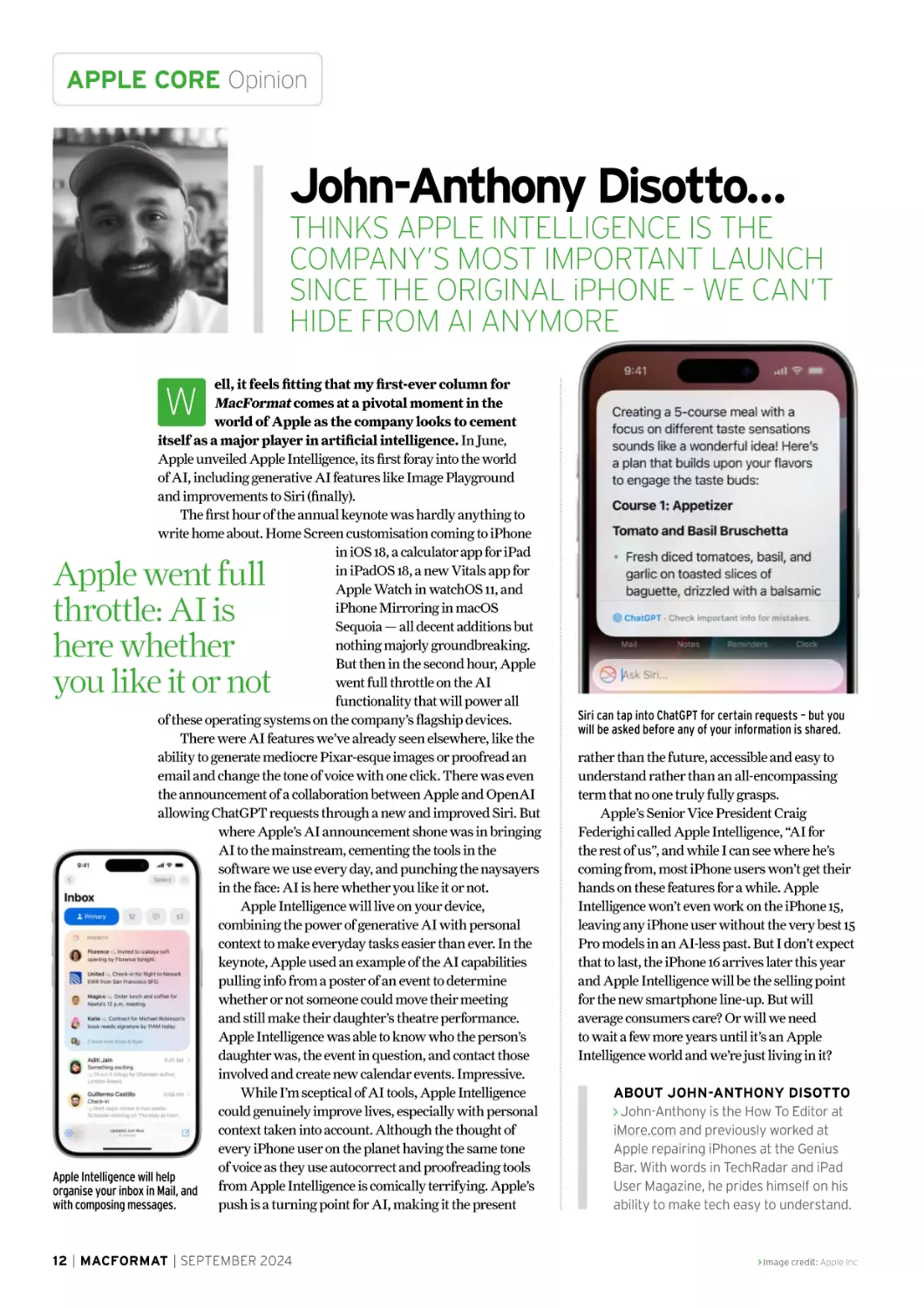
Apple Intelligence will help
from Apple Intelligence is comically terrifying. Apple’s
organise your inbox in Mail, and
push is a turning point for AI, making it the present
with composing messages.

W

Apple went full
throttle: AI is
here whether
you like it or not

12 | MACFORMAT | SEPTEMBER 2024

Siri can tap into ChatGPT for certain requests – but you
will be asked before any of your information is shared.

rather than the future, accessible and easy to
understand rather than an all-encompassing
term that no one truly fully grasps.
Apple’s Senior Vice President Craig
Federighi called Apple Intelligence, “AI for
the rest of us”, and while I can see where he’s
coming from, most iPhone users won’t get their
hands on these features for a while. Apple
Intelligence won’t even work on the iPhone 15,
leaving any iPhone user without the very best 15
Pro models in an AI-less past. But I don’t expect
that to last, the iPhone 16 arrives later this year
and Apple Intelligence will be the selling point
for the new smartphone line-up. But will
average consumers care? Or will we need
to wait a few more years until it’s an Apple
Intelligence world and we’re just living in it?
ABOUT JOHN-ANTHONY DISOTTO
John-Anthony is the How To Editor at
iMore.com and previously worked at
Apple repairing iPhones at the Genius
Bar. With words in TechRadar and iPad
User Magazine, he prides himself on his
ability to make tech easy to understand.

Image credit: Apple Inc

Facts & figures APPLE CORE

The Apple silicon M4 chip in

The stats behind the iPad Pro’s super-powerful chip

28
billion

38
trillion
> Number of operations
per second performed by
the M4’s 16-core Neural
Engine, making it 60x
faster than the first
Neural Engine used in the
iPhone 8’s A11 Bionic chip.

> Number of transistors
inside the M4, helping
make it 1.5x faster than
the M2 inside the previous
iPad Pro.

5
> Maximum number of
simultaneous 4K ProRes
video streams supported
by the M4’s Media
Engine, making it ideal
for creative pros.

3 nanometres (nm)
> Second-generation process used by
the new M4 chip, making it incredibly
power efficient. The M2 found inside
the 2024 iPad Air, current Mac mini
and iMac uses a 5nm process.

120GB/sec
> Memory bandwidth of the M4,
making it 1.2x faster than the M2
chip inside the previous iPad Pro.

Image credit: Apple Inc

10 CPU cores

10 GPU cores

> Maximum number of CPU cores inside
the Apple silicon M4 – of these four are
performance cores and six are efficiency
cores. The highest spec M4 is available
on 1TB and 2TB iPad Pro models.

> Number of graphic (GPU) cores inside
the M4, which supports hardwareaccelerated ray tracing for more realistic
shadows and reflections in games. It also
has hardware-accelerated mesh shading.

SEPTEMBER 2024 | MACFORMAT | 13

CONTACTS Get in touch

Contact us

Have your say on all things Apple!
LETTER OF THE MONTH!
MAC MINI UPDATE?
Now that Apple’s moved the iPad Pro to
the M4 chip (#MF406), I was wondering
when Apple will do the same for Mac?
I’m hoping to replace my ancient Intel
Mac mini this year, but I’m not sure whether
I should buy the current M2 model now or
wait until an M4 version arrives. I don’t need
anything particularly powerful, but I also
need something that will last me a few years and so I don’t want to make
a mistake by upgrading too early. What do you know of Apple’s plans and
when would be a good time for me to replace my old mini with a new one?
by B E N W I L K I N S O N

ROB SAYS…
Apple is always very tight-lipped when it comes to new product
announcements, although you can make certain predictions – like
there’ll inevitably be new iPhones in September, say, or that new Macs
usually arrive shortly after. This year, that’s most likely around the same
time as the macOS Sequoia arrives in October or November.
We’re certainly expecting to see the first MacBook Pro updates
around then with the new models expecting to sport M4 Pro and M4
Max, although rumours about other Macs are currently more opaque.
Given than the last Mac mini update was in January 2023 when
Apple’s littlest computer received M2 and M2 Pro chips, an update feels
overdue – although Apple can sometimes go a spectacularly long time
between Mac mini updates. The first Apple silicon M1 Mac mini arrived
in 2020 while the last of the Intel models arrived in 2018. That average
two-year gap suggests that we may not see any new Mac mini models
until January 2025, although they could, of course, arrive sooner than
that – no-one was expecting the M4 iPad Pro to arrive when it did so in
May after all, and Apple does like springing surprises from time to time.
However, you should be prepared for the fact that any new Mac mini
may not get an M4 chip at all. Instead, it may get variants of the M3 and
M3 Pro chips found in the current iMac, MacBook Air and MacBook Pro.
That’s not necessarily a bad thing as these are still mightily powerful
chips that will do pretty much everything you need them to do –
especially as your needs are modest.
Your other option would be to buy a Mac Studio. That’s also due an
upgrade, and current rumours suggest it will be kitted out with M4 Max
and M4 Ultra chips when it arrives in mid-2025. However given that
prices for even an entry-level Mac Studio start at £2,099 that may be
a bit rich for you. Whichever Mac you eventually buy, we suggest you get
a model with more memory if you can – hopefully Apple will soon make
16GB of memory the default, rather than the £200-400 option it is now.

14 | MACFORMAT | SEPTEMBER 2024

Email your queries
and your questions to
letters@macformat.com

PASSWORD BYPASS
I wonder how many times you have been
asked about signing in to the new 14-inch M3
MacBook Pro? Very frustrating not being able
to get started as soon as the lid is opened,
I have to enter a password each time.
What are the steps to overcome this?
I’ve read suggestions on the web to no avail.
by S I D A K H U R S T

ROB SAYS…
While we don’t recommend that you bypass
security measures such as using Touch ID or
entering a password to unlock on your Mac
or your user login, we can understand why
you might want to do so.
If you’re sure your Mac is safe from
unauthorised access, go to System Settings
Lock Screen and, next to ‘Require password
after screen saver begins or display is
turned off’, choose Never from the menu
to its right. You can also set your Mac to
log in automatically under Users & Groups
> ‘Automatically log in as’ > [Your Username]
although you will need to turn off FileVault
under System Settings > Privacy & Security >
FileVault (if set) to do so. Another way to
make logins easier is to pair your MacBook
with an Apple Watch, if you have one. To do
that, switch that option on under System
Settings > Login Password > Apple Watch >
[Your Apple Watch]. Your Watch will then
come to your aid at login time.

You can avoid having to enter your password each time your
Mac goes to sleep by making changes to System Settings.

Image credit: Apple Inc

Meet the
technology
experts

The world’s most comprehensive technology website
An unrivalled mix of news, opinions, reviews and features
All-new design, new homepage, new features and special reports
Backed by over 300 years of editorial experience

www.techradar.com

The pros
and cons of

Apple Intelligence
AI is taking over Apple devices
but is that really a smart move?
WRITTEN BY

16 | MACFORMAT | SEPTEMBER 2024

DAVID CROOKES

For our latest
subscription offer
see page 32!

INVESTIGATES

or many years now,
artificial intelligence
(AI) has been viewed
with a mix of excitement
and trepidation. On the one hand, AI is
being used to make sense of large datasets,
speed up patient diagnoses, and make
light work of dull tasks. On the other
hand, there are fears it’s going to take
over the world, rule our future, destroy
our jobs and spark the end of civilisation
as we know it…
So when Apple announced its own
take on AI – which it’s named Apple
Intelligence – the mixed reaction was, for
the most part, predictable. For while it’s
set to revolutionise how we use the iPhone,
iPad and Mac by providing new, faster
and easier ways to get things done, there
remain some big concerns, primarily
surrounding privacy and security.

F

Apple has gone to great lengths to allay
such fears. Craig Federighi, Apple’s senior
vice president of software engineering,
says “the cornerstone of the Personal
Intelligence System is on-device
processing”. This means many of the
models powering Apple Intelligence are
run entirely on Apple’s advanced silicon
chips, and Federighi says the system will
use your personal data but not collect it.
If data needs to leave the device – for
complex requests that require greater
processing power – Apple says it will be
sent to a secure server created using Apple
silicon called Private Cloud Compute. This
will be just as private and secure as an
iPhone. “Private Cloud Compute allows
Apple intelligence to flex and scale its
computational capacity and draw on even
larger server-based models for more
complex requests, while protecting

Apple’s Private Cloud Compute means your data is used to fulfil a request but not stored.

Image credit: Apple Inc

SEPTEMBER 2024 | MACFORMAT | 17

APPLE CORE Apple Intelligence

your privacy,” Federighi says. Even so,
concerns remain and a major issue surrounds
Apple’s move towards more ‘agentic’ AI. Rather
than simply answer queries, agentic AI is capable
of making decisions and initiating actions,
allowing actions to be performed within apps.
By giving AI agency, hence the ‘agentic’ tag,
large language models (LLMs) can fall prey to
prompt injection attacks in which hackers
disguise malicious inputs as legitimate prompts
(a hacker could send a direct message containing
an instruction or insert prompts within rogue
websites). Cybersecurity firm Tigera says
ruling out such risks is difficult.

Samsung’s fast-selling Galaxy S24 Ultra
has a range of generative AI features.

Time for a chat?

Changing times

Another issue surrounds Apple’s decision to
partner with third-party AIs rather than keep
Apple Intelligence wholly in-house. To start with,
Apple is making use of OpenAI’s ChatGPT
which will be integrated across iOS 18, iPadOS 18
and macOS Sequoia. If you make a request via
Siri and Apple Intelligence can’t fulfil it,
ChatGPT’s broad world knowledge will be called
upon. ChatGPT will also be used by Apple’s
system-wide Writing Tools to help generate
content and it will be used to create images, too.
To mitigate privacy and security concerns
(Elon Musk has called ChatGPT’s inclusion
“an unacceptable security violation”), Apple
says IP addresses will be obscured and OpenAI
won’t store requests. Users will need to grant
permission in order to use ChatGPT’s services
and they won’t need to create an account. If users
want to connect their own ChatGPT account,
then they’ll be adhering to ChatGPT’s data use
policies. And Apple denies Musk’s central
complaint, saying data sent from Siri will not
be used to train the ChatGPT model.
“If there is a need for ChatGPT to be used,
the user will be informed,” adds Francisco
Jeronimo, of the analyst firm IDC. “If Apple
makes sure the most important private data is
not shared at all, I think users will accept it and
be less concerned in the future.”
Still, throwing ChatGPT into the mix has
been a curious move but Ben Wood, chief analyst
at research firm CCS Insight, says it makes sense,
not least because “the ongoing investment and
time required to support a widescale large
language model (LLM) is immense”. He draws
parallels with Apple’s reluctance to build its own
search engine in preference of working with
Google for search.
“The partnership between Apple and
OpenAI is an interesting way for Apple to fill

18 | MACFORMAT | SEPTEMBER 2024

Since Apple wants the Apple
Intelligence system to primarily
work on-device, it has been forced
to limit the feature to Macs and
iPads with M1 or later silicon and,
crucially, to iPhone 15 Pro and
iPhone 15 Pro Max. By only fitting
the iPhone 15 Pro/Max models with
the latest silicon, some owners are
inevitably feeling rather hard done
by. Yet it’s by no means an attempt
to force people to buy a new handset,
according to experts, even though
it could lead to an upgrade
supercycle in the near-future.

“Already consumers are looking
into their next devices and asking
which will provide AI-enabled
features,” says Francisco Jeronimo,
of the analyst firm IDC. “The Galaxy
S24 is the best example. It sold more
in the first few months than the
previous version. But we only expect
the iPhone supercycle to start in five
years time. People need to start
learning about the AI features and
to begin showing them off to others.
This happened with smartphones –
it took three, four or five years then
just exploded overnight.”

a competitive gap for artificial intelligence
capabilities it can’t offer or does not want to
offer itself,” Wood adds. And he believes it’s
only the start. “Apple has already indicated it
plans to offer access to other LLMs, including
Google’s Gemini,” he says.

Power is yours

You will always be alerted if
Apple Intelligence refers you
to ChatGPT and you’ll always
be able to refuse.

Yet given how strongly Apple likes to control
the user experience, Wood believes it won’t let
its high standards start to slip. “If Apple finds
that the relationship with OpenAI starts to
affect the overall user experience or, worse,
create challenges around security and data
integrity, it might look to add further guardrails
or find other ways to deliver AI-powered
content,” he explains – a point seemingly proved
by Apple’s decision to walk away from early talks
with Facebook parent Meta, whose own AI
models raised privacy concerns.
So while Wood suggests the consent prompts
and other guardrails that are being implemented

Image credit: Apple Inc, Samsung

Image Playground allows you
to create fun images with a
range of themes, costumes
and accessories.

reflects nervousness on Apple’s part, he still says
the move towards AI is necessary. “Apple needed
to deliver an AI story and Apple Intelligence
should help placate nervous investors and
reassure them that Apple is keeping pace
with its rivals,” Wood continues.
“The partnership with ChatGPT is a major
development which beefs up Apple’s AI offerings
and new features such as a significantly
improved Siri will be welcome to users. But it
won’t escape people’s attention that, like rivals,
it has had to offer a cloud-based solution for some
functions. This comes with unique challenges
and, although Apple has created its own private
cloud, the partnership with OpenAI marks a
new direction. Apple has previously been
reluctant to partner for core technology.”
Of course, Apple hasn’t been entirely
lagging behind. Machine learning capabilities
and actions have been a feature of Apple devices
equipped with Neural Engines for some time.
Apple users have already been able to enjoy
on-device machine learning for word prediction,
Journal suggestions and people/animal
recognition in the Photos app on Mac, iPhone
and iPad, to name just a few examples, which
mean AI has long been Apple’s direction of travel
for its devices and operating systems. It’s just that
Apple Intelligence can take things further…
As Jeronimo says, Apple is well placed
to create a unique experience. “Most of its
customers use Apple applications whether
that’s Mail, Weather, the Camera, Apple TV
and so on, which means it collects a lot of data
across its different devices.” But what if this isn’t
something you’d want? MacFormat understands

Image credit: Apple Inc

Playing a waiting game
Apple Intelligence will roll out
slowly with the introduction of iOS
18. There will be a beta version
launching this autumn in US English
with some features, software
platforms and additional languages
being introduced over the following
12 months.
Eventually, users will be able to
enjoy a revamped Siri capable of
better understanding what you
want, with new intelligent writing
aids that will help with documents
and emails, clever image generation

AI has long
been Apple’s
direction of
travel. Apple
Intelligence
can take
things further

and Genmoji creation. At least that’s
the case in the US. Users in Europe
have to wait even longer due to
“regulatory uncertainties” brought
about by the European Union’s
Digital Markets Act (DMA). As
Apple spokesperson Fred Sainz
said: “We are concerned that the
interoperability requirements of the
DMA could force us to compromise
the integrity of our products in ways
that risk user privacy and data
security.” As such, there’s no current
launch date for the EU market.

that users will be able to customise the
experience, perhaps turning off email
summaries, notifications or Siri. Smart Reply,
for instance, would need both the predictive
keyboard and Apple Intelligence to be active.
In short, users will be in ultimate control.
The smart money is on people embracing
AI on their devices, however. “ChatGPT
democratised Artificial Intelligence for most
of us,” Jeronimo says. “Before ChatGPT, there
was a feeling that it was a machine intelligence
which would fill our jobs and dominate the
world because people couldn’t understand
how it would translate to their day-to-day
activities. Now they can and these features
will become part of our lives. This is going
to be a long-term play for Apple.”

SEPTEMBER 2024 | MACFORMAT | 19

macOS
Sequoia

20 | MACFORMAT | SEPTEMBER 2024

Image credit: Apple Inc

At the 2024 Worldwide Developers Conference,
Apple lifted the lid on its next operating system
updates. Here’s what to expect
Written by Ian Osborne
lipping on a pair of
goggles, and a suitably
coiffured helmet,
Apple’s Craig Federighi
declared “It’s showtime!”, before
promptly jumping out of an
aeroplane and parachuting into
Apple Park to the sound of Mötley
Crüe’s Kickstart My Heart. We
wonder if anyone at Apple knew
that song is about the band’s bass
player overdosing on drugs, forcing
medics to literally restart his heart
with an adrenaline injection?
Adrenaline was certainly the
order of the day as the Apple team
opened their parachutes, which
were emblazoned with the names
of the operating systems being
discussed in the keynote. This
wasn’t a real stunt, of course, but it
was a great bit of theatre and it set
the scene for the presentation well.

C

iPadOS 18

Naturally, artificial intelligence
(AI) played a big part. Apple
Intelligence is a new system for
Macs, iPhones and iPads that
harnesses the power of Apple
silicon to offer more personalised
AI assistance in several apps and
features across the operating
systems. Thanks to this new AI
platform, Siri gains a few new tricks
across the board and Apple’s
individual operating systems such
as macOS, iOS, iPadOS, VisionOS,
watchOS and tvOS are updated,
with some great new features.
If you’ve been using Apple
products for a while, you won’t
be surprised to hear the new OS
releases will be with us from
September onwards. Developer
betas are out now, with public betas
to follow in July. So let’s see what
you’ve got to look forward to…

iOS 18

Image credit: Apple Inc

SEPTEMBER 2024 | MACFORMAT | 21

Introducing
Apple’s been working hard on macOS 15, and it shows
o the next version of the
Mac’s operating system,
macOS 15, is to be
called Sequoia. Found
in northern California and southern
Oregon, the sequoia is a giant
redwood tree, the tallest trees on
Earth. Before logging took its toll,
they covered most of California, but
many that remain today are protected
in the Sequoia National Park.
macOS Sequoia has some great
new features. As well as benefitting
from Apple Intelligence, a new AI
platform integrated into the next
releases of Apple’s operating systems,
it offers iPhone Mirroring, Image
Playground and a new Passwords
app. But what are these exciting tools?
Let’s take a look.

S

Passwords app
The Passwords app is
coming to Apple mobile
devices, Vision Pro and even
Windows as part of the iCloud for
Windows app as well as the Mac. It
makes it easier to manage your Wi-Fi
passwords, app passwords, website
logins, verification codes, shared

passwords Passkeys and more. Stored
passwords securely sync across your
devices, and if you use Autofill when
making a password, it automatically
populates in the app. Passwords was
built on the foundation of – and
replaces – Keychain. You need
never forget a password again.

macOS Sequoia highlights

Passwords

Game Porting
Toolkit 2

22 | MACFORMAT | SEPTEMBER 2024

Scenes in
freeform

Collections in Photos

Image credit: Apple Inc

Video call
backgrounds
If you want to make a
video call but your room
is a mess, macOS Sequoia
has the answer. Using Apple’s
industry-leading segmentation
algorithms, Background
Replacements takes your image and
places it on a background of your
choice. This can be from a range of
built-in images and colour gradients,
or a photo of your choice. We’re told
Background Replacements works with
apps like FaceTime and Zoom. We
expect it will be compatible with more.

Tile windows
macOS Sequoia offers
a new way of organising
your on-screen windows.
By dragging a window to the edge
of the screen, Sequoia suggests a
position, or tile, for it to occupy. You
then simply release it and it snaps
into place. New keyboard and menu
shortcuts help you arrange your tiles
even faster. It’s an interesting way to
arrange your screen.

Safari Reader view
Safari’s Reader feature
has been redesigned. It still
removes distractions such as
adverts and incidental pictures from
web articles, making them easier to
read, but it’s now supported by a table
of contents for longer pieces, found in

a new sidebar. This sidebar also offers
a summary of the article, outlining the
contents in a short paragraph. These
are, of course, powered by Apple’s
Machine Learning. It’s not the website
that curates the contents and produces
the summary, it’s done on your Mac.

Safari Highlights
Apple claims Sequoia’s
Safari browser is the
world’s fastest and most
energy efficient. It’s gaining some
great new features too. Using machine
learning, Safari automatically detects
pertinent information and highlights
it. These highlights include directions,
summaries and quick links to take you
to more information.

Game Porting
Toolkit 2
Game Porting Toolkit
makes it easier for
publishers to bring
their games to the Mac from
other platforms. The second
release builds on this, adding
features most often requested
by developers and programmers.
It simplifies the task of porting
Mac games to the iPhone and
iPad as well as from Windows
to the Mac, further integrating
Apple’s platforms.

Safari Highlights

Image credit: Apple Inc

Text effects

iPhone Mirroring

iOS notifications on Mac

SEPTEMBER 2024 | MACFORMAT | 23

FEATURE New OS updates

Calendar
reminders
In another example
of Apple’s quest for
system-wide and
ecosystem-wide integration,
the Calendar app now takes
information about events and
tasks from the Reminders app.
If you have a deadline set up as
a reminder, it appears on your
calendar. An updated Month View
makes it easier to see events and
reminders for the month ahead too.

Safari videos
The way you view website
videos in the Safari app
has been refined. When
Safari detects a video on the page,
the Viewer feature puts it front and
centre so you can watch a larger
version, not just the small window
found on the site. Viewer still gives
you full access to system playback
controls, including Picture in Picture.

Calculator
The popular Calculator
app has been updated
in macOS Sequoia too.
It gains a history function, giving
you access to previous calculations
you’ve made. It also lets you see your
mathematical expressions as you
type. The Mac’s Calculator app has
long been an underachiever, but with
macOS 15 Sequoia, it comes closer
to achieving its full potential.

New games
A number of new Mac games – 14
to be precise – were announced
at WWDC. Look out for the highly
anticipated Assassin’s Creed
Shadows – coming to Mac and iPad
on 15 November, alongside its PC
and console release. Fellow Ubisoft
title Prince of Persia: The Lost
Crown has been announced
for the platform too.

Writing Tools
The new AI-powered
Writing Tools is offered
system-wide in macOS
Sequoia. The Rewrite tool lets you
choose from different versions of
what you’ve have written, adjusting
the tone to suit the audience. Make
it Professional, Friendly or Concise
as needed. You can also use Writing
Tools to proofread your work for
grammar, spelling and more, so
you can correct errors. Select a
piece of text and Writing Tools can
summarise its key points, so you
can see what it’s about without
reading the whole thing.

macOS Sequoia highlights

Presenter preview

Tile windows

24 | MACFORMAT | SEPTEMBER 2023

Image credit: Apple Inc

New OS updates FEATURE

Messages

Photos

The Tapback feature
in Messages has been
improved. At the moment,
clicking and holding a message lets
you reply with a limited range of
icons. In Sequoia (and indeed iOS and
iPadOS), you can use any emoji,
genmoji or sticker. Messages can be
scheduled, you can format text, and
text effects are available too.

In Photos, the Memories
feature lets you build an
AI-generated story by just
typing a description. A short movie
is created, with its own narrative arc.
The new Clean Up tool can identify
and remove objects from a photo
without damaging its subject. Look
out too for Collections, which
organises your library by themes.

Image Playground
Another Apple Intelligence
feature coming to most
Apple devices this year,
Image Playground lets you create
playful images in seconds, choosing
from three styles: Animation,
Illustration, or Sketch. Available as
a dedicated app, its functionality is
also built into apps like Messages.

Private Cloud
Compute

iPhone Mirroring
One of the most exciting
features coming to Sequoia
is iPhone Mirroring. If you’re
on your Mac and you need to use your
iPhone, but it’s in another room, you
can control your smartphone without
leaving the keyboard.
Just click the iPhone Mirroring icon
in your Mac’s Dock, and your iPhone
appears on the screen. You can interact
with it as if it were in your hand. Swipe
through pages on your Home screen,
open apps and use your Mac’s

Image credit: Apple Inc

keyboard on your phone. Notifications
sent to your iPhone appear on your
Mac, and if you click one, it opens the
relevant app on your smartphone.
When using iPhone apps, the phone’s
audio is played through your Mac. You
can seamlessly move files between
your Mac and your iPhone too.
For privacy, while using iPhone
Mirroring, your iPhone remains locked.
So although you are controlling the
handset from your Mac, the iPhone
does not display what you’re doing.

For privacy reasons, Apple favours
on-device processing for artificial
intelligence functions. If your data
stays on your Mac, iPhone or iPad,
it can’t be compromised on the
cloud, right? On-device intelligence
is deeply integrated into Apple
silicon processors, making them
ideal for such tasks. There are
times, though, when you need
something more than you can
achieve on-device. That’s where
Private Cloud Compute comes in.
With this feature, if your device
makes a request to a server, only
the data that’s relevant to the task
is sent. Data is never stored and is
not accessible by Apple. Private
Cloud Compute stops your Apple
device from talking to a server
that isn’t verified as private, and
the software that runs on these
servers is verified by independent
experts as secure.

SEPTEMBER 2023 | MACFORMAT | 25

What's new in
Some great visual and
practical enhancements
are coming to iPhone
he next release of the
iPhone’s operating
system is called (you
guessed it) iOS 18.
It offers some great new artificial
intelligence features powered by Apple
Intelligence, as well as a couple of
excellent ways to customise the Home
Screen and the biggest ever update
to the Photos app. Also, we get the
long-overdue opportunity to lock an
app, making it impossible to open
without your passcode or Face/Touch
ID, and a locked folder to store apps
you’d rather people didn’t know you
had. All in all, it’s a very exciting update.

T

New in Wallet

Customise colours

Arrange icons

NameDrop can be used
to share contact info
with someone nearby.
Simply bring the phones together,
and choose which phone numbers
and email addresses to share,
then tap to exchange details. You
can also use NameDrop with an
iPhone and an Apple Watch, and
share with AirDrop by bringing
your phones together too.

Again on your Home
screen, app icons now
have a ‘dark’ version for
when you put your phone into Dark
Mode. You can customise their
colours too. By bringing up a new
customisation sheet, you can give
all your icons and widgets a tint in
a colour of your choice. Or you can
use a colour suggested by iOS to
complement your wallpaper.

We’ve long been able to
rearrange the contents
of our Home screen, but
with iOS 18, you can place them
in any open space; you don’t have
to fill the screen from the top. You
can place app icons and widgets
wherever you like, which is great
for making more of the subject of
a Home Screen photo, rather than
covering it up, as seen here.

iOS 18 highlights

Hiking in Maps

26 | MACFORMAT | SEPTEMBER 2024

Home Screen
customisation

State of Mind
in Journal

Control Centre
customisation

Image credit: Apple Inc

Control Centre
iOS 18’s Control Centre
gets more than one
page, and is far more
customisable. Controls are grouped
into pages such as favourites, media
playback and Home controls, and
you get from one to another by
swiping up and down. Alternatively,
when you summon Control Centre,
you can get to the page you want
by continuing to swipe.

Redesigned Photos app
As part of its biggest-ever
redesign, the Photos app
gets a unified view, with a
thumbnails grid atop the page and
automatically curated collections

available underneath. Collections can
now be pinned, keeping your favourites
handy, and a new carousel view updates
daily and shows your favourite people,
pets, places, and more.

New in Messages

New in Mail

The iOS 18 Messages
app gains all the features
already discussed in the
macOS Sequoia section, such
as new Tapbacks, message
scheduling and text formatting.
Another feature coming throughout
Apple’s ecosystem is text effects.
These include exploding words,
extra large or small text, shaking
or rippling letters, and more.

On-device categorisation
automatically organises
your messages into pages.
Primary for your most important
emails, Transactions for receipts
and order confirmations, Updates
for newsletters and social media
notifications and Promotions for
marketing and sales. A digest view
combines all messages sent from
a business too.

Lock an app
iOS 18 lets you lock an app
so if you hand your phone
to someone they can’t
open it. A locked app can only be
opened with your passcode or Face/
Touch ID, and info from the app
doesn’t appear in other places in
the system. A Hidden apps folder
lets you hide apps you don’t want
others to see, and is also locked.

Game Mode

Messaging support

Image credit: Apple Inc

Text effects

Larger icons on
Home Screen

Reminders integration
with Calendar

SEPTEMBER 2024 | MACFORMAT | 27

FEATURE New OS updates

What's new in
New in Freeform
What does the autumn OS update have
in store for Apple’s popular tablet?

The new iPad 18 version of Freeform
adds Scenes, an all-new way to select
sections of a virtual whiteboard. This
makes it much easier to navigate your way around
a board when things get full. The Scenes menu is
available from the Freeform controls.

New in SharePlay

Calculator and Math Notes
At long last, the
Calculator app is
coming to the iPad,
and it’s gaining a few new
features that take advantage
of the tablet’s larger screen.
It’s gained a few new tricks
like a history sidebar and unit
conversions, but its main
advance is its ability to do
mathematical formulae. A new
feature called Math Notes lets

you write a sum or expression
with your Apple Pencil, and have
it calculated for you. Change a
variable and the calculation is
automatically updated.

SharePlay gets new features in iPadOS
18 too. When sharing your screen with
another iPad user, you can draw on it to
convey information to the other party. If, for example,
they ask which app or icon to use, draw an arrow
pointing at it. With their permission, you can also take
control of the other
person’s screen and
do it for them
while they watch.
These features are
great for showing
your gran how to
do something on
her iPad.

Smart Script in Notes
The Notes app’s new Smart Script makes
writing by hand with Apple Pencil easier
and neater. If you’re writing quickly, Smart
Script smooths out your handwriting to preserve
legibility. You can also edit handwritten text, just
like regular typed text.

iPadOS 18 highlights
Scenes in Freeform

in Notes

28 | MACFORMAT | SEPTEMBER 2023

Customisable
app icons

Photos app
redesign

Image credit: Apple Inc

The autumn updates are bringing even more to other Apple devices
aturally, there’s some great
features coming to Apple’s
other key operating
systems, such as tvOS,
watchOS and visionOS. For example, in
tvOS 18, you can enhance the dialogue in a
movie, so it doesn’t get drowned out when
things get noisy, and you'll be able to see
more on-screen info about your favourite
Apple TV+ shows. There are some great
new Home & Audio features on the way,
and Siri has had a boost, thanks to Apple
Intelligence. Let’s look at some more great
treats we have coming in the autumn.

Canon STM
DUAL Lens

N

It’s already easy to create
spatial videos on your Vision Pro
using the iPhone 15 Pro. For a
real pro touch, however, Canon
is to release a dedicated spatial
lens for its EOS R7 digital camera
system. It can record gorgeous
spatial video for Apple Vision Pro,
even when the light is poor.

Audio & Home highlights

Guest access

Energy
category

30 | MACFORMAT | SEPTEMBER 2024

Voice Isolation
on AirPods Pro

New Apple TV
screen savers

Image credit: Apple Inc

visionOS 2:
spatial photos
Spatial photos on the Vision Pro
give incredible depth and
realism to your snaps. With
visionOS 2, you can bring this spatial
element to your existing photo collection,
directly from your Photos app. Using
advanced machine learning, visionOS 2
transforms a regular 2D image into a
spatial photo, which you can then view
on your Vision Pro. In this way, photos
taken long before the Vision Pro was even
released can be viewed as spatial snaps.

A smarter Siri

watchOS 11:
Training Load

watchOS 11:
Vitals App

Training Load is watchOS
11’s new way to measure
how the intensity and
duration of your workouts impacts
you. It helps you understand the strain
your exercise regime puts on your
body. It compares the last seven days
with the previous 28 days, so you can
make informed decisions over whether
to train harder or softer.

During sleep, Apple Watch
can record health info
such as heart rate, sleep
duration, respiratory rate, wrist
temperature, and blood oxygen.
watchOS 11’s new Vitals app lets
you compare these metrics on the
go, and get an alert and health
information when two or more of
them are outside their typical range.

Siri has been improved for
the next round of Apple
OS releases, making the
famous personal digital assistant
more natural, personal and
relevant. Harnessing the power
of Apple Intelligence, Siri keeps up
even if you stumble over your words
and correct yourself mid-sentence.
You can double-tap the foot of the
screen to type to Siri, and its
product knowledge has been
improved. It has a great new look
too. When you talk to Siri, you can
see it’s active by a glowing light that
runs all the way around your screen.

watchOS 11: Activity
The Exercise, Move and Stand
rings we all like to complete can
be customised in watchOS 11.
You can pause them for a day, week, month
or more without affecting your award
streaks, which is great if you’re injured or
need a day off. You can customise goals
according to the day of the week too.

Image credit: Apple Inc

SEPTEMBER 2024 | MACFORMAT | 31

SUBSCRIBE Never miss an issue

*

Subscribe online…
www.magazinesdirect.com/mac/D35T
Or call 0330 333 1113 and quote ‘D35T’

Never miss an issue SUBSCRIBE

Great reasons
to subscribe
NEW! Digital access to 130+ issues
when you subscribe to print!**
Enjoy the MacFormat print edition
for just £21.09 every six months!
Or enjoy six months of MacFormat
digital edition for just £16.87!
Delivered direct to your door and device
For more than 25 years, we’ve been helping
Apple fans get the most from their kit

Keep your subscription
rolling today!
DIGITAL ONLY

PRINT &
DIGITAL ACCESS

PLUS

ACCESS TO
130 DIGITAL
BACK
ISSUES!

£16.87

£21.09

every six months

every six months

Terms and conditions: Offer closes 15 October 2024. Please allow up to six weeks for the delivery of your first subscription issue (up to 8 weeks overseas). The
full subscription rate includes postage and packaging. *Savings are based on the print cover price. Payment is non-refundable after the 14-day cancellation period.
**Access to the digital library will end with your subscription. For full terms and conditions, visit magazinesdirect.com/terms. For enquiries and overseas rates, please
call: +44 (0) 330 333 1113. Lines are open Monday-Friday 8:30am-7pm, Saturday 10am-3pm UK Time (excluding Bank Holidays) or email: help@magazinesdirect.
com. Calls to 0330 numbers will be charged at no more than a national landline call, and may be included in your phone provider’s call bundle.

Start a 30-day
digital trial
and get an issue for free*

In iOS 11 or later, point the Camera
app’s photo mode at this QR code
to download our app.
*First-time digital subscribers only.

NEW
IDEAS
Your in-depth guide to
getting more from
your Apple kit

Contact us

EDITED BY

Email your queries and
your questions to
letters@macformat.com

JO MEMBERY

Master Apple
shortcuts

36

macOS
Cmd is the Command key.
Alt or Opt is the Option key.
Ctrl is the Control key, also
shown as ‘^’ in shortcuts in
the menu bar.
The thick, outlined up
arrow is the Shift key.
The thin, left arrow or
outlined pointer with ‘X’
inside is the Delete key, which
deletes to the left. Pressing
the Function key (Fn) and the
Delete key deletes to the right.
The thin, right arrow key with
a small vertical line at the end
is the Tab key, which shifts the
focus between some controls.

WHAT’S INSIDE
36 TAME UNRULY WEB PAGES

42

Enjoy your favourite websites – hassle free!

38 COMBINE YOUR MAC & iPAD
Use Sidecar and Universal Control across both

iOS
A tap is a brief contact
of (usually) one finger
on your device’s screen.
To drag is to move a finger
across the screen to scroll
or pan around content.
Swipe means move one or
more fingers across an item
or the screen, then let go.
A flick is like swiping, but it’s
quicker, and is often used to
scroll content more quickly.
Pinch means move two
fingers together or apart,
usually to zoom in or out.
Touch and hold means lightly
rest your finger on an item
and wait for a reaction.

40 DIGITISE OLD MEDIA
Bring prints, negatives and slides back to life

42 RUN WINDOWS 11 ON MAC
With VMWare’s Fusion Pro virtual machine

44 CREATE CUSTOM ACTIONS
Master iPhone actions – and make your own

46 CRAFT ENGAGING VIDEOS
Make video editing quick and fun with Clips

48 SCAN DOCUMENTS & TEXT
Store scribbles and important docs in Notes

50 BECOME A SIRI MASTER
Harness the power of Apple’s voice assistant

52 EXPLAINED: APPLE PENCIL PRO

50

What makes Apple’s latest stylus so great

Image credits: Apple Inc, Jeffrey Johnson, Parallels International GmbH

SEPTEMBER 2024 | MACFORMAT | 35

APPLE SKILLS macOS

Tame unruly web pages in Safari
Turn web pages from insanely annoying to just plain sane
IT WILL TAKE
10 minutes
YOU WILL LEARN
To make web pages
easier to navigate in
the Safari browser
YOU’LL NEED
macOS 14 or later,
Safari, Adblock (macOS
11 or later) and/or
StopTheMadness
(macOS 12 or later,
optional)

With macOS Sequoia,
navigating the web in Safari
is going to be easier than ever
before. It’s going to highlight key
details on a web page and point you towards
more information. It’s going to put video front
and centre, and it’ll help to make sites far less
distracting and more practical thanks to a
designed Reader.
But that’s not to say you can’t make
improvements to your browsing habits right
now. By using Safari in macOS 14 (Sonoma),

you already have the potential to take
browsing to another level. Throw in some
extensions and it’s also possible to take
greater control. You don’t have to be beholden
to the whims of a website developer.
So let’s take a look at the nifty things you
can achieve in Safari to make accessing web
pages more of a pleasure than a pain. Whether
you’re looking to prevent ad pop-ups, find
information with ease or simply want to enjoy
clean-looking pages, we have you covered.
David Crookes

HOW TO Regain control over websites

Genius tip!
For permanent private
browsing, click Safari >
Settings > General. From
the options for ‘Safari
Opens with’, choose
‘A new private window’.

1 Block all cookies

Don’t want to be tracked across the web
or let websites identify you when you return?
Prevent Safari from storing cookies and
browsing data. Go to Safari > Settings >
Advanced and click ‘Block all cookies’.

36 | MACFORMAT | SEPTEMBER 2024

2 Make browsing private

Permanently blocking cookies means
having to constantly log back into websites.
You can, however, prevent cookies and data
from saving during a single session by going
private. Click File > New Private Window.

Image credits: Apple Inc, Jeffrey Johnson

Manage web pages APPLE SKILLS

CONTINUED… Regain control over websites

Jargon buster

3 Lock the windows

4 Strip away cruft

5 Auto switch to Reader

6 Search for content

Private Browsing stops Autofill, websites
opening on other devices and websites being
added to your browser history. Want tabs to
lock when they’re inactive? Go to Safari >
Settings > Private and click Private Browsing.

If particular websites are annoying, you
can tell Safari to auto switch to Reader when
accessing them. Hold down on the Reader
button and select Use Reader Automatically.
Manage sites via the Settings option.

StopTheMadness can
prevent scrolljacking
– an annoying design
element that makes
the scroll bar behave
differently at certain
points on a web page.

Pop-ups, adverts, videos and web pages
that jump around are annoying but Safari has
a solution: Reader View. Click the Reader
button to the left of the Smart Search field and
the page will be stripped of such distractions.

You can quickly sift through a web page’s
content by pressing Cmd+F. Enter a search
term and it’ll highlight all incidents. You can
then jump to each one. If the string you want
is within a word, select Contains.

Genius tip!
You can make Reader
more readable and
pleasant on the eye by
clicking AA in the search
bar and changing the
font size, type and
background colour.

7 Use an extension

Adblock (Free, Mac App Store) is a useful
extension, blocking ads, preventing pop-ups,
autoplaying ads and more. You can create
website ‘allowlists’ and allow non-intrusive ads
to reward websites that don’t annoy.

Image credits: Apple Inc, Adblock Inc, Jeffrey Johnson

8 Stop the madness

Try StopTheMadness for the ultimate in
control. Work through the dozens of options
and you can prevent hover pop-ups and alerts,
set custom cookies, stop animations, protect
mouse movement and more.

SEPTEMBER 2024 | MACFORMAT | 37

APPLE SKILLS macOS/iPadOS

Master Sidecar and
Universal Control
Turn your iPad and Mac into a combined mega-machine
IT WILL TAKE
20 minutes
YOU WILL LEARN
How to combine Mac
and iPad with Sidecar
and Universal Control
YOU’LL NEED
macOS 12.4,
iPadOS 15.4 or later

Universal
Control can
also control
multiple Macs
from the same
keyboard,
mouse and
trackpad

With Universal Control and
Sidecar, you can combine your
Mac and iPad (or your iPhone)
into one super device, turning
your MacBook or Mac into a dual-display
device or controlling multiple Apple devices
from the same keyboard, mouse or trackpad.
Sidecar enables you to use your iPad or
Apple TV as a second display for your Mac.

When using Sidecar, you can adjust its on-screen layout
in System Settings > Displays on your Mac.

38 | MACFORMAT | SEPTEMBER 2024

It can do that either as a second monitor
or by mirroring your Mac’s screen. If you
mirror your Mac to your iPad in an app such
as Photoshop, you can then navigate and
draw using your Apple Pencil as if your
iPad were a graphics tablet.

Cross-platform control
Universal Control unites Mac and iPad in
a slightly different way. It enables you to
control your iPad and your Mac from the
same keyboard and mouse or trackpad, so
you can type on your Mac’s keyboard into
apps on your iPad, and control the iPad cursor
from your Mac’s trackpad or mouse. And when
you combine that with the Universal Clipboard
that enables you to copy and paste between
macOS and iOS or vice-versa, it becomes
a really useful productivity tool.
Universal Control doesn’t need to have an
iPad – you can use it to control two Macs from
the same keyboard, mouse and trackpad, or
mix Macs and iPads – but it does need a Mac.
You can’t currently use Universal Control
between two iPads with no Mac involved.
Carrie Marshall

Image credit: Apple Inc

Universal Control & Sidecar APPLE SKILLS

HOW TO Combine your devices

Jargon buster

1 Take control

2 Check the options

3 Move from your Mac

4 Set up Sidecar

To enable Universal Control on your iPad,
go to Settings > General > AirPlay & Handoff >
Cursor and Keyboard and turn that option on.
Your iPad should now appear in your Mac’s
System Settings > Displays.

Move your pointer to the right-hand edge
of your Mac screen. You’ll see a vertical line
appear here; your pointer will then disappear
and appear on your iPad, which you can now
use with your Mac’s keyboard and trackpad.

In Settings > Displays on the Mac, go to
Advanced > ‘Link to Mac or iPad’. Note that if
you toggle Allow Your Pointer to off, Universal
Control won’t work. Make sure all three of the
toggles here are switched on, then click Done.

Mirroring is when
a screen shows you
exactly what’s
happening on a
different screen, for
example by showing
your Mac’s display
on your iPad.

Sidecar is available via the dual-screen
item in your menu bar or from the Screen
Mirroring option in your Mac’s Control Centre.
On the menu bar item, click on it and you’ll see
a list of device options.

Genius tip!
Universal Control
works over a
surprisingly large
distance – up to 10m
(30ft) provided
Bluetooth, Wi-Fi and
Handoff are enabled.

5 Choose your setting

If you click on iPad, you can mirror your
current display or use your iPad as a second
display. If you have a high-res monitor, the
former option will resize your Mac’s screen
so it matches the iPad’s screen resolution.

Image credit: Apple Inc

6 Scribble on the mirror

With Sidecar, if you mirror your Mac, you
can use your iPad touchscreen or Apple Pencil
to draw directly into your Mac’s apps. Here
we’re using our Apple Pencil on iPad to draw
into Affinity Photo on our Mac.

SEPTEMBER 2024 | MACFORMAT | 39

APPLE SKILLS iOS/iPadOS

PART 1 OF 2

Digitise your old media
Bring old prints, negatives and slides back to life!
IT WILL TAKE
15 minutes
YOU WILL LEARN
How to digitise
prints, negatives,
and slides
YOU’LL NEED
Photomyne
(Free, IAPs),
iOS 15 or later

Thanks to our ever-present
iPhones, we are spoiled when
it comes to shooting, editing
and sharing thousands of
photographs. However, in pre-digital days
we were limited to shooting up to 36 photos
on a roll of analogue film. Some of our prints
might have been placed in photo albums or
given pride of place in a picture frame, but
the majority are probably still stacked in their
original envelopes and hidden in a dark corner
of a cupboard, attic or basement. In part one
of this two-part tutorial, we’ll show you how
to rescue these irreplaceable moments in
time and give them a new lease of life, to
the delight of friends and family.
The process of turning analogue prints,
slides and negatives into digital copies is called
digitising. This doesn’t need to be an expensive
process (though check out ‘Try a dedicated
scanner’ opposite if you have a large collection

40 | MACFORMAT | SEPTEMBER 2024

of slides and negatives). In the second
instalment next month, we’ll demonstrate
ways to counteract distortion caused by the
digitising process and remove signs of wear
and tear so that photos look as good as new.

Digitise a print
Let’s start by using your iPhone to digitise
an old 4x6in photograph. Simply pop the print
on a flat surface near a bright but soft light
source (such as a window on an overcast day)
as this will minimise shadows being cast on
the print. Open the Camera app and position
the iPhone over the print.
As you move the iPhone to make the
print fill the frame, the flower-shaped Macro
mode icon will appear. This indicates that the
Camera app is using the Ultra Wide lens to get
the sharpest focus at close proximity. Tap to
take a snap. This captures a 12MP digital
version of the original analogue print

Image credits: Apple Inc, Photomyne Ltd

Restore old pics APPLE SKILLS

Try a dedicated scanner
Scan slides and negatives with ease
The Photomyne app provides
a cheap way to scan slides and
negatives, though its digitised
images have a low resolution of
between 1MP and 4MP. Kodak’s Slide
N Scan (£224.99, uk.kodakphotoplus.
com) digitises slides at a resolution of
22MP (5416x4062), revealing more
detail in a digitised slide or negative.

Simply slide a film strip through
the device’s feeding tray, view the
negatives on the 5in LCD, and save
a scanned version to an SD card
(not provided). You can also edit
shots to spruce up colours and
tones as you go, making this
an effective way to scan
a large collection.

Digitising negatives can reveal lost prints that you’ve
not seen for decades, like this late 80s analogue selfie!

(measuring 10x13in at a resolution of 300dpi).
This digital version will be larger than the
original print (enabling you to reprint a bigger
version once you’ve restored the digitised
picture). You can then process the scanned
print in iOS Photos to counteract distortion,
as we’ll explain next month.

Slides and negatives
Negatives can’t be easily digitised using the
iOS Camera app. A negative’s highlights are

black and its shadows are white, so you need
a digitising app such as Photomyne to create
a positive version of a scanned negative that
reveals correct colours and tones. Negatives
and slides also need to be backlit before
you can digitise them. You could purchase
a scanner with a mount designed to backlight
negatives and slides (such as the Kodak Slide
N Scan, see above). However, if you browse to
photomyne.com/backlight, you can backlight
a slide or negative by laying it on your iPad’s
illuminated screen and then scan it using the
Photomyne app’s camera from your iPhone.
Photomyne can also auto-crop a group
of scanned prints to create separate digital
photos, making it easier and quicker to batchdigitise your old prints than it is using the iOS
Camera app. You can use Photomyne for free
if you can cope with in-app adverts. If you’re
organised, you can prepare photos, slides and
negatives in advance, then digitise them using
the advert-free, three-day trial version of
the app (though don’t forget to cancel the
subscription or you’ll be charged £34.99!).
George Cairns

Genius tip!

The Kodak Slide N Scan scanner avoids the need to convert a negative’s inverted colours to positive ones in an app.

Image credits: Apple Inc, Eastman Kodak Company

Don’t be tempted to
save cash by buying a
cardboard scanner such
as the Kodak Mobile
Film Scanner. The
iPhone needs to use
the Ultra Wide camera
to get the negatives in
focus but the Kodak app
only lets you use the
Main camera, resulting
in an out-of-focus scan.

SEPTEMBER 2024 | MACFORMAT | 41

Run Windows 11 on Mac
With a VMware Personal Licence, it’s all free apart from Windows itself
IT WILL TAKE
1 hour
YOU WILL LEARN
How to install and
use virtual Windows
11 on Arm
YOU’LL NEED
Apple silicon Mac,
macOS 12 or later

For a couple of years, Apple
silicon Macs have been able to
run Windows 11 on a virtual
machine (VM), although at
a price. Fortunately, VMware has now made its
highly respected Fusion Pro virtualiser free for
personal use, giving you the opportunity to run
games and other Windows apps on your
M-series Mac. Getting an ISO disk image can be
difficult, as Windows for ARM achitecture still
isn’t available in a retail version. It’s simplest to
download it using the rival Parallels Desktop; it

should also be available to those in
Microsoft’s Insider Programme, or on
a PC through the UUP Dump app.
The trickiest part is working around the
need for additional drivers. The initial set-up
and installation are run without a network
connection, following a little PowerShell
magic. Then the missing drivers and other
tools can be installed in VMware Tools, and
Windows restarted into its full glory. You can
use similar steps on Intel Macs to install
regular Windows 11. Howard Oakley

HOW TO Run Windows 11 for Arm

1 Download Windows 11

Using a demo version of Parallels
Desktop, create a new VM by getting
Windows 11 from Microsoft. Once that
has downloaded, move its 6GB ISO Disk
Image from Downloads to a folder ready
to install, and quit Parallels.

42 | MACFORMAT | SEPTEMBER 2024

2 Install VMware Fusion

Register at Broadcom, locate
VMware Fusion Pro, license and download
it. Install it and choose to license it for
Personal Use. Agree to privacy prompts,
and create the VM by dropping the ISO
file on to the window.

3 Configure VM and boot

Select UEFI firmware, Auto Generate
Password for TPM file encryption, and
click on Finish to start Boot Manager.
With Boot normally selected, press
Return to start Windows Setup. Select
localisation and keyboard.

Image credits: Apple Inc, Parallels International GmbH

Run Windows 11 APPLE SKILLS

CONTINUED… Run Windows 11 for ARM architecure

4 Activate Windows

5 Bypass network

6 Create new user

7 Prepare for tools

8 Install VMware Tools

9 Run Tools setup

Click ‘I don’t have a product key’
unless you have one, then select the
version to install. Opt for ‘Custom: Install
Windows only’, and install it into Drive 0
default. Wait for that to complete, then
set your country.

Click Start and enter ‘Power’
into the search box to locate Windows
PowerShell (x64). Click on ‘Run as
administrator’, and at the command
prompt, type Set-ExecutionPolicy
RemoteSigned and press Return.

Press Fn+Shift+F10 or Shift+F10
to open PowerShell. Type OOBE\
BYPASSNRO at the prompt and press
Return. When the installer invites you
to connect to a network, click on ‘I don’t
have internet’ to proceed.

When prompted enter A, press
Return, and close PowerShell. Open
VMware’s Virtual Machine menu on the
Mac and select Install VMware Tools
there. The installer will appear in
Windows as a mounted DVD Drive in D:.

10 Complete and restart 11 Update Windows
Select ‘Typical installation of
VMware Tools’ and allow the Setup
Wizard to complete. You’ll then be
prompted to restart Windows so it
can make full use of those drivers and
features supported by VMware.

Image credits: Apple Inc, Parallels International GmbH

After Windows restarts and you log
back in, open the Start window and click
on Settings. Check for and install any
Windows updates available. If you have
a licence code you can use that to
activate the VM now.

Work your way through creating
a new user, including password
confirmation and three security
questions. Then refuse all invitations
to share information. Windows will next
take a few minutes to set itself up.

Choose to ‘Run setup.exe’ from
this virtual DVD menu. This will enable
VMware Tools Setup to install the missing
drivers to support networking, display
and input devices within your Windows
11 Virtual Machine.

12 Tweak VM settings

VMware Fusion provides extensive
controls and customisation, accessible
when you’ve shut the VM down using the
Power control in Windows. These set how
many cores to use, how much memory,
and graphics acceleration.

SEPTEMBER 2024 | MACFORMAT | 43

APPLE SKILLS iOS

Create your own
custom actions
Make the most of the new fast-access
Action button, or make your own…
IT WILL TAKE
10 minutes
YOU WILL LEARN
How to access
various functions even
if you don’t have an
Action button to hand
YOU’LL NEED
iOS 12 or later,
iPhone 15 Pro or 15 Pro
Max with Action button

There are many benefits to
owning an iPhone 15 Pro or
Max. Quite aside from a better,
telephoto camera and enhanced
silicon, you have support for USB 3, that cool
titanium finish and the ability to run Apple
Intelligence in iOS 18.
These two devices also have an Action
button in place of the mute switch that
makes accessing an app’s features and
functions quick and easy. And, as you’ll see,
it’s mightily useful, but what if you don’t
have either of these high-end phones?
As luck would have it, there are some
workarounds – little tricks you can use to
achieve something similar. With a bit of
imagination, you can get the feel of having
speedy functions at your fingertips without
needing to upgrade thanks in the main to
contextual menus, shortcuts and a few neat
ways to put them close to hand. So let’s take
a look at how you can go pro to some extent
without going Pro and max the abilities of
your current device. David Crookes

HOW TO Choose a function for the Action button

1 Launch Settings

The Action button is accessed by
pressing and holding the top left button
on an iPhone 15 Pro or Max. By default,
it switches between silent/ring modes
but open the Settings app and you can
tap Action Button to customise it.

44 | MACFORMAT | SEPTEMBER 2024

2 Find an action

Swipe and you can assign the
camera, flashlight, magnifier, a focus or
voice memo to the button – tap any dropdown menus for further customisation.
You can select an Accessibility feature
too such as Increase Contrast.

3 Assign a shortcut

For more options, swipe to Shortcut
and tap ‘Choose a Shortcut’. You’ll see
shortcuts for many apps such as Files,
Pages and Podcasts that perform specific
tasks (scan doc, new doc, play…). Tap
and choose the shortcut.

Image credit: Apple Inc

Fast-action options APPLE SKILLS

HOW TO Use contextual menus

1 Touch and hold

Don’t have an iPhone 15 Pro or Max?
You can still achieve something similar.
One way is to try touching and holding
an app’s icon. Many of them will display
a menu of app-specific quick actions.
Tap an action to run it.

2 Open Control Centre

Some Control Centre options also
have contextual menus. Touch and hold
Shazam for past songs, or the brightness
control to turn Dark Mode on and off. Do
the same with Wallet to see the default
card or last transaction.

3 Reorder the apps

If you’re frequently using a
particular app’s contextual menu, why
not place it in a convenient spot on your
Home Screen? Tap and hold any app, tap
Edit Home Screen and, when the icons
wiggle, drag them into position.

HOW TO Create a shortcut

1 Use an existing shortcut 2 Make a shortcut
Shortcuts let you quickly complete
tasks, and you’ll find many ready-made
options by opening the Shortcuts app
and tapping Gallery. Tap a shortcut to
learn more about how it works. Tap Add
Shortcut to add it to your collection.

You can create your own shortcut
by tapping ‘+’. Add a name, tap Done, and
select Add Action. You’ll find lots of
suggestions from your apps – there’s a
shortcut to create a new spreadsheet in
Numbers or to find a product on Amazon.

3 Add to Home Screen

Finish building your shortcut and tap
Done to add it to your collection. You can
also tap the downward arrow and choose
to add the shortcut as an icon on your
Home Screen. One tap of the icon will
activate the shortcut.

Create your own ‘Action button’
Assign actions to an on-screen Home button
You could create your own ‘Action button’ and there are a couple of ways to
do this. One is an on-screen Home button – it’ll appear if you go to Settings >
Accessibility > Touch, and activate AssistiveTouch. You can assign actions that
run when you single-tap, double-tap or press and hold this button. You can even
assign shortcuts to it. Want something more physical? There’s a ‘hidden’ button.
Go to Settings > Accessibility > Touch > Back Tap and choose which actions you
want to trigger when double- or triple-tapping the back of your iPhone.

Image credit: Apple Inc

SEPTEMBER 2024 | MACFORMAT | 45

Craft engaging videos
Clips is the ultimate app for quick and fun video editing!
IT WILL TAKE
15 minutes
YOU WILL LEARN
How to use Clips
to record, edit and
share slick videos
YOU’LL NEED
iOS/iPadOS 17
or later

Clips is a fantastic videocapture and editing app that
launched right after TikTok in
2017, as a response from Apple
to the super-popular and ever-changing
world of short-form video content. Clips is
part of the native applications present from
the very first time you turn on your iPhone
and iPad, it’s fully free to use, and like many
Apple native apps, extremely intuitive.
The app is based on the concept of
recording or importing little snippets of video

footage to then edit them with filters or enrich
them with stickers and emojis. Subtitles can be
added in different styles and colours to make
your videos more accessible, all while volume
levels can be adjusted to choose between
louder music or clearer voiceover. The clips
can be cut and trimmed ad hoc to match the
tempo of the music; they can be sped up or
slowed down for dramatic effects, and
colourful posters are available to give your
videos the perfect intros and outros.
John-Anthony Disotto

Add video snippets to a Clips project
Adding video snippets to your
project couldn’t be simpler.
When you launch Clips, you
will notice a red Record button
on the bottom of the screen or
to your right, if you are using
your iPad in landscape mode.
You can record by pressing
and holding down the Record
button for short clips, or you can
hold and swipe left to lock the

46 | MACFORMAT | SEPTEMBER 2024

button in Record mode for longer
segments. If you have previously
recorded your clips from your
iPhone or an external camera,
you can import these from your
Photos library. In order to do
so, press the two-image icon
underneath the Record button,
tap Photos, then select the video
or photo you want to import. You
are now ready to edit your clips!

You can record clips by pressing and holding the large red
button, or use previously recorded clips from Photos.

Image credit: Apple Inc

Record videos in Clips APPLE SKILLS

HOW TO Record and import videos in Clips

1 Start a new project

2 Choose a scene

3 Trim the recording

4 Organise your videos

5 Add some subtitles

6 Enhance with effects

7 Add some music

8 Use animated text

9 Save or export

When you open the app, you will be
presented with a few buttons dotted
around the screen. Tap the one in the
top-left corner to open the folder
containing your projects. Tap the ‘+’
button to start a blank Clips canvas.

After trimming a video, you might
want to place it before or after another
clip. To do this, press and hold the icon
that looks like an individual frame in a
square at the bottom of the screen,
and drag it wherever you like.

Tap on the Music icon (music note,
top-right) and choose from an array
of royalty-free music. By tapping the
individual square clips on the main
screen, you will be able to mute the
original audio of the clips.

Image credit: Apple Inc

If you are recording straight from
the app, you can add a green-screen like
background. Simply tap the Effects icon
(rainbow star) and select the button with
the mountain logo. Select a scene and
start recording!

Apple’s commitment to accessibility
has always been at the forefront of its
hardware and software, and Clips is no
different. By pressing the Effects icon
then the Speech Bubble icon, you can
add closed captions to your video.

To finish up, tap on the two-image
icon underneath the record button and
select Posters. Here you can choose
from a selection of customisable
animated text backgrounds to enrich
the intro and outro of your clips.

Once your clip is recorded, you will
see them all at the bottom of your screen
appearing as tiny squares. When you tap
on each clip, a menu will appear showing
editing or enhancing options. Tap on Trim
to adjust the length of your recording.

You can enhance your clips with
animated stickers, text effects, emojis,
and more. Tap the Effects icon and scroll
through your options; remember, you can
do this after a clip has been recorded, or
before you press the Record button.

Once you are happy with your
masterpiece, tap Share in the bottomright corner of your screen, and either
tap Save Video to save it to a Clips album
in your Photos library or share it directly
with your friends.

SEPTEMBER 2024 | MACFORMAT | 47

APPLE SKILLS iOS

Scan documents and text
Get your iPhone to store your scribbles and important documents alike
IT WILL TAKE
15 minutes
YOU WILL LEARN
The best ways to
store docs and text
on your iPhone
YOU’LL NEED
iOS 15 or later

We love the Notes app on our
iPhone, but we can’t quite stop
ourselves from putting our pen
to Post-It notes or scribbling
on the backs of envelopes. And that’s why
the scanning features in the Notes app are
so useful. Whether it’s an important letter,
a receipt that you need to keep or a scrawled
shopping list, you can use your iPhone camera

Genius tip!
If you’re scanning
shopping or to-do lists,
use the Share options to
copy your items into
Reminders where you
can add alarms, location
triggers and so on.

You can use emoji in your Notes folder names to make
them more visually different from each other.

48 | MACFORMAT | SEPTEMBER 2024

to capture it – and you can turn it into text that
you can then tick off, edit or share. It’s then
available wherever you have a phone, tablet
or computer using your Apple ID.

Clearer the better
As you might expect, the clearer the text the
better the results will be. A crisp laser-printed
document with decent text sizes will be
recognised much more accurately than a
photocopy of a photocopy of a photocopy or
a document that uses a font size so small you
need a microscope to read it. That’s even more
true with handwriting. A hastily written scrawl
is, generally, really hard for even the most
powerful iPhone to understand, so you’ll get
better results from neater handwriting
– although it’s surprising how well Notes copes
with even our pretty terrible scribbles.
The benefit of having the info in Notes is
that it’s then available across all your devices.
And you can edit and organise it by adding
checkboxes, changing the formatting, adding
tags and so on. Carrie Marshall

Image credit: Apple Inc

Scan into Notes APPLE SKILLS

HOW TO Shoot and scan documents

1 Get set to scan

2 Scan simply

3 Tag your note

4 Take action

5 Scan the text

6 Scan your scribbles

Create your new note as normal and
give it a title. In this example, we’re going
to scan a printed copy of a family recipe,
and we’re going to do that by tapping the
camera icon above the keyboard and
selecting Scan Documents.

If you tap on your scanned doc,
you’ll see these options, which include
sharing, saving and printing. You can also
rename or delete the file from your note;
if you’ve already saved it to Files, the copy
you saved there won’t be deleted too.

The Notes screen will be replaced
with a live view from the iPhone camera,
and when it recognises the shape of the
document it’ll turn yellow. Tap on the
Save button (bottom right) to save the
photographed document to your note.

We’ve photographed a doc, but
Notes can do more. Try the same again,
but this time choose Scan Text rather
than Scan Documents to run character
recognition and produce editable text.
Tap insert to add the text to your note.

7 Capture some cursive 8 Do what you want
As Notes recognises some of the
text, it’ll appear in the top half of the
screen above the image of the scan.
If Notes is only recognising part of the
copy, try simply moving back slightly
to make sure you capture it all.

Image credit: Apple Inc

Once inserted and quickly edited to
remove any mistakes, your captured text
works just like typed text – so for example
you can turn it into tickable action points
as we’ve done here in order to create an
instant shopping or to-do list.

In order to find your document
again it’s a really good idea to tag it.
To do that, just type the hash (#) symbol
and the word you want to tag the note
with. Here we’re using ‘recipes’. You
can use as many tags as you like.

Let’s see how well it copes with
handwriting. This handwriting is terrible
but Notes does a good job of recognising
it. However, because it’s written mostly in
block capitals, Notes has done the same.
Let’s try some cursive.

9 Be tag-tastic

If you use Notes a lot, tagging
becomes crucial; the more tags you use
the easier everything is to find. Multiple
tags enable you to filter categories,
so here, instead of just searching for
‘recipes’, we’re also using the ‘pork’ tag.

SEPTEMBER 2024 | MACFORMAT | 49

APPLE SKILLS iPadOS

Become a Siri master
Apple’s voice assistant has a lot of tricks up its sleeve
IT WILL TAKE
10 minutes
YOU WILL LEARN
How to make the
most of Siri, Apple’s
voice assistant
YOU’LL NEED
Any Apple device
(we’ve used an
iPad here)

Siri, the voice assistant found
on all of Apple’s products
often gets a bad rep for being
ineffective and a little outdated
compared to its competition. Although
things look set to change dramatically with
the imminent release of Apple Intelligence.
But even now, Siri is far more than just an
afterthought on your device, it’s capable of
loads of nifty tricks that can help you get the
most from your iPad. Think of Siri as your
personal assistant and it quickly becomes

one of the most used features on anyone’s
device. You can access Siri from anywhere
on your iPad, making it the most efficient
way to get information when typing is tricky.
From telling jokes to setting alarms or
translating sentences, Siri is an incredibly
powerful tool we shouldn’t take for granted.
In this how-to guide, we’ll share some Siri
quick tips so you can start using the voice
assistant to its full potential and make the
most of its capabilities.
John-Anthony Disotto

How to find your lost iPad with Siri
Do you often misplace your
iPad? If so, Siri can be your
perfect companion to help
you locate your tablet around
the house. If you can’t find
your iPad, simply shout “Hey
Siri, where are you?” and as

long as you have “Hey Siri”
enabled, the iPad will reply
“I’m here”, leading you to
its location. Turn on “Hey
Siri” by heading to Settings
> Siri & Search > Listen for
> “Siri” or “Hey Siri”.

50 | MACFORMAT | SEPTEMBER 2024

Make sure you turn Siri on
in Settings to benefit from
Apple’s free voice assistant.

Image credit: Apple Inc

Master Siri APPLE SKILLS

HOW TO Make the most of Siri

1 What’s the weather?

2 Back-to-back requests 3 Read an article
If you’re running iPadOS 17, you can
ask back-to-back requests making your
conversation far more natural. Simply ask
another related question after Siri
answers your first. “How’s the weather
in London?”, “How about Brighton.”

Did you know Siri can read any web
page you land on in Safari? Simply open
a web page with an article you’d rather
listen to, activate Siri, and say “Read
this”. You’ll see an audio player on the
screen as Siri reads you the article.

4 Wake me up

5 Turn off the lights

6 Tell a joke

7 Translate

8 Change Siri Voice

9 Announce FaceTime

While most people know Siri makes for
a brilliant weather assistant, sometimes
we forget that you don’t need to open
the Weather app to know if it’s raining.
Simply ask “What’s the weather?” and
Siri will let you know.

Using Siri as an alarm clock is one
of the best ways to make sure you never
forget to wake up on time again. Simply
ask Siri: “Wake me up at 9am tomorrow”
and the voice assistant will set an alarm
via the Clock app.

Siri is a fantastic translation tool;
it can convert your language to another,
and speak the sentence back to you,
allowing you to learn pronunciations. Ask
“Can you translate this?” and listen as
your English turns into another language.

Image credit: Apple Inc

Do you own smart lights? If so, Siri
can work as your light switch allowing
you to simply turn off and on your home
lighting with your voice. Say “Turn off the
lights” and Siri will do the rest, perfect
for your bedtime routine.

You don’t need to listen to Siri’s
generic voice every time you speak to it.
To change it, open Settings, and go to Siri
& Search > Siri Voice, and select from a
wide range of different varieties. Click
on one to hear an example of the voice.

Do you want to hear a bad joke
to brighten your day? Just say “Tell
me a joke” and Siri will often give you
a dad joke to bring a smile to your face.
Definitely a gimmick but you never
know when it may come in handy.

If you like to know who’s calling
without reaching for your iPad then Siri
has a great feature that will come in
handy. Open Settings > Siri & Search >
Announce Calls. Next time someone
FaceTimes you, Siri will let you know.

SEPTEMBER 2024 | MACFORMAT | 51

The Pencil Pro provides new
creative tools, as well as
greater precision via its
haptic engine.

HOW IT WORKS

Apple Pencil Pro
More than just a pencil – the Pencil Pro boasts a range of creative tools
YOU WILL LEARN
How new sensors
provide greater
creative control for the
Apple Pencil Pro

Key fact
Each version of the
Apple Pencil provides
different features and
is designed to be
compatible with
different iPad models.
You might be able to use
one of the older Pencil
models with a newer
iPad, but you may find
that certain features
don’t work properly.
Apple provides a
comprehensive list on
its website that tells you
which Pencil works with
each type of iPad. Go to
support.apple.com/
en-gb/108937.

eople laughed at the Apple Pencil
when it was first launched back in
2015, saying that only Apple could
take a simple tool like a pencil and turn
it into an overpriced accessory costing £99.
In fact, Steve Jobs had always mocked the
idea of using a stylus with an iPad or iPhone,
arguing that “God gave us 10 styluses” so they
didn’t need to invent another one. And critics
certainly reminded Apple of Jobs’ words when
the Apple Pencil was launched. Even so, the
Pencil has proved surprisingly popular over
the years, and – like so many other Apple
products – it recently got the ‘pro’ treatment
with the launch of the new Apple Pencil Pro.
That’s a little surprising, perhaps, because
the original first generation version of the
Apple Pencil – and, yes, ‘Apple Pencil (1st
generation)’ is still the official title – wasn’t
particularly innovative. Its two most important
features were pressure sensitivity and tilt
sensitivity. As the name suggests, pressure
sensitivity allows the Pencil to detect the
amount of pressure that you apply when
drawing; increasing the pressure creates a
thicker stroke, while less pressure would
create a smaller, thinner stroke. Tilt sensitivity
is useful for tasks like shading, where holding
the Pencil at an angle allows you to apply a
light shade to an area, whereas holding it
more upright creates a simple, clean line.

P

52 | MACFORMAT | SEPTEMBER 2024

These are certainly important features for
the Apple Pencil – or any other type of digital
stylus – as they allow it to reproduce some of
the artistic effects that you can get from using
a traditional paint brush or pencil. However,
digital styluses that provide these features
have been around since the 1990s, so Apple
wasn’t really doing anything new with the
Pencil. But, as the iPad – and particularly the
iPad Pro – became increasingly powerful,
there was an increasing demand for the

Crayon vs Pencil
There’s nothing really new about the
Apple Pencil. Long before Apple invented
the iPad, the graphics company Wacom
made graphics tablets and styluses that
you could plug straight in to your Mac.
More recently, Logitech released its
Crayon stylus as a more affordable option
for iPad users. Available with either
Lightning (£54.99) or USB-C charging
(£69.99), the Crayon doesn’t have
features like pressure sensitivity, so
it’s best suited for simple drawings and
marking up text documents. However
it’s cheaper than the Apple Pencil, and
compatible with most iPads since 2018.

Image credit: Apple Inc

Apple Pencil Pro APPLE SKILLS

The Pencil’s Progress
Apple Pencil
(1st generation)

Apple Pencil
(2nd generation)

Apple Pencil
(USB-C)

£99
Launched in 2015
and still available, the
original Pencil uses a
Lightning connector,
and provides basic
drawing tools, such
as tilt and pressure
sensitivity. However,
it lacks advanced
features, such as
the ‘hover’ preview
function, and is only
compatible with older
iPad models.

£129
Updated in 2018, the
second generation
Pencil uses a special
magnetic connector
that charges the Pencil
by attaching it to the
side of the iPad (but
only specific models).
This model introduced
the new ‘hover’ preview
feature, and also the
ability to double tap on
the barrel to select a
number of different tools.

£79
As well as switching
to USB-C for charging,
this third-generation
of the Apple Pencil was
introduced in 2023
to provide a more
affordable option.
It lacks key features,
though, such as pressure
sensitivity and doubletap, so it’s mainly useful
for marking up
documents or just
simple drawings.

Apple Pencil from creative users who wanted
to use their iPad for drawing and other types
of graphics work.

Pencil power
It wasn’t until the Apple Pencil (2nd
generation) – yep, official title again – that
Apple started to introduce more innovative
features. This model introduced an important
new feature called Hover (although this is
only available when used with more recent
iPad Pro and Air models). This allows you
to hold – hover – the tip of the Pencil over
the screen, and then shows you precisely
where the tip of the stylus will make contact.
A talented artist with a keen eye and a steady
hand might not need that sort of help, but it
provides extra precision for those of us with
more limited artistic talents.
Apple took a slight detour with the more
affordable – and more limited – Apple Pencil
(USB-C) in 2023, but this year’s new Pencil
Pro raised the bar again. The main new
features in the Pencil Pro – when used with
an iPad Air or Pro from 2024 – are Squeeze,
Barrel roll and the new haptic engine. A new
sensor allows the Pencil Pro to detect when
you squeeze the barrel of the Pencil, and
automatically activates a menu on the

The Pencil Pro’s Barrel roll
feature is an extension of the
Pencil’s existing tilt sensitivity
Image credit: Apple Inc

Apple Pencil Pro

screen of the iPad so that you can quickly
select a different tool. Or, when using a
graphics app, it might display a palette that
allows you to select different colours, or
different types of pens or brushes.
The Barrel roll feature is an extension
of the Pencil’s existing tilt sensitivity, and
uses a new internal gyroscope to detect the
rotation of the barrel of the Pencil. Some
traditional drawing tools, such as a felt pen
with a broad tip, can draw different lines and
shapes depending on how you hold the pen.
The Pencil Pro can now mimic this process
with Barrel roll, by allowing you to rotate the
barrel so that the tool you’re using also
rotates as you draw on the screen. This
feature can work in other ways too, perhaps
rotating an object within a multi-layered
composition, and maybe even animating that
rotation when used within a video-editing
program. And, when you’re working with the
Pencil Pro, its new haptic engine provides
helpful tactile feedback – in much the same
way that the trackpad of a MacBook uses a
haptic engine to create the sensation of a
‘click’ when you press down on the trackpad.
So while Steve Jobs might not have
approved of the original Apple Pencil, we
suspect that he might give a grudging nod
to the new Pencil Pro, acknowledging it
as the sort of tool that helps creative
users to bring their ideas to life (just
don’t mention that iPad ad!).
Cliff Joseph

£129
Only compatible with
2024’s iPad Air and Pro
models, the Pencil Pro
comes in at the same
price as the secondgeneration model, but
introduces a number
of new features. The
squeeze and barrel roll
commands provide
versatile creative tools,
while Apple’s haptic
engine makes the Pencil
Pro feel more precise
than previous iterations.

Key fact
New Apple Pencil Pro
features like Squeeze
and Barrel roll provide
default controls that
can be adjusted in your
iPad’s Settings panel.
However Apple also
provides developers with
a set of programming
tools called PencilKit,
which allows them to
customise these controls
for their own apps,
perhaps rotating objects
within an image, rather
than simply rotating
a brush.

SEPTEMBER 2024 | MACFORMAT | 53

EXPERT
ADVICE
Our resident genius
solves your Mac and
iOS problems

Contact us

EDITED BY

Email your queries and
your questions to
genius@macformat.com

HOWARD OAKLEY

Move new
apps before
running

Can you erase securely?

ownload an app
in a Zip archive,
expand it, and
run it where it is. Although
you may not notice, macOS
won’t run the app from
there, but launches a copy
from a semi-random folder
buried deep, a process
known as app translocation.
Introduced in macOS 10.12
(Sierra), it defends against
malware taking advantage
of that app’s location.
To avoid this, move the
app from its original folder
to somewhere different,
such as the main
Applications folder.
Rules determining
whether translocation
occurs are subtle, but it
shouldn’t happen if you
move the app individually
so it’s enclosed by a
different folder before
running it for the first time.
Move it within its original
folder, though, and every
time the app is run, it will be
translocated. That can stop
it from being updated, and
may make it unstable.

by J I M L A N G R I D G E

D

Q

How could a previous user’s photos
be passed on by a securely erased
Mac or device?

If Erase All Content & Settings has
been used, it’s impossible for old files
to pass on to a new user. Macs and
devices keep the System in a read-only
snapshot that can’t be changed except by
Apple’s installers during an update. User
files are stored on the separate Data volume,
and in Macs with T2 or Apple silicon chips,
and all devices, that’s encrypted even if
FileVault isn’t enabled.
Encryption keys for that Data volume
are kept and used exclusively in the Secure

A

Enclave. The whole Data volume has one
encryption key; without that none of the
files in that volume can be decrypted.
When you open Settings > General >
‘Transfer or Reset and Erase All Content
& Settings’, that handles all the signing out
that’s required before disposing of your Mac
or device, including disabling Find My and
Activation Lock. Once those are complete,
it then destroys all encryption keys used for
internal storage, making the entire contents
of the Data volume unreadable, but leaving
the System intact.
When that Mac or device starts up
afterwards, it creates a new Data volume
and sets itself up as if it was new. All old files
and data are lost and gone for good.

Erase All Content & Settings destroys the keys used to encrypt your files, so they can never be accessed again.

54 | MACFORMAT | SEPTEMBER 2024

Image credit: Apple Inc

iOS software GENIUS TIPS

iOS software
Swipe away your touchscreen troubles and
rekindle your love of Apple’s mobile devices
Quick-fire
questions
How to stop an app
from using Face ID?
> Although you should
be able to set this in the
app, it’s quicker just to
open Settings > Face ID
& Passcode, enter your
passcode, then tap
Other Apps, where
you’ll see the app listed,
and can turn it off there.
That may include apps
that haven’t had it
enabled yet.

How to flash the
LED in my iPhone
to alert me?
> If you can’t be sure
you’ll hear its alert
sounds or feel its
haptics, set your
iPhone’s LED to flash in
Settings > Accessibility >
Audio & Visual > LED
Flash for Alerts. Enable
that at the top, and
choose whether you
want it to happen when
your phone is unlocked
or in Silent Mode.

Image credit: Apple Inc

Get all due
updates
Q

How do I install all available
iOS and app updates while
my iPhone is charging,
rather than waiting days for them
to appear?
by M I K E R O D R I G U E S

If you want updates
downloaded automatically,
ensure that’s enabled in
Settings > General > Software Update
for iOS updates, and Settings > App
Store > App Updates for apps. Even
with those enabled, your iPhone may
not spontaneously download and offer
updates, though. You can perform
a quick manual check by opening
Software Update, and in the App Store
by opening your account from the
avatar at the upper right, where you
can Update All if any are available.
Even then, some updates may not
be offered for a day or more. Apple
encourages developers to phase
individual updates to their apps, and
for them to be trickled out over a
seven-day period, and it may do the
same for iOS updates to spread the
load on its update servers.
There’s a manoeuvre you can use
to force-refresh the list available in the
App Store. Open your account in the
App Store app, and before you might
tap Update All, tap and hold near the
After forcing the App Store to refresh its list of updates,
middle of the view and drag its
expect to see some from days ago, waiting to be installed.
contents down the screen. A progress
wheel should appear at the top and start
count of available updates. When that appears,
rotating, indicating your iPhone is connecting
tap the Update All button. You can use a similar
to the App Store to get the latest list of
technique to force-refresh apps that sync with
updates. Release your hold and await a new
iCloud, like Mail, Contacts and Calendar.

A

SEPTEMBER 2024 | MACFORMAT | 55

GENIUS TIPS Peripherals

Peripherals
Thinking inside the box to refresh
the parts other tips can’t reach
Quick-fire
questions
Why does my
external hard drive
panic my Mac?
> This occurs when the
hard drive has a fatal
hardware fault and is
about to fail. When you
connect the drive, an
unrecoverable error
occurs as it’s mounted,
causing a kernel panic
in the Mac, which
restarts. That external
drive is now dead.

Does an external
SSD need fan
cooling?

Join two SSDs into one drive
Q

How can I join two 4TB NVMe SSDs in
one external Thunderbolt enclosure
to use as a single drive?

by S T E V E E V A N S

There are three basic schemes you
can use to join two drives into a single
storage unit: concatenate them into
a disk set using JBOD (‘just a bunch of disks’),
combine them into a RAID 0 striped set, or
turn them into a mirrored RAID 1 set.
A concatenated disk set would here provide
much the same total capacity and speed, just
the advantage that it could accommodate files
and libraries of greater than 4TB. If either of
the disks develops a problem, the contents of
both are at risk, an important consideration
when using large media libraries, for example,

A

which are also more difficult to back up. Striped
RAID 0 is primarily intended to improve their
speed, notably when writing to relatively slow
storage media such as hard drives. Combining
two already fast SSDs in a single enclosure is
unlikely to result in any better performance,
as that’s limited by the bandwidth of the
Thunderbolt port to deliver read and write
speeds of up to around 2-3GB/sec, and won’t
improve significantly.
Mirrored RAID 1 makes them more robust to
error, but would only provide half the capacity,
here 4TB, without any speed advantage, so is
probably the last thing you’d want to do.
If you really do want to join these into a
concatenated set, that’s straightforward to set
up in Disk Utility, although you may be better
off using them as two separate drives.

> Faster SSDs generate
heat, particularly when
performing sustained
large writes. If an SSD
is connected via
Thunderbolt/USB 4, its
enclosure needs to
dissipate heat using a
high surface area with
deep fins. Fans require a
heatsink on the SSD
and good internal
design, and may not be
as effective as fins.

Disk Utility’s RAID Assistant will turn two or more disks into a single disk set, and offers RAID 0 and 1 as well.

56 | MACFORMAT | SEPTEMBER 2024

Image credit: Apple Inc, Other World Computing

Peripherals GENIUS TIPS

Can I use a
Thunderbolt cable
for DFU mode?

The best way to pair rechargeable wireless keyboards and input devices is to connect them using their charging cables.

Re-pair your keyboard and mouse
Q

Why won’t my Apple Magic Keyboard
and Magic Mouse from my old iMac
connect to my new iMac?

by R A Y H O R N E R

If your wireless keyboard and mouse
or trackpad are still paired with your
old Mac, and that’s left running, they
may well be reluctant to pair with another
Mac. If you’ve have wired or wireless
replacements you can use with your old iMac,
you should be able to connect those and then
unpair the ones to use with your new iMac.
When you can’t do that, and they’re
rechargeable, dig out both their charging

A

cables, shut down your old iMac, and connect
them using those cables to your new iMac. As
they’re now connected by USB, this should
allow the new iMac to recognise and pair with
them, although because the Magic Mouse
connects via its underside, you won’t be able
use it while it’s still connected by its cable.
If you have any problems logging in to your
new iMac with the keyboard, use its menu at
the top right of the login window to correct
its layout as needed.
Another useful trick, when your old iMac
is shut down, is to turn the keyboard off using
the small switch at the back right, wait a few
seconds, and turn it back on again.

> No, because the Mac
running in DFU mode
can only use basic
USB protocols not
Thunderbolt. You must
connect it to the
recovery Mac using a
vanilla USB-C to USB-C
cable supporting data
and charging, such
as Apple’s USB-C
Charge Cable.

Do Thunderbolt 4
hubs support
USB 4 SSDs?
> Most should, and at
USB 4 speeds of at least
3GB/sec, faster than
Thunderbolt 3. We’ve
tested and confirmed
this with a Satechi
Thunderbolt 4 Slim Hub,
and expect all more
recent Thunderbolt 4
hubs should perform
just as well.

Fix printer problems after upgrading
Q
After upgrading to Sonoma,
my Epson Expression Photo
XP-760 printer won’t print
in full screen any more. Does it need
a new driver?

by C O L I N H E A T O N

When a supported printer
doesn’t work properly after a
macOS upgrade, try reinstalling
its driver in macOS. If you have any old
printer software still installed, ensure you
uninstall or remove that before going
any further. Although some printers
might still work better using their
manufacturer’s software, that’s now
a fallback that can create its own
problems, and you should try using
Apple’s driver first. Apple’s list of
supported AirPrint printers in Sonoma
is at bit.ly/mac407airprint.

A

Image credit: Apple Inc

Open Printers & Scanners in System
Settings, click on the printer there, and
in the window that appears, click on the
Remove Printer button to uninstall it
from your Mac. Then shut your Mac
down, together with your printer.
Wait a few seconds, then start your
Mac up. Once you’ve logged in, give it
a minute or so to settle before turning
your printer on and waiting for it to
initialise fully.
Once it’s ready to print, open System
Settings > Printers & Scanners again,
and click Add Printer, Scanner or Fax.
Locate your printer among the AirPrint
devices, most probably listed in the left
(default) or globe (IP) views there. Go
through its installation sequence
carefully. You may also wish to set it as
the Default printer, and its standard
paper size. It should now work properly.

After a macOS upgrade, you may need to remove
an existing printer and add it back again before
it can work properly.

SEPTEMBER 2024 | MACFORMAT | 57

GENIUS TIPS Networking

Networking
We help to solve your Wi-Fi woes
and connection conundrums
Quick-fire
questions
Why do I get a
NSURL error
checking for
updates?
> That error comes from
Apple’s software update
servers. Restart your
Mac and try again. If it
remains, have another
go in an hour or two. If
it persists, and Apple’s
status at bit.ly/
mac407systemstatus
remains green, contact
Apple Support.

Are my files in
iCloud Drive well
encrypted?
> Yes, standard iCloud
Drive robustly encrypts
all your files. As that
supports data recovery
by Apple, it keeps your
recovery keys for you.
If you want to have your
own recovery keys with
end-to-end encryption,
do so by enabling
Advanced Data
Protection in iCloud
settings. Then Apple
won’t have any keys,
and you’ll be responsible
for data recovery.

Fing’s deep network security checks can report problems that shouldn’t be a concern to most users.

Is my router not secure?
Why do Fing’s security checks
report a problem with my hub router,
claiming that it has insufficient
protection, and identifying ‘DHCP Proxy
WPAD’ as a problem?

Q

by C H R I S T O S K E L T O N

Fing is an online network monitoring
service that performs a deep dive into
some of the more obscure features
and protocols than could compromise security
in small office and similar networks. Among the
features it claims to be able to detect in hubs
and routers is DHCP Proxy WPAD, which can be
considered to be an unnecessary vulnerability
in some situations.
In many larger networks, it has been
popular to use web proxying for the browsers
used within that network, giving control over
access to external web servers. Proxy

A

58 | MACFORMAT | SEPTEMBER 2024

configurations are then saved locally in a file.
To save administrators having to configure
each browser to use the proxy configuration,
a Proxy WPAD provides a means of sharing a
single proxy configuration file using the DHCP
service on that local network.
The risk to security here is that an attacker
from within the network could then deliberately
interfere with that service, although that can’t
be done from outside the local network. From
that report, it appears that your hub router
may offer that service, which Fing doesn’t like.
It’s extremely unlikely that anything on
your network uses web proxies anyway, and
that service will be left unused. Unless you
think a local attacker might try to exploit it,
it’s probably best left well alone.
You might be able to turn the service off
in the hub-router’s configuration, but that
could prove a long and pointless journey.

Image credit: Apple Inc

Networking GENIUS TIPS

Can two Ethernet
ports combine for
double speed?
> They can when
connected to a
managed network
switch that supports
Link Aggregation. Some
network devices like
NAS storage can
support SMB
Multichannel if they’re
connected to a switch
with suitable support,
and that can speed up
network backups.
Select photos and other attachments in Messages and use the Delete command to remove them and free up iCloud storage.

Can I network
multiple Macs with
Thunderbolt?

Shrink Messages use of iCloud
Q

Messages is filling my iCloud.
Why can’t I delete their photo
attachments to recover space?

by K A R L J A Y

You should delete images and other
attachments in Messages to avoid
them taking up too much space.
It’s best to try to thin them as you go. If
you receive lots of images from someone, add
any you want to your photo library or copy

A

elsewhere. Then select the rest and delete
them using the command in the contextual
menu. That takes time to sync across other
Macs and devices using the same iCloud
account; some deleted images may be
retained on other devices, where you can
delete them again. iCloud keeps deleted
attachments for 30 days in case you want to
recover them, so you won’t see the results for
a month, but it will control how much space
Messages takes in your iCloud storage.

> Networking works well
over a Thunderbolt 4
cable connecting two
Macs back-to-back, and
delivers the fastest
network transfers.
But add more Macs
and cabling becomes
more complicated,
with connections
less reliable.

Vanishing meeting invitations
Q
Why do some who are sent my
invitations to meetings from
Calendar receive them fine, but
others don’t see their invitations at all?

by D U N C A N B A R N E S

The Calendar app’s invitations
are based on email. When you
distribute a set of invitations
to a group, each is turned into a mail
message and sent. If that email ends
up in the recipient’s Junk mailbox and
is automatically deleted there, they
won’t see it, and may not even be aware
it was received.
Sending invitations from the
Calendar app in iCloud.com is more
complicated, though, and may be worth
avoiding if you need reliability.

A

Image credit: Apple Inc

First check with each
of the recipients that the
email address you have
for them in Contacts is
the most appropriate for
them. Then check that
your email address is
included in any whitelist,
and not in their spamlist.
One quick way to verify
those is an exchange of
Calendar invitations are sent automatically by email from the address
messages using those
set for that account, normally your Apple ID.
addresses. The email
Some Windows users appear to
address Calendar uses for your
have problems receiving invitations that
outgoing invitations should be the same
aren’t sent by Microsoft Outlook, so if
as the active account given in
you can’t get Calendar to work reliably
Calendar’s Settings, in its Accounts
for them, it’s worth considering
view, which normally defaults to the
switching to Outlook.
address in your Apple ID.

SEPTEMBER 2024 | MACFORMAT | 59

Protect yourself
with the help of
your Mac and
iPhone
Written by Nick Peers

60 | MACFORMAT | SEPTEMBER 2024

iPhone
Protected
!

Image credits: Apple Inc, Antishock

verywhere you turn, it
seems like someone is
out to scam you. Online
ads promoting deals too
good to be true, dodgy
web links lurking in prominent paid-for
search engine slots – even people at
the end of the phone trying to
trick you into thinking your
Mac is infested with malware.
Since 2010, the amount of
money lost to fraud has
ballooned, with one reporting
estimating UK individuals may
have lost nearly £9 billion to
scammers in 2023 alone.
Thanks to a growing number
of online security breaches,
hackers have gained access
to millions of people’s personal
information and are using it in
increasingly sophisticated scams.
But the good news is that there’s
plenty you can do to fight back,
and that’s where we come in. In
this feature we’ll start by identifying
some of the most common scams
currently circulating and what you
can do in each case to avoid
becoming a victim.
We’ll also show you how to find
out if your data has been stolen
(and what to do about it), before
examining how to tighten security
across all your Apple devices. You’ll
discover how to lock down your iCloud
account, install antivirus software,
and explore additional tools to protect
you against fraudulent emails and
unsafe websites.
Whether you’re looking
for the best way to
protect your online
accounts from being
compromised, looking
for a safe way to connect to
public Wi-Fi networks or wondering
how you can lock down your iPhone
or iPad, so your data remains locked
away whatever happens to it, you’ll
find the answers here. Would-be
scammers won’t know what hit them…

E

Image credits: Apple Inc, Antishock

SEPTEMBER 2024 | MACFORMAT | 61

Scams – the
state of play
Find out what types of scams currently plague users worldwide

Spot the
scams
here was a time
when you could
rely almost
exclusively on your Apple
devices to keep you safe
and secure. If you needed
extra protection, then
antivirus software sealed
the deal. But bad actors
have found ways to bypass
such security measures by
targeting the weakest point
in any system: us.
Hackers and scammers
have realised they can trick
people into giving up
personal details or even
handing control of their
devices to a third party.
What started out as simple
‘phishing’, an attempt to
steal people’s personal
information through
random fake emails,
has evolved into more
personally targeted and
sophisticated scams that
stretch across all channels.
Many of these
personalised attacks use
data obtained from largescale breaches (see
opposite). Read on to find
out what kinds of scams
you should be aware of, how
to protect yourself against
them and how to find out if
your passwords and other
personal information have
already been compromised.

Apple support here, please
confirm your password by
clicking through on this link:
apple.biz/pass345ytr

T

62 | MACFORMAT | SEPTEMBER 2024

Online
advertising
scams
eware ads from… well, just
about anywhere. Scam ads
are nothing new, but they’re
becoming ever more devious. Take
online video ads, for example. AI
technology has led to video ‘deepfakes’,
where realistic facsimiles of celebrities
appear to endorse the product or
service being peddled. How do you
avoid being scammed? First, be extra
cautious responding to ads on social
media as well as promoted results at
the top of search engine web pages. Do
your research: look for independent
reviews, and check the website is the
real deal and not some copy sporting a
similar (but not identical) web address to
any official site. Oh, and if an offer
appears too good to be true, then it
almost certainly is. Steer clear.

B

Fake Apple
security alert
scams
adly, there are many fake
Apple messages in circulation.
Apple does occasionally send
security alerts by email or iMessage, but
there will never be a clickable link in
them. Other Apple messages – such as
receipts – may include links, but you’ll
never be pressured into clicking them.
Apple-branded scams vary from
asking you to confirm a purchase you
didn’t make to telling you your iCloud
storage is almost full (and offering a
tempting free upgrade). But they share
the same modus operandi: a link they’re
desperate for you to click. Never click
these links; instead, go directly to the
source – for example, look for a ‘Threat
notification’ message on appleid.apple.
com to confirm Apple did send that
security alert.

S

QR scan code scams
canning a QR code is easy but is the one you’re
about to scan with your camera genuine? Some
scammers physically place fake codes in plausible
locations like on parking meters or restaurant tables that
divert you to a fake website where they can steal personal
info including credit card details. Do your research before you
scan or ignore the code and go directly to the website.

S

Image credits: Apple Inc, Antishock, AI Generated (Adobe)

Beat the scammers FEATURE

FUNDS
WITHDRAWN!
PLEASE CONTACT
YOUR BANK

Impersonation
scams
his type of scam covers a
wide range of attempts to
trick you into giving away
personal details using impersonation
or redirection. In an increasing number
of cases, scammers target individuals
personally using what’s known as ‘spear
phishing’. This scam exploits stolen
personal information to make you think
the message or caller must be genuine
because of the details they appear to
know about you.
Impersonation scams can originate
from many sources – phone calls, fake
emails and texts, and can claim to be
from people you know personally as well
as businesses and other institutions. End
the call or don’t reply to any message –
instead, contact the person or institution
directly using verified contact details.

T

Online
marketplace
scams
his ‘scammy’ tactic affects
both those buying and selling
online, particularly through
social media. Scammers may, for
example, deposit fake money in your
account for goods you’re selling. After
dispatching the items, the payment is
suddenly reversed by your bank when
it discovers it’s fraudulent. Others will
attempt to convince you to make or
receive payments using unofficial and
untraceable sources such as wire
transfer, cash or cryptocurrency.
Avoiding this type of fraud requires
vigilance. Don’t deal with new accounts
(though even seemingly long-established
accounts can be compromised), and
only use the marketplace’s own chat
and payment tools to help ensure your
transaction remains above board.

T

Online sextortion scam
nyone who’s shared an intimate photo or video
of themselves over the internet – privately or
otherwise – is at risk from sextortion. Most
sextortion is committed by organised crime gangs, but
some falls under the classification of ‘revenge porn’. If
you’re worried about falling victim, visit stopncii.org
for help getting images removed.

A

Image credits: Apple Inc, Antishock, AI Generated (Adobe), haveibeenpwned, Bitwarden Inc

Have you
been pwn’ed?
It doesn’t matter how careful
you are, your contact details
and passwords can still be
compromised by even
supposedly secure websites
that fall foul of a data breach.
With data breaches often kept
secret for years, don’t wait for
telltale signs like a rise in spam
or scam attempts. Visit
haveibeenpwned.com to find
out if your email address and/or
passwords have been exposed.
If they have, find out what to do
to rectify the situation below.

Recover control
of your accounts
If you find yourself the victim
of a data breach, make a note
of the accounts affected. Your
first step is to change the
password on each account
immediately. If you frequently
use the same password and it’s
also been compromised, you’ll
need to change that too. Use
a password manager to help
generate new passwords – turn
the page for more advice on
securing your online accounts.

SEPTEMBER 2024 | MACFORMAT | 63

d

Protecting your Mac
Keep your Mac safe from harm by strengthening its core security

he best security is
multilayered. With security
software, the antivirus
component provides a last line of
defence; look for packages with
additional protections, such as
against dangerous websites and
scam emails.
Also avoid installing software
from dodgy sources – see opposite
– and get into the habit of choosing
New > New Private Window in Safari
to hide your browsing history from
trackers (see p36). If your Mac
supports it, enable its Touch ID
feature for secure logins.
Finally, consider upgrading to
an iCloud+ subscription to unlock
extra security features – the guides
opposite reveal what’s available.

T

Install new software with care
esperate to try a new
application? Don’t rush into
making a potentially costly
mistake. First, make sure it’s downloaded
from a reputable source: ideally the App
Store or the program’s official website.
If it’s the latter, make sure you type the
web address correctly – ‘uk.norton.com’
and not ‘uk.norton.co’ for example.

D

Once downloaded, double-click
the installer to subject it to Apple’s
Gatekeeper check. This verifies the
download is signed by a trusted
developer. If blocked, check its website
to confirm this is expected behaviour,
and scan it with your security tool before
opening System Settings > Privacy &
Security to manually approve it.

Top 5: Antivirus software

Bitdefender
Total Security

Intego Mac
Internet Security

Norton 360
Deluxe

Trend Micro
Maximum Security

AVG
Antivirus Free

> £74.99
> bitdefender.com
> Bitdefender routinely sits
at the top of the antivirus
charts for its detection
and removal rates. It can
also blocker trackers, spot
(and block) dangerous
websites and is easy to
Micro
Inc
use thanks
to its set-it-andforget-it autopilot setting.

> £49.99
> intego.com
> Intego has almost
30 years’ experience
developing Mac security
products. Its internet
security product bundles
a two-way firewall alongside
antivirus. Sadly, there’s
no protection against
suspicious websites.

> £89.99
> uk.norton.com
> Comprehensive
protection against
malware, ransomware and
hacking, as well as various
scams, including email
phishing. Norton offers an
unlimited VPN that encrypts
your internet connection
on public Wi-Fi networks.

> £79.95
> trendmicro.com
> Trend Micro’s antivirus
package scores highly for
detecting and removing
malware. It also offers
lots more protection like
scanning social networks
for privacy issues. Up to five
devices – including your
iPhone – can be protected.

> Free
> avg.com
> If you don’t want to pay
for antivirus protection,
then AVG’s free antivirus
covers all the basics. It
includes protection against
malware, unsafe emails and
websites. Expect frequent
prompts to upgrade for
more protection.

64 | MACFORMAT | SEPTEMBER 2024

Image credits: Apple Inc, Antishock, Bitdefender, Intego, Gen Digital Inc, Trend Micro Inc

Beat the scammers FEATURE

How to Quick-fire iCloud+ security wins >

1 Encrypt your connection 2 Protect iCloud content 3 Disable web access
Open System Settings, then click
Apple ID > iCloud, then scroll down to
the iCloud+ section. Click Private Relay
and flick the switch to On; doing so, will
then mask your IP address and encrypt
all web browsing activity.

Next, click Advanced Data
Protection to use end-to-end encryption
on your iCloud-hosted data and settings.
You’ll need to click ‘Set up…’ under
Account Recovery to ensure you’re
not locked out from your data.

If you don’t need easy access
to your iCloud data, flick the ‘Access
iCloud Data on the Web’ switch to off.
This prevents anyone who steals your
iCloud login details from accessing
your data through a web browser.

How to Use Hide My Email >

1 Use in Safari

If you have an iCloud+ subscription,
look out for websites in Safari or apps
that invite you to log in using your Apple
account (plex.tv is one such example).
Choose the ‘Hide My Email’ option to
generate a random email.

2 Manage addresses

Once done, a random address will
be set up, which forwards to the email
address assigned to your Apple ID. To
view and manage addresses (plus set
up new addresses manually), go to
System Settings > Apple ID > iCloud.

3 Make changes

Scroll down and click Hide My Email
under iCloud+. A list of apps and sites
with randomly generated emails will
be shown. Select one and click ‘Manage
settings’ to make changes, or remove
it by clicking ‘Stop using Apple ID’.

Passwords

Multi-layer security

Each of your online accounts should be
protected by a strong, randomly generated
password or passphrase. This should be at
least 12-14 characters long, and contain a mix
of letters, numbers and symbols. Turn the page
to pick the right password manager for you.

Two-factor authentication (2FA) provides
extra protection against stolen passwords.
You can generate and store 2FA codes with an
app like 2FAS Auth (2fas.com) or store them
in using System Settings > Passwords (macOS)
or Safari > Settings > Passwords (iOS).

Image credits: Apple Inc, Antishock, Bitwarden Inc

SEPTEMBER 2024 | MACFORMAT | 65

Protect your
iPhone and iPad
Lock down your mobile devices for maximum security
ecurity is baked into your
iPhone and iPad from the
ground up. But you can’t
assume your phone or tablet is
completely protected from the getgo. You need to get involved in the
process by ensuring you set up your
devices correctly. The walkthrough
opposite covers through the basic steps

S

Make use of your phone’s call-screening tools
to help keep scammers out.

required to achieve this. When you come
to strengthen your passcode, choose
something memorable to you, and make
it alphanumeric if possible. It’s a good
idea to store this somewhere safe –
for example, as a secure note in your
password manager (see below).
Your phone is also equipped
with measures to protect you from
scammers. Navigate to Settings > Phone
to work through various options such
as Silence Unknown Callers (all calls
outside of your contacts are diverted
to voicemail) and Call Blocking &
Identification to add additional
information – if it’s supported – about
calls made to your phone. This latter
option works best with a reputable
Caller ID app that helps screen calls.
If you receive repeated unwanted
calls or messages from the same
number, open the Phone or Messages

Switch to a long alphanumeric passcode instead
of relying on a guessable numeric code.

app and tap ‘i’ next to the number to
choose ‘Block this Caller’. Also take the
time to report unwanted messages: open
the message and tap Report Junk.
You’ll also find tools for reporting
unwanted emails in iCloud Mail – on iPad/
iPhone, swipe left on the message and
tap More > ‘Move to Junk’ to ensure
future mails from that sender go to Junk.

Top 5: Password managers

iCloud Keychain

Bitwarden

Secrets

LastPass

> Free
> support.apple.com/
en-us/109016
> If all your computers and
mobile devices are Apple,
there’s no need for a
third-party password
manager. iCloud Keychain
is built into the OS and
encrypts (and syncs)
your sensitive data using
your iCloud account.

> Free or $10/year
> bitwarden.com
> We love Bitwarden: it’s
completely free and open
source. It can also store
2FA codes and works
across all your devices
and web browsers – even
non-Apple ones. You can
even self-host your
passwords (see #MF396)
if you don’t trust the cloud.

> £2.99/month or
from £39.99/year
> secrets.app
> Like Keychain, Secrets
is largely restricted to
Apple devices. It can
securely store all kinds
of sensitive info, not just
passwords. You can also
store your data locally, or
sync to specific devices
using iCloud.

> Free, £2.60/month
> lastpass.com
> LastPass scored well
in our password manager
round-up back in #MF397
and continues to be a
popular choice. It works
across all your devices and
comes with a dashboard
that monitors the strength
and health of all your
passwords.

66 | MACFORMAT | SEPTEMBER 2024

Your security
package
> Before investing in a
stand-alone password
manager, check to see
if your security package
includes one. Norton 360
and Trend Micro do, for
example, while Bitdefender
includes it with its Premium
Security package.

Image credits: Apple Inc, Antishock, Bitwarden Inc, Outer Corner, LastPass US LP, Bitdefender

Beat the scammers FEATURE

How to Make your iPhone and iPad theft-proof >

1 Strengthen passcode

Open Settings and navigate to
Settings > Touch ID (or Face ID) &
Passcode. Tap Change passcode,
followed by Passcode Options to choose
a custom numeric or alphanumeric
passcode. Aim for eight digits or more.

2 More passcode options 3 Enable protection
Consider enabling Face ID or Touch
ID for more sensitive operations, like
accessing your Wallet or Apple Pay.
Finally, scroll down and enable Erase
Data, so your iPhone or iPad’s data is
deleted after 10 failed passcode attempts.

Stolen Device Protection is
exclusive to iPhones and allows you
to tighten your phone’s security when
you’re in an unfamiliar location. You’ll
find the setting to switch it on and off
under Face ID & Passcode in Settings.

4 Biometric-only access 5 Protect changes
The main feature of Stolen Device
Protection is that it effectively disables
your passcode for certain actions, such
as accessing your passwords or credit
card details. Instead, only Touch ID or
Face ID authentication is supported.

Stolen Device Protection introduces
a security delay to certain actions; for
example, if you attempt to change your
Apple ID password, you’ll need to wait
an hour before performing a second
Face ID or Touch ID authentication.

6 Switch on Find My

7 Track a lost iPhone

8 Mark as lost

9 Erase the device

If your iPhone goes missing, use
the Find My app on another device to
check where it is. Select the phone
under Devices and tap the ‘i’ button
next to it to reveal options for finding
it, including getting it to emit a sound.

Image credit: Apple Inc, Antishock

If you’ve lost your device, select
Activate under Mark As Lost. This will
put your device into restricted mode,
preventing others from using it. You
can also leave a message to be
displayed on it for whoever finds it.

One of Apple ID’s best tricks is
the ability to use Find My, which lets
you keep track of all your devices,
including your Mac, iPhone and iPad.
Navigate to your Apple ID in Settings,
then tap Find My to switch it on.

If you can’t find your device and
want to remove all data from it, click
‘Erase this device’. Follow the prompts,
and it’ll be erased the next time it’s
online. You can leave a contact number
displayed on it after it’s been wiped.

SEPTEMBER 2024 | MACFORMAT | 67

Other steps
you can take
You’ve made things more secure, now go Fort Knox-level
ou’ve taken great strides into
protecting your devices and
securing your online presence,
but there’s still plenty you can do to
tighten things up further. In this final
section, we examine further ways in
which you can improve your security,
both at home and when out and about.
One popular privacy and security
measure is a Virtual Private Network
(VPN). This adds an extra layer of
encryption to the data you send and
receive over the internet, but it’s not

Y

quite the silver bullet you might think.
The job of a VPN is to prevent data being
identified or intercepted during the first
part of its journey to the VPN server.
From here it’s then decrypted and sent
on – you need to make sure you’re
connecting to secure destinations,
such as a secure (https) website or
chat platform that uses end-to-end
encryption. Find out more about VPNs
below, plus discover some additional
do’s and don’ts of securing your
online identity and data.

Check for connected
devices on iCloud

Instead of using a VPN to connect to untrusted
Wi-Fi networks, why not use your mobile’s secure
cellular connection as a private Wi-Fi hotspot?

When to use a VPN
A Virtual Private Network adds an
extra layer of encryption to all the data
you send and receive over the internet.
Make sure you connect to your VPN before
logging on to any Wi-Fi hotspot (encrypted
or otherwise) when away from home to
mask your data.

Open Settings or System Settings and click
on your Apple ID, then scroll down to see
which devices are logged into your various
Apple accounts. Click one to view more
details – click ‘Remove from Account’ if it’s
no longer used or you don’t recognise it.

Top 5: VPNs

Your security
provider
> Before looking at
third-party VPNs, check
your current security
package to see if a VPN is
provided. It’s included with
Norton 360, but Bitdefender
and Trend Micro customers
need to upgrade to Premium
Security packages.

NordVPN

ExpressVPN

Windscribe

> From £12.50/month
> nordvpn.com
> NordVPN scores highly
on all VPN metrics,
including connection
speeds. Its mid-range
Plus plan offers extra
privacy and security
features and can be had
at a 70% discount if you
can afford to pay for two
years up front.

> From £10.47
> expressvpn.com
> Although it offers less
generous discounts than
its rivals, ExpressVPN is
renowned for its speed
and ease of use. A
one-year plan currently
costs around £81/$100 –
a discount of 35% - and
can be used on up to
eight devices.

> Free
> windscribe.com
> If you only require
occasional use of a VPN,
Windscribe’s generous
free plan gives you 10GB
of data each month (or
2GB if you don’t provide
an email address) across
11 countries. Paid plans,
from $9 (about £8.50)/
month, lift these limits.

68 | MACFORMAT | SEPTEMBER 2024

Private Internet
Access (PIA)
> From £9.99
> privateinternetaccess.com
> PIA is packed full of
features, so will appeal to
power users looking for
maximum configurability.
It’s a little slow compared to
other VPNs, but competitively
priced with no limit on how
many devices you connect
at once.

Image credits: Apple Inc, Antishock, Bitdefender, Nordsec Ltd, Kape Technologies, Windscribe Ltd, PIA Private Internet Access Inc

Beat the scammers FEATURE

Do’s and Don’ts >

1 DO… Stay up to date

DO… Install
on iOS
2 security

DO… Regularly
passwords
3 change

DON’T… Change
Apple ID
4 your

Routinely
use Lockdown Mode
5 DON’T…

Agree to
password requests
6 DON’T…

Most app and system updates include
security fixes and improvements. Either
regularly check your app store or visit
System Settings > General > Software
Update and click ‘i’ to verify automatic
updates are on.

If your Apple ID is compromised, don’t
ditch it – you’ll lose everything associated
with that account. Instead, visit apple.
co/3KVRGhB to discover how to change
your Apple ID email.

If your Mac security tool comes with an
iPhone/iPad version, install it. You’ll gain
access to a security audit of your device’s
current settings, plus additional tools
such as web protection and scam alerts.

Lockdown Mode is an extreme security
mode aimed at journalists, diplomats and
people who may be personally targeted.
For the average user, it’s overkill, so don’t
use except in exceptional circumstances.

Make the effort to periodically change
your account passwords – including your
Apple ID one. Doing so helps protect you
from future data breaches – because
you’ve already updated the info exposed.

If you’re bombarded with password reset
notifications, swipe left on one of the
notifications and choose Clear All. You
may also receive a phone call claiming to
be from Apple – it’s not. Ignore the call.

Secure your router

Review Wi-Fi connections

If you’ve not yet done so, log on to your
router’s administration panel through a web
browser. Once logged in, change the default
password if you’ve not already done so, and make
sure you disable any remote access features to
put it beyond the reach of online hackers.

When you connect to a Wi-Fi network, it’s
stored in your iCloud account so your other
devices can easily connect. Go to Settings >
Wi-Fi and click Advanced to review stored
networks. Click ‘…’ next to any that aren’t
needed to choose Remove From List.

Image credits: Apple Inc, Antishock, Bitdefender, Synology Inc

SEPTEMBER 2024 | MACFORMAT | 69

There are kitchen gadgets and
there are smart kitchen gadgets
but which ones are cooking on gas?
Written by David Crookes

magine if you had your own personal
chef. Imagine someone was on hand
to prep all of your food, cook it and
even clean up afterwards, leaving
you with nothing to do but sit at the table
grab your knife and fork and tuck in,
mouth salivating. Imagine if that someone
was able to rustle up a delicious drink too
– a lovely beer to accompany your meal,
perhaps, or a fine coffee to finish off. Well,
imagine a little longer because that’s not
going to happen! But let’s not entirely
burst that bubble.
Thanks to smart kitchen tech, the
processes of prepping, cooking and
cleaning can be so much easier and far
less tiresome. For starters, food can be

70 | MACFORMAT | SEPTEMBER 2024

kept fresher for longer, reducing those
trips to the grocery store, and you can pick
yourself up with some fine homebrew beer
and coffee without having to steep your
grains or grind your beans. The thought
process behind working out what
temperature you should use to cook
something, and for how long, needn’t give
you a headache either and you don’t need
to stand in a hot kitchen for hours on end.
Smart tech allows you to exert greater
control over all aspects of cooking (and
cleaning) while helping to ensure that the
end result is as good as it possibly can be.
So let’s get the low-down on preparing,
cooking, monitoring and storing tasty grub
in the smartest of ways. Bon appétit.

Image credit: Xiaomi

Image credit: Xiaomi

SEPTEMBER 2024 | MACFORMAT | 71

SMART
FOOD PREP
Let tech keep your food and drink fresh

F

ood doesn’t just
magically appear
on your plate. It
needs to be prepared which
typically means keeping raw
ingredients fresh before
weighing, chopping and
mixing them. It often requires
accuracy and patience, as well
as a watchful eye should
something go wrong. But, as
laborious as prepping can be,
it can also be fun, relaxing and
efficient – with the right tech.
Here we look at smart
gadgets to help reduce waste,
keep food fresher for longer,
prevent you from setting it
alight and enjoy time in the
kitchen. We’ll show you
devices that make light work
of the most boring of tasks
and allow greater control
thanks to apps that let you set
up and monitor key processes.

2

3

Vitesy Shelfy
£149
1
From vitesy.com
Shelfy uses WO3
photocatalytic
technology to reduce
odours and 99% of
bacteria in your fridge,
doubling the shelf life
of fruit and vegetables.
Use your iPhone to
monitor the temperature and how often
the door is opened and closed, and cut down
the amount of food you throw away.

4

5

Nest Protect smoke
and CO alarm

iGulu F1 Beer
Brewing Station

LG MoodUp Tall
Fridge Freezer

Xiaomi
Smart Blender

£109
store.google.com
Capable of detecting smoke
and carbon monoxide, this
smart alarm lets you know if
your food is starting to burn.
It sends alerts to your iPhone
via an app which lets you
silence the alarm, perform
safety checks and know
when the battery is low.

£555 igulu.com
Take the hassle out of
brewing beer with this
all-in-one countertop solution.
It enables you to create
high-quality, thirst-quenching
craft beers in its five-litre
tank with an average brewing
time of seven days. Grab the
app filled with creative
recipes too.

£2,200 lg.com
This stylish two-door
fridge-freezer (GBG719MDNN)
– includes an Instaview
window that allows you to
view your food with a couple
of knocks on the panel. You
can change the colour of the
window’s LEDs to match your
kitchen interior through the
ThinQ app.

£89.99 mi.com
Connect this nine-speed,
eight-blade blender to the
Xiaomi app and you can pile
your ingredients into the
device and either set a
schedule or start the process
remotely. You’ll also find
many recipes for delicious
soups, juices, smoothies,
sauces and more.

72 | MACFORMAT | SEPTEMBER 2024

Image credit: Laboratori Fabrici srl, Google Inc, iGulu, LG Electronics, Xiaomi

AMAZING
RECIPE APPS
Kitchen Stories:
Recipes
Free (with IAPs)
kitchenstories.com
As well as enjoying
thousands of
recipes with
step-by-step visual guides,
this inspirational, communityfocused app will teach you
fresh culinary skills, help you
to keep track of timings and
allow you to create your very
own personalised cookbook.

7

BigOven Recipes
& Meal Planner
Free (with IAPs)
bigoven.com
Finding yourself
wasting lots of
food? Aside from
a vast library of recipes and
the ability to add those you
discover online, BigOven can
find tasty dishes based on up
to three ingredients while
letting you plan your meals
and create grocery lists.

6

Yummly Recipes
& Meal Planning
Free yummly.com
The free Yummly
app will soon have
you licking your lips.
It aims to cater to your foodie
tastes by using artificial
intelligence (AI) to scour
its database of 1.2 million
recipes before suggesting
meals it thinks you’ll enjoy.

8

6

Nespresso Limited
Edition Vertuo Pop
£109
nespresso.com
If you rely on a cup of Joe
to start your day off, then
consider this colourful
compact Nespresso coffee
capsule machine. It heats up
in just 30 seconds and you
can connect it to your iPhone
for automatic updates via
Bluetooth or Wi-Fi.

7

Ninja 3-in-1
Food Processor
with Auto-IQ
£199.99 ninjakitchen.co.uk
You don’t need to engage
your own brain with this
1200W Ninja food processor.
With the correct attachment
in place, you can press a
button and have its Auto-iQ
technology select the correct
programme, chopping, slicing
and mixing to perfection.

Image credit: Nespresso SA, SharkNinja Operating LLC, Smarter,
AJNS New Media GmbH, Aisle Ahead Inc, Yummly, Forks Over Knives LLC

Forks Plant-Based
Recipes

8

Smarter iKettle
£129
smarter.am
Do you really need a kettle
to be smart? Actually, on
this evidence, you do.
Fully controllable via the
Smarter app, you can make
adjustments to the boiling
temperature, set alarms and
prompts and get a brew
ready to pour before you
venture into the kitchen.

£29.99
forksoverknives.com
If you don’t eat
meat or just want to
discover some tasty
plant-based alternative
recipes, the Forks app has
more than 1,600 easy-tofollow suggestions, created
by more than 50 top chefs,
for roughly the same price as
a hardback cookery book.

SEPTEMBER 2024 | MACFORMAT | 73

SMART COOKING
AND CLEAN-UP
Become a head chef then get help with the clearing up

W

ith the prep out of
the way, it’s time
to cook – heating
your food to perfection so
that it draws out the flavours
and maximises nutritional
value. But while we’re all used
to appliances that make
cooking possible such as
ovens, hobs, microwaves, grills
and the like, smart kitchen
tech can free up your time,
make guesswork a thing of the
past and, who knows, even
help turn you into a Michelinstar chef. Maybe.
Of course, once you’ve
made your awesome meal,
you’re then going to be faced
with lots of dirty pots, pans,
plates and cutlery and a
potentially messy floor. Do
you relish the task of cleaning
up or can smart tech rush to
the rescue once again?

2

1

Stirr
£29.99 From uutensil.com
Bored of standing over pots and pans stirring
soups, porridge and sauces? Charge up this
device using the USB hub and you can free
yourself of such drudgery by getting its three
non-stick, heat-resistant nylon legs to
automatically rotate your food.

3

Tefal Cook4me
Touch

Cosori Smart Air
Fryer 5.5L

£409.99 tefal.co.uk
This six-litre capacity
pressure cooker can steam,
fry, boil and more and it has
a colour touchscreen for
displaying step-by-step
recipes and how-to videos.
Find, organise and edit
recipes and created
personalised shopping lists
in an accompanying app.

£119.99
cosori.co.uk
Thanks to an app, this air
fryer lets you keep a check on
your meals as they’re cooking
so you’re not totally tied to
the kitchen. Presets can be
selected with a single tap and
there are multiple cooking
functions to hand. It also
responds to voice controls.

74 | MACFORMAT | SEPTEMBER 2024

1

4

5

Spirit EPX-335
GBS Smart Gas
Barbecue
£1,099 weber.com
Cooking and eating outdoors
is fun – until you realise the
food is under or overcooked.
With real-time food
monitoring on your iPhone, as
well as countdowns and alerts
when your food is ready to be
served, such worries will be
firmly consigned to the past.

iRobot Roomba
Combo J9+
£1,249 irobot.co.uk
When your stomach is full
of delicious food, cleaning up
the kitchen can truly feel like
a chore. Roll forward the
J9+ which is both a vacuum
cleaner and a mop. It’ll
understand Siri voice
commands and keep going
for at least 30 days of
hands-free cleaning.

Image credit: üutensil, Tefal SAS, Cosori, Weber, iRobot Corp

6
7

Bosch Series 8 Dishwasher
£999 bosch-home.co.uk
You can control and monitor
this internet-connected
dishwasher from afar using
the Home Connect app,
selecting programmes and

Miele app
– Smart Home

activating remote start. It’ll
understand voice commands
via Alexa and ask for your
opinion after each wash to
customise future cycles.
7

iGrill Mini

6

OTHER COOL
KITCHEN
APPS

£69.99 From weber.com
Don’t have a fancy grill but
still want to benefit from
smarts? Then burn the tiniest
of holes in your pocket with
this budget-friendly magnetic
thermometer which connects
to your iPhone and lets you
know when your food is
cooked the way you want it.
8

Samsung Combi
Smart Microwave
£399 From samsung.com
Samsung’s stylish all-in-one
microwave oven (model
MC32DB7746KCE3) has
embedded Wi-Fi for smart
control. So, as well as allowing
you to use Alexa and Google
Assistant, it’ll let you check
the progress of your food
using the SmartThings app.
8

Free (with IAPs)
miele.co.uk
Miele’s domestic
appliances have a reputation
for being feature-packed and
reliable. The Miele app allows
you to control and track
many of them. It also serves
up status notifications and
helps with troubleshooting.

Philips Hue
Free (with IAPs)
philips-hue.com
Modern kitchens
are now designed to
create the perfect
space for both cooking and
entertaining. Philips Hue
smart lighting can shine
white when you’re prepping
and soften with colours when
setting a mood. The app
keeps you in control.

Eve for Matter
& HomeKit
Free evehome.com
Eve creates lots
of smart gadgets
suitable for your
kitchen such as autoopening/closing blinds
(MotionBlinds) and a water
leak detector (Water Guard).
As you’d expect, it’s intuitive
app gives at-a-glance status
updates and easy control.

SmartThings
Free samsung.com
SmartThings is
similar to Apple
Home, working with
a wide range of kitchen
appliances from washers,
tumble driers and
refrigerators to ovens,
microwaves and robot
cleaners. Bringing gadgets
together in one place, it also
works with Ring, Nest and
Philips Hue.

Image credits: BSH Home Appliances Corporation, Weber, Samsung, Miele & Cie KG,
Signify Holding, Eve Systems GmbH, Samsung Electronics Co Ltd

SEPTEMBER 2024 | MACFORMAT | 75

BACK ISSUES Collect them all

Missed an issue?
Complete your collection of the
UK’s No 1 magazine for Apple fans
IN PRINT

ON iPAD & iPHONE

ISSUE 406
AUGUST 2024

ISSUE 405
JULY 2024

ISSUE 404
JUNE 2024

Introducing Apple Intelligence
101 ways to make iCloud truly great
On test: M4 iPad Pro, M2 iPad Air
Take amazing holiday photos

The best apps for everything
Meet the new iPad Pro and iPad Air
Apple’s incredible new M4 chip
6 best Safari alternatives

M3 MacBook Air: in-depth review
Discover fast fixes for your Mac
Apple’s new focus on AI robots
6 best Mac keyboards on test

To order back issues of the print magazine,
go to bit.ly/macformat_backissues
or phone +44 (0)330 333 1113 and
we’ll post them out to you.

Download back issues onto your
iOS device at any time and keep them
forever in your personal library.
bit.ly/macformatipad

NEVER MISS AN ISSUE! SUBSCRIBE TODAY!
IN PRINT & ON iOS

ON YOUR MAC

Your print subscription includes the
paper magazine and the digital
edition for iPad and iPhone
bit.ly/magazinesdirect_macformat

Read on the big screen, too! If you prefer
to read MacFormat magazine on a Mac,
then subscribe with Zinio at
bit.ly/ziniomacf

76 | MACFORMAT | SEPTEMBER 2024

BUYING
ADVICE
Our authoritative reviews
help you make more
informed choices

Contact us

EDITED BY

Email your queries and
your questions to
letters@macformat.com

ROB MEAD-GREEN

Our ratings

80

Our reviews are totally
independent; we’re not
affiliated with Apple or
anyone else, nor are we
influenced by advertisers.

A truly exceptional product.
Award given solely at the
discretion of the editor.

78
HARDWARE
78 BenQ PD3225U
4K Designer Monitor
80 iFi Hip DAC 3

The best example of its
kind when pitted against
comparable products.

81 Elgato Facecam MK.2
82 Sonos Ace
84 Belkin BoostCharge
Pro Charging Dock

A brilliant thing

82

85 Razer Kishi Ultra
SOFTWARE

Strongly recommended

Worth considering

86 Group test: Video capture
apps for iOS
92 Little Snitch 6
94 Paper Trail

Notable flaws

A waste of your money

Image credits: Apple Inc, BenQ, iFi audio, Sonos Inc

95 iMazing 3
96 App round-up: Six apps to make
meal times more sustainable

86

SEPTEMBER 2024 | MACFORMAT | 77

APPLE CHOICE Hardware

BenQ PD3225U 4K
Designer Monitor
Because sometimes it makes sense to pay more to get more
£1,099.99 FROM benq.eu FEATURES 3840x2160 UHD, 2000: 1 IPS, Thunderbolt 3, HDMI 2.0, Display P3,
DCI-P3, sRGB, Rec.709, HDR, AQCOLOR technology, factory calibrated, Hotkey Puck G2, ICC sync, KVM

This display
was built with
the discerning
user in mind

looking extremely vibrant, with strong, deep
igh-needs users who are prepared
blacks and outstanding colour reproduction.
to pay for a monitor that makes no
This really is an excellent monitor for designers
compromises need look no further
and picture editors. In our tests, a photo test
than this 32-inch display from BenQ. It’s far
image was perfectly reproduced, with rich
from cheap, but its quality and feature set shine
colours, fine detail and skin tones that were
through like an IPS screen at full brightness.
spot on. Gradient ramps were smooth, with
As soon as you get it out of the box, you
no sign of rippling, and it did a great job of
can see it was built with the discerning user
distinguishing between black and near-black,
in mind. It’s solidly built but aesthetically
and white and near-white. If you need excellent
understated. With its dark gunmetal stand,
colour accuracy, this is the display for you.
thin black bodywork and very small bezel,
there’s nothing to distract you from your work.
You can adjust the height of the screen by
simply moving it up and down, and when it’s
It’s uniformly lit too. While lesser monitors
set to your satisfaction, it won’t slide down
might be brighter in the middle than they are
over time. You can twist the screen 90° to
at the edges, this one offers the same degree
view it in portrait mode too, tilt it between
of brightness and colour saturation across
minus 5° and 20°, and swivel it 30° in either
the entire screen area. This is achieved using
direction. It’s a very versatile monitor.
BenQ’s Uniformity Technology, which divides
Around the back there are two USB 3.2
the display into 2,040 sub-regions and
ports, two HDMI 2.0 ports, a DisplayPort 1.4
fine-tunes them for precision. Viewing angles
port and twin Thunderbolt 3 ports. There
are also great, as you’d expect from an IPS
are also USB 3.2, USB-C and
screen of this quality.
headphone ports on the side,
Text reproduction is handled
and if you like to use more than
with ease. It’s crisp and sharp,
one screen, you can daisy
and remains readable even at
chain a second 4K monitor for
very low point sizes. It’s great
high-speed connectivity. The
with moving pictures too. Gaming
monitor has a built-in KVM
and video footage is beautifully
switch that makes it easy to
fluid, with no shadowing or
view and control two systems
tearing. It’s ideal for video editing,
with one keyboard and mouse,
and when you’ve finished work,
and a bundled Hotkey Puck
use it to watch a movie. Our only
controller that lets you access
complaint here is its internal
your most-used features using
speakers are terrible, but who
a dial and three controller keys,
uses display speakers anyway?
as well as switching between
The BenQ PD3225U is a great
computers on the KVM.
monitor for the discerning user.
The PD3225U really shines.
It’s sturdy, feature-packed and
Its IPS Black panel features a
perfect for design and video
contrast ratio of 2000:1, and
professionals. Even at the price,
As well as great connectivity options,
a brightness of 400 nits. This
the display can be lifted, twisted and it’s definitely worth the money.
translates to photos and videos tilted to your particular preference.
Ian Osborne

H

Great from all angles

VERDICT
An excellent display
that combines great
colour reproduction,
sharp text and a great
feature set. Definitely
recommended.

★★
★★★★

Superb build quality
Crisp, clear colours
Great feature set
Weak speakers

78 | MACFORMAT | SEPTEMBER 2024

Image credit: BenQ

BenQ PD3225U APPLE CHOICE

The PD3225U’s colour
reproduction is near
flawless.

Image credit: BenQ

SEPTEMBER 2024 | MACFORMAT | 79

APPLE CHOICE Hardware
The Hip DAC 3 is designed to work
with a wide variety of wired
headphones and earbuds.

iFi Hip
DAC 3
iFi’s third-gen DAC provides great
sound, audio features and battery life
£199 FROM ifi-audio.com FEATURES 3.5mm/4.4mm outputs, PowerMatch, XBass, IEMatch, USB-C, up to 12 hours’ battery

It can handle
even the
highest quality
audio formats
available on
Apple Music

VERDICT
There are cheaper
alternatives, but the
Hip DAC 3 is a great
audio accessory
for audiophiles.

★★
★★★★

Compact,
sturdy design
3.5mm and
4.4mm connectors
Includes
Lightning adaptor
PowerMatch for
high-end headphones

he Hip DAC from iFi has been one
of the most popular portable DACs
(digital-to-analogue converters) of
recent years, thanks to its attractive and
compact design that looks like an oldfashioned hip flask. It’s not the cheapest
DAC you can buy, but this updated Hip
DAC 3 boasts a few extra features that will
particularly appeal to audiophiles who own
more than just one pair of headphones.
Priced at £199, the Hip DAC 3 looks very
similar to its predecessor – which is still on sale
for £159 – but its sturdy aluminium casing is
now finished in a subtle smokey-grey rather
than the lurid orange of the previous model.
The dimensions are unchanged, at 14mm thick,
70mm wide and 102mm long, with a weight of
just 135g so you can easily slip it into a jacket
pocket or bag when you’re travelling.
Unlike many portable DACs, the Hip DAC 3
has its own volume control on the front panel,
along with 3.5mm and 4.4mm sockets that can
handle a wide range of wired headphones.
There’s also a PowerMatch button that can
boost the power output for larger, over-ear
headphones, along with an XBass button
that adds a bit of weight to the bass as well.
On the underside, you’ll find an IEMatch
switch (‘in-ear match’) that adjusts the output
to reduce noise on smaller, more sensitive

T

The Hip DAC 3 provides you with 3.5mm and 4.4mm
outputs, as well as power and bass boost buttons.

80 | MACFORMAT | SEPTEMBER 2024

earbuds. This new model also swaps its original
USB-A interface for two USB-C ports on the
back. The first USB-C port is for digital audio
input from your Mac and mobile devices, while
the second one is for charging the internal
battery. The audio port is certified for Hi-Res
Audio up to 32-bit/384kHz so it can handle
even the highest quality audio formats available
on Apple Music and other streaming services
(and there’s a Lightning adaptor also included
for older iPhone and iPad models).

Enjoy the audio journey
Battery life is quoted at seven to 12 hours,
depending on the volume level. It’s hard to
judge precisely, though, as the status light
on the charging port only tells you when the
battery is above 75%. However, we managed
to get about 9.5 hours of use when listening
at around 60% volume, so the Hip DAC 3
should be able to last you through long
journeys by train or plane.
You’ll enjoy the journey too, as the sound
quality provided by the Hip DAC 3 is excellent.
Using a wired connection on a pair of Beats
Studio Pro headphones, the DAC creates a
spacious, atmospheric backdrop for Madonna’s
Frozen. It shows a delicate touch on the slow
strings that open the track, while the electronic
chimes float through the air like snowflakes.
But the Hip DAC 3 handles the change of pace
as the percussion suddenly snaps through the
air and it captures the warmth of Madonna’s
multi-tracked harmonies as she chants –
“if I could melt your heart”.
Cliff Joseph

Image credit: iFi audio

Hardware APPLE CHOICE

Elgato
Facecam
MK.2
An impressive second-gen effort
The new Facecam
features improved
image quality and a
slide-over privacy cover.

£149.99 FROM elgato.com FEATURES HDR support, 1080p resolution
at 60Hz, f/2.4 aperture, 84° field of view, 30-120cm focus range, 24mm
focal length, Sony STARVIS CMOS sensor, USB-C to USB-A cable

Elgato has
corrected one of
the Facecam’s
most glaring
errors by
dropping its
price to £150

VERDICT
With HDR footage
and a lower price, the
Facecam MK.2 is a
worthy upgrade.

★★
★★★★

Good image quality
Excellent software
Many improvements
over predecessor
Outdone by
Continuity Camera

Image credit: Elgato

image, with sliders for brightness, contrast,
hree years ago, Elgato brought
saturation and sharpness. You can also tweak
out the Facecam, a £200 webcam
field of view, exposure, white balance and more.
with great software but an
Your changes can be saved to the webcam and
uncomfortably high price. Now, Elgato has
will be applied on every Mac you use. Sadly,
gone back to the drawing board and revised its
the app’s background effects don’t work on
camera, which now comes with HDR support,
Mac, but it’s an otherwise impressive way
a redesigned body and a lower price. But is it
to control your output.
enough to find a way into our good books?
Let’s start with the positives. Right off the
bat, Elgato has corrected one of the original
Facecam’s most glaring errors by dropping its
Compared to the first Facecam, the Facecam
price to £150. Previously, £200 was an awful
MK.2 now has a sliding privacy shutter. This is a
lot to pay for the Facecam’s average image
little stiff and involves placing sharp fingernails
quality, but now the barrier to entry has
mere centimetres from the lens cover, which
been lowered substantially.
feels worryingly risky. There’s also a removable
Speaking of image quality, the Facecam
monitor mount and a 1/4-inch thread for
MK.2 offers 1080p footage at 60 frames a
tripods and boom arms.
second. It has more resolution and frame rate
The included cable is USB-C to USB-A and
combinations than its predecessor, including
there’s no adaptor, so you’ll need one if your
120Hz at 720p. It also now has high dynamic
Mac only comes with USB-C ports. And like the
range (HDR) support and performs very well
original Facecam, the MK.2 lacks any onboard
with it enabled. In bright lighting, we were
microphones. Elgato justifies this by saying that
correctly exposed, with no hints of washed-out
webcam mics ‘stink’ (which is mostly true), but
over-brightness (but
it means you’ll have to use
backgrounds were a little
either your Mac’s mics or
dark). In challenging
a stand-alone device.
lighting with a window
Despite these small
behind us, it struggled
niggles, we don’t think
to get our face bright
they’re enough to outweigh
enough. Low-light
the Facecam MK.2’s many
performance, however,
improvements over its
was better than Continuity
predecessor. It’s still
Camera. We remained well-lit,
outshone by Apple’s
and while there was some
Continuity Camera, which
noise, it was kept under control.
performs better in most lighting
You must download the
conditions. But if you don’t
Elgato Camera Hub app to
want to use your iPhone as a
enable HDR. This app gives
webcam, the new Facecam is
The Facecam has USB-C, but comes
extensive control over your
a strong option. Alex Blake
with a USB-C to USB-A cable.

T

Face value

SEPTEMBER 2024 | MACFORMAT | 81

APPLE CHOICE Hardware

Sonos Ace
Premium wired and wireless headphones
£449 FROM sonos.com FEATURES Bluetooth 5.4, up to 30hr battery life,
Dolby Atmos, spatial audio, active noise cancellation, lossless audio support,
wear detection, dynamic head tracking, wireless or wired, USB-C (USB-C to
USB-C, USB-C to 3.5mm cables), eight microphones, travel case

The noise
cancelling is
among the best
we’ve heard,
with eight mics
also enabling
great call
quality

est known for its home
cinema and portable and
smart speaker systems, it
was perhaps inevitable that Sonos
would eventually produce its own pair
of headphones. The Ace headphones
are aimed more at the Apple AirPods
Max end of the market than at midrange models, costing around £50
less than Apple’s flagship cans, but
they’re still fairly pricey.
Available in black or white, the Ace
headphones are more compact than
Apple’s offering, with a high-quality
build, and weigh in at just 312g. The fit is
comfortable, although it’s a little snug, and
the ear pads can get a little warm especially
when worn for longer periods in hot weather.
Battery life is an impressive 30 hours, or 24
with active noise cancelling on, and quickcharge capability means you’ll get up to
three hours of use off a three-minute charge
from 0%, while a full charge takes a little
under three hours.
The headphones charge over USB-C using
the bundled cable and this also allows lossless
playback from your USB-C capable device, as

B

Elegant and compact, the headphones boast cutting-edge
noise cancelling technology.

does the supplied USB-C to 3.5mm cable for
connecting to conventional audio ports, say
on a hi-fi. Lossless Bluetooth is supported too,
though only on Android devices with the
relevant codec support. Sadly, we don’t have
this option on any Apple device. Multipoint is
supported for connecting to two devices.

Sound management

The headphones’ travel case is a thing of beauty in itself, and you get a neat cable pouch too.

82 | MACFORMAT | SEPTEMBER 2024

The headphones are managed by the Sonos
app for iOS, which is easy enough to use and
provides access to various settings. Out of the
box, they sound impressive, detailed and rich
with an excellent soundstage. A Loudness
control in the app boosts the low end at low
volumes, but also seems to attenuate mid
range at higher volumes, which is worth
being aware of. A three-band EQ is helpful
for tweaking the sound, though we found we
didn’t need really need it as overall the balance
was very good. There isn’t at present a facility
to store your own EQ presets. As is usually the

Image credit: Sonos Inc

Sonos Ace APPLE CHOICE

If you’ve got a compatible
Sonos soundbar, the Sonos Ace
headphones connect seamlessly.

case, you get greater overall volume and
a slightly sharper sonic picture by using the
wired, lossless modes, though at the price
of freedom to move about.
The noise cancelling is up there with the
best we’ve heard, with eight mics also enabling
great call quality. When active, the sound of
playback does become slightly more boxy
though not in a way that most people would
find a problem. There’s also an Aware mode

The inner of the right ear cup is in a contrast colour, so you
can easily see which way round the headphones need to go.

Image credit: Sonos Inc

that blends the sound from outside with the
signal, useful for calls or wearing out in public.
This mode too is strikingly effective.
The Ace’s compact form hides some other
nifty tricks. Spatial audio is supported, tracking
your head to move the stereo position of vocals
and other elements in specially mixed music
tracks. Dolby Atmos surround signal can be
sent from supported Sonos soundbars, and
there’s a TV Audio Swap button in the app to
instantly transfer sound from a Sonos soundbar
to the headphones without any extra steps.
While spatial audio as a technology still feels
a little gimmicky, it is at least nice to have here
as an option should you want to explore it.
The Sonos Ace are great headphones,
though at the pricier end of what you typically
pay for this kind of product. Just as Apple
enables some features in AirPods Max that
integrate deeply with other Apple gear, here
too you will get the most out of the headphones
if you also own a compatible Sonos soundbar,
with the links between the two a key feature.
Hollin Jones

VERDICT
Great sounding
headphones with
plenty of connectivity
choices, but they
aren’t cheap.

★★★★
★★

Rich, balanced sound
Wired and wireless
Head tracking
Quite pricey

SEPTEMBER 2024 | MACFORMAT | 83

APPLE CHOICE Hardware

Belkin BoostCharge
Pro Charging Dock
MagSafe magnificence in dock form
£109.99 FROM belkin.com FEATURES iPhone MagSafe charger,
Apple Watch charger, 15W fast charging, 30W USB-C charging plug
included, 1.5m non-removable USB-C cable, adjustable viewing angle
(0-70°); 500g weight (575g including plug)

The build
quality is
undeniable…
the device is
great to look at
as well as to use

VERDICT
Beautifully
constructed and
finished, Belkin’s
BoostCharge Pro
2-in-1 is an ideal
nightstand charger.

★★
★★★★

High-quality build
Charges iPhone
and Watch
Surprising value
for money
Limited to charging
two devices at once

elkin is well known
for the top-notch
accessories it builds
for Apple products. One of the
latest is the wordily named BoostCharge
Pro 2-in-1 Wireless Charging Dock with
MagSafe, a nightstand charger for your iPhone
and Apple Watch that’s thankfully a lot more
compact than its lengthy name.
The build quality of Belkin’s charger is
undeniable. At 570g, it’s impressively weighty
and solid, with plenty of metal to be found
throughout – no flimsy, bendy plastic here.
Its rubberised surfaces are smooth and soft,
while even the included wall plug has a pleasant
textured finish. Everything feels very deliberate
and considered. That means the device is great
to look at as well as to use. You won’t want to
hide it away out of sight, and its neutral colours
should make it a good fit for a range of
furniture styles. It’s got a very modest desktop
footprint, too, so it won’t end up dominating
the space it occupies.
While it’s primarily designed to charge your
iPhone in landscape orientation (for use with
StandBy mode), you can also attach your
phone in portrait mode. The iPhone charging
platform can also power up AirPods (third-gen)
or later and AirPods Pro (first-gen) or later,
while its angle can be adjusted from 0° to 70°.
The platform is a little stiff, so you might need
to use two hands to prevent the BoostCharge
Pro’s base from moving or your iPhone from
dislodging when making adjustments.

B

Form meets function
The magnetic connection is strong for both an
iPhone and an Apple Watch, and both devices
can take a light knock without becoming
dislodged from their respective perches. That’s
reassuring if you want to use the BoostCharge

84 | MACFORMAT | SEPTEMBER 2024

The BoostCharge Pro 2-in-1 comes
in Charcoal and Sand colour options.

Pro on a nightstand and worry that a flailing
arm might send your Apple products flying
across the room mid-slumber. And with the
charger’s hefty weight, non-slip base and
low centre of gravity, it shouldn’t move
far if it’s bumped either.
With 15W of wireless power, the
BoostCharge Pro offers MagSafe’s maximum
output. That means it quickly juices up your
devices (provided you use a 30W Power
Delivery plug). That also means it’ll fast charge
your Apple Watch if you have a compatible
model (the Apple Watch Series 7 or later).
Our Apple Watch never got too toasty while
charging. Our iPhone warmed up a little,
although not to a disconcerting degree,
so you shouldn’t need to worry about
charging anything overnight.
The £110 tag price isn’t cheap, but it’s
roughly in line with rivals. Yet the quality
construction of Belkin’s device makes it feel like
surprisingly good value, and you certainly get a
great piece of kit for your money. If you’ve got
the cash to stump up for it, you won’t regret
your purchase. Alex Blake

Image credit: Belkin

Hardware APPLE CHOICE

The Razer Kishi Ultra can
be used with an iPad mini as
well as an iPhone, but only
those with USB-C ports.

Razer Kishi Ultra
Is this the god tier of mobile gaming?
£149.99 FROM razer.com FEATURES 15W passthrough charging, 3.5mm audio socket, clickable thumb sticks,
six shoulder buttons, four action buttons; eight-way D-pad; works with iPhone 15 series, iPad mini (sixth-gen)
ishi Ultra is Razer’s new top-ofthe-range smartphone controller.
It makes significant advances over
the Kishi V2 and Kishi V2 Pro. As well as
smartphones, it can also hold an iPad mini.
The gaming controls have been improved,
as have the ergonomics, and as well as
passthrough charging for your mobile
device, it also adds a 3.5mm audio socket.
Although this Kishi fits the iPad mini as well
as standard and large-sized iPhones, it’s only
compatible with devices equipped with USB-C
ports – the iPhone 15 series or iPad mini (sixth
gen). No accommodation has been made for
Lightning devices. To fit your Apple mobile
device to the Kishi Ultra, you pull the handles
apart, plug your phone or tablet into the USB-C
connector and then let the handles spring back
into place. Three sets of sizers are included in
the box, so you can find one that fits your
device. There’s a USB-C port on the bottom of
the Kishi Ultra, so you can connect it to a
Windows 11 PC (but at the time of writing, not a
Mac) or a full-sized iPad and use it as a cabled
joypad too, though the cable isn’t included.
When in use, power and data transfer is
through the USB-C connection, so there’s no
battery to charge up or Bluetooth to connect.
The companion app, Razer Nexus, turns
gaming on your iPhone/iPad mini and the Kishi
Ultra into a console-like experience. Opened
using the device’s Nexus button, it gives access
to handpicked game recommendations across

K

VERDICT
Arguably the best
controller yet for
iPhone; it brings
the console-gaming
experience to the
smartphone and
mini tablet.

★★
★★★★

Works with wide
range of games
Excellent
performance
Light and ergonomic
USB-C devices only

Image credit: Razer Inc

curated categories. This is especially useful if
you subscribe to Apple Arcade. Compatible
games are listed, helping you find something
new to play. The app lets you launch your
games, customise the Kishi Ultra’s settings,
including remapping the buttons, and take
screenshots at the push of a button. That’s not
to say only games curated in the app work with
the controller. You can launch a compatible
game directly from the Home Screen and use
it with the Kishi Ultra, adding it to your Nexus
favourites at the touch of a button. The Kishi
Ultra also works with Xbox Cloud Gaming,
Steam Link and the Delta Nintendo emulator.

Classy console
In use, the Razer Kishi Ultra performs
outstandingly. Button and stick response is
instant, with no noticeable lag. It’s comfortable
in the hand, with all controls in easy reach,
and its haptics are spot on. It’s light too – you
don’t feel like you’re gaming with a brick in
your hand. It feels just like you’re playing on
a dedicated handheld console. You forget
you’re playing on an Apple device, unless you
forgot to turn your notifications off and one
splashes itself across your screen mid-game.
While the initial purchase is expensive,
unlike some of its rivals, you don’t need any
ongoing subscriptions to use the Razer Kishi
Ultra, so it’s more cost effective than you think.
It truly is the Rolls Royce of iPhone gaming.
Ian Osborne

SEPTEMBER 2024 | MACFORMAT | 85

The best
video apps
for iPhone
Boost your movie-making
prowess with these…

Group
test
Reviewed by
GEORGE CAIRNS

ON TEST…
> Blackmagic Camera
> Camera
> Cinema P3 Pro Camera
> Filmic Pro 7
> Final Cut Camera
> Kino

86 | MACFORMAT | SEPTEMBER 2024

Image credit: Apple Inc

our iPhone’s
Camera app
is capable of
capturing beautiful
footage. And although
you can choose a wide
range of shooting modes
– from Cinematic to SloMo
– the Camera app doesn’t
provide all the manual
controls that a professional
video maker might require.
For example, the Camera
app enables you to change
focus by tapping on a
subject, but you can’t
change the speed of the
focal change. You can tap
and hold the 0.5x-5x icons
to zoom in or out, but you
can’t easily control the
zoom speed.
As well as manual
zoom and focus control,

Y

some of the third-party
apps that we’ve tested
here add pro features such
as histograms and zebra
warnings, so you can
diagnose and fix areas that
are over or underexposed.
Some apps feature focus
peaking (which indicates
which areas are sharp)
and offer the ability to
manually pull focus
from a foreground to
background subject like
a pro cinematographer.
You may be happy
with Apple’s Camera app
toolset, but if you want to
take more control over a
host of proprieties then
one of these alternatives
apps should be worth
investing in (and some
of them are free!).

How we tested
We installed our film-making apps on the same
iPhone 15 Pro Max to give them a level playing field
during our test. We filmed a range of subjects (from
models to documentary subjects) over a period of
weeks and tested each app’s ability to adjust common
video proprieties such as exposure, shutter speed and
focus. We also explored more unusual properties such
as the ability of some apps to control video smoothness
using manual shutter angle controls.

Things to consider…

1

Manual controls

2

Diagnostic tools

3

Customisation

4

Price

Pro film makers will want to choose the speed
at which they pull focus or zoom. Auto ISO can add noise
artefacts, so the option to manually keep ISO low (and
use a slower shutter speed instead) is very useful.

Pro movie makers will want to analyse a scene’s
exposure or focus using overlays that indicate which areas
are blown-out or are blurred. Not all of our test apps have
zebra (exposure) warnings or focus-peaking overlays.

We all work in different ways, so it’s worth checking
if you can adjust an app’s display to feature just the tools
you need, such as placing the record button on the left.

The apps tested range from free to a one-off
payment to monthly subscriptions, so there’s something
for every budget. Consider features needed against cost.

Image credit: Apple Inc

SEPTEMBER 2024 | MACFORMAT | 87

1

2

Blackmagic Camera

Free FROM apple.com/uk

Free FROM blackmagicdesign.com
As a cinema camera
manufacturer,
Blackmagic know what
features pro movie makers
require. You can use a
focus-peaking overlay to see
which areas are sharp
(courtesy of red outlines
overlaid on sharp subjects).
You can also set up to three
different focus-point key
frames that enable you to pull
focus between separate
subjects during a take
(enabling you to tell a story
in a more cinematic way).
One area in which
Blackmagic Camera excels is
in stabilisation. It has three
levels, the most effective is
Cinematic. However, the

1

Camera

Extreme stabilisation setting
produces a delay (latency)
that makes it harder to keep
a moving subject in shot.
We did encounter an issue
with some clips appearing as
black when imported into
Final Cut Pro. (iMovie
displayed the same clips
correctly.) Despite these
issues, Blackmagic Camera
is packed full of pro features
that will expand your iPhone’s
film-making abilities for free.

VERDICT
Focus key frames
Effective stabilisation
White Balance presets
Black thumbnails in FCP

★★★★★

88 | MACFORMAT | SEPTEMBER 2024

Apple’s iOS Camera
app captures wellexposed clips automatically,
though you can swipe to
manually adjust exposure
and tap and hold to lock
exposure and focus.
However, compared to other
apps on test the app’s manual
controls are limited.
Shutter speeds and ISO
settings are automatic, so you
can’t manually choose a fast
shutter speed to capture fast
moving objects (such as
falling rain drops) or set a low
ISO to avoid noise artefacts
when filming in low light. And
you can’t manually control
properties such as zoom
speed or pull-focus speed.

2

However, the Camera app
has unique advantages as it’s
designed to fit into Apple’s
editing software pipeline. By
shooting in Cinematic mode,
you can use iMovie or Final
Cut Pro to change the
strength of the softwaregenerated background blur.
You can also alter a Cinematic
clip’s focal points. The Camera
app also enables you to
capture 3D spatial video clips
for the Apple Vision Pro.

VERDICT
Spatial video
Cinematic mode
Native to iPhone
Limited manual controls

★★★★★

Image credits: Apple Inc, George Cairns, Blackmagic Design Pty Ltd

3

4

Cinema P3 Pro Camera
£12.95 FROM blackburnapps.com
This feature-packed
app gives you access
to tools you’d find on a pro
video camera, such as a
histogram scope displaying
the spread of tones. A zebra
overlay shows over and
underexposed areas to help
manually prioritise exposure
for shadow or highlight detail.
You can manually focus
with precision thanks to a
focus peaking overlay, and
a focus loupe that magnifies
part of the frame. You can
also manually adjust shutter
speed and ISO values and
change the shutter angle.
A low shutter angle captures
sharper details in consecutive
frames (creating a more

3

Filmic Pro 7
£1.99 per week/£41.99 per year FROM filmicpro.com

cinematic look), while a high
angle captures smoother
video where fast objects
become blurred.
Left-handed film makers
can swap the position of the
record button. The horizon
level indicator displays both
vertical/horizontal tilts in
precise degrees – detail not
found in Apple’s Camera app.
Cinema P3 does have a
stabiliser but you need to
delve into the Settings menu.

VERDICT
Smooth speed zooms
Different metering modes
Focus peaking and loupe
Stabiliser in settings

★★★★★

Image credits: Apple Inc, George Cairns, Thomas Blackburn, Evernote Corp

Filmic Pro doesn’t
disappoint when it
comes to pro camera
features, such as scopes
that display information
about colours and tones.
The app enables you to
adjust the input sound levels
by sliding a finger on the level
indicator, which helps you
avoid audio clipping. It also
boasts a focus key frame
feature that enables you
to pull focus at variable
speeds from foreground to
background subjects (though
it does take a while to master).
You can also key frame a
zoom’s start/end points (and
choose speed) but the custom
zoom can be a bit jerky.

4

Unlike Apple’s Camera
app, you can control focus
and exposure settings
independently using two
reticules. The Camera
app sets white balance
automatically, but in Filmic
Pro you can tap presets
(such as Sun or Cloud) to
get more accurate colours in
different lighting scenarios.
Filmic Pro can also import
lookup tables (LUTs) for more
creative colours and tones.

VERDICT
Manual white balance
Focus loupe and peaking
Manual audio levels
Jerky zooms

★★★★★

SEPTEMBER 2024 | MACFORMAT | 89

5

6

Final Cut Camera
Free FROM apple.com/uk
Final Cut Camera
works as a pro video
camera in its own right, but
it is also designed to
complement iOS Final Cut
Pro. If you have an iPad
running Final Cut Pro and up
to four iPhones running the
Final Cut Camera app then
you can transmit their live
feed to the iPad. This feed is
turned into a multi-cam clip in
Final Cut Pro, enabling you to
cut from one synced iPhone’s
footage to another’s in a tap.
Unlike the native Camera
app, Final Cut Camera enables
you to take manual control
over ISO and shutter speed.
It also provides pro level tools
such as zebra warnings that

5

Kino
£19.99 FROM lux.camera

indicate blown-out highlights,
as well as a focus peaking
overlay that indicates which
areas are sharp. You can
manually pull focus or zoom
using a slider but you can’t
key frame start and end
points (or speed) as you can
in Cinema P3, Blackmagic
Camera and Filmic Pro. It
also provides white balance
presets (and a Kelvin degree
slider) so you can manually
adjust colour temperature.

VERDICT
Supports FCP multi-cam
Manual focus and zoom
White balance presets
No Cinematic mode

★★★★★

90 | MACFORMAT | SEPTEMBER 2024

Lux produces Halide, a
pro stills camera app
that we’ve featured (and
rated highly) in previous
issues. The recently released
Kino app is designed to
provide pro camera tools to
video makers. As a new app
Kino may lack some of the
tools featured in the other
apps in our group test, but
we’re told by Lux that Kino’s
toolset will grow over time.
We’ve all made the
mistake of thinking that we’re
recording footage when we’re
not! Kino makes it easier to
see that we’ve tapped the
Record button by placing a
red ring around the edge of
the screen (something you

6

can also do with Cinema P3).
As with Cinema P3, Kino also
enables you to adjust the
shutter angle to capture sharp
detail on every frame (great
for detailed action sequences)
or add smoother blurs to fast
moving subjects.
Kino also features creative
grading presets that you can
burn on to a clip to change its
look. These presets can also
be applied after the clip has
been captured.

VERDICT
Instant grade tools
Recording indicator
Shutter angle controls
No tap to focus

★★★★★

Image credits: Apple Inc, George Cairns, Lux

THE WINNER

Cinema P3 Pro Camera
A feature-packed and highly customisable pro camera app
pple’s Camera and
Final Cut Camera
apps will always
have their place one your
iPhone. Especially if you need
to edit the focal points and
blur amount in a Cinematic
mode clip in iMovie, or stream
multiple iPhone feeds to an
iPad Pro running iOS Final Cut

A

Pro to create a multi-cam clip.
However, third-party apps
such as Filmic Pro 7 have
extra features that filmmakers
require, such as variable zoom
speeds. Kino provides the
opportunity to create a more
cinematic look by changing
shutter angle, but it lacks
Blackmagic Camera’s ability

key-framed zoom with
precision, so you can perform
cinematic camera moves such
as a Hitchcock dolly zoom
(where the background
stretches away from the
camera as you track towards
the main subject). This makes
it a strong all-rounder and
a worthy winner.

to key frame focus points
for precise control.
Cinema P3 is the app
that truly combines key
film-making features with a
customisable interface. As
well as giving you manual
control over shutter speed,
ISO and audio levels, it lets
you control the speed of a

How do
they
compare?
> Specs

Blackmagic Camera

Camera

Cinema P3
Pro Camera

Filmic Pro 7

Final Cut Camera

Kino

Price

Free

Free

£12.95

£1.99/£41.99

Free

£19.99

Website

blackmagicdesign.com

apple.com/uk

blackburnapps.com

filmicpro.com

apple.com/uk

lux.camera

Focus peaking

Yes

No

Yes

Yes

Yes

Yes

Focus key
frames

Yes

No

Yes

Yes

No

Yes

Shutter angle
control

Yes

No

Yes

No

Yes

Yes

Manual exposure Yes

Yes

Yes

Yes

No

No

Variable
zoom speed

No

No

Yes

Yes

5

No

Creative filters

No

Yes

Yes

Yes

No

Yes

Stabilisation

Yes

Yes

Yes

Yes

Yes

Yes

> Overall

★★★★★

★★★★★

★★★★★

★★★★★

★★★★★

★★★★★

Note: The final verdict scores reflect the overall opinion of a product and are not necessarily an average of the criteria listed in the table.
Image credits: Apple Inc, George Cairns, Blackmagic Design Pty Ltd, Thomas Blackburn, Evernote Corp, Lux

SEPTEMBER 2024 | MACFORMAT | 91

APPLE CHOICE Software

Little Snitch 6
Monitor and control your networking connections
€59 (about £50) FROM obdev.at NEEDS macOS 14

Support for
blocklists alone
makes this an
excellent
replacement
for other ad
blockers

ittle runs on your Mac without
an internet connection, and
in this hidden world of connections,
there’s ample scope for bad behaviour.
You’ll find apps compromising your privacy
by sending your data to their servers, as well
as the truly malicious wanting to cause you
pain and grief. Little Snitch opens a window
on that world, providing insight into what’s
making all those connections, and giving you
the choice to block what you don’t trust using
its powerful software firewall.
Version 6 takes advantage of changes
in macOS 14 (Sonoma) that make its
installation quick and simple despite its
two system extensions. The firewall then
works according to the rules you set to allow
or block connections between your Mac and
both local and remote systems. Rules can be
general enough to apply to all processes, or
specific to a single process, destination and
protocol. It even supports time-limited rules
that only apply for a fixed period. These can
be assembled into groups to aid their
organisation and control, and assigned
priorities. Little Snitch provides additional

L

The menu bar Control Centre switches between modes.

management aids, including valuable analyses
of those that are redundant or unused.
Previous versions identified processes by
their path, which caused problems when apps
are moved, and with any that are being run
in translocation (see p54). Now they’re
identified by the cdhashes in their signature,
as used by macOS security itself, making them
more reliable and secure. (Path-based
identification is an option.)
Support for blocklists is a major addition.
Little Snitch offers 14 chosen from recognised
authorities, and you can add others. Each is

APP TIPS

How to use blocklists in Little Snitch’s rules

Add a blocklist

Control blocklists

Edit a blocklist

Click on Add Blocklists in the left-hand
pane of the Rule window to pick from the
standard blocklists provided. Choose
a category in the menu options (top
right), select the blocklist and click
the Add button.

Add more using the ‘+’ button for
Blocklists. To disable them, uncheck
the list at the left. Select that item
to see its list of web addresses and
information about when it was last
checked and updated by Little Snitch.

Blocklists can only be edited if you
enable the Allow Global Rule Editing
option in the Security view in Little
Snitch’s settings; then Ctrl-click the
blocklist, select the Edit command
and authenticate.

92 | MACFORMAT | SEPTEMBER 2024

Image credits: Apple Inc, Objective Development Software GmbH

Little Snitch 6 APPLE CHOICE

Little Snitch’s Network Monitor
window shows you where all the
connections have gone on a map.

checked for updates daily, and applied to all
processes, not just connections from selected
browsers. This feature makes version 6 an
excellent replacement for all other ad blockers.

Connection response
Little Snitch runs in one of three modes
determining how it responds to connections
that aren’t covered by existing rules. These can
silently allow, silently deny, or alert you to an
attempt to establish a connection. You can link
a range of fun, meaningful sounds to different
types of network activity to enable you to
distinguish them without having to watch its
Network Monitor, and some sounds can even
indicate how much data is being transferred.
DNS encryption is an important addition to
version 6. Normally, when your Mac looks up
the IP address for an internet server, details
are sent in plain view, and can be intercepted,
revealing the sites that you frequent. Little

Rules give fine-grained control over every connection.

Image credis: Apple Inc, Objective Development Software GmbH

Snitch’s settings now offer a choice of four
services including Cloudflare that support
encrypted DNS queries over HTTPS or TLS,
or you can add your own. You can also add
exceptions if required, and test DNS lookups.
Other improved features include its
Network Monitor window, which displays
connections on a map and in configurable
lists that can be grouped by process, domain
or country. Its menu bar Control Centre
summarises recent network activity and
provides quick access to settings and rules.
There’s even a command tool for multiple
deployment and advanced traffic capture
in PCAP format.
Little Snitch 6 is by far the most capable
software firewall and is in a class of its own.
Although its rich toolset facilitates the
management of rules, it’s possible to misuse
its power to make a complete mess of your
Mac, and stop apps and much of macOS from
working properly. It’s therefore not for the
novice or faint-hearted. If you’re not sure
whether you need or can cope with its
features, Little Snitch Mini, available on
subscription from the App Store, might
prove a better place to start.
If you’re prepared to tread cautiously, use
its extensive online documentation, and not do
anything rash, Little Snitch 6 is everything you
could ever want in a software firewall, from ad
blocker to malware strangler. Howard Oakley

VERDICT
Extensive features
and power make it by
far the best and most
comprehensive, but
not for the novice.

★★★★
★★

Complete
connection control
Choice of
curated blocklists
Detailed traffic map
Optional DNS
encryption

SEPTEMBER 2024 | MACFORMAT | 93

Paper Trail combines sumptuous
graphics with tricky puzzles.

Paper Trail
A game that will have you returning to the fold
£16.75 FROM papertrailgame.com NEEDS OS X 10.11 or later

A beautiful
brainteaser
that’ll leave
you stratching
your head

VERDICT
A gorgeous puzzler
that will test even
the most seasoned
riddle solvers.

★★
★★★★

Interesting gameplay
Tricky puzzles
Great artwork
and music
Vexing folding
controls

aper Trail is a puzzle game with
a twist – or with a fold, we should
say. Its unusual mechanic makes for
some ingenious puzzle solutions, but you might
also be left tearing your hair out.
At the game’s opening, the protagonist
leaves home to study at university against her
parents’ wishes. You make your way through
varied worlds – caves, swamps, forests – in
order to get there. Each top-down level
presents a set of challenges, from locked doors
to broken bridges, that block your progress.
But these objects are not as insurmountable
as they may seem – folding the edges of your
paper world can reveal the solution stored
on the other side of the page.
For example, you could land on a platform
with a chasm separating you from your goal on
the other side. Turn the corner of the level up
and fold it inwards, however, and you might
reveal a path that slots into place over the
gap, opening a way forward. As you progress,
further trials – and tools – appear, from
moveable boulders to rotating platforms.
It’s a form of gameplay that rewards as
much as it vexes. Even the early levels are at
times bafflingly obtuse, with multiple folds
and a lot of running back and forth required.
If you love lateral thinking, however, you’ll feel
right at home, and finding a solution is as
satisfying as it gets. Added to that are the

P

94 | MACFORMAT | SEPTEMBER 2024

secrets scattered throughout each level, which
make further exploration worthwhile.
If you’re truly stuck, there’s a hint system
that shows you the sides you need to fold and
the order this must be done in. You can also
hold the right mouse button to show the
reverse side of the paper, which lets you
plan out what you need to fold and where.

Tetchy touches
The folding can be buggy and at times
unbearably glitchy, with fiddly controls and
paper corners that frequently fail to latch on
to your pointer. Sometimes the paper refuses
to fold. Other times it only folds part way or
reverts to its original position when you let
go of your mouse. Using a trackpad is not
much better. For a game built around folding
paper, it’s a real annoyance.
Visually, though, Paper Trail is a treat.
Each level has a hand-painted feel that is both
characterful and enchanting. The music, too,
feels on point and enjoyable. Most of the sound
effects are well constructed, but we found that
the folding paper sound quickly came to grate.
As far as puzzle games go, Paper Trail is
challenging, but its unique mechanic keeps the
novelty factor going well. If you can put up with
its fiddly controls, it’s a beautiful brainteaser
that will leave you scratching your head –
and jumping for joy. Alex Blake

Image credit: Newfangled Games

Managing your iPhone’s
photos is easy with iMazing 3.

iMazing 3
An aMazing device manager that gives you what Apple does not
£54.99 one-time purchase for three devices/£34.99 a year for five devices FROM imazing.com
NEEDS macOS 10.11 or later

For those
who want to go
further with
their device
management,
it’s a worthy
purchase

VERDICT
The last word
in mobile device
management.
A really great app.

★★
★★★★

Very in-depth
Great new interface
Intuitive tools
No iPod shuffle
support on a Mac

Image credit: DigiDNA SARL

aunched in 2008 (as DiskAid),
DigiDNA’s iMazing for Macs and
Windows PCs puts you in control of
your iPhone, iPad, iPod and even Vision Pro.
The mobile device manager is packed with
tools that go far beyond those offered by
Apple. These include incremental backups,
browsing and exporting text and voicemail
messages, app management, easy migration
from an old device to a new one; it can also
reinstall iOS, and allow you to use your mobile
device as an external hard drive. It can even
detect spyware by looking for known malicious
file names, links, process names and emails.
iMazing 3 requires macOS 10.11 or later. And
you can manage iPhones and iPads going right
back to the first-generation models, any iPod
touch and iPod mini, nano and classic (iPod
shuffles can only be managed on a PC).

L

Director of devices
This third version of iMazing boasts a great
new interface and new and improved features
and tools. A new Discover section gives easy
access to the application’s most popular
features, including file transfer, media
management, backups and more. The new
Devices screen offers grid and list views for
easy access to connected gadgets, and Device
Overview lets you review important info about

them. A Storage section breaks down what’s
stored on your device into categories such as
Photos, Documents, Apps, Books and more.
Improvements to already-present tools include
a Data section to make browsing music, videos,
ringtones and other stored data easier, while
the Battery Status page provides info on
battery health, and the Settings Section offers
a redesigned interface with helpful tips.
It looks good on paper, and works great
in practice. Managing the contents of Photos
and Music apps is much easier. There are a few
limitations. You can’t delete photos or videos
if you’ve activated iCloud Photos; you can’t
transfer songs downloaded using an Apple
Music subscription to the Mac’s desktop,
and you can’t move data directly between
connected devices. But for moving media
between devices in all other circumstances,
it’s great. In some cases, iMazing 3 might offer
too much info; a panel on the Battery Status,
for example, tells you the battery’s instant
voltage and amperage, etc. It’s not in the way,
though, and can be exported as a text doc for
the benefit of a trained engineer.
Not everyone needs an app as powerful
and in-depth as iMazing 3; if you’re happy using
the Finder, save your money. But for those who
want to go further with device management,
it’s a worthy purchase. Ian Osborne

SEPTEMBER 2024 | MACFORMAT | 95

6 apps to

Make mealtimes
more sustainable
Cut food waste and help the planet – and your appetite

Too Good To Go:
End Food Waste
Free FROM toogoodtogo.com
NEEDS iOS 14 or later
Every day, shops throw out
perfectly good food because
no one has bought it by closing
time. Too Good To Go aims to fix this by
making leftover food available from
various eateries in your area. Open the
app, see what’s going spare, pay the
(discounted) price, then head to the shop
at the end of the day to collect. Offerings
are based on what is left unsold, so every
day is different, meaning there are plenty
of interesting bargains to be had.

96 | MACFORMAT | SEPTEMBER 2024

Olio
Free (offers IAPs) FROM olioapp.com
NEEDS iOS 14 or later
We all have things we no longer
need, and that’s as true for
food as it is for anything else.
But instead of throwing your spare fare
away, you can donate it using Olio,
ensuring it never goes to waste. Just take
a snap of your items, chat with interested
people, then arrange a pickup location.
And it’s not just for food – Olio lets you
trade unwanted clothes, books, toys, and
more or less anything else. That makes it
perfect for spring cleaning and getting
organised as well as cutting food waste.

Reewild –
Carbon Tracking
Free FROM reewild.com
NEEDS iOS 13 or later
Want to cut your food’s carbon
footprint but not sure how to
do it? Reewild is the ideal app.
You can look up the carbon impact of
any ingredients used, then use that
knowledge to find greener alternatives to
help you make more sustainable meals.
Reewild comes with a wealth of recipe
ideas that are scored according to their
environmental credentials, and you can
set a carbon target to ensure you
minimise the impact of your cooking.

Image credits: Too Good To Go Intl, Olio, Reeset Earth Ltd

Reduce food waste APPLE CHOICE

educing food waste and eating
more sustainably are noble
goals, and they can also be
extremely achievable with the help of a
few handy apps. The six we’ve gathered
here are all ideally suited to this aim; they
can help you get delicious food at bargain

prices, pass on unwanted ingredients to
others so they don’t get wasted, remind
you when your foodstuffs are set to
expire, and much more. They prove that
being sustainable can be easier and more
enjoyable than you thought possible.
Alex Blake

Yuka – Food &
Cosmetic Scanner

FoodShiner:
Pantry Companion

R

Free (offers IAPs) FROM yuka.io
NEEDS iOS 13 or later
Greenwashing and deceptive
packaging make it hard to
know what food is good for
you (and the planet). Find out with Yuka.
The app lets you scan a barcode and find
out what your food contains and what
that means for your health. You’ll see
its nutritional value, whether it contains
additives and if it’s made using organic
processes. If it’s no good, the app
suggests alternatives, helping you
avoid wasting your food and money.

Image credit: Yuka SAS, Idriss M’rabti, Openkit Ltd

Free (offers IAPs) FROM foodshiner.app
NEEDS iOS 15.5 or later
Knowing what you’ve got in
your pantry is key to ensuring
nothing ends up getting
unnecessarily discarded. With
FoodShiner, you can log food (entered
manually or by scanning barcodes), then
the app will send you a notification when
anything is due to expire. It has automatic
smart lists (for opened items, expired
food, and more), iCloud syncing, widgets,
Shortcuts integrations, an unlimited
number of lists for your food, and more.

Food Forage
Free FROM foodforage.app
NEEDS iOS 11 or later
If you want to find a way
to be healthier and more
sustainable with what you
eat and cook, try Food Forage. You can
create meal plans based on recipes in the
app, then build shopping lists for those
plans. The recipes are affordable and
straightforward, so you don’t have to
waste your time and money when
mealtimes roll around. And its choices
can help you pick more seasonal
ingredients that are better for the
environment with minimal fuss.

SEPTEMBER 2024 | MACFORMAT | 97

Your guide to the best Apple hardware and third-party accessories
EXPECTED
OCT 2024
UPDATED
OCT 2023

iMac

From
£1,399

In October 2023, Apple updated its
only iMac – the 24in model, so that it now
benefits from Apple’s M3 chip. You can now
choose between an 8-core CPU/8-core GPU
at the entry-level, or an 8-core CPU/10-core
GPU on the mid-range and top-tier versions.
You still get a 4.5K (4480x2520) Retina display,
and all models come with 8GB of memory
as standard, but this is now upgradeable to
24GB throughout. The solid-state drive (SSD)
storage ranges from 256GB on entry-level and
mid-range versions to 512GB on the top tier,
although you can add up to 1TB on the entry-level
and up to 2TB on mid-range and top-tier models.
The entry level version is available in Blue, Green,
Pink and Silver, but the mid- and top-tier models are also
available in Yellow, Orange, and Purple. Each M3 iMac also
comes with a 1080p FaceTime camera, and a six-speaker
sound system with support for spatial audio. You’ll also find
two Thunderbolt/USB 4 ports on each model, with mid-range
and top-tier options offering two additional USB 3 (USB-C)
ports. Rather surprisingly – and pleasingly – the starting price
remains unchanged at £1,399.

iMac 24in £1,399

iMac 24in £1,599

(Entry level)

(Mid-range)

(Ultimate)

Display: 23.5in 4.5K Retina (4480x2520) with True Tone
Chip: Apple M3 with 8-core CPU (4 performance cores,
4 efficiency cores), 8-core GPU, 16-core Neural Engine
Memory: 8GB (upgradeable to 24GB)
Storage: 256GB (upgradeable to 512GB or 1TB)
Ports: 2x Thunderbolt/USB 4, 1x Gb Ethernet (option)

Display: 23.5in 4.5K Retina (4480x2520) with True Tone
Chip: Apple M3 with 8-core CPU (4 performance cores,
4 efficiency cores), 10-core GPU, 16-core Neural Engine
Memory: 8GB (upgradeable to 24GB)
Storage: 256GB (upgradeable to 512GB, 1TB or 2TB)
Ports: 2x Thunderbolt/USB 4, 2x USB 3, 1x Gb Ethernet

Display: 23.5in 4.5K Retina (4480x2520) with True Tone
Chip: Apple M3 with 8-core CPU (4 performance cores,
4 efficiency cores), 10-core GPU, 16-core Neural Engine
Memory: 8GB (upgradeable to 16GB)
Storage: 512GB (upgradeable to 1TB or 2TB)
Ports: 2x Thunderbolt/USB 4, 2x USB 3, 1x Gb Ethernet

Apple Magic
Mouse
From £79

Apple Magic Keyboard with
Touch ID and Numeric Keypad
From £179

This extended keyboard is a great upgrade
option for any Mac and comes with Touch ID for
faster Mac logins. The black version costs £199.

98 | MACFORMAT | SEPTEMBER 2024

Design quirks aside,
(we’re looking at you,
Lightning Port) the Magic
Mouse is a great pointing
device, thanks to its Multi
Touch support. The black
version costs £99.

iMac 24in £1,799

Apple Magic
Trackpad
From £129

This Multi Touch glass
trackpad is a thing of
beauty, giving you lots
of control over macOS
and it’s rechargeable
too. The black version
costs £149.

Apple kit STORE GUIDE
EXPECTED
OCT 2024
UPDATED
JAN 2023

Mac mini
EXPECTED
MAR 2025
UPDATED
MAR 2024

MacBook Air
Apple’s most affordable laptop was
given an upgrade in March 2024, with
both the 13-inch and 15-inch models
now sporting Apple silicon M3 chips,
although an M2-equipped version of
the 13-inch remains available.
The laptop boasts a silent, fanless
design, a six-speaker sound system
(the 13in has four speakers) and spatial
audio. The 13in M3 features an 8-core
CPU, offering 1.6x faster performance
than the M1, along with either an 8- or
a 10-core GPU, giving it a 5.8% boost
in graphics performance. The M3 also
benefits from 100GB/sec memory
bandwidth. Both M3 MacBook Air models
come with 8GB of memory as standard,
configurable to 16 or 24GB, and both can
be configured with up to 2TB of storage.

From
£1,099
The 15in MacBook Air is the thinnest
15in laptop available – 40% thinner than
comparable PC laptops; it’s just 11.5mm
thin and weighs 1.51kg. The 13in Air is
11.3mm thin and weighs 1.24kg. The
Liquid Retina display in the 15in MacBook
Air has a resolution of 2880x1864 pixels,
while the 13in has 2560x1664. Both
support up to one billion colours.
Both M3 MacBook Air models come
with 1080p FaceTime HD cameras,
MagSafe 3, two Thunderbolt/USB 4
ports and a headphone jack and
Bluetooth 5.3, and they now support
Wi-Fi 6E. You also get up to 18 hours
of battery life when viewing video or
15 when web surfing.
Prices for the 13in model start at
£1,099, while the 15in starts at £1,299.

From
£649

Apple’s most affordable desktop
may not come with a mouse, a
trackpad or keyboard, but it’s also
great value starting at even less
than the last model at £649.
Despite the reduction in price, the
Mac mini now boasts Apple’s M2 chip,
boasting an 8-core CPU, 10-core GPU
and 16-core Neural Engine. The 8GB
of memory can now be boosted up
to 24GB, while SSD storage options
range from 256GB all the way up to
2TB. There is now also an M2 Pro
version with a 10-core CPU/16-core
GPU (configurable to 12-core CPU/19core GPU), with 16 to 32GB memory
and 512GB to 8TB SSD storage.
Entry-level and mid-range M2 Mac
mini models continue to come with
two Thunderbolt/USB 4 ports, but
the M2 Pro model has now has four.

Mac mini £649
(Entry level)
Chip: Apple M2, 8-core CPU (4 performance cores, 4
efficiency cores), 10-core GPU, 16-core Neural Engine
Memory: 8GB (upgradeable to 24GB)
Storage: 256GB (upgradeable to 512GB, 1TB or 2TB)
Ports: 2x Thunderbolt/USB 4, 2x USB-A, 1x HDMI 2.0,
3.5mm headphone jack, Gb Ethernet (10Gb Ethernet option)

MacBook Air 15in £1,699

Mac mini £1,399

(Entry level)

(Ultimate)

(Ultimate)

Display: 13.6in Liquid Retina with True Tone
Chip: Apple M3 with 8-core CPU (4 performance cores,
4 efficiency cores), 8-core GPU, 16-core Neural Engine
Memory: 8GB (upgradeable to 24GB)
Storage: 256GB (upgradeable to 512GB, 1TB or 2TB)
Ports: 2x Thunderbolt/USB 4, 3.5mm headphone jack

Display: 15.3in Liquid Retina with True Tone
Chip: Apple M3 with 8-core CPU (4 performance cores,
4 efficiency cores), 10-core GPU, 16-core Neural Engine
Memory: 16GB (upgradeable to 24GB)
Storage: 512GB (upgradeable to 1TB or 2TB)
Ports: 2x Thunderbolt/USB 4, 3.5mm headphone jack

Chip: Apple M2 Pro with 10-core CPU (4 performance cores,
4 efficiency cores), 16-core GPU, 16-core Neural Engine
Memory: 8GB (upgradeable to 16GB)
Storage: 512GB (upgradeable to 1TB or 2TB)
Ports: 4x Thunderbolt/USB 4, 2x USB-A, 1x HDMI 2.0,
3.5mm headphone jack, Gb Ethernet (10Gb Ethernet option)

MacBook Air 13in £1,099

TV 4K
From £149

Apple’s third-gen
little black box with
A15 Bionic chip now
adds HDR10+ to the
mix. Prices now start at just
£149 (Wi-Fi only); the standard version now
comes with 64GB of storage, while paying £20
extra gets you 128GB, Ethernet and Thread.

Image credit: Apple Inc

Apple HomePod/
HomePod mini
£99/£299

Apple’s Siri-powered
speakers sound great,
you can link two for
stereo sound, and use them
as smart home hubs. The mini comes in five
colours; the 2nd-gen Midnight/White HomePod
(£299), offers higher spec and spatial audio.

Watch
Series 9,
Ultra 2, SE
From £219

The SE and
Series 9 are water resistant to
50m, but the titanium Ultra 2 is water resistant to
100m. The Series 9 and the Ultra 2 now run on an
S9 SiP and boast an Always-On Retina display, and
all three offer Emergency SOS and Crash Detection.

SEPTEMBER 2024 | MACFORMAT | 99

STORE GUIDE Apple kit
EXPECTED
OCT 2024
UPDATED
OCT 2023

MacBook Pro
From £1,349
October 2023 saw the introduction
of the M3 chip family to the MacBook
Pro. The new 14-inch M3 model is
available with an 8-core CPU/10-core
GPU. But if you step up to the M3 Pro
option, you can opt for either an 11-core
CPU/14-core GPU or a 12-core CPU/
18-core GPU, or the M3 Max which
has a 14-core CPU/30-core GPU.
The 16in options start with the M3 Pro
chip with a 12-core CPU/18-core GPU and
either 18GB or 36GB of unified memory.
Or you can opt for the M3 Max chip with

either a 14-core CPU/30-core GPU or
16-core CPU/40-core GPU. The unified
memory can be upgraded to a max of
128GB on the M3 Max models, while SSD

storage can be upgraded to a max of
8TB on M3 Max models. The 14in M3 and
and 16in M3 Pro and M3 Max models now
offer up to 22 hours of battery life.

MacBook Pro 14in £1,699

MacBook Pro 16in £2,599

(Entry level)

(Mid-range)

(Ultimate)

Display: 14.2in Liquid Retina XDR (3024x1964) with True Tone
Chip: Apple M3 with 8-core CPU (4 performance cores,
4 efficiency cores), 10-core GPU, 16-core Neural Engine
Memory: 8GB (upgradeable to 24GB)
Storage: 512GB (upgradeable to 1TB, 2TB)
Ports: 2x Thunderbolt/USB 4, HDMI port, SDXC card slot

Display: 16.2in Liquid Retina XDR (3456x2234) with True Tone
Chip: Apple M3 Pro with 12-core CPU (6 performance cores,
6 efficiency cores), 18-core GPU, 16-core Neural Engine
Memory: 18GB (upgradeable to 36GB)
Storage: 512GB (upgradeable to 1TB, 2TB, 4TB)
Ports: 3x Thunderbolt/USB 4, HDMI port, SDXC card slot

Display: 16.2in Liquid Retina XDR (3456x2234) and True Tone
Chip: Apple M3 Max with 16-core CPU (12 performance cores,
4 efficiency cores), 40-core GPU, 16-core Neural Engine
Memory: 48GB (upgradeable to 128GB)
Storage: 1TB (upgradeable to 2TB, 4TB or 8TB)
Ports: 3x Thunderbolt/USB 4, HDMI port, SDXC card slot

Mac Studio

From
£2,099

The Mac Studio finally received a
long-hoped-for update in June 2023
with the latest model sporting Apple
silicon M2 Max and M2 Ultra chips.
The Mac Studio is up to six times faster
than the most powerful Intel-based
27-inch iMac and up to three times faster
than the M1 Ultra Studio that preceded it.
The Studio’s aluminium body is very
compact for a desktop Mac, measuring
197x197x95mm, but it’s what’s inside that
counts. The M2 Max chip has a 12-core
CPU, a 30-core GPU (upgradeable to
38-core), and 32GB of memory
(configurable to 96GB). The M2 Ultra
comes with a 24-core CPU, 60-core GPU
(upgradeable to 76-core), and 64GB of

EXPECTED
JUNE 2025
UPDATED
JUNE 2023

The Mac Studio is Apple’s most powerful
desktop Mac to date – it’s pricy though.

unified memory (upgradeable to 192GB).
Storage options on both scale up to 8TB.
The Mac Studio M2 Max starts at
£2,099, and the M2 Ultra starts at
£4,199, so these machines are not for
everyone. But both offer an incredible
array of connectivity options and
support for the more pro user.

Mac Studio £2,099

Mac Studio £4,199

(Entry level)

(Ultimate)

Chip: M2 Max with 12-core CPU (8 performance cores,
4 efficiency cores), 30-core GPU, 16-core Neural Engine
Memory: 32GB (upgradeable to 96GB)
Storage: 512GB (upgradeable to 1TB, 2TB, 4TB, 8TB)
Ports: 4x Thunderbolt 4, 2x USB-C, 2x USB-A, HDMI 2.0,
3.5mm headphone jack, 10Gb Ethernet, SDXC card slot

Chip: M2 Ultra with 24-core CPU (16 performance cores,
8 efficiency cores), 60-core GPU, 32-core Neural Engine
Memory: 64GB (upgradeable to 192GB)
Storage: 1TB (upgradeable to 2TB, 4TB, 8TB)
Ports: 4x Thunderbolt 4, 2x USB-C, 2x USB-A, HDMI 2.0,
3.5mm headphone jack, 10Gb Ethernet, SDXC card slot

100 | MACFORMAT | SEPTEMBER 2024

MacBook Pro 16in £4,099

Studio Display
From £1,499
Launched alongside the original
Mac Studio in March 2022, the
Studio Display is a great addition
to any Mac set-up.
Powered by Apple’s A13 Bionic
and running iOS, it features a
27-inch Retina display with 5K
resolution (5120x2880 pixels)
and True Tone, a 12MP Ultra Wide
camera with Centre Stage, and
a six-speaker sound system with
support for spatial audio. A range
of stand options are available, and
you can choose nano-texture glass
for £250 more.

Apple kit STORE GUIDE
EXPECTED
OCT 2024
UPDATED
OCT 2022

EXPECTED
MAY 2025
UPDATED
MAY 2024

EXPECTED
MAY 2025
UPDATED
MAY 2024

iPad/mini
iPad (10th gen) From £349
iPad mini From £499

iPad Air

From
£599

iPad Pro

From
£999

Apple’s entry-level iPad got a
welcome price drop in May 2024,
with prices now starting at £349.
Its specs remain the same, though,
with the iPad (10th gen) sporting a
10.9in display, powered by an A14
Bionic chip. Plus you get an Ultra Wide
12MP front and 12MP back camera.
The iPad also comes with a USB-C
port and is available in four colours.
The iPad mini is a neat little tablet,
with an 8.3in Liquid Retina display.
The cheapest £499 model has 64GB
of storage (a 256GB model is also
available for £649) and comes with a
12MP Wide camera, Apple Pencil
support and USB-C charging.

In May 2024, Apple announced
a redesigned 11-inch and all-new
13-inch iPad Air. Inside, you’ll now
find an Apple silicon M2 chip. Storage
options now range from 128GB or 1TB,
and there’s Wi-Fi 6E and Bluetooth 5.3.
The two new models support the
newly released Apple Pencil Pro, and
can be teamed with Apple’s Magic
Keyboard for powerhouse productivity
on the go. As before, augmented
reality fans will love the LiDARequipped 12MP Wide camera and
Centre Stage. The Liquid Retina
display resolution remains at
2360x1640 on the 11in, but the 13in
boasts a resolution of 2732x2048.
Prices start at a respectable £599
for the 11in and £799 for the 13in.

Alongside the new iPad Air in
May, Apple showed off its newly
designed ‘thinpossible’ iPad Pro
11in and 13in. The iPad Pro models
have now jumped to M4 Apple silicon
to provide incredible performance
and powerful AI capabilities.
Despite the Ultra Retina XDR
display boasting new Tandem OLED
tech, the new iPad Pro is über thin,
with the 13-inch model measuring
just 5.1mm thick! (There’s also a
nano-texture glass option on the 1TB
and 2TB models.) The front camera
is now a Landscape 12MP Ultra Wide
on the iPad’s longest side. Plus, the
Pro supports the new Apple Pencil
Pro, and revamped Magic Keyboard.

iPad

iPad mini

iPad Air

iPad Pro

Display: 10.9in
Chip: A14 Bionic
Storage: 64GB, 256GB
Ports: USB-C
Unlocking: Touch ID

Display: 8.3in
Chip: A15 Bionic
Storage: 64GB, 256GB
Ports: USB-C
Unlocking: Touch ID

Display: 11in or 13in
Chip: Apple M2
Storage: 128GB, 256, 512GB, 1TB
Ports: USB-C
Unlocking: Touch ID

Display: 11in or 13in
Chip: Apple M4
Storage: 256GB-2TB
Ports: Thunderbolt 4
Unlocking: Face ID

Apple Smart Folio
From £69

Available in a range of stylish colours, these
wrap-around magnetic cases will keep your iPad,
iPad mini, iPad Air and iPad Pro looking good for
years, and they double as handy stands.

Apple Pencil/Apple Pencil Pro
From £79

There are now four variations of
Pencil. The 1st- and 2nd-gen models are
still available; Apple released a USB-C
version in November 2023, and in May
2024, Apple unveiled the Apple Pencil
Pro (£129), which contains a barrel
sensor that can feel a user’s squeeze
and a gyroscope for incredible control.

Image credit: Apple Inc

Apple Magic
Keyboard
From £299

Team your iPad with
one of these and you’ll
feel like you’re using a
touchscreen Mac. The
new iPad Pro version
even has a trackpad
with haptic feedback.

SEPTEMBER 2024 | MACFORMAT | 101

EXPECTED
SEPT 2024
UPDATED
SEPT 2023

STORE GUIDE Apple kit

EXPECTED
MAR 2025
UPDATED
MAR 2022

EXPECTED
SEPT 2024
UPDATED
SEPT 2023

iPhone SE
From £429

iPhone 15/
Plus

iPhone 15
Pro/Pro Max

iPhone 15 From £799
iPhone 15 Plus From £899

iPhone 15 Pro From £999
iPhone 15 Pro Max From £1,199

Apple’s most affordable iPhone
is now even better value, thanks
to a September price reduction of
£20. As with the iPhone 14 range,
the SE works on an A15 Bionic
chip. The iPhone SE offers plenty of
the things people love about iPhone,
including iOS’s phenomenal ease of
use. There’s only a single 12MP Wide
main camera and no Night mode, but
you do get True Tone, a Photonic
engine, and 4K recording.
Battery life is decent too with the
iPhone SE lasting for up to 15 hours
between recharges (with Qi wireless
charging onboard too). The main
thing the iPhone SE misses out on
is Face ID unlocking, making do with
Touch ID on the Home button instead.

In September, Apple launched its
iPhone 15 range. The base model
retains its 6.1in screen, and the Plus
stays at 6.7in, while both handsets
are still of an aluminium build.
Both models now benefit from the
Dynamic Island, while the dual-camera
system has been improved with a
48MP Main camera and a 12MP Ultra
Wide, plus a Photonic Engine for lowlight images and Smart HDR 5. The
iPhone 15 lasts for up to 20 hours
when playing video playback; the Plus
up to 26. And the best news? The 15
and 15 Plus are each £50 cheaper than
the 14 and 14 Plus before them.

The iPhone 15 Pro and Pro Max
boast a lightweight titanium shell
with a textured matt glass back.
There’s now a new fast Action button
on the side of the handset that acts
as a handy physical shortcut.
The quad-pixel sensor on the
Main camera provides 48MP, 12MP
Ultra Wide, 12 MP Telephoto with up
to 5x optical zoom on the Pro Max.
The 15 Pro and Pro Max are powered
by a graphics-friendly A17 Pro chip.
Video playback times remain at up to
23 hours for the Pro, while the Pro
Max can keep going for 29.

iPhone SE

iPhone 15

iPhone 15 Plus

iPhone 15 Pro

iPhone 15 Pro Max

Display: 4.7in
Chip: A15 Bionic
Storage: 64GB-256GB
Connectivity: 5G, Wi-Fi
Unlocking: Touch ID

Display: 6.1in
Chip: A16 Bionic
Storage: 128GB-512GB
Connectivity: 5G, Wi-Fi
Unlocking: Face ID

Display: 6.7in
Chip: A16 Bionic
Storage: 128GB-512GB
Connectivity: 5G, Wi-Fi
Unlocking: Face ID

Display: 6.1in
Chip: A17 Pro
Storage: 128GB-1TB
Connectivity: 5G, Wi-Fi
Unlocking: Face ID

Display: 6.7in
Chip: A17 Pro
Storage: 256GB-1TB
Connectivity: 5G, Wi-Fi
Unlocking: Face ID

Apple Vision Pro

Apple AirPods Max/
AirPods Pro/AirPods

£3,499

Marking the start of what
Apple hopes is a new era of
spatial computing, the Vision
Pro is now available in the UK.
Equipped with a custom 23 million
pixel microOLED display, the twin
lenses inside the Vision Pro boasts
better than 4K resolution and it

£499/£229/From £169

has spatial audio onboard too.
Driving the whole thing are Apple
silicon M2 and R1 chips, upon which
sits its own dedicated visionOS.

102 | MACFORMAT | SEPTEMBER 2024

The AirPods Max are super comfy
and boast Transparency Mode and ANC.
The second-gen AirPods Pro add in
Adaptive Audio. The third-gen AirPods are
available with either a Lightning (£169)
or MagSafe (£179) charging case. All three
come with personalised spatial audio.

Image credit: Apple Inc

Third-party kit STORE GUIDE

BEST BUYS…

BEST BUYS…
Third-party iPhone,
iPad & Watch apps
VIDEO EDITOR (iOS/iPADOS)

LumaFusion 3
EXTERNAL DISPLAY

BLUETOOTH SPEAKER

Philips 27B1U7903

Marshall Middleton

£1,099, philips.co.uk
An excellent monitor that
satisfies on every level. It’s
expensive, but you do get a
lot of quality for your money.
★★★★★ MF392

£269.99,
marshallheadphones.com
Meaty, beaty, big and
bouncy, the Middleton
knows how to rock.
★★★★★ MF391
OUR TOP 3

OUR TOP 3

NAS DRIVE

Asustor Lockerstor 2
Gen2 AS6702T
£469, asustor.com
Excellent and versatile
mid-range network
storage.
★★★★★ MF390
OUR TOP 3

PORTABLE SSDS

SUPERFAST CHARGERS

ASUS ZenWiFi XT9

Crucial X8

> £459.99 > MF386
> asus.com/uk

> £211.99 > MF388
> uk.crucial.com

Satechi 200W
USB-C 6-Port PD GaN

Linksys Atlas 6

SanDisk Extreme

> £179.99 > MF386
> linksys.com/gb

> £99.99, > MF388
> westerndigital.com

Devolo Magic 2
WiFi next

OWC Envoy Pro SX

MESH NETWORK DEVICES

£159.99 > MF392
> satechi.net

Anker 737 Charger
GaNPrime 120W
£84.99 > MF392
> anker.com/uk

Ugreen Nexode
200W USB-C Desktop

> £285 > MF388
> owc.com

> £174.99 > MF386
>devolo.co.uk

£199.99 > MF394
> uk.ugreen.com

£29.99 luma-touch.com
A powerful and reasonably priced
video-editing suite. Existing users
can upgrade for free.
★★★★★ MF372
NOTE-TAKING (iOS/iPADOS)

Notability
£8.99 notability.com
Notability is a superb note-taking
app with lots of flexibility. It’s ideal
for a variety of projects.
★★★★★ MF360
SCANNING/OCR (iOS/iPADOS)

GeniusScan+
£8.99 grizzlylabs.com
Fast, flexible and useful scanning
with good optical character
recognition (OCR).
★★★★★ MF368
PAGE LAYOUT (iPADOS)

Affinity Publisher 2

BEST BUYS… Third-party Mac apps

£17.99 affinity.serif.com
Serif’s page layout app finally arrives on
iPad and it’s great – even if the interface
takes some getting used to.
★★★★★ MF391
PHOTO EDITOR (iPADOS)

Capture One
PHOTO EDITOR

PRODUCTIVITY TIMER

WRITING APPS

Luminar AI

Vitamin-R 4.14

Scrivener

£9.99/month skylum.com
If you want to improve
your photos without
spending too much, this
is the app for you.
★★★★★ MF361

€27.95 (about £30)
publicspace.net
Break your working day
up into short bursts of
distraction-free activity.
★★★★★ MF384

£49.99
literatureandlatte.com
A genuinely outstanding
app that has almost
everything you could ever
need. ★★★★★ MF385

OUR TOP 3

VIDEO EDITORS

OUR TOP 3

NOTE TAKING APPS

OUR TOP 3

EMAIL

Wondershare Filmora

Agenda.

Spark

> £17.49/month > MF387
> wondershare.com

> Free (IAPs)> MF389
> agenda.com

> Free > MF375
> sparkmailapp.com

HitFilm (Creator)

Bear

Edison Mail

> £7.99/month> MF387
> fxhome.com

> Free (IAPs) > MF389
> bear.app

> Free (IAPs) > MF375
> mail.edison.tech

Lightworks Create

Simplenote

Airmail Pro

> £7.99/month> MF387
> lwks.com

> Free (IAPs) > MF389
> simplenote.com

> £5.99/month > MF375
> airmailapp.com

Image credits: Koninklijke Philips NV, Marshall Amplification PLC, Asustor Inc, ASUSTeK Computer Inc, Linksys
Holdings Inc, devolo AG, Micron Technology, Inc, Western Digital Corporation, Other World Computing Inc,
Satechi, Fantasia Trading LLC, Ugreen Ltd, Skylum, publicspace.net, Literature & Latte Ltd, Wondershare, Artlist
UK Ltd, LWKS.com, Momenta BV, ShinyFrog, Automattic Inc, Spark Mail Ltd, Edison Software, Bloop, Luma Touch
LLC, Ginger Labs, The Grizzly Labs, Serif (Europe) Ltd, Capture One, Silvio Rizzi, inkle Ltd

£4.49/month captureone.com
A comprehensive photo editor offering
powerful Raw conversion and desktopquality editing tools on the iPad.
★★★★★ MF384
RSS READER (iOS)

Reeder 5
£4.99 reederapp.com
Version 5 brings minor, but welcome
improvements to an already great
RSS news-reader app.
★★★★★ MF361
GAME (iOS/iPADOS)

Overboard!
£5.99 inklestudios.com
A gem. A small, but perfectly formed
and entertaining game about a shipbased murder mystery.
★★★★★ MF372

SEPTEMBER 2024 | MACFORMAT | 103

NEW ISSUE
ON SALE NOW!

THE iPAD MAGAZINE
YOU READ ON THE iPAD
Find us on the App Store by searching
‘iPad User Magazine’ or scanning the QR code!

MacFormat, Future,
Quay House, The Ambury
Bath, BA1 1UA
Tel +44 (0)1225 442 244
www.futureplc.com
facebook.com/macformat
twitter.com/macformat

To email, enter firstname.surname@futurenet.com
EDITORIAL
Editor ROB MEAD-GREEN
Art Editor PAUL BLACHFORD
Operations Editor JO MEMBERY
Global Head of Design RODNEY DIVE
Group Art Director WARREN BROWN
CONTRIBUTORS
EDITORIAL: Alex Blake, George Cairns, David Crookes, John-Anthony Disotto, Hollin Jones,
Cliff Joseph, Carrie Marshall, Howard Oakley, Ian Osborne, Nick Peers
ART: Apple Inc, Phil Barker, Olly Curtis (Bath Photography Studio)
ADVERTISING
Chief Revenue Officer ZACK SULLIVAN
Commercial Sales Director CLARE DOVE
Head of Commercial – Technology DAVE RANDALL
Senior Advertising Manager SASHA MCGREGOR
Account Director ANDREW TILBURY

Lines are open Mon-Fri 8.30am-7pm and Sat 10am-3pm UK time.
magazinesdirect.com is owned and operated by Future Publishing Limited.

CIRCULATION
Head of Newstrade EMMA BONE
Tel 0330 390 6496

INTERNATIONAL LICENSING

PRINT & PRODUCTION
Head of Production UK & US MARK CONSTANCE
Manufacturing Team Leader MATT EGLINGTON
Ad Production Team Leader JO CROSBY
Digital Editions Manager JASON HUDSON
Production Manager FRANCES TWENTYMAN
Ad Production Coordinator SZEKY BARRETT

MacFormat is available for licensing.
To find our more contact us at licensing@futurenet.com
or view our available content at futurecontenthub.com.

Head of Print Licensing RACHEL SHAW
PRINT SUBSCRIPTIONS & BACK ISSUES
Web www.magazinesdirect.com
Email help@magazinesdirect.com
Tel 0330 333 1113

MANAGEMENT
Chief Financial & Strategy Officer PENNY LADKIN-BRAND
MD Tech PAUL NEWMAN
Group Editor-in-Chief GRAHAM BARLOW

HOW TO ORDER AND ACCESS BACK ISSUES
If you are an active subscriber, you have instant access to back issues
through your iOS or Android device/s. Your digital magazine entitlement
is available at no additional cost and no further action is required.
Pocketmags library may not have access to the full archive of digital
back issues. You will only be able to access the digital back issues as long
as you are an active subscriber. To purchase single back issues (print
format only) visit: magazinesdirect.com (click on the ‘Single issues’ tab). Or
email: help@magazinesdirect.com. For further help call: +44(0)330 333 1113.

Everything you need to know about MacFormat... MacFormat,
ISSN 0968-3305, USPS 24150 is published monthly with an
extra issue in June by Future Publishing, Quay House, The
Ambury, Bath, BA1 1UA, UK
The US annual subscription price is $188.37. Airfreight and
mailing in the USA by agent named World Container Inc,
150-15 183rd St, Jamaica, NY 11413, USA

PRINTED BY
Buxton Press Ltd, Palace Road, Buxton, Derbyshire, SK17 6AE
https://buxtonpress.com Tel: 01298 212000
DISTRIBUTED BY
Marketforce UK, 121-141 Westbourne Terrace, London, W2 6JR
Email: mfcommunications@futurenet.com

MacFormat is an independent magazine and has not been
authorised, sponsored, or otherwise approved by Apple Inc.
We are committed to only using magazine paper which is derived
from responsibly managed, certified forestry and chlorine-free
manufacture. The paper in this magazine was sourced and
produced from sustainable managed forests, conforming to
strict environmental and socioeconomic standards. The
manufacturing paper mill holds full FSC (Forest Stewardship
Council) certification and accreditation.

Periodicals Postage Paid at Brooklyn, NY 11256.
POSTMASTER: Send address changes to MacFormat,
Air Business Ltd, c/o World Container Inc, c/o BBT 150-15
183rd St, Jamaica, NY 11413, USA
Subscription records are maintained at Future Publishing, c/o
Air Business Subscriptions, Rockwood House, Perrymount
Road, Haywards Heath, West Sussex, RH16 3DH, UKThe Apple
logo and various Apple products and services mentioned in
MacFormat are trademarks of Apple Inc.

All contents © 2024 Future Publishing Limited or published
under licence. All rights reserved. No part of this magazine may
be used, stored, transmitted or reproduced in any way without
the prior written permission of the publisher. Future Publishing
Limited (company number 2008885) is registered in England
and Wales. Registered office: Quay House, The Ambury, Bath
BA1 1UA. All information contained in this publication is for
information only and is, as far as we are aware, correct at the
time of going to press. Future cannot accept any responsibility
for errors or inaccuracies in such information. You are advised

to contact manufacturers and retailers directly with regard
to the price of products/services referred to in this publication.
Apps and websites mentioned in this publication are not under
our control. We are not responsible for their contents or any
other changes or updates to them. This magazine is fully
independent and not affiliated in any way with the
companies mentioned herein.
If you submit material to us, you warrant that you own the
material and/or have the necessary rights/permissions to supply
the material and you automatically grant Future and its licensees
a licence to publish your submission in whole or in part in any/all
issues and/or editions of publications, in any format published
worldwide and on associated websites, social media channels
and associated products. Any material you submit is sent at your
own risk and, although every care is taken, neither Future nor its
employees, agents, subcontractors or licensees shall be liable
for loss or damage. We assume all unsolicited material is for
publication unless otherwise stated, and reserve the right to
edit, amend, adapt all submissions.

We are committed to only using
magazine paper which is derived
from responsibly managed,
certified forestry and chlorinefree manufacture. The paper in
this magazine was sourced and
produced from sustainable
managed forests, conforming to
strict environmental and
socioeconomic standards.

N E X T

M O N T H

The ultimate Apple buying guide
> Discover which Mac, iPhone or iPad is right for you
PLUS: Automate everything with Shortcuts
ALSO INSIDE…
>Look back: the Apple gear that time forgot
> Remove unwanted apps from your Mac
>Plan the perfect garden on your iPad

… and much more!
Contents subject to change

ISSUE 408

ON SALE

20 AUG
2024

DON’T MISS IT – SUBSCRIBE TODAY!
IN PRINT & ON iOS

ON YOUR MAC

Your print subscription includes the paper magazine
and the digital edition for iPad and iPhone

Read digitally on your Mac:
subscribe with Zinio at

bit.ly/magazinesdirect_macformat

bit.ly/ziniomacf

GOODBYE Until next issue…

One more thing

Apple Vision Pro
Now it’s finally available in the UK, Graham Barlow wonders if
Apple’s vision for the Vision Pro is getting as blurry as his…
s soon as I turned 50, my vision
seemed to fall off a cliff. I started
noticing it on my iPhone first – I was
having to hold it further and further away from
me to read text messages comfortably, but it
wasn’t long before even my MacBook screen
was blurring before my eyes. My optician said
there was nothing to worry about, it was quite
normal for my age, and I just needed reading
glasses. Apple hasn’t turned 50 yet (nearly –
it was founded in 1976), but I’m starting to
wonder if its vision for 2024’s hot new thing,
the Vision Pro, is starting to get equally blurry.
Spatial computing, spearheaded by the
Vision Pro, was supposed to be the next step
in the evolution of the home computer, taking
us from the boring world of flat 2D screens
into a magical world of floating windows and
stunning vistas of mountains and lakes that
felt like we could step into them, all viewable
from the comfort of our own sofa.

A

Next version vision
Since then, this brave new
world Apple teased us with
has stalled. At the recent
WWDC in June, Vision Pro
got a mention but was soon
almost forgotten amongst
the avalanche of new Apple
Intelligence (aka, Apple’s take on artificial
intelligence) features announced for the iPhone,
Mac and iPad. Obviously, the Vision Pro has
been in development for years inside Apple’s
research labs, so it’s ironic that as soon as it was
ready for release its thunder was completely
stolen by ChatGPT and other AI tools.
The Vision Pro launched without a mention
of AI, and it’s still lacking in that area. After
the initial buzz around its US launch, the hype
around it has fallen off a cliff too. Nobody seems
to be particularly excited about the Vision Pro
anymore, perhaps put off by the hefty price tag

106 | MACFORMAT | SEPTEMBER 2024

Has Apple already lost its vision for its mixed-reality headset? Hopefully
Apple Intelligence will provide the Vision Pro with the focus it needs.

and heavy headset combined with the external battery
you have to lug about with you. It feels like version one of
a product that will eventually find its feet, but definitely
isn’t there yet. If Apple can keep making it smaller,
lighter, thinner, and most importantly cheaper, each
year then we’ll eventually get to a place where
spatial computing can meet AI and find an
audience. Until then, the UK launch this month
NEXT ISSUE ON SALE
(12 July, with prices starting at £3,499) will
20 AUG
remain of interest only to early adoptors and
the tech curious with cash to burn.

Image credit: Apple Inc

9000

9001