/


Author: Wade D.
Tags: art drawing digital technology visual arts drawing lessons
ISBN: 1-921002-16-6
Year: 2005


Text
                    MATTE PAINTING
1|
ix
■* •
4 '
^*
V
* •*.
An?
*-. • ■,*■*»
*.*>■..
■ ■ * h
<«
.4\- ^
• \
**v
i^*-,
V;
.«">■
KV*
Sk*"
<rf>-
GITAL ARTISTS MASTE
I. *\s *
TINER DYLA 0 £
Sir '
/BALLISTIC/

4
K
<
$>
■ -. *
4
O
f
4-
^
*
V
4 t
i
4
*.\ "".5*
«
4 - *
V .'*
•' ' » ■ ;
1 V
• *'"
*
■ V
*■ •>'
V
/
/
/
■:■»■'•_.
*• *4R:
« ^
'
,
'a
V
'O-.v.'
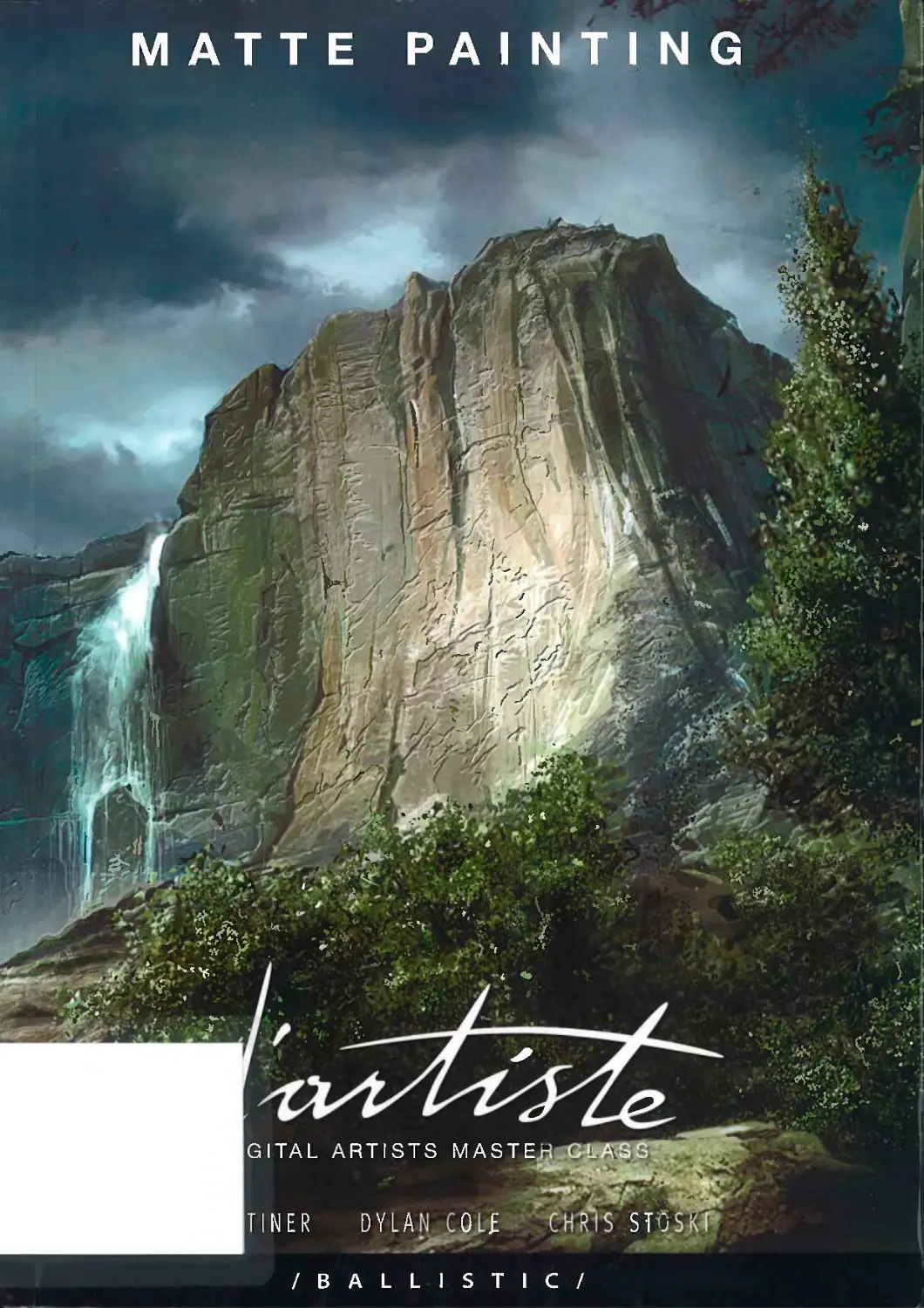
Ma e Painting is the third book in the d'artiste Digital Artists Master Cfassf seriea^t features th;
artwork and,te'chrtiques of Master Artists: Alp Altiner, Dylan, Cols'and Chris gt&s' f'Jn addition to
matte painting techniques (including work from Star Wars. Revehge of th§ £fthj£toratte Painting
shows each artist's overall approach and how they choose Subje'dt matter thafworks. The book
also features a huge invited artist gallery chosen by the Master $fef|?t} * s £*
Edited by Daniel Wade
Published by Ballistic Publishing
www.BallisttcPublishing.com
/BALLISTIC/

Ballistic Publishing
For an up-to-date list of Ballistic
Publishing titles, visit the web site at:
www.BallisticPublishing.com
CHARACTER MODELING
I
. \
i b h L t I i t i c t
d'artiste: Character Modeling
DIGITAL PAINTING
^1
W11UM.,. PHI i» j '" '■
/MUlStlCI
d'artiste; Digital Painting
EXPOS6 3 /:
CS rwALLENO
tfOSPACtttHSfc.
, ^
t -
EXPOSE 3
* ' ,..
i
y ■ ■
Jl*'», 4*
Grand Space Opera
■■■; H
*r .►.'-*
K:
■■■
■ ■
'A
i.
i
■
i
k I
MATTE PAINTING
DIGITAL ARTISTS MASTER CLASS

Published
by
Ballistic Publishing
Publishers of digital works for the digital world.
Aldgate Valley Rd
MylorSA5153
Australia
www.BallisticPublishing.com
Correspondence:
info@BallisticPublishing.com
d'artiste Digital Artists Master Class: Matte Painting. Copyright © 2005 by Ballistic Media Pty Ltd. All rights reserved. No part
of this book may be reproduced or transmitted in any form or by any means, electronic or mechanical, without prior written
consent of the publisher. All artworks are copyright © 2005 by the credited artists, their representative or copyright holders.
Every effort has been made to ensure the credits and contact details listed are correct. However, if any errors have occured
the editors disclaim any liability and respectfully direct people to the web site www.BallisticPublishing.com for any updated
information or corrections.
First Edition published in Australia 2005
by Ballistic Publishing
Softcover/Slipcase Edition ISBN 1-921002-16-6
Limited Collector's Edition ISBN 1-921002-17-4
Editor
Daniel Wade
Assistant Editor
Paul Hellard
Art Director
Mark Snoswell
Design & Image Processing
Lauren Stevens, Stuart Colafella
d'artiste Matte Painting Master Artists
Alp Altiner, Dylan Cole, Chris Stoski
Printing and binding
Everbest Printing (China)
www.everbest.com
Cover credits
The Mountains
Photoshop
Maciej Kuciara, POLAND
[Front cover: d'artiste Matte
Painting Softcover edition]
Partners
The CGSociety (Computer Graphics Society)
www.cgsociety.org
Also available from Ballistic Publishing
d'artiste Digital Painting ISBN 0-9750965-5-9
d'artiste Character Modeling ISBN 1-921002-11-
EXPOSE 3 Softcover ISBN 1-921002-14-X
Visit www.BallisticPublishing.com
for our complete range of titles.
Last Meeting
Photoshop
Alp Altiner, USA
[Cover: d'artiste Matte Painting
Limited Edition cover]
/BALLISTIC/
Daniel Wade Paul Hellard
Managing Editor Assistant Editor
Welcome to the third book in our Digital Artist Master Class series.
The d'artiste imprint (pronounced dah-tee-st) means both 'of the artist' and
'digital artist'. Each d'artiste title features techniques and approaches of a
small group of Master Artists. However, the focus of d'artiste books is not
limited to just techniques and technical tricks. In addition, we also showcase
galleries of their own work and other artists' paintings that inspire them.
Along with artist interviews this gives the reader a comprehensive
and personal insight into the Master Artists—their approaches, their
techniques, their influences and their works.
d'artiste: Matte Painting showcases the work and technical prowess of: Alp
Altiner, Dylan Cole and Chris Stoski. Each Master Artist presents their matte
painting techniques through a series of tutorials which start with the original
concept and step through the painting process to completion.
d'artiste: Matte Painting is broken into three sections based around each
Master Artist. Artists' sections include a personal gallery, the artist's work
and thoughts in their own words, a large tutorial section, and an invited artist
gallery featuring paintings from some of the most talented digital artists in
the world.
Ballistic Publishing continues to expand the d'artiste series to encompass
all aspects of digital content creation. Look for d'artiste Character Modeling
which follows the art and techniques of three world-leading character
modelers in Pascal Blanche, Francisco A. Cortina and Steven Stahlberg.
Visit www.BallisticPublishing.com for new titles.
On a personal note, it has been a privilege to work with such high calibre
artists whose iconic work is featured in many of biggest movies of all time.
In particular, through the entire production of d'artiste Matte Painting Chris
Stoski has battled serious illness with absolute courage. We're grateful to
have shared in this process with him and wish him a speedy recovery.
The Editors
Daniel Wade and Paul Hellard

>
D
[
SI
DIGITAL ARTISTS MASTER CLASS
iV.-
;-'vi-f
» I
MATTE PAINTING
Dylan Cole
The artist 6
Tutorials
Tutorial one:
Tower of London 20
Tutorial two:
Desert City 26
Tutorial three:
Lava City 36
Invited artist gallery 44
Alp Altiner
The artist 70
Tutorials
Tutorial one:
Gothic Cathedral 86
Tutorial two:
Planet-scape 94
Tutorial three:
The Birth 102
Invited artist gallery 108
Chris Stoski
The artist 130
Tutorials
Tutorial one:
Coruscant 140
Tutorial two:
Jedi Temple 152
Tutorial three:
Golden Gate Bridge 162
Invited artist gallery 168

1 U-iU • ^ *~
f
- *,
Dylan Cole is a leading
matte painter and concept
artist specializing in work
for film, television, and video
games. After graduating
from UCLA with a degree in
fine art, he took his painting
skills to the computer. He
got his start with a brief
stint at Illusion Arts on Time
Machine'. Smaller jobs as a
matte painter and concept
artist led to him working at
Rhythm and Hues on
'Daredevil'. He then left his
native California to go to
New Zealand to be a senior
matte painter on 'Lord of
the Rings: Return of the
King'for Weta. Cole returned
to the US as Lead Matte
Painter on The Chronicles
of Riddick' for Rhythm and
Hues where he transitioned
to Visual Effects Art Director
on The Ring 2'.
■;, -, Sim- „X-w_ 7-
SI" r ■ "TTT-J «~—
H—
IVH^^^IM H
\ '■' ^
'" t-^
*
P
1 ' ■ I.,
5-1
imr
"i ■
"T*^
— 1" - -
- <!
jitiim _r
1
"*
Tl

CONTENTS
ylan Cole
allery
2
ylan Cole
torials
'0
ylan Cole
vited Artist Gallery
'4
v\
► 'i
V
d'artiste Matte Painting
DYLAN COLE: THE ARTIST
4
Background
I was always drawing at a young age.
I wasn't particularly good at it—I just
enjoyed it. I would sit around and
draw space battles from Star Wars
or Superman. I was the type of kid
who would make cards for my parents
on birthdays, or Mother's Day and
Father's Day. I think on more than one
occasion my Mom had a Star Destroyer
on her Mother's Day card! Nothing
says motherly love like the Empire.
I turned a corner when I started reading
comic books when I was 10. I started
drawing them and began to realize that
I was doing it a little better than the
other kids. That was when I had my
first ambition in art—I really wanted
to be a professional comic book artist.
I would sit in my room for hours drawing
my own characters. My parents were
incredibly supportive, my Dad took me
to San Diego Comic Con every year and
waited in line for me to get autographs
and see panels. My young artistic life took
another turn when I first began to paint.
I think I was 15 when I first started acrylic
painting and I knew I wanted to paint
for the rest of my life. After high school
I went to UCLA as a fine art major.
My painting skills had progressed and
I mainly focused on that in college. UCLA
is a very contemporary, art-minded
school, which meant they were more
interested in the why's of the work and
not the how's. So in that sense I am
pretty much self-taught when it comes to
painting. During this time I was doing a lot
of surrealism, heavily influenced by people
like Dali, and various sci-fi illustrators.
The lure of Hollywood
When I first started painting I wanted
to be a book cover illustrator having
enjoyed the work on Michael Whelan,
Jim Burns, James Gurney, and others.
What really changed things for me was
when I got the 'Art of Star Wars' books
and saw matte paintings forthe first time.
I guess I was about 18 at the time.
Here was this beautiful science-fiction
art that was completely realistic, and it
was on screen for all of the world to see!
This seemed like the perfect application
of painting for me. In my painting I had
mainly been interested in environments
more than characters and I was always
trying to paint them more and more
realistically. Matte painting really called
to me. Artists like Michael Pangrazio
and Chris Evans soon became my
artistic heroes. Once I fell in love with
matte painting, I started to do some
research about it and soon found out
it was all being done digitally (this was
around 1997). I was crushed because
I really loved traditional painting. I was
also something of a traditional art snob.
I had some friends who were doing
digital art, but I wanted nothing to
do with it. I would tease them about
cheating and not being real artists
because they needed a computer for
help—all of the stuff that drives me
crazy now when people say it to me!
Needless to say, the joke was on me.
d'artiste Matte Painting 9

flan Cole The Artist
t
t
Fi City sketch: A quick color and compositional study completed in a few hours.
iat really got me going
h digital was when I was at
LA and I got an internship at
ustrial Light & Magic (ILM).
ot in based on my traditional
ntings, but they said they
nted me to start painting
itally. This was in 2000 and
until then the only thing
sed a computer for was to
!e papers for school. I had
ely used email until then,
'as very serious so I emptied
savings to buy a Power Mac
and a big Apple display,
vas pretty funny when I was
my internship because I was
rounded by world class matte
3ts, and I was bugging them for
:ic Photoshop help. They were
/ tolerant of me and supportive
I by then end of the summerl had
basics down pretty well. Instead
doing many different paintings,
irked on the same two paintings
months and months, refining
I refining. I think 1 painted those
gs probably five times over,
ould figure out something and
tly what I had learned to the
: of the painting. I spent my
ior year at UCLA in my room
until my work started to look like
what I saw at ILM. My digital art
progressed rather quickly, and
I think it was because I was
only exposed to the best. I was
around some of the best matte
painters in the world up at ILM and
that is what I aimed for. I wasn't
involved in the online community
so I didn't see what everyone else
was doing. Nobody at my school
was doing that type of work so
I had nobody to compare with.
I thought it was unfortunate at
the time, but I think it helped me.
As I progressed I became more
comfortable doing quick color
sketching in Photoshop. I really
began to use it as a paint tool,
instead of just for matte painting
type of work.
Into the commercial world
The first real job I had was
with Illusion Arts shortly after
I graduated from UCLA. I had sent
out dozens of portfolios to every
visual effect house I could find.
I had heard nothing from any of
them, but two days after I sent
my portfolio to Illusion Arts, Syd
Dutton called me and asked me if
I wanted to come in for an interview.
I ended up doing concept work for
matte paintings on Time Machine'.
I learned a lot from Syd. He realiy
took me under his wing, which
I am incredibly grateful for. The other
artists at Illusion Arts were also
very helpful. Unfortunately, my stint
there was brief. Shortly thereafter,
September 11 happened. Everyone
was out of work, and I didnt work
again for five months. I picked up
a few random commercials and
music video assignments, but my
big break came when I joined the
art team for "A Sound of Thunder,'
and I was off to Prague for
12 weeks. It was a dream. I was
in a beautiful city doing futuristic
city designs. Life was good.
I came back, and then things really
snowballed from one thing to the
next: 'Daredevil' at Rhythm and
Hues, and then right after that I was
off to Weta for 'Lord of the Rings:
Return of the King'.
Tools
I mainly use Photoshop for my
work—it is the industry standard
and really can't be beat for matte
painting work. Especially with the
latest couple of versions which
have made some big leaps.
I would like to play around with
Painter for concept paintings, but
I haven't had time to get into it.
I have seen people do some
amazing things with it. I am a
diehard Mac guy, and I use a
Wacom tablet. I am getting into
3D with Cinema 4D. I have really
come to enjoy Cinema because
it is very user-friendly and Maxon
are really trying to cater to matte
painters. Something like Maya
is complete overkill for an artist
like myself. I don't need all of the
high-end features that it offers,
and a lot of the simple stuff is
complicated because of it.
Inspiration
As far as matte painters, I have had
the privilege of working with Robert
Stromberg over the past year or
so. He is a fantastic matte painter
and visual effects supervisor.
I leam something from him almost
every time we talk. One of the
main things that I have learned
is restraint. I always need to
reign myself in; too often I will
make a painting overly-detailed or
complicated. Robert knows how
to do a shot with simplicity and
clarity. His compositions are very
impressive. Other matte painters
whose work I really enjoy are Mark
Sullivan, Deak Ferrand, and Yanick
Dusseault. As far as pure inspiration
I will always go back to the Hudson
River School Artists, like Church
and Bierstadt. Those guys had
color and composition down.
Working in a team
I think the hardest thing about
matte painting is to iet go and
realize you are just creating one
shot in a big film and that it has to
fit. You are part of a team and not
creating a piece of art for yourself.
When painting for film you really
have to think about context and
continuity. You need to know what
is going on in the scene, and what
d'artiste Matte Painting
\\
' ' " }H{ iim
f* -Hi*
Dylan Cole The Artist
'V
Chinese Temples: A personal matte painting using a lot of reference that I photographed in China.
cuts surround your shot. When you
are doing a painting for yourself,
you can do whatever you want and
take whatever license you need to.
When you are doing painting for
film, often your painting is meant
to just enhance the live action and
not be the star. I also went from
enjoying illustrators because of
the high amount of detail in their
paintings, to looking at artists who
really nailed color and composition.
These are the two things that are
most important to a matte painter.
Detail is just time.
The process
The process is to first talk
with either the visual effects
art director or the visual
effects supervisor about the
requirements of the shot. They
will normally tell me what is
going on in the scene and the
surrounding cuts. Sometimes
they will give me a concept
painting or even just a pencil
sketch telling me what they want
to see in the shot. Sometimes
it is very specific artwork
with composition and color
worked out, and other times
it is just a little scribble with a
lot of talking and arm waving.
I then take their sketch, and I do
my own on top of it to establish
exactly where things will go and
what the color palette will be.
I then get this approved by the
visual effects supervisor and
sometimes the director. After I do
whatever revisions are needed
of the sketch, I start work on
the final painting. Once I have a
somewhat completed painting,
I then go through another round
of revisions with the supervisor
and the director until everyone
is happy. I find the fewer people
involved in approving a shot, the
better. When there are too many
people offering comments,
the work gets watered down and
stale. Usually, the first instinct is
the best one.
Satisfaction
I am probably most proud of the
work I did on "Return of the King'.
I am not sure if it is my best painting,
but I think I am proud because
I contributed a lot to the film. I was
fortunate to create some pretty
iconic shots. Alan Lee and Jeremy
Bennett had a lot of faith in me and
trusted me with some challenges,
ft was also the longest I have been
involved with a project. I learned a
lot while working on that film. It was
fun to contrast the first paintings
I did with the last ones—there
was definite improvement. Other
projects were satisfying for different
reasons. "Daredevil* was a lot of fun
because often I would be given
a green screen plate and simply
be toid: "Okay, they are on a roof
and there is the city behind them."
I a!so enjoyed some of the paintings
I did on 'The Aviator", just because
it was pretty invisible work. Most
of the stuff I have worked on has
been really big, sci-fiflantasy stuff
that no matter how good you make
it look, the audience still knows
that it is not real. I think I would
like to do more period drama work.
Every project is different because
of many reasons, subject matter,
work environment, the people you
are working with, technical pipeline,
etc. I think that is why it is still fresh
and exciting to me, because every
job is so different.
Breaking into matte painting
i would advise potential matte
painters to learn traditional
drawing and painting skills—
especially basic perspective.
There are far too many photo
monkeys out there who can
only collage photos together.
They may integrate them well
and balance them all together,
but the perspective is all off,
and the composition is wrong.
I must again refer to the Hudson
River School; just look at how
they handled light in their work—
amazing. Other artists rely too
heavily on 3D and don't know
how to create anything without
it. I think 3D is a fantastic tool
and is the future, but it can be
a serious crutch—especially
when someone can't lay out
some basic 3-point perspective
grids without it.
Virtual environment artists
I think the term matte painter
is already an obsolete term. To
be honest, I have never done
a real matte painting. Those
days ended with digital. Now we
are virtual environment artists.
I think there are more, and more
3D environments being created
these days, and matte painters
will have to adapt to keep up.
It is becoming more common
for there to be teams of people
on an environment instead of a
matte painter. I also think that
more stuff will go procedural,
and matte painters will be taken
out of the picture for basic stuff.
Though I do think there will
always be a need for a matte
painter simply because it is
often the easiest and most cost-
effective way to create a shot.
A simple, locked off shot with
a set extension will probably be
done as a matte painting for
many years to come. The other
advantage to matte painting over
3D is that you have so much
more control, and changes are
much faster than having to do
a re-render.
d'arti ste M atte Pa i nting 11

ylan Cole The Artist
! ' Iji
t.t *«• t it ", ,
1*
*
It*
m
*a*u*a- 4
■•■■•■ V-
>cKs Along the Beach
this piece I was mainly driven by Ihe
sire to paint a scene at dusk. This Is
e of my favorite times of day because
> lights of the city are sterling to turn
and there is still light in the sky.
vanted to imply a civilization where
uctures are built right into Ihe rock.
hmk the small details, like the dried
es, give it a random real-world feel.
d'artiste Matte Painting
Dylan Cole The Artist
_ -jj vt,
d'artiste Matte Painting 13

Saucer Hill
For this piece I thought of classic science
fiction with the very simple, rounded
architecture. I built mysetf a 3D model
for reference and added a let of small
detail to the structure to give it scale.
I was thinking about artists like Albert
Bierstadt and Frederic Church when
I did the ighting. I thought I would try a
dutched angle and dramatic perspective
lo make this piece stand out.
[above]
Cave City sketch
For this sketch I began by painting large
random blobs of color. I then used this
as my rough composition and palette.
I then began to add delait and refine Ihe
shapes. A targe interior city emerged.
This is a piece that I would enjoy finishing
into a detailed matte painting.
[left]
Dylan Cole The Artist
^ i
ft*
Scl-Fi Sidewalk sketch
Whenever I have a free moment and
I start to doodle, ii almost inevitably
becomes some sort of futuristic city.
I tried to come up with unique, more
whimsical, shapes for this piece instead
ot the typical slufl we see. I enjoy the
energy of loose sketches.
(right}
>t
f
'* 4
. i .^
1 • - .
d'artiste Matte Painting 15

Irban Plateaus
i this piece I wanted to explore the
lea of a futuristic city where real-estate
. even more of a premium than it is
>day. I pictured buildings built so close
jgelher that they eventually become
irge masses shaped like plateaus,
r buttes, maximizing the waterfront
roperty. t used many different buildings
om an over the world and a lot of
ainting to create this image.
6 d'artiste Matte Painting
■£* ^a
r*
<* —
<i>
"« ..
'"i.
^T-" fF"
jr -
- *
«
I
i
'law
\U
-**
K3-
X"
■f %" I
d artiste Matte Painting 17

I I
I
I I
, I
Barad-Dur and Mount Doom
This was the matte painting for the
destruction of Barad-Dur at the end of
'Return of the King'. The tower was a CG
model built for the collapse, but the rest of
the environment was a matte painting. For
this shot I animated the pyroclastic cloud
and interactive glows in After Effects to
give the effect of a large erupting voicano.
'Lord of the Rings: Trie Return of the Kfng' ©2005 New Line Cinema. All rights reserved
18 d'artiste Matte Painting
d'artiste Matte Painting 19

MATTE PAINTING: TOWER OF LONDON
Inspiration and subject
I've always loved old medieval architecture,
castles in particular. I was very excited
when I got to visit the Tower of London,
because it had a lot of the classic castle
qualities, with the towers, high walls, and
battlements. I chose this photo of the
Tower of London because it had a lot of
depth, and it also had a street to lead the
viewer into the painting. I wanted to create
a moody kind of night shot with a lot of
atmosphere and shadowy streets. It also
had the nice trees in the frame to give it a
more eerie feel as well as giving a different
texture to the piece.
Technique
This is my basic technique for doing a day for
night shot. The key is to layer the PSD to give
a lot of flexibility. When darkening images down
this much, one must be wary of losing bit depth.
That's why I work with a lot of adjustment
layers and layer masks, so that I always have
the freedom of change. I start by adding a
Curve adjustment layer that darkens the entire
image. I then go into the adjustment layer's layer
mask and paint areas that 1 want to remain lit.
This is how I create my pools of light. I add
subsequent layers to add windows, shadows,
and haze. Depending on the shot, I may add a
new sky. When choosing a sky I generally use
daytime, backlit skies, so that when I darken
them, they resemble backlit, moonlit clouds.
Composition
I was conscious when I took this photo of
creating a balanced composition that led the
viewer into the painting. I let the big tree on the
left frame the lit buildings. I spotted lit windows
throughout the frame to create a visual path that
leads from the top left, through the center, to the
distant building on the right. I was conscious of
the fact that we read left to right and wanted my
composition to flow in a similar way.
20 d'artiste Matte Painting

tfatte Painting Tower of London
~^
#»'
.v *: r
/j»«w?:-.-tF"'* -
v .'i
Plate
This is the starting plate that t shot at the Tower
of London. Overcast photos such as this offer
nice possibilities for day-for-night paintings because
of the lack of direct sunlight and hard shadows.
It allowed me the freedom to light the photograph in
any way I wished.
i\ —
V
\
i
Adjustment layer to create night
I used Curves on an adjustment layer to darken
down the entire plate to what felt like a nice bluish
night. A lot of care was taken at this stage because
the curve dictated the main palette and exposure
level. I did this on an adjustment layer so that I'd
have the freedom to change it later without losing bit
depth in the original plate.
Painting into the layer mask
I painted into the adjustment layer's mask to define
the lit areas of the painting. The areas that I painted
black would not be affected by the curve layer
Here's what that mask looked like by itself. The
painting was done with a large, soft, round brush
and then I used the Eraser to clean up edges.
22 d'artiste Matte Painting
Matte Painting Tower of London
Layer mask painting
Here are the results on the image of painting into the
layer mask. Pools of light were created with special
attention being paid to the light direction. I tried to
think about how these buildings would be lit in real
life. Most often the light would be coming from street
level, so I lit most of the buildings with an up-lighting.
I tried to create pools of light in a balanced way that
lead the eye through the painting.
I
Interactive shadows and more lighting
I continued to paint into the layer mask to reveal the
lit street and also to add interactive shadows on the
figures. These touches created a focus in the center
of the image. Also, by adding the cast shadows from
the figures, it clearly defined the direction that the
light is coming from.
1
j
i
Blocking in the windows ,,
On a new layer I painted in the lit windows with a
solid color. At this point, the color and detail did
not matter as much as just defining the shapes and
placement of the lit windows. It was really tempting
to go in and paint every window, but I didn't want
to overdo it. I would typically go too far and then ' ^*
have to reign myself in by erasing about half of the I _ . *
windows that I have painted. '
i r
d'artiste Matte Painting 23

flatte Painting Tower of London
Creating window detail
On the window layer, I clicked on the Preserve
Transparency button in the Layers palette. This
allowed me to paint on the layer without going
outside the bounds of my original window shapes.
I used large soft brushes to add gradations ol color in
the windows to simulate lit rooms, and I also added
some brighter light sources. I was not concerned
with painting in every detail in the rooms, instead
opting to imply detail. With this type of exposure,
the lit windows would be overexposed anyway.
I also created a new layer for the street lamp in the
middle of the painting and the light on the outside of
the tower on the left.
Adding the clouds
After creating some interactive light on the Tower
on the left, I pasted in a sky that I photographed
that had some clouds that I thought would work
well for night. Backlit clouds, such as these, work
well when simulating a moonlit sky. Building up a
library of clouds is very important for a digital matte
painter. It is good to categorize them by time of day
as well as kind of cloud. Always having a digital
camera on hand is a good way to quickly build up
a reference collection.
!S-
4;
3
*
Foreground mask
In order to place the sky into the painting I needed
to create a matte for the foreground. I did this by
looking at the color channels from the original
plate and selecting the one with the most contrast
between the sky and the rest of the image.
1 duplicated that channel (the blue channel), and used
Curves to increase the contrast until the black and
white image separated the sky from the foreground.
!4 d'artiste Matte Painting
Matte Painting Tower of London
Integrating the sky
I created a layer mask for the sky layer and then
copied and pasted the foreground mask from
the Channels palette into the new layer mask.
I created a new Curves adjustment layer and created
a clipping mask with the sky layer so that the Curves
adjustments were only affecting the sky. Using
Curves I darkened the sky down to a more nighttime
look. I then painted into the adjustment layer's mask
to add a glow in the center of the sky to imply a
moon behind the clouds.
!-
i t
L I
Refining fights
I went back to the center of the painting and added
a little bit more light to the center buildings. The
tops were getting a bit too dark. I lightened them to
imply more distance between the viewer and those
buildings to give the painting a bit more focus.
I also added a little more light to the right side wall-
It was just too much of a massive black shape.
I did all of these adjustments in my original Curves
adjustment layer.
Final touches
To finish it off, I created a new layer to add a bit more
haze and atmosphere. I sampled a medium value
from the sky and using a large soft brush I painted
some haze onto the distant buildings. This created
a bit more depth and separation in the painting and
made the image feel a bit more moody.
I)
I >
ll '
<
d'artiste Matte Painting 25

I V
1 t
V
MATTE PAINTING: DESERT CITY
, n
Inspiration and subject matter
"or this piece I was thinking a lot about
ancient cities of the Middle East. There was
something about the very simple architecture
:hat I found appealing. I thought it would be
i nice contrast to the usual complexity of my
work. I also thought it would be a welcomed
challenge to do a painting in harsh sunlight.
Dften, matte paintings are helped along
Dy being either backlit, monochromatic, or
/ery atmospheric. All of these things help to
obscure a lot of detail and lighting challenges.
daylight is much more difficult. I also thought
would add a bit of whimsy with the airships.
Technique
For this piece I use many different techniques,
many having to do with photo manipulation
and integration. I also discuss how to build
a city using very simple shapes and colors.
I then go into detail about adding texture and
realism using both layering techniques and
painting. A painting of this size can be very
cumbersome in Photoshop with all of the
layers, so I like to make use of layer sets so
that I can navigate through my layers easily.
I also like to save out multiple versions of my
painting so that I can flatten certain areas, yet
retain all of the separate layers in another file.
Starting point and composition
To begin this piece I had a tiny photo with
some desert rock that I liked. I painted
over that and created a color sketch of the
composition. I tried to find a nice rhythm
through the piece. I also have a road
leading the viewer's eye into the painting.
This is a rather obvious method of leading
the eye, but I thought it was appropriate
as a way of taking the viewer to the city.
I tried to be conscious of scale and depth by
having repeating shapes receding in space,
such as the buildings and airships.
?6 d'artiste Matte Painting
i
\
it '
f
1 « tl
,1
J
i P
(
"■*6J
...vj',-,f
in1 »
'if I
I .
t I
«. »
1 t
.1
■ I •
nv.
* -
I I
'4. •:
■ r -
t
V
I I
m
■J
v/,
r
hf".H
If ■ i * .
K*.
/*/■
<£■■ , .■■•?•. V
w ' ■'•■•■'
\ ^T{ i
y
~»^W **
J^
r
*r
Xv\ -Jsw*.

Matte Painting Desert City
■« ■»
- £
- i j
*e
Sketch and sky
My initia! sketch was done over a little bit of
photo that had some rock in it. The photo
can be found just below the main structure.
I started from the photo simply because
I liked the quality of the desert rock. This
sketch was done in a Ifttle over an hour.
It was a very quick study to determine color
and composition. For the sky I used a couple
photographs that had a nice wispy texture.
I wanted a very simple sky to not detract
from the landscape and something simple
to place the airships against. However, I did
not want a boring gradient, so I opted for
the light wispy clouds to add texture without
cluttering the composition
Background painting
I zoomed in and began detailing the
background. I used mainly small round brushes
and began detailing the rocky mountains
using the colors that I had established in my
sketch. At this distance it was basically a two-
toned painting: a highlight; and a shadow.
This made for quick painting and just the
implication of detail.
Background detailing
I continued to detail the background and also
used some photo texture from some rocky
cliff faces. I used the texture by copying
it into a new channel and making a high
contrast version of it. By making a selection
of the new channel, I could now paint on
my background with a large soft brush to
lay in the rocky highlights. I inverted the
selection and painted into the shadows. This
technique works best on distant objects, or
monochromatic objects, because by doing
this you are only using the value of the texture
and not the color information.
8 d'artiste Matte Painting
Matte Painting Desert City
Raw photo reference
I placed a patch of rocky photo reference
where I wanted it in the image. I also paid
attention to try to find the right scale for the
detail and rocks so that it felt believable. I was
careful to find an image with light direction
coming from the right because even though
it is harsh sunlight, I would darken it down so
that it looked like ambient fill light.
^*_
^. *■ ;
iM _,_^ '*.. _
*" t- .i
* ^ -*_--„*?■
; ^ «>-_^ - -
^t..
r- »
- ^ -"*<?- ^
v. t~. it. —
T-- .— ^ ^<a> -s
.\
*"y
>. ->
»V..
1
^
It
. * -„ "*■
Photo integration
Here's the photo after it had been color-
corrected. I used Curves to get the color to
match my sketch. I then used a Color Overlay
blend mode from the Layers palette to reduce
the contrast of the layer. This is really the
key to helping the texture sit into the scene.
I also added a layer mask so that I could
blend the edges of the layer without having to
commit to erasing them.
tf
More rock details
I continue to add some photo elements from
rocks or desert elements that I had shot.
I was mainly concerned with getting consistent
scale, light direction, and contrast. I was not
concerned with every element blending into
one another—that would be handled with
painting later. At this point, I was laying in the
foundation of texture and detail.
- *
d'artiste Matte Painting 29

Raw ground texture reference
I placed in some reference that I shot in
the Sierra Nevadas. I actually shot this
specifically for this painting. I was up fishing
for a weekend and brought my camera. This
is the ideal situation tor gathering reference
because you know exactly what you need.
You can keep an eye out for the right lighting
and perspective.
Adding rocks and trees
I roughly placed in some more elements.
I found the rocks along the coast, but
I thought they would work well in a desert
situation. I color-corrected them, but the
sloppy, water edges were still visible. This
part of the painting was basically like a jigsaw
puzzle: you're trying to find little pieces to
cover as much of the painting as possible.
You're also establishing the kind of detail you
will be painting later on.
Texturing the left mountain
Rough photos are placed for the mountain
on the left. I chose to use rocky reference
more than mountainous reference, because
I wanted the landscape to feel fairly harsh.
The mountains are supposed to be a natural
defense to the people of this city, and I didn't
want it to look easily scalable. I continued to
use the Color Overlay blend mode to help the
photos fit into the scene—particularly on the
shadow side. Sometimes, I will decrease the
opacity of the layer to allow some of the color
of the sketch to come through and decrease
contrast in the texture layer. I would then use
layer masks to blend all of the edges of these
elements.
Matte Painting Desert City
Dried trees
In order to create the dried trees, I used some
extensive layering. I had some good reference
of dried trees but there was no lighting as they
were only silhouettes. To create light and dark.
I overlayed several different layers of trees,
alternating between a highlight color and a
shadow color. This isn't a perfect method, but
it does work at a distance such as this. We
can then go in and add specific highlights and
shadows to create the look we want.
- 1
> w
*»
1 «w..<"-
An overall look
I stepped back to look at where we'd come
so far. Most of the major photos were in
place, and I had stuck pretty faithfully to my
composition—maybe too faithfully. I was not
completely happy with the foreground rock
placement, but I would play with it later. It still
needed a lot of integration, but I could see
where it was going.
1 :>
-V
«-i
,■■*
Beginning the rock integration
I created a new layer and began painting in
a lot of the detail between the rock photos.
I was thinking about how these rocks interact
and transition to one another. I paid special
attention to cast shadows and the natural
flow of textures. Since I was painting this at
double film resolution, I didn't have to worry
about painting pixel perfect.
*
I •
r
-j*
w-i '
/
d'artiste Matte Painting 31

Matte Painting Desert City
r t
■ c
4 ,X ' '.
w
ti
A ,V.
Micro composition
Working in this zoomed up view,
I began thinking about micro-
composition, or how small elements
played against one another. I was
very conscious of how light and dark
shapes would help establish depth.
You can see how I placed light colored
trees against a dark background, but
the bottoms of these trees are dark
against the highlighted ground. This
was all an effort to make the image
read clearly and quickly.
Iv
/
•*% I.
*
I
Building blocks
I made a very simple two-toned cube
using the Marquee tool. This would
be the basis for all of my buildings.
I duplicated this and distorted it many
times until I had the basic layout for
the bottom buildings. I continued to
think about light and dark playing
against one another.
~. v I
Mil /
I
v\
N
r
• 4
More blocks and color variations
I continued to duplicate these cubes
around to create different parts
of my city. This was a very quick
and effective way to try different
arrangements without a lot of sloppy
painting. I kept every building on a
separate layer so that I could easily
move them around. This made for
a very cumbersome PSD file, but
I'd flatten it once I was happy with
the composition. Using the Hue/
Saturation adjustment, I began to
introduce some color variation to
my blocks to suggest the natural
variance in stone that would occur in
a city like this.
32 d'artiste Matte Painting
Matte Painting Desert City
Creating perspective
Using a perspective grid created with
the Line tool, I began to paint and
erase into the buildings to make
them sit into the proper perspective.
I also began adding cast shadows
to give more definite sense of how
the buildings were sitting with one
another.
/ 11
' .
The entire blocked in city
The whole city was now blocked in
with simple blocks. I also started
adding small bits of window detail
and color variation. I tried to create a
natural, flowing shape to the city that
i
looked as though it had been added ^ 5
onto over the years. ",', J
-- H . . ■ m, , ...
j M *
' 1 ■ .'
<>>
1 —
Balancing the composition
I was feeling that composition was a
bit heavy on the right side and that
our eye was traveling too easily off
the right of the image. I decided to 1
try a large tree to lead the viewer's **■ \j
eye back to the center of the image. ^
1 think it worked and created a nice ( I * ^
circular motion to the composition. > «•'( ' T 1 ■ ' , , *v ' 1
I also simplified the foreground rocks. ^ .. v
I felt that it was a bit cluttered and .# «•-"■■'■< _ V^
complex so I opened up the middle ' '
to show the road and give the viewer ~*
a visual entry to the image. I also ,'
clicked on my perspective grid to do
another check on the city.
l'
"l '
1 '
d'artiste Matte Painting 33

Matte Painting Desert City
Adding building texture
I found a couple small scraps of old rock
wall texture and duplicated it around the
structure many times. I used the Overlay
blend mode to add texture without destroying
the values established underneath. Because
of the variety of building shapes and sizes
I used only a couple photos to create the
texture base for the whole city.
$
\
"fr -
K"
(-
1 I
lfc,
<N
i *
Painting in building detail
On a new layer I began painting in small
windows and details to individualize the
buildings. I created these with a small round
brush and sometimes with a custom brush
made up of two dots. The brush let me
paint two parallel lines for creating pairs of
windows that were evenly spaced. I also
implied recesses into the buildings so that all
of the faces were not so monolithic. This also
helped provide scale.
- «
I -r
\
The detailed city
The city was almost finished. Window details
and small doors and pathways were added
to give interest. I also added bits of trees to
the city to give it a bit of life and to contrast
the geometric nature of the architecture. Only
some small details on the lower buildings
remained to be done.
34 d'artiste Matte Painting
Matte Painting Desert City
Modeling the airships
I used Cinema 4D to model the basic shapes
of the airships. I took great care in lining
up the reference plane to my perspective
grids to make sure I was using the correct
field of view. Since I created my perspective
grids from scratch, I didn't know the lens
information. 1 did a bit of trial and error to line
up the airships.
-«
If -i
f»-" ■
The rendered airship
Here are the raw renders out of Cinema 4D of
the airship. I used basic plank style shaders
to give the patchwork look to the cloth of the
airship. The main thing I wanted to get out of
the render was the way the texture wrapped
around the round shape. This would be very
difficult to do in Photoshop.
1
1 '
• _.. i
Final details
On a new layer I painted in detail and texture
into the airship. I added a lot of weathering to
surface to help it not feel so clean and CG.
I also added a lot of small folds where the
cloth was bulging a[ the wooden braces.
To finish it off I added some warm bounce light
from the ground with an adjustment layer and
some tethering ropes created from paths.
-f
'1'J , '
\
V^l
1,1
- «:
d'artiste Matte Painting 35

II ; ■ l
■! |
MATTE PAINTING: LAVA CITY
Inspiration and subject matter
Other worlds and fictional cities have always
fascinated me. I try to imagine places that
I would like to go to or wish existed.
Often, inspiration simply comes from a
color palette, and that was the case here.
I wanted to do a futuristic city with this kind
of lew dusk light. I was trying to think about
how this city could be different from others,
and I thought of lava, probably because
I had just finished working on 'Return of
the King' and still had Mordor on the brain.
I also thought that lava would give me
some interesting lighting opportunities with
the glow and smoke that it creates.
Technique
Besides a lot of my standard Photoshop
matte painting techniques, I wanted to p!ay
with manipulating building photographs.
I was just doing this painting for myself and
wanted to do it fairly quickly, so I wasn't
interested in doing extensive modeling
and texturing. I thought of taking a lot of
photographs that I had, mainly of Sydney,
and massively squashing them horizontally to
make them match the tall, skinny buildings in
my sketch. I also laid a lot of these buildings
over one another to get a quick accumulation
of detail to suggest the scale that I was after.
I ended up modeling one of the foreground
buildings in 3D, mainly as a way to ease
myself back into 3D, but also because I was
planning on doing a camera projection with
this painting to get a little parallax.
Starting point
My starting point was my initial sketch,
inspired by an old photograph I had seen
of smoggy Los Angeles. What was unusual
is that I didn't go back to do the final matte
painting until about a year after the sketch
was completed.
Composition
I chose a fairly standard sort of composition
for this piece, i wanted the lighting and
subject matter to speak for itself. I kept
the foreground buildings dark to focus the
viewer's eye towards the buildings in the
center. I was careful not to put the main
buildings in the dead center of the painting as
that makes for boring and uninteresting shot
design. I also tried to create a left to right read
on the painting, since that is how we naturally
view an image.
36 d'artiste Matte Painting
I'
I

Matte Painting Lava City
Sketch
,/\
t r
This was the very first sketch that
I did for this piece. I started by
just blocking in rough shapes and
building ideas until I was happy with
the composition. I had a grainy little
JPEG of an old photo of Los Angeles
that I painted over. I tweaked the
color quite heavily to make it look like
the kind of dusk that I wanted. I also
redid the gradients in the sky. I took
my time balancing shapes and values
in this sketch, and I think it paid off
because I barely deviated from this
in the final image.
Sky
I removed most of my sketch to
work on the sky. I added some wispy
clouds to give texture to the sky.
I didn't want a lot of detail and
complexity in the sky because there
would be plenty of that in the city.
I just wanted a few small clouds to
give depth. I extracted these clouds
from photos that I took by finding
the color channel that had the most
contrast. I then duplicated that
channel and made a high contrast
matte for the cloud. 1 really let the
haze pile up towards the horizon to
show all of the atmosphere and smog
in the air.
Ground plane detail
I used a few aerial photos of various
cities to give some detail to the
ground plane. I paid special attention
to perspective, having laid cut grids
for a basic two-point perspective that
I used to line up my buildings. Some
liberal use of the Free Transform and
Distort tools and my buildings were
lined up. I then used Curves to adjust
the color and contrast to get the
buildings to sit properly in the scene.
**?
38 d'artiste Matte Painting
Distant buildings and smoke
Matte Painting Lava City
I started detailing out some of my
distant buildings. I did this through
both photo manipulation and painting.
I painted in some distant smoke that
had more of a definite source, instead
of smog. I paid special attention
to the placement of the smoke so
as best to silhouette the buildings.
I also painted in some distant lava
on the right. I did the concentric
circles by drawing several circles with
the Circular Marquee tool and then
stroking them with a red lava color.
I used the Transform tools to warp
them into the proper perspective.
The source buildings
I placed a few buildings extracted from
some photos that I took in Sydney.
I would heavily manipulate them,
but they were a nice starting point
because of the nice detail and lack of
recognizable landmarks—at least for
people not from Sydney. I didn't color-
correct the buildings at this stage to
match the painting, but I corrected
them to match one another.
Creating new buildings
Here's the result of a lot of
horizontal squashing and layering.
I used many different buildings and
layers one on top of the other to
create the building shapes that
I made in my sketch. My focus here
was more on accumulation of detail
while not necessarily making literal
sense. I also went in and tweaked
a lot of individual faces so that they
were in the correct perspective. When
massively squashing buildings in this
manner, you have to pay special
attention to perspective because it
gets very exaggerated.
**#
**/
* *V
d'artiste Matte Painting 39

Matte Painting Lava City
Adding atmosphere to the buildings
I used Curves and Color Balance to
color-correct the buildings into the
scene. I then used the Color Overlay
blend mode to lay in the proper
amount of haze. I sampled a color
from the sky for the correct haze
color. This often takes a little bit of
trial and error to get the correct result,
depending on how closely you color-
corrected your buildings in the first
place. I like to use the Color Overlay
blend mode because it saved me
from creating a new haze layer and it
allowed me the freedom of dialing in
the right color and opacity.
Adding light to the building tops
I duplicated my building layer and
removed the layer effects. I then made
a high contrast version using Curves
that retained color information in
the highlights and moved the darks
and midtones to black. I also color-
corrected this to a much warmer
reddish orange. I used the Screen
blend mode to apply the highlights
to the painting. I then created a new
layer mask and painted into it to
have the highlights only affect the
surfaces facing the sun. I also added
a soft gradient to highlights so that
they were only affecting the tops of
the buildings.
Adding more smoke and lava
I created a new layer and painted
in lava around the main building.
In order to get the proper perspective,
I painted the basic lava shapes in
orthographic view and then distorted
them into perspective. I found this a
good technique when dealing with
complex geometric patterns that
need to be in perspective. I then
added a haze layer on top of it for
adding a lot of atmosphere to the
bottom of the buildings. I added
some more smoke that had a more
definite source along some of the
lava. I found that the contrast of soft
and hard smoke helped create depth.
All of the smoke was created by
freehand with soft brushes.
40 d'artiste Matte Painting
Matte Painting Lava City
Lower midground buildings
I added some lower midground
buildings from aerial photos of various
cities around the world. I used the
horizontal squashing technique on the
buildings to change their dimensions
and detail. I placed the buildings so
that they were silhouetted against
brighter pieces of smoke and distant
buildings. I tried to be conscious of
light shapes against dark shapes,
and vice versa, because it helps
establish depth and helps the shapes
read better. I added some large roads
that travel to the main structure.
I painted these with the Line tool and
Brush tool. I used my perspective
grid as reference to ensure that my
lines converged on the horizon.
Raw buildings
I added another layer of buildings
taken from many different sources.
At this stage, I was just making
sure that the buildings worked
for perspective and scale. If the
buildings were out of perspective,
I used the Polygonal Lasso tool to
select individual faces and skew
them into proper perspective.
Integrating the midground buildings
I used Curves and Color Balance
to adjust the buildings to match the
painting. I used the Color Overlay
blend mode to add the proper
atmosphere to these buildings.
I sampled a dark color and used that
for a gradient on a new layer that
faded from the bottom to the middle.
This took out a lot of unnecessary
detail in the midground and let the
viewer's eye focus on the center
buildings. I also added a few lights
on a new layer as well as some
interactive light on the buildings.
1 restricted this to the bottom
midground buildings because that
was where the lights would show up
the best.
d'artiste Matte Painting 41

Matte Painting Lava City
Blocking in the foreground building
Using my original sketch as reference
for shape and design, I blocked in
the values for the right foreground
building. I didn't worry about detail
yet—I just wanted the shapes and
composition to work. I used a lot of
the Polygonal Lasso tool as well as
the Paintbrush and Line tool to create
hard edges. 1 also referred to my
perspective grid quite extensively.
Detailing the right building
1 began detailing the right building
by overlaying some concrete texture
on the main faces of the building.
! wanted to keep it subtle—something
to break the large clean surface.
I took photographs of buildings at
night and used Curves to make
everything but the lit windows black.
I used a Screen blend mode on this
layer to only add to the windows.
I moved and erased windows until
I was happy with the placement
and added another layer to paint in
the small up-light on the auxiliary
tower.
3D model
I finished off the building on the right
with some roof details, like railings
and red lights. For the left building
I decided to model a building in 3D
and use it for lighting and perspective
reference. I knew I wanted a lot of
small repetitive shapes and 3D is
ideal for this. I modeled this building
in Cinema 4D and rendered out a few
basic lighting passes.
42 d'artiste Matte Painting
Matte Painting Lava City
Mixing render passes
I color-corrected the first ambient
pass and mixed in a little bit of a key
light pass. I kept the key light pass
very subtle. I wanted it to be tit from
the sun just as our main buildings,
but I didn't want it to become the
focus. 1 wanted it to remain fairly dark
so that the viewer's eye goes past it
to the central buildings.
J I
Window tights and surface detail
Using the same techniques as the
ether building I began to add detail
to the left building. I combined
several textures for the surfaces, one
geometric from a building facade,
and another of concrete with some
nice weathering. I used the Overlay
blend mode to mix these textures.
When using the Overlay blend mode,
it is a good idea to neutralize your
textures as much as possible, both
in value and in color so that only the
texture itself is being transferred.
Final details
I painted a few final details into
the image. I concentrated on the
roof of the left building by adding a
white light to show off some of the
structural detail. I did this by mixing
a lighting pass from Cinema 4D and
also by painting. I also added some
red lights to the top of the building.
Real world details, such as the red
aircraft warning lights, are good to
add to fictional cities because they
are elements that we recognize in
everyday cities and lend a certain
believability to the scene.
d'artiste Matte Painting 43

I
4
^ -
V.
<tw;
» i
"t *
■Cfc_
. >*
*
'V-
,#w-;
;*s*
\
-t «v
X
*»«
.^'^'"■t*:
* ,„»
The Mountains
Photoshop
Maciej Kuciara,
POLAND
Dylan Cole
This is a very dramatic image with
very strong lighting. I particularly like
the light striking the rock face as
well as the mist being created by Ihe
waterfall. The foreground trees vignette
the scene nicely and help create
good separation between foreground,
midground and background. It is also
impressive that the whole image was
hand painted.
44 d'artiste Matte Painting
V
*«
-\
1
**■
*»"
^•t
u >
><■
**:■■■
*
**
*?.
d'artiste Matte Painting 45

V
/.■/
if
~£
V
*»
a*
* .. ^SSfe,
x*^
V:
>..
The Lab
Pholoshop
Dan Wheaton. Carbonmalter,
CANADA
Dylan Cote
This piece has a wonderful mood to
it. The pools of light help lead the
viewer's eye around Ihe painting. Wilh
the dutcheti angle and the pose of Ihe
figure, the artist has created a lot of
energy and movement. This painling
could have easily been over-detailed and
busy, bul the artist simplifies unneeded
areas to allow the viewer to concentrate
on the subject.
46 d'artrste Matte Painting
d'artiste Matte Painting 47

Dylan Cole Invited Artist Gallery
Dylan Cole Invited Artist Gallery
\
iM
U«B|
II'
II
» » I
■ • I * » • ■ ■)
, J l l I . I ( (({
H11+*"** ♦w*^*1*' '*'
Hi
... «t"
rf*
*■"
.,. I>»»•
■ III <»!<*
in > *
,lrri a • ** i'i ■
i t~ • >
underwater City
Photoshop
Steven Messing.
USA
[above]
Dylan Cole
This is a wonderful piece, very strong
with color and composition. The pools
of light lead our eye into the image as
do the school of fish. The heavy use
of atmosphere is perfect to suggest
the murky depths of the ocean. There
is a very nice restrained use of texture
in the rocky spires; jus! enough to seil
the surface, though not so much as lo
overwhelm.
Building
Photoshop, 3ds max
Thomas Crausaz,
UNITED KINGDOM
[right]
Dylan Cede
The artist has created a very simple and
striking composition. The lighting is very
understated and effective. The use of
atmosphere on the pyramid is nice to
suggest the immense scale.
48 d'artiste Matte Painting
d'artiste Matte Painting 49

*■' a v
- - ii
-w
-J
"t
Haunted Mansion
Photoshop. SoftimagetXSt
Tim Warnock, The Next Side,
CANADA
Dylan Cole
Images thai imply a story are very
powerful, as with this piece and the
lone light on in the window. This
painting has a very strong composition
and invites the viewer in wilh the
slairs coming to the foreground. Little
touches such as the ground fog, help
sell the mood.
50 d'artlste Matte Painting
N
1
T.V-
<r.
■«/■
•.**L
"l "
*i
"'■'••.'irf- ■**.}_>.. ^iT , . T*. M 'ft*"?,,. ?* -■ A* "
*T»>
:>V
•* " *. .•
N*»,-»»ul
v f *
?-"
*,*
\
d'artiste Matte Painting 51

Dylan Cole Invited Artist Gallery
EARTHSEA Spiritual City
Photoshop Photoshop
Copyright Hallmark Entertainment Jaime Jasso, METACUBE,
Distribution, LLC MEXICO
Rasout Shafeazadeh, {right}
CANADA
/above/
Dylan Cede
This is a strong piece with very good use
of atmospheric perspective. The hills
fall off into fog in a very believable way.
I think the muted color paielte works
very well in this overcast scene. I also
like the bold rock shapes in the near part
of the island and the nice use of light
against dark.
Dylan Cote
I really enjoy this image. I tike the
juxtaposition of the eastern architecture
with Ihe waterfall scene. The dutched
angle and the flying birds give the piece
some good movement. I think the fog
and haze is very effective, especially
where the horizon is obscured on Ihe
right side of frame.
52 d'artiste Matte Painting
» 1
Dylan Cole Invited Artist Gallery
©Hallmark Entertainment Dial Ibution LLC
itii n
v
1'
*
;>
m ii «"
w
•t
d'artiste Matte Painting 53

Dyian Cole Invited Artist Gallery
I II!
I I
11'! 111
iiur
UN
Mill
I.' »
Western Town/Night time
Photoshop
Ron Crabb. Crabb Digital,
USA
Dylan Cote
This piece has that classic Hollywood
night look with the perfectly
composed moon and the moonlight
on the buildings. The artist has a
good command of perspective and
the composition frames the area of
the street where the action would
take place.
54 d'artrste Matte Painting
Dylan Cole Invited Artist Gallery
ft
d'artiste Matte Painting 55

Dylan Cole Invited Artist Gallery
11
tmtr
<%
.,*
•iiiiiiii hi t*»*1
•iiihii uuinu """I
"mnunniHi »»"*
■in
4 Klnituinmi,
I 1
Untitled
Lightwave 3D, Photoshop
Christian Haley,
USA
[top]
Old meets New
Pholoshop
Mogens Skjold Overbeck,
United Kingdom
[above]
Dylan Cole
This image is a lot of fun with the
curious struclure, precariously built. You
definitely want to know what is going on
in Ihis environment. There is a nice sense
of texture in all of Ihe surfaces. I think
the main strength of the piece is in the
bounce light and attention to subtlety in
shadow areas. Reflected light is always
a chalenge in matte paintings.
Dylan Cole
Like the opposing piece this has a
understated beauty with the color
palette. The artist chose to leave Ihe sky
not overly complicated, letting subtle
gradients illustrate the time of day.
I also enjoy the quality of highlights on
the buildings.
56 d'artiste Matte Painting
Dylan Cole Invited Artist Gallery
**s«
tot*
1
1
''{{
K
i
f
1 J
1
r}''
-
/"iff" -i]
I
'I '
The Beach
Photoshop
Maciej Kuciara,
POLAND
[top]
Dylan Cole
This is a nice subtle painting. I enjoy how
the rocks are fantastical in shape, but
don't cease to be beievable. The color
palette is very effective and feels real.
I also like how the artist uses the low
lying mist to accentuate the rock shapes
by playing light against dark.
Old England Morning
3ds max, Photoshop, combustion
Jaime Jasso, METACUBE,
MEXICO
[above]
Dylan Cole
This is a very nice 3D matte painting.
There is a real strength in texture and
surface, it has a nice lived-in look.
I particularly enjoy the back lighting on
the left half of the image—especially Ihe
'god' rays streaming over the top of the
building on the left.
d'artiste M atte Pa inting 57

Dylan Cole Invited Artist Gallery
I
Dylan Cole tnvited Artist Gallery
No Swimming
Photoshop
Tim Warnook, The Nexf Side,
CANADA
Dylan Cole
I reaBy enjoy the backlit look of this painting.
With the warmer palette and bright water
reflection, one really gets the feeling of a
hot day. The real world touches like the 'No
Swimming" sign and smoke elements hefc
sell the realism of the city and flying car.
58 d'artiste Matte Painting
d'artiste M atte Pa i nti n g 59

Dylan Cole Invited Artist Gallery
•IE
Future City
Photoshop, Maya
Steven Messing,
USA
{above}
Untitled
Lightwave 3D. Photoshop
Christian Haley,
USA
[right]
Dylan Cole
This is a fantastic cityscape. The
subtlety of the colors in the sunset
is very nice. Many artists would have
oversaturated it. I really enjoy the
inventiveness of design wilh the large
floating structure and the execution is
welt done wilh Ihe subtle texturing and
small lights. Cityscapes such as ihis
tend to get overly complicated, but here
the artist has shown restraint lo create
a bold composition. The atmospheric
perspective is handled nicely as the
objects recede.
Dylan Cole
I really enjoy the bold color and
composition. This is almost like an
abstract matie painting if there is such a
thing. There is a very nice rhythm to the
piece wiih the sweeping lines and lack
of straight edges. The lines at Ihe edges
of the painting curve in, leading our eye
back through the painting.
Dylan Cole Invited Artist Gallery
ff-
\
60 d'artiste Matte Painting
d'artiste Matte Painting 61

■IV
\
*
Rock Terrain
Photoshop
Thomas Pringle.
DENMARK
Dylan Cote
The monochromatic feel of this painting artist placed the viewer far beneath the
really lets the bold composition shine. slructure emphasizes their height since
The repelition of rock shapes from the we have lo look way up to see them,
foreground inlo the background help I also enjoy ihe looming superstructure
to sell the vast depth. The way the barely visible in Ihe distant background.
62 d'artiste Matte Painting
\v v
I
M
. \
t\\\% ;
ii1 ■ >^.
i . ----- «
V
d'artiste Matte Painting 63

it
[I
Furgatorium
Photoshop, 3ds max, VRay
Dragos Jieanu, PROTV,
ROMANIA
(above]
Dylan Cole
The artist has created a very striking
composition wiih the use of light and
dark. Our eye naturally goes towards
Ihe bright area in the center with the
illuminated architecture. There is an
interesting slory implied here and that
always makes for an intriguing image.
I think the illuminated ground fog is used
nicety to show depth and lo silhouette
the figure in the foreground.
Lost Time, Lost Place
Photoshop, Maya
Stephane Bern.
CANADA
{right}
Dylan Cole
I like the lost world feel of this image.
The lighting enhances this feel as most
of the landscape is shrouded in fog and
shadow. The foreground trees and ruins
frame the scene nicety and direct our
eye to the light catching the tops of the
architeclure. I also enjoy the color and
texture variation in the shadow areas.
64 d'artiste Matte Painting
i n
;v
n
i
. \
,i
d'artiste Matte Painting 65

I
**-v -
Gothic Castle
Photoshop
Steven Messing,
USA
Dylan Cole
t think the composition is very effective
in the piece. The foreground trees lead
us into the painting nicely and draw us
to ihe cathedral fortress. I Ihink the use
66 d'artiste Matte Painting
of aimosphere and ground fog is very
good. The repetition of ihe gravestones
is a great tool to establish distance and
scale. A very well-executed night shot.
d'artiste Matte Painting 67

*
>•
i
< •»
L, f. .,
'* ■
»
; -*' *
4 ~
. ^ ' ^
fc
f? i^ ■ ^^*. >
' . t. - n . "■ -**\:
■■«*" r :*
iy '
> ,' ifs ' > ^: Jf
*«r
'.«
l + y
\
V
:jf
h
'/~
i'
Silent Evening
Photoshop, 3ds max
Audrius Urbonavicius,
LITHUANIA
Dylan Cole
I like the understated realism of this piece.
The palette Is pretty without calling too
much attention to itself. Tha composition
is very effective wilh the bank leading
our eye Into the image and the traes
silhouetted against the bright sky. The
foreground nver banK and trees recall the
paintings of the Hudson River School.
one of my favorite group of artists.
A
\"»»-
^\
4.

\
ii y
Alp Altiner's career as an
artist started in Seattle where
he grew up, working in print
design for magazines, and
multimedia projects. As a
comic book artist, he worked
for publishers such as Todd
McFarlane, Image Comics,
Top Cow Productions, DC
and Marvel. He then worked
as a conceptual artist for
video game developers in
both traditional and digital
visual development. After
receiving an offer from Digital
Domain, he joined their Visual
FX Studio in Venice California
as a matte painter/concept
artist. Since then, he has
been working for film/tv and
video game developers as a
VFX artist specializing in 2D
and 3D related visual FX work,
including concept design,
matte paintings, 3D modeling,
texturing, and lighting.

ALP ALTINER: THE ARTIST
I
Background
I started drawing at a very early age.
My parents are both artists, and were
very supportive and bought me various
art, and hcw-tc-draw type books while
growing up. My dad got me an issue of
Spiderman when I was around eleven—
that's when things really changed, and
I knew I wanted to make a living as an
artist some day. Their support helped
me tremendously, and I never stopped
drawing and painting ever since.
I studied print design, and multimedia
at the Art Institute for a short time back
home in Seattle where I grew up, and
my first professional assignment was
in print design for a local newspaper,
which was a freelance job, designing the
cover, and various interior illustrations.
I continued working in print for a while,
and eventually made the switch into
multimedia, since my main interest has
always been in sound, and motion-
related creations. Several other projects
eventually led to more and more web
design and Flash animation jobs.
After multimedia studies I started using
computers for all my projects, and
continued learning as many programs as
possible, and also got into learning certain
languages such as dhtml, Java, asp, and
jsp while working for a web design firm as
their lead web design artist.
Comics and games
I started working in After Effects, and
was able to translate my vision both
in design and sound in the creation
of motion graphics work. At the same
time I started getting video game
conceptual design work, and my first
concept designs were several years
ago for Monolith Productions, a video
game developer in Seattle, My passion
and love for comics led me to take
a break from the digital media for
a while, and when I started getting
professional work in comics, I worked
in that field for couple of years for
publishers such as Todd Mo Farlance,
DC, Marvel, Top Cow Productions, and
many others. I learned a tremendous
amount of traditional skills while
working in comrcs from some of the
best artists, such as Todd Mc Farlane,
Marc Silvestri, Jim Valentino, and various
others, which today is helping me with my
daily work in conceptual design, not only
environments, but characters, general
drawing and sketching skills. Besides,
penciling, and inking, my very first digital
work also was done while working in
comics, which was the coloring of comic
book pages using Photoshop. After
comics, going back into the digital field
and being introduced to the Wacom
tablet was the time I knew what I wanted
to do for the rest of my life—draw
and paint for a living. I started getting
heavy work in the video game field as
a concept artist and started digitally
painting on a daily basis. After learning
more and more about matte paintings
through the Internet, books, and movies,
I decided to quit my day job and take
some time off to put a portfolio together.
d'artiste Matte Painting 73

Alp Altiner The Artist
♦
Hidden Lords: A matte painting of a valley at dusk wiih a gothic structure in the foreground.
I sacrificed many months to stay
at home to work on my demo reel.
After gathering together some
new paintings, i sent my demo
reel to various studios, and
shortly after was offered a matte
painting job at Digital Domain.
Digital tools
In the past I've used programs
such as Photoshop, After
Effects, Illustrator, Flash,
Director, and others while
working as a multimedia artist
but never had any 3D software
training/experience. When
t started working in film and
was surrounded by unbelievably
talented 3D artists, I started
showing more interest in CG,
and eventually got into it. My
very first CG work was building
3D models, and creating textures
for the film 'Van Helsing'.
I currently use Photoshop,
Painter. Maya. ZBrush, Shake,
and After Effects for my visual
fx work. Mostly Photoshop and
Painter for conceptual design
work/2D matte paintings, and
Maya for ail my modeling,
texturing, lighting related CG
work. I'm also getting into
ZBrush for various projects.
On-the-job learning
Syd Dutton offered me a matte
painter position to join the team
at Illusion Arts, where I did many
conceptual and matte paintings
for the movie 'Van Helsing'. as
well as other projects. I was
introduced for the first time to
many original oil paintings done
on glass, and it was the most
unbelievable feeling seeing these
giant paintings done in oils by
some of the best painters such as
Al Whitlock, Mr. Dutton himself,
Rob Stromberg, and Bob Scifo.
Believe me, it makes a huge
difference seeing these original
paintings in person. While working
at Illusion Arts, Syd Dutton taught
me the thinking process behind
painting photo-realistically, and
how to create the illusion of
reality both digitally as well as in
traditional oil paintings. He also
shared many traditional painting
techniques, and how to capture
things in the world with a matte
painter's eye. I soon after started
painting in oils on my lunch
breaks, and my passion for matte
paintings grew limitless, and I was
hungry to learn more, and more.
The painting skill certainly grows
with how hard you work, and how
much time you invest in practicing
and studying in your free time.
Eventually I got more involved in
CG in general, and started doing
various 3D matte paintings, which
required me to build various 3D
models, and create projections
myself to be mapped onto 3D
for complicated camera moves.
With 2D projections in 3D
I've learned many shortcuts and
great techniques while working in
film productions.
Using reference
The biggest lesson I've learned is
to use reference before starting to
assemble a matte painting. Matte
paintings require photo-realism,
and seamless integration with a
particular scene you work with.
It is achieved by integrating
photos and/or CG elements, and
blending them together. While
creating this type of work, you
will most of the time freehand
paint on top of certain areas
to add textures, and other real-
life fundamentals. This will vary
upon each project. The only time
I got to entirely freehand paint
74 d'artiste Matte Painting
Alp Altiner The Artist
T 1
.*
' Jf
1 ■**■ "* v_-
**W
#»
New Japan: A matte painting that contrasts traditional Japanese architecture with a city of the future.
certain things was for the film
'Van Helsing' where I purely used
my painting skill for a couple of
matte paintings to add certain
parts of the environments.
Working for Hollywood
I really enjoyed working on the
'Exorcist' movie, where I started
getting heavily into the use of
3D, and 2D projections. One of
the shots I worked on required us
to remove a female actress from
the scene with a very low, and
close-up camera pulling back,
it was the most challenging shot
I've worked on, and eventually
various matte paintings were
projected onto 3D terrains, and
the result was great. I also had
to figure out a way to integrate
an actor into the same scene,
which also was achieved with
complex projection techniques
without having to texture a CG
character. A matte painter's
job will vary depending on
the shot and requirements, so
sometimes you will create other
elements, such as textures,
overlay paintings, and other 2D
techniques to complete a shot.
Each project requires different
skills, and ways to finalize the
sequence.
Getting into the industry
You can try e-mailing certain
matte painters you like and ask
for their opinions and to critique
your work. Study light, shadow,
and perspective intensively and
paint every day. Make it a habit—
even if it is a small sketch, idea
or a concept. I still do it myself,
and try to paint as much as I can
in my free time—there is always
something new you can and will
learn. But you certainly will leam
the most in a real production
environment, so maybe ycu
could start as a conceptual
artist, and work en a demo-reel,
and submit it to various Visual FX
studios. Your commitment, and
hard work will pay off.
The evolving VFX industry
The work and expectations will
become more complex with a lot
more VFX shots, unique camera
moves and new ways of solving
problems. More filmmakers will
take advantage of shooting a lot
more in green-screen stages and
use cost effective solutions such
as miniatures and matte paintings.
The matte paintings in the future
will become more integrated
with the newer and creative 3D
tools to give even more freedom
to directors to limitlessly move
around these environments. We
certainly will see employment ads
in the near future with companies
looking for 3D matte painters
with extensive 3D technical skills.
experience, and art direction, as
well as painting skills, since many
CG programs will have more
complex, but exciting ways of
creating virtual worlds.
The future
Besides working as a matte
painter, I also have been working
as a 3D artist on various projects
for film/TV/commercials, and
music videos. I also recently got
into character modeling, and
study 3D intensively. 1 consider
myself a VFX artist specializing
both in 2D and 3D matte paintings,
as well as 3D modeling, texturing,
lighting, and rendering. My goal
is to continue to grow and learn
as an artist in general, and learn
more about filmmaking and the
creation of visual development-
in motion.
d'artiste Matte Painting 75

\
v<>
^
.* '*
*$
.». I
*v.
'<-
;- -
The Journey
I love jungles, and I wanted to paini
somelhing different from all the sci-fi
related stuff IVe been doing. I remember
watching Ihe King Kong movies as a
kid, and being amazed by the story so
I wanted to translate my own vision
76 d'artiste Matte Painting
and tetl a story with this painting.
I tried to integrate the mood,
atmosphere, and feelings that I get
when looking ai a Syd Duiton or
AI Whitlock panting
d'artiste Matte Painting 77

Alp Altiner The Artist
The Moon of Larda
A painting from my personal project 'The
Unknown". It was very lime-consuming
to complete this painting as the layout
changed several times
(top]
The Gate
This painting started with some
sketches I found m my sketchbook that
were done some lime ago. I restarted
the process with some quick colored
paintings in Photoshop.
(above]
78 d'artiste Matte Painting
Alp Altiner The Artist
The End
Another painting from "The Unknown'
project. This is part of a 3D matte
painting where Ihe planet is surrounded
by meteors and various tech that
I built in 3D. This painting is the portion
that I will project onto geometry adding
particle effects for Ihe explosion effect.
flop/
Lost Caves
A painting from 'The Unknown" project.
Many sketches I colored wenl to make
up the final concept painting, though
this was the final 3D matte painting used
in Ihe sequence.
/above/
d'artiste Matte Painting 79

■N
Evidence
I've wanted !o paint a UFO-retated piece
thai look an individual's point of view as
ihough ihey were taking a photo of it.
80 d'artiste Matte Painting
d'artiste Matte Painting 81

'*>"
T *
^r4
. J A
-:•
■*■
V
Final Word
This is Ihe opening sequence of 'The
Unknown' short film. I buitt most of
the vegetation, background trees, and
other elemenis using Paint FX. The
water will eventually be animated CG
water, along wiih a tens flare animation
while the character is visible next lo
Ihe small hover vehicle. The planets,
sky and rest of the elements are mostly
freehand paintings, and a combination
of pholo elements.
[above]
Final Word
A conceptual painting which I created
for ihe opening sequence of 'The
Unknown".
[left]
82 d'artiste Matte Painting
Last Masting
A painting from my personal project
'The Unknown'. This painting will
evenluaBy become part of a 3D matte
painting, and the fog will bea CG etemeni.
as a moving layer. I plan to add the beam
effect at the compositing stage.
d'artiste Matte Painting 83

s
Arrival
A personal painting of a futuristic city
created for the d'artiste Malle Painting
book, it started off as a concept
sketch, and then evolved into a very
detailed painting.
84 d'artiste Matte Painting
k.
* ", .ft
■"* ,
*>!■(»(» II
d'artiste Matte Painting 85

* *
ftl
MATTE PAINTING: GOTHIC CATHEDRAL
Composition
Composition is really understanding of
whether the shapes are interacting, and
creating a well-blended image to create
a dynamic layout or final image. When
I start a painting I usually squint down
on it to look at various elements, and/or
my sketched layout to see bigger shapes.
I judge my arrangement of these elements
to lock down the direction, integration,
and the balance of the overall layout. With
this painting I did arrange my elements/
shapes in a H formation, following the
photography's layout. I wanted to keep
the big shape from the building as my
structure, and continue adding elements
such as additional architecture, trees,
and various shapes of snow-covered
mountains in the background. Since the
building is the boldest shape, I wanted
to balance it with the faded, and lighter
background to keep the heavy shape
as the strongest form. I also wanted to
indicate movement by adding the birds
very softly as an element, introducing
motion into the painting. Sometimes you
really don't need a confusing arrangement
of shapes/elements to get the viewer's
attention. I personally always prefer to use
a few very dynamic shapes created from
essential values, colors and textures.
Technique
My goal is to stay away from spending too
much time on a small portion of the painting,
since the results will mostly look overworked.
Most of the time I will paint a smaller version
of the painting in black and white, and/or
paint a quick colts' study without adding too
much detail to sharpen my senses, and play
with shapes and layout until I feel comfortable
working on the actual file. Other times,
depending on the subject, I will draw the layout
with a pencil, scan in my sketches and quickly
paint over them to create my color palette. Not
only on the computer, but also traditionally it is
very important to have solid drawing skills, and
practice traditional skills using various media.
86 d'artiste Matte Painting

Cold and bold
I wanted to find an interesting photo that had
the shape, and bold torm 1 could use to create a
painting. I placed the structure in the middle, even
though it is usually best not to cut the layout in the
middle with the placement of your main element.
1 wanted to create an interesting scene dominated
by a cold bold structure in the middle of nowhere
amid a snowy scene.
Calculations
I wanted to pull a matte from the building, so 1 did
this by using Photoshop's Calculations {Image >
Calculations). The bright sky made the process quite
easy. 1 then saved the new channel, and started
using Levels to color-correct the image and adjust
the saturation. My goal was to get a soft flat tone
I could easily work with.
Perspective grid
I adjusted the vanishing point using Perspective
(Transform > Perspective) to make it a bit more
dramatic and to simulate the look of a smaller lens.
1 also placed two more towers on the sides of the
structure. Using the Path tool, 1 created a perspective
grid of easily visible red lines.
Matte Painting Gothic Cathedral
Height, mood and light source
I quickly sketched in a background to get an idea for
my layout using the hard round brush. I developed
the composition to indicate height, mood, and a light
source from behind the furthest mountains. To add
motion to the piece, I sketched in some birds and ^ ^ v,.
moving atmospheric fog. I also added couple more \ •
towers, and indicated some trees. *<™
'i
1
Detail
Using the chalk brush and soft airbrush, I started
adding snow to the building. I carefully varied the
snow paint so it did not look repeated and had a
natural feel. It's really up to the individual how much
detail you want to add in. It certainly helps to look
at as much reference as possible, and try to use
sympathetic colors. I usually paint in more, and then
start reducing it until it starts looking more natural.
I also will paint at a higher resolution, and then reduce
ft to the original size, which provides more detail.
Tree reference
I used various tree photos, and started pulling
mattes from them using Photoshop's Calculations.
t
*,
I _ 4
><■• v><
d'artiste Matte Painting 89

Matte Painting Gothic Cathedral
Light and shadow
Building on my first sketch, I started laying in
paint, color, and shapes. Using various custom
and default brushes, I started laying in some of
the mountains, and other background elements.
1 also used photo reference and sampled some
parts from snowy mountains to achieve a
photorealistic effect. The most important part of making
your paintings photo-realistic is creating believable
light and shadow. Just the right amount of light,
shadows, and highlights will bring a photo-realistic
feel to your painting. I usually keep all these
steps on separate layers, so I can individually
dial in my shadows, lights, and highlights layers.
I also pulled mattes from several tree images,
and after saturating, and color-correcting them,
I added them into the scene.
4^ ■ ;* vi y
**"
Surrounding trees
I added more detail to the mountains, and used
a flat tone for the sky, softly airbrushing the far
mountains to push them further away. The depth
also helped to create the height I wanted to achieve
in the scene. I started adding the trees on the right
cascading down to lead the viewer's eye more
towards the building, and the middle of the scene.
I also finalized the placement of all the low-lying
trees, to help set a ground level for the scene.
:v
Atmospheric touches
Now I was ready to create my favorite atmospheric
layers. I started blending certain areas by
airbrushing atmospheric elements, keeping each
on separate layers. At this stage I was working with
a lot of layers, so I created new layer sets from my
linked files, and organized all my separate painting
layers, and named them all. It can get pretty crazy
if you don't name or colorize your layers. A cool
trick that I use is when selecting the move tool V
key on your keyboard, if you hold it on a specific
area, and right click on the screen it will show
you the name of that particular layer. The other
thing that really helps me organize everything is
colorizing all my linked layers.
90 d'artiste Matte Painting
Matte Painting Gothic Cathedral
Surrounding trees
Now that I had airbrushed various layers to blend
certain parts of the painting, I added some of my
tree layers. My goal at this point was to push the
building forward, and make it look bolder and
more solid in the scene. I added more snow to
the structure and on some of the branches of the
foreground trees. Since some of my reference
trees were dry, and had leaves, I wanted to use
pine-trees behind the towers to provide bolder
shapes and to help blend in the edges of the
building. Finally, I added some snow paint on the
background trees, and performed further color
adjustments on them.
Blending in
I was getting closer to the final look I was trying
to achieve, so I started merging layers to create a
lighter file, and saved off a new file. I usually save
many versions so I don't have to work on heavy
files. I zoomed into the mountain layers, and using
a soft airbrush started adding small details onto
their surface, indicating the soft light source that
I established in my sketch. At this point, I started
flipping my image horizontally to look at the way
things were blending. I paid particular attention to
the amount of atmosphere, and the overall realism
of the piece. The most important thing is the way
everything blends and sits in the space whether it
exists in the real world or a fantasy world.
Final touches
My final touches were mostly to add details like
birds, and painting more atmosphere into the
far mountains to get a good amount of depth.
Finally, I strengthened the top light source to draw
the viewer's eye to the top edge of the structure, so
it would let the eye rest somewhere in the middle
again creating the 'H' composition.
d'artiste Matte Painting
91

*"*
_$ •
V"V
*«*■*.
* ■-♦'
,A

MATTE PAINTING: PLANET-SCAPE
Inspiration
I have been wanting to paint a ptanet scape
for a while, and this particular painting
for this tutorial started with various pencil
sketches I did in my sketchbook on the
weekends. Using various shading with a
pencil I was simply playing around with
shapes, and composition.
Starting point
Eventually, I scanned one of my sketches and
started experimenting with values in black and
white. My goal is always to create and design
a composition to hold the viewer's interest, so
I wanted to create an area of tension, and keep
a high horizon line, and force the viewer's eye
towards the top third of the painting.
Technique
I tried to balance the overall painting by
adding calm foreground elements. I also
ended up freehand painting as much as
I could get away with, and made many custom
brushes for various active textures for the
surface/ground, and also some smooth ones
to have areas for the viewer's eye to rest.
94 d'artiste Matte Painting

Sketching
I started a colored sketch in Photoshop
using the hard round brush and the chalk
brush to get an idea for my layout, colors,
shapes/form, and composition. I didn't want
to spend too much time during this process
but wanted to quickly get a fairty readable
layout that would indicate the direction
I wanted to take. I used the foreground
elements/rocks, varying their height and
the amount of shadows they're receiving to
keep the focal point further back there. I also
introduced some of the red/orange tones
for the background, and lightly integrated
colors into certain areas to create a path to
follow the main focal point
Reference
After I finished my layout. I started gathering
as much reference as possible. I started
taking pictures more often since I've been
working as a matte painter, and it certainly
comes in handy having a good personal
library of references. You can also purchase
stock photos on the Internet from various
websites to use for your personal or
production-related projects.
Background element
I started laying in the main element for
the background piece, and extended the
edges by painting. I also used similar
photo reference to extend the painting.
1 do this until I have enough pieces that
fill my file, and/or start painting more en
top for a certain look of the ground. After
I finished my laying down of the background
element, I started adjusting the element
using Curves and Levels to bring it into the
color space I wanted to work with. Using
adjustment curves I started painting in
lighter and darker areas where I wanted the
viewer to focus.
Matte Painting Planet-scape
Horizon lighting
I filled in my background with
black, and worked more on the
lighting and horizon, blending
certain areas before I added the
stars and additional elements for
the space. I also started painting in
small lights on certain areas, and at
this stage I started experimenting
with various freehand painting,
adding shape and form.
Foreground
1 created my foreground elements
using various rocks. Matching
my light direction, I started using
Curves, and Levels to adjust, tone,
color, and paint in my light direction.
I also painted a layer of haze in
between the foreground rocks and
those in front of that layer.
In the color space
1 continued to add my foreground
elements and kept adjusting
until everything was in the same
color space. I spent more time
making sure that the haze layer
in between my foreground layers
and background had the right
amount of color and opacity.
-x
» *
d'artiste Matte Painting 97

Matte Painting Planet-scape
Atmospheric elements
I started freehand painting some
nebula like atmospheric elements,
and introduced some colors
to create interest and mood.
I wanted to create unique layers
of star-filled paintings, dust, and
atmosphere, and kept playing
around with shapes, and color.
I also added haze to start creating
a well-blended horizon.
Movement
Using a soft airbrush I started
painting more around the focal
point driving the eye closer, and
painting in some wave formations
to create motion. I always try to
do this, as if something is moving
or has the sense of motion in my
paintings, which helps me tell a
story, and create a certain mood.
I also created another layer at this
stage for the star fields by using
noise, and using Linear Dodge
blend mode for several star field
layers. I varied their size and
opacity, and created layer sets
for various parts of the painting.
Water
At this stage I started painting
in the water using a round hard
brush indicating areas I wanted
to be visible.
98 d'artiste Matte Painting
I
Balancing detail
At very low opacity I continued
airbrushrng all the blue smoke/
atmosphere, and started flipping the
image horizontally, taking a break
from painting, and analyzing the
work so far. I stated turning certain
layers on and off to see how well
everything was balanced. I didn't
want to overwork and try to decide
on the amount of blue t wanted in
the mid area. It is really easy to miss
certain parts you paint, that may not
blend with the rest of the work, so
it's helpful to go back to your sketch
and see how much detail was
introduced. I added brighter touches
of paint in the focal point area, and
started adding very small and fine
detail to give more density and
realism to the ground and water.
Learning from the past
I continued working on balancing
my black values in the foreground
elements so they received enough
lighting to integrate with the rest
of the painting. I used several rock
images that I balanced, and ptayed
with height and shape to make a
final decision. I started airbrushing
atmosphere behind this layer to
separate the hint of secondary
rock elements for the midground.
I wanted to keep the shadows a bit
stronger on the surface closer to
the opening, so it would help create
a motion for the viewer's eye and
use the bold black star-field area
for them to rest. I've learned most
of these rules and techniques by
studying traditional oil painters,
and practicing in painting with oils.
Final details
Lastly I got into the finer detail,
such as my secondary color
choice, and started painting the
fire/smoke in the background, and
used a chalk brush again to get
more texture into the vibrant tones
of colors. I also decided on how
much of the colorful background
elements should be visible for the
final image by erasing most of
the extra elements I had painted
in. Lastly, I created a Curve
adjustment on top of all my layers
and balanced and color-corrected
the final image.
Matte Painting Planet-scape
d'artiste Matte Painting 99

Matte Painting Planet-scape
Matte Painting Planet-scape
100 d'artiste Matte Painting
d'artiste Matte Painting 101

MATTE PAINTING: THE BIRTH
Inspiration Technique Composition
Like many others, I really enjoyed the
look and feel of the movie 'Chronicles of
Riddick'. It featured a let of really unique
and creative environments and helped to
bring the story to life. It inspired me to
create a painting which centered around
a strange light source to create an
otherworldly moody ambience.
Using a photograph with some atmospheric
elements already there. I planned to colorize
it to give some character and mood. My
main goal was to freehand paint a sky and
additional glow/wave-like effects on top
of my main light source. I didn't want too
much reflection affecting the painting, instead
letting the light do the visual work.
I wanted to use a 'V-shaped composition,
to bring the viewer's eye to the light source.
Sometimes you don't need a lot of detail if
your painting needs to be strong, moody and
atmospheric. I usually add detail where the
main light source is. I wanted to add some
interesting shapes, and hide the rest of the
visible forms to create a bold image.
102 d'artiste Matte Painting

Matte Painting The Birth
Starting with a good photo
I started with an image that had a
great composition, and I wanted
to add even more mood and
color. My aim was to use a simple
approach by adding some painted
clouds, and a light source. I also
wanted to share some techniques
on creating some of the elements
in this painting.
The right red
I started with color-corrections
using Curves and dialing into
the channels to get the red
I was looking for. I wanted to keep
this tone throughout the painting.
Using a soft airbrush I brushed
the midground and the right edge
to create some interest points.
I added some more fog and
atmosphere using the same
brush, and set some of the layers
to Screen blend mode.
Light source
I painted some shapes in the
background, introduced an odd
light source, and created a new
layer for some waves. For the
wave lines, I created a straight
line then used the Distort/Wave
filter with varied settings to get
interesting shapes. I added a
bit of a glow to these layers and
merged them into a layer set with
a Screen blend mode.
104 d'artiste Matte Painting
Matte Painting The Birth
Cloud shapes and direction
For the clouds I started adding
various layers and painted in
some tones using the airbrush.
I made seme shapes to decide on
a direction for the clouds using
the Smudge tool. I then started
pushing and pulling various parts
and colors to create interesting
shapes for my top sky.
Reflections
I wanted to lightly integrate some
cloud reflection into the water,
but did not plan on making it too
visible. Using the same brushes
and the Smudge tool I started
carving enough shapes to add
this layer on top of my reflections.
It is always a good idea to use
reference for skies, but it is fun
painting freehand for these type
of paintings. When I was done
I set the layer to Screen mode,
and using levels punched it up
enough to be visible.
Touch-ups
I added a sky layer using the
Multiply blend mode and
adjusted the layer using Curves
and Levels I also created a new
layer, and started touching things
up by freehand painting a little
information here and there.
d'artiste Matte Painting 105

Matte Painting The Birth
Wavy shapes
At this stage I experimented
some more with wavy shapes
for the light source area and
spent time with the placement of
various wave light effects.
More reflections
I wanted this painting to look
simple, yet very moody, and
dark, so I started thinking about
how much reflection to integrate
into the water, and again started
sketching on a new layer to see
my options.
Leading the eye
Now I had both of my painted
cloud layers on and using the
Dodge tool I started touching up
these layers a little with a soft
airbrush, and added more glow
for the light-source. I painted the
edges of the trees to add more
details that would lead the eye
closer to the mid ground.
106 d'artiste Matte Painting
o gj
to
S*«
in
> t:
» a
a. "
111 m
in a>
a> o
jq ■
: a>
4-*
i C
Q.
£ p °
° ® «
. o
ggo
HI OKB
c c
O T3
° s
-a ^
c
to
€-0 5
U) nj +±
g
C ^
.:= m
o
c °
Eg
Eo|
II
11
d'artiste Matte Painting 107

\\
•■jk,
•rift Vi '■.-*' ■
'"*.'•
' "I'V-t^l' ' '■■>■
\
i
■■■/ ixx^
vA.t
feli£i||>&&4 , ■*'-:■
■I "
w
a\^
M
A
it
u
f.«l I
ri -
i'
'V^
"" r.4< V .fa '*
k
v.
&
»»'*.
Cloud City
Pholostiop, 3ds max
Jaime Jasso, METACUBE
MEXICO
Alp Altiner
A very cool image. When using such
strong foreground elements, sometimes
it helps to fade out some of the elemenls
in ihe furthest distance. Great image.
4
■i
■ r? -I
1 ,-f.
t
v1^ it
8>^i
1 -'i SViil.1
i iii
A
> '1-
!r-
l|.
i! \
?"
■=5
*#
\
f I.
¥' .'.^
W
108 d'artiste Matte Painting
d'artiste Matte Painting 109

Alp Altiner Invited Artist Gallery
Dark City
Photoshop
Sarry Long,
FRANCE
(top]
Castle at Night
Photoshop
Mogens Skjold Overbeck,
UNITED KINGDOM
[above]
Runetords, Mystarria - Castle
Photoshop
Jiri Stamfest, UPP.
CZECH REPUBLIC
[right)
Alp Altiner
I love Ihis creative image. I am really
into moody paintings. The skulls make
this image stand out among the many
similar works. This image has a great
focal point. Well executed.
Alp Altiner
Another great castle painling, and a very
interesting sky. The artist integrated the
lighls realty well, and he also created a
nice focal point in this iBustratron.
Alp Altiner
Interesting image/concept. II certainly
would be ok to add more highiighls to
certain areas from the sun, and also
more atmosphere as we get higher, to
help with scale. Very nice approach.
110 d'artiste Matte Painting
7-
\
J
si,
¥
..*w
* .
j*.*
, i
* I-
■J I
* v
5T
-r v
:, t
» ■ <
i 1
K.
L.

Castle Dracula
Photoshop
Brenton Cotlman,
USA
Alp Altiner
Very creative, unique layout. I tike
Brenton's use of Shapes and form.
Hey, maybe this place really does exist
somewhere.
112 d'artiste Matte Painting
d'artiste Matte Patnttng 113

Alp Altiner Invited Artist Gallery
Beyond the End of Ctoudiand
Photoshop
Tao Mu
CHINA
[above]
Approaching the Lost City
Photoshop
Mogens Skjold Overbeck,
UNITED KINGDOM
(right]
Alp Altiner
I tike the stylized quality of this—looks
like something out of a Disney movie.
The light rays help make Ihis a very
powerful image. Also the composition is
really nice, and I realty like the foreground
rocks that help with depth and scale.
Alp Altiner
Very nice image/illuslration. I like the sky,
and all the elements, making Ihis a very
inleresting digital work.
Alp Altiner Invited Artist Gallery
114 d'artiste Matte Painting
i
d'artiste Matte Painting 115

■A
»v ,. -1,
I
^
.1
,
i
tpa-
i
Vt
t »
'" V
**
*
1 -* ^
i ¥SA
L . Tl
1
1 ■
-1
I
\ :
sv
<A
J.') N ,
Lj
1.1
:V:
n
* »*
'/
1 v.
r a,
r
V
M
-1
V ,■ i-
— B
I I'
'" " ' '^ife- T JE"
■ tk-^l
w-
5T p
■
\P&
i
i. *v
I ■
\
X
t
k
j' **\
■*f ■<
"^"""^jl*" ****
^ »* "^
■%.
•v v
XK^
■e*
Glacier Base
Photoshop, 3ds max
Jaime Jasso, METACUBE
MEXICO
Alp Altiner
Very unique image. I like the integration
of the CG elements; it certainly makes
this image stand oul. 1 think il would
have helped toning down the blues in
the shadows of the icebergs to blend it
wilh the rest of the image. Well done!
116 d'artiste Matte Painting
d'artiste Matte Painting 117

N
A
•!',
X
^k
Leaky House
Photoshop Painter

Alp Aitiner Invited Artist Gallery
Alp Aitiner Invited Artist Gallery
tf
■\
'1
\
;i\
■°&<£S«.
Dubrovnik Matte Painting
Photoshop
Patrick Jensen,
USA
Alp Aitiner
This painting has a very coot style.
Some areas look tike they are from a
concept painting, and there are some
realistic elements. I really like the water
rsf feci ions on INs image.
120 d'artiste Matte Painting
d'artiste Matte Painting 121

Alp Altiner Invited Artist Gallery
"#.>?M?f
y»-^6^
y
** -
t vi
■<
i
r.
i. ,>■
I
1'
Sunset memory
Photoshop, inferno
Justin van der Lek,
THE NETHERLANDS
'top]
Alp Altiner
very well done. Certainly has Ihe feel, as
f it is a scene from a movie. Love how
well the fight and shadow is Integrated,
which is the most challenging part about
nhoto-rea! matte paintings.
Ancient Voices
Photoshop
Dana Daukshta. F. Rice
LATVIA
[above]
Alp Altiner
Nice composition, and great colors,
t really like how it feels as though you are
looking through Ihe branches and leaves.
Fauno's Hideaway
Pholoshop. CINEMA 4D
Carles Piles,
SPAIN
[right]
Alp Altiner
This is really beautiful, extremely
creative, and well done. This image
certainly speaks for ilsetf! Very good use
of lighting
122 d'artiste Matte Painting

.Ip Altiner Invited Artist Gallery
!L
iRTHSEA
.otoshop
tpyright Hallmark Entertainment
Slribirtion. LLC
isoul Shafeazadeh,
iNADA
3 Altiner
is reminds me of some of the
ditional paintings of the Hudson
/er—espeoiallly of Albert Bierstadfs
irk. The sky is very well done, and
isally like thai little green patch in
} far background on the left. This
a great image, with the traditional/
Inierly quality.
!4 d'artiste Matte Painting
Alp Altiner Invited Artist Gallery
'I ' L
V
-Hallmark Entertainment Distribution LLC
d'artiste Matte Painting 125

\lp Altiner Invited Artist Gallery
/'
i
*
stun
s- A>
^
1 !
f«
26 d artiste Matte Painting
Sarah 3
Photoshop
Client: WANDA
Sarry Long,
FRANCE
[left]
Alp Altiner
Very good integration of photography,
and color balancing. It feels like a scene
from a sci-fi film. The only thing I've
noticed is the scale of the girl, compared
to the truck behind her. Other than thart,
I love this overall image.
□ark City Towers
Photoshop
Mogens Skjold Overbeck,
UNITED KINGDOM
[right]
Alp Altiner
Very powerful image. I realty like ihe birds
thai the artist has added, and his lighting
is superb. It certainly stands out Irom
the crowd.
Sarah 1
Pholoshcp
Client: WANDA
Sarry Long,
FRANCE
[left]
Alp Altiner
Another great view from the same
area. It feels as though the girl was
photographed with a smaller lens,
compared to the background, which
creates an entirely different scale.
I really like ihe overall execution of
the work.
Alp Altiner Invited Artist Gallery
.1
\
d'artiste Matte Painting 127

\
- na in the Dusk
aya, menial ray, 3ds max
• - bastien LarroudS, Ubisoft
ANADA
-ipAltiner
■ nottter image that spaaks for itself,
like how Sebastian shows motion
ith the flags. Every little creative
; lament brings valuable results to such
- great painting.

\ ■ -'
118II
Chris Stoski has always had
an interest in environment
creation and design. He
graduated from the School
of Architecture at Washington
State University with both a
Bachelor of Architecture and
a Bachelor of Science in
Architecture and found a
passion for computer graphic
artwork through creating CG
architectural renderings and
computer animation classes.
He moved into the film
industry becoming the lead
full-time Digital Matte Artist
at Matte World Digital while
also performing the duties
of the in-house concept
artist and art director. He
began working as a Digital
Matte Artist for Industrial
Light and Magic where he
has spent time working on
'Star Wars Episode III:
Revenge of the Sith*.

CHRIS STOSKI: THE ARTIST
t
Background
As a kid I liked to draw a great deal
In Junior High School I took many
art classes and in the ninth grade a
Drafting class introduced me to the
world of architecture. I always knew
I wanted to have a job where I could
be creative. Since I was 13, I wanted
be an Architect. I grew up in Canada
and after graduating from High
School I went to Washington State
University and earned two degrees in
Architecture, I see Architecture school
more as a design school. In college I
not only learned about building, but
about good design, aesthetics and
creating environments.
Commodore 64
My first experience with a computer
was with my Commodore 64 when
I was about 9 years old. I used it for
games, but the first (and I think only)
artwork I created with it was a grid
of sprites designed to represent the
Space Shuttle. It wasn't until college
when I started learning CAD and taking
many animation electives that I found
a new passion for the digital art
world. I soon found myself traveling
down the road to becoming a matte
painter.
Paid work
Many of my first commercial
assignments happened when I was
stili in college. My first paid job was
for a dear friend and Architect who
needed me to model and light a
3D architectural fly-through of a
large house he had designed for a
client. It was a great deal of fun!
I got to create the interior and exterior
of the house including the large
yard and surrounding hills as well
as day and night-time renderings.
After that, my growing student
portfolio landed me a few web
page design jobs and work as an
illustrator for a book on architectural
structural failure.
Photo-real environments
Through many computer animation
classes I learned the basics of
3D software and compositing. In my
free time (there's not a lot of that
in Architecture school) I would paint
with a Wacom tablet and create
varying types of art—abstract
paintings, stylized paintings of
buildings, etc. I soon realized that
though I was having fun designing
buildings for my school projects,
I loved creating the renderings of them
even more! I soon found the challenge
of creating photo-real renderings
for my building designs and always
wanted more of that. After college
I got a job as an architectural
illustrator for a small architectural firm
in Berkeley. As an architectural
illustrator you create renderings that
show what the buildings and their
environment will look like when they
are built. A year later I moved to
a company called Michael Sechman
and Associates.
d'artiste Matte Painting 133

iris Stoski The Artist
„^h*-
r Wars: Revenge of the Sith: A cityscape of Coruscant which was extensively used for the Jedi Temple scene.
\
Dhael Sechman specialized
architectural illustration (both
lital and old-school), and
earned a great deal about
rating artwork and CG there.
;hitectural illustration is a lot
3 matte painting. I learned
out creating environments
d realized how the models,
iting and composition can be
■y similar to matte painting.
Dent many of my free evenings
d weekends working on my
n personal matte paintings at
me. I planned to spend, or
all I say 'sacrifice' about a
ar-and-a-half to work on
itte paintings in my free
le to grow and understand
ire about the craft. Once
■It my paintings were up to par,
■eated a demo-reel that landed
s a job as Digital Matte Artist
Matte World Digital. Though
id start to digitally paint more
ny shots, I learned how to use
ire photo-reference in and for
my work. Not everything has to
be painted or CG to be a digital
matte painting. All that matters is
that it looks real.
Working in film
About half way through college
(1996) I decided I wanted to
work in film, but I wasn't sure
exactly what kind of digital artist
I wanted to be or could be.
I decided to finish Architecture
school and in the mean time
I kept working on my artwork.
I discovered what matte painting
was around 1998 and saw a
direct correlation with my then
current job as an architectural
illustrator. The want to work
on Star Wars (specifically
the beautiful architecture
of Coruscant) brought me to
Industrial Light & Magic.
Digital tools
Ictirrentlyuse3dsmax, Photoshop,
a Wacom tablet, Shake and ILM's
proprietary 3D software. The
software I've used in the past
ranged greatly. For 3D alone I've
used: Zoom; ArchiCAD; AutoCAD;
Strata; PowerAnimator; and Maya.
I agree with people when they
say 'the software you use isn't
as important as the artwork you
create'.
Learning the craft
I learned the importance of
being very meticulous with my
color palette from Chris Evans
and Brett Northcutt at Matte
World Digital. I didn't learn
how to camera-map until about
1998. Though camera-mapping
is valuable, learning advanced
camera-mapping techniques
can be amazing, especially
for us painter types. I learned
a great deal of advanced
techniques from Glenn Cotter
at Matte World Digital and
Yanick Dusseault and Toshi
Maeda at ILM.
The process
I've worked on all types of matte
paintings (2D, 2.5D and 3D).
My favorites are either futuristic
cities, or period architectural
paintings and I get the most
enjoyment out of creating 2.5D
and 3D shots. It's also fun
when the shots are longer than
the typical 4 to 6 second matte
shots, that way you really get
to show off the environment.
In 'The Last Samurai' I had the
pleasure of creating San Francisco
in the year 1876 (a 3D shot).
For 'The Majestic' I recreated the
look of the Graumann's Chinese
Theater in the 1950s (2.5D). For
'The Ring' I created a long 52
second 3D shot flying up to a
lighthouse and over a large part
of Moesko island. For 'Star Wars:
Revenge of the Sith', I created
a variety of Coruscant 2D, 2.5D
and 3D paintings. The longest
continuous matte painting on
screen is the Landing Platform
shot (p.140), it's 30 seconds long
4 d'artiste Matte Painting
Chris Stoski The Artist
/
!
1
I
»
Star Wars: Revenge of the Sith: The landing platform scene used a camera-mapped city rnalte painting for a 170 degree fly-around.
and shows about 170 degrees
of the city. The process of each
project is different, especially
when camera-mapping a 2.5D
scene. A 2D matte painting is
simple. I usually paint and
assemble elements from back to
front. With 3D, I determine what
the camera needs to see and
then proceed to model, texture
and light rt However, there is no
single rule for how to camera map
a scene, it really comes down
to one thing: how much of your
scene does your camera see?
Since the goal of camera-mapping
is to make things easier to paint
and more efficient, you want to
make sure you are doing this the
right way and not making things
more difficult than they need
to be. When camera-mapping,
make sure you get the camera
move as close to final as possible,
then you can setup still cameras
that can project your painting(s).
Try to choose positions for
camera projections that will
allow you to paint in the fewest
number of matte paintings
possible. This allows you to paint
things relative to each other in the
shot and reduces the management
of paintings and how they join.
Advice for artists
Many people ask: "How do
I get a job in the film industry?"
My answer is commit yourself.
If you feel you could be learning
more than your day-job teaches
you, find a way to do it. Work
on painting in your free time,
read about the art, ask people
online and watch all the visual
effects tricks they reveal on DVDs.
It's also very important to practice
creating photo-real digital matte
paintings that are like those you
enjoy in movies. Focus on basic
skills like painting, lighting and
composition and get really good
at them. These are difficult skills
and take a long time to attain.
Learning 3D modeling and basic
compositing can be important
too, but these are skills that are a
little easier to learn. Find an artist
whose opinion you value and ask
them to critique your work. Take
those critiques and use them,
don't be afraid to change your
painting or parts of it several times.
Get used to it. In the film industry,
your peers, supervisors and the
director are going to ask you to
make changes. Keep learning—
artists we should always keep
learning how to be better.
The future of matte painting
In recent years matte painting
has become more popular.
More digital artists know what
a matte painting is than ever
before. It seems as though the
movie industry is also growing
more familiar with uses of
digital matte paintings and
digital environments. I hope
this encourages Hollywood to
'greenlight' a lot more quality
stories that take place in exciting
places and times. With this, the
industry could be able to support
a large number of matte artists,
especially those of us who are
quick as well as talented.
The future for Chris Stoski
My current plans are to continue
working as a matte artist, t feel
like there are many things I still
want to learn and do as a matte
painter. I am currently surrounded
by many very talented people
at ILM. Some are veterans and
some beginners, but they are
all talented nonetheless. I love
these environments where I can
learn from people and share with
others the lessons I've learned.
I also enjoy working on high-
profile films. Getting to create
some interesting matte paintings
for Star Wars was ideal for me,
and I hope to find more projects
like it coming my way.
d'artiste Matte Painting 135

iris Stoski The Artist
\
r i
:• ,s
* v
■H
- T
<!>
Y
«. *
A
it
t '
tv
.1
I I
*>
TV
Av
I
e ry Fox. All rights reserved
rm With Love: Madison Ave
this shoi of Madison Avenue
jinted this 2D matte painting of the
ute canyon that is New York City.
"e the plate was sho! on the Universal
dios backtot, I had to make all the
dings appear as they did in 1963 and
cti Ihe lighting to at the period cars,
mosi proud of the CG American flags.
:icularly the two closest to carriera.
The flag on Ihe right is in shadow and
you can see the texture, wrinkles and
seams I painted lo make it convincing.
Second, the flag on the left is backlit
and appears to glow as the sunlight
illuminates ii. I animated ait the flags in
ihe scene wilh a cloth simulator which
helped me produce very realistic motion
and complex folding and billowing.
5 d'artiste Matte Painting
t
!
[
I 1
1
f
Chris Stoski The Artist
t <
\
f
X4Y2
, <m
\ ..-=£^r-'
s-
d'artiste Matte Painting 137

iris Stoski The Artist
i-
wn With Love' ©2005 Twentieth Century Fox. All rights reserved
«n With Love: New York aerial
i is the opening shot for Down With
e. Recreating New York city in Ihe
r fS63 was a great deal of fun.
$ entire shot was created with one
lera-rrap. Though there were a
minor patches supplementing the
nera-map. It's a perfect example of
if a cleverly designed camera path
reduce the amount of technical
f( and allow more time to work on
artwork. In this 3D matte painting,
Ihe camera approaches the city as il
pushes through the clouds and slowly
dips ever so subtly downwards. This
move allowed me lo avoid revealing
the 'echo' that building camera-map
projections leave on the ground behind
them. At full-scale on the big screen Ihe
shot boasts a variety of fife from the many
boats traveling the rivers, Ihe air traffic in
the distance and even people and cars
on the streets and waterfront areas.
3 d'artiste Matte Painting
Chris Stoski The Artist
1
^-4
d'artiste Matte Painting 139

ft
images in this tutorial © 2005 Lucasfilm Ltd. Atl rights reserved
40VIE MATTE PAINTING: STAR WARS CORUSCANT
King the scene
■ 'Star Wars Episode III Revenge of the
V, [ was assigned this long 3D shot of
ruscant (an entire pianet covered in cities).
711 frames the shot is on screen for almost
seconds and the camera move reveals the
/ironment around the platform as well as
ch of the city's architecture.
The final matte painting
The Coruscant scene was composed of the
final matte painting composited with ships.
people and the floating landing platform.
Everything in the shot was CG (computer
graphics and matte painting) except the
people in the foreground who were shot on
green-screen.
Digital Artists
Chris Stoski, Yanrck Dusseault, Toshi Maeda
and Jeremy Cook.
i d'artiste Matte Painting
I
\
%
r~

3vie Matte Painting Star Wars Coruscant
Landing platform
\
The following sequence of
five images illustrate the
ship, landing platform and
surrounding city as the
camera slowly approaches
and turns. After George
Lucas approved the camera
animation focusing on the
ship, 1 tried to set up the
composition of building
clusters and open space in
a way that would allow direct
light to spill upon it.
Illumination
I painted the sun setting
between the far buildings
and illuminating the distant
atmosphere. Here, we can see
the interaction of the sunlight
and the metal panels on the
floor of the platform as well
as the shadows from people,
cargo boxes and transports.
Once again, the composition
draws the eye toward the
ship despite the two large
buildings in the frame. These
towers are backlit, therefore,
they don't draw attention to
themselves and block the eye
from wondering too far into
the background.
\
Revealing the city
As the camera continues to
dolly inward and pan to the
right, the shadowed side of
the landing platform keeps
the eye focused on the
ship. Now glimpses of the
cityscape beyond the two
foreground towers reveal a
more complicated colour
palette—one that is not overly
monochromatic. Throughout
the shot we can see how the
matte painting and its color
palette can effect the other
elements. We can see the
warm hues from the sunlit
clouds in the distance and
the cool blues of the sky
above (suggested in the
last frame of the shot) in the
reflections of the chrome-like
Naboo Skiff spaceship.
2 d'artiste Matte Painting
Movie Matte Painting Star Wars Coruscant
Air traffic
As Padme and C-3PO board
the Naboo Skiff, we can
also see subtle details like
distant air traffic. Adding
these types of elements give
life to the matte painting
and help develop the sense
of a realistic, bustling and
living city.
From general to precise
Though the city-planet of
Coruscant is visually busy,
the camera move helps the
audience focus in on the ship
and those boarding for a clear
understanding of what our
characters are doing. From
start to finish, the camera
path and city layout guide
the viewer from general to
precise. By the end, the shot
describes both the look of
the grand cityscape and the
actions of the characters.
Cohesiveness
The wireframe shown here
illustrates the large number
of polygons that make up just
part of the shot. The entire
shot had to be split into several
files to maintain efficiency.
This can pose a problem
when trying to paint a realistic
and cohesive environment.
Since the foreground ship
and characters were going
to be composited into the
shot later by a compositor
I concentrated on the rest of
the elements in an attempt to
make the city environment as
believable as possible.
II
i. „
H
d'artiste Matte Painting 143

>vie Matte Painting Star Wars Coruscant
<
The environment
Due to the constant movement
of the camera, there are
elements of the shot that are
obscured in the composition
keyframes by the landing
platform and ship. However,
it is important to remember
that they will at one time
or another be revealed
throughout the shot. The
following five frames illustrate
the environment only. The
ship and foreground elements
have been excluded to better
display the issues that arise
when designing and painting
a complex 3D shot.
\
Photo-realistic exposure
As the camera tilts and pans
across the 3D matte painting,
the sunset and distant
buildings come into view.
This part of the shot posed
a difficult problem; how
can I create photo-realistic
exposure in the matte painting
while the camera looks
directly into the sun and still
be able to see the foreground
elements? The lighting and
exposure of the sunset and its
relationship to the foreground
buildings was dealt with in
one painting. This part of the
matte painting is shown in
detail with a shot breakdown
in the following pages.
^
Cycloramas
Four distinct parts make
up this 3D matte painting.
The foreground buildings,
and the left, center and
right background eye's
(cycloramas). This frame
shows part of each of the
three eye's (screen left,
middle and right), their joints
are permanently hidden by
the two prominent towers.
4 d'artiste Matte Painting
Movie Matte Painting Star Wars Comscant
Showing architecture
The composition of the
last frames of the shot was
meant to feel like the city
was thick in architecture, but
not uncomfortably confining.
So I created an opening
between the major foreground
elements that would frame
small vistas of the distant
rooftops. These areas of the
painting create a section
of interest and complexity,
without drawing too much
attention to themselves.
f H
r
Setting the scene
The last frame in the shot is
almost exactly as I composed
it in my early animatic. The
foreground building masses
reach beyond the edges of
the frame with darker values
and keep the eye focused on
the central areas of the shot
where the ship, characters
and its entry ramp will later be
composited. Throughout the
planning of this entire matte
painting, it was necessary
to always remember that
though the subject matter
of this sunset environment
was interesting, the landing
platform and the characters
boarding the ship are the
reason the film needed this
shot in the first place.
d'artiste Matte Painting 145

lovie Matte Painting Star Wars Coruscant
ll
Left cyclorama
Here is the matte painting (left eye) with a
few foreground buildings. I included these
foreground buildings in the matte painting to
make it easier to accurately paint the lighting,
shadows, color and other effects on them.
When the buildings were complete, they were
camera-mapped back onto their geometry or
sometimes simple cards.
Ambient occlusion pass
This pass was used to add shadows to the
scene from the ambient light of the sky. This
pass would be the same no matter where the
sun's position is.
i
f
1 i
li
\ f
46 d'artiste Matte Painting
Movie Matte Painting Star Wars Coruscart
Volumetric sunlight pass
This is a render pass that simulates the sun
illuminating the atmosphere with building
shadows.
Sun keylight pass
This is the only keylight in the scene It tells us
what objects and surfaces the sun is hitting
from our camera's point of view
■r ■-
/***--.*-25^
d'artiste Matte Painting 147

3vie Matte Painting Star Wars Coruscant
Diffuse pass
Here we have the diffuse pass with the
Ambient Occlusion pass multiplied over it.
The ambient shadows affect the diffuse pass
but still reveal the colour and texture. The area
where I plan to add the sun is intentionally
kept a bit darker and has less visible detail
than the nest of the model. This is to help me
achieve that photo-real look when looking
into the sun. If I had too much detail in those
regions, the scene would look too fabricated.
Only create what you need
The same thing was done here to the
foreground megastructures (boxes). Since
the geometry count was so high in these
models it was necessary to split them up
into separate scenes and combine them in
Photoshop. This image illustrates the objects
of the eye with diffuse and ambient occlusion
passes combined. Note the gaps and empty
areas of the model. In a large CG model and
matte painting, only create the elements
you will see in the shot or need to help you
visualize a more successful painting. I put the
'empty' areas out of mind and concentrate
on what will be seen in the final film. In the
production environment you need all the time
you can get to make that paintings look real.
•_ ***
^f..~ -
■-'/
iS;^~
~y-
B d'artiste Matte Painting
Movie Matte Painting Star Wars Coruscant
Sky, horizon and illuminated windows
The most obvious element added here is the
sky. However, it's importantto notice the subtle
ways I started to add both the volumetric
pass and the keylight pass (previous spread).
In Photoshop, you can use these passes as
masks for painting and adjusting color curves
to get the desired effect. For example, this is
how I "lit* the rooftops in the foreground and
midground with a warm, subtle light. Also
note the added painted buildings, horizon
line and the illuminated windows on the
foreground walls.
Foreground buildings
I added the foreground buildings to the
painting so I could start working on the
final look of them. They were created with
the same technique I mentioned previously.
However, they'll receive more tweaking as
the painting grows closer to final. From this
point on I keep them in close consideration.
Here, I've also added a sun flare that might
simulate the look of the final flare and started
playing with the overall color of the shot to
find something warm in lit areas, but keeping
the cooler tones in the shadows to avoid that
monochromatic look.
I
**■--.
w
d'artiste Matte Painting 149

ovie Matte Painting Star Wars Coruscant
Illuminating the atmosphere
I've added more color adjustments and
haze to the whole shot. I figured that if the
sun was illuminating the atmosphere more,
it would give us more depth and therefore
more range to work with—especially when
the foreground platform and ship was added.
Though the foreground buildings received
haze, the background elements received
the most to simulate reality. Removing the
magenta and adding green to the shot
helped the believability of the shot. As a
result, it's a little less 'candy'-colored and a
little more real.
-r
More chaos
Here one of the foreground buildings was
replaced, and a more interesting structure
was added. It's important to always consider
change in a shot. In this case, the right
foreground tower simply wasn't working. The
entire scene is fabricated in CG and when that
happens, it's good to consider elements that
will bring more 'chaos' and visual complexity
to your scene. You will still have to work
hard at making things look real, but a nicely
designed shot has a higher success rate at
fooling people into believing it's real than a
simple one does.
Final environment
This is the look of the final eye and foreground
buildings. This is how they looked when they
were projected back onto 3D geometry. The
sun is painted in a manner that allows for
a photo-real foundation below a dynamic lens
flare. This will be added in the final composite.
However, there is an intentional lack of detail
in the area immediately surrounding the sun
to avoid any unwanted 'additive' artefacts.
Overall, the color range of this eye also avoids
a monochromatic palette and the majority of
the detail is concentrated in the areas that
were obscured the least by the ship and
landing platform.
0 d'artiste Matte Painting
Movie Matte Painting Star Wars Coruscant
\
\
\
r
d'artiste Matte Painting 151

*
ages in Ihis tutorial © 2005 Lucasfilm Lid. All rights reserved
OVIE MATTE PAINTING: STAR WARS JEDI TEMPLE
ng the scene
gh we've seen the Jedi Temple throughout
Star Wars prequels, never has its
undings been portrayed in such light The
Doftops of the surrounding architecture
je seen in all directions from the Temple.
Anakin Skywalker's slow turn to the dark
George Lucas wanted to supplement the
with the approaching storm. With the use
,/eral matte paintings, the weather creeps
r to the Temple and eventually shrouds
darkness. This is one of several matte
ngs created to capture the change in
w and mood to support the story.
Constructing the shot
The eye (cyclorama) shows us approximately
a 220-degree view from the Temple. In a
hallway within the tempie, Anakin and Obi-
Wan have an important discussion about
the Jedi Council. For this sequence, only a
small part of the hallway was constructed
as a stage set. The rest was created as a
CG set extension. For the views outside
the windows, only one close building was
a model miniature; the rest is a digital
matte painting. Since I had a CG camera
that could show me the parts of the matte
painting that would be featured through
the windows and the parts that would be
obscured by columns, I could focus on
the important parts of the painting and
concentrate on making them as dramatic
as possible.
Digital Artists
Chris Stoski, Toshi Maeda and Jeremy Cook.
d'artiste Matte Painting
• *
pS*
*s#&
"fe>*^
v.-
fr^VHL
d'artiste Matte Painting 153

ovie Matte Painting Star Wars Jedi Temple
UL> iter
\
nsistency
ise are examples of how the matte painting
jsed in this sequence. As the characters
ne down the stairs and proceed into
hallway the camera pans with them. At
t, it seems we catch only a glimpse of
matte painting through the windows.
/i/ever, through this long sequence, the
nera slowly reveals almost every part of the
;. This is one of the many good reasons to
ate the matte painting as one large eye
I makes it easier to keep the weather and
ting consistent throughout.
Lining up perspective and lighting angles
Though creating the eye has its benefits, it's
also necessary to ensure that when it's placed
on a cylindrical CG model, the painting is
aligned correctly so that the lighting angle
and perspective line up with plate and set-
extensions. Here it's obvious by the sun
and shadows on the hallway floor where the
sun should be placed outside the windows.
The lighting on the architecture outside should
also be consistent with the interior.
I d'artiste Matte Painting
Movie Matte Painting Star Wars Jedi Temple
.1
W *
J
Complex environment
As with most anything in the film industry,
many people are involved in the creation of
the final shot. Not only were the actors shot
on a green screen stage, but here we can see
the CG models of the hallway interior created
by Jeremy Cook. The bright rooftop of the
model miniature just outside the windows
can be seen here as well, and the matte
painting beyond all help to create a complex
environment.
Iconic creations
As tension in the discussion between our two
characters builds, they stop in front of one of
the hallway's large windows. Backlit by the
sun, the focus is purely on the characters
and what they are saying. Though this shot
in the sequence mainly shows the sky in my
matte painting, it's my favorite in terms of
composition, intensity, lighting and mood.
Here, our two main characters are held up on
the big screen, opposing each other in bright
light and dark shadow. This symbolizes the
rest of their lives. It's iconic and I'm proud to
be part of it.
d'artiste Matte Painting 155

vie Matte Painting Star Wars Jedi Temple
fe "LV" S»
>=-"-^
.^-
fe^^ >
STSa-
\V-~* -^^x
d'artiste Matte Painting
Movie Matte Painting Star Wars Jedi Temple
1
l>
Pinal eye
The final eye has been cropped here to better
illustrate the creation of the matte painting.
In showing each of the proceeding steps.
I'll discuss not only how the details are
created, but how they affect the painting as
a whole and their relationship to the passes
used. Below are just a few of the many 3D
render passes Toshi Maeda created for my
matte painting. The passes for this type of
painting have been similar in concept for
many of the Coruscant shots. Once these
general passes are created, the polygon
count of a scene is no longer an issue.
It makes it faster and more intuitive to bring
beauty and aesthetics to the shot because it's
all 2D from here.
- 1
11 ■
Fog pass
Only the fog in the scene is visible. The outline
of the underlying geometry can be seen
through the fog. However, the texture and
lighting on geometry is not.
Sun Keylight pass
Similar to the Sun Keylight pass in the
Coruscant landing platform matte painting,
this pass shows us the geometry that is lit by
the sun. However, note that the sun shadow
resolution is higher and more detailed for this
painting because the sun is higher in the sky
than in the other shot. The softer, less obvious
sun shadows on horizontal surfaces works
better in a shot where the sun is low and near
the horizon.
d'artiste Matte Painting 157

>vie Matte Painting Star Wars Jedi Temple
■TSJafii
*<
-r
d'arttste Matte Painting
Movie Matte Painting Star Wars Jedi Temple
Tops pass
Here only the top faces of the geometry
can be seen. This pass can be used in the
final matte painting for controlling color and
brightness of the top surfaces.
The approaching storm
Since the approaching storm plays
a significant role in this matte painting,
I started by painting and preparing a sky
to use. Typically the perfect panoramic sky
is difficult to find and photograph, so I stitched
a few photos together and proceeded
to paint the rest of the desired look. I then
placed it behind the Ambient Occlusion pass
of the Coruscant surface. Adding cool values
to this pass is important as it simulates the
cool light from the sky above. These values
can be derived from the blue and green
values in the skies palette.
— =3?^
i>l
t
e^*-
Bringing it atl together
Next I started to use the Sun Keylight pass.
Here, you can see how I used it on the
surfaces of the metal building tops. Even
though the pass simulates even sunlight
on the entire city, you can use it to light the
city anyway you wish. For example, I used
the Sun Keylight pass in three steps. First,
I lit the left side of the painting with a warm
yellow color. Second, I lit the right side of the
painting with a warm orange color. Lastly,
I removed patches of sunlight all around the
painting to once again reveal the Ambient
Occlusion pass and simulate cloud shadows.
Some of the more subtle details shown here
in this progress frame are the addition of
the glow below the sun and slightly darker
canyons correlating with the sun shadows.
Finally, I darkened the horizon on the right
side of the painting to begin to tie the sky and
the architecture together in the distance.
d'artiste Matte Painting 159

■vie Matte Painting Star Wars Jedi Temple
<5~* 1 -"i^
^\
-r^ar
jr^
**?;
„.*
1 ^ *" ^£^
'•a .
^Z^IS
w
lading the sky
■ area under the sun needed more treatment
I applied the Fog pass to both it and the
ant horizon on the right. Notice that the fog
ssn't affect the foreground. This is because
Tioved the effects of the Fog pass in areas
It it was necessary—very similar to the
/1 created cloud shadows in the previous
3. This works well on the right because
elps to illustrate the less visible areas in
jd shadow. However, when using the Fog
s on the left under the sun, it's necessary
apply it on a layer underneath the Sun
'light pass so it doesn't completely dull
the highlights. I also continued working on the
metal building tops on the left side to further
the believability of the top surfaces' metal
qualities. In fact, the overall idea of getting
some general sky color reflection in the metal
elements are starting to show here. In the
areas where there are hotter, brighter parts
of the sky, I tried to reflect a warmer color in
the metal. This is also true with the cooler,
darker parts of the sky and the correlating
blue reflection on the surfaces. These hand-
painted additions to the painting are achieved
using the Tops pass and supplement the
pools of light that were painted earlier. Lastly,
I decided to remove a few of the pools of
light on the right side. It made more sense
because so much of the sky was filled with
clouds it seemed that the sun wouldn't really
cast that much light on the surfaces. This is
a perfect example of how the sky dictates
much of what should happen in the rest of the
matte painting.
) d'artiste Matte Painting
Movie Matte Painting Star Wars Jedi Temple
'>^=^'
»■ ■S*fc-
^L~ ' <WV«
as. ■
. ir«i
* ft-
Hand-painting
The changes seen here in the final matte
painting are all hand-painted. I didn't use the
passes for the following changes. Using the
passes definitely has its advantages, but it's
also important to know when to hand-paint
things to get the organic elements you need.
The rays of sunlight are coming through
clouds and though they should be painted
straight, they appear more real when they
are of different sharpness and transparency.
I also added a few brighter sun reflections
in the metal surfaces in the distance right
below the sun itself. On the right side of the
painting I felt that some of the clouds were
a bit too dark so t simply painted a lighter
layer over the top of them. I determined that
the darker values in the clouds at the center
of the painting were eventually going to be
hidden behind a column. Since they wouldn't
show up in the final shot, I didn't waste time
tweaking them further. Since much of the
distant right side of the painting seemed to be
too dark and lacked depth, I painted in more
fog and atmosphere. As a result, it raised
the distant black levels to a grey color and
in places I painted enough fog to break the
horizon line. Adding this type of chaos to the
scene helps pull it away from the 'computer-
generated' look and bring it closer to a more
natural and photo-realistic one. Taking cues
from the color of elements like clouds at sunset
can also help you determine values for your
painting and help achieve the goal of a
photorealistic environment. Using photographs for
clouds, compositing real people into the
shot and taking advantage of complex CG
models all help to make your matte painting
appear more real—especially within the time
constraints of a movie production schedule.
d'artiste Matte Painting 161

ATTE PAINTING: GOLDEN GATE
ration Technique Starting point
i I live and work in the San Francisco
Area, creating a matte painting of the
3n Gate bridge in a snow storm was an
isting project. One of the most important
cts of creating this matte painting was to
t photographs of the area at a foggy time
y and try to avoid sunshine.
When painting the snowfall on the bridge I tried
to keep it somewhat random and natural as well
as having the colour and intensity falloff as it
recedes into the distance. The chaotic painted
snow accumulation in the foreground parking
lot and on the rooftop was inspired by looking
at photo-reference of similar subject matter.
The final result calied for snow and fog, so that
determined the conditions I needed to shoot
in. If the bridge was shot in direct sun, I would
have to paint out the shadows. This would have
taken a !ong time considering the structure of
the bridge, not to mention the overall effect
direct light has on the water itself.
d'artiste Matte Painting

tte Painting Golden Gate
Photo reference
9
Getting the photos of the bridge in fog
helped a great deal. If for instance, the
bridge was shot in direct sun, I would've
had to paint out all the sun and shadows
throughout the shot. This would've taken
a long time especially considering all the
cables and trusses on the bridge, not to
mention the overall effect direct light has
on the water itself.
\
Fixing the perspective
I stitched the images together and color-
corrected them. Since the final shot would
be one plate and not many photos stitched
together it wouldn't make sense for the
far tower to be leaning in perspective
the way it does in the original photo.
I decided to remove the 'lean' and keep all
my verticals in the painting true.
Keeping it cool
I continued to color-correct the image and
started to hand-paint fog into the shot.
Since it would be a snowy scene, I chose
to keep the color palette cool.
d'artiste Matte Painting
Snow layers
When painting the snow it was
important to choose a cool color that
reflected the overall ambient light. Since
I already established a color palette,
I could paint the body of snow on its
own layer, then tweak the colour until
I thought it suited the rest of the scene.
I kept the painted snow on the bridge
members and distant hills on their own
layers so I wouldn't lose the ability to edit
them. When painting the snowfall on the
bridge I tried to keep it random and natural
as well as having the colour and intensity
falloff as it receded into the distance.
The chaotic painted snow accumulation
in the foreground parking lot and on the
rooftop was inspired by iooking at photo-
reference of similar subject matter. I find
this is the best way to keep the matter
painting from looking too artificial.
Leading the viewer
Looking at the layout of the snow on
the bay, I decided it was good for the
composition of tine shot. The water that
stretched from between the towers of
the bridge seemed realistic and the line
it creates acted as a subtle pointer to
the focal point. Conveniently, the deck
of the bridge also directed the eye to
the foreground tower of the bridge, and
even some of the lines in the foreground
building curve in that direction. Lastly, the
opening below the tower not only pointed
up at the focal point, but also revealed
complex reflections of the tower itself in
the water.
Details
Once I felt the composition was strong
I proceeded to paint details into the body
of snow and ice on the bay. Looking at
more realistic reference I created subtle
highlights and shadows within the small
terrains of the snow. I also added small
floating icebergs in the distance and
started to finesse the openings in the
ice. As a work in progress, you'll notice
the small dark rocks that I painted in the
snow. I took cues from the rocks that were
in the water in the photographs, but later
removed these elements as I thought they
were distracting.

tte Painting Golden Gate
*
■ ■
-N
Snow particles
I used a particle generator to create a CG
snowflake element that I later composited
over the final shot. Shown here against blue
and without motion blur, the flakes are a
simple star shape, but the velocity, roll and
wind gusts all help make the final shot more
believable.
Snow in motion
Here you can see the snow with motion blur
composited over the painting giving a sense
of movement and wind.
T *
t, '
M
Complexity and chaos
The final matte painting shows the many
CG snow elements composited. The large
number of flakes falling also added to the
foggy atmosphere. Using many snowflake
elements with varying wind gusts, and chaos
brought life and motion to the shot. Ultimately,
complexity and chaos helped make the matter
painting appear more realistic.
* I »>
\ —
d'artiste Matte Painting
Si
V
1 i''
. J
A,..
J: *

ouses/Nighl time
Shop, CINEMA 4D
:rabb, Crabb Digital,
Sloski
3 an architectural background
ilways enjoyed paintings that
a strong and creative 'sense of
. This is a term some architects
o depict an architectural or
;ape design that can be
Tiing and encourage the visitor
3tore the exciting elements that
have been designed. It is not merely
a space, but a place. I always appreciate
when artists take the tine to design a
shot in this manner. These treehouses
and their connecting bridges would be a
marvelous place to visil. The view of the
distant mountains peeking through the
edge of the forest is a fantastic design.
d'artiste Matte Painting
%x
> \
1?
( 4
V
1 kfr*
1 *#
d'artiste Matte Painting 169

is Stoski Invited Artist Gallery
Chris Stoski Invited Artist Gallery
*. i
sc
Esprite, Xfrog, Pholoshop
as Juul Krahn,
iARK
*;
Stoski
of my favorite malte paintings
5 extreme wealher conditions. One
benefits to being a matte artist is
l control of the weather in your
Here, Thomas not only uses the
exity of the computer-generaied
> I mentioned earlier, bul he adds
:, dense fog to Ihe scene resulting
•autiful and natural valley. The cool
;olor palette he's used reminds
chilly mornings I've spent in the
ian Rocky Mountains and evokes
realistic sense of what it's like lo
in these conditions.
Northern Wastelands
Photoshop
Mogens Skjoid OverbecK,
UNITED KINGDOM
[right]
Chris Stoski
This painting has many elements thai
I feel are successful. Growing up in
Canada. I've spent a great deal of time
in winter scenarios such as these. The
drifts of snow with small pockets of
grass, dirt and rock poking through are
all realistic elements. The contrast of
the distant lower against the sky helps
pull the eye toward it. The colors of the
sunrise on Ihe horizon blend wonderfully
wiih the palette of cool blues. The
ground fog that hasn't yel been burned
off by the sun are all details one sees
and feels when they are immersed in
an environment such as this. I think this
is a very successful composiiion. The
foreground figure standing in the snow Is
placed in the corner of ihe shoi, but not
loo close to the corner. Also, the main
lower is placed at one of the paintings
imaginary vertical third lines.
d'artiste Matte Painting
d'artiste Matte Painting 171

V
X9
1
>
t
Nhr^
t *- 1 i/T* t i * *_
Midnight
shop, Maya
Brisbane,
Stoski
latte painting has the audience
j right inio the Mausoleum,
he way the moonlight illuminates
surrounding tombstones With
i blue light and Ihe texturing of
the tombstones is very realistic.
Perhaps the most intriguing part of the
shot is the dark doorway. It makes one
wonder what's lurking in ihe darkness
and what's about lo happen?
d'artiste Matte Painting
S.
^W.rr r
>\
d'artiste Matte Painting 173

s Stoski Invited Artist Gallery
Chris Stoski invited Artist Gallery
e City
Pholoshop
■n Cottman,
Stoski
imposition of this shot is very
sful. The painting shows off the
cture and scale cleanly and my
led io the main structure with the
Composition is a key element to a
sful maite painting. If the eye isn't
the right parts of the painting, an
jhing sho! fails to do its job.
d'artiste Matte Painting
h
d'artiste Matte Painting 175

1
I
SIT^"'
V.'-&s-
« l
i
ousa
>■= op, a =
B is-' .e
housa a a lot of great old
eifed fe; =s. The rooftops and
are all ta ared and missing pieces,
he overgrSwn vegetation help the
thesc i- «rerealistic.
\
> {
t

is Stoski Invited Artist Gallery
L'
' r^
*,W—^
x."
.s: * -
**»
-•v- -
T*
rv
\'. i
>> -*-■-.
**
*
I
*V
™K
iridge at Kipi
shop
ns Skjold Overbeck,
•D KINGDOM
Stoski
irest in this painting starkly
ists the sharp detailed
ition you find with a 3D CG
towever. it communicates the
concept successfully. The bridge
and river in Ihe foreground draw
my attention first with Iheir sharper
detail and slightly mere saturated
coloration. Then the soft ambient
light of the overall painting sets the
mood of the shoi- The color palette
is very successful; the colors of
the distant forest and hilts almost
merge as the air is thick and gray
with atmosphere.
Fantasy
Photoshop
Sarry Long,
FRANCE
[above]
Chris Stoski
This painting has a few parts that
I think would work ntcely for
several shots. Since it illustrates
the winding stairway, the palace
and the bridge on the right, a
Director could use ihis painting
in many smaller camera pans.
I'd love to see a frame with
people walking up the stairs,
and as the camera pans up
and left, the palace is revealed.
Laying out a targe painting like
this leaves many opportunities
to create different compositions
from one piece.
d'artiste Matte Painting

*• <..
Vii'i
■ •• i i i i i
<^
■r i r \a
< ^ ' <?- ,
-i... .JL.
* -
^■*
- -**-j\
^ L.
1
ML-. ~ v *
> ■>
■V
*V-
1 I
0 ■>
,*
ji*'
t I
i Castle
istiop
3rabb, Crabb Digital.
Stoski
5 a nicety painted castle. The details 'sense of place'. One would enjoy
3 snow resting on various bricks, exploring this caslle. The crane-like
jay the structure rests in the cliff element on Ihe right appears to support
and the overall soft ambient light an elevator-type pod that can be lowered
Ip sett its believability. I particularly down below into the fog This is a fun
ie layers and levels created here. and wett-executed piece.
is another painting with a good
d'artiste Matte Painting
k—- - ■.*.
^ n
h
V
>■
**f„
3*
1
"S
* v*
d'artiste Matte Painting 181

s Stoski Invited Artist Gallery
\
fcl
^
'It
1
.1
1 I « V 1
* \
Esprit, Xfrog, Photoshop
as Juul Krshn,
AFK
'/
Stoski
CG world, developing successful
ved vegetation in targe quantities
omrng more aid more common.
like Thomas are not only using
its to create complex jungles and
s, but composing them creatively
N the eye io the focal point of the
-tere, the backlit leaves and rocks
the eye 10 look into the distance
udy the waterfalls and warm light
ists over Ihe valley. Alt along, the
jund trees and palms quietly play
)te by framing the shot-
Far East
Photoshop
Stephane Belin,
CANADA
Iright]
Chris Stoski
1 like the drama of this shot. The soldiers
marching in the foreground emphasize
the scale of the grand architecture in the
distance. The colors in the sky and the
way Ihe sunlight bleeds into the building
elements are wonderful
d'artiste Matte Painting
Chris 5toski Invited Artist Gallery
Tl. \
i
1 !*^ »^f^V
••-itt 'r*f.>
m&
. v\
^4 -i
•*
a'r* .*..;
n
<■ V
u
i'.
HI
I. ■
*
d artiste Matte Painting 183

o
.11
N
wT
Y
\,
: Towers
.hop
rabb, Crabb Digital.
Btoshi
g realistic and unusual sci-fi
ctore can be challenging—
aBy with unique forms such as
pointed domes. However, the
of these towers are painted with
r and texture that appears !o
ive to this environment. Painting
these elements in a warm stone or adobe
color helps to unite Ihem with Ihe rocks.
This helps the viewer buy the faci that
these structures could really exist here.
The lighting color, angle and bounce
light also work welt to integrate the
structures into Ihe rest of the scene.
d'artiste Matte Painting
I
^v- Jr.
d'artiste Matte Painting 185

s Stoski Invited Artist Gallery
fl
tA
* I
T;
h
ft
L i, i>
l **
v,
, :j
s
2
shop
WANDA
Long. FRANCE
Stoski
imposition, color palelte and
execution of the elements are
ane here. The painiing is painled
it a great deal of color which
support the bleak emolion evoked
le destruction and ruins of the city.
The distant skyfine of towers is placed at
one of the composition's imaginary vertical
third lines. Lastly, the girl's skirt is the only
clean white element in the painting and it
draws ihe viewer's attention to her as she
welks down the channel.
Daily Pianet
Photoshop
Chris Thunig.
GERMANY
[above]
Chris Stoski
The way Ihe sinBght illuminates this room
is very nice. The light glows bright at
each window and softer as il bounces
through the space. Complex shadows in a
scenario Bke this helps fool the viewer into
thinking what they are looking at is real.
d'artiste Matte Painting
Chris Stoski Invited Artist Gallery
SF Apple Flagship Store a 3D model, The fighting and integration EARTHSEA
3ds max, Photoshop into the scene is what makes it befievable. Photoshop
Client: Apple Computers Inc. Layering the duller like street lamps. Copyright Hallmark Entertainment
Mark Dessert, USA people and overhead cables over the Distribution, LLC
[top] building help sel Ihe store into place. Mark Rasou! Shafeazadeh, CANADA
also took cues from the environment to (above)
Chris Stoski plan Ihe color of the lighting. The building
Before I became a matte painter, I worked has an ambient cool, blue fight with a few Chris Stoski
in architectural illusiralion. Many of the yellow and pink fights that make it appear This litile village with its thatched the painting reminds me of the old
challenges for Ihat job apply to matte very realistic. Lastly, the soft reflection rooftops and varied building placements traditional matte paintings before they
artists. The Apple Store is added to of the signage is visible in the buildings is painted nicely. Its complexity of were composited with their plale and
this scene and like many architectural metal watts further illustrating Ihe type and huts, texture and layout make it appear people walking throughout,
illustrations nowadays it has been built as texture of materia] on the surfaces. realistic. Seeing the rough edges of
d'artiste Matte Painting 187

31V
7 Tcr
lz i
I
in -in tn
ill mi ;m
I
111 in ■!'
in m- «i
I
i[:!!iliil||i| P\. BW * ^
!"
~lll
.:.-x
I
111(1
i
4 4 1*1 -fc
1
r
in
i
1820s Erie Canal Town
Pholoshop, 3ds max
Clieni: Excel Entertainment Group
Scott Brisbane, Malts World Digital,
USA
Chris Stoski
This is a fine period piece. Scott's matte
painting and architectural extensions
are very believable and the water
replacement is great. The bustling
slreel and roadside clutter add to the
complexity cf the overall shol. The
artists at Malte World always know how
to create a great malte painting.
I I
■ ■
XV
* »
t \
~X~
4|
i
- ♦
I >
*
*v
\
^
**■ *&+*
•*»**».
s
*
,*
V
■»
* Ab
* -
.~ -,»_.
*
-i-v -.-
-a** .
a
*.
v *^
r ■ w ■ .
* *
'•*' j.
* —
*
^
* *
1 ■-*
— *1
_ ■»
*\ *-■
%^to *-*
-_ 1*
*w r*
>t
'-*^
, "• *-
*^

•X
Christian Hatey
37 Overtook Drive,
Feeding Hiiis. MA.
USA
chri5tianhatey@rrtsc.com
56.61
Sebastien Larroude
Ubisoft,
CANADA
sebastJen.larroLide@ijbisoft.com
www.rainfx.com
130-131
finer
nia,
3lpattiner.com
7
iane Belin
e des Soeurs Grises. Loft 501.
eat. QC. H3C 5Pt
DA
^I@Stephanebelin.ccm
3Iephanebetin.c0m
Brisbane
Technology Lane, 8803,
ima, CA
3ane@sbcgtobat.net
73,176-177,188-169
Dylan Cole
California,
USA
www.dytancoles1udio.com
6-43
Brenton Cottman
Culver City
USA
brenton@brentoncottman.com
www.brenloncottman.com
112-113, 174-175
Ron Crabb
Crabb Digital.
Bainbridge Island,
USA
ron@c rabbdigital. com
www.crabbdigital.com
54-55, 16S-169, 180-181, 185
Thomas Crausaz
UNITED KINGDOM
tharmine@yahoo. com
www.tharmine.com
49
Dana Daukshta
PushkinaStr.2-16
Riga. LV-1050
LATVIA
inky2@inbox.lv
122
Mark Dessert
California,
USA
187
Jaime Jasso
Calte Ctm S5230 el Colli Ctm,
Zapopan, Jalisco,
MEXICO
}ames@metacube.com,mx
53,57,108-109, 116-117
Patrick Jensen
11 Hemlock Drive,
Stamford. CT.
USA
ptansen@ringting.edu
www.metavisuals.com
120-121
Dragos Jieanu
Sos. Berceni Nr. 41 Bl 108 Sc.C Ap.71,
Bucharest, 7000
ROMANIA
dragosji@yahoo.com
www.dragos.org
64-65
Thomas Juul Krahn
Fruenshave 56,
Hovedgaard, 8732
DENMARK
thomas.krahn@stofanel.dk
www.lhomaskrahn.com
170-171,179, t82-183
Maciej Kuciara
Abrahams 48c/13 Street,
Gdynia, 81-395
POLAND
fajny@maciejkuciara.com
www.maciejkuciara.com
44-45, 57
Sarry Long
29 rue de la Parcheminerie.
Paris, 75005
FRANCE
S.long@free.fr
110.128, 178, 186
Steven Messing
2100 Fair Park Avenue, 1(214,
Los Angeles, CA
USA
slevenmessing@yahoo.com
48-49.60-61.66-67
Tao Mu
Yu Zhou Qu Wen Hua Guan,
Yulin, Guangxi
CHINA
amuaying@hotmail.com
114-115
Mogens Skjold Overbeck
UNITED KINGDOM
mogens@skjotdbroder.dk
www.skjotdbroder.dk
56,110,115,129, 171.178
Cartes Piles
Avda. Germanies 27-4-7,
Benifaio, Valencia
SPAIN
www.carlespiles.com
123
Thomas Pringte
Strandgade 1,
Helsinor. 3000
DENMARK
thomas@pringteart.com
www.pringleart.com
62-63
d'artiste Matte Painttnq
Index
Rasou) Shafeazadeh
225 West 8th Avenue,
Vancouver, BC, V5Y 1N3
CANADA
rasoul@sIargaIefilms.com
www.simasysiem.com
52-53, 124
Jiri Stamfest
UPP
V.RCkatova 1,
Zitomirska 7/489, Praha 10, 160 00
CZECH REPUBLIC
jirka@upp.c2
www.stamfest.wz.cz
111
SOFTWARE INDEX
Products credited by popular name in this book are listed alphabetically here by company.
Adobe Photoshop . ..
Alias Maya
Autodesk 3ds max
Autodesk Combusion ..
Autodesk Inferno
Avid SoftimagelXSI
Corel Painter
e-on software Vue d'Esprit..
Greenworks Xfrog
MAXON CINEMA 4D ..
Mental Images mental ray . ..
www.adobe.com
www.altas.com
www.autodesk.com
www.autodesk.com
www.autodesk.com
www.softimage.com
www.coreI.com
www.e-onsoftware.com
www.xfrog.com
www.maxoncomputer.com
www.mentalimages.com
NewTek LightWave 3D www.newtek.com
Richard Rosenman VRay www.richardrosenman.com
Chris Stoski
California,
USA
www.sloskidigital.com
130-167
Chris Thunig
Kaufmannring 6,
Zwenkau, 04442
GERMANY
contact@thunig.com
www.thunig.com
186
Audrius Urbonavicius
Kaunas,
LITHUANIA
aurbonavicius@yahoo.com
www.audriusart.com
Tim Warnock
The Next Side
2277 Colbeck Street,
Oakville, ON, L6M SE5
CANADA
tirrt@thenextside.com
www.thenexlside.com
50-51,58-59
Justin Van der Lek
Dinlherseschans 2,
Nieuwegein, Utrecht. 3432 XV
THE NETHERLANDS
tnto@dataranf x. com
www.dalaranfx.com
122
Dan Wheaton
Csrbonmatter
2217 Urwin Crescent,
Oakville, ON, L6L 2T3
CANADA
dan®carbonrnatter.com
www.carbonmatter.com
46-47, 118-119
d'artiste Matte Painting 191

§
O
>
I
CHARACTER MODELING
Kvrosi' i
I-
6
1
1
AI
■p
4B
EXPO a*-?
«i
Ballistic Publishing produces the world's best CG art books from the EXPOSE annuals which showcase the best CG art in the known universe, to
the d'artiste series which offers a Master Class in CG techniques from the leaders of their craft. Ballistic Publishing offers each of its titles as Limited
Edition collectibles. A single print-run of these black leather-bound, foil-embossed, numbered copies is produced with no more than 2,000 copies
available. Each copy also comes with its own numbered Certificate of Authenticity. Visit: www.ballisticpublishing.com
/ BALLISTIC /
jry «g Lmrary *sq Liora
f Library ^Library D§'
ary (^Library l|Yibra
I1 Library ^Library t|'
ary l$* Library l!§' Libra:
fLibrary ^Library l|'
Ballistic Publishing
Publishers of digital works for the digital world
www.BallisticPublishing.com
Correspondence
info@BallisticPublishing.com
Partners
The CGSociety (Computer Graphics Society)
www.CGSociety.org
About Ballistic Publishing
Ballistic Publishing is the leading
independent publisher of digital art
publications worldwide. We are setting high
standards in all areas of publishing from the
quality of our content to design, delivery
and responsiveness to the market.
Our staff have strong backgrounds and
experience in serving the creative computer
graphics industry. We understand digital
art intimately, being closely affiliated with
The CGSociety (www.CGSociety.org), the
world's leading organization representing
the computer graphic arts industry. We
work closely with our authors, giving them
the valuable feedback needed to produce
high quality product for our readers. We
hold the utmost respect for the artists that
contribute to our book titles.
As digital artists ourselves, we don't accept
anything but the best when it comes to
image quality. Every single image that
appears in our books have been hand-
tweaked and color-corrected to obtain the
best possible image quality in the transfer
from the digital medium to the printed
page.
Ballistic Publishing is a global publishing
company based in Australia. We operate
in the Adelaide Hills where we can be
contacted:
Ballistic Media Pty Ltd
Aldgate Valley Road
Mylor, SA 5153
Australia
ABN: 63 104 352 758
info@BallisticPubiishing.com
For other Ballistic Publishing titles, pfease visit:
www.BallisticPublishing.com