/



![Изменение формы примечаний
Note over all participants [across]](https://djvu.online/jpg1/h/N/Y/hNYTjttkdzpUp/013.webp)
![Several notes aligned at the same level [/]](https://djvu.online/jpg1/h/N/Y/hNYTjttkdzpUp/014.webp)



![Incoming and outgoing messages (with '[', ']')
Incoming messages (with '[')](https://djvu.online/jpg1/h/N/Y/hNYTjttkdzpUp/033.webp)
![Outgoing messages (with ']')](https://djvu.online/jpg1/h/N/Y/hNYTjttkdzpUp/034.webp)





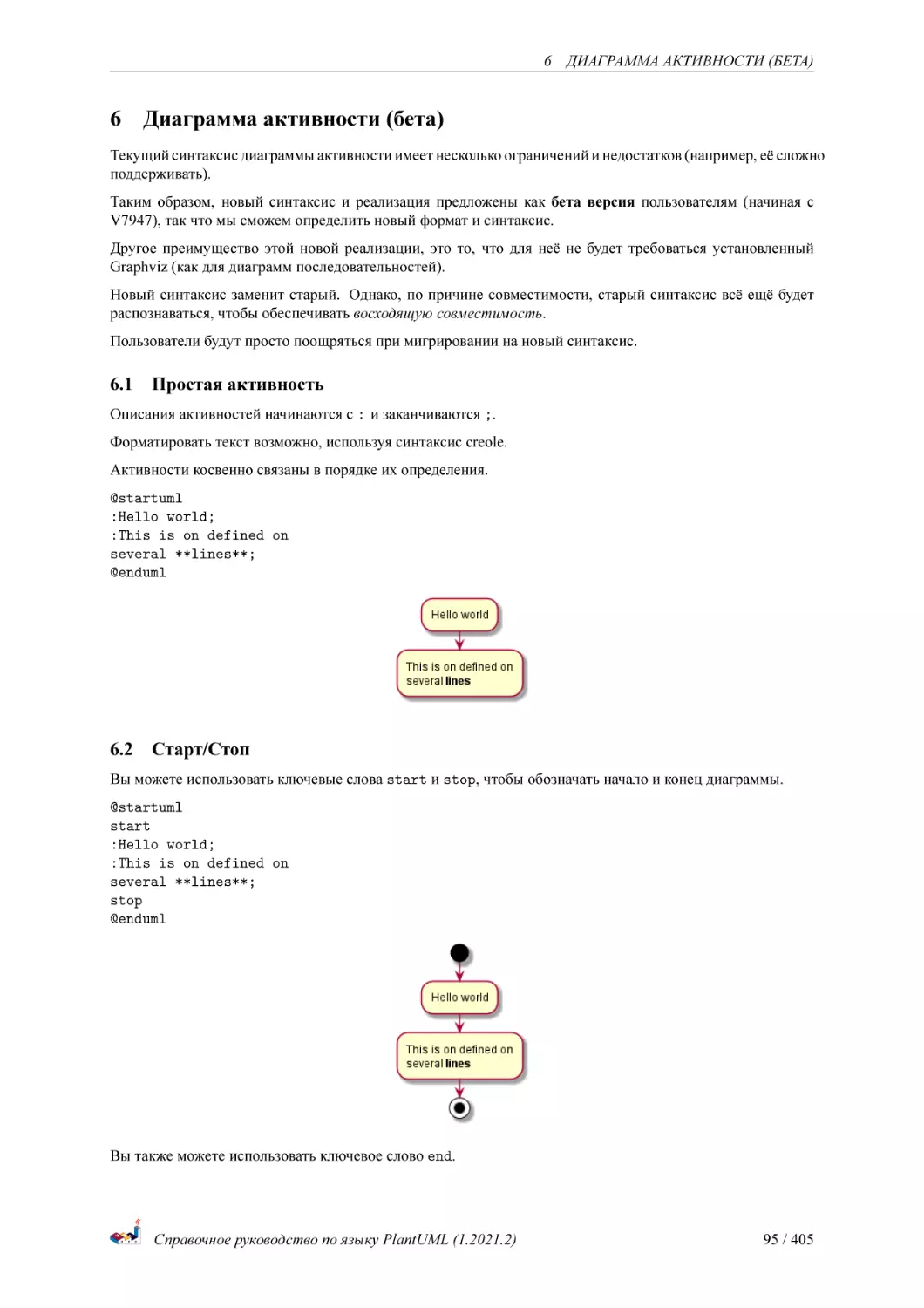
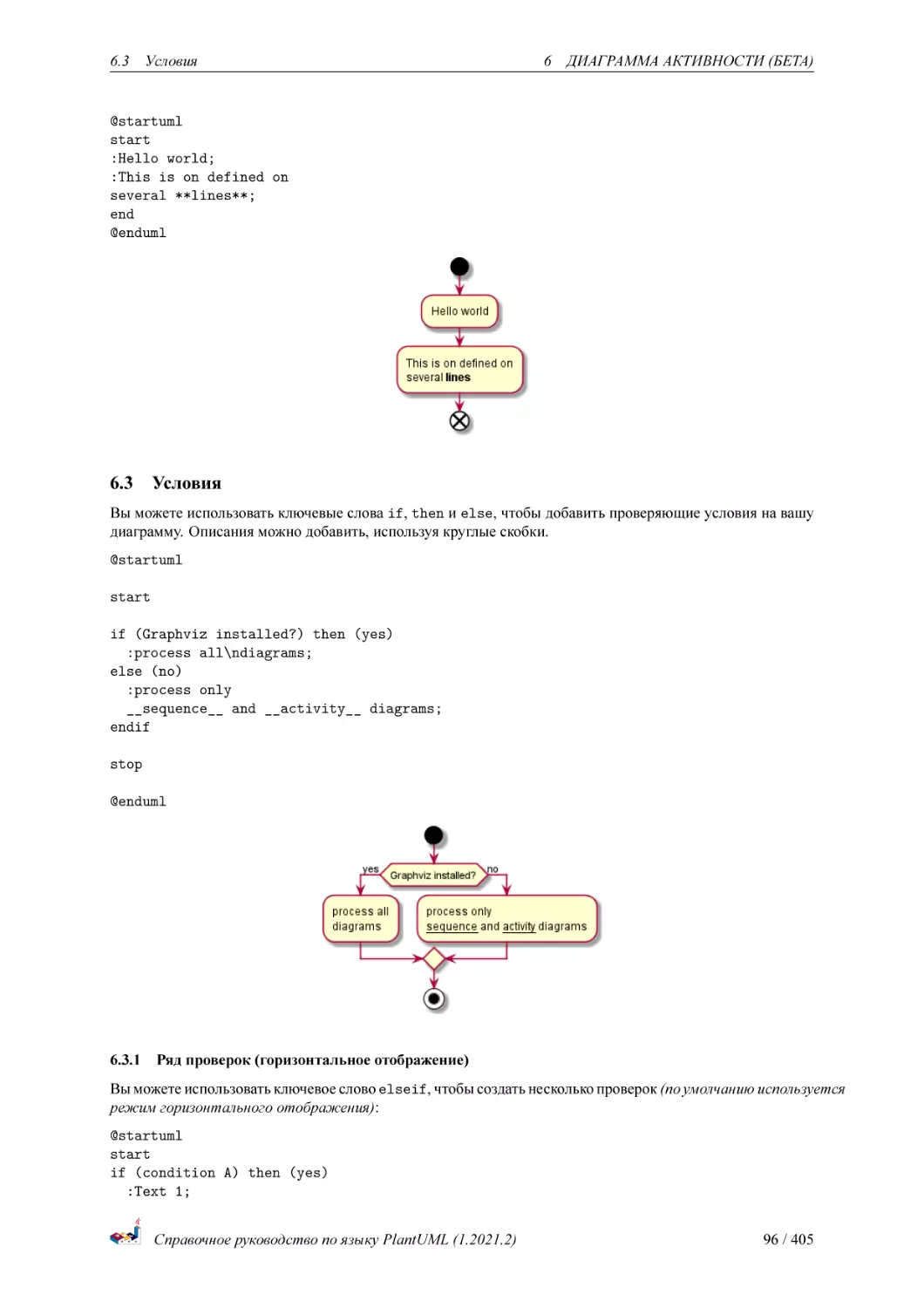
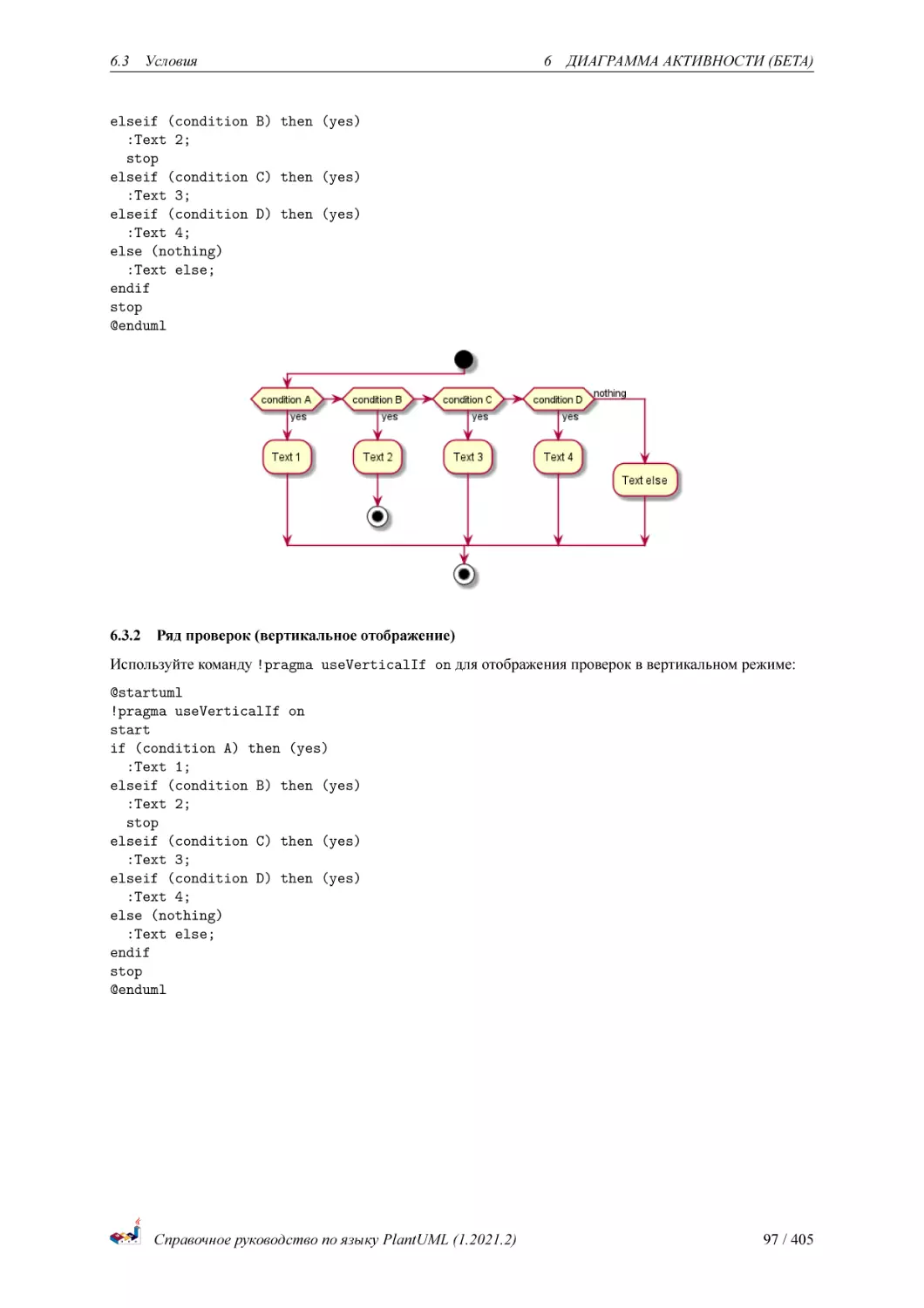
![Conditional with stop on an action [kill, detach]](https://djvu.online/jpg1/h/N/Y/hNYTjttkdzpUp/099.webp)
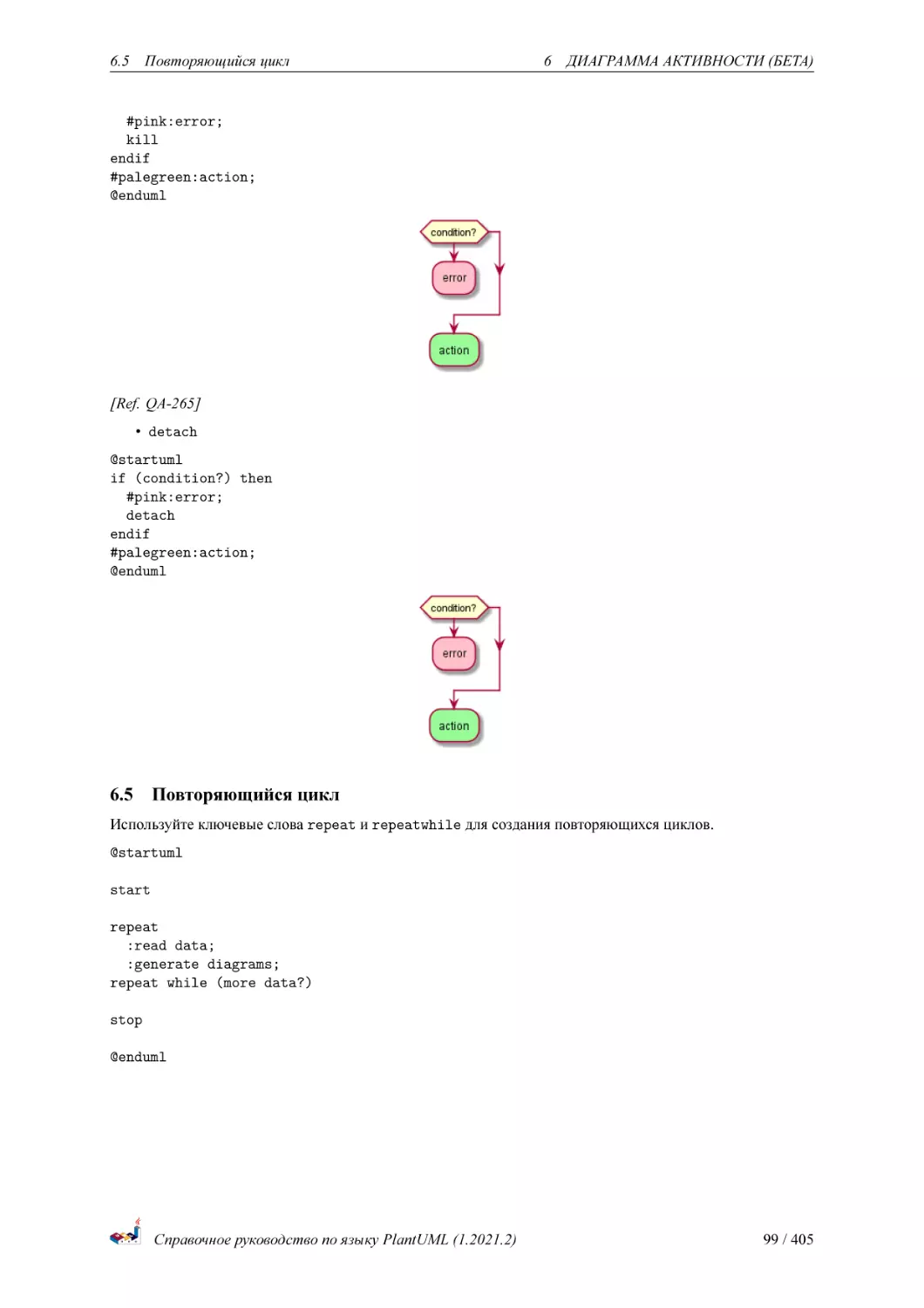
![Break on a repeat loop [break]](https://djvu.online/jpg1/h/N/Y/hNYTjttkdzpUp/101.webp)















![History [[H], [H*]]](https://djvu.online/jpg1/h/N/Y/hNYTjttkdzpUp/172.webp)
![Fork [fork, join]](https://djvu.online/jpg1/h/N/Y/hNYTjttkdzpUp/173.webp)
![Conditional [choice]](https://djvu.online/jpg1/h/N/Y/hNYTjttkdzpUp/175.webp)
![Stereotypes full example [choice, fork, join, end]](https://djvu.online/jpg1/h/N/Y/hNYTjttkdzpUp/176.webp)
![Point [entryPoint, exitPoint]](https://djvu.online/jpg1/h/N/Y/hNYTjttkdzpUp/177.webp)
![Pin [inputPin, outputPin]](https://djvu.online/jpg1/h/N/Y/hNYTjttkdzpUp/178.webp)
![Expansion [expansionInput, expansionOutput]](https://djvu.online/jpg1/h/N/Y/hNYTjttkdzpUp/179.webp)






























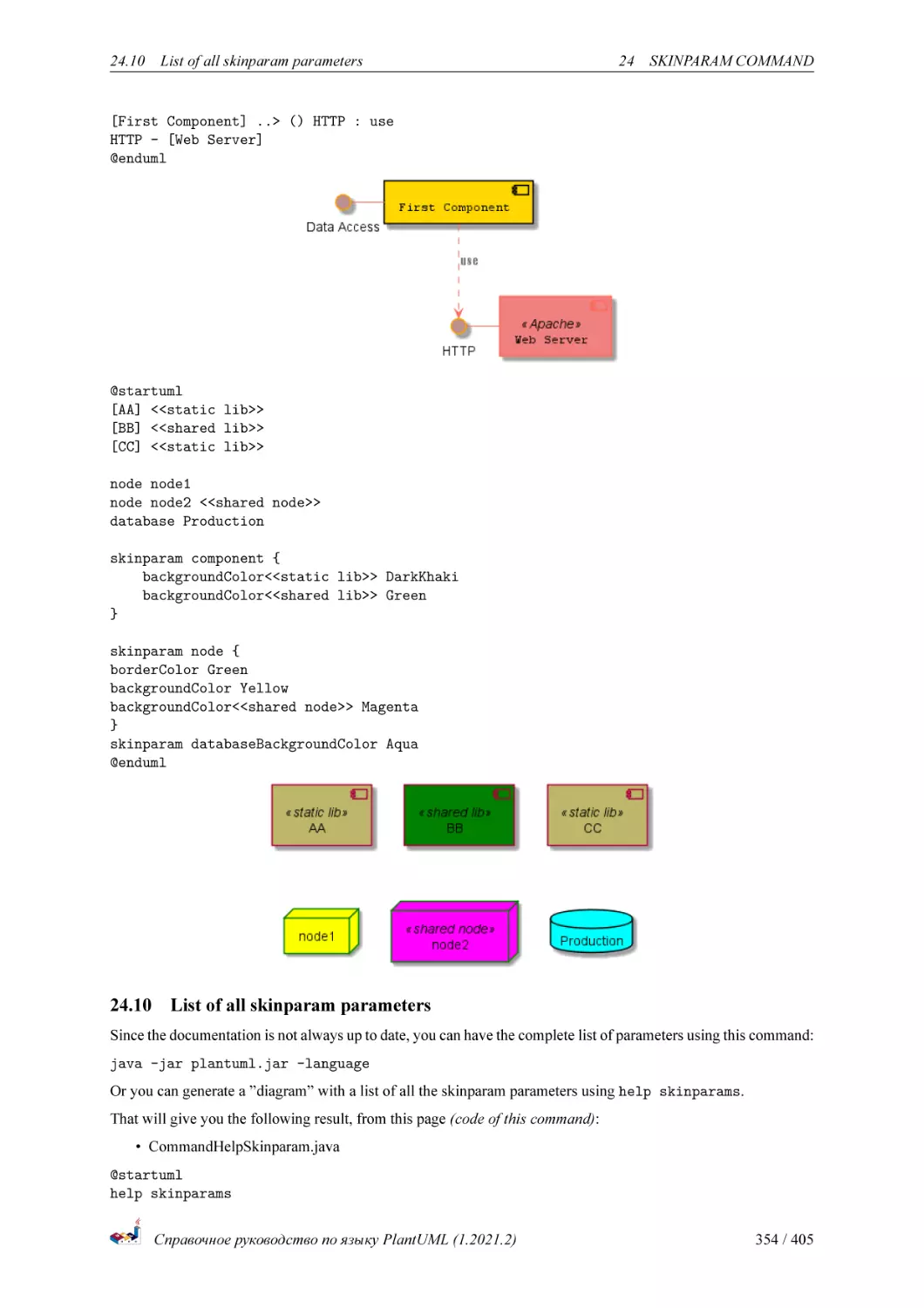


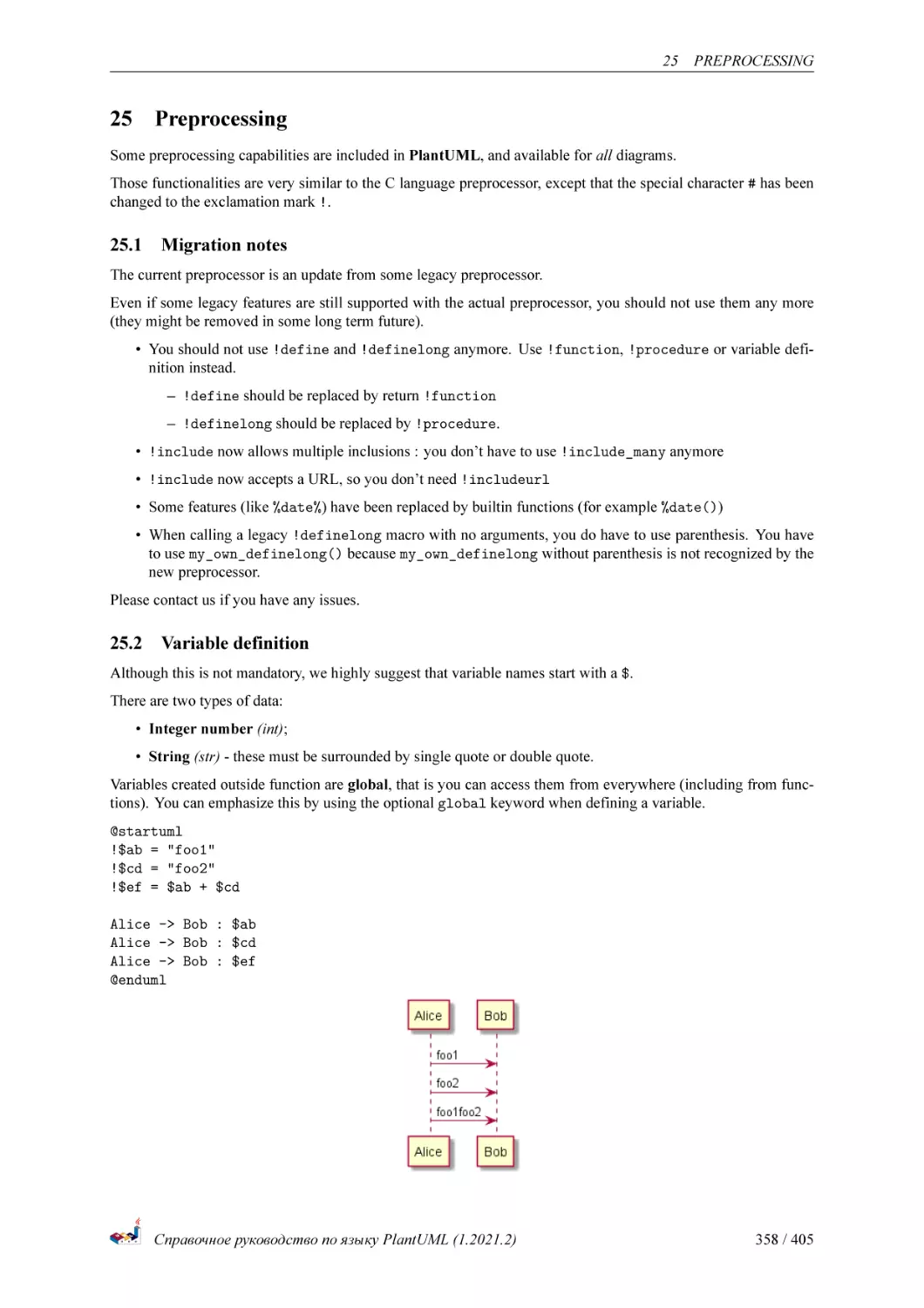
![Boolean expression
Boolean represention [0 is false]
Boolean operation and operator [&&, ||, ()]
Boolean builtin functions [%false(), %true(), %not(<exp>)]
Conditions [!if, !else, !elseif, !endif]](https://djvu.online/jpg1/h/N/Y/hNYTjttkdzpUp/360.webp)
![While loop [!while, !endwhile]](https://djvu.online/jpg1/h/N/Y/hNYTjttkdzpUp/361.webp)
![Procedure [!procedure, !endprocedure]](https://djvu.online/jpg1/h/N/Y/hNYTjttkdzpUp/362.webp)
![Return function [!function, !endfunction]](https://djvu.online/jpg1/h/N/Y/hNYTjttkdzpUp/363.webp)
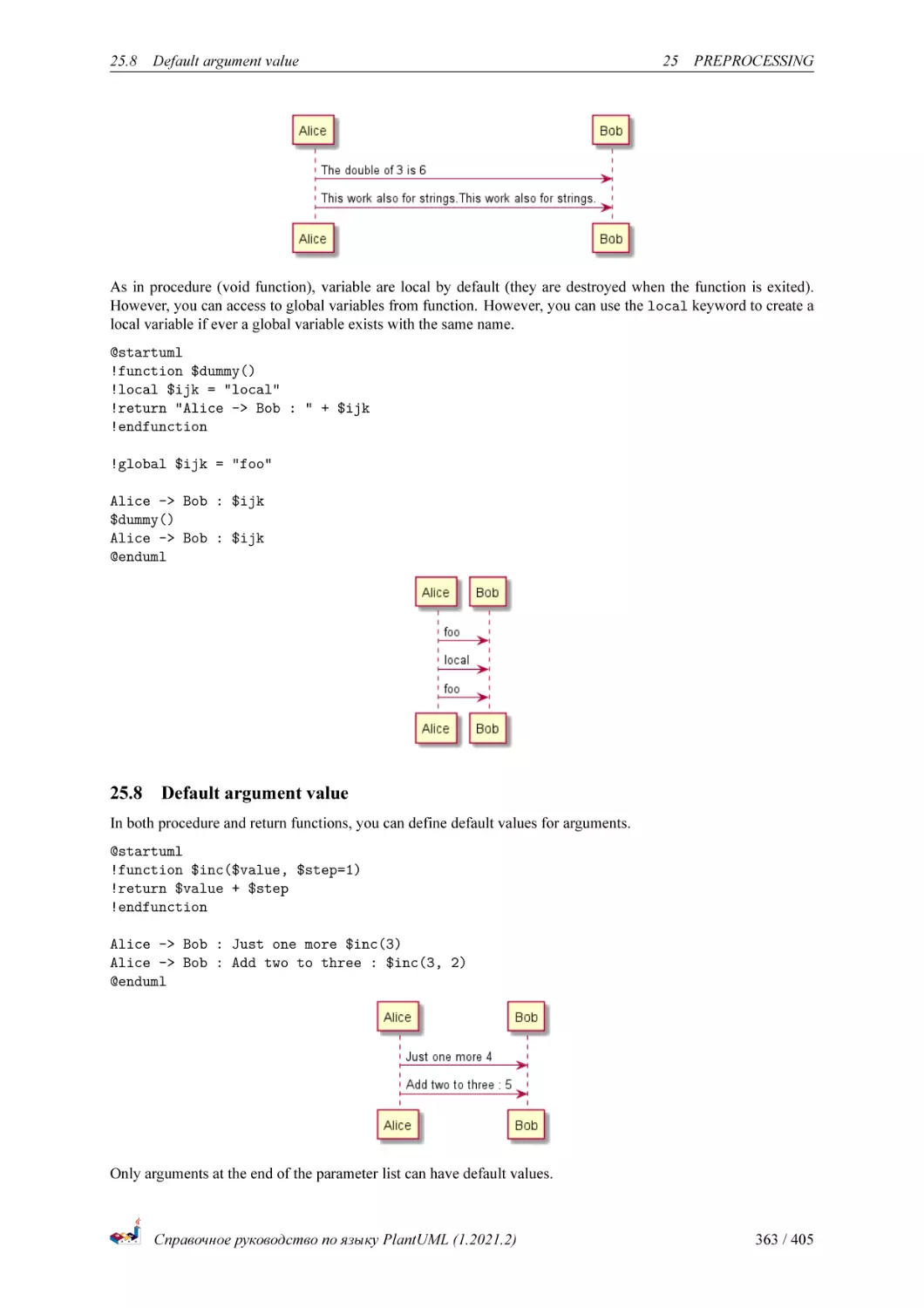
![Unquoted procedure or function [!unquoted]
Keywords arguments](https://djvu.online/jpg1/h/N/Y/hNYTjttkdzpUp/365.webp)
![Including files or URL [!include, !include_many, !include_once]](https://djvu.online/jpg1/h/N/Y/hNYTjttkdzpUp/366.webp)
![Including Subpart [!startsub, !endsub, !includesub]
Builtin functions [%]](https://djvu.online/jpg1/h/N/Y/hNYTjttkdzpUp/367.webp)
![Logging [!log]
Memory dump [!memory_dump]](https://djvu.online/jpg1/h/N/Y/hNYTjttkdzpUp/368.webp)
![Assertion [!assert]
Building custom library [!import, !include]](https://djvu.online/jpg1/h/N/Y/hNYTjttkdzpUp/369.webp)
![Search path
Argument concatenation [##]
Dynamic invocation [%invoke_procedure(), %call_user_func()]](https://djvu.online/jpg1/h/N/Y/hNYTjttkdzpUp/370.webp)
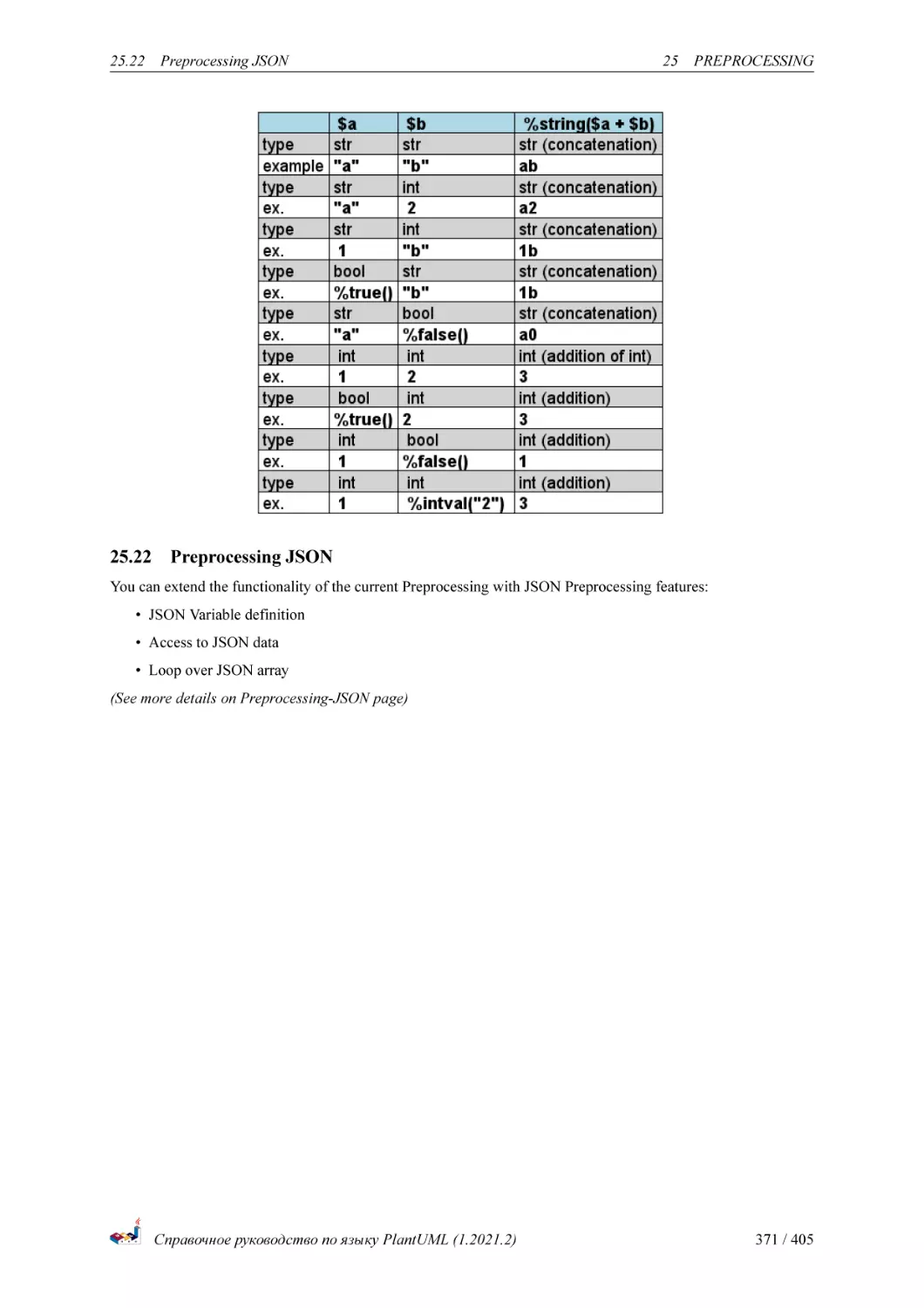
![Evaluation of addition depending of data types [+]](https://djvu.online/jpg1/h/N/Y/hNYTjttkdzpUp/371.webp)

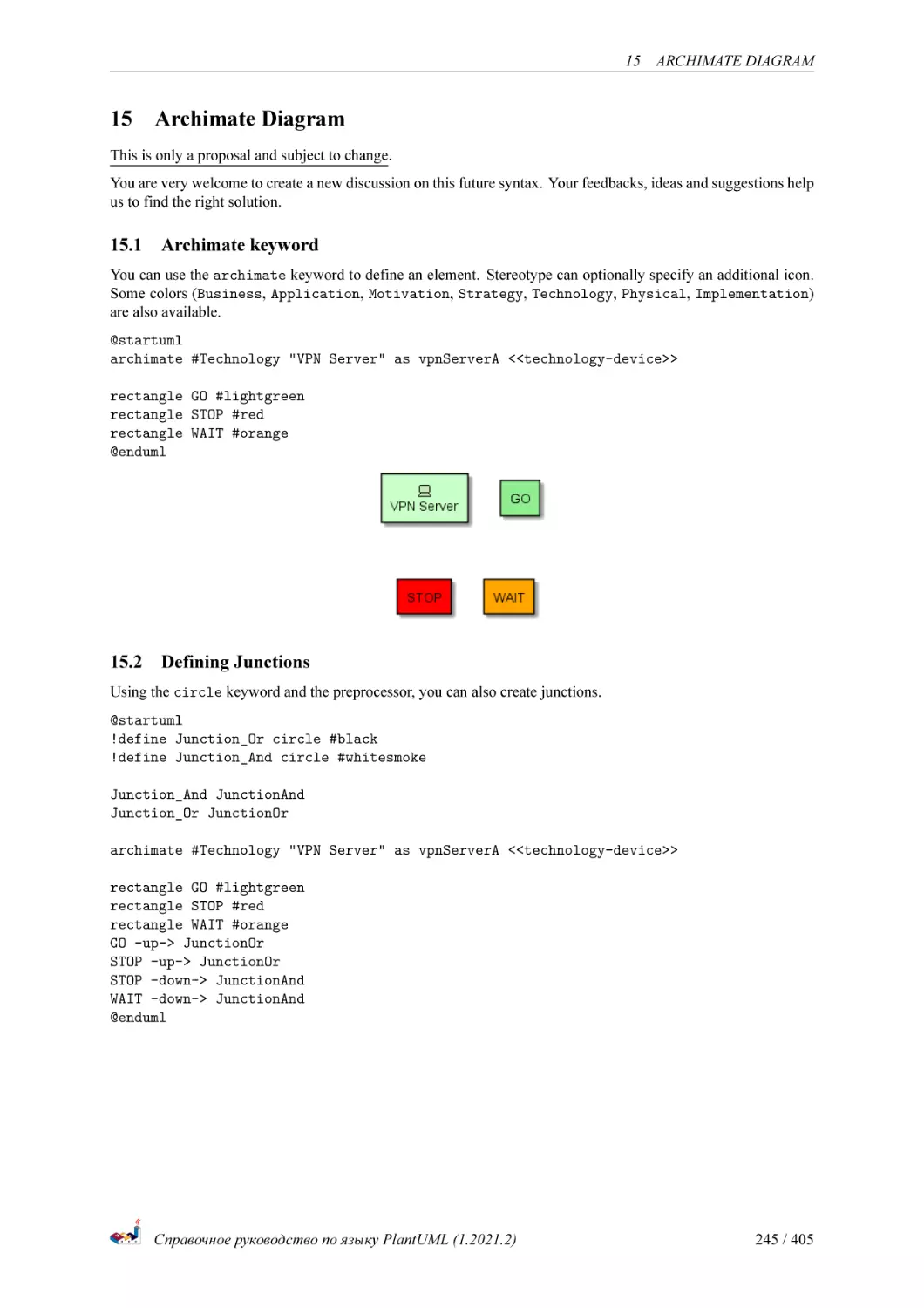
![ArchiMate [archimate]](https://djvu.online/jpg1/h/N/Y/hNYTjttkdzpUp/377.webp)
![AWS library [aws]](https://djvu.online/jpg1/h/N/Y/hNYTjttkdzpUp/378.webp)
![Amazon Labs AWS Library [awslib]](https://djvu.online/jpg1/h/N/Y/hNYTjttkdzpUp/379.webp)
![Azure library [azure]](https://djvu.online/jpg1/h/N/Y/hNYTjttkdzpUp/380.webp)
![C4 Library [C4]](https://djvu.online/jpg1/h/N/Y/hNYTjttkdzpUp/381.webp)
![Cloud Insight [cloudinsight]](https://djvu.online/jpg1/h/N/Y/hNYTjttkdzpUp/382.webp)
![Cloudogu [cloudogu]](https://djvu.online/jpg1/h/N/Y/hNYTjttkdzpUp/383.webp)
![Elastic library [elastic]](https://djvu.online/jpg1/h/N/Y/hNYTjttkdzpUp/384.webp)

![Google Material Icons [material]](https://djvu.online/jpg1/h/N/Y/hNYTjttkdzpUp/386.webp)
![Kubernetes [kubernetes]](https://djvu.online/jpg1/h/N/Y/hNYTjttkdzpUp/387.webp)
![Logos [logos]](https://djvu.online/jpg1/h/N/Y/hNYTjttkdzpUp/388.webp)

![Office [office]](https://djvu.online/jpg1/h/N/Y/hNYTjttkdzpUp/390.webp)

![Open Security Architecture (OSA) [osa]](https://djvu.online/jpg1/h/N/Y/hNYTjttkdzpUp/392.webp)

![Tupadr3 library [tupadr3]](https://djvu.online/jpg1/h/N/Y/hNYTjttkdzpUp/394.webp)




Text
Построение диаграмм UML с
использованием PlantUML
Справочное руководство по языку PlantUML
(Version 1.2021.2)
PlantUML —проект с открытым кодом, позволяющий быстро создавать:
• Диаграммы последовательности
• Диаграммы прецедентов
• Диаграммы классов
• Диаграммы объектов
• Диаграммы активности
• Диаграммы компонентов
• Диаграмма развёртывания
• Диаграммы состояний
• Диаграмма синхронизации
Также поддерживаются следующие не-UML-диаграммы:
• JSON Data
• YAML Data
• Network diagram (nwdiag)
• Wireframe graphical interface
• Archimate diagram
• Specification and Description Language (SDL)
• Ditaa diagram
• Gantt diagram
• MindMap diagram
• Work Breakdown Structure diagram
• Mathematic with AsciiMath or JLaTeXMath notation
• Entity Relationship diagram
Для создания диаграмм применяется простой и интуитивно понятный язык.
1 ДИАГРАММА ПОСЛЕДОВАТЕЛЬНОСТИ
1
1.1
Диаграмма последовательности
Основные примеры
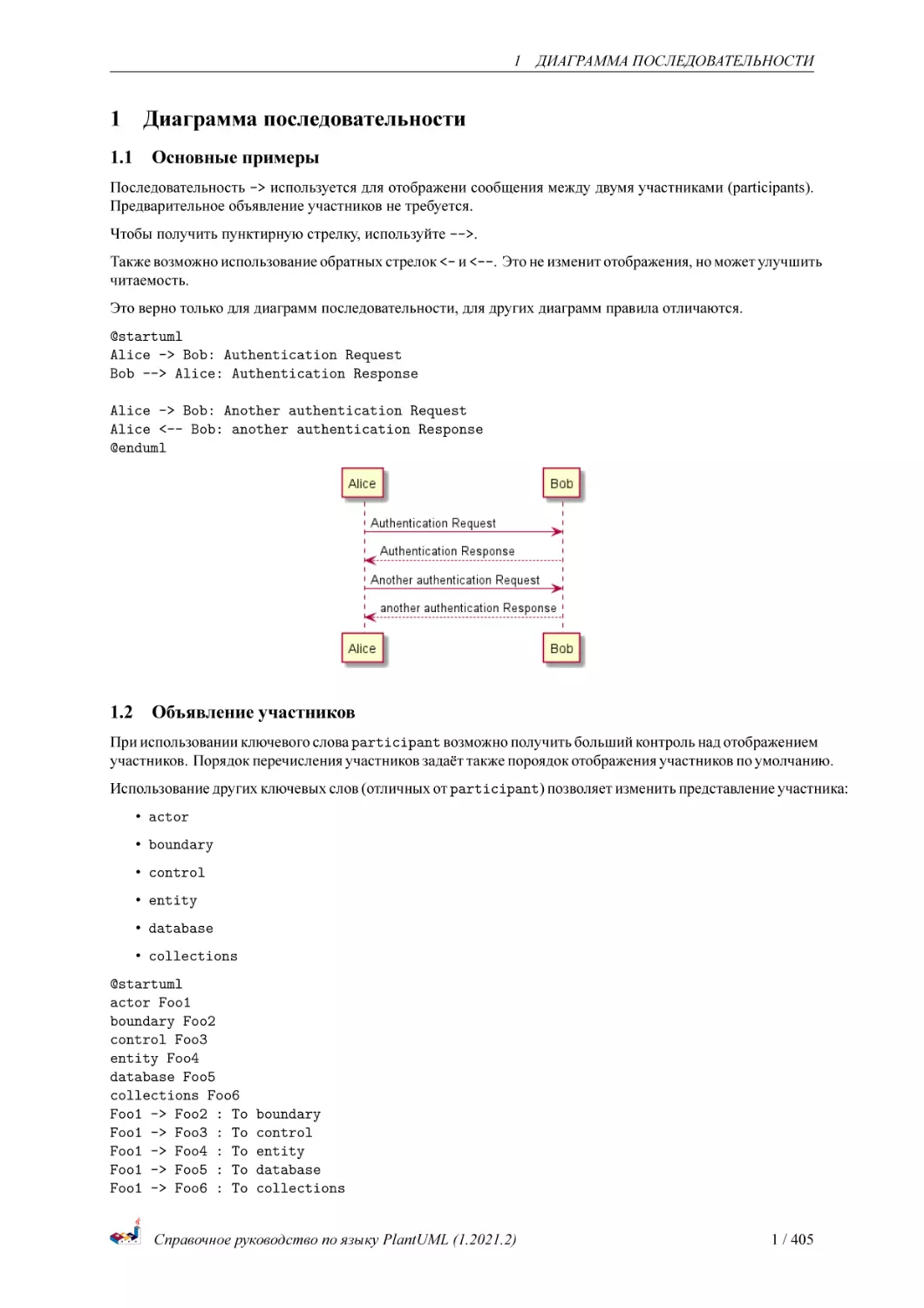
Последовательность -> используется для отображени сообщения между двумя участниками (participants).
Предварительное объявление участников не требуется.
Чтобы получить пунктирную стрелку, используйте -->.
Также возможно использование обратных стрелок <- и <--. Это не изменит отображения, но может улучшить
читаемость.
Это верно только для диаграмм последовательности, для других диаграмм правила отличаются.
@startuml
Alice -> Bob: Authentication Request
Bob --> Alice: Authentication Response
Alice -> Bob: Another authentication Request
Alice <-- Bob: another authentication Response
@enduml
1.2
Объявление участников
При использовании ключевого слова participant возможно получить больший контроль над отображением
участников. Порядок перечисления участников задаёт также пороядок отображения участников по умолчанию.
Использование других ключевых слов (отличных от participant) позволяет изменить представление участника:
• actor
• boundary
• control
• entity
• database
• collections
@startuml
actor Foo1
boundary Foo2
control Foo3
entity Foo4
database Foo5
collections Foo6
Foo1 -> Foo2 : To
Foo1 -> Foo3 : To
Foo1 -> Foo4 : To
Foo1 -> Foo5 : To
Foo1 -> Foo6 : To
boundary
control
entity
database
collections
Справочное руководство по языку PlantUML (1.2021.2)
1 / 405
1.2 Объявление участников
1 ДИАГРАММА ПОСЛЕДОВАТЕЛЬНОСТИ
@enduml
Возможно переименовать участника используя ключевое слово as.
Также возможно изменить цвет фона участника.
@startuml
actor Bob #red
' The only difference between actor
'and participant is the drawing
participant Alice
participant "I have a really\nlong name" as L #99FF99
/' You can also declare:
participant L as "I have a really\nlong name" #99FF99
'/
Alice->Bob: Authentication Request
Bob->Alice: Authentication Response
Bob->L: Log transaction
@enduml
Возможно изменить порядок следования участников с помощью ключевого слова order.
@startuml
participant Last order 30
participant Middle order 20
participant First order 10
Справочное руководство по языку PlantUML (1.2021.2)
2 / 405
1.3 Использование небуквенных символов в названиях участников
1 ДИАГРАММА ПОСЛЕДОВАТЕЛЬНОСТИ
@enduml
1.3
Использование небуквенных символов в названиях участников
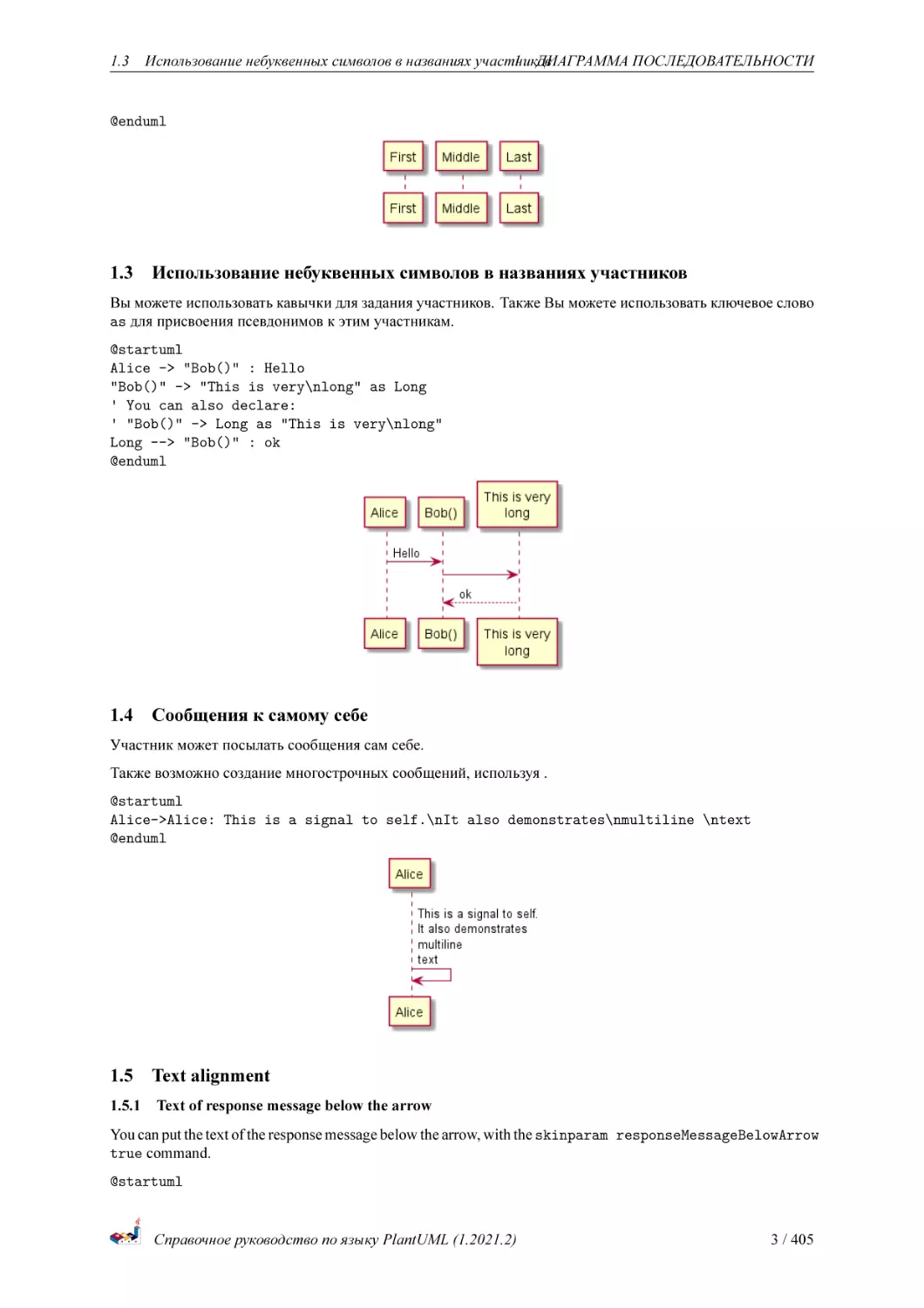
Вы можете использовать кавычки для задания участников. Также Вы можете использовать ключевое слово
as для присвоения псевдонимов к этим участникам.
@startuml
Alice -> "Bob()" : Hello
"Bob()" -> "This is very\nlong" as Long
' You can also declare:
' "Bob()" -> Long as "This is very\nlong"
Long --> "Bob()" : ok
@enduml
1.4
Сообщения к самому себе
Участник может посылать сообщения сам себе.
Также возможно создание многострочных сообщений, используя .
@startuml
Alice->Alice: This is a signal to self.\nIt also demonstrates\nmultiline \ntext
@enduml
1.5
Text alignment
1.5.1
Text of response message below the arrow
You can put the text of the response message below the arrow, with the skinparam responseMessageBelowArrow
true command.
@startuml
Справочное руководство по языку PlantUML (1.2021.2)
3 / 405
1.6 Изменение стиля стрелок
1 ДИАГРАММА ПОСЛЕДОВАТЕЛЬНОСТИ
skinparam responseMessageBelowArrow true
Bob -> Alice : hello
Alice -> Bob : ok
@enduml
TODO: TODO Link to Text Alignment on skinparam page.
1.6
Изменение стиля стрелок
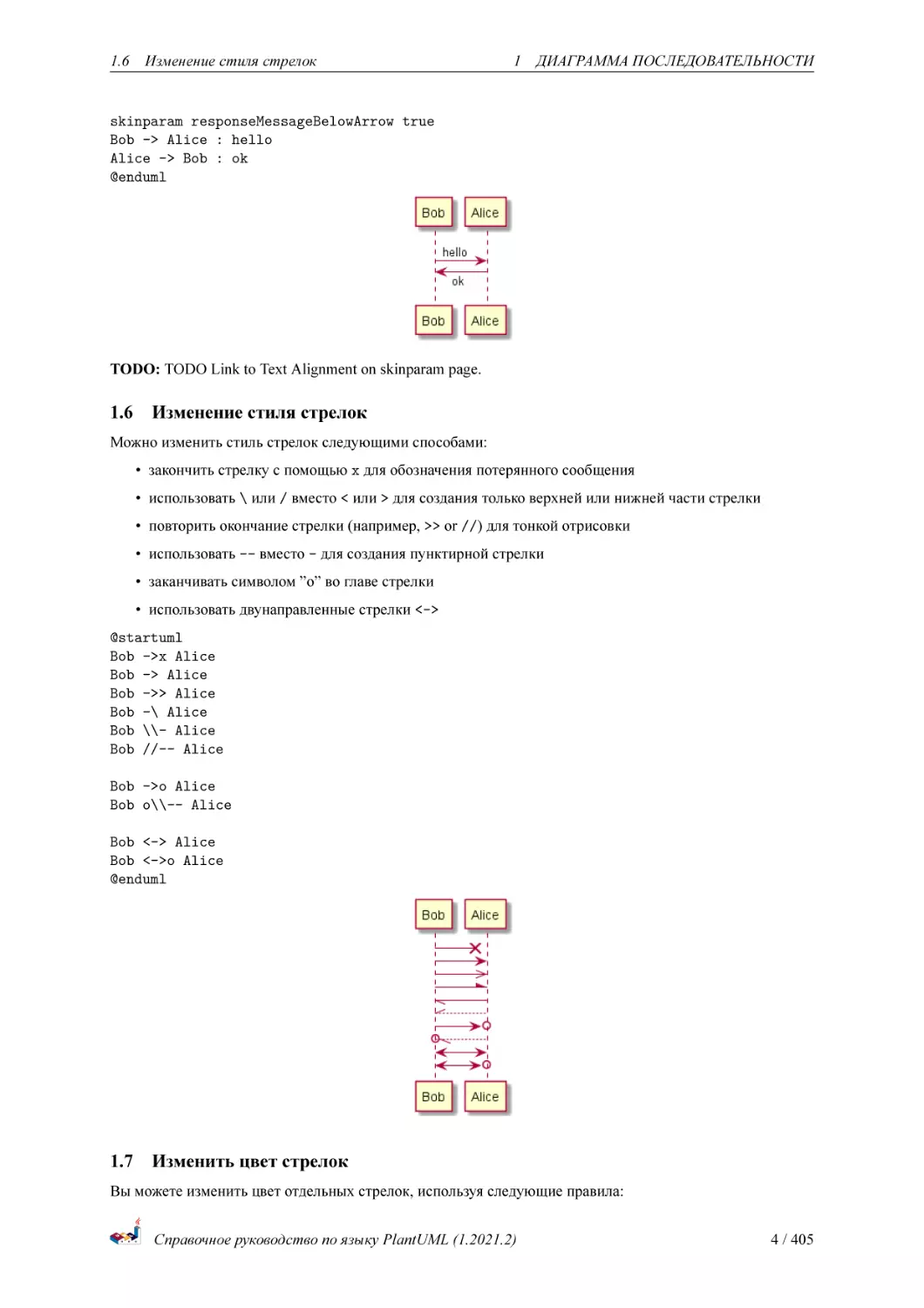
Можно изменить стиль стрелок следующими способами:
• закончить стрелку с помощью x для обозначения потерянного сообщения
• использовать \ или / вместо < или > для создания только верхней или нижней части стрелки
• повторить окончание стрелки (например, >> or //) для тонкой отрисовки
• использовать -- вместо - для создания пунктирной стрелки
• заканчивать символом ”o” во главе стрелки
• использовать двунаправленные стрелки <->
@startuml
Bob ->x Alice
Bob -> Alice
Bob ->> Alice
Bob -\ Alice
Bob \\- Alice
Bob //-- Alice
Bob ->o Alice
Bob o\\-- Alice
Bob <-> Alice
Bob <->o Alice
@enduml
1.7
Изменить цвет стрелок
Вы можете изменить цвет отдельных стрелок, используя следующие правила:
Справочное руководство по языку PlantUML (1.2021.2)
4 / 405
1.8 Нумерация сообщений в последовательностях
1 ДИАГРАММА ПОСЛЕДОВАТЕЛЬНОСТИ
@startuml
Bob -[#red]> Alice : hello
Alice -[#0000FF]->Bob : ok
@enduml
1.8
Нумерация сообщений в последовательностях
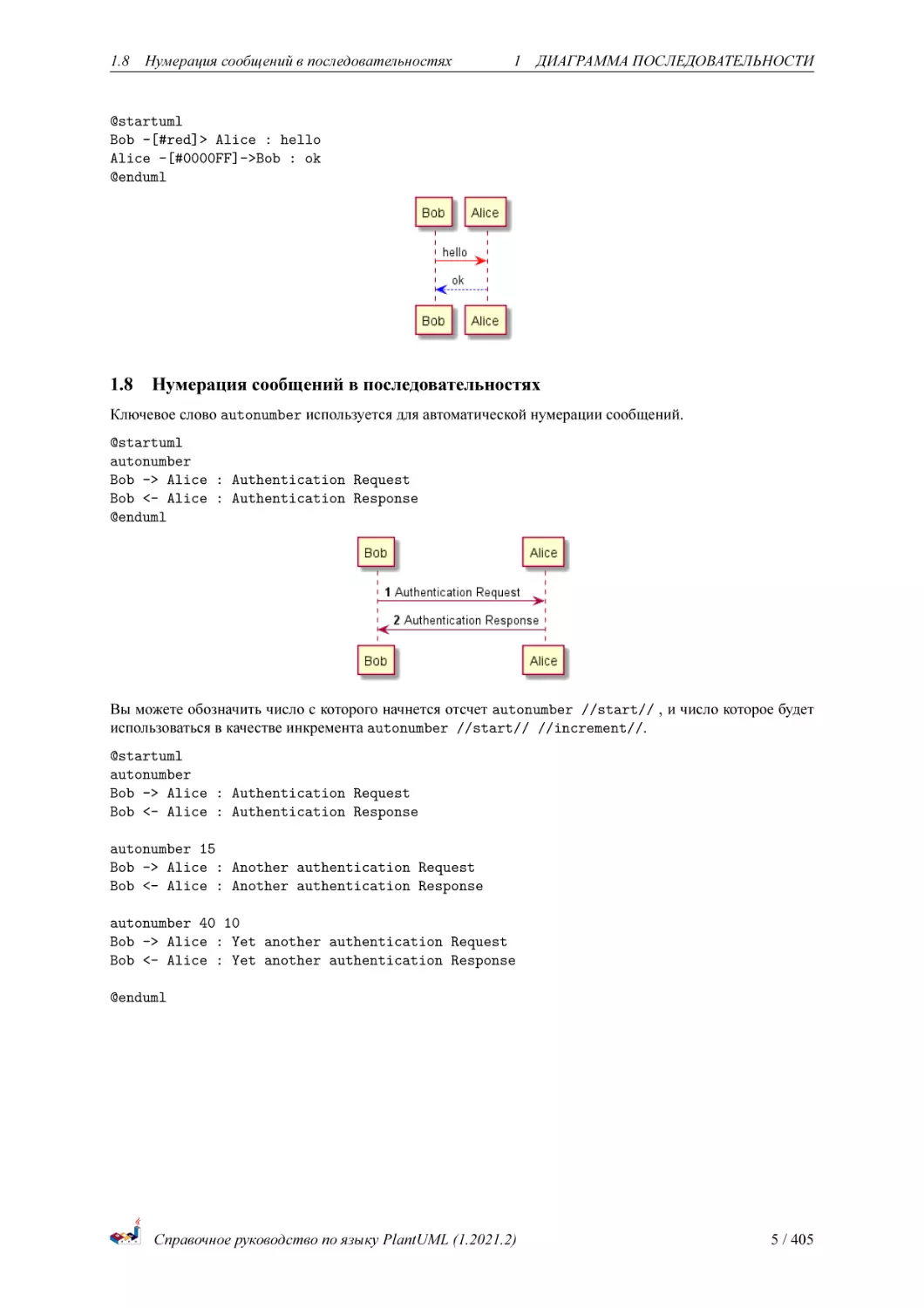
Ключевое слово autonumber используется для автоматической нумерации сообщений.
@startuml
autonumber
Bob -> Alice : Authentication Request
Bob <- Alice : Authentication Response
@enduml
Вы можете обозначить число с которого начнется отсчет autonumber //start// , и число которое будет
использоваться в качестве инкремента autonumber //start// //increment//.
@startuml
autonumber
Bob -> Alice : Authentication Request
Bob <- Alice : Authentication Response
autonumber 15
Bob -> Alice : Another authentication Request
Bob <- Alice : Another authentication Response
autonumber 40 10
Bob -> Alice : Yet another authentication Request
Bob <- Alice : Yet another authentication Response
@enduml
Справочное руководство по языку PlantUML (1.2021.2)
5 / 405
1.8 Нумерация сообщений в последовательностях
1 ДИАГРАММА ПОСЛЕДОВАТЕЛЬНОСТИ
Можно задавать формат чисел, указав его в двойных кавычках.
Форматирование выполнено с использованием класса Java DecimalFormat (0 означает цифру, # означает
цифру или ноль если отсутствует).
При форматировании также можно использовать теги html.
@startuml
autonumber "<b>[000]"
Bob -> Alice : Authentication Request
Bob <- Alice : Authentication Response
autonumber 15 "<b>(<u>##</u>)"
Bob -> Alice : Another authentication Request
Bob <- Alice : Another authentication Response
autonumber 40 10 "<font color=red><b>Message 0 "
Bob -> Alice : Yet another authentication Request
Bob <- Alice : Yet another authentication Response
@enduml
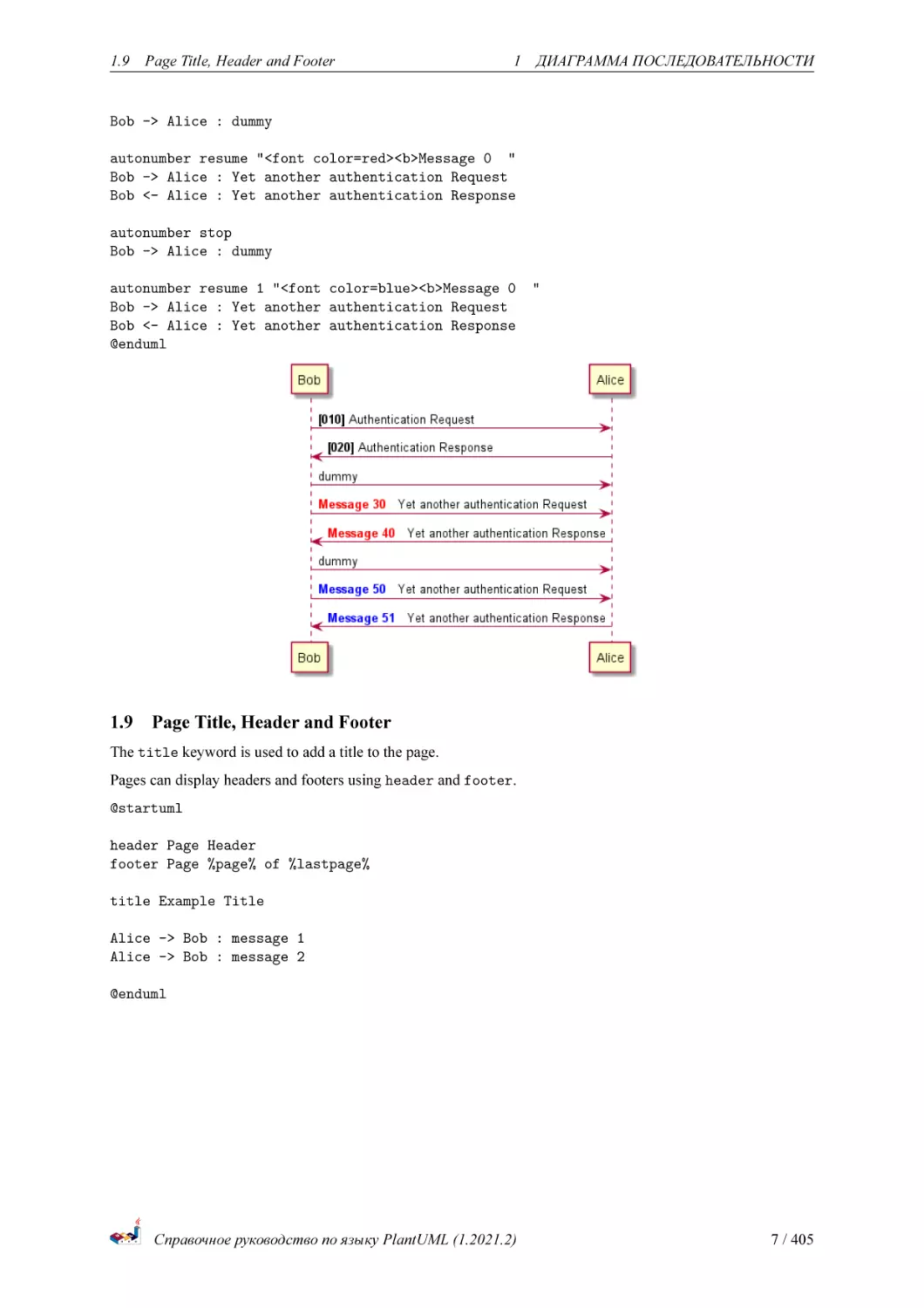
Вы так же можете использовать autonumber stop и autonumber resume //increment// //format//
чтобы соотсетственно остановить и продолжить автоматическое нумерование.
@startuml
autonumber 10 10 "<b>[000]"
Bob -> Alice : Authentication Request
Bob <- Alice : Authentication Response
autonumber stop
Справочное руководство по языку PlantUML (1.2021.2)
6 / 405
1.9 Page Title, Header and Footer
1 ДИАГРАММА ПОСЛЕДОВАТЕЛЬНОСТИ
Bob -> Alice : dummy
autonumber resume "<font color=red><b>Message 0 "
Bob -> Alice : Yet another authentication Request
Bob <- Alice : Yet another authentication Response
autonumber stop
Bob -> Alice : dummy
autonumber resume 1 "<font color=blue><b>Message 0
Bob -> Alice : Yet another authentication Request
Bob <- Alice : Yet another authentication Response
@enduml
1.9
"
Page Title, Header and Footer
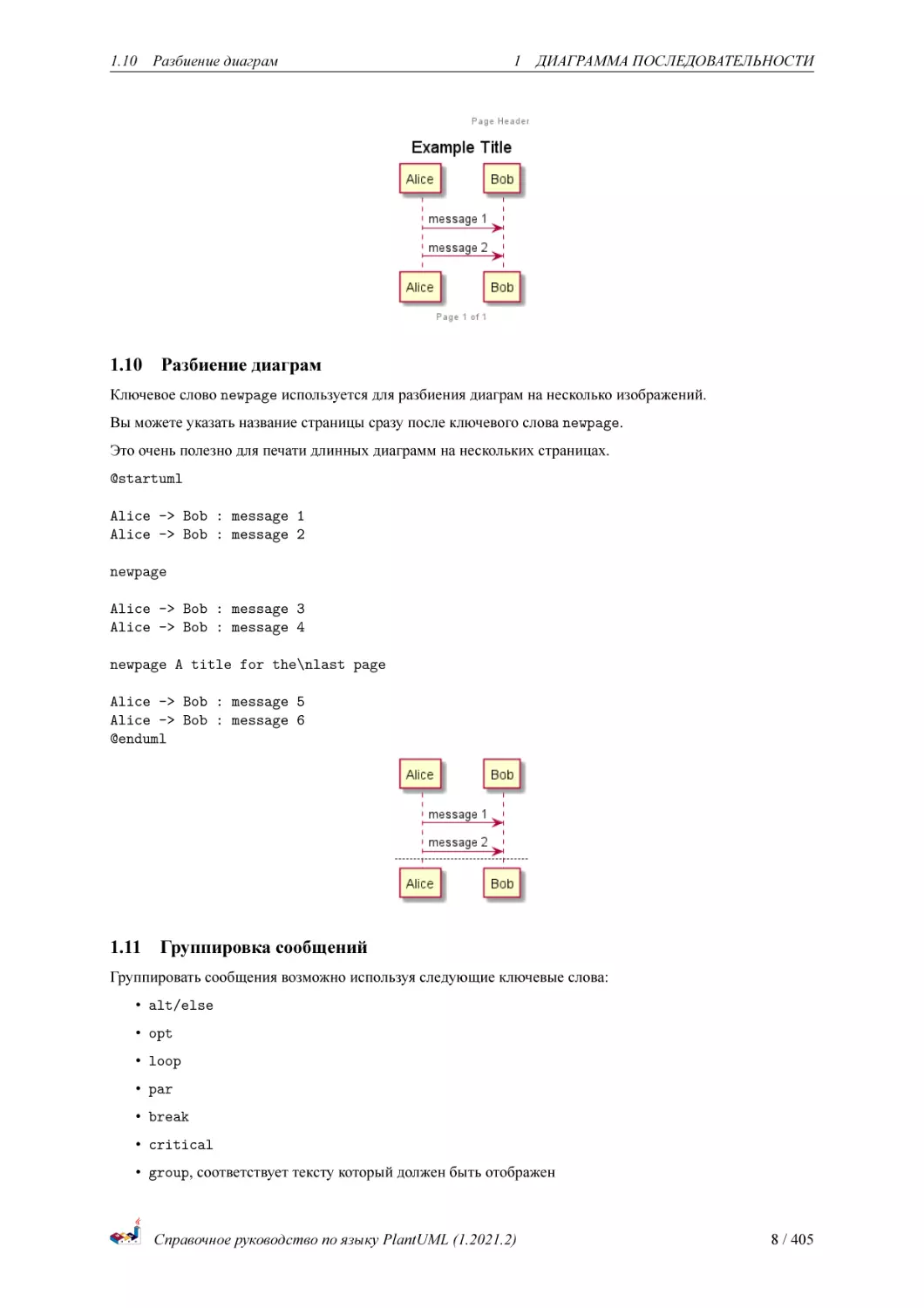
The title keyword is used to add a title to the page.
Pages can display headers and footers using header and footer.
@startuml
header Page Header
footer Page %page% of %lastpage%
title Example Title
Alice -> Bob : message 1
Alice -> Bob : message 2
@enduml
Справочное руководство по языку PlantUML (1.2021.2)
7 / 405
1.10
1.10
Разбиение диаграм
1 ДИАГРАММА ПОСЛЕДОВАТЕЛЬНОСТИ
Разбиение диаграм
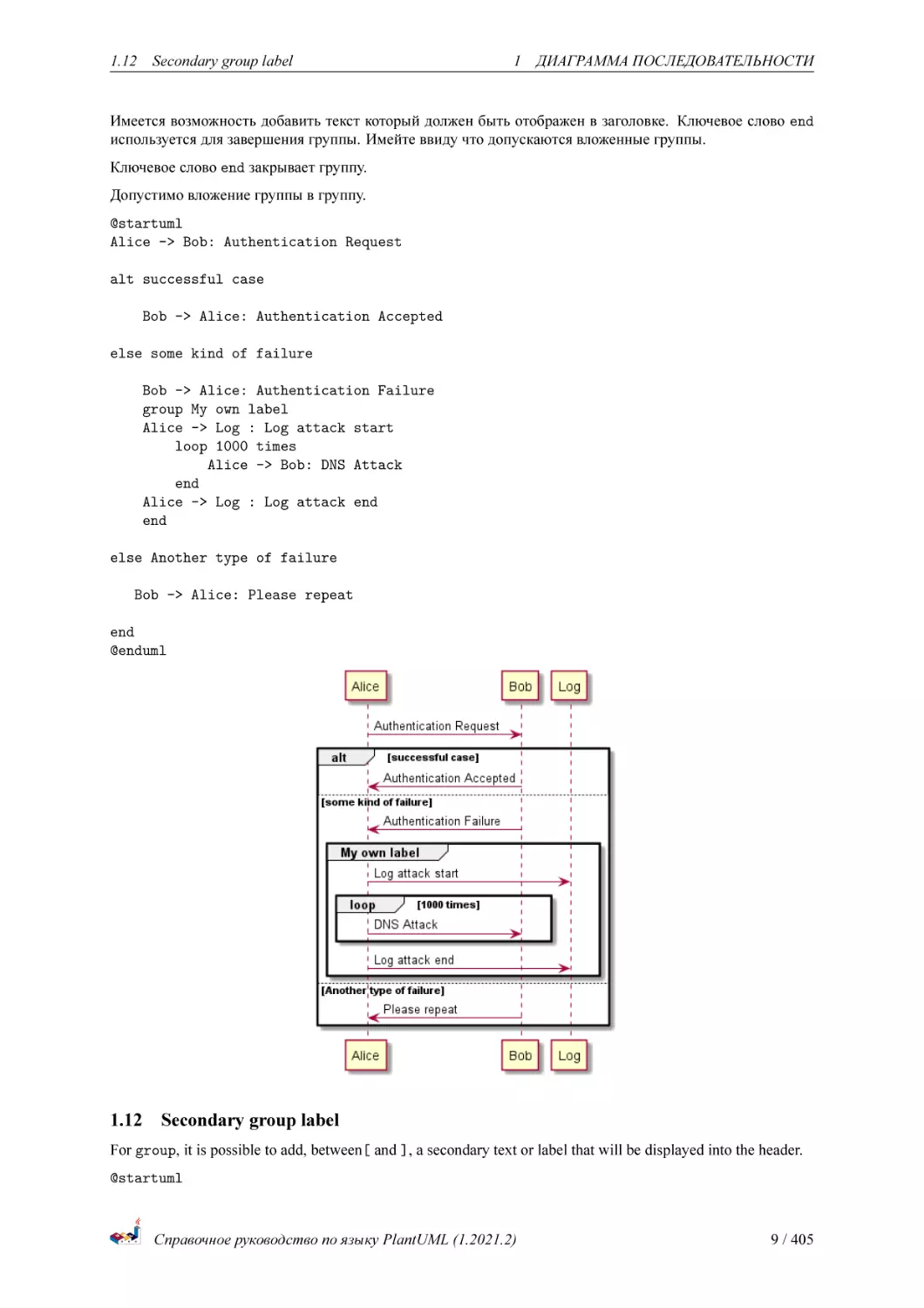
Ключевое слово newpage используется для разбиения диаграм на несколько изображений.
Вы можете указать название страницы сразу после ключевого слова newpage.
Это очень полезно для печати длинных диаграмм на нескольких страницах.
@startuml
Alice -> Bob : message 1
Alice -> Bob : message 2
newpage
Alice -> Bob : message 3
Alice -> Bob : message 4
newpage A title for the\nlast page
Alice -> Bob : message 5
Alice -> Bob : message 6
@enduml
1.11 Группировка сообщений
Группировать сообщения возможно используя следующие ключевые слова:
• alt/else
• opt
• loop
• par
• break
• critical
• group, соответствует тексту который должен быть отображен
Справочное руководство по языку PlantUML (1.2021.2)
8 / 405
1.12
Secondary group label
1 ДИАГРАММА ПОСЛЕДОВАТЕЛЬНОСТИ
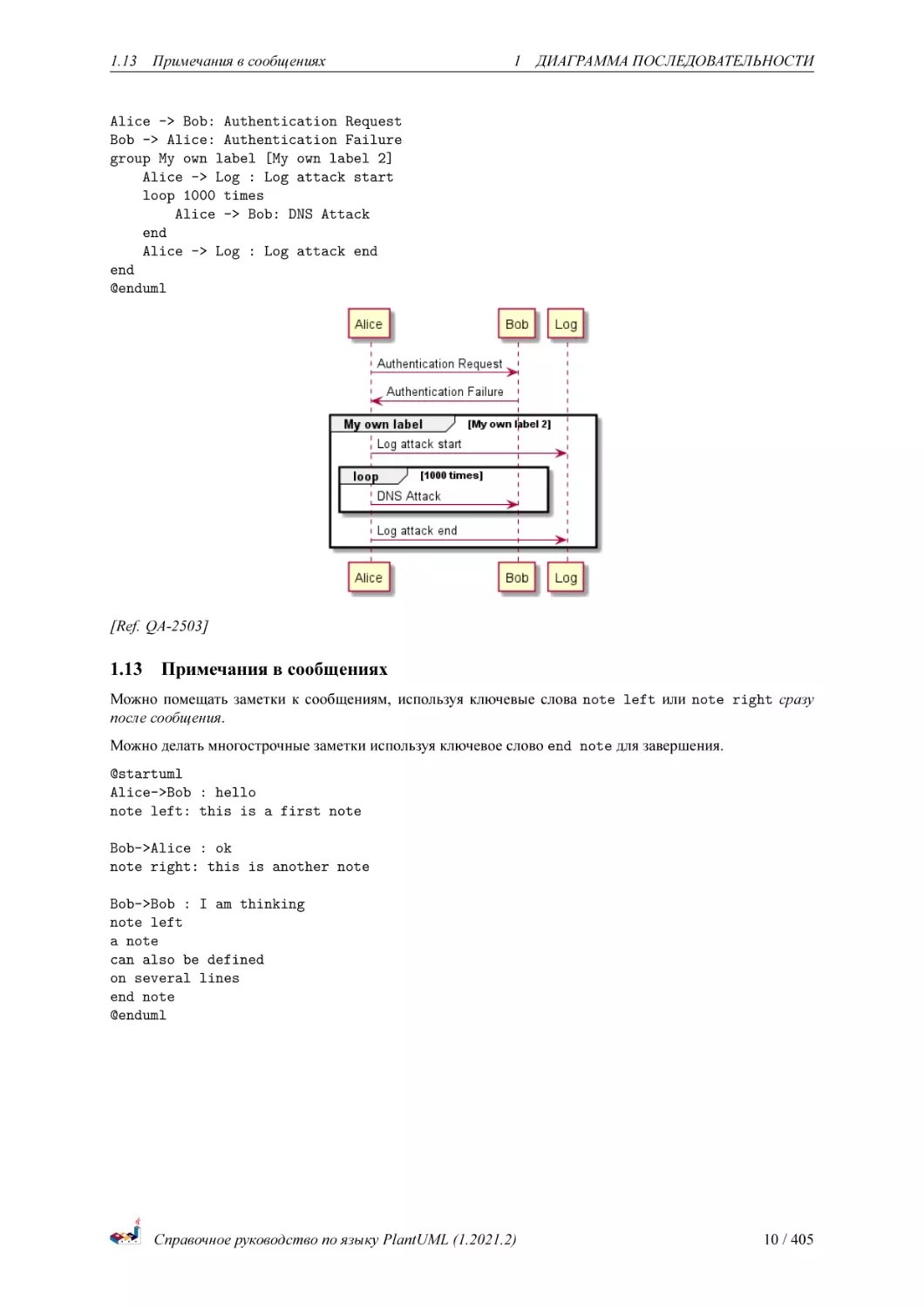
Имеется возможность добавить текст который должен быть отображен в заголовке. Ключевое слово end
используется для завершения группы. Имейте ввиду что допускаются вложенные группы.
Ключевое слово end закрывает группу.
Допустимо вложение группы в группу.
@startuml
Alice -> Bob: Authentication Request
alt successful case
Bob -> Alice: Authentication Accepted
else some kind of failure
Bob -> Alice: Authentication Failure
group My own label
Alice -> Log : Log attack start
loop 1000 times
Alice -> Bob: DNS Attack
end
Alice -> Log : Log attack end
end
else Another type of failure
Bob -> Alice: Please repeat
end
@enduml
1.12
Secondary group label
For group, it is possible to add, between[ and ], a secondary text or label that will be displayed into the header.
@startuml
Справочное руководство по языку PlantUML (1.2021.2)
9 / 405
1.13
Примечания в сообщениях
1 ДИАГРАММА ПОСЛЕДОВАТЕЛЬНОСТИ
Alice -> Bob: Authentication Request
Bob -> Alice: Authentication Failure
group My own label [My own label 2]
Alice -> Log : Log attack start
loop 1000 times
Alice -> Bob: DNS Attack
end
Alice -> Log : Log attack end
end
@enduml
[Ref. QA-2503]
1.13
Примечания в сообщениях
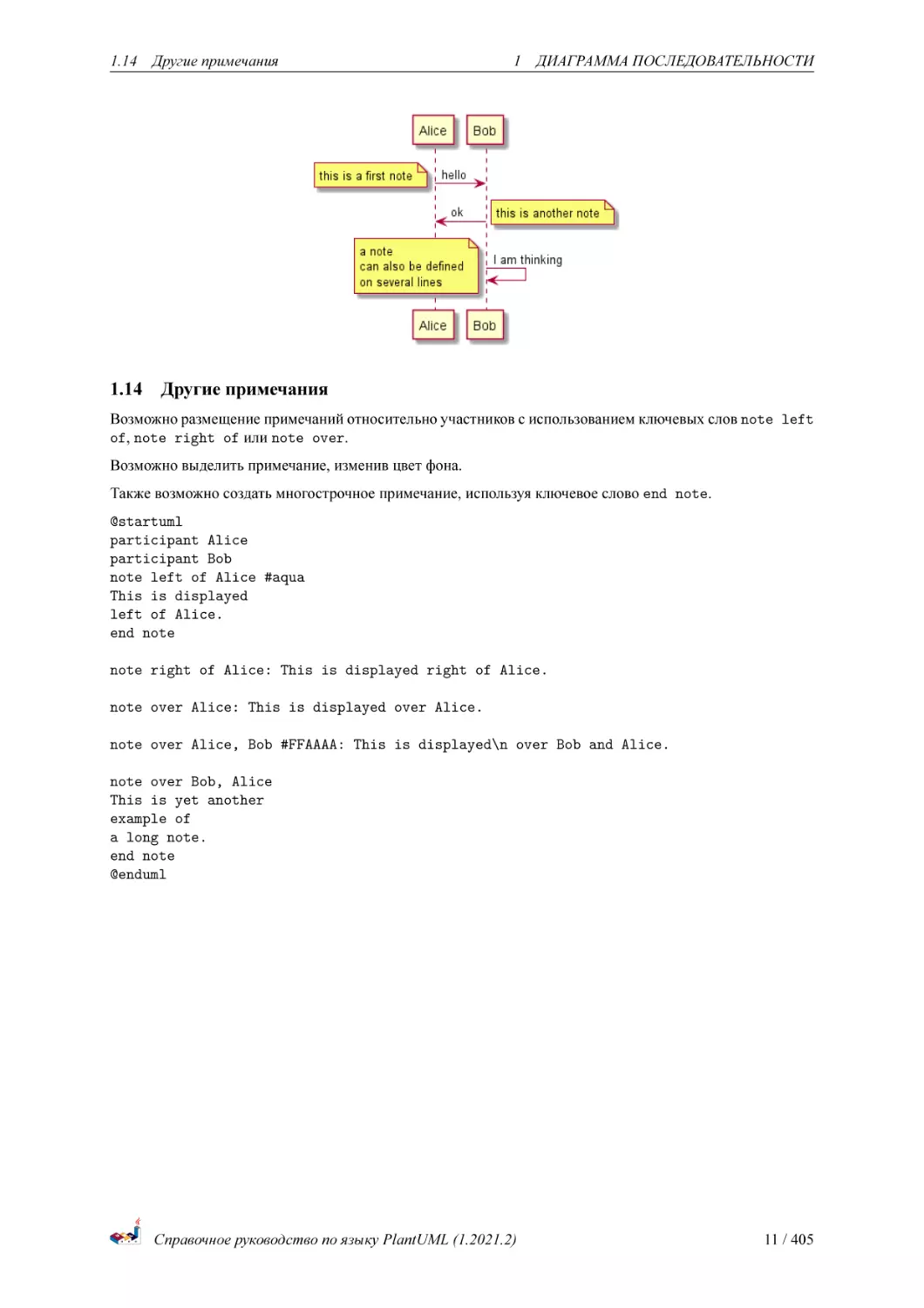
Можно помещать заметки к сообщениям, используя ключевые слова note left или note right сразу
после сообщения.
Можно делать многострочные заметки используя ключевое слово end note для завершения.
@startuml
Alice->Bob : hello
note left: this is a first note
Bob->Alice : ok
note right: this is another note
Bob->Bob : I am thinking
note left
a note
can also be defined
on several lines
end note
@enduml
Справочное руководство по языку PlantUML (1.2021.2)
10 / 405
1.14
1.14
Другие примечания
1 ДИАГРАММА ПОСЛЕДОВАТЕЛЬНОСТИ
Другие примечания
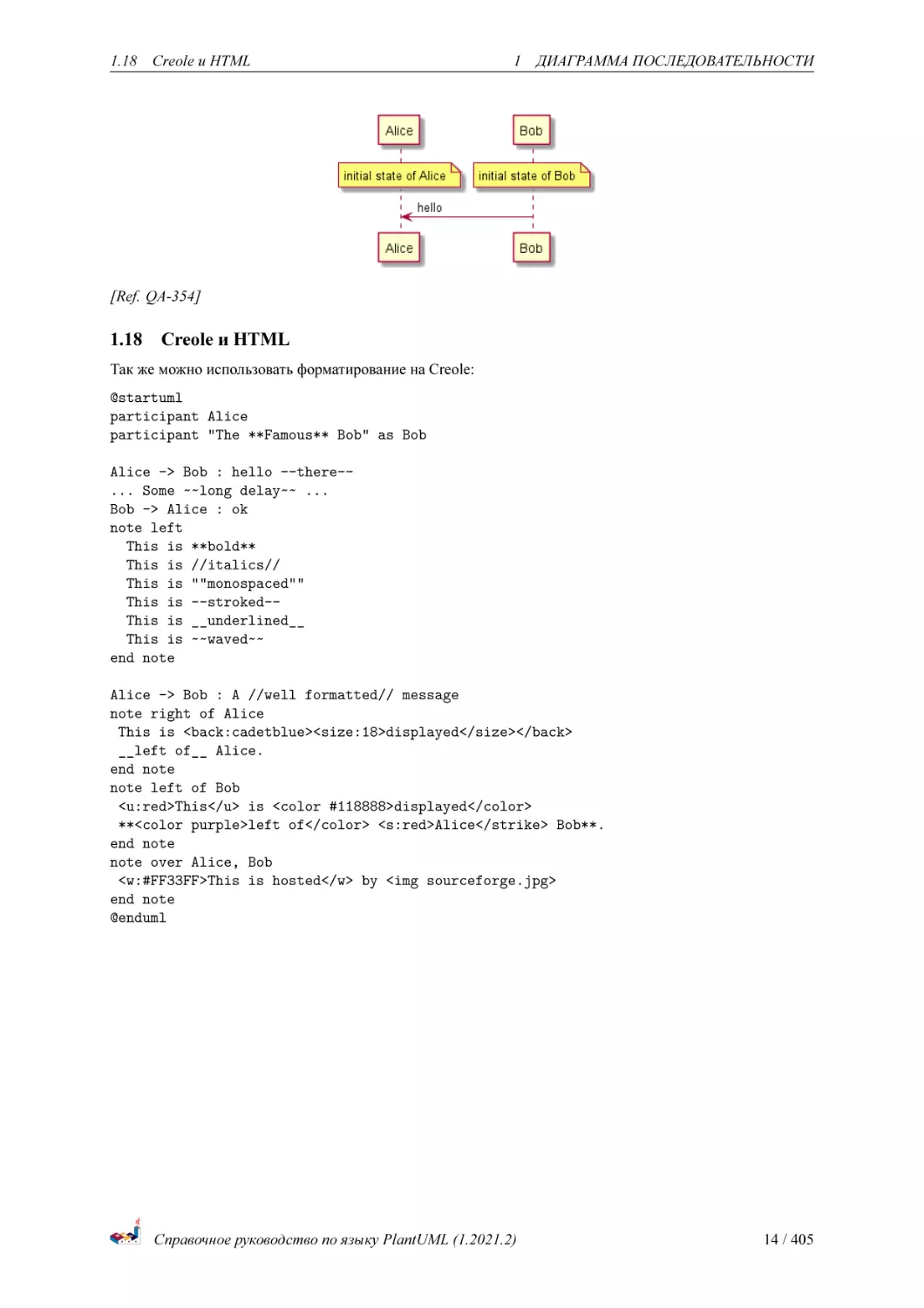
Возможно размещение примечаний относительно участников с использованием ключевых слов note left
of, note right of или note over.
Возможно выделить примечание, изменив цвет фона.
Также возможно создать многострочное примечание, используя ключевое слово end note.
@startuml
participant Alice
participant Bob
note left of Alice #aqua
This is displayed
left of Alice.
end note
note right of Alice: This is displayed right of Alice.
note over Alice: This is displayed over Alice.
note over Alice, Bob #FFAAAA: This is displayed\n over Bob and Alice.
note over Bob, Alice
This is yet another
example of
a long note.
end note
@enduml
Справочное руководство по языку PlantUML (1.2021.2)
11 / 405
1.15
1.15
Изменение формы примечаний
1 ДИАГРАММА ПОСЛЕДОВАТЕЛЬНОСТИ
Изменение формы примечаний
Вы можете использовать hnote и rnote для изменения формы примечаний.
@startuml
caller -> server : conReq
hnote over caller : idle
caller <- server : conConf
rnote over server
"r" as rectangle
"h" as hexagon
endrnote
@enduml
*[Ref. [QA-1765](https://forum.plantuml.net/1765/is-it-possible-to-have-different-shapes-for-notes?show=1806#c1806)]*
1.16
Note over all participants [across]
You can directly make a note over all participants, with the syntax:
• note across: note_description
@startuml
Alice->Bob:m1
Bob->Charlie:m2
note over Alice, Charlie: Old method for note over all part. with:\n ""note over //FirstPart, LastPar
note across: New method with:\n""note across""
Справочное руководство по языку PlantUML (1.2021.2)
12 / 405
1.17
Several notes aligned at the same level [/]
1 ДИАГРАММА ПОСЛЕДОВАТЕЛЬНОСТИ
Bob->Alice
hnote across:Note across all part.
@enduml
[Ref. QA-9738]
1.17
Several notes aligned at the same level [/]
You can make several notes aligned at the same level, with the syntax /:
• without / (by default, the notes are not aligned)
@startuml
note over Alice : initial state of Alice
note over Bob : initial state of Bob
Bob -> Alice : hello
@enduml
• with / (the notes are aligned)
@startuml
note over Alice : initial state of Alice
/ note over Bob : initial state of Bob
Bob -> Alice : hello
@enduml
Справочное руководство по языку PlantUML (1.2021.2)
13 / 405
1.18
Creole и HTML
1 ДИАГРАММА ПОСЛЕДОВАТЕЛЬНОСТИ
[Ref. QA-354]
1.18
Creole и HTML
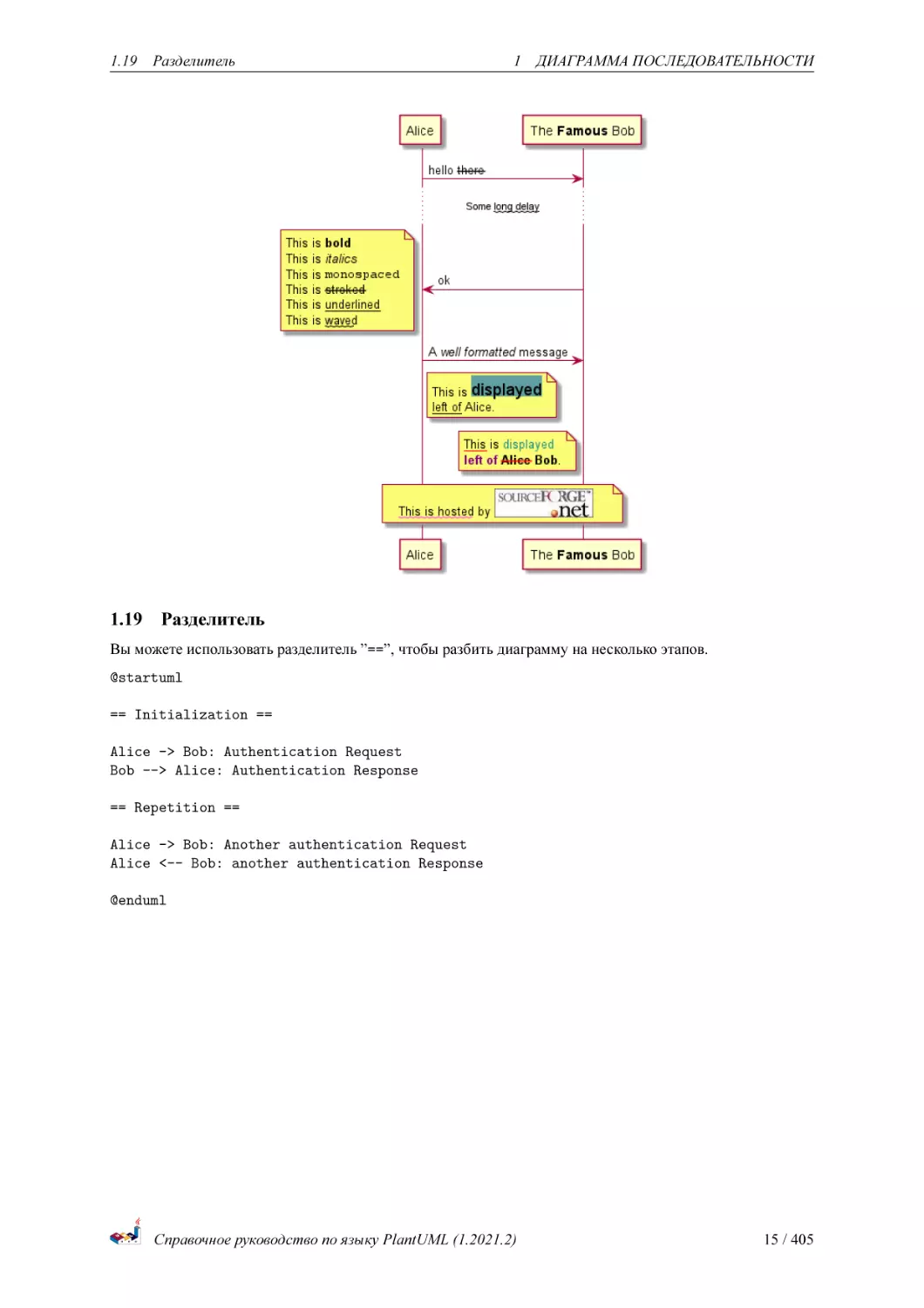
Так же можно использовать форматирование на Creole:
@startuml
participant Alice
participant "The **Famous** Bob" as Bob
Alice -> Bob : hello --there-... Some ~~long delay~~ ...
Bob -> Alice : ok
note left
This is **bold**
This is //italics//
This is ""monospaced""
This is --stroked-This is __underlined__
This is ~~waved~~
end note
Alice -> Bob : A //well formatted// message
note right of Alice
This is <back:cadetblue><size:18>displayed</size></back>
__left of__ Alice.
end note
note left of Bob
<u:red>This</u> is <color #118888>displayed</color>
**<color purple>left of</color> <s:red>Alice</strike> Bob**.
end note
note over Alice, Bob
<w:#FF33FF>This is hosted</w> by <img sourceforge.jpg>
end note
@enduml
Справочное руководство по языку PlantUML (1.2021.2)
14 / 405
1.19
1.19
Разделитель
1 ДИАГРАММА ПОСЛЕДОВАТЕЛЬНОСТИ
Разделитель
Вы можете использовать разделитель ”==”, чтобы разбить диаграмму на несколько этапов.
@startuml
== Initialization ==
Alice -> Bob: Authentication Request
Bob --> Alice: Authentication Response
== Repetition ==
Alice -> Bob: Another authentication Request
Alice <-- Bob: another authentication Response
@enduml
Справочное руководство по языку PlantUML (1.2021.2)
15 / 405
1.20
1.20
Ссылки
1 ДИАГРАММА ПОСЛЕДОВАТЕЛЬНОСТИ
Ссылки
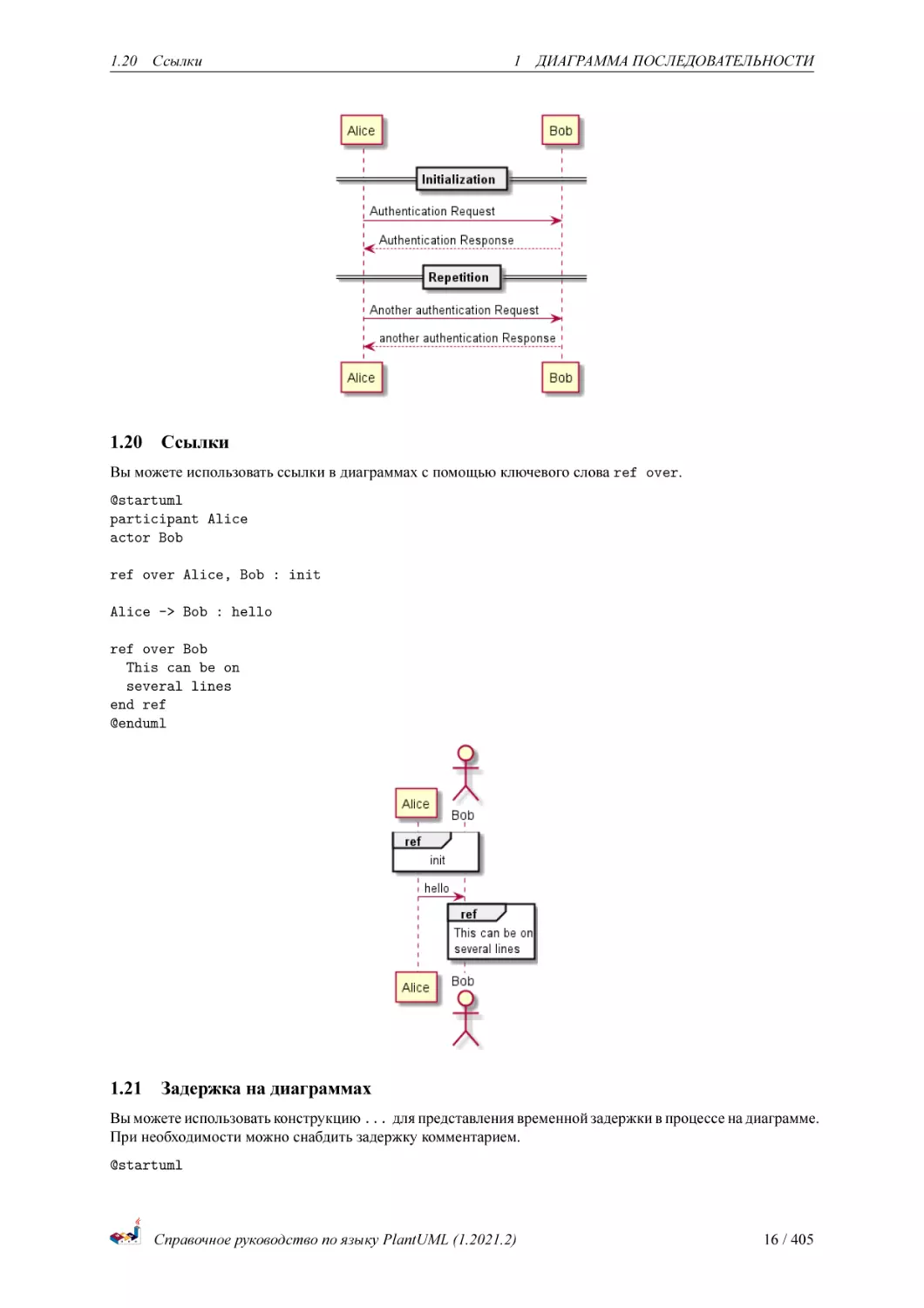
Вы можете использовать ссылки в диаграммах с помощью ключевого слова ref over.
@startuml
participant Alice
actor Bob
ref over Alice, Bob : init
Alice -> Bob : hello
ref over Bob
This can be on
several lines
end ref
@enduml
1.21
Задержка на диаграммах
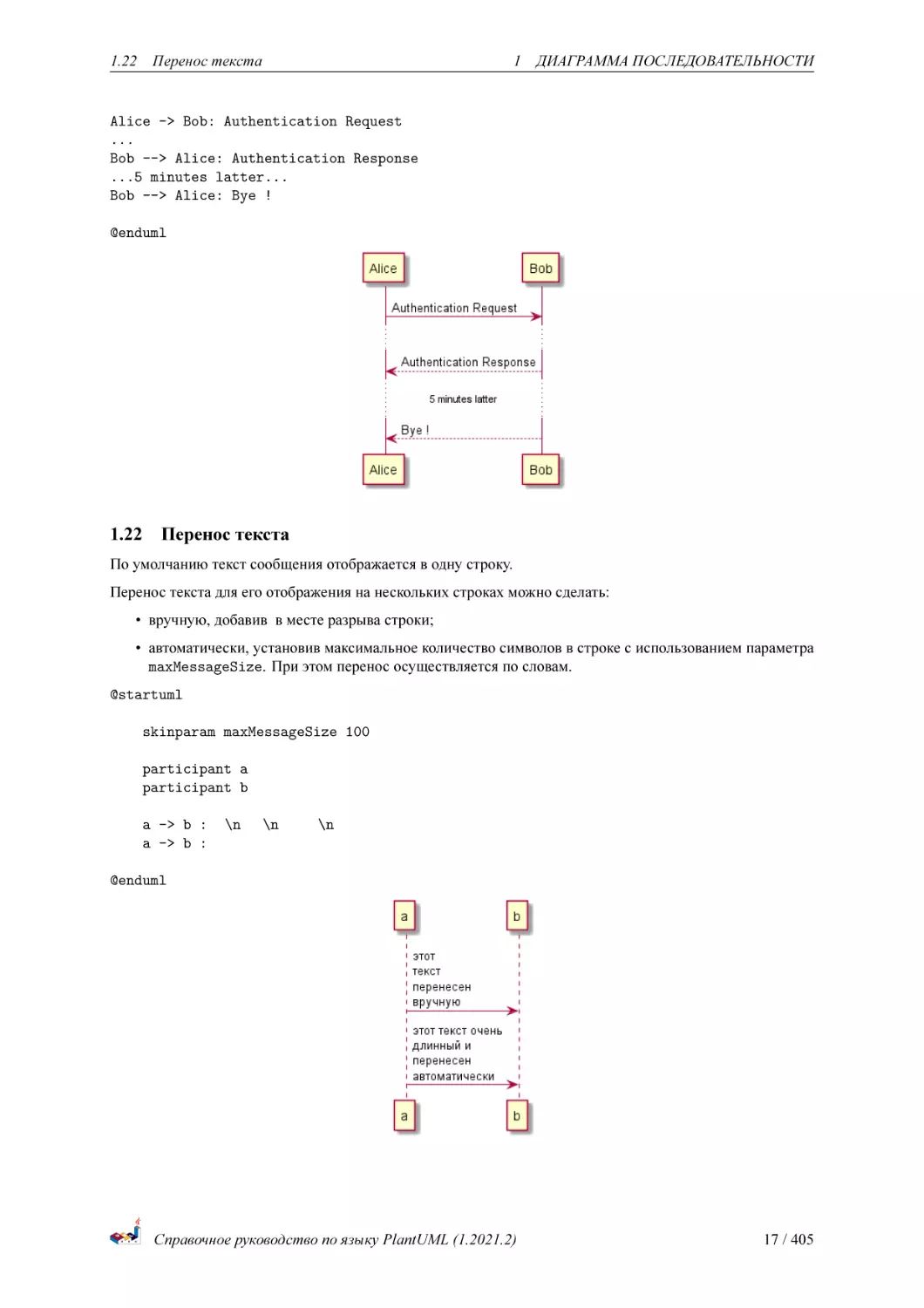
Вы можете использовать конструкцию ... для представления временной задержки в процессе на диаграмме.
При необходимости можно снабдить задержку комментарием.
@startuml
Справочное руководство по языку PlantUML (1.2021.2)
16 / 405
1.22
Перенос текста
1 ДИАГРАММА ПОСЛЕДОВАТЕЛЬНОСТИ
Alice -> Bob: Authentication Request
...
Bob --> Alice: Authentication Response
...5 minutes latter...
Bob --> Alice: Bye !
@enduml
1.22
Перенос текста
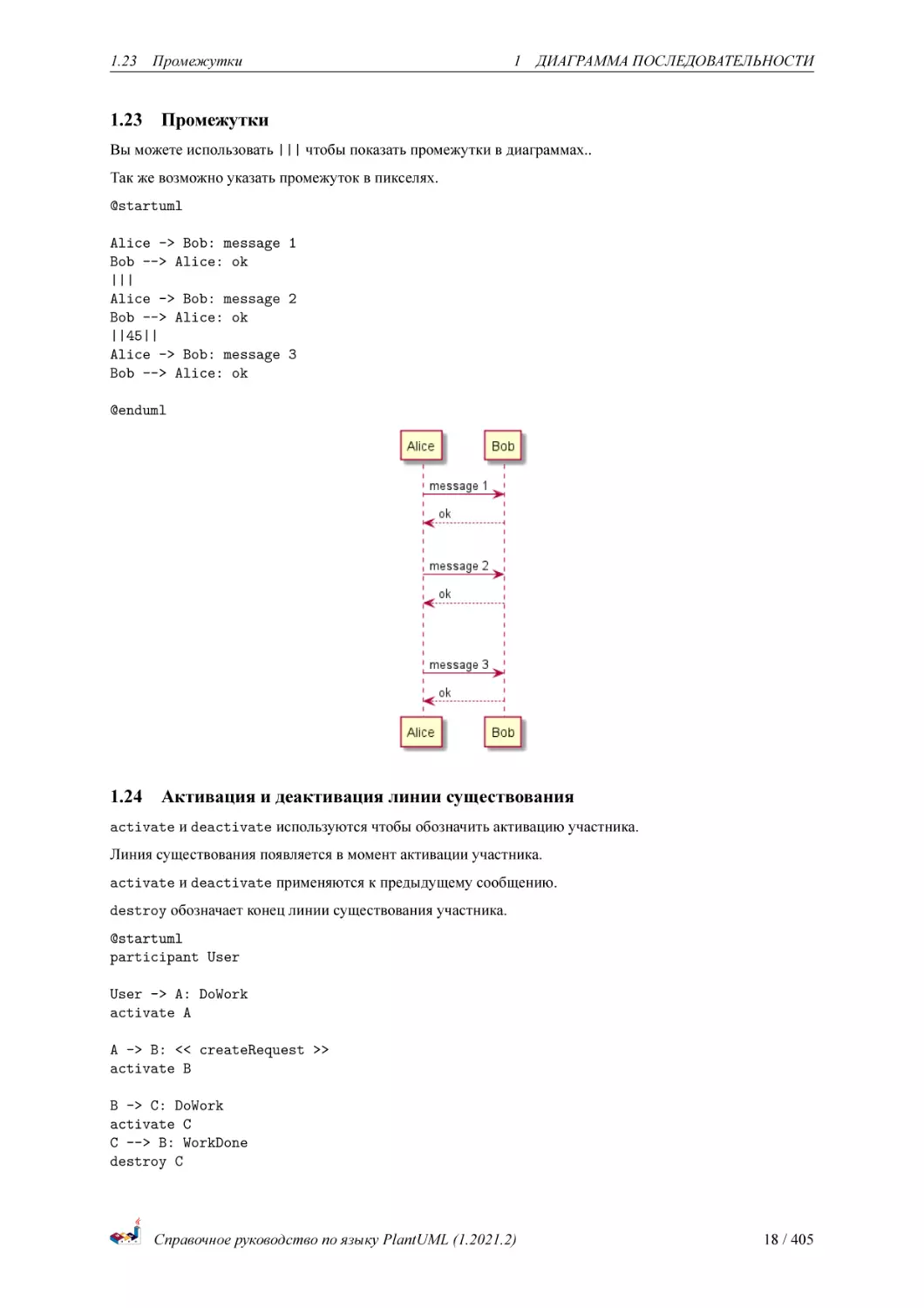
По умолчанию текст сообщения отображается в одну строку.
Перенос текста для его отображения на нескольких строках можно сделать:
• вручную, добавив в месте разрыва строки;
• автоматически, установив максимальное количество символов в строке с использованием параметра
maxMessageSize. При этом перенос осуществляется по словам.
@startuml
skinparam maxMessageSize 100
participant a
participant b
a -> b :����\n�����\n���������\n�������
a -> b :���� ����� ����� ������� � ��������� �������������
@enduml
Справочное руководство по языку PlantUML (1.2021.2)
17 / 405
1.23
1.23
Промежутки
1 ДИАГРАММА ПОСЛЕДОВАТЕЛЬНОСТИ
Промежутки
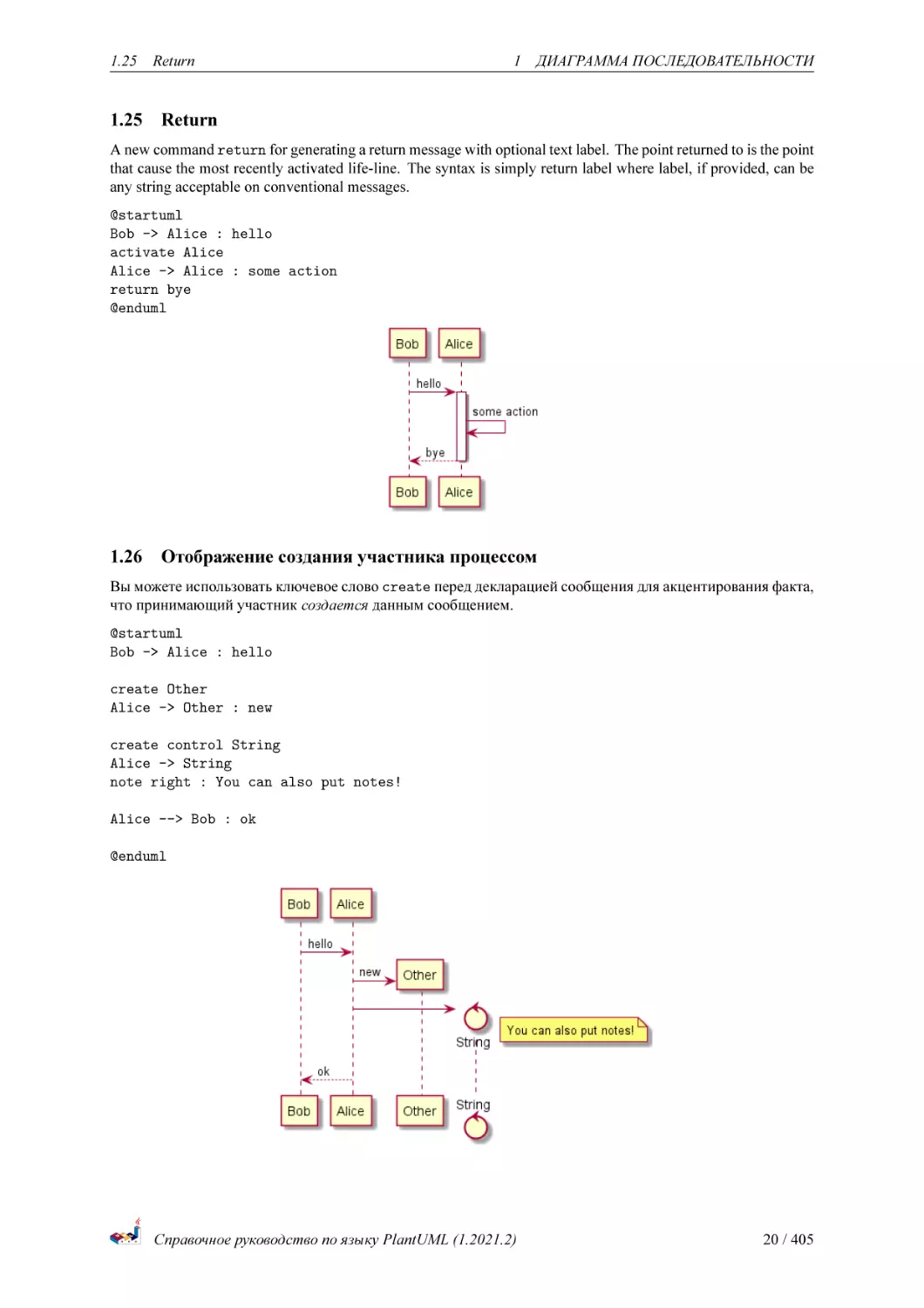
Вы можете использовать ||| чтобы показать промежутки в диаграммах..
Так же возможно указать промежуток в пикселях.
@startuml
Alice -> Bob: message 1
Bob --> Alice: ok
|||
Alice -> Bob: message 2
Bob --> Alice: ok
||45||
Alice -> Bob: message 3
Bob --> Alice: ok
@enduml
1.24
Активация и деактивация линии существования
activate и deactivate используются чтобы обозначить активацию участника.
Линия существования появляется в момент активации участника.
activate и deactivate применяются к предыдущему сообщению.
destroy обозначает конец линии существования участника.
@startuml
participant User
User -> A: DoWork
activate A
A -> B: << createRequest >>
activate B
B -> C: DoWork
activate C
C --> B: WorkDone
destroy C
Справочное руководство по языку PlantUML (1.2021.2)
18 / 405
1.24
Активация и деактивация линии существования
1
ДИАГРАММА ПОСЛЕДОВАТЕЛЬНОСТИ
B --> A: RequestCreated
deactivate B
A -> User: Done
deactivate A
@enduml
Можно использовать вложенные линии существования, и возможно добавлять цвет линии существования
@startuml
participant User
User -> A: DoWork
activate A #FFBBBB
A -> A: Internal call
activate A #DarkSalmon
A -> B: << createRequest >>
activate B
B --> A: RequestCreated
deactivate B
deactivate A
A -> User: Done
deactivate A
@enduml
Справочное руководство по языку PlantUML (1.2021.2)
19 / 405
1.25
1.25
Return
1 ДИАГРАММА ПОСЛЕДОВАТЕЛЬНОСТИ
Return
A new command return for generating a return message with optional text label. The point returned to is the point
that cause the most recently activated life-line. The syntax is simply return label where label, if provided, can be
any string acceptable on conventional messages.
@startuml
Bob -> Alice : hello
activate Alice
Alice -> Alice : some action
return bye
@enduml
1.26
Отображение создания участника процессом
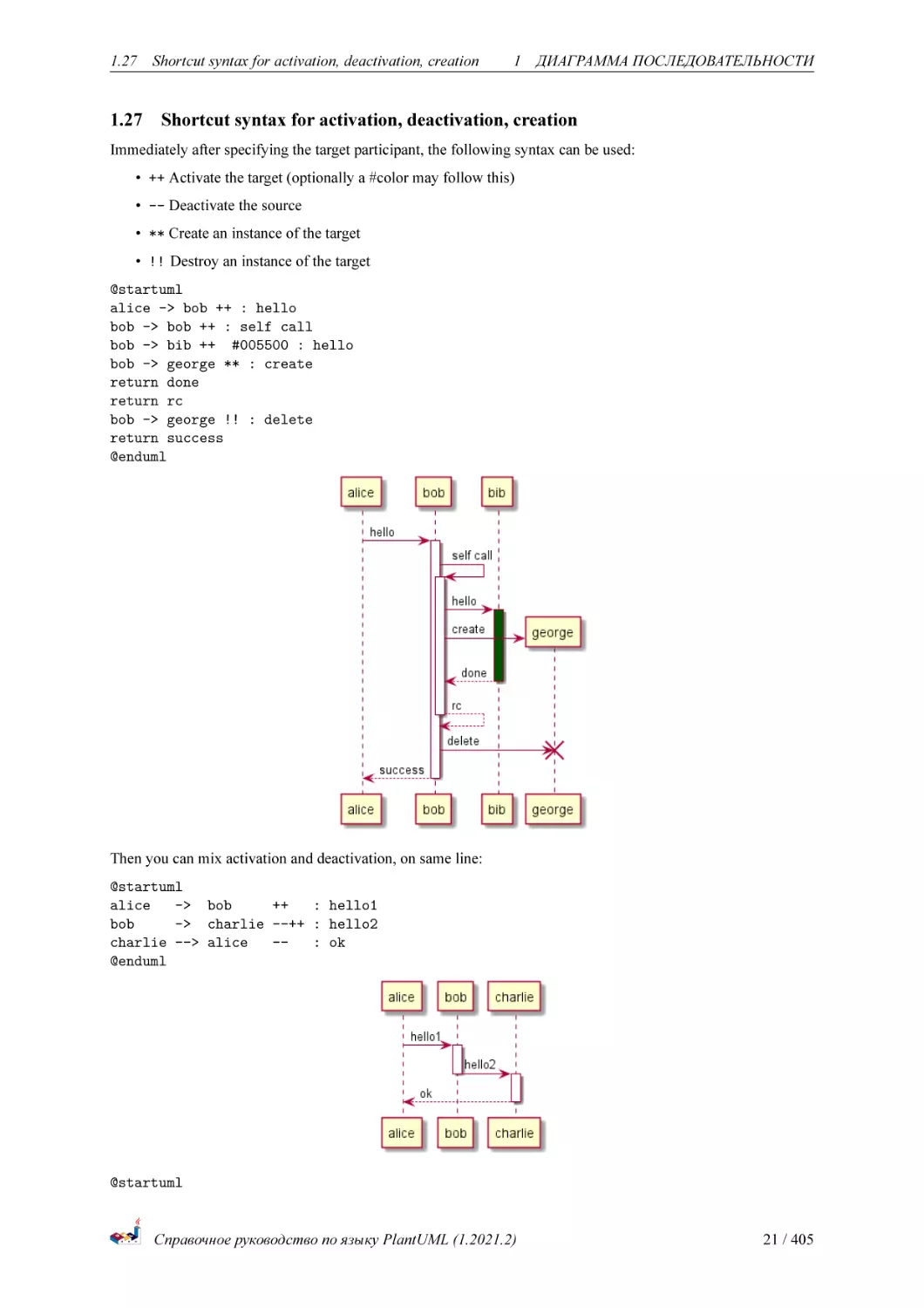
Вы можете использовать ключевое слово create перед декларацией сообщения для акцентирования факта,
что принимающий участник создается данным сообщением.
@startuml
Bob -> Alice : hello
create Other
Alice -> Other : new
create control String
Alice -> String
note right : You can also put notes!
Alice --> Bob : ok
@enduml
Справочное руководство по языку PlantUML (1.2021.2)
20 / 405
1.27
1.27
Shortcut syntax for activation, deactivation, creation
1
ДИАГРАММА ПОСЛЕДОВАТЕЛЬНОСТИ
Shortcut syntax for activation, deactivation, creation
Immediately after specifying the target participant, the following syntax can be used:
• ++ Activate the target (optionally a #color may follow this)
• -- Deactivate the source
• ** Create an instance of the target
• !! Destroy an instance of the target
@startuml
alice -> bob ++ : hello
bob -> bob ++ : self call
bob -> bib ++ #005500 : hello
bob -> george ** : create
return done
return rc
bob -> george !! : delete
return success
@enduml
Then you can mix activation and deactivation, on same line:
@startuml
alice
-> bob
++
: hello1
bob
-> charlie --++ : hello2
charlie --> alice
-: ok
@enduml
@startuml
Справочное руководство по языку PlantUML (1.2021.2)
21 / 405
1.28
Входящие и исходящие сообщения
@startuml
alice -> bob
bob
-> alice
alice -> bob
alice -> bob
@enduml
@enduml
1 ДИАГРАММА ПОСЛЕДОВАТЕЛЬНОСТИ
--++ #gold: hello
--++ #gold: you too
--: step1
: step2
[Ref. QA-4834, QA-9573 and QA-13234]
1.28
Входящие и исходящие сообщения
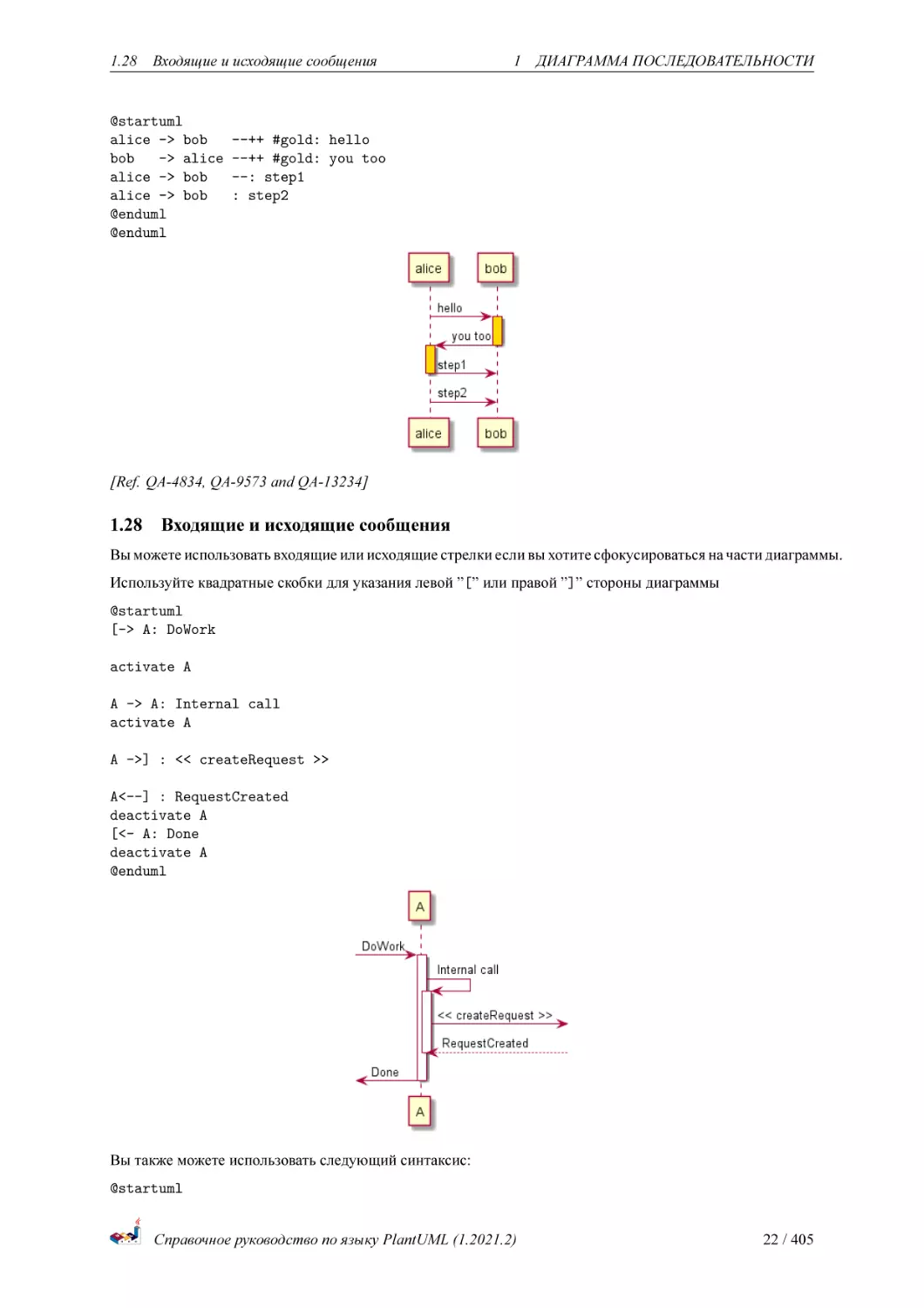
Вы можете использовать входящие или исходящие стрелки если вы хотите сфокусироваться на части диаграммы.
Используйте квадратные скобки для указания левой ”[” или правой ”]” стороны диаграммы
@startuml
[-> A: DoWork
activate A
A -> A: Internal call
activate A
A ->] : << createRequest >>
A<--] : RequestCreated
deactivate A
[<- A: Done
deactivate A
@enduml
Вы также можете использовать следующий синтаксис:
@startuml
Справочное руководство по языку PlantUML (1.2021.2)
22 / 405
1.29
Short arrows for incoming and outgoing messages
1 ДИАГРАММА ПОСЛЕДОВАТЕЛЬНОСТИ
[-> Bob
[o-> Bob
[o->o Bob
[x-> Bob
[<- Bob
[x<- Bob
Bob
Bob
Bob
Bob
->]
->o]
o->o]
->x]
Bob <-]
Bob x<-]
@enduml
1.29
Short arrows for incoming and outgoing messages
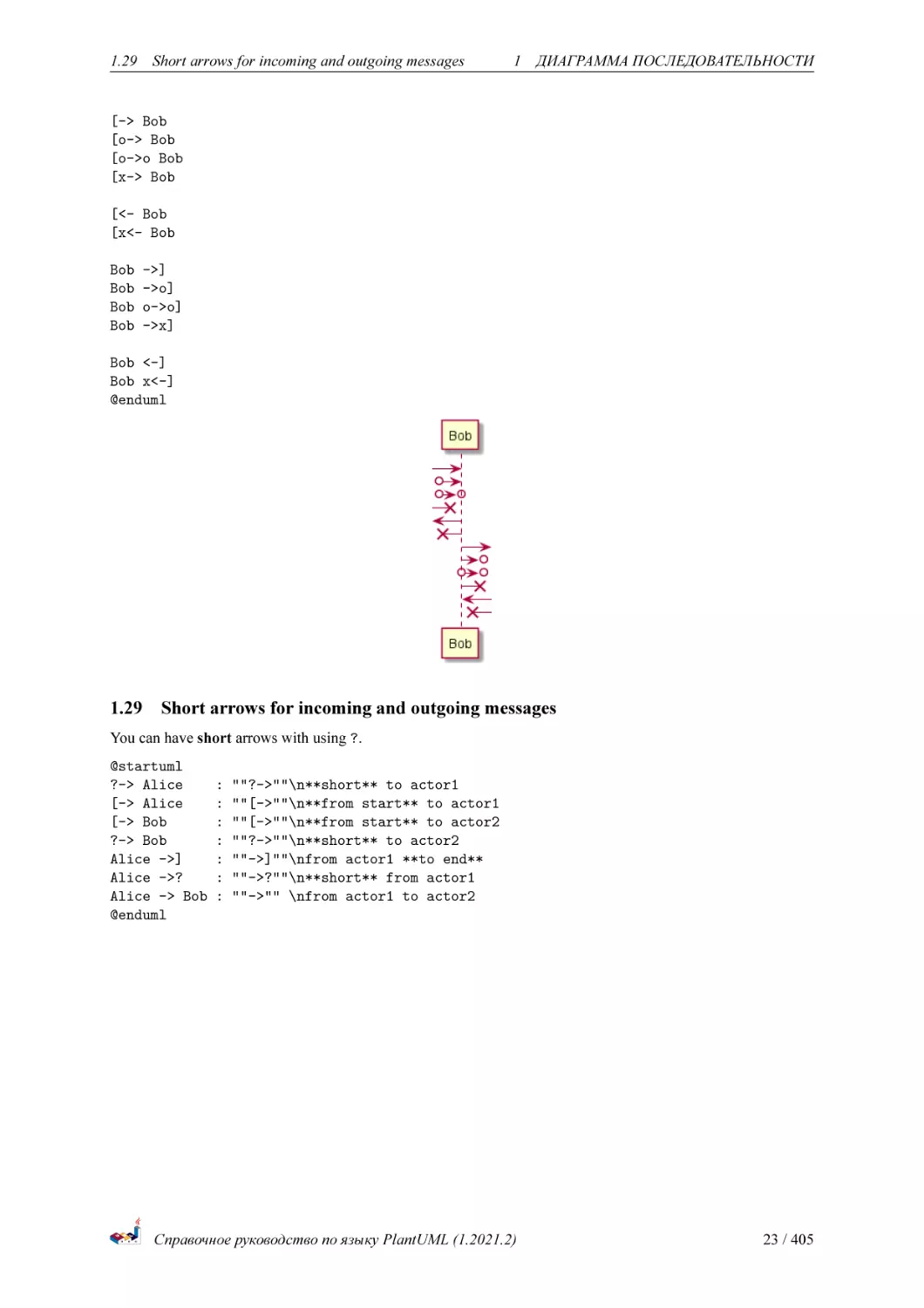
You can have short arrows with using ?.
@startuml
?-> Alice
[-> Alice
[-> Bob
?-> Bob
Alice ->]
Alice ->?
Alice -> Bob
@enduml
:
:
:
:
:
:
:
""?->""\n**short** to actor1
""[->""\n**from start** to actor1
""[->""\n**from start** to actor2
""?->""\n**short** to actor2
""->]""\nfrom actor1 **to end**
""->?""\n**short** from actor1
""->"" \nfrom actor1 to actor2
Справочное руководство по языку PlantUML (1.2021.2)
23 / 405
1.30
Anchors and Duration
1 ДИАГРАММА ПОСЛЕДОВАТЕЛЬНОСТИ
[Ref. QA-310]
1.30
Anchors and Duration
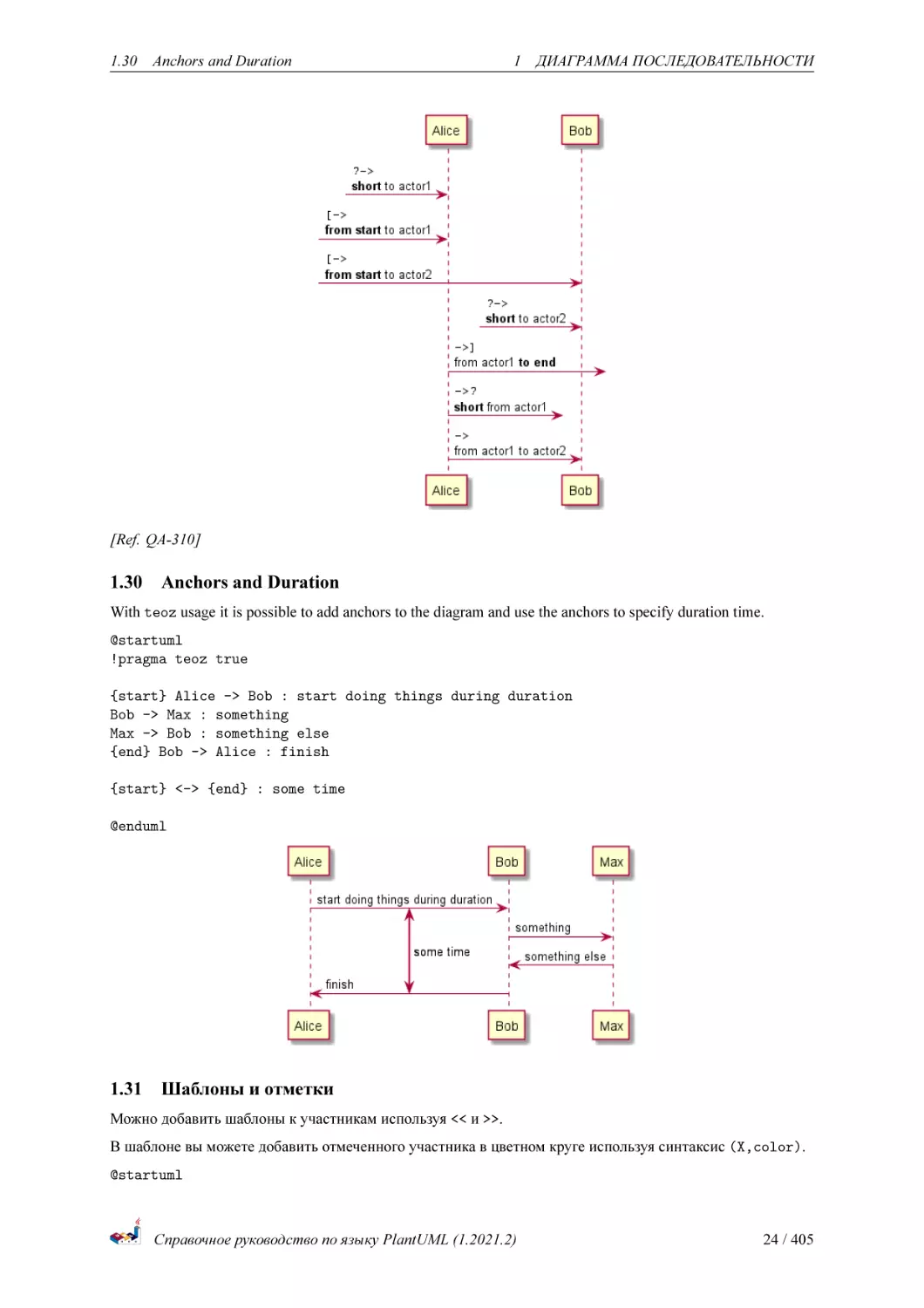
With teoz usage it is possible to add anchors to the diagram and use the anchors to specify duration time.
@startuml
!pragma teoz true
{start} Alice -> Bob : start doing things during duration
Bob -> Max : something
Max -> Bob : something else
{end} Bob -> Alice : finish
{start} <-> {end} : some time
@enduml
1.31
Шаблоны и отметки
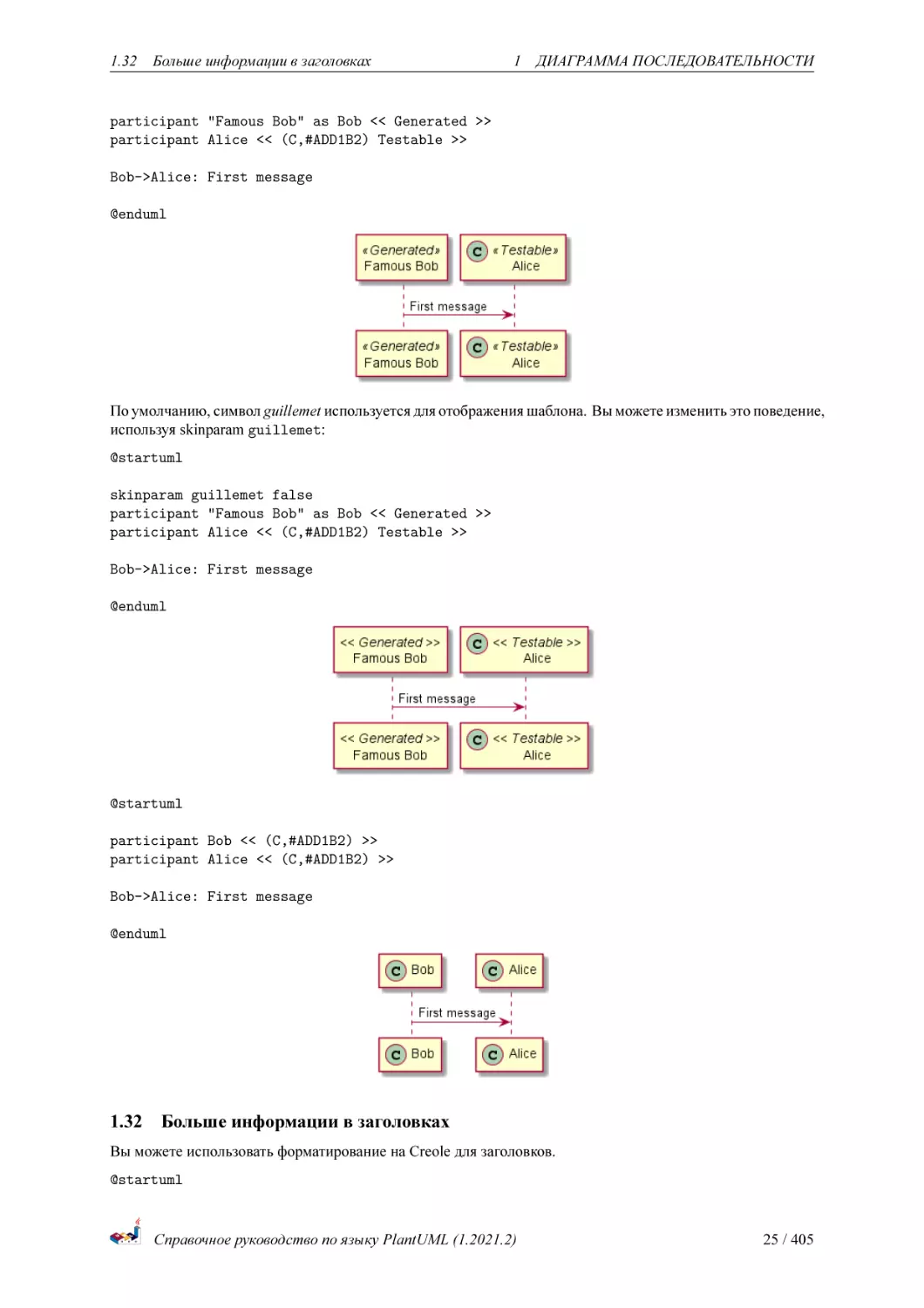
Можно добавить шаблоны к участникам используя << и >>.
В шаблоне вы можете добавить отмеченного участника в цветном круге используя синтаксис (X,color).
@startuml
Справочное руководство по языку PlantUML (1.2021.2)
24 / 405
1.32
Больше информации в заголовках
1 ДИАГРАММА ПОСЛЕДОВАТЕЛЬНОСТИ
participant "Famous Bob" as Bob << Generated >>
participant Alice << (C,#ADD1B2) Testable >>
Bob->Alice: First message
@enduml
По умолчанию, символ guillemet используется для отображения шаблона. Вы можете изменить это поведение,
используя skinparam guillemet:
@startuml
skinparam guillemet false
participant "Famous Bob" as Bob << Generated >>
participant Alice << (C,#ADD1B2) Testable >>
Bob->Alice: First message
@enduml
@startuml
participant Bob << (C,#ADD1B2) >>
participant Alice << (C,#ADD1B2) >>
Bob->Alice: First message
@enduml
1.32
Больше информации в заголовках
Вы можете использовать форматирование на Creole для заголовков.
@startuml
Справочное руководство по языку PlantUML (1.2021.2)
25 / 405
1.32
Больше информации в заголовках
1 ДИАГРАММА ПОСЛЕДОВАТЕЛЬНОСТИ
title __Simple__ **communication** example
Alice -> Bob: Authentication Request
Bob -> Alice: Authentication Response
@enduml
C помощью последовательности символов вы можете добавить перевод строки в заголовок.
@startuml
title __Simple__ communication example\non several lines
Alice -> Bob: Authentication Request
Bob -> Alice: Authentication Response
@enduml
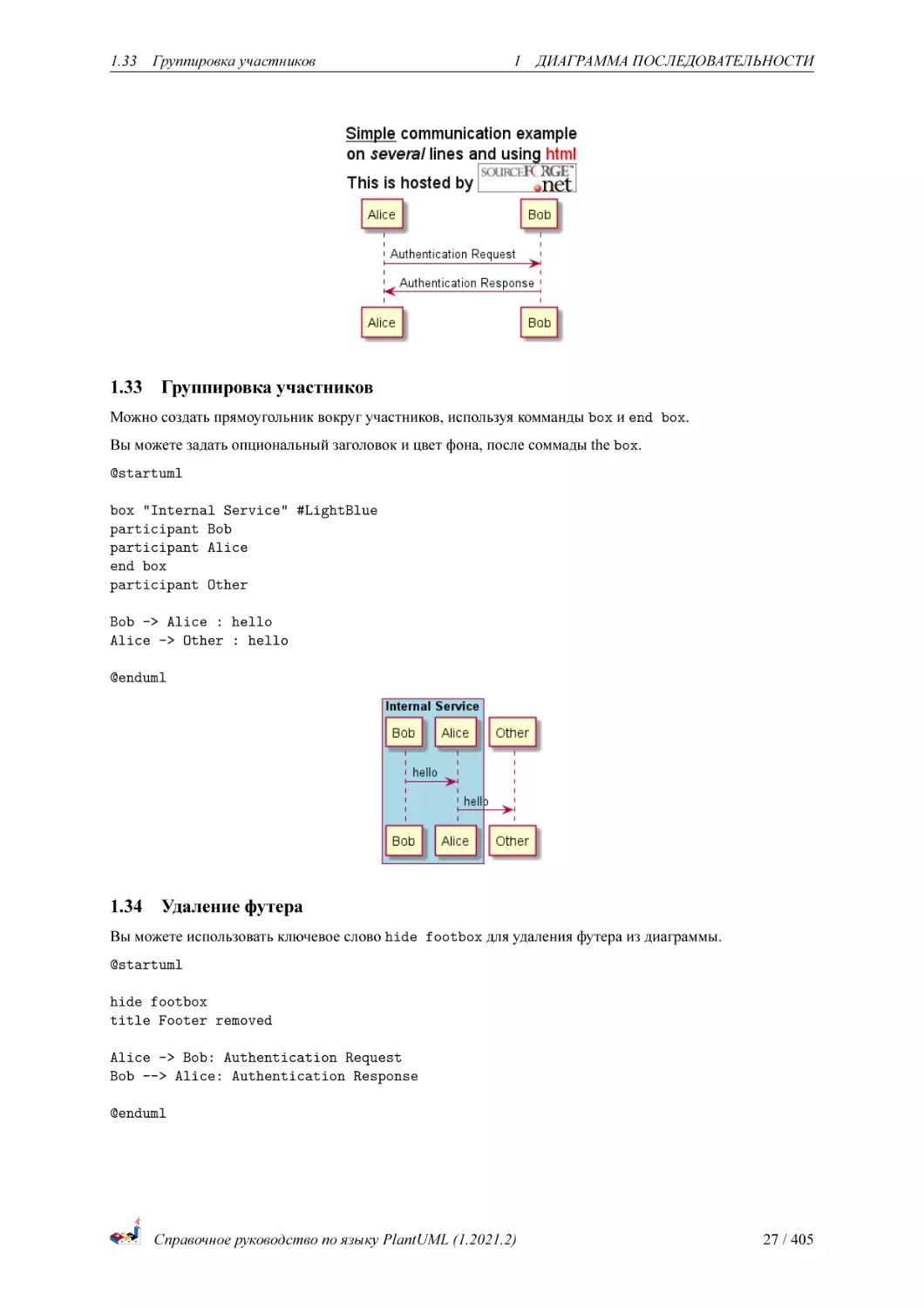
Вы также можете задать заголовок на нескольких строках, используя ключевые слова title и end title .
@startuml
title
<u>Simple</u> communication example
on <i>several</i> lines and using <font color=red>html</font>
This is hosted by <img:sourceforge.jpg>
end title
Alice -> Bob: Authentication Request
Bob -> Alice: Authentication Response
@enduml
Справочное руководство по языку PlantUML (1.2021.2)
26 / 405
1.33
1.33
Группировка участников
1 ДИАГРАММА ПОСЛЕДОВАТЕЛЬНОСТИ
Группировка участников
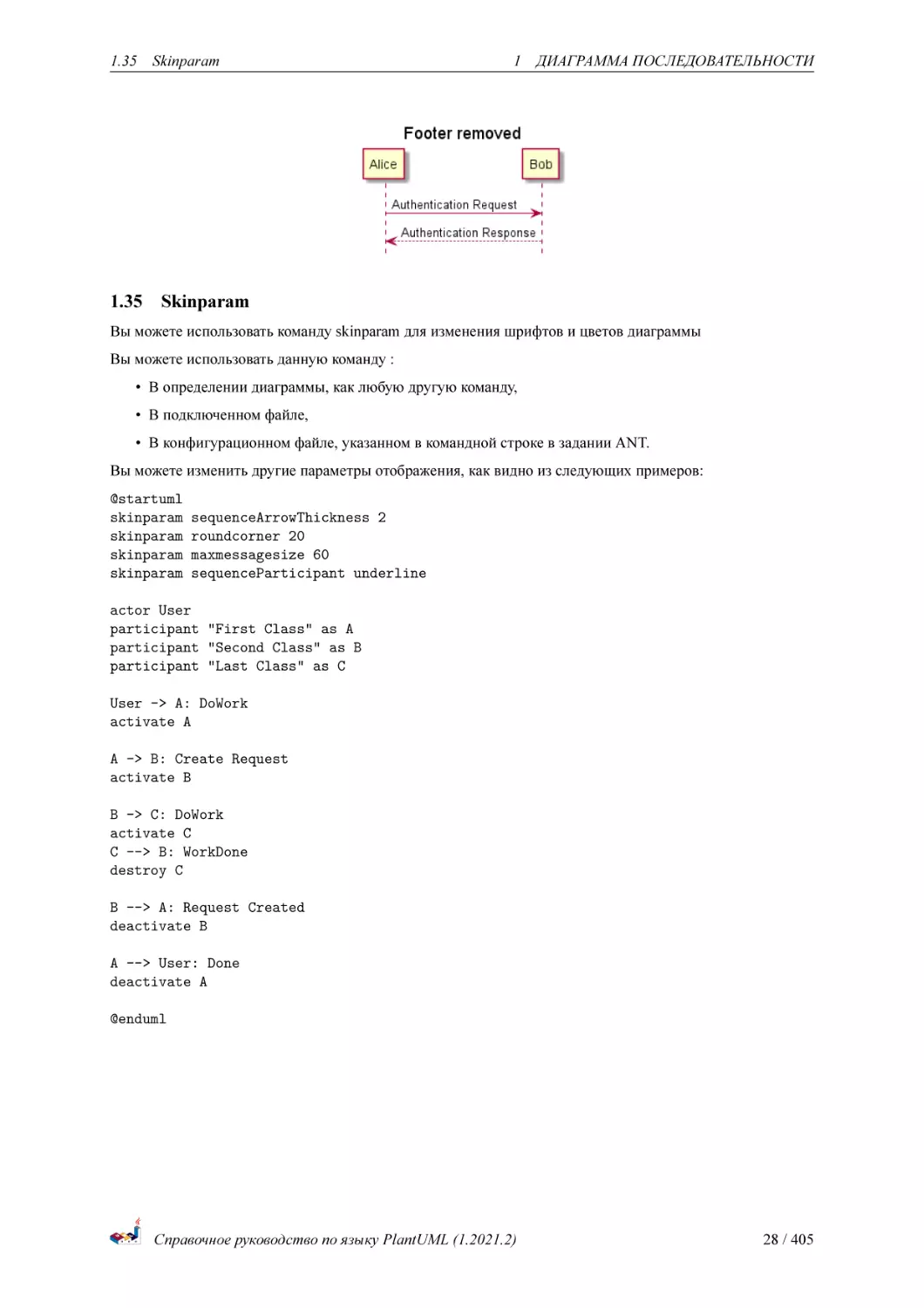
Можно создать прямоугольник вокруг участников, используя комманды box и end box.
Вы можете задать опциональный заголовок и цвет фона, после соммады the box.
@startuml
box "Internal Service" #LightBlue
participant Bob
participant Alice
end box
participant Other
Bob -> Alice : hello
Alice -> Other : hello
@enduml
1.34
Удаление футера
Вы можете использовать ключевое слово hide footbox для удаления футера из диаграммы.
@startuml
hide footbox
title Footer removed
Alice -> Bob: Authentication Request
Bob --> Alice: Authentication Response
@enduml
Справочное руководство по языку PlantUML (1.2021.2)
27 / 405
1.35
1.35
Skinparam
1 ДИАГРАММА ПОСЛЕДОВАТЕЛЬНОСТИ
Skinparam
Вы можете использовать команду skinparam для изменения шрифтов и цветов диаграммы
Вы можете использовать данную команду :
• В определении диаграммы, как любую другую команду,
• В подключенном файле,
• В конфигурационном файле, указанном в командной строке в задании ANT.
Вы можете изменить другие параметры отображения, как видно из следующих примеров:
@startuml
skinparam
skinparam
skinparam
skinparam
sequenceArrowThickness 2
roundcorner 20
maxmessagesize 60
sequenceParticipant underline
actor User
participant "First Class" as A
participant "Second Class" as B
participant "Last Class" as C
User -> A: DoWork
activate A
A -> B: Create Request
activate B
B -> C: DoWork
activate C
C --> B: WorkDone
destroy C
B --> A: Request Created
deactivate B
A --> User: Done
deactivate A
@enduml
Справочное руководство по языку PlantUML (1.2021.2)
28 / 405
1.35
Skinparam
1 ДИАГРАММА ПОСЛЕДОВАТЕЛЬНОСТИ
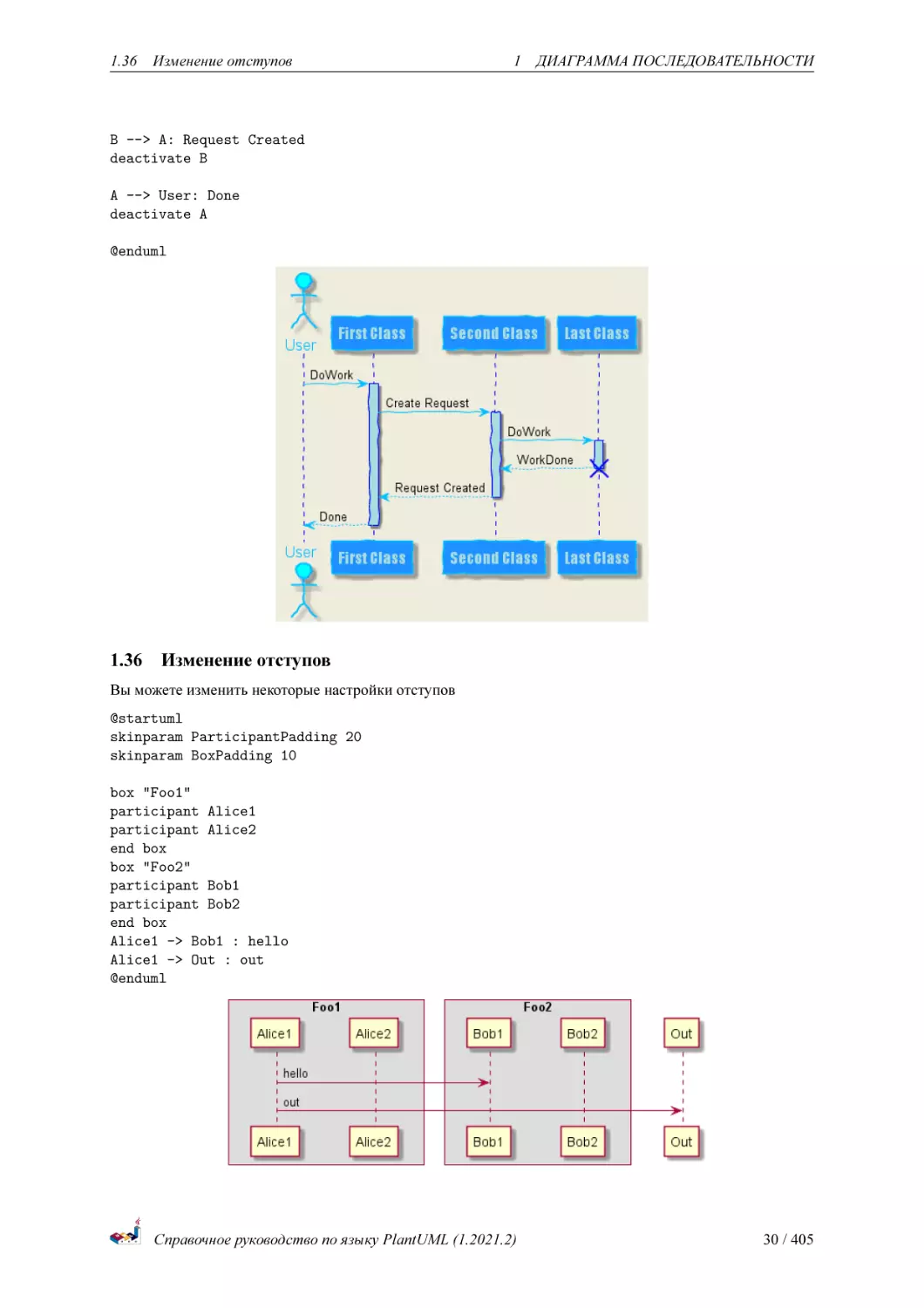
@startuml
skinparam backgroundColor #EEEBDC
skinparam handwritten true
skinparam sequence {
ArrowColor DeepSkyBlue
ActorBorderColor DeepSkyBlue
LifeLineBorderColor blue
LifeLineBackgroundColor #A9DCDF
ParticipantBorderColor DeepSkyBlue
ParticipantBackgroundColor DodgerBlue
ParticipantFontName Impact
ParticipantFontSize 17
ParticipantFontColor #A9DCDF
ActorBackgroundColor aqua
ActorFontColor DeepSkyBlue
ActorFontSize 17
ActorFontName Aapex
}
actor User
participant "First Class" as A
participant "Second Class" as B
participant "Last Class" as C
User -> A: DoWork
activate A
A -> B: Create Request
activate B
B -> C: DoWork
activate C
C --> B: WorkDone
destroy C
Справочное руководство по языку PlantUML (1.2021.2)
29 / 405
1.36
Изменение отступов
1 ДИАГРАММА ПОСЛЕДОВАТЕЛЬНОСТИ
B --> A: Request Created
deactivate B
A --> User: Done
deactivate A
@enduml
1.36
Изменение отступов
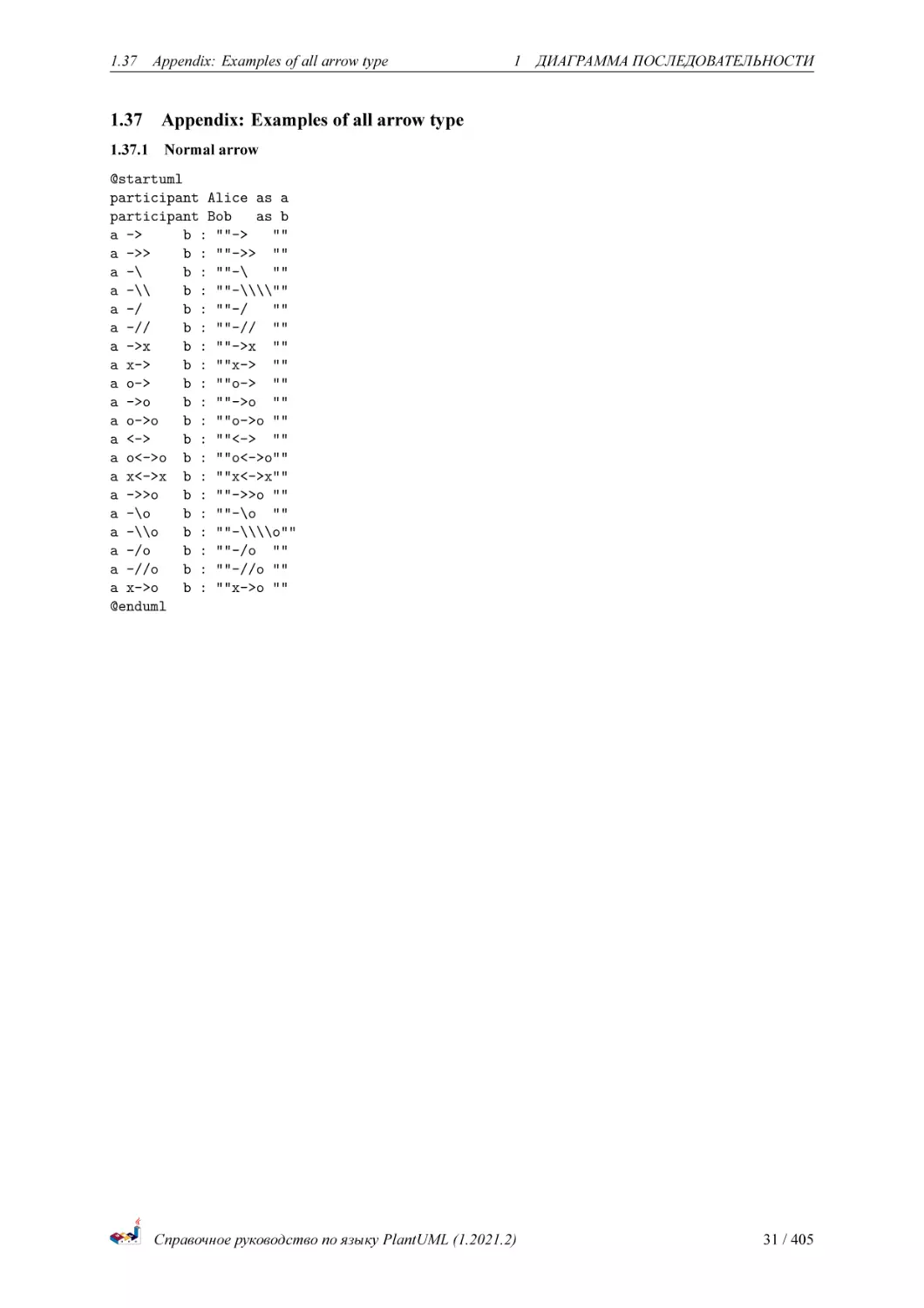
Вы можете изменить некоторые настройки отступов
@startuml
skinparam ParticipantPadding 20
skinparam BoxPadding 10
box "Foo1"
participant Alice1
participant Alice2
end box
box "Foo2"
participant Bob1
participant Bob2
end box
Alice1 -> Bob1 : hello
Alice1 -> Out : out
@enduml
Справочное руководство по языку PlantUML (1.2021.2)
30 / 405
1.37
1.37
Appendix: Examples of all arrow type
1 ДИАГРАММА ПОСЛЕДОВАТЕЛЬНОСТИ
Appendix: Examples of all arrow type
1.37.1 Normal arrow
@startuml
participant Alice as a
participant Bob
as b
a ->
b : ""->
""
a ->>
b : ""->> ""
a -\
b : ""-\
""
a -\\
b : ""-\\\\""
a -/
b : ""-/
""
a -//
b : ""-// ""
a ->x
b : ""->x ""
a x->
b : ""x-> ""
a o->
b : ""o-> ""
a ->o
b : ""->o ""
a o->o
b : ""o->o ""
a <->
b : ""<-> ""
a o<->o b : ""o<->o""
a x<->x b : ""x<->x""
a ->>o
b : ""->>o ""
a -\o
b : ""-\o ""
a -\\o
b : ""-\\\\o""
a -/o
b : ""-/o ""
a -//o
b : ""-//o ""
a x->o
b : ""x->o ""
@enduml
Справочное руководство по языку PlantUML (1.2021.2)
31 / 405
1.37
Appendix: Examples of all arrow type
1 ДИАГРАММА ПОСЛЕДОВАТЕЛЬНОСТИ
1.37.2 Incoming and outgoing messages (with ’[’, ’]’)
1.37.3 Incoming messages (with ’[’)
@startuml
participant Alice as a
participant Bob
as b
[->
b : ""[->
""
[->>
b : ""[->> ""
[-\
b : ""[-\
""
[-\\
b : ""[-\\\\""
[-/
b : ""[-/
""
[-//
b : ""[-// ""
[->x
b : ""[->x ""
[x->
b : ""[x-> ""
[o->
b : ""[o-> ""
[->o
b : ""[->o ""
[o->o
b : ""[o->o ""
[<->
b : ""[<-> ""
[o<->o
b : ""[o<->o""
[x<->x
b : ""[x<->x""
Справочное руководство по языку PlantUML (1.2021.2)
32 / 405
1.37
Appendix: Examples of all arrow type
[->>o
[-\o
[-\\o
[-/o
[-//o
[x->o
@enduml
b
b
b
b
b
b
:
:
:
:
:
:
1 ДИАГРАММА ПОСЛЕДОВАТЕЛЬНОСТИ
""[->>o ""
""[-\o ""
""[-\\\\o""
""[-/o ""
""[-//o ""
""[x->o ""
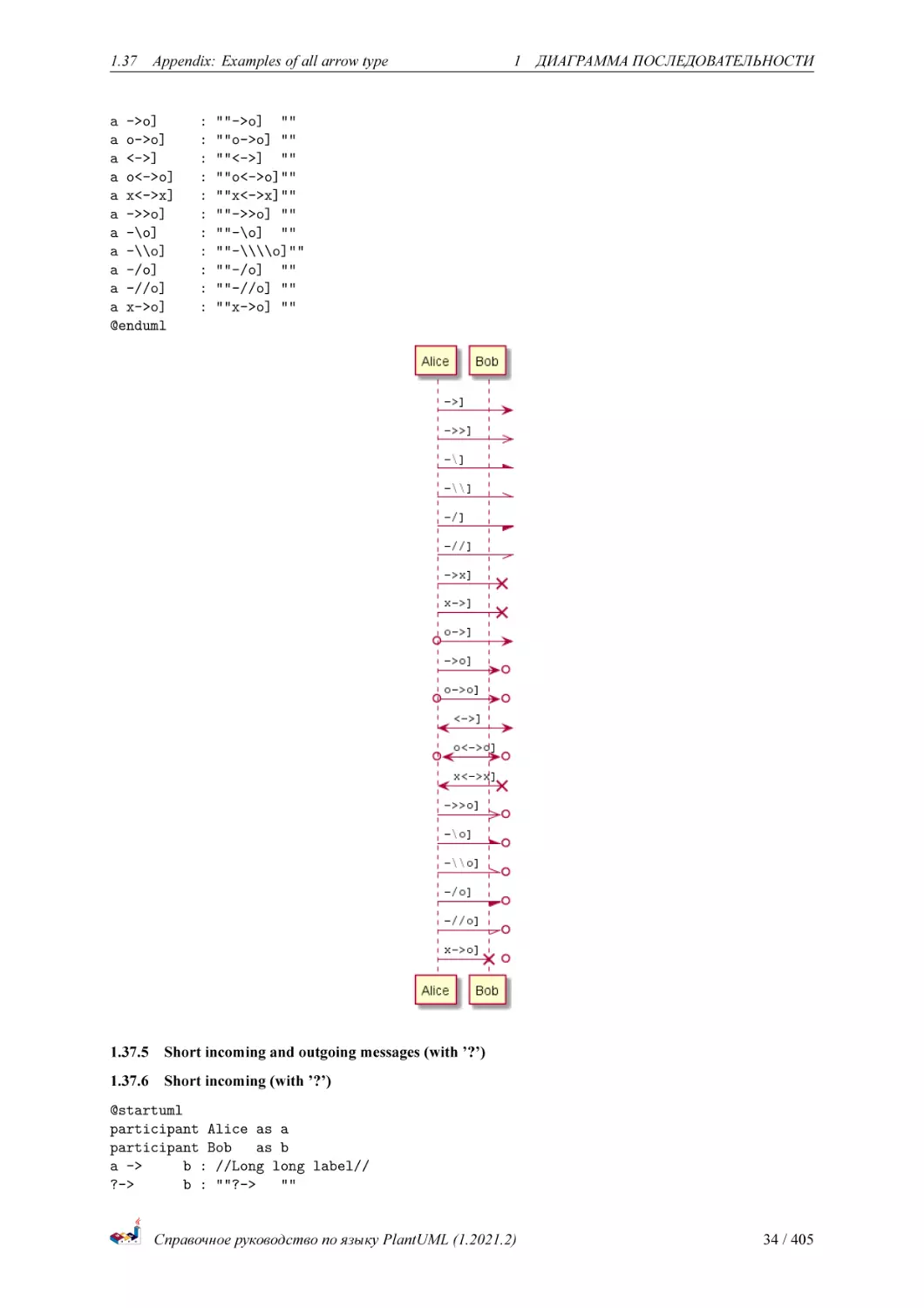
1.37.4 Outgoing messages (with ’]’)
@startuml
participant Alice as a
participant Bob
as b
a ->]
: ""->]
""
a ->>]
: ""->>] ""
a -\]
: ""-\]
""
a -\\]
: ""-\\\\]""
a -/]
: ""-/]
""
a -//]
: ""-//] ""
a ->x]
: ""->x] ""
a x->]
: ""x->] ""
a o->]
: ""o->] ""
Справочное руководство по языку PlantUML (1.2021.2)
33 / 405
1.37
Appendix: Examples of all arrow type
a ->o]
a o->o]
a <->]
a o<->o]
a x<->x]
a ->>o]
a -\o]
a -\\o]
a -/o]
a -//o]
a x->o]
@enduml
:
:
:
:
:
:
:
:
:
:
:
1 ДИАГРАММА ПОСЛЕДОВАТЕЛЬНОСТИ
""->o] ""
""o->o] ""
""<->] ""
""o<->o]""
""x<->x]""
""->>o] ""
""-\o] ""
""-\\\\o]""
""-/o] ""
""-//o] ""
""x->o] ""
1.37.5 Short incoming and outgoing messages (with ’?’)
1.37.6 Short incoming (with ’?’)
@startuml
participant Alice as a
participant Bob
as b
a ->
b : //Long long label//
?->
b : ""?->
""
Справочное руководство по языку PlantUML (1.2021.2)
34 / 405
1.37
Appendix: Examples of all arrow type
?->>
?-\
?-\\
?-/
?-//
?->x
?x->
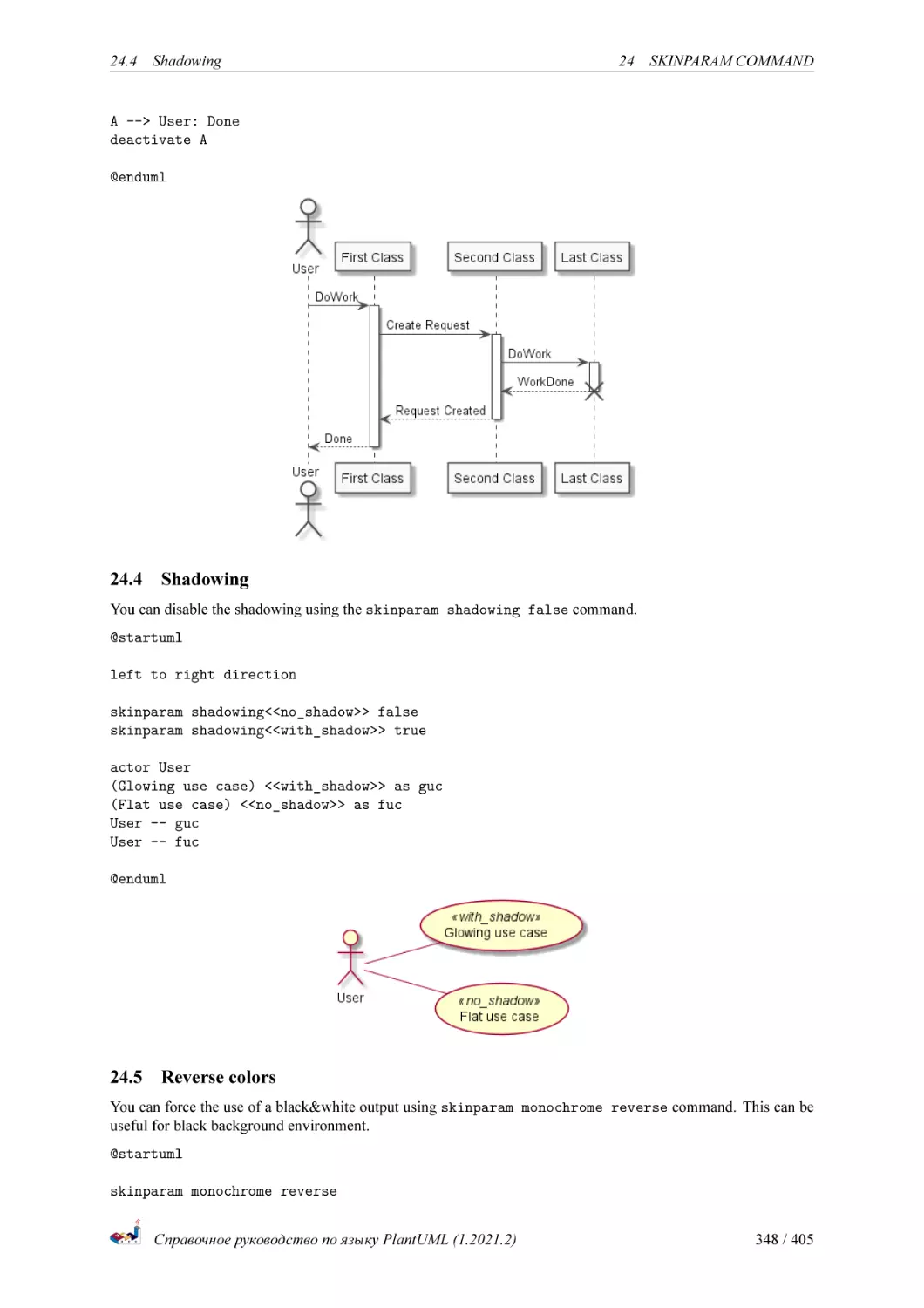
?o->
?->o
?o->o
?<->
?o<->o
?x<->x
?->>o
?-\o
?-\\o
?-/o
?-//o
?x->o
@enduml
b
b
b
b
b
b
b
b
b
b
b
b
b
b
b
b
b
b
b
:
:
:
:
:
:
:
:
:
:
:
:
:
:
:
:
:
:
:
1 ДИАГРАММА ПОСЛЕДОВАТЕЛЬНОСТИ
""?->> ""
""?-\
""
""?-\\\\""
""?-/
""
""?-// ""
""?->x ""
""?x-> ""
""?o-> ""
""?->o ""
""?o->o ""
""?<-> ""
""?o<->o""
""?x<->x""
""?->>o ""
""?-\o ""
""?-\\\\o ""
""?-/o ""
""?-//o ""
""?x->o ""
Справочное руководство по языку PlantUML (1.2021.2)
35 / 405
1.37
Appendix: Examples of all arrow type
1 ДИАГРАММА ПОСЛЕДОВАТЕЛЬНОСТИ
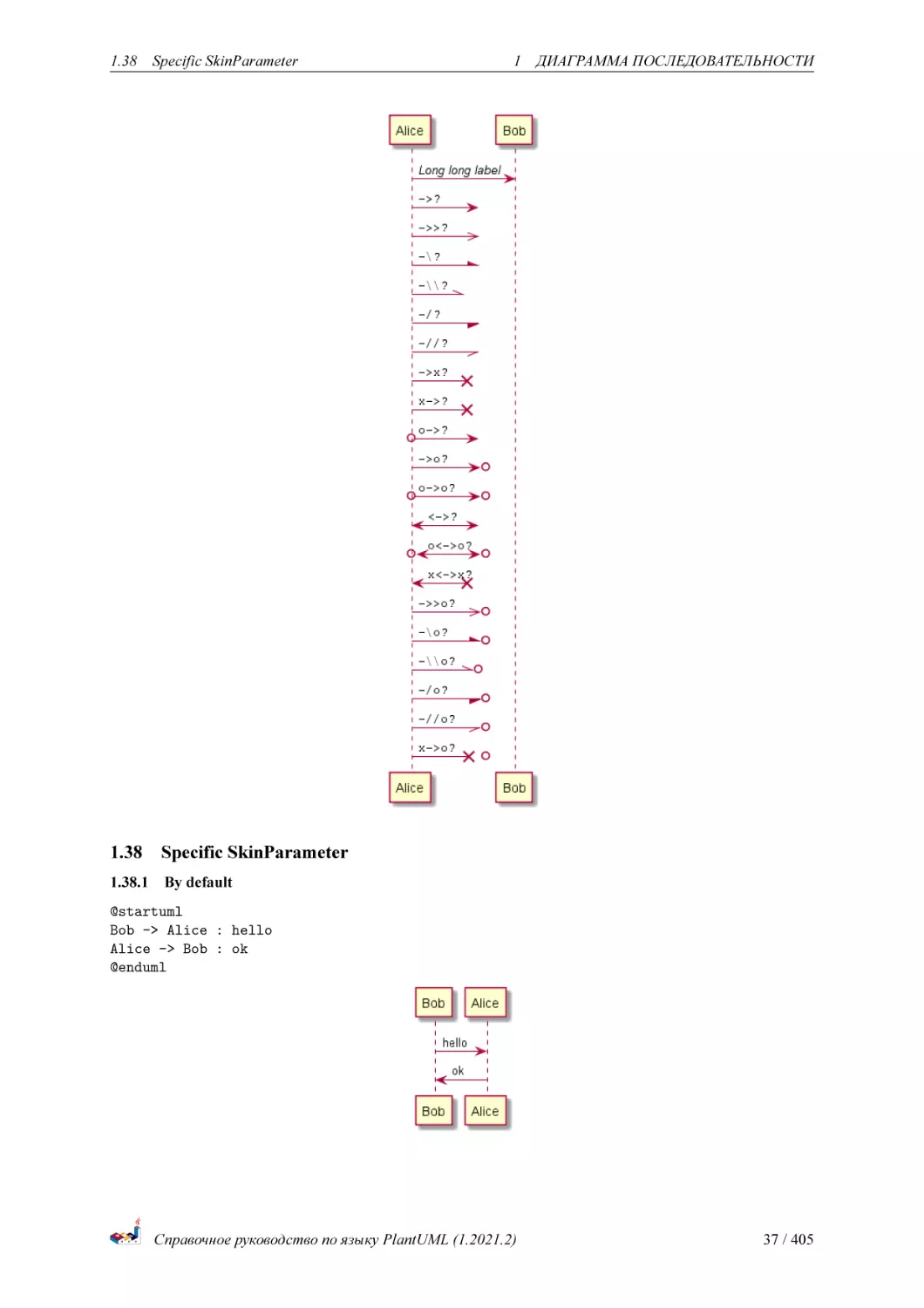
1.37.7 Short outgoing (with ’?’)
@startuml
participant Alice as a
participant Bob
as b
a ->
b : //Long long label//
a ->?
: ""->?
""
a ->>?
: ""->>? ""
a -\?
: ""-\?
""
a -\\?
: ""-\\\\?""
a -/?
: ""-/?
""
a -//?
: ""-//? ""
a ->x?
: ""->x? ""
a x->?
: ""x->? ""
a o->?
: ""o->? ""
a ->o?
: ""->o? ""
a o->o?
: ""o->o? ""
a <->?
: ""<->? ""
a o<->o?
: ""o<->o?""
a x<->x?
: ""x<->x?""
a ->>o?
: ""->>o? ""
a -\o?
: ""-\o? ""
a -\\o?
: ""-\\\\o?""
a -/o?
: ""-/o? ""
a -//o?
: ""-//o? ""
a x->o?
: ""x->o? ""
@enduml
Справочное руководство по языку PlantUML (1.2021.2)
36 / 405
1.38
1.38
Specific SkinParameter
1 ДИАГРАММА ПОСЛЕДОВАТЕЛЬНОСТИ
Specific SkinParameter
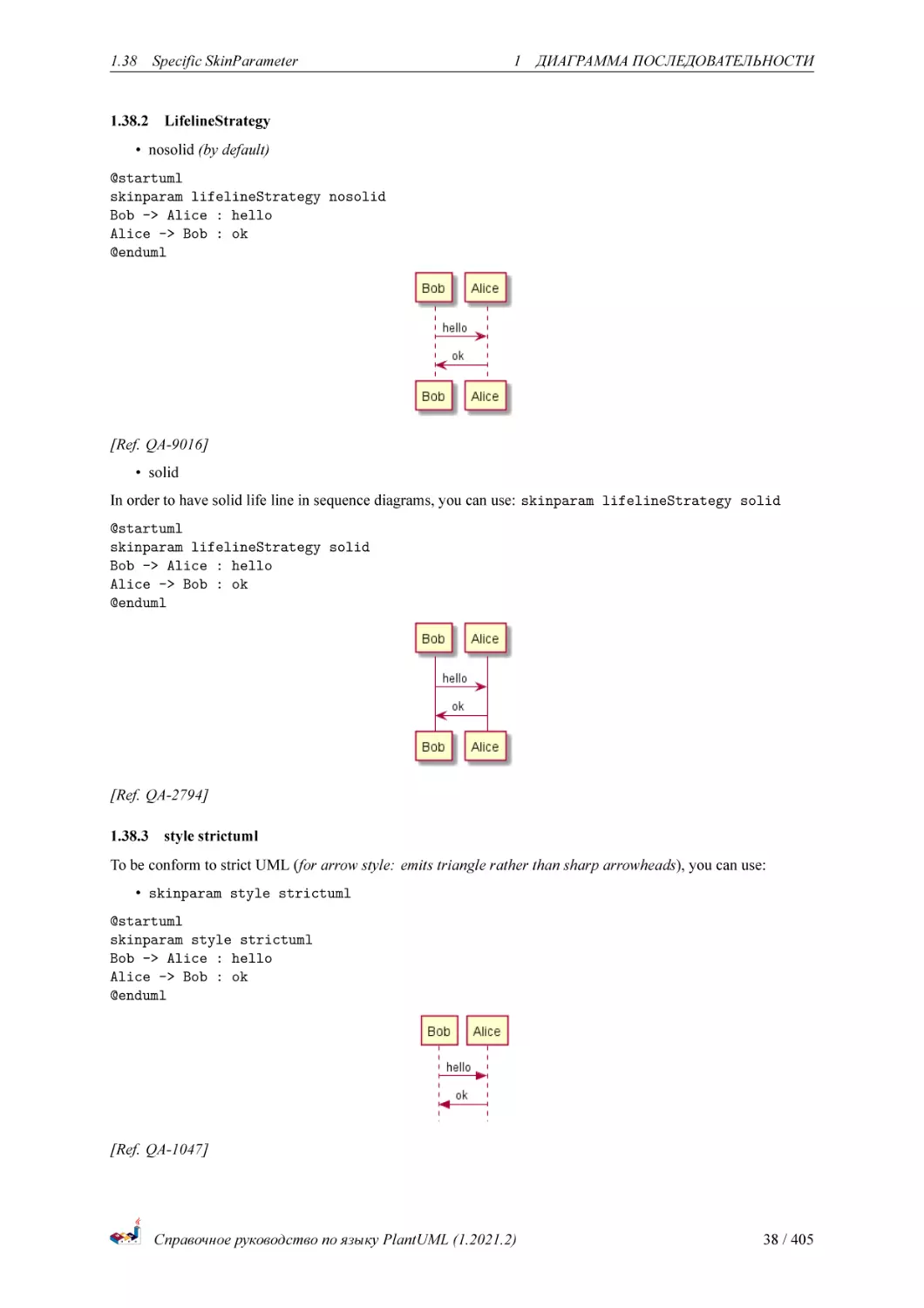
1.38.1 By default
@startuml
Bob -> Alice : hello
Alice -> Bob : ok
@enduml
Справочное руководство по языку PlantUML (1.2021.2)
37 / 405
1.38
Specific SkinParameter
1 ДИАГРАММА ПОСЛЕДОВАТЕЛЬНОСТИ
1.38.2 LifelineStrategy
• nosolid (by default)
@startuml
skinparam lifelineStrategy nosolid
Bob -> Alice : hello
Alice -> Bob : ok
@enduml
[Ref. QA-9016]
• solid
In order to have solid life line in sequence diagrams, you can use: skinparam lifelineStrategy solid
@startuml
skinparam lifelineStrategy solid
Bob -> Alice : hello
Alice -> Bob : ok
@enduml
[Ref. QA-2794]
1.38.3 style strictuml
To be conform to strict UML (for arrow style: emits triangle rather than sharp arrowheads), you can use:
• skinparam style strictuml
@startuml
skinparam style strictuml
Bob -> Alice : hello
Alice -> Bob : ok
@enduml
[Ref. QA-1047]
Справочное руководство по языку PlantUML (1.2021.2)
38 / 405
1.39
1.39
Hide unlinked participant
1 ДИАГРАММА ПОСЛЕДОВАТЕЛЬНОСТИ
Hide unlinked participant
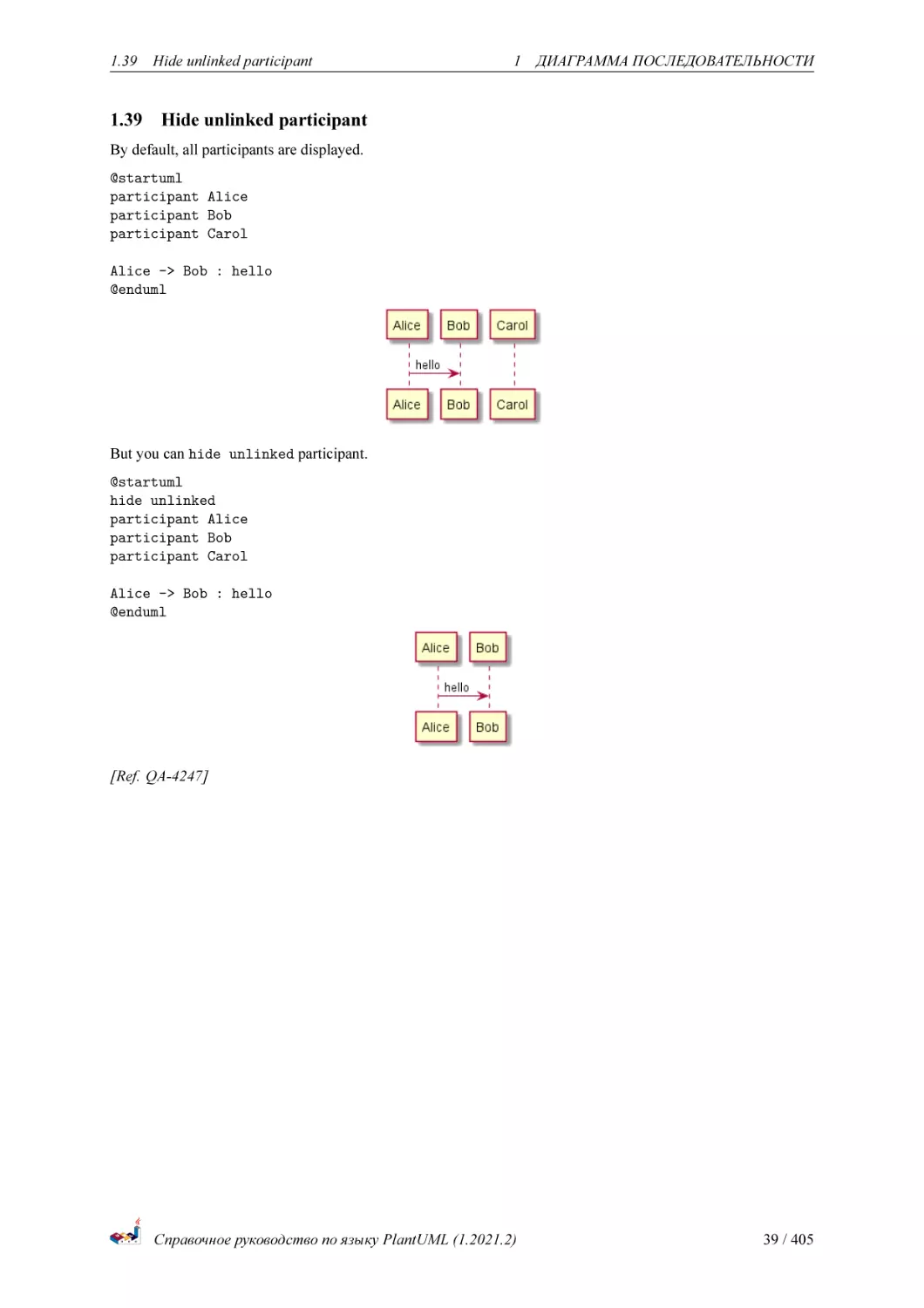
By default, all participants are displayed.
@startuml
participant Alice
participant Bob
participant Carol
Alice -> Bob : hello
@enduml
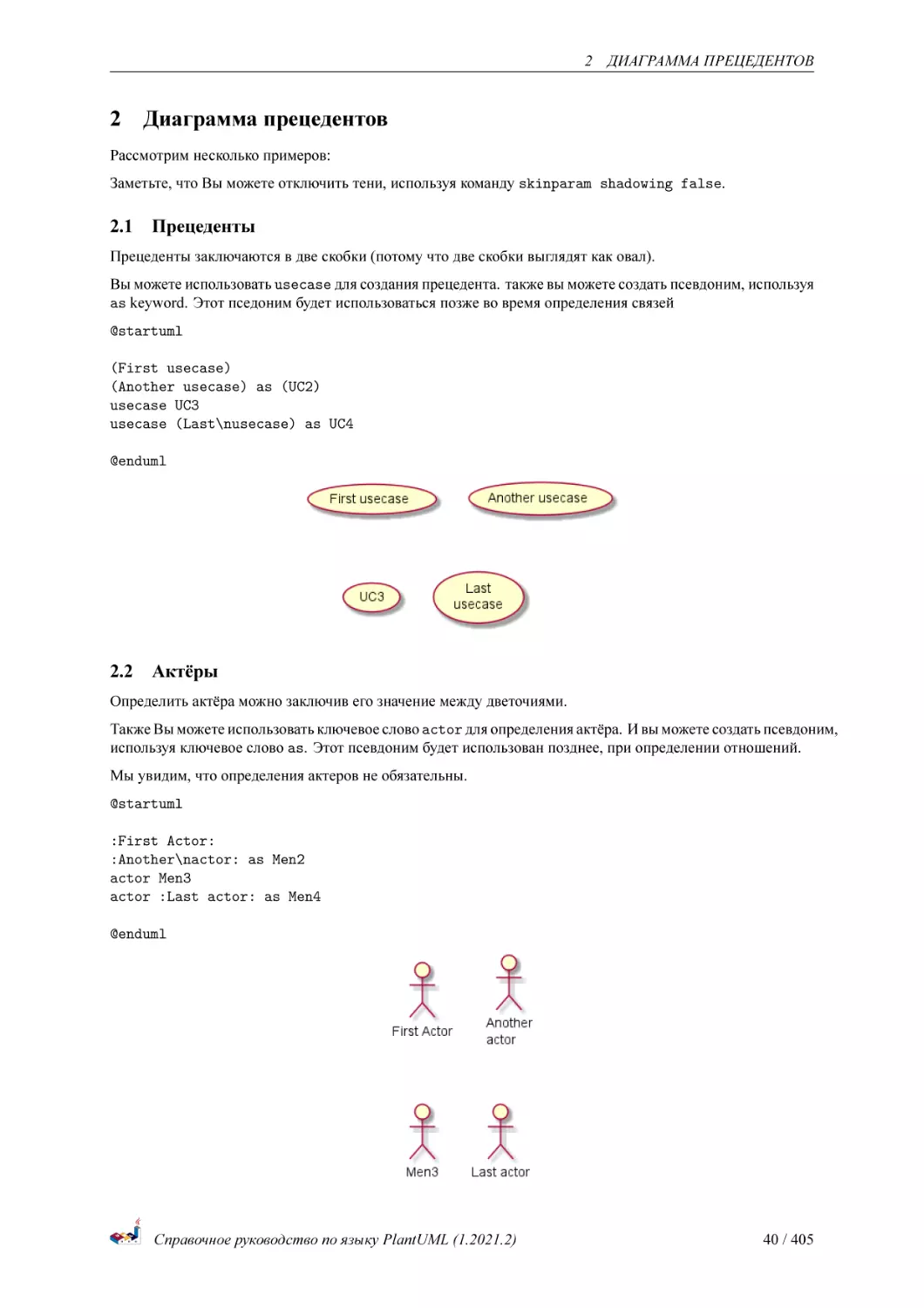
But you can hide unlinked participant.
@startuml
hide unlinked
participant Alice
participant Bob
participant Carol
Alice -> Bob : hello
@enduml
[Ref. QA-4247]
Справочное руководство по языку PlantUML (1.2021.2)
39 / 405
2 ДИАГРАММА ПРЕЦЕДЕНТОВ
2
Диаграмма прецедентов
Рассмотрим несколько примеров:
Заметьте, что Вы можете отключить тени, используя команду skinparam shadowing false.
2.1
Прецеденты
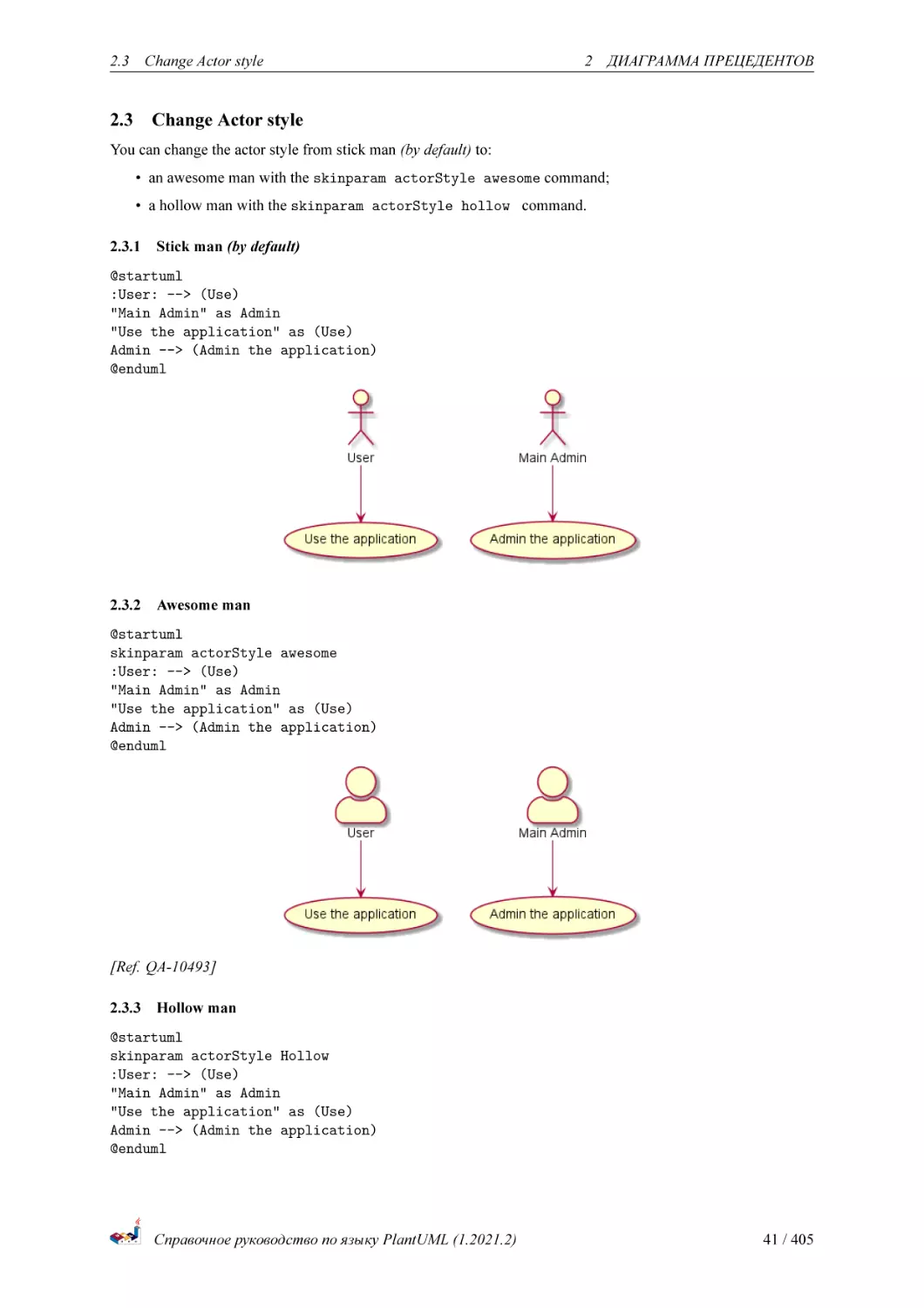
Прецеденты заключаются в две скобки (потому что две скобки выглядят как овал).
Вы можете использовать usecase для создания прецедента. также вы можете создать псевдоним, используя
as keyword. Этот пседоним будет использоваться позже во время определения связей
@startuml
(First usecase)
(Another usecase) as (UC2)
usecase UC3
usecase (Last\nusecase) as UC4
@enduml
2.2
Актёры
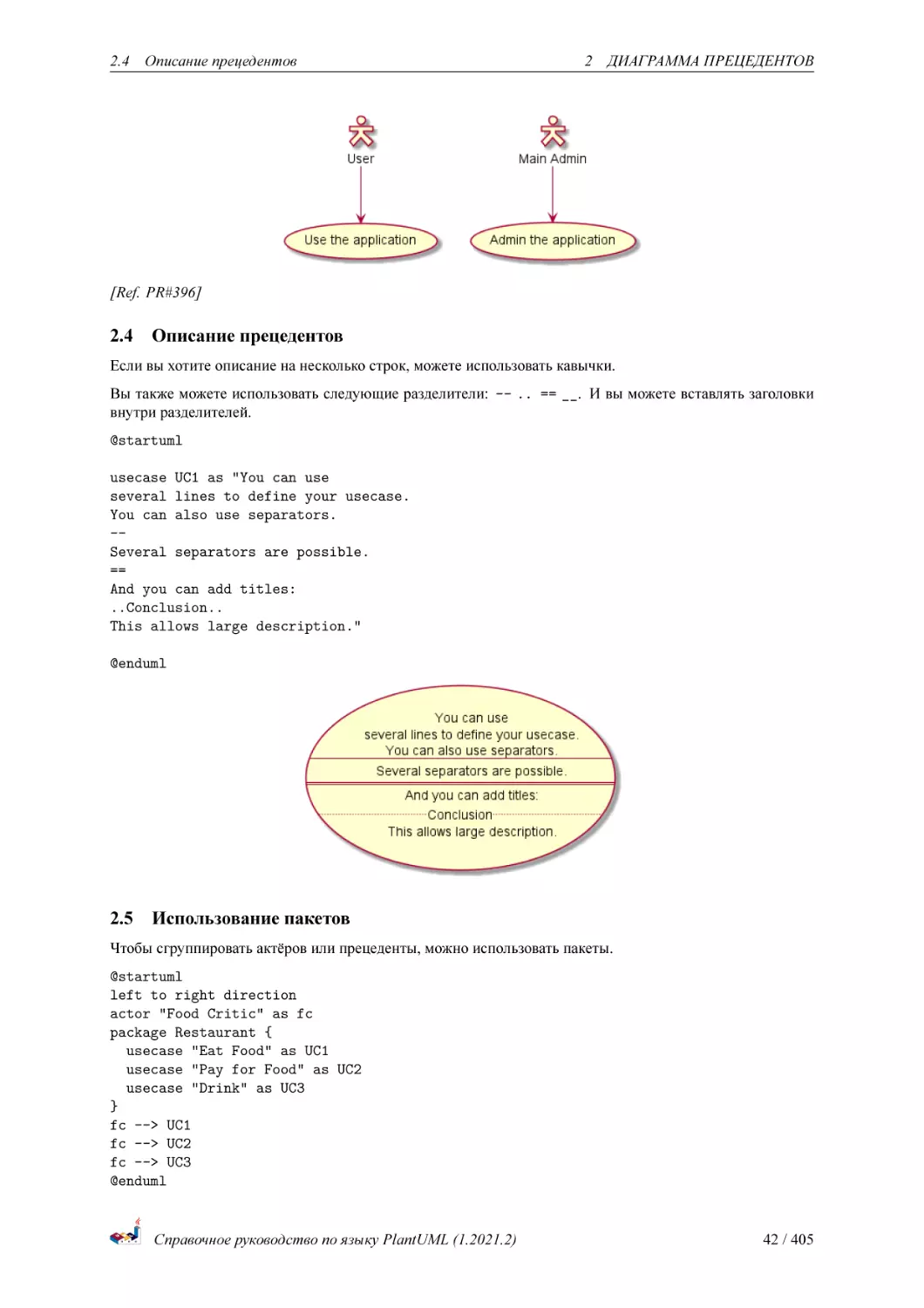
Определить актёра можно заключив его значение между дветочиями.
Также Вы можете использовать ключевое слово actor для определения актёра. И вы можете создать псевдоним,
используя ключевое слово as. Этот псевдоним будет использован позднее, при определении отношений.
Мы увидим, что определения актеров не обязательны.
@startuml
:First Actor:
:Another\nactor: as Men2
actor Men3
actor :Last actor: as Men4
@enduml
Справочное руководство по языку PlantUML (1.2021.2)
40 / 405
2.3 Change Actor style
2.3
2 ДИАГРАММА ПРЕЦЕДЕНТОВ
Change Actor style
You can change the actor style from stick man (by default) to:
• an awesome man with the skinparam actorStyle awesome command;
• a hollow man with the skinparam actorStyle hollow command.
2.3.1
Stick man (by default)
@startuml
:User: --> (Use)
"Main Admin" as Admin
"Use the application" as (Use)
Admin --> (Admin the application)
@enduml
2.3.2
Awesome man
@startuml
skinparam actorStyle awesome
:User: --> (Use)
"Main Admin" as Admin
"Use the application" as (Use)
Admin --> (Admin the application)
@enduml
[Ref. QA-10493]
2.3.3
Hollow man
@startuml
skinparam actorStyle Hollow
:User: --> (Use)
"Main Admin" as Admin
"Use the application" as (Use)
Admin --> (Admin the application)
@enduml
Справочное руководство по языку PlantUML (1.2021.2)
41 / 405
2.4 Описание прецедентов
2 ДИАГРАММА ПРЕЦЕДЕНТОВ
[Ref. PR#396]
2.4
Описание прецедентов
Если вы хотите описание на несколько строк, можете использовать кавычки.
Вы также можете использовать следующие разделители: -- .. == __. И вы можете вставлять заголовки
внутри разделителей.
@startuml
usecase UC1 as "You can use
several lines to define your usecase.
You can also use separators.
-Several separators are possible.
==
And you can add titles:
..Conclusion..
This allows large description."
@enduml
2.5
Использование пакетов
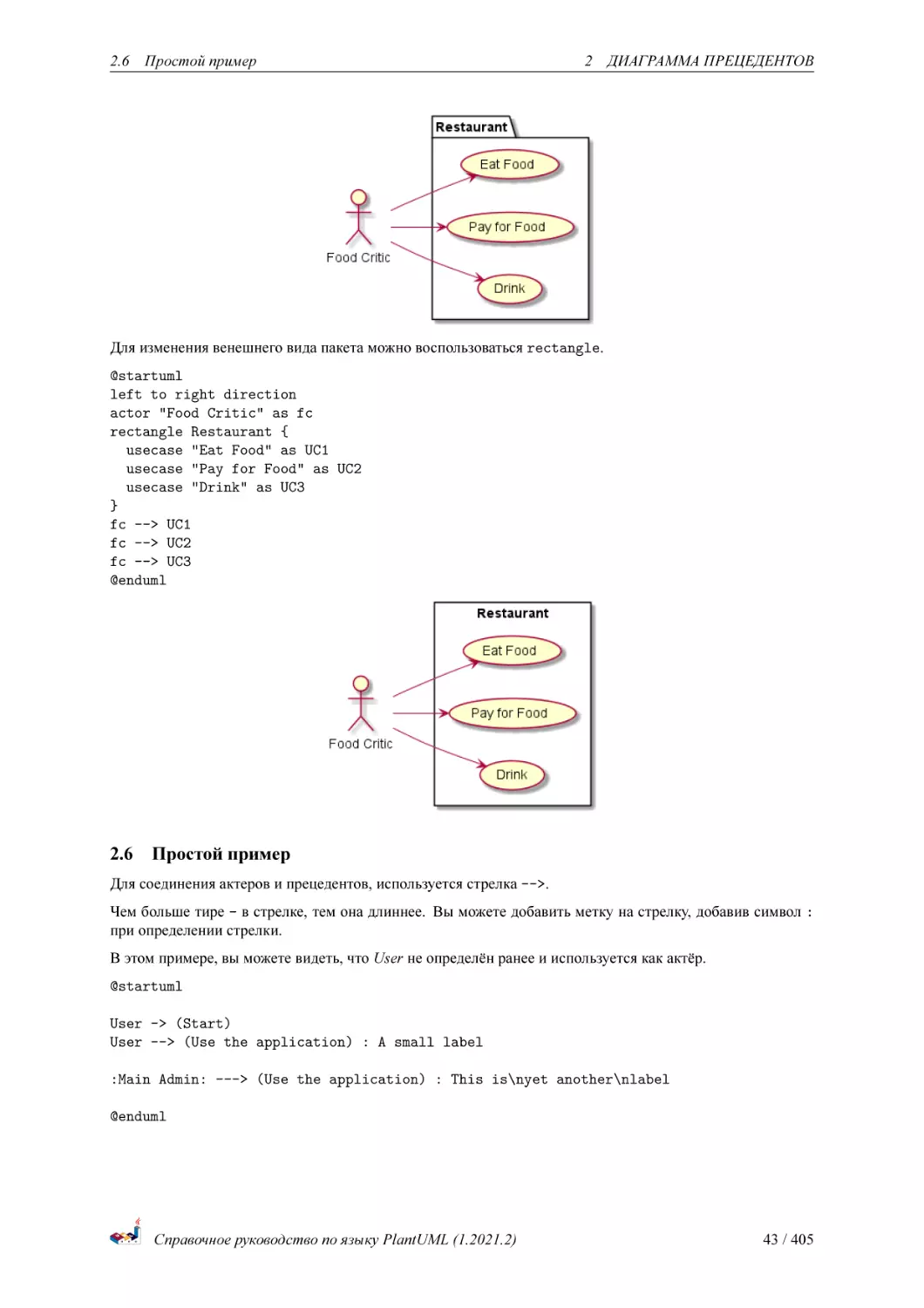
Чтобы сгруппировать актёров или прецеденты, можно использовать пакеты.
@startuml
left to right direction
actor "Food Critic" as fc
package Restaurant {
usecase "Eat Food" as UC1
usecase "Pay for Food" as UC2
usecase "Drink" as UC3
}
fc --> UC1
fc --> UC2
fc --> UC3
@enduml
Справочное руководство по языку PlantUML (1.2021.2)
42 / 405
2.6 Простой пример
2 ДИАГРАММА ПРЕЦЕДЕНТОВ
Для изменения венешнего вида пакета можно воспользоваться rectangle.
@startuml
left to right direction
actor "Food Critic" as fc
rectangle Restaurant {
usecase "Eat Food" as UC1
usecase "Pay for Food" as UC2
usecase "Drink" as UC3
}
fc --> UC1
fc --> UC2
fc --> UC3
@enduml
2.6
Простой пример
Для соединения актеров и прецедентов, используется стрелка -->.
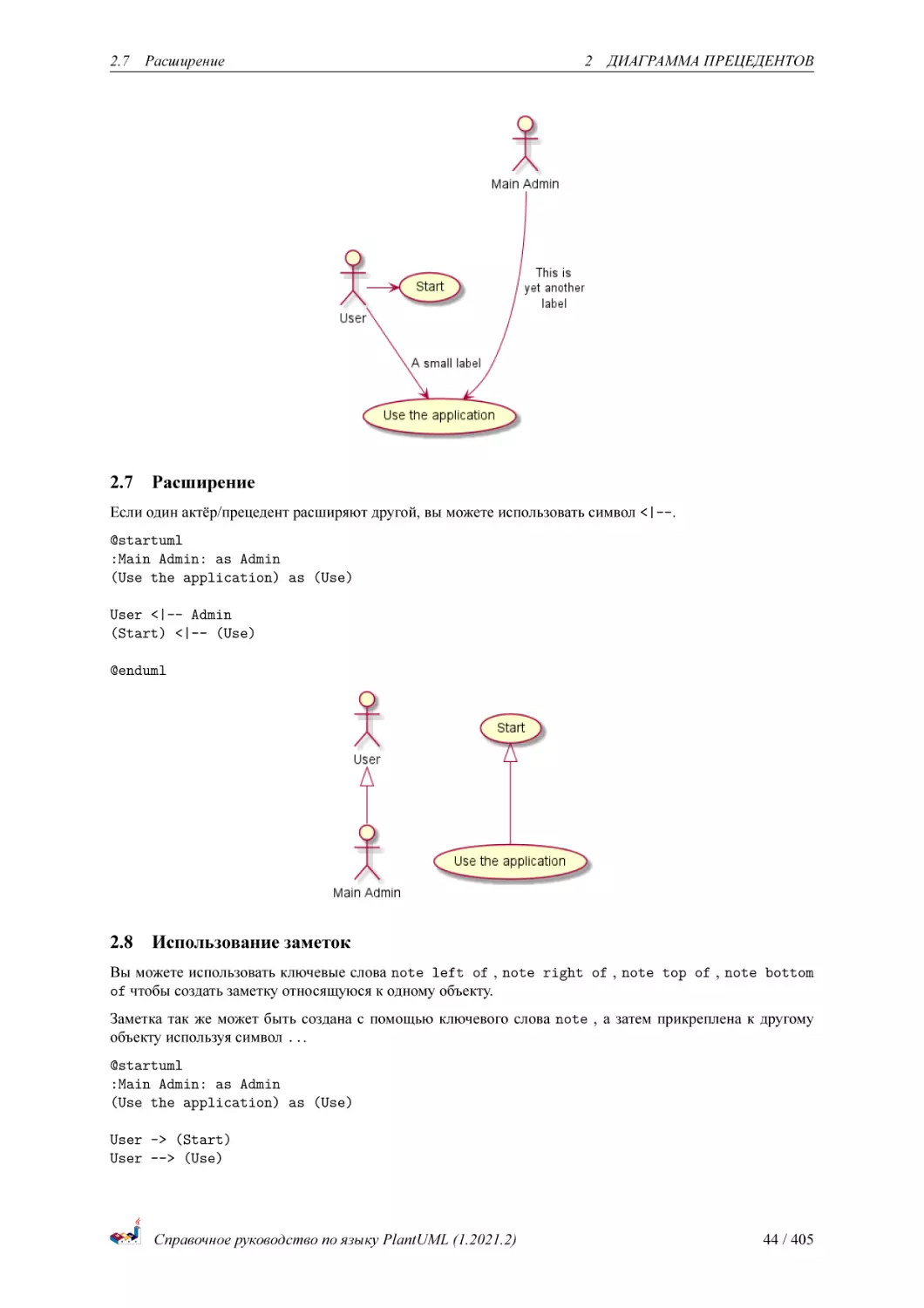
Чем больше тире - в стрелке, тем она длиннее. Вы можете добавить метку на стрелку, добавив символ :
при определении стрелки.
В этом примере, вы можете видеть, что User не определён ранее и используется как актёр.
@startuml
User -> (Start)
User --> (Use the application) : A small label
:Main Admin: ---> (Use the application) : This is\nyet another\nlabel
@enduml
Справочное руководство по языку PlantUML (1.2021.2)
43 / 405
2.7 Расширение
2.7
2 ДИАГРАММА ПРЕЦЕДЕНТОВ
Расширение
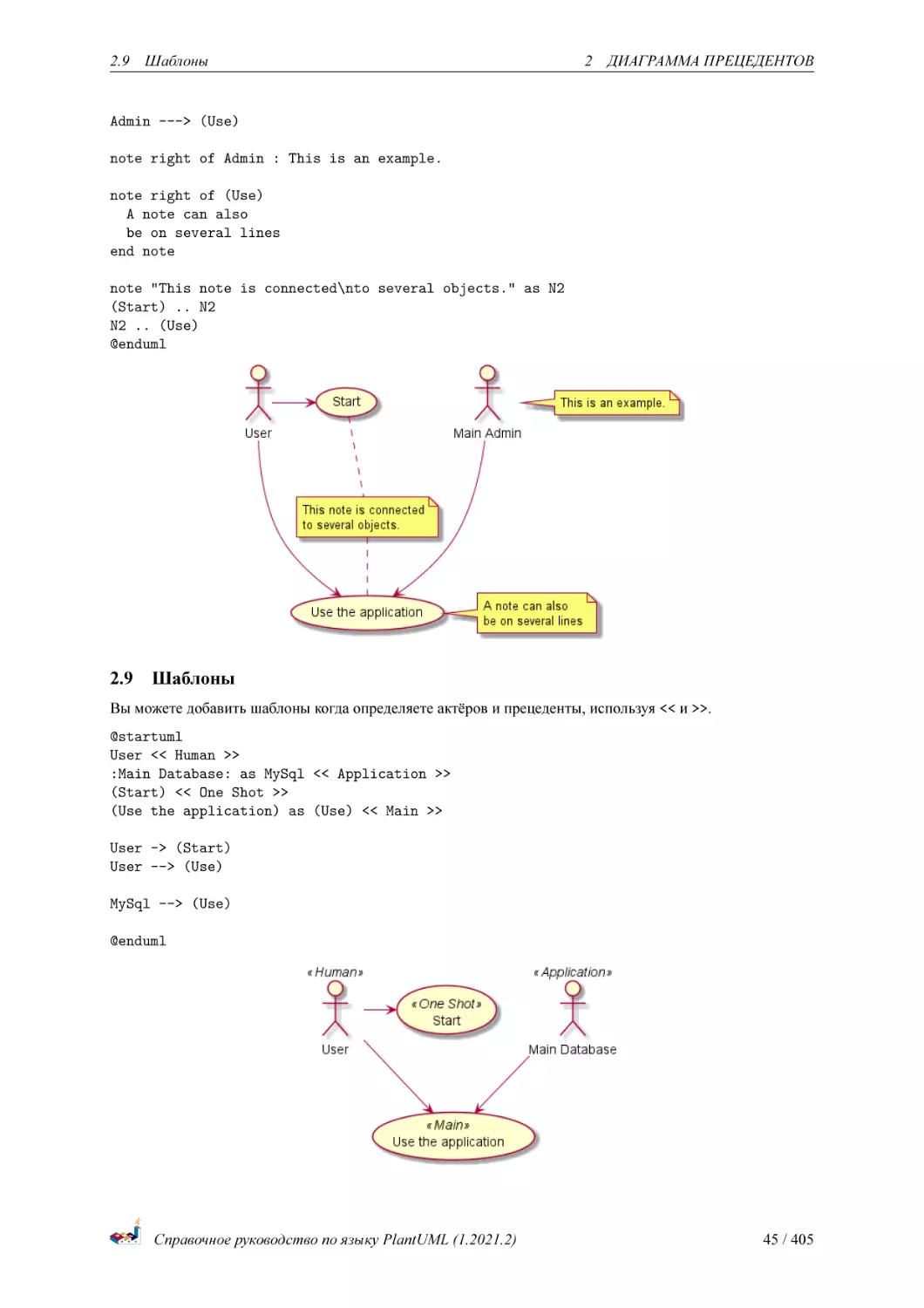
Если один актёр/прецедент расширяют другой, вы можете использовать символ <|--.
@startuml
:Main Admin: as Admin
(Use the application) as (Use)
User <|-- Admin
(Start) <|-- (Use)
@enduml
2.8
Использование заметок
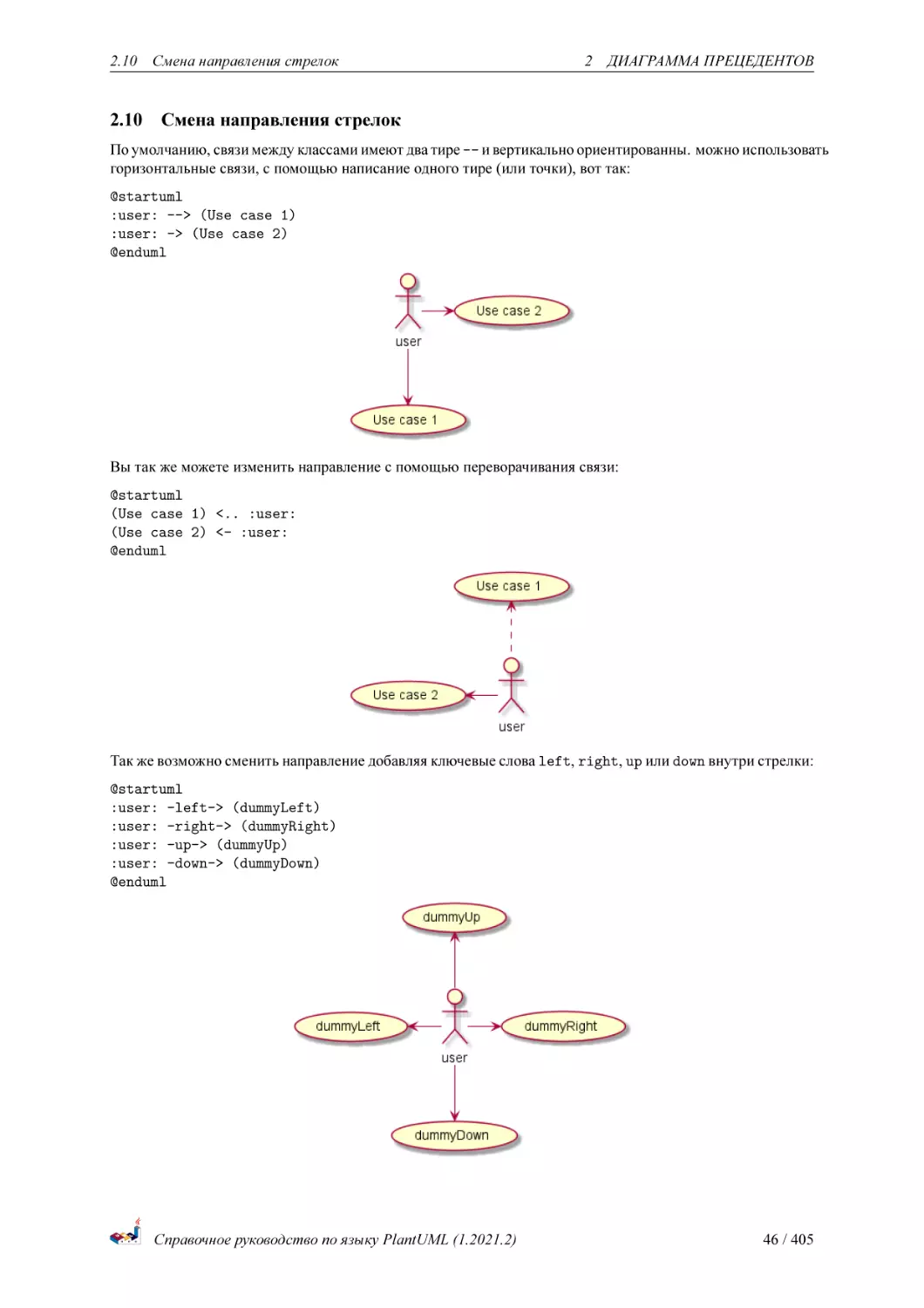
Вы можете использовать ключевые слова note left of , note right of , note top of , note bottom
of чтобы создать заметку относящуюся к одному объекту.
Заметка так же может быть создана с помощью ключевого слова note , а затем прикреплена к другому
объекту используя символ ...
@startuml
:Main Admin: as Admin
(Use the application) as (Use)
User -> (Start)
User --> (Use)
Справочное руководство по языку PlantUML (1.2021.2)
44 / 405
2.9 Шаблоны
2 ДИАГРАММА ПРЕЦЕДЕНТОВ
Admin ---> (Use)
note right of Admin : This is an example.
note right of (Use)
A note can also
be on several lines
end note
note "This note is connected\nto several objects." as N2
(Start) .. N2
N2 .. (Use)
@enduml
2.9
Шаблоны
Вы можете добавить шаблоны когда определяете актёров и прецеденты, используя << и >>.
@startuml
User << Human >>
:Main Database: as MySql << Application >>
(Start) << One Shot >>
(Use the application) as (Use) << Main >>
User -> (Start)
User --> (Use)
MySql --> (Use)
@enduml
Справочное руководство по языку PlantUML (1.2021.2)
45 / 405
2.10
2.10
Смена направления стрелок
2 ДИАГРАММА ПРЕЦЕДЕНТОВ
Смена направления стрелок
По умолчанию, связи между классами имеют два тире -- и вертикально ориентированны. можно использовать
горизонтальные связи, с помощью написание одного тире (или точки), вот так:
@startuml
:user: --> (Use case 1)
:user: -> (Use case 2)
@enduml
Вы так же можете изменить направление с помощью переворачивания связи:
@startuml
(Use case 1) <.. :user:
(Use case 2) <- :user:
@enduml
Так же возможно сменить направление добавляя ключевые слова left, right, up или down внутри стрелки:
@startuml
:user: -left-> (dummyLeft)
:user: -right-> (dummyRight)
:user: -up-> (dummyUp)
:user: -down-> (dummyDown)
@enduml
Справочное руководство по языку PlantUML (1.2021.2)
46 / 405
2.11 Разделение диаграмм
2 ДИАГРАММА ПРЕЦЕДЕНТОВ
Вы можете записать короче, используя только первый символ названия направления (например, -d- вместо
-down-) или первые два символа (-do-).
Пожалуйста, помните, что Вы не должны использовать эту функциональность без реальной необходимости:
GraphViz обычно даёт хороший результат без дополнительных настроек.
2.11 Разделение диаграмм
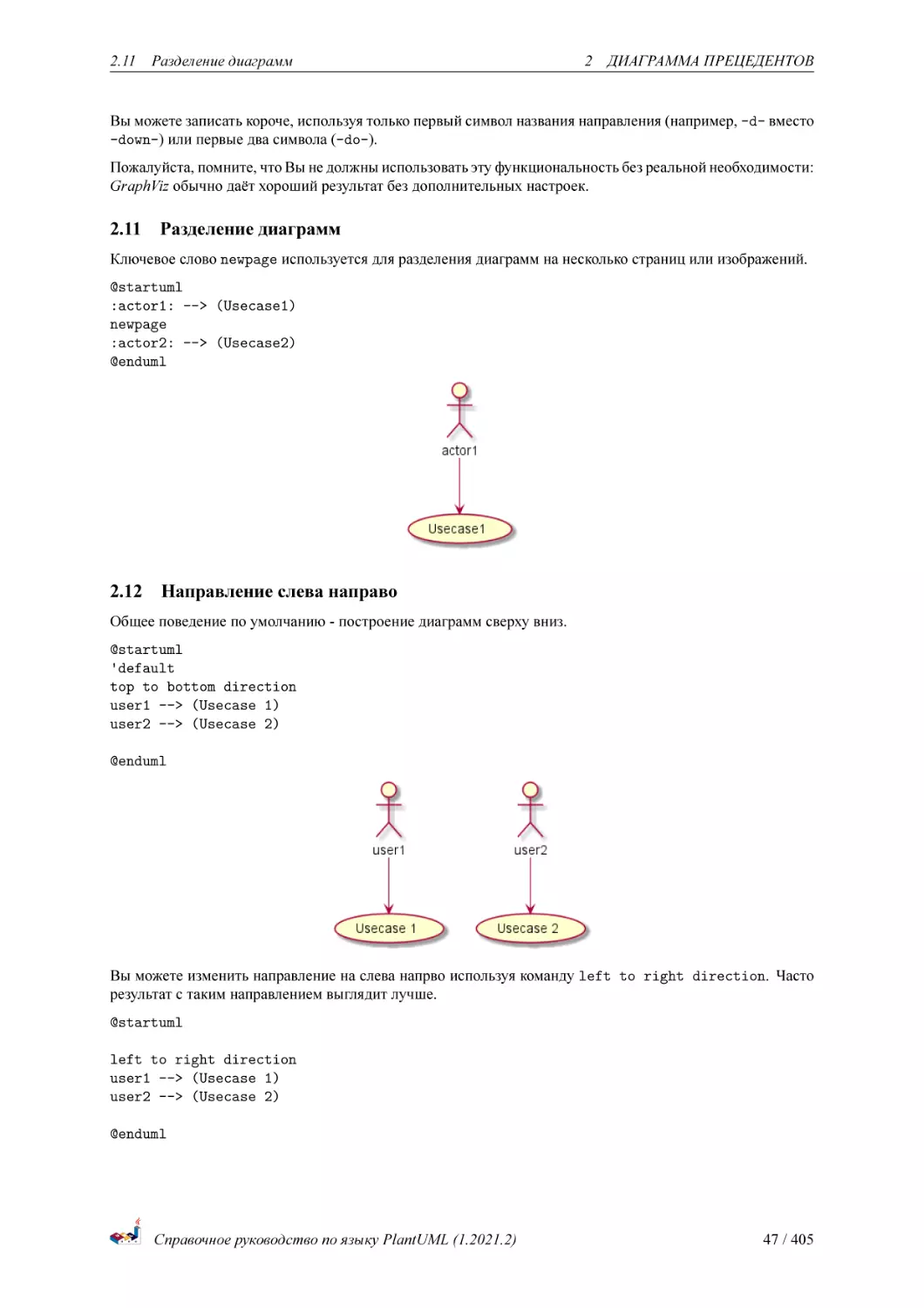
Ключевое слово newpage используется для разделения диаграмм на несколько страниц или изображений.
@startuml
:actor1: --> (Usecase1)
newpage
:actor2: --> (Usecase2)
@enduml
2.12
Направление слева направо
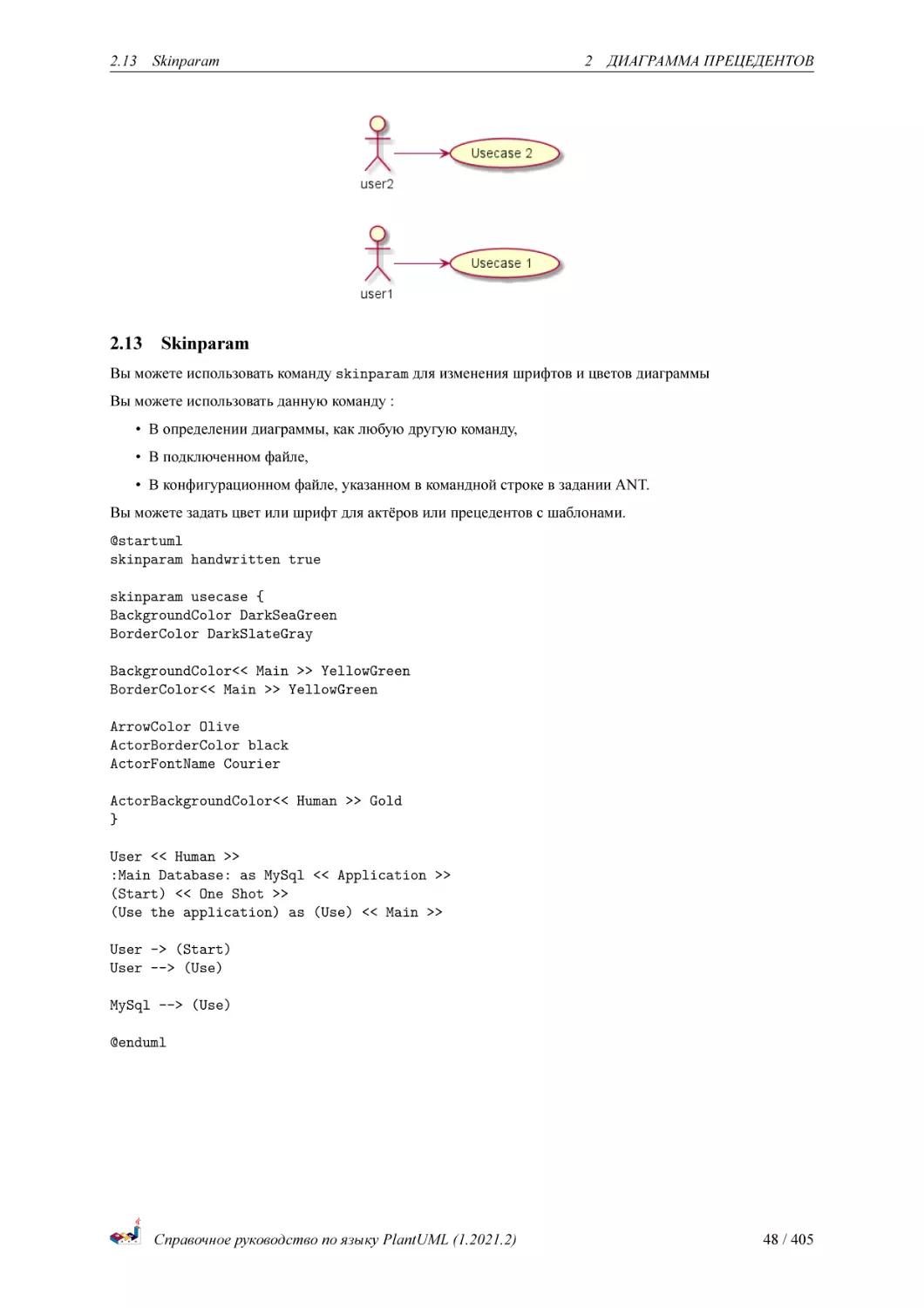
Общее поведение по умолчанию - построение диаграмм сверху вниз.
@startuml
'default
top to bottom direction
user1 --> (Usecase 1)
user2 --> (Usecase 2)
@enduml
Вы можете изменить направление на слева напрво используя команду left to right direction. Часто
результат с таким направлением выглядит лучше.
@startuml
left to right direction
user1 --> (Usecase 1)
user2 --> (Usecase 2)
@enduml
Справочное руководство по языку PlantUML (1.2021.2)
47 / 405
2.13
2.13
Skinparam
2 ДИАГРАММА ПРЕЦЕДЕНТОВ
Skinparam
Вы можете использовать команду skinparam для изменения шрифтов и цветов диаграммы
Вы можете использовать данную команду :
• В определении диаграммы, как любую другую команду,
• В подключенном файле,
• В конфигурационном файле, указанном в командной строке в задании ANT.
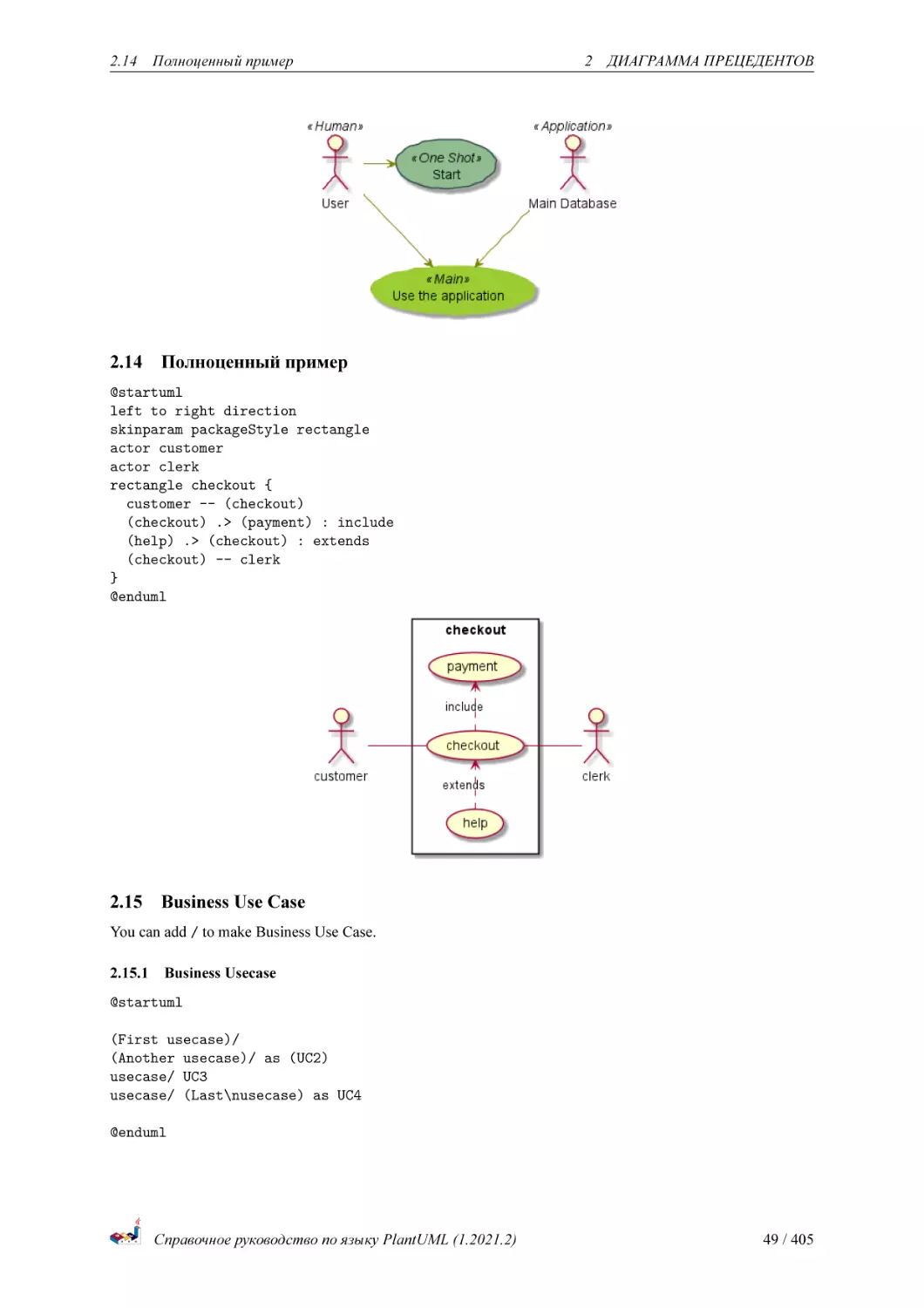
Вы можете задать цвет или шрифт для актёров или прецедентов с шаблонами.
@startuml
skinparam handwritten true
skinparam usecase {
BackgroundColor DarkSeaGreen
BorderColor DarkSlateGray
BackgroundColor<< Main >> YellowGreen
BorderColor<< Main >> YellowGreen
ArrowColor Olive
ActorBorderColor black
ActorFontName Courier
ActorBackgroundColor<< Human >> Gold
}
User << Human >>
:Main Database: as MySql << Application >>
(Start) << One Shot >>
(Use the application) as (Use) << Main >>
User -> (Start)
User --> (Use)
MySql --> (Use)
@enduml
Справочное руководство по языку PlantUML (1.2021.2)
48 / 405
2.14
2.14
Полноценный пример
2 ДИАГРАММА ПРЕЦЕДЕНТОВ
Полноценный пример
@startuml
left to right direction
skinparam packageStyle rectangle
actor customer
actor clerk
rectangle checkout {
customer -- (checkout)
(checkout) .> (payment) : include
(help) .> (checkout) : extends
(checkout) -- clerk
}
@enduml
2.15
Business Use Case
You can add / to make Business Use Case.
2.15.1 Business Usecase
@startuml
(First usecase)/
(Another usecase)/ as (UC2)
usecase/ UC3
usecase/ (Last\nusecase) as UC4
@enduml
Справочное руководство по языку PlantUML (1.2021.2)
49 / 405
2.16
Change arrow color and style (inline style)
2 ДИАГРАММА ПРЕЦЕДЕНТОВ
2.15.2 Business Actor
@startuml
:First Actor:/
:Another\nactor:/ as Man2
actor/ Woman3
actor/ :Last actor: as Person1
@enduml
[Ref. QA-12179]
2.16
Change arrow color and style (inline style)
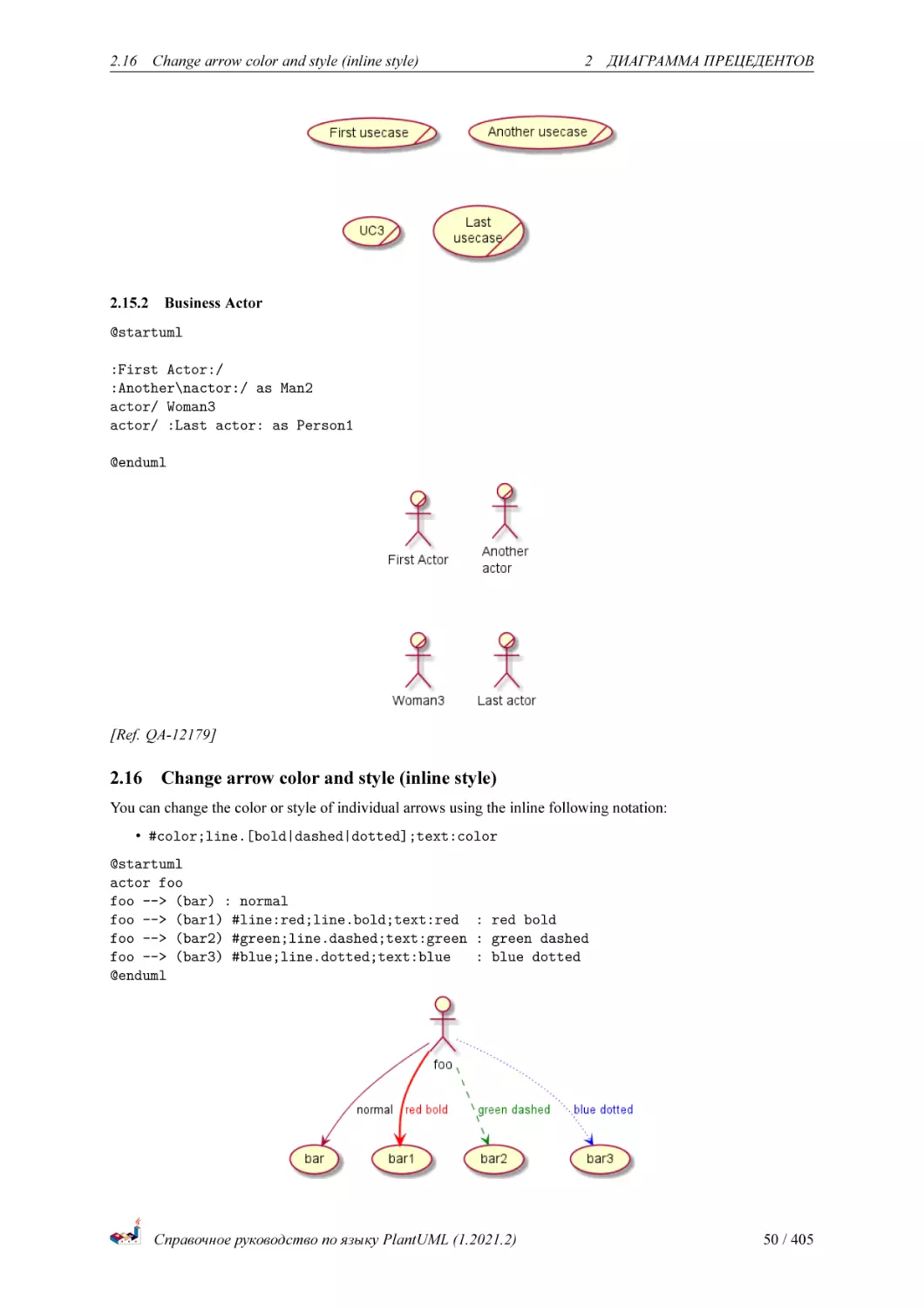
You can change the color or style of individual arrows using the inline following notation:
• #color;line.[bold|dashed|dotted];text:color
@startuml
actor foo
foo --> (bar) : normal
foo --> (bar1) #line:red;line.bold;text:red : red bold
foo --> (bar2) #green;line.dashed;text:green : green dashed
foo --> (bar3) #blue;line.dotted;text:blue
: blue dotted
@enduml
Справочное руководство по языку PlantUML (1.2021.2)
50 / 405
2.17
Change element color and style (inline style)
2 ДИАГРАММА ПРЕЦЕДЕНТОВ
[Ref. QA-3770 and QA-3816] [See similar feature on deployment-diagram or class diagram]
2.17
Change element color and style (inline style)
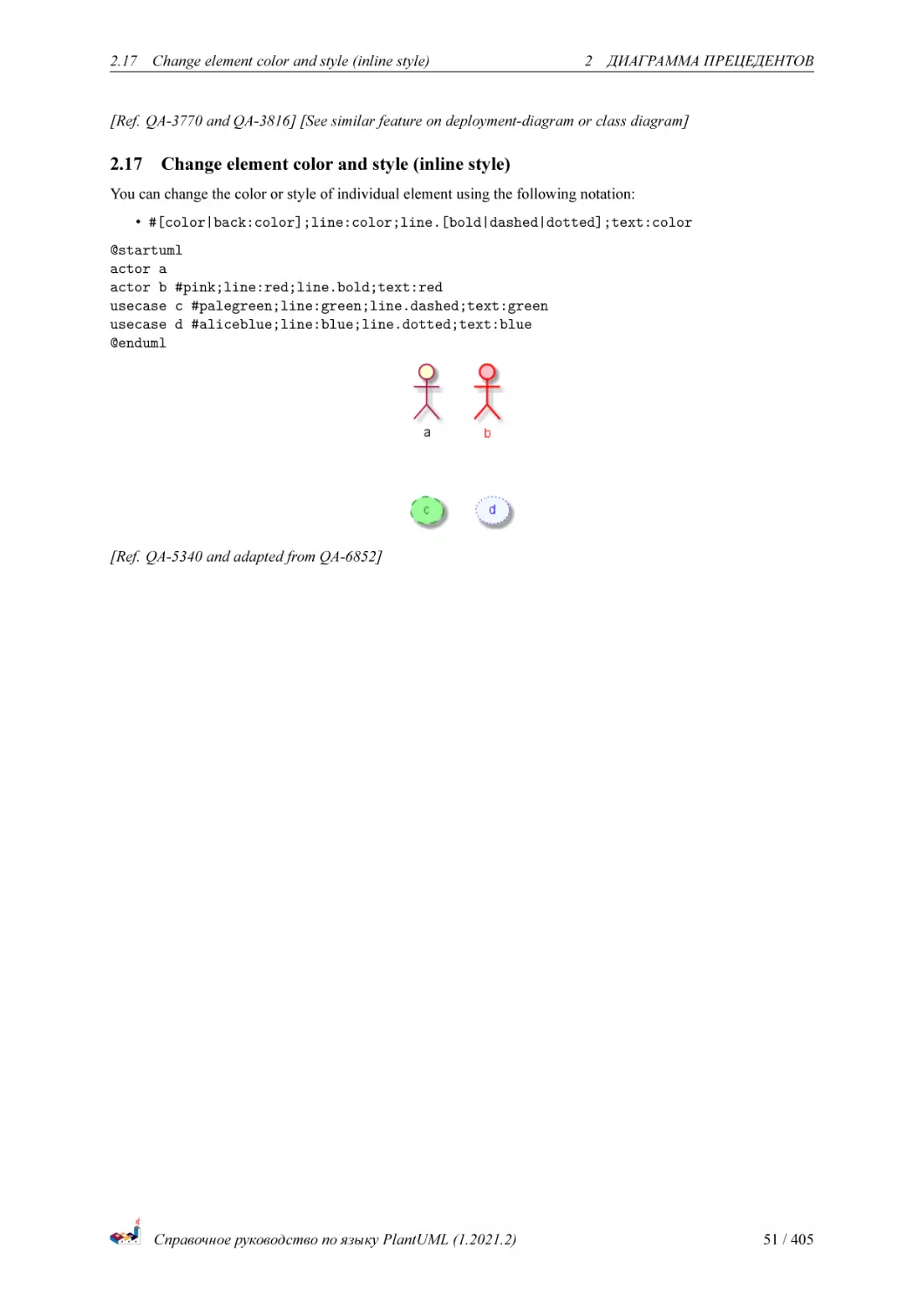
You can change the color or style of individual element using the following notation:
• #[color|back:color];line:color;line.[bold|dashed|dotted];text:color
@startuml
actor a
actor b #pink;line:red;line.bold;text:red
usecase c #palegreen;line:green;line.dashed;text:green
usecase d #aliceblue;line:blue;line.dotted;text:blue
@enduml
[Ref. QA-5340 and adapted from QA-6852]
Справочное руководство по языку PlantUML (1.2021.2)
51 / 405
3
3
3.1
Диаграмма классов
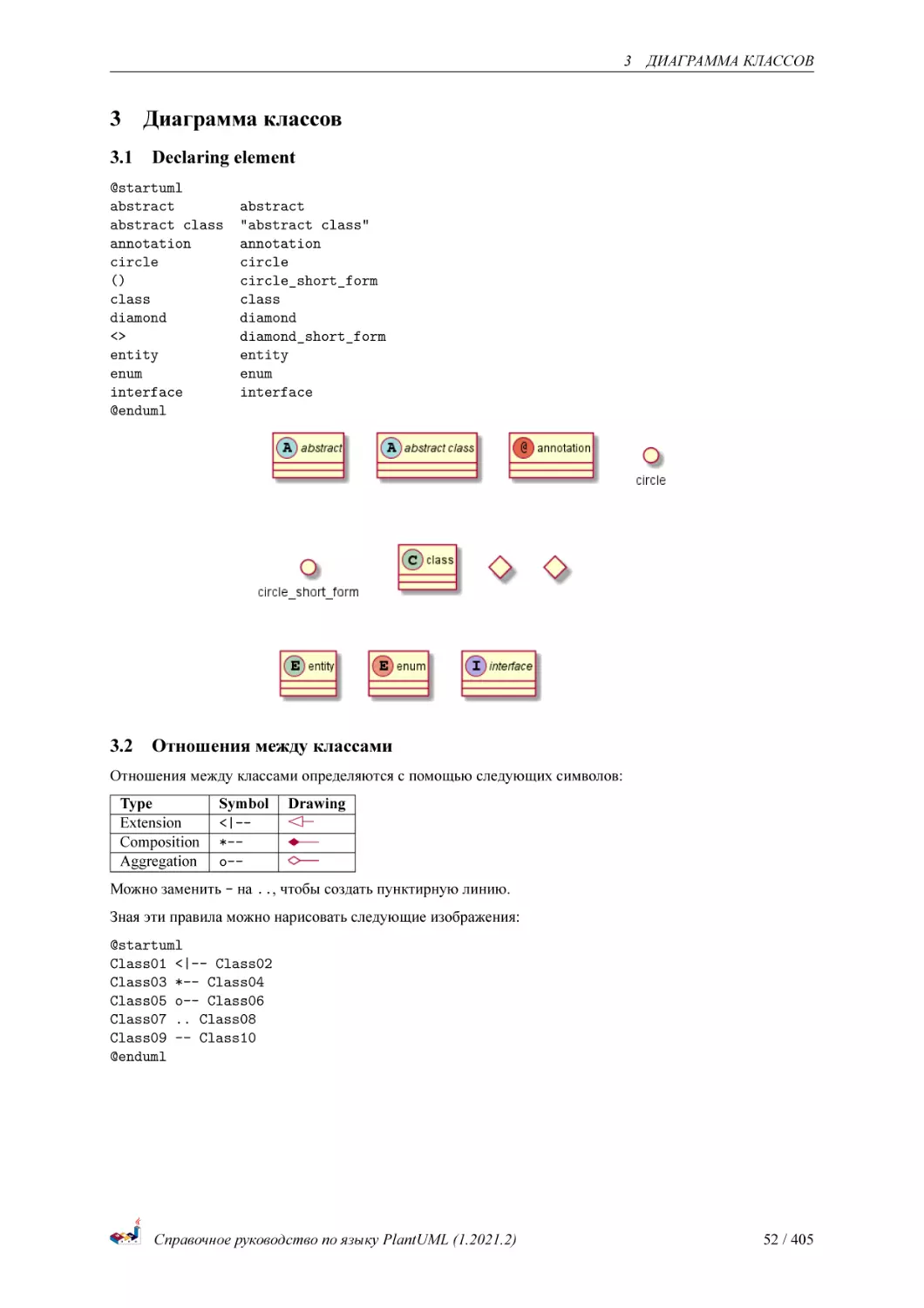
Declaring element
@startuml
abstract
abstract class
annotation
circle
()
class
diamond
<>
entity
enum
interface
@enduml
3.2
ДИАГРАММА КЛАССОВ
abstract
"abstract class"
annotation
circle
circle_short_form
class
diamond
diamond_short_form
entity
enum
interface
Отношения между классами
Отношения между классами определяются с помощью следующих символов:
Type
Extension
Composition
Aggregation
Symbol
<|-*-o--
Drawing
Можно заменить - на .., чтобы создать пунктирную линию.
Зная эти правила можно нарисовать следующие изображения:
@startuml
Class01 <|-- Class02
Class03 *-- Class04
Class05 o-- Class06
Class07 .. Class08
Class09 -- Class10
@enduml
Справочное руководство по языку PlantUML (1.2021.2)
52 / 405
3.3 Метки на отношениях
3
ДИАГРАММА КЛАССОВ
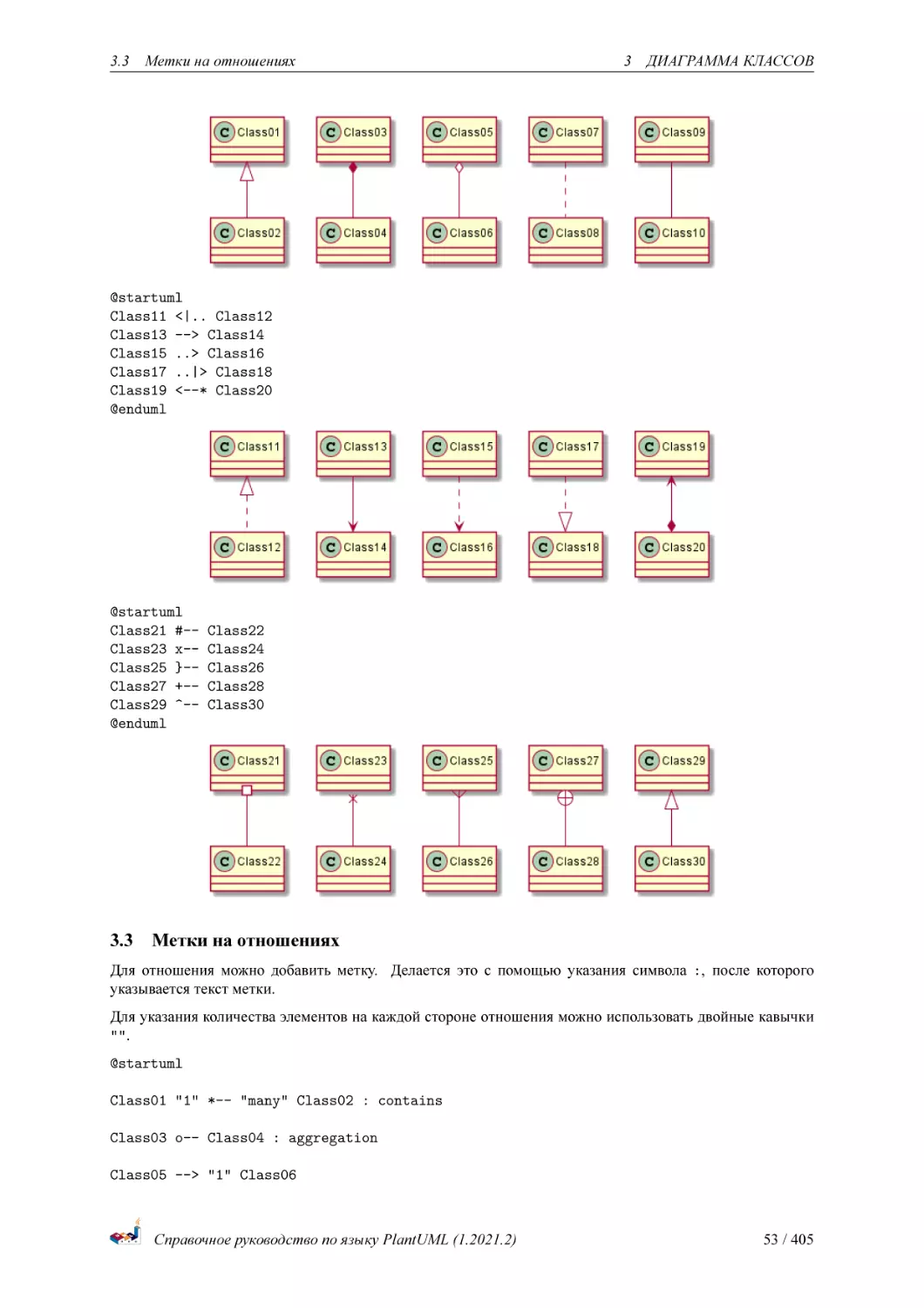
@startuml
Class11 <|.. Class12
Class13 --> Class14
Class15 ..> Class16
Class17 ..|> Class18
Class19 <--* Class20
@enduml
@startuml
Class21 #-Class23 x-Class25 }-Class27 +-Class29 ^-@enduml
3.3
Class22
Class24
Class26
Class28
Class30
Метки на отношениях
Для отношения можно добавить метку. Делается это с помощью указания символа :, после которого
указывается текст метки.
Для указания количества элементов на каждой стороне отношения можно использовать двойные кавычки
"".
@startuml
Class01 "1" *-- "many" Class02 : contains
Class03 o-- Class04 : aggregation
Class05 --> "1" Class06
Справочное руководство по языку PlantUML (1.2021.2)
53 / 405
3.4 Добавление методов
3
ДИАГРАММА КЛАССОВ
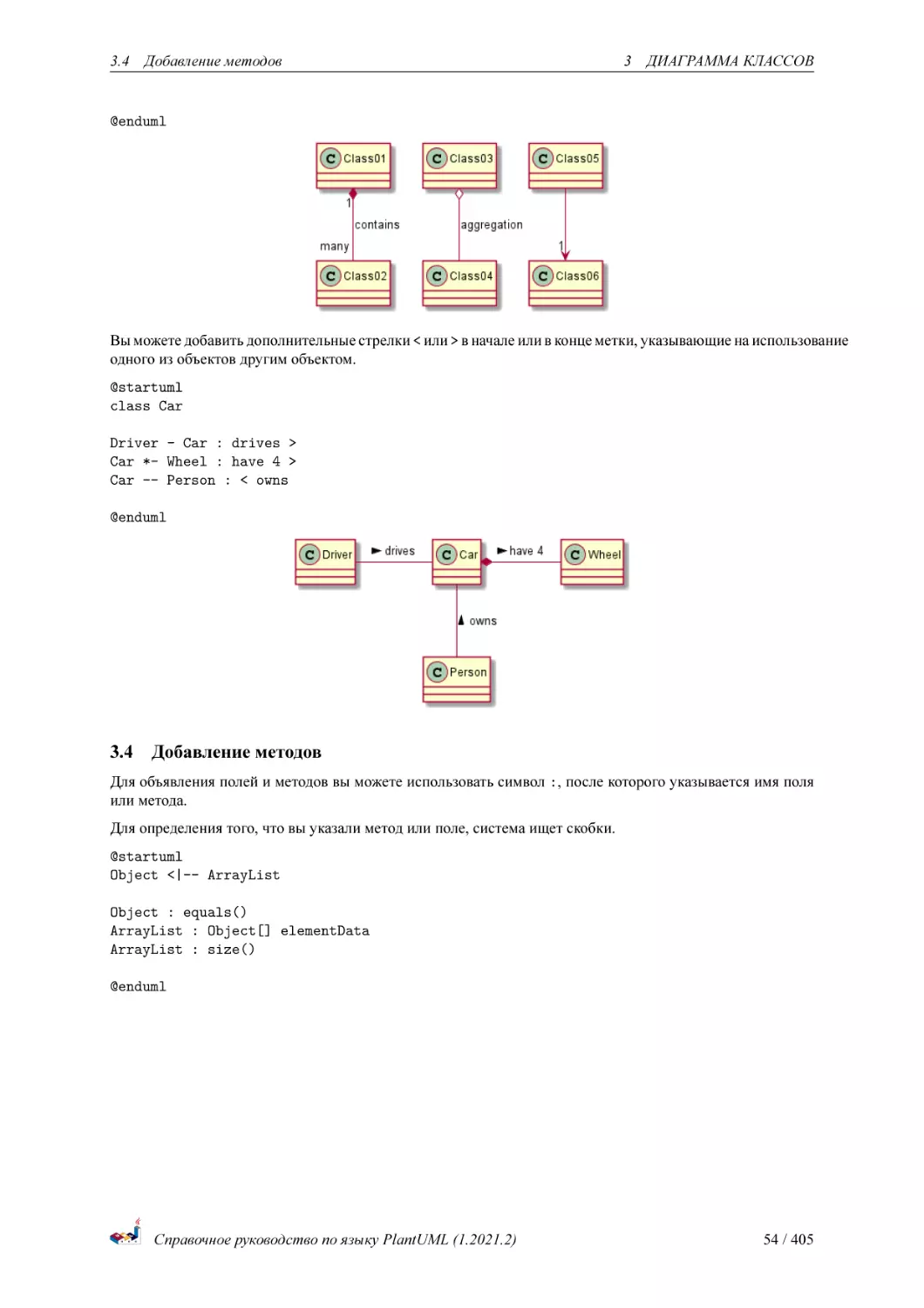
@enduml
Вы можете добавить дополнительные стрелки < или > в начале или в конце метки, указывающие на использование
одного из объектов другим объектом.
@startuml
class Car
Driver - Car : drives >
Car *- Wheel : have 4 >
Car -- Person : < owns
@enduml
3.4
Добавление методов
Для объявления полей и методов вы можете использовать символ :, после которого указывается имя поля
или метода.
Для определения того, что вы указали метод или поле, система ищет скобки.
@startuml
Object <|-- ArrayList
Object : equals()
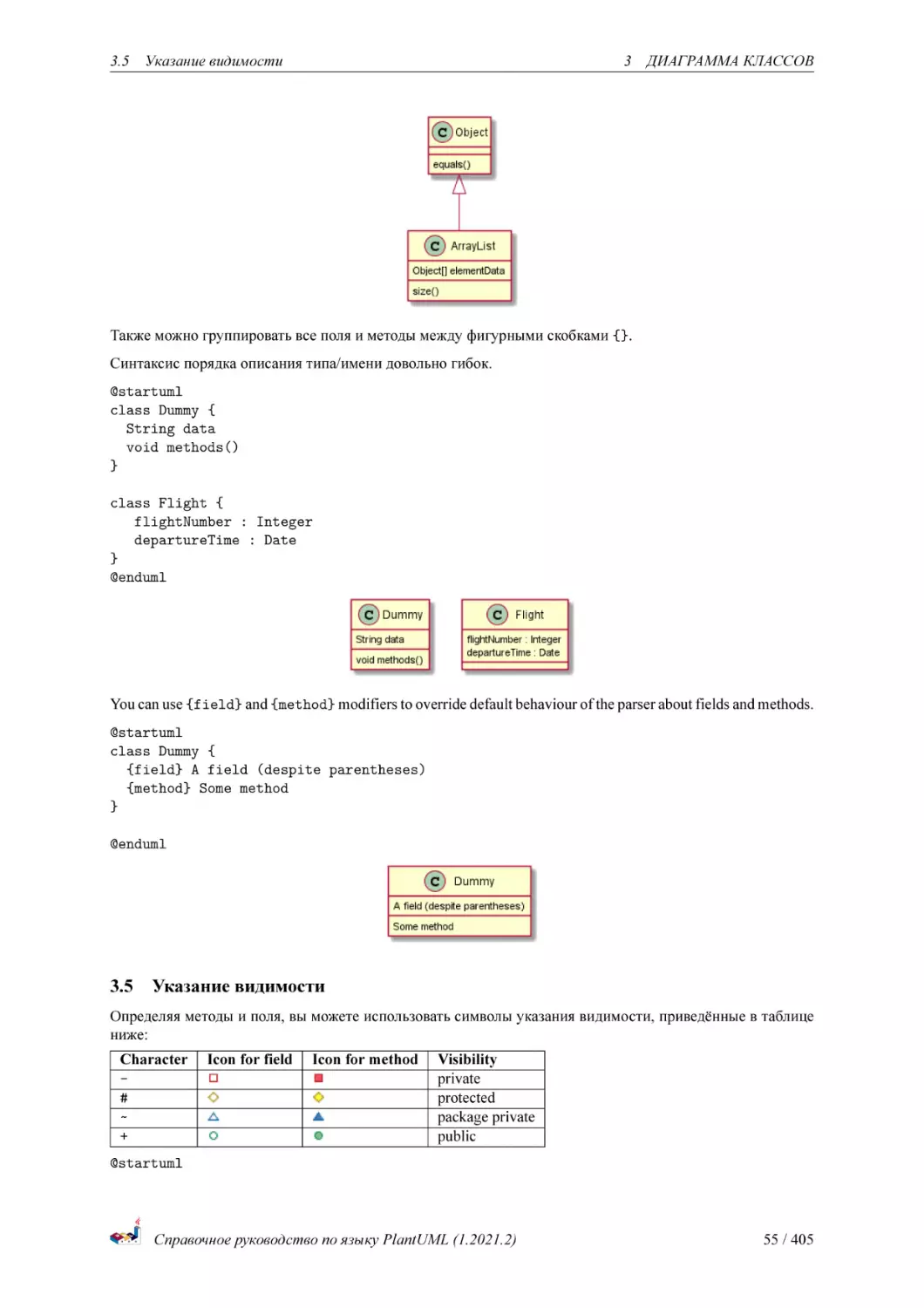
ArrayList : Object[] elementData
ArrayList : size()
@enduml
Справочное руководство по языку PlantUML (1.2021.2)
54 / 405
3.5 Указание видимости
3
ДИАГРАММА КЛАССОВ
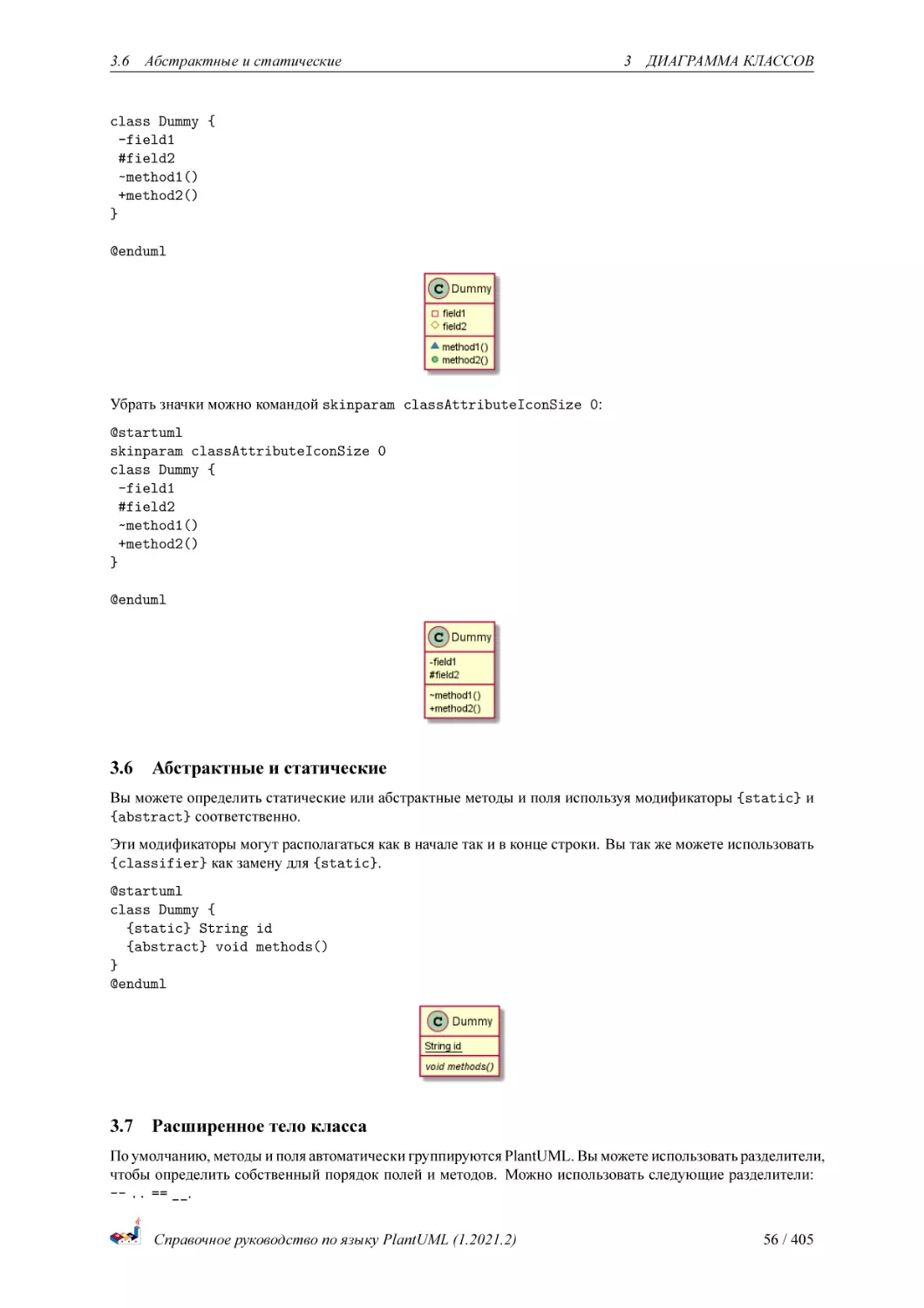
Также можно группировать все поля и методы между фигурными скобками {}.
Синтаксис порядка описания типа/имени довольно гибок.
@startuml
class Dummy {
String data
void methods()
}
class Flight {
flightNumber : Integer
departureTime : Date
}
@enduml
You can use {field} and {method} modifiers to override default behaviour of the parser about fields and methods.
@startuml
class Dummy {
{field} A field (despite parentheses)
{method} Some method
}
@enduml
3.5
Указание видимости
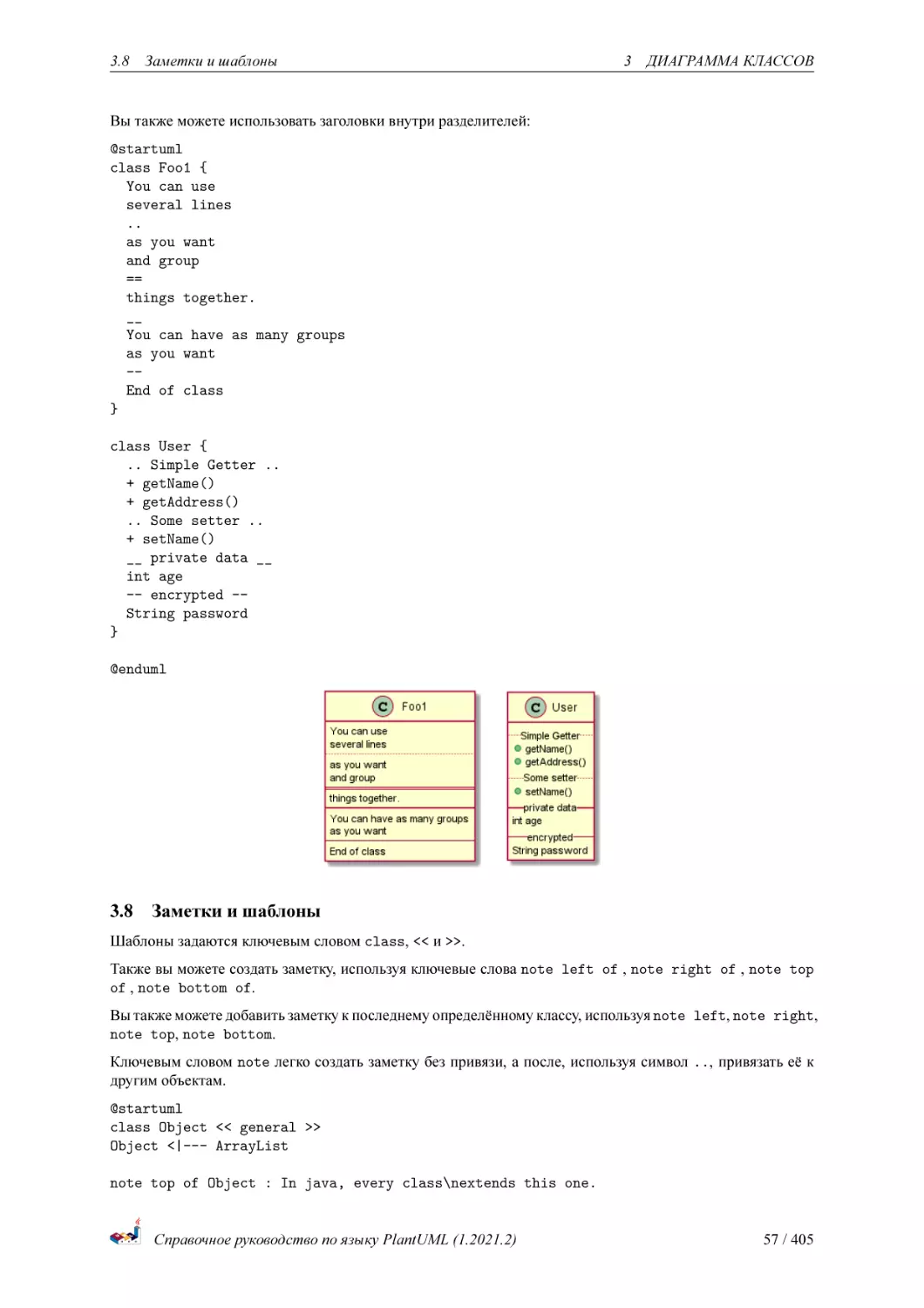
Определяя методы и поля, вы можете использовать символы указания видимости, приведённые в таблице
ниже:
Character
#
~
+
Icon for field
Icon for method
Visibility
private
protected
package private
public
@startuml
Справочное руководство по языку PlantUML (1.2021.2)
55 / 405
3.6 Абстрактные и статические
3
ДИАГРАММА КЛАССОВ
class Dummy {
-field1
#field2
~method1()
+method2()
}
@enduml
Убрать значки можно командой skinparam classAttributeIconSize 0:
@startuml
skinparam classAttributeIconSize 0
class Dummy {
-field1
#field2
~method1()
+method2()
}
@enduml
3.6
Абстрактные и статические
Вы можете определить статические или абстрактные методы и поля используя модификаторы {static} и
{abstract} соответственно.
Эти модификаторы могут располагаться как в начале так и в конце строки. Вы так же можете использовать
{classifier} как замену для {static}.
@startuml
class Dummy {
{static} String id
{abstract} void methods()
}
@enduml
3.7
Расширенное тело класса
По умолчанию, методы и поля автоматически группируются PlantUML. Вы можете использовать разделители,
чтобы определить собственный порядок полей и методов. Можно использовать следующие разделители:
-- .. == __.
Справочное руководство по языку PlantUML (1.2021.2)
56 / 405
3.8 Заметки и шаблоны
3
ДИАГРАММА КЛАССОВ
Вы также можете использовать заголовки внутри разделителей:
@startuml
class Foo1 {
You can use
several lines
..
as you want
and group
==
things together.
__
You can have as many groups
as you want
-End of class
}
class User {
.. Simple Getter ..
+ getName()
+ getAddress()
.. Some setter ..
+ setName()
__ private data __
int age
-- encrypted -String password
}
@enduml
3.8
Заметки и шаблоны
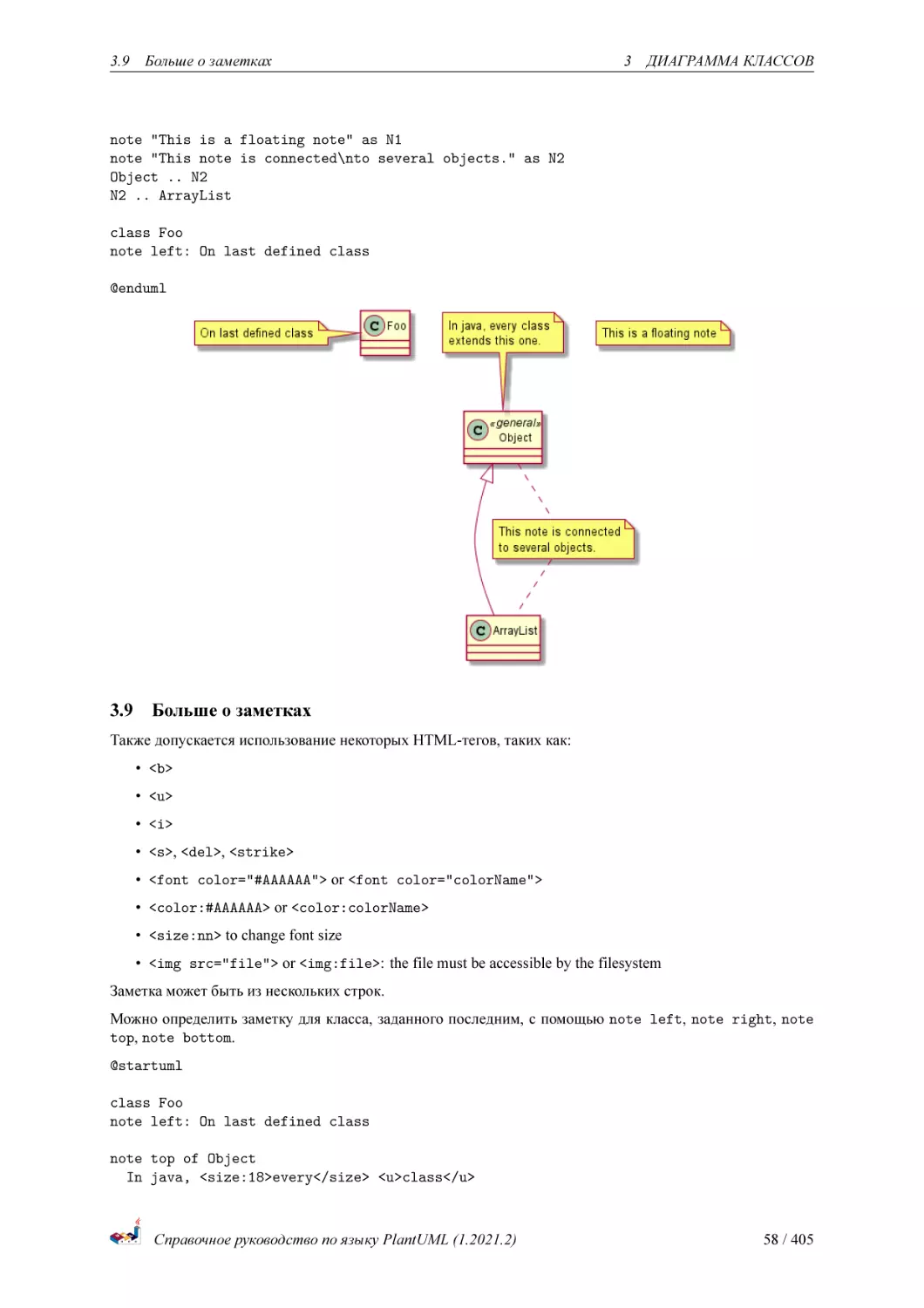
Шаблоны задаются ключевым словом class, << и >>.
Также вы можете создать заметку, используя ключевые слова note left of , note right of , note top
of , note bottom of.
Вы также можете добавить заметку к последнему определённому классу, используя note left, note right,
note top, note bottom.
Ключевым словом note легко создать заметку без привязи, а после, используя символ .., привязать её к
другим объектам.
@startuml
class Object << general >>
Object <|--- ArrayList
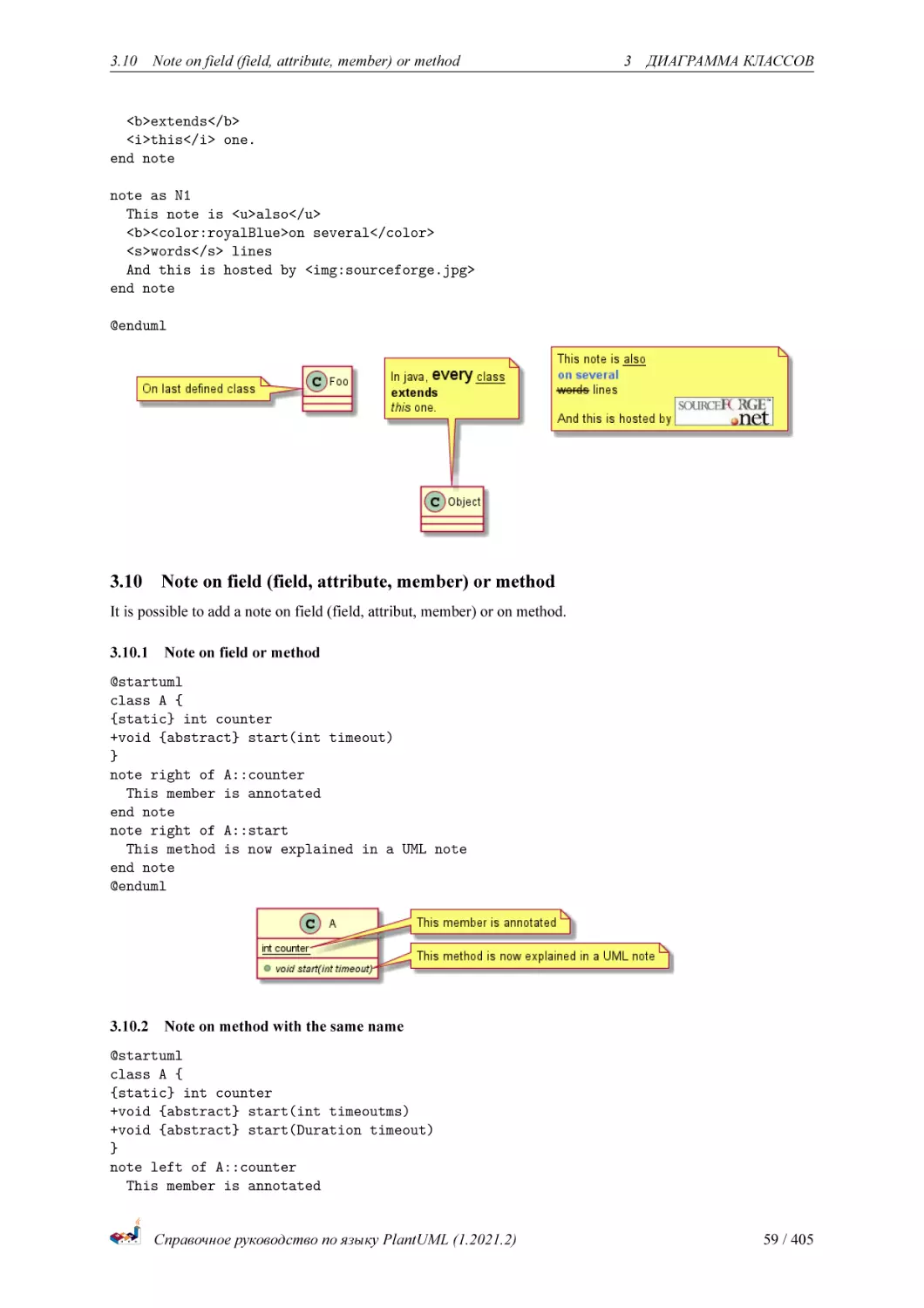
note top of Object : In java, every class\nextends this one.
Справочное руководство по языку PlantUML (1.2021.2)
57 / 405
3.9 Больше о заметках
3
ДИАГРАММА КЛАССОВ
note "This is a floating note" as N1
note "This note is connected\nto several objects." as N2
Object .. N2
N2 .. ArrayList
class Foo
note left: On last defined class
@enduml
3.9
Больше о заметках
Также допускается использование некоторых HTML-тегов, таких как:
• <b>
• <u>
• <i>
• <s>, <del>, <strike>
• <font color="#AAAAAA"> or <font color="colorName">
• <color:#AAAAAA> or <color:colorName>
• <size:nn> to change font size
• <img src="file"> or <img:file>: the file must be accessible by the filesystem
Заметка может быть из нескольких строк.
Можно определить заметку для класса, заданного последним, с помощью note left, note right, note
top, note bottom.
@startuml
class Foo
note left: On last defined class
note top of Object
In java, <size:18>every</size> <u>class</u>
Справочное руководство по языку PlantUML (1.2021.2)
58 / 405
3.10
Note on field (field, attribute, member) or method
3
ДИАГРАММА КЛАССОВ
<b>extends</b>
<i>this</i> one.
end note
note as N1
This note is <u>also</u>
<b><color:royalBlue>on several</color>
<s>words</s> lines
And this is hosted by <img:sourceforge.jpg>
end note
@enduml
3.10
Note on field (field, attribute, member) or method
It is possible to add a note on field (field, attribut, member) or on method.
3.10.1 Note on field or method
@startuml
class A {
{static} int counter
+void {abstract} start(int timeout)
}
note right of A::counter
This member is annotated
end note
note right of A::start
This method is now explained in a UML note
end note
@enduml
3.10.2 Note on method with the same name
@startuml
class A {
{static} int counter
+void {abstract} start(int timeoutms)
+void {abstract} start(Duration timeout)
}
note left of A::counter
This member is annotated
Справочное руководство по языку PlantUML (1.2021.2)
59 / 405
3.11 Заметки на связях
end note
note right of
This method
end note
note right of
This method
end note
@enduml
3
ДИАГРАММА КЛАССОВ
A::"start(int timeoutms)"
with int
A::"start(Duration timeout)"
with Duration
[Ref. QA-3474 and QA-5835]
3.11 Заметки на связях
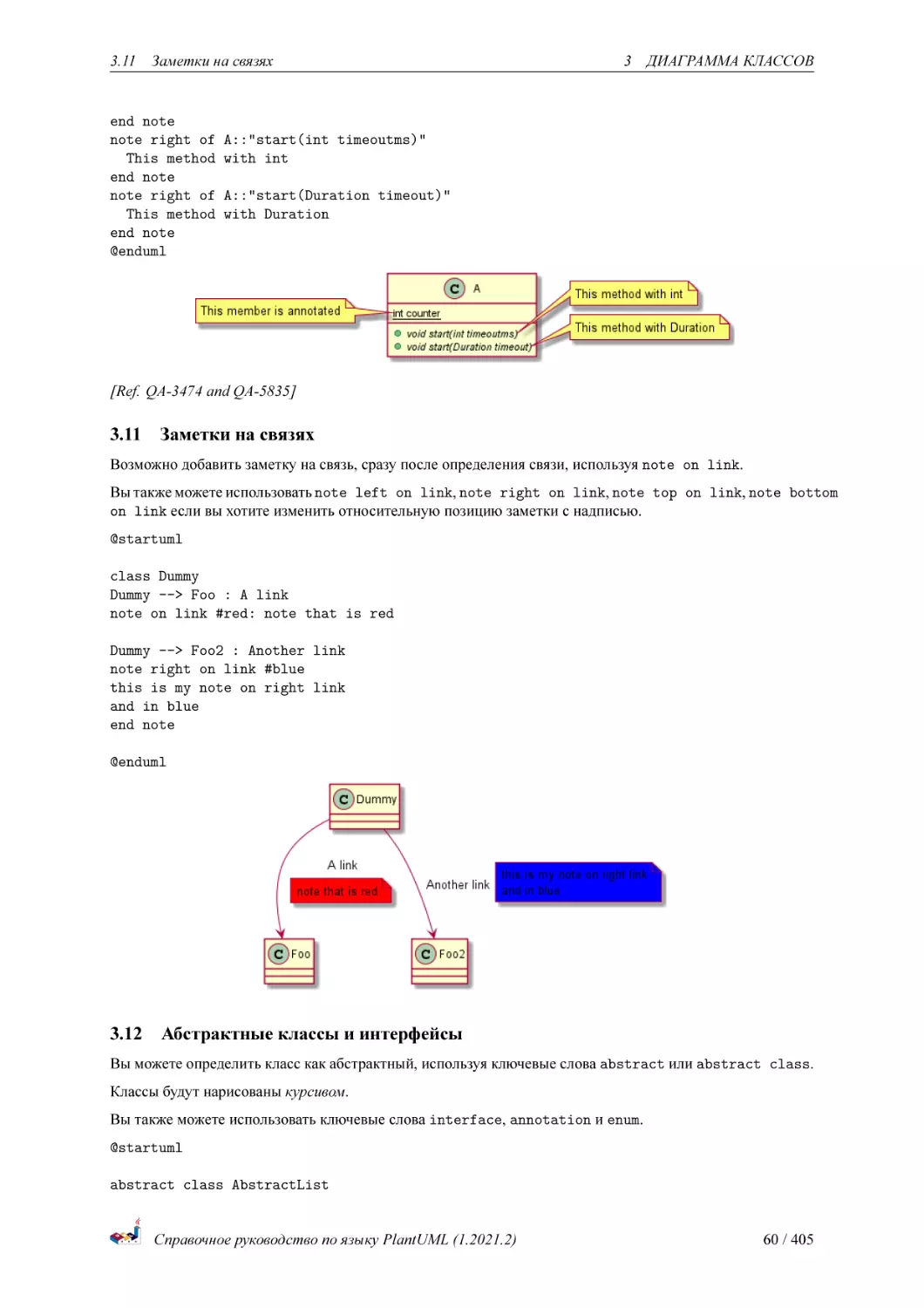
Возможно добавить заметку на связь, сразу после определения связи, используя note on link.
Вы также можете использовать note left on link, note right on link, note top on link, note bottom
on link если вы хотите изменить относительную позицию заметки с надписью.
@startuml
class Dummy
Dummy --> Foo : A link
note on link #red: note that is red
Dummy --> Foo2 : Another link
note right on link #blue
this is my note on right link
and in blue
end note
@enduml
3.12
Абстрактные классы и интерфейсы
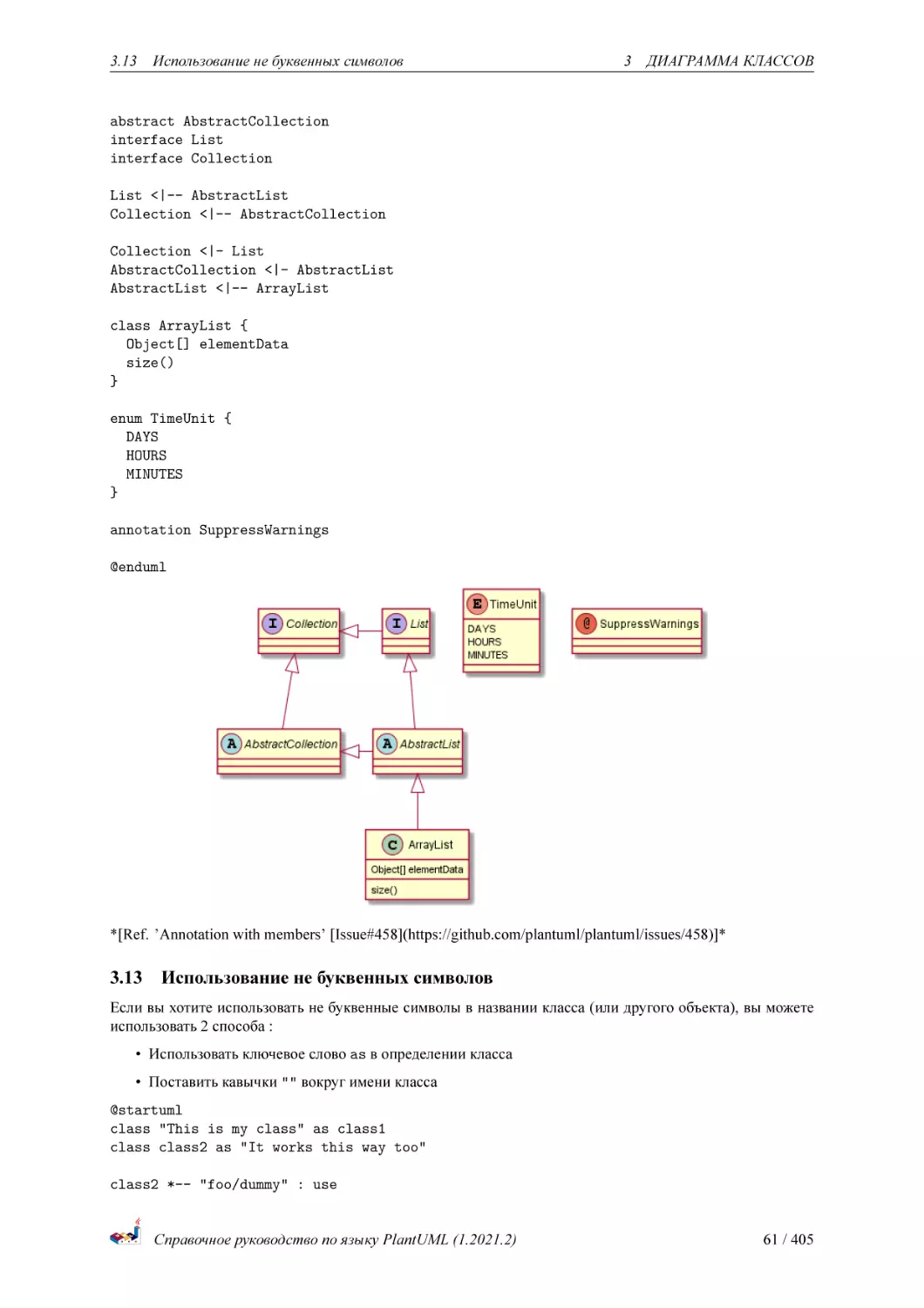
Вы можете определить класс как абстрактный, используя ключевые слова abstract или abstract class.
Классы будут нарисованы курсивом.
Вы также можете использовать ключевые слова interface, annotation и enum.
@startuml
abstract class AbstractList
Справочное руководство по языку PlantUML (1.2021.2)
60 / 405
3.13
Использование не буквенных символов
3
ДИАГРАММА КЛАССОВ
abstract AbstractCollection
interface List
interface Collection
List <|-- AbstractList
Collection <|-- AbstractCollection
Collection <|- List
AbstractCollection <|- AbstractList
AbstractList <|-- ArrayList
class ArrayList {
Object[] elementData
size()
}
enum TimeUnit {
DAYS
HOURS
MINUTES
}
annotation SuppressWarnings
@enduml
*[Ref. ’Annotation with members’ [Issue#458](https://github.com/plantuml/plantuml/issues/458)]*
3.13
Использование не буквенных символов
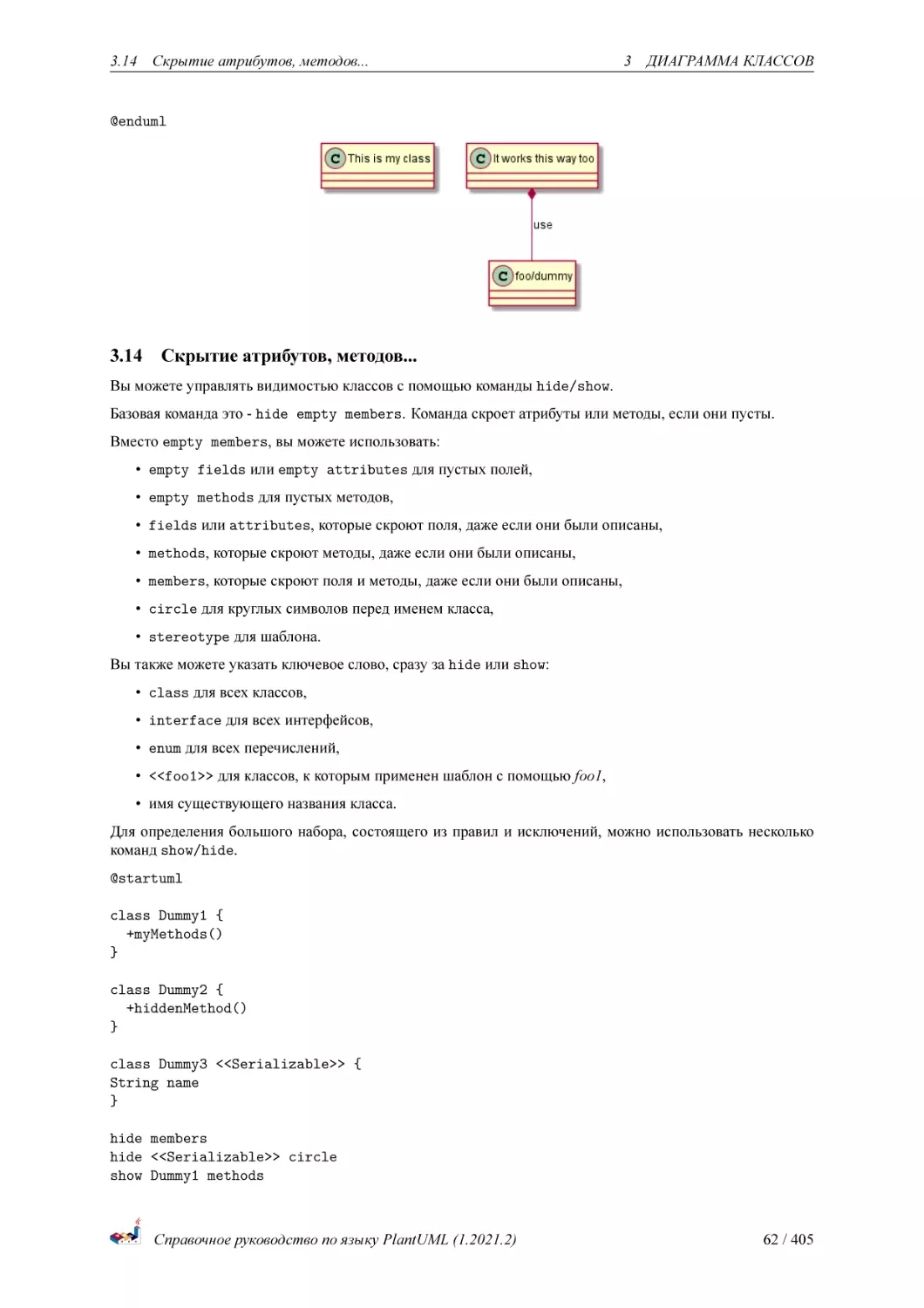
Если вы хотите использовать не буквенные символы в названии класса (или другого объекта), вы можете
использовать 2 способа :
• Использовать ключевое слово as в определении класса
• Поставить кавычки "" вокруг имени класса
@startuml
class "This is my class" as class1
class class2 as "It works this way too"
class2 *-- "foo/dummy" : use
Справочное руководство по языку PlantUML (1.2021.2)
61 / 405
3.14
Скрытие атрибутов, методов...
3
ДИАГРАММА КЛАССОВ
@enduml
3.14
Скрытие атрибутов, методов...
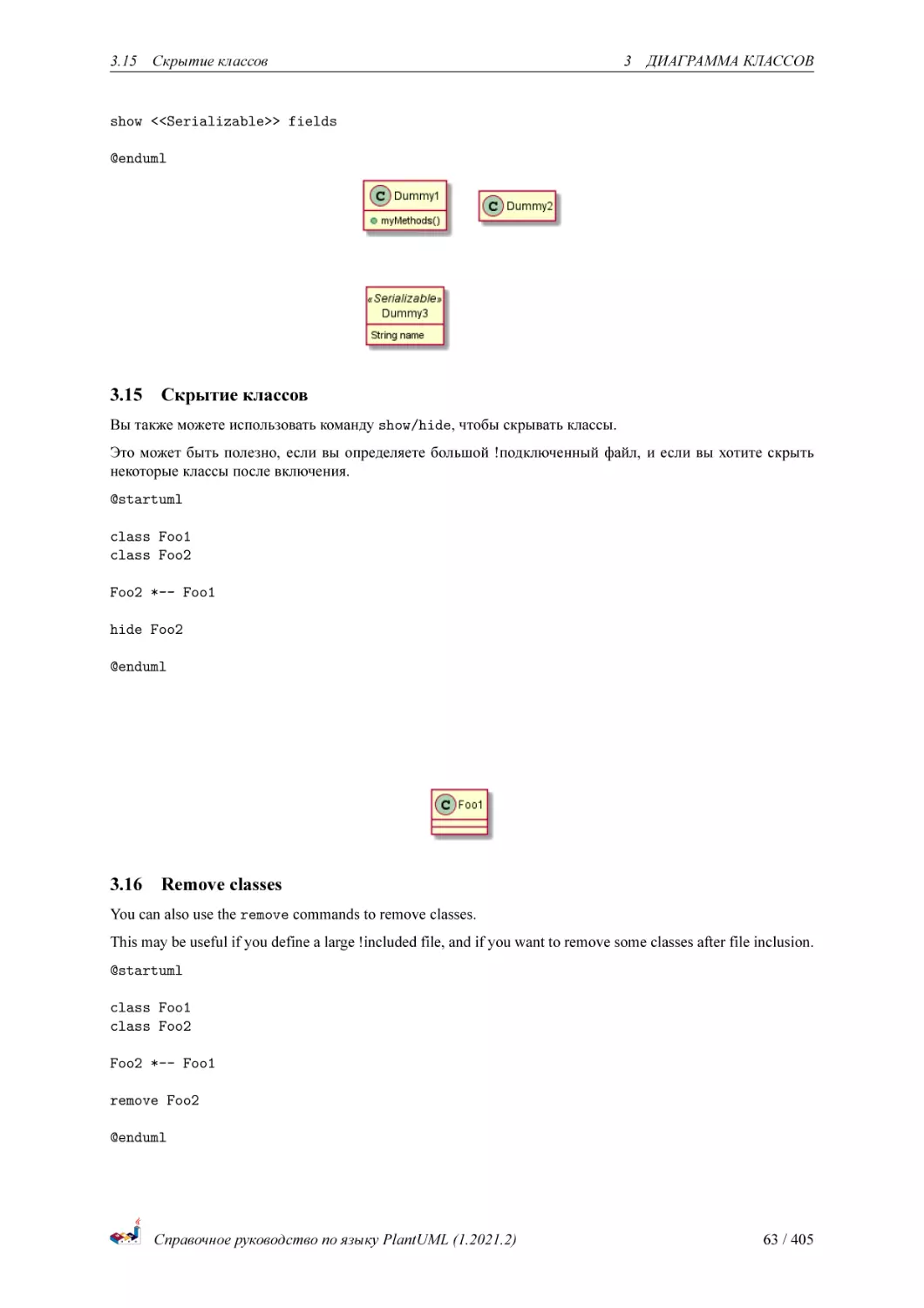
Вы можете управлять видимостью классов с помощью команды hide/show.
Базовая команда это - hide empty members. Команда скроет атрибуты или методы, если они пусты.
Вместо empty members, вы можете использовать:
• empty fields или empty attributes для пустых полей,
• empty methods для пустых методов,
• fields или attributes, которые скроют поля, даже если они были описаны,
• methods, которые скроют методы, даже если они были описаны,
• members, которые скроют поля и методы, даже если они были описаны,
• circle для круглых символов перед именем класса,
• stereotype для шаблона.
Вы также можете указать ключевое слово, сразу за hide или show:
• class для всех классов,
• interface для всех интерфейсов,
• enum для всех перечислений,
• <<foo1>> для классов, к которым применен шаблон с помощью foo1,
• имя существующего названия класса.
Для определения большого набора, состоящего из правил и исключений, можно использовать несколько
команд show/hide.
@startuml
class Dummy1 {
+myMethods()
}
class Dummy2 {
+hiddenMethod()
}
class Dummy3 <<Serializable>> {
String name
}
hide members
hide <<Serializable>> circle
show Dummy1 methods
Справочное руководство по языку PlantUML (1.2021.2)
62 / 405
3.15
Скрытие классов
3
ДИАГРАММА КЛАССОВ
show <<Serializable>> fields
@enduml
3.15
Скрытие классов
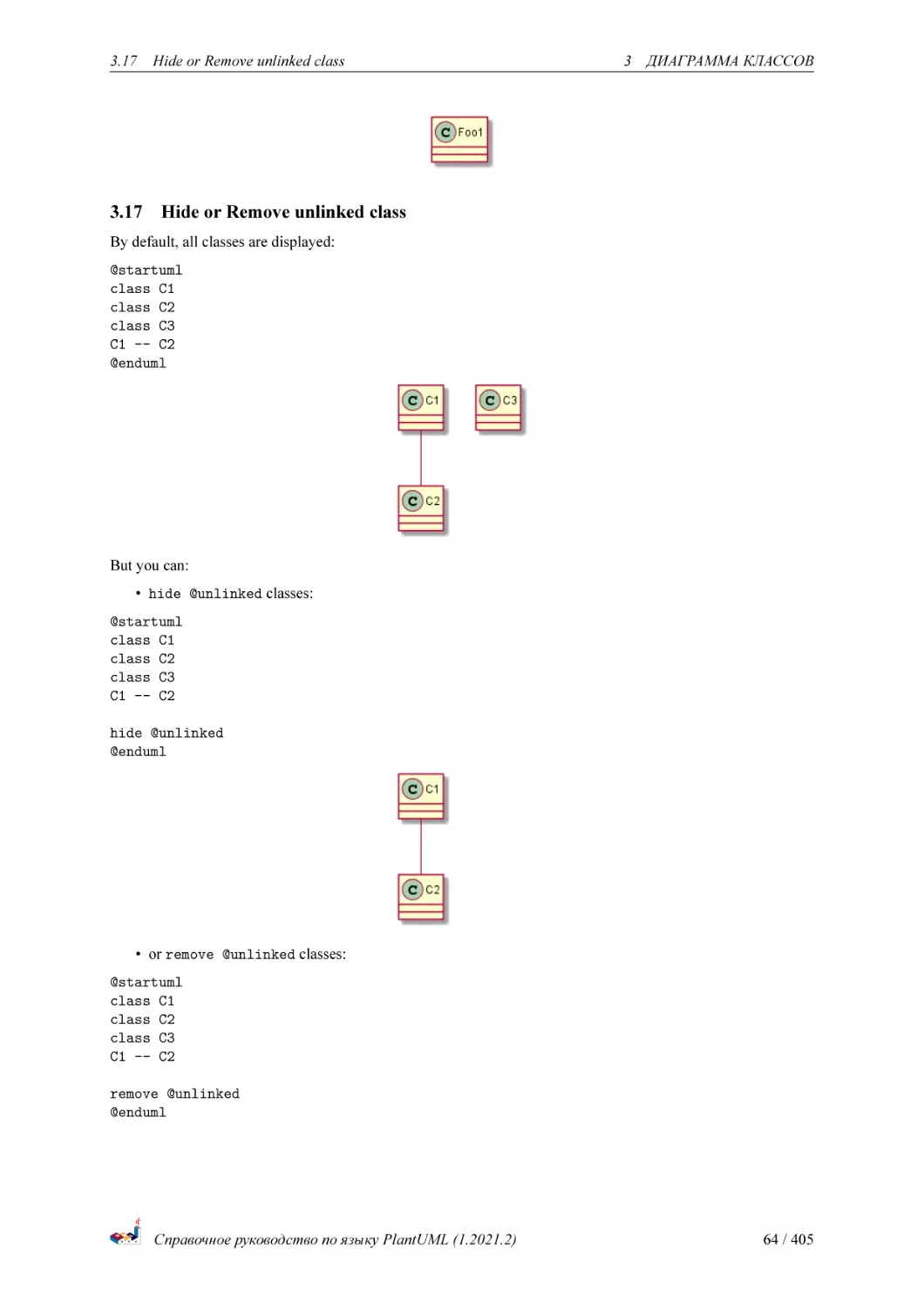
Вы также можете использовать команду show/hide, чтобы скрывать классы.
Это может быть полезно, если вы определяете большой !подключенный файл, и если вы хотите скрыть
некоторые классы после включения.
@startuml
class Foo1
class Foo2
Foo2 *-- Foo1
hide Foo2
@enduml
3.16
Remove classes
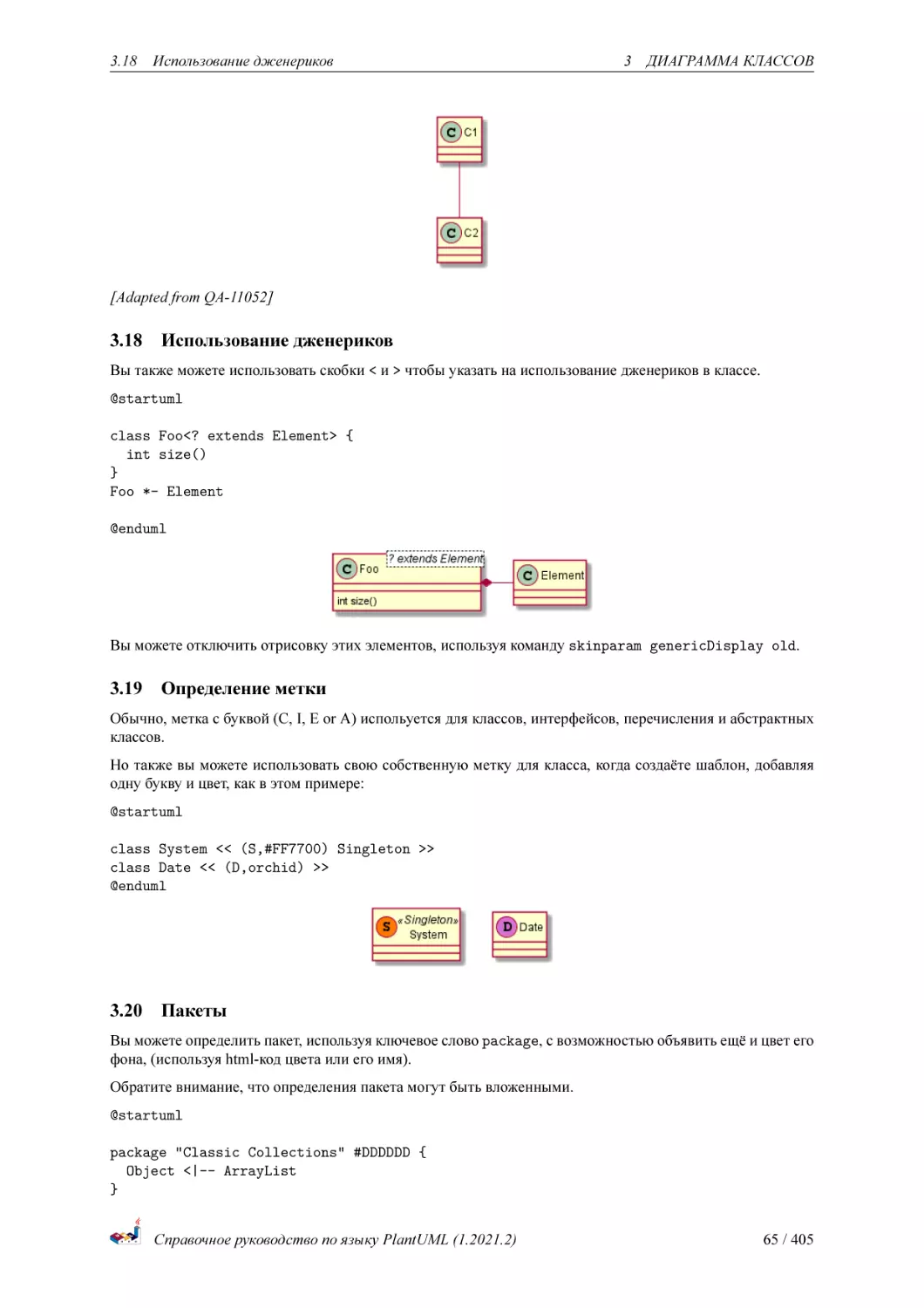
You can also use the remove commands to remove classes.
This may be useful if you define a large !included file, and if you want to remove some classes after file inclusion.
@startuml
class Foo1
class Foo2
Foo2 *-- Foo1
remove Foo2
@enduml
Справочное руководство по языку PlantUML (1.2021.2)
63 / 405
3.17
3.17
Hide or Remove unlinked class
3
ДИАГРАММА КЛАССОВ
Hide or Remove unlinked class
By default, all classes are displayed:
@startuml
class C1
class C2
class C3
C1 -- C2
@enduml
But you can:
• hide @unlinked classes:
@startuml
class C1
class C2
class C3
C1 -- C2
hide @unlinked
@enduml
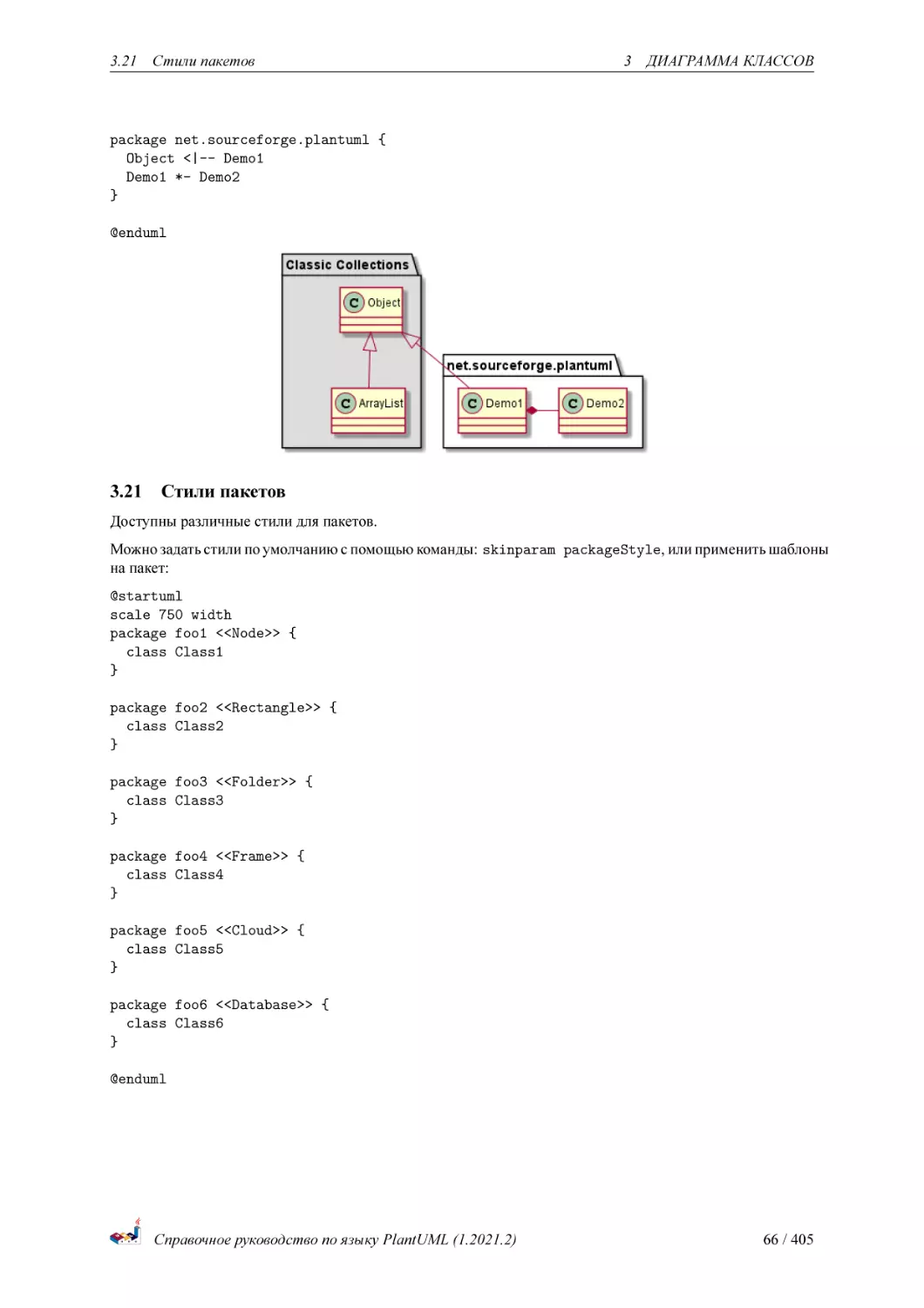
• or remove @unlinked classes:
@startuml
class C1
class C2
class C3
C1 -- C2
remove @unlinked
@enduml
Справочное руководство по языку PlantUML (1.2021.2)
64 / 405
3.18
Использование дженериков
3
ДИАГРАММА КЛАССОВ
[Adapted from QA-11052]
3.18
Использование дженериков
Вы также можете использовать скобки < и > чтобы указать на использование дженериков в классе.
@startuml
class Foo<? extends Element> {
int size()
}
Foo *- Element
@enduml
Вы можете отключить отрисовку этих элементов, используя команду skinparam genericDisplay old.
3.19
Определение метки
Обычно, метка с буквой (C, I, E or A) испольуется для классов, интерфейсов, перечисления и абстрактных
классов.
Но также вы можете использовать свою собственную метку для класса, когда создаёте шаблон, добавляя
одну букву и цвет, как в этом примере:
@startuml
class System << (S,#FF7700) Singleton >>
class Date << (D,orchid) >>
@enduml
3.20
Пакеты
Вы можете определить пакет, используя ключевое слово package, с возможностью объявить ещё и цвет его
фона, (используя html-код цвета или его имя).
Обратите внимание, что определения пакета могут быть вложенными.
@startuml
package "Classic Collections" #DDDDDD {
Object <|-- ArrayList
}
Справочное руководство по языку PlantUML (1.2021.2)
65 / 405
3.21
Стили пакетов
3
ДИАГРАММА КЛАССОВ
package net.sourceforge.plantuml {
Object <|-- Demo1
Demo1 *- Demo2
}
@enduml
3.21
Стили пакетов
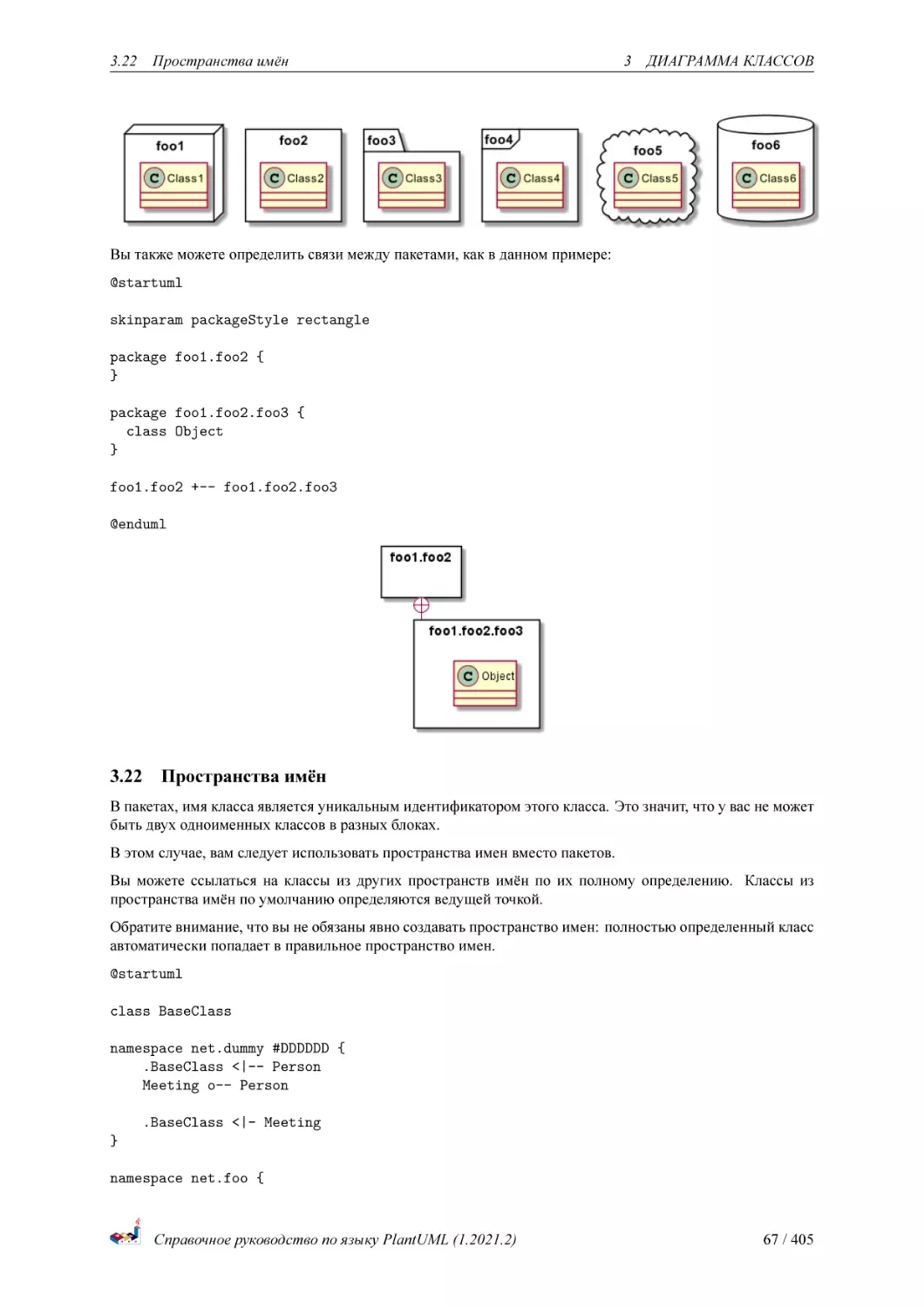
Доступны различные стили для пакетов.
Можно задать стили по умолчанию с помощью команды: skinparam packageStyle, или применить шаблоны
на пакет:
@startuml
scale 750 width
package foo1 <<Node>> {
class Class1
}
package foo2 <<Rectangle>> {
class Class2
}
package foo3 <<Folder>> {
class Class3
}
package foo4 <<Frame>> {
class Class4
}
package foo5 <<Cloud>> {
class Class5
}
package foo6 <<Database>> {
class Class6
}
@enduml
Справочное руководство по языку PlantUML (1.2021.2)
66 / 405
3.22
Пространства имён
3
ДИАГРАММА КЛАССОВ
Вы также можете определить связи между пакетами, как в данном примере:
@startuml
skinparam packageStyle rectangle
package foo1.foo2 {
}
package foo1.foo2.foo3 {
class Object
}
foo1.foo2 +-- foo1.foo2.foo3
@enduml
3.22
Пространства имён
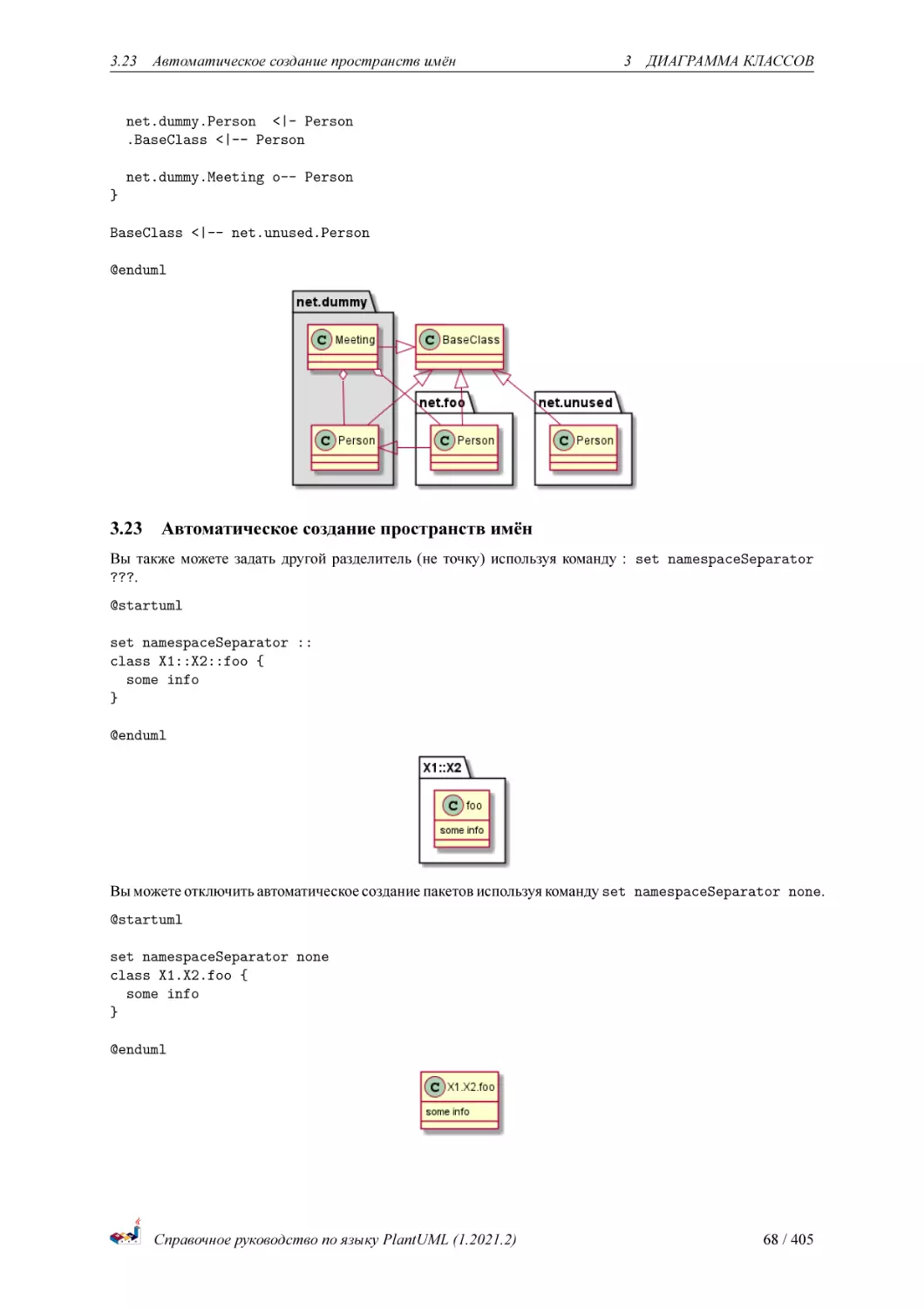
В пакетах, имя класса является уникальным идентификатором этого класса. Это значит, что у вас не может
быть двух одноименных классов в разных блоках.
В этом случае, вам следует использовать пространства имен вместо пакетов.
Вы можете ссылаться на классы из других пространств имён по их полному определению. Классы из
пространства имён по умолчанию определяются ведущей точкой.
Обратите внимание, что вы не обязаны явно создавать пространство имен: полностью определенный класс
автоматически попадает в правильное пространство имен.
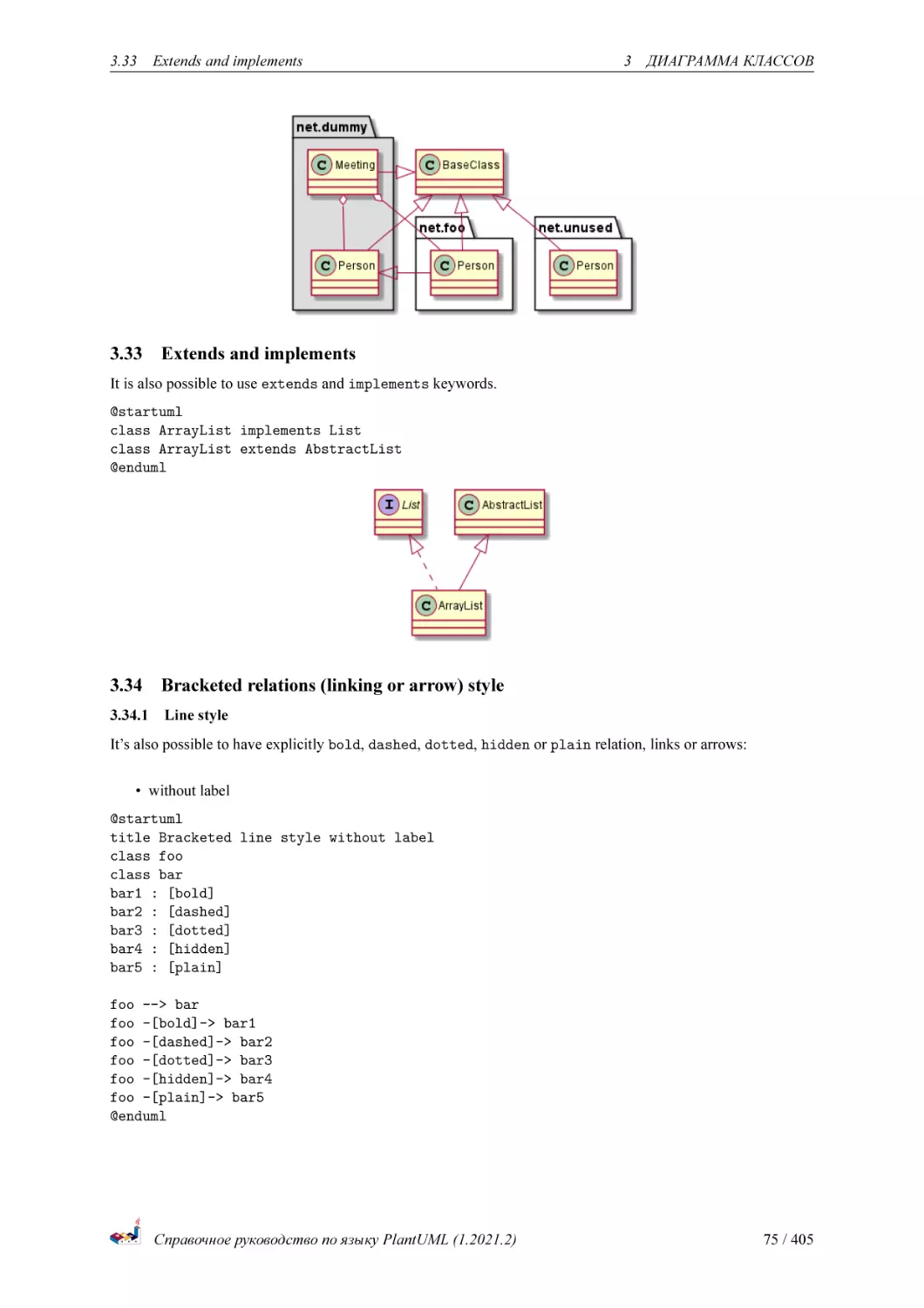
@startuml
class BaseClass
namespace net.dummy #DDDDDD {
.BaseClass <|-- Person
Meeting o-- Person
.BaseClass <|- Meeting
}
namespace net.foo {
Справочное руководство по языку PlantUML (1.2021.2)
67 / 405
3.23
Автоматическое создание пространств имён
3
ДИАГРАММА КЛАССОВ
net.dummy.Person <|- Person
.BaseClass <|-- Person
net.dummy.Meeting o-- Person
}
BaseClass <|-- net.unused.Person
@enduml
3.23
Автоматическое создание пространств имён
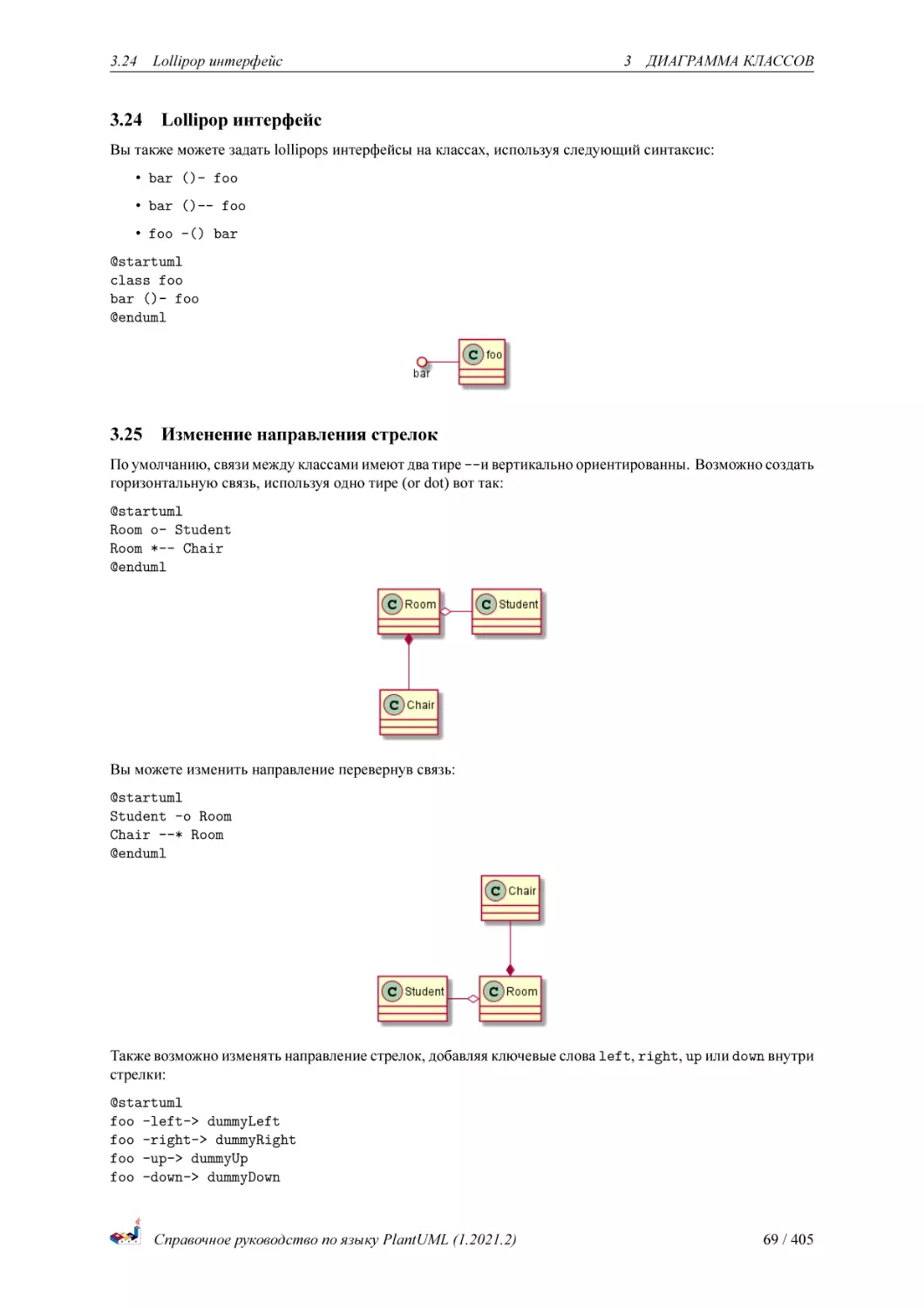
Вы также можете задать другой разделитель (не точку) используя команду : set namespaceSeparator
???.
@startuml
set namespaceSeparator ::
class X1::X2::foo {
some info
}
@enduml
Вы можете отключить автоматическое создание пакетов используя команду set namespaceSeparator none.
@startuml
set namespaceSeparator none
class X1.X2.foo {
some info
}
@enduml
Справочное руководство по языку PlantUML (1.2021.2)
68 / 405
3.24
3.24
Lollipop интерфейс
3
ДИАГРАММА КЛАССОВ
Lollipop интерфейс
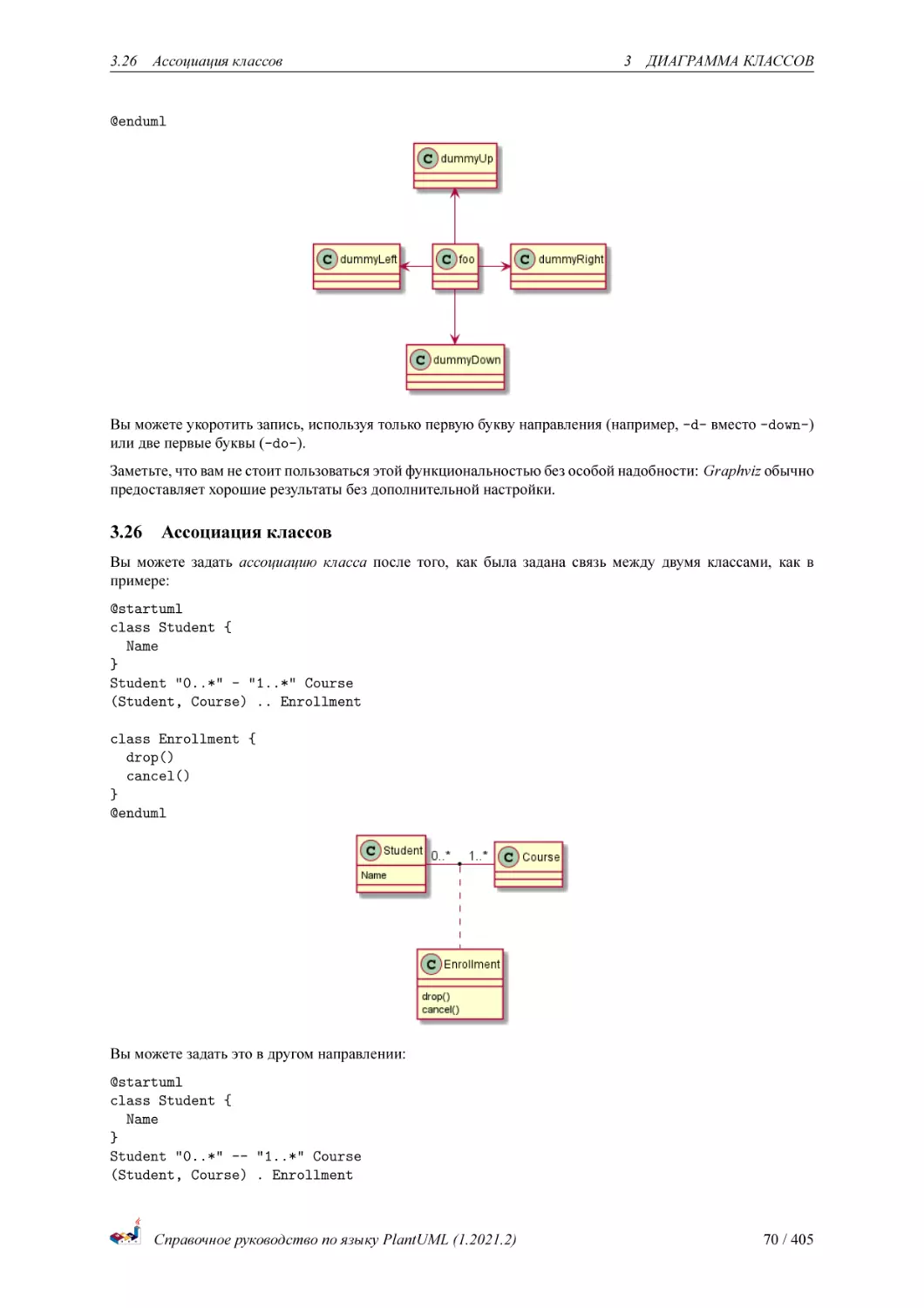
Вы также можете задать lollipops интерфейсы на классах, используя следующий синтаксис:
• bar ()- foo
• bar ()-- foo
• foo -() bar
@startuml
class foo
bar ()- foo
@enduml
3.25
Изменение направления стрелок
По умолчанию, связи между классами имеют два тире --и вертикально ориентированны. Возможно создать
горизонтальную связь, используя одно тире (or dot) вот так:
@startuml
Room o- Student
Room *-- Chair
@enduml
Вы можете изменить направление перевернув связь:
@startuml
Student -o Room
Chair --* Room
@enduml
Также возможно изменять направление стрелок, добавляя ключевые слова left, right, up или down внутри
стрелки:
@startuml
foo -left-> dummyLeft
foo -right-> dummyRight
foo -up-> dummyUp
foo -down-> dummyDown
Справочное руководство по языку PlantUML (1.2021.2)
69 / 405
3.26
Ассоциация классов
3
ДИАГРАММА КЛАССОВ
@enduml
Вы можете укоротить запись, используя только первую букву направления (например, -d- вместо -down-)
или две первые буквы (-do-).
Заметьте, что вам не стоит пользоваться этой функциональностью без особой надобности: Graphviz обычно
предоставляет хорошие результаты без дополнительной настройки.
3.26
Ассоциация классов
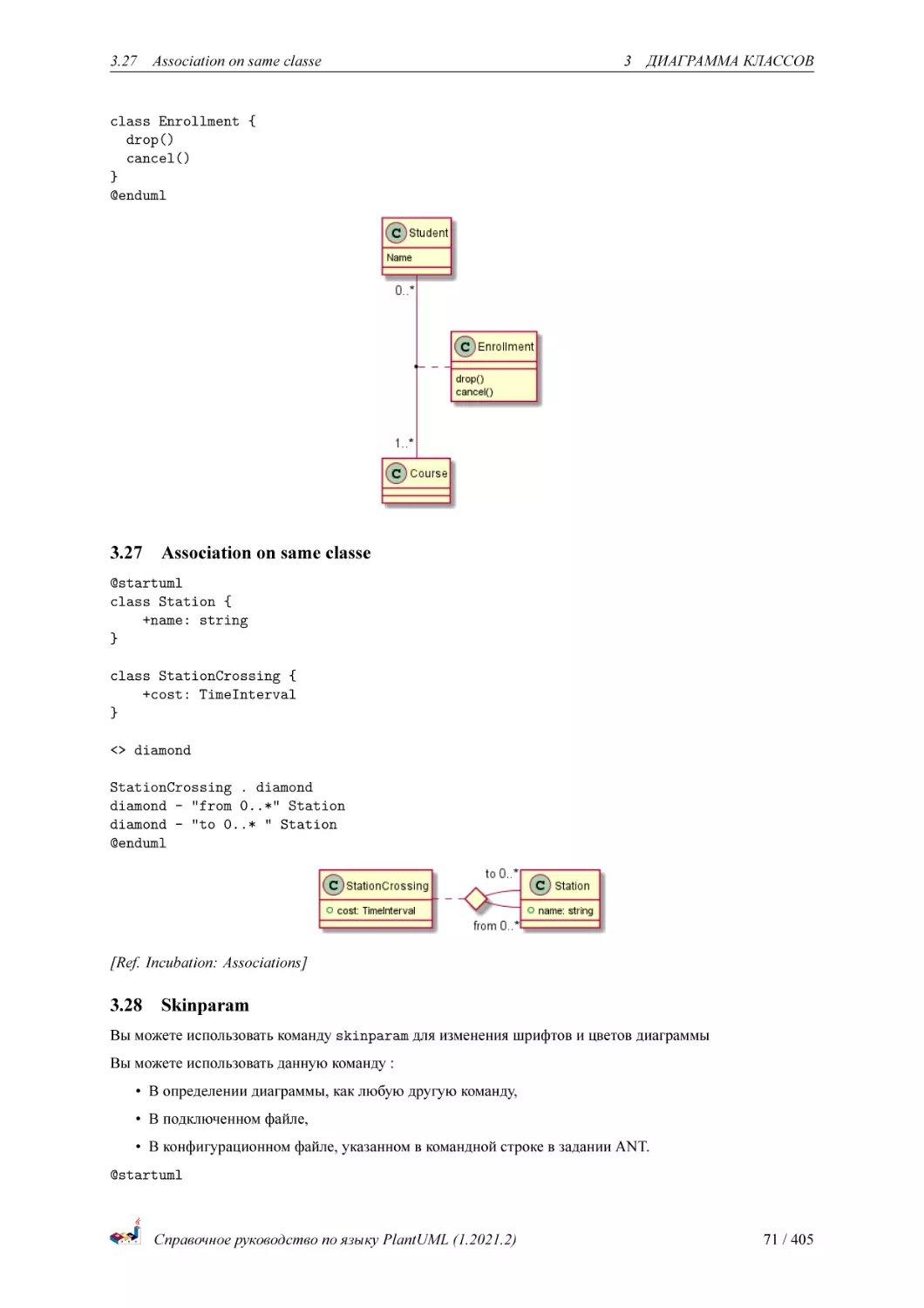
Вы можете задать ассоциацию класса после того, как была задана связь между двумя классами, как в
примере:
@startuml
class Student {
Name
}
Student "0..*" - "1..*" Course
(Student, Course) .. Enrollment
class Enrollment {
drop()
cancel()
}
@enduml
Вы можете задать это в другом направлении:
@startuml
class Student {
Name
}
Student "0..*" -- "1..*" Course
(Student, Course) . Enrollment
Справочное руководство по языку PlantUML (1.2021.2)
70 / 405
3.27
Association on same classe
3
ДИАГРАММА КЛАССОВ
class Enrollment {
drop()
cancel()
}
@enduml
3.27
Association on same classe
@startuml
class Station {
+name: string
}
class StationCrossing {
+cost: TimeInterval
}
<> diamond
StationCrossing . diamond
diamond - "from 0..*" Station
diamond - "to 0..* " Station
@enduml
[Ref. Incubation: Associations]
3.28
Skinparam
Вы можете использовать команду skinparam для изменения шрифтов и цветов диаграммы
Вы можете использовать данную команду :
• В определении диаграммы, как любую другую команду,
• В подключенном файле,
• В конфигурационном файле, указанном в командной строке в задании ANT.
@startuml
Справочное руководство по языку PlantUML (1.2021.2)
71 / 405
3.29
Шаблоны со Skinparam
3
ДИАГРАММА КЛАССОВ
skinparam class {
BackgroundColor PaleGreen
ArrowColor SeaGreen
BorderColor SpringGreen
}
skinparam stereotypeCBackgroundColor YellowGreen
Class01 "1" *-- "many" Class02 : contains
Class03 o-- Class04 : aggregation
@enduml
3.29
Шаблоны со Skinparam
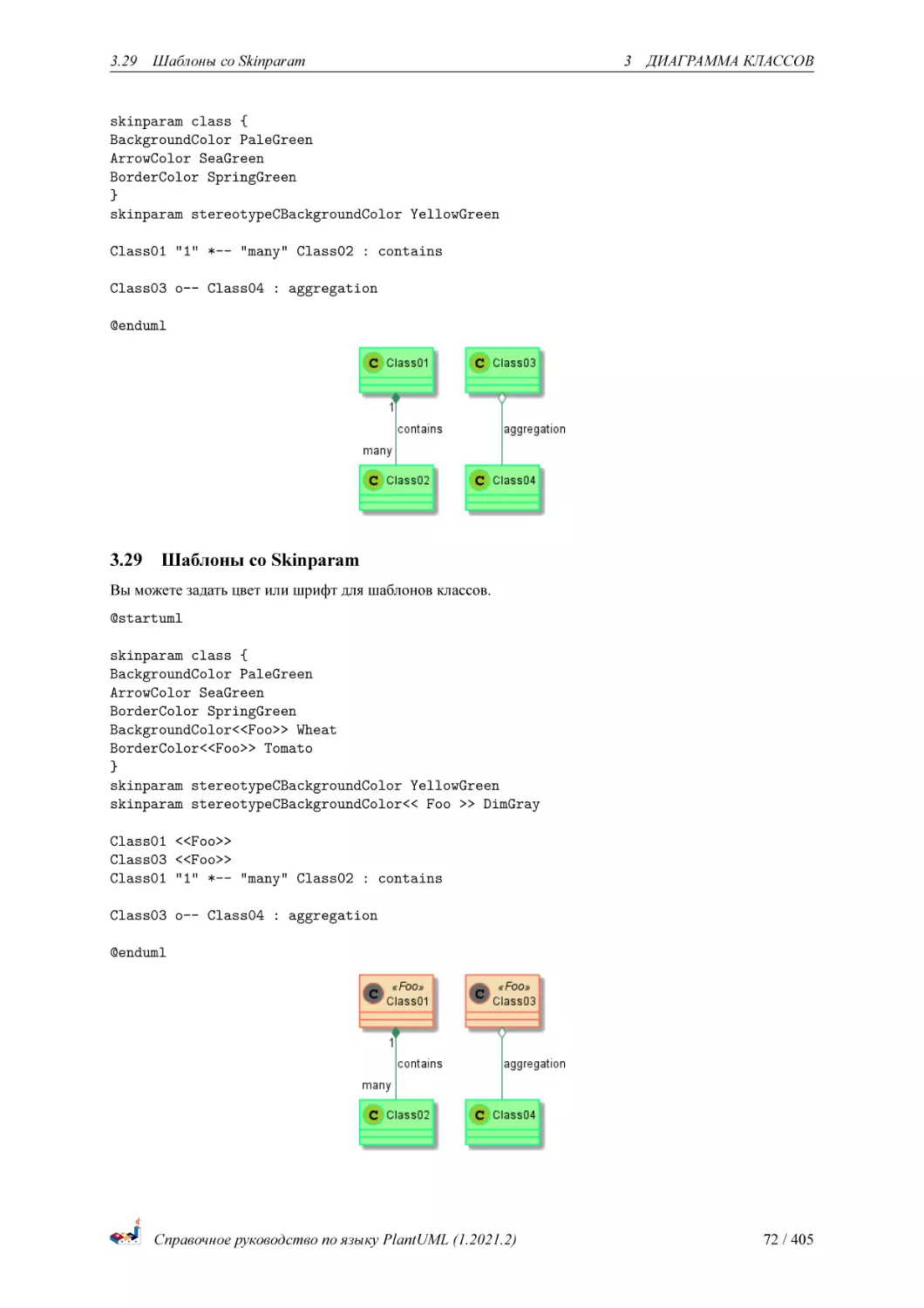
Вы можете задать цвет или шрифт для шаблонов классов.
@startuml
skinparam class {
BackgroundColor PaleGreen
ArrowColor SeaGreen
BorderColor SpringGreen
BackgroundColor<<Foo>> Wheat
BorderColor<<Foo>> Tomato
}
skinparam stereotypeCBackgroundColor YellowGreen
skinparam stereotypeCBackgroundColor<< Foo >> DimGray
Class01 <<Foo>>
Class03 <<Foo>>
Class01 "1" *-- "many" Class02 : contains
Class03 o-- Class04 : aggregation
@enduml
Справочное руководство по языку PlantUML (1.2021.2)
72 / 405
3.30
Цветовой градиент
3.30
3
ДИАГРАММА КЛАССОВ
Цветовой градиент
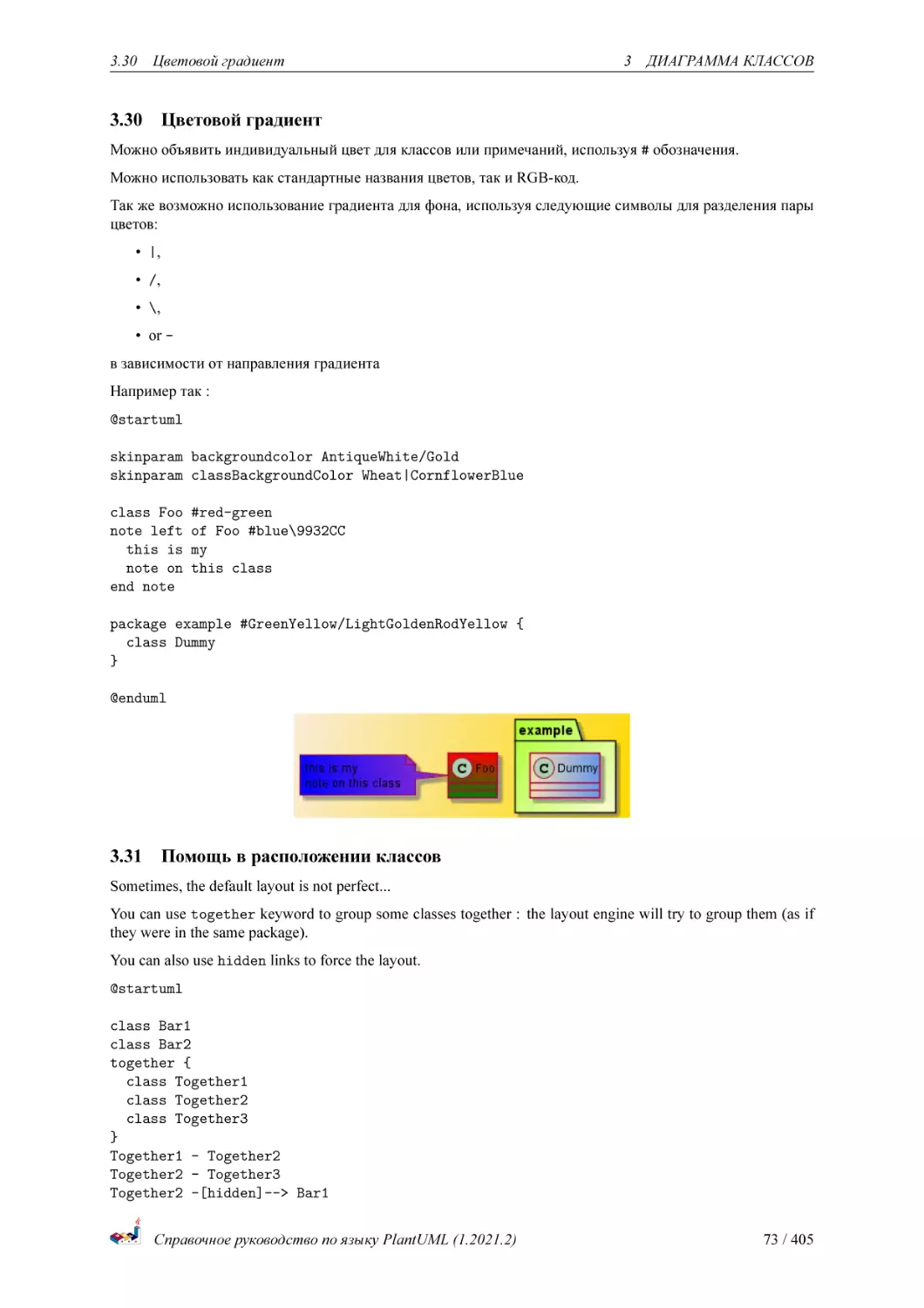
Можно объявить индивидуальный цвет для классов или примечаний, используя # обозначения.
Можно использовать как стандартные названия цветов, так и RGB-код.
Так же возможно использование градиента для фона, используя следующие символы для разделения пары
цветов:
• |,
• /,
• \,
• or в зависимости от направления градиента
Например так :
@startuml
skinparam backgroundcolor AntiqueWhite/Gold
skinparam classBackgroundColor Wheat|CornflowerBlue
class Foo
note left
this is
note on
end note
#red-green
of Foo #blue\9932CC
my
this class
package example #GreenYellow/LightGoldenRodYellow {
class Dummy
}
@enduml
3.31
Помощь в расположении классов
Sometimes, the default layout is not perfect...
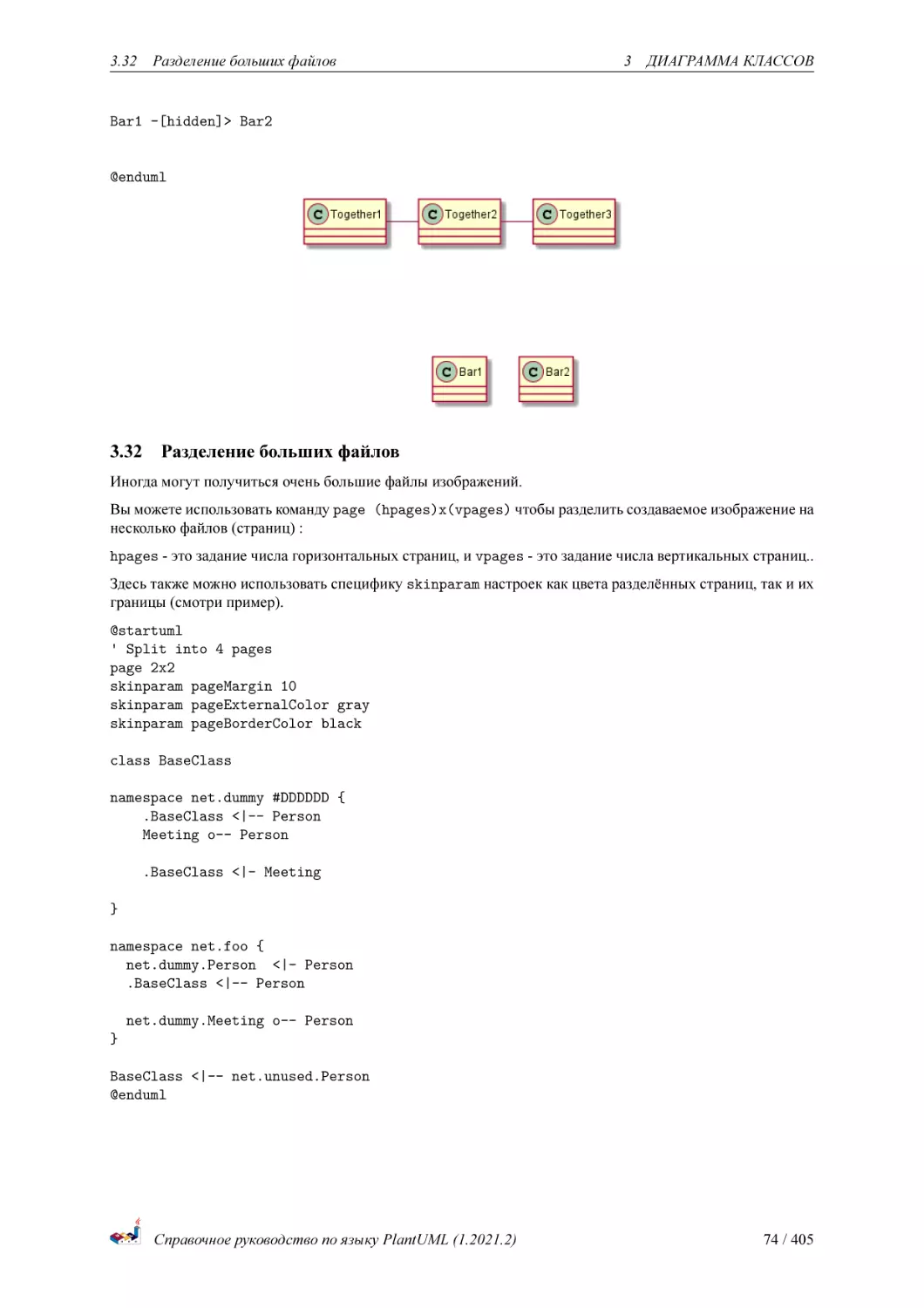
You can use together keyword to group some classes together : the layout engine will try to group them (as if
they were in the same package).
You can also use hidden links to force the layout.
@startuml
class Bar1
class Bar2
together {
class Together1
class Together2
class Together3
}
Together1 - Together2
Together2 - Together3
Together2 -[hidden]--> Bar1
Справочное руководство по языку PlantUML (1.2021.2)
73 / 405
3.32
Разделение больших файлов
3
ДИАГРАММА КЛАССОВ
Bar1 -[hidden]> Bar2
@enduml
3.32
Разделение больших файлов
Иногда могут получиться очень большие файлы изображений.
Вы можете использовать команду page (hpages)x(vpages) чтобы разделить создаваемое изображение на
несколько файлов (страниц) :
hpages - это задание числа горизонтальных страниц, и vpages - это задание числа вертикальных страниц..
Здесь также можно использовать специфику skinparam настроек как цвета разделённых страниц, так и их
границы (смотри пример).
@startuml
' Split into 4 pages
page 2x2
skinparam pageMargin 10
skinparam pageExternalColor gray
skinparam pageBorderColor black
class BaseClass
namespace net.dummy #DDDDDD {
.BaseClass <|-- Person
Meeting o-- Person
.BaseClass <|- Meeting
}
namespace net.foo {
net.dummy.Person <|- Person
.BaseClass <|-- Person
net.dummy.Meeting o-- Person
}
BaseClass <|-- net.unused.Person
@enduml
Справочное руководство по языку PlantUML (1.2021.2)
74 / 405
3.33
3.33
Extends and implements
3
ДИАГРАММА КЛАССОВ
Extends and implements
It is also possible to use extends and implements keywords.
@startuml
class ArrayList implements List
class ArrayList extends AbstractList
@enduml
3.34
Bracketed relations (linking or arrow) style
3.34.1 Line style
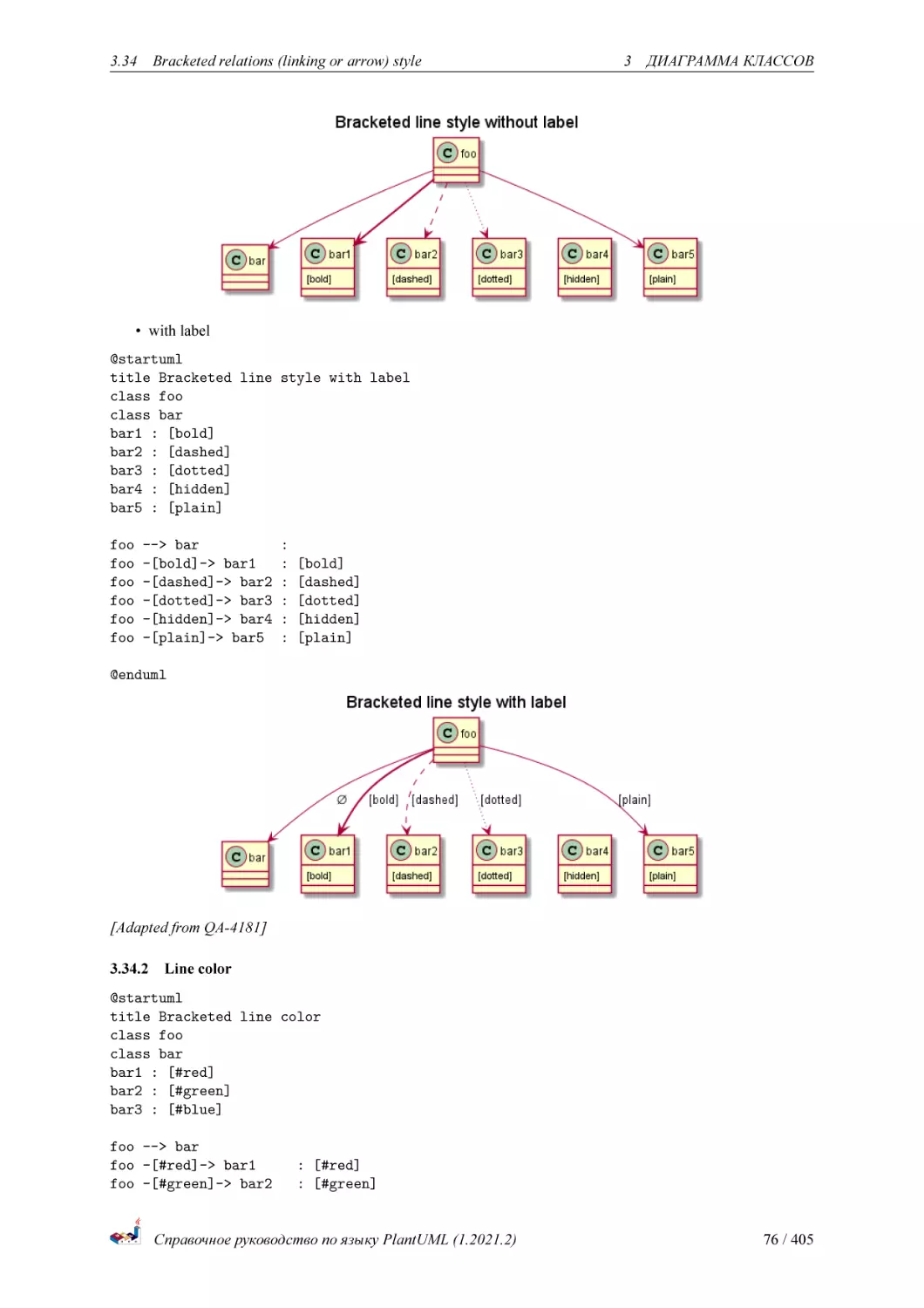
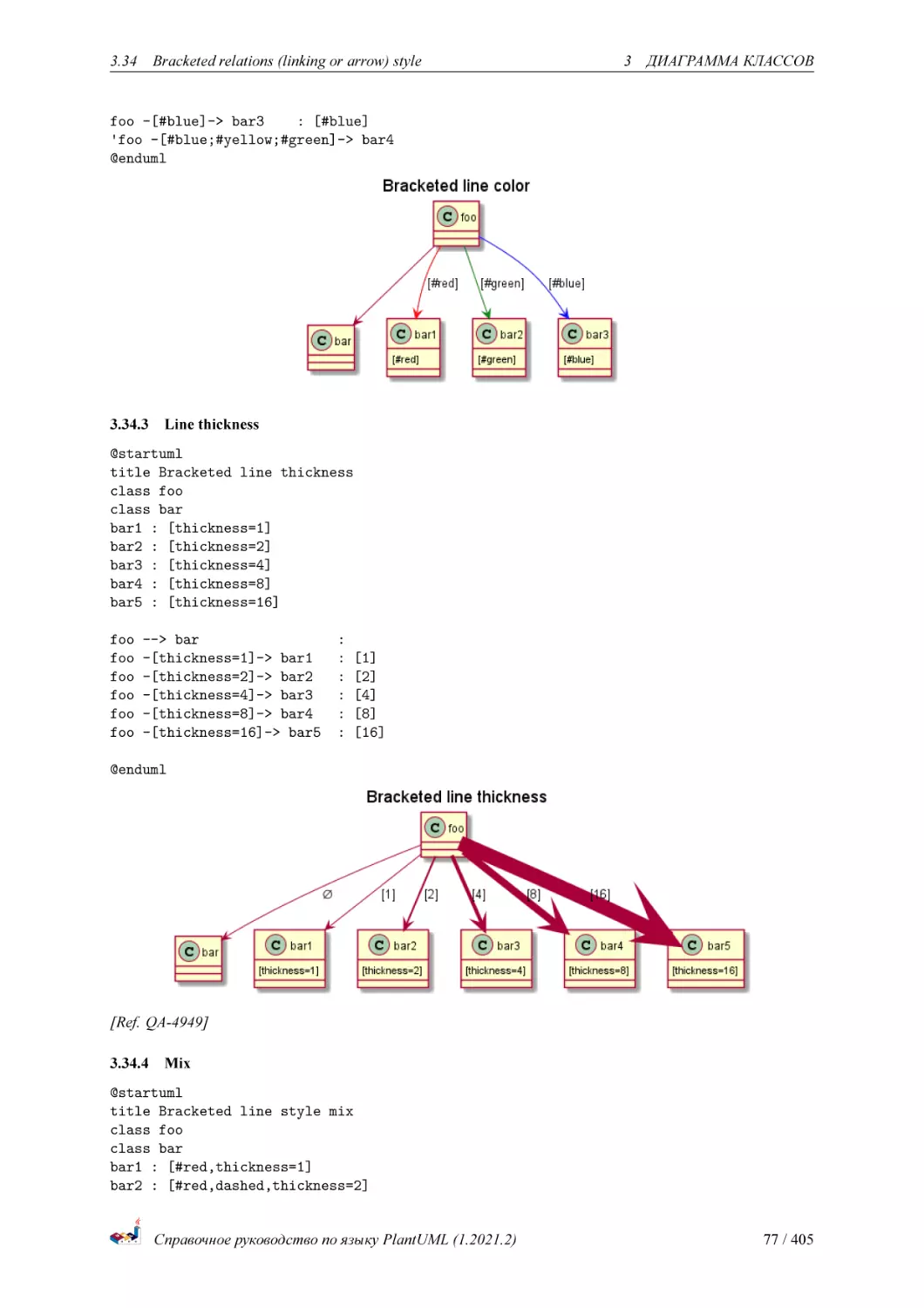
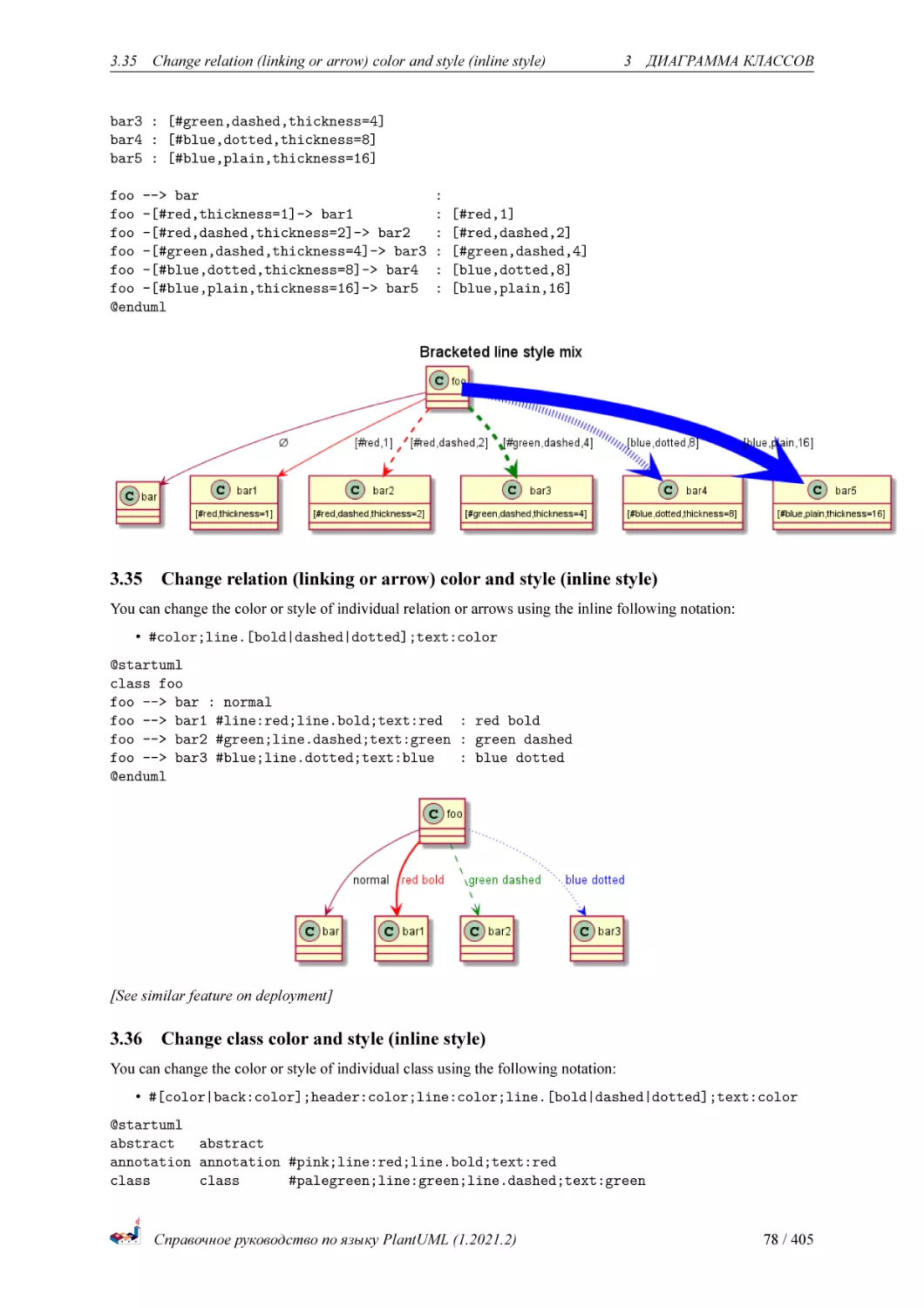
It’s also possible to have explicitly bold, dashed, dotted, hidden or plain relation, links or arrows:
• without label
@startuml
title Bracketed line style without label
class foo
class bar
bar1 : [bold]
bar2 : [dashed]
bar3 : [dotted]
bar4 : [hidden]
bar5 : [plain]
foo --> bar
foo -[bold]-> bar1
foo -[dashed]-> bar2
foo -[dotted]-> bar3
foo -[hidden]-> bar4
foo -[plain]-> bar5
@enduml
Справочное руководство по языку PlantUML (1.2021.2)
75 / 405
3.34
Bracketed relations (linking or arrow) style
3
ДИАГРАММА КЛАССОВ
• with label
@startuml
title Bracketed line style with label
class foo
class bar
bar1 : [bold]
bar2 : [dashed]
bar3 : [dotted]
bar4 : [hidden]
bar5 : [plain]
foo
foo
foo
foo
foo
foo
--> bar
-[bold]-> bar1
-[dashed]-> bar2
-[dotted]-> bar3
-[hidden]-> bar4
-[plain]-> bar5
:
:
:
:
:
:
�
[bold]
[dashed]
[dotted]
[hidden]
[plain]
@enduml
[Adapted from QA-4181]
3.34.2 Line color
@startuml
title Bracketed line color
class foo
class bar
bar1 : [#red]
bar2 : [#green]
bar3 : [#blue]
foo --> bar
foo -[#red]-> bar1
foo -[#green]-> bar2
: [#red]
: [#green]
Справочное руководство по языку PlantUML (1.2021.2)
76 / 405
3.34
Bracketed relations (linking or arrow) style
3
ДИАГРАММА КЛАССОВ
foo -[#blue]-> bar3
: [#blue]
'foo -[#blue;#yellow;#green]-> bar4
@enduml
3.34.3 Line thickness
@startuml
title Bracketed line thickness
class foo
class bar
bar1 : [thickness=1]
bar2 : [thickness=2]
bar3 : [thickness=4]
bar4 : [thickness=8]
bar5 : [thickness=16]
foo
foo
foo
foo
foo
foo
--> bar
-[thickness=1]-> bar1
-[thickness=2]-> bar2
-[thickness=4]-> bar3
-[thickness=8]-> bar4
-[thickness=16]-> bar5
:
:
:
:
:
:
�
[1]
[2]
[4]
[8]
[16]
@enduml
[Ref. QA-4949]
3.34.4 Mix
@startuml
title Bracketed line style mix
class foo
class bar
bar1 : [#red,thickness=1]
bar2 : [#red,dashed,thickness=2]
Справочное руководство по языку PlantUML (1.2021.2)
77 / 405
3.35
Change relation (linking or arrow) color and style (inline style)
3
ДИАГРАММА КЛАССОВ
bar3 : [#green,dashed,thickness=4]
bar4 : [#blue,dotted,thickness=8]
bar5 : [#blue,plain,thickness=16]
foo --> bar
foo -[#red,thickness=1]-> bar1
foo -[#red,dashed,thickness=2]-> bar2
foo -[#green,dashed,thickness=4]-> bar3
foo -[#blue,dotted,thickness=8]-> bar4
foo -[#blue,plain,thickness=16]-> bar5
@enduml
3.35
:
:
:
:
:
:
�
[#red,1]
[#red,dashed,2]
[#green,dashed,4]
[blue,dotted,8]
[blue,plain,16]
Change relation (linking or arrow) color and style (inline style)
You can change the color or style of individual relation or arrows using the inline following notation:
• #color;line.[bold|dashed|dotted];text:color
@startuml
class foo
foo --> bar : normal
foo --> bar1 #line:red;line.bold;text:red : red bold
foo --> bar2 #green;line.dashed;text:green : green dashed
foo --> bar3 #blue;line.dotted;text:blue
: blue dotted
@enduml
[See similar feature on deployment]
3.36
Change class color and style (inline style)
You can change the color or style of individual class using the following notation:
• #[color|back:color];header:color;line:color;line.[bold|dashed|dotted];text:color
@startuml
abstract
abstract
annotation annotation #pink;line:red;line.bold;text:red
class
class
#palegreen;line:green;line.dashed;text:green
Справочное руководство по языку PlantUML (1.2021.2)
78 / 405
3.37
Arrows from/to class members
interface
@enduml
interface
3
ДИАГРАММА КЛАССОВ
#aliceblue;line:blue;line.dotted;text:blue
First original example:
@startuml
class bar #line:green;back:lightblue
class bar2 #lightblue;line:green
class Foo1 #back:red;line:00FFFF
class FooDashed #line.dashed:blue
class FooDotted #line.dotted:blue
class FooBold #line.bold
class Demo1 #back:lightgreen|yellow;header:blue/red
@enduml
[Ref. QA-3770]
3.37
Arrows from/to class members
@startuml
class Foo {
+ field1
+ field2
}
class Bar {
+ field3
+ field4
}
Foo::field1 --> Bar::field3 : foo
Foo::field2 --> Bar::field4 : bar
@enduml
Справочное руководство по языку PlantUML (1.2021.2)
79 / 405
3.37
Arrows from/to class members
3
ДИАГРАММА КЛАССОВ
[Ref. QA-3636]
@startuml
left to right direction
class User {
id : INTEGER
..
other_id : INTEGER
}
class Email {
id : INTEGER
..
user_id : INTEGER
address : INTEGER
}
User::id *-- Email::user_id
@enduml
[Ref. QA-5261]
Справочное руководство по языку PlantUML (1.2021.2)
80 / 405
4 ДИАГРАММА ОБЪЕКТОВ
4
4.1
Диаграмма объектов
Определение объектов
Вы можете определить экземпляр объекта используя ключевое слово object.
@startuml
object firstObject
object "My Second Object" as o2
@enduml
4.2
Отношения между объектами
Отношения между объектами определяются с использованием следующий символов :
Type
Extension
Composition
Aggregation
Symbol
<|-*-o--
Image
Возможно заменить -- на .. чтобы получить линию из точек.
Зная данные правила, можно создать следующие картинки.
Возможно добавить описание к связи, используя :, с последующим текстом описания.
Для определения количества элементов, вы можете использовать двойные кавычки "" на каждой стороне
связи.
@startuml
object Object01
object Object02
object Object03
object Object04
object Object05
object Object06
object Object07
object Object08
Object01
Object03
Object05
Object07
@enduml
4.3
<|-- Object02
*-- Object04
o-- "4" Object06
.. Object08 : some labels
Associations objects
@startuml
object o1
object o2
Справочное руководство по языку PlantUML (1.2021.2)
81 / 405
4.4 Добавление полей
4 ДИАГРАММА ОБЪЕКТОВ
diamond dia
object o3
o1 --> dia
o2 --> dia
dia --> o3
@enduml
4.4
Добавление полей
Для определения свойств (полей) объекта, задайте префикс :, указав вслед за ним имея свойства.
@startuml
object user
user : name = "Dummy"
user : id = 123
@enduml
Также возможно разместить все поля между скобками {}.
@startuml
object user {
name = "Dummy"
id = 123
}
@enduml
4.5
Общие с диаграммами классов функции
• Видимость
• Задание меток
• Использовние пакетов
• Стилизование вывода
Справочное руководство по языку PlantUML (1.2021.2)
82 / 405
4.6 Map table or associative array
4.6
4 ДИАГРАММА ОБЪЕКТОВ
Map table or associative array
You can define a map table or associative array, with map keyword and => separator.
@startuml
map CapitalCity {
UK => London
USA => Washington
Germany => Berlin
}
@enduml
@startuml
map "Map **Contry => CapitalCity**" as CC {
UK => London
USA => Washington
Germany => Berlin
}
@enduml
@startuml
map "map: Map<Integer, String>" as users {
1 => Alice
2 => Bob
3 => Charlie
}
@enduml
And add link with object.
@startuml
object London
map CapitalCity {
UK *-> London
USA => Washington
Germany => Berlin
}
@enduml
@startuml
object London
Справочное руководство по языку PlantUML (1.2021.2)
83 / 405
4.6 Map table or associative array
4 ДИАГРАММА ОБЪЕКТОВ
object Washington
object Berlin
object NewYork
map CapitalCity {
UK *-> London
USA *--> Washington
Germany *---> Berlin
}
NewYork --> CapitalCity::USA
@enduml
[Ref. #307]
Справочное руководство по языку PlantUML (1.2021.2)
84 / 405
5
5
5.1
ДИАГРАММА ДЕЯТЕЛЬНОСТИ
Диаграмма деятельности
Простая деятельность
Вы можете использовать (*) для начальных и конечных точек диаграммы деятельности.
В некоторых случаях,вы можете использовать (*top) чтобы указать что начальная точка должна быть в
верху диаграммы.
Используйте --> для стрелок.
@startuml
(*) --> "First Activity"
"First Activity" --> (*)
@enduml
5.2
Метка на стрелках
По умолчанию, стрелка начинается с последней использованной активности.
Вы можете пометить стрелку при помощи скобок [ и ] сразу после определения стрелки.
@startuml
(*) --> "First Activity"
-->[You can put also labels] "Second Activity"
--> (*)
@enduml
5.3
Изменение направления стрелки
Вы можете использовать -> для горизонтальных стрелок. Возможно задать направление стрелки используя
следующий синтаксис:
• -down-> (default arrow)
Справочное руководство по языку PlantUML (1.2021.2)
85 / 405
5.4 Ветвления
5
ДИАГРАММА ДЕЯТЕЛЬНОСТИ
• -right-> or ->
• -left->
• -up->
@startuml
(*) -up-> "First Activity"
-right-> "Second Activity"
--> "Third Activity"
-left-> (*)
@enduml
5.4
Ветвления
Вы можете использовать ключевые слова if/then/else чтобы определять ветки.
@startuml
(*) --> "Initialization"
if "Some Test" then
-->[true] "Some Activity"
--> "Another activity"
-right-> (*)
else
->[false] "Something else"
-->[Ending process] (*)
endif
@enduml
К сожалению, вам иногда придётся повторять ту же активность в тексте диаграммы:
Справочное руководство по языку PlantUML (1.2021.2)
86 / 405
5.5 Больше о ветках
5
ДИАГРАММА ДЕЯТЕЛЬНОСТИ
@startuml
(*) --> "check input"
If "input is verbose" then
--> [Yes] "turn on verbosity"
--> "run command"
else
--> "run command"
Endif
-->(*)
@enduml
5.5
Больше о ветках
По умолчанию, ветка соединена к последней заданной активности, но возможно переопределить это и
задать связь с помощью ключевого слова if.
Также возможно создавать вложенные ветки.
@startuml
(*) --> if "Some Test" then
-->[true] "activity 1"
if "" then
-> "activity 3" as a3
else
if "Other test" then
-left-> "activity 5"
else
--> "activity 6"
endif
endif
else
->[false] "activity 2"
Справочное руководство по языку PlantUML (1.2021.2)
87 / 405
5.6 Синхронизация
5
ДИАГРАММА ДЕЯТЕЛЬНОСТИ
endif
a3 --> if "last test" then
--> "activity 7"
else
-> "activity 8"
endif
@enduml
5.6
Синхронизация
Вы можете использовать === code ===, чтобы отобразить барьеры синхронизации.
@startuml
(*) --> ===B1===
--> "Parallel Activity 1"
--> ===B2===
===B1=== --> "Parallel Activity 2"
--> ===B2===
--> (*)
@enduml
Справочное руководство по языку PlantUML (1.2021.2)
88 / 405
5.7 Длинное описание активности
5.7
5
ДИАГРАММА ДЕЯТЕЛЬНОСТИ
Длинное описание активности
Когда вы задаёте активность, вы можете разделить её описание на несколько линий. Вы также можете
добавть в описание.
Вы также можете задать короткий код активности с помощью ключевого слова as. Этот код может быть
использован позже в описании диаграммы.
@startuml
(*) -left-> "this <size:20>activity</size>
is <b>very</b> <color:red>long2</color>
and defined on several lines
that contains many <i>text</i>" as A1
-up-> "Another activity\n on several lines"
A1 --> "Short activity <img:sourceforge.jpg>"
@enduml
5.8
Заметки
Вы можете добавить заметки к активности используя команды note left, note right, note top or note
bottom, Сразу после описания активности. к которой вы хотите прикрепить заметку.
Если вы хотите прикрепить заметку к точку начала, задайте метку в самом начале описания диаграммы.
Вы также можете создать заметку на нескольких линиях, используя ключевое слово endnote.
@startuml
(*) --> "Some Activity"
Справочное руководство по языку PlantUML (1.2021.2)
89 / 405
5.9 Разделы
5
ДИАГРАММА ДЕЯТЕЛЬНОСТИ
note right: This activity has to be defined
"Some Activity" --> (*)
note left
This note is on
several lines
end note
@enduml
5.9
Разделы
Вы можете задать раздел используя ключевое слово partition, и опционально задать цвет фона для своего
раздела (Используя код цвета html или название цвета)
Когда вы задаёте активность, они автоматически попадают в последнюю заданную активность.
Вы можете закрыть раздел используя закрывающую скобку }.
@startuml
partition Conductor {
(*) --> "Climbs on Platform"
--> === S1 ===
--> Bows
}
partition Audience #LightSkyBlue {
=== S1 === --> Applauds
}
partition Conductor {
Bows --> === S2 ===
--> WavesArmes
Applauds --> === S2 ===
}
partition Orchestra #CCCCEE {
WavesArmes --> Introduction
--> "Play music"
}
@enduml
Справочное руководство по языку PlantUML (1.2021.2)
90 / 405
5.10
5.10
Skinparam
5
ДИАГРАММА ДЕЯТЕЛЬНОСТИ
Skinparam
Вы можете использовать команду skinparam чтобы изменить цвет и шрифт рисования.
Вы можете использоват команду :
• В определении диаграммы, как любую другую команду,
• В подключаемом файле,
• В конфигурационном файле, подставленный в командной строке ANT задания.
Вы можете задать определённый цвет и шрифт для активностей с шаблоном.
@startuml
skinparam backgroundColor #AAFFFF
skinparam activity {
StartColor red
BarColor SaddleBrown
EndColor Silver
BackgroundColor Peru
BackgroundColor<< Begin >> Olive
BorderColor Peru
FontName Impact
}
(*) --> "Climbs on Platform" << Begin >>
--> === S1 ===
--> Bows
Справочное руководство по языку PlantUML (1.2021.2)
91 / 405
5.11 Восьмиугольник
5
ДИАГРАММА ДЕЯТЕЛЬНОСТИ
--> === S2 ===
--> WavesArmes
--> (*)
@enduml
5.11 Восьмиугольник
Вы можете изменить форму активностей на восьмиугольник, используя команду skinparam activityShape
octagon.
@startuml
'Default is skinparam activityShape roundBox
skinparam activityShape octagon
(*) --> "First Activity"
"First Activity" --> (*)
@enduml
5.12
Полноценный пример
@startuml
title Servlet Container
(*) --> "ClickServlet.handleRequest()"
--> "new Page"
Справочное руководство по языку PlantUML (1.2021.2)
92 / 405
5.12
Полноценный пример
5
ДИАГРАММА ДЕЯТЕЛЬНОСТИ
if "Page.onSecurityCheck" then
->[true] "Page.onInit()"
if "isForward?" then
->[no] "Process controls"
if "continue processing?" then
-->[yes] ===RENDERING===
else
-->[no] ===REDIRECT_CHECK===
endif
else
-->[yes] ===RENDERING===
endif
if "is Post?" then
-->[yes] "Page.onPost()"
--> "Page.onRender()" as render
--> ===REDIRECT_CHECK===
else
-->[no] "Page.onGet()"
--> render
endif
else
-->[false] ===REDIRECT_CHECK===
endif
if "Do redirect?" then
->[yes] "redirect request"
--> ==BEFORE_DESTROY===
else
if "Do Forward?" then
-left->[yes] "Forward request"
--> ==BEFORE_DESTROY===
else
-right->[no] "Render page template"
--> ==BEFORE_DESTROY===
endif
endif
--> "Page.onDestroy()"
-->(*)
@enduml
Справочное руководство по языку PlantUML (1.2021.2)
93 / 405
5.12
Полноценный пример
Справочное руководство по языку PlantUML (1.2021.2)
5
ДИАГРАММА ДЕЯТЕЛЬНОСТИ
94 / 405
6 ДИАГРАММА АКТИВНОСТИ (БЕТА)
6
Диаграмма активности (бета)
Текущий синтаксис диаграммы активности имеет несколько ограничений и недостатков (например, её сложно
поддерживать).
Таким образом, новый синтаксис и реализация предложены как бета версия пользователям (начиная с
V7947), так что мы сможем определить новый формат и синтаксис.
Другое преимущество этой новой реализации, это то, что для неё не будет требоваться установленный
Graphviz (как для диаграмм последовательностей).
Новый синтаксис заменит старый. Однако, по причине совместимости, старый синтаксис всё ещё будет
распознаваться, чтобы обеспечивать восходящую совместимость.
Пользователи будут просто поощряться при мигрировании на новый синтаксис.
6.1
Простая активность
Описания активностей начинаются с : и заканчиваются ;.
Форматировать текст возможно, используя синтаксис creole.
Активности косвенно связаны в порядке их определения.
@startuml
:Hello world;
:This is on defined on
several **lines**;
@enduml
6.2
Старт/Стоп
Вы можете использовать ключевые слова start и stop, чтобы обозначать начало и конец диаграммы.
@startuml
start
:Hello world;
:This is on defined on
several **lines**;
stop
@enduml
Вы также можете использовать ключевое слово end.
Справочное руководство по языку PlantUML (1.2021.2)
95 / 405
6.3 Условия
6 ДИАГРАММА АКТИВНОСТИ (БЕТА)
@startuml
start
:Hello world;
:This is on defined on
several **lines**;
end
@enduml
6.3
Условия
Вы можете использовать ключевые слова if, then и else, чтобы добавить проверяющие условия на вашу
диаграмму. Описания можно добавить, используя круглые скобки.
@startuml
start
if (Graphviz installed?) then (yes)
:process all\ndiagrams;
else (no)
:process only
__sequence__ and __activity__ diagrams;
endif
stop
@enduml
6.3.1
Ряд проверок (горизонтальное отображение)
Вы можете использовать ключевое слово elseif, чтобы создать несколько проверок (по умолчанию используется
режим горизонтального отображения):
@startuml
start
if (condition A) then (yes)
:Text 1;
Справочное руководство по языку PlantUML (1.2021.2)
96 / 405
6.3 Условия
6 ДИАГРАММА АКТИВНОСТИ (БЕТА)
elseif (condition B) then (yes)
:Text 2;
stop
elseif (condition C) then (yes)
:Text 3;
elseif (condition D) then (yes)
:Text 4;
else (nothing)
:Text else;
endif
stop
@enduml
6.3.2
Ряд проверок (вертикальное отображение)
Используйте команду !pragma useVerticalIf on для отображения проверок в вертикальном режиме:
@startuml
!pragma useVerticalIf on
start
if (condition A) then (yes)
:Text 1;
elseif (condition B) then (yes)
:Text 2;
stop
elseif (condition C) then (yes)
:Text 3;
elseif (condition D) then (yes)
:Text 4;
else (nothing)
:Text else;
endif
stop
@enduml
Справочное руководство по языку PlantUML (1.2021.2)
97 / 405
6.4 Conditional with stop on an action [kill, detach]
6 ДИАГРАММА АКТИВНОСТИ (БЕТА)
[Ref. QA-3931]
6.4
Conditional with stop on an action [kill, detach]
You can stop action on a if loop.
@startuml
if (condition?) then
:error;
stop
endif
#palegreen:action;
@enduml
But if you want to stop at an precise action, you can use the kill or detach keyword:
• kill
@startuml
if (condition?) then
Справочное руководство по языку PlantUML (1.2021.2)
98 / 405
6.5 Повторяющийся цикл
6 ДИАГРАММА АКТИВНОСТИ (БЕТА)
#pink:error;
kill
endif
#palegreen:action;
@enduml
[Ref. QA-265]
• detach
@startuml
if (condition?) then
#pink:error;
detach
endif
#palegreen:action;
@enduml
6.5
Повторяющийся цикл
Используйте ключевые слова repeat и repeatwhile для создания повторяющихся циклов.
@startuml
start
repeat
:read data;
:generate diagrams;
repeat while (more data?)
stop
@enduml
Справочное руководство по языку PlantUML (1.2021.2)
99 / 405
6.6 Break on a repeat loop [break]
6 ДИАГРАММА АКТИВНОСТИ (БЕТА)
Для включения в обратный путь цикла самостоятельного действия используйте ключевое слово backward.
@startuml
start
repeat :foo as starting label;
:read data;
:generate diagrams;
backward:This is backward;
repeat while (more data?)
stop
@enduml
6.6
Break on a repeat loop [break]
You can break after an action on a loop.
@startuml
start
repeat
:Test something;
if (Something went wrong?) then (no)
#palegreen:OK;
break
endif
Справочное руководство по языку PlantUML (1.2021.2)
100 / 405
6.7 Цикл while
6 ДИАГРАММА АКТИВНОСТИ (БЕТА)
->NOK;
:Alert "Error with long text";
repeat while (Something went wrong with long text?) is (yes) not (no)
->//merged step//;
:Alert "Sucess";
stop
@enduml
[Ref. QA-6105]
6.7
Цикл while
Используйте ключевые слова while и end while для создания повторяющихся циклов.
@startuml
start
while (data available?)
:read data;
:generate diagrams;
endwhile
stop
@enduml
Справочное руководство по языку PlantUML (1.2021.2)
101 / 405
6.8 Паралельная обработка
6 ДИАГРАММА АКТИВНОСТИ (БЕТА)
Добавить описание можно после ключевого слова endwhile или используя ключевое слово is.
@startuml
while (check filesize ?) is (not empty)
:read file;
endwhile (empty)
:close file;
@enduml
6.8
Паралельная обработка
Используйте ключевые слова fork, fork again и end fork для определения параллельных процессов.
@startuml
start
if (multiprocessor?) then (yes)
fork
:Treatment 1;
fork again
:Treatment 2;
end fork
else (monoproc)
:Treatment 1;
:Treatment 2;
endif
@enduml
Справочное руководство по языку PlantUML (1.2021.2)
102 / 405
6.9 Split processing
6.9
Split processing
6.9.1
Split
6 ДИАГРАММА АКТИВНОСТИ (БЕТА)
You can use split, split again and end split keywords to denote split processing.
@startuml
start
split
:A;
split again
:B;
split again
:C;
split again
:a;
:b;
end split
:D;
end
@enduml
6.9.2
Input split (multi-start)
You can use hidden arrows to make an input split (multi-start):
@startuml
split
-[hidden]->
:A;
split again
Справочное руководство по языку PlantUML (1.2021.2)
103 / 405
6.9 Split processing
6 ДИАГРАММА АКТИВНОСТИ (БЕТА)
-[hidden]->
:B;
split again
-[hidden]->
:C;
end split
:D;
@enduml
@startuml
split
-[hidden]->
:A;
split again
-[hidden]->
:a;
:b;
split again
-[hidden]->
(Z)
end split
:D;
@enduml
[Ref. QA-8662]
6.9.3
Output split (multi-end)
You can use kill or detach to make an output split (multi-end):
@startuml
start
split
:A;
kill
split again
:B;
detach
split again
:C;
Справочное руководство по языку PlantUML (1.2021.2)
104 / 405
6.10
Заметки
6 ДИАГРАММА АКТИВНОСТИ (БЕТА)
kill
end split
@enduml
@startuml
start
split
:A;
kill
split again
:b;
:c;
detach
split again
(Z)
detach
split again
end
split again
stop
end split
@enduml
6.10
Заметки
Форматирование текста может быть сделано с использованием синтаксиса creole.
Заметку можно сделать отсоединенной с помощью ключевого слова floating.
@startuml
start
:foo1;
floating note left: This is a note
:foo2;
note right
This note is on several
//lines// and can
contain <b>HTML</b>
====
* Calling the method ""foo()"" is prohibited
end note
stop
Справочное руководство по языку PlantUML (1.2021.2)
105 / 405
6.11 Цвета
6 ДИАГРАММА АКТИВНОСТИ (БЕТА)
@enduml
Заметка также может быть добавлена к действию, входящему в обратный поток цикла.
@startuml
start
repeat :Enter data;
:Submit;
backward :Warning;
note right: Note
repeat while (Valid?) is (No) not (Yes)
stop
@enduml
[Ref. QA-11788]
6.11 Цвета
Вы можете задать цвет некоторым активностям.
@startuml
start
:starting progress;
#HotPink:reading configuration files
These files should edited at this point!;
#AAAAAA:ending of the process;
@enduml
Справочное руководство по языку PlantUML (1.2021.2)
106 / 405
6.12
6.12
Линии без стрелок
6 ДИАГРАММА АКТИВНОСТИ (БЕТА)
Линии без стрелок
Используйте команду skinparam ArrowHeadColor none для соединения действий линиями без стрелок.
@startuml
skinparam ArrowHeadColor none
start
:Hello world;
:This is on defined on
several **lines**;
stop
@enduml
@startuml
skinparam ArrowHeadColor none
start
repeat :Enter data;
:Submit;
backward :Warning;
repeat while (Valid?) is (No) not (Yes)
stop
@enduml
Справочное руководство по языку PlantUML (1.2021.2)
107 / 405
6.13
6.13
Стрелки
6 ДИАГРАММА АКТИВНОСТИ (БЕТА)
Стрелки
Используя нотацию ->, вы можете добавить текст к стрелке, aи поменять их цвет.
Так же можно сделать стрелки: из точек (dotted), из дефисов (dashed), жирные (bold) и скрытые (hidden).
@startuml
:foo1;
-> You can put text on arrows;
if (test) then
-[#blue]->
:foo2;
-[#green,dashed]-> The text can
also be on several lines
and **very** long...;
:foo3;
else
-[#black,dotted]->
:foo4;
-[hidden]->
:foo4a;
endif
-[#gray,bold]->
:foo5;
@enduml
6.14
Connector
You can use parentheses to denote connector.
@startuml
start
:Some activity;
(A)
detach
(A)
:Other activity;
@enduml
Справочное руководство по языку PlantUML (1.2021.2)
108 / 405
6.15
6.15
Color on connector
6 ДИАГРАММА АКТИВНОСТИ (БЕТА)
Color on connector
You can add color on connector.
@startuml
start
:The connector below
wishes he was blue;
#blue:(B)
:This next connector
feels that she would
be better off green;
#green:(G)
stop
@enduml
[Ref. QA-10077]
6.16
Группирование
Вы можете группировать активности вместе, определяя раздел:
@startuml
start
partition Initialization {
:read config file;
:init internal variable;
}
partition Running {
:wait for user interaction;
:print information;
Справочное руководство по языку PlantUML (1.2021.2)
109 / 405
6.17
Дорожки
6 ДИАГРАММА АКТИВНОСТИ (БЕТА)
}
stop
@enduml
6.17
Дорожки
Используя символ |, вы можете определять плавающие линии.
Также возможно изменять цвет плавающих линий.
@startuml
|Swimlane1|
start
:foo1;
|#AntiqueWhite|Swimlane2|
:foo2;
:foo3;
|Swimlane1|
:foo4;
|Swimlane2|
:foo5;
stop
@enduml
Справочное руководство по языку PlantUML (1.2021.2)
110 / 405
6.18
6.18
Отсоединение
6 ДИАГРАММА АКТИВНОСТИ (БЕТА)
Отсоединение
Возможно убрать стрелку используя ключевое слово detach.
@startuml
:start;
fork
:foo1;
:foo2;
fork again
:foo3;
detach
endfork
if (foo4) then
:foo5;
detach
endif
:foo6;
detach
:foo7;
stop
@enduml
Справочное руководство по языку PlantUML (1.2021.2)
111 / 405
6.19
SDL
6.19
6 ДИАГРАММА АКТИВНОСТИ (БЕТА)
SDL
Изменяя последний разделитель ;, вы можете установить различный рендеринг для активности:
• |
• <
• >
• /
• ]
• }
@startuml
:Ready;
:next(o)|
:Receiving;
split
:nak(i)<
:ack(o)>
split again
:ack(i)<
:next(o)
on several line|
:i := i + 1]
:ack(o)>
split again
:err(i)<
:nak(o)>
split again
:foo/
split again
Справочное руководство по языку PlantUML (1.2021.2)
112 / 405
6.20
Полноценный пример
6 ДИАГРАММА АКТИВНОСТИ (БЕТА)
:i > 5}
stop
end split
:finish;
@enduml
6.20
Полноценный пример
@startuml
start
:ClickServlet.handleRequest();
:new page;
if (Page.onSecurityCheck) then (true)
:Page.onInit();
if (isForward?) then (no)
:Process controls;
if (continue processing?) then (no)
stop
endif
if (isPost?) then (yes)
:Page.onPost();
else (no)
:Page.onGet();
endif
:Page.onRender();
endif
else (false)
endif
if (do redirect?) then (yes)
Справочное руководство по языку PlantUML (1.2021.2)
113 / 405
6.20
Полноценный пример
6 ДИАГРАММА АКТИВНОСТИ (БЕТА)
:redirect process;
else
if (do forward?) then (yes)
:Forward request;
else (no)
:Render page template;
endif
endif
stop
@enduml
Справочное руководство по языку PlantUML (1.2021.2)
114 / 405
6.21
6.21
Condition Style
6 ДИАГРАММА АКТИВНОСТИ (БЕТА)
Condition Style
6.21.1 Inside style (by default)
@startuml
skinparam conditionStyle inside
start
repeat
:act1;
:act2;
repeatwhile (<b>end)
:act3;
@enduml
@startuml
start
repeat
:act1;
:act2;
repeatwhile (<b>end)
:act3;
@enduml
6.21.2 Diamond style
@startuml
skinparam conditionStyle diamond
start
Справочное руководство по языку PlantUML (1.2021.2)
115 / 405
6.21
Condition Style
6 ДИАГРАММА АКТИВНОСТИ (БЕТА)
repeat
:act1;
:act2;
repeatwhile (<b>end)
:act3;
@enduml
6.21.3 InsideDiamond (or Foo1) style
@startuml
skinparam conditionStyle InsideDiamond
start
repeat
:act1;
:act2;
repeatwhile (<b>end)
:act3;
@enduml
@startuml
skinparam conditionStyle foo1
start
repeat
:act1;
:act2;
repeatwhile (<b>end)
:act3;
Справочное руководство по языку PlantUML (1.2021.2)
116 / 405
6.22
Condition End Style
6 ДИАГРАММА АКТИВНОСТИ (БЕТА)
@enduml
[Ref. QA-1290 and #400]
6.22
Condition End Style
6.22.1 Diamond style (by default)
• With one branch
@startuml
skinparam ConditionEndStyle diamond
:A;
if (decision) then (yes)
:B1;
else (no)
endif
:C;
@enduml
• With two branchs (B1, B2)
@startuml
skinparam ConditionEndStyle diamond
:A;
if (decision) then (yes)
:B1;
else (no)
:B2;
endif
Справочное руководство по языку PlantUML (1.2021.2)
117 / 405
6.22
Condition End Style
6 ДИАГРАММА АКТИВНОСТИ (БЕТА)
:C;
@enduml
@enduml
6.22.2 Horizontal line (hline) style
• With one branch
@startuml
skinparam ConditionEndStyle hline
:A;
if (decision) then (yes)
:B1;
else (no)
endif
:C;
@enduml
• With two branchs (B1, B2)
@startuml
skinparam ConditionEndStyle hline
:A;
if (decision) then (yes)
:B1;
else (no)
:B2;
endif
:C;
@enduml
@enduml
Справочное руководство по языку PlantUML (1.2021.2)
118 / 405
6.22
Condition End Style
6 ДИАГРАММА АКТИВНОСТИ (БЕТА)
[Ref. QA-4015]
Справочное руководство по языку PlantUML (1.2021.2)
119 / 405
7 ДИАГРАММА КОМПОНЕНТОВ
7
Диаграмма компонентов
Let’s have few examples : Let’s have few examples.
7.1
Компоненты
Обозначения компонентов должны быть заключены в квадратные скобки.
Также можно использовать ключевое слово component для объявления компонента. Вы можете объявить
алиас с помощью ключевого слова as. Этот алиас может быть использован позже, при объявлении связей.
@startuml
[First component]
[Another component] as Comp2
component Comp3
component [Last\ncomponent] as Comp4
@enduml
7.2
Интерфейсы
Для обозначения интерфейса используется символ () (потому что он выглядит как круг).
Также возможно использование ключевого слова interface для объявления интерфейса. Вы можете объявить
алиас с помощью ключевого слова as. Этот алиас может быть использован позднее, когда будут задаваться
связи.
Далее мы увидим, что задание интерфейсов опционально.
@startuml
() "First Interface"
() "Another interface" as Interf2
interface Interf3
interface "Last\ninterface" as Interf4
@enduml
Справочное руководство по языку PlantUML (1.2021.2)
120 / 405
7.3 Простой пример
7.3
7 ДИАГРАММА КОМПОНЕНТОВ
Простой пример
Отношения между элементами создаются с помощью комбинации точечных линий (..), прямых линий (--)
и стрелок (-->).
@startuml
DataAccess - [First Component]
[First Component] ..> HTTP : use
@enduml
7.4
Использование заметок
Вы можете использовать ключевые слова note left of , note right of , note top of , note bottom
of чтобы задать метки, относящиеся к одному объекту.
Заметка также может быть задана не прикреплённой, используя ключевое слово note, а затем прикреплена
к другим объектам, используя символ ...
@startuml
interface "Data Access" as DA
DA - [First Component]
[First Component] ..> HTTP : use
note left of HTTP : Web Service only
note right of [First Component]
A note can also
be on several lines
end note
@enduml
7.5
Группирование компонентов
Вы можете использовать несколько ключевых слов package, чтобы группировать компоненты и интерфейсы
вместе.
Справочное руководство по языку PlantUML (1.2021.2)
121 / 405
7.5 Группирование компонентов
7 ДИАГРАММА КОМПОНЕНТОВ
• package
• node
• folder
• frame
• cloud
• database
@startuml
package "Some Group" {
HTTP - [First Component]
[Another Component]
}
node "Other Groups" {
FTP - [Second Component]
[First Component] --> FTP
}
cloud {
[Example 1]
}
database "MySql" {
folder "This is my folder" {
[Folder 3]
}
frame "Foo" {
[Frame 4]
}
}
[Another Component] --> [Example 1]
[Example 1] --> [Folder 3]
[Folder 3] --> [Frame 4]
@enduml
Справочное руководство по языку PlantUML (1.2021.2)
122 / 405
7.6 Изменение направления стрелок
7.6
7 ДИАГРАММА КОМПОНЕНТОВ
Изменение направления стрелок
По умолчанию, связи между классами имею два тире -- и ориентированы вертикально. Можно создавать
горизонтальные связи с помощью одного тире (или точки), вот так:
@startuml
[Component] --> Interface1
[Component] -> Interface2
@enduml
Вы также можете изменять направления, перевернув связь:
@startuml
Interface1 <-- [Component]
Interface2 <- [Component]
@enduml
Справочное руководство по языку PlantUML (1.2021.2)
123 / 405
7.7 Use UML2 notation
7 ДИАГРАММА КОМПОНЕНТОВ
Также, можно изменить направление стрелки добавлением ключевых слов left, right, up или down внутри
стрелки:
@startuml
[Component]
[Component]
[Component]
[Component]
@enduml
-left-> left
-right-> right
-up-> up
-down-> down
Вы можете сократить запись, используя только первую букву направления (например, -d- вместо -down-)
или две первые буквы (-do-).
Пожалуйста, заметьте, что не стоит использовать эту функциональность без особой надобности: Graphviz
обычно даёт хорошие результаты без дополнительной настройки.
7.7
Use UML2 notation
By default (from v1.2020.13-14), UML2 notation is used.
@startuml
interface "Data Access" as DA
DA - [First Component]
[First Component] ..> HTTP : use
@enduml
Справочное руководство по языку PlantUML (1.2021.2)
124 / 405
7.8 Использовании нотации UML1
7.8
7 ДИАГРАММА КОМПОНЕНТОВ
Использовании нотации UML1
Команда skinparam componentStyle uml1 используется, чтобы переключиться на нотацию UML1.
@startuml
skinparam componentStyle uml1
interface "Data Access" as DA
DA - [First Component]
[First Component] ..> HTTP : use
@enduml
7.9
Use rectangle notation (remove UML notation)
The skinparam componentStyle rectangle command is used to switch to rectangle notation (without any
UML notation).
@startuml
skinparam componentStyle rectangle
interface "Data Access" as DA
DA - [First Component]
[First Component] ..> HTTP : use
@enduml
Справочное руководство по языку PlantUML (1.2021.2)
125 / 405
7.10
7.10
Длинное описание
7 ДИАГРАММА КОМПОНЕНТОВ
Длинное описание
Для помещения многострочного текста в тело компонента используются квадратные скобки
@startuml
component comp1 [
This component
has a long comment
on several lines
]
@enduml
7.11 Индивидуальные цвета
Вы можете задать цвет после определения компонента.
@startuml
component
@enduml
7.12
[Web Server] #Yellow
Использование Sprite в стереотипах
Можно использовать спрайты внутри компонентов стереотипа.
@startuml
sprite $businessProcess [16x16/16] {
FFFFFFFFFFFFFFFF
FFFFFFFFFFFFFFFF
FFFFFFFFFFFFFFFF
FFFFFFFFFFFFFFFF
FFFFFFFFFF0FFFFF
FFFFFFFFFF00FFFF
FF00000000000FFF
FF000000000000FF
FF00000000000FFF
FFFFFFFFFF00FFFF
FFFFFFFFFF0FFFFF
FFFFFFFFFFFFFFFF
FFFFFFFFFFFFFFFF
FFFFFFFFFFFFFFFF
FFFFFFFFFFFFFFFF
FFFFFFFFFFFFFFFF
}
rectangle " End to End\nbusiness process" <<$businessProcess>> {
rectangle "inner process 1" <<$businessProcess>> as src
rectangle "inner process 2" <<$businessProcess>> as tgt
src -> tgt
}
@enduml
Справочное руководство по языку PlantUML (1.2021.2)
126 / 405
7.13
7.13
Skinparam
7 ДИАГРАММА КОМПОНЕНТОВ
Skinparam
Вы можете использовать команду skinparam для изменения шрифтов и цветов диаграммы
Вы можете использовать данную команду :
• В определении диаграммы, как любую другую команду,
• В подключенном файле,
• В конфигурационном файле, указанном в командной строке в задании ANT.
Вы можете задать цвет и шрифт для компонентов и интерфейсов с заданными шаблонами.
@startuml
skinparam interface {
backgroundColor RosyBrown
borderColor orange
}
skinparam component {
FontSize 13
BackgroundColor<<Apache>> Red
BorderColor<<Apache>> #FF6655
FontName Courier
BorderColor black
BackgroundColor gold
ArrowFontName Impact
ArrowColor #FF6655
ArrowFontColor #777777
}
() "Data Access" as DA
DA - [First Component]
[First Component] ..> () HTTP : use
HTTP - [Web Server] << Apache >>
@enduml
@startuml
Справочное руководство по языку PlantUML (1.2021.2)
127 / 405
7.14
Specific SkinParameter
7 ДИАГРАММА КОМПОНЕНТОВ
[AA] <<static lib>>
[BB] <<shared lib>>
[CC] <<static lib>>
node node1
node node2 <<shared node>>
database Production
skinparam component {
backgroundColor<<static lib>> DarkKhaki
backgroundColor<<shared lib>> Green
}
skinparam node {
borderColor Green
backgroundColor Yellow
backgroundColor<<shared node>> Magenta
}
skinparam databaseBackgroundColor Aqua
@enduml
7.14
Specific SkinParameter
7.14.1 componentStyle
• By default (or with skinparam componentStyle uml2), you have an icon for component
@startuml
skinparam BackgroundColor transparent
skinparam componentStyle uml2
component A {
component "A.1" {
}
component A.44 {
[A4.1]
}
component "A.2"
[A.3]
component A.5 [
A.5]
component A.6 [
]
}
[a]->[b]
@enduml
Справочное руководство по языку PlantUML (1.2021.2)
128 / 405
7.15
Hide or Remove unlinked component
7 ДИАГРАММА КОМПОНЕНТОВ
• If you want to suppress it, and to have only the rectangle, you can use skinparam componentStyle
rectangle
@startuml
skinparam BackgroundColor transparent
skinparam componentStyle rectangle
component A {
component "A.1" {
}
component A.44 {
[A4.1]
}
component "A.2"
[A.3]
component A.5 [
A.5]
component A.6 [
]
}
[a]->[b]
@enduml
[Ref. 10798]
7.15
Hide or Remove unlinked component
By default, all components are displayed:
@startuml
component C1
component C2
component C3
Справочное руководство по языку PlantUML (1.2021.2)
129 / 405
7.15
Hide or Remove unlinked component
7 ДИАГРАММА КОМПОНЕНТОВ
C1 -- C2
@enduml
But you can:
• hide @unlinked components:
@startuml
component C1
component C2
component C3
C1 -- C2
hide @unlinked
@enduml
• or remove @unlinked components:
@startuml
component C1
component C2
component C3
C1 -- C2
remove @unlinked
@enduml
[Ref. QA-11052]
Справочное руководство по языку PlantUML (1.2021.2)
130 / 405
8 DEPLOYMENT DIAGRAM
8
8.1
Deployment Diagram
Declaring element
@startuml
actor actor
actor/ "actor/"
agent agent
artifact artifact
boundary boundary
card card
circle circle
cloud cloud
collections collections
component component
control control
database database
entity entity
file file
folder folder
frame frame
hexagon hexagon
interface interface
label label
node node
package package
queue queue
rectangle rectangle
stack stack
storage storage
usecase usecase
usecase/ "usecase/"
@enduml
Справочное руководство по языку PlantUML (1.2021.2)
131 / 405
8.1 Declaring element
8 DEPLOYMENT DIAGRAM
You can optionaly put text using bracket [] for a long description.
@startuml
folder folder [
This is a <b>folder
---You can use separator
====
of different kind
....
and style
]
node node [
This is a <b>node
---You can use separator
====
of different kind
....
and style
]
database database [
This is a <b>database
---You can use separator
====
of different kind
....
and style
Справочное руководство по языку PlantUML (1.2021.2)
132 / 405
8.2 Declaring element (using short form)
8 DEPLOYMENT DIAGRAM
]
usecase usecase [
This is a <b>usecase
---You can use separator
====
of different kind
....
and style
]
card card [
This is a <b>card
---You can use separator
====
of different kind
....
and style
<i><color:blue>(add from V1.2020.7)</color></i>
]
@enduml
8.2
Declaring element (using short form)
We can declare element using some short forms.
Long form Keyword
actor
component
interface
usecase
8.2.1
Short form Keyword
: a:
[c]
() i
(u)
Long form example
actor actor1
component component1
interface interface1
usecase usecase1
Short form example
:actor2:
[component2]
() "interface2"
(usecase2)
Ref.
Actors
Components
Interfaces
Usecases
Actor
@startuml
actor actor1
:actor2:
@enduml
Справочное руководство по языку PlantUML (1.2021.2)
133 / 405
8.3 Linking or arrow
8 DEPLOYMENT DIAGRAM
NB: There is an old syntax for actor with guillemet which is now deprecated and will be removed some days. Please
do not use in your diagram.
8.2.2
Component
@startuml
component component1
[component2]
@enduml
8.2.3
Interface
@startuml
interface interface1
() "interface2"
label "//interface example//"
@enduml
8.2.4
Usecase
@startuml
usecase usecase1
(usecase2)
@enduml
8.3
Linking or arrow
You can create simple links between elements with or without labels:
@startuml
node node1
node node2
node node3
Справочное руководство по языку PlantUML (1.2021.2)
134 / 405
8.3 Linking or arrow
8 DEPLOYMENT DIAGRAM
node node4
node node5
node1 -- node2 : label1
node1 .. node3 : label2
node1 ~~ node4 : label3
node1 == node5
@enduml
It is possible to use several types of links:
@startuml
artifact artifact1
artifact artifact2
artifact artifact3
artifact artifact4
artifact artifact5
artifact artifact6
artifact artifact7
artifact artifact8
artifact artifact9
artifact artifact10
artifact1 --> artifact2
artifact1 --* artifact3
artifact1 --o artifact4
artifact1 --+ artifact5
artifact1 --# artifact6
artifact1 -->> artifact7
artifact1 --0 artifact8
artifact1 --^ artifact9
artifact1 --(0 artifact10
@enduml
You can also have the following types:
@startuml
cloud cloud1
cloud cloud2
cloud cloud3
Справочное руководство по языку PlantUML (1.2021.2)
135 / 405
8.3 Linking or arrow
8 DEPLOYMENT DIAGRAM
cloud cloud4
cloud cloud5
cloud1 -0- cloud2
cloud1 -0)- cloud3
cloud1 -(0- cloud4
cloud1 -(0)- cloud5
@enduml
or another example:
@startuml
actor foo1
actor foo2
foo1 <-0-> foo2
foo1 <-(0)-> foo2
(ac1) -le(0)-> left1
ac1 -ri(0)-> right1
ac1 .up(0).> up1
ac1 ~up(0)~> up2
ac1 -do(0)-> down1
ac1 -do(0)-> down2
actor1 -0)- actor2
component comp1
component comp2
comp1 *-0)-+ comp2
[comp3] <-->> [comp4]
@enduml
Справочное руководство по языку PlantUML (1.2021.2)
136 / 405
8.4 Bracketed arrow style
8 DEPLOYMENT DIAGRAM
[Ref. QA-1736]
� See all type on Appendix.
8.4
Bracketed arrow style
Similar as Bracketed class relations (linking or arrow) style
8.4.1
Line style
It’s also possible to have explicitly bold, dashed, dotted, hidden or plain arrows:
• without label
@startuml
node foo
title Bracketed line style without label
foo --> bar
foo -[bold]-> bar1
foo -[dashed]-> bar2
foo -[dotted]-> bar3
foo -[hidden]-> bar4
foo -[plain]-> bar5
@enduml
• with label
@startuml
title Bracketed line style with label
node foo
Справочное руководство по языку PlantUML (1.2021.2)
137 / 405
8.4 Bracketed arrow style
foo --> bar
foo -[bold]-> bar1
foo -[dashed]-> bar2
foo -[dotted]-> bar3
foo -[hidden]-> bar4
foo -[plain]-> bar5
@enduml
:
:
:
:
:
:
8 DEPLOYMENT DIAGRAM
�
[bold]
[dashed]
[dotted]
[hidden]
[plain]
[Adapted from QA-4181]
8.4.2
Line color
@startuml
title Bracketed line color
node foo
foo --> bar
foo -[#red]-> bar1
: [#red]
foo -[#green]-> bar2
: [#green]
foo -[#blue]-> bar3
: [#blue]
foo -[#blue;#yellow;#green]-> bar4
@enduml
8.4.3
Line thickness
@startuml
title Bracketed line thickness
node foo
foo --> bar
: �
foo -[thickness=1]-> bar1
: [1]
foo -[thickness=2]-> bar2
: [2]
foo -[thickness=4]-> bar3
: [4]
foo -[thickness=8]-> bar4
: [8]
foo -[thickness=16]-> bar5 : [16]
@enduml
Справочное руководство по языку PlantUML (1.2021.2)
138 / 405
8.5 Change arrow color and style (inline style)
8 DEPLOYMENT DIAGRAM
[Adapted from QA-4949]
8.4.4
Mix
@startuml
title Bracketed line style mix
node foo
: �
foo --> bar
foo -[#red,thickness=1]-> bar1
: [#red,1]
foo -[#red,dashed,thickness=2]-> bar2
: [#red,dashed,2]
foo -[#green,dashed,thickness=4]-> bar3 : [#green,dashed,4]
foo -[#blue,dotted,thickness=8]-> bar4 : [blue,dotted,8]
foo -[#blue,plain,thickness=16]-> bar5 : [blue,plain,16]
foo -[#blue;#green,dashed,thickness=4]-> bar6 : [blue;green,dashed,4]
@enduml
8.5
Change arrow color and style (inline style)
You can change the color or style of individual arrows using the inline following notation:
• #color;line.[bold|dashed|dotted];text:color
@startuml
node foo
foo --> bar : normal
foo --> bar1 #line:red;line.bold;text:red : red bold
foo --> bar2 #green;line.dashed;text:green : green dashed
foo --> bar3 #blue;line.dotted;text:blue
: blue dotted
@enduml
Справочное руководство по языку PlantUML (1.2021.2)
139 / 405
8.6 Change element color and style (inline style)
8 DEPLOYMENT DIAGRAM
[Ref. QA-3770 and QA-3816] [See similar feature on class diagram]
8.6
Change element color and style (inline style)
You can change the color or style of individual element using the following notation:
• #[color|back:color];line:color;line.[bold|dashed|dotted];text:color
@startuml
agent a
cloud c #pink;line:red;line.bold;text:red
file f #palegreen;line:green;line.dashed;text:green
node n #aliceblue;line:blue;line.dotted;text:blue
@enduml
@startuml
agent a
cloud c #pink;line:red;line.bold;text:red [
c
cloud description
]
file f #palegreen;line:green;line.dashed;text:green {
[c1]
[c2]
}
frame frame {
node n #aliceblue;line:blue;line.dotted;text:blue
}
@enduml
[Ref. QA-6852]
Справочное руководство по языку PlantUML (1.2021.2)
140 / 405
8.7 Nestable elements
8.7
8 DEPLOYMENT DIAGRAM
Nestable elements
Here are the nestable elements:
@startuml
artifact artifact {
}
card card {
}
cloud cloud {
}
component component {
}
database database {
}
file file {
}
folder folder {
}
frame frame {
}
hexagon hexagon {
}
node node {
}
package package {
}
queue queue {
}
rectangle rectangle {
}
stack stack {
}
storage storage {
}
@enduml
8.8
Packages and nested elements
8.8.1
Example with one level
@startuml
artifact
file f1
}
card
file f2
}
cloud
file f3
}
component
file f4
}
database
file f5
artifactVeryLOOOOOOOOOOOOOOOOOOOg
as "artifact" {
cardVeryLOOOOOOOOOOOOOOOOOOOg
as "card" {
cloudVeryLOOOOOOOOOOOOOOOOOOOg
as "cloud" {
componentVeryLOOOOOOOOOOOOOOOOOOOg
as "component" {
databaseVeryLOOOOOOOOOOOOOOOOOOOg
as "database" {
Справочное руководство по языку PlantUML (1.2021.2)
141 / 405
8.8 Packages and nested elements
}
file
file f6
}
folder
file f7
}
frame
file f8
}
hexagon
file f9
}
node
file f10
}
package
file f11
}
queue
file f12
}
rectangle
file f13
}
stack
file f14
}
storage
file f15
}
@enduml
8.8.2
8 DEPLOYMENT DIAGRAM
fileVeryLOOOOOOOOOOOOOOOOOOOg
as "file" {
folderVeryLOOOOOOOOOOOOOOOOOOOg
as "folder" {
frameVeryLOOOOOOOOOOOOOOOOOOOg
as "frame" {
hexagonVeryLOOOOOOOOOOOOOOOOOOOg
as "hexagon" {
nodeVeryLOOOOOOOOOOOOOOOOOOOg
as "node" {
packageVeryLOOOOOOOOOOOOOOOOOOOg
as "package" {
queueVeryLOOOOOOOOOOOOOOOOOOOg
as "queue" {
rectangleVeryLOOOOOOOOOOOOOOOOOOOg
as "rectangle" {
stackVeryLOOOOOOOOOOOOOOOOOOOg
as "stack" {
storageVeryLOOOOOOOOOOOOOOOOOOOg
as "storage" {
Other example
@startuml
artifact Foo1 {
folder Foo2
}
folder Foo3 {
artifact Foo4
}
frame Foo5 {
database Foo6
}
cloud vpc {
node ec2 {
stack stack
}
}
Справочное руководство по языку PlantUML (1.2021.2)
142 / 405
8.8 Packages and nested elements
8 DEPLOYMENT DIAGRAM
@enduml
@startuml
node Foo1 {
cloud Foo2
}
cloud Foo3 {
frame Foo4
}
database Foo5 {
storage Foo6
}
storage Foo7 {
storage Foo8
}
@enduml
8.8.3
Full nesting
Here is all the nested elements:
• by alphabetical order:
@startuml
artifact artifact {
card card {
cloud cloud {
component component {
database database {
file file {
folder folder {
frame frame {
hexagon hexagon {
node node {
package package {
queue queue {
rectangle rectangle {
stack stack {
storage storage {
Справочное руководство по языку PlantUML (1.2021.2)
143 / 405
8.8 Packages and nested elements
8 DEPLOYMENT DIAGRAM
}
}
}
}
}
}
}
}
}
}
}
}
}
}
}
@enduml
Справочное руководство по языку PlantUML (1.2021.2)
144 / 405
8.8 Packages and nested elements
8 DEPLOYMENT DIAGRAM
• or reverse alphabetical order
@startuml
storage storage {
stack stack {
rectangle rectangle {
queue queue {
Справочное руководство по языку PlantUML (1.2021.2)
145 / 405
8.8 Packages and nested elements
8 DEPLOYMENT DIAGRAM
package package {
node node {
hexagon hexagon {
frame frame {
folder folder {
file file {
database database {
component component {
cloud cloud {
card card {
artifact artifact {
}
}
}
}
}
}
}
}
}
}
}
}
}
}
}
@enduml
Справочное руководство по языку PlantUML (1.2021.2)
146 / 405
8.9 Alias
8.9
Alias
8.9.1
Simple alias with as
8 DEPLOYMENT DIAGRAM
@startuml
node Node1 as n1
node "Node 2" as n2
Справочное руководство по языку PlantUML (1.2021.2)
147 / 405
8.9 Alias
8 DEPLOYMENT DIAGRAM
file f1 as "File 1"
cloud c1 as "this
is
a
cloud"
cloud c2 [this
is
another
cloud]
n1 -> n2
n1 --> f1
f1 -> c1
c1 -> c2
@enduml
8.9.2
Examples of long alias
@startuml
actor
agent
artifact
boundary
card
cloud
collections
component
control
database
entity
file
folder
frame
hexagon
interface
label
node
package
queue
stack
rectangle
storage
usecase
@enduml
"actor"
"agent"
"artifact"
"boundary"
"card"
"cloud"
"collections"
"component"
"control"
"database"
"entity"
"file"
"folder"
"frame"
"hexagon"
"interface"
"label"
"node"
"package"
"queue"
"stack"
"rectangle"
"storage"
"usecase"
as
as
as
as
as
as
as
as
as
as
as
as
as
as
as
as
as
as
as
as
as
as
as
as
actorVeryLOOOOOOOOOOOOOOOOOOOg
agentVeryLOOOOOOOOOOOOOOOOOOOg
artifactVeryLOOOOOOOOOOOOOOOOOOOg
boundaryVeryLOOOOOOOOOOOOOOOOOOOg
cardVeryLOOOOOOOOOOOOOOOOOOOg
cloudVeryLOOOOOOOOOOOOOOOOOOOg
collectionsVeryLOOOOOOOOOOOOOOOOOOOg
componentVeryLOOOOOOOOOOOOOOOOOOOg
controlVeryLOOOOOOOOOOOOOOOOOOOg
databaseVeryLOOOOOOOOOOOOOOOOOOOg
entityVeryLOOOOOOOOOOOOOOOOOOOg
fileVeryLOOOOOOOOOOOOOOOOOOOg
folderVeryLOOOOOOOOOOOOOOOOOOOg
frameVeryLOOOOOOOOOOOOOOOOOOOg
hexagonVeryLOOOOOOOOOOOOOOOOOOOg
interfaceVeryLOOOOOOOOOOOOOOOOOOOg
labelVeryLOOOOOOOOOOOOOOOOOOOg
nodeVeryLOOOOOOOOOOOOOOOOOOOg
packageVeryLOOOOOOOOOOOOOOOOOOOg
queueVeryLOOOOOOOOOOOOOOOOOOOg
stackVeryLOOOOOOOOOOOOOOOOOOOg
rectangleVeryLOOOOOOOOOOOOOOOOOOOg
storageVeryLOOOOOOOOOOOOOOOOOOOg
usecaseVeryLOOOOOOOOOOOOOOOOOOOg
Справочное руководство по языку PlantUML (1.2021.2)
148 / 405
8.9 Alias
@startuml
actor
agent
artifact
boundary
card
cloud
collections
component
control
database
entity
file
folder
frame
hexagon
interface
label
node
package
queue
stack
rectangle
storage
usecase
@enduml
8 DEPLOYMENT DIAGRAM
actorVeryLOOOOOOOOOOOOOOOOOOOg
agentVeryLOOOOOOOOOOOOOOOOOOOg
artifactVeryLOOOOOOOOOOOOOOOOOOOg
boundaryVeryLOOOOOOOOOOOOOOOOOOOg
cardVeryLOOOOOOOOOOOOOOOOOOOg
cloudVeryLOOOOOOOOOOOOOOOOOOOg
collectionsVeryLOOOOOOOOOOOOOOOOOOOg
componentVeryLOOOOOOOOOOOOOOOOOOOg
controlVeryLOOOOOOOOOOOOOOOOOOOg
databaseVeryLOOOOOOOOOOOOOOOOOOOg
entityVeryLOOOOOOOOOOOOOOOOOOOg
fileVeryLOOOOOOOOOOOOOOOOOOOg
folderVeryLOOOOOOOOOOOOOOOOOOOg
frameVeryLOOOOOOOOOOOOOOOOOOOg
hexagonVeryLOOOOOOOOOOOOOOOOOOOg
interfaceVeryLOOOOOOOOOOOOOOOOOOOg
labelVeryLOOOOOOOOOOOOOOOOOOOg
nodeVeryLOOOOOOOOOOOOOOOOOOOg
packageVeryLOOOOOOOOOOOOOOOOOOOg
queueVeryLOOOOOOOOOOOOOOOOOOOg
stackVeryLOOOOOOOOOOOOOOOOOOOg
rectangleVeryLOOOOOOOOOOOOOOOOOOOg
storageVeryLOOOOOOOOOOOOOOOOOOOg
usecaseVeryLOOOOOOOOOOOOOOOOOOOg
as
as
as
as
as
as
as
as
as
as
as
as
as
as
as
as
as
as
as
as
as
as
as
as
Справочное руководство по языку PlantUML (1.2021.2)
"actor"
"agent"
"artifact"
"boundary"
"card"
"cloud"
"collections"
"component"
"control"
"database"
"entity"
"file"
"folder"
"frame"
"hexagon"
"interface"
"label"
"node"
"package"
"queue"
"stack"
"rectangle"
"storage"
"usecase"
149 / 405
8.10
Round corner
8 DEPLOYMENT DIAGRAM
[Ref. QA-12082]
8.10
Round corner
@startuml
skinparam rectangle {
roundCorner<<Concept>> 25
}
rectangle "Concept Model" <<Concept>> {
rectangle "Example 1" <<Concept>> as ex1
rectangle "Another rectangle"
}
@enduml
8.11 Specific SkinParameter
8.11.1 roundCorner
@startuml
skinparam roundCorner 15
actor actor
agent agent
Справочное руководство по языку PlantUML (1.2021.2)
150 / 405
8.12
Appendix: All type of arrow line
8 DEPLOYMENT DIAGRAM
artifact artifact
boundary boundary
card card
circle circle
cloud cloud
collections collections
component component
control control
database database
entity entity
file file
folder folder
frame frame
hexagon hexagon
interface interface
label label
node node
package package
queue queue
rectangle rectangle
stack stack
storage storage
usecase usecase
@enduml
[Ref. QA-5299, QA-6915, QA-11943]
8.12
Appendix: All type of arrow line
@startuml
Справочное руководство по языку PlantUML (1.2021.2)
151 / 405
8.13
Appendix: All type of arrow head or ’0’ arrow
8 DEPLOYMENT DIAGRAM
left to right direction
skinparam nodesep 5
f3 ~~
f2 ..
f1 ==
f0 -@enduml
8.13
b3
b2
b1
b0
:
:
:
:
""~~""\n//dotted//
""..""\n//dashed//
""==""\n//bold//
""--""\n//plain//
Appendix: All type of arrow head or ’0’ arrow
8.13.1 Type of arrow head
@startuml
left to right direction
skinparam nodesep 5
f13 --0
f12 --@
f11 --:|>
f10 --||>
f9 --|>
f8 --^
f7 --\\
f6 --#
f5 --+
f4 --o
f3 --*
f2 -->>
f1 -->
f0 -@enduml
b13
b12
b11
b10
b9
b8
b7
b6
b5
b4
b3
b2
b1
b0
:
:
:
:
:
:
:
:
:
:
:
:
:
:
""--0""
""--@""
""--:|>""
""--||>""
""--|>""
""--^ ""
""--\\\\""
""--# ""
""--+ ""
""--o ""
""--* ""
""-->>""
""--> ""
""-- ""
Справочное руководство по языку PlantUML (1.2021.2)
152 / 405
8.13
Appendix: All type of arrow head or ’0’ arrow
8 DEPLOYMENT DIAGRAM
8.13.2 Type of ’0’ arrow or circle arrow
@startuml
left to right direction
skinparam nodesep 5
f10 0--0 b10
f9 )--( b9
f8 0)--(0 b8
f7 0)-- b7
f6 -0)- b6
f5 -(0)- b5
:
:
:
:
:
:
""
""
""
""
""
""
0--0 ""
)--(""
0)--(0""
0)-- ""
-0)-\n ""
-(0)-\n""
Справочное руководство по языку PlantUML (1.2021.2)
153 / 405
8.14
Appendix: Test of inline style on all element
f4 -(0f3 --(0
f2 --(
f1 --0
@enduml
8.14
b4
b3
b2
b1
:
:
:
:
""
""
""
""
8 DEPLOYMENT DIAGRAM
-(0-\n ""
--(0 ""
--( ""
--0 ""
Appendix: Test of inline style on all element
8.14.1 Simple element
@startuml
actor actor #aliceblue;line:blue;line.dotted;text:blue
actor/ "actor/" #aliceblue;line:blue;line.dotted;text:blue
agent agent #aliceblue;line:blue;line.dotted;text:blue
artifact artifact #aliceblue;line:blue;line.dotted;text:blue
boundary boundary #aliceblue;line:blue;line.dotted;text:blue
card card #aliceblue;line:blue;line.dotted;text:blue
circle circle #aliceblue;line:blue;line.dotted;text:blue
cloud cloud #aliceblue;line:blue;line.dotted;text:blue
collections collections #aliceblue;line:blue;line.dotted;text:blue
component component #aliceblue;line:blue;line.dotted;text:blue
control control #aliceblue;line:blue;line.dotted;text:blue
database database #aliceblue;line:blue;line.dotted;text:blue
entity entity #aliceblue;line:blue;line.dotted;text:blue
file file #aliceblue;line:blue;line.dotted;text:blue
folder folder #aliceblue;line:blue;line.dotted;text:blue
Справочное руководство по языку PlantUML (1.2021.2)
154 / 405
8.14
Appendix: Test of inline style on all element
8 DEPLOYMENT DIAGRAM
frame frame #aliceblue;line:blue;line.dotted;text:blue
hexagon hexagon #aliceblue;line:blue;line.dotted;text:blue
interface interface #aliceblue;line:blue;line.dotted;text:blue
label label #aliceblue;line:blue;line.dotted;text:blue
node node #aliceblue;line:blue;line.dotted;text:blue
package package #aliceblue;line:blue;line.dotted;text:blue
queue queue #aliceblue;line:blue;line.dotted;text:blue
rectangle rectangle #aliceblue;line:blue;line.dotted;text:blue
stack stack #aliceblue;line:blue;line.dotted;text:blue
storage storage #aliceblue;line:blue;line.dotted;text:blue
usecase usecase #aliceblue;line:blue;line.dotted;text:blue
usecase/ "usecase/" #aliceblue;line:blue;line.dotted;text:blue
@enduml
8.14.2 Nested element
8.14.3 Without sub-element
@startuml
artifact artifact #aliceblue;line:blue;line.dotted;text:blue {
}
card card #aliceblue;line:blue;line.dotted;text:blue {
}
cloud cloud #aliceblue;line:blue;line.dotted;text:blue {
}
component component #aliceblue;line:blue;line.dotted;text:blue {
}
database database #aliceblue;line:blue;line.dotted;text:blue {
}
file file #aliceblue;line:blue;line.dotted;text:blue {
}
Справочное руководство по языку PlantUML (1.2021.2)
155 / 405
8.14
Appendix: Test of inline style on all element
8 DEPLOYMENT DIAGRAM
folder folder #aliceblue;line:blue;line.dotted;text:blue {
}
frame frame #aliceblue;line:blue;line.dotted;text:blue {
}
hexagon hexagon #aliceblue;line:blue;line.dotted;text:blue {
}
node node #aliceblue;line:blue;line.dotted;text:blue {
}
package package #aliceblue;line:blue;line.dotted;text:blue {
}
queue queue #aliceblue;line:blue;line.dotted;text:blue {
}
rectangle rectangle #aliceblue;line:blue;line.dotted;text:blue {
}
stack stack #aliceblue;line:blue;line.dotted;text:blue {
}
storage storage #aliceblue;line:blue;line.dotted;text:blue {
}
@enduml
8.14.4 With sub-element
@startuml
artifact
file f1
}
card
file f2
}
cloud
file f3
}
component
file f4
}
database
file f5
}
file
file f6
}
folder
file f7
}
frame
file f8
}
hexagon
file f9
}
node
file f10
}
package
file f11
artifactVeryLOOOOOOOOOOOOOOOOOOOg
as "artifact" #aliceblue;line:blue;line.dotted;text:
cardVeryLOOOOOOOOOOOOOOOOOOOg
as "card" #aliceblue;line:blue;line.dotted;text:blue
cloudVeryLOOOOOOOOOOOOOOOOOOOg
as "cloud" #aliceblue;line:blue;line.dotted;text:blu
componentVeryLOOOOOOOOOOOOOOOOOOOg
as "component" #aliceblue;line:blue;line.dotted;text
databaseVeryLOOOOOOOOOOOOOOOOOOOg
as "database" #aliceblue;line:blue;line.dotted;text:
fileVeryLOOOOOOOOOOOOOOOOOOOg
as "file" #aliceblue;line:blue;line.dotted;text:blue
folderVeryLOOOOOOOOOOOOOOOOOOOg
as "folder" #aliceblue;line:blue;line.dotted;text:bl
frameVeryLOOOOOOOOOOOOOOOOOOOg
as "frame" #aliceblue;line:blue;line.dotted;text:blu
hexagonVeryLOOOOOOOOOOOOOOOOOOOg
as "hexagon" #aliceblue;line:blue;line.dotted;text:b
nodeVeryLOOOOOOOOOOOOOOOOOOOg
as "node" #aliceblue;line:blue;line.dotted;text:blue
packageVeryLOOOOOOOOOOOOOOOOOOOg
as "package" #aliceblue;line:blue;line.dotted;text:b
Справочное руководство по языку PlantUML (1.2021.2)
156 / 405
8.15
Appendix: Test of style on all element
}
queue
file f12
}
rectangle
file f13
}
stack
file f14
}
storage
file f15
}
@enduml
8.15
8 DEPLOYMENT DIAGRAM
queueVeryLOOOOOOOOOOOOOOOOOOOg
as "queue" #aliceblue;line:blue;line.dotted;text:blu
rectangleVeryLOOOOOOOOOOOOOOOOOOOg
as "rectangle" #aliceblue;line:blue;line.dotted;text
stackVeryLOOOOOOOOOOOOOOOOOOOg
as "stack" #aliceblue;line:blue;line.dotted;text:blu
storageVeryLOOOOOOOOOOOOOOOOOOOg
as "storage" #aliceblue;line:blue;line.dotted;text:b
Appendix: Test of style on all element
8.15.1 Simple element
8.15.2 Global style (on componentDiagram)
@startuml
<style>
componentDiagram {
BackGroundColor palegreen
LineThickness 1
LineColor red
}
</style>
actor actor
actor/ "actor/"
agent agent
artifact artifact
boundary boundary
card card
circle circle
cloud cloud
collections collections
component component
control control
database database
entity entity
file file
folder folder
frame frame
hexagon hexagon
interface interface
label label
node node
package package
queue queue
rectangle rectangle
stack stack
storage storage
Справочное руководство по языку PlantUML (1.2021.2)
157 / 405
8.15
Appendix: Test of style on all element
8 DEPLOYMENT DIAGRAM
usecase usecase
usecase/ "usecase/"
@enduml
8.15.3 Style for each element
@startuml
<style>
actor {
BackGroundColor
LineThickness 1
LineColor black
}
agent {
BackGroundColor
LineThickness 1
LineColor black
}
artifact {
BackGroundColor
LineThickness 1
LineColor black
}
boundary {
BackGroundColor
LineThickness 1
LineColor black
}
card {
BackGroundColor
LineThickness 1
#f80c12
#f80c12
#ee1100
#ee1100
#ff3311
Справочное руководство по языку PlantUML (1.2021.2)
158 / 405
8.15
Appendix: Test of style on all element
LineColor black
}
circle {
BackGroundColor
LineThickness 1
LineColor black
}
cloud {
BackGroundColor
LineThickness 1
LineColor black
}
collections {
BackGroundColor
LineThickness 1
LineColor black
}
component {
BackGroundColor
LineThickness 1
LineColor black
}
control {
BackGroundColor
LineThickness 1
LineColor black
}
database {
BackGroundColor
LineThickness 1
LineColor black
}
entity {
BackGroundColor
LineThickness 1
LineColor black
}
file {
BackGroundColor
LineThickness 1
LineColor black
}
folder {
BackGroundColor
LineThickness 1
LineColor black
}
frame {
BackGroundColor
LineThickness 1
LineColor black
}
hexagon {
BackGroundColor
LineThickness 1
LineColor black
}
interface {
8 DEPLOYMENT DIAGRAM
#ff3311
#ff4422
#ff4422
#ff6644
#ff6644
#ff9933
#feae2d
#feae2d
#ccbb33
#d0c310
#aacc22
Справочное руководство по языку PlantUML (1.2021.2)
159 / 405
8.15
Appendix: Test of style on all element
8 DEPLOYMENT DIAGRAM
BackGroundColor #69d025
LineThickness 1
LineColor black
}
label {
BackGroundColor black
LineThickness 1
LineColor black
}
node {
BackGroundColor #22ccaa
LineThickness 1
LineColor black
}
package {
BackGroundColor #12bdb9
LineThickness 1
LineColor black
}
queue {
BackGroundColor #11aabb
LineThickness 1
LineColor black
}
rectangle {
BackGroundColor #4444dd
LineThickness 1
LineColor black
}
stack {
BackGroundColor #3311bb
LineThickness 1
LineColor black
}
storage {
BackGroundColor #3b0cbd
LineThickness 1
LineColor black
}
usecase {
BackGroundColor #442299
LineThickness 1
LineColor black
}
</style>
actor actor
actor/ "actor/"
agent agent
artifact artifact
boundary boundary
card card
circle circle
cloud cloud
collections collections
component component
control control
database database
entity entity
Справочное руководство по языку PlantUML (1.2021.2)
160 / 405
8.15
Appendix: Test of style on all element
8 DEPLOYMENT DIAGRAM
file file
folder folder
frame frame
hexagon hexagon
interface interface
label label
node node
package package
queue queue
rectangle rectangle
stack stack
storage storage
usecase usecase
usecase/ "usecase/"
@enduml
[Ref. QA-13261]
8.15.4 Nested element (without level)
8.15.5 Global style (on componentDiagram)
@startuml
<style>
componentDiagram {
BackGroundColor palegreen
LineThickness 2
LineColor red
}
</style>
artifact artifact {
}
Справочное руководство по языку PlantUML (1.2021.2)
161 / 405
8.15
Appendix: Test of style on all element
8 DEPLOYMENT DIAGRAM
card card {
}
cloud cloud {
}
component component {
}
database database {
}
file file {
}
folder folder {
}
frame frame {
}
hexagon hexagon {
}
node node {
}
package package {
}
queue queue {
}
rectangle rectangle {
}
stack stack {
}
storage storage {
}
@enduml
8.15.6 Style for each nested element
@startuml
<style>
artifact {
BackGroundColor
LineThickness 1
LineColor black
}
card {
BackGroundColor
LineThickness 1
LineColor black
}
cloud {
BackGroundColor
LineThickness 1
LineColor black
}
component {
BackGroundColor
LineThickness 1
LineColor black
}
database {
#ee1100
#ff3311
#ff4422
#ff6644
Справочное руководство по языку PlantUML (1.2021.2)
162 / 405
8.15
Appendix: Test of style on all element
8 DEPLOYMENT DIAGRAM
BackGroundColor #ff9933
LineThickness 1
LineColor black
}
file {
BackGroundColor
LineThickness 1
LineColor black
}
folder {
BackGroundColor
LineThickness 1
LineColor black
}
frame {
BackGroundColor
LineThickness 1
LineColor black
}
hexagon {
BackGroundColor
LineThickness 1
LineColor black
}
node {
BackGroundColor
LineThickness 1
LineColor black
}
package {
BackGroundColor
LineThickness 1
LineColor black
}
queue {
BackGroundColor
LineThickness 1
LineColor black
}
rectangle {
BackGroundColor
LineThickness 1
LineColor black
}
stack {
BackGroundColor
LineThickness 1
LineColor black
}
storage {
BackGroundColor
LineThickness 1
LineColor black
}
#feae2d
#ccbb33
#d0c310
#aacc22
#22ccaa
#12bdb9
#11aabb
#4444dd
#3311bb
#3b0cbd
</style>
artifact artifact {
}
Справочное руководство по языку PlantUML (1.2021.2)
163 / 405
8.15
Appendix: Test of style on all element
8 DEPLOYMENT DIAGRAM
card card {
}
cloud cloud {
}
component component {
}
database database {
}
file file {
}
folder folder {
}
frame frame {
}
hexagon hexagon {
}
node node {
}
package package {
}
queue queue {
}
rectangle rectangle {
}
stack stack {
}
storage storage {
}
@enduml
8.15.7 Nested element (with one level)
8.15.8 Global style (on componentDiagram)
@startuml
<style>
componentDiagram {
BackGroundColor palegreen
LineThickness 1
LineColor red
}
</style>
artifact e1 as "artifact" {
file f1
}
card e2 as "card" {
file f2
}
cloud e3 as "cloud" {
file f3
}
component e4 as "component" {
file f4
}
database e5 as "database" {
Справочное руководство по языку PlantUML (1.2021.2)
164 / 405
8.15
Appendix: Test of style on all element
8 DEPLOYMENT DIAGRAM
file f5
}
file e6 as "file" {
file f6
}
folder e7 as "folder" {
file f7
}
frame e8 as "frame" {
file f8
}
hexagon e9 as "hexagon" {
file f9
}
node e10 as "node" {
file f10
}
package e11 as "package" {
file f11
}
queue e12 as "queue" {
file f12
}
rectangle e13 as "rectangle" {
file f13
}
stack e14 as "stack" {
file f14
}
storage e15 as "storage" {
file f15
}
@enduml
8.15.9 Style for each nested element
@startuml
<style>
artifact {
BackGroundColor #ee1100
LineThickness 1
LineColor black
}
card {
BackGroundColor #ff3311
LineThickness 1
LineColor black
}
cloud {
BackGroundColor #ff4422
LineThickness 1
LineColor black
}
Справочное руководство по языку PlantUML (1.2021.2)
165 / 405
8.15
Appendix: Test of style on all element
component {
BackGroundColor
LineThickness 1
LineColor black
}
database {
BackGroundColor
LineThickness 1
LineColor black
}
file {
BackGroundColor
LineThickness 1
LineColor black
}
folder {
BackGroundColor
LineThickness 1
LineColor black
}
frame {
BackGroundColor
LineThickness 1
LineColor black
}
hexagon {
BackGroundColor
LineThickness 1
LineColor black
}
node {
BackGroundColor
LineThickness 1
LineColor black
}
package {
BackGroundColor
LineThickness 1
LineColor black
}
queue {
BackGroundColor
LineThickness 1
LineColor black
}
rectangle {
BackGroundColor
LineThickness 1
LineColor black
}
stack {
BackGroundColor
LineThickness 1
LineColor black
}
storage {
BackGroundColor
LineThickness 1
8 DEPLOYMENT DIAGRAM
#ff6644
#ff9933
#feae2d
#ccbb33
#d0c310
#aacc22
#22ccaa
#12bdb9
#11aabb
#4444dd
#3311bb
#3b0cbd
Справочное руководство по языку PlantUML (1.2021.2)
166 / 405
8.15
Appendix: Test of style on all element
8 DEPLOYMENT DIAGRAM
LineColor black
}
</style>
artifact e1 as "artifact" {
file f1
}
card e2 as "card" {
file f2
}
cloud e3 as "cloud" {
file f3
}
component e4 as "component" {
file f4
}
database e5 as "database" {
file f5
}
file e6 as "file" {
file f6
}
folder e7 as "folder" {
file f7
}
frame e8 as "frame" {
file f8
}
hexagon e9 as "hexagon" {
file f9
}
node e10 as "node" {
file f10
}
package e11 as "package" {
file f11
}
queue e12 as "queue" {
file f12
}
rectangle e13 as "rectangle" {
file f13
}
stack e14 as "stack" {
file f14
}
storage e15 as "storage" {
file f15
}
@enduml
Справочное руководство по языку PlantUML (1.2021.2)
167 / 405
9
9
9.1
ДИАГРАММА СОСТОЯНИЙ
Диаграмма состояний
Простое состояние
Для изображения начального и конечного псевдосостояний используется [*].
Используйте --> для изображения переходов.
@startuml
[*] --> State1
State1 --> [*]
State1 : this is a string
State1 : this is another string
State1 -> State2
State2 --> [*]
@enduml
9.2
Change state rendering
You can use hide empty description to render state as simple box.
@startuml
hide empty description
[*] --> State1
State1 --> [*]
State1 : this is a string
State1 : this is another string
State1 -> State2
State2 --> [*]
@enduml
Справочное руководство по языку PlantUML (1.2021.2)
168 / 405
9.3 Составное состояние
9.3
9
ДИАГРАММА СОСТОЯНИЙ
Составное состояние
Также можно изображать составные состояния. Для этого его следует объявить, используя конструкцию
state { ... }.
@startuml
scale 350 width
[*] --> NotShooting
state NotShooting {
[*] --> Idle
Idle --> Configuring : EvConfig
Configuring --> Idle : EvConfig
}
state Configuring {
[*] --> NewValueSelection
NewValueSelection --> NewValuePreview : EvNewValue
NewValuePreview --> NewValueSelection : EvNewValueRejected
NewValuePreview --> NewValueSelection : EvNewValueSaved
state NewValuePreview {
State1 -> State2
}
}
@enduml
Справочное руководство по языку PlantUML (1.2021.2)
169 / 405
9.4 Длинные имена
9.4
9
ДИАГРАММА СОСТОЯНИЙ
Длинные имена
Вы также можете использовать ключевое слово state для сокращения длинного имени состояния.
@startuml
scale 600 width
[*] -> State1
State1 --> State2 : Succeeded
State1 --> [*] : Aborted
State2 --> State3 : Succeeded
State2 --> [*] : Aborted
state State3 {
state "Accumulate Enough Data\nLong State Name" as long1
long1 : Just a test
[*] --> long1
long1 --> long1 : New Data
long1 --> ProcessData : Enough Data
}
State3 --> State3 : Failed
State3 --> [*] : Succeeded / Save Result
State3 --> [*] : Aborted
@enduml
Справочное руководство по языку PlantUML (1.2021.2)
170 / 405
9.5 History [[H], [H*]]
9.5
9
ДИАГРАММА СОСТОЯНИЙ
History [[H], [H*]]
You can use [H] for the history and [H*] for the deep history of a substate.
@startuml
[*] -> State1
State1 --> State2 : Succeeded
State1 --> [*] : Aborted
State2 --> State3 : Succeeded
State2 --> [*] : Aborted
state State3 {
state "Accumulate Enough Data" as long1
long1 : Just a test
[*] --> long1
long1 --> long1 : New Data
long1 --> ProcessData : Enough Data
State2 --> [H]: Resume
}
State3 --> State2 : Pause
State2 --> State3[H*]: DeepResume
State3 --> State3 : Failed
State3 --> [*] : Succeeded / Save Result
State3 --> [*] : Aborted
@enduml
Справочное руководство по языку PlantUML (1.2021.2)
171 / 405
9.6 Fork [fork, join]
9.6
9
ДИАГРАММА СОСТОЯНИЙ
Fork [fork, join]
You can also fork and join using the <<fork>> and <<join>> stereotypes.
@startuml
state fork_state <<fork>>
[*] --> fork_state
fork_state --> State2
fork_state --> State3
state join_state <<join>>
State2 --> join_state
State3 --> join_state
join_state --> State4
State4 --> [*]
@enduml
Справочное руководство по языку PlantUML (1.2021.2)
172 / 405
9.7 Параллельные состояния
9.7
9
ДИАГРАММА СОСТОЯНИЙ
Параллельные состояния
Используя оператор -- или ||, вы можете объявлять параллельные подсостояния внутри составного состояния.
@startuml
[*] --> Active
state Active {
[*] -> NumLockOff
NumLockOff --> NumLockOn : EvNumLockPressed
NumLockOn --> NumLockOff : EvNumLockPressed
-[*] -> CapsLockOff
CapsLockOff --> CapsLockOn : EvCapsLockPressed
CapsLockOn --> CapsLockOff : EvCapsLockPressed
-[*] -> ScrollLockOff
ScrollLockOff --> ScrollLockOn : EvCapsLockPressed
ScrollLockOn --> ScrollLockOff : EvCapsLockPressed
}
@enduml
Справочное руководство по языку PlantUML (1.2021.2)
173 / 405
9.8 Conditional [choice]
9.8
9
ДИАГРАММА СОСТОЯНИЙ
Conditional [choice]
The stereotype <<choice>> can be used to use conditional state.
@startuml
state "Req(Id)" as ReqId <<sdlreceive>>
state "Minor(Id)" as MinorId
state "Major(Id)" as MajorId
state c <<choice>>
Idle --> ReqId
ReqId --> c
c --> MinorId : [Id <= 10]
c --> MajorId : [Id > 10]
@enduml
Справочное руководство по языку PlantUML (1.2021.2)
174 / 405
9.9 Stereotypes full example [choice, fork, join, end]
9.9
9
ДИАГРАММА СОСТОЯНИЙ
Stereotypes full example [choice, fork, join, end]
@startuml
state choice1
state fork1
state join2
state end3
<<choice>>
<<fork>>
<<join>>
<<end>>
[*]
choice1
choice1
choice1
-->
-->
-->
-->
choice1
fork1
join2
end3
fork1
fork1
---> State1 : from fork\nto state
--> State2 : from fork\nto state
State2
State1
--> join2
--> [*]
join2
--> [*]
@enduml
:
:
:
:
from
from
from
from
start\nto choice
choice\nto fork
choice\nto join
choice\nto end
: from state\nto join
: from state\nto end
: from join\nto end
Справочное руководство по языку PlantUML (1.2021.2)
175 / 405
9.10
Point [entryPoint, exitPoint]
9
ДИАГРАММА СОСТОЯНИЙ
[Ref. QA-404 and QA-1159]
9.10
Point [entryPoint, exitPoint]
You can added point with <<entryPoint>> and <<exitPoint>> stereotypes:
@startuml
state Somp {
state entry1 <<entryPoint>>
state entry2 <<entryPoint>>
state sin
entry1 --> sin
entry2 -> sin
sin -> sin2
sin2 --> exitA <<exitPoint>>
}
[*] --> entry1
exitA --> Foo
Foo1 -> entry2
@enduml
Справочное руководство по языку PlantUML (1.2021.2)
176 / 405
9.11 Pin [inputPin, outputPin]
9
ДИАГРАММА СОСТОЯНИЙ
9.11 Pin [inputPin, outputPin]
You can added pin with <<inputPin>> and <<outputPin>> stereotypes:
@startuml
state Somp {
state entry1 <<inputPin>>
state entry2 <<inputPin>>
state sin
entry1 --> sin
entry2 -> sin
sin -> sin2
sin2 --> exitA <<outputPin>>
}
[*] --> entry1
exitA --> Foo
Foo1 -> entry2
@enduml
Справочное руководство по языку PlantUML (1.2021.2)
177 / 405
9.12
Expansion [expansionInput, expansionOutput]
9
ДИАГРАММА СОСТОЯНИЙ
[Ref. QA-4309]
9.12
Expansion [expansionInput, expansionOutput]
You can added expansion with <<expansionInput>> and <<expansionOutput>> stereotypes:
@startuml
state Somp {
state entry1 <<expansionInput>>
state entry2 <<expansionInput>>
state sin
entry1 --> sin
entry2 -> sin
sin -> sin2
sin2 --> exitA <<expansionOutput>>
}
[*] --> entry1
exitA --> Foo
Foo1 -> entry2
@enduml
Справочное руководство по языку PlantUML (1.2021.2)
178 / 405
9.13
Направления стрелок
9
ДИАГРАММА СОСТОЯНИЙ
[Ref. QA-4309]
9.13
Направления стрелок
Для изображения стрелок перехода горизонтально используется оператор ->. Следующий синтаксис позволяет
задать другое направление.
• -down-> (default arrow)
• -right-> or ->
• -left->
• -up->
@startuml
[*] -up-> First
First -right-> Second
Second --> Third
Third -left-> Last
@enduml
Вы также можете сокращать слова в описании стрелок (например, -d-> или -do-> вместо -down->).
Не следует злоупотреблять этой функциональностью: GraphViz в большинстве случаев дает хороший результат
без лишних манипуляций.
Справочное руководство по языку PlantUML (1.2021.2)
179 / 405
9.14
9.14
Change line color and style
9
ДИАГРАММА СОСТОЯНИЙ
Change line color and style
You can change line color and/or line style.
@startuml
State S1
State S2
S1 -[#DD00AA]-> S2
S1 -left[#yellow]-> S3
S1 -up[#red,dashed]-> S4
S1 -right[dotted,#blue]-> S5
X1 -[dashed]-> X2
Z1 -[dotted]-> Z2
Y1 -[#blue,bold]-> Y2
@enduml
[Ref. Incubation: Change line color in state diagrams]
9.15
Заметки
К состоянию можно добавлять заметки, используя специальные ключевые слова: note left of, note
right of, note top of, note bottom of .
Заметки можно определять в несколько строк.
@startuml
[*] --> Active
Active --> Inactive
note left of Active : this is a short\nnote
note right of Inactive
A note can also
be defined on
several lines
end note
@enduml
Справочное руководство по языку PlantUML (1.2021.2)
180 / 405
9.16
Note on link
9
ДИАГРАММА СОСТОЯНИЙ
Можно создавать заметки, не привязанные ни к какому объекту.
@startuml
state foo
note "This is a floating note" as N1
@enduml
9.16
Note on link
You can put notes on state-transition or link, with note on link keyword.
@startuml
[*] -> State1
State1 --> State2
note on link
this is a state-transition note
end note
@enduml
9.17
Еще о заметках
Также заметки можно прикреплять к составным состояниям.
@startuml
[*] --> NotShooting
state "Not Shooting State" as NotShooting {
Справочное руководство по языку PlantUML (1.2021.2)
181 / 405
9.18
Inline color
9
ДИАГРАММА СОСТОЯНИЙ
state "Idle mode" as Idle
state "Configuring mode" as Configuring
[*] --> Idle
Idle --> Configuring : EvConfig
Configuring --> Idle : EvConfig
}
note right of NotShooting : This is a note on a composite state
@enduml
9.18
Inline color
@startuml
state CurrentSite #pink {
state HardwareSetup #lightblue {
state Site #brown
Site -[hidden]-> Controller
Controller -[hidden]-> Devices
}
state PresentationSetup{
Groups -[hidden]-> PlansAndGraphics
}
state Trends #FFFF77
state Schedule #magenta
state AlarmSupression
}
@enduml
Справочное руководство по языку PlantUML (1.2021.2)
182 / 405
9.19
Skinparam
9
ДИАГРАММА СОСТОЯНИЙ
[Ref. QA-1812]
9.19
Skinparam
Вы можете использовать команду skinparam для изменения шрифтов и цветов диаграммы
Вы можете использовать данную команду :
• В определении диаграммы, как любую другую команду,
• В подключенном файле,
• В конфигурационном файле, указанном в командной строке в задании ANT.
Вы можете задавать цвета и шрифты для именованных шаблонов состояний.
@startuml
skinparam backgroundColor LightYellow
skinparam state {
StartColor MediumBlue
EndColor Red
BackgroundColor Peru
BackgroundColor<<Warning>> Olive
BorderColor Gray
FontName Impact
}
[*] --> NotShooting
state "Not Shooting State" as NotShooting {
state "Idle mode" as Idle <<Warning>>
state "Configuring mode" as Configuring
[*] --> Idle
Idle --> Configuring : EvConfig
Configuring --> Idle : EvConfig
}
NotShooting --> [*]
@enduml
Справочное руководство по языку PlantUML (1.2021.2)
183 / 405
9.20
9.20
Changing style
9
ДИАГРАММА СОСТОЯНИЙ
Changing style
You can change style.
@startuml
<style>
stateDiagram {
BackgroundColor Peru
'LineColor Gray
FontName Impact
FontColor Red
arrow {
FontSize 13
LineColor Blue
}
}
</style>
[*] --> NotShooting
state "Not Shooting State" as NotShooting {
state "Idle mode" as Idle <<Warning>>
state "Configuring mode" as Configuring
[*] --> Idle
Idle --> Configuring : EvConfig
Configuring --> Idle : EvConfig
}
NotShooting --> [*]
@enduml
Справочное руководство по языку PlantUML (1.2021.2)
184 / 405
9.21
9.21
Change state color and style (inline style)
9
ДИАГРАММА СОСТОЯНИЙ
Change state color and style (inline style)
You can change the color or style of individual state using the following notation:
• #color ##[style]color
With background color first (#color), then line style and line color (##[style]color ).
@startuml
state FooGradient #red-green ##00FFFF
state FooDashed #red|green ##[dashed]blue {
}
state FooDotted ##[dotted]blue {
}
state FooBold ##[bold] {
}
state Foo1 ##[dotted]green {
state inner1 ##[dotted]yellow
}
state out ##[dotted]gold
state Foo2 ##[bold]green {
state inner2 ##[dotted]yellow
}
inner1 -> inner2
out -> inner2
@enduml
Справочное руководство по языку PlantUML (1.2021.2)
185 / 405
9.21
Change state color and style (inline style)
9
ДИАГРАММА СОСТОЯНИЙ
[Ref. QA-1487]
• #color;line:color;line.[bold|dashed|dotted];text:color
TODO: FIXME � text:color seems not to be taken into account TODO: FIXME
@startuml
@startuml
state FooGradient #red-green;line:00FFFF
state FooDashed #red|green;line.dashed;line:blue {
}
state FooDotted #line.dotted;line:blue {
}
state FooBold #line.bold {
}
state Foo1 #line.dotted;line:green {
state inner1 #line.dotted;line:yellow
}
state out #line.dotted;line:gold
state Foo2 #line.bold;line:green {
state inner2 #line.dotted;line:yellow
}
inner1 -> inner2
out -> inner2
@enduml
@enduml
@startuml
state s1 : s1 description
state s2 #pink;line:red;line.bold;text:red : s2 description
state s3 #palegreen;line:green;line.dashed;text:green : s3 description
state s4 #aliceblue;line:blue;line.dotted;text:blue
: s4 description
@enduml
[Adapted from QA-3770]
Справочное руководство по языку PlantUML (1.2021.2)
186 / 405
10
10
TIMING DIAGRAM
Timing Diagram
This is still under construction. You can propose new features if you need some.
10.1
Declaring participant
You declare participant using the following keywords, depending on how you want them to be drawn.
• concise: A simplified signal designed to show the movement of data (great for messages).
• robust: A complex line signal designed to show the transition from one state to another (can have many
states).
• clock: A ’clocked’ signal that repeatedly transitions from high to low
• binary: A specific signal restricted to only 2 states (binary).
You define state change using the @ notation, and the is verb.
@startuml
robust "Web Browser" as WB
concise "Web User" as WU
@0
WU is Idle
WB is Idle
@100
WU is Waiting
WB is Processing
@300
WB is Waiting
@enduml
10.2
Binary and Clock
It’s also possible to have binary and clock signal, using the following keywords:
• binary
• clock
@startuml
clock clk with period 1
binary "Enable" as EN
@0
EN is low
@5
EN is high
@10
Справочное руководство по языку PlantUML (1.2021.2)
187 / 405
10.3
Adding message
10
TIMING DIAGRAM
EN is low
@enduml
10.3
Adding message
You can add message using the following syntax.
@startuml
robust "Web Browser" as WB
concise "Web User" as WU
@0
WU is Idle
WB is Idle
@100
WU -> WB : URL
WU is Waiting
WB is Processing
@300
WB is Waiting
@enduml
10.4
Relative time
It is possible to use relative time with @.
@startuml
robust "DNS Resolver" as DNS
robust "Web Browser" as WB
concise "Web User" as WU
@0
WU is Idle
WB is Idle
DNS is Idle
@+100
WU -> WB : URL
WU is Waiting
WB is Processing
@+200
WB is Waiting
Справочное руководство по языку PlantUML (1.2021.2)
188 / 405
10.5
Anchor Points
10
TIMING DIAGRAM
WB -> DNS@+50 : Resolve URL
@+100
DNS is Processing
@+300
DNS is Idle
@enduml
10.5
Anchor Points
Instead of using absolute or relative time on an absolute time you can define a time as an anchor point by using the
as keyword and starting the name with a :.
@XX as :<anchor point name>
@startuml
clock clk with period 1
binary "enable" as EN
concise "dataBus" as db
@0 as :start
@5 as :en_high
@10 as :en_low
@:start
EN is low
db is "0x0000"
@:en_high
EN is high
@:en_low
EN is low
@:en_high-2
db is "0xf23a"
@:en_high+6
db is "0x0000"
@enduml
Справочное руководство по языку PlantUML (1.2021.2)
189 / 405
10.6
10.6
Participant oriented
10
TIMING DIAGRAM
Participant oriented
Rather than declare the diagram in chronological order, you can define it by participant.
@startuml
robust "Web Browser" as WB
concise "Web User" as WU
@WB
0 is idle
+200 is Proc.
+100 is Waiting
@WU
0 is Waiting
+500 is ok
@enduml
10.7
Setting scale
You can also set a specific scale.
@startuml
concise "Web User" as WU
scale 100 as 50 pixels
@WU
0 is Waiting
+500 is ok
@enduml
10.8
Initial state
You can also define an inital state.
@startuml
robust "Web Browser" as WB
Справочное руководство по языку PlantUML (1.2021.2)
190 / 405
10.9
Intricated state
10
TIMING DIAGRAM
concise "Web User" as WU
WB is Initializing
WU is Absent
@WB
0 is idle
+200 is Processing
+100 is Waiting
@WU
0 is Waiting
+500 is ok
@enduml
10.9
Intricated state
A signal could be in some undefined state.
@startuml
robust "Signal1" as S1
robust "Signal2" as S2
S1 has 0,1,2,hello
S2 has 0,1,2
@0
S1 is 0
S2 is 0
@100
S1 is {0,1} #SlateGrey
S2 is {0,1}
@200
S1 is 1
S2 is 0
@300
S1 is hello
S2 is {0,2}
@enduml
Справочное руководство по языку PlantUML (1.2021.2)
191 / 405
10.10
10.10
Hidden state
10
TIMING DIAGRAM
Hidden state
It is also possible to hide some state.
@startuml
concise "Web User" as WU
@0
WU is {-}
@100
WU is A1
@200
WU is {-}
@300
WU is {hidden}
@400
WU is A3
@500
WU is {-}
@enduml
10.11 Hide time axis
It is possible to hide time axis.
@startuml
hide time-axis
concise "Web User" as WU
WU is Absent
@WU
0 is Waiting
+500 is ok
@enduml
10.12
Using Time and Date
It is possible to use time or date.
@startuml
robust "Web Browser" as WB
concise "Web User" as WU
@2019/07/02
WU is Idle
Справочное руководство по языку PlantUML (1.2021.2)
192 / 405
10.13
Adding constraint
10
TIMING DIAGRAM
WB is Idle
@2019/07/04
WU is Waiting : some note
WB is Processing : some other note
@2019/07/05
WB is Waiting
@enduml
@startuml
robust "Web Browser" as WB
concise "Web User" as WU
@1:15:00
WU is Idle
WB is Idle
@1:16:30
WU is Waiting : some note
WB is Processing : some other note
@1:17:30
WB is Waiting
@enduml
10.13
Adding constraint
It is possible to display time constraints on the diagrams.
@startuml
robust "Web Browser" as WB
concise "Web User" as WU
WB is Initializing
WU is Absent
@WB
0 is idle
+200 is Processing
Справочное руководство по языку PlantUML (1.2021.2)
193 / 405
10.14
Highlighted period
10
TIMING DIAGRAM
+100 is Waiting
WB@0 <-> @50 : {50 ms lag}
@WU
0 is Waiting
+500 is ok
@200 <-> @+150 : {150 ms}
@enduml
10.14
Highlighted period
You can higlight a part of diagram.
@startuml
robust "Web Browser" as WB
concise "Web User" as WU
@0
WU is Idle
WB is Idle
@100
WU -> WB : URL
WU is Waiting #LightCyan;line:Aqua
@200
WB is Proc.
@300
WU -> WB@350 : URL2
WB is Waiting
@+200
WU is ok
@+200
WB is Idle
highlight 200 to 450 #Gold;line:DimGrey : This is my caption
@enduml
Справочное руководство по языку PlantUML (1.2021.2)
194 / 405
10.15
10.15
Adding texts
10
TIMING DIAGRAM
Adding texts
You can optionally add a title, a header, a footer, a legend and a caption:
@startuml
Title This is my title
header: some header
footer: some footer
legend
Some legend
end legend
caption some caption
robust "Web Browser" as WB
concise "Web User" as WU
@0
WU is Idle
WB is Idle
@100
WU is Waiting
WB is Processing
@300
WB is Waiting
@enduml
10.16
Complete example
Thanks to Adam Rosien for this example.
@startuml
concise "Client" as Client
concise "Server" as Server
Справочное руководство по языку PlantUML (1.2021.2)
195 / 405
10.17
Digital Example
10
TIMING DIAGRAM
concise "Response freshness" as Cache
Server is idle
Client is idle
@Client
0 is send
Client -> Server@+25 : GET
+25 is await
+75 is recv
+25 is idle
+25 is send
Client -> Server@+25 : GET\nIf-Modified-Since: 150
+25 is await
+50 is recv
+25 is idle
@100 <-> @275 : no need to re-request from server
@Server
25 is recv
+25 is work
+25 is send
Server -> Client@+25 : 200 OK\nExpires: 275
+25 is idle
+75 is recv
+25 is send
Server -> Client@+25 : 304 Not Modified
+25 is idle
@Cache
75 is fresh
+200 is stale
@enduml
10.17
Digital Example
@startuml
scale 5 as 150 pixels
clock clk with period 1
binary "enable" as en
binary "R/W" as rw
binary "data Valid" as dv
concise "dataBus" as db
concise "address bus" as addr
Справочное руководство по языку PlantUML (1.2021.2)
196 / 405
10.17
Digital Example
10
TIMING DIAGRAM
@6 as :write_beg
@10 as :write_end
@15 as :read_beg
@19 as :read_end
@0
en is low
db is "0x0"
addr is "0x03f"
rw is low
dv is 0
@:write_beg-3
en is high
@:write_beg-2
db is "0xDEADBEEF"
@:write_beg-1
dv is 1
@:write_beg
rw is high
@:write_end
rw is low
dv is low
@:write_end+1
rw is low
db is "0x0"
addr is "0x23"
@12
dv is high
@13
db is "0xFFFF"
@20
en is low
dv is low
@21
db is "0x0"
highlight :write_beg to :write_end #Gold:Write
highlight :read_beg to :read_end #lightBlue:Read
db@:write_beg-1 <-> @:write_end : setup time
db@:write_beg-1 -> addr@:write_end+1 : hold
@enduml
Справочное руководство по языку PlantUML (1.2021.2)
197 / 405
10.18
10.18
Adding color
10
TIMING DIAGRAM
Adding color
You can add color.
@startuml
concise "LR" as LR
concise "ST" as ST
LR is AtPlace #palegreen
ST is AtLoad #gray
@LR
0 is Lowering
100 is Lowered #pink
350 is Releasing
@ST
200 is Moving
@enduml
[Ref. QA-5776]
Справочное руководство по языку PlantUML (1.2021.2)
198 / 405
11 DISPLAY JSON DATA
11 Display JSON Data
JSON format is widely used in software.
You can use PlantUML to visualize your data.
To activate this feature, the diagram must:
• begin with @startjson keyword
• end with @endjson keyword.
@startjson
{
"fruit":"Apple",
"size":"Large",
"color":"Red"
}
@endjson
11.1 Complex example
You can use complex JSON structure.
@startjson
{
"firstName": "John",
"lastName": "Smith",
"isAlive": true,
"age": 27,
"address": {
"streetAddress": "21 2nd Street",
"city": "New York",
"state": "NY",
"postalCode": "10021-3100"
},
"phoneNumbers": [
{
"type": "home",
"number": "212 555-1234"
},
{
"type": "office",
"number": "646 555-4567"
}
],
"children": [],
"spouse": null
}
@endjson
Справочное руководство по языку PlantUML (1.2021.2)
199 / 405
11.2 Highlight parts
11 DISPLAY JSON DATA
11.2 Highlight parts
@startjson
#highlight "lastName"
#highlight "address" / "city"
#highlight "phoneNumbers" / "0" / "number"
{
"firstName": "John",
"lastName": "Smith",
"isAlive": true,
"age": 28,
"address": {
"streetAddress": "21 2nd Street",
"city": "New York",
"state": "NY",
"postalCode": "10021-3100"
},
"phoneNumbers": [
{
"type": "home",
"number": "212 555-1234"
},
{
"type": "office",
"number": "646 555-4567"
}
],
"children": [],
"spouse": null
}
@endjson
11.3 JSON basic element
11.3.1 Synthesis of all JSON basic element
@startjson
Справочное руководство по языку PlantUML (1.2021.2)
200 / 405
11.4 JSON array or table
11 DISPLAY JSON DATA
{
"null": null,
"true": true,
"false": false,
"JSON_Number": [-1, -1.1, "<color:green>TBC"],
"JSON_String": "a\nb\rc\td <color:green>TBC...",
"JSON_Object": {
"{}": {},
"k_int": 123,
"k_str": "abc",
"k_obj": {"k": "v"}
},
"JSON_Array" : [
[],
[true, false],
[-1, 1],
["a", "b", "c"],
["mix", null, true, 1, {"k": "v"}]
]
}
@endjson
11.4 JSON array or table
11.4.1 Array type
@startjson
{
"Numeric": [1, 2, 3],
"String ": ["v1a", "v2b", "v3c"],
"Boolean": [true, false, true]
Справочное руководство по языку PlantUML (1.2021.2)
201 / 405
11.5 JSON numbers
11 DISPLAY JSON DATA
}
@endjson
11.4.2 Minimal array or table
11.4.3 Number array
@startjson
[1, 2, 3]
@endjson
11.4.4 String array
@startjson
["1a", "2b", "3c"]
@endjson
11.4.5 Boolean array
@startjson
[true, false, true]
@endjson
11.5 JSON numbers
@startjson
{
"DecimalNumber": [-1, 0, 1],
"DecimalNumber . Digits": [-1.1, 0.1, 1.1],
"DecimalNumber ExponentPart": [1E5]
}
Справочное руководство по языку PlantUML (1.2021.2)
202 / 405
11.6 JSON strings
11 DISPLAY JSON DATA
@endjson
11.6 JSON strings
11.6.1 JSON Unicode
On JSON you can use Unicode directly or by using escaped form like .
@startjson
{
"<color:blue><b>code": "<color:blue><b>value",
"a\\u005Cb":
"a\u005Cb",
"\\uD83D\\uDE10":
"\uD83D\uDE10",
"�":
"�"
}
@endjson
11.6.2 JSON two-character escape sequence
@startjson
{
"**legend**: character name":
"quotation mark character (U+0022)":
"reverse solidus character (U+005C)":
"solidus character (U+002F)":
"backspace character (U+0008)":
"form feed character (U+000C)":
"line feed character (U+000A)":
"carriage return character (U+000D)":
"character tabulation character (U+0009)":
}
@endjson
["**two-character escape sequence**", "example (between
["\\\"", "a\"b"],
["\\\\", "a\\b"],
["\\\/", "a\/b"],
["\\b", "a\bb"],
["\\f", "a\fb"],
["\\n", "a\nb"],
["\\r", "a\rb"],
["\\t", "a\tb"]
Справочное руководство по языку PlantUML (1.2021.2)
203 / 405
11.7 Minimal JSON examples
11 DISPLAY JSON DATA
TODO: FIXME FIXME or not �, on the same item as management in PlantUML � TODO: FIXME
@startjson
[
"\\\\",
"\\n",
"\\r",
"\\t"
]
@endjson
11.7 Minimal JSON examples
@startjson
"Hello world!"
@endjson
@startjson
Справочное руководство по языку PlantUML (1.2021.2)
204 / 405
11.8 Using (global) style
11 DISPLAY JSON DATA
42
@endjson
@startjson
true
@endjson
(Examples come from STD 90 - Examples)
11.8 Using (global) style
11.8.1 Without style (by default)
@startjson
#highlight "1" / "hr"
[
{
"name": "Mark McGwire",
"hr":
65,
"avg": 0.278
},
{
"name": "Sammy Sosa",
"hr":
63,
"avg": 0.288
}
]
@endjson
11.8.2 With style
You can use style to change rendering of elements.
@startjson
<style>
jsonDiagram {
node {
BackGroundColor Khaki
LineColor lightblue
FontName Helvetica
FontColor red
FontSize 18
FontStyle bold
RoundCorner 0
LineThickness 2
LineStyle 10;5
Справочное руководство по языку PlantUML (1.2021.2)
205 / 405
11.8 Using (global) style
11 DISPLAY JSON DATA
separator {
LineThickness 0.5
LineColor black
LineStyle 1;5
}
}
arrow {
BackGroundColor lightblue
LineColor green
LineThickness 2
LineStyle 2;5
}
highlight {
BackGroundColor red
FontColor white
FontStyle italic
}
}
</style>
#highlight "1" / "hr"
[
{
"name": "Mark McGwire",
"hr":
65,
"avg": 0.278
},
{
"name": "Sammy Sosa",
"hr":
63,
"avg": 0.288
}
]
@endjson
[Adapted from QA-13123 and QA-13288]
Справочное руководство по языку PlantUML (1.2021.2)
206 / 405
12
12
DISPLAY YAML DATA
Display YAML Data
YAML format is widely used in software.
You can use PlantUML to visualize your data.
To activate this feature, the diagram must:
• begin with @startyaml keyword
• end with @endyaml keyword.
@startyaml
fruit: Apple
size: Large
color: Red
@endyaml
12.1
Complex example
@startyaml
doe: "a deer, a female deer"
ray: "a drop of golden sun"
pi: 3.14159
xmas: true
french-hens: 3
calling-birds:
- huey
- dewey
- louie
- fred
xmas-fifth-day:
calling-birds: four
french-hens: 3
golden-rings: 5
partridges:
count: 1
location: "a pear tree"
turtle-doves: two
@endyaml
Справочное руководство по языку PlantUML (1.2021.2)
207 / 405
12.2
12.2
Specific key (with symbols or unicode)
12
DISPLAY YAML DATA
Specific key (with symbols or unicode)
@startyaml
@fruit: Apple
$size: Large
&color: Red
�: Heart
‰: Per mille
@endyaml
[Ref. QA-13376]
12.3
Highlight parts
12.3.1 Normal style
@startyaml
#highlight "french-hens"
#highlight "xmas-fifth-day" / "partridges"
doe: "a deer, a female deer"
ray: "a drop of golden sun"
pi: 3.14159
xmas: true
french-hens: 3
calling-birds:
- huey
- dewey
- louie
- fred
xmas-fifth-day:
calling-birds: four
french-hens: 3
golden-rings: 5
partridges:
count: 1
location: "a pear tree"
turtle-doves: two
@endyaml
Справочное руководство по языку PlantUML (1.2021.2)
208 / 405
12.4
Using (global) style
12
DISPLAY YAML DATA
12.3.2 Customised style
@startyaml
<style>
yamlDiagram {
highlight {
BackGroundColor red
FontColor white
FontStyle italic
}
}
</style>
#highlight "french-hens"
#highlight "xmas-fifth-day" / "partridges"
doe: "a deer, a female deer"
ray: "a drop of golden sun"
pi: 3.14159
xmas: true
french-hens: 3
calling-birds:
- huey
- dewey
- louie
- fred
xmas-fifth-day:
calling-birds: four
french-hens: 3
golden-rings: 5
partridges:
count: 1
location: "a pear tree"
turtle-doves: two
@endyaml
[Ref. QA-13288]
12.4
Using (global) style
12.4.1 Without style (by default)
@startyaml
name: Mark McGwire
hr:
65
avg: 0.278
Справочное руководство по языку PlantUML (1.2021.2)
209 / 405
12.4
Using (global) style
12
DISPLAY YAML DATA
name: Sammy Sosa
hr:
63
avg: 0.288
@endyaml
12.4.2 With style
You can use style to change rendering of elements.
@startyaml
<style>
yamlDiagram {
node {
BackGroundColor lightblue
LineColor lightblue
FontName Helvetica
FontColor red
FontSize 18
FontStyle bold
BackGroundColor Khaki
RoundCorner 0
LineThickness 2
LineStyle 10;5
separator {
LineThickness 0.5
LineColor black
LineStyle 1;5
}
}
arrow {
BackGroundColor lightblue
LineColor green
LineThickness 2
LineStyle 2;5
}
}
</style>
name: Mark McGwire
hr:
65
avg: 0.278
name: Sammy Sosa
hr:
63
avg: 0.288
@endyaml
Справочное руководство по языку PlantUML (1.2021.2)
210 / 405
12.4
Using (global) style
12
DISPLAY YAML DATA
[Ref. QA-13123]
Справочное руководство по языку PlantUML (1.2021.2)
211 / 405
13 NETWORK DIAGRAM (NWDIAG)
13
Network diagram (nwdiag)
nwdiag has been created by Takeshi Komiya and allows to quickly draw network diagrams. So we thank him for
his creation!
Since the syntax is clear and simple, this has been integrated within PlantUML. We reuse here the examples that
Takeshi has documented.
13.1
Simple diagram
@startuml
nwdiag {
network dmz {
address = "210.x.x.x/24"
web01 [address = "210.x.x.1"];
web02 [address = "210.x.x.2"];
}
network internal {
address = "172.x.x.x/24";
web01 [address = "172.x.x.1"];
web02 [address = "172.x.x.2"];
db01;
db02;
}
}
@enduml
13.2
Define multiple addresses
@startuml
nwdiag {
network dmz {
address = "210.x.x.x/24"
// set multiple addresses (using comma)
web01 [address = "210.x.x.1, 210.x.x.20"];
web02 [address = "210.x.x.2"];
}
network internal {
address = "172.x.x.x/24";
web01 [address = "172.x.x.1"];
web02 [address = "172.x.x.2"];
db01;
Справочное руководство по языку PlantUML (1.2021.2)
212 / 405
13.3
Grouping nodes
13 NETWORK DIAGRAM (NWDIAG)
db02;
}
}
@enduml
13.3
Grouping nodes
13.3.1 Define group inside network definitions
@startuml
nwdiag {
network Sample_front {
address = "192.168.10.0/24";
// define group
group web {
web01 [address = ".1"];
web02 [address = ".2"];
}
}
network Sample_back {
address = "192.168.20.0/24";
web01 [address = ".1"];
web02 [address = ".2"];
db01 [address = ".101"];
db02 [address = ".102"];
// define network using defined nodes
group db {
db01;
db02;
}
}
}
@enduml
Справочное руководство по языку PlantUML (1.2021.2)
213 / 405
13.3
Grouping nodes
13 NETWORK DIAGRAM (NWDIAG)
13.3.2 Define group outside of network definitions
@startuml
nwdiag {
// define group outside of network definitions
group {
color = "#FFAAAA";
web01;
web02;
db01;
}
network dmz {
web01;
web02;
}
network internal {
web01;
web02;
db01;
db02;
}
}
@enduml
13.3.3 Define several groups on same network
13.3.4 Example with 2 group
@startuml
nwdiag {
group {
Справочное руководство по языку PlantUML (1.2021.2)
214 / 405
13.3
Grouping nodes
13 NETWORK DIAGRAM (NWDIAG)
color = "#FFaaaa";
web01;
db01;
}
group {
color = "#aaaaFF";
web02;
db02;
}
network dmz {
address = "210.x.x.x/24"
web01 [address = "210.x.x.1"];
web02 [address = "210.x.x.2"];
}
network internal {
address = "172.x.x.x/24";
web01 [address = "172.x.x.1"];
web02 [address = "172.x.x.2"];
db01 ;
db02 ;
}
}
@enduml
[Ref. QA-12663]
13.3.5 Example with 3 groups
@startuml
nwdiag {
group {
color = "#FFaaaa";
web01;
db01;
}
group {
color = "#aaFFaa";
web02;
db02;
}
group {
color = "#aaaaFF";
web03;
Справочное руководство по языку PlantUML (1.2021.2)
215 / 405
13.4
Extended Syntax (for network or group)
13 NETWORK DIAGRAM (NWDIAG)
db03;
}
network dmz {
web01;
web02;
web03;
}
network internal {
web01;
db01 ;
web02;
db02 ;
web03;
db03;
}
}
@enduml
[Ref. QA-13138]
13.4
Extended Syntax (for network or group)
13.4.1 Network
For network or network’s component, you can add or change:
• addresses (separated by comma ,);
• color;
• description;
• shape.
@startuml
nwdiag {
network Sample_front {
address = "192.168.10.0/24"
color = "red"
// define group
group web {
web01 [address = ".1, .2", shape = "node"]
web02 [address = ".2, .3"]
}
}
network Sample_back {
address = "192.168.20.0/24"
color = "palegreen"
Справочное руководство по языку PlantUML (1.2021.2)
216 / 405
13.4
Extended Syntax (for network or group)
13 NETWORK DIAGRAM (NWDIAG)
web01 [address = ".1"]
web02 [address = ".2"]
db01 [address = ".101", shape = database ]
db02 [address = ".102"]
// define network using defined nodes
group db {
db01;
db02;
}
}
}
@enduml
13.4.2 Group
For a group, you can add or change:
• color;
• description.
@startuml
nwdiag {
group {
color = "#CCFFCC";
description = "Long group description";
web01;
web02;
db01;
}
network dmz {
web01;
web02;
}
network internal {
web01;
web02;
db01 [address = ".101", shape = database];
}
}
@enduml
Справочное руководство по языку PlantUML (1.2021.2)
217 / 405
13.5
Using Sprites
13 NETWORK DIAGRAM (NWDIAG)
[Ref. QA-12056]
13.5
Using Sprites
You can use all sprites (icons) from the Standard Library or any other library.
Use the notation <$sprite> to use a sprite, to make a new line, or any other Creole syntax.
@startuml
!include <office/Servers/application_server>
!include <office/Servers/database_server>
nwdiag {
network dmz {
address = "210.x.x.x/24"
// set multiple addresses (using comma)
web01 [address = "210.x.x.1, 210.x.x.20", description = "<$application_server>\n web01"]
web02 [address = "210.x.x.2", description = "<$application_server>\n web02"];
}
network internal {
address = "172.x.x.x/24";
web01 [address = "172.x.x.1"];
web02 [address = "172.x.x.2"];
db01 [address = "172.x.x.100",
db02 [address = "172.x.x.101",
description = "<$database_server>\n db01"];
description = "<$database_server>\n db02"];
}
}
@enduml
Справочное руководство по языку PlantUML (1.2021.2)
218 / 405
13.6
Using OpenIconic
13 NETWORK DIAGRAM (NWDIAG)
[Ref. QA-11862]
13.6
Using OpenIconic
You can also use the icons from OpenIconic in network or node descriptions.
Use the notation <&icon> to make an icon, <&icon*n> to multiply the size by a factor n, and to make a newline:
@startuml
nwdiag {
group nightly {
color = "#FFAAAA";
description = "<&clock> Restarted nightly <&clock>";
web02;
db01;
}
network dmz {
address = "210.x.x.x/24"
user [description = "<&person*4.5>\n user1"];
// set multiple addresses (using comma)
web01 [address = "210.x.x.1, 210.x.x.20", description = "<&cog*4>\nweb01"]
web02 [address = "210.x.x.2", description = "<&cog*4>\nweb02"];
}
network internal {
address = "172.x.x.x/24";
web01 [address = "172.x.x.1"];
web02 [address = "172.x.x.2"];
db01 [address = "172.x.x.100",
db02 [address = "172.x.x.101",
ptr [address = "172.x.x.110",
description = "<&spreadsheet*4>\n db01"];
description = "<&spreadsheet*4>\n db02"];
description = "<&print*4>\n ptr01"];
}
}
@enduml
Справочное руководство по языку PlantUML (1.2021.2)
219 / 405
13.7
13.7
Same nodes on more than two networks
13 NETWORK DIAGRAM (NWDIAG)
Same nodes on more than two networks
You can use same nodes on different networks (more than two networks); nwdiag use in this case ’jump line’ over
networks.
@startuml
nwdiag {
// define group at outside network definitions
group {
color = "#7777FF";
web01;
web02;
db01;
}
network dmz {
color = "pink"
web01;
web02;
}
network internal {
web01;
web02;
db01 [shape = database ];
}
network internal2 {
color = "LightBlue";
web01;
web02;
db01;
}
}
@enduml
Справочное руководство по языку PlantUML (1.2021.2)
220 / 405
13.8
13.8
Peer networks
13 NETWORK DIAGRAM (NWDIAG)
Peer networks
Peer networks are simple connections between two nodes, for which we don’t use a horizontal ”busbar” network
@startuml
nwdiag {
inet [shape = cloud];
inet -- router;
network {
router;
web01;
web02;
}
}
@enduml
13.9
Peer networks and group
13.9.1 Without group
@startuml
nwdiag {
internet [ shape = cloud];
internet -- router;
Справочное руководство по языку PlantUML (1.2021.2)
221 / 405
13.9
Peer networks and group
13 NETWORK DIAGRAM (NWDIAG)
network proxy {
router;
app;
}
network default {
app;
db;
}
}
@enduml
13.9.2 Group on first
@startuml
nwdiag {
internet [ shape = cloud];
internet -- router;
group {
color = "pink";
app;
db;
}
network proxy {
router;
app;
}
network default {
app;
db;
}
}
@enduml
Справочное руководство по языку PlantUML (1.2021.2)
222 / 405
13.9
Peer networks and group
13 NETWORK DIAGRAM (NWDIAG)
13.9.3 Group on second
@startuml
nwdiag {
internet [ shape = cloud];
internet -- router;
network proxy {
router;
app;
}
group {
color = "pink";
app;
db;
}
network default {
app;
db;
}
}
@enduml
Справочное руководство по языку PlantUML (1.2021.2)
223 / 405
13.9
Peer networks and group
13 NETWORK DIAGRAM (NWDIAG)
TODO: FIXME Why the line on proxy for ’db’? (’db’ must be only on ’default network’) [See example without
group]
13.9.4 Group on third
@startuml
nwdiag {
internet [ shape = cloud];
internet -- router;
network proxy {
router;
app;
}
network default {
app;
db;
}
group {
color = "pink";
app;
db;
}
}
@enduml
Справочное руководство по языку PlantUML (1.2021.2)
224 / 405
13.10
Add title, caption, header, footer or legend on network diagram 13
NETWORK DIAGRAM (NWDIAG)
TODO: FIXME [Ref. Issue#408 and QA-12655] TODO: Not totally fixed
13.10
Add title, caption, header, footer or legend on network diagram
@startuml
header some header
footer some footer
title My title
nwdiag {
network inet {
web01 [shape = cloud]
}
}
legend
The legend
end legend
caption This is caption
@enduml
Справочное руководство по языку PlantUML (1.2021.2)
225 / 405
13.11 Change width of the networks
13 NETWORK DIAGRAM (NWDIAG)
[Ref. QA-11303 and Common commands]
13.11 Change width of the networks
You can change the width of the networks, especially in order to have the same full width for only some or all
networks.
Here are some examples, with all the possibilities:
• without
@startuml
nwdiag {
network NETWORK_BASE {
dev_A
[address = "dev_A" ]
dev_B [address = "dev_B" ]
}
network IntNET1 {
dev_B [address = "dev_B1" ]
dev_M [address = "dev_M1" ]
}
network IntNET2 {
dev_B [address = "dev_B2" ]
dev_M [address = "dev_M2" ]
}
}
@enduml
• only the first
@startuml
Справочное руководство по языку PlantUML (1.2021.2)
226 / 405
13.11 Change width of the networks
13 NETWORK DIAGRAM (NWDIAG)
nwdiag {
network NETWORK_BASE {
width = full
dev_A
[address = "dev_A" ]
dev_B [address = "dev_B" ]
}
network IntNET1 {
dev_B [address = "dev_B1" ]
dev_M [address = "dev_M1" ]
}
network IntNET2 {
dev_B [address = "dev_B2" ]
dev_M [address = "dev_M2" ]
}
}
@enduml
• the first and the second
@startuml
nwdiag {
network NETWORK_BASE {
width = full
dev_A
[address = "dev_A" ]
dev_B [address = "dev_B" ]
}
network IntNET1 {
width = full
dev_B [address = "dev_B1" ]
dev_M [address = "dev_M1" ]
}
network IntNET2 {
dev_B [address = "dev_B2" ]
dev_M [address = "dev_M2" ]
}
}
@enduml
Справочное руководство по языку PlantUML (1.2021.2)
227 / 405
13.11 Change width of the networks
13 NETWORK DIAGRAM (NWDIAG)
• all the network (with same full width)
@startuml
nwdiag {
network NETWORK_BASE {
width = full
dev_A
[address = "dev_A" ]
dev_B [address = "dev_B" ]
}
network IntNET1 {
width = full
dev_B [address = "dev_B1" ]
dev_M [address = "dev_M1" ]
}
network IntNET2 {
width = full
dev_B [address = "dev_B2" ]
dev_M [address = "dev_M2" ]
}
}
@enduml
Справочное руководство по языку PlantUML (1.2021.2)
228 / 405
13.12
13.12
Other internal networks
13 NETWORK DIAGRAM (NWDIAG)
Other internal networks
You can define other internal networks (TCP/IP, USB, SERIAL,...).
• Without adress or type
@startuml
nwdiag {
network LAN1 {
a [address = "a1"];
}
network LAN2 {
a [address = "a2"];
switch;
}
switch -- equip;
equip -- printer;
}
@enduml
• With adress or type
@startuml
nwdiag {
network LAN1 {
a [address = "a1"];
}
network LAN2 {
a [address = "a2"];
switch [address = "s2"];
}
switch -- equip;
equip [address = "e3"];
equip -- printer;
printer [address = "USB"];
}
@enduml
Справочное руководство по языку PlantUML (1.2021.2)
229 / 405
13.12
Other internal networks
13 NETWORK DIAGRAM (NWDIAG)
[Ref. QA-12824]
Справочное руководство по языку PlantUML (1.2021.2)
230 / 405
14
14
SALT (КАРКАСНАЯ СХЕМА)
Salt (Каркасная схема)
Salt - это подпроект, включенный в PlantUML и призванный помочь вам проектировать графический интерфейс
или иначе - Каркасную, Контурную, Проволочную схему (диаграмму).
Вы можете использовать ключевое слово @startsalt или @startuml, после которого с новой строки стоит
ключевое слово salt.
14.1
Простые виджеты
Окно должно начинаться и заканчиваться скобками. Вы можете определить:
• Кнопку, используя [ и ].
• Radio button (переключатель), используя ( и ).
• Checkbox (флажок), используя [ и ].
• Поле ввода текста, используя ".
• Раскрывающийся список (Droplist), используя ^.
@startsalt
{
Just plain text
[This is my button]
() Unchecked radio
(X) Checked radio
[] Unchecked box
[X] Checked box
"Enter text here
"
^This is a droplist^
}
@endsalt
Цель этого инструмента - обсуждать простые и типовые окна.
14.2
Использование сетки
Таблица автоматически создаётся, когда вы используете открывающую скобку {.
Ещё вам нужно использовать | для деления на колонки.
Например:
@startsalt
{
Login
| "MyName
"
Password | "****
"
[Cancel] | [ OK
]
}
@endsalt
Справочное руководство по языку PlantUML (1.2021.2)
231 / 405
14.3
Группа
14
SALT (КАРКАСНАЯ СХЕМА)
Сразу после открывающей скобки вы можете использовать символ, чтобы определить, где закончится строка
и начнётся колонка сетки:
Symbol
#
!
+
Result
Чтобы показать вертикальные и горизонтальные линии
Чтобы показать вертикальные линии
Чтобы показать горизонтальные линии
Чтобы показать внешние линии
@startsalt
{+
Login
| "MyName
"
Password | "****
"
[Cancel] | [ OK
]
}
@endsalt
14.3
Группа
Виджеты могут быть объединены в группу со своим наименованием.
Используйте символ ^, следующий сразу после открывающей скобки {.
Наименование группы задается в кавычках " сразу после символа группы ^.
@startsalt
{^"My group box"
Login
| "MyName
"
Password | "****
"
[Cancel] | [ OK
]
}
@endsalt
14.4
Использование разделителя
Вы можете использовать несколько горизонтальных линий как разделитель.
@startsalt
{
Text1
..
"Some field"
==
Note on usage
~~
Another text
-[Ok]
Справочное руководство по языку PlantUML (1.2021.2)
232 / 405
14.5
Древовидный виджет
14
SALT (КАРКАСНАЯ СХЕМА)
}
@endsalt
14.5
Древовидный виджет
Чтобы создать дерево, вам нужно начать с {T и использовать + чтобы определять иерархию.
@startsalt
{
{T
+ World
++ America
+++ Canada
+++ USA
++++ New York
++++ Boston
+++ Mexico
++ Europe
+++ Italy
+++ Germany
++++ Berlin
++ Africa
}
}
@endsalt
14.6
Таблица дерева иерархии
Возможно придание таблицам древовидной (иерархической) структуры.
@startsalt
{
{T
+Region
+ World
++ America
+++ Canada
+++ USA
++++ NYC
++++ Boston
+++ Mexico
++ Europe
|
|
|
|
|
|
|
|
|
Population
7.13 billion
964 million
35 million
319 million
8 million
617 thousand
117 million
601 million
|
|
|
|
|
|
|
|
|
Age
30
30
30
30
30
30
30
30
Справочное руководство по языку PlantUML (1.2021.2)
233 / 405
14.6
Таблица дерева иерархии
+++ Italy
+++ Germany
++++ Berlin
++ Africa
}
}
@endsalt
|
|
|
|
61 million
82 million
3 million
1 billion
14
|
|
|
|
SALT (КАРКАСНАЯ СХЕМА)
30
30
30
30
Таблица может не иметь границ, как в примере выше, либо иметь только вертикальные (T!), только горизонтальные
(T-), внешние границы (T+) или все границы (T#). Используйте указанные параметры сразу после открывающей
скобки {.
@startsalt
{
..
== with T!
{T!
+Region
+ World
++ America
}
..
== with T{T+Region
+ World
++ America
}
..
== with T+
{T+
+Region
+ World
++ America
}
..
== with T#
{T#
+Region
+ World
++ America
}
..
}
@endsalt
| Population
| 7.13 billion
| 964 million
| Age
| 30
| 30
| Population
| 7.13 billion
| 964 million
| Age
| 30
| 30
| Population
| 7.13 billion
| 964 million
| Age
| 30
| 30
| Population
| 7.13 billion
| 964 million
| Age
| 30
| 30
Справочное руководство по языку PlantUML (1.2021.2)
234 / 405
14.7
Окружающие скобки
14
SALT (КАРКАСНАЯ СХЕМА)
[Ref. QA-1265]
14.7
Окружающие скобки
Вы можете задать подэлементы, открывая новую скобку.
@startsalt
{
Name
Modifiers:
Superclass:
}
@endsalt
14.8
| "
"
| { (X) public | () default | () private | () protected
[] abstract | [] final
| [] static }
| { "java.lang.Object " | [Browse...] }
Добавление вкладок
Вы можете добавить вкладки, используя нотацию {/. Заметьте, что вы можете использовать HTML код для
выделения текста жирным.
@startsalt
{+
{/ <b>General | Fullscreen | Behavior | Saving }
{
{ Open image in: | ^Smart Mode^ }
[X] Smooth images when zoomed
[X] Confirm image deletion
[ ] Show hidden images
}
[Close]
}
@endsalt
Справочное руководство по языку PlantUML (1.2021.2)
235 / 405
14.9
Использование меню
14
SALT (КАРКАСНАЯ СХЕМА)
Вкладки также могут быть вертикально ориентированы:
@startsalt
{+
{/ <b>General
Fullscreen
Behavior
Saving } |
{
{ Open image in: | ^Smart Mode^ }
[X] Smooth images when zoomed
[X] Confirm image deletion
[ ] Show hidden images
[Close]
}
}
@endsalt
14.9
Использование меню
Вы можете добавить меню используя нотацию {*.
@startsalt
{+
{* File | Edit | Source | Refactor }
{/ General | Fullscreen | Behavior | Saving }
{
{ Open image in: | ^Smart Mode^ }
[X] Smooth images when zoomed
[X] Confirm image deletion
[ ] Show hidden images
}
[Close]
}
@endsalt
Также можно открыть меню:
Справочное руководство по языку PlantUML (1.2021.2)
236 / 405
14.10
Продвинутая таблица
14
SALT (КАРКАСНАЯ СХЕМА)
@startsalt
{+
{* File | Edit | Source | Refactor
Refactor | New | Open File | - | Close | Close All }
{/ General | Fullscreen | Behavior | Saving }
{
{ Open image in: | ^Smart Mode^ }
[X] Smooth images when zoomed
[X] Confirm image deletion
[ ] Show hidden images
}
[Close]
}
@endsalt
14.10
Продвинутая таблица
Вы можете использовать две специальные нотации для таблиц :
• * чтобы показать что ячейка должна быть объединена с левой
• . чобы обозначить пустую ячейку
@startsalt
{#
. | Column 2 | Column 3
Row header 1 | value 1 | value 2
Row header 2 | A long cell | *
}
@endsalt
14.11 Полосы прокрутки
Используйте параметр S, следующий сразу после открывающей скобки {, для добавления вертикальных
(SI), горизонтальных (S-) или всех (S) полос прокрутки.
@startsalt
{S
Message
.
.
.
.
}
@endsalt
Справочное руководство по языку PlantUML (1.2021.2)
237 / 405
14.12
Цвет элементов
14
SALT (КАРКАСНАЯ СХЕМА)
@startsalt
{SI
Message
.
.
.
.
}
@endsalt
@startsalt
{SMessage
.
.
.
.
}
@endsalt
14.12
Цвет элементов
Изменяйте цвет текста в виджетах по аналогии с другими диаграммами.
Для этого поставьте код <color:���_����> перед текстом виджета.
@startsalt
{
<color:Blue>Just plain text
[This is my default button]
[<color:green>This is my green button]
[<color:#9a9a9a>This is my disabled button]
[] <color:red>Unchecked box
[X] <color:green>Checked box
"Enter text here
"
^This is a droplist^
^<color:#9a9a9a>This is a disabled droplist^
^<color:red>This is a red droplist^
}
@endsalt
Справочное руководство по языку PlantUML (1.2021.2)
238 / 405
14.13
Спрайты
14
SALT (КАРКАСНАЯ СХЕМА)
[Ref. QA-12177]
14.13
Спрайты
Используя << и >> вы можете определить псевдо-графическое изображение (спрайт) и задать его имя, с
помощью которого переиспользовать его в дальнейшем.
Спрайт представляет собой текстовое поле рамером 10 строк на 12 колонок, состоящее их пустых пикселей,
задаваемых точкой (.), и заполненных пикселей, задаваемых сиволом X.
@startsalt
{
[X] checkbox|[] checkbox
() radio | (X) radio
This is a text|[This is my button]|This is another text
"A field"|"Another long Field"|[A button]
<<folder
............
.XXXXX......
.X...X......
.XXXXXXXXXX.
.X........X.
.X........X.
.X........X.
.X........X.
.XXXXXXXXXX.
............
>>|<color:blue>other folder|<<folder>>
^Droplist^
}
@endsalt
[Ref. QA-5849]
14.14
OpenIconic
OpenIconic is an very nice open source icon set. Those icons have been integrated into the creole parser, so you
can use them out-of-the-box.
You can use the following syntax: <&ICON_NAME>.
@startsalt
Справочное руководство по языку PlantUML (1.2021.2)
239 / 405
14.15
Include Salt ”on activity diagram”
14
SALT (КАРКАСНАЯ СХЕМА)
{
Login<&person> | "MyName
"
Password<&key> | "****
"
[Cancel <&circle-x>] | [OK <&account-login>]
}
@endsalt
The complete list is available on OpenIconic Website, or you can use the following special diagram:
@startuml
listopeniconic
@enduml
14.15
Include Salt ”on activity diagram”
You can read the following explanation.
@startuml
(*) --> "
{{
salt
{+
<b>an example
choose one option
()one
()two
[ok]
}
}}
" as choose
Справочное руководство по языку PlantUML (1.2021.2)
240 / 405
14.15
Include Salt ”on activity diagram”
14
SALT (КАРКАСНАЯ СХЕМА)
choose -right-> "
{{
salt
{+
<b>please wait
operation in progress
<&clock>
[cancel]
}
}}
" as wait
wait -right-> "
{{
salt
{+
<b>success
congratulations!
[ok]
}
}}
" as success
wait -down-> "
{{
salt
{+
<b>error
failed, sorry
[ok]
}
}}
"
@enduml
It can also be combined with define macro.
@startuml
!unquoted procedure SALT($x)
"{{
salt
%invoke_procedure("_"+$x)
}}" as $x
Справочное руководство по языку PlantUML (1.2021.2)
241 / 405
14.15
Include Salt ”on activity diagram”
14
SALT (КАРКАСНАЯ СХЕМА)
!endprocedure
!procedure _choose()
{+
<b>an example
choose one option
()one
()two
[ok]
}
!endprocedure
!procedure _wait()
{+
<b>please wait
operation in progress
<&clock>
[cancel]
}
!endprocedure
!procedure _success()
{+
<b>success
congratulations!
[ok]
}
!endprocedure
!procedure _error()
{+
<b>error
failed, sorry
[ok]
}
!endprocedure
(*) --> SALT(choose)
-right-> SALT(wait)
wait -right-> SALT(success)
wait -down-> SALT(error)
@enduml
Справочное руководство по языку PlantUML (1.2021.2)
242 / 405
14.16
14.16
Include salt ”on while condition of activity diagram”
14
SALT (КАРКАСНАЯ СХЕМА)
Include salt ”on while condition of activity diagram”
You can include salt on while condition of activity diagram.
@startuml
start
while (\n{{\nsalt\n{+\nPassword | "****
:log attempt;
:attempt_count++;
if (attempt_count > 4) then (yes)
:increase delay timer;
:wait for timer to expire;
else (no)
endif
endwhile (correct)
:log request;
:disable service;
@enduml
"\n[Cancel] | [
Справочное руководство по языку PlantUML (1.2021.2)
OK
]}\n}}\n) is (Incorrect)
243 / 405
14.16
Include salt ”on while condition of activity diagram”
14
SALT (КАРКАСНАЯ СХЕМА)
[Ref. QA-8547]
Справочное руководство по языку PlantUML (1.2021.2)
244 / 405
15
15
ARCHIMATE DIAGRAM
Archimate Diagram
This is only a proposal and subject to change.
You are very welcome to create a new discussion on this future syntax. Your feedbacks, ideas and suggestions help
us to find the right solution.
15.1
Archimate keyword
You can use the archimate keyword to define an element. Stereotype can optionally specify an additional icon.
Some colors (Business, Application, Motivation, Strategy, Technology, Physical, Implementation)
are also available.
@startuml
archimate #Technology "VPN Server" as vpnServerA <<technology-device>>
rectangle GO #lightgreen
rectangle STOP #red
rectangle WAIT #orange
@enduml
15.2
Defining Junctions
Using the circle keyword and the preprocessor, you can also create junctions.
@startuml
!define Junction_Or circle #black
!define Junction_And circle #whitesmoke
Junction_And JunctionAnd
Junction_Or JunctionOr
archimate #Technology "VPN Server" as vpnServerA <<technology-device>>
rectangle GO #lightgreen
rectangle STOP #red
rectangle WAIT #orange
GO -up-> JunctionOr
STOP -up-> JunctionOr
STOP -down-> JunctionAnd
WAIT -down-> JunctionAnd
@enduml
Справочное руководство по языку PlantUML (1.2021.2)
245 / 405
15.3
15.3
Example 1
15
ARCHIMATE DIAGRAM
Example 1
@startuml
skinparam rectangle<<behavior>> {
roundCorner 25
}
sprite $bProcess jar:archimate/business-process
sprite $aService jar:archimate/application-service
sprite $aComponent jar:archimate/application-component
rectangle
rectangle
rectangle
rectangle
rectangle
rectangle
HC
HC
HC
HC
HC
"Handle claim" as HC <<$bProcess>><<behavior>> #Business
"Capture Information" as CI <<$bProcess>><<behavior>> #Business
"Notify\nAdditional Stakeholders" as NAS <<$bProcess>><<behavior>> #Business
"Validate" as V <<$bProcess>><<behavior>> #Business
"Investigate" as I <<$bProcess>><<behavior>> #Business
"Pay" as P <<$bProcess>><<behavior>> #Business
*-down*-down*-down*-down*-down-
CI
NAS
V
I
P
CI -right->> NAS
NAS -right->> V
V -right->> I
I -right->> P
rectangle
rectangle
rectangle
rectangle
rectangle
"Scanning" as scanning <<$aService>><<behavior>> #Application
"Customer admnistration" as customerAdministration <<$aService>><<behavior>> #Application
"Claims admnistration" as claimsAdministration <<$aService>><<behavior>> #Application
Printing <<$aService>><<behavior>> #Application
Payment <<$aService>><<behavior>> #Application
scanning -up-> CI
customerAdministration -up-> CI
claimsAdministration -up-> NAS
claimsAdministration -up-> V
claimsAdministration -up-> I
Payment -up-> P
Printing -up-> V
Printing -up-> P
Справочное руководство по языку PlantUML (1.2021.2)
246 / 405
15.4
Example 2
rectangle
rectangle
rectangle
rectangle
15
ARCHIMATE DIAGRAM
"Document\nManagement\nSystem" as DMS <<$aComponent>> #Application
"General\nCRM\nSystem" as CRM <<$aComponent>> #Application
"Home & Away\nPolicy\nAdministration" as HAPA <<$aComponent>> #Application
"Home & Away\nFinancial\nAdministration" as HFPA <<$aComponent>> #Application
DMS .up.|> scanning
DMS .up.|> Printing
CRM .up.|> customerAdministration
HAPA .up.|> claimsAdministration
HFPA .up.|> Payment
legend left
Example from the "Archisurance case study" (OpenGroup).
See
====
<$bProcess> :business process
====
<$aService> : application service
====
<$aComponent> : application component
endlegend
@enduml
15.4
Example 2
@startuml
Справочное руководство по языку PlantUML (1.2021.2)
247 / 405
15.5
List possible sprites
skinparam roundcorner 25
rectangle "Capture Information"
@enduml
15.5
15
ARCHIMATE DIAGRAM
as CI <<$archimate/business-process>> #Business
List possible sprites
You can list all possible sprites for Archimate using the following diagram:
@startuml
listsprite
@enduml
15.6
ArchiMate Macros
15.6.1 Archimate Macros and Library
A list of Archimate macros are defined Archimate-PlantUML here which simplifies the creation of ArchiMate
diagrams, and Archimate is natively on the Standard Library of PlantUML.
15.6.2 Archimate elements
Using the macros, creation of ArchiMate elements are done using the following format: Category_ElementName(nameOfTheEleme
"description")
For example:
• To define a Stakeholder element, which is part of Motivation category, the syntax will be Motivation_Stakeholder(Stakeho
"Stakeholder Description"):
Справочное руководство по языку PlantUML (1.2021.2)
248 / 405
15.6
ArchiMate Macros
15
ARCHIMATE DIAGRAM
@startuml
!include <archimate/Archimate>
Motivation_Stakeholder(StakeholderElement, "Stakeholder Description")
@enduml
• To define a Business Service element, Business_Service(BService, "Business Service"):
@startuml
!include <archimate/Archimate>
Business_Service(BService, "Business Service")
@enduml
15.6.3 Archimate relationships
The ArchiMate relationships are defined with the following pattern: Rel_RelationType(fromElement, toElement,
"description") and to define the direction/orientation of the two elements: Rel_RelationType_Direction(fromElement,
toElement, "description")
The RelationTypes supported are:
• Access
• Aggregation
• Assignment
• Association
• Composition
• Flow
• Influence
• Realization
• Serving
• Specialization
• Triggering
The Directions supported are:
• Up
• Down
• Left
• Right
For example:
• To denote a composition relationship between the Stakeholder and Business Service defined above, the syntax
will be
Rel_Composition(StakeholderElement, BService, "Description for the relationship")
@startuml
!include <archimate/Archimate>
Motivation_Stakeholder(StakeholderElement, "Stakeholder Description")
Справочное руководство по языку PlantUML (1.2021.2)
249 / 405
15.6
ArchiMate Macros
15
ARCHIMATE DIAGRAM
Business_Service(BService, "Business Service")
Rel_Composition(StakeholderElement, BService, "Description for the relationship")
@enduml
• Unordered List ItemTo orient the two elements in top - down position, the syntax will be
Rel_Composition_Down(StakeholderElement, BService, "Description for the relationship")
@startuml
!include <archimate/Archimate>
Motivation_Stakeholder(StakeholderElement, "Stakeholder Description")
Business_Service(BService, "Business Service")
Rel_Composition_Down(StakeholderElement, BService, "Description for the relationship")
@enduml
15.6.4 Appendice: Examples of all Archimate RelationTypes
@startuml
left to right direction
!include <archimate/Archimate>
Rel_Triggering(i15, j15, Triggering)
Rel_Specialization(i14, j14, Specialization)
Rel_Serving(i13, j13, Serving)
Rel_Realization(i12, j12, Realization)
Rel_Influence(i11, j11, Influence)
Rel_Flow(i10, j10, Flow)
Rel_Composition(i9, j9, Composition)
'Rel_Association_dir(i8, j8, Association_dir)
Rel_Association(i7, j7, Association)
Rel_Assignment(i6, j6, Assignment)
Rel_Aggregation(i5, j5, Aggregation)
Rel_Access_w(i4, j4, Access_w)
Rel_Access_rw(i3, j3, Access_rw)
Rel_Access_r(i2, j2, Access_r)
Rel_Access(i1, j1, Access)
@enduml
Справочное руководство по языку PlantUML (1.2021.2)
250 / 405
15.6
ArchiMate Macros
Справочное руководство по языку PlantUML (1.2021.2)
15
ARCHIMATE DIAGRAM
251 / 405
16
16
GANTT DIAGRAM
Gantt Diagram
The Gantt is described in natural language, using very simple sentences (subject-verb-complement).
16.1
Declaring tasks
Tasks defined using square bracket.
16.1.1 Duration
Their durations are defined using the last verb:
@startgantt
[Prototype design] lasts 15 days
[Test prototype] lasts 10 days
-- All example -[Task 1 (1 day)] lasts 1 day
[T2 (5 days)] lasts 5 days
[T3 (1 week)] lasts 1 week
[T4 (1 week and 4 days)] lasts 1 week and 4 days
[T5 (2 weeks)] lasts 2 weeks
@endgantt
16.1.2 Start
Their beginning are defined using the start verb:
@startuml
[Prototype design] lasts 15 days
[Test prototype] lasts 10 days
Project starts 2020-07-01
[Prototype design] starts 2020-07-01
[Test prototype] starts 2020-07-16
@enduml
16.1.3 End
Their ending are defined using the end verb:
@startuml
[Prototype design] lasts 15 days
[Test prototype] lasts 10 days
Project starts 2020-07-01
[Prototype design] ends 2020-07-15
Справочное руководство по языку PlantUML (1.2021.2)
252 / 405
16.2
One-line declaration (with the and conjunction)
16
GANTT DIAGRAM
[Test prototype] ends 2020-07-25
@enduml
16.1.4 Start/End
It is possible to define both absolutely, by specifying dates:
@startuml
Project starts 2020-07-01
[Prototype design] starts 2020-07-01
[Test prototype] starts 2020-07-16
[Prototype design] ends 2020-07-15
[Test prototype] ends 2020-07-25
@enduml
16.2
One-line declaration (with the and conjunction)
It is possible to combine declaration on one line with the and conjunction.
@startuml
Project starts 2020-07-01
[Prototype design] starts 2020-07-01 and ends 2020-07-15
[Test prototype] starts 2020-07-16 and lasts 10 days
@enduml
16.3
Adding constraints
It is possible to add constraints between tasks.
@startgantt
[Prototype design] lasts 15 days
[Test prototype] lasts 10 days
[Test prototype] starts at [Prototype design]'s end
@endgantt
Справочное руководство по языку PlantUML (1.2021.2)
253 / 405
16.4
Short names
16
GANTT DIAGRAM
@startgantt
[Prototype design] lasts 10 days
[Code prototype] lasts 10 days
[Write tests] lasts 5 days
[Code prototype] starts at [Prototype design]'s end
[Write tests] starts at [Code prototype]'s start
@endgantt
16.4
Short names
It is possible to define short name for tasks with the as keyword.
@startgantt
[Prototype design] as [D] lasts 15 days
[Test prototype] as [T] lasts 10 days
[T] starts at [D]'s end
@endgantt
16.5
Customize colors
It is also possible to customize colors with is colored in.
@startgantt
[Prototype design] lasts 13 days
[Test prototype] lasts 4 days
[Test prototype] starts at [Prototype design]'s end
[Prototype design] is colored in Fuchsia/FireBrick
[Test prototype] is colored in GreenYellow/Green
@endgantt
16.6
Completion status
You can set the completion status of a task.
@startgantt
[foo] lasts 21 days
[foo] is 40% completed
[bar] lasts 30 days and is 10% complete
@endgantt
16.7
Milestone
You can define Milestones using the happen verb.
Справочное руководство по языку PlantUML (1.2021.2)
254 / 405
16.8
Hyperlinks
16
GANTT DIAGRAM
16.7.1 Relative milestone (use of constraints)
@startgantt
[Test prototype] lasts 10 days
[Prototype completed] happens at [Test prototype]'s end
[Setup assembly line] lasts 12 days
[Setup assembly line] starts at [Test prototype]'s end
@endgantt
16.7.2 Absolute milestone (use of fixed date)
@startgantt
Project starts 2020-07-01
[Test prototype] lasts 10 days
[Prototype completed] happens 2020-07-10
[Setup assembly line] lasts 12 days
[Setup assembly line] starts at [Test prototype]'s end
@endgantt
16.7.3 Milestone of maximum end of tasks
@startgantt
[Task1] lasts 4 days
then [Task1.1] lasts 4 days
[Task1.2] starts at [Task1]'s end and lasts 7 days
[Task2] lasts 5 days
then [Task2.1] lasts 4 days
[MaxTaskEnd] happens at [Task1.1]'s end
[MaxTaskEnd] happens at [Task1.2]'s end
[MaxTaskEnd] happens at [Task2.1]'s end
@endgantt
[Ref. QA-10764]
16.8
Hyperlinks
You can add hyperlinks to tasks.
Справочное руководство по языку PlantUML (1.2021.2)
255 / 405
16.9
Calendar
16
GANTT DIAGRAM
@startgantt
[task1] lasts 10 days
[task1] links to [[http://plantuml.com]]
@endgantt
16.9
Calendar
You can specify a starting date for the whole project. By default, the first task starts at this date.
@startgantt
Project starts the 20th of september 2017
[Prototype design] as [TASK1] lasts 13 days
[TASK1] is colored in Lavender/LightBlue
@endgantt
16.10
Coloring days
It is possible to add colors to some days.
@startgantt
Project starts the 2020/09/01
2020/09/07 is colored in salmon
2020/09/13 to 2020/09/16 are colored in lightblue
[Prototype design] as [TASK1] lasts 22 days
[TASK1] is colored in Lavender/LightBlue
[Prototype completed] happens at [TASK1]'s end
@endgantt
16.11 Changing scale
You can change scale for very long project, with one of those parameters:
• printscale
• ganttscale
• projectscale
and one of the values:
• daily (by default)
• weekly
• monthly
Справочное руководство по языку PlantUML (1.2021.2)
256 / 405
16.11 Changing scale
16
GANTT DIAGRAM
(See QA-11272, QA-9041 and QA-10948)
16.11.1 Daily (by default)
@startuml
saturday are closed
sunday are closed
Project starts the 1st of january 2021
[Prototype design end] as [TASK1] lasts 19 days
[TASK1] is colored in Lavender/LightBlue
[Testing] lasts 14 days
[TASK1]->[Testing]
2021-01-18 to 2021-01-22 are named [End's committee]
2021-01-18 to 2021-01-22 are colored in salmon
@enduml
16.11.2 Weekly
@startuml
printscale weekly
saturday are closed
sunday are closed
Project starts the 1st of january 2021
[Prototype design end] as [TASK1] lasts 19 days
[TASK1] is colored in Lavender/LightBlue
[Testing] lasts 14 days
[TASK1]->[Testing]
2021-01-18 to 2021-01-22 are named [End's committee]
2021-01-18 to 2021-01-22 are colored in salmon
@enduml
@startgantt
printscale weekly
Project starts the
[Prototype design]
[TASK1] is colored
[Testing] lasts 20
[TASK1]->[Testing]
20th of september 2020
as [TASK1] lasts 130 days
in Lavender/LightBlue
days
2021-01-18 to 2021-01-22 are named [End's committee]
2021-01-18 to 2021-01-22 are colored in salmon
@endgantt
Справочное руководство по языку PlantUML (1.2021.2)
257 / 405
16.12
Close day
16
GANTT DIAGRAM
16.11.3 Monthly
@startgantt
projectscale monthly
Project starts the 20th of september 2020
[Prototype design] as [TASK1] lasts 130 days
[TASK1] is colored in Lavender/LightBlue
[Testing] lasts 20 days
[TASK1]->[Testing]
2021-01-18 to 2021-01-22 are named [End's committee]
2021-01-18 to 2021-01-22 are colored in salmon
@endgantt
16.12
Close day
It is possible to close some day.
@startgantt
project starts the 2018/04/09
saturday are closed
sunday are closed
2018/05/01 is closed
2018/04/17 to 2018/04/19 is closed
[Prototype design] lasts 14 days
[Test prototype] lasts 4 days
[Test prototype] starts at [Prototype design]'s end
[Prototype design] is colored in Fuchsia/FireBrick
[Test prototype] is colored in GreenYellow/Green
@endgantt
Then it is possible to open some closed day.
@startgantt
2020-07-07 to 2020-07-17 is closed
2020-07-13 is open
Project starts the 2020-07-01
[Prototype design] lasts 10 days
Then [Test prototype] lasts 10 days
@endgantt
Справочное руководство по языку PlantUML (1.2021.2)
258 / 405
16.13
16.13
Simplified task succession
16
GANTT DIAGRAM
Simplified task succession
It’s possible to use the then keyword to denote consecutive tasks.
@startgantt
[Prototype design] lasts 14 days
then [Test prototype] lasts 4 days
then [Deploy prototype] lasts 6 days
@endgantt
You can also use arrow ->
@startgantt
[Prototype design] lasts 14 days
[Build prototype] lasts 4 days
[Prepare test] lasts 6 days
[Prototype design] -> [Build prototype]
[Prototype design] -> [Prepare test]
@endgantt
16.14
Separator
You can use -- to separate sets of tasks.
@startgantt
[Task1] lasts 10 days
then [Task2] lasts 4 days
-- Phase Two -then [Task3] lasts 5 days
then [Task4] lasts 6 days
@endgantt
16.15
Working with resources
You can affect tasks on resources using the on keyword and brackets for resource name.
@startgantt
[Task1] on {Alice} lasts 10 days
Справочное руководство по языку PlantUML (1.2021.2)
259 / 405
16.16
Complex example
16
GANTT DIAGRAM
[Task2] on {Bob:50%} lasts 2 days
then [Task3] on {Alice:25%} lasts 1 days
@endgantt
Multiple resources can be assigned to a task:
@startgantt
[Task1] on {Alice} {Bob} lasts 20 days
@endgantt
Resources can be marked as off on specific days:
@startgantt
project starts on 2020-06-19
[Task1] on {Alice} lasts 10 days
{Alice} is off on 2020-06-24 to 2020-06-26
@endgantt
16.16
Complex example
It also possible to use the and conjunction.
You can also add delays in constraints.
@startgantt
[Prototype design] lasts 13 days and is colored in Lavender/LightBlue
[Test prototype] lasts 9 days and is colored in Coral/Green and starts 3 days after [Prototype design
[Write tests] lasts 5 days and ends at [Prototype design]'s end
[Hire tests writers] lasts 6 days and ends at [Write tests]'s start
[Init and write tests report] is colored in Coral/Green
[Init and write tests report] starts 1 day before [Test prototype]'s start and ends at [Test prototyp
@endgantt
Справочное руководство по языку PlantUML (1.2021.2)
260 / 405
16.17
16.17
Comments
16
GANTT DIAGRAM
Comments
As is mentioned on Common Commands page: �blockquote�� Everything that starts with simple quote ' is
a comment.
You can also put comments on several lines using /' to start and '/ to end. �blockquote�� (i.e.: the first character
(except space character) of a comment line must be a simple quote ')
@startgantt
' This is a comment
[T1] lasts 3 days
/' this comment
is on several lines '/
[T2] starts at [T1]'s end and lasts 1 day
@endgantt
16.18
Using style
16.18.1 Without style (by default)
@startuml
[Task1] lasts 20 days
note bottom
memo1 ...
memo2 ...
explanations1 ...
explanations2 ...
end note
[Task2] lasts 4 days
[Task1] -> [Task2]
-- Separator title -[M1] happens on 5 days after [Task1]'s end
-- end -@enduml
16.18.2 With style
You can use style to change rendering of elements.
@startuml
<style>
ganttDiagram {
task {
FontName Helvetica
FontColor red
FontSize 18
Справочное руководство по языку PlantUML (1.2021.2)
261 / 405
16.18
Using style
16
GANTT DIAGRAM
FontStyle bold
BackGroundColor GreenYellow
LineColor blue
}
milestone {
FontColor blue
FontSize 25
FontStyle italic
BackGroundColor yellow
LineColor red
}
note {
FontColor DarkGreen
FontSize 10
LineColor OrangeRed
}
arrow {
FontName Helvetica
FontColor red
FontSize 18
FontStyle bold
BackGroundColor GreenYellow
LineColor blue
}
separator {
LineColor red
BackGroundColor green
FontSize 16
FontStyle bold
FontColor purple
}
}
</style>
[Task1] lasts 20 days
note bottom
memo1 ...
memo2 ...
explanations1 ...
explanations2 ...
end note
[Task2] lasts 4 days
[Task1] -> [Task2]
-- Separator title -[M1] happens on 5 days after [Task1]'s end
-- end -@enduml
[Ref. QA-10835, QA-12045, QA-11877 and PR-438]
TODO: TODO Awaiting style for Separator and all style for Arrow (thickness...)
Справочное руководство по языку PlantUML (1.2021.2)
262 / 405
16.19
16.19
Add notes
16
GANTT DIAGRAM
Add notes
@startgantt
[task01] lasts 15 days
note bottom
memo1 ...
memo2 ...
explanations1 ...
explanations2 ...
end note
[task01] -> [task02]
@endgantt
Example with overlap.
@startgantt
[task01] lasts 15 days
note bottom
memo1 ...
memo2 ...
explanations1 ...
explanations2 ...
end note
[task01] -> [task02]
[task03] lasts 5 days
@endgantt
@startgantt
-- test01 -[task01] lasts 4 days
note bottom
'note left
memo1 ...
memo2 ...
explanations1 ...
explanations2 ...
end note
[task02] lasts 8 days
[task01] -> [task02]
note bottom
Справочное руководство по языку PlantUML (1.2021.2)
263 / 405
16.19
Add notes
16
GANTT DIAGRAM
'note left
memo1 ...
memo2 ...
explanations1 ...
explanations2 ...
end note
-- test02 -[task03] as [t3] lasts 7 days
[t3] -> [t4]
@endgantt
TODO: DONE Thanks for correction (of #386 on v1.2020.18) when overlapping
@startgantt
Project starts 2020-09-01
[taskA] starts 2020-09-01 and lasts 3 days
[taskB] starts 2020-09-10 and lasts 3 days
[taskB] displays on same row as [taskA]
[task01] starts 2020-09-05 and lasts 4 days
then [task02] lasts 8 days
note bottom
note for task02
more notes
end note
then [task03] lasts 7 days
note bottom
note for task03
more notes
end note
-- separator -[taskC] starts 2020-09-02 and lasts 5 days
[taskD] starts 2020-09-09 and lasts 5 days
[taskD] displays on same row as [taskC]
[task 10] starts 2020-09-05 and lasts 5 days
then [task 11] lasts 5 days
note bottom
note for task11
Справочное руководство по языку PlantUML (1.2021.2)
264 / 405
16.20
Pause tasks
16
GANTT DIAGRAM
more notes
end note
@endgantt
16.20
Pause tasks
@startgantt
Project starts the 5th of december 2018
saturday are closed
sunday are closed
2018/12/29 is opened
[Prototype design] lasts 17 days
[Prototype design] pauses on 2018/12/13
[Prototype design] pauses on 2018/12/14
[Prototype design] pauses on monday
[Test prototype] starts at [Prototype design]'s end and lasts 2 weeks
@endgantt
16.21
Change link colors
@startgantt
[T1] lasts 4
[T2] lasts 4
[T3] lasts 4
[T4] lasts 4
@endgantt
days
days and starts 3 days after [T1]'s end with blue dotted link
days and starts 3 days after [T2]'s end with green bold link
days and starts 3 days after [T3]'s end with green dashed link
@startuml
Links are colored in blue
[Prototype design] lasts 14 days
[Build prototype] lasts 4 days
[Prepare test] lasts 6 days
Справочное руководство по языку PlantUML (1.2021.2)
265 / 405
16.22
Tasks or Milestones on the same line
16
GANTT DIAGRAM
[Prototype design] -[#FF00FF]-> [Build prototype]
[Prototype design] -[dotted]-> [Prepare test]
@enduml
16.22
Tasks or Milestones on the same line
@startgantt
[Prototype design] lasts 13 days
[Test prototype] lasts 4 days and 1 week
[Test prototype] starts 1 week and 2 days after [Prototype design]'s end
[Test prototype] displays on same row as [Prototype design]
[r1] happens on 5 days after [Prototype design]'s end
[r2] happens on 5 days after [r1]'s end
[r3] happens on 5 days after [r2]'s end
[r2] displays on same row as [r1]
[r3] displays on same row as [r1]
@endgantt
16.23
Highlight today
@startgantt
Project starts the 20th of september 2018
sunday are close
2018/09/21 to 2018/09/23 are colored in salmon
2018/09/21 to 2018/09/30 are named [Vacation in the Bahamas]
today is 30 days after start and is colored in #AAF
[Foo] happens 40 days after start
[Dummy] lasts 10 days and starts 10 days after start
@endgantt
16.24
Task between two milestones
@startgantt
project starts on 2020-07-01
[P_start] happens 2020-07-03
[P_end]
happens 2020-07-13
[Prototype design] occurs from [P_start] to [P_end]
@endgantt
Справочное руководство по языку PlantUML (1.2021.2)
266 / 405
16.25
Grammar and verbal form
16.25
16
GANTT DIAGRAM
Grammar and verbal form
Verbal form
[T] starts
[M] happens
16.26
Example
Add title, header, footer, caption or legend on gantt diagram
@startuml
header some header
footer some footer
title My title
[Prototype design] lasts 13 days
legend
The legend
end legend
caption This is caption
@enduml
(See also: Common commands)
16.27
Removing Foot Boxes
You can use the hide footbox keywords to remove the foot boxes of the gantt diagram (as for sequence diagram).
Examples on:
• daily scale (without project start)
@startgantt
hide footbox
title Foot Box removed
[Prototype design] lasts 15 days
[Test prototype] lasts 10 days
@endgantt
Справочное руководство по языку PlantUML (1.2021.2)
267 / 405
16.27
Removing Foot Boxes
16
GANTT DIAGRAM
• daily scale
@startgantt
Project starts the 20th of september 2017
[Prototype design] as [TASK1] lasts 13 days
[TASK1] is colored in Lavender/LightBlue
hide footbox
@endgantt
• weekly scale
@startgantt
hide footbox
printscale weekly
saturday are closed
sunday are closed
Project starts the 1st of january 2021
[Prototype design end] as [TASK1] lasts 19 days
[TASK1] is colored in Lavender/LightBlue
[Testing] lasts 14 days
[TASK1]->[Testing]
2021-01-18 to 2021-01-22 are named [End's committee]
2021-01-18 to 2021-01-22 are colored in salmon
@endgantt
• monthly scale
@startgantt
hide footbox
projectscale monthly
Project starts the 20th of september 2020
[Prototype design] as [TASK1] lasts 130 days
[TASK1] is colored in Lavender/LightBlue
[Testing] lasts 20 days
[TASK1]->[Testing]
2021-01-18 to 2021-01-22 are named [End's committee]
2021-01-18 to 2021-01-22 are colored in salmon
@endgantt
Справочное руководство по языку PlantUML (1.2021.2)
268 / 405
16.27
Removing Foot Boxes
Справочное руководство по языку PlantUML (1.2021.2)
16
GANTT DIAGRAM
269 / 405
17
17
МЕНТАЛЬНЫЕ КАРТЫ
Ментальные карты
Диаграммы ментальных карт всё ещё в статусе бета-версии: синтакс может измениться без оповещений.
17.1
Синтаксис OrgMode
Этот синтаксис совместим с OrgMode
@startmindmap
* Debian
** Ubuntu
*** Linux Mint
*** Kubuntu
*** Lubuntu
*** KDE Neon
** LMDE
** SolydXK
** SteamOS
** Raspbian with a very long name
*** <s>Raspmbc</s> => OSMC
*** <s>Raspyfi</s> => Volumio
@endmindmap
17.2
Markdown синтаксис
Этот синтаксис совместим с Markdown
@startmindmap
* root node
* some first level node
* second level node
* another second level node
* another first level node
@endmindmap
Справочное руководство по языку PlantUML (1.2021.2)
270 / 405
17.3
17.3
Арифметическая нотация
17
МЕНТАЛЬНЫЕ КАРТЫ
Арифметическая нотация
Вы можете использовать следующую нотацию для выбора направления ветвления.
@startmindmap
+ OS
++ Ubuntu
+++ Linux Mint
+++ Kubuntu
+++ Lubuntu
+++ KDE Neon
++ LMDE
++ SolydXK
++ SteamOS
++ Raspbian
-- Windows 95
-- Windows 98
-- Windows NT
--- Windows 8
--- Windows 10
@endmindmap
17.4
Multilines
Вы можете использовать символы : и ; для того, чтобы создавать многострочные блоки.
@startmindmap
* Class Templates
Справочное руководство по языку PlantUML (1.2021.2)
271 / 405
17.5
Цвета
17
МЕНТАЛЬНЫЕ КАРТЫ
**:Example 1
<code>
template <typename T>
class cname{
void f1()<U+003B>
...
}
</code>
;
**:Example 2
<code>
other template <typename T>
class cname{
...
</code>
;
@endmindmap
17.5
Цвета
Можно задавать цвет узлов диаграммы.
@startmindmap
*[#Orange] Colors
**[#lightgreen] Green
**[#FFBBCC] Rose
**[#lightblue] Blue
@endmindmap
17.6
Убирание рамки
Вы можете убрать рамку вокруг блока используя символ подчёркивания.
Справочное руководство по языку PlantUML (1.2021.2)
272 / 405
17.7
Изменение направления ветвления
17
МЕНТАЛЬНЫЕ КАРТЫ
@startmindmap
* root node
** some first level node
***_ second level node
***_ another second level node
***_ foo
***_ bar
***_ foobar
** another first level node
@endmindmap
17.7
Изменение направления ветвления
Возможно использовать обе стороны диаграммы.
@startmindmap
* count
** 100
*** 101
*** 102
** 200
left side
** A
*** AA
*** AB
** B
@endmindmap
17.8
Полный пример
@startmindmap
caption figure 1
title My super title
* <&flag>Debian
** <&globe>Ubuntu
*** Linux Mint
*** Kubuntu
Справочное руководство по языку PlantUML (1.2021.2)
273 / 405
17.9
Changing style
17
МЕНТАЛЬНЫЕ КАРТЫ
*** Lubuntu
*** KDE Neon
** <&graph>LMDE
** <&pulse>SolydXK
** <&people>SteamOS
** <&star>Raspbian with a very long name
*** <s>Raspmbc</s> => OSMC
*** <s>Raspyfi</s> => Volumio
header
My super header
endheader
center footer My super footer
legend right
Short
legend
endlegend
@endmindmap
17.9
Changing style
17.9.1 node, depth
@startmindmap
<style>
mindmapDiagram {
node {
Справочное руководство по языку PlantUML (1.2021.2)
274 / 405
17.9
Changing style
17
МЕНТАЛЬНЫЕ КАРТЫ
BackgroundColor lightGreen
}
:depth(1) {
BackGroundColor white
}
}
</style>
* Linux
** NixOS
** Debian
*** Ubuntu
**** Linux Mint
**** Kubuntu
**** Lubuntu
**** KDE Neon
@endmindmap
17.9.2 boxless
@startmindmap
<style>
mindmapDiagram {
node {
BackgroundColor lightGreen
}
boxless {
FontColor darkgreen
}
}
</style>
* Linux
** NixOS
** Debian
***_ Ubuntu
**** Linux Mint
**** Kubuntu
**** Lubuntu
**** KDE Neon
@endmindmap
Справочное руководство по языку PlantUML (1.2021.2)
275 / 405
17.10
17.10
Word Wrap
17
МЕНТАЛЬНЫЕ КАРТЫ
Word Wrap
Using MaximumWidth setting you can control automatic word wrap. Unit used is pixel.
@startmindmap
<style>
node {
Padding 12
Margin 3
HorizontalAlignment center
LineColor blue
LineThickness 3.0
BackgroundColor gold
RoundCorner 40
MaximumWidth 100
}
rootNode {
LineStyle 8.0;3.0
LineColor red
BackgroundColor white
LineThickness 1.0
RoundCorner 0
Shadowing 0.0
}
leafNode {
LineColor gold
RoundCorner 0
Padding 3
}
arrow {
LineStyle 4
LineThickness 0.5
LineColor green
}
</style>
* Hi =)
** sometimes i have node in wich i want to write a long text
*** this results in really huge diagram
**** of course, i can explicit split with a\nnew line
Справочное руководство по языку PlantUML (1.2021.2)
276 / 405
17.10
Word Wrap
17
МЕНТАЛЬНЫЕ КАРТЫ
**** but it could be cool if PlantUML was able to split long lines, maybe with an option
@endmindmap
Справочное руководство по языку PlantUML (1.2021.2)
277 / 405
18
18
WORK BREAKDOWN STRUCTURE (WBS)
Work Breakdown Structure (WBS)
WBS diagram are still in beta: the syntax may change without notice.
18.1
OrgMode syntax
This syntax is compatible with OrgMode
@startwbs
* Business Process Modelling WBS
** Launch the project
*** Complete Stakeholder Research
*** Initial Implementation Plan
** Design phase
*** Model of AsIs Processes Completed
**** Model of AsIs Processes Completed1
**** Model of AsIs Processes Completed2
*** Measure AsIs performance metrics
*** Identify Quick Wins
** Complete innovate phase
@endwbs
18.2
Change direction
You can change direction using < and >
@startwbs
* Business Process Modelling WBS
** Launch the project
*** Complete Stakeholder Research
*** Initial Implementation Plan
** Design phase
*** Model of AsIs Processes Completed
****< Model of AsIs Processes Completed1
****> Model of AsIs Processes Completed2
***< Measure AsIs performance metrics
***< Identify Quick Wins
@endwbs
Справочное руководство по языку PlantUML (1.2021.2)
278 / 405
18.3
18.3
Arithmetic notation
18
WORK BREAKDOWN STRUCTURE (WBS)
Arithmetic notation
You can use the following notation to choose diagram side.
@startwbs
+ New Job
++ Decide on Job Requirements
+++ Identity gaps
+++ Review JDs
++++ Sign-Up for courses
++++ Volunteer
++++ Reading
++- Checklist
+++- Responsibilities
+++- Location
++ CV Upload Done
+++ CV Updated
++++ Spelling & Grammar
++++ Check dates
---- Skills
+++ Recruitment sites chosen
@endwbs
18.4
Removing box
You can use underscore _ to remove box drawing.
Справочное руководство по языку PlantUML (1.2021.2)
279 / 405
18.4
Removing box
18
WORK BREAKDOWN STRUCTURE (WBS)
18.4.1 Boxless on Arithmetic notation
18.4.2 Several boxless node
@startwbs
+ Project
+ Part One
+ Task 1.1
- LeftTask 1.2
+ Task 1.3
+ Part Two
+ Task 2.1
+ Task 2.2
-_ Task 2.2.1 To the left boxless
-_ Task 2.2.2 To the Left boxless
+_ Task 2.2.3 To the right boxless
@endwbs
18.4.3 All boxless node
@startwbs
+_ Project
+_ Part One
+_ Task 1.1
-_ LeftTask 1.2
+_ Task 1.3
+_ Part Two
+_ Task 2.1
+_ Task 2.2
-_ Task 2.2.1 To the left boxless
-_ Task 2.2.2 To the Left boxless
+_ Task 2.2.3 To the right boxless
@endwbs
Справочное руководство по языку PlantUML (1.2021.2)
280 / 405
18.4
Removing box
18
WORK BREAKDOWN STRUCTURE (WBS)
18.4.4 Boxless on OrgMode syntax
18.4.5 Several boxless node
@startwbs
* World
** America
***_ Canada
***_ Mexico
***_ USA
** Europe
***_ England
***_ Germany
***_ Spain
@endwbs
[Ref. QA-13297]
18.4.6 All boxless node
@startwbs
*_ World
**_ America
***_ Canada
***_ Mexico
***_ USA
**_ Europe
***_ England
***_ Germany
***_ Spain
@endwbs
Справочное руководство по языку PlantUML (1.2021.2)
281 / 405
18.5
Colors (with inline or style color)
18
WORK BREAKDOWN STRUCTURE (WBS)
[Ref. QA-13355]
18.5
Colors (with inline or style color)
It is possible to change node color:
• with inline color
@startwbs
*[#SkyBlue] this is the partner workpackage
**[#pink] this is my workpackage
** this is another workpackage
@endwbs
@startwbs
+[#SkyBlue] this is the partner workpackage
++[#pink] this is my workpackage
++ this is another workpackage
@endwbs
[Ref. QA-12374, only from v1.2020.20]
• with style color
@startwbs
<style>
wbsDiagram {
.pink {
BackgroundColor pink
}
.your_style_name {
BackgroundColor SkyBlue
}
}
</style>
* this is the partner workpackage <<your_style_name>>
Справочное руководство по языку PlantUML (1.2021.2)
282 / 405
18.6
Using style
18
WORK BREAKDOWN STRUCTURE (WBS)
** this is my workpackage <<pink>>
** this is another workpackage
@endwbs
@startwbs
<style>
wbsDiagram {
.pink {
BackgroundColor pink
}
.your_style_name {
BackgroundColor SkyBlue
}
}
</style>
+ this is the partner workpackage <<your_style_name>>
++ this is my workpackage <<pink>>
++ this is another workpackage
@endwbs
18.6
Using style
It is possible to change diagram style.
@startwbs
<style>
wbsDiagram {
// all lines (meaning connector and borders, there are no other lines in WBS) are black by default
Linecolor black
arrow {
// note that connector are actually "arrow" even if they don't look like as arrow
// This is to be consistent with other UML diagrams. Not 100% sure that it's a good idea
// So now connector are green
LineColor green
}
:depth(0) {
// will target root node
BackgroundColor White
RoundCorner 10
LineColor red
// Because we are targetting depth(0) for everything, border and connector for level 0 will be
}
arrow {
:depth(2) {
Справочное руководство по языку PlantUML (1.2021.2)
283 / 405
18.7
Word Wrap
18
WORK BREAKDOWN STRUCTURE (WBS)
// Targetting only connector between Mexico-Chihuahua and USA-Texas
LineColor blue
LineStyle 4
LineThickness .5
}
}
node {
:depth(2) {
LineStyle 2
LineThickness 2.5
}
}
boxless {
// will target boxless node with '_'
FontColor darkgreen
}
}
</style>
* World
** America
*** Canada
*** Mexico
**** Chihuahua
*** USA
**** Texas
***< New York
** Europe
***_ England
***_ Germany
***_ Spain
@endwbs
18.7
Word Wrap
Using MaximumWidth setting you can control automatic word wrap. Unit used is pixel.
@startwbs
Справочное руководство по языку PlantUML (1.2021.2)
284 / 405
18.7
Word Wrap
18
WORK BREAKDOWN STRUCTURE (WBS)
<style>
node {
Padding 12
Margin 3
HorizontalAlignment center
LineColor blue
LineThickness 3.0
BackgroundColor gold
RoundCorner 40
MaximumWidth 100
}
rootNode {
LineStyle 8.0;3.0
LineColor red
BackgroundColor white
LineThickness 1.0
RoundCorner 0
Shadowing 0.0
}
leafNode {
LineColor gold
RoundCorner 0
Padding 3
}
arrow {
LineStyle 4
LineThickness 0.5
LineColor green
}
</style>
* Hi =)
** sometimes i have node in wich i want to write a long text
*** this results in really huge diagram
**** of course, i can explicit split with a\nnew line
**** but it could be cool if PlantUML was able to split long lines, maybe with an option who specify
@endwbs
Справочное руководство по языку PlantUML (1.2021.2)
285 / 405
18.7
Word Wrap
18
Справочное руководство по языку PlantUML (1.2021.2)
WORK BREAKDOWN STRUCTURE (WBS)
286 / 405
19 MATHS
19
Maths
You can use AsciiMath or JLaTeXMath notation within PlantUML:
@startuml
:<math>int_0^1f(x)dx</math>;
:<math>x^2+y_1+z_12^34</math>;
note right
Try also
<math>d/dxf(x)=lim_(h->0)(f(x+h)-f(x))/h</math>
<latex>P(y|\mathbf{x}) \mbox{ or } f(\mathbf{x})+\epsilon</latex>
end note
@enduml
or:
@startuml
Bob -> Alice : Can you solve: <math>ax^2+bx+c=0</math>
Alice --> Bob: <math>x = (-b+-sqrt(b^2-4ac))/(2a)</math>
@enduml
19.1
Standalone diagram
You can also use @startmath/@endmath to create standalone AsciiMath formula.
@startmath
f(t)=(a_0)/2 + sum_(n=1)^ooa_ncos((npit)/L)+sum_(n=1)^oo b_n\ sin((npit)/L)
@endmath
Or use @startlatex/@endlatex to create standalone JLaTeXMath formula.
@startlatex
\sum_{i=0}^{n-1} (a_i + b_i^2)
@endlatex
Справочное руководство по языку PlantUML (1.2021.2)
287 / 405
19.2
19.2
How is this working?
19 MATHS
How is this working?
To draw those formulas, PlantUML uses two open source projects:
• AsciiMath that converts AsciiMath notation to LaTeX expression;
• JLatexMath that displays mathematical formulas written in LaTeX. JLaTeXMath is the best Java library to
display LaTeX code.
ASCIIMathTeXImg.js is small enough to be integrated into PlantUML standard distribution.
PlantUML relies on the Java Scripting API (specifically: new ScriptEngineManager().getEngineByName("JavaScript");)
to load a JavaScript engine and execute JavaScript code. Java 8 includes a JavaScript engine called Nashorn but it
was deprecated in Java 11.
If you are using AsciiMath in Java 11 you see the following warnings:
Warning: Nashorn engine is planned to be removed from a future JDK release
Nashorn was removed in Java 15. Fortunately, you can use the GraalVM JavaScript Engine instead by adding the
following dependencies:
<dependency>
<groupId>org.graalvm.js</groupId>
<artifactId>js</artifactId>
<version>20.2.0</version>
</dependency>
<dependency>
<groupId>org.graalvm.js</groupId>
<artifactId>js-scriptengine</artifactId>
<version>20.2.0</version>
</dependency>
You can even use the GraalVM JavaScript Engine in Java 11 to get rid of the warning messages.
Since JLatexMath is bigger, you have to download it separately, then unzip the 4 jar files (batik-all-1.7.jar, jlatexmathminimal-1.0.3.jar, jlm_cyrillic.jar and jlm_greek.jar) in the same folder as PlantUML.jar.
Справочное руководство по языку PlantUML (1.2021.2)
288 / 405
20 ENTITY RELATIONSHIP DIAGRAM
20
Entity Relationship Diagram
Based on the Information Engineering notation.
This is an extension to the existing Class Diagram. This extension adds:
• Additional relations for the Information Engineering notation.
• An entity alias that maps to the class diagram class.
• An additional visibility modifier * to identify mandatory attributes.
Otherwise, the syntax for drawing diagrams is the same as for class diagrams. All other features of class diagrams
are also supported.
20.1
Information Engineering Relations
Type
Zero or One
Exactly One
Zero or Many
One or Many
Symbol
|o-||-}o-}|--
Examples:
@startuml
Entity01 }|..||
Entity03 }o..o|
Entity05 ||--o{
Entity07 |o--||
@enduml
20.2
Entity02
Entity04
Entity06
Entity08
Entities
@startuml
entity Entity01 {
* identifying_attribute
-* mandatory_attribute
optional_attribute
}
@enduml
Again, this is the normal class diagram syntax (aside from use of entity instead of class). Anything that you
can do in a class diagram can be done here.
The * visibility modifier can be used to identify mandatory attributes. A space can be used after the modifier
character to avoid conflicts with the creole bold:
Справочное руководство по языку PlantUML (1.2021.2)
289 / 405
20.3
Complete Example
20 ENTITY RELATIONSHIP DIAGRAM
@startuml
entity Entity01 {
optional attribute
**optional bold attribute**
* **mandatory bold attribute**
}
@enduml
20.3
Complete Example
@startuml
' hide the spot
hide circle
' avoid problems with angled crows feet
skinparam linetype ortho
entity "Entity01" as e01 {
*e1_id : number <<generated>>
-*name : text
description : text
}
entity "Entity02"
*e2_id : number
-*e1_id : number
other_details :
}
as e02 {
<<generated>>
<<FK>>
text
entity "Entity03" as e03 {
*e3_id : number <<generated>>
-e1_id : number <<FK>>
other_details : text
}
e01 ||..o{ e02
e01 |o..o{ e03
@enduml
Справочное руководство по языку PlantUML (1.2021.2)
290 / 405
20.3
Complete Example
20 ENTITY RELATIONSHIP DIAGRAM
Currently the crows feet do not look very good when the relationship is drawn at an angle to the entity. This can
be avoided by using the linetype ortho skinparam.
Справочное руководство по языку PlantUML (1.2021.2)
291 / 405
21 COMMON COMMANDS
21
Common commands
21.1
Comments
Everything that starts with simple quote ' is a comment.
You can also put comments on several lines using /' to start and '/ to end.
21.2
Zoom
You can use the scale command to zoom the generated image.
You can use either a number or a fraction to define the scale factor. You can also specify either width or height (in
pixel). And you can also give both width and height : the image is scaled to fit inside the specified dimension.
• scale 1.5
• scale 2/3
• scale 200 width
• scale 200 height
• scale 200*100
• scale max 300*200
• scale max 1024 width
• scale max 800 height
@startuml
scale 180*90
Bob->Alice : hello
@enduml
21.3
Title
The title keywords is used to put a title. You can add newline using in the title description.
Some skinparam settings are available to put borders on the title.
@startuml
skinparam
skinparam
skinparam
skinparam
titleBorderRoundCorner 15
titleBorderThickness 2
titleBorderColor red
titleBackgroundColor Aqua-CadetBlue
title Simple communication\nexample
Alice -> Bob: Authentication Request
Bob --> Alice: Authentication Response
@enduml
Справочное руководство по языку PlantUML (1.2021.2)
292 / 405
21.4
Caption
21
COMMON COMMANDS
You can use creole formatting in the title.
You can also define title on several lines using title and end title keywords.
@startuml
title
<u>Simple</u> communication example
on <i>several</i> lines and using <back:cadetblue>creole tags</back>
end title
Alice -> Bob: Authentication Request
Bob -> Alice: Authentication Response
@enduml
21.4
Caption
There is also a caption keyword to put a caption under the diagram.
@startuml
caption figure 1
Alice -> Bob: Hello
@enduml
Справочное руководство по языку PlantUML (1.2021.2)
293 / 405
21.5
21.5
Footer and header
21
COMMON COMMANDS
Footer and header
You can use the commands header or footer to add a footer or a header on any generated diagram.
You can optionally specify if you want a center, left or right footer/header, by adding a keyword.
As with title, it is possible to define a header or a footer on several lines.
It is also possible to put some HTML into the header or footer.
@startuml
Alice -> Bob: Authentication Request
header
<font color=red>Warning:</font>
Do not use in production.
endheader
center footer Generated for demonstration
@enduml
21.6
Legend the diagram
The legend and end legend are keywords is used to put a legend.
You can optionally specify to have left, right, top, bottom or center alignment for the legend.
@startuml
Alice -> Bob : Hello
legend right
Short
legend
endlegend
@enduml
@startuml
Alice -> Bob : Hello
legend top left
Short
legend
endlegend
Справочное руководство по языку PlantUML (1.2021.2)
294 / 405
21.7
Appendix: Examples on all diagram
21
COMMON COMMANDS
@enduml
21.7
Appendix: Examples on all diagram
21.7.1 Activity
@startuml
header some header
footer some footer
title My title
caption This is caption
legend
The legend
end legend
start
:Hello world;
:This is defined on
several **lines**;
stop
@enduml
21.7.2 Archimate
@startuml
header some header
Справочное руководство по языку PlantUML (1.2021.2)
295 / 405
21.7
Appendix: Examples on all diagram
21
COMMON COMMANDS
footer some footer
title My title
caption This is caption
legend
The legend
end legend
archimate #Technology "VPN Server" as vpnServerA <<technology-device>>
rectangle GO #lightgreen
rectangle STOP #red
rectangle WAIT #orange
@enduml
21.7.3 Class
@startuml
header some header
footer some footer
title My title
caption This is caption
legend
The legend
end legend
a -- b
@enduml
Справочное руководство по языку PlantUML (1.2021.2)
296 / 405
21.7
Appendix: Examples on all diagram
21
COMMON COMMANDS
21.7.4 Component, Deployment, Use-Case
@startuml
header some header
footer some footer
title My title
caption This is caption
legend
The legend
end legend
node n
(u) -> [c]
@enduml
21.7.5 Gantt project planning
@startuml
header some header
footer some footer
title My title
caption This is caption
legend
The legend
Справочное руководство по языку PlantUML (1.2021.2)
297 / 405
21.7
Appendix: Examples on all diagram
21
COMMON COMMANDS
end legend
[t] lasts 5 days
@enduml
TODO: DONE [(Header, footer) corrected on V1.2020.18]
21.7.6 Object
@startuml
header some header
footer some footer
title My title
caption This is caption
legend
The legend
end legend
object user {
name = "Dummy"
id = 123
}
@enduml
21.7.7 MindMap
@startmindmap
header some header
footer some footer
title My title
Справочное руководство по языку PlantUML (1.2021.2)
298 / 405
21.7
Appendix: Examples on all diagram
21
COMMON COMMANDS
caption This is caption
legend
The legend
end legend
* r
** d1
** d2
@endmindmap
21.7.8 Network (nwdiag)
@startuml
header some header
footer some footer
title My title
caption This is caption
legend
The legend
end legend
nwdiag {
network inet {
web01 [shape = cloud]
}
}
@enduml
Справочное руководство по языку PlantUML (1.2021.2)
299 / 405
21.7
Appendix: Examples on all diagram
21
COMMON COMMANDS
21.7.9 Sequence
@startuml
header some header
footer some footer
title My title
caption This is caption
legend
The legend
end legend
a->b
@enduml
21.7.10 State
@startuml
header some header
footer some footer
title My title
caption This is caption
legend
The legend
end legend
Справочное руководство по языку PlantUML (1.2021.2)
300 / 405
21.7
Appendix: Examples on all diagram
21
COMMON COMMANDS
[*] --> State1
State1 -> State2
@enduml
21.7.11 Timing
@startuml
header some header
footer some footer
title My title
caption This is caption
legend
The legend
end legend
robust "Web Browser" as WB
concise "Web User" as WU
@0
WU is Idle
WB is Idle
@100
WU is Waiting
WB is Processing
@300
WB is Waiting
@enduml
Справочное руководство по языку PlantUML (1.2021.2)
301 / 405
21.7
Appendix: Examples on all diagram
21
COMMON COMMANDS
21.7.12 Work Breakdown Structure (WBS)
@startwbs
header some header
footer some footer
title My title
caption This is caption
legend
The legend
end legend
* r
** d1
** d2
@endwbs
TODO: DONE [Corrected on V1.2020.17]
21.7.13 Wireframe (SALT)
@startsalt
header some header
footer some footer
Справочное руководство по языку PlantUML (1.2021.2)
302 / 405
21.8
Appendix: Examples on all diagram with style
21
COMMON COMMANDS
title My title
caption This is caption
legend
The legend
end legend
{+
Login
| "MyName
"
Password | "****
"
[Cancel] | [ OK
]
}
@endsalt
TODO: DONE [Corrected on V1.2020.18]
21.8
Appendix: Examples on all diagram with style
TODO: DONE
FYI:
• all is only good for Sequence diagram
• title, caption and legend are good for all diagrams except for salt diagram
TODO: FIXME �
• Now (test on 1.2020.18-19) header, footer are not good for all other diagrams except only for Sequence
diagram.
To be fix; Thanks
TODO: FIXME
Here are tests of title, header, footer, caption or legend on all the diagram with the debug style:
<style>
title {
HorizontalAlignment right
FontSize 24
FontColor blue
}
header {
HorizontalAlignment center
FontSize 26
FontColor purple
}
footer {
HorizontalAlignment left
FontSize 28
Справочное руководство по языку PlantUML (1.2021.2)
303 / 405
21.8
Appendix: Examples on all diagram with style
21
COMMON COMMANDS
FontColor red
}
legend {
FontSize 30
BackGroundColor yellow
Margin 30
Padding 50
}
caption {
FontSize 32
}
</style>
21.8.1 Activity
@startuml
<style>
title {
HorizontalAlignment right
FontSize 24
FontColor blue
}
header {
HorizontalAlignment center
FontSize 26
FontColor purple
}
footer {
HorizontalAlignment left
FontSize 28
FontColor red
}
legend {
FontSize 30
BackGroundColor yellow
Margin 30
Padding 50
}
caption {
FontSize 32
}
</style>
header some header
footer some footer
title My title
caption This is caption
legend
The legend
end legend
Справочное руководство по языку PlantUML (1.2021.2)
304 / 405
21.8
Appendix: Examples on all diagram with style
21
COMMON COMMANDS
start
:Hello world;
:This is defined on
several **lines**;
stop
@enduml
21.8.2 Archimate
@startuml
<style>
title {
HorizontalAlignment right
FontSize 24
FontColor blue
}
header {
HorizontalAlignment center
FontSize 26
FontColor purple
}
footer {
HorizontalAlignment left
FontSize 28
FontColor red
}
Справочное руководство по языку PlantUML (1.2021.2)
305 / 405
21.8
Appendix: Examples on all diagram with style
21
COMMON COMMANDS
legend {
FontSize 30
BackGroundColor yellow
Margin 30
Padding 50
}
caption {
FontSize 32
}
</style>
header some header
footer some footer
title My title
caption This is caption
legend
The legend
end legend
archimate #Technology "VPN Server" as vpnServerA <<technology-device>>
rectangle GO #lightgreen
rectangle STOP #red
rectangle WAIT #orange
@enduml
Справочное руководство по языку PlantUML (1.2021.2)
306 / 405
21.8
Appendix: Examples on all diagram with style
21
COMMON COMMANDS
21.8.3 Class
@startuml
<style>
title {
HorizontalAlignment right
FontSize 24
FontColor blue
}
header {
HorizontalAlignment center
FontSize 26
FontColor purple
}
footer {
HorizontalAlignment left
FontSize 28
FontColor red
}
legend {
FontSize 30
BackGroundColor yellow
Margin 30
Padding 50
}
caption {
FontSize 32
}
</style>
header some header
footer some footer
title My title
caption This is caption
legend
The legend
end legend
a -- b
@enduml
Справочное руководство по языку PlantUML (1.2021.2)
307 / 405
21.8
Appendix: Examples on all diagram with style
21
COMMON COMMANDS
21.8.4 Component, Deployment, Use-Case
@startuml
<style>
title {
HorizontalAlignment right
FontSize 24
FontColor blue
}
header {
HorizontalAlignment center
FontSize 26
FontColor purple
}
footer {
HorizontalAlignment left
FontSize 28
FontColor red
}
legend {
FontSize 30
BackGroundColor yellow
Margin 30
Padding 50
}
caption {
FontSize 32
}
Справочное руководство по языку PlantUML (1.2021.2)
308 / 405
21.8
Appendix: Examples on all diagram with style
21
COMMON COMMANDS
</style>
header some header
footer some footer
title My title
caption This is caption
legend
The legend
end legend
node n
(u) -> [c]
@enduml
21.8.5 Gantt project planning
@startuml
<style>
title {
HorizontalAlignment right
FontSize 24
FontColor blue
}
header {
HorizontalAlignment center
FontSize 26
FontColor purple
}
footer {
HorizontalAlignment left
FontSize 28
FontColor red
Справочное руководство по языку PlantUML (1.2021.2)
309 / 405
21.8
Appendix: Examples on all diagram with style
21
COMMON COMMANDS
}
legend {
FontSize 30
BackGroundColor yellow
Margin 30
Padding 50
}
caption {
FontSize 32
}
</style>
header some header
footer some footer
title My title
caption This is caption
legend
The legend
end legend
[t] lasts 5 days
@enduml
21.8.6 Object
@startuml
<style>
title {
HorizontalAlignment right
FontSize 24
FontColor blue
}
Справочное руководство по языку PlantUML (1.2021.2)
310 / 405
21.8
Appendix: Examples on all diagram with style
21
COMMON COMMANDS
header {
HorizontalAlignment center
FontSize 26
FontColor purple
}
footer {
HorizontalAlignment left
FontSize 28
FontColor red
}
legend {
FontSize 30
BackGroundColor yellow
Margin 30
Padding 50
}
caption {
FontSize 32
}
</style>
header some header
footer some footer
title My title
caption This is caption
legend
The legend
end legend
object user {
name = "Dummy"
id = 123
}
@enduml
Справочное руководство по языку PlantUML (1.2021.2)
311 / 405
21.8
Appendix: Examples on all diagram with style
21
COMMON COMMANDS
21.8.7 MindMap
@startmindmap
<style>
title {
HorizontalAlignment right
FontSize 24
FontColor blue
}
header {
HorizontalAlignment center
FontSize 26
FontColor purple
}
footer {
HorizontalAlignment left
FontSize 28
FontColor red
}
legend {
FontSize 30
BackGroundColor yellow
Margin 30
Padding 50
}
caption {
FontSize 32
}
</style>
header some header
footer some footer
title My title
Справочное руководство по языку PlantUML (1.2021.2)
312 / 405
21.8
Appendix: Examples on all diagram with style
21
COMMON COMMANDS
caption This is caption
legend
The legend
end legend
* r
** d1
** d2
@endmindmap
21.8.8 Network (nwdiag)
@startuml
<style>
title {
HorizontalAlignment right
FontSize 24
FontColor blue
}
header {
HorizontalAlignment center
FontSize 26
FontColor purple
}
footer {
HorizontalAlignment left
FontSize 28
FontColor red
}
Справочное руководство по языку PlantUML (1.2021.2)
313 / 405
21.8
Appendix: Examples on all diagram with style
21
COMMON COMMANDS
legend {
FontSize 30
BackGroundColor yellow
Margin 30
Padding 50
}
caption {
FontSize 32
}
</style>
header some header
footer some footer
title My title
caption This is caption
legend
The legend
end legend
nwdiag {
network inet {
web01 [shape = cloud]
}
}
@enduml
21.8.9 Sequence
@startuml
<style>
Справочное руководство по языку PlantUML (1.2021.2)
314 / 405
21.8
Appendix: Examples on all diagram with style
21
COMMON COMMANDS
title {
HorizontalAlignment right
FontSize 24
FontColor blue
}
header {
HorizontalAlignment center
FontSize 26
FontColor purple
}
footer {
HorizontalAlignment left
FontSize 28
FontColor red
}
legend {
FontSize 30
BackGroundColor yellow
Margin 30
Padding 50
}
caption {
FontSize 32
}
</style>
header some header
footer some footer
title My title
caption This is caption
legend
The legend
end legend
a->b
@enduml
Справочное руководство по языку PlantUML (1.2021.2)
315 / 405
21.8
Appendix: Examples on all diagram with style
21
COMMON COMMANDS
21.8.10 State
@startuml
<style>
title {
HorizontalAlignment right
FontSize 24
FontColor blue
}
header {
HorizontalAlignment center
FontSize 26
FontColor purple
}
footer {
HorizontalAlignment left
FontSize 28
FontColor red
}
legend {
FontSize 30
BackGroundColor yellow
Margin 30
Padding 50
}
caption {
FontSize 32
}
</style>
Справочное руководство по языку PlantUML (1.2021.2)
316 / 405
21.8
Appendix: Examples on all diagram with style
21
COMMON COMMANDS
header some header
footer some footer
title My title
caption This is caption
legend
The legend
end legend
[*] --> State1
State1 -> State2
@enduml
21.8.11 Timing
@startuml
<style>
title {
HorizontalAlignment right
FontSize 24
FontColor blue
}
header {
HorizontalAlignment center
FontSize 26
FontColor purple
}
footer {
Справочное руководство по языку PlantUML (1.2021.2)
317 / 405
21.8
Appendix: Examples on all diagram with style
21
COMMON COMMANDS
HorizontalAlignment left
FontSize 28
FontColor red
}
legend {
FontSize 30
BackGroundColor yellow
Margin 30
Padding 50
}
caption {
FontSize 32
}
</style>
header some header
footer some footer
title My title
caption This is caption
legend
The legend
end legend
robust "Web Browser" as WB
concise "Web User" as WU
@0
WU is Idle
WB is Idle
@100
WU is Waiting
WB is Processing
@300
WB is Waiting
@enduml
Справочное руководство по языку PlantUML (1.2021.2)
318 / 405
21.8
Appendix: Examples on all diagram with style
21
COMMON COMMANDS
21.8.12 Work Breakdown Structure (WBS)
@startwbs
<style>
title {
HorizontalAlignment right
FontSize 24
FontColor blue
}
header {
HorizontalAlignment center
FontSize 26
FontColor purple
}
footer {
HorizontalAlignment left
FontSize 28
FontColor red
}
legend {
FontSize 30
BackGroundColor yellow
Margin 30
Padding 50
}
caption {
FontSize 32
}
</style>
Справочное руководство по языку PlantUML (1.2021.2)
319 / 405
21.8
Appendix: Examples on all diagram with style
21
COMMON COMMANDS
header some header
footer some footer
title My title
caption This is caption
legend
The legend
end legend
* r
** d1
** d2
@endwbs
21.8.13 Wireframe (SALT)
TODO: FIXME Fix all (title, caption, legend, header, footer) for salt. TODO: FIXME
@startsalt
<style>
title {
HorizontalAlignment right
FontSize 24
FontColor blue
}
header {
HorizontalAlignment center
FontSize 26
FontColor purple
}
Справочное руководство по языку PlantUML (1.2021.2)
320 / 405
21.8
Appendix: Examples on all diagram with style
21
COMMON COMMANDS
footer {
HorizontalAlignment left
FontSize 28
FontColor red
}
legend {
FontSize 30
BackGroundColor yellow
Margin 30
Padding 50
}
caption {
FontSize 32
}
</style>
@startsalt
header some header
footer some footer
title My title
caption This is caption
legend
The legend
end legend
{+
Login
| "MyName
"
Password | "****
"
[Cancel] | [ OK
]
}
@endsalt
Справочное руководство по языку PlantUML (1.2021.2)
321 / 405
22
22
CREOLE
Creole
Creole is a lightweight common markup language for various wikis. A light-weight Creole engine is integrated in
PlantUML to have a standardized way to emit styled text.
All diagrams support this syntax.
Note that compatibility with HTML syntax is preserved.
22.1
Emphasized text
@startuml
Alice -> Bob : hello --there-- here
... Some ~~long delay~~ ...
Bob -> Alice : ok
note left
This is **bold**
This is //italics//
This is ""monospaced""
This is --stricken-out-This is __underlined__
This is ~~wave-underlined~~
end note
@enduml
22.2
Lists
You can use numbered and bulleted lists in node text, notes, etc.
TODO: FIXME � You cannot quite mix numbers and bullets in a list and its sublist.
@startuml
object demo {
* Bullet list
* Second item
}
note left
* Bullet list
* Second item
** Sub item
end note
legend
# Numbered list
# Second item
Справочное руководство по языку PlantUML (1.2021.2)
322 / 405
22.3
Escape character
22
CREOLE
## Sub item
## Another sub item
* Can't quite mix
* Numbers and bullets
# Third item
end legend
@enduml
22.3
Escape character
You can use the tilde ~ to escape special creole characters.
@startuml
object demo {
This is not ~___underscored__.
This is not ~""monospaced"".
}
@enduml
22.4
Horizontal lines
@startuml
database DB1 as "
You can have horizontal line
---Or double line
====
Or strong line
____
Or dotted line
..My title..
Enjoy!
"
note right
This is working also in notes
You can also add title in all these lines
==Title==
--Another title-end note
@enduml
Справочное руководство по языку PlantUML (1.2021.2)
323 / 405
22.5
22.5
Headings
22
CREOLE
Headings
@startuml
usecase UC1 as "
= Extra-large heading
Some text
== Large heading
Other text
=== Medium heading
Information
....
==== Small heading"
@enduml
22.6
Legacy HTML
You can mix Creole with the following HTML tags:
• <b> for bold text
• <u> or <u:#AAAAAA> or <u:[[color|colorName]]> for underline
• <i> for italic
• <s> or <s:#AAAAAA> or <s:[[color|colorName]]> for strike text
• <w> or <w:#AAAAAA> or <w:[[color|colorName]]> for wave underline text
• <color:#AAAAAA> or <color:[[color|colorName]]>
• <back:#AAAAAA> or <back:[[color|colorName]]> for background color
• <size:nn> to change font size
• <img:file> : the file must be accessible by the filesystem
• <img:http://plantuml.com/logo3.png> : the URL must be available from the Internet
@startuml
:* You can change <color:red>text color</color>
* You can change <back:cadetblue>background color</back>
* You can change <size:18>size</size>
* You use <u>legacy</u> <b>HTML <i>tag</i></b>
Справочное руководство по языку PlantUML (1.2021.2)
324 / 405
22.7
Code
22
CREOLE
* You use <u:red>color</u> <s:green>in HTML</s> <w:#0000FF>tag</w>
---* Use image : <img:http://plantuml.com/logo3.png>
;
@enduml
22.7
Code
You can use <code> to display some programming code in your diagram (sorry, syntax highlighting is not yet
supported).
@startuml
Alice -> Bob : hello
note right
<code>
main() {
printf("Hello world");
}
</code>
end note
@enduml
This is especially useful to illustrate some PlantUML code and the resulting rendering:
@startuml
Alice -> Bob : hello
note left
<code>
This is **bold**
This is //italics//
This is ""monospaced""
This is --stricken-out-This is __underlined__
This is ~~wave-underlined~~
Справочное руководство по языку PlantUML (1.2021.2)
325 / 405
22.8
Table
22
CREOLE
--test Unicode and icons-This is <U+221E> long
This is a <&code> icon
</code>
end note
note right
This is **bold**
This is //italics//
This is ""monospaced""
This is --stricken-out-This is __underlined__
This is ~~wave-underlined~~
--test Unicode and icons-This is <U+221E> long
This is a <&code> icon
end note
@enduml
22.8
Table
22.8.1 Create a table
It is possible to build table, with | separator.
@startuml
skinparam titleFontSize 14
title
Example of simple table
|= |= table |= header |
| a | table | row |
| b | table | row |
end title
[*] --> State1
@enduml
Справочное руководство по языку PlantUML (1.2021.2)
326 / 405
22.8
Table
22
CREOLE
22.8.2 Add color on rows or cells
You can specify background colors of rows and cells:
@startuml
start
:Here is the result
|= |= table |= header |
| a | table | row |
|<#FF8080> red |<#80FF80> green |<#8080FF> blue |
<#yellow>| b | table | row |;
@enduml
22.8.3 Add color on border and text
You can also specify colors of text and borders.
@startuml
title
<#lightblue,#red>|=
<#lightgreen>| 1.1
end title
@enduml
Step |= Date |= Name |= Status |= Link |
| TBD | plantuml news |<#Navy><color:OrangeRed><b> Unknown
| [[https://plantu
[Ref. QA-7184]
22.8.4 No border or same color as the background
You can also set the border color to the same color as the background.
@startuml
node n
note right of n
<#FBFB77,#FBFB77>|= Husky / Yorkie |= Foo |
| SourceTree1 | foo1 |
| ST2 | foo2 |
end note
Справочное руководство по языку PlantUML (1.2021.2)
327 / 405
22.9
Tree
22
CREOLE
@enduml
[Ref. QA-12448]
22.8.5 Bold header or not
= as the first char of a cell indicates whether to make it bold (usually used for headers), or not.
@startuml
note as deepCSS0
|<#white> Husky / Yorkie |
|=<#gainsboro> SourceTree0 |
endnote
note as deepCSS1
|= <#white> Husky / Yorkie |= Foo |
|<#gainsboro><r> SourceTree1 | foo1 |
endnote
note as deepCSS2
|= Husky / Yorkie |
|<#gainsboro> SourceTree2 |
endnote
note as deepCSS3
<#white>|= Husky / Yorkie |= Foo |
|<#gainsboro> SourceTree1 | foo1 |
endnote
@enduml
[Ref. QA-10923]
22.9
Tree
You can use |_ characters to build a tree.
On common commands, like title:
@startuml
skinparam titleFontSize 14
title
Example of Tree
|_ First line
|_ **Bom (Model)**
|_ prop1
|_ prop2
|_ prop3
|_ Last line
Справочное руководство по языку PlantUML (1.2021.2)
328 / 405
22.9
Tree
22
CREOLE
end title
[*] --> State1
@enduml
On Class diagram.
(Please note how we have to use an empty second compartment, else the parentheses in (Model) cause that text to
be moved to a separate first compartment):
@startuml
class Foo {
**Bar (Model)**
|_ prop
|_ **Bom (Model)**
|_ prop2
|_ prop3
|_ prop3.1
|_ prop4 :(
-}
@enduml
[Ref. QA-3448]
On Component or Deployement diagrams:
@startuml
[A] as A
rectangle "Box B" {
component B [
Level 1
|_ Level 2a
|_ Level 3a
|_ Level 3b
|_ Level 3c
|_ Level 4a
|_ Level 3d
|_ Level 2b
Справочное руководство по языку PlantUML (1.2021.2)
329 / 405
22.10
Special characters
22
CREOLE
|_ Level 3e
]
}
A -> B
@enduml
[Ref. QA-11365]
22.10
Special characters
It’s possible to use any unicode character, either directly or with syntax &#XXX or <U+XXXX>:
@startuml
usecase direct as "this is ∞ long"
usecase ampHash as "this is also ∞ long"
usecase angleBrackets as "this is also <U+221E> long"
@enduml
22.11 OpenIconic
OpenIconic is a very nice open-source icon set. Those icons are integrated in the creole parser, so you can use them
out-of-the-box.
Use the following syntax: <&ICON_NAME>.
@startuml
title: <size:20><&heart>Use of OpenIconic<&heart></size>
class Wifi
note left
Click on <&wifi>
end note
@enduml
Справочное руководство по языку PlantUML (1.2021.2)
330 / 405
22.12
Appendix: Examples of ”Creole List” on all diagrams
22
CREOLE
The complete list is available at the OpenIconic Website, or you can use the following special command to list
them:
@startuml
listopeniconic
@enduml
22.12
Appendix: Examples of ”Creole List” on all diagrams
22.12.1 Activity
@startuml
start
:**test list 1**
* Bullet list
* Second item
** Sub item
*** Sub sub item
* Third item
---**test list 2**
# Numbered list
# Second item
## Sub item
## Another sub item
# Third item;
stop
@enduml
Справочное руководство по языку PlantUML (1.2021.2)
331 / 405
22.12
Appendix: Examples of ”Creole List” on all diagrams
22
CREOLE
22.12.2 Class
TODO: FIXME �
• Sub item
• Sub sub item
TODO: FIXME
@startuml
class a {
**test list 1**
* Bullet list
* Second item
** Sub item
*** Sub sub item
* Third item
---**test list 2**
# Numbered list
# Second item
## Sub item
## Another sub item
# Third item
}
a -- b
@enduml
Справочное руководство по языку PlantUML (1.2021.2)
332 / 405
22.12
Appendix: Examples of ”Creole List” on all diagrams
22
CREOLE
22.12.3 Component, Deployment, Use-Case
@startuml
node n [
**test list 1**
* Bullet list
* Second item
** Sub item
*** Sub sub item
* Third item
---**test list 2**
# Numbered list
# Second item
## Sub item
## Another sub item
# Third item
]
file f as "
**test list 1**
* Bullet list
* Second item
** Sub item
*** Sub sub item
* Third item
---**test list 2**
# Numbered list
# Second item
## Sub item
## Another sub item
# Third item
"
@enduml
Справочное руководство по языку PlantUML (1.2021.2)
333 / 405
22.12
Appendix: Examples of ”Creole List” on all diagrams
22
CREOLE
TODO: DONE [Corrected in V1.2020.18]
22.12.4 Gantt project planning
N/A
22.12.5 Object
TODO: FIXME �
• Sub item
• Sub sub item
TODO: FIXME
@startuml
object user {
**test list 1**
* Bullet list
* Second item
** Sub item
*** Sub sub item
* Third item
---**test list 2**
# Numbered list
# Second item
## Sub item
## Another sub item
# Third item
}
@enduml
Справочное руководство по языку PlantUML (1.2021.2)
334 / 405
22.12
Appendix: Examples of ”Creole List” on all diagrams
22
CREOLE
22.12.6 MindMap
@startmindmap
* root
** d1
**:**test list 1**
* Bullet list
* Second item
** Sub item
*** Sub sub item
* Third item
---**test list 2**
# Numbered list
# Second item
## Sub item
## Another sub item
# Third item;
@endmindmap
22.12.7 Network (nwdiag)
N/A
22.12.8 Note
@startuml
note as n
**test list 1**
* Bullet list
* Second item
** Sub item
*** Sub sub item
* Third item
---**test list 2**
# Numbered list
# Second item
Справочное руководство по языку PlantUML (1.2021.2)
335 / 405
22.13
Appendix: Examples of ”Creole horizontal lines” on all diagrams
22
CREOLE
## Sub item
## Another sub item
# Third item
end note
@enduml
22.12.9 Sequence
N/A (or on note or common commands)
22.12.10
State
N/A (or on note or common commands)
22.13
Appendix: Examples of ”Creole horizontal lines” on all diagrams
22.13.1 Activity
TODO: FIXME � strong line ____ TODO: FIXME
@startuml
start
:You can have horizontal line
---Or double line
====
Or strong line
____
Or dotted line
..My title..
Or dotted title
//and title... //
==Title==
Or double-line title
--Another title-Or single-line title
Enjoy!;
stop
@enduml
Справочное руководство по языку PlantUML (1.2021.2)
336 / 405
22.13
Appendix: Examples of ”Creole horizontal lines” on all diagrams
22
CREOLE
22.13.2 Class
@startuml
class a {
You can have horizontal line
---Or double line
====
Or strong line
____
Or dotted line
..My title..
Or dotted title
//and title... //
==Title==
Or double-line title
--Another title-Or single-line title
Enjoy!
}
a -- b
@enduml
Справочное руководство по языку PlantUML (1.2021.2)
337 / 405
22.13
Appendix: Examples of ”Creole horizontal lines” on all diagrams
22
CREOLE
22.13.3 Component, Deployment, Use-Case
@startuml
node n [
You can have horizontal line
---Or double line
====
Or strong line
____
Or dotted line
..My title..
//and title... //
==Title==
--Another title-Enjoy!
]
file f as "
You can have horizontal line
---Or double line
====
Or strong line
____
Or dotted line
..My title..
//and title... //
==Title==
--Another title-Enjoy!
"
@enduml
Справочное руководство по языку PlantUML (1.2021.2)
338 / 405
22.13
Appendix: Examples of ”Creole horizontal lines” on all diagrams
22
CREOLE
22.13.4 Gantt project planning
N/A
22.13.5 Object
@startuml
object user {
You can have horizontal line
---Or double line
====
Or strong line
____
Or dotted line
..My title..
//and title... //
==Title==
--Another title-Enjoy!
}
@enduml
TODO: DONE [Corrected on V1.2020.18]
22.13.6 MindMap
TODO: FIXME � strong line ____ TODO: FIXME
@startmindmap
* root
** d1
**:You can have horizontal line
----
Справочное руководство по языку PlantUML (1.2021.2)
339 / 405
22.13
Appendix: Examples of ”Creole horizontal lines” on all diagrams
22
CREOLE
Or double line
====
Or strong line
____
Or dotted line
..My title..
//and title... //
==Title==
--Another title-Enjoy!;
@endmindmap
22.13.7 Network (nwdiag)
N/A
22.13.8 Note
@startuml
note as n
You can have horizontal line
---Or double line
====
Or strong line
____
Or dotted line
..My title..
//and title... //
==Title==
--Another title-Enjoy!
end note
@enduml
Справочное руководство по языку PlantUML (1.2021.2)
340 / 405
22.14
Style equivalent (between Creole and HTML)
22
CREOLE
22.13.9 Sequence
N/A (or on note or common commands)
22.13.10
State
N/A (or on note or common commands)
22.14
Style equivalent (between Creole and HTML)
Style
bold
italics
monospaced
stroked
underlined
waved
Creole
This is **bold**
This is //italics//
This is ""monospaced""
This is --stroked-This is __underlined__
This is ~~~
Legacy HTML like
This is <b>bold</b>
This is <i>italics</i>
This is <font:monospaced>monospaced</font>
This is <s>stroked</s>
This is <u>underlined</u>
This is <w>waved</w>
@startmindmap
* Style equivalent\n(between Creole and HTML)
**:**Creole**
---<#silver>|= code|= output|
| \n This is ""~**bold**""\n | \n This is **bold** |
| \n This is ""~//italics//""\n | \n This is //italics// |
| \n This is ""~""monospaced~"" ""\n | \n This is ""monospaced"" |
| \n This is ""~--stroked--""\n | \n This is --stroked-- |
| \n This is ""~__underlined__""\n | \n This is __underlined__ |
| \n This is ""<U+007E><U+007E>waved<U+007E><U+007E>""\n | \n This is ~~waved~~ |;
**:<b>Legacy HTML like
---<#silver>|= code|= output|
| \n This is ""~<b>bold</b>""\n | \n This is <b>bold</b> |
| \n This is ""~<i>italics</i>""\n | \n This is <i>italics</i> |
| \n This is ""~<font:monospaced>monospaced</font>""\n | \n This is <font:monospaced>monospaced</font
| \n This is ""~<s>stroked</s>""\n | \n This is <s>stroked</s> |
| \n This is ""~<u>underlined</u>""\n | \n This is <u>underlined</u> |
| \n This is ""~<w>waved</w>""\n | \n This is <w>waved</w> |
And color as a bonus...
<#silver>|= code|= output|
| \n This is ""~<s:""<color:green>""green""</color>"">stroked</s>""\n | \n This is <s:green>stroked<
| \n This is ""~<u:""<color:red>""red""</color>"">underlined</u>""\n | \n This is <u:red>underlined</
| \n This is ""~<w:""<color:#0000FF>""#0000FF""</color>"">waved</w>""\n | \n This is <w:#0000FF>waved
@endmindmap
Справочное руководство по языку PlantUML (1.2021.2)
341 / 405
22.14
Style equivalent (between Creole and HTML)
Справочное руководство по языку PlantUML (1.2021.2)
22
CREOLE
342 / 405
23 DEFINING AND USING SPRITES
23
Defining and using sprites
A Sprite is a small graphic element that can be used in diagrams.
In PlantUML, sprites are monochrome and can have either 4, 8 or 16 gray level.
To define a sprite, you have to use a hexadecimal digit between 0 and F per pixel.
Then you can use the sprite using <$XXX> where XXX is the name of the sprite.
@startuml
sprite $foo1 {
FFFFFFFFFFFFFFF
F0123456789ABCF
F0123456789ABCF
F0123456789ABCF
F0123456789ABCF
F0123456789ABCF
F0123456789ABCF
F0123456789ABCF
F0123456789ABCF
FFFFFFFFFFFFFFF
}
Alice -> Bob : Testing <$foo1>
@enduml
You can scale the sprite.
@startuml
sprite $foo1 {
FFFFFFFFFFFFFFF
F0123456789ABCF
F0123456789ABCF
F0123456789ABCF
F0123456789ABCF
F0123456789ABCF
F0123456789ABCF
F0123456789ABCF
F0123456789ABCF
FFFFFFFFFFFFFFF
}
Alice -> Bob : Testing <$foo1{scale=3}>
@enduml
Справочное руководство по языку PlantUML (1.2021.2)
343 / 405
23.1
23.1
Changing colors
23 DEFINING AND USING SPRITES
Changing colors
Although sprites are monochrome, it’s possible to change their color.
@startuml
sprite $foo1 {
FFFFFFFFFFFFFFF
F0123456789ABCF
F0123456789ABCF
F0123456789ABCF
F0123456789ABCF
F0123456789ABCF
F0123456789ABCF
F0123456789ABCF
F0123456789ABCF
FFFFFFFFFFFFFFF
}
Alice -> Bob : Testing <$foo1,scale=3.4,color=orange>
@enduml
23.2
Encoding Sprite
To encode sprite, you can use the command line like:
java -jar plantuml.jar -encodesprite 16z foo.png
where foo.png is the image file you want to use (it will be converted to gray automatically).
After -encodesprite, you have to specify a format: 4, 8, 16, 4z, 8z or 16z.
The number indicates the gray level and the optional z is used to enable compression in sprite definition.
23.3
Importing Sprite
You can also launch the GUI to generate a sprite from an existing image.
Click in the menubar then on File/Open Sprite Window.
After copying an image into you clipboard, several possible definitions of the corresponding sprite will be displayed
: you will just have to pickup the one you want.
23.4
Examples
@startuml
sprite $printer [15x15/8z] NOtH3W0W208HxFz_kMAhj7lHWpa1XC716sz0Pq4MVPEWfBHIuxP3L6kbTcizR8tAhzaqFvXwvF
start
:click on <$printer> to print the page;
@enduml
Справочное руководство по языку PlantUML (1.2021.2)
344 / 405
23.5
StdLib
23 DEFINING AND USING SPRITES
@startuml
sprite $bug [15x15/16z] PKzR2i0m2BFMi15p__FEjQEqB1z27aeqCqixa8S4OT7C53cKpsHpaYPDJY_12MHM-BLRyywPhrrl
sprite $printer [15x15/8z] NOtH3W0W208HxFz_kMAhj7lHWpa1XC716sz0Pq4MVPEWfBHIuxP3L6kbTcizR8tAhzaqFvXwv
sprite $disk {
444445566677881
436000000009991
43600000000ACA1
53700000001A7A1
53700000012B8A1
53800000123B8A1
63800001233C9A1
634999AABBC99B1
744566778899AB1
7456AAAAA99AAB1
8566AFC228AABB1
8567AC8118BBBB1
867BD4433BBBBB1
39AAAAABBBBBBC1
}
title Use of sprites (<$printer>, <$bug>...)
class Example {
Can have some bug : <$bug>
Click on <$disk> to save
}
note left : The printer <$printer> is available
@enduml
23.5
StdLib
The PlantUML StdLib includes a number of ready icons in various IT areas such as architecture, cloud services,
logos etc. It including AWS, Azure, Kubernetes, C4, product Logos and many others. To explore these libraries:
• Browse the Github folders of PlantUML StdLib
• Browse the source repos of StdLib collections that interest you. Eg if you are interested in logos you can find
that it came from gilbarbara-plantuml-sprites, and quickly find its
sprites-list. (The next section shows how to list selected sprites but unfortunately that’s in grayscale whereas this
custom listing is in color.)
• Study the in-depth Hitchhiker’s Guide to PlantUML, eg sections Standard Library Sprites and PlantUML
Stdlib Overview
23.6
Listing Sprites
You can use the listsprites command to show available sprites:
• Used on its own, it just shows ArchiMate sprites
• If you include some sprite libraries in your diagram, the command shows all these sprites, as explained in
View all the icons with listsprites.
Справочное руководство по языку PlantUML (1.2021.2)
345 / 405
23.6
Listing Sprites
23 DEFINING AND USING SPRITES
(Example from Hitchhikers Guide to PlantUML)
@startuml
!define osaPuml https://raw.githubusercontent.com/Crashedmind/PlantUML-opensecurityarchitecture2-icon
!include osaPuml/Common.puml
!include osaPuml/User/all.puml
listsprites
@enduml
Most collections have files called all that allow you to see a whole sub-collection at once. Else you need to find
the sprites that interest you and include them one by one. Unfortunately, the version of a collection included in
StdLib often does not have such all files, so as you see above we include the collection from github, not from
StdLib.
All sprites are in grayscale, but most collections define specific macros that include appropriate (vendor-specific)
colors.
Справочное руководство по языку PlantUML (1.2021.2)
346 / 405
24 SKINPARAM COMMAND
24
Skinparam command
You can change colors and font of the drawing using the skinparam command.
Example:
skinparam backgroundColor transparent
24.1
Usage
You can use this command :
• In the diagram definition, like any other commands,
• In an included file,
• In a configuration file, provided in the command line or the ANT task.
24.2
Nested
To avoid repetition, it is possible to nest definition. So the following definition :
skinparam
skinparam
skinparam
skinparam
xxxxParam1
xxxxParam2
xxxxParam3
xxxxParam4
value1
value2
value3
value4
is strictly equivalent to:
skinparam xxxx {
Param1 value1
Param2 value2
Param3 value3
Param4 value4
}
24.3
Black and White
You can force the use of a black&white output using skinparam monochrome true command.
@startuml
skinparam monochrome true
actor User
participant "First Class" as A
participant "Second Class" as B
participant "Last Class" as C
User -> A: DoWork
activate A
A -> B: Create Request
activate B
B -> C: DoWork
activate C
C --> B: WorkDone
destroy C
B --> A: Request Created
deactivate B
Справочное руководство по языку PlantUML (1.2021.2)
347 / 405
24.4
Shadowing
24 SKINPARAM COMMAND
A --> User: Done
deactivate A
@enduml
24.4
Shadowing
You can disable the shadowing using the skinparam shadowing false command.
@startuml
left to right direction
skinparam shadowing<<no_shadow>> false
skinparam shadowing<<with_shadow>> true
actor User
(Glowing use case) <<with_shadow>> as guc
(Flat use case) <<no_shadow>> as fuc
User -- guc
User -- fuc
@enduml
24.5
Reverse colors
You can force the use of a black&white output using skinparam monochrome reverse command. This can be
useful for black background environment.
@startuml
skinparam monochrome reverse
Справочное руководство по языку PlantUML (1.2021.2)
348 / 405
24.6
Colors
24 SKINPARAM COMMAND
actor User
participant "First Class" as A
participant "Second Class" as B
participant "Last Class" as C
User -> A: DoWork
activate A
A -> B: Create Request
activate B
B -> C: DoWork
activate C
C --> B: WorkDone
destroy C
B --> A: Request Created
deactivate B
A --> User: Done
deactivate A
@enduml
24.6
Colors
You can use either standard color name or RGB code.
@startuml
colors
@enduml
Справочное руководство по языку PlantUML (1.2021.2)
349 / 405
24.7
Font color, name and size
24 SKINPARAM COMMAND
transparent can only be used for background of the image.
24.7
Font color, name and size
You can change the font for the drawing using xxxFontColor, xxxFontSize and xxxFontName parameters.
Example:
skinparam classFontColor red
skinparam classFontSize 10
skinparam classFontName Aapex
You can also change the default font for all fonts using skinparam defaultFontName.
Example:
skinparam defaultFontName Aapex
Please note the fontname is highly system dependent, so do not over use it, if you look for portability. Helvetica
and Courier should be available on all system.
A lot of parameters are available. You can list them using the following command:
java -jar plantuml.jar -language
24.8
Text Alignment
Text alignment can be set up to left, right or center. You can also use direction or reverseDirection
values for sequenceMessageAlign which align text depending on arrow direction.
Param name
sequenceMessageAlign
sequenceReferenceAlign
Default value
left
center
Comment
Used for messages in sequence diagrams
Used for ref over in sequence diagrams
@startuml
skinparam sequenceMessageAlign center
Alice -> Bob : Hi
Alice -> Bob : This is very long
@enduml
Справочное руководство по языку PlantUML (1.2021.2)
350 / 405
24.9
24.9
Examples
24 SKINPARAM COMMAND
Examples
@startuml
skinparam backgroundColor #EEEBDC
skinparam handwritten true
skinparam sequence {
ArrowColor DeepSkyBlue
ActorBorderColor DeepSkyBlue
LifeLineBorderColor blue
LifeLineBackgroundColor #A9DCDF
ParticipantBorderColor DeepSkyBlue
ParticipantBackgroundColor DodgerBlue
ParticipantFontName Impact
ParticipantFontSize 17
ParticipantFontColor #A9DCDF
ActorBackgroundColor aqua
ActorFontColor DeepSkyBlue
ActorFontSize 17
ActorFontName Aapex
}
actor User
participant "First Class" as A
participant "Second Class" as B
participant "Last Class" as C
User -> A: DoWork
activate A
A -> B: Create Request
activate B
B -> C: DoWork
activate C
C --> B: WorkDone
destroy C
B --> A: Request Created
deactivate B
A --> User: Done
deactivate A
@enduml
Справочное руководство по языку PlantUML (1.2021.2)
351 / 405
24.9
Examples
24 SKINPARAM COMMAND
@startuml
skinparam handwritten true
skinparam actor {
BorderColor black
FontName Courier
BackgroundColor<< Human >> Gold
}
skinparam usecase {
BackgroundColor DarkSeaGreen
BorderColor DarkSlateGray
BackgroundColor<< Main >> YellowGreen
BorderColor<< Main >> YellowGreen
ArrowColor Olive
}
User << Human >>
:Main Database: as MySql << Application >>
(Start) << One Shot >>
(Use the application) as (Use) << Main >>
User -> (Start)
User --> (Use)
MySql --> (Use)
@enduml
Справочное руководство по языку PlantUML (1.2021.2)
352 / 405
24.9
Examples
24 SKINPARAM COMMAND
@startuml
skinparam roundcorner 20
skinparam class {
BackgroundColor PaleGreen
ArrowColor SeaGreen
BorderColor SpringGreen
}
skinparam stereotypeCBackgroundColor YellowGreen
Class01 "1" *-- "many" Class02 : contains
Class03 o-- Class04 : aggregation
@enduml
@startuml
skinparam interface {
backgroundColor RosyBrown
borderColor orange
}
skinparam component {
FontSize 13
BackgroundColor<<Apache>> LightCoral
BorderColor<<Apache>> #FF6655
FontName Courier
BorderColor black
BackgroundColor gold
ArrowFontName Impact
ArrowColor #FF6655
ArrowFontColor #777777
}
() "Data Access" as DA
[Web Server] << Apache >>
DA - [First Component]
Справочное руководство по языку PlantUML (1.2021.2)
353 / 405
24.10
List of all skinparam parameters
24 SKINPARAM COMMAND
[First Component] ..> () HTTP : use
HTTP - [Web Server]
@enduml
@startuml
[AA] <<static lib>>
[BB] <<shared lib>>
[CC] <<static lib>>
node node1
node node2 <<shared node>>
database Production
skinparam component {
backgroundColor<<static lib>> DarkKhaki
backgroundColor<<shared lib>> Green
}
skinparam node {
borderColor Green
backgroundColor Yellow
backgroundColor<<shared node>> Magenta
}
skinparam databaseBackgroundColor Aqua
@enduml
24.10
List of all skinparam parameters
Since the documentation is not always up to date, you can have the complete list of parameters using this command:
java -jar plantuml.jar -language
Or you can generate a ”diagram” with a list of all the skinparam parameters using help skinparams.
That will give you the following result, from this page (code of this command):
• CommandHelpSkinparam.java
@startuml
help skinparams
Справочное руководство по языку PlantUML (1.2021.2)
354 / 405
24.10
List of all skinparam parameters
24 SKINPARAM COMMAND
@enduml
Справочное руководство по языку PlantUML (1.2021.2)
355 / 405
24.10
List of all skinparam parameters
Справочное руководство по языку PlantUML (1.2021.2)
24 SKINPARAM COMMAND
356 / 405
24.10
List of all skinparam parameters
24 SKINPARAM COMMAND
You can also view each skinparam parameters with its results displayed at the page All Skin Parameters of
Ashley's PlantUML Doc:
• https://plantuml-documentation.readthedocs.io/en/latest/formatting/all-skin-params.html.
Справочное руководство по языку PlantUML (1.2021.2)
357 / 405
25
25
PREPROCESSING
Preprocessing
Some preprocessing capabilities are included in PlantUML, and available for all diagrams.
Those functionalities are very similar to the C language preprocessor, except that the special character # has been
changed to the exclamation mark !.
25.1
Migration notes
The current preprocessor is an update from some legacy preprocessor.
Even if some legacy features are still supported with the actual preprocessor, you should not use them any more
(they might be removed in some long term future).
• You should not use !define and !definelong anymore. Use !function, !procedure or variable definition instead.
– !define should be replaced by return !function
– !definelong should be replaced by !procedure.
• !include now allows multiple inclusions : you don’t have to use !include_many anymore
• !include now accepts a URL, so you don’t need !includeurl
• Some features (like %date%) have been replaced by builtin functions (for example %date())
• When calling a legacy !definelong macro with no arguments, you do have to use parenthesis. You have
to use my_own_definelong() because my_own_definelong without parenthesis is not recognized by the
new preprocessor.
Please contact us if you have any issues.
25.2
Variable definition
Although this is not mandatory, we highly suggest that variable names start with a $.
There are two types of data:
• Integer number (int);
• String (str) - these must be surrounded by single quote or double quote.
Variables created outside function are global, that is you can access them from everywhere (including from functions). You can emphasize this by using the optional global keyword when defining a variable.
@startuml
!$ab = "foo1"
!$cd = "foo2"
!$ef = $ab + $cd
Alice -> Bob : $ab
Alice -> Bob : $cd
Alice -> Bob : $ef
@enduml
Справочное руководство по языку PlantUML (1.2021.2)
358 / 405
25.3
25.3
Boolean expression
25
PREPROCESSING
Boolean expression
25.3.1 Boolean represention [0 is false]
There is not real boolean type, but PlantUML use this integer convention:
• Integer 0 means false
• and any non-null number (as 1) or any string (as "1", or even "0") means true.
[Ref. QA-9702]
25.3.2 Boolean operation and operator [&&, ||, ()]
You can use boolean expression, in the test, with :
• parenthesis ();
• and operator &&;
• or operator ||.
(See next example, within if test.)
25.3.3 Boolean builtin functions [%false(), %true(), %not(<exp>)]
For convenience, you can use those boolean builtin functions:
• %false()
• %true()
• %not(<exp>)
[See also Builtin functions]
25.4
Conditions [!if, !else, !elseif, !endif]
• You can use expression in condition.
• else and elseif are also implemented
@startuml
!$a = 10
!$ijk = "foo"
Alice -> Bob : A
!if ($ijk == "foo") && ($a+10>=4)
Alice -> Bob : yes
!else
Alice -> Bob : This should not appear
!endif
Alice -> Bob : B
@enduml
Справочное руководство по языку PlantUML (1.2021.2)
359 / 405
25.5
25.5
While loop [!while, !endwhile]
25
PREPROCESSING
While loop [!while, !endwhile]
You can use !while and !endwhile keywords to have repeat loops.
@startuml
!procedure $foo($arg)
:procedure start;
!while $arg!=0
!$i=3
#palegreen:arg=$arg;
!while $i!=0
:arg=$arg and i=$i;
!$i = $i - 1
!endwhile
!$arg = $arg - 1
!endwhile
:procedure end;
!endprocedure
start
$foo(2)
end
@enduml
[Adapted from QA-10838]
@startmindmap
!procedure $foo($arg)
Справочное руководство по языку PlantUML (1.2021.2)
360 / 405
25.6
Procedure [!procedure, !endprocedure]
25
PREPROCESSING
!while $arg!=0
!$i=3
**[#palegreen] arg = $arg;
!while $i!=0
*** i = $i;
!$i = $i - 1
!endwhile
!$arg = $arg - 1
!endwhile
!endprocedure
*:While
Loop;
$foo(2)
@endmindmap
25.6
Procedure [!procedure, !endprocedure]
• Procedure names should start with a $
• Argument names should start with a $
• Procedures can call other procedures
Example:
@startuml
!procedure $msg($source, $destination)
$source --> $destination
!endprocedure
!procedure $init_class($name)
class $name {
$addCommonMethod()
}
!endprocedure
!procedure $addCommonMethod()
toString()
hashCode()
Справочное руководство по языку PlantUML (1.2021.2)
361 / 405
25.7
Return function [!function, !endfunction]
25
PREPROCESSING
!endprocedure
$init_class("foo1")
$init_class("foo2")
$msg("foo1", "foo2")
@enduml
Variables defined in procedures are local. It means that the variable is destroyed when the procedure ends.
25.7
Return function [!function, !endfunction]
A return function does not output any text. It just define a function that you can call:
• directly in variable definition or in diagram text
• from other return functions
• from procedures
• Function name should start with a $
• Argument names should start with a $
@startuml
!function $double($a)
!return $a + $a
!endfunction
Alice -> Bob : The double of 3 is $double(3)
@enduml
It is possible to shorten simple function definition in one line:
@startuml
!function $double($a) !return $a + $a
Alice -> Bob : The double of 3 is $double(3)
Alice -> Bob : $double("This work also for strings.")
@enduml
Справочное руководство по языку PlantUML (1.2021.2)
362 / 405
25.8
Default argument value
25
PREPROCESSING
As in procedure (void function), variable are local by default (they are destroyed when the function is exited).
However, you can access to global variables from function. However, you can use the local keyword to create a
local variable if ever a global variable exists with the same name.
@startuml
!function $dummy()
!local $ijk = "local"
!return "Alice -> Bob : " + $ijk
!endfunction
!global $ijk = "foo"
Alice -> Bob : $ijk
$dummy()
Alice -> Bob : $ijk
@enduml
25.8
Default argument value
In both procedure and return functions, you can define default values for arguments.
@startuml
!function $inc($value, $step=1)
!return $value + $step
!endfunction
Alice -> Bob : Just one more $inc(3)
Alice -> Bob : Add two to three : $inc(3, 2)
@enduml
Only arguments at the end of the parameter list can have default values.
Справочное руководство по языку PlantUML (1.2021.2)
363 / 405
25.9
Unquoted procedure or function [!unquoted]
25
PREPROCESSING
@startuml
!procedure defaulttest($x, $y="DefaultY", $z="DefaultZ")
note over Alice
x = $x
y = $y
z = $z
end note
!endprocedure
defaulttest(1, 2, 3)
defaulttest(1, 2)
defaulttest(1)
@enduml
25.9
Unquoted procedure or function [!unquoted]
By default, you have to put quotes when you call a function or a procedure. It is possible to use the unquoted
keyword to indicate that a function or a procedure does not require quotes for its arguments.
@startuml
!unquoted function id($text1, $text2="FOO") !return $text1 + $text2
alice -> bob : id(aa)
alice -> bob : id(ab,cd)
@enduml
25.10
Keywords arguments
Like in Python, you can use keywords arguments :
@startuml
!unquoted procedure $element($alias, $description="", $label="", $technology="", $size=12, $colour="g
rectangle $alias as "
Справочное руководство по языку PlantUML (1.2021.2)
364 / 405
25.11 Including files or URL [!include, !include_many, !include_once]
25
PREPROCESSING
<color:$colour><<$alias>></color>
==$label==
//<size:$size>[$technology]</size>//
$description"
!endprocedure
$element(myalias, "This description is %newline()on several lines", $size=10, $technology="Java")
@enduml
25.11 Including files or URL [!include, !include_many, !include_once]
Use the !include directive to include file in your diagram. Using URL, you can also include file from Internet/Intranet.
Imagine you have the very same class that appears in many diagrams. Instead of duplicating the description of this
class, you can define a file that contains the description.
@startuml
interface List
List : int size()
List : void clear()
List <|.. ArrayList
@enduml
File List.iuml
interface List
List : int size()
List : void clear()
The file List.iuml can be included in many diagrams, and any modification in this file will change all diagrams
that include it.
You can also put several @startuml/@enduml text block in an included file and then specify which block you
want to include adding !0 where 0 is the block number. The !0 notation denotes the first diagram.
For example, if you use !include foo.txt!1, the second @startuml/@enduml block within foo.txt will be
included.
You can also put an id to some @startuml/@enduml text block in an included file using @startuml(id=MY_OWN_ID)
syntax and then include the block adding !MY_OWN_ID when including the file, so using something like !include
foo.txt!MY_OWN_ID.
Справочное руководство по языку PlantUML (1.2021.2)
365 / 405
25.12
Including Subpart [!startsub, !endsub, !includesub]
25
PREPROCESSING
By default, a file can only be included once. You can use !include_many instead of !include if you want to
include some file several times. Note that there is also a !include_once directive that raises an error if a file is
included several times.
25.12
Including Subpart [!startsub, !endsub, !includesub]
You can also use !startsub NAME and !endsub to indicate sections of text to include from other files using
!includesub. For example:
file1.puml:
@startuml
A -> A : stuff1
!startsub BASIC
B -> B : stuff2
!endsub
C -> C : stuff3
!startsub BASIC
D -> D : stuff4
!endsub
@enduml
file1.puml would be rendered exactly as if it were:
@startuml
A -> A :
B -> B :
C -> C :
D -> D :
@enduml
stuff1
stuff2
stuff3
stuff4
However, this would also allow you to have another file2.puml like this:
file2.puml
@startuml
title this contains only B and D
!includesub file1.puml!BASIC
@enduml
This file would be rendered exactly as if:
@startuml
title this contains only B and D
B -> B : stuff2
D -> D : stuff4
@enduml
25.13
Builtin functions [%]
Some functions are defined by default. Their name starts by %
Справочное руководство по языку PlantUML (1.2021.2)
366 / 405
25.14
Logging [!log]
Name
%date
%dirpath
%false
%file_exists
%filename
%function_exists
%get_variable_value
%getenv
%intval
%lower
%newline
%not
%set_variable_value
%string
%strlen
%strpos
%substr
%true
%upper
%variable_exists
%version
25.14
25
PREPROCESSING
Description
Retrieve current date. You can provide an optional format for the date
Retrieve current dirpath
Return always false
Check if a file exists on the local filesystem
Retrieve current filename
Check if a function exists
Retrieve some variable value
Retrieve environment variable value
Convert a String to Int
Return a lowercase string
Return a newline
Return the logical negation of an expression
Set a global variable
Convert an expression to String
Calculate the length of a String
Search a substring in a string
Extract a substring. Takes 2 or 3 arguments
Return always true
Return an uppercase string
Check if a variable exists
Return PlantUML current version
Example
%date("yyyy.MM.dd' at '
%dirpath()
%false()
%file_exists("c:/foo/du
%filename()
%function_exists("$some
%get_variable_value("$m
%getenv("OS")
%intval("42")
%lower("Hello")
%newline()
%not(2+2==4)
%set_variable_value("$m
%string(1 + 2)
%strlen("foo")
%strpos("abcdef", "ef")
%substr("abcdef", 3, 2)
%true()
%upper("Hello")
%variable_exists("$my_v
%version()
Logging [!log]
You can use !log to add some log output when generating the diagram. This has no impact at all on the diagram
itself. However, those logs are printed in the command line’s output stream. This could be useful for debug purpose.
@startuml
!function bold($text)
!$result = "<b>"+ $text +"</b>"
!log Calling bold function with $text. The result is $result
!return $result
!endfunction
Alice -> Bob : This is bold("bold")
Alice -> Bob : This is bold("a second call")
@enduml
25.15
Memory dump [!memory_dump]
You can use !memory_dump to dump the full content of the memory when generating the diagram. An optional
string can be put after !memory_dump. This has no impact at all on the diagram itself. This could be useful for
debug purpose.
@startuml
!function $inc($string)
!$val = %intval($string)
!log value is $val
!dump_memory
Справочное руководство по языку PlantUML (1.2021.2)
367 / 405
25.16
Assertion [!assert]
25
PREPROCESSING
!return $val+1
!endfunction
Alice -> Bob : 4 $inc("3")
!unused = "foo"
!dump_memory EOF
@enduml
25.16
Assertion [!assert]
You can put assertions in your diagram.
@startuml
Alice -> Bob : Hello
!assert %strpos("abcdef", "cd")==3 : "This always fails"
@enduml
25.17
Building custom library [!import, !include]
It’s possible to package a set of included files into a single .zip or .jar archive. This single zip/jar can then be
imported into your diagram using !import directive.
Once the library has been imported, you can !include file from this single zip/jar.
Example:
@startuml
!import /path/to/customLibrary.zip
' This just adds "customLibrary.zip" in the search path
!include myFolder/myFile.iuml
' Assuming that myFolder/myFile.iuml is located somewhere
Справочное руководство по языку PlantUML (1.2021.2)
368 / 405
25.18
Search path
25
PREPROCESSING
' either inside "customLibrary.zip" or on the local filesystem
...
25.18
Search path
You can specify the java property plantuml.include.path in the command line.
For example:
java -Dplantuml.include.path="c:/mydir" -jar plantuml.jar atest1.txt
Note the this -D option has to put before the -jar option. -D options after the -jar option will be used to define
constants within plantuml preprocessor.
25.19
Argument concatenation [##]
It is possible to append text to a macro argument using the ## syntax.
@startuml
!unquoted procedure COMP_TEXTGENCOMP(name)
[name] << Comp >>
interface Ifc << IfcType >> AS name##Ifc
name##Ifc - [name]
!endprocedure
COMP_TEXTGENCOMP(dummy)
@enduml
25.20
Dynamic invocation [%invoke_procedure(), %call_user_func()]
You can dynamically invoke a procedure using the special %invoke_procedure() procedure. This procedure
takes as first argument the name of the actual procedure to be called. The optional following arguments are copied
to the called procedure.
For example, you can have:
@startuml
!procedure $go()
Bob -> Alice : hello
!endprocedure
!$wrapper = "$go"
%invoke_procedure($wrapper)
@enduml
@startuml
!procedure $go($txt)
Bob -> Alice : $txt
!endprocedure
Справочное руководство по языку PlantUML (1.2021.2)
369 / 405
25.21
Evaluation of addition depending of data types [+]
25
PREPROCESSING
%invoke_procedure("$go", "hello from Bob...")
@enduml
For return functions, you can use the corresponding special function %call_user_func() :
@startuml
!function bold($text)
!return "<b>"+ $text +"</b>"
!endfunction
Alice -> Bob : %call_user_func("bold", "Hello") there
@enduml
25.21
Evaluation of addition depending of data types [+]
Evaluation of $a + $b depending of type of $a or $b
@startuml
title
<#LightBlue>|= |= $a |= $b |= <U+0025>string($a + $b)|
<#LightGray>| type | str | str | str (concatenation) |
| example |= "a" |= "b" |= %string("a" + "b") |
<#LightGray>| type | str | int | str (concatenation) |
| ex.|= "a" |= 2 |= %string("a" + 2)
|
<#LightGray>| type | str | int | str (concatenation) |
| ex.|= 1 |= "b" |= %string(1 + "b")
|
<#LightGray>| type | bool | str | str (concatenation) |
| ex.|= <U+0025>true() |= "b" |= %string(%true() + "b") |
<#LightGray>| type | str | bool | str (concatenation) |
| ex.|= "a" |= <U+0025>false() |= %string("a" + %false()) |
<#LightGray>| type | int | int | int (addition of int) |
| ex.|= 1 |= 2 |= %string(1 + 2)
|
<#LightGray>| type | bool | int | int (addition) |
| ex.|= <U+0025>true() |= 2 |= %string(%true() + 2) |
<#LightGray>| type | int | bool | int (addition) |
| ex.|= 1 |= <U+0025>false() |= %string(1 + %false()) |
<#LightGray>| type | int | int | int (addition) |
| ex.|= 1 |= <U+0025>intval("2") |= %string(1 + %intval("2")) |
end title
@enduml
Справочное руководство по языку PlantUML (1.2021.2)
370 / 405
25.22
25.22
Preprocessing JSON
25
PREPROCESSING
Preprocessing JSON
You can extend the functionality of the current Preprocessing with JSON Preprocessing features:
• JSON Variable definition
• Access to JSON data
• Loop over JSON array
(See more details on Preprocessing-JSON page)
Справочное руководство по языку PlantUML (1.2021.2)
371 / 405
26 UNICODE
26
Unicode
The PlantUML language use letters to define actor, usecase and soon.
But letters are not only A-Z latin characters, it could be any kind of letter from any language.
26.1
Examples
@startuml
skinparam handwritten true
skinparam backgroundColor #EEEBDC
actor 使用者
participant "頭等艙" as A
participant "第二類" as B
participant "最後一堂課" as 別的東西
使用者 -> A: 完成這項工作
activate A
A -> B: 創建請求
activate B
B -> 別的東西: 創建請求
activate 別的東西
別的東西 --> B: 這項工作完成
destroy 別的東西
B --> A: 請求創建
deactivate B
A --> 使用者: 做完
deactivate A
@enduml
@startuml
(*) --> "膩平台"
--> === S1 ===
--> 鞠躬向公眾
Справочное руководство по языку PlantUML (1.2021.2)
372 / 405
26.1
Examples
26 UNICODE
--> === S2 ===
--> 這傢伙波武器
--> (*)
skinparam
skinparam
skinparam
skinparam
skinparam
skinparam
@enduml
backgroundColor #AAFFFF
activityStartColor red
activityBarColor SaddleBrown
activityEndColor Silver
activityBackgroundColor Peru
activityBorderColor Peru
@startuml
skinparam
skinparam
skinparam
skinparam
usecaseBackgroundColor DarkSeaGreen
usecaseArrowColor Olive
actorBorderColor black
usecaseBorderColor DarkSlateGray
使用者 << 人類 >>
"主數據庫" as 數據庫 << 應用程式 >>
(草創) << 一桿 >>
"主数据燕" as (贏余) << 基本的 >>
使用者 -> (草創)
使用者 --> (贏余)
數據庫 --> (贏余)
@enduml
Справочное руководство по языку PlantUML (1.2021.2)
373 / 405
26.2
Charset
26 UNICODE
@startuml
() ”Σωκράτηςψεύτης” as Σωκράτης
Σωκράτης - [Πτηνά πολεμοχαρής]
[Πτηνά πολεμοχαρής] ..> () Αθήνα : Αυτές οι φράσειςσημαίνουν τίποτα
@enduml
26.2
Charset
The default charset used when reading the text files containing the UML text description is system dependent.
Normally, it should just be fine, but in some case, you may want to the use another charset. For example, with the
command line:
java -jar plantuml.jar -charset UTF-8 files.txt
Or, with the ant task:
<!-- Put images in c:/images directory -->
<target name="main">
<plantuml dir="./src" charset="UTF-8" />
Depending of your Java installation, the following charset should be available: ISO-8859-1, UTF-8, UTF-16BE,
UTF-16LE, UTF-16.
Справочное руководство по языку PlantUML (1.2021.2)
374 / 405
27
27
STANDARD LIBRARY
Standard Library
This page explains the official Standard Library (stdlib) for PlantUML. This Standard Library is now included
in official releases of PlantUML. Including files follows the C convention for ”C standard library”.
Contents of the library come from third party contributors. We thank them for their useful contribution!
27.1
List of Standard Library
You can list standard library folders using the special diagram:
@startuml
stdlib
@enduml
It is also possible to use the command line java -jar plantuml.jar -stdlib to display the same list.
Справочное руководство по языку PlantUML (1.2021.2)
375 / 405
27.2
ArchiMate [archimate]
27
STANDARD LIBRARY
Finally, you can extract the full standard library sources using java -jar plantuml.jar -extractstdlib.
All files will be extracted in the folder stdlib.
Sources used to build official PlantUML releases are hosted here https://github.com/plantuml/plantuml-stdlib. You
can create Pull Request to update or add some library if you find it relevant.
27.2
ArchiMate [archimate]
• https://github.com/plantuml/plantuml-stdlib/tree/master/archimate
• https://github.com/ebbypeter/Archimate-PlantUML
This repository contains ArchiMate PlantUML macros and other includes for creating Archimate Diagrams easily
and consistantly.
@startuml
!include <archimate/Archimate>
title Archimate Sample - Internet Browser
' Elements
Business_Object(businessObject, "A Business Object")
Business_Process(someBusinessProcess,"Some Business Process")
Business_Service(itSupportService, "IT Support for Business (Application Service)")
Application_DataObject(dataObject, "Web Page Data \n 'on the fly'")
Application_Function(webpageBehaviour, "Web page behaviour")
Application_Component(ActivePartWebPage, "Active Part of the web page \n 'on the fly'")
Technology_Artifact(inMemoryItem,"in memory / 'on the fly' html/javascript")
Technology_Service(internetBrowser, "Internet Browser Generic & Plugin")
Technology_Service(internetBrowserPlugin, "Some Internet Browser Plugin")
Technology_Service(webServer, "Some web server")
'Relationships
Rel_Flow_Left(someBusinessProcess, businessObject, "")
Rel_Serving_Up(itSupportService, someBusinessProcess, "")
Rel_Specialization_Up(webpageBehaviour, itSupportService, "")
Rel_Flow_Right(dataObject, webpageBehaviour, "")
Rel_Specialization_Up(dataObject, businessObject, "")
Rel_Assignment_Left(ActivePartWebPage, webpageBehaviour, "")
Rel_Specialization_Up(inMemoryItem, dataObject, "")
Rel_Realization_Up(inMemoryItem, ActivePartWebPage, "")
Rel_Specialization_Right(inMemoryItem,internetBrowser, "")
Rel_Serving_Up(internetBrowser, webpageBehaviour, "")
Rel_Serving_Up(internetBrowserPlugin, webpageBehaviour, "")
Rel_Aggregation_Right(internetBrowser, internetBrowserPlugin, "")
Rel_Access_Up(webServer, inMemoryItem, "")
Rel_Serving_Up(webServer, internetBrowser, "")
@enduml
Справочное руководство по языку PlantUML (1.2021.2)
376 / 405
27.3
27.3
AWS library [aws]
27
STANDARD LIBRARY
AWS library [aws]
• https://github.com/plantuml/plantuml-stdlib/tree/master/aws
• https://github.com/milo-minderbinder/AWS-PlantUML
The AWS library consists of Amazon AWS icons, it provides icons of two different sizes (normal and large).
Use it by including the file that contains the sprite, eg: !include <aws/Storage/AmazonS3/AmazonS3>. When
imported, you can use the sprite as normally you would, using <$sprite_name>.
You may also include the common.puml file, eg: !include <aws/common>, which contains helper macros defined. With the common.puml imported, you can use the NAME_OF_SPRITE(parameters...) macro.
Example of usage:
@startuml
!include <aws/common>
!include <aws/Storage/AmazonS3/AmazonS3>
AMAZONS3(s3_internal)
AMAZONS3(s3_partner,"Vendor's S3")
s3_internal <- s3_partner
@enduml
Справочное руководство по языку PlantUML (1.2021.2)
377 / 405
27.4
Amazon Labs AWS Library [awslib]
27
STANDARD LIBRARY
@startuml
!include <aws/common>
!include <aws/Storage/AmazonS3/AmazonS3>
!include <aws/Storage/AmazonS3/AmazonS3_LARGE>
skinparam nodeBackgroundColor White
skinparam storage<<**AmazonS3**>> {
backgroundColor #F9DFDC
}
AMAZONS3(s3_internal,"Default S3")
AMAZONS3(s3_internal2,"S3 as node",node)
AMAZONS3_LARGE(s3_partner,"Large S3")
s3_internal2 <-r- s3_partner
s3_internal <-l- s3_partner
@enduml
27.4
Amazon Labs AWS Library [awslib]
• https://github.com/plantuml/plantuml-stdlib/tree/master/awslib
• https://github.com/awslabs/aws-icons-for-plantuml
The Amazon Labs AWS library provides PlantUML sprites, macros, and other includes for Amazon Web Services
(AWS) services and resources.
Справочное руководство по языку PlantUML (1.2021.2)
378 / 405
27.5
Azure library [azure]
27
STANDARD LIBRARY
Used to create PlantUML diagrams with AWS components. All elements are generated from the official AWS
Architecture Icons and when combined with PlantUML and the C4 model, are a great way to communicate your
design, deployment, and topology as code.
@startuml
'Copyright 2019 Amazon.com, Inc. or its affiliates. All Rights Reserved.
'SPDX-License-Identifier: MIT (For details, see https://github.com/awslabs/aws-icons-for-plantuml/blo
!include <awslib/AWSCommon>
' Uncomment the following line to create simplified view
' !include <awslib/AWSSimplified>
!include
!include
!include
!include
!include
<awslib/General/Users>
<awslib/Mobile/APIGateway>
<awslib/SecurityIdentityAndCompliance/Cognito>
<awslib/Compute/Lambda>
<awslib/Database/DynamoDB>
left to right direction
Users(sources, "Events", "millions of users")
APIGateway(votingAPI, "Voting API", "user votes")
Cognito(userAuth, "User Authentication", "jwt to submit votes")
Lambda(generateToken, "User Credentials", "return jwt")
Lambda(recordVote, "Record Vote", "enter or update vote per user")
DynamoDB(voteDb, "Vote Database", "one entry per user")
sources --> userAuth
sources --> votingAPI
userAuth <--> generateToken
votingAPI --> recordVote
recordVote --> voteDb
@enduml
27.5
Azure library [azure]
• https://github.com/plantuml/plantuml-stdlib/tree/master/azure
• https://github.com/RicardoNiepel/Azure-PlantUML/
The Azure library consists of Microsoft Azure icons.
Use it by including the file that contains the sprite, eg: !include <azure/Analytics/AzureEventHub.puml>.
When imported, you can use the sprite as normally you would, using <$sprite_name>.
You may also include the AzureCommon.puml file, eg: !include <azure/AzureCommon.puml>, which contains
helper macros defined. With the AzureCommon.puml imported, you can use the NAME_OF_SPRITE(parameters...)
macro.
Example of usage:
@startuml
!include <azure/AzureCommon.puml>
!include <azure/Analytics/AzureEventHub.puml>
!include <azure/Analytics/AzureStreamAnalytics.puml>
!include <azure/Databases/AzureCosmosDb.puml>
left to right direction
agent "Device Simulator" as devices #fff
Справочное руководство по языку PlantUML (1.2021.2)
379 / 405
27.6
C4 Library [C4]
AzureEventHub(fareDataEventHub, "Fare
AzureEventHub(tripDataEventHub, "Trip
AzureStreamAnalytics(streamAnalytics,
AzureCosmosDb(outputCosmosDb, "Output
27
STANDARD LIBRARY
Data", "PK: Medallion HackLicense VendorId; 3 TUs")
Data", "PK: Medallion HackLicense VendorId; 3 TUs")
"Stream Processing", "6 SUs")
Database", "1,000 RUs")
devices --> fareDataEventHub
devices --> tripDataEventHub
fareDataEventHub --> streamAnalytics
tripDataEventHub --> streamAnalytics
streamAnalytics --> outputCosmosDb
@enduml
27.6
C4 Library [C4]
• https://github.com/plantuml/plantuml-stdlib/tree/master/C4
• https://github.com/plantuml-stdlib/C4-PlantUML
@startuml
!include <C4/C4_Container>
Person(personAlias, "Label", "Optional Description")
Container(containerAlias, "Label", "Technology", "Optional Description")
System(systemAlias, "Label", "Optional Description")
Rel(personAlias, containerAlias, "Label", "Optional Technology")
@enduml
Справочное руководство по языку PlantUML (1.2021.2)
380 / 405
27.7
27.7
Cloud Insight [cloudinsight]
27
STANDARD LIBRARY
Cloud Insight [cloudinsight]
• https://github.com/plantuml/plantuml-stdlib/tree/master/cloudinsight
• https://github.com/rabelenda/cicon-plantuml-sprites
This repository contains PlantUML sprites generated from Cloudinsight icons, which can easily be used in PlantUML diagrams for nice visual representation of popular technologies.
@startuml
!include <cloudinsight/tomcat>
!include <cloudinsight/kafka>
!include <cloudinsight/java>
!include <cloudinsight/cassandra>
title Cloudinsight sprites example
skinparam monochrome true
rectangle "<$tomcat>\nwebapp" as webapp
queue "<$kafka>" as kafka
rectangle "<$java>\ndaemon" as daemon
database "<$cassandra>" as cassandra
webapp -> kafka
kafka -> daemon
daemon --> cassandra
@enduml
Справочное руководство по языку PlantUML (1.2021.2)
381 / 405
27.8
27.8
Cloudogu [cloudogu]
27
STANDARD LIBRARY
Cloudogu [cloudogu]
• https://github.com/plantuml/plantuml-stdlib/tree/master/cloudogu
• https://github.com/cloudogu/plantuml-cloudogu-sprites
• https://cloudogu.com
The Cloudogu library provides PlantUML sprites, macros, and other includes for Cloudogu services and resources.
@startuml
!include <cloudogu/common.puml>
!include <cloudogu/dogus/jenkins.puml>
!include <cloudogu/dogus/cloudogu.puml>
!include <cloudogu/dogus/scm.puml>
!include <cloudogu/dogus/smeagol.puml>
!include <cloudogu/dogus/nexus.puml>
!include <cloudogu/tools/k8s.puml>
node "Cloudogu Ecosystem" <<$cloudogu>> {
DOGU_JENKINS(jenkins, Jenkins) #ffffff
DOGU_SCM(scm, SCM-Manager) #ffffff
DOGU_SMEAGOL(smeagol, Smeagol) #ffffff
DOGU_NEXUS(nexus,Nexus) #ffffff
}
TOOL_K8S(k8s, Kubernetes) #ffffff
actor developer
developer --> smeagol : "Edit Slides"
smeagol -> scm : Push
scm -> jenkins : Trigger
jenkins -> nexus : Deploy
jenkins --> k8s : Deploy
@enduml
Справочное руководство по языку PlantUML (1.2021.2)
382 / 405
27.9
Elastic library [elastic]
27
STANDARD LIBRARY
All cloudogu sprites
See all possible cloudogu sprites on plantuml-cloudogu-sprites.
27.9
Elastic library [elastic]
• https://github.com/plantuml/plantuml-stdlib/tree/master/elastic
• https://github.com/Crashedmind/PlantUML-Elastic-icons
The Elastic library consists of Elastic icons. It is similar in use to the AWS and Azure libraries (it used the same
tool to create them).
Use it by including the file that contains the sprite, eg: !include elastic/elastic_search/elastic_search.puml>.
When imported, you can use the sprite as normally you would, using <$sprite_name>.
You may also include the common.puml file, eg: !include <elastic/common>, which contains helper macros
defined. With the common.puml imported, you can use the NAME//OF//SPRITE(parameters...) macro.
Example of usage:
@startuml
!include <elastic/common>
!include <elastic/elasticsearch/elasticsearch>
!include <elastic/logstash/logstash>
!include <elastic/kibana/kibana>
ELASTICSEARCH(ElasticSearch, "Search and Analyze",database)
LOGSTASH(Logstash, "Parse and Transform",node)
KIBANA(Kibana, "Visualize",agent)
Logstash -right-> ElasticSearch: Transformed Data
ElasticSearch -right-> Kibana: Data to View
@enduml
Справочное руководство по языку PlantUML (1.2021.2)
383 / 405
27.9
Elastic library [elastic]
27
STANDARD LIBRARY
All Elastic Sprite Set
@startuml
'Adapted from https://github.com/Crashedmind/PlantUML-Elastic-icons/blob/master/All.puml
'Elastic stuff here
'================================
!include
!include
!include
!include
!include
!include
!include
!include
!include
' Beware
!include
!include
!include
!include
!include
!include
!include
!include
!include
!include
!include
!include
<elastic/common.puml>
<elastic/apm/apm.puml>
<elastic/app_search/app_search.puml>
<elastic/beats/beats.puml>
<elastic/cloud/cloud.puml>
<elastic/cloud_in_kubernetes/cloud_in_kubernetes.puml>
<elastic/code_search/code_search.puml>
<elastic/ece/ece.puml>
<elastic/eck/eck.puml>
of the difference between Crashedmind and plantuml-stdlib version: with '_' usage!
<elastic/elasticsearch/elasticsearch.puml>
<elastic/endpoint/endpoint.puml>
<elastic/enterprise_search/enterprise_search.puml>
<elastic/kibana/kibana.puml>
<elastic/logging/logging.puml>
<elastic/logstash/logstash.puml>
<elastic/maps/maps.puml>
<elastic/metrics/metrics.puml>
<elastic/siem/siem.puml>
<elastic/site_search/site_search.puml>
<elastic/stack/stack.puml>
<elastic/uptime/uptime.puml>
skinparam agentBackgroundColor White
APM(apm)
APP_SEARCH(app_search)
BEATS(beats)
CLOUD(cloud)
CLOUD_IN_KUBERNETES(cloud_in_kubernetes)
CODE_SEARCH(code_search)
ECE(ece)
ECK(eck)
ELASTICSEARCH(elastic_search)
ENDPOINT(endpoint)
ENTERPRISE_SEARCH(enterprise_search)
KIBANA(kibana)
LOGGING(logging)
LOGSTASH(logstash)
MAPS(maps)
METRICS(metrics)
Справочное руководство по языку PlantUML (1.2021.2)
384 / 405
27.10
Google Material Icons [material]
27
STANDARD LIBRARY
SIEM(siem)
SITE_SEARCH(site_search)
STACK(stack)
UPTIME(uptime)
@enduml
27.10
Google Material Icons [material]
• https://github.com/plantuml/plantuml-stdlib/tree/master/material
• https://github.com/Templarian/MaterialDesign
This library consists of a free Material style icons from Google and other artists.
Use it by including the file that contains the sprite, eg: !include <material/ma_folder_move>. When imported, you can use the sprite as normally you would, using <$ma_sprite_name>. Notice that this library requires
an ma_ prefix on sprites names, this is to avoid clash of names if multiple sprites have the same name on different
libraries.
You may also include the common.puml file, eg: !include <material/common>, which contains helper macros
defined. With the common.puml imported, you can use the MA_NAME_OF_SPRITE(parameters...) macro, note
Справочное руководство по языку PlantUML (1.2021.2)
385 / 405
27.11 Kubernetes [kubernetes]
27
STANDARD LIBRARY
again the use of the prefix MA_.
Example of usage:
@startuml
!include <material/common>
' To import the sprite file you DON'T need to place a prefix!
!include <material/folder_move>
MA_FOLDER_MOVE(Red, 1, dir, rectangle, "A label")
@enduml
Notes:
When mixing sprites macros with other elements you may get a syntax error if, for example, trying to add a rectangle
along with classes. In those cases, add { and } after the macro to create the empty rectangle.
Example of usage:
@startuml
!include <material/common>
' To import the sprite file you DON'T need to place a prefix!
!include <material/folder_move>
MA_FOLDER_MOVE(Red, 1, dir, rectangle, "A label") {
}
class foo {
bar
}
@enduml
27.11 Kubernetes [kubernetes]
• https://github.com/plantuml/plantuml-stdlib/tree/master/kubernetes
• https://github.com/michiel/plantuml-kubernetes-sprites
@startuml
!include <kubernetes/k8s-sprites-unlabeled-25pct>
package "Infrastructure" {
component "<$master>\nmaster" as master
component "<$etcd>\netcd" as etcd
component "<$node>\nnode" as node
}
@enduml
Справочное руководство по языку PlantUML (1.2021.2)
386 / 405
27.12
27.12
Logos [logos]
27
STANDARD LIBRARY
Logos [logos]
• https://github.com/plantuml/plantuml-stdlib/tree/master/logos
• https://github.com/plantuml-stdlib/gilbarbara-plantuml-sprites
This repository contains PlantUML sprites generated from Gil Barbara’s logos, which can easily be used in PlantUML diagrams for nice visual aid.
@startuml
!include <logos/flask.puml>
!include <logos/kafka.puml>
!include <logos/kotlin.puml>
!include <logos/cassandra.puml>
title Gil Barbara's logos example
skinparam monochrome true
rectangle "<$flask>\nwebapp" as webapp
queue "<$kafka>" as kafka
rectangle "<$kotlin>\ndaemon" as daemon
database "<$cassandra>" as cassandra
webapp -> kafka
kafka -> daemon
daemon --> cassandra
@enduml
Справочное руководство по языку PlantUML (1.2021.2)
387 / 405
27.12
Logos [logos]
27
STANDARD LIBRARY
@startuml
scale 0.7
!include <logos/apple-pay.puml>
!include <logos/dinersclub.puml>
!include <logos/discover.puml>
!include <logos/google-pay.puml>
!include <logos/jcb.puml>
!include <logos/maestro.puml>
!include <logos/mastercard.puml>
!include <logos/paypal.puml>
!include <logos/unionpay.puml>
!include <logos/visaelectron.puml>
!include <logos/visa.puml>
' ...
title Gil Barbara's logos example - **Payment Scheme**
actor customer
rectangle "<$apple-pay>"
rectangle "<$dinersclub>"
rectangle "<$discover>"
rectangle "<$google-pay>"
rectangle "<$jcb>"
rectangle "<$maestro>"
rectangle "<$mastercard>"
rectangle "<$paypal>"
rectangle "<$unionpay>"
rectangle "<$visa>"
rectangle "<$visaelectron>"
rectangle "..." as etc
customer
customer
customer
customer
customer
customer
customer
customer
customer
customer
customer
customer
@enduml
as
as
as
as
as
as
as
as
as
as
as
ap
dc
d
gp
j
ma
m
p
up
v
ve
--> ap
---> dc
--> d
---> gp
--> j
---> ma
--> m
---> p
--> up
---> v
--> ve
---> etc
Справочное руководство по языку PlantUML (1.2021.2)
388 / 405
27.13
27.13
Office [office]
27
STANDARD LIBRARY
Office [office]
• https://github.com/plantuml/plantuml-stdlib/tree/master/office
• https://github.com/Roemer/plantuml-office
There are sprites (*.puml) and colored png icons available. Be aware that the sprites are all only monochrome even
if they have a color in their name (due to automatically generating the files). You can either color the sprites with
the macro (see examples below) or directly use the fully colored pngs. See the following examples on how to use
the sprites, the pngs and the macros.
Example of usage:
@startuml
!include <tupadr3/common>
!include
!include
!include
!include
<office/Servers/database_server>
<office/Servers/application_server>
<office/Concepts/firewall_orange>
<office/Clouds/cloud_disaster_red>
title Office Icons Example
package "Sprites" {
OFF_DATABASE_SERVER(db,DB)
OFF_APPLICATION_SERVER(app,App-Server)
OFF_FIREWALL_ORANGE(fw,Firewall)
OFF_CLOUD_DISASTER_RED(cloud,Cloud)
db <-> app
app <--> fw
fw <.left.> cloud
}
@enduml
Справочное руководство по языку PlantUML (1.2021.2)
389 / 405
27.13
Office [office]
27
STANDARD LIBRARY
@startuml
!include <tupadr3/common>
!include
!include
!include
!include
<office/servers/database_server>
<office/servers/application_server>
<office/Concepts/firewall_orange>
<office/Clouds/cloud_disaster_red>
' Used to center the label under the images
skinparam defaultTextAlignment center
title Extended Office Icons Example
package "Use sprite directly" {
[Some <$cloud_disaster_red> object]
}
package "Different macro usages" {
OFF_CLOUD_DISASTER_RED(cloud1)
OFF_CLOUD_DISASTER_RED(cloud2,Default with text)
OFF_CLOUD_DISASTER_RED(cloud3,Other shape,Folder)
OFF_CLOUD_DISASTER_RED(cloud4,Even another shape,Database)
OFF_CLOUD_DISASTER_RED(cloud5,Colored,Rectangle, red)
OFF_CLOUD_DISASTER_RED(cloud6,Colored background) #red
}
@enduml
Справочное руководство по языку PlantUML (1.2021.2)
390 / 405
27.14
27.14
Open Security Architecture (OSA) [osa]
27
STANDARD LIBRARY
Open Security Architecture (OSA) [osa]
• https://github.com/plantuml/plantuml-stdlib/tree/master/osa
• https://github.com/Crashedmind/PlantUML-opensecurityarchitecture-icons
• https://www.opensecurityarchitecture.org
@startuml
'Adapted from https://github.com/Crashedmind/PlantUML-opensecurityarchitecture-icons/blob/master/all.
scale .5
!include <osa/arrow/green/left/left.puml>
!include <osa/arrow/yellow/right/right.puml>
!include <osa/awareness/awareness.puml>
!include <osa/contract/contract.puml>
!include <osa/database/database.puml>
!include <osa/desktop/desktop.puml>
!include <osa/desktop/imac/imac.puml>
!include <osa/device_music/device_music.puml>
!include <osa/device_scanner/device_scanner.puml>
!include <osa/device_usb/device_usb.puml>
!include <osa/device_wireless_router/device_wireless_router.puml>
!include <osa/disposal/disposal.puml>
!include <osa/drive_optical/drive_optical.puml>
!include <osa/firewall/firewall.puml>
!include <osa/hub/hub.puml>
!include <osa/ics/drive/drive.puml>
!include <osa/ics/plc/plc.puml>
!include <osa/ics/thermometer/thermometer.puml>
!include <osa/id/card/card.puml>
!include <osa/laptop/laptop.puml>
!include <osa/lifecycle/lifecycle.puml>
!include <osa/lightning/lightning.puml>
!include <osa/media_flash/media_flash.puml>
!include <osa/media_optical/media_optical.puml>
!include <osa/media_tape/media_tape.puml>
!include <osa/mobile/pda/pda.puml>
!include <osa/padlock/padlock.puml>
!include <osa/printer/printer.puml>
!include <osa/site_branch/site_branch.puml>
!include <osa/site_factory/site_factory.puml>
!include <osa/vpn/vpn.puml>
Справочное руководство по языку PlantUML (1.2021.2)
391 / 405
27.14
Open Security Architecture (OSA) [osa]
27
STANDARD LIBRARY
!include <osa/wireless/network/network.puml>
rectangle
rectangle
rectangle
rectangle
rectangle
rectangle
rectangle
rectangle
rectangle
rectangle
rectangle
rectangle
rectangle
rectangle
rectangle
rectangle
rectangle
rectangle
rectangle
rectangle
rectangle
rectangle
rectangle
rectangle
rectangle
rectangle
rectangle
rectangle
rectangle
rectangle
rectangle
rectangle
rectangle
}
@enduml
"OSA" {
"Left: <$left>"
"Right: <$right>"
"Awareness: <$awareness>"
"Contract: <$contract>"
"Database: <$database>"
"Desktop: <$desktop>"
"Imac: <$imac>"
"Device_music: <$device_music>"
"Device_scanner: <$device_scanner>"
"Device_usb: <$device_usb>"
"Device_wireless_router: <$device_wireless_router>"
"Disposal: <$disposal>"
"Drive_optical: <$drive_optical>"
"Firewall: <$firewall>"
"Hub: <$hub>"
"Drive: <$drive>"
"Plc: <$plc>"
"Thermometer: <$thermometer>"
"Card: <$card>"
"Laptop: <$laptop>"
"Lifecycle: <$lifecycle>"
"Lightning: <$lightning>"
"Media_flash: <$media_flash>"
"Media_optical: <$media_optical>"
"Media_tape: <$media_tape>"
"Pda: <$pda>"
"Padlock: <$padlock>"
"Printer: <$printer>"
"Site_branch: <$site_branch>"
"Site_factory: <$site_factory>"
"Vpn: <$vpn>"
"Network: <$network>"
Справочное руководство по языку PlantUML (1.2021.2)
392 / 405
27.15
27.15
Tupadr3 library [tupadr3]
27
STANDARD LIBRARY
Tupadr3 library [tupadr3]
• https://github.com/plantuml/plantuml-stdlib/tree/master/tupadr3
• https://github.com/tupadr3/plantuml-icon-font-sprites
This library contains several libraries of icons (including Devicons and Font Awesome).
Use it by including the file that contains the sprite, eg: !include <font-awesome/align_center>. When
imported, you can use the sprite as normally you would, using <$sprite_name>.
You may also include the common.puml file, eg: !include <font-awesome/common>, which contains helper
macros defined. With the common.puml imported, you can use the NAME_OF_SPRITE(parameters...) macro.
Example of usage:
@startuml
!include <tupadr3/common>
!include <tupadr3/font-awesome/server>
!include <tupadr3/font-awesome/database>
title Styling example
FA_SERVER(web1,web1)
FA_SERVER(web2,web2)
FA_SERVER(web3,web3)
FA_SERVER(web4,web4)
#Green
#Yellow
#Blue
#YellowGreen
FA_DATABASE(db1,LIVE,database,white) #RoyalBlue
Справочное руководство по языку PlantUML (1.2021.2)
393 / 405
27.15
Tupadr3 library [tupadr3]
27
STANDARD LIBRARY
FA_DATABASE(db2,SPARE,database) #Red
db1 <--> db2
web1 <-->
web2 <-->
web3 <-->
web4 <-->
@enduml
db1
db1
db1
db1
@startuml
!include <tupadr3/common>
!include <tupadr3/devicons/mysql>
DEV_MYSQL(db1)
DEV_MYSQL(db2,label of db2)
DEV_MYSQL(db3,label of db3,database)
DEV_MYSQL(db4,label of db4,database,red) #DeepSkyBlue
@enduml
Справочное руководство по языку PlantUML (1.2021.2)
394 / 405
CONTENTS
CONTENTS
Contents
1
2
Диаграмма последовательности
1.1 Основные примеры . . . . . . . . . . . . . . . . . . . . . . . . .
1.2 Объявление участников . . . . . . . . . . . . . . . . . . . . . . .
1.3 Использование небуквенных символов в названиях участников .
1.4 Сообщения к самому себе . . . . . . . . . . . . . . . . . . . . . .
1.5 Text alignment . . . . . . . . . . . . . . . . . . . . . . . . . . . .
1.5.1 Text of response message below the arrow . . . . . . . . . .
1.6 Изменение стиля стрелок . . . . . . . . . . . . . . . . . . . . . .
1.7 Изменить цвет стрелок . . . . . . . . . . . . . . . . . . . . . . .
1.8 Нумерация сообщений в последовательностях . . . . . . . . . .
1.9 Page Title, Header and Footer . . . . . . . . . . . . . . . . . . . .
1.10 Разбиение диаграм . . . . . . . . . . . . . . . . . . . . . . . . . .
1.11 Группировка сообщений . . . . . . . . . . . . . . . . . . . . . .
1.12 Secondary group label . . . . . . . . . . . . . . . . . . . . . . . .
1.13 Примечания в сообщениях . . . . . . . . . . . . . . . . . . . . .
1.14 Другие примечания . . . . . . . . . . . . . . . . . . . . . . . . .
1.15 Изменение формы примечаний . . . . . . . . . . . . . . . . . . .
1.16 Note over all participants [across] . . . . . . . . . . . . . . . . . .
1.17 Several notes aligned at the same level [/] . . . . . . . . . . . . . .
1.18 Creole и HTML . . . . . . . . . . . . . . . . . . . . . . . . . . . .
1.19 Разделитель . . . . . . . . . . . . . . . . . . . . . . . . . . . . . .
1.20 Ссылки . . . . . . . . . . . . . . . . . . . . . . . . . . . . . . . .
1.21 Задержка на диаграммах . . . . . . . . . . . . . . . . . . . . . .
1.22 Перенос текста . . . . . . . . . . . . . . . . . . . . . . . . . . . .
1.23 Промежутки . . . . . . . . . . . . . . . . . . . . . . . . . . . . .
1.24 Активация и деактивация линии существования . . . . . . . . .
1.25 Return . . . . . . . . . . . . . . . . . . . . . . . . . . . . . . . . .
1.26 Отображение создания участника процессом . . . . . . . . . . .
1.27 Shortcut syntax for activation, deactivation, creation . . . . . . . .
1.28 Входящие и исходящие сообщения . . . . . . . . . . . . . . . . .
1.29 Short arrows for incoming and outgoing messages . . . . . . . . . .
1.30 Anchors and Duration . . . . . . . . . . . . . . . . . . . . . . . . .
1.31 Шаблоны и отметки . . . . . . . . . . . . . . . . . . . . . . . . .
1.32 Больше информации в заголовках . . . . . . . . . . . . . . . . .
1.33 Группировка участников . . . . . . . . . . . . . . . . . . . . . .
1.34 Удаление футера . . . . . . . . . . . . . . . . . . . . . . . . . . .
1.35 Skinparam . . . . . . . . . . . . . . . . . . . . . . . . . . . . . . .
1.36 Изменение отступов . . . . . . . . . . . . . . . . . . . . . . . . .
1.37 Appendix: Examples of all arrow type . . . . . . . . . . . . . . . .
1.37.1 Normal arrow . . . . . . . . . . . . . . . . . . . . . . . . .
1.37.2 Incoming and outgoing messages (with ’[’, ’]’) . . . . . . .
1.37.3 Incoming messages (with ’[’) . . . . . . . . . . . . . . . .
1.37.4 Outgoing messages (with ’]’) . . . . . . . . . . . . . . . . .
1.37.5 Short incoming and outgoing messages (with ’?’) . . . . . .
1.37.6 Short incoming (with ’?’) . . . . . . . . . . . . . . . . . . .
1.37.7 Short outgoing (with ’?’) . . . . . . . . . . . . . . . . . . .
1.38 Specific SkinParameter . . . . . . . . . . . . . . . . . . . . . . . .
1.38.1 By default . . . . . . . . . . . . . . . . . . . . . . . . . . .
1.38.2 LifelineStrategy . . . . . . . . . . . . . . . . . . . . . . .
1.38.3 style strictuml . . . . . . . . . . . . . . . . . . . . . . . . .
1.39 Hide unlinked participant . . . . . . . . . . . . . . . . . . . . . .
.
.
.
.
.
.
.
.
.
.
.
.
.
.
.
.
.
.
.
.
.
.
.
.
.
.
.
.
.
.
.
.
.
.
.
.
.
.
.
.
.
.
.
.
.
.
.
.
.
.
.
.
.
.
.
.
.
.
.
.
.
.
.
.
.
.
.
.
.
.
.
.
.
.
.
.
.
.
.
.
.
.
.
.
.
.
.
.
.
.
.
.
.
.
.
.
.
.
.
.
.
.
.
.
.
.
.
.
.
.
.
.
.
.
.
.
.
.
.
.
.
.
.
.
.
.
.
.
.
.
.
.
.
.
.
.
.
.
.
.
.
.
.
.
.
.
.
.
.
.
.
.
.
.
.
.
.
.
.
.
.
.
.
.
.
.
.
.
.
.
.
.
.
.
.
.
.
.
.
.
.
.
.
.
.
.
.
.
.
.
.
.
.
.
.
.
.
.
.
.
.
.
.
.
.
.
.
.
.
.
.
.
.
.
.
.
.
.
.
.
.
.
.
.
.
.
.
.
.
.
.
.
.
.
.
.
.
.
.
.
.
.
.
.
.
.
.
.
.
.
.
.
.
.
.
.
.
.
.
.
.
.
.
.
.
.
.
.
.
.
.
.
.
.
.
.
.
.
.
.
.
.
.
.
.
.
.
.
.
.
.
.
.
.
.
.
.
.
.
.
.
.
.
.
.
.
.
.
.
.
.
.
.
.
.
.
.
.
.
.
.
.
.
.
.
.
.
.
.
.
.
.
.
.
.
.
.
.
.
.
.
.
.
.
.
.
.
.
.
.
.
.
.
.
.
.
.
.
.
.
.
.
.
.
.
.
.
.
.
.
.
.
.
.
.
.
.
.
.
.
.
.
.
.
.
.
.
.
.
.
.
.
.
.
.
.
.
.
.
.
.
.
.
.
.
.
.
.
.
.
.
.
.
.
.
.
.
.
.
.
.
.
.
.
.
.
.
.
.
.
.
.
.
.
.
.
.
.
.
.
.
.
.
.
.
.
.
.
.
.
.
.
.
.
.
.
.
.
.
.
.
.
.
.
.
.
.
.
.
.
.
.
.
.
.
.
.
.
.
.
.
.
.
.
.
.
.
.
.
.
.
.
.
.
.
.
.
.
.
.
.
.
.
.
.
.
.
.
.
.
.
.
.
.
.
.
.
.
.
.
.
.
.
.
.
.
.
.
.
.
.
.
.
.
.
.
.
.
.
.
.
.
.
.
.
.
.
.
.
.
.
.
.
.
.
.
.
.
.
.
.
.
.
.
.
.
.
.
.
.
.
.
.
.
.
.
.
.
.
.
.
.
.
.
.
.
.
.
.
.
.
.
.
.
.
.
.
.
.
.
.
.
.
.
.
.
.
.
.
.
.
.
.
.
.
.
.
.
.
.
.
.
.
.
.
.
.
.
.
.
.
.
.
.
.
.
.
.
.
.
.
.
.
.
.
.
.
.
.
.
.
.
.
.
.
.
.
.
.
.
.
.
.
.
.
.
.
.
.
.
.
.
.
.
.
.
.
.
.
.
.
.
.
.
.
.
.
.
.
.
.
.
.
.
.
.
.
.
.
.
.
.
.
.
.
.
.
.
.
.
.
.
.
.
.
.
.
.
.
.
.
.
.
.
.
.
.
.
.
.
.
.
.
.
.
.
.
.
.
.
.
.
.
.
.
.
.
.
.
.
.
.
.
.
.
.
.
.
.
.
.
.
.
.
.
.
.
.
.
.
.
.
.
.
.
.
.
.
.
.
.
.
.
.
.
.
.
.
.
.
.
.
.
.
.
.
.
.
.
.
1
1
1
3
3
3
3
4
4
5
7
8
8
9
10
11
12
12
13
14
15
16
16
17
18
18
20
20
21
22
23
24
24
25
27
27
28
30
31
31
32
32
33
34
34
36
37
37
38
38
39
Диаграмма прецедентов
2.1 Прецеденты . . . . . . . . .
2.2 Актёры . . . . . . . . . . . .
2.3 Change Actor style . . . . . .
2.3.1 Stick man (by default)
.
.
.
.
.
.
.
.
.
.
.
.
.
.
.
.
.
.
.
.
.
.
.
.
.
.
.
.
.
.
.
.
.
.
.
.
.
.
.
.
.
.
.
.
.
.
.
.
.
.
.
.
.
.
.
.
.
.
.
.
.
.
.
.
40
40
40
41
41
.
.
.
.
.
.
.
.
.
.
.
.
.
.
.
.
.
.
.
.
.
.
.
.
.
.
.
.
.
.
.
.
.
.
.
.
.
.
.
.
.
.
.
.
.
.
.
.
.
.
.
.
Справочное руководство по языку PlantUML (1.2021.2)
.
.
.
.
.
.
.
.
.
.
.
.
.
.
.
.
.
.
.
.
.
.
.
.
.
.
.
.
395 / 405
CONTENTS
.
.
.
.
.
.
.
.
.
.
.
.
.
.
.
.
.
.
.
.
.
.
.
.
.
.
.
.
.
.
.
.
.
.
.
.
.
.
.
.
.
.
.
.
.
.
.
.
.
.
.
.
.
.
.
.
.
.
.
.
.
.
.
.
.
.
.
.
.
.
.
.
.
.
.
.
.
.
.
.
.
.
.
.
.
.
.
.
.
.
.
.
.
.
.
.
.
.
.
.
.
.
.
.
.
.
.
.
.
.
.
.
.
.
.
.
.
.
.
.
.
.
.
.
.
.
.
.
.
.
.
.
.
.
.
.
.
.
.
.
.
.
.
.
.
.
.
.
.
.
.
.
.
.
.
.
.
.
.
.
.
.
.
.
.
.
.
.
.
.
.
.
.
.
.
.
.
.
.
.
.
.
.
.
.
.
.
.
.
.
.
.
.
.
.
.
.
.
.
.
.
.
.
.
.
.
.
.
.
.
.
.
.
.
.
.
.
.
.
.
.
.
.
.
.
.
.
.
.
.
.
.
.
.
.
.
.
.
.
.
.
.
.
.
.
.
.
.
.
.
.
.
.
.
.
.
.
.
.
.
.
.
.
.
.
.
.
.
.
.
.
.
.
.
.
.
.
.
.
.
.
.
.
.
.
.
.
.
.
.
.
.
.
.
.
.
.
.
.
.
.
.
.
.
.
.
.
.
.
.
.
.
.
.
.
.
.
.
.
.
.
.
.
.
.
.
.
.
.
.
.
.
.
.
.
.
.
.
.
.
.
.
.
.
.
.
.
.
.
.
.
.
.
.
.
.
.
.
.
.
.
.
.
.
.
.
.
.
.
.
.
.
.
.
.
.
.
.
.
.
.
.
.
.
.
.
.
.
.
.
.
.
.
.
.
.
.
.
.
.
.
.
.
.
.
.
.
.
.
.
.
.
.
.
.
.
.
.
.
.
.
.
.
.
.
.
.
.
.
.
.
.
.
.
.
.
.
.
.
.
.
.
.
.
.
.
.
.
.
.
.
.
.
.
.
.
.
.
.
.
.
.
.
.
.
.
.
.
.
.
.
.
.
.
.
.
.
.
.
.
.
.
.
.
.
.
41
41
42
42
43
44
44
45
46
47
47
48
49
49
49
50
50
51
Диаграмма классов
3.1 Declaring element . . . . . . . . . . . . . . . . .
3.2 Отношения между классами . . . . . . . . . .
3.3 Метки на отношениях . . . . . . . . . . . . . .
3.4 Добавление методов . . . . . . . . . . . . . . .
3.5 Указание видимости . . . . . . . . . . . . . . .
3.6 Абстрактные и статические . . . . . . . . . . .
3.7 Расширенное тело класса . . . . . . . . . . . .
3.8 Заметки и шаблоны . . . . . . . . . . . . . . .
3.9 Больше о заметках . . . . . . . . . . . . . . . .
3.10 Note on field (field, attribute, member) or method
3.10.1 Note on field or method . . . . . . . . .
3.10.2 Note on method with the same name . . .
3.11 Заметки на связях . . . . . . . . . . . . . . . .
3.12 Абстрактные классы и интерфейсы . . . . . .
3.13 Использование не буквенных символов . . . .
3.14 Скрытие атрибутов, методов... . . . . . . . . .
3.15 Скрытие классов . . . . . . . . . . . . . . . . .
3.16 Remove classes . . . . . . . . . . . . . . . . . .
3.17 Hide or Remove unlinked class . . . . . . . . . .
3.18 Использование дженериков . . . . . . . . . . .
3.19 Определение метки . . . . . . . . . . . . . . .
3.20 Пакеты . . . . . . . . . . . . . . . . . . . . . .
3.21 Стили пакетов . . . . . . . . . . . . . . . . . .
3.22 Пространства имён . . . . . . . . . . . . . . .
3.23 Автоматическое создание пространств имён .
3.24 Lollipop интерфейс . . . . . . . . . . . . . . .
3.25 Изменение направления стрелок . . . . . . . .
3.26 Ассоциация классов . . . . . . . . . . . . . . .
3.27 Association on same classe . . . . . . . . . . . .
3.28 Skinparam . . . . . . . . . . . . . . . . . . . . .
3.29 Шаблоны со Skinparam . . . . . . . . . . . . .
3.30 Цветовой градиент . . . . . . . . . . . . . . . .
3.31 Помощь в расположении классов . . . . . . . .
3.32 Разделение больших файлов . . . . . . . . . .
3.33 Extends and implements . . . . . . . . . . . . .
3.34 Bracketed relations (linking or arrow) style . . .
3.34.1 Line style . . . . . . . . . . . . . . . . .
3.34.2 Line color . . . . . . . . . . . . . . . . .
.
.
.
.
.
.
.
.
.
.
.
.
.
.
.
.
.
.
.
.
.
.
.
.
.
.
.
.
.
.
.
.
.
.
.
.
.
.
.
.
.
.
.
.
.
.
.
.
.
.
.
.
.
.
.
.
.
.
.
.
.
.
.
.
.
.
.
.
.
.
.
.
.
.
.
.
.
.
.
.
.
.
.
.
.
.
.
.
.
.
.
.
.
.
.
.
.
.
.
.
.
.
.
.
.
.
.
.
.
.
.
.
.
.
.
.
.
.
.
.
.
.
.
.
.
.
.
.
.
.
.
.
.
.
.
.
.
.
.
.
.
.
.
.
.
.
.
.
.
.
.
.
.
.
.
.
.
.
.
.
.
.
.
.
.
.
.
.
.
.
.
.
.
.
.
.
.
.
.
.
.
.
.
.
.
.
.
.
.
.
.
.
.
.
.
.
.
.
.
.
.
.
.
.
.
.
.
.
.
.
.
.
.
.
.
.
.
.
.
.
.
.
.
.
.
.
.
.
.
.
.
.
.
.
.
.
.
.
.
.
.
.
.
.
.
.
.
.
.
.
.
.
.
.
.
.
.
.
.
.
.
.
.
.
.
.
.
.
.
.
.
.
.
.
.
.
.
.
.
.
.
.
.
.
.
.
.
.
.
.
.
.
.
.
.
.
.
.
.
.
.
.
.
.
.
.
.
.
.
.
.
.
.
.
.
.
.
.
.
.
.
.
.
.
.
.
.
.
.
.
.
.
.
.
.
.
.
.
.
.
.
.
.
.
.
.
.
.
.
.
.
.
.
.
.
.
.
.
.
.
.
.
.
.
.
.
.
.
.
.
.
.
.
.
.
.
.
.
.
.
.
.
.
.
.
.
.
.
.
.
.
.
.
.
.
.
.
.
.
.
.
.
.
.
.
.
.
.
.
.
.
.
.
.
.
.
.
.
.
.
.
.
.
.
.
.
.
.
.
.
.
.
.
.
.
.
.
.
.
.
.
.
.
.
.
.
.
.
.
.
.
.
.
.
.
.
.
.
.
.
.
.
.
.
.
.
.
.
.
.
.
.
.
.
.
.
.
.
.
.
.
.
.
.
.
.
.
.
.
.
.
.
.
.
.
.
.
.
.
.
.
.
.
.
.
.
.
.
.
.
.
.
.
.
.
.
.
.
.
.
.
.
.
.
.
.
.
.
.
.
.
.
.
.
.
.
.
.
.
.
.
.
.
.
.
.
.
.
.
.
.
.
.
.
.
.
.
.
.
.
.
.
.
.
.
.
.
.
.
.
.
.
.
.
.
.
.
.
.
.
.
.
.
.
.
.
.
.
.
.
.
.
.
.
.
.
.
.
.
.
.
.
.
.
.
.
.
.
.
.
.
.
.
.
.
.
.
.
.
.
.
.
.
.
.
.
.
.
.
.
.
.
.
.
.
.
.
.
.
.
.
.
.
.
.
.
.
.
.
.
.
.
.
.
.
.
.
.
.
.
.
.
.
.
.
.
.
.
.
.
.
.
.
.
.
.
.
.
.
.
.
.
.
.
.
.
.
.
.
.
.
.
.
.
.
.
.
.
.
.
.
.
.
.
.
.
.
.
.
.
.
.
.
.
.
.
.
.
.
.
.
.
.
.
.
.
.
.
.
.
.
.
.
.
.
.
.
.
.
.
.
.
.
.
.
.
.
.
.
.
.
.
.
.
.
.
.
.
.
.
.
.
.
.
.
.
.
.
.
.
.
.
.
.
.
.
.
.
.
.
.
.
.
.
.
.
.
.
.
.
.
.
.
.
.
.
.
.
.
.
.
.
.
.
.
.
.
.
.
.
.
.
.
.
.
.
.
.
.
.
.
.
.
.
.
.
.
.
.
.
.
.
.
.
.
.
.
.
.
.
.
.
.
.
.
.
.
.
.
.
.
.
.
.
.
.
.
.
.
.
.
.
.
.
.
.
.
.
.
.
.
.
.
.
.
.
.
.
.
.
.
.
.
.
.
.
.
.
.
.
.
.
.
.
.
.
.
.
.
.
.
.
.
.
.
.
.
.
.
.
.
.
.
.
.
.
.
.
.
.
.
.
.
.
.
.
.
.
.
.
.
.
.
.
.
.
.
.
.
.
.
.
.
.
.
.
.
.
.
.
.
.
.
.
.
.
.
.
.
.
.
.
.
.
.
.
.
.
.
.
.
.
.
.
.
.
.
.
.
.
.
.
.
.
.
.
.
.
52
52
52
53
54
55
56
56
57
58
59
59
59
60
60
61
62
63
63
64
65
65
65
66
67
68
69
69
70
71
71
72
73
73
74
75
75
75
76
2.4
2.5
2.6
2.7
2.8
2.9
2.10
2.11
2.12
2.13
2.14
2.15
2.16
2.17
3
2.3.2 Awesome man . . . . . . . . . . . .
2.3.3 Hollow man . . . . . . . . . . . . .
Описание прецедентов . . . . . . . . . . .
Использование пакетов . . . . . . . . . . .
Простой пример . . . . . . . . . . . . . . .
Расширение . . . . . . . . . . . . . . . . .
Использование заметок . . . . . . . . . . .
Шаблоны . . . . . . . . . . . . . . . . . . .
Смена направления стрелок . . . . . . . . .
Разделение диаграмм . . . . . . . . . . . .
Направление слева направо . . . . . . . . .
Skinparam . . . . . . . . . . . . . . . . . . .
Полноценный пример . . . . . . . . . . . .
Business Use Case . . . . . . . . . . . . . .
2.15.1 Business Usecase . . . . . . . . . . .
2.15.2 Business Actor . . . . . . . . . . . .
Change arrow color and style (inline style) . .
Change element color and style (inline style) .
CONTENTS
.
.
.
.
.
.
.
.
.
.
.
.
.
.
.
.
.
.
Справочное руководство по языку PlantUML (1.2021.2)
396 / 405
CONTENTS
4
5
6
CONTENTS
3.34.3 Line thickness . . . . . . . . . . . . . . . . . . . . .
3.34.4 Mix . . . . . . . . . . . . . . . . . . . . . . . . . . .
3.35 Change relation (linking or arrow) color and style (inline style)
3.36 Change class color and style (inline style) . . . . . . . . . . .
3.37 Arrows from/to class members . . . . . . . . . . . . . . . . .
.
.
.
.
.
.
.
.
.
.
.
.
.
.
.
.
.
.
.
.
.
.
.
.
.
.
.
.
.
.
.
.
.
.
.
.
.
.
.
.
.
.
.
.
.
.
.
.
.
.
.
.
.
.
.
.
.
.
.
.
.
.
.
.
.
.
.
.
.
.
.
.
.
.
.
.
.
.
.
.
.
.
.
.
.
.
.
.
.
.
.
.
.
.
.
77
77
78
78
79
Диаграмма объектов
4.1 Определение объектов . . . . . . . . . . .
4.2 Отношения между объектами . . . . . . .
4.3 Associations objects . . . . . . . . . . . . .
4.4 Добавление полей . . . . . . . . . . . . .
4.5 Общие с диаграммами классов функции .
4.6 Map table or associative array . . . . . . .
.
.
.
.
.
.
.
.
.
.
.
.
.
.
.
.
.
.
.
.
.
.
.
.
.
.
.
.
.
.
.
.
.
.
.
.
.
.
.
.
.
.
.
.
.
.
.
.
.
.
.
.
.
.
.
.
.
.
.
.
.
.
.
.
.
.
.
.
.
.
.
.
.
.
.
.
.
.
.
.
.
.
.
.
.
.
.
.
.
.
.
.
.
.
.
.
.
.
.
.
.
.
.
.
.
.
.
.
.
.
.
.
.
.
.
.
.
.
.
.
.
.
.
.
.
.
.
.
.
.
.
.
.
.
.
.
.
.
.
.
.
.
.
.
.
.
.
.
.
.
.
.
.
.
.
.
.
.
.
.
.
.
.
.
.
.
.
.
.
.
.
.
.
.
81
81
81
81
82
82
83
Диаграмма деятельности
5.1 Простая деятельность . . . . . .
5.2 Метка на стрелках . . . . . . . .
5.3 Изменение направления стрелки
5.4 Ветвления . . . . . . . . . . . .
5.5 Больше о ветках . . . . . . . . .
5.6 Синхронизация . . . . . . . . . .
5.7 Длинное описание активности .
5.8 Заметки . . . . . . . . . . . . . .
5.9 Разделы . . . . . . . . . . . . . .
5.10 Skinparam . . . . . . . . . . . . .
5.11 Восьмиугольник . . . . . . . . .
5.12 Полноценный пример . . . . . .
.
.
.
.
.
.
.
.
.
.
.
.
.
.
.
.
.
.
.
.
.
.
.
.
.
.
.
.
.
.
.
.
.
.
.
.
.
.
.
.
.
.
.
.
.
.
.
.
.
.
.
.
.
.
.
.
.
.
.
.
.
.
.
.
.
.
.
.
.
.
.
.
.
.
.
.
.
.
.
.
.
.
.
.
.
.
.
.
.
.
.
.
.
.
.
.
.
.
.
.
.
.
.
.
.
.
.
.
.
.
.
.
.
.
.
.
.
.
.
.
.
.
.
.
.
.
.
.
.
.
.
.
.
.
.
.
.
.
.
.
.
.
.
.
.
.
.
.
.
.
.
.
.
.
.
.
.
.
.
.
.
.
.
.
.
.
.
.
.
.
.
.
.
.
.
.
.
.
.
.
.
.
.
.
.
.
.
.
.
.
.
.
.
.
.
.
.
.
.
.
.
.
.
.
.
.
.
.
.
.
.
.
.
.
.
.
.
.
.
.
.
.
.
.
.
.
.
.
.
.
.
.
.
.
.
.
.
.
.
.
.
.
.
.
.
.
.
.
.
.
.
.
.
.
.
.
.
.
.
.
.
.
.
.
.
.
.
.
.
.
.
.
.
.
.
.
.
.
.
.
.
.
.
.
.
.
.
.
.
.
.
.
.
.
.
.
.
.
.
.
.
.
.
.
.
.
.
.
.
.
.
.
.
.
.
.
.
.
.
.
.
.
.
.
.
.
.
.
.
.
.
.
.
.
.
.
.
.
.
.
.
.
.
.
.
.
.
.
85
85
85
85
86
87
88
89
89
90
91
92
92
Диаграмма активности (бета)
6.1 Простая активность . . . . . . . . . . . . . . . . . .
6.2 Старт/Стоп . . . . . . . . . . . . . . . . . . . . . . .
6.3 Условия . . . . . . . . . . . . . . . . . . . . . . . . .
6.3.1 Ряд проверок (горизонтальное отображение)
6.3.2 Ряд проверок (вертикальное отображение) .
6.4 Conditional with stop on an action [kill, detach] . . . .
6.5 Повторяющийся цикл . . . . . . . . . . . . . . . . .
6.6 Break on a repeat loop [break] . . . . . . . . . . . . .
6.7 Цикл while . . . . . . . . . . . . . . . . . . . . . . .
6.8 Паралельная обработка . . . . . . . . . . . . . . . .
6.9 Split processing . . . . . . . . . . . . . . . . . . . . .
6.9.1 Split . . . . . . . . . . . . . . . . . . . . . . .
6.9.2 Input split (multi-start) . . . . . . . . . . . . .
6.9.3 Output split (multi-end) . . . . . . . . . . . .
6.10 Заметки . . . . . . . . . . . . . . . . . . . . . . . . .
6.11 Цвета . . . . . . . . . . . . . . . . . . . . . . . . . .
6.12 Линии без стрелок . . . . . . . . . . . . . . . . . . .
6.13 Стрелки . . . . . . . . . . . . . . . . . . . . . . . . .
6.14 Connector . . . . . . . . . . . . . . . . . . . . . . . .
6.15 Color on connector . . . . . . . . . . . . . . . . . . .
6.16 Группирование . . . . . . . . . . . . . . . . . . . . .
6.17 Дорожки . . . . . . . . . . . . . . . . . . . . . . . .
6.18 Отсоединение . . . . . . . . . . . . . . . . . . . . .
6.19 SDL . . . . . . . . . . . . . . . . . . . . . . . . . . .
6.20 Полноценный пример . . . . . . . . . . . . . . . . .
6.21 Condition Style . . . . . . . . . . . . . . . . . . . . .
6.21.1 Inside style (by default) . . . . . . . . . . . .
6.21.2 Diamond style . . . . . . . . . . . . . . . . .
6.21.3 InsideDiamond (or Foo1) style . . . . . . . .
6.22 Condition End Style . . . . . . . . . . . . . . . . . .
.
.
.
.
.
.
.
.
.
.
.
.
.
.
.
.
.
.
.
.
.
.
.
.
.
.
.
.
.
.
.
.
.
.
.
.
.
.
.
.
.
.
.
.
.
.
.
.
.
.
.
.
.
.
.
.
.
.
.
.
.
.
.
.
.
.
.
.
.
.
.
.
.
.
.
.
.
.
.
.
.
.
.
.
.
.
.
.
.
.
.
.
.
.
.
.
.
.
.
.
.
.
.
.
.
.
.
.
.
.
.
.
.
.
.
.
.
.
.
.
.
.
.
.
.
.
.
.
.
.
.
.
.
.
.
.
.
.
.
.
.
.
.
.
.
.
.
.
.
.
.
.
.
.
.
.
.
.
.
.
.
.
.
.
.
.
.
.
.
.
.
.
.
.
.
.
.
.
.
.
.
.
.
.
.
.
.
.
.
.
.
.
.
.
.
.
.
.
.
.
.
.
.
.
.
.
.
.
.
.
.
.
.
.
.
.
.
.
.
.
.
.
.
.
.
.
.
.
.
.
.
.
.
.
.
.
.
.
.
.
.
.
.
.
.
.
.
.
.
.
.
.
.
.
.
.
.
.
.
.
.
.
.
.
.
.
.
.
.
.
.
.
.
.
.
.
.
.
.
.
.
.
.
.
.
.
.
.
.
.
.
.
.
.
.
.
.
.
.
.
.
.
.
.
.
.
.
.
.
.
.
.
.
.
.
.
.
.
.
.
.
.
.
.
.
.
.
.
.
.
.
.
.
.
.
.
.
.
.
.
.
.
.
.
.
.
.
.
.
.
.
.
.
.
.
.
.
.
.
.
.
.
.
.
.
.
.
.
.
.
.
.
.
.
.
.
.
.
.
.
.
.
.
.
.
.
.
.
.
.
.
.
.
.
.
.
.
.
.
.
.
.
.
.
.
.
.
.
.
.
.
.
.
.
.
.
.
.
.
.
.
.
.
.
.
.
.
.
.
.
.
.
.
.
.
.
.
.
.
.
.
.
.
.
.
.
.
.
.
.
.
.
.
.
.
.
.
.
.
.
.
.
.
.
.
.
.
.
.
.
.
.
.
.
.
.
.
.
.
.
.
.
.
.
.
.
.
.
.
.
.
.
.
.
.
.
.
.
.
.
.
.
.
.
.
.
.
.
.
.
.
.
.
.
.
.
.
.
.
.
.
.
.
.
.
.
.
.
.
.
.
.
.
.
.
.
.
.
.
.
.
.
.
.
.
.
.
.
.
.
.
.
.
.
.
.
.
.
.
.
.
.
.
.
.
.
.
.
.
.
.
.
.
.
.
.
.
.
.
.
.
.
.
.
.
.
.
.
.
.
.
.
.
.
.
.
.
.
.
.
.
.
.
.
.
.
.
.
.
.
.
.
.
.
.
.
.
.
.
.
.
.
.
.
.
.
.
.
.
.
.
.
.
.
.
.
.
.
.
.
.
.
.
.
.
.
.
.
.
.
.
.
.
.
.
.
.
.
.
.
.
.
.
.
.
.
.
.
.
.
.
.
.
.
.
.
.
.
.
.
.
.
.
.
.
.
.
.
.
.
95
95
95
96
96
97
98
99
100
101
102
103
103
103
104
105
106
107
108
108
109
109
110
111
112
113
115
115
115
116
117
.
.
.
.
.
.
.
.
.
.
.
.
.
.
.
.
.
.
.
.
.
.
.
.
.
.
.
.
.
.
.
.
.
.
.
.
.
.
.
.
.
.
.
.
.
.
.
.
.
.
.
.
.
.
.
.
.
.
.
.
Справочное руководство по языку PlantUML (1.2021.2)
397 / 405
CONTENTS
CONTENTS
6.22.1 Diamond style (by default) . . . . . . . . . . . . . . . . . . . . . . . . . . . . . . . . . . 117
6.22.2 Horizontal line (hline) style . . . . . . . . . . . . . . . . . . . . . . . . . . . . . . . . . 118
7
8
Диаграмма компонентов
7.1 Компоненты . . . . . . . . . . . . . . . . . .
7.2 Интерфейсы . . . . . . . . . . . . . . . . . .
7.3 Простой пример . . . . . . . . . . . . . . . .
7.4 Использование заметок . . . . . . . . . . . .
7.5 Группирование компонентов . . . . . . . . .
7.6 Изменение направления стрелок . . . . . . .
7.7 Use UML2 notation . . . . . . . . . . . . . . .
7.8 Использовании нотации UML1 . . . . . . . .
7.9 Use rectangle notation (remove UML notation)
7.10 Длинное описание . . . . . . . . . . . . . . .
7.11 Индивидуальные цвета . . . . . . . . . . . .
7.12 Использование Sprite в стереотипах . . . . .
7.13 Skinparam . . . . . . . . . . . . . . . . . . . .
7.14 Specific SkinParameter . . . . . . . . . . . . .
7.14.1 componentStyle . . . . . . . . . . . .
7.15 Hide or Remove unlinked component . . . . .
.
.
.
.
.
.
.
.
.
.
.
.
.
.
.
.
.
.
.
.
.
.
.
.
.
.
.
.
.
.
.
.
.
.
.
.
.
.
.
.
.
.
.
.
.
.
.
.
.
.
.
.
.
.
.
.
.
.
.
.
.
.
.
.
.
.
.
.
.
.
.
.
.
.
.
.
.
.
.
.
.
.
.
.
.
.
.
.
.
.
.
.
.
.
.
.
.
.
.
.
.
.
.
.
.
.
.
.
.
.
.
.
.
.
.
.
.
.
.
.
.
.
.
.
.
.
.
.
.
.
.
.
.
.
.
.
.
.
.
.
.
.
.
.
.
.
.
.
.
.
.
.
.
.
.
.
.
.
.
.
.
.
.
.
.
.
.
.
.
.
.
.
.
.
.
.
.
.
.
.
.
.
.
.
.
.
.
.
.
.
.
.
.
.
.
.
.
.
.
.
.
.
.
.
.
.
.
.
.
.
.
.
.
.
.
.
.
.
.
.
.
.
.
.
.
.
.
.
.
.
.
.
.
.
.
.
.
.
.
.
.
.
.
.
.
.
.
.
.
.
.
.
.
.
.
.
.
.
.
.
.
.
.
.
.
.
.
.
.
.
.
.
.
.
.
.
.
.
.
.
.
.
.
.
.
.
.
.
.
.
.
.
.
.
.
.
.
.
.
.
.
.
.
.
.
.
.
.
.
.
.
.
.
.
.
.
.
.
.
.
.
.
.
.
.
.
.
.
.
.
.
.
.
.
.
.
.
.
.
.
.
.
.
.
.
.
.
.
.
.
.
.
.
.
.
.
.
.
.
.
.
.
.
.
.
.
.
.
.
.
.
.
.
.
.
.
.
.
.
.
.
.
.
.
.
.
.
.
.
.
.
.
.
.
.
.
.
.
.
.
.
.
.
.
.
.
.
.
.
.
.
.
.
.
.
.
.
.
.
.
.
.
.
.
.
.
.
.
.
.
.
.
120
120
120
121
121
121
123
124
125
125
126
126
126
127
128
128
129
Deployment Diagram
8.1 Declaring element . . . . . . . . . . . . . . . .
8.2 Declaring element (using short form) . . . . . .
8.2.1 Actor . . . . . . . . . . . . . . . . . .
8.2.2 Component . . . . . . . . . . . . . . .
8.2.3 Interface . . . . . . . . . . . . . . . .
8.2.4 Usecase . . . . . . . . . . . . . . . .
8.3 Linking or arrow . . . . . . . . . . . . . . . .
8.4 Bracketed arrow style . . . . . . . . . . . . .
8.4.1 Line style . . . . . . . . . . . . . . . .
8.4.2 Line color . . . . . . . . . . . . . . . .
8.4.3 Line thickness . . . . . . . . . . . . .
8.4.4 Mix . . . . . . . . . . . . . . . . . . .
8.5 Change arrow color and style (inline style) . . .
8.6 Change element color and style (inline style) . .
8.7 Nestable elements . . . . . . . . . . . . . . . .
8.8 Packages and nested elements . . . . . . . . .
8.8.1 Example with one level . . . . . . . . .
8.8.2 Other example . . . . . . . . . . . . .
8.8.3 Full nesting . . . . . . . . . . . . . . .
8.9 Alias . . . . . . . . . . . . . . . . . . . . . .
8.9.1 Simple alias with as . . . . . . . . . .
8.9.2 Examples of long alias . . . . . . . . .
8.10 Round corner . . . . . . . . . . . . . . . . . .
8.11 Specific SkinParameter . . . . . . . . . . . . .
8.11.1 roundCorner . . . . . . . . . . . . . .
8.12 Appendix: All type of arrow line . . . . . . . .
8.13 Appendix: All type of arrow head or ’0’ arrow .
8.13.1 Type of arrow head . . . . . . . . . . .
8.13.2 Type of ’0’ arrow or circle arrow . . . .
8.14 Appendix: Test of inline style on all element . .
8.14.1 Simple element . . . . . . . . . . . . .
8.14.2 Nested element . . . . . . . . . . . . .
8.14.3 Without sub-element . . . . . . . . . .
8.14.4 With sub-element . . . . . . . . . . . .
8.15 Appendix: Test of style on all element . . . . .
8.15.1 Simple element . . . . . . . . . . . . .
8.15.2 Global style (on componentDiagram) .
.
.
.
.
.
.
.
.
.
.
.
.
.
.
.
.
.
.
.
.
.
.
.
.
.
.
.
.
.
.
.
.
.
.
.
.
.
.
.
.
.
.
.
.
.
.
.
.
.
.
.
.
.
.
.
.
.
.
.
.
.
.
.
.
.
.
.
.
.
.
.
.
.
.
.
.
.
.
.
.
.
.
.
.
.
.
.
.
.
.
.
.
.
.
.
.
.
.
.
.
.
.
.
.
.
.
.
.
.
.
.
.
.
.
.
.
.
.
.
.
.
.
.
.
.
.
.
.
.
.
.
.
.
.
.
.
.
.
.
.
.
.
.
.
.
.
.
.
.
.
.
.
.
.
.
.
.
.
.
.
.
.
.
.
.
.
.
.
.
.
.
.
.
.
.
.
.
.
.
.
.
.
.
.
.
.
.
.
.
.
.
.
.
.
.
.
.
.
.
.
.
.
.
.
.
.
.
.
.
.
.
.
.
.
.
.
.
.
.
.
.
.
.
.
.
.
.
.
.
.
.
.
.
.
.
.
.
.
.
.
.
.
.
.
.
.
.
.
.
.
.
.
.
.
.
.
.
.
.
.
.
.
.
.
.
.
.
.
.
.
.
.
.
.
.
.
.
.
.
.
.
.
.
.
.
.
.
.
.
.
.
.
.
.
.
.
.
.
.
.
.
.
.
.
.
.
.
.
.
.
.
.
.
.
.
.
.
.
.
.
.
.
.
.
.
.
.
.
.
.
.
.
.
.
.
.
.
.
.
.
.
.
.
.
.
.
.
.
.
.
.
.
.
.
.
.
.
.
.
.
.
.
.
.
.
.
.
.
.
.
.
.
.
.
.
.
.
.
.
.
.
.
.
.
.
.
.
.
.
.
.
.
.
.
.
.
.
.
.
.
.
.
.
.
.
.
.
.
.
.
.
.
.
.
.
.
.
.
.
.
.
.
.
.
.
.
.
.
.
.
.
.
.
.
.
.
.
.
.
.
.
.
.
.
.
.
.
.
.
.
.
.
.
.
.
.
.
.
.
.
.
.
.
.
.
.
.
.
.
.
.
.
.
.
.
.
.
.
.
.
.
.
.
.
.
.
.
.
.
.
.
.
.
.
.
.
.
.
.
.
.
.
.
.
.
.
.
.
.
.
.
.
.
.
.
.
.
.
.
.
.
.
.
.
.
.
.
.
.
.
.
.
.
.
.
.
.
.
.
.
.
.
.
.
.
.
.
.
.
.
.
.
.
.
.
.
.
.
.
.
.
.
.
.
.
.
.
.
.
.
.
.
.
.
.
.
.
.
.
.
.
.
.
.
.
.
.
.
.
.
.
.
.
.
.
.
.
.
.
.
.
.
.
.
.
.
.
.
.
.
.
.
.
.
.
.
.
.
.
.
.
.
.
.
.
.
.
.
.
.
.
.
.
.
.
.
.
.
.
.
.
.
.
.
.
.
.
.
.
.
.
.
.
.
.
.
.
.
.
.
.
.
.
.
.
.
.
.
.
.
.
.
.
.
.
.
.
.
.
.
.
.
.
.
.
.
.
.
.
.
.
.
.
.
.
.
.
.
.
.
.
.
.
.
.
.
.
.
.
.
.
.
.
.
.
.
.
.
.
.
.
.
.
.
.
.
.
.
.
.
.
.
.
.
.
.
.
.
.
.
.
.
.
.
.
.
.
.
.
.
.
.
.
.
.
.
.
.
.
.
.
.
.
.
.
.
.
.
.
.
.
.
.
.
.
.
.
.
.
.
.
.
.
.
.
.
.
.
.
.
.
.
.
.
.
.
.
.
.
.
.
.
.
.
.
.
.
.
.
.
.
.
.
.
.
.
.
.
.
.
.
.
.
.
.
.
.
.
.
.
.
.
.
.
.
.
.
.
.
.
.
.
.
.
.
.
.
.
.
.
.
.
.
.
.
.
.
.
.
.
.
.
.
.
.
.
.
.
.
.
.
.
.
.
.
.
.
.
.
.
.
.
.
.
.
.
.
.
.
.
.
.
.
.
.
.
.
.
.
.
.
.
.
.
.
.
.
.
.
.
.
.
.
.
.
.
.
.
.
.
.
.
.
.
.
.
.
.
.
.
.
.
.
.
.
.
.
.
.
.
.
.
.
.
.
.
.
.
.
.
.
.
.
.
.
.
.
.
.
.
.
.
.
.
.
.
.
.
.
.
.
.
.
.
.
.
.
.
.
.
.
.
.
.
.
.
.
.
.
.
.
.
.
.
.
.
.
.
.
131
131
133
133
134
134
134
134
137
137
138
138
139
139
140
141
141
141
142
143
147
147
148
150
150
150
151
152
152
153
154
154
155
155
156
157
157
157
Справочное руководство по языку PlantUML (1.2021.2)
398 / 405
CONTENTS
8.15.3
8.15.4
8.15.5
8.15.6
8.15.7
8.15.8
8.15.9
9
CONTENTS
Style for each element . . . . . . . .
Nested element (without level) . . . .
Global style (on componentDiagram)
Style for each nested element . . . .
Nested element (with one level) . . .
Global style (on componentDiagram)
Style for each nested element . . . .
.
.
.
.
.
.
.
.
.
.
.
.
.
.
.
.
.
.
.
.
.
.
.
.
.
.
.
.
.
.
.
.
.
.
.
.
.
.
.
.
.
.
.
.
.
.
.
.
.
.
.
.
.
.
.
.
.
.
.
.
.
.
.
.
.
.
.
.
.
.
.
.
.
.
.
.
.
.
.
.
.
.
.
.
.
.
.
.
.
.
.
.
.
.
.
.
.
.
.
.
.
.
.
.
.
.
.
.
.
.
.
.
.
.
.
.
.
.
.
.
.
.
.
.
.
.
.
.
.
.
.
.
.
.
.
.
.
.
.
.
.
.
.
.
.
.
.
.
.
.
.
.
.
.
.
.
.
.
.
.
.
.
.
.
.
.
.
.
.
.
.
.
.
.
.
.
.
.
.
.
.
.
.
.
.
.
.
.
.
158
161
161
162
164
164
165
Диаграмма состояний
9.1 Простое состояние . . . . . . . . . . . . . . . .
9.2 Change state rendering . . . . . . . . . . . . . .
9.3 Составное состояние . . . . . . . . . . . . . .
9.4 Длинные имена . . . . . . . . . . . . . . . . .
9.5 History [[H], [H*]] . . . . . . . . . . . . . . . .
9.6 Fork [fork, join] . . . . . . . . . . . . . . . . . .
9.7 Параллельные состояния . . . . . . . . . . . .
9.8 Conditional [choice] . . . . . . . . . . . . . . .
9.9 Stereotypes full example [choice, fork, join, end]
9.10 Point [entryPoint, exitPoint] . . . . . . . . . . .
9.11 Pin [inputPin, outputPin] . . . . . . . . . . . . .
9.12 Expansion [expansionInput, expansionOutput] . .
9.13 Направления стрелок . . . . . . . . . . . . . .
9.14 Change line color and style . . . . . . . . . . . .
9.15 Заметки . . . . . . . . . . . . . . . . . . . . . .
9.16 Note on link . . . . . . . . . . . . . . . . . . . .
9.17 Еще о заметках . . . . . . . . . . . . . . . . . .
9.18 Inline color . . . . . . . . . . . . . . . . . . . .
9.19 Skinparam . . . . . . . . . . . . . . . . . . . . .
9.20 Changing style . . . . . . . . . . . . . . . . . .
9.21 Change state color and style (inline style) . . . .
.
.
.
.
.
.
.
.
.
.
.
.
.
.
.
.
.
.
.
.
.
.
.
.
.
.
.
.
.
.
.
.
.
.
.
.
.
.
.
.
.
.
.
.
.
.
.
.
.
.
.
.
.
.
.
.
.
.
.
.
.
.
.
.
.
.
.
.
.
.
.
.
.
.
.
.
.
.
.
.
.
.
.
.
.
.
.
.
.
.
.
.
.
.
.
.
.
.
.
.
.
.
.
.
.
.
.
.
.
.
.
.
.
.
.
.
.
.
.
.
.
.
.
.
.
.
.
.
.
.
.
.
.
.
.
.
.
.
.
.
.
.
.
.
.
.
.
.
.
.
.
.
.
.
.
.
.
.
.
.
.
.
.
.
.
.
.
.
.
.
.
.
.
.
.
.
.
.
.
.
.
.
.
.
.
.
.
.
.
.
.
.
.
.
.
.
.
.
.
.
.
.
.
.
.
.
.
.
.
.
.
.
.
.
.
.
.
.
.
.
.
.
.
.
.
.
.
.
.
.
.
.
.
.
.
.
.
.
.
.
.
.
.
.
.
.
.
.
.
.
.
.
.
.
.
.
.
.
.
.
.
.
.
.
.
.
.
.
.
.
.
.
.
.
.
.
.
.
.
.
.
.
.
.
.
.
.
.
.
.
.
.
.
.
.
.
.
.
.
.
.
.
.
.
.
.
.
.
.
.
.
.
.
.
.
.
.
.
.
.
.
.
.
.
.
.
.
.
.
.
.
.
.
.
.
.
.
.
.
.
.
.
.
.
.
.
.
.
.
.
.
.
.
.
.
.
.
.
.
.
.
.
.
.
.
.
.
.
.
.
.
.
.
.
.
.
.
.
.
.
.
.
.
.
.
.
.
.
.
.
.
.
.
.
.
.
.
.
.
.
.
.
.
.
.
.
.
.
.
.
.
.
.
.
.
.
.
.
.
.
.
.
.
.
.
.
.
.
.
.
.
.
.
.
.
.
.
.
.
.
.
.
.
.
.
.
.
.
.
.
.
.
.
.
.
.
.
.
.
.
.
.
.
.
.
.
.
.
.
.
.
.
.
.
.
.
.
.
.
.
.
.
.
.
.
.
.
.
.
.
.
.
.
.
.
.
.
.
.
.
.
.
.
.
.
.
.
.
.
.
.
.
.
.
.
.
.
.
.
.
.
.
.
.
.
.
.
.
.
.
.
.
.
.
.
.
.
.
.
.
.
.
.
.
.
.
168
168
168
169
170
171
172
173
174
175
176
177
178
179
180
180
181
181
182
183
184
185
10 Timing Diagram
10.1 Declaring participant
10.2 Binary and Clock . .
10.3 Adding message . . .
10.4 Relative time . . . .
10.5 Anchor Points . . . .
10.6 Participant oriented .
10.7 Setting scale . . . . .
10.8 Initial state . . . . .
10.9 Intricated state . . . .
10.10Hidden state . . . . .
10.11Hide time axis . . . .
10.12Using Time and Date
10.13Adding constraint . .
10.14Highlighted period .
10.15Adding texts . . . . .
10.16Complete example .
10.17Digital Example . . .
10.18Adding color . . . .
.
.
.
.
.
.
.
.
.
.
.
.
.
.
.
.
.
.
.
.
.
.
.
.
.
.
.
.
.
.
.
.
.
.
.
.
.
.
.
.
.
.
.
.
.
.
.
.
.
.
.
.
.
.
.
.
.
.
.
.
.
.
.
.
.
.
.
.
.
.
.
.
.
.
.
.
.
.
.
.
.
.
.
.
.
.
.
.
.
.
.
.
.
.
.
.
.
.
.
.
.
.
.
.
.
.
.
.
.
.
.
.
.
.
.
.
.
.
.
.
.
.
.
.
.
.
.
.
.
.
.
.
.
.
.
.
.
.
.
.
.
.
.
.
.
.
.
.
.
.
.
.
.
.
.
.
.
.
.
.
.
.
.
.
.
.
.
.
.
.
.
.
.
.
.
.
.
.
.
.
.
.
.
.
.
.
.
.
.
.
.
.
.
.
.
.
.
.
.
.
.
.
.
.
.
.
.
.
.
.
.
.
.
.
.
.
.
.
.
.
.
.
.
.
.
.
.
.
.
.
.
.
.
.
.
.
.
.
.
.
.
.
.
.
.
.
.
.
.
.
.
.
.
.
.
.
.
.
.
.
.
.
.
.
.
.
.
.
.
.
.
.
.
.
.
.
.
.
.
.
.
.
.
.
.
.
.
.
.
.
.
.
.
.
.
.
.
.
.
.
.
.
.
.
.
.
.
.
.
.
.
.
.
.
.
.
.
.
.
.
.
.
.
.
.
.
.
.
.
.
.
.
.
.
.
.
.
.
.
.
.
.
.
.
.
.
.
.
.
.
.
.
.
.
.
.
.
.
.
.
.
.
.
.
.
.
.
.
.
.
.
.
.
.
.
.
.
.
.
.
.
.
.
.
.
.
.
.
.
.
.
.
.
.
.
.
.
.
.
.
.
.
.
.
.
.
.
.
.
.
.
.
.
.
.
.
.
.
.
.
.
.
.
.
.
.
.
.
.
.
.
.
.
.
.
.
.
.
.
.
.
.
.
.
.
.
.
.
.
.
.
.
.
.
.
.
.
.
.
.
.
.
.
.
.
.
.
.
.
.
.
.
.
.
.
.
.
.
.
.
.
.
.
.
.
.
.
.
.
.
.
.
.
.
.
.
.
.
.
.
.
.
.
.
.
.
.
.
.
.
.
.
.
.
.
.
.
.
.
.
.
.
.
.
.
.
.
.
.
.
.
.
.
.
.
.
.
.
.
.
.
.
.
.
.
.
.
187
187
187
188
188
189
190
190
190
191
192
192
192
193
194
195
195
196
198
11 Display JSON Data
11.1 Complex example . . . . . . . . . . . . . .
11.2 Highlight parts . . . . . . . . . . . . . . .
11.3 JSON basic element . . . . . . . . . . . . .
11.3.1 Synthesis of all JSON basic element
11.4 JSON array or table . . . . . . . . . . . . .
11.4.1 Array type . . . . . . . . . . . . .
11.4.2 Minimal array or table . . . . . . .
.
.
.
.
.
.
.
.
.
.
.
.
.
.
.
.
.
.
.
.
.
.
.
.
.
.
.
.
.
.
.
.
.
.
.
.
.
.
.
.
.
.
.
.
.
.
.
.
.
.
.
.
.
.
.
.
.
.
.
.
.
.
.
.
.
.
.
.
.
.
.
.
.
.
.
.
.
.
.
.
.
.
.
.
.
.
.
.
.
.
.
.
.
.
.
.
.
.
.
.
.
.
.
.
.
.
.
.
.
.
.
.
.
.
.
.
.
.
.
.
.
.
.
.
.
.
.
.
.
.
.
.
.
.
.
.
.
.
.
.
.
.
.
.
.
.
.
.
.
.
.
.
.
.
.
.
.
.
.
.
.
.
.
.
.
.
.
.
.
.
.
.
.
.
.
.
.
.
.
.
.
.
.
.
.
.
.
.
.
.
.
.
.
.
.
.
.
.
.
.
.
.
.
199
199
200
200
200
201
201
202
.
.
.
.
.
.
.
.
.
.
.
.
.
.
.
.
.
.
.
.
.
.
.
.
.
.
.
.
.
.
.
.
.
.
.
.
.
.
.
.
.
.
.
.
.
.
.
.
.
.
.
.
.
.
.
.
.
.
.
.
.
.
.
.
.
.
.
.
.
.
.
.
.
.
.
.
.
.
.
.
.
.
.
.
.
.
.
.
.
.
.
.
.
.
.
.
.
.
.
.
.
.
.
.
.
.
.
.
.
.
.
.
.
.
.
.
.
.
.
.
.
.
.
.
.
.
.
.
.
.
.
.
.
.
.
.
.
.
.
.
.
.
.
.
.
.
.
.
.
.
.
.
.
.
.
.
.
.
.
.
.
.
.
.
.
.
.
.
.
.
.
.
.
.
.
.
.
.
.
.
.
.
.
.
.
.
.
.
.
.
.
.
.
.
.
.
.
.
Справочное руководство по языку PlantUML (1.2021.2)
399 / 405
CONTENTS
CONTENTS
.
.
.
.
.
.
.
.
.
.
.
.
.
.
.
.
.
.
.
.
.
.
.
.
.
.
.
.
.
.
.
.
.
.
.
.
.
.
.
.
.
.
.
.
.
.
.
.
.
.
.
.
.
.
.
.
.
.
.
.
.
.
.
.
.
.
.
.
.
.
.
.
.
.
.
.
.
.
.
.
.
.
.
.
.
.
.
.
.
.
.
.
.
.
.
.
.
.
.
.
.
.
.
.
.
.
.
.
.
.
.
.
.
.
.
.
.
.
.
.
.
.
.
.
.
.
.
.
.
.
.
.
.
.
.
.
.
.
.
.
.
.
.
.
.
.
.
.
.
.
.
.
.
.
.
.
.
.
.
.
.
.
.
.
.
.
.
.
.
.
.
.
.
.
.
.
.
.
.
.
.
.
.
.
.
.
.
.
.
.
.
.
.
.
.
.
.
.
.
.
.
.
.
.
.
.
.
.
.
.
.
.
.
.
.
.
.
.
.
.
.
.
.
.
.
.
.
.
.
.
.
.
.
.
.
.
.
.
.
.
.
.
.
.
.
.
.
.
.
.
.
.
.
.
.
.
.
.
.
.
.
.
.
.
.
.
.
.
.
.
.
.
.
.
.
.
.
.
.
.
.
.
.
.
.
.
.
.
.
.
.
.
.
.
.
.
.
.
.
.
.
.
.
.
.
.
.
.
202
202
202
202
203
203
203
204
205
205
205
.
.
.
.
.
.
.
.
.
.
.
.
.
.
.
.
.
.
.
.
.
.
.
.
.
.
.
.
.
.
.
.
.
.
.
.
.
.
.
.
.
.
.
.
.
.
.
.
.
.
.
.
.
.
.
.
.
.
.
.
.
.
.
.
.
.
.
.
.
.
.
.
.
.
.
.
.
.
.
.
.
.
.
.
.
.
.
.
.
.
.
.
.
.
.
.
.
.
.
.
.
.
.
.
.
.
.
.
.
.
.
.
.
.
.
.
.
.
.
.
.
.
.
.
.
.
.
.
.
.
.
.
.
.
.
.
.
.
.
.
.
.
.
.
.
.
.
.
.
.
.
.
.
.
.
.
.
.
.
.
.
.
.
.
.
.
.
.
.
.
.
.
.
.
.
.
.
.
.
.
.
.
.
.
.
.
.
.
.
.
.
.
.
.
.
.
.
.
.
.
.
.
.
.
.
.
.
.
.
.
.
.
.
.
.
.
.
.
.
.
.
.
.
.
207
207
208
208
208
209
209
209
210
13 Network diagram (nwdiag)
13.1 Simple diagram . . . . . . . . . . . . . . . . . . . . . . . . .
13.2 Define multiple addresses . . . . . . . . . . . . . . . . . . . .
13.3 Grouping nodes . . . . . . . . . . . . . . . . . . . . . . . . .
13.3.1 Define group inside network definitions . . . . . . . .
13.3.2 Define group outside of network definitions . . . . . .
13.3.3 Define several groups on same network . . . . . . . .
13.3.4 Example with 2 group . . . . . . . . . . . . . . . . .
13.3.5 Example with 3 groups . . . . . . . . . . . . . . . . .
13.4 Extended Syntax (for network or group) . . . . . . . . . . . .
13.4.1 Network . . . . . . . . . . . . . . . . . . . . . . . .
13.4.2 Group . . . . . . . . . . . . . . . . . . . . . . . . . .
13.5 Using Sprites . . . . . . . . . . . . . . . . . . . . . . . . . .
13.6 Using OpenIconic . . . . . . . . . . . . . . . . . . . . . . . .
13.7 Same nodes on more than two networks . . . . . . . . . . . .
13.8 Peer networks . . . . . . . . . . . . . . . . . . . . . . . . . .
13.9 Peer networks and group . . . . . . . . . . . . . . . . . . . .
13.9.1 Without group . . . . . . . . . . . . . . . . . . . . .
13.9.2 Group on first . . . . . . . . . . . . . . . . . . . . . .
13.9.3 Group on second . . . . . . . . . . . . . . . . . . . .
13.9.4 Group on third . . . . . . . . . . . . . . . . . . . . .
13.10Add title, caption, header, footer or legend on network diagram
13.11Change width of the networks . . . . . . . . . . . . . . . . .
13.12Other internal networks . . . . . . . . . . . . . . . . . . . . .
.
.
.
.
.
.
.
.
.
.
.
.
.
.
.
.
.
.
.
.
.
.
.
.
.
.
.
.
.
.
.
.
.
.
.
.
.
.
.
.
.
.
.
.
.
.
.
.
.
.
.
.
.
.
.
.
.
.
.
.
.
.
.
.
.
.
.
.
.
.
.
.
.
.
.
.
.
.
.
.
.
.
.
.
.
.
.
.
.
.
.
.
.
.
.
.
.
.
.
.
.
.
.
.
.
.
.
.
.
.
.
.
.
.
.
.
.
.
.
.
.
.
.
.
.
.
.
.
.
.
.
.
.
.
.
.
.
.
.
.
.
.
.
.
.
.
.
.
.
.
.
.
.
.
.
.
.
.
.
.
.
.
.
.
.
.
.
.
.
.
.
.
.
.
.
.
.
.
.
.
.
.
.
.
.
.
.
.
.
.
.
.
.
.
.
.
.
.
.
.
.
.
.
.
.
.
.
.
.
.
.
.
.
.
.
.
.
.
.
.
.
.
.
.
.
.
.
.
.
.
.
.
.
.
.
.
.
.
.
.
.
.
.
.
.
.
.
.
.
.
.
.
.
.
.
.
.
.
.
.
.
.
.
.
.
.
.
.
.
.
.
.
.
.
.
.
.
.
.
.
.
.
.
.
.
.
.
.
.
.
.
.
.
.
.
.
.
.
.
.
.
.
.
.
.
.
.
.
.
.
.
.
.
.
.
.
.
.
.
.
.
.
.
.
.
.
.
.
.
.
.
.
.
.
.
.
.
.
.
.
.
.
.
.
.
.
.
.
.
.
.
.
.
.
.
.
.
.
.
.
.
.
.
.
.
.
.
.
.
.
.
.
.
.
.
.
.
.
.
.
.
.
.
.
.
.
.
.
.
.
.
.
.
.
.
.
.
.
.
.
.
.
.
.
.
.
.
.
.
.
.
.
.
.
.
.
.
.
.
.
.
.
.
.
.
.
.
.
.
.
.
.
.
.
.
.
.
212
212
212
213
213
214
214
214
215
216
216
217
218
219
220
221
221
221
222
223
224
225
226
229
14 Salt (Каркасная схема)
14.1 Простые виджеты . . . . .
14.2 Использование сетки . . .
14.3 Группа . . . . . . . . . . .
14.4 Использование разделителя
14.5 Древовидный виджет . . .
14.6 Таблица дерева иерархии .
14.7 Окружающие скобки . . .
14.8 Добавление вкладок . . . .
14.9 Использование меню . . .
14.10Продвинутая таблица . . .
14.11Полосы прокрутки . . . . .
.
.
.
.
.
.
.
.
.
.
.
.
.
.
.
.
.
.
.
.
.
.
.
.
.
.
.
.
.
.
.
.
.
.
.
.
.
.
.
.
.
.
.
.
.
.
.
.
.
.
.
.
.
.
.
.
.
.
.
.
.
.
.
.
.
.
.
.
.
.
.
.
.
.
.
.
.
.
.
.
.
.
.
.
.
.
.
.
.
.
.
.
.
.
.
.
.
.
.
.
.
.
.
.
.
.
.
.
.
.
.
.
.
.
.
.
.
.
.
.
.
.
.
.
.
.
.
.
.
.
.
.
.
.
.
.
.
.
.
.
.
.
.
.
.
.
.
.
.
.
.
.
.
.
.
.
.
.
.
.
.
.
.
.
.
.
.
.
.
.
.
.
.
.
.
.
.
.
.
.
.
.
.
.
.
.
.
.
.
.
.
.
.
.
.
.
.
.
.
.
.
.
.
.
.
.
.
.
.
231
231
231
232
232
233
233
235
235
236
237
237
11.5
11.6
11.7
11.8
11.4.3 Number array . . . . . . . . . . . . .
11.4.4 String array . . . . . . . . . . . . . .
11.4.5 Boolean array . . . . . . . . . . . . .
JSON numbers . . . . . . . . . . . . . . . .
JSON strings . . . . . . . . . . . . . . . . .
11.6.1 JSON Unicode . . . . . . . . . . . .
11.6.2 JSON two-character escape sequence
Minimal JSON examples . . . . . . . . . . .
Using (global) style . . . . . . . . . . . . . .
11.8.1 Without style (by default) . . . . . .
11.8.2 With style . . . . . . . . . . . . . . .
12 Display YAML Data
12.1 Complex example . . . . . . . . . . . .
12.2 Specific key (with symbols or unicode)
12.3 Highlight parts . . . . . . . . . . . . .
12.3.1 Normal style . . . . . . . . . .
12.3.2 Customised style . . . . . . . .
12.4 Using (global) style . . . . . . . . . . .
12.4.1 Without style (by default) . . .
12.4.2 With style . . . . . . . . . . . .
.
.
.
.
.
.
.
.
.
.
.
.
.
.
.
.
.
.
.
.
.
.
.
.
.
.
.
.
.
.
.
.
.
.
.
.
.
.
.
.
.
.
.
.
.
.
.
.
.
.
.
.
.
.
.
.
.
.
.
.
.
.
.
.
.
.
.
.
.
.
.
.
.
.
.
.
.
.
.
.
.
.
.
.
.
.
.
.
.
.
.
.
.
.
.
.
.
.
.
.
.
.
.
.
.
.
.
.
.
.
.
.
.
.
.
.
.
.
.
.
.
.
.
.
.
.
.
.
.
.
.
.
.
.
.
.
.
.
.
.
.
.
.
.
.
.
.
.
.
.
.
.
.
.
.
.
.
.
.
.
.
.
.
.
.
.
.
.
.
.
.
.
.
.
.
.
.
.
Справочное руководство по языку PlantUML (1.2021.2)
.
.
.
.
.
.
.
.
.
.
.
.
.
.
.
.
.
.
.
.
.
.
.
.
.
.
.
.
.
.
.
.
.
.
.
.
.
.
.
.
.
.
.
.
400 / 405
CONTENTS
14.12Цвет элементов . . . . . . . . . . . . . . . . . . . .
14.13Спрайты . . . . . . . . . . . . . . . . . . . . . . .
14.14OpenIconic . . . . . . . . . . . . . . . . . . . . . .
14.15Include Salt ”on activity diagram” . . . . . . . . . .
14.16Include salt ”on while condition of activity diagram”
CONTENTS
.
.
.
.
.
.
.
.
.
.
.
.
.
.
.
.
.
.
.
.
.
.
.
.
.
.
.
.
.
.
.
.
.
.
.
.
.
.
.
.
.
.
.
.
.
.
.
.
.
.
.
.
.
.
.
.
.
.
.
.
.
.
.
.
.
.
.
.
.
.
.
.
.
.
.
.
.
.
.
.
.
.
.
.
.
.
.
.
.
.
.
.
.
.
.
.
.
.
.
.
.
.
.
.
.
238
239
239
240
243
15 Archimate Diagram
15.1 Archimate keyword . . . . . . . . . . . . . . . . . . . . . . .
15.2 Defining Junctions . . . . . . . . . . . . . . . . . . . . . . .
15.3 Example 1 . . . . . . . . . . . . . . . . . . . . . . . . . . . .
15.4 Example 2 . . . . . . . . . . . . . . . . . . . . . . . . . . . .
15.5 List possible sprites . . . . . . . . . . . . . . . . . . . . . . .
15.6 ArchiMate Macros . . . . . . . . . . . . . . . . . . . . . . .
15.6.1 Archimate Macros and Library . . . . . . . . . . . . .
15.6.2 Archimate elements . . . . . . . . . . . . . . . . . .
15.6.3 Archimate relationships . . . . . . . . . . . . . . . .
15.6.4 Appendice: Examples of all Archimate RelationTypes
.
.
.
.
.
.
.
.
.
.
.
.
.
.
.
.
.
.
.
.
.
.
.
.
.
.
.
.
.
.
.
.
.
.
.
.
.
.
.
.
.
.
.
.
.
.
.
.
.
.
.
.
.
.
.
.
.
.
.
.
.
.
.
.
.
.
.
.
.
.
.
.
.
.
.
.
.
.
.
.
.
.
.
.
.
.
.
.
.
.
.
.
.
.
.
.
.
.
.
.
.
.
.
.
.
.
.
.
.
.
.
.
.
.
.
.
.
.
.
.
.
.
.
.
.
.
.
.
.
.
.
.
.
.
.
.
.
.
.
.
.
.
.
.
.
.
.
.
.
.
.
.
.
.
.
.
.
.
.
.
.
.
.
.
.
.
.
.
.
.
.
.
.
.
.
.
.
.
.
.
.
.
.
.
.
.
.
.
.
.
245
245
245
246
247
248
248
248
248
249
250
16 Gantt Diagram
16.1 Declaring tasks . . . . . . . . . . . . . . . . . . . . . . . .
16.1.1 Duration . . . . . . . . . . . . . . . . . . . . . . .
16.1.2 Start . . . . . . . . . . . . . . . . . . . . . . . . . .
16.1.3 End . . . . . . . . . . . . . . . . . . . . . . . . . .
16.1.4 Start/End . . . . . . . . . . . . . . . . . . . . . . .
16.2 One-line declaration (with the and conjunction) . . . . . . .
16.3 Adding constraints . . . . . . . . . . . . . . . . . . . . . .
16.4 Short names . . . . . . . . . . . . . . . . . . . . . . . . . .
16.5 Customize colors . . . . . . . . . . . . . . . . . . . . . . .
16.6 Completion status . . . . . . . . . . . . . . . . . . . . . . .
16.7 Milestone . . . . . . . . . . . . . . . . . . . . . . . . . . .
16.7.1 Relative milestone (use of constraints) . . . . . . . .
16.7.2 Absolute milestone (use of fixed date) . . . . . . . .
16.7.3 Milestone of maximum end of tasks . . . . . . . . .
16.8 Hyperlinks . . . . . . . . . . . . . . . . . . . . . . . . . . .
16.9 Calendar . . . . . . . . . . . . . . . . . . . . . . . . . . . .
16.10Coloring days . . . . . . . . . . . . . . . . . . . . . . . . .
16.11Changing scale . . . . . . . . . . . . . . . . . . . . . . . .
16.11.1 Daily (by default) . . . . . . . . . . . . . . . . . . .
16.11.2 Weekly . . . . . . . . . . . . . . . . . . . . . . . .
16.11.3 Monthly . . . . . . . . . . . . . . . . . . . . . . . .
16.12Close day . . . . . . . . . . . . . . . . . . . . . . . . . . .
16.13Simplified task succession . . . . . . . . . . . . . . . . . .
16.14Separator . . . . . . . . . . . . . . . . . . . . . . . . . . .
16.15Working with resources . . . . . . . . . . . . . . . . . . . .
16.16Complex example . . . . . . . . . . . . . . . . . . . . . . .
16.17Comments . . . . . . . . . . . . . . . . . . . . . . . . . . .
16.18Using style . . . . . . . . . . . . . . . . . . . . . . . . . .
16.18.1 Without style (by default) . . . . . . . . . . . . . .
16.18.2 With style . . . . . . . . . . . . . . . . . . . . . . .
16.19Add notes . . . . . . . . . . . . . . . . . . . . . . . . . . .
16.20Pause tasks . . . . . . . . . . . . . . . . . . . . . . . . . .
16.21Change link colors . . . . . . . . . . . . . . . . . . . . . .
16.22Tasks or Milestones on the same line . . . . . . . . . . . . .
16.23Highlight today . . . . . . . . . . . . . . . . . . . . . . . .
16.24Task between two milestones . . . . . . . . . . . . . . . . .
16.25Grammar and verbal form . . . . . . . . . . . . . . . . . .
16.26Add title, header, footer, caption or legend on gantt diagram
16.27Removing Foot Boxes . . . . . . . . . . . . . . . . . . . .
.
.
.
.
.
.
.
.
.
.
.
.
.
.
.
.
.
.
.
.
.
.
.
.
.
.
.
.
.
.
.
.
.
.
.
.
.
.
.
.
.
.
.
.
.
.
.
.
.
.
.
.
.
.
.
.
.
.
.
.
.
.
.
.
.
.
.
.
.
.
.
.
.
.
.
.
.
.
.
.
.
.
.
.
.
.
.
.
.
.
.
.
.
.
.
.
.
.
.
.
.
.
.
.
.
.
.
.
.
.
.
.
.
.
.
.
.
.
.
.
.
.
.
.
.
.
.
.
.
.
.
.
.
.
.
.
.
.
.
.
.
.
.
.
.
.
.
.
.
.
.
.
.
.
.
.
.
.
.
.
.
.
.
.
.
.
.
.
.
.
.
.
.
.
.
.
.
.
.
.
.
.
.
.
.
.
.
.
.
.
.
.
.
.
.
.
.
.
.
.
.
.
.
.
.
.
.
.
.
.
.
.
.
.
.
.
.
.
.
.
.
.
.
.
.
.
.
.
.
.
.
.
.
.
.
.
.
.
.
.
.
.
.
.
.
.
.
.
.
.
.
.
.
.
.
.
.
.
.
.
.
.
.
.
.
.
.
.
.
.
.
.
.
.
.
.
.
.
.
.
.
.
.
.
.
.
.
.
.
.
.
.
.
.
.
.
.
.
.
.
.
.
.
.
.
.
.
.
.
.
.
.
.
.
.
.
.
.
.
.
.
.
.
.
.
.
.
.
.
.
.
.
.
.
.
.
.
.
.
.
.
.
.
.
.
.
.
.
.
.
.
.
.
.
.
.
.
.
.
.
.
.
.
.
.
.
.
.
.
.
.
.
.
.
.
.
.
.
.
.
.
.
.
.
.
.
.
.
.
.
.
.
.
.
.
.
.
.
.
.
.
.
.
.
.
.
.
.
.
.
.
.
.
.
.
.
.
.
.
.
.
.
.
.
.
.
.
.
.
.
.
.
.
.
.
.
.
.
.
.
.
.
.
.
.
.
.
.
.
.
.
.
.
.
.
.
.
.
.
.
.
.
.
.
.
.
.
.
.
.
.
.
.
.
.
.
.
.
.
.
.
.
.
.
.
.
.
.
.
.
.
.
.
.
.
.
.
.
.
.
.
.
.
.
.
.
.
.
.
.
.
.
.
.
.
.
.
.
.
.
.
.
.
.
.
.
.
.
.
.
.
.
.
.
.
.
.
.
.
.
.
.
.
.
.
.
.
.
.
.
.
.
.
.
.
.
.
.
.
.
.
.
.
.
.
.
.
.
.
.
.
.
.
.
.
.
.
.
.
.
.
.
.
.
.
.
.
.
.
.
.
.
.
.
.
.
.
.
.
.
.
.
.
.
.
.
.
.
.
.
.
.
.
.
.
.
.
.
.
.
.
.
.
.
.
.
.
.
.
.
.
.
.
.
.
.
.
.
.
.
.
.
.
.
.
.
.
.
.
.
.
.
.
.
.
.
.
.
.
.
.
.
.
.
.
.
.
.
.
.
.
.
.
.
.
.
.
.
.
.
.
.
.
.
.
.
.
.
.
.
.
.
.
.
.
.
.
.
.
.
.
.
.
.
.
.
.
.
.
.
.
.
.
.
.
.
.
.
.
.
.
.
.
.
.
.
.
.
.
.
.
.
.
.
.
.
.
.
.
.
.
252
252
252
252
252
253
253
253
254
254
254
254
255
255
255
255
256
256
256
257
257
258
258
259
259
259
260
261
261
261
261
263
265
265
266
266
266
267
267
267
Справочное руководство по языку PlantUML (1.2021.2)
.
.
.
.
.
.
.
.
.
.
.
.
.
.
.
.
.
.
.
.
.
.
.
.
.
.
.
.
.
.
.
.
.
.
.
.
.
.
.
.
.
.
.
.
.
.
.
.
.
.
.
.
.
.
401 / 405
CONTENTS
17 Ментальные карты
17.1 Синтаксис OrgMode . . . . . . . .
17.2 Markdown синтаксис . . . . . . . .
17.3 Арифметическая нотация . . . . .
17.4 Multilines . . . . . . . . . . . . . .
17.5 Цвета . . . . . . . . . . . . . . . .
17.6 Убирание рамки . . . . . . . . . .
17.7 Изменение направления ветвления
17.8 Полный пример . . . . . . . . . .
17.9 Changing style . . . . . . . . . . .
17.9.1 node, depth . . . . . . . . .
17.9.2 boxless . . . . . . . . . . .
17.10Word Wrap . . . . . . . . . . . . .
CONTENTS
.
.
.
.
.
.
.
.
.
.
.
.
.
.
.
.
.
.
.
.
.
.
.
.
.
.
.
.
.
.
.
.
.
.
.
.
.
.
.
.
.
.
.
.
.
.
.
.
.
.
.
.
.
.
.
.
.
.
.
.
.
.
.
.
.
.
.
.
.
.
.
.
.
.
.
.
.
.
.
.
.
.
.
.
.
.
.
.
.
.
.
.
.
.
.
.
.
.
.
.
.
.
.
.
.
.
.
.
.
.
.
.
.
.
.
.
.
.
.
.
.
.
.
.
.
.
.
.
.
.
.
.
.
.
.
.
.
.
.
.
.
.
.
.
.
.
.
.
.
.
.
.
.
.
.
.
.
.
.
.
.
.
.
.
.
.
.
.
.
.
.
.
.
.
.
.
.
.
.
.
.
.
.
.
.
.
.
.
.
.
.
.
.
.
.
.
.
.
.
.
.
.
.
.
.
.
.
.
.
.
.
.
.
.
.
.
.
.
.
.
.
.
.
.
.
.
.
.
.
.
.
.
.
.
.
.
.
.
.
.
.
.
.
.
.
.
.
.
.
.
.
.
.
.
.
.
.
.
.
.
.
.
.
.
.
.
.
.
.
.
.
.
.
.
.
.
.
.
.
.
.
.
.
.
.
.
.
.
.
.
.
.
.
.
.
.
.
.
.
.
.
.
.
.
.
.
.
.
.
.
.
.
.
.
.
.
.
.
.
.
.
.
.
.
.
.
.
.
.
.
.
.
.
.
.
.
.
.
.
.
.
.
.
.
.
.
.
.
.
.
.
.
.
.
.
.
.
.
.
.
.
.
.
.
.
.
.
.
.
.
.
.
.
.
.
.
.
.
.
.
.
.
.
.
270
270
270
271
271
272
272
273
273
274
274
275
276
18 Work Breakdown Structure (WBS)
18.1 OrgMode syntax . . . . . . . . . . . .
18.2 Change direction . . . . . . . . . . . .
18.3 Arithmetic notation . . . . . . . . . . .
18.4 Removing box . . . . . . . . . . . . . .
18.4.1 Boxless on Arithmetic notation
18.4.2 Several boxless node . . . . . .
18.4.3 All boxless node . . . . . . . .
18.4.4 Boxless on OrgMode syntax . .
18.4.5 Several boxless node . . . . . .
18.4.6 All boxless node . . . . . . . .
18.5 Colors (with inline or style color) . . . .
18.6 Using style . . . . . . . . . . . . . . .
18.7 Word Wrap . . . . . . . . . . . . . . .
.
.
.
.
.
.
.
.
.
.
.
.
.
.
.
.
.
.
.
.
.
.
.
.
.
.
.
.
.
.
.
.
.
.
.
.
.
.
.
.
.
.
.
.
.
.
.
.
.
.
.
.
.
.
.
.
.
.
.
.
.
.
.
.
.
.
.
.
.
.
.
.
.
.
.
.
.
.
.
.
.
.
.
.
.
.
.
.
.
.
.
.
.
.
.
.
.
.
.
.
.
.
.
.
.
.
.
.
.
.
.
.
.
.
.
.
.
.
.
.
.
.
.
.
.
.
.
.
.
.
.
.
.
.
.
.
.
.
.
.
.
.
.
.
.
.
.
.
.
.
.
.
.
.
.
.
.
.
.
.
.
.
.
.
.
.
.
.
.
.
.
.
.
.
.
.
.
.
.
.
.
.
.
.
.
.
.
.
.
.
.
.
.
.
.
.
.
.
.
.
.
.
.
.
.
.
.
.
.
.
.
.
.
.
.
.
.
.
.
.
.
.
.
.
.
.
.
.
.
.
.
.
.
.
.
.
.
.
.
.
.
.
.
.
.
.
.
.
.
.
.
.
.
.
.
.
.
.
.
.
.
.
.
.
.
.
.
.
.
.
.
.
.
.
.
.
.
.
.
.
.
.
.
.
.
.
.
.
.
.
.
.
.
.
.
.
.
.
.
.
.
.
.
.
.
.
.
.
.
.
.
.
.
.
.
.
.
.
.
.
.
.
.
.
.
.
.
.
.
.
.
.
.
.
.
.
.
.
.
.
.
.
.
.
.
.
.
.
.
.
.
.
.
.
.
.
.
.
.
.
.
.
.
.
.
.
.
.
.
.
.
.
.
.
.
.
.
.
.
.
.
.
.
.
.
.
.
.
.
.
.
.
.
.
.
.
.
.
.
.
.
.
.
278
278
278
279
279
280
280
280
281
281
281
282
283
284
.
.
.
.
.
.
.
.
.
.
.
.
19 Maths
287
19.1 Standalone diagram . . . . . . . . . . . . . . . . . . . . . . . . . . . . . . . . . . . . . . . . . . 287
19.2 How is this working? . . . . . . . . . . . . . . . . . . . . . . . . . . . . . . . . . . . . . . . . . 288
20 Entity Relationship Diagram
289
20.1 Information Engineering Relations . . . . . . . . . . . . . . . . . . . . . . . . . . . . . . . . . . 289
20.2 Entities . . . . . . . . . . . . . . . . . . . . . . . . . . . . . . . . . . . . . . . . . . . . . . . . 289
20.3 Complete Example . . . . . . . . . . . . . . . . . . . . . . . . . . . . . . . . . . . . . . . . . . 290
21 Common commands
21.1 Comments . . . . . . . . . . . . . . . . . .
21.2 Zoom . . . . . . . . . . . . . . . . . . . .
21.3 Title . . . . . . . . . . . . . . . . . . . . .
21.4 Caption . . . . . . . . . . . . . . . . . . .
21.5 Footer and header . . . . . . . . . . . . . .
21.6 Legend the diagram . . . . . . . . . . . . .
21.7 Appendix: Examples on all diagram . . . .
21.7.1 Activity . . . . . . . . . . . . . . .
21.7.2 Archimate . . . . . . . . . . . . . .
21.7.3 Class . . . . . . . . . . . . . . . .
21.7.4 Component, Deployment, Use-Case
21.7.5 Gantt project planning . . . . . . .
21.7.6 Object . . . . . . . . . . . . . . . .
21.7.7 MindMap . . . . . . . . . . . . . .
21.7.8 Network (nwdiag) . . . . . . . . .
21.7.9 Sequence . . . . . . . . . . . . . .
21.7.10 State . . . . . . . . . . . . . . . . .
21.7.11 Timing . . . . . . . . . . . . . . .
21.7.12 Work Breakdown Structure (WBS)
21.7.13 Wireframe (SALT) . . . . . . . . .
.
.
.
.
.
.
.
.
.
.
.
.
.
.
.
.
.
.
.
.
.
.
.
.
.
.
.
.
.
.
.
.
.
.
.
.
.
.
.
.
.
.
.
.
.
.
.
.
.
.
.
.
.
.
.
.
.
.
.
.
.
.
.
.
.
.
.
.
.
.
.
.
.
.
.
.
.
.
.
.
.
.
.
.
.
.
.
.
.
.
.
.
.
.
.
.
.
.
.
.
.
.
.
.
.
.
.
.
.
.
.
.
.
.
.
.
.
.
.
.
Справочное руководство по языку PlantUML (1.2021.2)
.
.
.
.
.
.
.
.
.
.
.
.
.
.
.
.
.
.
.
.
.
.
.
.
.
.
.
.
.
.
.
.
.
.
.
.
.
.
.
.
.
.
.
.
.
.
.
.
.
.
.
.
.
.
.
.
.
.
.
.
.
.
.
.
.
.
.
.
.
.
.
.
.
.
.
.
.
.
.
.
.
.
.
.
.
.
.
.
.
.
.
.
.
.
.
.
.
.
.
.
.
.
.
.
.
.
.
.
.
.
.
.
.
.
.
.
.
.
.
.
.
.
.
.
.
.
.
.
.
.
.
.
.
.
.
.
.
.
.
.
.
.
.
.
.
.
.
.
.
.
.
.
.
.
.
.
.
.
.
.
.
.
.
.
.
.
.
.
.
.
.
.
.
.
.
.
.
.
.
.
.
.
.
.
.
.
.
.
.
.
.
.
.
.
.
.
.
.
.
.
.
.
.
.
.
.
.
.
.
.
.
.
.
.
.
.
.
.
.
.
.
.
.
.
.
.
.
.
.
.
.
.
.
.
.
.
.
.
.
.
.
.
.
.
.
.
.
.
.
.
.
.
.
.
.
.
.
.
.
.
.
.
.
.
.
.
.
.
.
.
.
.
.
.
.
.
.
.
.
.
.
.
.
.
.
.
.
.
.
.
.
.
.
.
.
.
.
.
.
.
.
.
.
.
.
.
.
.
.
.
.
.
.
.
.
.
.
.
.
.
.
.
.
.
.
.
.
.
.
.
.
.
.
.
.
.
.
.
.
.
.
.
.
.
.
.
.
.
.
.
.
.
.
.
.
.
.
.
.
.
.
.
.
.
.
.
.
.
.
.
.
.
.
.
.
.
.
.
.
.
.
.
.
.
.
.
.
.
.
.
.
.
.
.
.
.
.
.
.
.
.
.
.
.
.
.
.
.
.
.
.
.
.
.
.
.
.
.
.
.
.
.
.
.
.
.
.
.
.
.
.
.
.
.
.
.
.
.
.
.
.
.
.
.
.
.
.
.
.
.
.
.
.
.
.
.
.
.
.
.
292
292
292
292
293
294
294
295
295
295
296
297
297
298
298
299
300
300
301
302
302
402 / 405
CONTENTS
21.8 Appendix: Examples on all diagram with style .
21.8.1 Activity . . . . . . . . . . . . . . . . .
21.8.2 Archimate . . . . . . . . . . . . . . . .
21.8.3 Class . . . . . . . . . . . . . . . . . .
21.8.4 Component, Deployment, Use-Case . .
21.8.5 Gantt project planning . . . . . . . . .
21.8.6 Object . . . . . . . . . . . . . . . . . .
21.8.7 MindMap . . . . . . . . . . . . . . . .
21.8.8 Network (nwdiag) . . . . . . . . . . .
21.8.9 Sequence . . . . . . . . . . . . . . . .
21.8.10 State . . . . . . . . . . . . . . . . . . .
21.8.11 Timing . . . . . . . . . . . . . . . . .
21.8.12 Work Breakdown Structure (WBS) . .
21.8.13 Wireframe (SALT) . . . . . . . . . . .
CONTENTS
.
.
.
.
.
.
.
.
.
.
.
.
.
.
.
.
.
.
.
.
.
.
.
.
.
.
.
.
.
.
.
.
.
.
.
.
.
.
.
.
.
.
.
.
.
.
.
.
.
.
.
.
.
.
.
.
.
.
.
.
.
.
.
.
.
.
.
.
.
.
.
.
.
.
.
.
.
.
.
.
.
.
.
.
.
.
.
.
.
.
.
.
.
.
.
.
.
.
.
.
.
.
.
.
.
.
.
.
.
.
.
.
.
.
.
.
.
.
.
.
.
.
.
.
.
.
.
.
.
.
.
.
.
.
.
.
.
.
.
.
.
.
.
.
.
.
.
.
.
.
.
.
.
.
.
.
.
.
.
.
.
.
.
.
.
.
.
.
.
.
.
.
.
.
.
.
.
.
.
.
.
.
.
.
.
.
.
.
.
.
.
.
.
.
.
.
.
.
.
.
.
.
.
.
.
.
.
.
.
.
.
.
.
.
.
.
.
.
.
.
.
.
.
.
.
.
.
.
.
.
.
.
.
.
.
.
.
.
.
.
.
.
.
.
.
.
.
.
.
.
.
.
.
.
.
.
.
.
.
.
.
.
.
.
.
.
.
.
.
.
.
.
.
.
.
.
.
.
.
.
.
.
.
.
.
.
.
.
.
.
.
.
.
.
.
.
.
.
.
.
.
.
.
.
.
.
.
.
.
.
.
.
.
.
.
.
.
.
.
.
.
.
.
.
.
.
.
.
.
.
.
.
.
.
.
.
.
.
.
.
.
.
.
.
.
.
.
.
.
.
.
.
.
.
.
.
.
.
.
.
.
.
.
.
.
.
.
.
.
.
.
.
.
.
.
.
.
.
303
304
305
307
308
309
310
312
313
314
316
317
319
320
22 Creole
22.1 Emphasized text . . . . . . . . . . . . . . . . . . . . . . . . . . .
22.2 Lists . . . . . . . . . . . . . . . . . . . . . . . . . . . . . . . . .
22.3 Escape character . . . . . . . . . . . . . . . . . . . . . . . . . .
22.4 Horizontal lines . . . . . . . . . . . . . . . . . . . . . . . . . . .
22.5 Headings . . . . . . . . . . . . . . . . . . . . . . . . . . . . . .
22.6 Legacy HTML . . . . . . . . . . . . . . . . . . . . . . . . . . .
22.7 Code . . . . . . . . . . . . . . . . . . . . . . . . . . . . . . . . .
22.8 Table . . . . . . . . . . . . . . . . . . . . . . . . . . . . . . . .
22.8.1 Create a table . . . . . . . . . . . . . . . . . . . . . . . .
22.8.2 Add color on rows or cells . . . . . . . . . . . . . . . . .
22.8.3 Add color on border and text . . . . . . . . . . . . . . . .
22.8.4 No border or same color as the background . . . . . . . .
22.8.5 Bold header or not . . . . . . . . . . . . . . . . . . . . .
22.9 Tree . . . . . . . . . . . . . . . . . . . . . . . . . . . . . . . . .
22.10Special characters . . . . . . . . . . . . . . . . . . . . . . . . . .
22.11OpenIconic . . . . . . . . . . . . . . . . . . . . . . . . . . . . .
22.12Appendix: Examples of ”Creole List” on all diagrams . . . . . . .
22.12.1 Activity . . . . . . . . . . . . . . . . . . . . . . . . . . .
22.12.2 Class . . . . . . . . . . . . . . . . . . . . . . . . . . . .
22.12.3 Component, Deployment, Use-Case . . . . . . . . . . . .
22.12.4 Gantt project planning . . . . . . . . . . . . . . . . . . .
22.12.5 Object . . . . . . . . . . . . . . . . . . . . . . . . . . . .
22.12.6 MindMap . . . . . . . . . . . . . . . . . . . . . . . . . .
22.12.7 Network (nwdiag) . . . . . . . . . . . . . . . . . . . . .
22.12.8 Note . . . . . . . . . . . . . . . . . . . . . . . . . . . . .
22.12.9 Sequence . . . . . . . . . . . . . . . . . . . . . . . . . .
22.12.10State . . . . . . . . . . . . . . . . . . . . . . . . . . . . .
22.13Appendix: Examples of ”Creole horizontal lines” on all diagrams
22.13.1 Activity . . . . . . . . . . . . . . . . . . . . . . . . . . .
22.13.2 Class . . . . . . . . . . . . . . . . . . . . . . . . . . . .
22.13.3 Component, Deployment, Use-Case . . . . . . . . . . . .
22.13.4 Gantt project planning . . . . . . . . . . . . . . . . . . .
22.13.5 Object . . . . . . . . . . . . . . . . . . . . . . . . . . . .
22.13.6 MindMap . . . . . . . . . . . . . . . . . . . . . . . . . .
22.13.7 Network (nwdiag) . . . . . . . . . . . . . . . . . . . . .
22.13.8 Note . . . . . . . . . . . . . . . . . . . . . . . . . . . . .
22.13.9 Sequence . . . . . . . . . . . . . . . . . . . . . . . . . .
22.13.10State . . . . . . . . . . . . . . . . . . . . . . . . . . . . .
22.14Style equivalent (between Creole and HTML) . . . . . . . . . . .
.
.
.
.
.
.
.
.
.
.
.
.
.
.
.
.
.
.
.
.
.
.
.
.
.
.
.
.
.
.
.
.
.
.
.
.
.
.
.
.
.
.
.
.
.
.
.
.
.
.
.
.
.
.
.
.
.
.
.
.
.
.
.
.
.
.
.
.
.
.
.
.
.
.
.
.
.
.
.
.
.
.
.
.
.
.
.
.
.
.
.
.
.
.
.
.
.
.
.
.
.
.
.
.
.
.
.
.
.
.
.
.
.
.
.
.
.
.
.
.
.
.
.
.
.
.
.
.
.
.
.
.
.
.
.
.
.
.
.
.
.
.
.
.
.
.
.
.
.
.
.
.
.
.
.
.
.
.
.
.
.
.
.
.
.
.
.
.
.
.
.
.
.
.
.
.
.
.
.
.
.
.
.
.
.
.
.
.
.
.
.
.
.
.
.
.
.
.
.
.
.
.
.
.
.
.
.
.
.
.
.
.
.
.
.
.
.
.
.
.
.
.
.
.
.
.
.
.
.
.
.
.
.
.
.
.
.
.
.
.
.
.
.
.
.
.
.
.
.
.
.
.
.
.
.
.
.
.
.
.
.
.
.
.
.
.
.
.
.
.
.
.
.
.
.
.
.
.
.
.
.
.
.
.
.
.
.
.
.
.
.
.
.
.
.
.
.
.
.
.
.
.
.
.
.
.
.
.
.
.
.
.
.
.
.
.
.
.
.
.
.
.
.
.
.
.
.
.
.
.
.
.
.
.
.
.
.
.
.
.
.
.
.
.
.
.
.
.
.
.
.
.
.
.
.
.
.
.
.
.
.
.
.
.
.
.
.
.
.
.
.
.
.
.
.
.
.
.
.
.
.
.
.
.
.
.
.
.
.
.
.
.
.
.
.
.
.
.
.
.
.
.
.
.
.
.
.
.
.
.
.
.
.
.
.
.
.
.
.
.
.
.
.
.
.
.
.
.
.
.
.
.
.
.
.
.
.
.
.
.
.
.
.
.
.
.
.
.
.
.
.
.
.
.
.
.
.
.
.
.
.
.
.
.
.
.
.
.
.
.
.
.
.
.
.
.
.
.
.
.
.
.
.
.
.
.
.
.
.
.
.
.
.
.
.
.
.
.
.
.
.
.
.
.
.
.
.
.
.
.
.
.
.
.
.
.
.
.
.
.
.
.
.
.
.
.
.
.
.
.
.
.
.
.
.
.
.
.
.
.
.
.
.
.
.
.
.
.
.
.
.
.
.
.
.
.
.
.
.
.
.
.
.
.
.
.
.
.
.
.
.
.
.
.
.
.
.
.
.
.
.
.
.
.
.
.
.
.
.
.
.
.
.
.
.
.
.
.
.
.
.
.
.
.
.
.
.
.
.
.
.
.
.
.
.
.
.
.
.
.
.
.
.
.
.
.
.
.
.
.
.
.
.
.
.
.
.
.
.
.
.
.
.
.
.
.
.
.
.
.
.
.
.
.
.
.
.
.
.
.
.
.
.
322
322
322
323
323
324
324
325
326
326
327
327
327
328
328
330
330
331
331
332
333
334
334
335
335
335
336
336
336
336
337
338
339
339
339
340
340
341
341
341
23 Defining and using sprites
343
23.1 Changing colors . . . . . . . . . . . . . . . . . . . . . . . . . . . . . . . . . . . . . . . . . . . . 344
23.2 Encoding Sprite . . . . . . . . . . . . . . . . . . . . . . . . . . . . . . . . . . . . . . . . . . . . 344
Справочное руководство по языку PlantUML (1.2021.2)
403 / 405
CONTENTS
23.3
23.4
23.5
23.6
Importing Sprite
Examples . . .
StdLib . . . . .
Listing Sprites .
CONTENTS
.
.
.
.
.
.
.
.
.
.
.
.
.
.
.
.
.
.
.
.
.
.
.
.
.
.
.
.
.
.
.
.
.
.
.
.
.
.
.
.
.
.
.
.
.
.
.
.
.
.
.
.
.
.
.
.
.
.
.
.
.
.
.
.
.
.
.
.
.
.
.
.
.
.
.
.
.
.
.
.
.
.
.
.
.
.
.
.
.
.
.
.
.
.
.
.
.
.
.
.
.
.
.
.
.
.
.
.
.
.
.
.
.
.
.
.
.
.
.
.
.
.
.
.
.
.
.
.
.
.
.
.
.
.
.
.
.
.
.
.
.
.
.
.
.
.
.
.
.
.
.
.
.
.
.
.
.
.
.
.
.
.
.
.
.
.
.
.
.
.
.
.
.
.
.
.
344
344
345
345
24 Skinparam command
24.1 Usage . . . . . . . . . . . . . .
24.2 Nested . . . . . . . . . . . . . .
24.3 Black and White . . . . . . . .
24.4 Shadowing . . . . . . . . . . .
24.5 Reverse colors . . . . . . . . . .
24.6 Colors . . . . . . . . . . . . . .
24.7 Font color, name and size . . . .
24.8 Text Alignment . . . . . . . . .
24.9 Examples . . . . . . . . . . . .
24.10List of all skinparam parameters
.
.
.
.
.
.
.
.
.
.
.
.
.
.
.
.
.
.
.
.
.
.
.
.
.
.
.
.
.
.
.
.
.
.
.
.
.
.
.
.
.
.
.
.
.
.
.
.
.
.
.
.
.
.
.
.
.
.
.
.
.
.
.
.
.
.
.
.
.
.
.
.
.
.
.
.
.
.
.
.
.
.
.
.
.
.
.
.
.
.
.
.
.
.
.
.
.
.
.
.
.
.
.
.
.
.
.
.
.
.
.
.
.
.
.
.
.
.
.
.
.
.
.
.
.
.
.
.
.
.
.
.
.
.
.
.
.
.
.
.
.
.
.
.
.
.
.
.
.
.
.
.
.
.
.
.
.
.
.
.
.
.
.
.
.
.
.
.
.
.
.
.
.
.
.
.
.
.
.
.
.
.
.
.
.
.
.
.
.
.
.
.
.
.
.
.
.
.
.
.
.
.
.
.
.
.
.
.
.
.
.
.
.
.
.
.
.
.
.
.
.
.
.
.
.
.
.
.
.
.
.
.
.
.
.
.
.
.
.
.
.
.
.
.
.
.
.
.
.
.
.
.
.
.
.
.
.
.
.
.
.
.
.
.
.
.
.
.
.
.
.
.
.
.
.
.
.
.
.
.
.
.
.
.
.
.
.
.
.
.
.
.
.
.
.
.
.
.
.
.
.
.
.
.
.
.
.
.
.
.
.
.
.
.
.
.
.
.
.
.
.
.
.
.
.
.
.
.
.
.
.
.
.
.
.
.
.
.
.
.
.
.
.
.
.
.
.
.
.
.
347
347
347
347
348
348
349
350
350
351
354
25 Preprocessing
25.1 Migration notes . . . . . . . . . . . . . . . . . . . . . . . . . . . . . .
25.2 Variable definition . . . . . . . . . . . . . . . . . . . . . . . . . . . .
25.3 Boolean expression . . . . . . . . . . . . . . . . . . . . . . . . . . . .
25.3.1 Boolean represention [0 is false] . . . . . . . . . . . . . . . . .
25.3.2 Boolean operation and operator [&&, ||, ()] . . . . . . . . . . .
25.3.3 Boolean builtin functions [%false(), %true(), %not(<exp>)] . .
25.4 Conditions [!if, !else, !elseif, !endif] . . . . . . . . . . . . . . . . . . .
25.5 While loop [!while, !endwhile] . . . . . . . . . . . . . . . . . . . . . .
25.6 Procedure [!procedure, !endprocedure] . . . . . . . . . . . . . . . . . .
25.7 Return function [!function, !endfunction] . . . . . . . . . . . . . . . .
25.8 Default argument value . . . . . . . . . . . . . . . . . . . . . . . . . .
25.9 Unquoted procedure or function [!unquoted] . . . . . . . . . . . . . . .
25.10Keywords arguments . . . . . . . . . . . . . . . . . . . . . . . . . . .
25.11Including files or URL [!include, !include_many, !include_once] . . . .
25.12Including Subpart [!startsub, !endsub, !includesub] . . . . . . . . . . .
25.13Builtin functions [%] . . . . . . . . . . . . . . . . . . . . . . . . . . .
25.14Logging [!log] . . . . . . . . . . . . . . . . . . . . . . . . . . . . . . .
25.15Memory dump [!memory_dump] . . . . . . . . . . . . . . . . . . . . .
25.16Assertion [!assert] . . . . . . . . . . . . . . . . . . . . . . . . . . . . .
25.17Building custom library [!import, !include] . . . . . . . . . . . . . . .
25.18Search path . . . . . . . . . . . . . . . . . . . . . . . . . . . . . . . .
25.19Argument concatenation [##] . . . . . . . . . . . . . . . . . . . . . . .
25.20Dynamic invocation [%invoke_procedure(), %call_user_func()]
25.21Evaluation of addition depending of data types [+] . . . . . . . . . . . .
25.22Preprocessing JSON . . . . . . . . . . . . . . . . . . . . . . . . . . .
.
.
.
.
.
.
.
.
.
.
.
.
.
.
.
.
.
.
.
.
.
.
.
.
.
.
.
.
.
.
.
.
.
.
.
.
.
.
.
.
.
.
.
.
.
.
.
.
.
.
.
.
.
.
.
.
.
.
.
.
.
.
.
.
.
.
.
.
.
.
.
.
.
.
.
.
.
.
.
.
.
.
.
.
.
.
.
.
.
.
.
.
.
.
.
.
.
.
.
.
.
.
.
.
.
.
.
.
.
.
.
.
.
.
.
.
.
.
.
.
.
.
.
.
.
.
.
.
.
.
.
.
.
.
.
.
.
.
.
.
.
.
.
.
.
.
.
.
.
.
.
.
.
.
.
.
.
.
.
.
.
.
.
.
.
.
.
.
.
.
.
.
.
.
.
.
.
.
.
.
.
.
.
.
.
.
.
.
.
.
.
.
.
.
.
.
.
.
.
.
.
.
.
.
.
.
.
.
.
.
.
.
.
.
.
.
.
.
.
.
.
.
.
.
.
.
.
.
.
.
.
.
.
.
.
.
.
.
.
.
.
.
.
.
.
.
.
.
.
.
.
.
.
.
.
.
.
.
.
.
.
.
.
.
.
.
.
.
.
.
.
.
.
.
.
.
.
.
.
.
.
.
.
.
.
.
.
.
.
.
.
.
.
.
.
.
.
.
.
.
.
.
.
.
.
.
.
.
.
.
.
.
.
.
.
.
.
.
.
.
.
.
.
.
.
.
.
.
.
.
.
.
.
.
.
.
.
.
.
.
.
.
.
.
.
.
.
.
.
.
358
358
358
359
359
359
359
359
360
361
362
363
364
364
365
366
366
367
367
368
368
369
369
369
370
371
26 Unicode
372
26.1 Examples . . . . . . . . . . . . . . . . . . . . . . . . . . . . . . . . . . . . . . . . . . . . . . . 372
26.2 Charset . . . . . . . . . . . . . . . . . . . . . . . . . . . . . . . . . . . . . . . . . . . . . . . . 374
27 Standard Library
27.1 List of Standard Library . . . . . . .
27.2 ArchiMate [archimate] . . . . . . .
27.3 AWS library [aws] . . . . . . . . .
27.4 Amazon Labs AWS Library [awslib]
27.5 Azure library [azure] . . . . . . . .
27.6 C4 Library [C4] . . . . . . . . . . .
27.7 Cloud Insight [cloudinsight] . . . .
27.8 Cloudogu [cloudogu] . . . . . . . .
27.9 Elastic library [elastic] . . . . . . .
27.10Google Material Icons [material] . .
.
.
.
.
.
.
.
.
.
.
.
.
.
.
.
.
.
.
.
.
.
.
.
.
.
.
.
.
.
.
.
.
.
.
.
.
.
.
.
.
.
.
.
.
.
.
.
.
.
.
.
.
.
.
.
.
.
.
.
.
.
.
.
.
.
.
.
.
.
.
.
.
.
.
.
.
.
.
.
.
.
.
.
.
.
.
.
.
.
.
.
.
.
.
.
.
.
.
.
.
Справочное руководство по языку PlantUML (1.2021.2)
.
.
.
.
.
.
.
.
.
.
.
.
.
.
.
.
.
.
.
.
.
.
.
.
.
.
.
.
.
.
.
.
.
.
.
.
.
.
.
.
.
.
.
.
.
.
.
.
.
.
.
.
.
.
.
.
.
.
.
.
.
.
.
.
.
.
.
.
.
.
.
.
.
.
.
.
.
.
.
.
.
.
.
.
.
.
.
.
.
.
.
.
.
.
.
.
.
.
.
.
.
.
.
.
.
.
.
.
.
.
.
.
.
.
.
.
.
.
.
.
.
.
.
.
.
.
.
.
.
.
.
.
.
.
.
.
.
.
.
.
.
.
.
.
.
.
.
.
.
.
.
.
.
.
.
.
.
.
.
.
.
.
.
.
.
.
.
.
.
.
.
.
.
.
.
.
.
.
.
.
.
.
.
.
.
.
.
.
.
.
.
.
.
.
.
.
.
.
.
.
.
.
.
.
.
.
.
.
.
.
.
.
.
.
.
.
.
.
.
.
.
.
.
.
.
.
.
.
.
.
375
375
376
377
378
379
380
381
382
383
385
404 / 405
CONTENTS
27.11Kubernetes [kubernetes] . . . . . . . .
27.12Logos [logos] . . . . . . . . . . . . . .
27.13Office [office] . . . . . . . . . . . . . .
27.14Open Security Architecture (OSA) [osa]
27.15Tupadr3 library [tupadr3] . . . . . . . .
CONTENTS
.
.
.
.
.
.
.
.
.
.
.
.
.
.
.
.
.
.
.
.
.
.
.
.
.
.
.
.
.
.
.
.
.
.
.
.
.
.
.
.
Справочное руководство по языку PlantUML (1.2021.2)
.
.
.
.
.
.
.
.
.
.
.
.
.
.
.
.
.
.
.
.
.
.
.
.
.
.
.
.
.
.
.
.
.
.
.
.
.
.
.
.
.
.
.
.
.
.
.
.
.
.
.
.
.
.
.
.
.
.
.
.
.
.
.
.
.
.
.
.
.
.
.
.
.
.
.
.
.
.
.
.
.
.
.
.
.
.
.
.
.
.
.
.
.
.
.
.
.
.
.
.
.
.
.
.
.
.
.
.
.
.
.
.
.
.
.
386
387
389
391
393
405 / 405