/










Text
                    CAUTION
BEFORE SERVICING THE CHASSIS,
READ THE SAFETY PRECAUTIONS IN THIS MANUAL.
COLOR TV
SERVICE MANUAL
CHASSIS: CP-079B

CONTENTS
Contents
Location & Function of control
Safety Precautions
Specifications
Adjustment
Block Diagram
Exploded View
Exploded View Parts List
Replacement Parts List
Schematic Diagram
2
3
4
7
9
15
18
19
20
2
R,G,B Section / Deflection Section
Audio AMP. Section
16
17

Location and function of controls
3
All the functions can be controlled with the remote control handset. Some functions can
also be adjusted with the buttons on the front panel of the set.
Remote control handset
Before you use the remote control handset, please install the batteries. See the
previous page.
1. POWER
switches the set from On to standby or standby to On.
2. NUMBER BUTTONS
switches the set On from standby or directly select a Programme number.
3. MENU
selects a menu.
4. EYE/ (option)
switches the eye function On or Off.
5.
/ (Programme Up/Down)
selects a programme or a menu item.
switches the set On from standby.
(Volume Up/Down)
adjusts the volume.
adjusts menu settings.
OK accepts your selection or displays the current mode.
6. Q. VIEW
returns to the previously viewed programme.
7. PSM (Picture Status Memory)
recalls your preferred picture setting.
8. XDP (option)
Select Excellent Digital Picture.
9. MUTE
switches the sound On or Off.
10. TV/AV
selects TV or AV mode.
switches the set On from Standby.
11. I/II/ (option)
selects the language during dual language broadcast. (option)
selects the sound output in AV mode.
12. LIST/X-LIST* (option)
displays the programme table. press LIST key again to clear the LIST table from
the screen.
13. SLEEP
sets the sleep timer.
14. SSM (option) (Sound Status Memory)
recalls your preferred sound setting.
15. ARC (option)
change picture format (Normal/Zoom).
16. FAVOURITE (OPTION) / X-SORT (option)
pressing each time this button will select a stored favourite programme. X-SORT
switches X- SORT (option) On/Off.
(option)
(option)
COLOURED BUTTONS : When Menu is On some of these buttons are used
for programme edit.
Remarks : 1. Some keys in remote can be non-functional, these keys are used in
other models. 2. Keys marked * are non functional.
17. MM (option)
select music mode.
18. Woofer
direct access key for woofer on/off.
19. EQ/* (option)
direct access key to select EQ (Graphics Equalizer).
20. XDS/*
selects excellent digital surround.
21. USB/* (option)
to enter into USB mode.
# Remote Design / Aesthetic may vary from model to model.
*
1
2
21
VOL
9
10
3
17
15
5
VOL
Q-VIEW
USB/*
TV/AV
SLEEP
7
MENU
8
0
5
6
9
4
1
POWER
2
3
VOL
EYE/
*
PR
PR
MUTE
4
16
7
13
14
8
OK
11
12
6
19
18
P
S
M
20
FAV/X-SORT*
l/ll/*
LIST/X-LIST*
S
S
M
/
*
XDS/*
XDP
I
C
/
S
E
U
Q
*
M
/
W
S
O
E
I
O
V
F
O
E
R
M
*
S
/
W
M
E
M
N
A
M
A
R
D
/
A
R
C

General Guidance
An Isolation Transformer should always be used during the
servicing of a receiver whose chassis is not isolated from the AC
power line. Use a transformer of adequate power rating as this
protects the technician from accidents resulting in personal injury
from electrical shocks.
It will also protect the receiver and it's components from being
damaged by accidental shorts of the circuitary that may be
inadvertently introduced during the service operation.
If any fuse (or Fusible Resistor) in this TV receiver is blown, replace it
with the specified.
When replacing a high wattage resistor (Oxide Metal Film
Resistor, over 1W), keep the resistor l0mm away from PCB.
Keep wires away from high voltage or high temperature parts.
Due to high vacuum and large surface area of picture tube, extreme
care should be used in handling the Picture Tube. Do not lift the
Picture tube by it's Neck.
X-RAY Radiation
Warning:
The source of X-RAY RADIATION in this TV receiver is the
High Voltage Section and the Picture Tube.
For continued X-RAY RADIATION protection, the
replacement tube must be the same type tube as specified
in the Replacement Parts List.
To determine the presence of high voltage, use an accurate high
impedance HV meter.
Adjust brightness, color, contrast controls to minimum. Measure the
high voltage.
The meter reading should indicate
23.5 .5KV: 14-19 inch, 26 1.5KV: 19- 21 inch,
29.0 1.5KV: 25-29 inch, 30.0 1.5KV: 32 inch,
If the meter indication is out of tolerance, immediate service and
correction is required to prevent the possibility of premature
component failure.
Before returning the receiver to the customer,
always perform an AC leakage current check on the exposed metallic
parts of the cabinet, such as antennas, terminals, etc., to be sure the
set is safe to operate without damage of electrical shock.
Leakage Current Cold Check (Antenna Cold Check)
With the instrument AC plug removed from AC source connect an
electrical jumper across the two AC plug prongs. Place the AC switch
in the on position, connect one lead of ohm-meter to the AC plug
prongs tied together and touch other ohm-meter lead in turn to each
exposed metallic parts such as antenna terminals, phone jacks, etc.
If the exposed metallic part has a return path to the chassis, the
measured resistance should be between 1MW and 5.2MW.
When the exposed metal has no return path to the chassis the
reading must be infinite.
An other abnormality exists that must be corrected before the
receiver is returned to the customer.
Leakage Current Hot Check (See below Figure)
Plug the AC cord directly into the AC outlet.
Do not use a line Isolation Transformer during this check.
Connect 1.5K/10watt resistor in parallel with a 0.15uF capacitor
between a known good earth ground (Water Pipe, Conduit, etc.) and
the exposed metallic parts.
Measure the AC voltage across the resistor using AC voltmeter with
1000 ohms/volt or more sensitivity.
Reverse plug the AC cord into the AC outlet and repeat AC voltage
measurements for each esposed metallic part. Any voltage
measured must not exceed 0.75 volt RMS which is corresponds to
0.5mA.
In case any measurement is out of the limits sepcified, there is
possibility of shock hazard and the set must be checked and repaired
before it is returned to the customer.
Leakage Current Hot Check circuit
SAFETY PRECAUTIONS
Many electrical and mechanical parts in this chassis have special safety-related characteristics. These parts are identified by in the
Schematic Diagram and Replacement Parts List.
It is essential that these special safety parts should be replaced with the same components as recommended in this manual to prevent X-
RADIATION, Shock, Fire, or other Hazards.
Do not modify the original design without permission of manufacturer.
IMPORTANT SAFETY NOTICE
AC Volt - meter
1.5 Kohm10W
To Instrument's
exposed
METALLIC PARTS
Good Earth Ground
such as WATER PIPE,
CONDUIT etc.
0.15uF
4

CAUTION: Before servicing receivers covered by this service manual
and its supplements and addenda, read and follow the SAFETY
PRECAUTIONS on page 3 of this publication.
NOTE: If unforeseen circumstances create conflict between the
following servicing precautions and any of the safety precautions on
page 3 of this publication, always follow the safety precautions.
Remember: Safety First.
General Servicing Precautions
1. Always unplug the receiver AC power cord from the AC power
source before;
a. Removing or reinstalling any component, circuit board module
or any other receiver assembly.
b.Disconnecting or reconnecting any receiver electrical plug or
other electrical connection.
c.Connecting a test substitute in parallel with an electrolytic
capacitor in the receiver.
CAUTION: A wrong part substitution or incorrect polarity
installation of electrolytic capacitors may result in an explosion
hazard.
d. Discharging the picture tube anode.
2. Test high voltage only by measuring it with an appropriate high
voltage meter or other voltage measuring device (DVM, FETVOM,
etc) equipped with a suitable high voltage probe. Do not test high
voltage by "drawing an arc".
3. Discharge the picture tube anode only by (a) first connecting one
end of an insulated clip lead to the degaussing or kine aquadag
grounding system shield at the point where the picture tube socket
ground lead is connected, and then (b) touch the other end of the
insulated clip lead to the picture tube anode button, using an
insulating handle to avoid personal contact with high voltage.
4. Do not spray chemicals on or near this receiver or any of its
assemblies.
5. Unless specified otherwise in this service manual, clean electrical
contacts only by applying the following mixture to the contacts with
a pipe cleaner, cotton-tipped stick or comparable nonabrasive
applicator; 10% (by volume) Acetone and 90% (by volume)
isopropyl alcohol (90%-99% strength)
CAUTION: This is a flammable mixture.
Unless specified otherwise in this service manual, lubrication of
contacts in not required.
6. Do not defeat any plug/socket B+ voltage interlocks with which
receivers covered by this service manual might be equipped.
7. Do not apply AC power to this instrument and/or any of its
electrical assemblies unless all solid-state device heat sinks are
correctly installed.
8. Always connect the test receiver ground lead to the receiver
chassis ground before connecting the test receiver positive lead.
Always remove the test receiver ground lead last.
9. Use with this receiver only the test fixtures specified in this service
manual.
CAUTION: Do not connect the test fixture ground strap to any
heatsink in this receiver.
Electrostatically Sensitive (ES) Devices
Some semiconductor (solid state) devices can be damaged easily
by static electricity. Such components commonly are called
Electrostatically Sensitive (ES) Devices. Examples of typical ES
devices are integrated circuits and some fieldeffect
transistors and semicounductor "chip" components. The following
techniques should be used to help reduce the incidence of
component damage caused by static by static electricity.
1.Immediately before handling any semiconductor component or
semiconductor-equipped assembly, drain off any electostatic
charge on your body by touching a known earth ground.
Alternatively, obtain and wear a commercially available
discharging wrist strap device, which should be removed to
prevent potential shock reasons prior to applying power to the unit
under test.
2.After removing an electrical assembly equipped with ES devices,
place the assembly on a conductive surface such as aluminum foil,
to prevent electrostatic charge buildup or exposure of the
assembly.
3.Use only a grounded-tip soldering iron to solder or unsolder ES
devices.
4.Use only an anti-static type solder removal device. Some solder
removal devices not classified as "anti-static" can generate
electrical charges sufficent to demage ES devices.
5.Do not use freon - propelled chemicals. These can generate
electrical charges sufficient to damage ES devices.
6.Do not remove a repalcement ES device from its protective
package until immediately before you are ready to install it. (Most
replacement ES devices are packaged with leads electrically
shorted together by conductive foam, aluminum foil or comparable
conductive material).
7.Immediately before removing the protective material from the
ieads of a replacement ES device, touch the protective material to
the chassis or circuit assembly into which the device will be
installed.
CAUTION: Be sure no power is applied to the chassis or circuit,
and observe all other safety precautions.
8. Minimize bodily motions when handling unpackaged replacement
ES devices. (Otherwise harmless motion such as the bruching
together of your clothes fabric or the lifting of your foot from a
carpeted floor can generate static electricity sufficient to damage
an ES device.)
General Soldering Guidelines
1.Use a grounded-tip, low-wattage soldering iron and appropriate tip
size and shape that will maintan tip temperature within the range or
500º F to 600º F.
2. Use an appropriate gauge of RMA resin-core solder composed of
60 parts tin/40 parts lead.
3.Keep the soldering iron tip clean and well tinned.
4. Thorohly clean the surfaces to be soldered. Use a mall wirebristle
(0.5 inch, or 1.25cm) brush with a metal handle.
Do not use freon- propelled spray-on cleaners.
5.Use the following unsoldering technique
a. Allow the soldering iron tip to reach normal temperature. (500º F
to 600º F)
b.Heat the component lead until the solder melts.
c.Quickly draw the melted solder with an anti-static, suction-type
solder removal device or with solder braid.
CAUTION: Work quickly to avoid overheating the circuiboard
printed foil.
6.Use the following soldering technique.
a.Allow the soldering iron tip to reach a normal temperature (500º F
to 600º F)
b.First, hold the soldering iron tip and solder the strand against the
component lead the solder melts.
SERVICING PRECAUTIONS
5

Fuse and Conventional Resistor
Removal/Replacement
1.Clip each fuse or resistor lead at top of the circuit board hollow
stake.
2.Securely crimp the leads of replacement component around notch
at stake top.
3. Solder the connections.
CAUTION: Maintain original spacing between the replaced
component and adjacent components and the circuit board to
prevent excessive component temperatures.
Circuit Board Foil Repair
Excessive heat applied to the copper foil of any printed circuit board
will weaken the adhesive that bonds the foil to the circuit board
causing the foil to separate from or "lift-off" the board. The following
guidelines and procedures should be followed whenever this
condition is encountered.
At IC Connections
To repair a defective copper pattern at IC connections use the
following procedure to install a jumper wire on the copper pattern side
of the circuit board. (Use this technique only on IC connections).
1.Carefully remove the damaged copper pattern with a sharp knife.
(Remove only as much copper as absolutely necessary).
2.carefully scratch away the solder resist and acrylic coating (if
used) from the end of the remaining copper pattern.
3.Bend a small "U" in one end of a small gauge jumper wire and
carefully crimp it around the IC pin. Solder the IC connection.
4.Route the jumper wire along the path of the out-away
copper pattern and let it overlap the previously scraped end of the
good copper pattern. Solder the overlapped area and clip off any
excess jumper wire.
At Other Connections
Use the following technique to repair the defective copper pattern at
connections other than IC Pins. This technique involoves the
installation of a jumper wire on the component side of the circuit
board.
1.Remove the defective copper pattern with a sharp knife. Remove
at least 1/4 inch of copper, to ensure that a hazardous condition will
not exist if the jumper wire opens.
2.Trace along the copper pattern from both sides of the pattern break
and locate the nearest component that is directly connected to the
affected copper pattern.
3.Connect insulated 20-gauge jumper wire from the lead of the
nearest component on one side of the pattern break to the lead of
the nearest component on the other side. Carefully crimp and
solder the connections.
CAUTION: Be sure the insulated jumper wire is dressed so the it
does not touch components or sharp edges.
c. OuIckly move the soldering iron tip to the junction of the
component lead and the printed circuit foil, and hold it there
only until the solder flows onto and around both the
component lead and the foil.
CAUTION: Work quickly to avoid overheating the circuit board
printed foil.
d. Closely inspect the solder area and remove any excess or
splashed solder with a small wire-bristle brush.
IC Remove/Replacement
Some chassis circuit boards have slotted holes (oblong) through
which the IC leads are inserted and then bent flat against the circuit
foil. When holes are the slotted type, the following technique should
be used to remove and replace the IC. When working with boards
using the familiar round hole, use the standard technique as outlined
in parapraphs 5 and 6 above.
Removal
1. Desolder and straighten each IC lead in one operation by gently
prying up on the lead with the soldering iron tip as the solder melts.
2. Draw away the melted solder with an anti-static suction type
solder removal device (or with solder braid) before removing the
IC.
Replacement
1. Carefully insert the replacement IC in the circuit boare.
2. Carefully bend each IC lead against the circuit foil pad and solder
it.
3. Clean the soldered areas with a small wire-bristle brush. (It is not
necessary to reapply acrylic coating to the areas).
"Small-Signal" Discrete Transistor
Removal/Replacement
1. Remove the defective transistor by clipping its leads as close as
possible to the component body.
2. Bend into a "U" shape the end of each of three leads remaining on
the circuit board.
3. Bend into a "U" shape the replacement transistor leads.
4. Connect the replacement transistor leads to the corresponding
leads extending from the circuit board and crimp the "U" with long
nose pliers to insure metal to metal contact then solder each
connection.
Power Output, Transistor Device
Removal/Replacement
1. Heat and remove all solder from around the transistor leads.
2. Remove the heatsink mounting screw (if so equipped).
3. Carefully remove the transistor from the heat sink of the circuit
board.
4. Insert new transistor in the circuit board.
5. Solder each transistor lead, and clip off excess lead.
6. Replace heatsink.
Diode Removal/Replacement
1. Remove defective diode by clipping its leads as close as possible
to diode body.
2. Bend the two remaining leads perpendicula y to the circuit board.
3. Observing diode polarity, wrap each lead of the new diode around
the corresponding lead on the circuit board.
4. Securely crimp each connection and solder it.
5. Inspect (on the circuit board copper side) the solder joints of the
two "original" leads. If they are not shiny, reheat them and if
necessary, apply additional solder.
6

SPECIFICATIONS
Note : Specification and others are subject to change without notice for improvement.
Video input system:
PAL-B/G, D/K, I/I
SECAM -B/G, D/K,L/L**
NTSC M **
NTSC 4.43**
Intermediate Frequency (Unit : Mhz)
VISION IF : 38.9MHz
COLOR IF : 34.47MHz(4.43)
35.32MHz(3.58) : NTSC-M
VIF-4.25000 MHz
V I F-4.40625MHz**
Ch4-13
SOUND IF : 33.4MHz (B/G)
32.9MHz (I/I)
32.4MHz (D/K)
34.4MHz (M)
~
Power requirement : 110 240V, 50/60Hz
Power consumption :
*
STAND-BY : <6W
Tuning system :
Feature :Auto programme /Manual programme
FVS
Auto Sleep
100 Programme memory (option)
PSM (Picture Status Memory)
200 Programme memory(W/0 TXT)
Programme Editing
Auto Volume Level
Antenna input impedance : VHF/UHF 75 ohm, unbalanced
SSM (Sound Status Memory)
Favourite Program
OSD (On Screen Display) : EASY_MENU
XDP*
Voice coil impedance : 8 ohm
Sound output :
*
Dual/Stereo : A2/NICAM(Option)
External connection : Head Phone Jack
A/Vin:2
PERI Connector(Full Scart) :1 (option)
DVD in (option)
External In/Output
Audio-In:O.5Vrms±3dB, over 10Kohm
Audio-Out:0.5Vrms±3dBb,below 1Kohm
Video-In/Out:1Vp-p±3d8, 75ohm
DVD In Y: 1Vp-p±3dB
Pb,Pr : 0.7Vp-p±3dB
7
Tuning range
For TV
For CATV
Band
B/G
D/K
I/I
NTSC
VHF-Low
Ch2-4
Ch1-5
S1'-S3', S1
VHF-High
Ch5-12
Ch2-13
Ch6-12
Chl4-69
Ch21-69
UHF
S2-S10,
S21-S41
S11-S20
Hyper
(
)
: SECAM**
*Depend on model.
** For Export model.

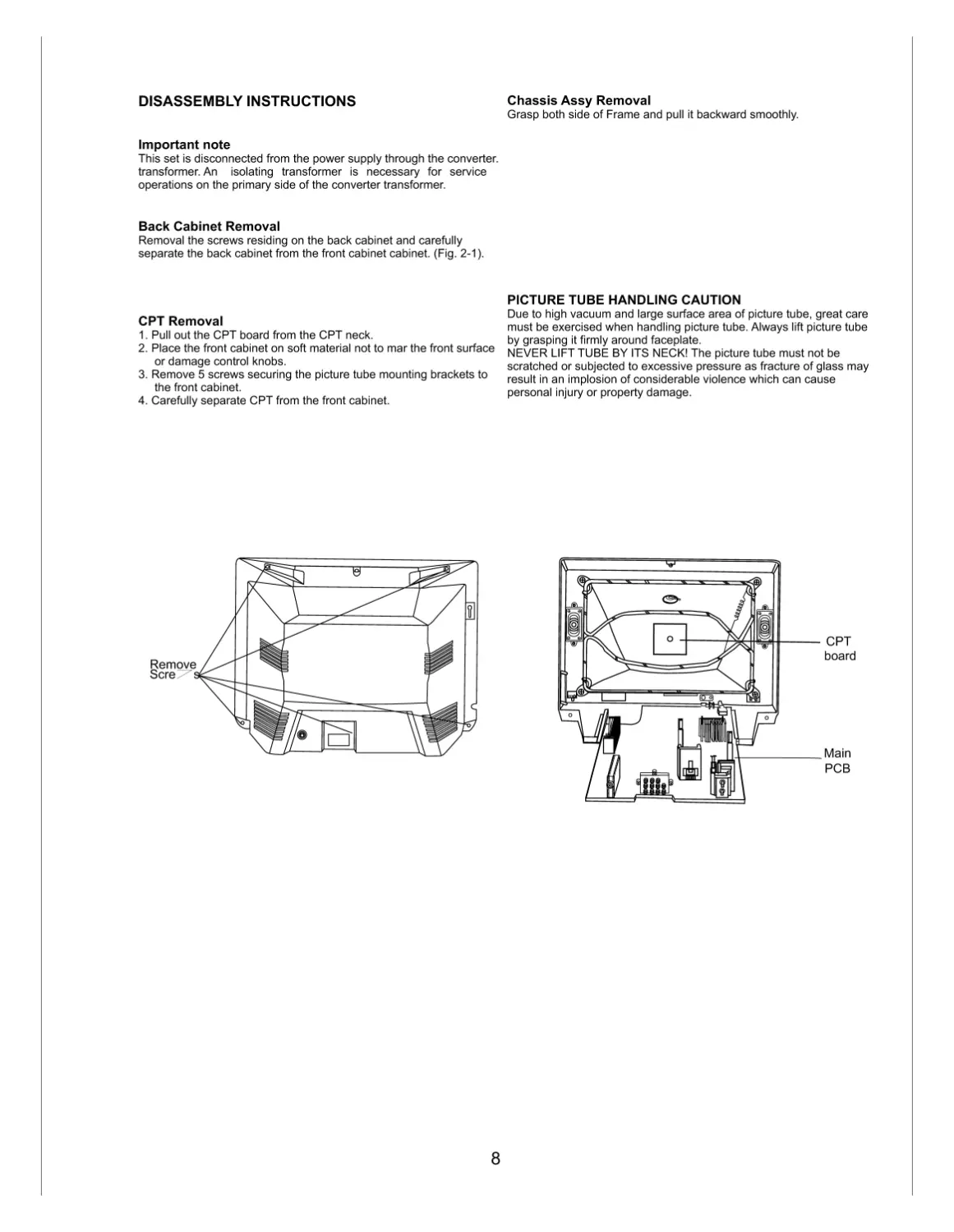
Chassis Assy Removal
Grasp both side of Frame and pull it backward smoothly.
PICTURE TUBE HANDLING CAUTION
Due to high vacuum and large surface area of picture tube, great care
must be exercised when handling picture tube. Always lift picture tube
by grasping it firmly around faceplate.
NEVER LIFT TUBE BY ITS NECK! The picture tube must not be
scratched or subjected to excessive pressure as fracture of glass may
result in an implosion of considerable violence which can cause
personal injury or property damage.
DISASSEMBLY INSTRUCTIONS
Important note
This set is disconnected from the power supply through the converter.
transformer. An isolating transformer is necessary for service
operations on the primary side of the converter transformer.
Back Cabinet Removal
Removal the screws residing on the back cabinet and carefully
separate the back cabinet from the front cabinet cabinet. (Fig. 2-1).
CPT Removal
1. Pull out the CPT board from the CPT neck.
2. Place the front cabinet on soft material not to mar the front surface
or damage control knobs.
3. Remove 5 screws securing the picture tube mounting brackets to
the front cabinet.
4. Carefully separate CPT from the front cabinet.
Remove
Screws
CPT
board
Main
PCB
8

2)Adjust the Focus Volume of FBT for best focus.
FOCUS Adjustment
1 )Tune the TV set to receive a PAL OSCH.
Test Point
: Observing Display
Adjust
: Focus Volume of FBT
AUTOMETIC GAIN CONTROL ( AGC )
ADJUSTMENT (LINE SVC-1)
1 Adjustment preparation
1.1 Put PAL-B/G 05CH with 70dB±1 dB Signal to Tuner.
Connect Multi-meter cable to AGC check point (J125).
2 Adjustment
2.1 Select SVC-1 Mode by SVC Key on the SVC Remote-
con (or Press same time Normal Remote- Controller
OK Key and TV pannel OK Key).
2.2 After select AGC -- by CH UP/DOWN (/) Key, Adjust
voltage of Multi-meter as below [Table 6] by VOL
UP/DOWN(/)Key.
Test Point
:AGC TP (C102)
Adjust
:Remote Controller
10
1) Screen Voltage Adjustment. To readjust, Press "Instart"
key and then "Adj" key of SVC remocon.
2) A thin horizontal line will appear on screen, the brightness
of which changes with the screen knob of FBT.
3) Adjust screen knob of FBT, till thin line becomes just
visible. Press TV/AV to exit.
Test Point : Rk ( Red cathode of CPT board)
Adjust
: Screen volume of FBT
Screen voltage Adjustment
6) Press the OK button to memorize the data.
White Balance Adjustment.(LINE SVC-0)
NOTE : This adjustment should be performed after screen
voltage adjustment.
1)Tune the TV set to receive an 100% white pattern.
2)Press OK buttons on TV set and remote controller at
the same time to get into SVC mode.
3) Use the CH CH Key to chose adjustment item.
4) Use the VOL VOL Key to change item data.
5) Adjustment.
a)Make the picture luminance 4.5 changing the
" CONTRAST" and "BRIGHTNESS".
b)Adjust X data of low light with BLO-R and Y data with
BLO-B.
c)Adjust X dada of High light RG and Y data with BG.
d) Repeat steps b~c until both low & high light hare same
readings as shown below.

Deflection Data Adjustment (Line SVC-1 )
NOTE: To enter SVC mode, press "OK" buttons on both TV set
and the Remote control at the same time.
1.Preparation for Deflection Adjustment
1 ) At SVC mode, press the "IN- START" key.
And then, deflection data adjustment OSD (SVC1 mode)
will be displayed.
2) Tune the TV set to receive a PAL 05 CH and set the ARC
mode is standard.
3. Deflection Adjustment Procedure
VL (Vertical Linearity)
Adjust so that the boundary line between upper and lower half is in
accord with geometric horizontal center of the CPT.
VA (Vertical Amplitude)
Adjust so that the circle of a digital circle pattern may be located within
the effective screen of the CPT.
SC (Vertical "S" Correction)
Adjust so that all distance between each horizontal lines are to be the
same.
VS (Vertical Shift)
Adjust so that the horizontal center line of a digital circle pattern is in
accord with geometric horizontal center of the CPT.
HS (Horizontal Shift)
Adjust so that the vertical center line of a digital circle pattern is in
accord with geometric vertical center of the CPT.
Press the OK button to memorize the data.
DEFLECTION DATA ADJUSTMENT (SVC-2)
1 Adjustment Preparation
1.1. Select SVC-2 Mode by IN-START key.
1.2. Receive PAL-B/G 05 CH.(LG standard Pattern) on TV( in case of
LG TV production system)
* If not available LG Standard Digital Signal then Put
Crosshatch Pattern with Circle to TV set.
(Example: Cross-hatch + Circle)
1) At adjustment mode (IN-START button on SVC remote control),
changed to LINE SVC 2 mode to Adjust the deflection.
2) Press Channel UP/DOWN button for desired function
Adjustment.
3) Press Volume UP/DOWN button to adjust the data.
4) Tune the TV set to receive a Digital pattern. (PAL:05CH)
11

Caution:
Convergence and Purity have been factory aligned. Do not attempt to
tamper with these alignments.
However, the effects of adjacent receiver components, or
replacement of picture tube or deffection yoke may require the need
to readjust purity any convergence.
Purity Adjustment
This procedure DOES NOT apply to bonded yoke and picture tube
assemblies.
The instrument should be at room temperature (60 degress F or
above) for six (6) hours and be operating at low beam current (dark
background) for approximately 20 to 30 minutes before performing
purity adjustments.
CAUTION: Do not remove any trim magnets that may be attached
to the bell of the picture tube.
1. Remove the AC power and disconnect the internal degaussing
coil.
2. Remove the yoke from the neck of the picture tube.
3. If the yoke has the tape version beam bender, remove it and
replace it with a adjustable type beam bender (follow the
instructions provided with the new beam bender)
4. Replace the yoke on the picture tube neck, temporarily remove
the three (3) rubber wedges from the bell of the picture tube and
then slide the yoke completely forward.
PURITY & CONVERGENCE ADJUSTMENT
PURITY%CONVERGENCE
MAGNET ASSEMBLY
DEFLECTION YPKE
6-POLE
4-POLE
4-POLE
GLASS CLOTH TAPE
RUBBER
WEDGES
X-AXISYOKE MAGNET
POSITIONING
(L/R PURITY)
PURITY MAGNET
PURITY MAGNET(2-POLE)
6-POLE
MAGNETS
CONVERGENCE MAGNET ASSEMBLY
5. Reconnect the internal degaussing coil.
6. Position the beam bender locking rings at the 9 o'clock position
and the other three pairs of tabs (2,4 and 6 pole magnets) at the
12 o'clock position.
7. Perform the following steps, in the order given, to prepare the
receiver for the purity adjustment procedure.
a.Face the receiver in the "magnetic north" direction.
b.Externally dsgauss the receiver screen with the television
power turned off.
c.Turn the television on for approximately 10 seconds to perform
internal degaussing and then turn the TV off.
d. Unplug the internal degaussing coil. This allows the thermistor
to cool down while you are performing the purity adjustment.
DO NOT MOVE THE RECEIVER FROM ITS "MAGNETIC
NORTH" POSITION.
e.Turn the receiver on and obtain a red raster by increasing the
red bias control (CW) and decreasing the bias controls for the
remaining two colors (CCW).
f. Attach two round magnets on the picture tube screen at 3
o'clock and 9 o'clock positions, approximately one (1 ) inch from
the edge of the mask (use double-sided tape).
12

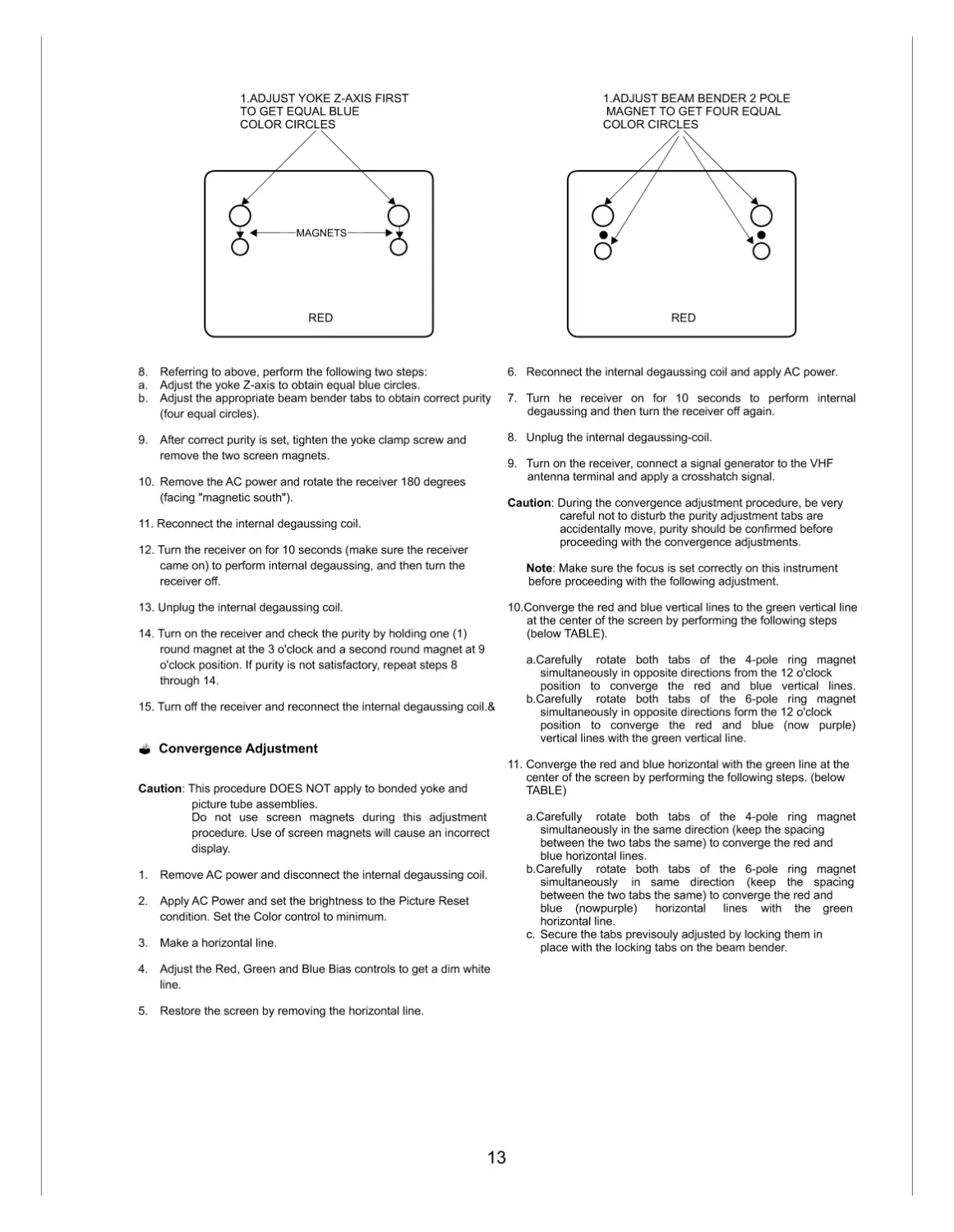
8. Referring to above, perform the following two steps:
a. Adjust the yoke Z-axis to obtain equal blue circles.
b. Adjust the appropriate beam bender tabs to obtain correct purity
(four equal circles).
9. After correct purity is set, tighten the yoke clamp screw and
remove the two screen magnets.
10. Remove the AC power and rotate the receiver 180 degrees
(facing "magnetic south").
11. Reconnect the internal degaussing coil.
12. Turn the receiver on for 10 seconds (make sure the receiver
came on) to perform internal degaussing, and then turn the
receiver off.
13. Unplug the internal degaussing coil.
14. Turn on the receiver and check the purity by holding one (1)
round magnet at the 3 o'clock and a second round magnet at 9
o'clock position. If purity is not satisfactory, repeat steps 8
through 14.
15. Turn off the receiver and reconnect the internal degaussing coil.&
Convergence Adjustment
Caution: This procedure DOES NOT apply to bonded yoke and
picture tube assemblies.
Do not use screen magnets during this adjustment
procedure. Use of screen magnets will cause an incorrect
display.
1. Remove AC power and disconnect the internal degaussing coil.
2. Apply AC Power and set the brightness to the Picture Reset
condition. Set the Color control to minimum.
3. Make a horizontal line.
4. Adjust the Red, Green and Blue Bias controls to get a dim white
line.
5. Restore the screen by removing the horizontal line.
6. Reconnect the internal degaussing coil and apply AC power.
7. Turn he receiver on for 10 seconds to perform internal
degaussing and then turn the receiver off again.
8. Unplug the internal degaussing-coil.
9. Turn on the receiver, connect a signal generator to the VHF
antenna terminal and apply a crosshatch signal.
Caution: During the convergence adjustment procedure, be very
careful not to disturb the purity adjustment tabs are
accidentally move, purity should be confirmed before
proceeding with the convergence adjustments.
Note: Make sure the focus is set correctly on this instrument
before proceeding with the following adjustment.
10.Converge the red and blue vertical lines to the green vertical line
at the center of the screen by performing the following steps
(below TABLE).
a.Carefully rotate both tabs of the 4-pole ring magnet
simultaneously in opposite directions from the 12 o'clock
position to converge the red and blue vertical lines.
b.Carefully rotate both tabs of the 6-pole ring magnet
simultaneously in opposite directions form the 12 o'clock
position to converge the red and blue (now purple)
vertical lines with the green vertical line.
11. Converge the red and blue horizontal with the green line at the
center of the screen by performing the following steps. (below
TABLE)
a.Carefully rotate both tabs of the 4-pole ring magnet
simultaneously in the same direction (keep the spacing
between the two tabs the same) to converge the red and
blue horizontal lines.
b.Carefully rotate both tabs of the 6-pole ring magnet
simultaneously in same direction (keep the spacing
between the two tabs the same) to converge the red and
blue (nowpurple) horizontal lines with the green
horizontal line.
c. Secure the tabs previsouly adjusted by locking them in
place with the locking tabs on the beam bender.
MAGNETS
RED
1.ADJUST YOKE Z-AXIS FIRST
TO GET EQUAL BLUE
COLOR CIRCLES
RED
1.ADJUST BEAM BENDER 2 POLE
MAGNET TO GET FOUR EQUAL
COLOR CIRCLES
13

12. While watching the 6 o'clock positions on the screen, rock the
front of the yoke in a vertical (up/down) direction to converge the
red and blue vertical lines. (Fig upper left)
13. Temporarily place a rubber wedge at the 12 o'clock position to
hold the vertical position or the yoke.
14. Check the 3 o'clock and 9 o'clock areas to confirm that the red
and blue horizontal lines are converged.
If the lines are not converged, slightly offset the vertical tilt of the
yoke (move the rubber wedge if necessary) to equally balance
the convergence error of the horizontal tines at 3 o'clock and 9
o'clock and the vertical lines at 6 o'clock and 12 o'clock.
15. Place a 1.5 inch piece of glass tape over the rubber foot at the
rear of the 12 o'clock wedge.
16. While watching the 6 o'clock and 12 o'clock areas of the screen,
rock the front of the yoke in the horizontal (left to right) motion to
converge the red and blue horizontal lines. (Fig. upper right)
17. Temporarily place a rubber wedge at the 5 o'clock and 7 o'clock
positions to hold the horizontal position of the yoke.
18. Check the 3 o'clock and 9 o' clock areas to confirm that the red
and blue vertical lines are converged. If the lines are not
converged, slightly offset the horizontal tilt of the yoke (move the
temporary rubber wedges if necessary) to equally balance the
convergence error of the horizontal lines at 6 o'clock and 12
o'clock and the vertical lines at 3 o'clock and 9 o'clock.
19. Using a round magnet confirm purity at the center, right and left
sides and corners. See Purity Adjustment Procedure.
20. Reconfirm convergence and apply a 1.5 inch piece of glass tape
over the rubber toot at the rear of the 5 o'clock and the 7 o'clock
wedges.
R
R
R
R
R
R
OR
MOVEMENT OF RED
AND BLUE BEAMS
OR
OR
B
B
B
B
B
B
R
R
OR
B
B
RING
PAIRS
4
POLE
6
POLE
OPPOSITE
SAME
OPPOSITE
SAME
ROTATION DIRECTION
OF BOTH TABS
GREEN
GREEN
GREEN
GREEN
BLUE
BLUE
B
L
U
E
B
L
U
E
RED
RED
R
E
D
R
E
D
ADJUSTMENT
VIEWING
AREA
GREEN
TV
SCREEN
B
L
U
E
RE
D
RED
ADJUSTMENT
VIEWING
AREA
UP/DOWN ROCKING OF THE YOKE
CAUSES OPPOSITE ROTATION OF RED
AND BLUE RASTERS
LEFT/RIGHT ROCKING OF THE YOKE
CAUSES OPPOSITE SIZE CHANGE OF THE
RED AND BLUE RASTERS
14

15
SDA
SCL
5V
IF
33V
IC201 LA7958
(AV switching)
IC501 UOC Top
IC202
USB Module
IC602 TDA7297
(Sound Amp W/O Woofer)
IC1601
CS5343
(ADC)
IC1602
STA326
(D-class amp)
Woofer Assy
(W/ Woofer)
P620
P621
P205
(Side AV)
JA02
(Front AV)
P05A
(Eye Module)
(
(
(
(
(Front Local Key)
P13A
(Side Local Key)
P902A
(To CPT B/D)
SMPS
TRANS
W/O Woofer
( ~016D )
FBT
B+
14V
-14V
200V
Pulse
HD
Collector
7
5
4
3
2
1
Q401
2SC6090
IC302
KIA4558
EW OUT
L401
IC02
EEPROM
AT24C16
28V
8
ABL
9
IC301 TDA4865A
(Vertical Amp)
V_DY
1
4
7
6
P02A
(Pre amp/LED)
IC804
(9V REG)
IC806
(ST-5V REG)
14
IC805
(5V REG)
IC803
(ST-3.3V REG)
Z111
SAW
12 13
IF IN
62
7
4
1
V1
L1
R1
USB
OPT
50
49 51
34
35
16
V1 IN
Y/Pb/Pr
SCL/SDA
14
15
VA
VB
L402
H_DY
8
2
1
Q302
KTD2059
16
EW
6
10.5V
37
PWR
For SW
39
IR
ST-5V
ST-3.3V
9V
5V
28
EYE
64
V2 IN
2
5
R2
L2
V2
63 61
L/R IN
R/G/B OUT
27
KEY
30 32
AV SW
11 13
29
USB SW
46~44
58
59
AUDIO L/R
VIF
P210
(USB Audio
& Video)
6
3
LR
12
V
CP79B BLOCK DIAGRAM
CP79B BLOCK DIAGRAM
Option Part
IIC Bus Line
Rear_AV DVD_In ( Y,Pb,Pr )
AV_Out (V,L,R)
AV_In (V,L,R)
Woofer
OUT
L OUT
R OUT
W/ Woofer
( ~ ????)

16
To protect the picture tube and FBT,the average beam current an d peak beam current may not to high.
The beam current limit information and High Voltage(H.V) t racking information are derived from
the H.V voltage winding of T401 (point A).
1. The contrast and brightness reduction of RGB is proportional to the voltage on the pin 48 of IC501.
2. As the beam current(slow),and H.V (fast) are changes, the voltage of point A is changed.
3. By the increase of beam current ,the point A voltage is decreased and this information is fed to pin 48 of IC501.
- Contrast reduction begins when V49 is below than 3.1V.
- By the more increasing of the beam current , the V48 decreased and eventually when this voltage is less than
1.8V the brightness reduction is started.
48
IC 501
BEAM CURRENT
contrast
reduction
(3.5V)
brightness
reduction
(2.5V)
R408
R411
9
FBT
T402
ABL
A
C420
R,G,B SECTION
R,G,B SECTION
D510
ABL CIRCUIT
R415
R409
B+
56
H-OUT
IC501
5V
R556
R555
R421
C401
Q442
C2231Y
R403
C403
T401
HDT
C402
Q401
C405
CT
FBT
1
2
H-DY
C496
CS
B+
110V
Primary
Winding
t1 : Q401 is switched on.
t1.t2
: Collector current of Q401 increases linearly.
i1 flows from C496 Which have been charged
at the end of first half of scan.
i5 also flows, energy stored in the primary
winding(.)) of FBT.
t2 : Q401 is switched off abruptly.
t2.t3
: Reverse EMF of H-DY maintains i1 direction
and charges C405.
Reverse EMF of the FBT primary occurs to
maintain is direction.
t3 : Q401 is still off.
t3.t4
: C405 discharges through H-DY.
t4.t5
: H-DY attempts to maintain i3 direction.
Damping diode becomes forward biased
and C496 is charged.
t1 t2
t3
t4t5t6
VB of Q401
t
Collector
Current
of Q401
The Voltage
at H-DY
The current
of resonant
Capacitor
(C405)
DAMP
current
t
Deflection
current of
H-DY
i1
i2
i3
i4
i1(t1.t2)
i2(t2.t3)
i3(t3.t4)
i5
i4(t4.t5)
1. The H drive output is open collector and active low,
I.e. the H-out TR should conduct during the low period
of output.
2. Under normal operation condition the duty cycle of the
output pulse is 50%.
3. To ensure a smooth start/stop behavior of the horizontal
deflection and protect the H-out TR, there are 3 different
condition of H-drive output.
During switch-on.
The horizontal output starts with the double frequency
(31KHz) and with duty of 75%(off),25%(on).
After about 50mSec of switch-on.
The frequency is changed to normal value(15.625KHz)
and duty cycle to 50%.
During switching-off.
Also the frequency is switched to the double value and
R.G.B drive is set to Max. and after 100mSec R.G.B
is set to Min. and 50mSec later the H drive is switch-off.
4. The H drive pulse from the MICOM (IC 501)
is amplified by the
horizontal drive circuit,to get sufficient base drive current
for the high voltage switching TR(Q401).
Deflection SECTION
J546
H.Vcc
R407
ts : scannig period
tr : retrace period
HORIZONTAL DRIVE CIRCUIT
FB401
Q402
J405
D403

'
LG Electronics. All right reserved.
Only for training and service purposes.
LGE Internal Use Only
Many electrical and mechanical parts in this chassis have special safety-related characteristics.These
parts are identified by in the Schematic Diagram and EXPLODED VIEW.
It is essential that these special safety parts should be replaced with the same components as
recommended in this manual to prevent X-RADIATION,Shock, Fire, or other Hazards.
Do not modify the original design without permission of manufacturer.
IMPORTANT SAFETY NOTICE
P801
500
913
112
150
170
400
EXPLODED VIEW
300
120

AUDIO AMP. SECTION
Q621
SPEAKER
TDA7297
TDA7297
15+15W DUAL BRIDGE AMPLIFIER
FEATURES :
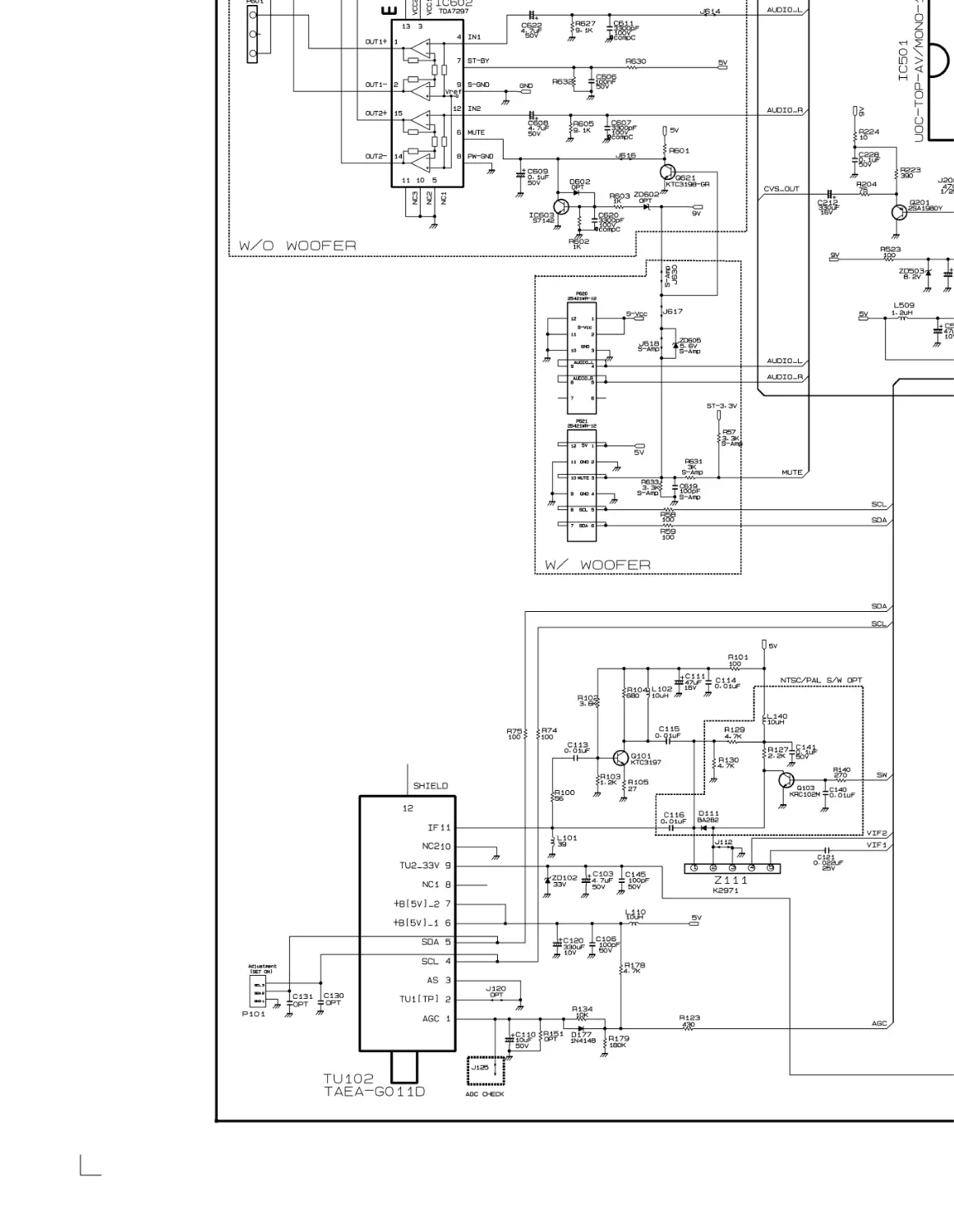
WIDE SUPPLY VOLTAGE RANGE (6.5V-18V)
MINIMUM EXTERNAL COMPONENTS
INTERNALLY FIXED GAIN
STAND -BY & MUTE FUNCTIONS
THERMAL OVERLOAD PROTECTION
SHORT CIRCUIT PROTECTION
Pin descriptions of TDA7297
Pin descriptions of TDA7297
ROLE
DESCRIPTION
Output 1+
Output 1-
Vcc
Supply Voltage
In1
Audio Input 1t
5,10,11
Nc
Not using.
Mute
St-by
Pw-Gnd
Power Ground
S-Gnd
Signal Ground
In2
Audio input 2
Vcc
Supply Voltage
Output 2-
Output 2+
HEAD-PHONE
JACK
SPEAKER
+
_
+
+
_
C612
ST-5V
R605
9.1V
3
1
2
C601
R602
ZD601
R601
S-Gnd Pw-Gnd
CIRCUIT ANALYSIS
Vref
U.O.C
MICOM
MUTE
38
- Audio signal from the PIN 58, 59 of IC501 are applied to PIN4,12
through R604,R608[Input level adjust] and C602,C606[AC coupling].
R608
R606
C602
R604
R609
C606
C605
L SPK OUT
59
58
IC602
_
4
7
14
2
1
6
_
+
15
12
98
13
3
J605
IC603
 R601 is to mute during ST-BY mode.
 ZD601/ R602 is to drop the input voltage IC603.
 IC603,Q621 is for muting during the set is on.
TDA7297
R SPK OUT
J557
J609
D824
R603
J602
S-Vcc
Pin NO
1
2
3
4
6
7
8
9
12
13
14
15
17
FR825