/





























Text
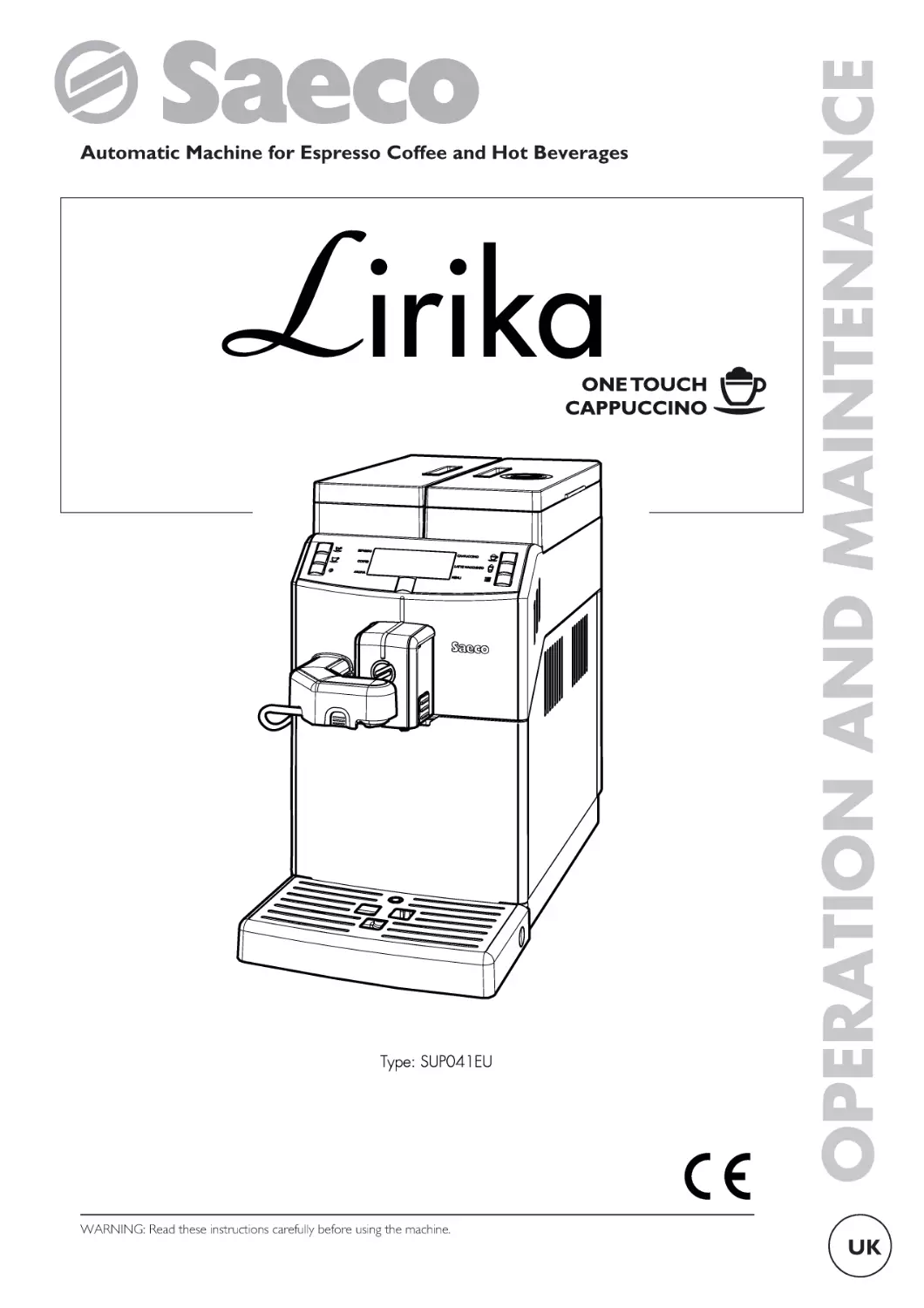
                    WARNING: Read these instructions carefully before using the machine.

OPERATION AND MAINTENANCE

Automatic Machine for Espresso Coffee and Hot Beverages

UK

English

MAIN PARTS

1
2
3
4
5

Water tank lid
Water tank
Control panel
Full drip tray float
Cup holder grill

11
12
13
14
15

6
7
8
9
10

Drip tray
Coffee bean hopper lid
Coffee bean hopper
Coffee grounds drawer
Brew group

16
17
18
19
20

Coffee residues drawer
Service door
Hot water dispensing spout
Coffee dispensing spout
Support for hot water dispensing spout and suction tube
for Cappuccinatore
Chassis plug
ON/OFF button
Display
Suction tube for Cappuccinatore
Cappuccinatore

The "key to components" includes all machine models;
check which one matches your machine. Certain functions
may not be available.

2

English

SAFETY INSTRUCTIONS

Never allow water to
come into contact
with
any
of
the
electrical parts of the
machine: danger of
short
circuit!
Hot
water and steam may
cause scalding!

Children must not play with
the appliance.

Intended Use

Power Supply

The machine is intended to
be
used
in
small
offices/organisations only.
The machine may be used
by children older than 8 and
upwards or by persons with
reduced physical, mental or
sensory abilities or lacking
sufficient experience and/or
skills, provided that they are
supervised or instructed on
how to use the appliance
correctly and that they
understand the hazards
involved.

Children cannot carry out
any
cleaning
and
maintenance
operations
unless they are supervised.

The machine must be
connected to the power
supply by the service
provider, in accordance with
its specifications.
Power cord
Never use the machine if
the power cord is defective.
Report any defects in the cord
and/or plug to the service
provider immediately.

3

English

Do not pass the power cord
around corners, over sharp
edges or over hot objects and
keep it away from oil.
Do not use the power
cord to carry or pull the
machine. Do not pull out
the plug by the power
cord or touch it with wet
hands or feet. Do not let
the power cord hang freely
from tables or shelves.

For the
Others

Safety

of

Ensure that children cannot
play with the machine
and/or
the
packaging
materials.
Never direct the jet of hot
water
and/or
steam
towards yourself or others.

4

Do not touch the hot
water wand with bare
hands. Always use the
handles or knobs provided.

Danger of Burning
Do not touch the hot
water wand and/or the
coffee/beverage dispensing
spout.
Fire Safety Precautions
In case of fire, use carbon
dioxide
(CO2)
extinguishers. Do not use
water or dry powder
extinguishers.
Suitable
Location
for
Operation and Maintenance

The machine should be
installed by the service
provider in accordance with
the safety regulations in force
at the time of installation.

English

The machine may only be
moved by the service
provider.
Do not use the machine
outdoors.
Do not install the machine in
a location where water jets
may be used.
Avoid placing open flames
and/or incandescent objects
near the machine so as not to
damage or melt the machine
housing.
Do not use in places
where the temperature
may drop to a level equal
to and/or lower than 2°C
or higher than 32°C. If the
machine has been exposed
to such conditions, alert
the service provider, who
will carry out a safety
check.
The appliance must be
installed horizontally.

The machine must only be
installed in places where it
can be checked by
qualified staff.
Cleaning
Before
cleaning
the
machine, the power button
must be switched to OFF
(0) and the plug must be
removed from the power
socket. Wait for the
machine to cool down.
Never
immerse
machine in water!

the

It is strictly forbidden to
tamper with the internal
parts of the machine.
Do not clean the machine
using a jet of water.
The appliance and its
components must be
cleaned
and
washed
following a period of
inactivity.

5

English

Using Milk
Milk must be used and
stored in accordance with
the instructions given on
the manufacturer's original
packaging.
We accept no liability for
use of milk unsuitable for
human consumption.

Milk must be kept cold, as
high temperatures will
make it turn sour - this is a
natural characteristic of
milk. For this reason, the
Cappuccinatore must be
cleaned after each use, as
described in the manual.

Storing the Machine
If the machine is to remain
inactive for a long time,
turn it off and unplug it.
Store the machine in a dry
place, out of the reach of
children. Keep it protected
from dust and dirt.

Repairs / Maintenance
In case of breakdown, defect
or a suspected fault resulting
from a fall, immediately
remove the plug from the
power socket and alert the
service provider or specialised
technician.
Never attempt to operate the
machine if it is faulty.
Only the service provider
and/or technician may service
or repair the machine.

6

English

Only skilled and experienced
people - with particular
reference to safety and
hygiene - are allowed to
access the service area.

7

English

CONTENTS

MAIN PARTS
1 INTRODUCTION TO THE MANUAL
1.1 PREAMBLE
1.2 ICONS USED
2 INFORMATION ABOUT THE MACHINE
2.1 INFORMATION FOR THE MAINTENANCE
TECHNICIAN
2.2 DESCRIPTION AND INTENDED USE
2.3 APPLIANCE IDENTIFICATION
2.4 TECHNICAL SPECIFICATIONS
3 SAFETY
3.1 PREAMBLE
3.2 GENERAL SAFETY INSTRUCTIONS
3.3 OPERATOR REQUIREMENTS
3.4 RESIDUAL RISKS
4 HANDLING AND STORAGE
4.1 UNLOADING AND HANDLING
4.2 STORAGE
5 INSTALLATION
5.1 CAUTIONS
5.2 UNPACKING AND POSITIONING
5.3 TUBE SUPPORT ASSEMBLY
5.4 CONNECTION TO THE ELECTRIC NETWORK
6 DESCRIPTION OF CONTROLS
6.1 POWER BUTTON
6.2 DISPLAY
6.3 KEYPAD
6.4 BUTTON DESCRIPTION DURING NORMAL
OPERATION
7 SUPPLY AND START UP
7.1 COFFEE BLENDS
7.2 COFFEE BEAN SUPPLY
7.3 FILLING THE WATER TANK
7.4 MEASURING AND ADJUSTING WATER
HARDNESS
7.5 "INTENZA+" WATER FILTER
7.6 COFFEE GRIND ADJUSTMENT
7.7 ADJUSTING THE COFFEE DISPENSING SPOUT
7.8 TURNING ON/OFF THE MACHINE
7.9 FIRST USE - USE AFTER A LONG PERIOD OF
INACTIVITY
7.10 WASHING THE PARTS COMING INTO
CONTACT WITH FOOD
7.11 USING THE APPLIANCE
8 PROGRAMMING MENU
8.1 BUTTON DESCRIPTION IN PROGRAMMING
MODE
8.2 USER PROGRAMMING
8.3 SERVICE PROVIDER PROGRAMMING
9 OPERATION AND USE
9.1 TURNING ON THE MACHINE
9.2 WARM-UP AND RINSING
9.3 RINSE/SELF-CLEANING CYCLE
9.4 ECO-FRIENDLY: STAND-BY
9.5 ADJUSTING THE AROMA (COFFEE STRENGTH)
9.6 BREWING COFFEE
9.7 ADJUSTING THE COFFEE LENGTH
8

2
9
9
10
11
11
11
12
13
14
14
14
15
15
16
16
16
17
17
18
19
20
21
21
21
21
21
22
22
22
23
24
24
26
27
28
28
30
30
31
31
32
34
41
41
41
42
43
43
43
44

9.8 CAPPUCCINATORE
9.9 BREWING CAPPUCCINO
9.10 ADJUSTING CAPPUCCINO IN THE CUP
9.11 BREWING LATTE MACCHIATO
9.12 ADJUSTING LATTE MACCHIATO IN THE CUP
9.13 DISPENSING HOT MILK
9.14 ADJUSTING HOT MILK IN THE CUP
9.15 HOT WATER DISPENSING
9.16 QUICK CARAFE RINSE CYCLE
9.17 USING THE MACHINE WITH CREDITS
9.18 EMPTYING THE COFFEE GROUNDS
DRAWER
10 CLEANING AND MAINTENANCE
10.1 GENERAL NOTES FOR CORRECT
OPERATION
10.2 CLEANING AND SCHEDULED
MAINTENANCE
11 TROUBLESHOOTING
11.1 WARNING SIGNALS
11.2 PROBLEMS - CAUSES - SOLUTIONS
12 STORAGE - DISPOSAL
12.1 LOCATION CHANGE
12.2 INACTIVITY AND STORAGE
13 INSTRUCTIONS FOR END OF
OPERATIONAL LIFE DISPOSAL

45
47
48
49
51
52
53
54
55
56
57
59
59
60
74
74
76
78
78
78
79

English

1.1

INTRODUCTION TO THE MANUAL
Preamble

This publication is an
essential part of the
machine and must be read
carefully for a proper use
compliant with basic safety
requirements.

This manual contains the
technical
information
necessary to properly
perform the operating,
installation, cleaning and
maintenance procedures.

Always refer to this manual
before carrying out any
operation.

1

1

This publication should be
carefully kept and must be
provided with the machine
throughout its service life,
including any transfer of
ownership.

If this manual is damaged
or lost, a copy may be
requested
from
the
manufacturer
or
the
technical
service
by
indicating
the
data
contained on the data
plate on the rear side of
the machine.

The manufacturer reserves
the right to make changes
without prior notice.

Manufacturer: SAECO Vending S.p.A.
Località Casona, 1066 - 40041 Gaggio Montano
Bologna, Italy

9

English

Icons Used

1

1.2

Various kinds of warnings are contained in this manual to
highlight the different hazard or competence levels.

Each icon is followed by a message suggesting operating
and behaviour procedures and providing useful information
for the correct operation of the machine.

Warning
It is used to highlight danger situations for the persons in
charge of using, refilling and servicing the machine.

Prohibition
It is used to highlight actions/operations not to be
performed.

Important
It is used to indicate operations that, if correctly
performed, preserve the correct operation of the
machine.

Suggested solutions
It is used to indicate alternative procedures which make
programming and/or maintenance operations quicker.

User
It is used to indicate the user of the machine. Users are
not allowed to perform any cleaning or maintenance
operations.
Supply operator
It is used to indicate those operations that must be
performed only by the person in charge of refilling and
cleaning the machine.
Supply operators can not perform any operations
requiring a Maintenance Technician.
Maintenance technician
It is used to signal those operations that must be
performed only by the specialised maintenance technicians.

10

English

2.1

INFORMATION ABOUT THE MACHINE
Information for the
Maintenance Technician

The appliance must be
installed in a well-lit,
sheltered and dry place
and on a counter able to
bear its weight.

2.2

Description and Intended Use
2

2

This machine automatically brews:
• coffee and espresso coffee using instantly ground coffee
beans;
• hot water to prepare beverages;
• milk-based beverages using the Cappuccinatore supplied.
The elegant machine housing has been designed for use in
small offices, businesses and institutions.
Using the machine for any other purpose is considered
dangerous and as a misuse.

To ensure its correct operation and reliability over time,
comply with the following recommendations:
• ambient temperature: from +2°C to +32°C;
• maximum humidity allowed: 80% (non-condensed).
For special installations, not covered by this manual, please
contact the dealer or the local importer. If this is not
possible, please contact the Manufacturer.

The technical service is available for any explanation or
information regarding the correct operation of the
machine and to satisfy any request for spare parts supply
or technical assistance.
The Maintenance Technician must carefully read and
observe the safety warnings contained in this manual to
ensure that installation, start-up, use and maintenance
operations are performed in complete safety.

Only the Maintenance Technician is allowed to give the
keys to access the internal parts of the machine to another
operator (Supply operator), and is the sole responsible for
any servicing procedure.

Misuse voids all forms of
warranty, releasing the
Manufacturer from any
responsibility for damage
to
property
and/or
personal injury.
The following are also
considered misuse:
• any use other than the intended use and/or employing
methods other than those described in this manual;
• any operation on the machine in breach of the instructions
provided in this manual;
• any tampering with parts and/or safety devices not
previously authorised by the Manufacturer and performed
by unauthorised personnel;
• use of the machine outdoors.

This manual is an essential part supplied with the machine
and must always be available for consultation before
carrying out any operation on the machine.

In such cases, the user shall bear the costs of repair.

11

English

2.3

Appliance Identification

2

The appliance is identified by the model name and serial
number shown on the special plate.

The plate contains the following data:
• name of the Manufacturer;
• marks of conformity;
• model;
• serial number;
• year and month of manufacture;
• supply voltage (V);
• supply frequency (Hz);
• electrical power consumption (W);
• appliance code.

It is strictly forbidden to
tamper with or modify the
data plate.
When
contacting
the
technical service, always
refer to this plate by
indicating the technical
data shown on it.

12

English

Technical Specifications

Size (w x h x d)
Weight
Machine housing material
Power Rating
Supply Voltage
Power cord length
Capacity

Control panel
A-weighted sound pressure level
Pump pressure
Operating conditions

Safety devices

215 x 370 x 429 mm
approx. 8 kg
Metal - Thermoplastic material
See the data plate
See the data plate
approx. 1,200 mm
Water tank
approx. 2.5 litres
Coffee grounds
15 grounds
drawer
Front panel
less than 70 dB
Max. 1.5 MPa (15.0 bar)
Minimum temperature:
above 2°C
Maximum temperature:
less than 32°C
Maximum humidity:
less than 80%
Boiler pressure safety valve
Safety thermostat

2

2.4

Subject to engineering and manufacturing changes due to technological improvements.

13

English

3

3

3.1

SAFETY
It is mandatory to:
• check conformity of the power supply;

Preamble

In accordance with the applicable standards and
regulations, SAECO VENDING has prepared a technical
file relating to the LIRIKA machine at its premises,
acknowledging the following standards in the design stage:

• use original spare parts;
• carefully read the instructions contained in this manual and
in the attached documents;
• use personal protective equipment when performing
installation, testing and maintenance operations.

-

3.2

EN 55014
EN 6100-3-2
EN 61000-3-3
EN 61000-4-2
EN 61000-4-3

-

EN 61000-4-4
EN 61000-4-5
EN 61000-4-11
EN 60335-2-75
EN 60335-1

General Safety Instructions

It is forbidden to:
• tamper with or disable the safety systems installed on the
machine;
• perform maintenance operations on the appliance, before
unplugging the power cord;
• install the appliance outdoors. It is advisable to place it in a
dry place where the temperature does not drop below
2°C, in order to prevent any possible freezing.
• use the appliance for purposes other than those indicated
in the sale contract and in this manual;
• electrically connect the appliance using multi-sockets or
adapters;
• use jets of water for cleaning operations.

14

Precautionary measures to prevent human errors:
• make the operator aware of safety issues;
• handle the appliance, either packaged or unpackaged, in
complete safety;
• deeply know the installation procedures, its correct
operation and its limits;
• dismantle the appliance in complete safety, in accordance
with the workers' health and environmental protection
regulations in force.

To prevent machining
residues from coming into
contact with the beverages,
dispense about 0.5 l of
water for each dispensing
path before definitely
starting the machine. The
dispensed beverages can
be drunk only after
performing this operation.

English

The manufacturer is not
liable for damage to
persons
or
property
resulting from failure to
follow
the
safety
instructions provided in
this section.
3.3

Operator Requirements

Three operators with different skills are required in order
to guarantee the appliance’s safety:
User

Maintenance technician
The maintenance technician is the only person authorised to
service the machine, start the programming procedures and
perform the adjustment, set up and maintenance operations.

Access to the internal area is
restricted to persons having
knowledge and practical
experience of the appliance,
in particular as far as safety
and hygiene are concerned.

3.4

Residual Risks

The dispensing outlet has
no guards to prevent
accidental hand contact
with coffee or hot water.

The user is not allowed to access the internal parts of the
machine.
Supply operator
Only the Maintenance Technician is allowed to keep the
keys to access the internal parts of the machine, and is in
charge of refilling the machine with products, cleaning the
outside of the appliance, turning it on and off.

Risk of burning if the hands
are placed inside the outlet
during beverage brewing.

The Supply operator is not
allowed to carry out
operations indicated in this
manual as competence of
the
Maintenance
Technician.

Before brewing a beverage
make sure that the
previous one has already
been picked up and that
the cup support is empty.

15

3

In case of failure or
malfunctioning, please refer
only to the qualified
personnel of the technical
service.

English

4

HANDLING AND STORAGE

4

All
the
operations
described in this chapter
must
be
performed
exclusively by the service
provider or a specialised
technician,
who
shall
organise all the operating
steps and use only suitable
means to ensure strict
compliance with the safety
regulations in force.

4.1

4.2

Storage

The machine is packed in cardboard and expanded
polystyrene packaging.
If the appliance is not immediately installed, it shall be kept
in a sheltered place according to the following instructions:
• the packaged appliance shall be stored in a closed, dry
area at a temperature between 1°C and 40°C;
• maximum humidity below 90% (non-condensed);
• do not put other appliances or boxes on the appliance;
• in any case, it is good practice to protect the appliance
from possible deposits of dust or other substances.

Unloading and Handling

Unloading from the transport vehicle and handling
operations of the appliance must be carried out by
qualified personnel only and using suitable equipment.

The appliance must always
be kept in upright position.

Do not:
• drag the appliance;
• overturn or lay down the appliance during transport and
handling;
• shake the appliance;
• lift the appliance by using ropes or cranes;
• leave the appliance exposed to bad weather, in humid
areas or close to heat sources.

16

Due to the total weight of
the packaged product, do
not stack more than three
machines on top of each
other. The machine should
be stored in its original
packaging, in a dry and/or
dust-FREE place.

English

INSTALLATION

All
the
operations
described in this chapter
must
be
performed
exclusively by the service
provider or a specialised
technician,
who
shall
organise all the operating
steps and use only suitable
means to ensure strict
compliance with the safety
regulations in force.

5.1

Cautions

The appliance cannot be
installed in external areas.
Avoid placing it in areas
where the temperature is
lower than 2°C or higher
than
32°C
and
in
particularly humid or dusty
places. It should neither be
installed in places where
water jets are used for
cleaning operations nor
where there is a risk of fire
or explosion.
Make sure that the installation place is compatible with the
following specifications, before unpacking the appliance:
• the power socket which the appliance is connected to
should be easily accessible and at a distance not higher
that 1.2 metres;
• the gradient of the supporting surface should NOT
exceed 2°;
• the socket voltage must correspond to that indicated on
the appliance data plate.

The appliance must be
installed on a horizontal
surface.

17

5

5

English

The presence of magnetic
fields or proximity to
electrical machines which
generate
interference
could cause the electronic
controls of the machine to
malfunction.
At
temperatures close to 0°C,
internal parts containing
water are at risk of
freezing. Do not use the
machine
under
these
conditions.

5

Access to the machine and
the plug should be kept
clear at all times in order
to allow users to easily
reach them and to leave
the area immediately if
required.

The following illustration shows the required access distances:
• to the keypad on the front of the appliance;
• to the service units in the event of malfunction.

5.2

Unpacking and Positioning

On receipt of the appliance, make sure that it has not
suffered any damage during transport or that the packaging
has not been unduly opened with consequent stealing of
the components contained in it. If damage of any kind is
found, the courier must be informed and notice must be
immediately given to the importer or to the seller. If these
are not in the purchaser’s country, please contact the
manufacturing company directly.
An accessories bag is supplied with the machine.

List of Standard Accessories
Manual: instructions on how to use the machine.

18

English

Power cord: to connect the machine to the mains.

"Intenza +" water filter: to remove any unpleasant flavours
in the water and reduce water hardness. This will improve
machine use.

Grinder adjustment key: for coffee grinder adjustment.

5.3
List of Optional Accessories

Tube Support Assembly

Insert the tube support into the first slot as shown in the
figure.

5

Water hardness test: quick test to determine the actual
hardness of the water used to prepare beverages; this test
is of fundamental importance to set the water hardness in
the machine.

Cleaning brush: to remove the coffee powder from the
service compartment.
Rotate the support 90° until it is properly positioned.

Lubricating grease: to lubricate the Brew Group at
periodic intervals.

Descaling solution: to remove limescale build-up in the
water circuit caused by normal use.

19

English

5.4

Connection to the Electric
Network

This operation must only be
performed by specialised
technical personnel or by
the service provider.

5

The
Maintenance
Technician, who is in charge
of the appliance's installation,
shall make sure that:
• the power supply system complies with the safety instructions in
force;
• the voltage corresponds to that indicated on the appliance data
plate.

In case of doubt, do not
proceed with the installation
and ask qualified and
authorised personnel to
accurately check the system.

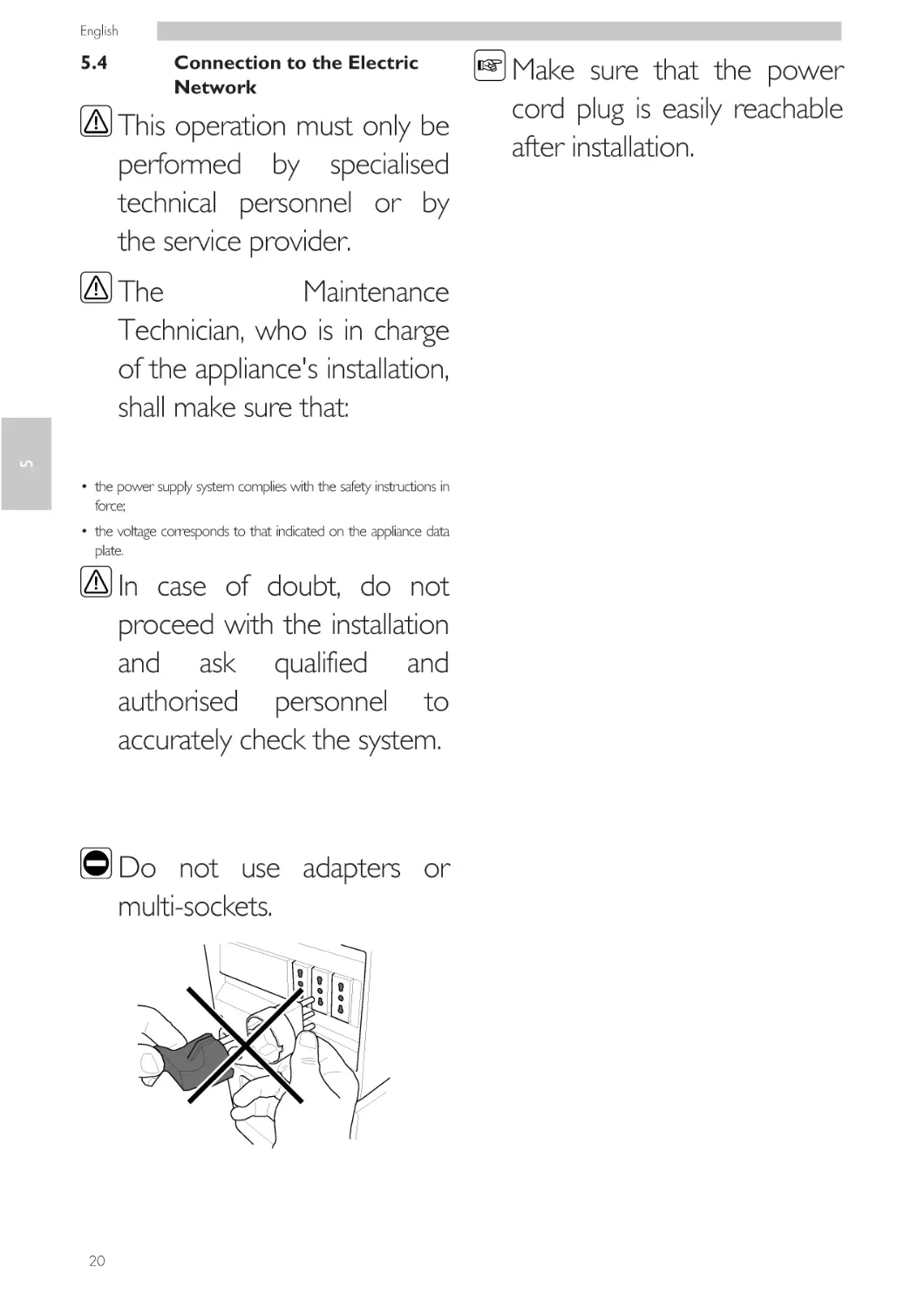
Do not use adapters or
multi-sockets.

20

Make sure that the power
cord plug is easily reachable
after installation.

English

6
6.1

DESCRIPTION OF CONTROLS
Power button

It is located in the lower left part in the rear of the
machine.
If set to the "I" position the machine turns on (electrical
functions enabled).
If set to the "O" position the machine turns off (electrical
functions disabled).

"Espresso" button
"Coffee" button
"Aroma" button
"Stand-by" button
"Cappuccino" button
"Latte Macchiato" button
"MENU" button

6

1
2
3
4
5
6
7

6.4
6.2

Display

The display shows the messages during normal operation
and during the programming and maintenance phase.

6.3

Keypad

The function of each button
changes according to the
change of the appliance
phase (ordinary dispensing
or programming phase).
Each button has a double
function according to the
appliance state (normal
operation or programming).

Button Description during
Normal Operation

"Espresso" button
When this button is pressed, an espresso coffee is brewed.

"COFFEE" button
When this button is pressed, a cup of coffee is brewed.
"Aroma" button
When this button is pressed, the aroma of the coffee to be
brewed can be selected.
"Stand-by" button
When this button is pressed, the machine Stand-by mode
is activated.
"Cappuccino" button
When this button is pressed, a cappuccino is brewed.

"Latte Macchiato" button
When this button is pressed, a Latte Macchiato is brewed.

"MENU" button
By pressing this button, you can access the special
beverage menu or the user menu, allowing you to program
certain parameters relating to machine operation.

21

English

7
7.1

SUPPLY AND START UP
Coffee Blends

• We recommend using fresh, non-oily and medium-ground
coffee.
• Use an espresso coffee blend.
• Use the special blends for espresso machines to obtain a
strong and aromatic coffee.
• Keep coffee in a cool place in an airtight sealed container.

7.2

The coffee bean hopper may
be provided with different
safety features according to
the regulations of the country
of use of the machine.

Coffee Bean Supply
Pour the coffee beans into the hopper.

7

Only coffee beans must be
put into the coffee bean
hopper. Ground coffee,
instant coffee or any other
object may damage the
machine.
Remove the coffee bean hopper lid.

When filling the coffee bean
hopper, use sterile disposable
gloves
to
prevent
bacteriological contamination.

22

English

If the water tank is not
inserted, check that no coffee
beans fall into the tank
compartment. If this happens,
remove them to avoid any
malfunctions.

Remove the lid from the water tank.

Refit the coffee bean hopper lid.

7

Remove the tank; lift it using the inside handle.

7.3

Filling the Water Tank

Before using the machine
for the first time, wash the
water tank carefully. Fill the
water tank with fresh
drinking water only. Hot or
carbonated water, as well
as other liquids, will
damage the machine.

Rinse and fill it with fresh water; do not exceed the level
(MAX) indicated on the tank.

23

English

When filling the water
tank, use sterile disposable
gloves
to
prevent
bacteriological
contamination.
Insert the water tank back into its seat and refit the lid.

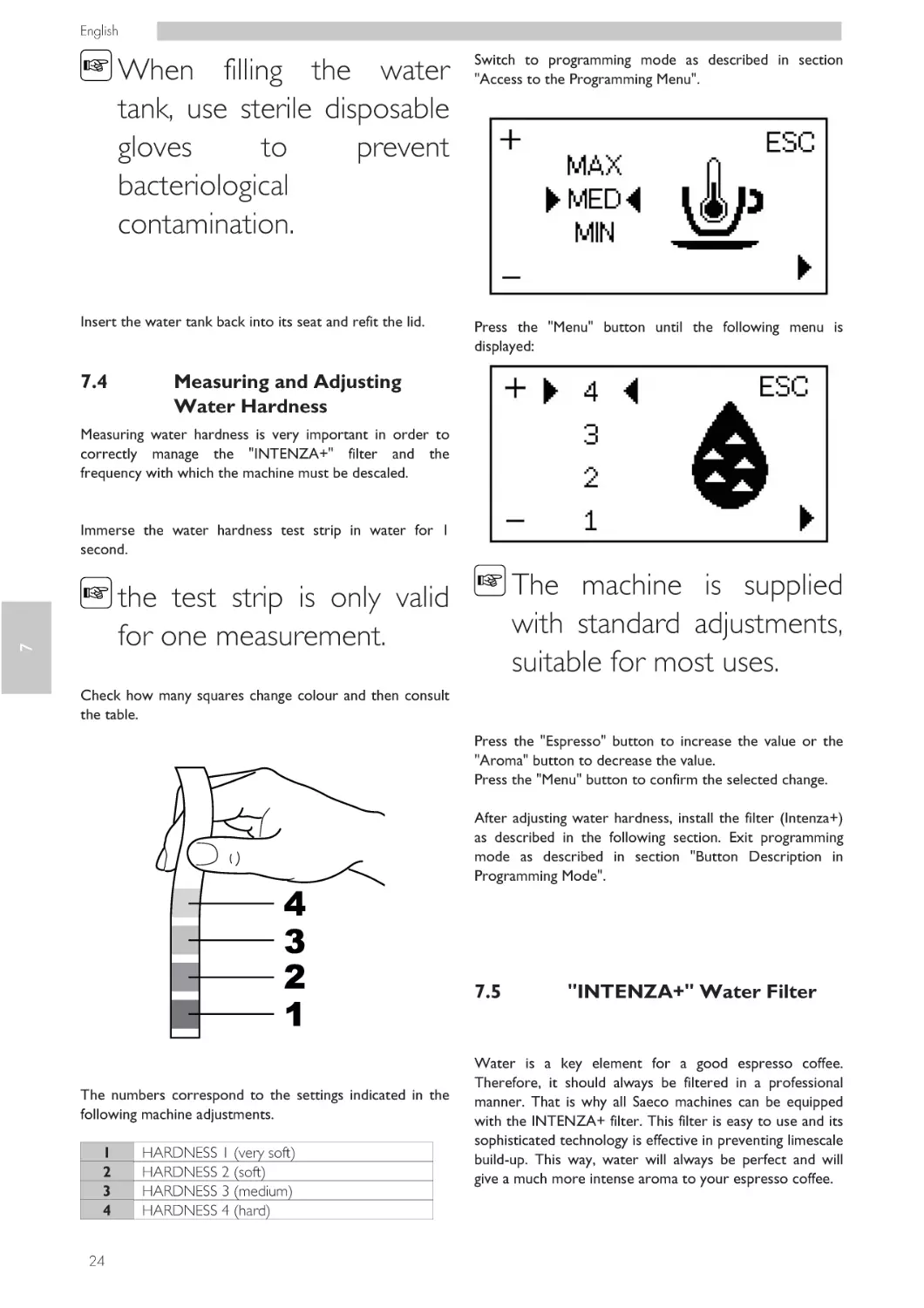
7.4

Switch to programming mode as described in section
"Access to the Programming Menu".

Press the "Menu" button until the following menu is
displayed:

Measuring and Adjusting
Water Hardness

Measuring water hardness is very important in order to
correctly manage the "INTENZA+" filter and the
frequency with which the machine must be descaled.

Immerse the water hardness test strip in water for 1
second.

The machine is supplied
with standard adjustments,
suitable for most uses.

7

the test strip is only valid
for one measurement.
Check how many squares change colour and then consult
the table.

Press the "Espresso" button to increase the value or the
"Aroma" button to decrease the value.
Press the "Menu" button to confirm the selected change.
After adjusting water hardness, install the filter (Intenza+)
as described in the following section. Exit programming
mode as described in section "Button Description in
Programming Mode".

7.5

The numbers correspond to the settings indicated in the
following machine adjustments.
1
2
3
4
24

HARDNESS 1 (very soft)
HARDNESS 2 (soft)
HARDNESS 3 (medium)
HARDNESS 4 (hard)

"INTENZA+" Water Filter

Water is a key element for a good espresso coffee.
Therefore, it should always be filtered in a professional
manner. That is why all Saeco machines can be equipped
with the INTENZA+ filter. This filter is easy to use and its
sophisticated technology is effective in preventing limescale
build-up. This way, water will always be perfect and will
give a much more intense aroma to your espresso coffee.

English

The anti-scale filter should
be replaced whenever
indicated by the machine.
Before descaling, remove
the anti-scale filter from
the water tank.

Remove the tank from the machine and empty it. Remove
the small white filter from the tank and store it in a dry
place sheltered from dust.

7

Measuring water hardness
is very important in order
to correctly manage the
"INTENZA+" water filter
and the frequency with
which the machine must
be descaled.

Immerse the "INTENZA+" water filter vertically in cold
water (with the opening positioned upwards) and gently
press its sides to let the air bubbles out.

Remove the "INTENZA+" water filter from its packaging.
The filter should be set according to the measurements
performed to set water hardness.
Use the water hardness test strip provided with the
machine. Set the "Intenza Aroma System" as specified on
the filter package (see section "Measuring and Adjusting
Water Hardness").
Put the filter into the empty tank. Press it to its limit stop.

A
B
C

Soft water
Hard water (standard)
Very hard water

25

English

Fill the tank with fresh drinking water and reinsert it into
the machine.
Switch to programming mode as described in section
"Access to the Programming Menu".

7.5.2

If the filter is installed in the machine and you want to
remove it, access the programming page and select the
"OFF" option.

Press the "Menu" button until the following menu is
displayed:

It is important to reinstall the small
white filter that was previously
removed while installing the
"INTENZA+" water filter.

7

7.6
Press the "Espresso" button to select "ON" and press the
"Menu" button to confirm.
Exit the programming menu and dispense about half the
water tank content to activate the filter.
Fill the water tank again up to the MAX level with fresh
drinking water.

7.5.1

Replacing the "Intenza+"
Water Filter

If the filter is already installed and the machine indicates
that it must be replaced, proceed as previously described.

When accessing the programming page, the "RESET"
option will also be available.

Select this option to reset the alarm.

26

Removing the "Intenza+"
Water Filter

Coffee Grind Adjustment

Do not pour ground
and/or instant coffee into
the coffee bean hopper.
Do not put any material
other than coffee beans
into the hopper.
The coffee grinder contains
moving parts that may be
dangerous. Do not insert
fingers
and/or
other
objects.

English

Turn off the machine by
pressing the ON/OFF
button and remove the
plug from the socket
before carrying out any
type of operation inside
the coffee bean hopper.

There are different grind settings to choose from with the
following references:
1 - Fine grind
2 - Coarse grind

adjustment
the coffee
must be
when the
grinder is in
7.7

Adjusting the Coffee
Dispensing Spout

7

The grinder
knob inside
bean hopper
turned only
ceramic coffee
use.

The reference marks indicate the grind setting.

Most of the cups available on the market can be used with
this coffee machine.
This adjustment can be carried out by pressing and turning
the grinder adjustment knob inside the coffee bean hopper
using the coffee grinder adjustment key provided with the
machine.

The height of the dispensing spout can be adjusted to
better fit the dimensions of the cups that you wish to use.

Press and turn the grinder adjustment knob one notch at a
time. You will taste the difference after brewing 2-3 cups
of coffee.

27

English

Manually move the dispensing spout up or down to adjust
its height.
The recommended positions are:
• When using small cups.

7.8

Turning on/off the Machine

The machine can be turned on/off by pressing the button
located to the rear of the machine.

• When using large cups and/or Latte Macchiato cups.

7.9

First Use - Use after a Long
Period of Inactivity

Refill the machine (follow the instructions above).

7

Connect the plug of the appliance to the mains (see
section "Connection to the Electric Network").
For a perfect Espresso: rinse the coffee circuit if using the
machine for the first time or after a long period of
inactivity.
These simple operations will allow you to always brew
excellent coffee.
They have to be performed:
• at first start-up;
Two cups can be placed under the dispensing spout to
brew two cups of coffee at the same time.

• when the machine remains inactive for a long time (more
than 2 weeks).

7.9.1

At First Start-up

Simply press the "Stand-by" button to turn on the machine.
The control panel indicates that the circuit must be
primed.
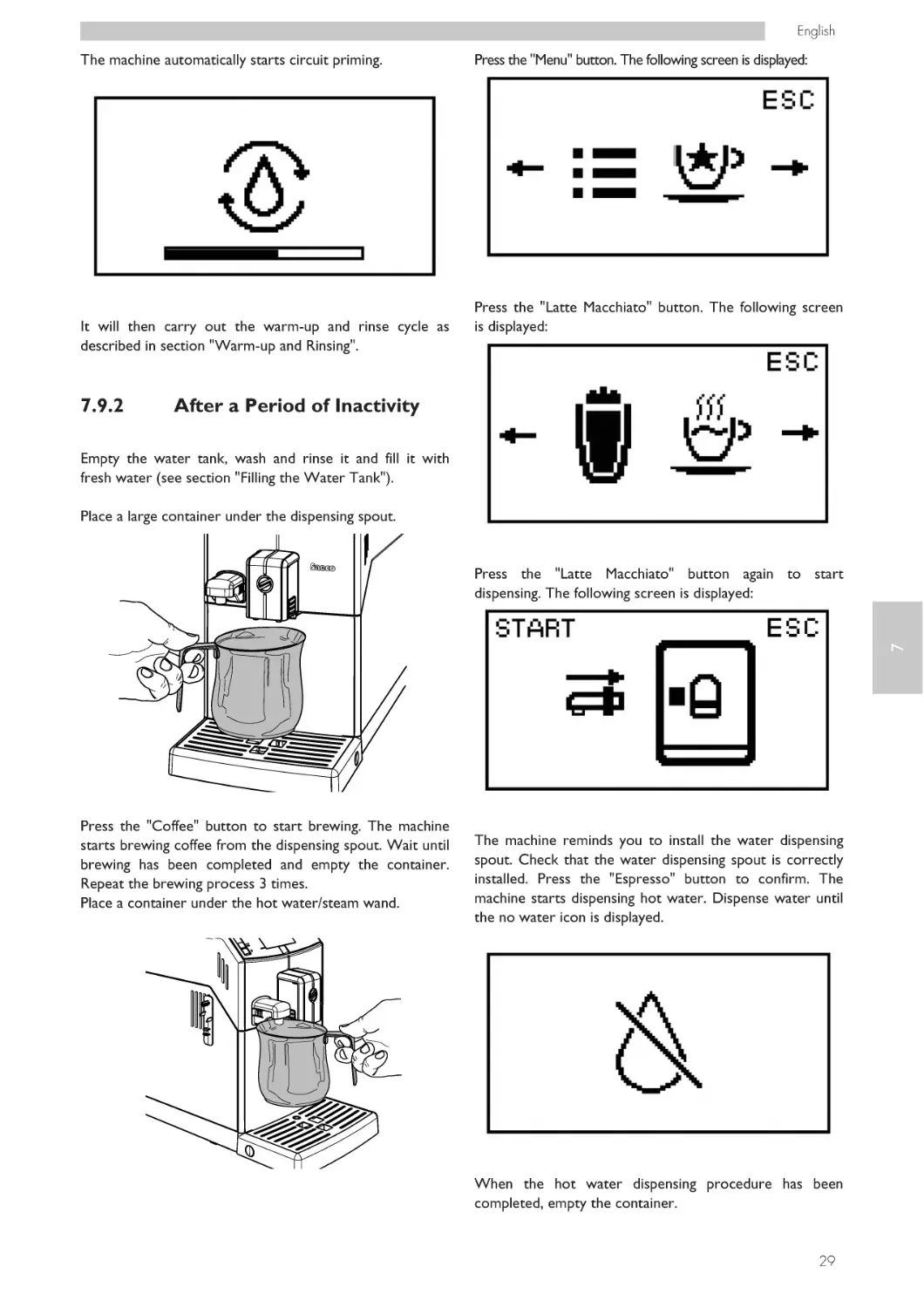
Place a large container under the dispensing spout.

28

English

The machine automatically starts circuit priming.

It will then carry out the warm-up and rinse cycle as
described in section "Warm-up and Rinsing".

7.9.2

Press the "Menu" button. The following screen is displayed:

Press the "Latte Macchiato" button. The following screen
is displayed:

After a Period of Inactivity

Empty the water tank, wash and rinse it and fill it with
fresh water (see section "Filling the Water Tank").
Place a large container under the dispensing spout.

7

Press the "Latte Macchiato" button again to start
dispensing. The following screen is displayed:

Press the "Coffee" button to start brewing. The machine
starts brewing coffee from the dispensing spout. Wait until
brewing has been completed and empty the container.
Repeat the brewing process 3 times.
Place a container under the hot water/steam wand.

The machine reminds you to install the water dispensing
spout. Check that the water dispensing spout is correctly
installed. Press the "Espresso" button to confirm. The
machine starts dispensing hot water. Dispense water until
the no water icon is displayed.

When the hot water dispensing procedure has been
completed, empty the container.

29

English

Fill the water tank again up to the MAX level.
The machine is now ready for use.

7.10

Washing the Parts coming
into Contact with Food

Rinse all the parts coming into contact with food.

• Thoroughly wash your hands.
• Prepare a chlorine-based, antibacterial disinfecting solution
(the products can be purchased at the chemist's) following
the concentrations indicated on the product.
• Remove all product containers from the appliance.
• Remove the container lids and product chutes. Immerse
all these parts in the previously prepared solution.

7.11

Using the Appliance

7

Before using the machine,
read this manual carefully
and make sure users are
familiar with the machine.

After the machine has not
been used for a certain
time, it is recommended to
read section “First Use Use after a Long Period of
Inactivity” again, before
using the module again.
The beverage selection modes are indicated in chapter
"Operation and Use".

30

English

8

PROGRAMMING MENU

This
chapter
contains
instructions on how to set
and
change
the
programming parameters
of the appliance.

8.1

Button Description in
Programming Mode

Use the buttons described below to scroll the appliance
menus.

All
the
operations
described in this chapter
must
be
performed
exclusively by the service
provider or a specialised
technician,
who
shall
organise all the operating
steps and use only suitable
means to ensure strict
compliance with the safety
regulations in force.

8

Therefore it is necessary to
carefully read it and to
understand
the
exact
sequence of operations
before performing them.

Button 1: Espresso
This button allows the parameters to be changed when they are displayed.
(+) increases the value
Button 2: Aroma
This button allows the parameters to be changed when they are displayed.
(-) decreases the value
Button 3: Cappuccino
This button allows the user to exit without changing the
edited or selected parameter.
press it repeatedly to exit programming mode.
Button 4: Menu
This button allows the user to:
1 scroll through the menu pages;
2 confirm the parameter/value after changing it.

The specialised technician or the service provider can
change some of the machine operating parameters to suit
the needs of the users.

31

English

8.2

User Programming

Timer (stand-by)
This function allows you to adjust the time taken for the
machine to go into stand-by mode after the last brewing.

Certain machine parameters can be programmed to
improve the brewing of a desired product, and to better
manage machine operation.
Press the "MENU" button to access programming.
The following screen is displayed:

Contrast
This function allows you to adjust the contrast of the
display to better view the messages.

Press the "COFFEE" button.
The main screen will be displayed.

8

8.2.2

The first screen appears, which allows the coffee brewing
temperature to be changed.

8.2.1

Machine Functions

Programming Machine
Functions

This example shows how to program the display contrast.
Proceed in the same way to program the other functions.

The programming menu can only be accessed when the
machine is on and shows the display.

The following functions can be programmed:

Coffee temperature
This function allows you to adjust the coffee brewing
temperature.

Press the "MENU" button to access programming.
The following screen is displayed:

32

English

Press the "Cappuccino" button to exit programming.

Press the "COFFEE" button.
The main screen will be displayed.

8

Press the "MENU" button to scroll the options until the
display contrast function is displayed.

The
machine
will
automatically
exit
programming mode if you
do not press any button
for 3 minutes. The values
that have been changed
but not confirmed will not
be saved.

Press the "ESPRESSO" and "Aroma" buttons to increase or
decrease the value of the function.

Once the value has been changed, the "OK" message
appears.
Press the "MENU" button to confirm the change.

33

English

8.3

Service Provider
Programming

The structure of the programming menu is indicated in
section "Structure of the Programming Menu".
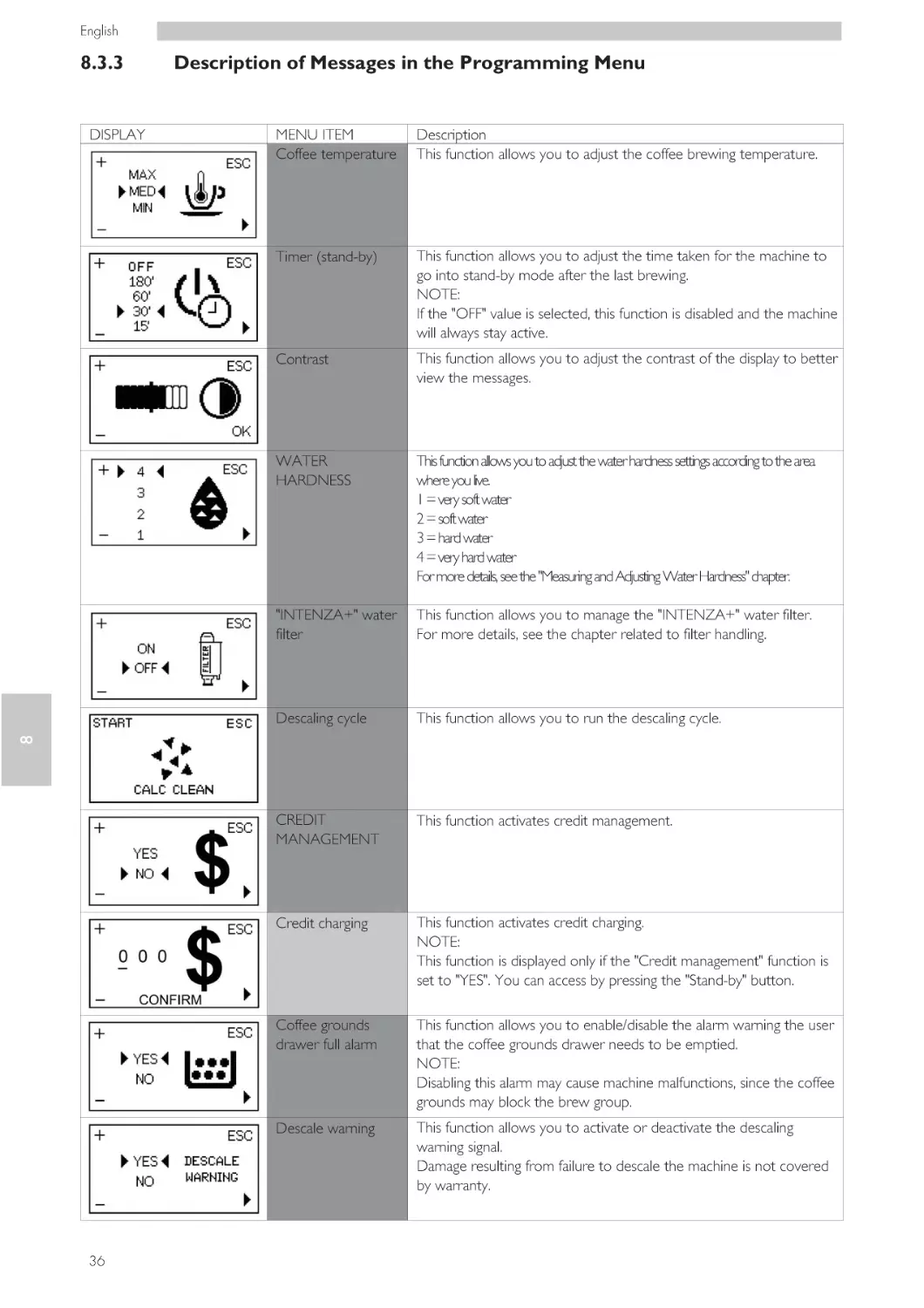
The section "Description of Messages in the Programming
Menu" describes all the items in the programming menu.

8.3.1

Access to the Programming
Menu

Proceed as follows to access programming mode.

With the machine turned on, press and hold the
"Cappuccino" and the "Latte Macchiato" buttons at the
same time for 7 seconds.

8

The following screen is displayed:

Press the "Stand-by" button to access programming.

34

The above mentioned
procedure can only be
used to access the
programming menu when
the machine has reached
operating temperature. To
execute
certain
programmes
(e.g.
DESCALING),
the
machine will manage the
procedure
automatically
and warm up according to
the manufacturer's settings.

After 3 minutes of
inactivity, the machine will
exit programming mode
and return to standard
operating mode.
The menus should be
PASSWORD-protected.

English

The PASSWORD will not
be requested if set on the
default value (0000). It
should be changed upon
first use to prevent
unauthorised access. After
this change, the password
must be entered each time
the display shows:

If the PASSWORD is
forgotten, you can reset it
by entering a PUK code.
You have to request the
PUK code to the Saeco
service centre, who will
guide you through the
procedure.
8.3.2

Structure of the
Programming Menu

This menu allows you to manage certain machine
operation parameters.
The main items of the programming menu are:

Refer to section "Password Setting" to set
PASSWORD; this section describes how to set it.

the

8

MENU ITEM
Coffee temperature
Timer (stand-by)
Contrast
WATER HARDNESS
"INTENZA+" water filter
Descaling cycle
CREDIT MANAGEMENT
Credit charging
Coffee grounds drawer full alarm
Descale warning
Password
Password setting
Coffee counters
Factory settings

To enter the password:
• Press the "ESPRESSO" button or the "Aroma" button to
set the desired number.
• Press the "MENU" button to move on to the next number
(when it gets to the end, it will start again from the beginning).
• Repeat the steps until the set password has been entered.
• Press the "Stand-by" button to confirm and to access
programming mode.

35

English

8.3.3

MENU ITEM
Coffee temperature

Description
This function allows you to adjust the coffee brewing temperature.

Timer (stand-by)

This function allows you to adjust the time taken for the machine to
go into stand-by mode after the last brewing.
NOTE:
If the "OFF" value is selected, this function is disabled and the machine
will always stay active.

Contrast

This function allows you to adjust the contrast of the display to better
view the messages.

WATER
HARDNESS

This function allows you to adjust the water hardness settings according to the area
where you live.
1 = very soft water
2 = soft water
3 = hard water
4 = very hard water
For more details, see the "Measuring and Adjusting Water Hardness" chapter.

"INTENZA+" water
filter

This function allows you to manage the "INTENZA+" water filter.
For more details, see the chapter related to filter handling.

Descaling cycle

This function allows you to run the descaling cycle.

CREDIT
MANAGEMENT

This function activates credit management.

Credit charging

This function activates credit charging.
NOTE:
This function is displayed only if the "Credit management" function is
set to "YES". You can access by pressing the "Stand-by" button.

Coffee grounds
drawer full alarm

This function allows you to enable/disable the alarm warning the user
that the coffee grounds drawer needs to be emptied.
NOTE:
Disabling this alarm may cause machine malfunctions, since the coffee
grounds may block the brew group.

Descale warning

This function allows you to activate or deactivate the descaling
warning signal.
Damage resulting from failure to descale the machine is not covered
by warranty.

8

DISPLAY

Description of Messages in the Programming Menu

36

English

MENU ITEM
Password

Description
This function activates the password used to access machine
programming mode.

Password setting

This function changes the password used to access machine
programming mode.
NOTE:
This function is displayed only if the "Password" function is set to
"YES". You can access by pressing the "Stand-by" button.

Coffee counters

This function allows you to check how many coffee cups have been
brewed.
The number is shown in correspondence of the letters (XX).
The number cannot be reset.

Factory settings

This function resets the factory settings when a malfunction occurs.

8

DISPLAY

37

English

8.3.4

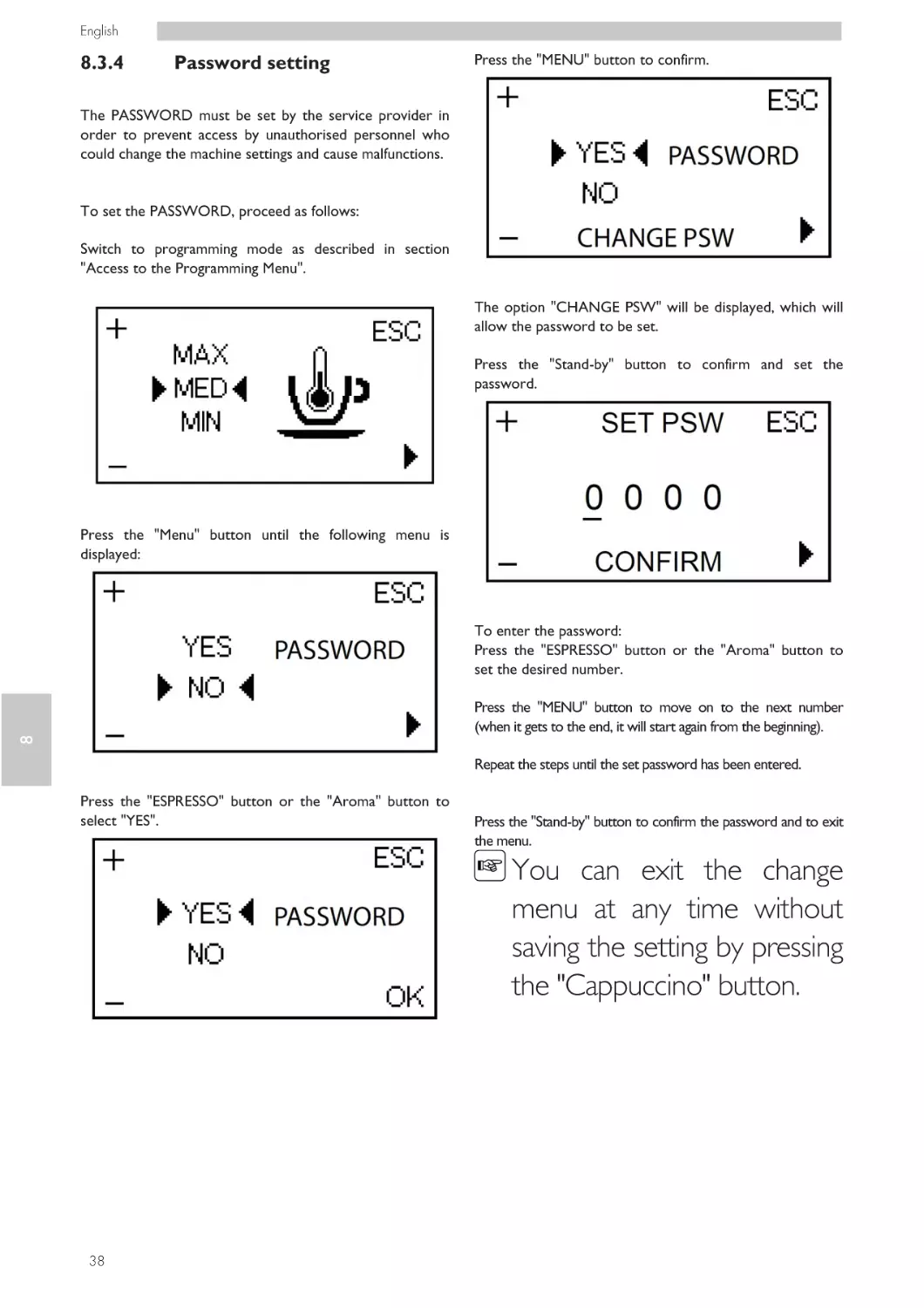
Password setting

Press the "MENU" button to confirm.

The PASSWORD must be set by the service provider in
order to prevent access by unauthorised personnel who
could change the machine settings and cause malfunctions.

To set the PASSWORD, proceed as follows:
Switch to programming mode as described in section
"Access to the Programming Menu".
The option "CHANGE PSW" will be displayed, which will
allow the password to be set.
Press the "Stand-by" button to confirm and set the
password.

Press the "Menu" button until the following menu is
displayed:

To enter the password:
Press the "ESPRESSO" button or the "Aroma" button to
set the desired number.

8

Press the "MENU" button to move on to the next number
(when it gets to the end, it will start again from the beginning).
Repeat the steps until the set password has been entered.
Press the "ESPRESSO" button or the "Aroma" button to
select "YES".

Press the "Stand-by" button to confirm the password and to exit
the menu.

You can exit the change
menu at any time without
saving the setting by pressing
the "Cappuccino" button.

38

English

If "NO" is selected from the
"PASSWORD" menu, the
saved password will be
cancelled.

Press the "ESPRESSO" button or the "Aroma" button to
select "YES".

Press the "MENU" button to confirm.

8.3.5

Setting Credits

Credits can be set to allow coffee to be brewed under the
strict control of the service provider. To set the credits,
proceed as follows:

The option "SET CREDITS" will be displayed, which will
allow the number of credits to be manually entered.
Press the "Stand-By" button to confirm and to access the
credit charging page.

8

Switch to programming mode as described in section
"Access to the Programming Menu".

To charge credits:
Press the "ESPRESSO" button or the "Aroma" button to
set the desired number.
Press the "Menu" button until the following menu is
displayed:

Press the "MENU" button to move on to the next number
(when it gets to the end, it will start again from the beginning).
Repeat the steps until the desired number of credits has been entered.

You can exit the change
menu at any time without
saving the setting by pressing
the "Cappuccino" button.

39

English

Press the "Stand-By" button to confirm the number of credits and to exit
the menu.

8

If "NO" is selected from the
"CREDIT MANAGEMENT"
menu, the charged credits will
remain in the memory even
though they will not be
counted each time a coffee is
brewed.

40

English

OPERATION AND USE
9.1

The use by children older
than 8 years or by persons
with reduced physical,
mental or sensory abilities
or with lack of experience
and skills is allowed,
provided that they are
supervised or instructed on
how to use the appliance
correctly and that they
understand the hazards
involved.
Children must not play
with
the
appliance.
Children must not carry
out any cleaning and
maintenance
operations
without being monitored.

For hygienic reasons, after
the machine has not been
used for a long time, it is
recommended
to
thoroughly rinse the circuit.

Turning on the Machine

Connection to the power
supply should be carried out
exclusively by the service
provider!
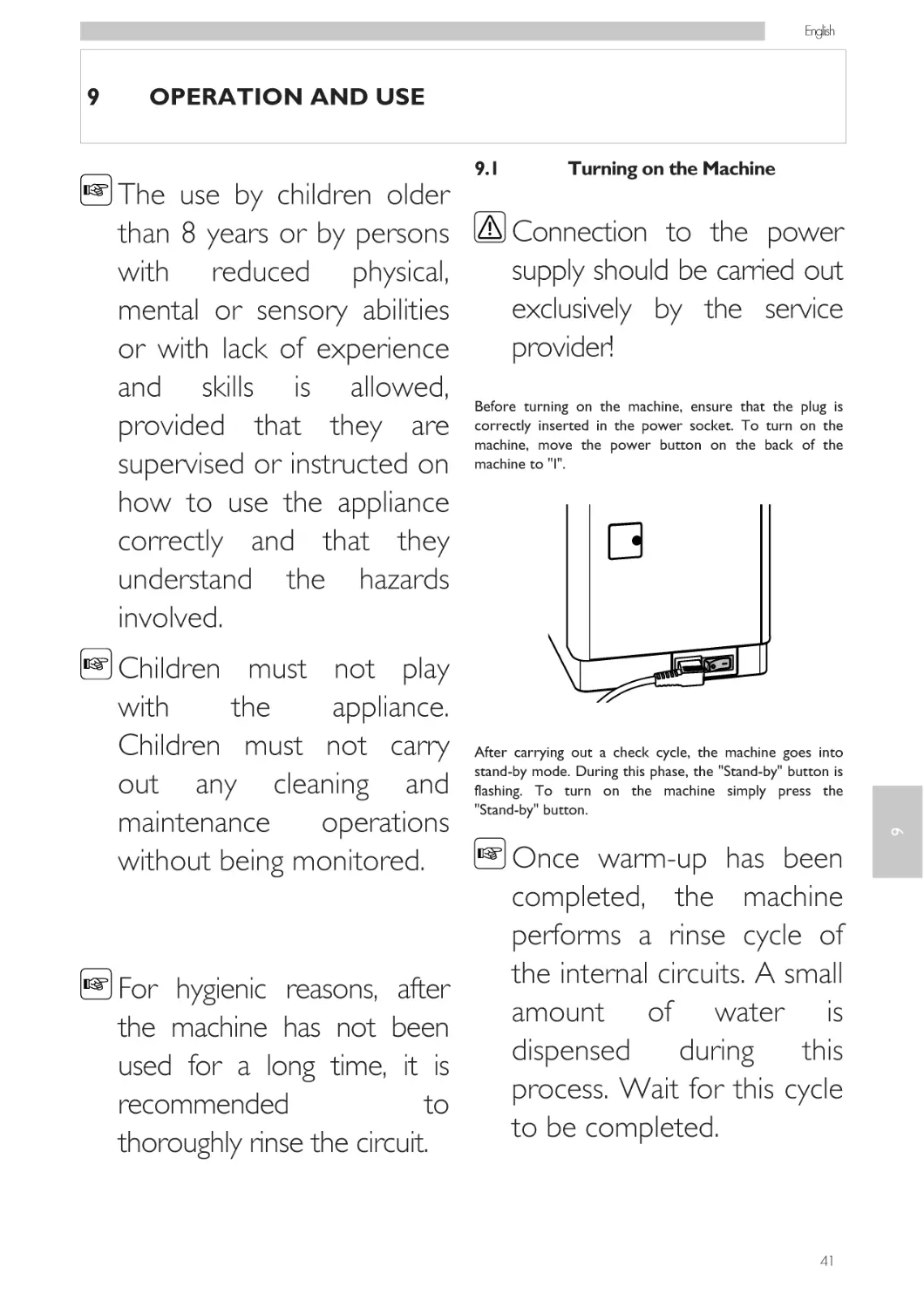
Before turning on the machine, ensure that the plug is
correctly inserted in the power socket. To turn on the
machine, move the power button on the back of the
machine to "I".

After carrying out a check cycle, the machine goes into
stand-by mode. During this phase, the "Stand-by" button is
flashing. To turn on the machine simply press the
"Stand-by" button.

9

9

Once warm-up has been
completed, the machine
performs a rinse cycle of
the internal circuits. A small
amount of water is
dispensed
during
this
process. Wait for this cycle
to be completed.

41

English

9.2

Warm-up and Rinsing

Upon start-up, the machine activates the warm-up phase.
Wait until it is completed.

If the machine is used for
the first time or after a
long period of inactivity,
contact
the
Service
Provider to start it up.

The progress bar indicates
that the machine is heating
up the system.
9.3
Once warm-up has been completed, the machine performs
a rinse cycle of the internal circuits.

Rinse/Self-Cleaning Cycle

This cycle allows the internal coffee circuits to be rinsed
with fresh water. This cycle is only carried out at the end
of the warm-up phase in the following cases:
• Upon machine start-up, when the boiler is cold;
• After priming the circuit, if the boiler is cold;
• During the Stand-by preparation phase (if at least one
coffee-based product has been brewed);

9

• When turning off the machine after pressing the
"Stand-by" button (if at least a coffee product has been
brewed).

The progress bar indicates
that the machine is
performing the rinse cycle
of the system.

A small amount of water will be dispensed to rinse and
heat all the machine parts. This icon is displayed.

A small amount of water is dispensed from the coffee
dispensing spout. Wait until the cycle is completed.
The cycle can be stopped by pressing the "Espresso"
button.
Then the machine is ready for use.

42

Wait for this cycle to be completed automatically. The
dispensing process can be stopped by pressing the
"Espresso" button.

English

9.4

Eco-friendly: Stand-by

You can choose from three options by pressing the "Aroma" button.
Each time the button is pressed, the aroma changes by one degree,
according to the selected amount:

The machine is designed for energy saving.
The machine automatically turns off after 30 minutes of
inactivity.

During the turn-off phase,
the machine will perform a
rinse cycle if a coffee
product has been brewed.
Time can be programmed
according to your needs
(see instructions in chapter
"User Programming").

A = mild aroma
B = medium aroma
C = strong aroma

9.6

Brewing Coffee

To brew coffee, press and release:
the "Espresso" button for an espresso;
the following icon is displayed.

Simply press the "Stand-by" button to restart the machine
(if the power button is set to "I").
In this case the machine will go through the rinse cycle
only if the boiler is cold.

9.5

or the "Coffee" button for a cup of coffee;
the following icon is displayed.

9

If needed, this function can
be disabled by the service
provider.

Adjusting the Aroma (Coffee
Strength)

Choose your favourite coffee blend and adjust the amount
of coffee to be ground according to your personal taste.

Selection must be made
prior to selecting coffee.

Then the brewing cycle starts:
Press the desired button once to brew 1 cup of coffee.
Press the desired button twice consecutively to brew 2
cups of coffee.

43

English

To brew 2 coffees, the
machine
automatically
grinds and doses the
correct amount of coffee.
Brewing two cups of coffee
requires
two
grinding
cycles and two brewing
cycles automatically carried
out by the machine; the
display shows the 2 cups
icon.

Brewing
cannot
stopped
during
prebrewing cycle.

be
the

The machine is adjusted to
brew
a
true
Italian
espresso
coffee.
This
feature
may
slightly
lengthen the brewing time,
allowing the intense coffee
flavour to fully develop.

9.7

Adjusting the Coffee Length

The machine allows you to adjust the amount of brewed
coffee according to your taste and the size of your cups.
Each time the "Espresso" or "Coffee" button is pressed,
the machine brews a pre-set amount of coffee.
Each button may be programmed for a specific brew
setting. This programming is individually set.
The following procedure describes the "Espresso" button
programming.

9

Place a cup under the dispensing spout.

Once the prebrewing cycle has been completed, coffee
begins to come out of the dispensing spout.
Coffee brewing stops automatically when the preset level
is reached. It is nevertheless possible to interrupt coffee
brewing by pressing the "Espresso" button.

44

English

Press and hold the "Espresso" button until the "MEMO"
icon is displayed, then release the button. The machine is
now in "dose programming" mode.

9.8

Cappuccinatore

This chapter explains how to use the milk Cappuccinatore
to prepare a cappuccino, a Latte Macchiato or to froth
milk.

The machine starts brewing coffee.

When the "STOP" icon is displayed, press the "Espresso"
button as soon as the desired amount of coffee is reached.

The "Espresso" button is now programmed;
every time it is pressed, the machine will dispense the
same amount of espresso that was programmed.

Before
using
the
Cappuccinatore, clean it
thoroughly as described in
the
"Cleaning
and
Maintenance" chapter. Use
cold (~5°C / 41°F) milk
with a protein content of
at least 3% to ensure
top-quality
beverages.
Whole milk, skimmed milk,
soy milk or lactose-free
milk
may
be
used
depending on individual
taste.

You should always use the "Espresso" button to stop
brewing coffee when the desired amount of coffee is
reached even when you are programming the "Coffee"
button.

9

Follow
the
same
procedure to program the
"Coffee" button.
Do not use any liquids
other than cleaning water
or milk.

45

English

Inserting the Cappuccinatore
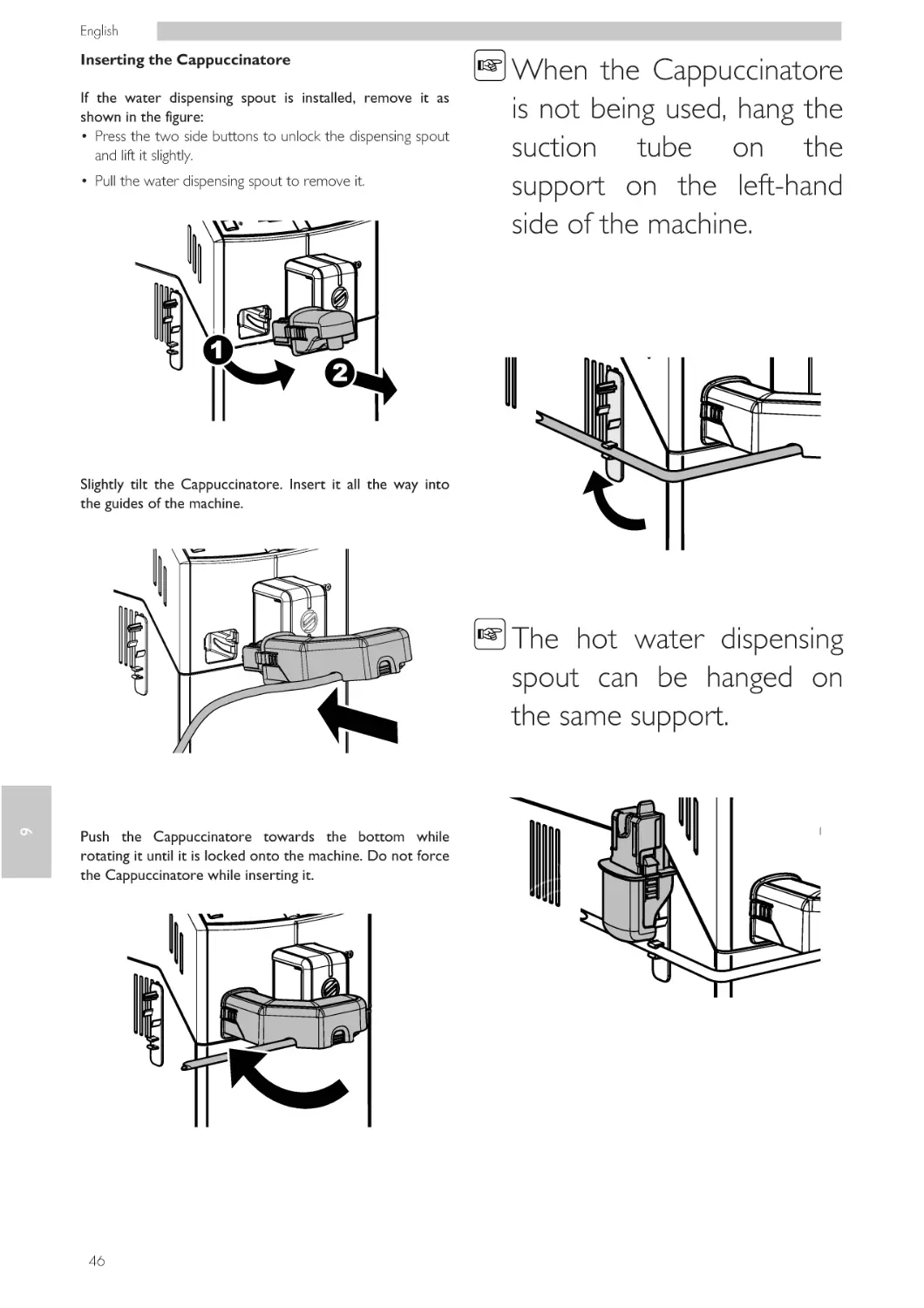
If the water dispensing spout is installed, remove it as
shown in the figure:
• Press the two side buttons to unlock the dispensing spout
and lift it slightly.
• Pull the water dispensing spout to remove it.

When the Cappuccinatore
is not being used, hang the
suction tube on the
support on the left-hand
side of the machine.

Slightly tilt the Cappuccinatore. Insert it all the way into
the guides of the machine.

9

The hot water dispensing
spout can be hanged on
the same support.

Push the Cappuccinatore towards the bottom while
rotating it until it is locked onto the machine. Do not force
the Cappuccinatore while inserting it.

46

English

Removing the Cappuccinatore

Fill 1/3 of a container with cold milk.

To properly remove the Cappuccinatore, proceed as follows:
• Press the two side buttons to unlock the Cappuccinatore and lift
it slightly;
• pull the Cappuccinatore to remove it.

Reinstall
the
Cappuccinatore if you
temporarily removed it for
cleaning; if this was not the
case, install the water
dispensing spout.
9.9

Brewing Cappuccino

The machine can dispense cappuccino quickly and easily
with the touch of a button.

Danger
of
burning!
Dispensing
may
be
preceded by small jets of
hot water. Wait until the
end of the cycle before
removing
the
Cappuccinatore.

This screen stays active for
30 seconds, then the
machine goes back to the
main screen.
Make sure that the Cappuccinatore is correctly installed.

47

9

Press the "Cappuccino" button. The following screen is
displayed:

English

Insert the suction tube into the milk container.

Once preheating has been completed, the machine starts
dispensing frothed milk directly into the cup.

Press the "Espresso" button to stop frothed milk
dispensing.

For hygienic reasons, make
sure that the outer surface
of the suction tube is clean.

Once the frothed milk has been dispensed, the machine
brews the coffee.

Place a cup under the Cappuccinatore.

Dispensing can be stopped by pressing the "Espresso"
button.

9.10

Adjusting Cappuccino in the
Cup

9

Each time the "Cappuccino" button is pressed, the machine
dispenses a pre-set quantity of cappuccino into the cup.
The machine allows you to adjust the amount of cappuccino
brewed according to your taste and the size of your cups.
Press the "Espresso" button to start brewing.
The machine needs time to preheat.

Fill 1/3 of a container with cold milk.
Press and hold the "Cappuccino" button until the following
screen is displayed:

48

English

This screen stays active for
30 seconds, then the
machine goes back to the
main screen.

When the desired quantity of frothed milk is reached, press the
"Espresso" button.
Once frothed milk has been dispensed, the machine starts
brewing coffee.

The machine is now in programming mode.
Insert the suction tube into the milk container.

When the desired quantity is reached, press the
"Espresso" button. "Cappuccino" is now programmed.
Every time it is pressed, the machine will dispense the
same amount of cappuccino that was programmed.

9.11

Brewing Latte Macchiato

Place a cup under the Cappuccinatore.
Press the "Espresso" button to start brewing.
The machine needs time to preheat.

Danger
of
burning!
Dispensing
may
be
preceded by small jets of
hot water. Wait until the
end of the cycle before
removing
the
Cappuccinatore.
Fill 1/3 of a container with cold milk.

The machine starts dispensing frothed milk into the cup.

49

9

The machine can dispense Latte Macchiato quickly and
easily with the touch of a button.

English

Press the "Latte Macchiato" button. The following screen
is displayed:

For hygienic reasons, make
sure that the outer surface
of the suction tube is clean.
Place a cup under the Cappuccinatore.

This screen stays active for
30 seconds, then the
machine goes back to the
main screen.
Make sure that the Cappuccinatore is correctly installed.

9

Press the "Espresso" button to start brewing.
The machine needs time to preheat.

Insert the suction tube into the milk container.

Once preheating has been completed, the machine starts
dispensing frothed milk directly into the cup.

Press the "Espresso" button to stop frothed milk
dispensing.

50

English

Once the frothed milk has been dispensed, the machine
brews the coffee.

Insert the suction tube into the milk container.

Dispensing can be stopped by pressing the "Espresso"
button.

9.12

Adjusting Latte Macchiato in
the Cup

Place a cup under the Cappuccinatore.
Press the "Espresso" button to start brewing.
The machine needs time to preheat.

Each time the "Latte Macchiato" button is pressed, the
machine brews a pre-set amount of Latte Macchiato into
the cup.
The machine allows you to adjust the dispensed amount of
Latte Macchiato according to your taste and the size of
your cups.
Fill 1/3 of a container with cold milk.

The machine starts dispensing frothed milk into the cup.

9

Press and hold the "Latte Macchiato" button until the
following screen is displayed:

This screen stays active for
30 seconds, then the
machine goes back to the
main screen.

When the desired quantity of frothed milk is reached,
press the "Espresso" button.
Once frothed milk has been dispensed, the machine starts
brewing coffee.

The machine is now in programming mode.

51

English

When the desired quantity is reached, press the
"Espresso" button.

Press the "Menu" button. The following screen is displayed:

"Latte Macchiato" is now programmed. Every time it is
pressed, the machine will dispense the same amount of
Latte Macchiato that was programmed.

9.13

Dispensing Hot Milk

The machine can dispense hot milk quickly.

Danger
of
burning!
Dispensing
may
be
preceded by small jets of
hot water. Wait until the
end of the cycle before
removing
the
Cappuccinatore.

Press the "Latte Macchiato" button. The following screen
is displayed:

Press the "Coffee" button. The following screen is displayed:

9

Fill 1/3 of a container with cold milk.

This screen stays active for
30 seconds, then the
machine goes back to the
main screen.

52

English

Make sure that the Cappuccinatore is correctly installed.

Insert the suction tube into the milk container.

Press the "Espresso" button to start brewing.
The machine needs time to preheat.

Once preheating has been completed, the machine starts
dispensing frothed milk directly into the cup.

Press the "Espresso" button to stop frothed milk dispensing.

Place a cup under the Cappuccinatore.

9.14

Adjusting Hot Milk in the
Cup

Each time this function is selected, the machine dispenses a
preset amount of frothed milk into the cup.
The machine allows you to adjust the dispensed amount of
Latte Macchiato according to your taste and the size of
your cups.
Fill 1/3 of a container with cold milk.
Press the "Menu" button. The following screen is displayed:

53

9

For hygienic reasons, make
sure that the outer surface
of the suction tube is clean.

English

Press the "Latte Macchiato" button. The following screen
is displayed:

The machine starts dispensing frothed milk into the cup.

Press and hold the "Coffee" button until the following
screen is displayed:

When the desired quantity of frothed milk is reached,
press the "Espresso" button.
The "Hot Milk" is now programmed. Every time it is
pressed, the machine will dispense the same amount of
Frothed milk that was programmed.

9.15

Danger
of
burning!
Dispensing
may
be
preceded by small jets of
hot water. Wait until the
end of the cycle before
removing
the
Cappuccinatore.

9

The machine is now in programming mode.
Insert the suction tube into the milk container.

Hot Water Dispensing

Slightly tilt the water dispensing spout and insert it all the
way into the guides of the machine.
Place a cup under the Cappuccinatore. Press the
"Espresso" button to start brewing. The machine needs
time to preheat.

54

English

Push the water dispensing spout towards the bottom while rotating it at
the same time until it is locked into the machine as shown in the figure.

Place a container under the hot water dispensing spout.

Press the "Latte Macchiato" button again to start
dispensing. The following screen is displayed:

The machine reminds you to install the water dispensing
spout. Check that the water dispensing spout is correctly
installed. Press the "Espresso" button to confirm. The
machine starts dispensing hot water.
The machine needs time to preheat.

Press the "Menu" button. The following screen is displayed:

9

After preheating, the machine starts dispensing hot water.

Press the "Latte Macchiato" button. The following screen
is displayed:
Press the "Espresso" button to stop hot water dispensing.
After dispensing, remove the container with hot water.

9.16

Quick Carafe Rinse Cycle

After one or more milk-based products have been
dispensed, the machine allows for a quick cleaning of the
carafe ducts.

55

English

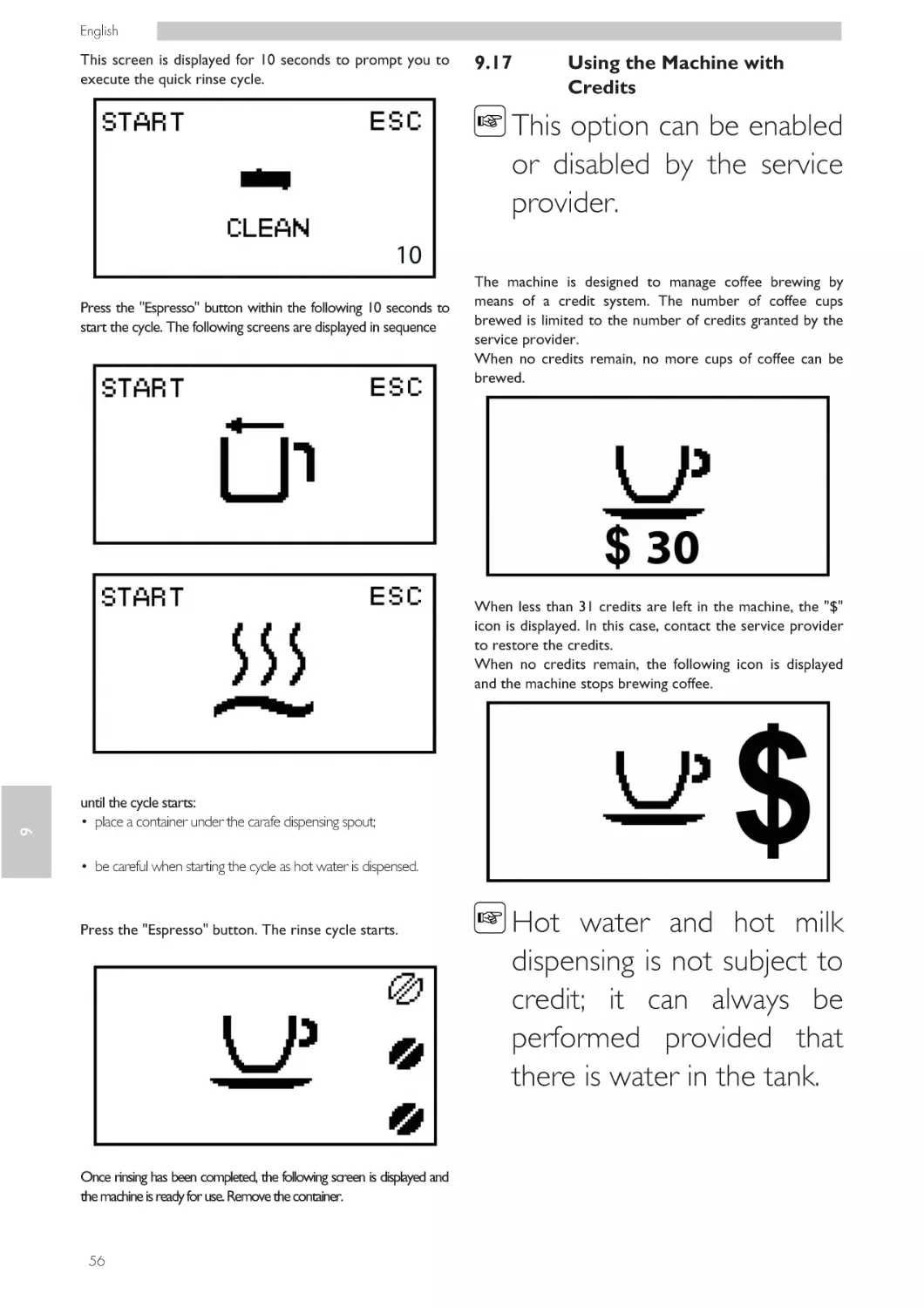
This screen is displayed for 10 seconds to prompt you to
execute the quick rinse cycle.

9.17

Using the Machine with
Credits

This option can be enabled
or disabled by the service
provider.

Press the "Espresso" button within the following 10 seconds to
start the cycle. The following screens are displayed in sequence

The machine is designed to manage coffee brewing by
means of a credit system. The number of coffee cups
brewed is limited to the number of credits granted by the
service provider.
When no credits remain, no more cups of coffee can be
brewed.

9

When less than 31 credits are left in the machine, the "$"
icon is displayed. In this case, contact the service provider
to restore the credits.
When no credits remain, the following icon is displayed
and the machine stops brewing coffee.

until the cycle starts:
• place a container under the carafe dispensing spout;
• be careful when starting the cycle as hot water is dispensed.

Press the "Espresso" button. The rinse cycle starts.

Once rinsing has been completed, the following screen is displayed and
the machine is ready for use. Remove the container.

56

Hot water and hot milk
dispensing is not subject to
credit; it can always be
performed provided that
there is water in the tank.

English

Each service provider decides independently how to
manage the granting and recharging of credits to allow the
machine to be used.

9.18

Remove the coffee grounds drawer and empty out the coffee grounds in
a suitable container.

Emptying the Coffee
Grounds Drawer

This operation must be
performed
with
the
machine turned on.
The machine will indicate when the coffee grounds drawer
has reached its maximum capacity.

It is advisable to also empty
the drip tray (see section
"Cleaning the Drip Tray").
In this case, the machine does not allow coffee to be
brewed. In order to brew coffee, the coffee grounds
drawer must be emptied of used coffee.
Make sure that the coffee dispensing spout is positioned upwards.

9

Only when the display shows the following icons in sequence:

Remove the drip tray.

may the coffee grounds drawer be inserted into the machine.

57

English

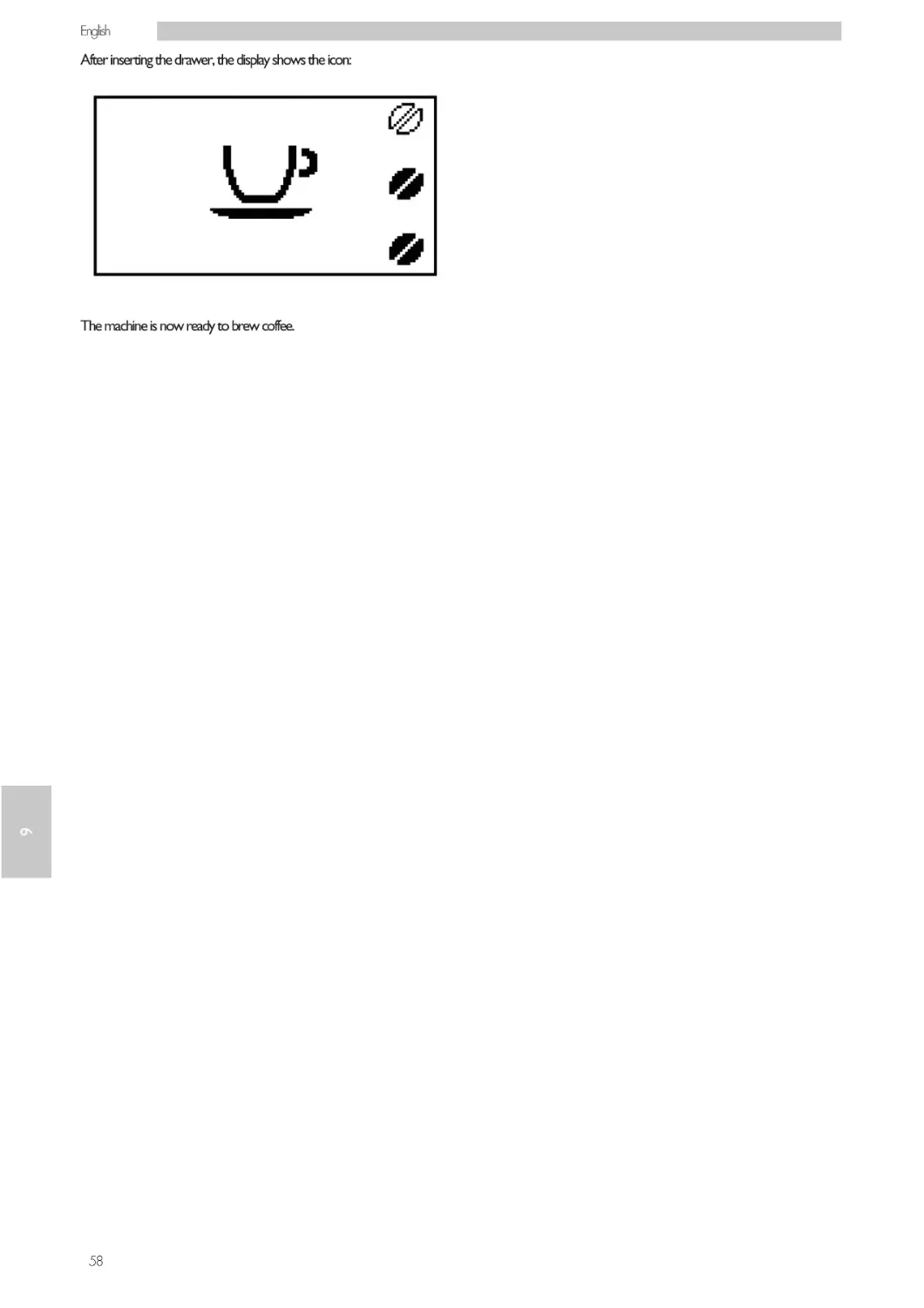
After inserting the drawer, the display shows the icon:

9

The machine is now ready to brew coffee.

58

English

CLEANING AND MAINTENANCE

Before performing any
maintenance
and/or
cleaning operation, unplug
the power cord.

The Manufacturer is not
liable for damage or
malfunctions caused by a
wrong
or
lack
of
maintenance.

Avoid using chlorine-based
tablets so as to prevent
oxidation
phenomena
inside the appliance.

10.1

General Notes for Correct
Operation

Non-removable
components
and
the
machine itself must be
cleaned,
when
not
differently specified, only
by using cold or lukewarm
water, with a non-abrasive
sponge and a damp cloth.
Never use direct jets of
water onto the appliance
and/or its components.
Periodic maintenance and cleaning will keep the machine in
good working order for a longer time and ensure
compliance with basic hygienic standards.

Follow the instructions and timing indicated in the
"MAINTENANCE SCHEDULE" to ensure correct
operation of the appliance.

10

10

59

English

10.2

Cleaning and Scheduled
Maintenance

All parts requiring cleaning
are easily accessible, so no
tools are needed.

All parts must be washed
with lukewarm water only
and
without
using
detergents or solvents that
could change their shape
or performance.

All removable parts can be
washed in the dishwasher.

10

Do not clean the above
mentioned electric parts
with wet cloths and/or
with degreasing detergents.
Remove any dust residues
with a jet of dry
compressed air or with an
antistatic cloth.

60

10.2.1

Maintenance Schedule

Operation to be carried out
Emptying and cleaning the coffee grounds
drawer
Water tank cleaning
Brew group cleaning
Brew group lubrication
Coffee bean hopper cleaning
DESCALING
A
B
C

A
yes
-

B
yes
yes

yes

-

C
yes
yes
-

When an alert is shown
Weekly
Every month or 500 brewing cycles

The machine and its parts
should in any case be
cleaned every week.
The appliance and its parts
should be cleaned and
washed following a period
of inactivity.

English

10.2.2

Cleaning of the
Cappuccinatore

Press the "Menu" button. The following screen is displayed:

Danger
of
burning!
Dispensing
may
be
preceded by small jets of
hot water.
Daily Cleaning of the Cappuccinatore
For hygienic reasons and to ensure a perfect milk froth
consistency, it is important that you clean the
Cappuccinatore after each use.

Press the "Latte Macchiato" button. The following screen
is displayed:

After frothing milk, you always need to:
Plunge the suction tube into a container filled with fresh
water.

Press the "Coffee" button. The following screen is displayed:

Place an empty container under the Cappuccinatore.

10

Press the "Espresso" button to start brewing.
The machine needs time to preheat.

61

English

The following icon is displayed during the dispensing phase.

Remove the lower part.

Dispense water from the Cappuccinatore until clear water
flows out. Press the "Espresso" button to stop brewing.

Clean the suction tube with a damp cloth.

Remove the fitting.

Weekly Cleaning of the Cappuccinatore
The weekly cleaning is more thorough since all milk residues are
removed from the dispensing spout. The carafe dispensing spout
is made up of six parts that must be disassembled.
Remove the Cappuccinatore from the machine.

Remove the tube with the fitting.

10

Detach the lower part from the Cappuccinatore.

62

English

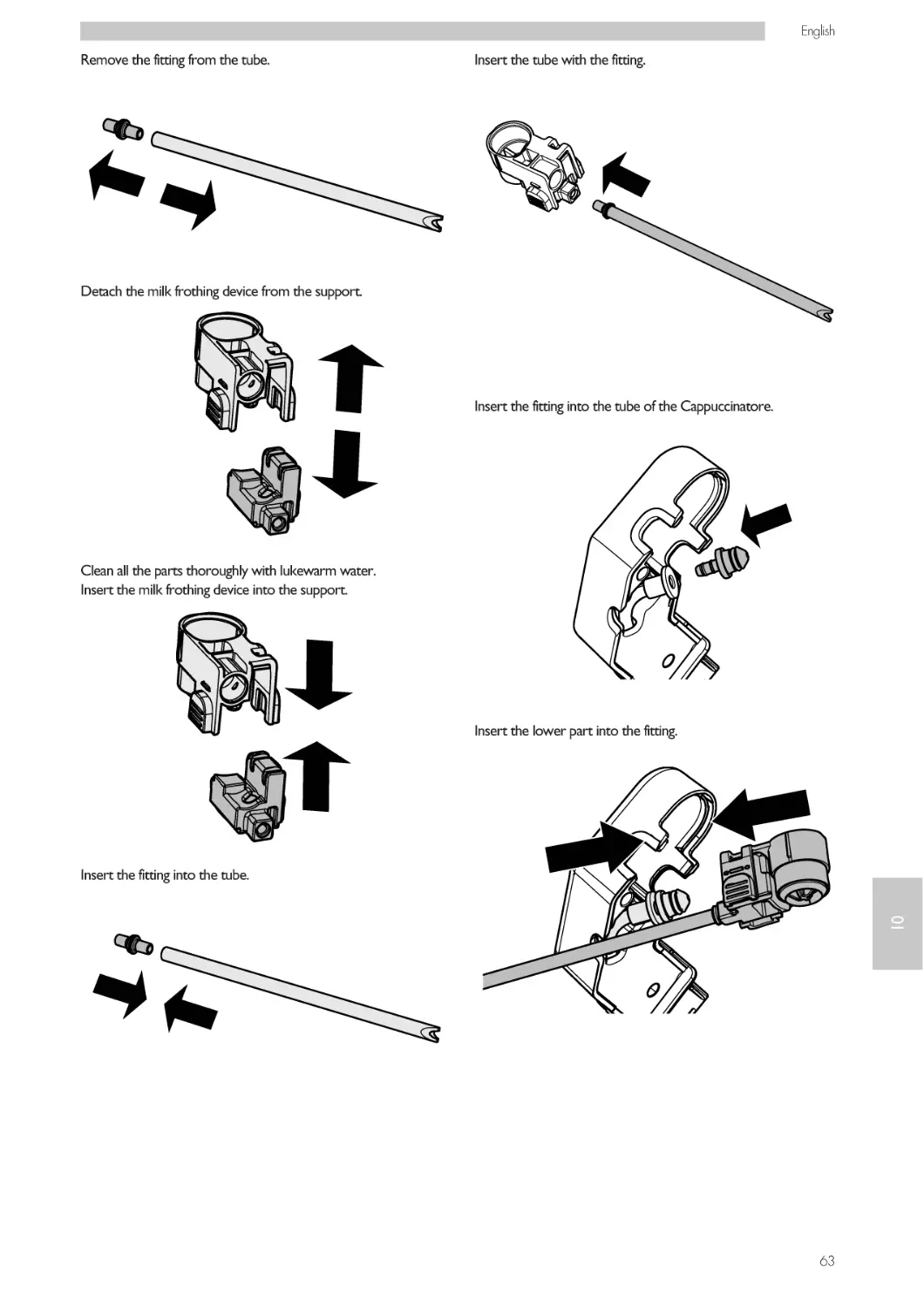
Remove the fitting from the tube.

Insert the tube with the fitting.

Detach the milk frothing device from the support.

Insert the fitting into the tube of the Cappuccinatore.

Clean all the parts thoroughly with lukewarm water.
Insert the milk frothing device into the support.

Insert the lower part into the fitting.

10

Insert the fitting into the tube.

63

English

Insert the lower part into the Cappuccinatore.

Make sure that the Cappuccinatore is correctly installed.
Pour the milk circuit cleaner into a container. Add 1/2 litre
of lukewarm water and wait for the product to dissolve
completely.

You can now use the Cappuccinatore.
Monthly Cleaning of the Cappuccinatore
You need to perform a more thorough cleaning of the
Cappuccinatore every month using the "Saeco Milk Circuit
Cleaner". The "Saeco Milk Circuit Cleaner" can be
purchased separately.

Insert the suction tube into the container.

For further details, please refer to the maintenance
products page in this user manual.

10

Place a large container (1.5 l) under the Cappuccinatore.

Danger
of
burning!
Dispensing
may
be
preceded by small jets of
hot water.

64

English

Press the "Menu" button. The following screen is displayed:

The following icon is displayed during the dispensing phase.

Press the "Latte Macchiato" button. The following screen
is displayed:

Once the machine stops dispensing, repeat the steps until the
container is empty.

Never drink the solution
dispensed during this step.
Rinse the container thoroughly and fill it with 1/2 litre of fresh
water to be used for the rinse cycle.

Press the "Coffee" button. The following screen is displayed:

Insert the suction tube into the container.

10

Press the "Espresso" button to start brewing.
The machine needs time to preheat.

65

English

Empty the container and place it back under the Cappuccinatore.

The following icon is displayed during the dispensing phase.

Press the "Menu" button. The following screen is displayed:

Once the machine stops dispensing, repeat the steps until the
carafe is empty.
Press the "Latte Macchiato" button. The following screen
is displayed:

Remove the Cappuccinatore from the machine. Repeat the
steps one more time.
Disassemble and wash the Cappuccinatore as described in
the "Weekly Cleaning of the Cappuccinatore" chapter.

10.2.3

Cleaning the Coffee Grounds
Drawer

The coffee grounds drawer is to be emptied and cleaned
whenever indicated by the machine. To carry out this
operation, refer to section "Emptying the Coffee Grounds
Drawer".
Press the "Coffee" button. The following screen is displayed:

10.2.4

Cleaning the Drip Tray

Empty and wash the drip tray daily; this operation must
also be performed when the float is raised.

Remove the drip tray and the coffee grounds drawer as
described in section "Emptying the Coffee Grounds
Drawer".

10

Empty the drip tray and wash it.
Press the "Espresso" button to start brewing.
The machine needs time to preheat.

Refit the coffee grounds drawer and insert the drip tray
into the machine.

10.2.5

Brew Group Cleaning

The brew group should be cleaned whenever the coffee
bean hopper is filled, or at least once a week.

Turn off the machine by switching the power button to
the "O" position and remove the plug from the socket.

66

English

Remove the drip tray and the coffee grounds drawer.

Wash the brew group with lukewarm water; carefully
wash the upper filter. Before placing the brew group in its
seat, ensure that there is no water left in the brewing
chamber.

Open the service door.
Remove the coffee residues drawer and wash it thoroughly.

Clean the inside of the machine with a damp cloth.
Insert the coffee residues drawer into its seat and ensure that it
is correctly in place.

10

Remove the brew group by pulling it by the handle and pressing
the «PUSH» button. The brew group must be washed with
lukewarm water only. Do not use any detergent.

67

English

If the coffee residues drawer
is not positioned correctly,
the brew group may not fit
into the machine.

Make sure that the hook which locks the brew group is in
the correct position. Firmly press the "PUSH" button to
check its position.

Make sure that the brew group is in the off position. The
two reference marks must match.

Insert the brew group into its seat again until it locks into
place WITHOUT pressing the "PUSH" button.

If they do not match, proceed as described below:

Ensure that the lever is in contact with the brew group
base.

Insert the coffee grounds drawer and the drip tray. Close
the service door.

10.2.6

Brew group lubrication

10

Lubricate the brew group after approximately 500 cups of
coffee or once a month.
The grease to lubricate the brew group and the complete
"Service Kit" can be purchased at your local dealer or at
authorised service centres.

Before lubricating the brew group, clean it under running
water as described in the "Brew Group Cleaning" chapter.

68

English

Lubricate the brew group guides using Saeco grease only.

Insert the brew group into its seat again until it locks into
place WITHOUT pressing the "PUSH" button.
Apply the grease evenly on both side guides.
Insert the coffee grounds drawer and the drip tray. Close
the service door.

10.2.7

DESCALING

Limescale is a natural part of the water used for machine
operation.
It needs to be removed regularly as it may clog the water
and coffee circuit of your appliance.

If the warning signal is
disabled, the machine will
not warn the user. Damage
resulting from failure to
perform the descaling cycle
is not covered by warranty.

Perform this operation before your appliance stops
working due to clear maintenance neglect.

69

10

Lubricate the shaft too.

The advanced electronics shows on the machine display
(with clear icons) when descaling is needed. Just follow the
steps described below.

English

Use the Saeco descaling product only. Its formula has been
specifically designed to ensure better machine
performance and operation for its whole operating life. If
correctly used, it also avoids alterations in the dispensed
product.

Fill a container with 1/2 litres of water. Insert the suction
tube into the container.

The descaling solution and the complete "Maintenance Kit"
may be purchased at your local dealer or at authorised
service centres.

Never drink the descaling
solution or any products
brewed until the cycle has
been completed. Never
use vinegar as a descaling
solution.

Place a large container (1.5 l) under the Cappuccinatore.

Use a container of at least
1.5 litre capacity.

10

Turn on the machine by pressing the ON/OFF button.
Wait for the machine to complete the rinse and warm-up
process. Make sure that the Cappuccinatore is installed.

Switch to programming mode as described in section
"Access to the Programming Menu".

Remove the "Intenza" filter
before adding the descaling
solution.

70

English

Press the "Espresso" button to start the DESCALING
cycle.

Press the "Cappuccino"
button to exit. You can
quit the cycle in any case;
see the "Interruption of the
Descaling Cycle" chapter.
Pour the entire content of the Saeco concentrated
descaling solution into the water tank.

Fill with fresh drinking water up to the level marked by the
"CALC CLEAN" icon.

Put the water tank back into the machine. Drain any
liquids from the drip tray and place it back into the
machine (see section "Cleaning the Drip Tray").

Press the "Espresso" button to start the descaling cycle.

If you do not have a
container of this capacity,
pause the cycle by pressing
the "Espresso" button,
empty the container, place
it back in the machine and
restart the cycle by
pressing the "Espresso"
button.
71

10

Press the "Menu" button until the following menu is
displayed:

English

The machine will now start dispensing the descaling
solution at intervals (the bar shows the cycle progress).
When the solution in the tank is finished, the machine
requests to empty and rinse the tank with fresh drinking
water.

When the amount of water needed for the rinse cycle has been
completely dispensed, this icon is displayed.

Press the "Cappuccino" button to exit the descaling cycle.

Empty the containers used to collect the liquid dispensed
by the machine.
Rinse the water tank thoroughly and fill it with fresh
drinking water up to the "CALC CLEAN" level.
Remove any liquids from the drip tray and insert it back
into the machine.
Place a large container under the steam/hot water wand
and another one under the coffee dispensing spout.
Insert the tank into the machine.

Press the "Espresso" button; the machine performs the
rinse cycle.

10

The rinse cycle may be
paused by pressing the
"Espresso"
button.
To
resume the cycle, press the
"Espresso" button again. This
allows you to empty the
container or to leave the
machine unattended for a
short time.
72

The
rinse
cycle
is
performed in order to
have the circuit cleaned
with a preset amount of
water to ensure proper
machine performance. If
the water tank is not filled
up to the CALC CLEAN
level, the machine may
require two or more cycles
to be carried out by
displaying the following
screen.

Once the rinse cycle has been completed, the machine
carries out the circuit priming, the warm-up and rinse
cycle in order to be ready for product brewing.

English

Empty the containers used to collect the liquid dispensed
by the machine.
Empty the drip tray and place it back.
The machine is now ready for use.

The descaling solution is to
be disposed of according to
the
manufacturer’s
instructions and/or the
regulations in force in the
country of use.
After
completing
the
descaling cycle, wash the
brew group as described in
the "Brew Group Cleaning"
section in the "Cleaning and
Maintenance" chapter.

10.2.8

Interruption of the Descaling
Cycle

10

Once the descaling cycle has started, it must be
completed; do not turn off the machine mid-cycle.
If the machine stops, you can quit the cycle by pressing the
ON/OFF button.
If this occurs, empty and rinse carefully the water tank,
then fill it up to the "CALC CLEAN" level.
Follow the instructions provided in section "After a Period
of Inactivity" before brewing any beverage.

If the cycle was not completed, the machine will require
another descaling cycle to be performed as soon as
possible.

73

English

11

TROUBLESHOOTING

11.1

Warning signals

This chapter describes all the warning messages that the machine may display to the user and the actions that can and/or
must be performed by the user.
Warning Signals

How to reset the message
The machine is warming up to brew beverages or dispense hot water.

The machine is performing the rinse cycle.
Wait until the machine has completed the cycle.

The "Intenza" water filter must be replaced with a new one.
Contact the service provider.

The brew group is being reset due to machine reset.

Fill the coffee bean hopper with coffee beans and restart the cycle.

The machine is priming the circuit.

11

The machine is out of credits.
In this case, only hot water and steam may be dispensed.
To brew coffee, contact the service provider to restore the credits.

The machine requires a descaling cycle.
When this message is displayed, it is still possible to use the machine, but its correct operation
might be affected.
Damage caused by failure to descale the machine is not covered by warranty.
Contact the service provider.

74

English

How to reset the message
Insert the drip tray and the coffee grounds drawer into the machine and close the service door.

Fill the coffee bean hopper.
This icon appears for 5 seconds, from when the machine detects that there is no more coffee
to be ground.
After this time the message (Fill the coffee bean hopper with coffee beans and restart the
cycle) appears (See Warning Signals (Yellow Colour)).
The brew group must be inserted into the machine.

Empty the coffee grounds drawer.

Fill the water tank.

Turn off the machine.
Turn it back on after 30 seconds.
Try this 2 or 3 times.
If this signal appears again, contact the service provider and provide the code shown in the
display.

11

Warning Signals

75

English

11.2

Problems - Causes - Solutions

The following table indicates the possible error or alarm cause which may lead to a partial or total shutdown of the
appliance.
Problems
The machine does not turn on.

Causes
The machine is not connected to the electric
network.
The ON/OFF button is on "0".

Solutions
Connect the machine to the electric network.

The drip tray gets filled although no
water is drained.

Water is sometimes drained automatically
by the machine into the drip tray to
manage circuit rinsing and ensure
optimum machine performance.

This is a normal behaviour of the
machine.

The red icon is always displayed on
the machine.

The coffee grounds drawer has been
emptied with the machine off.

The coffee grounds drawer must
always be emptied with the machine
on.
Wait until the icon is displayed

Coffee is not hot enough.

The cups are cold.
The beverage temperature in the
programming menu is set on LOW.

Coffee does not have enough crema
(see note).

The blend is unsuitable, coffee is not
freshly roasted or the grind is too
coarse.

The machine takes a long time to
warm up or the amount of water
dispensed is too little.
The brew group cannot be removed.

The machine circuit is clogged by
limescale.

Descale the machine.

The brew group is out of place.

Turn on the machine.
Close the service door.
The brew group automatically returns
to the initial position.

The coffee grounds drawer is inserted.

Remove the coffee grounds drawer before
removing the brew group.
Fill the water tank and prime the
circuit (see the "First Use - Use After
a Long Period of Inactivity" chapter).

There is no water.

11

The machine grinds the coffee beans
but no coffee is brewed (see note).

The brew group is dirty.
The circuit is not primed.

This might occur when the machine is
automatically adjusting the dose.
The dispensing spout is dirty.

76

Switch the ON/OFF button to "I".

before reinserting the drawer.
Preheat the cups with hot water.
Make sure that the temperature in the
programming menu is set on
NORMAL or HIGH.
Change coffee blend or adjust the
grind setting as explained in the
"Coffee Grind Adjustment" chapter.

Clean the brew group (see the "Brew Group
Cleaning" chapter).
Prime the circuit (see the "First Use Use After a Long Period of Inactivity"
chapter).
Brew some cups of coffee.

Clean the dispensing spout.

English

Problems
The coffee is too weak (see note).

Causes
This might occur when the machine is
automatically adjusting the dose.

Solutions
Brew some cups of coffee.

Coffee is brewed slowly (see note).

The coffee grind is too fine.

Change coffee blend or adjust the
grind as explained in the "Coffee
Grind Adjustment" chapter.

The circuit is not primed.

Prime the circuit (see the "First Use Use After a Long Period of Inactivity"
chapter).
Clean the brew group (see the "Brew Group
Cleaning" chapter).
Clean the dispensing spout and its holes.

The brew group is dirty.
Coffee leaks out of the dispensing spout.

The dispensing spout is clogged.

Frothed milk is too cold.
The milk is not frothed or will not
come out.

The cups are cold.
The Cappuccinatore is dirty.
The Cappuccinatore is not fully assembled.
The type of milk used is not suitable for frothing.

The descaling cycle cannot be
completed.

The water dispensed for the rinse
cycle is not enough.

Preheat the cups with hot water.
Clean the Cappuccinatore.
Make sure that all components have been
correctly assembled.
Use the recommended type of milk.
Press the ON/OFF button and follow
the instructions described in the
"Interruption of the Descaling Cycle"
section.

These problems can be considered normal if the coffee
blend has been changed or if the machine has just been
installed.

11

Please contact our consumer care help line for any
problems not covered in the table or when the suggested
solutions do not solve the problem.

77

English

12
12.1

STORAGE - DISPOSAL
Location Change

Should the machine be placed in a different location, it is
necessary to:
• disconnect the appliance from the supply network;
• carry out the general cleaning of the appliance as indicated
in chapter "Cleaning and Maintenance";
• put the parts back into place and close the doors;

• lift and place the appliance in the assigned location
following the instructions given in section "Unpacking and
Positioning".

12.2

Inactivity and Storage

If the appliance needs to be stored or remains inactive for
a long period, carry out the same operations as described
in section "Location Change", therefore:

• wrap the appliance with a cloth to protect it from dust
and humidity;

12

• make sure that the appliance is installed in a suitable place
(temperature must be lower than 1°C) and be careful not
to put cartons or appliances on it.

78

English

13

INSTRUCTIONS FOR END OF OPERATIONAL LIFE
DISPOSAL

INFORMATION FOR THE USER
in compliance with art. 13 of the Italian Legislative Decree dated
25 July 2005, no. 151 "Implementation of the directives
2002/95/EC, 2002/96/EC and 2003/108/EC on the restriction of
the use of certain hazardous substances in electrical and
electronic equipment, as well as waste disposal".
The symbol of the crossed-out wheeled bin on the appliance or
its packaging indicates that the product must be disposed of
separately from other waste at the end of its operational life.

Separate collection of the appliance, once at the end of its
operational life, is organised and managed by the manufacturer.
Therefore, for an appropriate disposal. the user must contact the
manufacturer and observe its separate collection management
adopted for this appliance at the end of its operational life.

Separating this product for subsequent recycling, treatment and
environmentally-friendly disposal will help prevent potential
environmental and health risks, and allow the materials which
make up the appliance to be re-used and/or recycled.

13

Specific administrative sanctions provided for by current
regulations will be applied for illicit disposal of the product by the
user.

79

Cod. 421946032132 - Ed. 02