/
























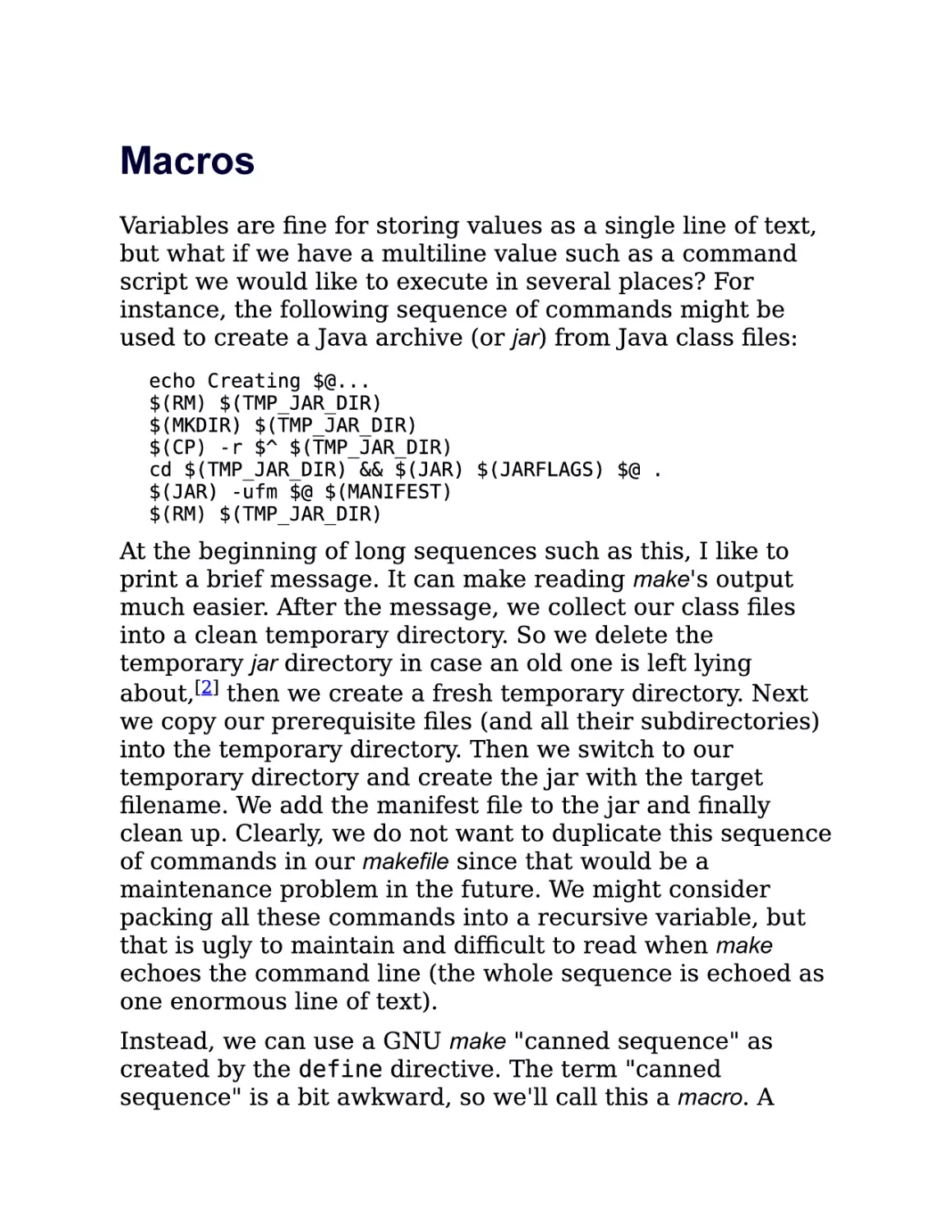
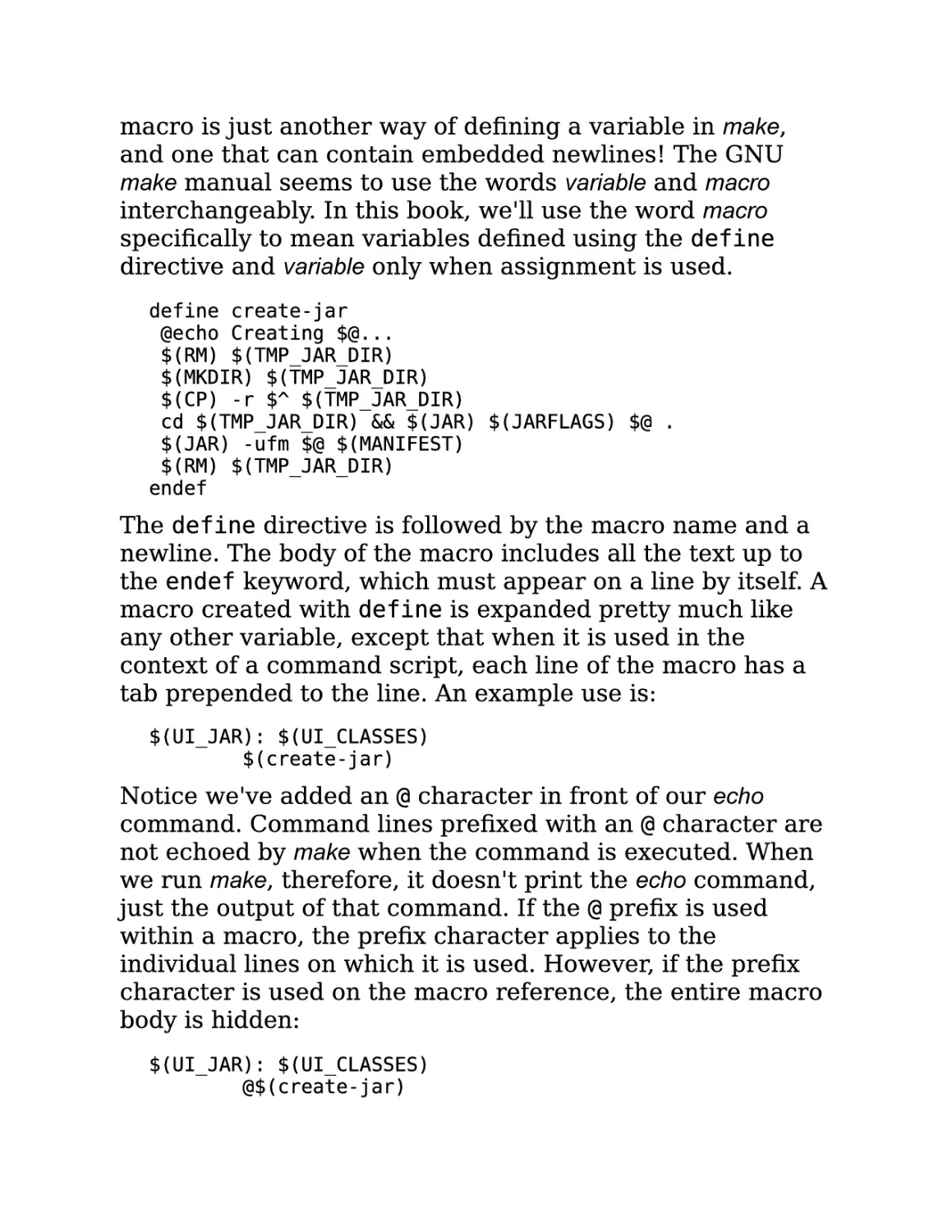
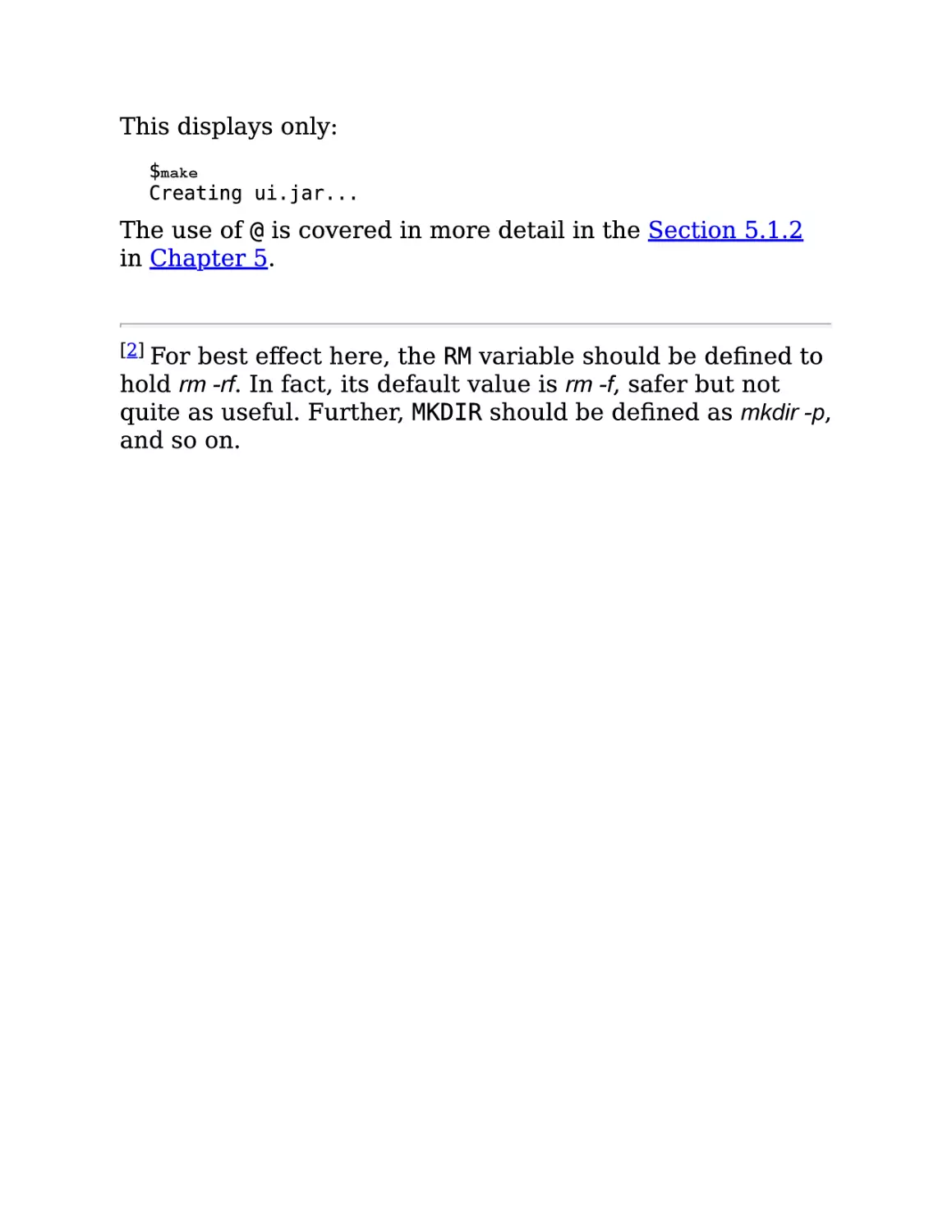
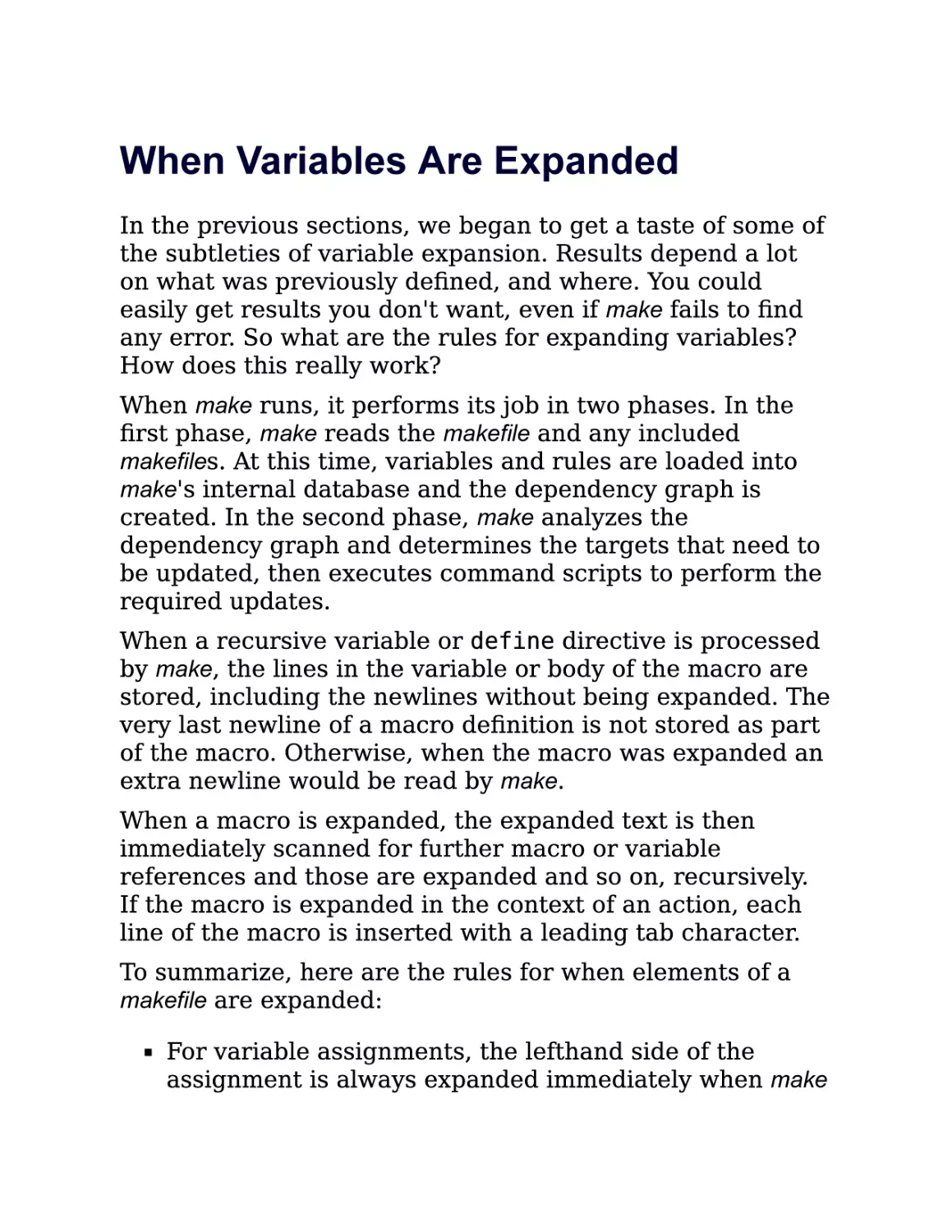



















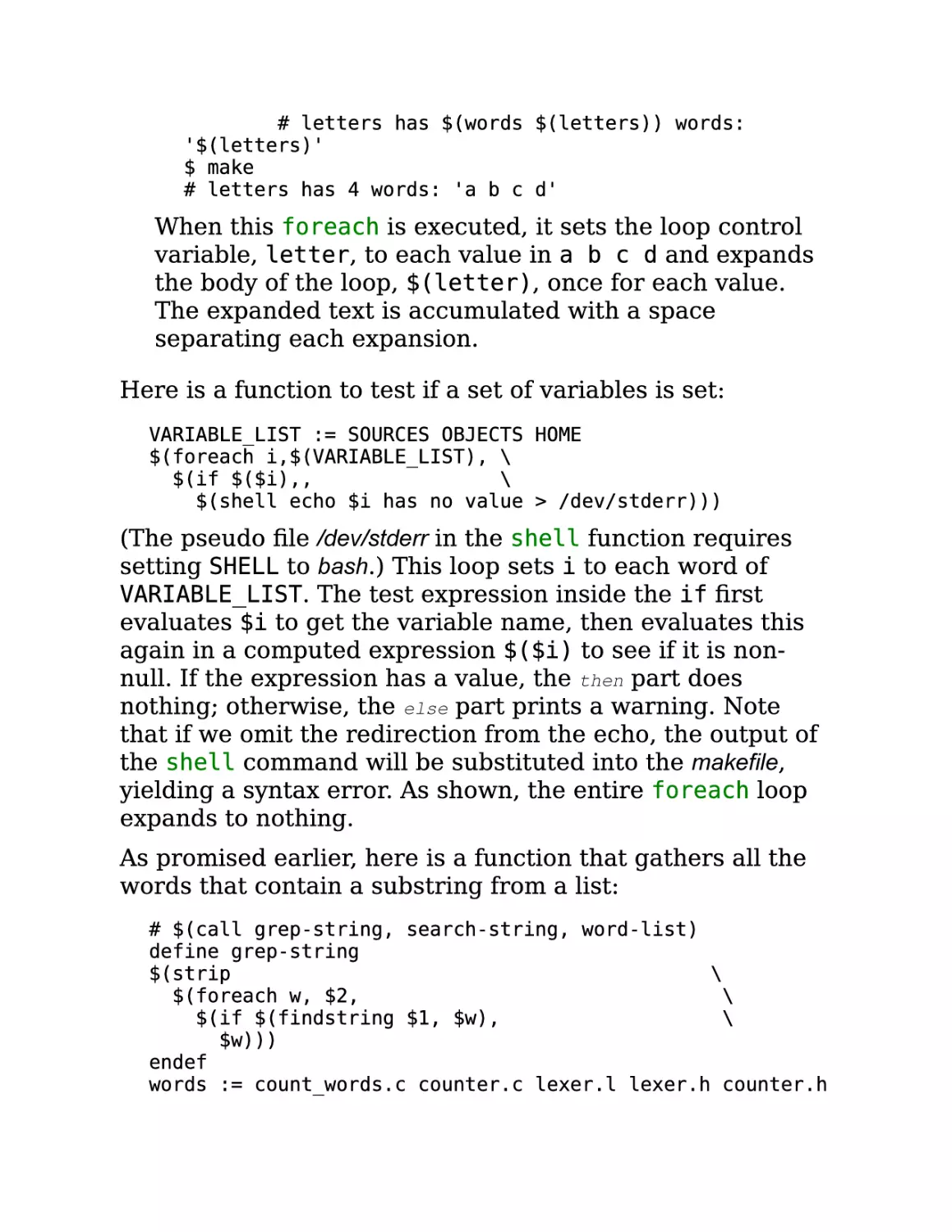
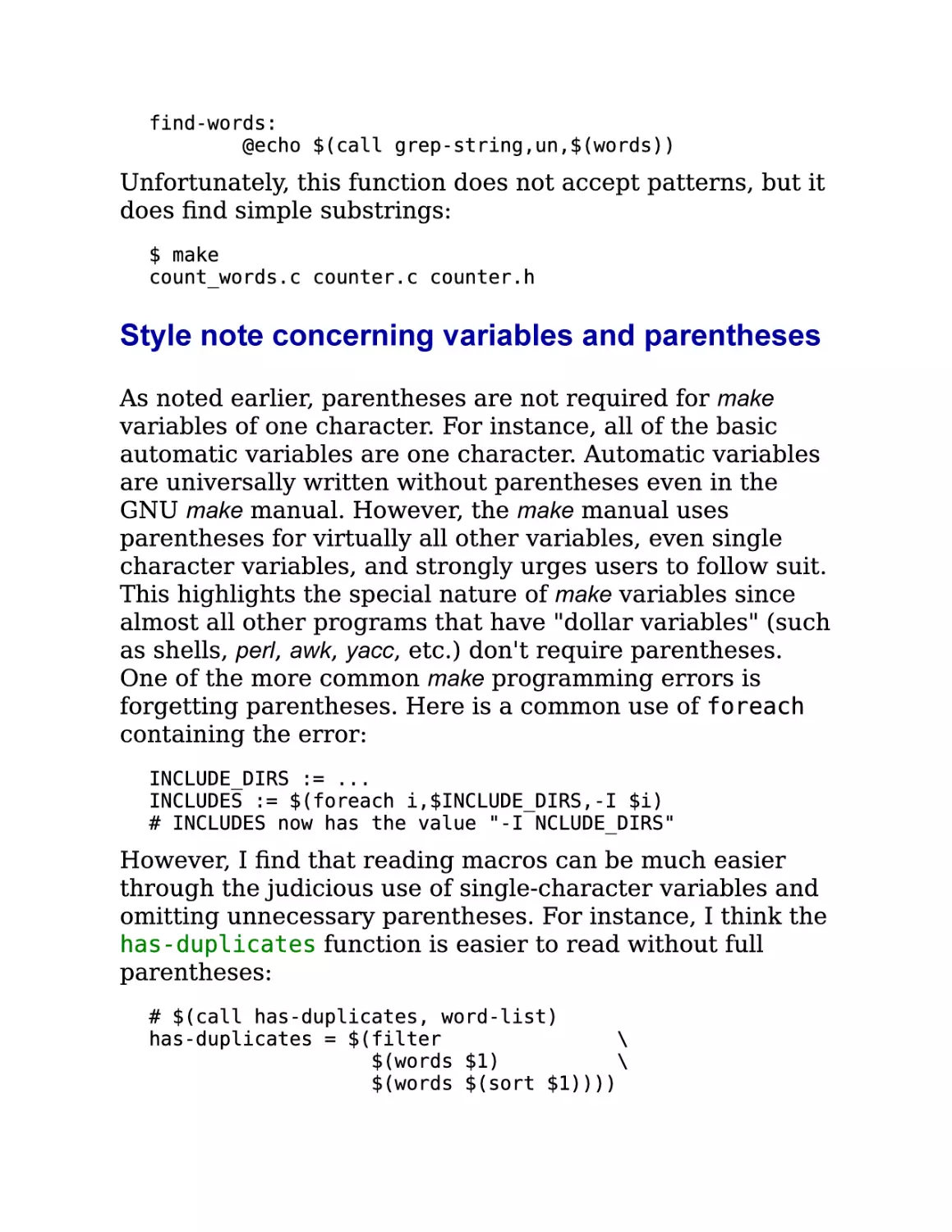
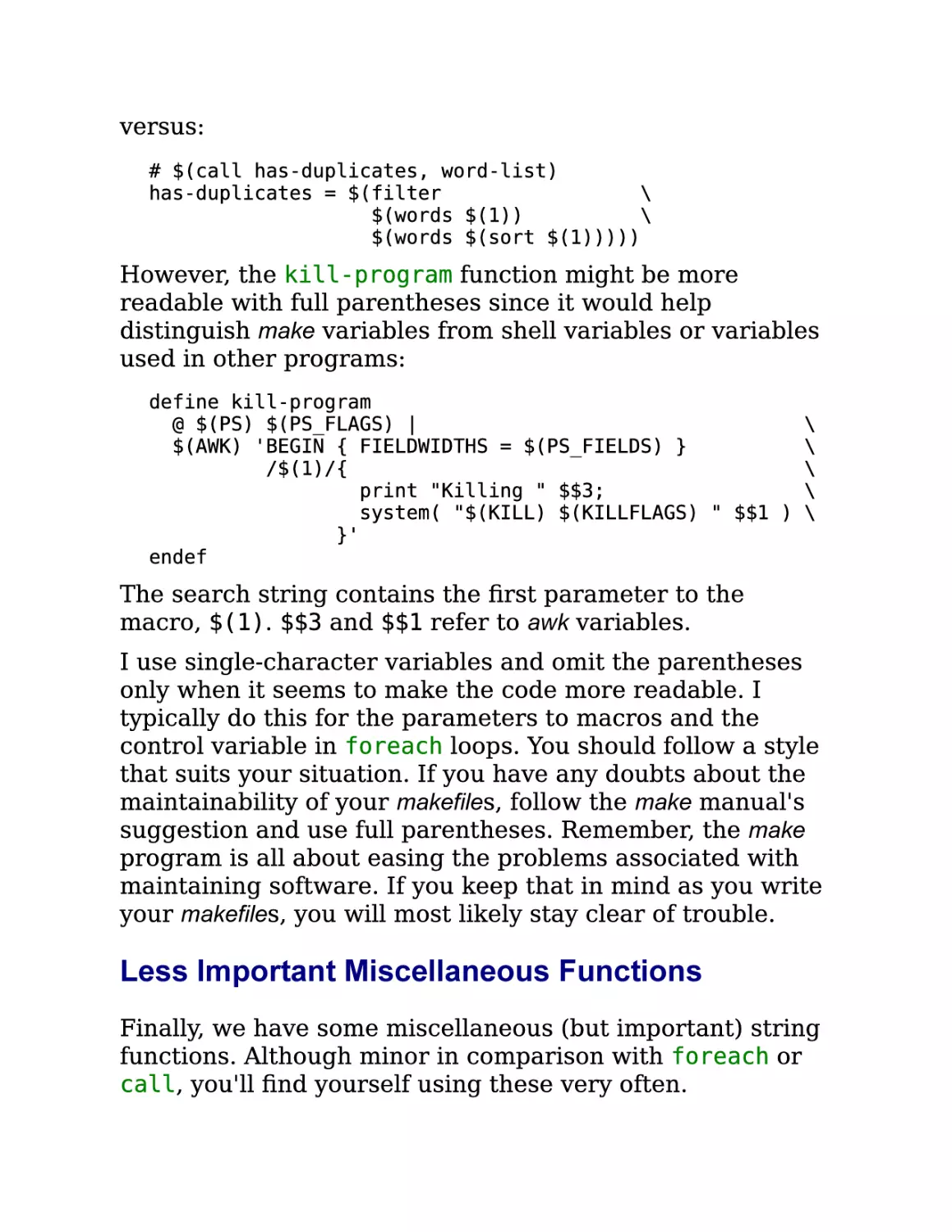
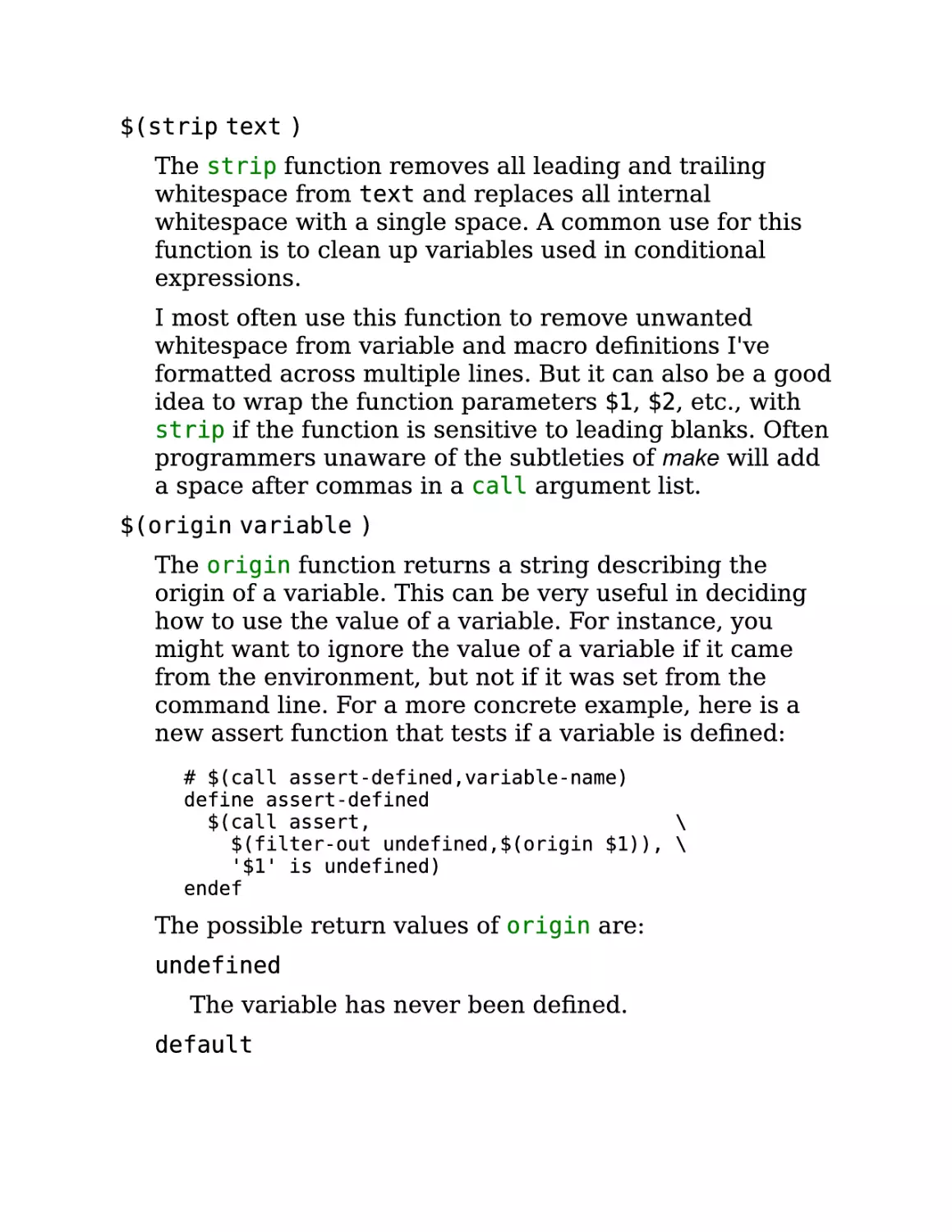
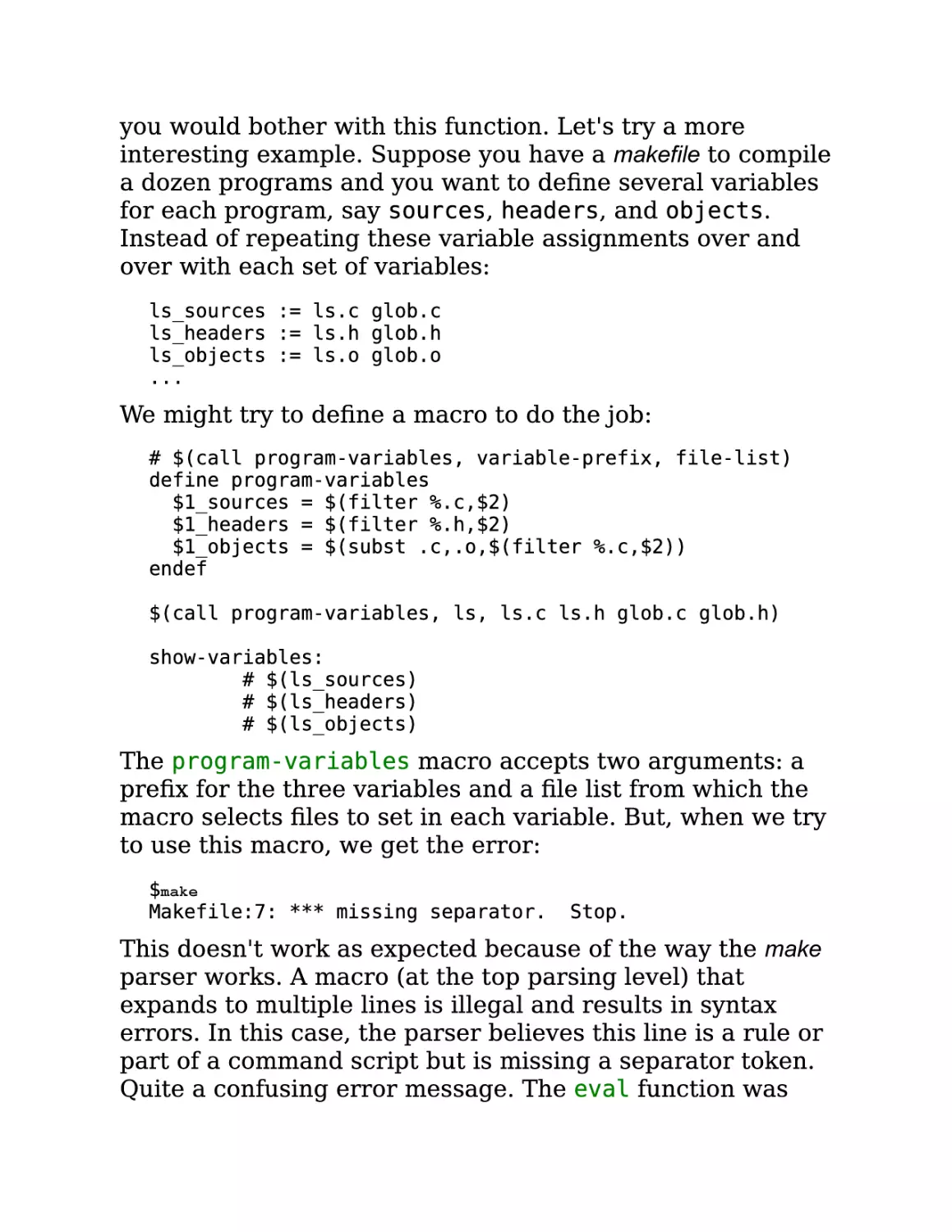
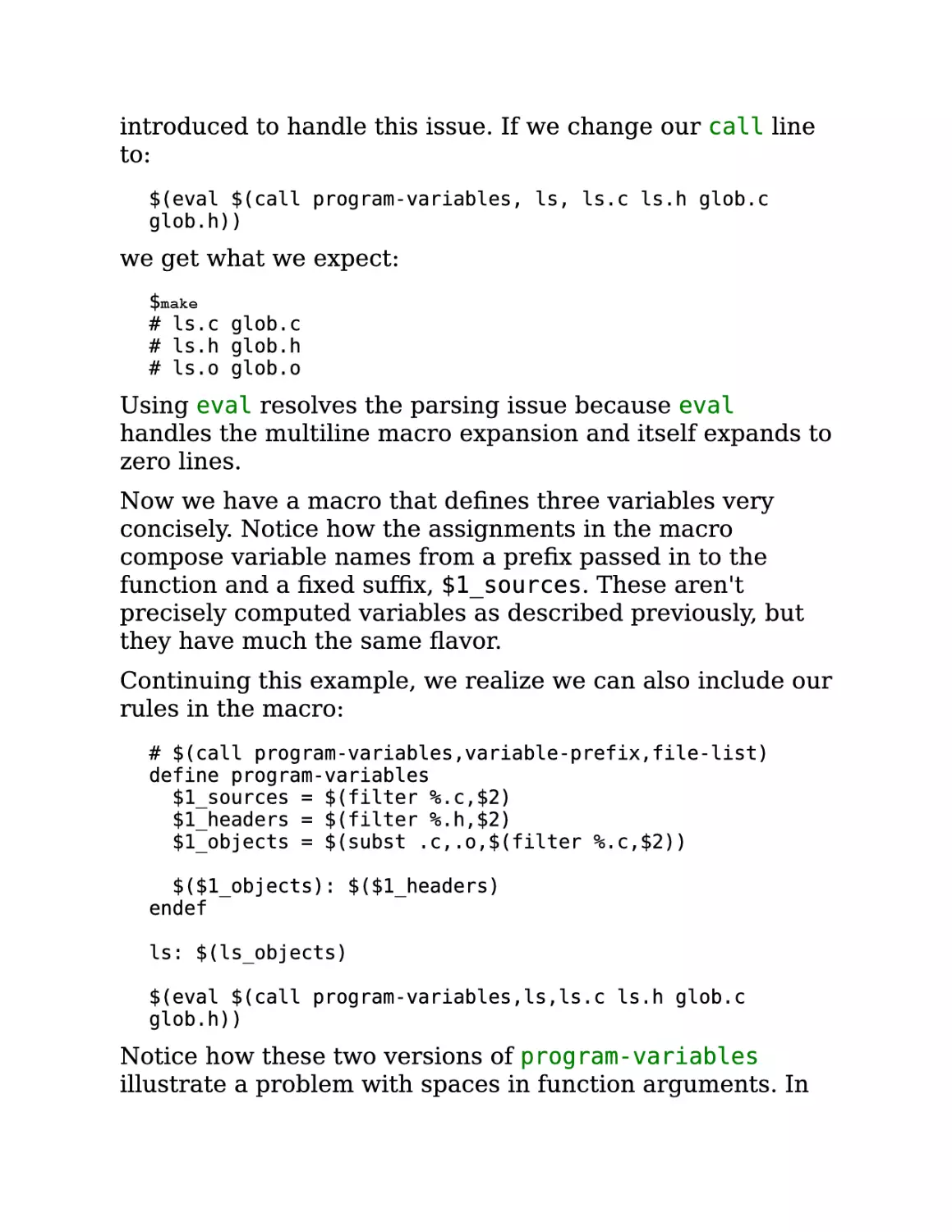


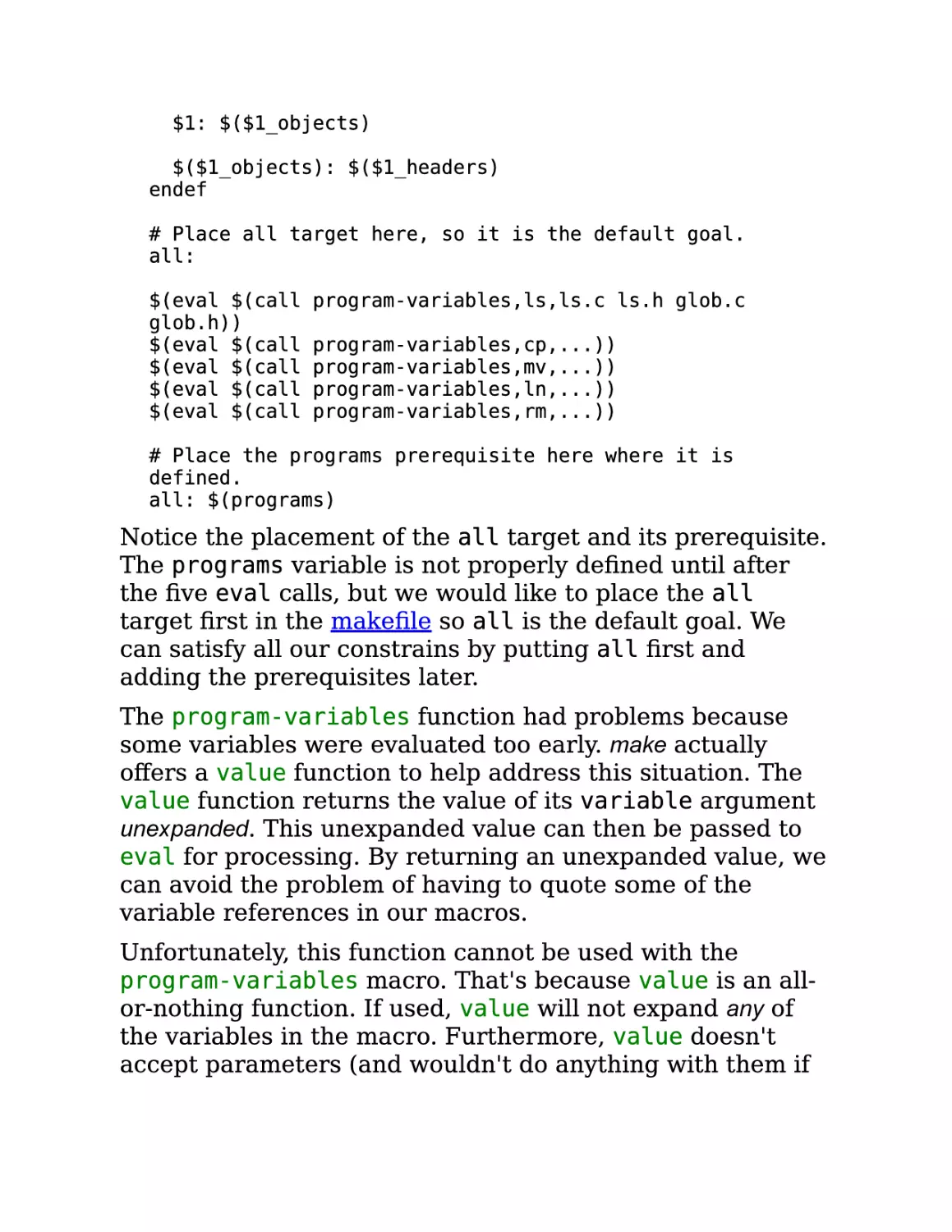
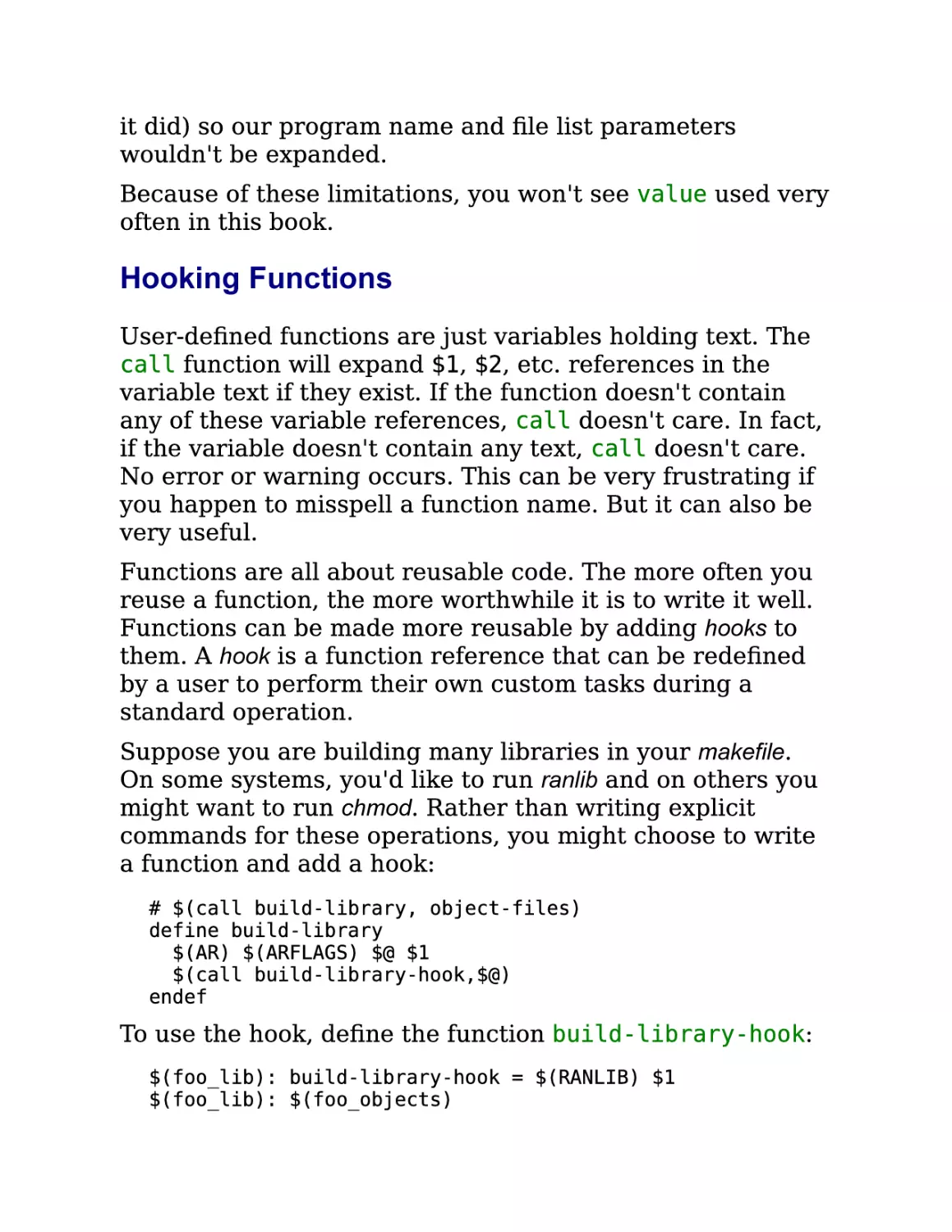
















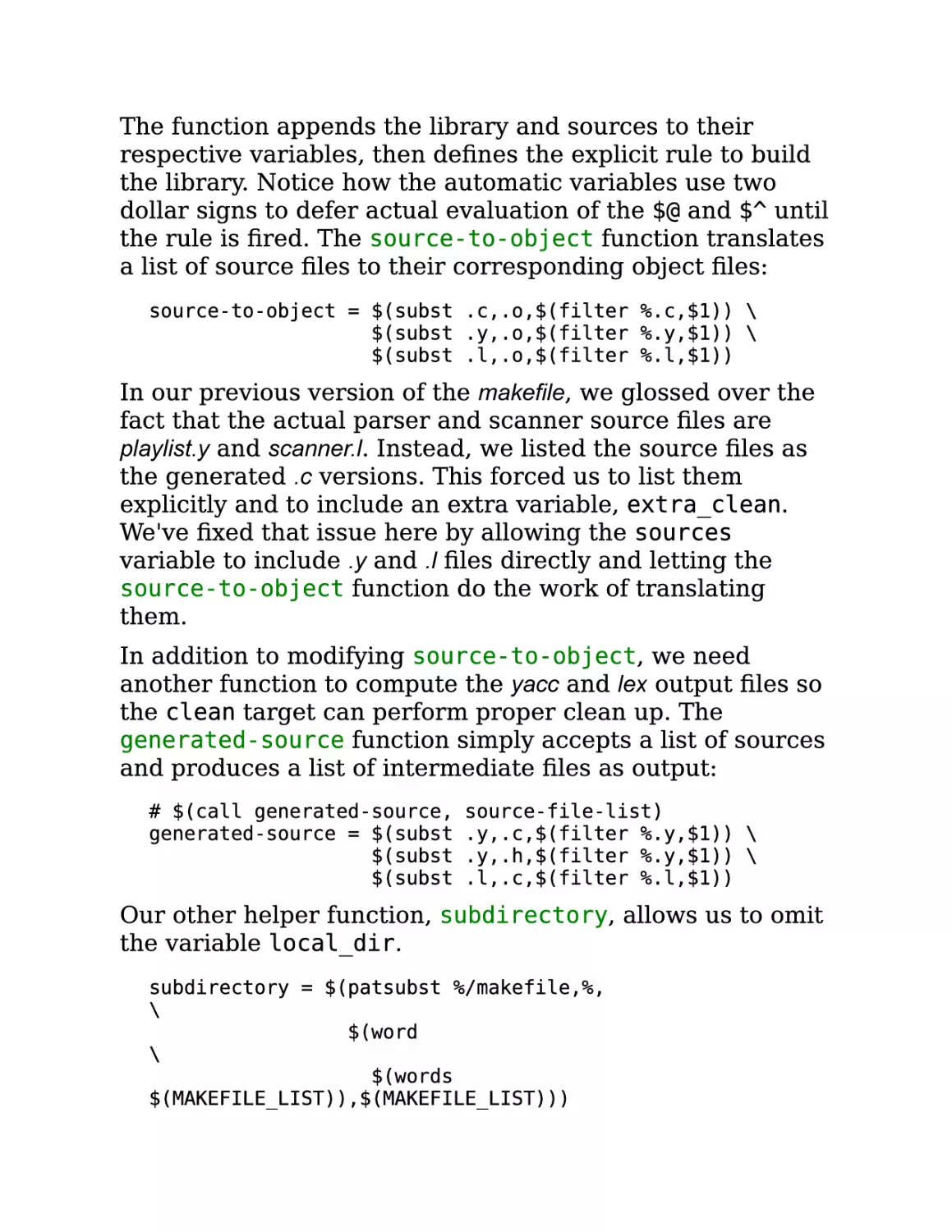
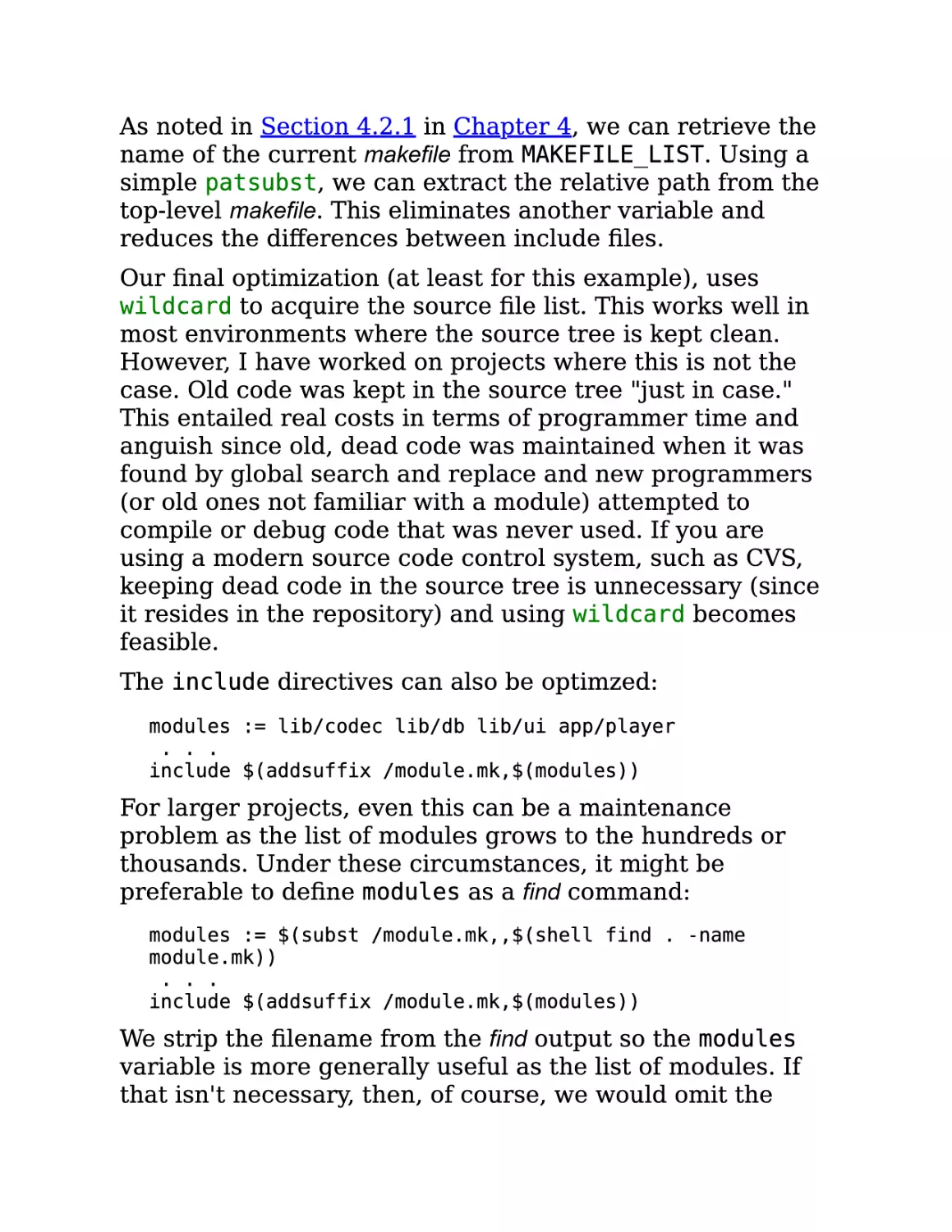
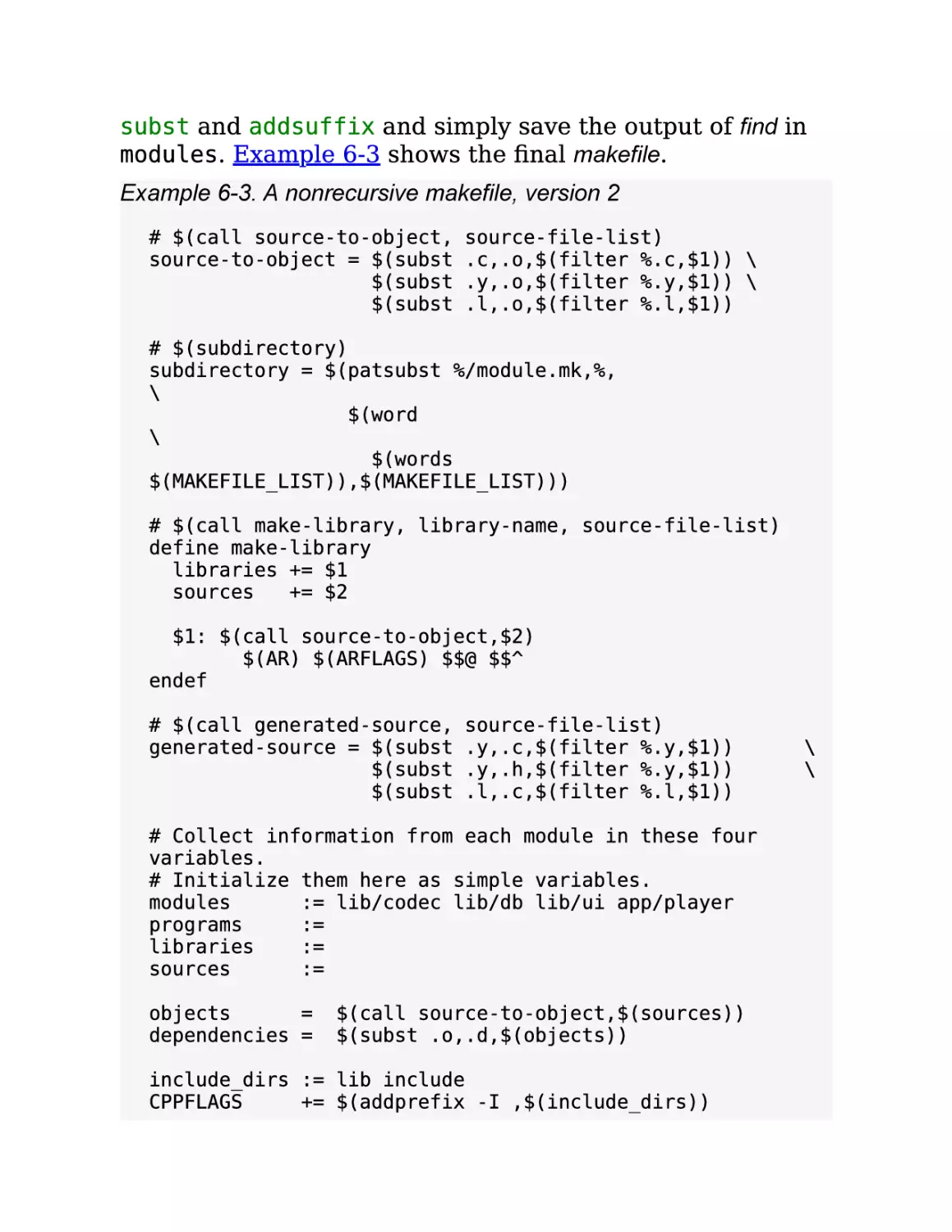


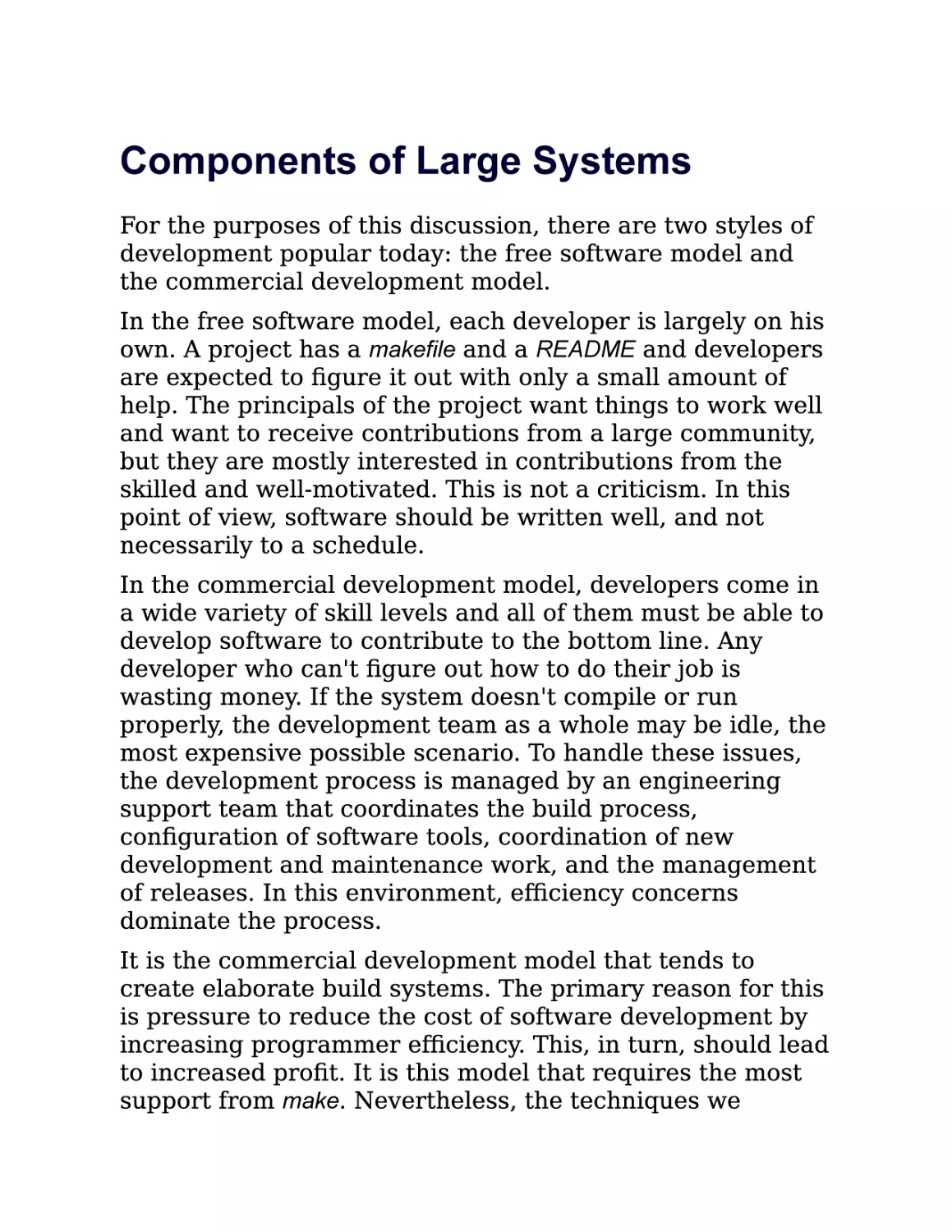
















































































Text
                    Managing Projects with GNU
Make, 3rd Edition
Robert Mecklenburg
Editor
Andy Oram

Copyright © 2009 O'Reilly Media, Inc.

O'Reilly Media

A Note Regarding Supplemental Files
Supplemental files and examples for this book can be found
at http://examples.oreilly.com/9780596006105/. Please use
a standard desktop web browser to access these files, as
they may not be accessible from all ereader devices.
All code files or examples referenced in the book will be
available online. For physical books that ship with an
accompanying disc, whenever possible, we’ve posted all
CD/DVD content. Note that while we provide as much of
the media content as we are able via free download, we are
sometimes limited by licensing restrictions. Please direct
any questions or concerns to booktech@oreilly.com.

Foreword
The make utility is an enticing servant, always there and
always accommodating. Like the indispensable sidekicks
found in many novels and movies, make starts out as the
underappreciated supplicant to whom you throw a few odd
jobs, and then gradually takes over the entire enterprise.
I had reached the terminal stage of putting make at the
center of every project I touched when Steve Talbott, my
supervisor and the author of the original O'Reilly classic
Managing Projects with make, noticed my obsession and asked
me to write the second edition. It proved to be a key
growth experience for me (as well as a pretty wild ride) and
my entry into the wonderful world of O'Reilly, but we didn't
really think about how long the result would stay on the
market. Thirteen years for one edition?
Enthralled in the memories of those days long ago when I
was a professional technical writer, I'll indulge myself with
a bulleted list to summarize the evolution of make since the
second edition of Managing Projects with make hit the stands:
The GNU version of make, already the choice of most
serious coders when the second edition of the book
came out, overran the industry and turned into the de
facto standard.
The rise of GNU/Linux made the GNU compiler tool
chain even more common, and that includes the GNU
version of make. As just one example, the Linux kernel
itself relies heavily on extensions provided by GNU
make, as documented in Chapter 11 of this book.
The adoption of a variant of BSD (Darwin) as the core
of Mac OS X continues the trend toward the dominance

of the GNU tool chain and GNU make.
More and more tricks are being discovered for using
make in a robust, error-free, portable, and flexible way.
Standard solutions to common problems on large
projects have grown up in the programming
community. It's time to move many of these solutions
from the realm of folklore to the realm of documented
practices, as this book does.
In particular, new practices are required to adapt make
to the C++ and Java© languages, which did not exist
when make was invented. To illustrate the shifting
sands of time, the original make contained special
features to support two variants of FORTRAN—of
which vestiges remain!—and rather ineffective
integration with SCCS.)
Against all odds, make has remained a critical tool for
nearly all computer development projects. None of
make's many (and insightful) critics would have
predicted this 13 years ago. Over these years,
replacements sprang up repeatedly, as if dragon's teeth
had been sown. Each new tool was supposed to bypass
the limitations in make's design, and most were indeed
ingenious and admirable. Yet the simplicity of make has
kept it supreme.
As I watched these trends, it had been in the back of my
mind for about a decade to write a new edition of Managing
Projects with make. But I sensed that someone with a broader
range of professional experience than mine was required.
Finally, Robert Mecklenburg came along and wowed us all
at O'Reilly with his expertise. I was happy to let him take
over the book and to retire to the role of kibitzer, which
earns me a mention on the copyright page of this book.
(Incidentally, we put the book under the GNU Free

Documentation License to mirror the GPL status of GNU
make.)
Robert is too modest to tout his Ph.D., but the depth and
precision of thinking he must have applied to that endeavor
comes through clearly in this book. Perhaps more
important to the book is his focus on practicality. He's
committed to making make work for you, and this
commitment ranges from being alert about efficiency to
being clever about making even typographical errors in
makefiles self-documenting.
This is a great moment: the creation of a new edition of one
of O'Reilly's earliest and most enduring books. Sit back and
read about how an unassuming little tool at the background
of almost every project embodies powers you never
imagined. Don't settle for creaky and unsatisfying makefiles
—expand your potential today.
—Andy Oram Editor, O'Reilly Media August 19, 2004

Dedication
For Ralph and Buff

Preface
The Road to the Third Edition
My first exposure to make was as an undergraduate at
Berkeley in 1979. I was thrilled to be working with the
"latest" equipment: a DEC PDP 11/70 with 128 kilobytes of
RAM, an ADM 3a "glass tty," Berkeley Unix, and 20 other
simultaneous users! Once, when an assignment was due, I
remember timing how long it took to log in—five minutes
from typing my username until I got a prompt.
After leaving school, it was 1984 before I got to work on
Unix again. This time it was as a programmer at NASA's
Ames Research Center. We purchased one of the first
microcomputer-based Unix systems, a 68000 (not a 68010
or 20) that had a megabyte of RAM and Unix Version 7—
with only six simultaneous users. My last project there was
an interactive satellite data analysis system written in C
with a yacc/lex command language, and, of course, make.
By 1988, I had gone back to school and was working on a
project to build a spline-based geometric modeler. The
system consisted of about 120,000 lines of C, spread across
20 or so executables. The system was built using makefile
templates that were expanded into normal makefiles by a
hand-rolled tool call genmakefile (similar in spirit to imake).
The tool performed simple file inclusion, conditional
compilation, and some custom logic to manage source and
binary trees. It was a common belief in those days that
make required such a wrapper to be a complete build tool.
Several years earlier, I had discovered the GNU project and
GNU make and realized that the wrapper program was
probably unnecessary. I rebuilt the build system without
the templates or a generator. To my chagrin, I wound up

maintaining the build system for the next four years (a
pattern I foolishly repeat to this day). The build system was
portable to five flavors of Unix and included separate
source and binary trees, automated nightly builds, and
support for partial checkouts by developers with the build
system filling in the missing objects.
My next interesting encounter with make came in 1996,
working on a commercial CAD system. It was my job to port
2 million lines of C++ (and 400,000 lines of Lisp) from Unix
to Windows NT, using the Microsoft C++ compiler. That's
when I discovered the Cygwin project. As an important
byproduct of the port, I reworked the build system to
support NT. This build system also supported separate
source and binary trees, many flavors of Unix, several
varieties of graphics support, automated nightly builds and
tests, and partial developer checkouts with reference
builds.
In 2000, I began working in Java writing laboratory
information management systems. This was one of the first
really different development environments I'd worked in for
many years. Most of the programmers came from a
Windows background and many seemed to know Java as
their first programming language. The build environment
consisted almost entirely of the project file generated by a
commercial Java Integrated Development Environment
(IDE). Although the project file was checked in, it rarely
worked "out of the box" and programmers often sat in each
other's cubes working through build problems.
Of course, I began to write a build system using make, but
an odd thing happened. Many of the developers were
reluctant to use any command-line tool. Further, many did
not have a firm grasp of such concepts as environment
variables, command-line options, or an understanding of
the tools used to build programs. The IDE hid all of these

issues. To address these issues, the build system I was
writing became more complex. I began to add better error
messages, precondition checking, management of the
developer's machine configuration, and support for IDEs.
Along the way, I'd read the GNU make manual several
dozen times. As I looked for more material, I found the
second edition of this book. It was filled with valuable
material, but was sadly lacking in details of GNU make.
That wasn't surprising, considering its age. The volume had
stood the test of time, but by 2003 needed updating. The
third edition focuses primarily on GNU make. As Paul Smith
(the GNU make maintainer) writes: "Don't hassle with
writing portable `makefiles', use a portable make instead!"

What's New in This Edition
Almost all the material in this book is new. I've divided the
material into three parts.
Part I, Basic Concepts, provides a moderately detailed
examination of the GNU make features and how to use
them.
Chapter 1, is a brief introduction to make with a simple, but
complete example. It explains the basic concepts of make
such as targets and prerequisites, and covers the syntax of
makefiles. This should be sufficient to get you going with
your first makefiles.
Chapter 2, discusses the structure and syntax of rules.
Explicit rules and pattern rules are covered in great detail
along with old-fashioned suffix rules. Special targets and
simple dependency generation are also discussed here.
Chapter 3, covers simple and recursive variables. This
chapter also discusses how makefiles are parsed, when
variables are expanded, and the directives for conditional
makefile processing.
Chapter 4, examines the wide variety of built-in functions
supported by GNU make. User-defined functions are
introduced here, with numerous examples ranging from the
trivial to illustrations of advanced concepts.
Chapter 5, explains the details of command scripts,
covering how they are parsed and evaluated. Here we also
discuss command modifiers, checking command exit status,
and the command environment. We explore the problems of
command-line limits and some ways to work around these
problems. At this point, you will know all the GNU make
features discussed in this book.

Part II, Advanced and Specialized Topics, covers larger topics,
such as using make on large projects, portability, and
debugging.
Chapter 6, discusses many issues encountered when
building large projects in make. The first topic is the use of
recursive invocations of make, as well as how to implement
these makefiles with a single, nonrecursive makefile. In
addition, other issues of large systems are discussed, such
as filesystem layout, component management, and
automated building and testing.
Chapter 7, discusses issues with portability of makefiles,
primarily between various flavors of Unix and Windows.
The Cygwin Unix emulation environment is discussed in
some detail, along with issues arising from nonportable
filesystem features and tools.
Chapter 8, provides specific examples of how to separate
source and binary trees and how to create read-only source
trees. Dependency analysis is revisited, with an emphasis
on language-specific solutions. This chapter and the next
tie in closely with many issues raised in Chapter 6.
Chapter 9, explains how to apply make to Java-based
development environments. Techniques for managing the
CLASSPATH variable, compiling large numbers of files,
creating jars, and constructing Enterprise JavaBeans (EJBs)
are introduced.
Chapter 10, begins by reviewing the performance
characteristics of several make operations to provide
context for how to write efficient makefiles. Techniques for
identifying and reducing bottlenecks are discussed. The
GNU make parallel jobs feature is described in some detail.
Chapter 11, provides two complex examples of real
makefiles. The first is the makefile used to create this book. It
is interesting, partly due to a fairly extreme degree of

automation and partly because it applies make to a
nontraditional domain. The other example consists of
excerpts from the Linux 2.6 kbuild system.
Chapter 12, delves into the black art of fixing broken
makefiles. We introduce techniques for discovering what
make is doing under the covers and how to ease
development pains.
Part III, Appendixes, includes supplemental material.
Appendix A, provides a reference guide to GNU make's
command-line options.
Appendix B, explores the limits of GNU make with two
unlikely capabilities: managing data structures and
performing arithmetic.
Appendix C, contains the GNU Free Documentation
License, under which the text of the book is distributed.

Conventions Used in This Book
The following typographical conventions are used in this
book:
Italic
Indicates new terms, URLs, email addresses, filenames,
file extensions, pathnames, and directories
Constant width
Indicates source code commands, command-line options,
the contents of files, or the output from commands
Constant width bold

Shows commands or other text that should be typed
literally by the user
Constant width italic

Shows text that should be replaced with user-supplied
values

Using Code Examples
This book is here to help you get your job done. In general,
you may use the code in this book in your programs and
documentation. You do not need to contact O'Reilly for
permission unless you're reproducing a significant portion
of the code. For example, writing a program that uses
several chunks of code from this book does not require
permission. Selling or distributing a CD-ROM of examples
from O'Reilly books does require permission. Answering a
question by citing this book and quoting example code does
not require permission. Incorporating a significant amount
of example code from this book into your product's
documentation does require permission.
O'Reilly appreciates, but does not require, attribution. An
attribution usually includes the title, author, publisher, and
ISBN. For example: "Managing Projects with GNU Make, Third
Edition, by Robert Mecklenburg. Copyright 2005 O'Reilly
Media, Inc., 0-596-00610-1."
If you feel your use of code examples falls outside fair use
or the permission given above, feel free to contact O'Reilly
at permissions@oreilly.com.

Comments and Questions
Please address comments and questions concerning this book
to the publisher:
O'Reilly Media, Inc.
1005 Gravenstein Highway North
Sebastopol, CA 95472
(800) 998-9938 (in the United States or Canada)
(707) 829-0515 (international or local)
(707) 829-0104 (fax)
O'Reilly maintains a web page for this book, which lists
errata, examples, and any additional information. You can
access this page at:
http://www.oreilly.com/catalog/make3
To comment or ask technical questions about this book, send
email to:
bookquestions@oreilly.com
For more information about O'Reilly books, conferences,
Resource Centers, and the O'Reilly Network, see O'Reilly's
web site at:
http://www.oreilly.com

Acknowledgments
I'd like to thank Richard Stallman for providing a vision and
the belief that it can come true. Of course, without Paul
Smith, GNU make would not exist in its current form today.
Thank you.
I'd like to thank my editor, Andy Oram, for his unflagging
support and enthusiasm.
Cimarron Software deserves my thanks for providing an
environment that encouraged me to begin this project.
Realm Systems also deserves thanks for providing an
environment that encouraged me to finish the project. In
particular, I'd like to thank Doug Adamson, Cathy
Anderson, and Peter Bookman.
Thanks to my reviewers, Simon Gerraty, John Macdonald,
and Paul Smith, who provided many insightful comments
and corrected many embarrassing errors.
The following people deserve thanks for valuable
contributions to this work: Steve Bayer, Richard Bogart,
Beth Cobb, Julie Daily, David Johnson, Andrew Morton,
Richard Pimentel, Brian Stevens, and Linus Torvalds. Many
thanks to the cabal that provided a safe haven in stormy
seas: Christine Delaney, Tony Di Sera, John Major, and
Daniel Reading.
Finally, my profound gratitude and love goes to my wife,
Maggie Kasten, and our children, William and James, for
their support, encouragement, and love during the last
sixteen months. Thank you for sharing this with me.

Part I. Basic Concepts
In Part I, we focus on the features of make, what they do,
and how to use them properly. We begin with a brief
introduction and overview that should be enough to get you
started on your first makefile. The chapters then cover make
rules, variables, functions, and finally command scripts.
When you are finished with Part I, you will have a fairly
complete working knowledge of GNU make and have many
advanced usages well in hand.
Chapter 1, How to Write a Simple Makefile
Chapter 2, Rules
Chapter 3, Variables and Macros
Chapter 4, Functions
Chapter 5, Commands

Chapter 1. How to Write a Simple
Makefile
The mechanics of programming usually follow a fairly
simple routine of editing source files, compiling the source
into an executable form, and debugging the result.
Although transforming the source into an executable is
considered routine, if done incorrectly a programmer can
waste immense amounts of time tracking down the
problem. Most developers have experienced the frustration
of modifying a function and running the new code only to
find that their change did not fix the bug. Later they
discover that they were never executing their modified
function because of some procedural error such as failing
to recompile the source, relink the executable, or rebuild a
jar. Moreover, as the program's complexity grows these
mundane tasks can become increasingly error-prone as
different versions of the program are developed, perhaps
for other platforms or other versions of support libraries,
etc.
The make program is intended to automate the mundane
aspects of transforming source code into an executable.
The advantages of make over scripts is that you can specify
the relationships between the elements of your program to
make, and it knows through these relationships and
timestamps exactly what steps need to be redone to
produce the desired program each time. Using this
information, make can also optimize the build process
avoiding unnecessary steps.
GNU make (and other variants of make) do precisely this.
make defines a language for describing the relationships
between source code, intermediate files, and executables.

It also provides features to manage alternate
configurations, implement reusable libraries of
specifications, and parameterize processes with userdefined macros. In short, make can be considered the
center of the development process by providing a roadmap
of an application's components and how they fit together.
The specification that make uses is generally saved in a file
named makefile. Here is a makefile to build the traditional
"Hello, World" program:
hello: hello.c
gcc hello.c -o hello

To build the program execute make by typing:
$make

at the command prompt of your favorite shell. This will
cause the make program to read the makefile and build the
first target it finds there:
$make
gcc hello.c -o hello

If a target is included as a c ommand-line argument, that
target is updated. If no command-line targets are given,
then the first target in the file is used, called the default goal.
Typically the default goal in most makefiles is to build a
program. This usually involves many steps. Often the
source code for the program is incomplete and the source
must be generated using utilities such as flex or bison. Next
the source is compiled into binary object files (.o files for
C/C++, .class files for Java, etc.). Then, for C/C++, the
object files are bound together by a linker (usually invoked
through the compiler, gcc) to form an executable program.
Modifying any of the source files and reinvoking make will
cause some, but usually not all, of these commands to be
repeated so the source code changes are properly

incorporated into the executable. The specification file, or
makefile, describes the relationship between the source,
intermediate, and executable program files so that make
can perform the minimum amount of work necessary to
update the executable.
So the principle value of make comes from its ability to
perform the complex series of commands necessary to
build an application and to optimize these operations when
possible to reduce the time taken by the edit-compiledebug cycle. Furthermore, make is flexible enough to be
used anywhere one kind of file depends on another from
traditional programming in C/C++ to Java, TEX, database
management, and more.

Targets and Prerequisites
Essentially a makefile contains a set of rules used to build an
application. The first rule seen by make is used as the default
rule. A rule consists of three parts: the target, its
prerequisites, and the command(s) to perform:
target: prereq

1
prereq

2
commands

The target is the file or thing that must be made. The
prerequisites or dependents are those files that must exist
before the target can be successfully created. And the
commands are those shell commands that will create the
target from the prerequisites.
Here is a rule for compiling a C file, foo.c, into an object file,
foo.o:

foo.o: foo.c foo.h
gcc -c foo.c

The target file foo.o appears before the colon. The
prerequisites foo.c and foo.h appear after the colon. The
command script usually appears on the following lines and
is preceded by a tab character.
When make is asked to evaluate a rule, it begins by finding
the files indicated by the prerequisites and target. If any of
the prerequisites has an associated rule, make attempts to
update those first. Next, the target file is considered. If any
prerequisite is newer than the target, the target is remade
by executing the commands. Each command line is passed
to the shell and is executed in its own subshell. If any of the
commands generates an error, the building of the target is
terminated and make exits. One file is considered newer
than another if it has been modified more recently.
Here is a program to count the number of occurrences of
the words "fee," "fie," "foe," and "fum" in its input. It uses a
flex scanner driven by a simple main:
#include <stdio.h>
extern int fee_count, fie_count, foe_count, fum_count;
extern int yylex( void );
int main( int argc, char ** argv )
{
yylex( );
printf( "%d %d %d %d\n", fee_count, fie_count,
foe_count, fum_count );
exit( 0 );
}

The scanner is very simple:
int
int
int
int

fee_count
fie_count
foe_count
fum_count

=
=
=
=

0;
0;
0;
0;

%%
fee
fie
foe
fum

fee_count++;
fie_count++;
foe_count++;
fum_count++;

The makefile for this program is also quite simple:
count_words: count_words.o lexer.o -lfl
gcc count_words.o lexer.o -lfl -o count_words
count_words.o: count_words.c
gcc -c count_words.c
lexer.o: lexer.c
gcc -c lexer.c
lexer.c: lexer.l
flex -t lexer.l > lexer.c

When this makefile is executed for the first time, we see:
$make
gcc -c count_words.c
flex -t lexer.l > lexer.c
gcc -c lexer.c
gcc count_words.o lexer.o -lfl -o count_words

We now have an executable program. Of course, real
programs typically consist of more modules than this. Also,
as you will see later, this makefile does not use most of the
features of make so it's more verbose than necessary.
Nevertheless, this is a functional and useful makefile. For
instance, during the writing of this example, I executed the
makefile several dozen times while experimenting with the
program.
As you look at the makefile and sample execution, you may
notice that the order in which commands are executed by
make are nearly the opposite to the order they occur in the
makefile. This top-down style is common in makefiles. Usually
the most general form of target is specified first in the
makefile and the details are left for later. The make program

supports this style in many ways. Chief among these is
make's two-phase execution model and recursive variables.
We will discuss these in great detail in later chapters.

Dependency Checking
How did make decide what to do? Let's go over the previous
execution in more detail to find out.
First make notices that the command line contains no
targets so it decides to make the default goal, count_words.
It checks for prerequisites and sees three: count_words.o,
lexer.o, and -lfl. make now considers how to build
count_words.o and sees a rule for it. Again, it checks the
prerequisites, notices that count_words.c has no rules but
that the file exists, so make executes the commands to
transform count_words.c into count_words.o by executing the
command:
gcc -c count_words.c

This "chaining" of targets to prerequisites to targets to
prerequisites is typical of how make analyzes a makefile to
decide the commands to be performed.
The next prerequisite make considers is lexer.o. Again the
chain of rules leads to lexer.c but this time the file does not
exist. make finds the rule for generating lexer.c from lexer.l so
it runs the flex program. Now that lexer.c exists it can run
the gcc command.
Finally, make examines -lfl. The -l option to gcc indicates
a system library that must be linked into the application.
The actual library name indicated by "fl" is libfl.a. GNU make
includes special support for this syntax. When a
prerequisite of the form-l<NAME> is seen, make searches for
a file of the form libNAME.so; if no match is found, it then
searches for libNAME.a. Here make finds /usr/lib/libfl.a and
proceeds with the final action, linking.

Minimizing Rebuilds
When we run our program, we discover that aside from
printing fees, fies, foes, and fums, it also prints text from
the input file. This is not what we want. The problem is that
we have forgotten some rules in our lexical analyzer and
flex is passing this unrecognized text to its output. To solve
this problem we simply add an "any character" rule and a
newline rule:

%%
fee
fie
foe
fum
.
\n

int
int
int
int

fee_count
fie_count
foe_count
fum_count

=
=
=
=

0;
0;
0;
0;

fee_count++;
fie_count++;
foe_count++;
fum_count++;

After editing this file we need to rebuild the application to
test our fix:
$make
flex -t lexer.l > lexer.c
gcc -c lexer.c
gcc count_words.o lexer.o -lfl -ocount_words

Notice this time the file count_words.c was not recompiled.
When make analyzed the rule, it discovered that
count_words.o existed and was newer than its prerequisite
count_words.c so no action was necessary to bring the file up
to date. While analyzing lexer.c, however, make saw that the
prerequisite lexer.l was newer than its target lexer.c so make
must update lexer.c. This, in turn, caused the update of
lexer.o and then count_words. Now our word counting
program is fixed:

$count_words
3 3 3 3

< lexer.l

Invoking make
The previous examples assume that:
All the project source code and the make description file
are stored in a single directory.
The make description file is called makefile, Makefile, or
GNUMakefile.
The makefile resides in the user's current directory
when executing the make command.
When make is invoked under these conditions, it
automatically creates the first target it sees. To update a
different target (or to update more than one target) include
the target name on the command line:
$make

lexer.c

When make is executed, it will read the description file and
identify the target to be updated. If the target or any of its
prerequisite files are out of date (or missing) the shell
commands in the rule's command script will be executed
one at a time. After the commands are run make assumes
the target is up to date and moves on to the next target or
exits.
If the target you specify is already up to date, make will say
so and immediately exit, doing nothing else:
$make lexer.c
make: `lexer.c' is up to date.

If you specify a target that is not in the makefile and for
which there is no implicit rule (discussed in Chapter 2),
make will respond with:

$make non-existent-target
make: *** No rule to make target `non-existent-target'.
Stop.
make has many command-line options. One of the most
useful is —just-print (or -n) which tells make to display

the commands it would execute for a particular target
without actually executing them. This is particularly
valuable while writing makefiles. It is also possible to set
almost any makefile variable on the command line to
override the default value or the value set in the makefile.

Basic Makefile Syntax
Now that you have a basic understanding of make you can
almost write your own makefiles. Here we'll cover enough of
the syntax and structure of a makefile for you to start using
make.
Makefiles are usually structured top-down so that the most
general target, often called all, is updated by default.
More and more detailed targets follow with targets for
program maintenance, such as a clean target to delete
unwanted temporary files, coming last. As you can guess
from these target names, targets do not have to be actual
files, any name will do.
In the example above we saw a simplified form of a rule.
The more complete (but still not quite complete) form of a
rule is:
target

1
target

2
target
3 : prerequisite

1

prerequisite

2
command

1
command

2
command

3

One or more targets appear to the left of the colon and zero
or more prerequisites can appear to the right of the colon.
If no prerequisites are listed to the right, then only the

target(s) that do not exist are updated. The set of
commands executed to update a target are sometimes
called the command script, but most often just the commands.
Each command must begin with a tab character. This
(obscure) syntax tells make that the characters that follow
the tab are to be passed to a subshell for execution. If you
accidentally insert a tab as the first character of a
noncommand line, make will interpret the following text as
a command under most circumstances. If you're lucky and
your errant tab character is recognized as a syntax error
you will receive the message:
$make
Makefile:6: *** commands commence before first target.
Stop.

We'll discuss the complexities of the tab character in
Chapter 2.
The comment character for make is the hash or pound sign,
. All text from the pound sign to the end of line is ignored.
Comments can be indented and leading whitespace is
ignored. The comment character does not introduce a make
comment in the text of commands. The entire line,
including the and subsequent characters, is passed to the
shell for execution. How it is handled there depends on
your shell.
Long lines can be continued using the standard Unix
escape character backslash (\). It is common for commands
to be continued in this way. It is also common for lists of
prerequisites to be continued with backslash. Later we'll
cover other ways of handling long prerequisite lists.
You now have enough background to write simple makefiles.
Chapter 2 will cover rules in detail, followed by make
variables in Chapter 3 and commands in Chapter 5. For

now you should avoid the use of variables, macros, and
multiline command sequences.

Chapter 2. Rules
In the last chapter, we wrote some rules to compile and link
our word-counting program. Each of those rules defines a
target, that is, a file to be updated. Each target file depends
on a set of prerequisites, which are also files. When asked
to update a target, make will execute the command script of
the rule if any of the prerequisite files has been modified
more recently than the target. Since the target of one rule
can be referenced as a prerequisite in another rule, the set
of targets and prerequisites form a chain or graph of
dependencies (short for "dependency graph"). Building and
processing this dependency graph to update the requested
target is what make is all about.
Since rules are so important in make, there are a number of
different kinds of rules. Explicit rules, like the ones in the
previous chapter, indicate a specific target to be updated if
it is out of date with respect to any of its prerequisites. This
is the most common type of rule you will be writing. Pattern
rules use wildcards instead of explicit filenames. This allows
make to apply the rule any time a target file matching the
pattern needs to updated. Implicit rules are either pattern
rules or suffix rules found in the rules database built-in to
make. Having a built-in database of rules makes writing
makefiles easier since for many common tasks make already
knows the file types, suffixes, and programs for updating
targets. Static pattern rules are like regular pattern rules
except they apply only to a specific list of target files.
GNU make can be used as a "drop in" replacement for many
other versions of make and includes several features
specifically for compatibility. Suffix rules were make's original
means for writing general rules. GNU make includes
support for suffix rules, but they are considered obsolete

having been replaced by pattern rules that are clearer and
more general.

Explicit Rules
Most rules you will write are explicit rules that specify
particular files as targets and prerequisites. A rule can
have more than one target. This means that each target has
the same set of prerequisites as the others. If the targets
are out of date, the same set of actions will be performed to
update each one. For instance:
vpath.o variable.o: make.h config.h getopt.h gettext.h
dep.h

This indicates that both vpath.o and variable.o depend on the
same set of C header files. This line has the same effect as:
vpath.o: make.h config.h getopt.h gettext.h dep.h
variable.o: make.h config.h getopt.h gettext.h dep.h

The two targets are handled independently. If either object
file is out of date with respect to any of its prerequisites
(that is, any header file has a newer modification time than
the object file), make will update the object file by executing
the commands associated with the rule.
A rule does not have to be defined "all at once." Each time
make sees a target file it adds the target and prerequisites
to the dependency graph. If a target has already been seen
and exists in the graph, any additional prerequisites are
appended to the target file entry in make's dependency
graph. In the simple case, this is useful for breaking long
lines naturally to improve the readability of the makefile:
vpath.o: vpath.c make.h config.h getopt.h gettext.h dep.h
vpath.o: filedef.h hash.h job.h commands.h variable.h
vpath.h

In more complex cases, the prerequisite list can be
composed of files that are managed very differently:
# Make sure lexer.c is created before vpath.c is compiled.
vpath.o: lexer.c
...
# Compile vpath.c with special flags.
vpath.o: vpath.c
$(COMPILE.c) $(RULE_FLAGS) $(OUTPUT_OPTION) $<
...
# Include dependencies generated by a program.
include auto-generated-dependencies.d

The first rule says that the vpath.o target must be updated
whenever lexer.c is updated (perhaps because generating
lexer.c has other side effects). The rule also works to ensure
that a prerequisite is always updated before the target is
updated. (Notice the bidirectional nature of rules. In the
"forward" direction the rule says that if the lexer.c has been
updated, perform the action to update vpath.o. In the
"backward" direction, the rule says that if we need to make
or use vpath.o ensure that lexer.c is up to date first.) This
rule might be placed near the rules for managing lexer.c so
developers are reminded of this subtle relationship. Later,
the compilation rule for vpath.o is placed among other
compilation rules. The command for this rule uses three
make variables. You'll be seeing a lot of these, but for now
you just need to know that a variable is either a dollar sign
followed by a single character or a dollar sign followed by a
word in parentheses. (I will explain more later in this
chapter and a lot more in Chapter 3.) Finally, the .o/.h
dependencies are included in the makefile from a separate
file managed by an external program.

Wildcards
A makefile often contains long lists of files. To simplify this
process make supports wildcards (also known as globbing).

make's wildcards are identical to the Bourne shell's: ~, *, ?,

[...], and [^...]. For instance, *.* expands to all the
files containing a period. A question mark represents any
single character, and [...] represents a character class. To
select the "opposite" (negated) character class use [^...].
In addition, the tilde (~) character can be used to represent
the current user's home directory. A tilde followed by a
user name represents that user's home directory.
Wildcards are automatically expanded by make whenever a
wildcard appears in a target, prerequisite, or command
script context. In other contexts, wildcards can be
expanded explicitly by calling a function. Wildcards can be
very useful for creating more adaptable makefiles. For
instance, instead of listing all the files in a program
explicitly, you can use wildcards:[1]
prog: *.c
$(CC) -o $@ $^

It is important to be careful with wildcards, however. It is
easy to misuse them as the following example shows:
*.o: constants.h

The intent is clear: all object files depend on the header file
constants.h, but consider how this expands on a clean
directory without any object files:
: constants.h

This is a legal make expression and will not produce an
error by itself, but it will also not provide the dependency
the user wants. The proper way to implement this rule is to
perform a wildcard on the source files (since they are
always present) and transform that into a list of object files.
We will cover this technique when we discuss make
functions in Chapter 4.

When mp_make expands a wildcard (or indeed when
mp_make looks for any file), it reads and caches the
directory contents. This caching improves mp_make's
performance considerably. However, once mp_make has
read and cached the directory contents, mp_make will not
"see" any changes made to the directory. This can be a
mysterious source of errors in a mp_makefile. The issue can
sometimes be resolved by using a sub-shell and globbing
(e.g., shell wildcards) rather than mp_make's own
wildcards, but occasionally, this is not possible and we must
resort to bizarre hacks.
Finally, it is worth noting that wildcard expansion is
performed by make when the pattern appears as a target or
prerequisite. However, when the pattern appears in a
command, the expansion is performed by the subshell. This
can occasionally be important because make will expand the
wildcards immediately upon reading the makefile, but the
shell will expand the wildcards in commands much later
when the command is executed. When a lot of complex file
manipulation is being done, the two wildcard expansions
can be quite different.

Phony Targets
Until now all targets and prerequisites have been files to be
created or updated. This is typically the case, but it is often
useful for a target to be just a label representing a
command script. For instance, earlier we noted that a
standard first target in many makefiles is called all. Targets
that do not represent files are known as phony targets.
Another standard phony target is clean:
clean:

rm -f *.o lexer.c

Normally, phony targets will always be executed because
the commands associated with the rule do not create the
target name.
It is important to note that make cannot distinguish
between a file target and phony target. If by chance the
name of a phony target exists as a file, make will associate
the file with the phony target name in its dependency
graph. If, for example, the file clean happened to be created
running make clean would yield the confusing message:
$ make clean
make: `clean' is up to date.

Since most phony targets do not have prerequisites, the
clean target would always be considered up to date and
would never execute.
To avoid this problem, GNU make includes a special target,
.PHONY, to tell make that a target is not a real file. Any
target can be declared phony by including it as a
prerequisite of .PHONY:
.PHONY: clean
clean:
rm -f *.o lexer.c

Now make will always execute the commands associated
with clean even if a file named clean exists. In addition to
marking a target as always out of date, specifying that a
target is phony tells make that this file does not follow the
normal rules for making a target file from a source file.
Therefore, make can optimize its normal rule search to
improve performance.
It rarely makes sense to use a phony target as a
prerequisite of a real file since the phony is always out of
date and will always cause the target file to be remade.
However, it is often useful to give phony targets

prerequisites. For instance, the all target is usually given
the list of programs to be built:
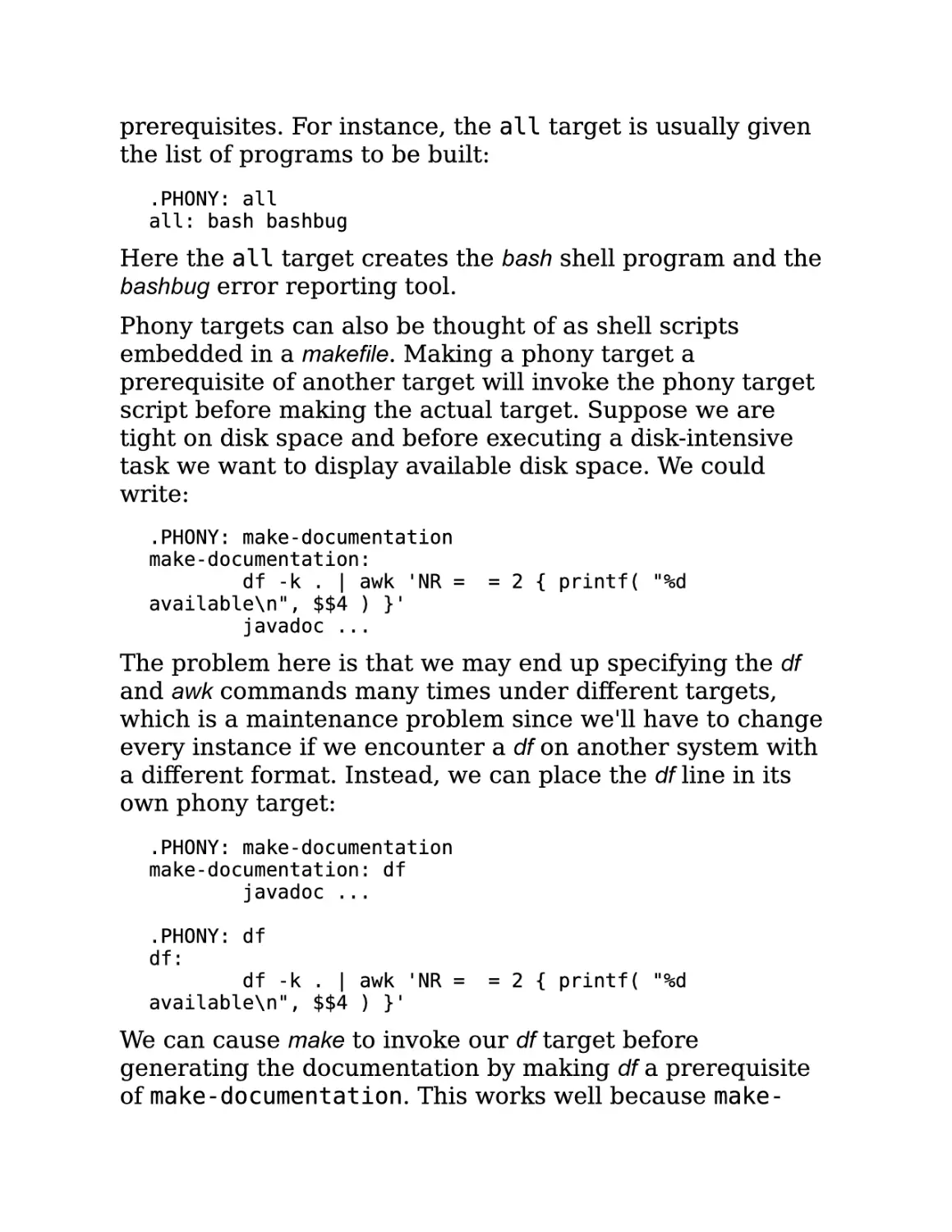
.PHONY: all
all: bash bashbug

Here the all target creates the bash shell program and the
bashbug error reporting tool.
Phony targets can also be thought of as shell scripts
embedded in a makefile. Making a phony target a
prerequisite of another target will invoke the phony target
script before making the actual target. Suppose we are
tight on disk space and before executing a disk-intensive
task we want to display available disk space. We could
write:
.PHONY: make-documentation
make-documentation:
df -k . | awk 'NR = = 2 { printf( "%d
available\n", $$4 ) }'
javadoc ...

The problem here is that we may end up specifying the df
and awk commands many times under different targets,
which is a maintenance problem since we'll have to change
every instance if we encounter a df on another system with
a different format. Instead, we can place the df line in its
own phony target:
.PHONY: make-documentation
make-documentation: df
javadoc ...
.PHONY: df
df:
df -k . | awk 'NR = = 2 { printf( "%d
available\n", $$4 ) }'

We can cause make to invoke our df target before
generating the documentation by making df a prerequisite
of make-documentation. This works well because make-

documentation is also a phony target. Now I can easily
reuse df in other targets.
There are a number of other good uses for phony targets.
The output of make can be confusing to read and debug.
There are several reasons for this: makefiles are written topdown but the commands are executed by make bottom-up;
also, there is no indication which rule is currently being
evaluated. The output of make can be made much easier to
read if major targets are commented in the make output.
Phony targets are a useful way to accomplish this. Here is
an example taken from the bash makefile:
$(Program): build_msg $(OBJECTS) $(BUILTINS_DEP) $(LIBDEP)
$(RM) $@
$(CC) $(LDFLAGS) -o $(Program) $(OBJECTS) $(LIBS)
ls -l $(Program)
size $(Program)
.PHONY: build_msg
build_msg:
@printf "#\n# Building $(Program)\n#\n"

Because the printf is in a phony target, the message is
printed immediately before any prerequisites are updated.
If the build message were instead placed as the first
command of the $(Program) command script, then it would
be executed after all compilation and dependency
generation. It is important to note that because phony
targets are always out of date, the phony build_msg target
causes $(Program) to be regenerated even when it is not
out of date. In this case, it seems a reasonable choice since
most of the computation is performed while compiling the
object files so only the final link will always be performed.
Phony targets can also be used to improve the "user
interface" of a makefile. Often targets are complex strings
containing directory path elements, additional filename
components (such as version numbers) and standard

suffixes. This can make specifying a target filename on the
command line a challenge. The problem can be avoided by
adding a simple phony target whose prerequisite is the
actual target file.
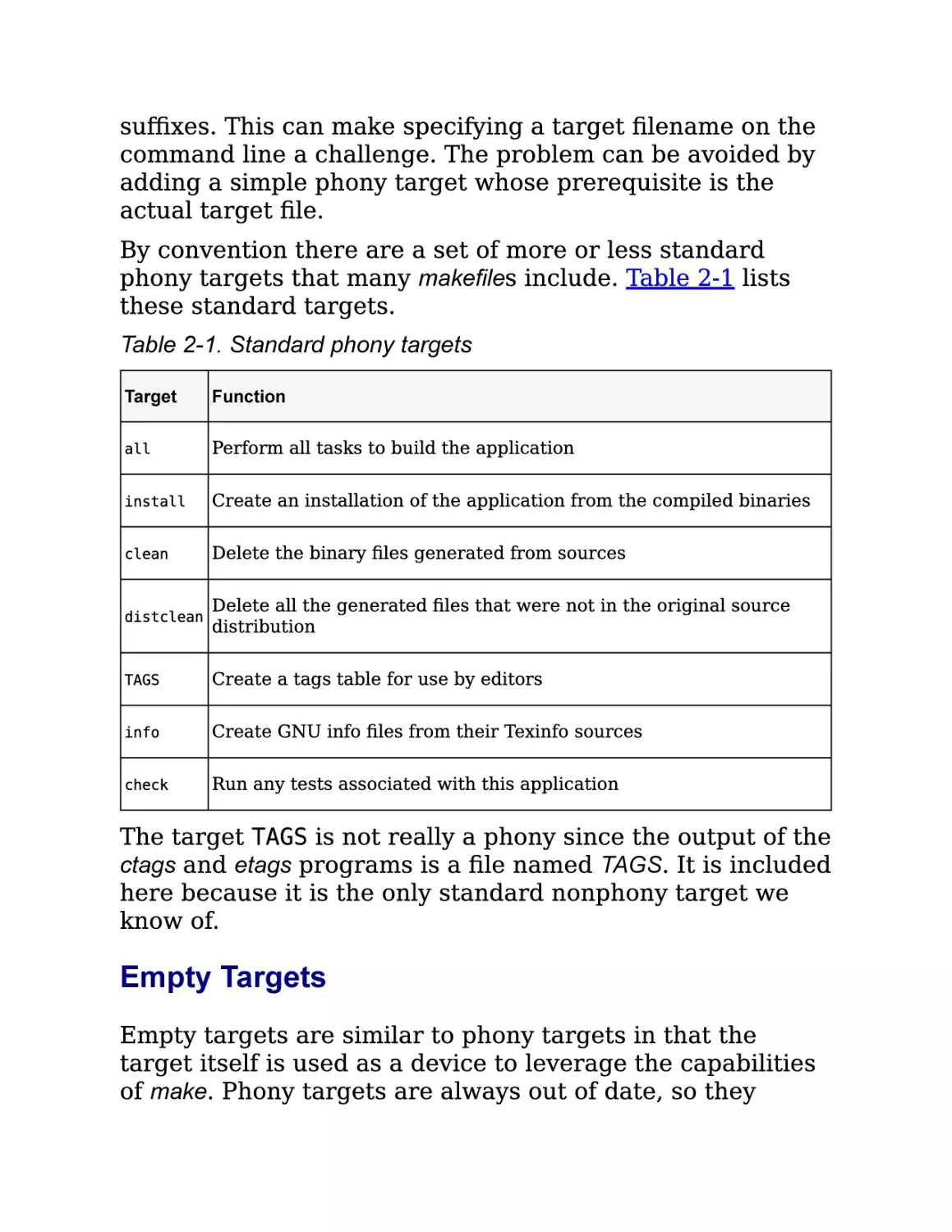
By convention there are a set of more or less standard
phony targets that many makefiles include. Table 2-1 lists
these standard targets.
Table 2-1. Standard phony targets
Target

Function

all

Perform all tasks to build the application

install

Create an installation of the application from the compiled binaries

clean

Delete the binary files generated from sources

distclean

Delete all the generated files that were not in the original source
distribution

TAGS

Create a tags table for use by editors

info

Create GNU info files from their Texinfo sources

check

Run any tests associated with this application

The target TAGS is not really a phony since the output of the
ctags and etags programs is a file named TAGS. It is included
here because it is the only standard nonphony target we
know of.

Empty Targets
Empty targets are similar to phony targets in that the
target itself is used as a device to leverage the capabilities
of make. Phony targets are always out of date, so they

always execute and they always cause their dependent (the
target associated with the prerequisite) to be remade. But
suppose we have some command, with no output file, that
needs to be performed only occasionally and we don't want
our dependents updated? For this, we can make a rule
whose target is an empty file (sometimes referred to as a
cookie):
prog: size prog.o
$(CC) $(LDFLAGS) -o $@ $^
size: prog.o
size $^
touch size

Notice that the size rule uses touch to create an empty file
named size after it completes. This empty file is used for its
timestamp so that make will execute the size rule only
when prog.o has been updated. Furthermore, the size
prerequisite to prog will not force an update of prog unless
its object file is also newer.
Empty files are particularly useful when combined with the
automatic variable $?. We discuss automatic variables in
Section 2.2.1, but a preview of this variable won't hurt.
Within the command script part of a rule, make defines the
variable $? to be the set of prerequisites that are newer
than the target. Here is a rule to print all the files that have
changed since the last time make print was executed:
print: *.[hc]
lpr $?
touch $@

Generally, empty files can be used to mark the last time a
particular event has taken place.

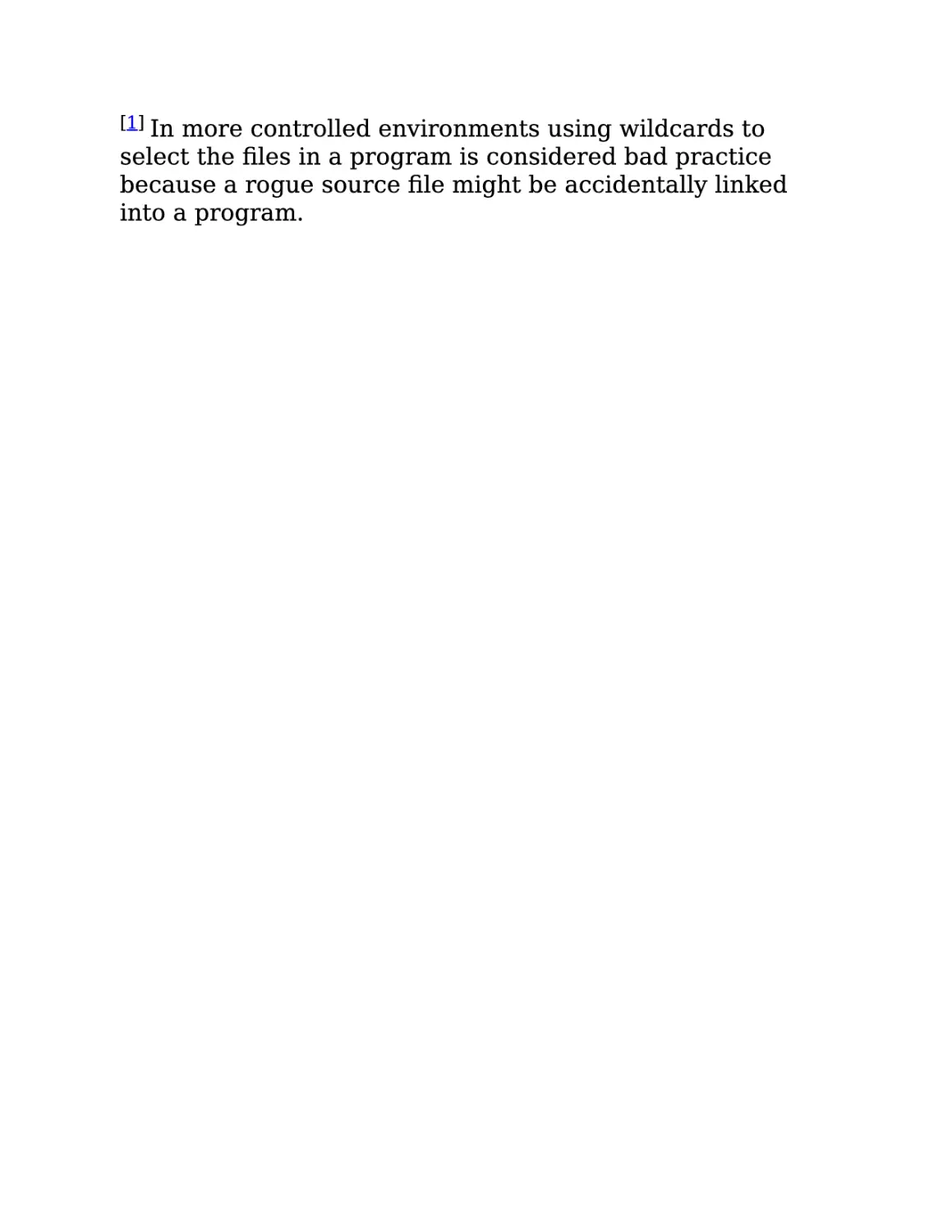
[1] In

more controlled environments using wildcards to
select the files in a program is considered bad practice
because a rogue source file might be accidentally linked
into a program.

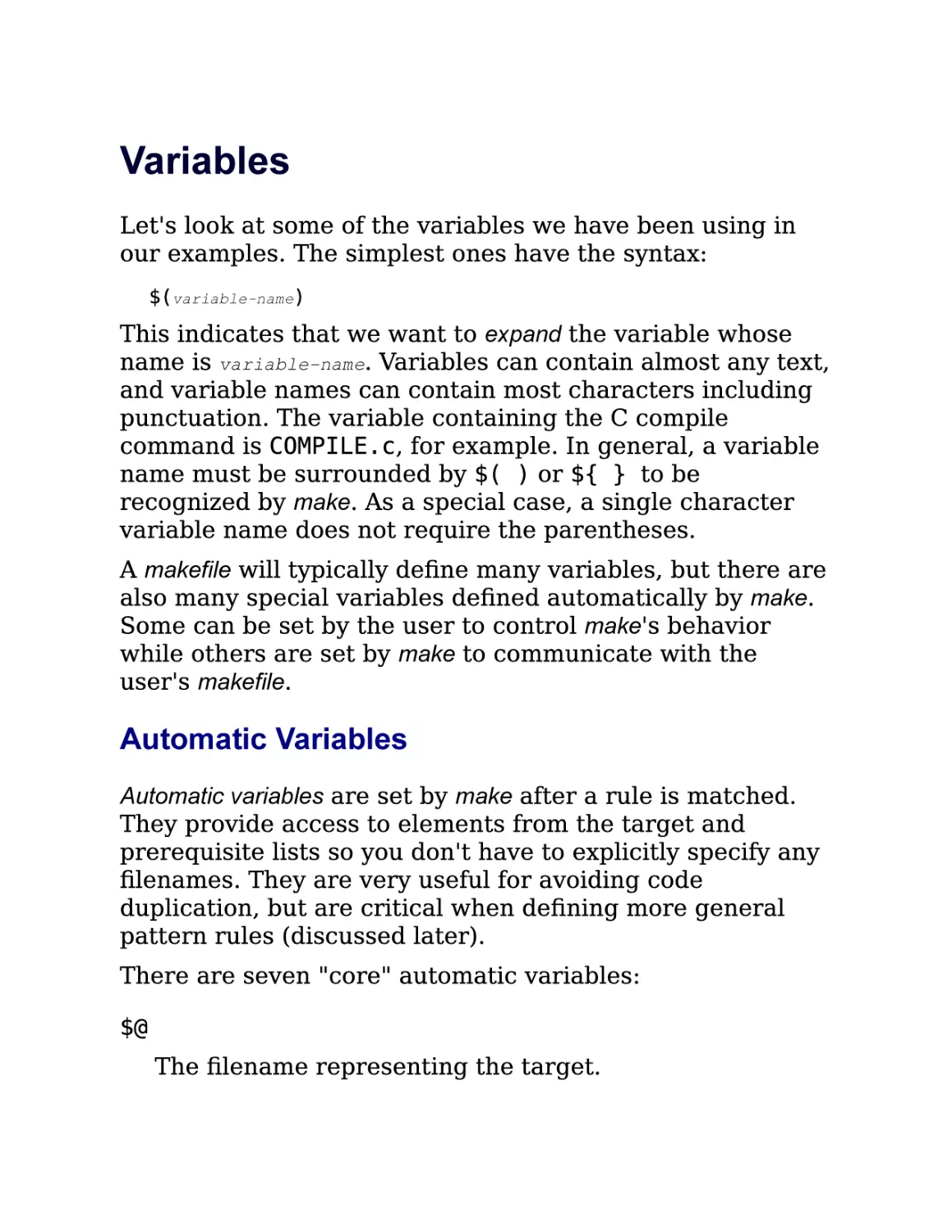
Variables
Let's look at some of the variables we have been using in
our examples. The simplest ones have the syntax:
$(variable-name)

This indicates that we want to expand the variable whose
name is variable-name. Variables can contain almost any text,
and variable names can contain most characters including
punctuation. The variable containing the C compile
command is COMPILE.c, for example. In general, a variable
name must be surrounded by $( ) or ${ } to be
recognized by make. As a special case, a single character
variable name does not require the parentheses.
A makefile will typically define many variables, but there are
also many special variables defined automatically by make.
Some can be set by the user to control make's behavior
while others are set by make to communicate with the
user's makefile.

Automatic Variables
Automatic variables are set by make after a rule is matched.

They provide access to elements from the target and
prerequisite lists so you don't have to explicitly specify any
filenames. They are very useful for avoiding code
duplication, but are critical when defining more general
pattern rules (discussed later).
There are seven "core" automatic variables:

$@
The filename representing the target.

$%
The filename element of an archive member
specification.

$<
The filename of the first prerequisite.

$?
The names of all prerequisites that are newer than the
target, separated by spaces.

$^
The filenames of all the prerequisites, separated by
spaces. This list has duplicate filenames removed since
for most uses, such as compiling, copying, etc.,
duplicates are not wanted.

$+
Similar to $^, this is the names of all the prerequisites
separated by spaces, except that $+ includes duplicates.
This variable was created for specific situations such as
arguments to linkers where duplicate values have
meaning.

$*
The stem of the target filename. A stem is typically a
filename without its suffix. (We'll discuss how stems are
computed later in Section 2.4.) Its use outside of pattern
rules is discouraged.
In addition, each of the above variables has two variants for
compatibility with other makes. One variant returns only
the directory portion of the value. This is indicated by
appending a "D" to the symbol, $(@D), $(<D), etc. The
other variant returns only the file portion of the value. This
is indicated by appending an F to the symbol, $(@F), $(<F),

etc. Note that these variant names are more than one
character long and so must be enclosed in parentheses.
GNU make provides a more readable alternative with the
dir and notdir functions. We will discuss functions in
Chapter 4.
Automatic variables are set by make after a rule has been
matched with its target and prerequisites so the variables
are only available in the command script of a rule.
Here is our makefile with explicit filenames replaced by the
appropriate automatic variable.
count_words: count_words.o counter.o lexer.o -lfl
gcc $^ -o $@
count_words.o: count_words.c
gcc -c $<
counter.o: counter.c
gcc -c $<
lexer.o: lexer.c
gcc -c $<
lexer.c: lexer.l
flex -t $< > $@

Finding Files with VPATH and vpath
Our examples so far have been simple enough that the
makefile and sources all lived in a single directory. Real
world programs are more complex (when's the last time
you worked on a single directory project?). Let's refactor
our example and create a more realistic file layout. We can
modify our word counting program by refactoring main into
a function called counter.
#include <lexer.h>
#include <counter.h>
void counter( int counts[4] )
{
while ( yylex( ) )
;

}

counts[0]
counts[1]
counts[2]
counts[3]

=
=
=
=

fee_count;
fie_count;
foe_count;
fum_count;

A reusable library function should have a declaration in a
header file, so let's create counter.h containing our
declaration:
#ifndef COUNTER_H_
#define COUNTER_H_
extern void
counter( int counts[4] );
#endif

We can also place the declarations for our lexer.l symbols in
lexer.h:
#ifndef LEXER_H_
#define LEXER_H_

extern int fee_count, fie_count, foe_count, fum_count;
extern int yylex( void );
#endif

In a traditional source tree layout the header files are
placed in an include directory and the source is placed in a
src directory. We'll do this and put our makefile in the parent
directory. Our example program now has the layout shown
in Figure 2-1.

Figure 2-1. Example source tree layout

Since our source files now include header files, these new
dependencies should be recorded in our makefile so that
when a header file is modified, the corresponding object
file will be updated.
count_words: count_words.o counter.o lexer.o -lfl
gcc $^ -o $@
count_words.o: count_words.c include/counter.h
gcc -c $<
counter.o: counter.c include/counter.h include/lexer.h
gcc -c $<
lexer.o: lexer.c include/lexer.h
gcc -c $<

lexer.c: lexer.l
flex -t $< > $@

Now when we run our makefile, we get:
$make
make: *** No rule to make target `count_words.c', needed
by `count_words.o'. Stop.

Oops, what happened? The makefile is trying to update
count_words.c, but that's a source file! Let's "play make." Our
first prerequisite is count_words.o. We see the file is missing
and look for a rule to create it. The explicit rule for creating
count_words.o references count_words.c. But why can't make
find the source file? Because the source file is in the src
directory not the current directory. Unless you direct it
otherwise, make will look only in the current directory for
its targets and prerequisites. How do we get make to look in
the src directory for source files? Or, more generally, how
do we tell make where our source code is?
You can tell make to look in different directories for its
source files using the VPATH and vpath features. To fix our
immediate problem, we can add a VPATH assignment to the
makefile:
VPATH = src

This indicates that make should look in the directory src if
the files it wants are not in the current directory. Now
when we run our makefile, we get:
$make
gcc -c src/count_words.c -o count_words.o
src/count_words.c:2:21: counter.h: No such file or
directory
make: *** [count_words.o] Error 1

Notice that make now successfully tries to compile the first
file, filling in correctly the relative path to the source. This
is another reason to use automatic variables: make cannot
use the appropriate path to the source if you hardcode the

filename. Unfortunately, the compilation dies because gcc
can't find the include file. We can fix this latest problem by
"customizing" the implicit compilation rule with the
appropriate -I option:
CPPFLAGS = -I include

and changing occurrences of gcc to gcc$(CPPFLAGS). Now
the build succeeds:
$make
gcc -I include -c src/count_words.c -o count_words.o
gcc -I include -c src/counter.c -o counter.o
flex -t src/lexer.l > lexer.c
gcc -I include -c lexer.c -o lexer.o
gcc count_words.o counter.o lexer.o /lib/libfl.a -o
count_words

The VPATH variable consists of a list of directories to search
when make needs a file. The list will be searched for targets
as well as prerequisites, but not for files mentioned in
command scripts. The list of directories can be separated
by spaces or colons on Unix and separated by spaces or
semicolons on Windows. I prefer to use spaces since that
works on all systems and we can avoid the whole
colon/semicolon imbroglio. Also, the directories are easier
to read when separated by spaces.
The VPATH variable is good because it solved our searching
problem above, but it is a rather large hammer. make will
search each directory for any file it needs. If a file of the
same name exists in multiple places in the VPATH list, make
grabs the first one. Sometimes this can be a problem.
The vpath directive is a more precise way to achieve our
goals. The syntax of this directive is:
vpathpattern

directory-list

So our previous VPATH use can be rewritten as:

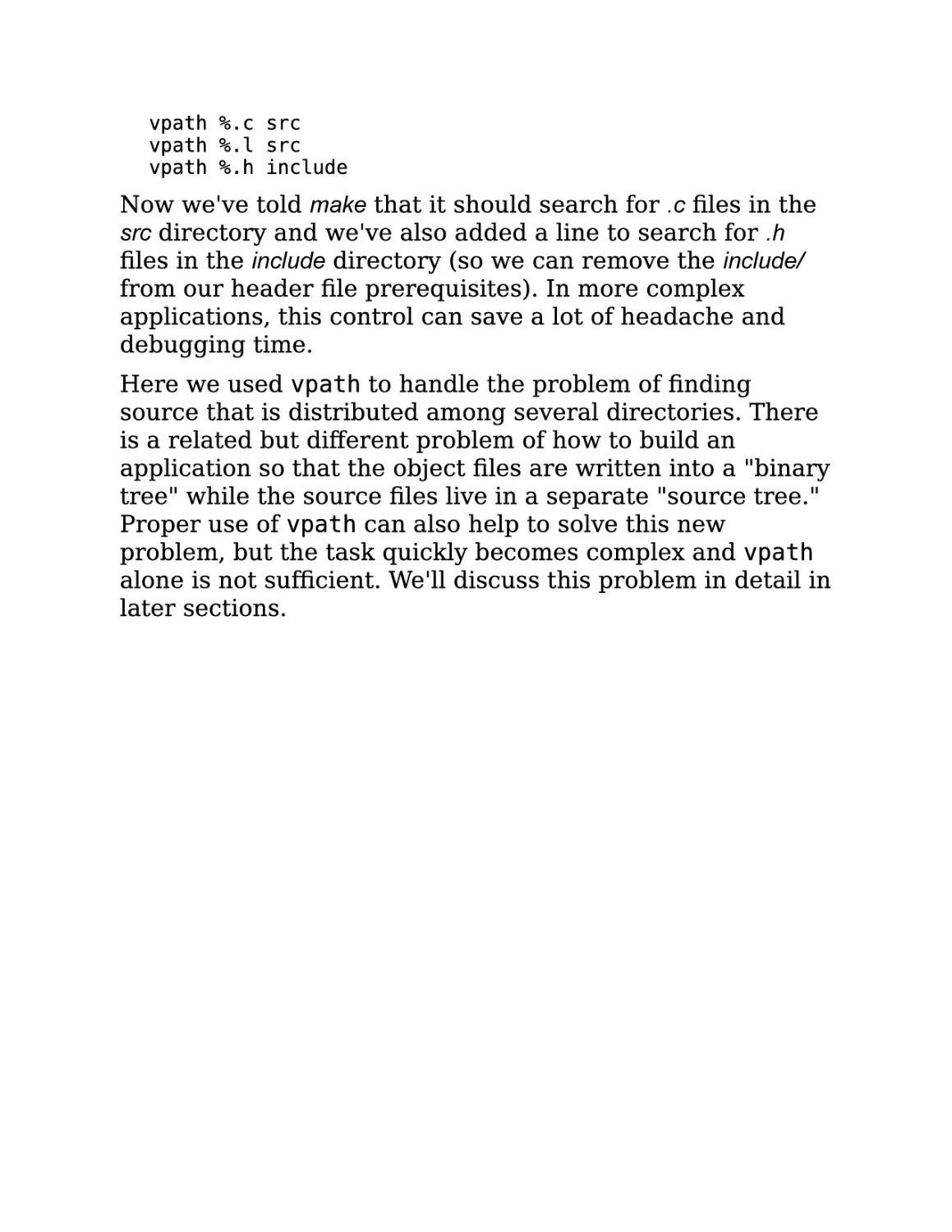
vpath %.c src
vpath %.l src
vpath %.h include

Now we've told make that it should search for .c files in the
src directory and we've also added a line to search for .h
files in the include directory (so we can remove the include/
from our header file prerequisites). In more complex
applications, this control can save a lot of headache and
debugging time.
Here we used vpath to handle the problem of finding
source that is distributed among several directories. There
is a related but different problem of how to build an
application so that the object files are written into a "binary
tree" while the source files live in a separate "source tree."
Proper use of vpath can also help to solve this new
problem, but the task quickly becomes complex and vpath
alone is not sufficient. We'll discuss this problem in detail in
later sections.

Pattern Rules
The makefile examples we've been looking at are a bit
verbose. For a small program of a dozen files or less we
may not care, but for programs with hundreds or thousands
of files, specifying each target, prerequisite, and command
script becomes unworkable. Furthermore, the commands
themselves represent duplicate code in our makefile. If the
commands contain a bug or ever change, we would have to
update all these rules. This can be a major maintenance
problem and source of bugs.
Many programs that read one file type and output another
conform to standard conventions. For instance, all C
compilers assume that files that have a .c suffix contain C
source code and that the object filename can be derived by
replacing the .c suffix with .o (or .obj for some Windows
compilers). In the previous chapter, we noticed that flex
input files use the .l suffix and that flex generates .c files.
These conventions allow make to simplify rule creation by
recognizing common filename patterns and providing builtin rules for processing them. For example, by using these
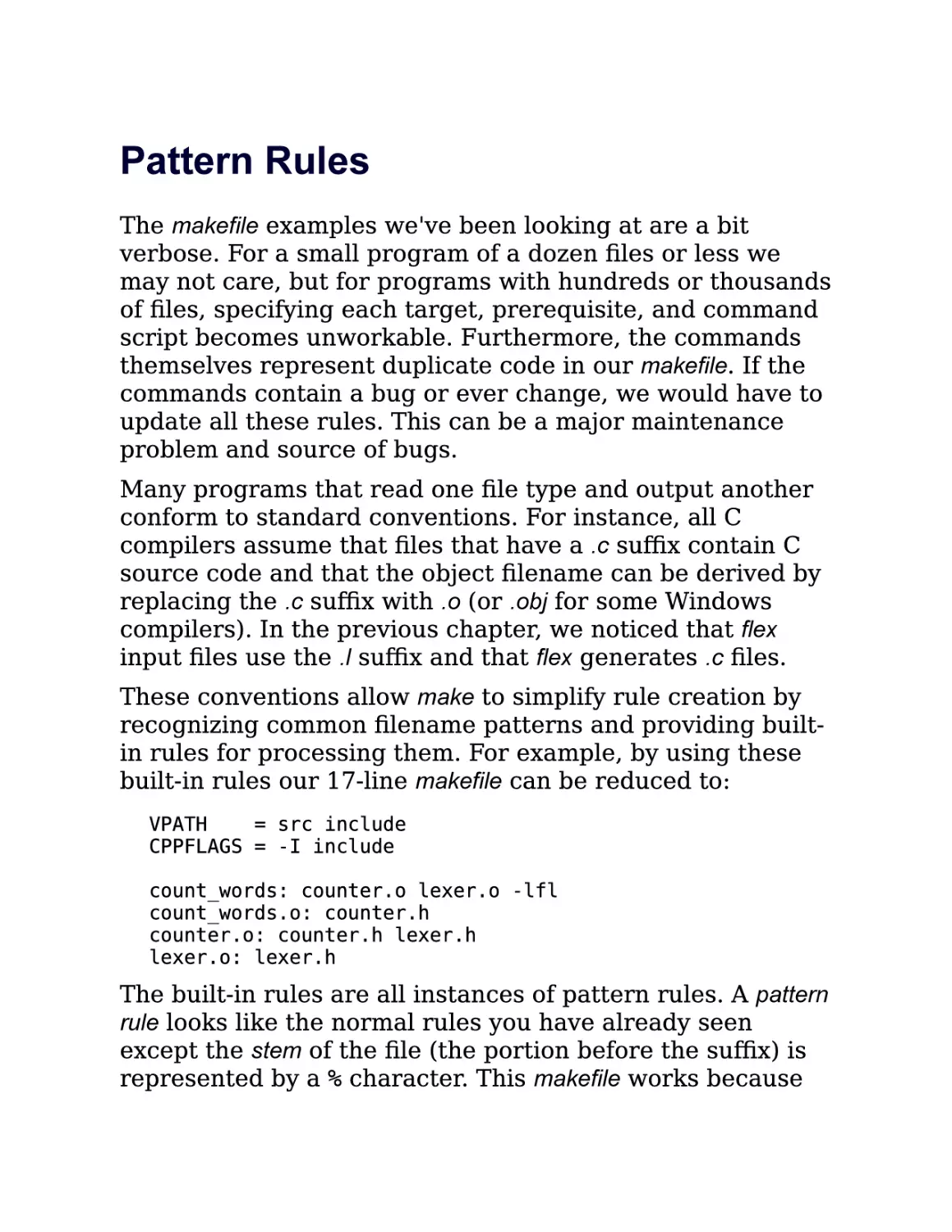
built-in rules our 17-line makefile can be reduced to:
VPATH
= src include
CPPFLAGS = -I include
count_words: counter.o lexer.o -lfl
count_words.o: counter.h
counter.o: counter.h lexer.h
lexer.o: lexer.h

The built-in rules are all instances of pattern rules. A pattern
rule looks like the normal rules you have already seen
except the stem of the file (the portion before the suffix) is
represented by a % character. This makefile works because

of three built-in rules. The first specifies how to compile a
.o file from a .c file:
%.o: %.c
$(COMPILE.c) $(OUTPUT_OPTION) $<

The second specifies how to make a .c file from a .l file:
%.c: %.l
@$(RM) $@
$(LEX.l) $< > $@

Finally, there is a special rule to generate a file with no
suffix (always an executable) from a .c file:
%: %.o

$(LINK.o) $^ $(LOADLIBES) $(LDLIBS) -o $@

We'll go into the details of this syntax in a bit, but first let's
go over make's output carefully and see how make applies
these built-in rules.
When we run make on our seven-line makefile, the output is:
$make
gcc -I include -c -o count_words.o src/count_words.c
gcc -I include -c -o counter.o src/counter.c
flex -t src/lexer.l > lexer.c
gcc -I include -c -o lexer.o lexer.c
gcc count_words.o counter.o lexer.o /lib/libfl.a -o
count_words
rm lexer.c

First, make reads the makefile and sets the default goal to
count_words since there are no command-line targets
specified. Looking at the default goal, make identifies four
prerequisites: count_words.o (this prerequisite is missing
from the makefile, but is provided by the implicit rule),
counter.o, lexer.o, and -lfl. It then tries to update each
prerequisite in turn.
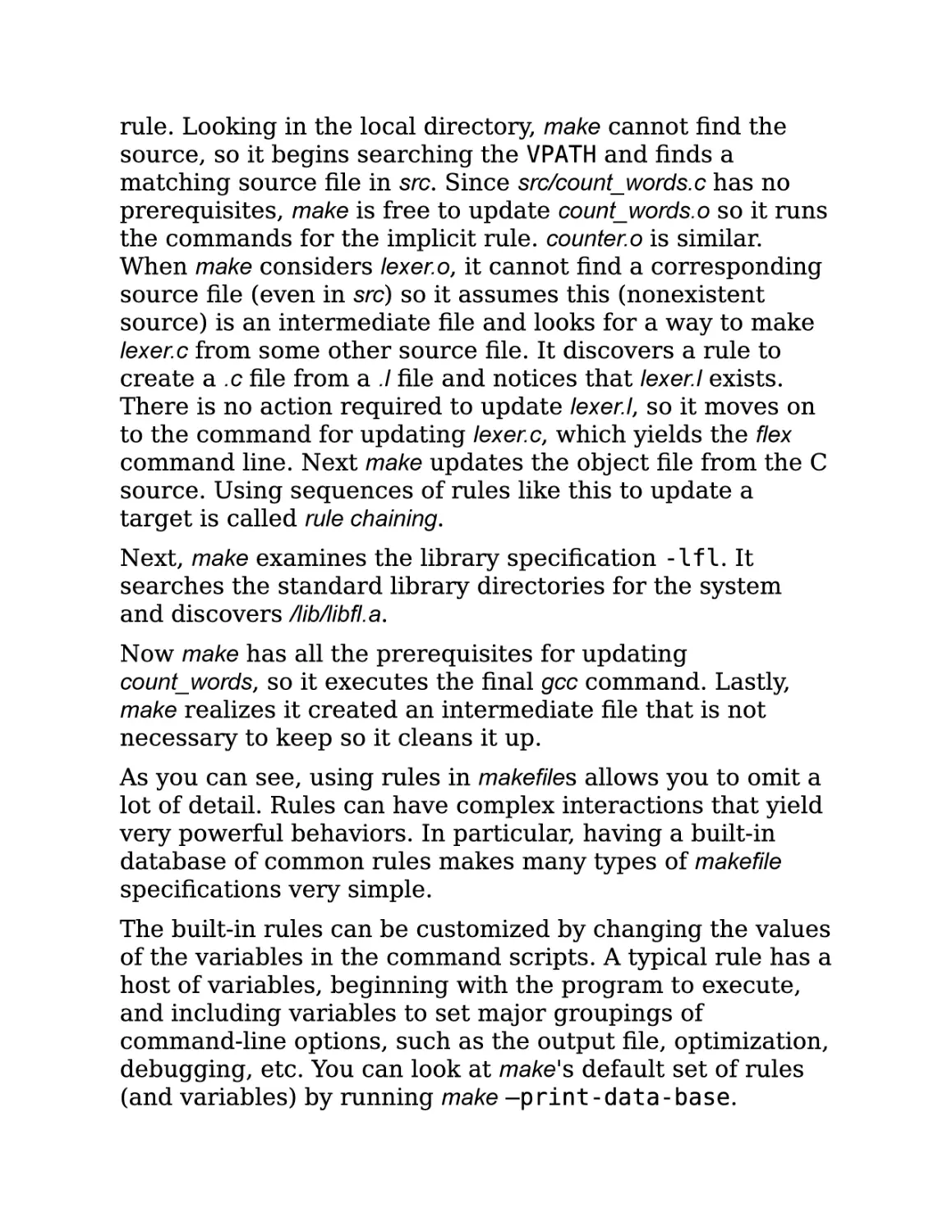
When make examines the first prerequisite, count_words.o,
make finds no explicit rule for it but discovers the implicit

rule. Looking in the local directory, make cannot find the
source, so it begins searching the VPATH and finds a
matching source file in src. Since src/count_words.c has no
prerequisites, make is free to update count_words.o so it runs
the commands for the implicit rule. counter.o is similar.
When make considers lexer.o, it cannot find a corresponding
source file (even in src) so it assumes this (nonexistent
source) is an intermediate file and looks for a way to make
lexer.c from some other source file. It discovers a rule to
create a .c file from a .l file and notices that lexer.l exists.
There is no action required to update lexer.l, so it moves on
to the command for updating lexer.c, which yields the flex
command line. Next make updates the object file from the C
source. Using sequences of rules like this to update a
target is called rule chaining.
Next, make examines the library specification -lfl. It
searches the standard library directories for the system
and discovers /lib/libfl.a.
Now make has all the prerequisites for updating
count_words, so it executes the final gcc command. Lastly,
make realizes it created an intermediate file that is not
necessary to keep so it cleans it up.
As you can see, using rules in makefiles allows you to omit a
lot of detail. Rules can have complex interactions that yield
very powerful behaviors. In particular, having a built-in
database of common rules makes many types of makefile
specifications very simple.
The built-in rules can be customized by changing the values
of the variables in the command scripts. A typical rule has a
host of variables, beginning with the program to execute,
and including variables to set major groupings of
command-line options, such as the output file, optimization,
debugging, etc. You can look at make's default set of rules
(and variables) by running make —print-data-base.

The Patterns
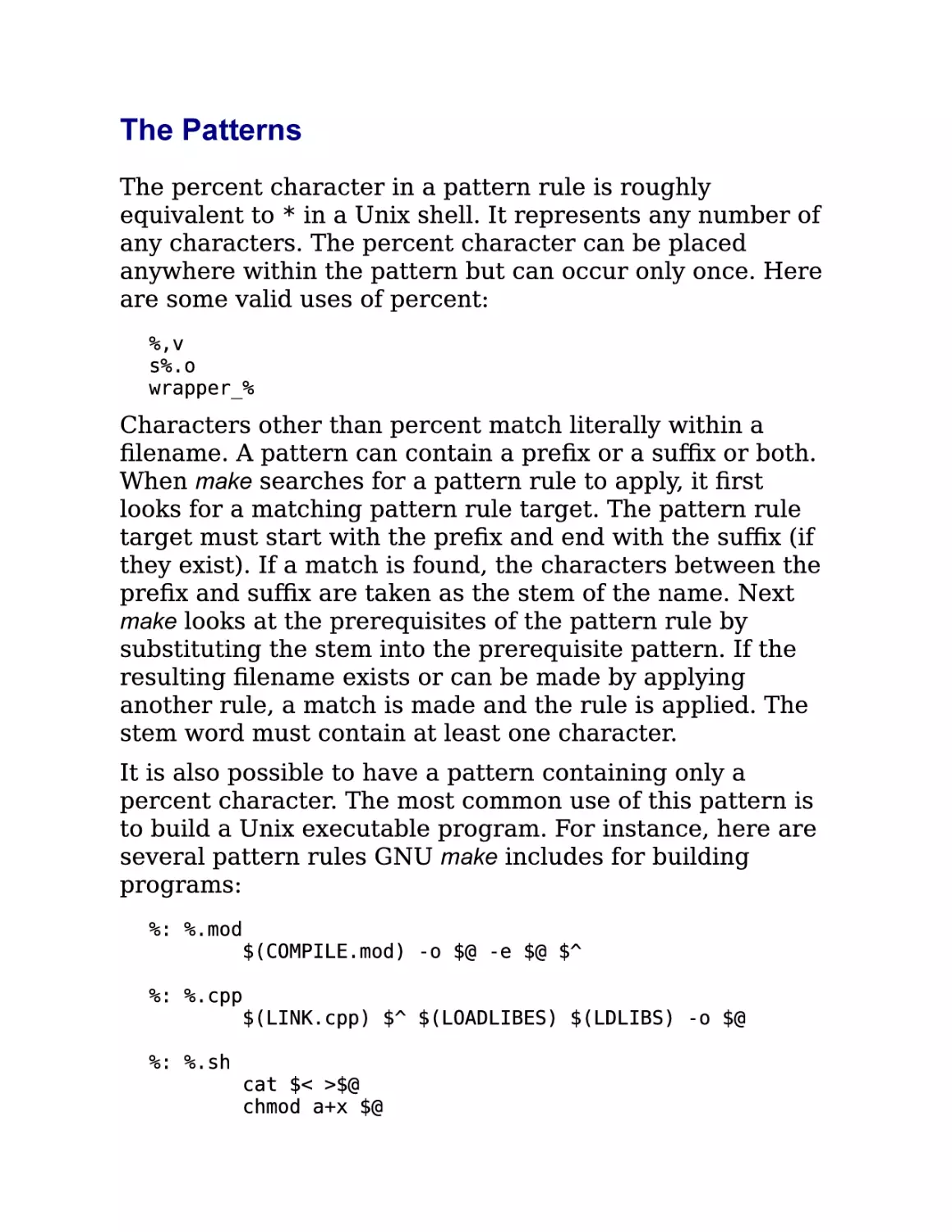
The percent character in a pattern rule is roughly
equivalent to * in a Unix shell. It represents any number of
any characters. The percent character can be placed
anywhere within the pattern but can occur only once. Here
are some valid uses of percent:
%,v
s%.o
wrapper_%

Characters other than percent match literally within a
filename. A pattern can contain a prefix or a suffix or both.
When make searches for a pattern rule to apply, it first
looks for a matching pattern rule target. The pattern rule
target must start with the prefix and end with the suffix (if
they exist). If a match is found, the characters between the
prefix and suffix are taken as the stem of the name. Next
make looks at the prerequisites of the pattern rule by
substituting the stem into the prerequisite pattern. If the
resulting filename exists or can be made by applying
another rule, a match is made and the rule is applied. The
stem word must contain at least one character.
It is also possible to have a pattern containing only a
percent character. The most common use of this pattern is
to build a Unix executable program. For instance, here are
several pattern rules GNU make includes for building
programs:
%: %.mod
$(COMPILE.mod) -o $@ -e $@ $^
%: %.cpp
$(LINK.cpp) $^ $(LOADLIBES) $(LDLIBS) -o $@
%: %.sh

cat $< >$@
chmod a+x $@

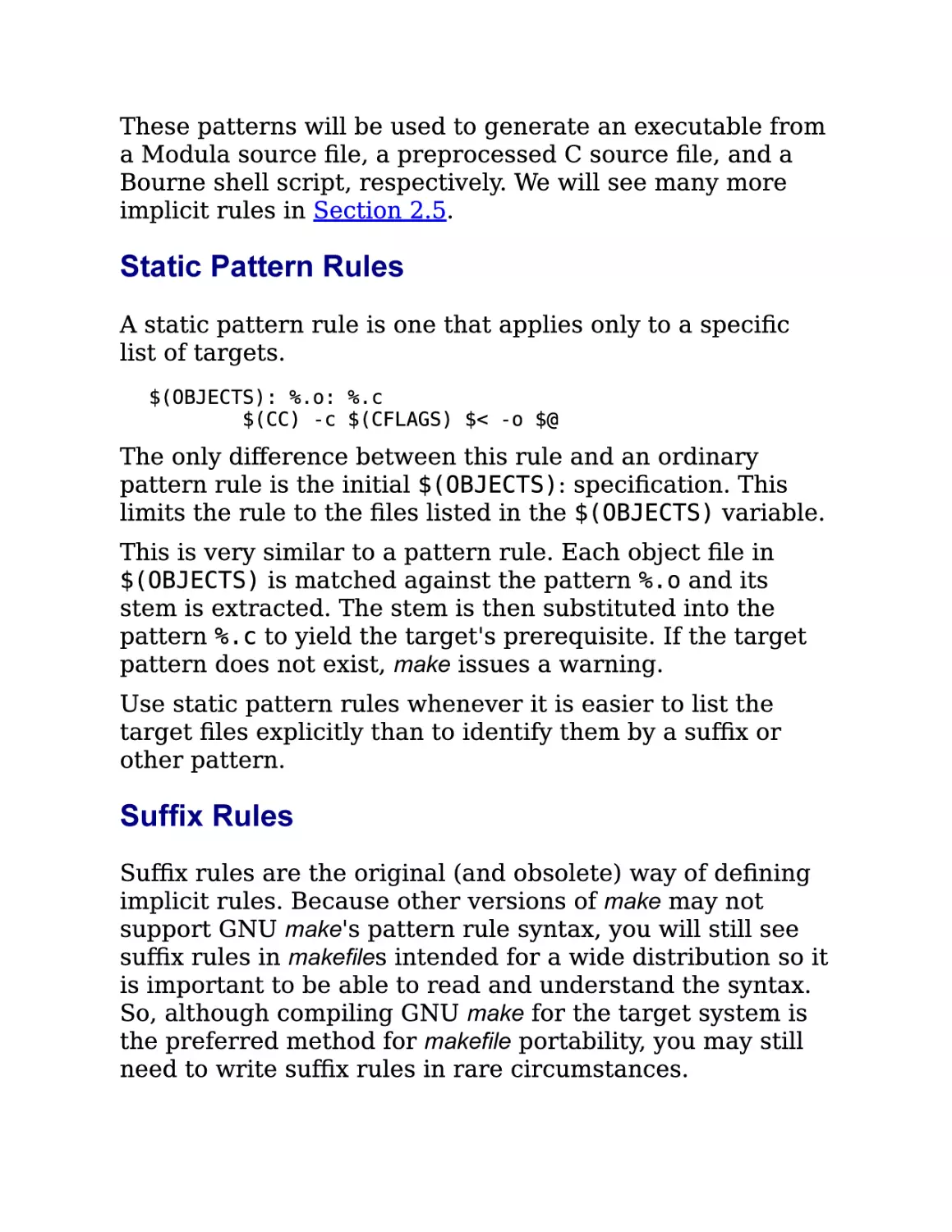
These patterns will be used to generate an executable from
a Modula source file, a preprocessed C source file, and a
Bourne shell script, respectively. We will see many more
implicit rules in Section 2.5.

Static Pattern Rules
A static pattern rule is one that applies only to a specific
list of targets.
$(OBJECTS): %.o: %.c
$(CC) -c $(CFLAGS) $< -o $@

The only difference between this rule and an ordinary
pattern rule is the initial $(OBJECTS): specification. This
limits the rule to the files listed in the $(OBJECTS) variable.
This is very similar to a pattern rule. Each object file in
$(OBJECTS) is matched against the pattern %.o and its
stem is extracted. The stem is then substituted into the
pattern %.c to yield the target's prerequisite. If the target
pattern does not exist, make issues a warning.
Use static pattern rules whenever it is easier to list the
target files explicitly than to identify them by a suffix or
other pattern.

Suffix Rules
Suffix rules are the original (and obsolete) way of defining
implicit rules. Because other versions of make may not
support GNU make's pattern rule syntax, you will still see
suffix rules in makefiles intended for a wide distribution so it
is important to be able to read and understand the syntax.
So, although compiling GNU make for the target system is
the preferred method for makefile portability, you may still
need to write suffix rules in rare circumstances.

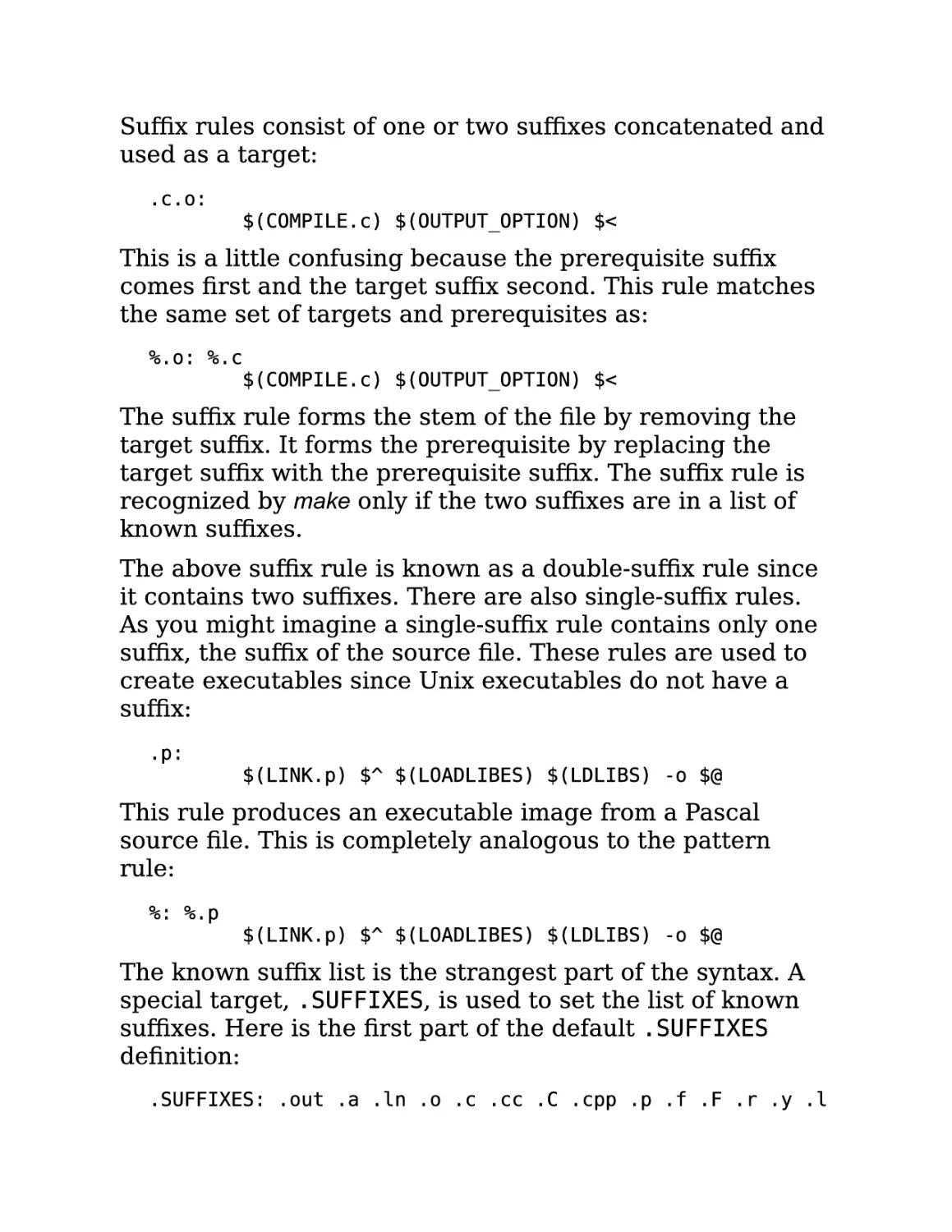
Suffix rules consist of one or two suffixes concatenated and
used as a target:
.c.o:

$(COMPILE.c) $(OUTPUT_OPTION) $<

This is a little confusing because the prerequisite suffix
comes first and the target suffix second. This rule matches
the same set of targets and prerequisites as:
%.o: %.c
$(COMPILE.c) $(OUTPUT_OPTION) $<

The suffix rule forms the stem of the file by removing the
target suffix. It forms the prerequisite by replacing the
target suffix with the prerequisite suffix. The suffix rule is
recognized by make only if the two suffixes are in a list of
known suffixes.
The above suffix rule is known as a double-suffix rule since
it contains two suffixes. There are also single-suffix rules.
As you might imagine a single-suffix rule contains only one
suffix, the suffix of the source file. These rules are used to
create executables since Unix executables do not have a
suffix:
.p:

$(LINK.p) $^ $(LOADLIBES) $(LDLIBS) -o $@

This rule produces an executable image from a Pascal
source file. This is completely analogous to the pattern
rule:
%: %.p

$(LINK.p) $^ $(LOADLIBES) $(LDLIBS) -o $@

The known suffix list is the strangest part of the syntax. A
special target, .SUFFIXES, is used to set the list of known
suffixes. Here is the first part of the default .SUFFIXES
definition:
.SUFFIXES: .out .a .ln .o .c .cc .C .cpp .p .f .F .r .y .l

You can add your own suffixes by simply adding a
.SUFFIXES rule to your makefile:
.SUFFIXES: .pdf .fo .html .xml

If you want to delete all the known suffixes (because they
are interfering with your special suffixes) simply specify no
prerequisites:
.SUFFIXES:

You can also use the command-line option —no-builtinrules (or -r).
We will not use this old syntax in the rest of this book
because GNU make's pattern rules are clearer and more
general.

The Implicit Rules Database
GNU make 3.80 has about 90 built-in implicit rules. An
implicit rule is either a pattern rule or a suffix rule. There
are built-in pattern rules for C, C++, Pascal, FORTRAN,
ratfor, Modula, Texinfo, TEX (including Tangle and Weave),
Emacs Lisp, RCS, and SCCS. In addition, there are rules for
supporting programs for these languages, such as cpp, as,
yacc, lex, tangle, weave and dvi tools.
If you are using any of these tools, you'll probably find most
of what you need in the built-in rules. If you're using some
unsupported languages such as Java or XML, you will have
to write rules of your own. But don't worry, you typically
need only a few rules to support a language and they are
quite easy to write.
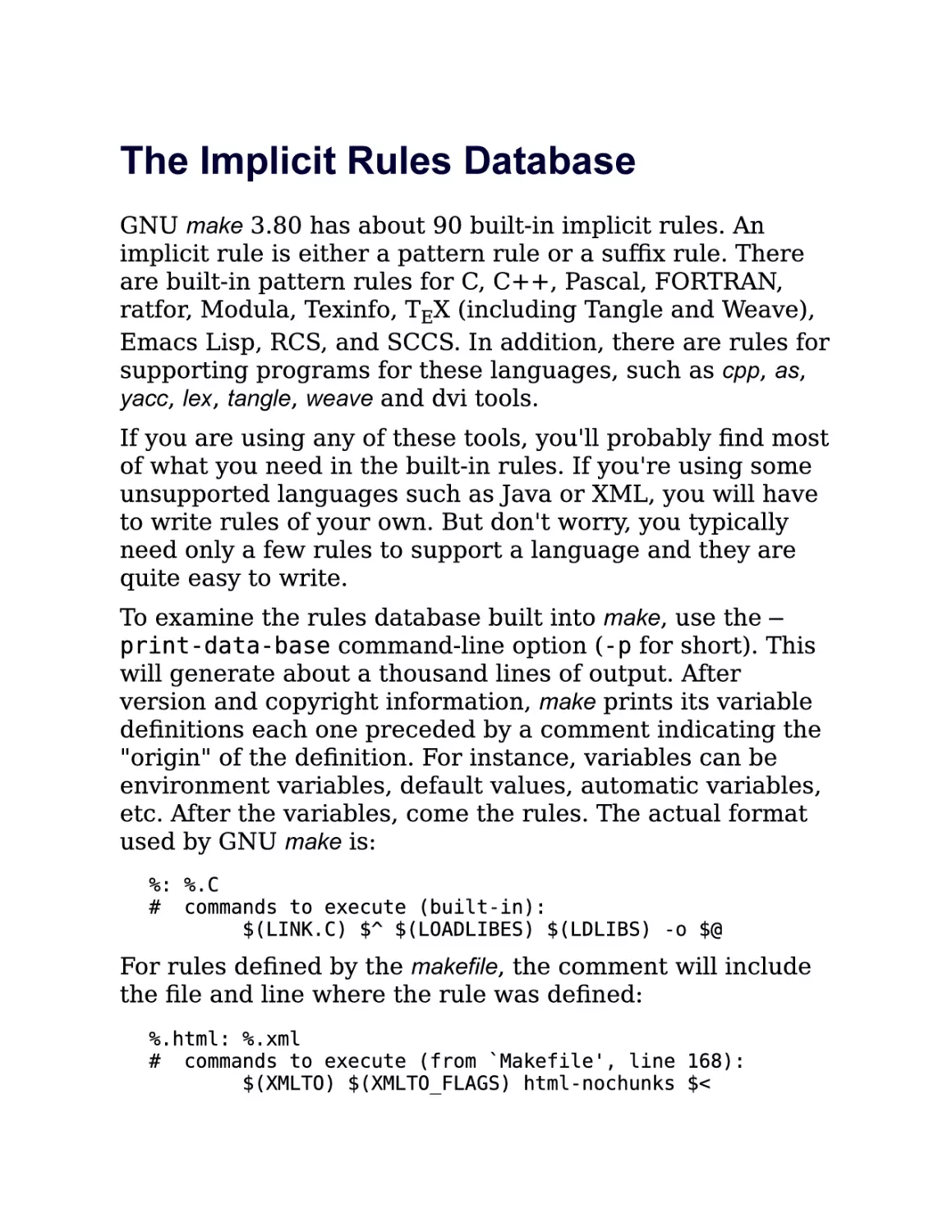
To examine the rules database built into make, use the —
print-data-base command-line option (-p for short). This
will generate about a thousand lines of output. After
version and copyright information, make prints its variable
definitions each one preceded by a comment indicating the
"origin" of the definition. For instance, variables can be
environment variables, default values, automatic variables,
etc. After the variables, come the rules. The actual format
used by GNU make is:
%: %.C
# commands to execute (built-in):
$(LINK.C) $^ $(LOADLIBES) $(LDLIBS) -o $@

For rules defined by the makefile, the comment will include
the file and line where the rule was defined:
%.html: %.xml
# commands to execute (from `Makefile', line 168):
$(XMLTO) $(XMLTO_FLAGS) html-nochunks $<

Working with Implicit Rules
The built-in implicit rules are applied whenever a target is
being considered and there is no explicit rule to update it.
So using an implicit rule is easy: simply do not specify a
command script when adding your target to the makefile.
This causes make to search its built-in database to satisfy
the target. Usually this does just what you want, but in rare
cases your development environment can cause problems.
For instance, suppose you have a mixed language
environment consisting of Lisp and C source code. If the
file editor.l and editor.c both exist in the same directory (say
one is a low-level implementation accessed by the other)
make will believe that the Lisp file is really a flex file (recall
flex files use the .l suffix) and that the C source is the output
of the flex command. If editor.o is a target and editor.l is
newer than editor.c, make will attempt to "update" the C file
with the output of flex overwriting your source code. Gack.
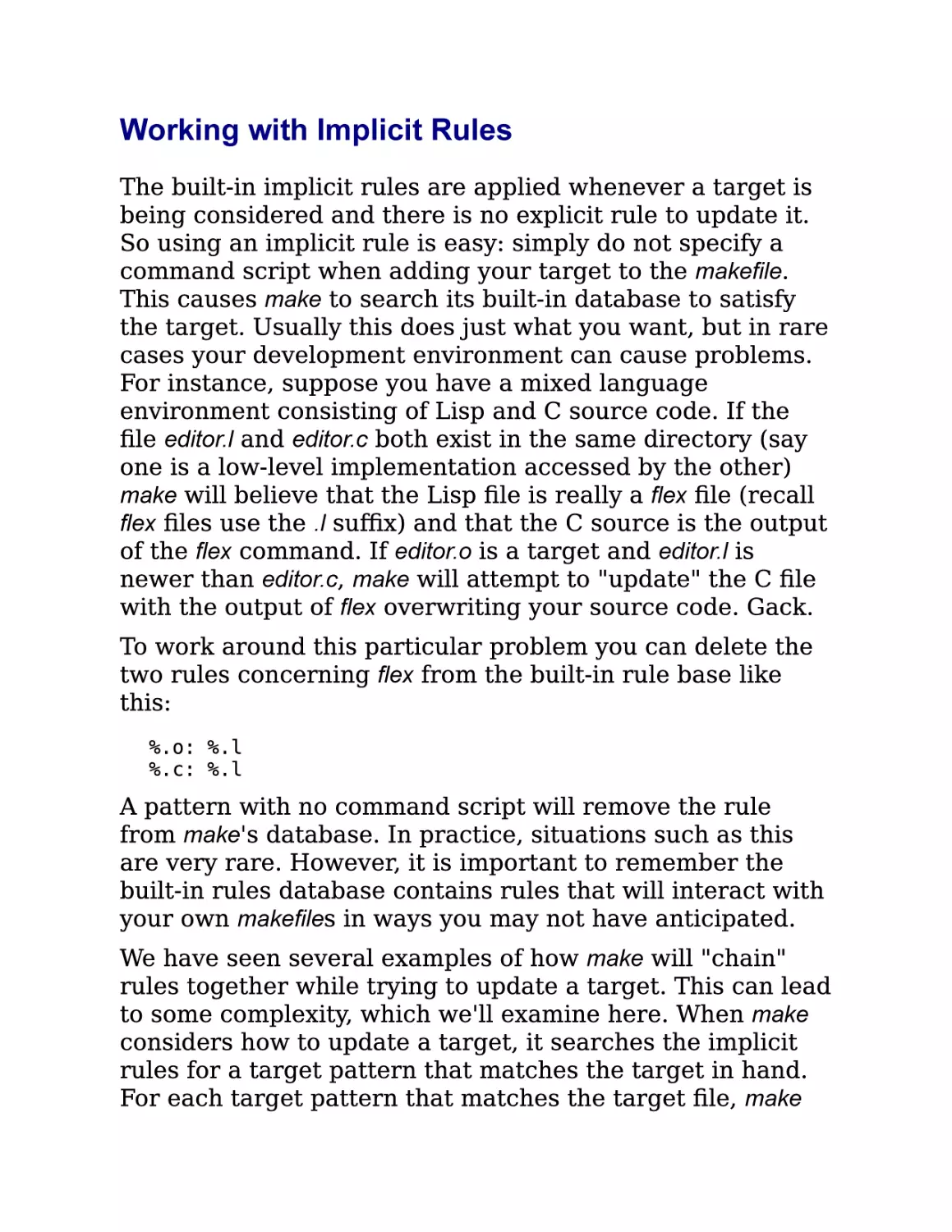
To work around this particular problem you can delete the
two rules concerning flex from the built-in rule base like
this:
%.o: %.l
%.c: %.l

A pattern with no command script will remove the rule
from make's database. In practice, situations such as this
are very rare. However, it is important to remember the
built-in rules database contains rules that will interact with
your own makefiles in ways you may not have anticipated.
We have seen several examples of how make will "chain"
rules together while trying to update a target. This can lead
to some complexity, which we'll examine here. When make
considers how to update a target, it searches the implicit
rules for a target pattern that matches the target in hand.
For each target pattern that matches the target file, make

will look for an existing matching prerequisite. That is,
after matching the target pattern, make immediately looks
for the prerequisite "source" file. If the prerequisite is
found, the rule is used. For some target patterns, there are
many possible source files. For instance, a .o file can be
made from .c, .cc, .cpp, .p, .f, .r, .s, and .mod files. But what if
the source is not found after searching all possible rules? In
this case, make will search the rules again, this time
assuming that the matching source file should be
considered as a new target for updating. By performing this
search recursively, make can find a "chain" of rules that
allows updating a target. We saw this in our lexer.o
example. make was able to update the lexer.o target from
lexer.l even though the intermediate .c file was missing by
invoking the .l to .c rule, then the .c to .o rule.
One of the more impressive sequences that make can
produce automatically from its database is shown here.
First, we setup our experiment by creating an empty yacc
source file and registering with RCS using ci (that is, we
want a version-controlled yacc source file):
$touch foo.y
$ ci foo.y
foo.y,v <-- foo.y
.
initial revision: 1.1
done

Now, we ask make how it would create the executable foo.
The —just-print (or -n) option tells make to report what
actions it would perform without actually running them.
Notice that we have no makefile and no "source" code, only
an RCS file:
$make -n foo
co foo.y,v foo.y
foo.y,v --> foo.y
revision 1.1
done

bison -y foo.y
mv -f y.tab.c foo.c
gcc
-c -o foo.o foo.c
gcc foo.o -o foo
rm foo.c foo.o foo.y

Following the chain of implicit rules and prerequisites,
make determined it could create the executable, foo, if it
had the object file foo.o. It could create foo.o if it had the C
source file foo.c. It could create foo.c if it had the yacc
source file foo.y. Finally, it realized it could create foo.y by
checking out the file from the RCS file foo.y,v, which it
actually has. Once make has formulated this plan, it
executes it by checking out foo.y with co, transforming it
into foo.c with bison, compiling it into foo.o with gcc, and
linking it to form foo again with gcc. All this from the
implicit rules database. Pretty cool.
The files generated by chaining rules are called intermediate
files and are treated specially by make. First, since
intermediate files do not occur in targets (otherwise they
would not be intermediate), make will never simply update
an intermediate file. Second, because make creates
intermediate files itself as a side effect of updating a target,
make will delete the intermediates before exiting. You can
see this in the last line of the example.
The implicit rules database contains a lot of rules and even
very large projects rarely use most of it. Because it
contains such a wide variety, rules you didn't expect to fire
may be used by make in unexpected ways. As a
preventative measure, some large projects choose to
discard the implicit rules entirely in favor of their own
hand-crafted rules. You can do this easily with the --nobuiltin-rules (or -r) option. (I have never had to use this
option even on the largest projects.) If you use this option,
you may also want to consider using --no-builtinvariables (or -R).

Rule Structure
The built-in rules have a standard structure intended to
make them easily customizable. Let's go over the structure
briefly then talk about customization. Here is the (by now
familiar) rule for updating an object file from its C source:
%.o: %.c
$(COMPILE.c) $(OUTPUT_OPTION) $<

The customization of this rule is controlled entirely by the
set of variables it uses. We see two variables here, but
COMPILE.c in particular is defined in terms of several other
variables:
COMPILE.c = $(CC) $(CFLAGS) $(CPPFLAGS) $(TARGET_ARCH) -c
CC = gcc
OUTPUT_OPTION = -o $@

The C compiler itself can be changed by altering the value
of the CC variable. The other variables are used for setting
compilation options (CFLAGS), preprocessor options
(CPPFLAGS), and architecture-specific options
(TARGET_ARCH).
The variables in a built-in rule are intended to make
customizing the rule as easy as possible. For that reason, it
is important to be very careful when setting these variables
in your makefile. If you set these variables in a naive way,
you destroy the end user's ability to customize them. For
instance, given this assignment in a makefile:
CPPFLAGS = -I project/include

If the user wanted to add a CPP define to the command
line, they would normally invoke make like:
$ make CPPFLAGS=-DDEBUG

But in so doing they would accidentally remove the -I
option that is (presumably) required for compiling.

Variables set on the command line override all other
assignments to the variable. (See the Section 3.6 in
Chapter 3 for more details on command-line assignments).
So, setting CPPFLAGS inappropriately in the makefile "broke"
a customization feature that most users would expect to
work. Instead of using simple assignment, consider
redefining the compilation variable to include your own
variables:
COMPILE.c = $(CC) $(CFLAGS) $(INCLUDES) $(CPPFLAGS)
$(TARGET_ARCH) -c
INCLUDES = -I project/include

Or you can use append-style assignment, which is
discussed in the Section 3.2.1 in Chapter 3.

Implicit Rules for Source Control
make knows about two source code control systems, RCS

and SCCS, and supports their use with built-in implicit
rules. Unfortunately, it seems the state of the art in source
code control and modern software engineering have left
make behind. I've never found a use for the source control
support in make, nor have I seen it used in other production
software. I do not recommend the use of this feature. There
are a number of reasons for this.
First, the source control tools supported by make, RCS and
SCCS, although valuable and venerable tools in their day,
have largely been supplanted by CVS, the Concurrent
Version System, or proprietary tools. In fact, CVS uses RCS
to manage individual files internally. However, using RCS
directly proved to be a considerable problem when a
project spanned more than one directory or more than one
developer. CVS, in particular, was implemented to fill the
gaps in RCS's functionality in precisely these areas.

Support for CVS has never been added to make, which is
probably a good thing.[2]
It is now well recognized that the life cycle of software
becomes complex. Applications rarely move smoothly from
one release to the next. More typically, one or more distinct
releases of an application are being used in the field (and
require bug fix support), while one or more versions are in
active development. CVS provides powerful features to help
manage these parallel versions of the software. But it also
means that a developer must be very aware of the specific
version of the code she is working on. Having the makefile
automatically check out source during a compilation begs
the question of what source is being checked out and
whether the newly checked out source is compatible with
the source already existing in the developer's working
directories. In many production environments, developers
are working on three or more distinct versions of the same
application in a single day. Keeping this complexity in
check is hard enough without having software quietly
updating your source tree for you.
Also, one of the more powerful features of CVS is that it
allows access to remote repositories. In most production
environments, the CVS repository (the database of
controlled files) is not located on the developer's own
machine, but on a server. Although network access is now
quite fast (particularly on a local area network) it is not a
good idea to have make probing the network server in
search of source files. The performance impact would be
disastrous.
So, although it is possible to use the built-in implicit rules
to interface more or less cleanly with RCS and SCCS, there
are no rules to access CVS for gathering source files or
makefile. Nor do I think it makes much sense to do so. On
the other hand, it is quite reasonable to use CVS in

makefiles. For instance, to ensure that the current source is

properly checked in, that the release number information is
managed properly, or that test results are correct. These
are uses of CVS by makefile authors rather than issues of
CVS integration with make.

A Simple Help Command
Large makefiles can have many targets that are difficult for
users to remember. One way to reduce this problem is to
make the default target a brief help command. However,
maintaining the help text by hand is always a problem. To
avoid this, you can gather the available commands directly
from make's rules database. The following target will
present a sorted four column listing of the available make
targets:
# help - The default goal
.PHONY: help
help:
@$(MAKE) --print-data-base --question no-suchtarget |
$(GREP) -v -e '^no-such-target' -e '^makefile' |
$(AWK) '/^[^.%][-A-Za-z0-9_]*:/
{ print substr($$1, 1, length($$1)-1) }' |
$(SORT) |
$(PR) --omit-pagination --width=80 --columns=4

The command script consists of a single pipeline. The make
rule database is dumped using the --print-data-base
command. Specifying a target of no-such-target (instead of
the default target) ensures that running the makefile
recursively does not trigger infinite recursion. The grep
command filters out the bogus target and the makefile
itself (which appears as a rule in the database dump).
Using the —question option prevents make from running
any actual commands. The database is then passed through
a simple awk filter that grabs every line representing a

target that does not begin with percent or period (pattern
rules and suffix rules, respectively) and discards extra
information on the line. Finally, the target list is sorted and
printed in a simple four-column listing.
Another approach to the same command (my first attempt),
used the awk command on the makefile itself. This required
special handling for included makefiles (covered in Section
3.7.1 in Chapter 3) and could not handle generated rules at
all. The version presented here handles all that
automatically by allowing make to process these elements
and report the resulting rule set.
[2] CVS

is, in turn, becoming supplanted by newer tools.
While it is currently the most ubiquitous source control
system, subversion (http://subversion.tigris.org) looks to be
the new wave.

Special Targets
A special target is a built-in phony target used to change
make's default behavior. For instance, .PHONY, a special
target, which we've already seen, declares that its
prerequisite does not refer to an actual file and should
always be considered out of date. The .PHONY target is the
most common special target you will see, but there are
others as well.
These special targets follow the syntax of normal targets,
that is target: prerequisite, but the target is not a file or even
a normal phony. They are really more like directives for
modifying make's internal algorithms.
There are twelve special targets. They fall into three
categories: as we've just said many are used to alter the
behavior of make when updating a target, another set act
simply as global flags to make and ignore their targets,
finally the .SUFFIXES special target is used when specifying
old-fashioned suffix rules (discussed in the Section 2.4.3
earlier in this chapter).
The most useful target modifiers (aside from .PHONY) are:

.INTERMEDIATE
Prerequisites of this special target are treated as
intermediate files. If make creates the file while updating
another target, the file will be deleted automatically
when make exits. If the file already exists when make
considers updating the file, the file will not be deleted.
This can be very useful when building custom rule
chains. For instance, most Java tools accept Windowslike file lists. Creating rules to build the file lists and

marking their output files as intermediate allows make to
clean up many temporary files.
.SECONDARY
Prerequisites of this special target are treated as
intermediate files but are never automatically deleted.
The most common use of .SECONDARY is to mark object
files stored in libraries. Normally these object files will
be deleted as soon as they are added to an archive.
Sometimes it is more convenient during development to
keep these object files, but still use the make support for
updating archives.
.PRECIOUS
When make is interrupted during execution, it may
delete the target file it is updating if the file was
modified since make started. This is so make doesn't
leave a partially constructed (possibly corrupt) file
laying around in the build tree. There are times when
you don't want this behavior, particularly if the file is
large and computationally expensive to create. If you
mark the file as precious, make will never delete the file
if interrupted.
Use of .PRECIOUS is relatively rare, but when it is
needed it is often a life saver. Note that make will not
perform an automatic delete if the commands of a rule
generate an error. It does so only when interrupted by a
signal.
.DELETE_ON_ERROR
This is sort of the opposite of .PRECIOUS. Marking a
target as .DELETE_ON_ERROR says that make should delete
the target if any of the commands associated with the

rule generates an error. make normally only deletes the
target if it is interrupted by a signal.
The other special targets will be covered later when their
use is more relevant. We'll discuss .EXPORT_ALL_VARIABLES
in Chapter 3 and the targets relating to parallel execution
in Chapter 10.

Automatic Dependency Generation
When we refactored our word counting program to use header
files, a thorny little problem snuck up on us. We added the
dependency between the object files and the C header files to the
makefile by hand. It was easy to do in this case, but in normal
programs (not toy examples) this can be tedious and error-prone.
In fact, in most programs it is virtually impossible because most
header files include other header files forming a complex tree.
For instance, on my system, the single header file stdio.h (the
most commonly referenced header file in C) expands to include
15 other header files. Resolving these relationships by hand is a
hopeless task. But failing to recompile files can lead to hours of
debugging headaches or worse, bugs in the resulting program.
So what do we do?
Well, computers are pretty good at searching and pattern
matching. Let's use a program to identify the relationships
between files and maybe even have this program write out these
dependencies in makefile syntax. As you have probably guessed,
such a program already exists—at least for C/C++. There is a
option to gcc and many other C/C++ compilers that will read the
source and write makefile dependencies. For instance, here is how
I found the dependencies for stdio.h:
$echo "#include <stdio.h>" > stdio.c
$ gcc -M stdio.c
stdio.o: stdio.c /usr/include/stdio.h /usr/include/_ansi.h \
/usr/include/newlib.h /usr/include/sys/config.h \
/usr/include/machine/ieeefp.h /usr/include/cygwin/config.h \
/usr/lib/gcc-lib/i686-pc-cygwin/3.2/include/stddef.h \
/usr/lib/gcc-lib/i686-pc-cygwin/3.2/include/stdarg.h \
/usr/include/sys/reent.h /usr/include/sys/_types.h \
/usr/include/sys/types.h /usr/include/machine/types.h \
/usr/include/sys/features.h /usr/include/cygwin/types.h \
/usr/include/sys/sysmacros.h /usr/include/stdint.h \
/usr/include/sys/stdio.h

"Fine." I hear you cry, "Now I need to run gcc and use an editor
to paste the results of -M into my makefiles. What a pain." And
you'd be right if this was the whole answer. There are two

traditional methods for including automatically generated
dependencies into makefiles. The first and oldest is to add a line
such as:
# Automatically generated dependencies follow - Do Not Edit

to the end of the makefile and then write a shell script to update
these generated lines. This is certainly better than updating them
by hand, but it's also very ugly. The second method is to add an
include directive to the make program. By now most versions of
make have the include directive and GNU make most certainly
does.
So, the trick is to write a makefile target whose action runs gcc
over all your source with the -M option, saves the results in a
dependency file, and then re-runs make including the generated
dependency file in the makefile so it can trigger the updates we
need. Before GNU make, this is exactly what was done and the
rule looked like:
depend: count_words.c lexer.c counter.c
$(CC) -M $(CPPFLAGS) $^ > $@
include depend

Before running make to build the program, you would first
execute make depend to generate the dependencies. This was
good as far as it went, but often people would add or remove
dependencies from their source without regenerating the depend
file. Then source wouldn't get recompiled and the whole mess
started again.
GNU make solved this last niggling problem with a cool feature
and a simple algorithm. First, the algorithm. If we generated
each source file's dependencies into its own dependency file with,
say, a .d suffix and added the .d file itself as a target to this
dependency rule, then make could know that the .d needed to be
updated (along with the object file) when the source file changed:
counter.o counter.d: src/counter.c include/counter.h
include/lexer.h

Generating this rule can be accomplished with a pattern rule and
a (fairly ugly) command script (this is taken directly from the

GNU make manual):[3]
%.d: %.c
$(CC) -M $(CPPFLAGS) $< > $@.$$$$;
\
sed 's,\($*\)\.o[ :]*,\1.o $@ : ,g' < $@.$$$$ > $@; \
rm -f $@.$$$$

Now, for the cool feature. make will treat any file named in an
include directive as a target to be updated. So, when we
mention the .d files we want to include, make will automatically
try to create these files as it reads the makefile. Here is our
makefile with the addition of automatic dependency generation:
VPATH
= src include
CPPFLAGS = -I include
SOURCES = count_words.c \
lexer.c
\
counter.c
count_words: counter.o lexer.o -lfl
count_words.o: counter.h
counter.o: counter.h lexer.h
lexer.o: lexer.h
include $(subst .c,.d,$(SOURCES))
%.d: %.c
$(CC) -M $(CPPFLAGS) $< > $@.$$$$;
\
sed 's,\($*\)\.o[ :]*,\1.o $@ : ,g' < $@.$$$$ > $@;
\
rm -f $@.$$$$

The include directive should always be placed after the handwritten dependencies so that the default goal is not hijacked by
some dependency file. The include directive takes a list of files
(whose names can include wildcards). Here we use a make
function, subst, to transform the list of source files into a list of
dependency filenames. (We'll discuss subst in detail in Section
4.2.1 in Chapter 4.) For now, just note that this use replaces the
string .c with .d in each of the words in $(SOURCES).
When we run this makefile with the —just-print option, we get:
$make --just-print
Makefile:13: count_words.d: No such file or directory

Makefile:13: lexer.d: No such file or directory
Makefile:13: counter.d: No such file or directory
gcc -M -I include src/counter.c > counter.d.$$;
\
sed 's,\(counter\)\.o[ :]*,\1.o counter.d : ,g' < counter.d.$$ >
counter.d; \
rm -f counter.d.$$
flex -t src/lexer.l > lexer.c
gcc -M -I include lexer.c > lexer.d.$$;
\
sed 's,\(lexer\)\.o[ :]*,\1.o lexer.d : ,g' < lexer.d.$$ >
lexer.d;
\
rm -f lexer.d.$$
gcc -M -I include src/count_words.c > count_words.d.$$;
\
sed 's,\(count_words\)\.o[ :]*,\1.o count_words.d : ,g' <
count_words.d.
$$
count_words.d; \
rm -f count_words.d.$$
rm lexer.c
gcc -I include -c -o count_words.o src/count_words.c
gcc -I include -c -o counter.o src/counter.c
gcc -I include -c -o lexer.o lexer.c
gcc count_words.o counter.o lexer.o /lib/libfl.a -o
count_words

At first the response by make is a little alarming—it looks like a
make error message. But not to worry, this is just a warning. make
looks for the include files and doesn't find them, so it issues the
No such file or directory warning before searching for a rule
to create these files. This warning can be suppressed by
preceding the include directive with a hyphen (-). The lines
following the warnings show make invoking gcc with the -M
option, then running the sed command. Notice that make must
invoke flex to create lexer.c, then it deletes the temporary lexer.c
before beginning to satisfy the default goal.
This gives you a taste of automatic dependency generation.
There's lots more to say, such as how do you generate
dependencies for other languages or build tree layouts. We'll
return to this topic in more depth in Part II of this book.
[3] This

is an impressive little command script, but I think it
requires some explanation. First, we use the C compiler with the

-M option to create a temporary file containing the dependencies
for this target. The temporary filename is created from the
target, $@, with a unique numeric suffix added, $$$$. In the shell,
the variable $$ returns the process number of the currently
running shell. Since process numbers are unique, this produces a
unique filename. We then use sed to add the .d file as a target to
the rule. The sed expression consists of a search part, \
($*\)\.o[ :]*, and a replacement part, \1.o $@ :, separated by
commas. The search expression begins with the target stem, $*,
enclosed in a regular expression (RE) group, \(\), followed by
the file suffix, \.o. After the target filename, there come zero or
more spaces or colons, [ :]*. The replacement portion restores
the original target by referencing the first RE group and
appending the suffix, \1.o, then adding the dependency file
target, $@.

Managing Libraries
An archive library, usually called simply a library or archive,
is a special type of file containing other files called
members. Archives are used to group related object files
into more manageable units. For example, the C standard
library libc.a contains low-level C functions. Libraries are
very common so make has special support for creating,
maintaining, and referencing them. Archives are created
and modified with the ar program.
Let's look at an example. We can modify our word counting
program by refactoring the reusable parts into a reusable
library. Our library will consist of the two files counter.o and
lexer.o. The ar command to create this library is:
$ar rv libcounter.a
a - counter.o
a - lexer.o

counter.o lexer.o

The options rv indicate that we want to replace members of
the archive with the object files listed and that ar should
verbosely echo its actions. We can use the replace option
even though the archive doesn't exist. The first argument
after the options is the archive name followed by a list of
object files. (Some versions of ar also require the "c" option,
for create, if the archive does not exist but GNU ar does
not.) The two lines following the ar command are its
verbose output indicating the object files were added.
Using the replace option to ar allows us to create or update
an archive incrementally:
$ar rv libcounter.a counter.o
r - counter.o
$ ar rv libcounter.a lexer.o
r - lexer.o

Here ar echoed each action with "r" to indicate the file was
replaced in the archive.
A library can be linked into an executable in several ways.
The most straightforward way is to simply list the library
file on the command line. The compiler or linker will use
the file suffix to determine the type of a particular file on
the command line and do the Right Thing©:
cc count_words.o libcounter.a /lib/libfl.a -o count_words

Here cc will recognize the two files libcounter.a and /lib/libfl.a
as libraries and search them for undefined symbols. The
other way to reference libraries on the command line is
with the -l option:
cc count_words.o -lcounter -lfl -o count_words

As you can see, with this option you omit the prefix and
suffix of the library filename. The -l option makes the
command line more compact and easier to read, but it has
a far more useful function. When cc sees the -l option it
searches for the library in the system's standard library
directories. This relieves the programmer from having to
know the precise location of a library and makes the
command line more portable. Also, on systems that support
shared libraries (libraries with the extension .so on Unix
systems), the linker will search for a shared library first,
before searching for an archive library. This allows
programs to benefit from shared libraries without
specifically requiring them. This is the default behavior of
GNU's linker/compiler. Older linker/compilers may not
perform this optimization.
The search path used by the compiler can be changed by
adding -L options indicating the directories to search and
in what order. These directories are added before the
system libraries and are used for all -l options on the
command line. In fact, the last example fails to link because

the current directory is not in cc's library search path. We
can fix this error by adding the current directory like this:
cc count_words.o -L. -lcounter -lfl -o count_words

Libraries add a bit of complication to the process of
building a program. How can make help to simplify the
situation? GNU make includes special features to support
both the creation of libraries and their use in linking
programs. Let's see how they work.

Creating and Updating Libraries
Within a makefile, a library file is specified with its name just
like any other file. A simple rule to create our library is:
libcounter.a: counter.o lexer.o
$(AR) $(ARFLAGS) $@ $^

This uses the built-in definition for the ar program in AR and
the standard options rv in ARFLAGS. The archive output file
is automatically set in $@ and the prerequisites are set in
$^.
Now, if you make libcounter.a a prerequisite of count_words
make will update our library before linking the executable.
Notice one small irritation, however. All members of the
archive are replaced even if they have not been modified.
This is a waste of time and we can do better:
libcounter.a: counter.o lexer.o
$(AR) $(ARFLAGS) $@ $?

If you use $? instead of $^, make will pass only those
objects files that are newer than the target to ar.
Can we do better still? Maybe, but maybe not. make has
support for updating individual files within an archive,
executing one ar command for each object file member, but
before we go delving into those details there are several

points worth noting about this style of building libraries.
One of the primary goals of make is to use the processor
efficiently by updating only those files that are out of date.
Unfortunately, the style of invoking ar once for each out-ofdate member quickly bogs down. If the archive contains
more than a few dozen files, the expense of invoking ar for
each update begins to outweigh the "elegance" factor of
using the syntax we are about to introduce. By using the
simple method above and invoking ar in an explicit rule, we
can execute ar once for all files and save ourselves many
fork/exec calls. In addition, on many systems using the r to
ar is very inefficient. On my 1.9 GHz Pentium 4, building a
large archive from scratch (with 14,216 members totaling
55 MB) takes 4 minutes 24 seconds. However, updating a
single object file with ar r on the resulting archive takes 28
seconds. So building the archive from scratch is faster if I
need to replace more than 10 files (out of 14,216!). In such
situations it is probably more prudent to perform a single
update of the archive with all modified object files using the
$? automatic variable. For smaller libraries and faster
processors there is no performance reason to prefer the
simple approach above to the more elegant one below. In
those situations, using the special library support that
follows is a fine approach.
In GNU make, a member of an archive can be referenced
using the notation:
libgraphics.a(bitblt.o): bitblt.o
$(AR) $(ARFLAGS) $@ $<

Here the library name is libgraphics.a and the member name
is bitblt.o (for bit block transfer). The syntax lib name.a( module.o)
refers to the module contained within the library. The
prerequisite for this target is simply the object file itself
and the command adds the object file to the archive. The
automatic variable $< is used in the command to get only

the first prerequisite. In fact, there is a built-in pattern rule
that does exactly this.
When we put this all together, our makefile looks like this:
VPATH
= src include
CPPFLAGS = -I include
count_words: libcounter.a /lib/libfl.a
libcounter.a: libcounter.a(lexer.o)
libcounter.a(counter.o)
libcounter.a(lexer.o): lexer.o
$(AR) $(ARFLAGS) $@ $<
libcounter.a(counter.o): counter.o
$(AR) $(ARFLAGS) $@ $<
count_words.o: counter.h
counter.o: counter.h lexer.h
lexer.o: lexer.h

When executed, make produces this output:
$ make
gcc -I include -c -o count_words.o src/count_words.c
flex -t src/lexer.l> lexer.c
gcc -I include -c -o lexer.o lexer.c
ar rv libcounter.a lexer.o
ar: creating libcounter.a
a - lexer.o
gcc -I include -c -o counter.o src/counter.c
ar rv libcounter.a counter.o
a - counter.o
gcc count_words.o libcounter.a /lib/libfl.a -o
count_words
rm lexer.c

Notice the archive updating rule. The automatic variable $@
is expanded to the library name even though the target in
the makefile is libcounter.a(lexer.o).
Finally, it should be mentioned that an archive library
contains an index of the symbols it contains. Newer archive

programs such as GNU ar manage this index automatically
when a new module is added to the archive. However, many
older versions of ar do not. To create or update the index of
an archive another program ranlib is used. On these
systems, the built-in implicit rule for updating archives is
insufficient. For these systems, a rule such as:
libcounter.a: libcounter.a(lexer.o)
libcounter.a(counter.o)
$(RANLIB) $@

must be used. Or if you choose to use the alternate
approach for large archives:
libcounter.a: counter.o lexer.o
$(RM) $@
$(AR) $(ARFLGS) $@ $^
$(RANLIB) $@

Of course, this syntax for managing the members of an
archive can be used with the built-in implicit rules as well.
GNU make comes with a built-in rule for updating an
archive. When we use this rule, our makefile becomes:
VPATH
= src include
CPPFLAGS = -I include
count_words: libcounter.a -lfl
libcounter.a: libcounter.a(lexer.o)
libcounter.a(counter.o)
count_words.o: counter.h
counter.o: counter.h lexer.h
lexer.o: lexer.h

Using Libraries as Prerequisites
When libraries appear as prerequisites, they can be
referenced using either a standard filename or with the -l
syntax. When filename syntax is used:
xpong: $(OBJECTS) /lib/X11/libX11.a /lib/X11/libXaw.a
$(LINK) $^ -o $@

the linker will simply read the library files listed on the
command line and process them normally. When the -l
syntax is used, the prerequisites aren't proper files at all:
xpong: $(OBJECTS) -lX11 -lXaw
$(LINK) $^ -o $@

When the -l form is used in a prerequisite, make will
search for the library (preferring a shared library) and
substitute its value, as an absolute path, into the $^ and $?
variables. One great advantage of the second form is that it
allows you to use the search and shared library preference
feature even when the system's linker cannot perform
these duties. Another advantage is that you can customize
make's search path so it can find your application's libraries
as well as system libraries. In this case, the first form
would ignore the shared library and use the archive library
since that is what was specified on the link line. In the
second form, make knows that shared libraries are
preferred and will search first for a shared version of X11
before settling for the archive version. The pattern for
recognizing libraries from the -l format is stored in
.LIBPATTERNS and can be customized for other library
filename formats.
Unfortunately, there is a small wrinkle. If a makefile
specifies a library file target, it cannot use the -l option for
that file in a prerequisite. For instance, the following
makefile:
count_words: count_words.o -lcounter -lfl
$(CC) $^ -o $@
libcounter.a: libcounter.a(lexer.o)
libcounter.a(counter.o)

fails with the error:
No rule to make target `-lcounter', needed by
`count_words'

It appears that this error occurs because make does not
expand -lcounter to libcounter.a and search for a target, but
instead does a straight library search. So for libraries built
within the makefile, the filename form must be used.
Getting complex programs to link without error can be
somewhat of a black art. The linker will search libraries in
the order in which they are listed on the command line. So
if library A includes an undefined symbol, say open, that is
defined in library B, the link command line must list A
before B (that is, A requires B). Otherwise, when the linker
reads A and sees the undefined symbol open, it's too late to
go back to B. The linker doesn't ever go back. As you can
see, the order of libraries on the command line is of
fundamental importance.
When the prerequisites of a target are saved in the $^ and
$? variables, their order is preserved. So using $^ as in the
previous example expands to the same files in the same
order as the prerequisites list. This is true even when the
prerequisites are split across multiple rules. In that case,
the prerequisites of each rule are appended to the target
prerequisite list in the order they are seen.
A closely related problem is mutual reference between
libraries, often referred to as circular references or circularities.
Suppose a change is made and library B now references a
symbol defined in library A. We know A must come before B,
but now B must come before A. Hmm, a problem. The
solution is to reference A both before and after B: -l A -l B -l
A. In large, complex programs, libraries often need to be
repeated in this way, sometimes more than twice.
This situation poses a minor problem for make because the
automatic variables normally discard duplicates. For
example, suppose we need to repeat a library prerequisite
to satisfy a library circularity:

xpong: xpong.o libui.a libdynamics.a libui.a -lX11
$(CC) $^ -o $@

This prerequisite list will be processed into the following
link command:
gcc xpong.o libui.a libdynamics.a /usr/lib/X11R6/libX11.a
-o xpong

Oops. To overcome this behavior of $^ an additional
variable is available in make, $+. This variable is identical to
$^ with the exception that duplicate prerequisites are
preserved. Using $+:
xpong: xpong.o libui.a libdynamics.a libui.a -lX11
$(CC) $+ -o $@

This prerequisite list will be processed into the following
link command:
gcc xpong.o libui.a libdynamics.a libui.a
/usr/lib/X11R6/libX11.a -o xpong

Double-Colon Rules
Double-colon rules are an obscure feature that allows the
same target to be updated with different commands
depending on which set of prerequisites are newer than the
target. Normally, when a target appears more than once all
the prerequisites are appended in a long list with only one
command script to perform the update. With double-colon
rules, however, each occurrence of the target is considered
a completely separate entity and is handled individually.
This means that for a particular target, all the rules must
be of the same type, either they are all double-colon rules
or all single-colon rules.
Realistic, useful examples of this feature are difficult to
come by (which is why it is an obscure feature), but here is
an artificial example:

file-list:: generate-list-script
chmod +x $<
generate-list-script $(files) > file-list
file-list:: $(files)
generate-list-script $(files) > file-list

We can regenerate the file-list target two ways. If the
generating script has been updated, we make the script
executable, then run it. If the source files have changed, we
simply run the script. Although a bit far-fetched, this gives
you a feel for how the feature might be used.
We've covered most of the features of make rules and, along
with variables and commands, this is the essence of make.
We've focused largely on the specific syntax and behavior
of the features without going much into how to apply them
in more complex situations. That is the subject of Part II.
For now, we will continue our discussion with variables and
then commands.

Chapter 3. Variables and Macros
We've been looking at makefile variables for a while now and
we've seen many examples of how they're used in both the
built-in and user-defined rules. But the examples we've
seen have only scratched the surface. Variables and macros
get much more complicated and give GNU make much of its
incredible power.
Before we go any further, it is important to understand that
make is sort of two languages in one. The first language
describes dependency graphs consisting of targets and
prerequisites. (This language was covered in Chapter 2.)
The second language is a macro language for performing
textual substitution. Other macro languages you may be
familiar with are the C preprocessor, m4, TEX, and macro
assemblers. Like these other macro languages, make allows
you to define a shorthand term for a longer sequence of
characters and use the shorthand in your program. The
macro processor will recognize your shorthand terms and
replace them with their expanded form. Although it is easy
to think of makefile variables as traditional programming
language variables, there is a distinction between a macro
"variable" and a "traditional" variable. A macro variable is
expanded "in place" to yield a text string that may then be
expanded further. This distinction will become more clear
as we proceed.
A variable name can contain almost any characters
including most punctuation. Even spaces are allowed, but if
you value your sanity you should avoid them. The only
characters actually disallowed in a variable name are :, #,
and =.
Variables are case-sensitive, so cc and CC refer to different
variables. To get the value of a variable, enclose the

variable name in $( ). As a special case, single-letter
variable names can omit the parentheses and simply use $
letter. This is why the automatic variables can be written
without the parentheses. As a general rule you should use
the parenthetical form and avoid single letter variable
names.
Variables can also be expanded using curly braces as in
${CC} and you will often see this form, particularly in older
makefiles. There is seldom an advantage to using one over
the other, so just pick one and stick with it. Some people
use curly braces for variable reference and parentheses for
function call, similar to the way the shell uses them. Most
modern makefiles use parentheses and that's what we'll use
throughout this book.
Variables representing constants a user might want to
customize on the command line or in the environment are
written in all uppercase, by convention. Words are
separated by underscores. Variables that appear only in the
makefile are all lowercase with words separated by
underscores. Finally, in this book, user-defined functions in
variables and macros use lowercase words separated by
dashes. Other naming conventions will be explained where
they occur. (The following example uses features we
haven't discussed yet. I'm using them to illustrate the
variable naming conventions, don't be too concerned about
the righthand side for now.)
# Some simple constants.
CC
:= gcc
MKDIR := mkdir -p
# Internal variables.
sources = *.c
objects = $(subst .c,.o,$(sources))
# A function or two.

maybe-make-dir = $(if $(wildcard $1),,$(MKDIR) $1)
assert-not-null = $(if $1,,$(error Illegal null value.))

The value of a variable consists of all the words to the right
of the assignment symbol with leading space trimmed.
Trailing spaces are not trimmed. This can occasionally
cause trouble, for instance, if the trailing whitespace is
included in the variable and subsequently used in a
command script:
LIBRARY = libio.a # LIBRARY has a trailing space.
missing_file:
touch $(LIBRARY)
ls -l | grep '$(LIBRARY)'

The variable assignment contains a trailing space that is
made more apparent by the comment (but a trailing space
can also be present without a trailing comment). When this
makefile is run, we get:
$ make
touch libio.a
ls -l | grep 'libio.a '
make: *** [missing_file] Error 1

Oops, the grep search string also included the trailing space
and failed to find the file in ls's output. We'll discuss
whitespace issues in more detail later. For now, let's look
more closely at variables.

What Variables Are Used For
In general it is a good idea to use variables to represent
external programs. This allows users of the makefile to more
easily adapt the makefile to their specific environment. For
instance, there are often several versions of awk on a
system: awk, nawk, gawk. By creating a variable, AWK, to hold
the name of the awk program you make it easier for other
users of your makefile. Also, if security is an issue in your

environment, a good practice is to access external
programs with absolute paths to avoid problems with user's
paths. Absolute paths also reduce the likelihood of issues if
trojan horse versions of system programs have been
installed somewhere in a user's path. Of course, absolute
paths also make makefiles less portable to other systems.
Your own requirements should guide your choice.
Though your first use of variables should be to hold simple
constants, they can also store user-defined command
sequences such as:[1]
DF = df
AWK = awk
free-space := $(DF) . | $(AWK) 'NR = = 2 { print $$4 }'

for reporting on free disk space. Variables are used for both
these purposes and more, as we will see.
[1] The df

command returns a list of each mounted
filesystem and statistics on the filesystem's capacity and
usage. With an argument, it prints statistics for the
specified filesystem. The first line of the output is a list of
column titles. This output is read by awk which examines
the second line and ignores all others. Column four of df's
output is the remaining free space in blocks.

Variable Types
There are two types of variables in make: simply expanded
variables and recursively expanded variables. A simply
expanded variable (or a simple variable) is defined using the
:= assignment operator:
MAKE_DEPEND := $(CC) -M

It is called "simply expanded" because its righthand side is
expanded immediately upon reading the line from the
makefile. Any make variable references in the righthand side
are expanded and the resulting text saved as the value of
the variable. This behavior is identical to most
programming and scripting languages. For instance, the
normal expansion of this variable would yield:
gcc -M

However, if CC above had not yet been set, then the value of
the above assignment would be:
<space>-M

$(CC) is expanded to its value (which contains no
characters), and collapses to nothing. It is not an error for
a variable to have no definition. In fact, this is extremely
useful. Most of the implicit commands include undefined
variables that serve as place holders for user
customizations. If the user does not customize a variable it
collapses to nothing. Now notice the leading space. The
righthand side is first parsed by make to yield the string
$(CC) -M. When the variable reference is collapsed to
nothing, make does not rescan the value and trim blanks.
The blanks are left intact.
The second type of variable is called a recursively
expanded variable. A recursively expanded variable (or a

recursive variable) is defined using the = assignment
operator:
MAKE_DEPEND = $(CC) -M

It is called "recursively expanded" because its righthand
side is simply slurped up by make and stored as the value of
the variable without evaluating or expanding it in any way.
Instead, the expansion is performed when the variable is
used. A better term for this variable might be lazily expanded
variable, since the evaluation is deferred until it is actually
used. One surprising effect of this style of expansion is that
assignments can be performed "out of order":
MAKE_DEPEND = $(CC) -M
...
# Some time later
CC = gcc

Here the value of MAKE_DEPEND within a command script is
gcc -M even though CC was undefined when MAKE_DEPEND
was assigned.
In fact, recursive variables aren't really just a lazy
assignment (at least not a normal lazy assignment). Each
time the recursive variable is used, its righthand side is reevaluated. For variables that are defined in terms of simple
constants such as MAKE_DEPEND above, this distinction is
pointless since all the variables on the righthand side are
also simple constants. But imagine if a variable in the
righthand side represented the execution of a program, say
date. Each time the recursive variable was expanded the
date program would be executed and each variable
expansion would have a different value (assuming they
were executed at least one second apart). At times this is
very useful. At other times it is very annoying!

Other Types of Assignment

From previous examples we've seen two types of
assignment: = for creating recursive variables and := for
creating simple variables. There are two other assignment
operators provided by make.
The ?= operator is called the conditional variable assignment
operator. That's quite a mouth-full so we'll just call it
conditional assignment. This operator will perform the
requested variable assignment only if the variable does not
yet have a value.
# Put all generated files in the directory
$(PROJECT_DIR)/out.
OUTPUT_DIR ?= $(PROJECT_DIR)/out

Here we set the output directory variable, OUTPUT_DIR, only
if it hasn't been set earlier. This feature interacts nicely
with environment variables. We'll discuss this in Section 3.6
later in this chapter.
The other assignment operator, += , is usually referred to as
append. As its name suggests, this operator appends text to
a variable. This may seem unremarkable, but it is an
important feature when recursive variables are used.
Specifically, values on the righthand side of the assignment
are appended to the variable without changing the original
values in the variable. "Big deal, isn't that what append always
does?" I hear you say. Yes, but hold on, this is a little tricky.
Appending to a simple variable is pretty obvious. The +=
operator might be implemented like this:
simple := $(simple) new stuff

Since the value in the simple variable has already
undergone expansion, make can expand $(simple), append
the text, and finish the assignment. But recursive variables
pose a problem. An implementation like the following isn't
allowed.

recursive = $(recursive) new stuff

This is an error because there's no good way for make to
handle it. If make stores the current definition of recursive
plus new stuff, make can't expand it again at runtime.
Furthermore, attempting to expand a recursive variable
containing a reference to itself yields an infinite loop.
$make
makefile:2: *** Recursive variable `recursive' references
itself (eventually). Stop.

So, += was implemented specifically to allow adding text to
a recursive variable and does the Right Thing©. This
operator is particularly useful for collecting values into a
variable incrementally.

Macros
Variables are fine for storing values as a single line of text,
but what if we have a multiline value such as a command
script we would like to execute in several places? For
instance, the following sequence of commands might be
used to create a Java archive (or jar) from Java class files:
echo Creating $@...
$(RM) $(TMP_JAR_DIR)
$(MKDIR) $(TMP_JAR_DIR)
$(CP) -r $^ $(TMP_JAR_DIR)
cd $(TMP_JAR_DIR) && $(JAR) $(JARFLAGS) $@ .
$(JAR) -ufm $@ $(MANIFEST)
$(RM) $(TMP_JAR_DIR)

At the beginning of long sequences such as this, I like to
print a brief message. It can make reading make's output
much easier. After the message, we collect our class files
into a clean temporary directory. So we delete the
temporary jar directory in case an old one is left lying
about,[2] then we create a fresh temporary directory. Next
we copy our prerequisite files (and all their subdirectories)
into the temporary directory. Then we switch to our
temporary directory and create the jar with the target
filename. We add the manifest file to the jar and finally
clean up. Clearly, we do not want to duplicate this sequence
of commands in our makefile since that would be a
maintenance problem in the future. We might consider
packing all these commands into a recursive variable, but
that is ugly to maintain and difficult to read when make
echoes the command line (the whole sequence is echoed as
one enormous line of text).
Instead, we can use a GNU make "canned sequence" as
created by the define directive. The term "canned
sequence" is a bit awkward, so we'll call this a macro. A

macro is just another way of defining a variable in make,
and one that can contain embedded newlines! The GNU
make manual seems to use the words variable and macro
interchangeably. In this book, we'll use the word macro
specifically to mean variables defined using the define
directive and variable only when assignment is used.
define create-jar
@echo Creating $@...
$(RM) $(TMP_JAR_DIR)
$(MKDIR) $(TMP_JAR_DIR)
$(CP) -r $^ $(TMP_JAR_DIR)
cd $(TMP_JAR_DIR) && $(JAR) $(JARFLAGS) $@ .
$(JAR) -ufm $@ $(MANIFEST)
$(RM) $(TMP_JAR_DIR)
endef

The define directive is followed by the macro name and a
newline. The body of the macro includes all the text up to
the endef keyword, which must appear on a line by itself. A
macro created with define is expanded pretty much like
any other variable, except that when it is used in the
context of a command script, each line of the macro has a
tab prepended to the line. An example use is:
$(UI_JAR): $(UI_CLASSES)
$(create-jar)

Notice we've added an @ character in front of our echo
command. Command lines prefixed with an @ character are
not echoed by make when the command is executed. When
we run make, therefore, it doesn't print the echo command,
just the output of that command. If the @ prefix is used
within a macro, the prefix character applies to the
individual lines on which it is used. However, if the prefix
character is used on the macro reference, the entire macro
body is hidden:
$(UI_JAR): $(UI_CLASSES)
@$(create-jar)

This displays only:
$make
Creating ui.jar...

The use of @ is covered in more detail in the Section 5.1.2
in Chapter 5.
[2] For

best effect here, the RM variable should be defined to
hold rm -rf. In fact, its default value is rm -f, safer but not
quite as useful. Further, MKDIR should be defined as mkdir -p,
and so on.

When Variables Are Expanded
In the previous sections, we began to get a taste of some of
the subtleties of variable expansion. Results depend a lot
on what was previously defined, and where. You could
easily get results you don't want, even if make fails to find
any error. So what are the rules for expanding variables?
How does this really work?
When make runs, it performs its job in two phases. In the
first phase, make reads the makefile and any included
makefiles. At this time, variables and rules are loaded into
make's internal database and the dependency graph is
created. In the second phase, make analyzes the
dependency graph and determines the targets that need to
be updated, then executes command scripts to perform the
required updates.
When a recursive variable or define directive is processed
by make, the lines in the variable or body of the macro are
stored, including the newlines without being expanded. The
very last newline of a macro definition is not stored as part
of the macro. Otherwise, when the macro was expanded an
extra newline would be read by make.
When a macro is expanded, the expanded text is then
immediately scanned for further macro or variable
references and those are expanded and so on, recursively.
If the macro is expanded in the context of an action, each
line of the macro is inserted with a leading tab character.
To summarize, here are the rules for when elements of a
makefile are expanded:
For variable assignments, the lefthand side of the
assignment is always expanded immediately when make

reads the line during its first phase.
The righthand side of = and ?= are deferred until they
are used in the second phase.
The righthand side of := is expanded immediately.
The righthand side of += is expanded immediately if the
lefthand side was originally defined as a simple
variable. Otherwise, its evaluation is deferred.
For macro definitions (those using define), the macro
variable name is immediately expanded and the body of
the macro is deferred until used.
For rules, the targets and prerequisites are always
immediately expanded while the commands are always
deferred.
Chapter 3 summarizes what occurs when variables are
expanded.
Table 3-1. Rules for immediate and deferred expansion
Definition

Expansion of a Expansion of b

Immediate

Deferred

b

Immediate

Deferred

:=

b

Immediate

Immediate

+=

b

Immediate

Deferred or immediate

Immediate

Deferred

a

=

a

?=

a

a

b

defineab . . .
b . . .
b . . .
endef

As a general rule, always define variables and macros
before they are used. In particular, it is required that a

variable used in a target or prerequisite be defined before
its use.
An example will make all this clearer. Suppose we
reimplement our free-space macro. We'll go over the
example a piece at a time, then put them all together at the
end.
BIN
PRINTF
DF
AWK

:=
:=
:=
:=

/usr/bin
$(BIN)/printf
$(BIN)/df
$(BIN)/awk

We define three variables to hold the names of the
programs we use in our macro. To avoid code duplication
we factor out the bin directory into a fourth variable. The
four variable definitions are read and their righthand sides
are immediately expanded because they are simple
variables. Because BIN is defined before the others, its
value can be plugged into their values.
Next, we define the free-space macro.
define free-space
$(PRINTF) "Free disk space "
$(DF) . | $(AWK) 'NR = = 2 { print $$4 }'
endef

The define directive is followed by a variable name that is
immediately expanded. In this case, no expansion is
necessary. The body of the macro is read and stored
unexpanded.
Finally, we use our macro in a rule.
OUTPUT_DIR := /tmp
$(OUTPUT_DIR)/very_big_file:
$(free-space)

When $(OUTPUT_DIR)/very_big_file is read, any variables
used in the targets and prerequisites are immediately

expanded. Here, $(OUTPUT_DIR) is expanded to /tmp to
form the /tmp/very_big_file target. Next, the command script
for this target is read. Command lines are recognized by
the leading tab character and are read and stored, but not
expanded.
Here is the entire example makefile. The order of elements
in the file has been scrambled intentionally to illustrate
make's evaluation algorithm.
OUTPUT_DIR := /tmp
$(OUTPUT_DIR)/very_big_file:
$(free-space)
define free-space
$(PRINTF) "Free disk space "
$(DF) . | $(AWK) 'NR = = 2 { print $$4 }'
endef
BIN
PRINTF
DF
AWK

:=
:=
:=
:=

/usr/bin
$(BIN)/printf
$(BIN)/df
$(BIN)/awk

Notice that although the order of lines in the makefile seems
backward, it executes just fine. This is one of the surprising
effects of recursive variables. It can be immensely useful
and confusing at the same time. The reason this makefile
works is that expansion of the command script and the
body of the macro are deferred until they are actually used.
Therefore, the relative order in which they occur is
immaterial to the execution of the makefile.
In the second phase of processing, after the makefile is read,
make identifies the targets, performs dependency analysis,
and executes the actions for each rule. Here the only
target, $(OUTPUT_DIR)/very_big_file, has no
prerequisites, so make will simply execute the actions
(assuming the file doesn't exist). The command is $(free-

space). So make expands this as if the programmer had
written:
/tmp/very_big_file:
/usr/bin/printf "Free disk space "
/usr/bin/df . | /usr/bin/awk 'NR = = 2 { print
$$4 }'

Once all variables are expanded, it begins executing
commands one at a time.
Let's look at the two parts of the makefile where the order
is important. As explained earlier, the target
$(OUTPUT_DIR)/very_big_file is expanded immediately. If the
definition of the variable OUTPUT_DIR had followed the rule,
the expansion of the target would have yielded /very_big_file.
Probably not what the user wanted. Similarly, if the
definition of BIN had been moved after AWK, those three
variables would have expanded to /printf, /df, and /awk
because the use of := causes immediate evaluation of the
righthand side of the assignment. However, in this case, we
could avoid the problem for PRINTF, DF, and AWK by
changing := to =, making them recursive variables.
One last detail. Notice that changing the definitions of
OUTPUT_DIR and BIN to recursive variables would not
change the effect of the previous ordering problems. The
important issue is that when $(OUTPUT_DIR)/very_big_file and
the righthand sides of PRINTF, DF, and AWK are expanded,
their expansion happens immediately, so the variables they
refer to must be already defined.

Target- and Pattern-Specific Variables
Variables usually have only one value during the execution
of a makefile. This is ensured by the two-phase nature of
makefile processing. In phase one, the makefile is read,
variables are assigned and expanded, and the dependency
graph is built. In phase two, the dependency graph is
analyzed and traversed. So when command scripts are
being executed, all variable processing has already
completed. But suppose we wanted to redefine a variable
for just a single rule or pattern.
In this example, the particular file we are compiling needs
an extra command-line option, -DUSE_NEW_MALLOC=1, that
should not be provided to other compiles:
gui.o: gui.h
$(COMPILE.c) -DUSE_NEW_MALLOC=1 $(OUTPUT_OPTION)
$<

Here, we've solved the problem by duplicating the
compilation command script and adding the new required
option. This approach is unsatisfactory in several respects.
First, we are duplicating code. If the rule ever changes or if
we choose to replace the built-in rule with a custom pattern
rule, this code would need to be updated and we might
forget. Second, if many files require special treatment, the
task of pasting in this code will quickly become very
tedious and error-prone (imagine a hundred files like this).
To address this issue and others, make provides targetspecific variables. These are variable definitions attached to a
target that are valid only during the processing of that
target and any of its prerequisites. We can rewrite our
previous example using this feature like this:

gui.o: CPPFLAGS += -DUSE_NEW_MALLOC=1
gui.o: gui.h
$(COMPILE.c) $(OUTPUT_OPTION) $<

The variable CPPFLAGS is built in to the default C
compilation rule and is meant to contain options for the C
preprocessor. By using the += form of assignment, we
append our new option to any existing value already
present. Now the compile command script can be removed
entirely:
gui.o: CPPFLAGS += -DUSE_NEW_MALLOC=1
gui.o: gui.h

While the gui.o target is being processed, the value of
CPPFLAGS will contain -DUSE_NEW_MALLOC=1 in addition to
its original contents. When the gui.o target is finished,
CPPFLAGS will revert to its original value. When the gui.o
target is finished, CPPFLAGS will revert to its original value.
Pattern-specific variables are similar, only they are
specified in a pattern rule (see page 21).
The general syntax for target-specific variables is:
target...: variable = value
target...: variable := value
target...: variable += value
target...: variable ?= value

As you can see, all the various forms of assignment are
valid for a target-specific variable. The variable does not
need to exist before the assignment.
Furthermore, the variable assignment is not actually
performed until the processing of the target begins. So the
righthand side of the assignment can itself be a value set in
another target-specific variable. The variable is valid
during the processing of all prerequisites as well.

Where Variables Come From
So far, most variables have been defined explicitly in our
own makefiles, but variables can have a more complex
ancestry. For instance, we have seen that variables can be
defined on the make command line. In fact, make variables
can come from these sources:
File
Of course, variables can be defined in the makefile or a
file included by the makefile (we'll cover the include
directive shortly).
Command line
Variables can be defined or redefined directly from the
make command line:
$ make CFLAGS=-g CPPFLAGS='-DBSD -DDEBUG'

A command-line argument containing an = is a variable
assignment. Each variable assignment on the command
line must be a single shell argument. If the value of the
variable (or heaven forbid, the variable itself) contains
spaces, the argument must be surrounded by quotes or
the spaces must be escaped.
An assignment of a variable on the command line
overrides any value from the environment and any
assignment in the makefile. Command-line assignments
can set either simple or recursive variables by using :=
or =, respectively. It is possible using the override
directive to allow a makefile assignment to be used
instead of a command-line assignment.
# Use big-endian objects or the program crashes!
override LDFLAGS = -EB

Of course, you should ignore a user's explicit assignment
request only under the most urgent circumstances
(unless you just want to irritate your users).
Environment
All the variables from your environment are
automatically defined as make variables when make
starts. These variables have very low precedence, so
assignments within the makefile or command-line
arguments will override the value of an environment
variable. You can cause environment variables to
override makefile variables using the —environmentoverrides (or -e) command-line option.
When make is invoked recursively, some variables from
the parent make are passed through the environment to
the child make. By default, only those variables that
originally came from the environment are exported to
the child's environment, but any variable can be
exported to the environment by using the export
directive:
export CLASSPATH := $(HOME)/classes:$(PROJECT)/classes
SHELLOPTS = -x
export SHELLOPTS

You can cause all variables to be exported with:
export

Note that make will export even those variables whose
names contain invalid shell variable characters. For
example:
export valid-variable-in-make = Neat!
show-vars:
env | grep '^valid-'
valid_variable_in_shell=Great
invalid-variable-in-shell=Sorry

$ make
env | grep '^valid-'
valid-variable-in-make=Neat!
valid_variable_in_shell=Great
invalid-variable-in-shell=Sorry
/bin/sh: line 1: invalid-variable-in-shell=Sorry:
command not found
make: *** [show-vars] Error 127

An "invalid" shell variable was created by exporting
valid-variable-in-make. This variable is not
accessible through normal shell syntax, only through
trickery such as running grep over the environment.
Nevertheless, this variable is inherited by any sub-make
where it is valid and accessible. We will cover use of
"recursive" make in Part II.
You can also prevent an environment variable from
being exported to the sub-process:
unexport DISPLAY

The mp_export and mp_unexport directives work the
same way the mp_sh commands mp_export and
mp_unset work.
The conditional assignment operator interacts very
nicely with environment variables. Suppose you have a
default output directory set in your makefile, but you
want users to be able to override the default easily.
Conditional assignment is perfect for this situation:
# Assume the output directory $(PROJECT_DIR)/out.
OUTPUT_DIR ?= $(PROJECT_DIR)/out

Here the assignment is performed only if OUTPUT_DIR
has never been set. We can get nearly the same effect
more verbosely with:
ifndef OUTPUT_DIR
# Assume the output directory $(PROJECT_DIR)/out.

OUTPUT_DIR = $(PROJECT_DIR)/out
endif

The difference is that the conditional assignment
operator will skip the assignment if the variable has
been set in any way, even to the empty value, while the
ifdef and ifndef operators test for a nonempty value.
Thus, OUTPUT_DIR= is considered set by the conditional
operator but not defined by ifdef.
It is important to note that excessive use of environment
variables makes your makefiles much less portable, since
other users are not likely to have the same set of
environment variables. In fact, I rarely use this feature
for precisely that reason.
Automatic
Finally, make creates automatic variables immediately
before executing the command script of a rule.
Traditionally, environment variables are used to help
manage the differences between developer machines. For
instance, it is common to create a development
environment (source code, compiled output tree, and tools)
based on environment variables referenced in the makefile.
The makefile would refer to one environment variable for the
root of each tree. If the source file tree is referenced from a
variable PROJECT_SRC, binary output files from
PROJECT_BIN, and libraries from PROJECT_LIB, then
developers are free to place these trees wherever is
appropriate.
A potential problem with this approach (and with the use of
environment variables in general) occurs when these "root"
variables are not set. One solution is to provide default
values in the makefile using the ?= form of assignment:
PROJECT_SRC ?= /dev/$(USER)/src
PROJECT_BIN ?= $(patsubst %/src,%/bin,$(PROJECT_SRC))

PROJECT_LIB ?= /net/server/project/lib

By using these variables to access project components, you
can create a development environment that is adaptable to
varying machine layouts. (We will see more comprehensive
examples of this in Part II.) Beware of overreliance on
environment variables, however. Generally, a makefile
should be able to run with a minimum of support from the
developer's environment so be sure to provide reasonable
defaults and check for the existence of critical components.

Conditional and include Processing
Parts of a makefile can be omitted or selected while the
makefile is being read using conditional processing directives.
The condition that controls the selection can have several
forms such as "is defined" or "is equal to." For example:
# COMSPEC is defined only on Windows.
ifdef COMSPEC
PATH_SEP := ;
EXE_EXT := .exe
else
PATH_SEP := :
EXE_EXT :=
endif

This selects the first branch of the conditional if the
variable COMSPEC is defined.
The basic syntax of the conditional directive is:
if-condition

endif

text if the condition is true

or:
if-condition

else

text if the condition is true

text if the condition is false

endif

The if-condition can be one of:
ifdefvariable-name
ifndef variable-name
ifeq test
ifneq test

The variable-name should not be surrounded by $( ) for the
ifdef/ifndef test. Finally, the test can be expressed as

either of:
"a" "b"
(a,b)

in which single or double quotes can be used
interchangeably (but the quotes you use must match).
The conditional processing directives can be used within
macro definitions and command scripts as well as at the
top level of makefiles:
libGui.a: $(gui_objects)
$(AR) $(ARFLAGS) $@ $<
ifdef RANLIB
$(RANLIB) $@
endif

I like to indent my conditionals, but careless indentation
can lead to errors. In the preceding lines, the conditional
directives are indented four spaces while the enclosed
commands have a leading tab. If the enclosed commands
didn't begin with a tab, they would not be recognized as
commands by make. If the conditional directives had a
leading tab, they would be misidentified as commands and
passed to the subshell.
The ifeq and ifneq conditionals test if their arguments are
equal or not equal. Whitespace in conditional processing
can be tricky to handle. For instance, when using the
parenthesis form of the test, whitespace after the comma is
ignored, but all other whitespace is significant:
ifeq (a, a)
# These are equal
endif
ifeq ( b, b )
# These are not equal - ' b' != 'b '
endif

Personally, I stick with the quoted forms of equality:

ifeq "a" "a"
# These are equal
endif
ifeq 'b' 'b'
# So are these
endif

Even so, it often occurs that a variable expansion contains
unexpected whitespace. This can cause problems since the
comparison includes all characters. To create more robust
makefiles, use the strip function:
ifeq "$(strip $(OPTIONS))" "-d"
COMPILATION_FLAGS += -DDEBUG
endif

The include Directive
We first saw the include directive in Chapter 2, in Section
2.7. Now let's go over it in more detail.
A makefile can include other files. This is most commonly
done to place common make definitions in a make header
file or to include automatically generated dependency
information. The include directive is used like this:
include definitions.mk

The directive can be given any number of files and shell
wildcards and make variables are also allowed.

include and Dependencies
When make encounters an include directive, it expands the
wildcards and variable references, then tries to read the
include file. If the file exists, we continue normally. If the
file does not exist, however, make reports the problem and
continues reading the rest of the makefile. When all reading
is complete, make looks in the rules database for any rule to

update the include files. If a match is found, make follows
the normal process for updating a target. If any of the
include files is updated by a rule, make then clears its
internal database and rereads the entire makefile. If, after
completing the process of reading, updating, and
rereading, there are still include directives that have
failed due to missing files, make terminates with an error
status.
We can see this process in action with the following two-file
example. We use the warning built-in function to print a
simple message from make. (This and other functions are
covered in detail in Chapter 4.) Here is the makefile:
# Simple makefile including a generated file.
include foo.mk
$(warning Finished include)
foo.mk: bar.mk
m4 --define=FILENAME=$@ bar.mk > $@

and here is bar.mk, the source for the included file:
# bar.mk - Report when I am being read.
$(warning Reading FILENAME)

When run, we see:
$make
Makefile:2: foo.mk: No such file or directory
Makefile:3: Finished include
m4 --define=FILENAME=foo.mk bar.mk > foo.mk
foo.mk:2: Reading foo.mk
Makefile:3: Finished include
make: `foo.mk' is up to date.

The first line shows that make cannot find the include file,
but the second line shows that make keeps reading and
executing the makefile. After completing the read, make
discovers a rule to create the include file, foo.mk, and it
does so. Then make starts the whole process again, this

time without encountering any difficulty reading the
include file.
Now is a good time to mention that make will also treat the
makefile itself as a possible target. After the entire makefile
has been read, make will look for a rule to remake the
currently executing makefile. If it finds one, make will
process the rule, then check if the makefile has been
updated. If so, make will clear its internal state and reread
the makefile, performing the whole analysis over again.
Here is a silly example of an infinite loop based on this
behavior:
.PHONY: dummy
makefile: dummy
touch $@

When make executes this makefile, it sees that the makefile is
out of date (because the .PHONY target, dummy, is out of
date) so it executes the touch command, which updates the
timestamp of the makefile. Then make rereads the file and
discovers that the makefile is out of date. . . . Well, you get
the idea.
Where does make look for included files? Clearly, if the
argument to include is an absolute file reference, make
reads that file. If the file reference is relative, make first
looks in its current working directory. If make cannot find
the file, it then proceeds to search through any directories
you have specified on the command line using the —
include-dir (or -I) option. After that, make searches a
compiled search path similar to: /usr/local/include,
/usr/gnu/include, /usr/include. There may be slight variations of
this path due to the way make was compiled.
If make cannot find the include file and it cannot create it
using a rule, make exits with an error. If you want make to
ignore include files it cannot load, add a leading dash to the
include directive:

-include i-may-not-exist.mk

For compatibility with other makes, the word sinclude is an
alias for -include.
It is worth noting that using an include directive before the
first target in a makefile might change the default goal.
That is, if the include file contains any targets at all the
first of those targets will become the default goal for the
makefile. This can be avoided by simply placing the desired
default goal before the include (even without prerequisites
or targets):
# Ensure all is the default goal.
all:
include support.mk
# Now that we have our variables defined, complete the all
target.
all: $(programs)

Standard make Variables
In addition to automatic variables, make maintains variables
revealing bits and pieces of its own state as well as
variables for customizing built-in rules:

MAKE_VERSION
This is the version number of GNU make. At the time of
this writing, its value is 3.80, and the value in the CVS
repository is 3.81rc1.
The previous version of make, 3.79.1, did not support the
eval and value functions (among other changes) and it
is still very common. So when I write makefiles that
require these features, I use this variable to test the
version of make I'm running. We'll see an example of that
in Section 4.2.4 in Chapter 4.
CURDIR
This variable contains the current working directory
(cwd) of the executing make process. This will be the
same directory the make program was executed from
(and it will be the same as the shell variable PWD), unless
the —directory (-C) option is used. The —directory
option instructs make to change to a different directory
before searching for any makefile. The complete form of
the option is —directory= directory-name or -C directoryname. If —directory is used, CURDIR will contain the
directory argument to —include-dir.
I typically invoke make from emacs while coding. For
instance, my current project is in Java and uses a single
makefile in a top-level directory (not necessarily the
directory containing the code). In this case, using the —
directory option allows me to invoke make from any

directory in the source tree and still access the makefile.
Within the makefile, all paths are relative to the makefile
directory. Absolute paths are occasionally required and
these are accessed using CURDIR.
MAKEFILE_LIST
This variable contains a list of each file make has read
including the default makefile and makefiles specified on
the command line or through include directives. Just
before each file is read, the name is appended to the
MAKEFILE_LIST variable. So a makefile can always
determine its own name by examining the last word of
the list.
MAKECMDGOALS
The MAKECMDGOALS variable contains a list of all the
targets specified on the command line for the current
execution of make. It does not include command-line
options or variable assignments. For instance:
$ make -f- FOO=bar -k goal <<< 'goal:;#
$(MAKECMDGOALS)'
# goal

The example uses the "trick" of telling make to read the
makefile from the stdin with the -f- (or —file) option. The
stdin is redirected from a command-line string using
bash's here string, "<<<", syntax.[3] The makefile itself
consists of the default goal goal, while the command
script is given on the same line by separating the target
from the command with a semicolon. The command
script contains the single line:
# $(MAKECMDGOALS)

MAKECMDGOALS is typically used when a target requires
special handling. The primary example is the "clean"
target. When invoking "clean," make should not perform

the usual dependency file generation triggered by
include (discussed in Section 2.7 in Chapter 2). To
prevent this use ifneq and MAKECMDGOALS:
ifneq "$(MAKECMDGOALS)" "clean"
-include $(subst .xml,.d,$(xml_src))
endif

.VARIABLES
This contains a list of the names of all the variables
defined in makefiles read so far, with the exception of
target-specific variables. The variable is read-only and
any assignment to it is ignored.
list:

@echo "$(.VARIABLES)" | tr ' ' '\015' | grep

MAKEF
$ make
MAKEFLAGS
MAKEFILE_LIST
MAKEFILES

As you've seen, variables are also used to customize the
implicit rules built in to make. The rules for C/C++ are
typical of the form these variables take for all programming
languages. Figure 3-1 shows the variables controlling
translation from one file type to another.

Figure 3-1. Variables for C/C++ compilation

The variables have the basic form: ACTION.suffix. The ACTION
is COMPILE for creating an object file, LINK for creating an
executable, or the "special" operations PREPROCESS, YACC,
LEX for running the C preprocessor, yacc, or lex,
respectively. The suffix indicates the source file type.
The standard "path" through these variables for, say, C++,
uses two rules. First, compile C++ source files to object
files. Then link the object files into an executable.
%.o: %.C
$(COMPILE.C) $(OUTPUT_OPTION) $<
%: %.o

$(LINK.o) $^ $(LOADLIBES) $(LDLIBS) -o $@

The first rule uses these variable definitions:
COMPILE.C
= $(COMPILE.cc)
COMPILE.cc
= $(CXX) $(CXXFLAGS) $(CPPFLAGS)
$(TARGET_ARCH) -c
CXX
= g++
OUTPUT_OPTION = -o $@

GNU make supports either of the suffixes .C or .cc for
denoting C++ source files. The CXX variable indicates the
C++ compiler to use and defaults to g++. The variables

CXXFLAGS, CPPFLAGS, and TARGET_ARCH have no default
value. They are intended for use by end-users to customize
the build process. The three variables hold the C++
compiler flags, C preprocessor flags, and architecturespecific compilation options, respectively. The
OUTPUT_OPTION contains the output file option.
The linking rule is a bit simpler:
LINK.o = $(CC) $(LDFLAGS) $(TARGET_ARCH)
CC
= gcc

This rule uses the C compiler to combine object files into an
executable. The default for the C compiler is gcc. LDFLAGS
and TARGET_ARCH have no default value. The LDFLAGS
variable holds options for linking such as -L flags. The
LOADLIBES and LDLIBS variables contain lists of libraries to
link against. Two variables are included mostly for
portability.
This was a quick tour through the make variables. There are
more, but this gives you the flavor of how variables are
integrated with rules. Another group of variables deals with
TEX and has its own set of rules. Recursive make is another
feature supported by variables. We'll discuss this topic in
Chapter 6.
[3] For

those of you who want to run this type of example in
another shell, use:

Chapter 4. Functions
GNU make supports both built-in and user-defined
functions. A function invocation looks much like a variable
reference, but includes one or more parameters separated
by commas. Most built-in functions expand to some value
that is then assigned to a variable or passed to a subshell.
A user-defined function is stored in a variable or macro and
expects one or more parameters to be passed by the caller.

User-Defined Functions
Storing command sequences in variables opens the door to
a wide range of applications. For instance, here's a nice
little macro to kill a process:[1]
AWK := awk
KILL := kill
# $(kill-acroread)
define kill-acroread
@ ps -W |
$(AWK) 'BEGIN
{ FIELDWIDTHS = "9 47 100" }
/AcroRd32/ {
print "Killing " $$3;
system( "$(KILL) -f " $$1 )
}'
endef

\
\
\
\
\

(This macro was written explicitly to use the Cygwin tools,
[2] so the program name we search for and the options to ps
and kill are not standard Unix.) To kill a process we pipe the
output of ps to awk. The awk script looks for the Acrobat
Reader by its Windows program name and kills the process
if it is running. We use the FIELDWIDTHS feature to treat the
program name and all its arguments as a single field. This
correctly prints the complete program name and

arguments even when it contains embedded blanks. Field
references in awk are written as $1, $2, etc. These would be
treated as make variables if we did not quote them in some
way. We can tell make to pass the $ n reference to awk
instead of expanding it itself by escaping the dollar sign in
$ n with an additional dollar sign, $$ n. make will see the
double dollar sign, collapse it to a single dollar sign and
pass it to the subshell.
Nice macro. And the define directive saves us from
duplicating the code if we want to use it often. But it isn't
perfect. What if we want to kill processes other than the
Acrobat Reader? Do we have to define another macro and
duplicate the script? No!
Variables and macros can be passed arguments so that
each expansion can be different. The parameters of the
macro are referenced within the body of the macro
definition with $1, $2, etc. To parameterize our killacroread function, we only need to add a search
parameter:
AWK
KILL
KILL_FLAGS
PS
PS_FLAGS
PS_FIELDS

:=
:=
:=
:=
:=
:=

awk
kill
-f
ps
-W
"9 47 100"

# $(call kill-program,awk-pattern)
define kill-program
@ $(PS) $(PS_FLAGS) |
$(AWK) 'BEGIN { FIELDWIDTHS = $(PS_FIELDS) }
/$1/ {
print "Killing " $$3;
system( "$(KILL) $(KILL_FLAGS) " $$1 )
}'
endef

\
\
\
\
\

We've replaced the awk search pattern, /AcroRd32/, with a
parameter reference, $1. Note the subtle distinction

between the macro parameter, $1, and the awk field
reference, $$1. It is very important to remember which
program is the intended recipient for a variable reference.
As long as we're improving the function, we have also
renamed it appropriately and replaced the Cygwin-specific,
hardcoded values with variables. Now we have a
reasonably portable macro for terminating processes.
So let's see it in action:
FOP
:= org.apache.fop.apps.Fop
FOP_FLAGS := -q
FOP_OUTPUT := > /dev/null
%.pdf: %.fo
$(call kill-program,AcroRd32)
$(JAVA) $(FOP) $(FOP_FLAGS) $< $@ $(FOP_OUTPUT)

This pattern rule kills the Acrobat process, if one is running,
and then converts an fo (Formatting Objects) file into a pdf
file by invoking the Fop processor
(http://xml.apache.org/fop). The syntax for expanding a
variable or macro is:
$(call macro-name[, param1 . . . ])

call is a built-in make function that expands its first
argument and replaces occurrences of $1, $2, etc., with the
remaining arguments it is given. (In fact, it doesn't really
"call" its macro argument at all in the sense of transfer of
control, rather it performs a special kind of macro
expansion.) The macro-name is the name of any macro or
variable (remember that macros are just variables where
embedded newlines are allowed). The macro or variable
value doesn't even have to contain a $ n reference, but then
there isn't much point in using call at all. Arguments to
the macro following macro-name are separated by commas.
Notice that the first argument to call is an unexpanded
variable name (that is, it does not begin with a dollar sign).
That is fairly unusual. Only one other built-in function,

origin, accepts unexpanded variables. If you enclose the
first argument to call in a dollar sign and parentheses,
that argument is expanded as a variable and its value is
passed to call.
There is very little in the way of argument checking with
call. Any number of arguments can be given to call. If a
macro references a parameter $ n and there is no
corresponding argument in the call instance, the variable
collapses to nothing. If there are more arguments in the
call instance than there are $ n references, the extra
arguments are never expanded in the macro.
If you invoke one macro from another, you should be aware
of a somewhat strange behavior in make 3.80. The call
function defines the arguments as normal make variables
for the duration of the expansion. So if one macro invokes
another, it is possible that the parent's arguments will be
visible in the child macro's expansion:
define parent
echo "parent has two parameters: $1, $2"
$(call child,$1)
endef
define child
echo "child has one parameter: $1"
echo "but child can also see parent's second parameter:
$2!"
endef
scoping_issue:
@$(call parent,one,two)

When run, we see that the macro implementation has a
scoping issue.
$make
parent has two parameters: one, two
child has one parameter: one
but child can also see parent's second parameter: two!

This has been resolved in 3.81 so that $2 in child collapses
to nothing.
We'll spend a lot more time with user-defined functions
throughout the rest of the book, but we need more
background before we can get into the really fun stuff!
[1] "Why

would you want to do this in a makefile?" you ask.
Well, on Windows, opening a file locks it against writing by
other processes. While I was writing this book, the PDF file
would often be locked by the Acrobat Reader and prevent
my makefile from updating the PDF. So I added this
command to several targets to terminate Acrobat Reader
before attempting to update the locked file.
[2] The Cygwin

tools are a port of many of the standard GNU
and Linux programs to Windows. It includes the compiler
suite, X11R6, ssh, and even inetd. The port relies on a
compatibility library that implements Unix system calls in
terms of Win32 API functions. It is an incredible feat of
engineering and I highly recommend it. Download it from
http://www.cygwin.com.

Built-in Functions
Once you start down the road of using make variables for
more than just simple constants you'll find that you want to
manipulate the variables and their contents in more and
more complex ways. Well, you can. GNU make has a couple
dozen built-in functions for working with variables and
their contents. The functions fall into several broad
categories: string manipulation, filename manipulation,
flow control, user-defined functions, and some (important)
miscellaneous functions.
But first, a little more about function syntax. All functions
have the form:
$(function-name arg1[, argn])

The $( is followed by built-in function name and then
followed by the arguments to the function. Leading
whitespace is trimmed from the first argument, but all
subsequent arguments include any leading (and, of course,
embedded and following) whitespace.
Function arguments are separated by commas, so a
function with one argument uses no commas, a function
with two arguments uses one comma, etc. Many functions
accept a single argument, treating it as a list of spaceseparated words. For these functions, the whitespace
between words is treated as a single-word separator and is
otherwise ignored.
I like whitespace. It makes the code more readable and
easier to maintain. So I'll be using whitespace wherever I
can "get away" with it. Sometimes, however, the
whitespace in an argument list or variable definition can
interfere with the proper functioning of the code. When this
happens, you have little choice but to remove the

problematic whitespace. We already saw one example
earlier in the chapter where trailing whitespace was
accidentally inserted into the search pattern of a grep
command. As we proceed with more examples, we'll point
out where whitespace issues arise.
Many make functions accept a pattern as an argument. This
pattern uses the same syntax as the patterns used in
pattern rules (see the Section 2.4 in Chapter 2). A pattern
contains a single % with leading or trailing characters (or
both). The % character represents zero or more characters
of any kind. To match a target string, the pattern must
match the entire string, not just a subset of characters
within the string. We'll illustrate this with an example
shortly. The % character is optional in a pattern and is
commonly omitted when appropriate.

String Functions
Most of make's built-in functions manipulate text in one
form or another, but certain functions are particularly
strong at string manipulation, and these will be discussed
here.
A common string operation in make is to select a set of files
from a list. This is what grep is typically used for in shell
scripts. In make we have the filter, filter-out, and
findstring functions.

$(filter pattern . . . ,text )
The filter function treats text as a sequence of space
separated words and returns a list of those words
matching pattern. For instance, to build an archive of
user-interface code, we might want to select only the
object files in the ui subdirectory. In the following
example, we extract the filenames starting with ui/ and

ending in .o from a list of filenames. The % character
matches any number of characters in between:
$(ui_library): $(filter ui/%.o,$(objects))
$(AR) $(ARFLAGS) $@ $^

It is also possible for filter to accept multiple patterns,
separated by spaces. As noted above, the pattern must
match an entire word for the word to be included in the
output list. So, for instance:
words := he the hen other the%
get-the:
@echo he matches: $(filter he, $(words))
@echo %he matches: $(filter %he, $(words))
@echo he% matches: $(filter he%, $(words))
@echo %he% matches: $(filter %he%, $(words))

When executed the makefile generates the output:
$ make
he matches: he
%he matches: he the
he% matches: he hen
%he% matches: the%

As you can see, the first pattern matches only the word
he, because the pattern must match the entire word, not
just a part of it. The other patterns match he plus words
that contain he in the right position.
A pattern can contain only one %. If additional %
characters are included in the pattern, all but the first
are treated as literal characters.
It may seem odd that filter cannot match substrings
within words or accept more than one wildcard
character. You will find times when this functionality is
sorely missed. However, you can implement something
similar using looping and conditional testing. We'll show
you how later.
$(filter-out pattern . . . ,text )

The filter-out function does the opposite of filter,
selecting every word that does not match the pattern.
Here we select all files that are not C headers.
all_source := count_words.c counter.c lexer.l counter.h
lexer.h
to_compile := $(filter-out %.h, $(all_source))

$(findstring string,text )
This function looks for string in text. If the string is
found, the function returns string; otherwise, it returns
nothing.
At first, this function might seem like the substring
searching grep function we thought filter might be, but
not so. First, and most important, this function returns
just the search string, not the word it finds that contains
the search string. Second, the search string cannot
contain wildcard characters (putting it another way, %
characters in the search string are matched literally).
This function is mostly useful in conjunction with the if
function discussed later. There is, however, one situation
where I've found findstring to be useful in its own
right.
Suppose you have several trees with parallel structure
such as reference source, sandbox source, debugging
binary, and optimized binary. You'd like to be able to find
out which tree you are in from your current directory
(without the current relative path from the root). Here is
some skeleton code to determine this:
find-tree:
# PWD = $(PWD)
# $(findstring
# $(findstring
# $(findstring
# $(findstring

/test/book/admin,$(PWD))
/test/book/bin,$(PWD))
/test/book/dblite_0.5,$(PWD))
/test/book/examples,$(PWD))

# $(findstring /test/book/out,$(PWD))
# $(findstring /test/book/text,$(PWD))

(Each line begins with a tab and a shell comment
character so each is "executed" in its own subshell just
like other commands. The Bourne Again Shell, bash, and
many other Bourne-like shells simply ignore these lines.
This is a more convenient way to print out the expansion
of simple make constructs than typing @echo. You can
achieve almost the same effect using the more portable :
shell operator, but the : operator performs redirections.
Thus, a command line containing > word creates the file
word as a side effect.) When run, it produces:
$make
# PWD = /test/book/out/ch03-findstring-1
#
#
#
#
# /test/book/out
#

As you can see, each test against $(PWD) returns null
until we test our parent directory. Then the parent
directory itself is returned. As shown, the code is merely
as a demonstration of findstring. This can be used to
write a function returning the current tree's root
directory.
There are two search and replace functions:

$(subst search-string,replace-string,text )
This is a simple, nonwildcard, search and replace. One
of its most common uses is to replace one suffix with
another in a list of filenames:
sources := count_words.c counter.c lexer.c
objects := $(subst .c,.o,$(sources))

This replaces all occurrences of ".c" with ".o" anywhere
in $(sources), or, more generally, all occurrences of the
search string with the replacement string.
This example is a commonly found illustration of where
spaces are significant in function call arguments. Note
that there are no spaces after the commas. If we had
instead written:
sources := count_words.c counter.c lexer.c
objects := $(subst .c, .o, $(sources))

(notice the space after each comma), the value of
$(objects) would have been:
count_words .o counter .o lexer .o

Not at all what we want. The problem is that the space
before the .o argument is part of the replacement text
and was inserted into the output string. The space
before the .c is fine because all whitespace before the
first argument is stripped off by make. In fact, the space
before $(sources) is probably benign as well since
$(objects) will most likely be used as a simple
command-line argument where leading spaces aren't a
problem. However, I would never mix different spacing
after commas in a function call even if it yields the
correct results:
# Yech, the spacing in this call is too subtle.
objects := $(subst .c,.o, $(source))

Note that subst doesn't understand filenames or file
suffixes, just strings of characters. If one of my source
files contains a .c internally, that too will be substituted.
For instance, the filename car.cdr.c would be transformed
into car.odr.o. Probably not what we want.
In Section 2.7 in Chapter 2, we talked about dependency
generation. The last example makefile of that section

used subst like this:
VPATH
= src include
CPPFLAGS = -I include
SOURCES = count_words.c \
lexer.c
\
counter.c
count_words: counter.o lexer.o -lfl
count_words.o: counter.h
counter.o: counter.h lexer.h
lexer.o: lexer.h
include $(subst .c,.d,$(SOURCES))
%.d: %.c
$(CC) -M $(CPPFLAGS) $< > $@.$$$$;
\
sed 's,\($*\)\.o[ :]*,\1.o $@ : ,g' < $@.$$$$ >
$@;
\
rm -f $@.$$$$

The subst function is used to transform the source file
list into a dependency file list. Since the dependency
files appear as an argument to include, they are
considered prerequisites and are updated using the %.d
rule.
$(patsubst search-pattern,replace-pattern,text )
This is the wildcard version of search and replace. As
usual, the pattern can contain a single %. A percent in
the replace-pattern is expanded with the matching
text. It is important to remember that the searchpattern must match the entire value of text. For
instance, the following will delete a trailing slash in
text, not every slash in text:
strip-trailing-slash = $(patsubst %/,%,$(directorypath))
Substitution references are a portable way of performing

the same substitution. The syntax of a substitution
reference is:
$(variable:search=replace)

The search text can be a simple string; in which case, the
string is replaced with replace whenever it occurs at the
end of a word. That is, whenever it is followed by
whitespace or the end of the variable value. In addition,
search can contain a % representing a wildcard character;
in which case, the search and replace follow the rules of
patsubst. I find this syntax to be obscure and difficult to
read in comparison to patsubst.
As we've seen, variables often contain lists of words.
Here are functions to select words from a list, count the
length of a list, etc. As with all make functions, words are
separated by whitespace.
$(words text )
This returns the number of words in text.
CURRENT_PATH := $(subst /, ,$(HOME))
words:
@echo My HOME path has $(words $(CURRENT_PATH))
directories.

This function has many uses, as we'll see shortly, but we
need to cover a few more functions to use it effectively.
$(word n,text )
This returns the n th word in text. The first word is
numbered 1. If n is larger than the number of words in
text, the value of the function is empty.
version_list := $(subst ., ,$(MAKE_VERSION))
minor_version := $(word 2, $(version_list))

The variable MAKE_VERSION is a built-in variable. (See
the Section 3.8 in Chapter 3.)
You can always get the last word in a list with:
current := $(word $(words $(MAKEFILE_LIST)),
$(MAKEFILE_LIST))

This returns the name of the most recently read makefile.
$(firstword text )
This returns the first word in text. This is equivalent to
$(word 1, text).
version_list := $(subst ., ,$(MAKE_VERSION))
major_version := $(firstword $(version_list))

$(wordlist start,end,text )
This returns the words in text from start to end,
inclusive. As with the word function, the first word is
numbered 1. If start is greater than the number of
words, the value is empty. If start is greater than end,
the value is empty. If end is greater than the number of
words, all words from start on are returned.
# $(call uid_gid, user-name)
uid_gid = $(wordlist 3, 4, \
$(subst :, , \
$(shell grep "^$1:" /etc/passwd)))

Important Miscellaneous Functions
Before we push on to functions for managing filenames,
let's introduce two very useful functions: sort and shell.

$(sort list )
The sort function sorts its list argument and removes
duplicates. The resulting list contains all the unique
words in lexicographic order, each separated by a single
space. In addition, sort strips leading and trailing
blanks.
$ make -f- <<< 'x:;@echo =$(sort
)='
=b d s t=

d b s

d

t

The sort function is, of course, implemented directly by
make, so it does not support any of the options of the
sort program. The function operates on its argument,
typically a variable or the return value of another make
function.
$(shell command )
The shell function accepts a single argument that is
expanded (like all arguments) and passed to a subshell
for execution. The standard output of the command is
then read and returned as the value of the function.
Sequences of newlines in the output are collapsed to a
single space. Any trailing newline is deleted. The
standard error is not returned, nor is any program exit
status.
stdout := $(shell echo normal message)
stderr := $(shell echo error message 1>&2)
shell-value:
# $(stdout)
# $(stderr)

As you can see, messages to stderr are sent to the
terminal as usual and so are not included in the output
of the shell function:
$ make
error message
# normal message
#

Here is a loop to create a set of directories:
REQUIRED_DIRS = ...
_MKDIRS := $(shell for d in $(REQUIRED_DIRS); \
do
\
[[ -d $$d ]] || mkdir -p $$d; \
done)

Often, a makefile is easier to implement if essential
output directories can be guaranteed to exist before any

command scripts are executed. This variable creates the
necessary directories by using a bash shell "for" loop to
ensure that a set of directories exists. The double square
brackets are bash test syntax similar to the test program
except that word splitting and pathname expansion are
not performed. Therefore if the variable contains a
filename with embedded spaces, the test still works
correctly (and without quoting). By placing this make
variable assignment early in the makefile, we ensure it is
executed before command scripts or other variables use
the output directories. The actual value of _MKDIRS is
irrelevant and _MKDIRS itself would never be used.
Since the shell function can be used to invoke any
external program, you should be careful how you use it. In
particular, you should consider the distinction between
simple variables and recursive variables.
START_TIME := $(shell date)
CURRENT_TIME = $(shell date)

The START_TIME variable causes the date command to
execute once when the variable is defined. The
CURRENT_TIME variable will reexecute date each time the
variable is used in the makefile.
Our toolbox is now full enough to write some fairly
interesting functions. Here is a function for testing whether
a value contains duplicates:
# $(call has-duplicates, word-list)
has-duplicates = $(filter
\
$(words $1)
\
$(words $(sort $1)))

We count the words in the list and the unique list, then
"compare" the two numbers. There are no make functions
that understand numbers, only strings. To compare two
numbers, we must compare them as strings. The easiest

way to do that is with filter. We search for one number in
the other number. The has-duplicates function will be
non-null if there are duplicates.
Here is a simple way to generate a filename with a
timestamp:
RELEASE_TAR := mpwm-$(shell date +%F).tar.gz

This produces:
mpwm-2003-11-11.tar.gz

We could produce the same filename and have date do more
of the work with:
RELEASE_TAR := $(shell date +mpwm-%F.tar.gz)

The next function can be used to convert relative paths
(possibly from a com directory) into a fully qualified Java
class name:
# $(call file-to-class-name, file-name)
file-to-class-name := $(subst /,.,$(patsubst %.java,%,$1))

This particular pattern can be accomplished with two
substs as well:
# $(call file-to-class-name, file-name)
file-to-class-name := $(subst /,.,$(subst .java,,$1))

We can then use this function to invoke the Java class like
this:
CALIBRATE_ELEVATOR := com/wonka/CalibrateElevator.java
calibrate:
$(JAVA) $(call file-to-classname,$(CALIBRATE_ELEVATOR))

If there are more parent directory components in
$(sources) above com, they can be removed with the
following function by passing the root of the directory tree
as the first argument:[3]

# $(call file-to-class-name, root-dir, file-name)
file-to-class-name := $(subst /,.,
\
$(subst .java,,
\
$(subst $1/,,$2)))

When reading functions such as this, it is typically easiest
to try to understand them inside out. Beginning at the
inner-most subst, the function removes the string $1/, then
removes the string .java, and finally converts all slashes to
periods.

Filename Functions
Makefile writers spend a lot of time handling files. So it isn't
surprising there are a lot of make functions to help with this

task.

$(wildcard pattern . . . )
Wildcards were covered in Chapter 2, in the context of
targets, prerequisites, and command scripts. But what if
we want this functionality in another context, say a
variable definition? With the shell function, we could
simply use the subshell to expand the pattern, but that
would be terribly slow if we needed to do this very often.
Instead, we can use the wildcard function:
sources := $(wildcard *.c *.h)

The wildcard function accepts a list of patterns and
performs expansion on each one.[4] If a pattern does not
match any files, the empty string is returned. As with
wildcard expansion in targets and prerequisites, the
normal shell globbing characters are supported: ~, *, ?,
[...], and [^...].
Another use of wildcard is to test for the existence of a
file in conditionals. When used in conjunction with the
if function (described shortly) you often see wildcard

function calls whose argument contains no wildcard
characters at all. For instance,
dot-emacs-exists := $(wildcard ~/.emacs)

will return the empty string if the user's home directory
does not contain a .emacs file.
$(dir list . . . )
The dir function returns the directory portion of each
word in list. Here is an expression to return every
subdirectory that contains C files:
source-dirs := $(sort
\
$(dir
\
$(shell find . -name '*.c')))

The find returns all the source files, then the dir function
strips off the file portion leaving the directory, and the
sort removes duplicate directories. Notice that this
variable definition uses a simple variable to avoid
reexecuting the find each time the variable is used (since
we assume source files will not spontaneously appear
and disappear during the execution of the makefile).
Here's a function implementation that requires a
recursive variable:
# $(call source-dirs, dir-list)
source-dirs = $(sort
\
$(dir
\
$(shell find $1 -name '*.c')))

This version accepts a space-separated directory list to
search as its first parameter. The first arguments to find
are one or more directories to search. The end of the
directory list is recognized by the first dash argument.
(A find feature I didn't know about for several decades!)
$(notdir name . . . )

The notdir function returns the filename portion of a
file path. Here is an expression to return the Java class
name from a Java source file:
# $(call get-java-class-name, file-name)
get-java-class-name = $(notdir $(subst .java,,$1))

There are many instances where dir and notdir can be
used together to produce the desired output. For
instance, suppose a custom shell script must be
executed in the same directory as the output file it
generates.
$(OUT)/myfile.out: $(SRC)/source1.in $(SRC)/source2.in
cd $(dir $@); \
generate-myfile $^ > $(notdir $@)

The automatic variable, $@, representing the target, can
be decomposed to yield the target directory and file as
separate values. In fact, if OUT is an absolute path, it
isn't necessary to use the notdir function here, but
doing so will make the output more readable.
In command scripts, another way to decompose a
filename is through the use of $(@D) and $(@F) as
mentioned in Section 2.2.1 in Chapter 2.
Here are functions for adding and removing file suffixes,
etc.

$(suffix name . . . )
The suffix function returns the suffix of each word in
its argument. Here is a function to test whether all the
words in a list have the same suffix:
# $(call same-suffix, file-list)
same-suffix = $(filter 1, $(words $(sort $(suffix
$1))))

A more common use of the suffix function is within
conditionals in conjunction with findstring.
$(basename name . . . )
The basename function is the complement of suffix. It
returns the filename without its suffix. Any leading path
components remain intact after the basename call. Here
are the earlier file-to-class-name and get-javaclass-name functions re-written with basename:
# $(call file-to-class-name, root-directory, file-name)
file-to-class-name := $(subst /,.,
\
$(basename
\
$(subst $1/,,$2)))
# $(call get-java-class-name, file-name)
get-java-class-name = $(notdir $(basename $1))

$(addsuffix suffix,name . . . )
The addsuffix function appends the given suffix text
to each word in name. The suffix text can be anything.
Here is a function to find all the files in the PATH that
match an expression:
# $(call find-program, filter-pattern)
find-program = $(filter $1,
$(wildcard
$(addsuffix /*,
$(sort
$(subst :, ,
$(subst ::,:.:,
$(patsubst :%,.:%,
$(patsubst
%:,%:.,$(PATH)))))))))
find:
@echo $(words $(call find-program, %))

\
\
\
\
\
\
\

The inner-most three substitutions account for a special
case in shell syntax. An empty path component is taken
to mean the current directory. To normalize this special
syntax we search for an empty trailing path component,
an empty leading path component, and an empty interior

path component, in that order. Any matching
components are replaced with ".". Next, the path
separator is replaced with a space to create separate
words. The sort function is used to remove repeated
path components. Then the globbing suffix /* is
appended to each word and wildcard is invoked to
expand the globbing expressions. Finally, the desired
patterns are extracted by filter.
Although this may seem like an extremely slow function
to run (and it may well be on many systems), on my 1.9
GHz P4 with 512 MB this function executes in 0.20
seconds and finds 4,335 programs. This performance
can be improved by moving the $1 argument inside the
call to wildcard. The following version eliminates the
call to filter and changes addsuffix to use the caller's
argument.
# $(call find-program,wildcard-pattern)
find-program = $(wildcard
$(addsuffix /$1,
$(sort
$(subst :, ,
$(subst ::,:.:,
$(patsubst :%,.:%,
$(patsubst
%:,%:.,$(PATH))))))))
find:
@echo $(words $(call find-program,*))

\
\
\
\
\
\

This version runs in 0.17 seconds. It runs faster because
wildcard no longer returns every file only to make the
function discard them later with filter. A similar
example occurs in the GNU make manual. Notice also
that the first version uses filter-style globbing patterns
(using % only) while the second version uses wildcardstyle globbing patterns (~, *, ?, [...], and [^...]).
$(addprefix prefix,name . . . )

The addprefix function is the complement of
addsuffix. Here is an expression to test whether a set
of files exists and is nonempty:
# $(call valid-files, file-list)
valid-files = test -s . $(addprefix -a -s ,$1)

This function is different from most of the previous
examples in that it is intended to be executed in a
command script. It uses the shell's test program with the
-s option ("true if the file exists and is not empty") to
perform the test. Since the test command requires a -a
(and) option between multiple filenames, addprefix
prepends the -a before each filename. The first file used
to start the "and" chain is dot, which always yields true.
$(join prefix-list,suffix-list )
The join function is the complement of dir and notdir.
It accepts two lists and concatenates the first element
from prefix-list with the first element from suffixlist, then the second element from prefix-list with
the second element from suffix-list and so on. It can
be used to reconstruct lists decomposed with dir and
notdir.

Flow Control
Because many of the functions we have seen so far are
implemented to perform their operations on lists, they work
well even without a looping construct. But without a true
looping operator and conditional processing of some kind
the make macro language would be very limited, indeed.
Fortunately, make provides both of these language features.
I have also thrown into this section the fatal error
function, clearly a very extreme form of flow control!

$(if condition,then-part,else-part )

The if function (not to be confused with the conditional
directives ifeq, ifneq, ifdef, and ifndef discussed in
Chapter 3) selects one of two macro expansions
depending on the "value" of the conditional expression.
The condition is true if its expansion contains any
characters (even space). In this case, the then-part is
expanded. Otherwise, if the expansion of condition is
empty, it is false and the else-part is expanded.[5]
Here is an easy way to test whether the makefile is
running on Windows. Look for the COMSPEC environment
variable defined only on Windows:
PATH_SEP := $(if $(COMSPEC),;,:)

condition by first removing leading
and trailing whitespace, then expanding the expression.
If the expansion yields any characters (including
whitespace), the expression is true. Now PATH_SEP
contains the proper character to use in paths, whether
the makefile is running on Windows or Unix.
In the last chapter, we mentioned checking the version
of make if you use some of the newest features (like
eval). The if and filter functions are often used
together to test the value of a string:
make evaluates the

$(if $(filter $(MAKE_VERSION),3.80),,\
$(error This makefile requires GNU make version
3.80.))

Now, as subsequent versions of make are released, the
expression can be extended with more acceptable
versions:
$(if $(filter $(MAKE_VERSION),3.80 3.81 3.90 3.92),,\
$(error This makefile requires one of GNU make
version ....))

This technique has the disadvantage that the code must
be updated when a new version of make is installed. But

that doesn't happen very often. (For instance, 3.80 has
been the release version since October 2002.) The above
test can be added to a makefile as a top-level expression
since the if collapses to nothing if true and error
terminates the make otherwise.
$(error text)
The error function is used for printing fatal error
messages. After the function prints its message, make
terminates with an exit status of 2. The output is
prefixed with the name of the current makefile, the
current line number, and the message text. Here is an
implementation of the common assert programming
construct for make:
# $(call assert,condition,message)
define assert
$(if $1,,$(error Assertion failed: $2))
endef
# $(call assert-file-exists,wildcard-pattern)
define assert-file-exists
$(call assert,$(wildcard $1),$1 does not exist)
endef
# $(call assert-not-null,make-variable)
define assert-not-null
$(call assert,$($1),The variable "$1" is null)
endef
error-exit:
$(call assert-not-null,NON_EXISTENT)

The first function, assert, just tests its first argument
and prints the user's error message if it is empty. The
second function builds on the first and tests that a
wildcard pattern yields an existing file. Note that the
argument can include any number of globbing patterns.
The third function is a very useful assert that relies on
computed variables. A make variable can contain anything,
including the name of another make variable. But if a
variable contains the name of another variable how can

you access the value of that other variable? Well, very
simply by expanding the variable twice:
NO_SPACE_MSG := No space left on device.
NO_FILE_MSG := File not found.
...;
STATUS_MSG := NO_SPACE_MSG
$(error $($(STATUS_MSG)))

This example is slightly contrived to keep it simple, but
here STATUS_MSG is set to one of several error messages
by storing the error message variable name. When it
comes time to print the message, STATUS_MSG is first
expanded to access the error message variable name,
$(STATUS_MSG), then expanded again to access the
message text, $($(STATUS_MSG)). In our assert-notnull function we assume the argument to the function is
the name of a make variable. We first expand the
argument, $1, to access the variable name, then expand
again, $($1), to determine if it has a value. If it is null,
then we have the variable name right in $1 to use in the
error message.
$ make
Makefile:14: *** Assertion failed: The variable
"NON_EXISTENT" is null. Stop.

There is also a warning function (see the Section 4.2.5
later in this chapter) that prints a message in the same
format as error, but does not terminate make.
$(foreach variable,list,body )
The foreach function provides a way to expand text
repeatedly while substituting different values into each
expansion. Notice that this is different from executing a
function repeatedly with different arguments (although
it can do that, too). For example:
letters := $(foreach letter,a b c d,$(letter))
show-words:

# letters has $(words $(letters)) words:
'$(letters)'
$ make
# letters has 4 words: 'a b c d'

When this foreach is executed, it sets the loop control
variable, letter, to each value in a b c d and expands
the body of the loop, $(letter), once for each value.
The expanded text is accumulated with a space
separating each expansion.
Here is a function to test if a set of variables is set:
VARIABLE_LIST := SOURCES OBJECTS HOME
$(foreach i,$(VARIABLE_LIST), \
$(if $($i),,
\
$(shell echo $i has no value > /dev/stderr)))

(The pseudo file /dev/stderr in the shell function requires
setting SHELL to bash.) This loop sets i to each word of
VARIABLE_LIST. The test expression inside the if first
evaluates $i to get the variable name, then evaluates this
again in a computed expression $($i) to see if it is nonnull. If the expression has a value, the then part does
nothing; otherwise, the else part prints a warning. Note
that if we omit the redirection from the echo, the output of
the shell command will be substituted into the makefile,
yielding a syntax error. As shown, the entire foreach loop
expands to nothing.
As promised earlier, here is a function that gathers all the
words that contain a substring from a list:
# $(call grep-string, search-string, word-list)
define grep-string
$(strip
\
$(foreach w, $2,
\
$(if $(findstring $1, $w),
\
$w)))
endef
words := count_words.c counter.c lexer.l lexer.h counter.h

find-words:
@echo $(call grep-string,un,$(words))

Unfortunately, this function does not accept patterns, but it
does find simple substrings:
$ make
count_words.c counter.c counter.h

Style note concerning variables and parentheses
As noted earlier, parentheses are not required for make
variables of one character. For instance, all of the basic
automatic variables are one character. Automatic variables
are universally written without parentheses even in the
GNU make manual. However, the make manual uses
parentheses for virtually all other variables, even single
character variables, and strongly urges users to follow suit.
This highlights the special nature of make variables since
almost all other programs that have "dollar variables" (such
as shells, perl, awk, yacc, etc.) don't require parentheses.
One of the more common make programming errors is
forgetting parentheses. Here is a common use of foreach
containing the error:
INCLUDE_DIRS := ...
INCLUDES := $(foreach i,$INCLUDE_DIRS,-I $i)
# INCLUDES now has the value "-I NCLUDE_DIRS"

However, I find that reading macros can be much easier
through the judicious use of single-character variables and
omitting unnecessary parentheses. For instance, I think the
has-duplicates function is easier to read without full
parentheses:
# $(call has-duplicates, word-list)
has-duplicates = $(filter
\
$(words $1)
\
$(words $(sort $1))))

versus:
# $(call has-duplicates, word-list)
has-duplicates = $(filter
\
$(words $(1))
\
$(words $(sort $(1)))))

However, the kill-program function might be more
readable with full parentheses since it would help
distinguish make variables from shell variables or variables
used in other programs:
define kill-program
@ $(PS) $(PS_FLAGS) |
$(AWK) 'BEGIN { FIELDWIDTHS = $(PS_FIELDS) }
/$(1)/{
print "Killing " $$3;
system( "$(KILL) $(KILLFLAGS) " $$1 )
}'
endef

\
\
\
\
\

The search string contains the first parameter to the
macro, $(1). $$3 and $$1 refer to awk variables.
I use single-character variables and omit the parentheses
only when it seems to make the code more readable. I
typically do this for the parameters to macros and the
control variable in foreach loops. You should follow a style
that suits your situation. If you have any doubts about the
maintainability of your makefiles, follow the make manual's
suggestion and use full parentheses. Remember, the make
program is all about easing the problems associated with
maintaining software. If you keep that in mind as you write
your makefiles, you will most likely stay clear of trouble.

Less Important Miscellaneous Functions
Finally, we have some miscellaneous (but important) string
functions. Although minor in comparison with foreach or
call, you'll find yourself using these very often.

$(strip text )
The strip function removes all leading and trailing
whitespace from text and replaces all internal
whitespace with a single space. A common use for this
function is to clean up variables used in conditional
expressions.
I most often use this function to remove unwanted
whitespace from variable and macro definitions I've
formatted across multiple lines. But it can also be a good
idea to wrap the function parameters $1, $2, etc., with
strip if the function is sensitive to leading blanks. Often
programmers unaware of the subtleties of make will add
a space after commas in a call argument list.
$(origin variable )
The origin function returns a string describing the
origin of a variable. This can be very useful in deciding
how to use the value of a variable. For instance, you
might want to ignore the value of a variable if it came
from the environment, but not if it was set from the
command line. For a more concrete example, here is a
new assert function that tests if a variable is defined:
# $(call assert-defined,variable-name)
define assert-defined
$(call assert,
\
$(filter-out undefined,$(origin $1)), \
'$1' is undefined)
endef

The possible return values of origin are:
undefined
The variable has never been defined.
default

The variable's definition came from make's built-in
database. If you alter the value of a built-in variable,
origin returns the origin of the most recent
definition.
environment
The variable's definition came from the environment
(and the —environment-overrides option is not
turned on).
environment override
The variable's definition came from the environment
(and the —environment-overrides option is turned
on).
file
The variable's definition came from the makefile.
command line
The variable's definition came from the command
line.
override
The variable's definition came from an override
directive.
automatic
The variable is an automatic variable defined by
make.
$(warning text )
The warning function is similar to the error function
except that it does not cause make to exit. Like the
error function, the output is prefixed with the name
of the current makefile and the current line number
followed by the message text. The warning function

expands to the empty string so it can be used almost
anywhere.
$(if $(wildcard $(JAVAC)),,
\
$(warning The java compiler variable, JAVAC
($(JAVAC)), \
is not properly set.))

[3] In

Java, it is suggested that all classes be declared within
a package containing the developer's complete Internet
domain name, reversed. Also, the directory structure
typically mirrors the package structure. Therefore, many
source trees look like root-dir/com/company-name/dir.
[4] The make

3.80 manual fails to mention that more than
one pattern is allowed.
[5] In

Chapter 3, I made a distinction between macro
languages and other programming languages. Macro
languages work by transforming source text into output
text through defining and expanding macros. This
distinction becomes clearer as we see how the if function
works.

Advanced User-Defined Functions
We'll spend a lot of time writing macro functions.
Unfortunately, there aren't many features in make for
helping to debug them. Let's begin by trying to write a
simple debugging trace function to help us out.
As we've mentioned, call will bind each of its parameters
to the numbered variables $1, $2, etc. Any number of
arguments can be given to call. As a special case, the
name of the currently executing function (i.e., the variable
name) is accessible through $0. Using this information, we
can write a pair of debugging functions for tracing through
macro expansion:
# $(debug-enter)
debug-enter = $(if $(debug_trace),\
$(warning Entering $0($(echo-args))))
# $(debug-leave)
debug-leave = $(if $(debug_trace),$(warning Leaving $0))
comma := ,
echo-args = $(subst ' ','$(comma) ',\
$(foreach a,1 2 3 4 5 6 7 8 9,'$($a)'))

If we want to watch how functions a and b are invoked, we
can use these trace functions like this:
debug_trace = 1
define a
$(debug-enter)
@echo $1 $2 $3
$(debug-leave)
endef
define b
$(debug-enter)
$(call a,$1,$2,hi)

$(debug-leave)
endef
trace-macro:
$(call b,5,$(MAKE))

By placing debug-enter and debug-leave variables at the
start and end of your functions, you can trace the
expansions of your own functions. These functions are far
from perfect. The echo-args function will echo only the
first nine arguments and, worse, it cannot determine the
number of actual arguments in the call (of course, neither
can make!). Nevertheless, I've used these macros "as is" in
my own debugging. When executed, the makefile generates
this trace output:
$ make
makefile:14:
'', '')
makefile:14:
'', '', '')
makefile:14:
makefile:14:
5 make hi

Entering b( '5', 'make', '', '', '', '', '',
Entering a( '5', 'make', 'hi', '', '', '',
Leaving a
Leaving b

As a friend said to me recently, "I never thought of make as
a programming language before." GNU make isn't your
grandmother's make!

eval and value
The eval function is completely different from the rest of
the built-in functions. Its purpose is to feed text directly to
the make parser. For instance,
$(eval sources := foo.c bar.c)

The argument to eval is first scanned for variables and
expanded (as all arguments to all functions are), then the
text is parsed and evaluated as if it had come from an input
file. This example is so simple you might be wondering why

you would bother with this function. Let's try a more
interesting example. Suppose you have a makefile to compile
a dozen programs and you want to define several variables
for each program, say sources, headers, and objects.
Instead of repeating these variable assignments over and
over with each set of variables:
ls_sources := ls.c glob.c
ls_headers := ls.h glob.h
ls_objects := ls.o glob.o
...

We might try to define a macro to do the job:
# $(call program-variables, variable-prefix, file-list)
define program-variables
$1_sources = $(filter %.c,$2)
$1_headers = $(filter %.h,$2)
$1_objects = $(subst .c,.o,$(filter %.c,$2))
endef
$(call program-variables, ls, ls.c ls.h glob.c glob.h)
show-variables:
# $(ls_sources)
# $(ls_headers)
# $(ls_objects)

The program-variables macro accepts two arguments: a
prefix for the three variables and a file list from which the
macro selects files to set in each variable. But, when we try
to use this macro, we get the error:
$make
Makefile:7: *** missing separator. Stop.

This doesn't work as expected because of the way the make
parser works. A macro (at the top parsing level) that
expands to multiple lines is illegal and results in syntax
errors. In this case, the parser believes this line is a rule or
part of a command script but is missing a separator token.
Quite a confusing error message. The eval function was

introduced to handle this issue. If we change our call line
to:
$(eval $(call program-variables, ls, ls.c ls.h glob.c
glob.h))

we get what we expect:
$make
# ls.c glob.c
# ls.h glob.h
# ls.o glob.o

Using eval resolves the parsing issue because eval
handles the multiline macro expansion and itself expands to
zero lines.
Now we have a macro that defines three variables very
concisely. Notice how the assignments in the macro
compose variable names from a prefix passed in to the
function and a fixed suffix, $1_sources. These aren't
precisely computed variables as described previously, but
they have much the same flavor.
Continuing this example, we realize we can also include our
rules in the macro:
# $(call program-variables,variable-prefix,file-list)
define program-variables
$1_sources = $(filter %.c,$2)
$1_headers = $(filter %.h,$2)
$1_objects = $(subst .c,.o,$(filter %.c,$2))
$($1_objects): $($1_headers)
endef
ls: $(ls_objects)
$(eval $(call program-variables,ls,ls.c ls.h glob.c
glob.h))

Notice how these two versions of program-variables
illustrate a problem with spaces in function arguments. In

the previous version, the simple uses of the two function
parameters were immune to leading spaces on the
arguments. That is, the code behaved the same regardless
of any leading spaces in $1 or $2. The new version,
however, introduced the computed variables
$($1_objects) and $($1_headers). Now adding a leading
space to the first argument to our function (ls) causes the
computed variable to begin with a leading space, which
expands to nothing because no variable we've defined
begins with a leading space. This can be quite an insidious
problem to diagnose.
When we run this makefile, we discover that somehow the .h
prerequisites are being ignored by make. To diagnose this
problem, we examine make's internal database by running
make with its —print-data-base option and we see
something strange:
$make --print-database | grep ^ls
ls_headers = ls.h glob.h
ls_sources = ls.c glob.c
ls_objects = ls.o glob.o
ls.c:
ls.o: ls.c
ls: ls.o

The .h prerequisites for ls.o are missing! There is something
wrong with the rule using computed variables.
When make parses the eval function call, it first expands
the user-defined function, program-variables. The first
line of the macro expands to:
ls_sources = ls.c glob.c

Notice that each line of the macro is expanded immediately
as expected. The other variable assignments are handled
similarly. Then we get to the rule:
$($1_objects): $($1_headers)

The computed variables first have their variable name
expanded:
$(ls_objects): $(ls_headers)

Then the outer variable expansion is performed, yielding:
:

Wait! Where did our variables go? The answer is that the
previous three assignment statements were expanded but
not evaluated by make. Let's keep going to see how this
works. Once the call to program-variables has been
expanded, make sees something like:
$(eval ls_sources = ls.c glob.c
ls_headers = ls.h glob.h
ls_objects = ls.o glob.o
:)

The eval function then executes and defines the three
variables. So, the answer is that the variables in the rule
are being expanded before they have actually been defined.
We can resolve this problem by explicitly deferring the
expansion of the computed variables until the three
variables are defined. We can do this by quoting the dollar
signs in front of the computed variables:
$$($1_objects): $$($1_headers)

This time the make database shows the prerequisites we
expect:
$make -p | grep ^ls
ls_headers = ls.h glob.h
ls_sources = ls.c glob.c
ls_objects = ls.o glob.o
ls.c:
ls.o: ls.c ls.h glob.h
ls: ls.o

To summarize, the argument to eval is expanded twice:
once when when make prepares the argument list for eval,
and once again by eval.
We resolved the last problem by deferring evaluation of the
computed variables. Another way of handling the problem
is to force early evaluation of the variable assignments by
wrapping each one with eval:
# $(call program-variables,variable-prefix,file-list)
define program-variables
$(eval $1_sources = $(filter %.c,$2))
$(eval $1_headers = $(filter %.h,$2))
$(eval $1_objects = $(subst .c,.o,$(filter %.c,$2)))
$($1_objects): $($1_headers)
endef
ls: $(ls_objects)
$(eval $(call program-variables,ls,ls.c ls.h glob.c
glob.h))

By wrapping the variable assignments in their own eval
calls, we cause them to be internalized by make while the
program-variables macro is being expanded. They are
then available for use within the macro immediately.
As we enhance our makefile, we realize we have another
rule we can add to our macro. The program itself depends
on its objects. So, to finish our parameterized makefile, we
add a top-level all target and need a variable to hold all the
programs our makefile can manage:
#$(call program-variables,variable-prefix,file-list)
define program-variables
$(eval $1_sources = $(filter %.c,$2))
$(eval $1_headers = $(filter %.h,$2))
$(eval $1_objects = $(subst .c,.o,$(filter %.c,$2)))
programs += $1

$1: $($1_objects)
$($1_objects): $($1_headers)
endef
# Place all target here, so it is the default goal.
all:
$(eval $(call
glob.h))
$(eval $(call
$(eval $(call
$(eval $(call
$(eval $(call

program-variables,ls,ls.c ls.h glob.c
program-variables,cp,...))
program-variables,mv,...))
program-variables,ln,...))
program-variables,rm,...))

# Place the programs prerequisite here where it is
defined.
all: $(programs)

Notice the placement of the all target and its prerequisite.
The programs variable is not properly defined until after
the five eval calls, but we would like to place the all
target first in the makefile so all is the default goal. We
can satisfy all our constrains by putting all first and
adding the prerequisites later.
The program-variables function had problems because
some variables were evaluated too early. make actually
offers a value function to help address this situation. The
value function returns the value of its variable argument
unexpanded. This unexpanded value can then be passed to
eval for processing. By returning an unexpanded value, we
can avoid the problem of having to quote some of the
variable references in our macros.
Unfortunately, this function cannot be used with the
program-variables macro. That's because value is an allor-nothing function. If used, value will not expand any of
the variables in the macro. Furthermore, value doesn't
accept parameters (and wouldn't do anything with them if

it did) so our program name and file list parameters
wouldn't be expanded.
Because of these limitations, you won't see value used very
often in this book.

Hooking Functions
User-defined functions are just variables holding text. The
call function will expand $1, $2, etc. references in the
variable text if they exist. If the function doesn't contain
any of these variable references, call doesn't care. In fact,
if the variable doesn't contain any text, call doesn't care.
No error or warning occurs. This can be very frustrating if
you happen to misspell a function name. But it can also be
very useful.
Functions are all about reusable code. The more often you
reuse a function, the more worthwhile it is to write it well.
Functions can be made more reusable by adding hooks to
them. A hook is a function reference that can be redefined
by a user to perform their own custom tasks during a
standard operation.
Suppose you are building many libraries in your makefile.
On some systems, you'd like to run ranlib and on others you
might want to run chmod. Rather than writing explicit
commands for these operations, you might choose to write
a function and add a hook:
# $(call build-library, object-files)
define build-library
$(AR) $(ARFLAGS) $@ $1
$(call build-library-hook,$@)
endef

To use the hook, define the function build-library-hook:
$(foo_lib): build-library-hook = $(RANLIB) $1
$(foo_lib): $(foo_objects)

$(call build-library,$^)
$(bar_lib): build-library-hook = $(CHMOD) 444 $1
$(bar_lib): $(bar_objects)
$(call build-library,$^)

Passing Parameters
A function can get its data from four "sources": parameters
passed in using call, global variables, automatic variables,
and target-specific variables. Of these, relying on
parameters is the most modular choice, since their use
insulates the function from any changes to global data, but
sometimes that isn't the most important criteria.
Suppose we have several projects using a common set of
make functions. Each project might be identified by a
variable prefix, say PROJECT1_, and critical variables for the
project all use the prefix with cross-project suffixes. The
earlier example, PROJECT_SRC, might look like
PROJECT1_SRC, PROJECT1_BIN, and PROJECT1_LIB. Rather
than write a function that requires these three variables we
could instead use computed variables and pass a single
argument, the prefix:
# $(call process-xml,project-prefix,file-name)
define process-xml
$($1_LIB)/xmlto -o $($1_BIN)/xml/$2 $($1_SRC)/xml/$2
endef

Another approach to passing arguments uses targetspecific variables. This is particularly useful when most
invocations use a standard value but a few require special
processing. Target-specific variables also provide flexibility
when the rule is defined in an include file, but invoked from
a makefile where the variable is defined.
release: MAKING_RELEASE = 1
release: libraries executables
...

$(foo_lib):
$(call build-library,$^)
...
# $(call build-library, file-list)
define build-library
$(AR) $(ARFLAGS) $@
\
$(if $(MAKING_RELEASE),
\
$(filter-out debug/%,$1), \
$1)
endef

This code sets a target-specific variable to indicate when a
release build is being executed. In that case, the librarybuilding function will filter out any debugging modules
from the libraries.

Chapter 5. Commands
We've already covered many of the basic elements of make
commands, but just to make sure we're all on the same
page, let's review a little.
Commands are essentially one-line shell scripts. In effect,
make grabs each line and passes it to a subshell for
execution. In fact, make can optimize this (relatively)
expensive fork/exec algorithm if it can guarantee that
omitting the shell will not change the behavior of the
program. It checks this by scanning each command line for
shell special characters, such as wildcard characters and
i/o redirection. If none are found, make directly executes
the command without passing it to a subshell.
By default, /bin/sh is used for the shell. This shell is
controlled by the make variable SHELL but it is not inherited
from the environment. When make starts, it imports all the
variables from the user's environment as make variables,
except SHELL. This is because the user's choice of shell
should not cause a makefile (possibly included in some
downloaded software package) to fail. If a user really wants
to change the default shell used by make, he can set the
SHELL variable explicitly in the makefile. We will discuss this
issue in the Section 5.2 later in this chapter.

Parsing Commands
Following a make target, lines whose first character is a tab
are assumed to be commands (unless the previous line was
continued with a backslash). GNU make tries to be as smart
as possible when handling tabs in other contexts. For
instance, when there is no possible ambiguity, comments,
variable assignments, and include directives may all use a

tab as their first character. If make reads a command line
that does not immediately follow a target, an error message
is displayed:
makefile:20: *** commands commence before first target.
Stop.

The wording of this message is a bit odd because it often
occurs in the middle of a makefile long after the "first"
target was specified, but we can now understand it without
too much trouble. A better wording for this message might
be, "encountered a command outside the context of a
target."
When the parser sees a command in a legal context, it
switches to "command parsing" mode, building the script
one line at a time. It stops appending to the script when it
encounters a line that cannot possibly be part of the
command script. There the script ends. The following may
appear in a command script:
Lines beginning with a tab character are commands
that will be executed by a subshell. Even lines that
would normally be interpreted as make constructs (e.g.,
ifdef, comments, include directives) are treated as
commands while in "command parsing" mode.
Blank lines are ignored. They are not "executed" by a
subshell.
Lines beginning with a #, possibly with leading spaces
(not tabs!), are makefile comments and are ignored.
Conditional processing directives, such as ifdef and
ifeq, are recognized and processed normally within
command scripts.
Built-in make functions terminate command parsing mode
unless preceded by a tab character. This means they must

expand to valid shell commands or to nothing. The
functions warning and eval expand to no characters.
The fact that blank lines and make comments are allowed in
command scripts can be surprising at first. The following
lines show how it is carried out:
long-command:
@echo Line 2: A blank line follows
@echo Line 4: A shell comment follows
# A shell comment (leading tab)
@echo Line 6: A make comment follows
# A make comment, at the beginning of a line
@echo Line 8: Indented make comments follow
# A make comment, indented with leading spaces
# Another make comment, indented with leading
spaces
@echo Line 11: A conditional follows
ifdef COMSPEC
@echo Running Windows
endif
@echo Line 15: A warning "command" follows
$(warning A warning)
@echo Line 17: An eval "command" follows
$(eval $(shell echo Shell echo 1>&2))

Notice that lines 5 and 10 appear identical, but are quite
different. Line 5 is a shell comment, indicated by a leading
tab, while line 10 is a make comment indented eight spaces.
Obviously, we do not recommend formatting make
comments this way (unless you intend entering an
obfuscated makefile contest). As you can see in the following
output, make comments are not executed and are not
echoed to the output even though they occur within the
context of a command script:
$make
makefile:2: A warning
Shell echo
Line 2: A blank line follows
Line 4: A shell comment follows

# A shell comment (leading tab)
Line 6: A make comment follows
Line 8: Indented make comments follow
Line 11: A conditional follows
Running Windows
Line 15: A warning command follows
Line 17: An eval command follows

The output of the warning and eval functions appears to be
out of order, but don't worry, it isn't. (We'll discuss the
order of evaluation later this chapter in Section 5.5.) The
fact that command scripts can contain any number of blank
lines and comments can be a frustrating source of errors.
Suppose you accidentally introduce a line with a leading
tab. If a previous target (with or without commands) exists
and you have only comments or blank lines intervening,
make will treat your accidental tabbed line as a command
associated with the preceding target. As you've seen, this is
perfectly legal and will not generate a warning or error
unless the same target has a rule somewhere else in the
makefile (or one of its include files).
If you're lucky, your makefile will include a nonblank,
noncomment between your accidental tabbed line and the
previous command script. In that case, you'll get the
"commands commence before first target" message.
Now is a good time to briefly mention software tools. I
think everyone agrees, now, that using a leading tab to
indicate a command line was an unfortunate decision, but
it's a little late to change. Using a modern, syntax-aware
editor can help head off potential problems by visibly
marking dubious constructs. GNU emacs has a very nice
mode for editing makefiles. This mode performs syntax
highlighting and looks for simple syntactic errors, such as
spaces after continuation lines and mixing leading spaces
and tabs. I'll talk more about using emacs and make later
on.

Continuing Long Commands
Since each command is executed in its own shell (or at
least appears to be), sequences of shell commands that need
to be run together must be handled specially. For instance,
suppose I need to generate a file containing a list of files.
The Java compiler accepts such a file for compiling many
source files. I might write a command script like this:
.INTERMEDIATE: file_list
file_list:
for d in logic ui
do
echo $d/*.java
done > $@

By now it should be clear that this won't work. It generates
the error:
$ make
for d in logic ui
/bin/sh: -c: line 2: syntax error: unexpected end of file
make: *** [file_list] Error 2

Our first fix is to add continuation characters to each line:
.INTERMEDIATE: file_list
file_list:
for d in logic ui
do
echo $d/*.java
done > $@

\
\
\

which generates the error:
$make
for d in logic ui
\
do
\
echo /*.java \
done > file_list
/bin/sh: -c: line 1: syntax error near unexpected token
`>'
/bin/sh: -c: line 1: `for d in logic ui do

echo /*.java
make: *** [file_list] Error 2

What happened? Two problems. First, the reference to the
loop control variable, d, needs to be escaped. Second, since
the for loop is passed to the subshell as a single line, we
must add semicolon separators after the file list and forloop statement:
.INTERMEDIATE: file_list
file_list:
for d in logic ui;
do
echo $$d/*.java;
done > $@

\
\
\

Now we get the file we expect. The target is declared
.INTERMEDIATE so that make will delete this temporary
target after the compile is complete.
In a more realistic example, the list of directories would be
stored in a make variable. If we are sure that the number of
files is relatively small, we can perform this same operation
without a for loop by using make functions:
.INTERMEDIATE: file_list
file_list:
echo $(addsuffix /*.java,$(COMPILATION_DIRS)) > $@

But the for-loop version is less likely to run up against
command-line length issues if we expect the list of
directories to grow with time.
Another common problem in make command scripts is how
to switch directories. Again, it should be clear that a simple
command script like:
TAGS:

cd src
ctags --recurse

will not execute the ctags program in the src subdirectory.
To get the effect we want, we must either place both

commands on a single line or escape the newline with a
backslash (and separate the commands with a semicolon):
TAGS:

cd src;
ctags --recurse

\

An even better version would check the status of the cd
before executing the ctags program:
TAGS:

cd src &&
ctags --recurse

\

Notice that in some circumstances omitting the semicolon
might not produce a make or shell error:
disk-free = echo "Checking free disk space..." \
df . | awk '{ print $$4 }'

This example prints a simple message followed by the
number of free blocks on the current device. Or does it? We
have accidentally omitted the semicolon after the echo
command, so we never actually run the df program.
Instead, we echo:
Checking free disk space... df .

into awk which dutifully prints the fourth field, space....
It might have occurred to you to use the define directive,
which is intended for creating multiline command
sequences, rather than continuation lines. Unfortunately,
this isn't quite the same problem. When a multiline macro
is expanded, each line is inserted into the command script
with a leading tab and make treats each line independently.
The lines of the macro are not executed in a single
subshell. So you will need to pay attention to command-line
continuation in macros as well.

Command Modifiers

A command can be modified by several prefixes. We've
already seen the "silent" prefix, @, used many times before.
The complete list of prefixes, along with some gory details,
are:

@
Do not echo the command. For historical compatibility,
you can make your target a prerequisite of the special
target .SILENT if you want all of its commands to be
hidden. Using @ is preferred, however, because it can be
applied to individual commands within a command
script. If you want to apply this modifier to all targets
(although it is hard to imagine why), you can use the —
silent (or -s) option.
Hiding commands can make the output of make easier on
the eyes, but it can also make debugging the commands
more difficult. If you find yourself removing the @
modifiers and restoring them frequently, you might
create a variable, say QUIET, containing the @ modifier
and use that on commands:
QUIET = @
hairy_script:
$(QUIET) complex script ...

Then, if you need to see the complex script as make runs
it, just reset the QUIET variable from the command line:
$ make QUIET= hairy_script
complex script ...

The dash prefix indicates that errors in the command
should be ignored by make. By default, when make
executes a command, it examines the exit status of
the program or pipeline, and if a nonzero (failure)
exit status is returned, make terminates execution of

the remainder of the command script and exits. This
modifier directs make to ignore the exit status of the
modified line and continue as if no error occurred.
We'll discuss this topic in more depth in the next
section.
For historical compatibility, you can ignore errors in
any part of a command script by making the target a
prerequisite of the .IGNORE special target. If you
want to ignore all errors in the entire makefile, you
can use the —ignore-errors (or -i) option. Again,
this doesn't seem too useful.

+
The plus modifier tells make to execute the command
even if the —just-print (or -n) command-line option
is given to make. It is used when writing recursive
makefiles. We'll discuss this topic in more detail in the
Section 6.1 in Chapter 6.
Any or all of these modifiers are allowed on a single line.
Obviously, the modifiers are stripped before the
commands are executed.

Errors and Interrupts
Every command that make executes returns a status code. A
status of zero indicates that the command succeeded. A
status of nonzero indicates some kind of failure. Some
programs use the return status code to indicate something
more meaningful than simply "error." For instance, grep
returns 0 (success) if a match is found, 1 if no match is
found, and 2 if some kind of error occurred.
Normally, when a program fails (i.e., returns a nonzero exit
status), make stops executing commands and exits with an
error status. Sometimes you want make to continue, trying

to complete as many targets as possible. For instance, you
might want to compile as many files as possible to see all
the compilation errors in a single run. You can do this with
the —keep-going (or -k) option.
Although the - modifier causes make to ignore errors in
individual commands, I try to avoid its use whenever
possible. This is because it complicates automated error
processing and is visually jarring.
When make ignores an error it prints a warning along with
the name of the target in square brackets. For example,
here is the output when rm tries to delete a nonexistent file:
rm non-existent-file
rm: cannot remove `non-existent-file': No such file or
directory
make: [clean] Error 1 (ignored)

Some commands, like rm, have options that suppress their
error exit status. The -f option will force rm to return
success while also suppressing error messages. Using such
options is better than depending on a preceding dash.
Occasionally, you want a command to fail and would like to
get an error if the program succeeds. For these situations,
you should be able to simply negate the exit status of the
program:
# Verify there are no debug statements left in the code.
.PHONY: no_debug_printf
no_debug_printf: $(sources)
! grep --line-number '"debug:' $^

Unfortunately, there is a bug in make 3.80 that prevents this
straightforward use. make does not recognize the !
character as requiring shell processing and executes the
command line itself, resulting in an error. In this case, a
simple work around is to add a shell special character as a
clue to make:

# Verify there are no debug statement left in the code
.PHONY: no_debug_printf
no_debug_printf: $(sources)
! grep --line-number '"debug:' $^ < /dev/null

Another common source of unexpected command errors is
using the shell's if construct without an else.
$(config): $(config_template)
if [ ! -d $(dir $@) ];
then
$(MKDIR) $(dir $@);
fi
$(M4) $^ > $@

\
\
\

The first command tests if the output directory exists and
calls mkdir to create it if it does not. Unfortunately, if the
directory does exist, the if command returns a failure exit
status (the exit status of the test), which terminates the
script. One solution is to add an else clause:
$(config): $(config_template)
if [ ! -d $(dir $@) ];
then
$(MKDIR) $(dir $@);
else
true;
fi
$(M4) $^ > $@

\
\
\
\
\

In the shell, the colon (:) is a no-op command that always
returns true, and can be used instead of true. An alternative
implementation that works well here is:
$(config): $(config_template)
[[ -d $(dir $@) ]] || $(MKDIR) $(dir $@)
$(M4) $^ > $@

Now the first statement is true when the directory exists or
when the mkdir succeeds. Another alternative is to use mkdir
-p. This allows mkdir to succeed even when the directory
already exists. All these implementations execute
something in a subshell even when the directory exists. By

using wildcard, we can omit the execution entirely if the
directory is present.
# $(call make-dir, directory)
make-dir = $(if $(wildcard $1),,$(MKDIR) -p $1)
$(config): $(config_template)
$(call make-dir, $(dir $@))
$(M4) $^ > $@

Because each command is executed in its own shell, it is
common to have multiline commands with each component
separated by semicolons. Be aware that errors within these
scripts may not terminate the script:
target:
anyway

rm rm-fails; echo But the next command executes

It is best to minimize the length of command scripts and
give make a chance to manage exit status and termination
for you. For instance:
path-fixup = -e "s;[a-zA-Z:/]*/src/;$(SOURCE_DIR)/;g" \
-e "s;[a-zA-Z:/]*/bin/;$(OUTPUT_DIR)/;g"
# A good version.
define fix-project-paths
sed $(path-fixup) $1 > $2.fixed && \
mv $2.fixed $2
endef
# A better version.
define fix-project-paths
sed $(path-fixup) $1 > $2.fixed
mv $2.fixed $2
endef

This macro transforms DOS-style paths (with forward
slashes) into destination paths for a particular source and
output tree. The macro accepts two filenames, the input
and output files. It is careful to overwrite the output file
only if the sed command completes correctly. The "good"

version does this by connecting the sed and mv with && so
they execute in a single shell. The "better" version executes
them as two separate commands, letting make terminate
the script if the sed fails. The "better" version is no more
expensive (the mv doesn't need a shell and is executed
directly), is easier to read, and provides more information
when errors occur (because make will indicate which
command failed).
Note that this is a different issue than the common problem
with cd:
TAGS:

cd src && \
ctags --recurse

In this case, the two statements must be executed within
the same subshell. Therefore, the commands must be
separated by some kind of statement connector, such as ;
or &&.

Deleting and preserving target files
If an error occurs, make assumes that the target cannot be
remade. Any other targets that have the current target as a
prerequisite also cannot be remade, so make will not
attempt them nor execute any part of their command
scripts. If the —keep-going (or -k) option is used, the next
goal will be attempted; otherwise, make exits. If the current
target is a file, it may be corrupt if the command exits
before finishing its work. Unfortunately, for reasons of
historical compatibility, make will leave this potentially
corrupt file on disk. Because the file's timestamp has been
updated, subsequent executions of make may not update
the file with correct data. You can avoid this problem and
cause make to delete these questionable files when an error
occurs by making the target file a prerequisite of

.DELETE_ON_ERROR. If .DELETE_ON_ERROR is used with no
prerequisites, errors in any target file build will cause make
to delete the target.
A complementary problem occurs when make is interrupted
by a signal, such as a Ctrl-C. In this case, make deletes the
current target file if the file has been modified. Sometimes
deleting the file is the wrong thing to do. Perhaps the file is
very expensive to create and partial contents are better
than none, or perhaps the file must exist for other parts of
the build to proceed. In these cases, you can protect the file
by making it a prerequisite of the special target .PRECIOUS.

Which Shell to Use
When make needs to pass a command line to a subshell, it
uses /bin/sh. You can change the shell by setting the make
variable SHELL. Think carefully before doing this. Usually,
the purpose of using make is to provide a tool for a
community of developers to build a system from its source
components. It is quite easy to create a makefile that fails in
this goal by using tools that are not available or
assumptions that are not true for other developers in the
community. It is considered very bad form to use any shell
other than /bin/sh in any widely distributed application (one
distributed via anonymous ftp or open cvs). We'll discuss
portability in more detail in Chapter 7.
There is another context for using make, however. Often, in
closed development environments, the developers are
working on a limited set of machines and operating systems
with an approved group of developers. In fact, this is the
environment I've most often found myself in. In this
situation, it can make perfect sense to customize the
environment make is expected to run under. Developers are
instructed in how to set up their environment to work
properly with the build and life goes on.
In environments such as this, I prefer to make some
portability sacrifices "up front." I believe this can make the
entire development process go much more smoothly. One
such sacrifice is to explicitly set the SHELL variable to
/usr/bin/bash. The bash shell is a portable, POSIX-compliant
shell (and, therefore, a superset of sh) and is the standard
shell on GNU/Linux. Many portability problems in makefiles
are due to using nonportable constructs in command
scripts. This can be solved by explicitly using one standard
shell rather than writing to the portable subset of sh. Paul

Smith, the maintainer of GNU make, has a web page "Paul's
Rules of Makefiles"
(http://make.paulandlesley.org/rules.html) on which he
states, "Don't hassle with writing portable makefiles, use a
portable make instead!" I would also say, "Where possible,
don't hassle with writing portable command scripts, use a
portable shell (bash) instead." The bash shell runs on most
operating systems including virtually all variants of Unix,
Windows, BeOS, Amiga, and OS/2.
For the remainder of this book, I will note when a command
script uses bash-specific features.

Empty Commands
An empty command is one that does nothing.
header.h: ;

Recall that the prerequisites list for a target can be
followed by a semicolon and the command. Here a
semicolon with nothing after it indicates that there are no
commands. You could instead follow the target with a line
containing only a tab, but that would be impossible to read.
Empty commands are most often used to prevent a pattern
rule from matching the target and executing commands
you don't want.
Note that in other versions of make, empty targets are
sometimes used as phony targets. In GNU make, use the
.PHONY special target instead; it's safer and clearer.

Command Environment
Commands executed by make inherit their processing
environment from make itself. This environment includes
the current working directory, file descriptors, and the
environment variables passed by make.
When a subshell is created, make adds a few variables to
the environment:
MAKEFLAGS
MFLAGS
MAKELEVEL

The MAKEFLAGS variable includes the command-line options
passed to make. The MFLAGS variable mirrors MAKEFLAGS
and exists for historical reasons. The MAKELEVEL variable
indicates the number of nested make invocations. That is,
when make recursively invokes make, the MAKELEVEL
variable increases by one. Subprocesses of a single parent
make will have a MAKELEVEL of one. These variables are
typically used for managing recursive make. We'll discuss
them in the Section 6.1 in Chapter 6.
Of course, the user can add whatever variables they like to
the subprocess environment with the use of the export
directive.
The current working directory for an executed command is
the working directory of the parent make. This is typically
the same as the directory the make program was executed
from, but can be changed with the the -directory=directory (or -C) command-line option. Note that
simply specifying a different makefile using —file does not
change the current directory, only the makefile read.
Each subprocess make spawns inherits the three standard
file descriptors: stdin, stdout, and stderr. This is not

particularly noteworthy except to observe that it is possible
for a command script to read its stdin. This is "reasonable"
and works. Once the script completes its read, the
remaining commands are executed as expected. But
makefiles are generally expected to run without this kind of
interaction. Users often expect to be able to start a make
and "walk away" from the process, returning later to
examine the results. Of course, reading the stdin will also
tend to interact poorly with cron-based automated builds.
A common error in makefiles is to read the stdin accidentally:
$(DATA_FILE): $(RAW_DATA)
grep pattern $(RAW_DATA_FILES) > $@

Here the input file to grep is specified with a variable
(misspelled in this example). If the variable expands to
nothing, the grep is left to read the stdin with no prompt or
indication of why the make is "hanging." A simple way
around this issue is to always include /dev/null on the
command line as an additional "file":
$(DATA_FILE): $(RAW_DATA)
grep pattern $(RAW_DATA_FILES) /dev/null > $@

This grep command will never attempt to read stdin. Of
course, debugging the makefile is also appropriate!

Evaluating Commands
Command script processing occurs in four steps: read the
code, expand variables, evaluate make expressions, and
execute commands. Let's see how these steps apply to a
complex command script. Consider this (somewhat
contrived) makefile. An application is linked, then optionally
stripped of symbols and compressed using the upx
executable packer:
# $(call strip-program, file)
define strip-program
strip $1
endef
complex_script:
$(CC) $^ -o $@
ifdef STRIP
$(call strip-program, $@)
endif
$(if $(PACK), upx --best $@)
$(warning Final size: $(shell ls -s $@))

The evaluation of command scripts is deferred until they
are executed, but ifdef directives are processed
immediately wherever they occur. Therefore, make reads
the command script, ignoring the content and storing each
line until it gets to the line ifdef STRIP. It evaluates the
test and, if STRIP is not defined, make reads and discards all
the text up to and including the closing endif. make then
continues reading and storing the rest of the script.
When a command script is to be executed, make first scans
the script for make constructs that need to be expanded or
evaluated. When macros are expanded, a leading tab is
prepended to each line. Expanding and evaluating before
any commands are executed can lead to an unexpected
execution order if you aren't prepared for it. In our

example, the last line of the script is wrong. The shell and
warning commands are executed before linking the
application. Therefore, the ls command will be executed
before the file it is examining has been updated. This
explains the "out of order" output seen earlier in Section
5.1.
Also, notice that the ifdef STRIP line is evaluated while
reading the file, but the $(if...) line is evaluated
immediately before the commands for complex_script are
executed. Using the if function is more flexible since there
are more opportunities to control when the variable is
defined, but it is not very well suited for managing large
blocks of text.
As this example shows, it is important to always attend to
what program is evaluating an expression (e.g., make or the
shell) and when the evaluation is performed:
$(LINK.c) $(shell find $(if $(ALL),$(wildcard core
ext*),core) -name '*.o')

This convoluted command script attempts to link a set of
object files. The sequence of evaluation and the program
performing the operation (in parentheses) is:
1. Expand $ALL (make).
2. Evaluate if (make).
3. Evaluate the wildcard, assuming ALL is not empty
(make).
4. Evaluate the shell (make).
5. Execute the find (sh).
6. After completing the expansion and evaluation of the
make constructs, execute the link command (sh).

Command-Line Limits
When working with large projects, you occasionally bump
up against limitations in the length of commands make tries
to execute. Command-line limits vary widely with the
operating system. Red Hat 9 GNU/Linux appears to have a
limit of about 128K characters, while Windows XP has a
limit of 32K. The error message generated also varies. On
Windows using the Cygwin port, the message is:
C:\usr\cygwin\bin\bash: /usr/bin/ls: Invalid argument

when ls is given too long an argument list. On Red Hat 9
the message is:
/bin/ls: argument list too long

Even 32K sounds like a lot of data for a command line, but
when your project contains 3,000 files in 100
subdirectories and you want to manipulate them all, this
limit can be constraining.
There are two basic ways to get yourself into this mess:
expand some basic value using shell tools, or use make
itself to set a variable to a very long value. For example,
suppose we want to compile all our source files in a single
command line:
compile_all:
$(JAVAC) $(wildcard $(addsuffix
/*.java,$(source_dirs)))

The make variable source_dirs may contain only a couple
hundred words, but after appending the wildcard for Java
files and expanding it using wildcard, this list can easily
exceed the command-line limit of the system. By the way,
make has no built-in limits to constrain us. So long as there

is virtual memory available, make will allow any amount of
data you care to create.
When you find yourself in this situation, it can feel like the
old Adventure game, "You are in a twisty maze of passages
all alike." For instance, you might try to solve the above
using xargs, since xargs will manage long command lines by
parceling out arguments up to the system-specific length:
compile_all:
echo $(wildcard $(addsuffix
/*.java,$(source_dirs))) | \
xargs $(JAVAC)

Unfortunately, we've just moved the command-line limit
problem from the javac command line to the echo command
line. Similarly, we cannot use echo or printf to write the data
to a file (assuming the compiler can read the file list from a
file).
No, the way to handle this situation is to avoid creating the
file list all at once in the first place. Instead, use the shell to
glob one directory at a time:
compile_all:
for d in $(source_dirs); \
do
\
$(JAVAC) $$d/*.java; \
done

We could also pipe the file list to xargs to perform the task
with fewer executions:
compile_all:
for d in $(source_dirs);
do
echo $$d/*.java;
done |
xargs $(JAVAC)

\
\
\
\

Sadly, neither of these command scripts handle errors
during compilation properly. A better approach would be to

save the full file list and feed it to the compiler, if the
compiler supports reading its arguments from a file. Java
compilers support this feature:
compile_all: $(FILE_LIST)
$(JAVA) @$<
.INTERMEDIATE: $(FILE_LIST)
$(FILE_LIST):
for d in $(source_dirs); \
do
\
echo $$d/*.java;
\
done > $@

Notice the subtle error in the for loop. If any of the
directories does not contain a Java file, the string *.java
will be included in the file list and the Java compiler will
generate a "File not found" error. We can make bash
collapse empty globbing patterns by setting the nullglob
option.
compile_all: $(FILE_LIST)
$(JAVA) @$<
.INTERMEDIATE: $(FILE_LIST)
$(FILE_LIST):
shopt -s nullglob;
for d in $(source_dirs);
do
echo $$d/*.java;
done > $@

\
\
\
\

Many projects have to make lists of files. Here is a macro
containing a bash script producing file lists. The first
argument is the root directory to change to. All the files in
the list will be relative to this root directory. The second
argument is a list of directories to search for matching
files. The third and fourth arguments are optional and
represent file suffixes.
# $(call collect-names, root-dir, dir-list, suffix1-opt,
suffix2-opt)

define collect-names
echo Making $@ from directory list...
cd $1;
\
shopt -s nullglob;
\
for f in $(foreach file,$2,'$(file)'); do
\
files=( $$f$(if $3,/*.{$3$(if $4,$(comma)$4)}) );
\
if (( $${#files[@]} > 0 ));
\
then
\
printf '"%s"\n' $${files[@]};
\
else :; fi;
\
done
endef

Here is a pattern rule for creating a list of image files:
%.images:
@$(call collect-names,$(SOURCE_DIR),$^,gif,jpeg) >
$@

The macro execution is hidden because the script is long
and there is seldom a reason to cut and paste this code.
The directory list is provided in the prerequisites. After
changing to the root directory, the script enables null
globbing. The rest is a for loop to process each directory we
want to search. The file search expression is a list of words
passed in parameter $2. The script protects words in the
file list with single quotes because they may contain shellspecial characters. In particular, filenames in languages
like Java can contain dollar signs:
for f in $(foreach file,$2,'$(file)'); do

We search a directory by filling the files array with the
result of globbing. If the files array contains any
elements, we use printf to write each word followed by a

newline. Using the array allows the macro to properly
handle paths with embedded spaces. This is also the reason
printf surrounds the filename with double quotes.
The file list is produced with the line:
files=( $$f$(if $3,/*.{$3$(if $4,$(comma)$4)}) );

The $$f is the directory or file argument to the macro. The
following expression is a make if testing whether the third
argument is nonempty. This is how you can implement
optional arguments. If the third argument is empty, it is
assumed the fourth is as well. In this case, the file passed
by the user should be included in the file list as is. This
allows the macro to build lists of arbitrary files for which
wildcard patterns are inappropriate. If the third argument
is provided, the if appends /*.{$3} to the root file. If the
fourth argument is provided, it appends ,$4 after the $3.
Notice the subterfuge we must use to insert a comma into
the wildcard pattern. By placing a comma in a make
variable we can sneak it past the parser, otherwise, the
comma would be interpreted as separating the then part
from the else part of the if. The definition of comma is
straightforward:
comma := ,

All the preceding for loops also suffer from the commandline length limit, since they use wildcard expansion. The
difference is that the wildcard is expanded with the
contents of a single directory, which is far less likely to
exceed the limits.
What do we do if a make variable contains our long file list?
Well, then we are in real trouble. There are only two ways
I've found to pass a very long make variable to a subshell.
The first approach is to pass only a subset of the variable
contents to any one subshell invocation by filtering the
contents.

compile_all:
$(JAVAC) $(wordlist 1, 499, $(all-source-files))
$(JAVAC) $(wordlist 500, 999, $(all-source-files))
$(JAVAC) $(wordlist 1000, 1499, $(all-sourcefiles))

The filter function can be used as well, but that can be
more uncertain since the number of files selected will
depend on the distribution within the pattern space chosen.
Here we choose a pattern based on the alphabet:
compile_all:
$(JAVAC) $(filter a%, $(all-source-files))
$(JAVAC) $(filter b%, $(all-source-files))

Other patterns might use special characteristics of the
filenames themselves.
Notice that it is difficult to automate this further. We could
try to wrap the alphabet approach in a foreach loop:
compile_all:
$(foreach l,a b c d e ...,
\
$(if $(filter $l%, $(all-source-files)),
\
$(JAVAC) $(filter $l%, $(all-source-files));))

but this doesn't work. make expands this into a single line
of text, thus compounding the line-length problem. We can
instead use eval:
compile_all:
$(foreach l,a b c d e ...,
\
$(if $(filter $l%, $(all-source-files)), \
$(eval
\
$(shell
\
$(JAVAC) $(filter $l%, $(all-sourcefiles));))))

This works because eval will execute the shell command
immediately, expanding to nothing. So the foreach loop
expands to nothing. The problem is that error reporting is

meaningless in this context, so compilation errors will not
be transmitted to make correctly.
The wordlist approach is worse. Due to make's limited
numerical capabilities, there is no way to enclose the
wordlist technique in a loop. In general, there are very
few satisfying ways to deal with immense file lists.

Part II. Advanced and Specialized
Topics
In Part II, we take a problem-oriented view of make. It is
often not obvious how to apply make to real-world problems
such as multidirectory builds, new programming
languages, portability and performance issues, or
debugging. Each of these problems is discussed, along with
a chapter covering several complex examples.
Chapter 6, Managing Large Projects
Chapter 7, Portable Makefiles
Chapter 8, C and C++
Chapter 9, Java
Chapter 10, Improving the Performance of make
Chapter 11, Example Makefiles
Chapter 12, Debugging Makefiles

Chapter 6. Managing Large Projects
What do you call a large project? For our purposes, it is one
that requires a team of developers, may run on multiple
architectures, and may have several field releases that
require maintenance. Of course, not all of these are
required to call a project large. A million lines of prerelease
C++ on a single platform is still large. But software rarely
stays prerelease forever. And if it is successful, someone
will eventually ask for it on another platform. So most large
software systems wind up looking very similar after awhile.
Large software projects are usually simplified by dividing
them into major components, often collected into distinct
programs, libraries, or both. These components are often
stored under their own directories and managed by their
own makefiles. One way to build an entire system of
components employs a top-level makefile that invokes the
makefile for each component in the proper order. This
approach is called recursive make because the top-level
makefile invokes make recursively on each component's
makefile. Recursive make is a common technique for
handling component-wise builds. An alternative suggested
by Peter Miller in 1998 avoids many issues with recursive
make by using a single makefile that includes information
from each component directory.[1]
Once a project gets beyond building its components, it
eventually finds that there are larger organizational issues
in managing builds. These include handling development
on multiple versions of a project, supporting several
platforms, providing efficient access to source and binaries,
and performing automated builds. We will discuss these
problems in the second half of this chapter.

Recursive make
The motivation behind recursive make is simple: make
works very well within a single directory (or small set of
directories) but becomes more complex when the number
of directories grows. So, we can use make to build a large
project by writing a simple, self-contained makefile for each
directory, then executing them all individually. We could
use a scripting tool to perform this execution, but it is more
effective to use make itself since there are also
dependencies involved at the higher level.
For example, suppose I have an mp3 player application. It
can logically be divided into several components: the user
interface, codecs, and database management. These might
be represented by three libraries: libui.a, libcodec.a, and
libdb.a. The application itself consists of glue holding these
pieces together. A straightforward mapping of these
components onto a file structure might look like Figure 6-1.

Figure 6-1. File layout for an MP3 player

A more traditional layout would place the application's
main function and glue in the top directory rather than in
the subdirectory app/player. I prefer to put application code
in its own directory to create a cleaner layout at the top
level and allow for growth of the system with additional
modules. For instance, if we choose to add a separate
cataloging application later it can neatly fit under
app/catalog.
If each of the directories lib/db, lib/codec, lib/ui, and app/player
contains a makefile, then it is the job of the top-level makefile
to invoke them.
lib_codec
lib_db
lib_ui
libraries
player

:=
:=
:=
:=
:=

lib/codec
lib/db
lib/ui
$(lib_ui) $(lib_db) $(lib_codec)
app/player

.PHONY: all $(player) $(libraries)
all: $(player)

$(player) $(libraries):
$(MAKE) --directory=$@
$(player): $(libraries)
$(lib_ui): $(lib_db) $(lib_codec)

The top-level makefile invokes make on each subdirectory
through a rule that lists the subdirectories as targets and
whose action is to invoke make:
$(player) $(libraries):
$(MAKE) --directory=$@

The variable MAKE should always be used to invoke make
within a makefile. The MAKE variable is recognized by make
and is set to the actual path of make so recursive
invocations all use the same executable. Also, lines
containing the variable MAKE are handled specially when
the command-line options —touch (-t), —just-print (-n),
and —question (-q) are used. We'll discuss this in detail in
Section 6.1.1 later in this chapter.
The target directories are marked with .PHONY so the rule
fires even though the target may be up to date. The —
directory (-C) option is used to cause make to change to
the target directory before reading a makefile.
This rule, although a bit subtle, overcomes several
problems associated with a more straightforward command
script:
all:

for d in $(player) $(libraries); \
do
\
$(MAKE) --directory=$$d;
\
done

This command script fails to properly transmit errors to the
parent make. It also does not allow make to execute any
subdirectory builds in parallel. We'll discuss this feature of
make in Chapter 10.

As make is planning the execution of the dependency graph,
the prerequisites of a target are independent of one
another. In addition, separate targets with no dependency
relationships to one another are also independent. For
example, the libraries have no inherent relationship to the
app/player target or to each other. This means make is free
to execute the app/player makefile before building any of the
libraries. Clearly, this would cause the build to fail since
linking the application requires the libraries. To solve this
problem, we provide additional dependency information.
$(player): $(libraries)
$(lib_ui): $(lib_db) $(lib_codec)

Here we state that the makefiles in the library
subdirectories must be executed before the makefile in the
player directory. Similarly, the lib/ui code requires the lib/db
and lib/codec libraries to be compiled. This ensures that any
generated code (such as yacc/lex files) have been generated
before the ui code is compiled.
There is a further subtle ordering issue when updating
prerequisites. As with all dependencies, the order of
updating is determined by the analysis of the dependency
graph, but when the prerequisites of a target are listed on
a single line, GNU make happens to update them from left
to right. For example:
all: a b c
all: d e f

If there are no other dependency relationships to be
considered, the six prerequisites can be updated in any
order (e.g., "d b a c e f"), but GNU make uses left to right
within a single target line, yielding the update order: "a b c
d e f" or "d e f a b c." Although this ordering is an accident
of the implementation, the order of execution appears
correct. It is easy to forget that the correct order is a happy
accident and fail to provide full dependency information.

Eventually, the dependency analysis will yield a different
order and cause problems. So, if a set of targets must be
updated in a specific order, enforce the proper order with
appropriate prerequisites.
When the top-level makefile is run, we see:
$make
make --directory=lib/db
make[1]: Entering directory `/test/book/out/ch06simple/lib/db'
Update db library...
make[1]: Leaving directory `/test/book/out/ch06simple/lib/db'
make --directory=lib/codec
make[1]: Entering directory `/test/book/out/ch06simple/lib/codec'
Update codec library...
make[1]: Leaving directory `/test/book/out/ch06simple/lib/codec'
make --directory=lib/ui
make[1]: Entering directory `/test/book/out/ch06simple/lib/ui'
Update ui library...
make[1]: Leaving directory `/test/book/out/ch06simple/lib/ui'
make --directory=app/player
make[1]: Entering directory `/test/book/out/ch06simple/app/player'
Update player application...
make[1]: Leaving directory `/test/book/out/ch06simple/app/player'

When make detects that it is invoking another make
recursively, it enables the —print-directory (-w) option,
which causes make to print the Entering directory and
Leaving directory messages. This option is also enabled
when the —directory (-C) option is used. The value of the
make variable MAKELEVEL is printed in square brackets in
each line as well. In this simple example, each component
makefile prints a simple message about updating the
component.

Command-Line Options
Recursive make is a simple idea that quickly becomes
complicated. The perfect recursive make implementation
would behave as if the many makefiles in the system are a
single makefile. Achieving this level of coordination is
virtually impossible, so compromises must be made. The
subtle issues become more clear when we look at how
command-line options must be handled.
Suppose we have added comments to a header file in our
mp3 player. Rather than recompiling all the source that
depends on the modified header, we realize we can instead
perform a make —touch to bring the timestamps of the files
up to date. By executing the make —touch with the top-level
makefile, we would like make to touch all the appropriate
files managed by sub-makes. Let's see how this works.
Usually, when —touch is provided on the command line, the
normal processing of rules is suspended. Instead, the
dependency graph is traversed and the selected targets
and those prerequisites that are not marked .PHONY are
brought up to date by executing touch on the target. Since
our subdirectories are marked .PHONY, they would normally
be ignored (touching them like normal files would be
pointless). But we don't want those targets ignored, we
want their command script executed. To do the right thing,
make automatically labels any line containing MAKE with the
+ modifier, meaning make runs the sub-make regardless of
the —touch option.
When make runs the sub-make it must also arrange for the —
touch flag to be passed to the sub-process. It does this
through the MAKEFLAGS variable. When make starts, it
automatically appends most command-line options to
MAKEFLAGS. The only exceptions are the options —directory
(-C), —file (-f), —old-file (-o), and —new-file (-W). The

MAKEFLAGS variable is then exported to the environment
and read by the sub-make as it starts.
With this special support, sub-makes behave mostly the way
you want. The recursive execution of $(MAKE) and the
special handling of MAKEFLAGS that is applied to —touch (-t)
is also applied to the options —just-print (-n) and —
question (-q).

Passing Variables
As we have already mentioned, variables are passed to submakes through the environment and controlled using the
export and unexport directives. Variables passed through
the environment are taken as default values, but are
overridden by any assignment to the variable. Use the —
environment-overrides (-e) option to allow environment
variables to override the local assignment. You can
explicitly override the environment for a specific
assignment (even when the —environment-overrides
option is used) with the override directive:
override TMPDIR = ~/tmp

Variables defined on the command line are automatically
exported to the environment if they use legal shell syntax.
A variable is considered legal if it uses only letters,
numbers, and underscores. Variable assignments from the
command line are stored in the MAKEFLAGS variable along
with command-line options.

Error Handling
What happens when a recursive make gets an error?
Nothing very unusual, actually. The make receiving the
error status terminates its processing with an exit status of
2. The parent make then exits, propagating the error status

up the recursive make process tree. If the —keep-going (-k)
option is used on the top-level make, it is passed to submakes as usual. The sub-make does what it normally does,
skips the current target and proceeds to the next goal that
does not use the erroneous target as a prerequisite.
For example, if our mp3 player program encountered a
compilation error in the lib/db component, the lib/db
make would exit, returning a status of 2 to the top-level
makefile. If we used the —keep-going (-k) option, the toplevel makefile would proceed to the next unrelated target,
lib/codec. When it had completed that target, regardless
of its exit status, the make would exit with a status of 2
since there are no further targets that can be processed
due to the failure of lib/db.
The —question (-q) option behaves very similarly. This
option causes make to return an exit status of 1 if some
target is not up to date, 0 otherwise. When applied to a tree
of makefiles, make begins recursively executing makefiles
until it can determine if the project is up to date. As soon as
an out-of-date file is found, make terminates the currently
active make and unwinds the recursion.

Building Other Targets
The basic build target is essential for any build system, but
we also need the other support targets we've come to
depend upon, such as clean, install, print, etc. Because
these are .PHONY targets, the technique described earlier
doesn't work very well.
For instance, there are several broken approaches, such as:
clean: $(player) $(libraries)
$(MAKE) --directory=$@ clean

or:

$(player) $(libraries):
$(MAKE) --directory=$@ clean

The first is broken because the prerequisites would trigger
a build of the default target in the $(player) and
$(libraries) makefiles, not a build of the clean target. The
second is illegal because these targets already exist with a
different command script.
One approach that works relies on a shell for loop:
clean:

for d in $(player) $(libraries); \
do
\
$(MAKE) --directory=$$d clean; \
done

A for loop is not very satisfying for all the reasons described
earlier, but it (and the preceding illegal example) points us
to this solution:
$(player) $(libraries):
$(MAKE) --directory=$@ $(TARGET)

By adding the variable $(TARGET) to the recursive make line
and setting the TARGET variable on the make command line,
we can add arbitrary goals to the sub-make:
$make

TARGET=clean

Unfortunately, this does not invoke the $(TARGET) on the
top-level makefile. Often this is not necessary because the
top-level makefile has nothing to do, but, if necessary, we
can add another invocation of make protected by an if:
$(player) $(libraries):
$(MAKE) --directory=$@ $(TARGET)
$(if $(TARGET), $(MAKE) $(TARGET))

Now we can invoke the clean target (or any other target)
by simply setting TARGET on the command line.

Cross-Makefile Dependencies

The special support in make for command-line options and
communication through environment variables suggests
that recursive make has been tuned to work well. So what
are the serious complications alluded to earlier?
Separate makefiles linked by recursive $(MAKE) commands
record only the most superficial top-level links.
Unfortunately, there are often subtle dependencies buried
in some directories.
For example, suppose a db module includes a yacc-based
parser for importing and exporting music data. If the ui
module, ui.c, includes the generated yacc header, we have a
dependency between these two modules. If the
dependencies are properly modeled, make should know to
recompile our ui module whenever the grammar header is
updated. This is not difficult to arrange using the automatic
dependency generation technique described earlier. But
what if the yacc file itself is modified? In this case, when the
ui makefile is run, a correct makefile would recognize that
yacc must first be run to generate the parser and header
before compiling ui.c. In our recursive make decomposition,
this does not occur, because the rule and dependencies for
running yacc are in the db makefile, not the ui makefile.
In this case, the best we can do is to ensure that the db
makefile is always executed before executing the ui makefile.
This higher-level dependency must be encoded by hand. We
were astute enough in the first version of our makefile to
recognize this, but, in general, this is a very difficult
maintenance problem. As code is written and modified, the
top-level makefile will fail to properly record the
intermodule dependencies.
To continue the example, if the yacc grammar in db is
updated and the ui makefile is run before the db makefile (by
executing it directly instead of through the top-level
makefile), the ui makefile does not know there is an

unsatisfied dependency in the db makefile and that yacc must
be run to update the header file. Instead, the ui makefile
compiles its program with the old yacc header. If new
symbols have been defined and are now being referenced,
then a compilation error is reported. Thus, the recursive
make approach is inherently more fragile than a single
makefile.
The problem worsens when code generators are used more
extensively. Suppose that the use of an RPC stub generator
is added to ui and the headers are referenced in db. Now we
have mutual reference to contend with. To resolve this, it
may be required to visit db to generate the yacc header,
then visit ui to generate the RPC stubs, then visit db to
compile the files, and finally visit ui to complete the
compilation process. The number of passes required to
create and compile the source for a project is dependent on
the structure of the code and the tools used to create it.
This kind of mutual reference is common in complex
systems.
The standard solution in real-world makefiles is usually a
hack. To ensure that all files are up to date, every makefile is
executed when a command is given to the top-level makefile.
Notice that this is precisely what our mp3 player makefile
does. When the top-level makefile is run, each of the four
sub-makefiles is unconditionally run. In complex cases,
makefiles are run repeatedly to ensure that all code is first
generated then compiled. Often this iterative execution is a
complete waste of time, but occasionally it is required.

Avoiding Duplicate Code
The directory layout of our application includes three
libraries. The makefiles for these libraries are very similar.
This makes sense because the three libraries serve
different purposes in the final application but are all built

with similar commands. This kind of decomposition is
typical of large projects and leads to many similar makefiles
and lots of (makefile) code duplication.
Code duplication is bad, even makefile code duplication. It
increases the maintenance costs of the software and leads
to more bugs. It also makes it more difficult to understand
algorithms and identify minor variations in them. So we
would like to avoid code duplication in our makefiles as
much as possible. This is most easily accomplished by
moving the common pieces of a makefile into a common
include file.
For example, the codec makefile contains:
lib_codec
sources
objects
dependencies

:=
:=
:=
:=

libcodec.a
codec.c
$(subst .c,.o,$(sources))
$(subst .c,.d,$(sources))

include_dirs := .. ../../include
CPPFLAGS
+= $(addprefix -I ,$(include_dirs))
vpath %.h $(include_dirs)
all: $(lib_codec)
$(lib_codec): $(objects)
$(AR) $(ARFLAGS) $@ $^
.PHONY: clean
clean:
$(RM) $(lib_codec) $(objects) $(dependencies)
ifneq "$(MAKECMDGOALS)" "clean"
include $(dependencies)
endif
%.d: %.c
$(CC) $(CFLAGS) $(CPPFLAGS) $(TARGET_ARCH) -M $< |
\
sed 's,\($*\.o\) *:,\1 $@: ,' > $@.tmp
mv $@.tmp $@

Almost all of this code is duplicated in the db and ui
makefiles. The only lines that change for each library are the
name of the library itself and the source files the library
contains. When duplicate code is moved into common.mk, we
can pare this makefile down to:
library := libcodec.a
sources := codec.c
include ../../common.mk

See what we have moved into the single, shared include
file:
MV
RM
SED

:= mv -f
:= rm -f
:= sed

objects
dependencies
include_dirs
CPPFLAGS

:=
:=
:=
+=

$(subst .c,.o,$(sources))
$(subst .c,.d,$(sources))
.. ../../include
$(addprefix -I ,$(include_dirs))

vpath %.h $(include_dirs)
.PHONY: library
library: $(library)
$(library): $(objects)
$(AR) $(ARFLAGS) $@ $^
.PHONY: clean
clean:
$(RM) $(objects) $(program) $(library)
$(dependencies) $(extra_clean)
ifneq "$(MAKECMDGOALS)" "clean"
-include $(dependencies)
endif
%.c %.h: %.y
$(YACC.y) --defines $<
$(MV) y.tab.c $*.c
$(MV) y.tab.h $*.h

%.d: %.c
$(CC) $(CFLAGS) $(CPPFLAGS) $(TARGET_ARCH) -M $< |
\
$(SED) 's,\($*\.o\) *:,\1 $@: ,' > $@.tmp
$(MV) $@.tmp $@

The variable include_dirs, which was different for each
makefile, is now identical in all makefiles because we
reworked the path source files use for included headers to
make all libraries use the same include path.
The common.mk file even includes the default goal for the
library include files. The original makefiles used the default
target all. That would cause problems with nonlibrary
makefiles that need to specify a different set of prerequisites
for their default goal. So the shared code version uses a
default target of library.
Notice that because this common file contains targets it
must be included after the default target for nonlibrary
makefiles. Also notice that the clean command script
references the variables program, library, and
extra_clean. For library makefiles, the program variable is
empty; for program makefiles, the library variable is
empty. The extra_clean variable was added specifically for
the db makefile. This makefile uses the variable to denote
code generated by yacc. The makefile is:
library
:= libdb.a
sources
:= scanner.c playlist.c
extra_clean := $(sources) playlist.h
.SECONDARY: playlist.c playlist.h scanner.c
include ../../common.mk

Using these techniques, code duplication can be kept to a
minimum. As more makefile code is moved into the common
makefile, it evolves into a generic makefile for the entire
project. make variables and user-defined functions are used

as customization points, allowing the generic makefile to be
modified for each directory.
[1] Miller,

P.A., Recursive Make Considered Harmful, AUUGN
Journal of AUUG Inc., 19(1), pp. 14-25 (1998). Also
available from http://aegis.sourceforge.net/auug97.pdf.

Nonrecursive make
Multidirectory projects can also be managed without
recursive makes. The difference here is that the source
manipulated by the makefile lives in more than one
directory. To accommodate this, references to files in
subdirectories must include the path to the file—either
absolute or relative.
Often, the makefile managing a large project has many
targets, one for each module in the project. For our mp3
player example, we would need targets for each of the
libraries and each of the applications. It can also be useful
to add phony targets for collections of modules such as the
collection of all libraries. The default goal would typically
build all of these targets. Often the default goal builds
documentation and runs a testing procedure as well.
The most straightforward use of nonrecursive make
includes targets, object file references, and dependencies
in a single makefile. This is often unsatisfying to developers
familiar with recursive make because information about the
files in a directory is centralized in a single file while the
source files themselves are distributed in the filesystem. To
address this issue, the Miller paper on nonrecursive make
suggests using one make include file for each directory
containing file lists and module-specific rules. The top-level
makefile includes these sub-makefiles.
Example 6-1 shows a makefile for our mp3 player that
includes a module-level makefile from each subdirectory.
Example 6-2 shows one of the module-level include files.
Example 6-1. A nonrecursive makefile

# Collect information from each module in these four
variables.

# Initialize
programs
sources
libraries
extra_clean

them here as simple variables.
:=
:=
:=
:=

objects
= $(subst .c,.o,$(sources))
dependencies = $(subst .c,.d,$(sources))
include_dirs := lib include
CPPFLAGS
+= $(addprefix -I ,$(include_dirs))
vpath %.h $(include_dirs)
MV := mv -f
RM := rm -f
SED := sed
all:
include
include
include
include

lib/codec/module.mk
lib/db/module.mk
lib/ui/module.mk
app/player/module.mk

.PHONY: all
all: $(programs)
.PHONY: libraries
libraries: $(libraries)
.PHONY: clean
clean:
$(RM) $(objects) $(programs) $(libraries) \
$(dependencies) $(extra_clean)
ifneq "$(MAKECMDGOALS)" "clean"
include $(dependencies)
endif
%.c %.h: %.y
$(YACC.y) --defines $<
$(MV) y.tab.c $*.c
$(MV) y.tab.h $*.h
%.d: %.c

\

$(CC) $(CFLAGS) $(CPPFLAGS) $(TARGET_ARCH) -M $< |

$(SED) 's,\($(notdir $*)\.o\) *:,$(dir $@)\1 $@:
,' > $@.tmp
$(MV) $@.tmp $@
Example 6-2. The lib/codec include file for a nonrecursive makefile

local_dir
local_lib
local_src
local_objs

:=
:=
:=
:=

lib/codec
$(local_dir)/libcodec.a
$(addprefix $(local_dir)/,codec.c)
$(subst .c,.o,$(local_src))

libraries += $(local_lib)
sources
+= $(local_src)
$(local_lib): $(local_objs)
$(AR) $(ARFLAGS) $@ $^

Thus, all the information specific to a module is contained
in an include file in the module directory itself. The toplevel makefile contains only a list of modules and include
directives. Let's examine the makefile and module.mk in
detail.
Each module.mk include file appends the local library name
to the variable libraries and the local sources to sources.
The local_ variables are used to hold constant values or to
avoid duplicating a computed value. Note that each include
file reuses these same local_ variable names. Therefore, it
uses simple variables (those assigned with :=) rather than
recursive ones so that builds combining multiple makefiles
hold no risk of infecting the variables in each makefile. The
library name and source file lists use a relative path as
discussed earlier. Finally, the include file defines a rule for
updating the local library. There is no problem with using
the local_ variables in this rule because the target and
prerequisite parts of a rule are immediately evaluated.
In the top-level makefile, the first four lines define the
variables that accumulate each module's specific file

information. These variables must be simple variables
because each module will append to them using the same
local variable name:
local_src := $(addprefix $(local_dir)/,codec.c)
...
sources
+= $(local_src)

If a recursive variable were used for sources, for instance,
the final value would simply be the last value of local_src
repeated over and over. An explicit assignment is required
to initialize these simple variables, even though they are
assigned null values, since variables are recursive by
default.
The next section computes the object file list, objects, and
dependency file list from the sources variable. These
variables are recursive because at this point in the makefile
the sources variable is empty. It will not be populated until
later when the include files are read. In this makefile, it is
perfectly reasonable to move the definition of these
variables after the includes and change their type to simple
variables, but keeping the basic file lists (e.g., sources,
libraries, objects) together simplifies understanding the
makefile and is generally good practice. Also, in other
makefile situations, mutual references between variables
require the use of recursive variables.
Next, we handle C language include files by setting
CPPFLAGS. This allows the compiler to find the headers. We
append to the CPPFLAGS variable because we don't know if
the variable is really empty; command-line options,
environment variables, or other make constructs may have
set it. The vpath directive allows make to find the headers
stored in other directories. The include_dirs variable is
used to avoid duplicating the include directory list.
Variables for mv, rm, and sed are defined to avoid hard
coding programs into the makefile. Notice the case of

variables. We are following the conventions suggested in
the make manual. Variables that are internal to the makefile
are lowercased; variables that might be set from the
command line are uppercased.
In the next section of the makefile, things get more
interesting. We would like to begin the explicit rules with
the default target, all. Unfortunately, the prerequisite for
all is the variable programs. This variable is evaluated
immediately, but is set by reading the module include files.
So, we must read the include files before the all target is
defined. Unfortunately again, the include modules contain
targets, the first of which will be considered the default
goal. To work through this dilemma, we can specify the all
target with no prerequisites, source the include files, then
add the prerequisites to all later.
The remainder of the makefile is already familiar from
previous examples, but how make applies implicit rules is
worth noting. Our source files now reside in subdirectories.
When make tries to apply the standard %.o: %.c rule, the
prerequisite will be a file with a relative path, say lib/ui/ui.c.
make will automatically propagate that relative path to the
target file and attempt to update lib/ui/ui.o. Thus, make
automagically does the Right Thing.
There is one final glitch. Although make is handling paths
correctly, not all the tools used by the makefile are. In
particular, when using gcc, the generated dependency file
does not include the relative path to the target object file.
That is, the output of gcc -M is:
ui.o: lib/ui/ui.c include/ui/ui.h lib/db/playlist.h

rather than what we expect:
lib/ui/ui.o: lib/ui/ui.c include/ui/ui.h lib/db/playlist.h

This disrupts the handling of header file prerequisites. To
fix this problem we can alter the sed command to add
relative path information:
$(SED) 's,\($(notdir $*)\.o\) *:,$(dir $@)\1 $@: ,'

Tweaking the makefile to handle the quirks of various tools
is a normal part of using make. Portable makefiles are often
very complex due to vagarities of the diverse set of tools
they are forced to rely upon.
We now have a decent nonrecursive makefile, but there are
maintenance problems. The module.mk include files are
largely similar. A change to one will likely involve a change
to all of them. For small projects like our mp3 player it is
annoying. For large projects with several hundred include
files it can be fatal. By using consistent variable names and
regularizing the contents of the include files, we position
ourselves nicely to cure these ills. Here is the lib/codec
include file after refactoring:
local_src := $(wildcard $(subdirectory)/*.c)
$(eval $(call make-library, $(subdirectory)/libcodec.a,
$(local_src)))

Instead of specifying source files by name, we assume we
want to rebuild all .c files in the directory. The makelibrary function now performs the bulk of the tasks for an
include file. This function is defined at the top of our
project makefile as:
# $(call make-library, library-name, source-file-list)
define make-library
libraries += $1
sources += $2
$1: $(call source-to-object,$2)
$(AR) $(ARFLAGS) $$@ $$^
endef

The function appends the library and sources to their
respective variables, then defines the explicit rule to build
the library. Notice how the automatic variables use two
dollar signs to defer actual evaluation of the $@ and $^ until
the rule is fired. The source-to-object function translates
a list of source files to their corresponding object files:
source-to-object = $(subst .c,.o,$(filter %.c,$1)) \
$(subst .y,.o,$(filter %.y,$1)) \
$(subst .l,.o,$(filter %.l,$1))

In our previous version of the makefile, we glossed over the
fact that the actual parser and scanner source files are
playlist.y and scanner.l. Instead, we listed the source files as
the generated .c versions. This forced us to list them
explicitly and to include an extra variable, extra_clean.
We've fixed that issue here by allowing the sources
variable to include .y and .l files directly and letting the
source-to-object function do the work of translating
them.
In addition to modifying source-to-object, we need
another function to compute the yacc and lex output files so
the clean target can perform proper clean up. The
generated-source function simply accepts a list of sources
and produces a list of intermediate files as output:
# $(call generated-source,
generated-source = $(subst
$(subst
$(subst

source-file-list)
.y,.c,$(filter %.y,$1)) \
.y,.h,$(filter %.y,$1)) \
.l,.c,$(filter %.l,$1))

Our other helper function, subdirectory, allows us to omit
the variable local_dir.
subdirectory = $(patsubst %/makefile,%,
\
$(word
\
$(words
$(MAKEFILE_LIST)),$(MAKEFILE_LIST)))

As noted in Section 4.2.1 in Chapter 4, we can retrieve the
name of the current makefile from MAKEFILE_LIST. Using a
simple patsubst, we can extract the relative path from the
top-level makefile. This eliminates another variable and
reduces the differences between include files.
Our final optimization (at least for this example), uses
wildcard to acquire the source file list. This works well in
most environments where the source tree is kept clean.
However, I have worked on projects where this is not the
case. Old code was kept in the source tree "just in case."
This entailed real costs in terms of programmer time and
anguish since old, dead code was maintained when it was
found by global search and replace and new programmers
(or old ones not familiar with a module) attempted to
compile or debug code that was never used. If you are
using a modern source code control system, such as CVS,
keeping dead code in the source tree is unnecessary (since
it resides in the repository) and using wildcard becomes
feasible.
The include directives can also be optimzed:
modules := lib/codec lib/db lib/ui app/player
. . .
include $(addsuffix /module.mk,$(modules))

For larger projects, even this can be a maintenance
problem as the list of modules grows to the hundreds or
thousands. Under these circumstances, it might be
preferable to define modules as a find command:
modules := $(subst /module.mk,,$(shell find . -name
module.mk))
. . .
include $(addsuffix /module.mk,$(modules))

We strip the filename from the find output so the modules
variable is more generally useful as the list of modules. If
that isn't necessary, then, of course, we would omit the

subst and addsuffix and simply save the output of find in
modules. Example 6-3 shows the final makefile.
Example 6-3. A nonrecursive makefile, version 2

# $(call source-to-object,
source-to-object = $(subst
$(subst
$(subst

source-file-list)
.c,.o,$(filter %.c,$1)) \
.y,.o,$(filter %.y,$1)) \
.l,.o,$(filter %.l,$1))

# $(subdirectory)
subdirectory = $(patsubst %/module.mk,%,
\
$(word
\
$(words
$(MAKEFILE_LIST)),$(MAKEFILE_LIST)))
# $(call make-library, library-name, source-file-list)
define make-library
libraries += $1
sources += $2
$1: $(call source-to-object,$2)
$(AR) $(ARFLAGS) $$@ $$^
endef
# $(call generated-source,
generated-source = $(subst
$(subst
$(subst

source-file-list)
.y,.c,$(filter %.y,$1))
.y,.h,$(filter %.y,$1))
.l,.c,$(filter %.l,$1))

# Collect information from each module in these four
variables.
# Initialize them here as simple variables.
modules
:= lib/codec lib/db lib/ui app/player
programs
:=
libraries
:=
sources
:=
objects
= $(call source-to-object,$(sources))
dependencies = $(subst .o,.d,$(objects))
include_dirs := lib include
CPPFLAGS
+= $(addprefix -I ,$(include_dirs))

\
\

vpath %.h $(include_dirs)
MV := mv -f
RM := rm -f
SED := sed
all:
include $(addsuffix /module.mk,$(modules))
.PHONY: all
all: $(programs)
.PHONY: libraries
libraries: $(libraries)
.PHONY: clean
clean:
$(RM) $(objects) $(programs) $(libraries)
$(dependencies)
\
$(call generated-source, $(sources))
ifneq "$(MAKECMDGOALS)" "clean"
include $(dependencies)
endif
%.c %.h: %.y
$(YACC.y) --defines $<
$(MV) y.tab.c $*.c
$(MV) y.tab.h $*.h
%.d: %.c
$(CC) $(CFLAGS) $(CPPFLAGS) $(TARGET_ARCH) -M $< |
\
$(SED) 's,\($(notdir $*)\.o\) *:,$(dir $@)\1 $@:
,' > $@.tmp
$(MV) $@.tmp $@

Using one include file per module is quite workable and has
some advantages, but I'm not convinced it is worth doing.
My own experience with a large Java project indicates that
a single top-level makefile, effectively inserting all the
module.mk files directly into the makefile, provides a
reasonable solution. This project included 997 separate

modules, about two dozen libraries, and half a dozen
applications. There were several makefiles for disjoint sets
of code. These makefiles were roughly 2,500 lines long. A
common include file containing global variables, userdefined functions, and pattern rules was another 2,500
lines.
Whether you choose a single makefile or break out module
information into include files, the nonrecursive make
solution is a viable approach to building large projects. It
also solves many traditional problems found in the
recursive make approach. The only drawback I'm aware of
is the paradigm shift required for developers used to
recursive make.

Components of Large Systems
For the purposes of this discussion, there are two styles of
development popular today: the free software model and
the commercial development model.
In the free software model, each developer is largely on his
own. A project has a makefile and a README and developers
are expected to figure it out with only a small amount of
help. The principals of the project want things to work well
and want to receive contributions from a large community,
but they are mostly interested in contributions from the
skilled and well-motivated. This is not a criticism. In this
point of view, software should be written well, and not
necessarily to a schedule.
In the commercial development model, developers come in
a wide variety of skill levels and all of them must be able to
develop software to contribute to the bottom line. Any
developer who can't figure out how to do their job is
wasting money. If the system doesn't compile or run
properly, the development team as a whole may be idle, the
most expensive possible scenario. To handle these issues,
the development process is managed by an engineering
support team that coordinates the build process,
configuration of software tools, coordination of new
development and maintenance work, and the management
of releases. In this environment, efficiency concerns
dominate the process.
It is the commercial development model that tends to
create elaborate build systems. The primary reason for this
is pressure to reduce the cost of software development by
increasing programmer efficiency. This, in turn, should lead
to increased profit. It is this model that requires the most
support from make. Nevertheless, the techniques we

discuss here apply to the free software model as well when
their requirements demand it.
This section contains a lot of high-level information with
very few specifics and no examples. That's because so
much depends on the language and operating environment
used. In Chapter 8 and Chapter 9, I will provide specific
examples of how to implement many of these features.

Requirements
Of course requirements vary with every project and every
work environment. Here we cover a wide range that are
often considered important in many commercial
development environments.
The most common feature desired by development teams is
the separation of source code from binary code. That is, the
object files generated from a compile should be placed in a
separate binary tree. This, in turn, allows many other
features to be added. Separate binary trees offer many
advantages:
It is easier to manage disk resources when the location
of large binary trees can be specified.
Many versions of a binary tree can be managed in
parallel. For instance, a single source tree may have
optimized, debug, and profiling binary versions
available.
Multiple platforms can be supported simultaneously. A
properly implemented source tree can be used to
compile binaries for many platforms in parallel.
Developers can check out partial source trees and have
the build system automatically "fill in" the missing files
from a reference source and binary trees. This doesn't
strictly require separating source and binary, but

without the separation it is more likely that developer
build systems would get confused about where binaries
should be found.
Source trees can be protected with read-only access.
This provides added assurance that the builds reflect
the source code in the repository.
Some targets, such as clean, can be implemented
trivially (and will execute dramatically faster) if a tree
can be treated as a single unit rather than searching
the tree for files to operate on.
Most of the above points are themselves important build
features and may be project requirements.
Being able to maintain reference builds of a project is often
an important system feature. The idea is that a clean checkout and build of the source is performed nightly, typically
by a cron job. Since the resulting source and binary trees
are unmodified with respect to the CVS source, I refer to
these as reference source and binary trees. The resulting
trees have many uses.
First, a reference source tree can be used by programmers
and managers who need to look at the source. This may
seem trivial, but when the number of files and releases
grows it can be unwieldy or unreasonable to expect
someone to check-out the source just to examine a single
file. Also, while CVS repository browsing tools are common,
they do not typically provide for easy searching of the
entire source tree. For this, tags tables or even find/grep (or
grep -R) are more appropriate.
Second, and most importantly, a reference binary tree
indicates that the source builds cleanly. When developers
begin each morning, they know if the system is broken or
whole. If a batch-oriented testing framework is in place, the
clean build can be used to run automated tests. Each day

developers can examine the test report to determine the
health of the system without wasting time running the tests
themselves. The cost savings is compounded if a developer
has only a modified version of the source because he avoids
spending additional time performing a clean check-out and
build. Finally, the reference build can be run by developers
to test and compare the functionality of specific
components.
The reference build can be used in other ways as well. For
projects that consist of many libraries, the precompiled
libraries from the nightly build can be used by
programmers to link their own application with those
libraries they are not modifying. This allows them to
shorten their develoment cycle by omiting large portions of
the source tree from their local compiles. Of course, easy
access to the project source on a local file server is
convenient if developers need to examine the code and do
not have a complete checked out source tree.
With so many different uses, it becomes more important to
verify the integrity of the reference source and binary
trees. One simple and effective way to improve reliability is
to make the source tree read-only. Thus, it is guaranteed
that the reference source files accurately reflect the state
of the repository at the time of check out. Doing this can
require special care, because many different aspects of the
build may attempt to causally write to the source tree.
Especially when generating source code or writing
temporary files. Making the source tree read-only also
prevents casual users from accidentally corrupting the
source tree, a most common occurrence.
Another common requirement of the project build system is
the ability to easily handle different compilation, linking,
and deployment configurations. The build system typically

must be able to manage different versions of the project
(which may be branches of the source repository).
Most large projects rely on significant third-party software,
either in the form of linkable libraries or tools. If there are
no other tools to manage configurations of the software
(and often there are not), using the makefile and build
system to manage this is often a reasonable choice.
Finally, when software is released to a customer, it is often
repackaged from its development form. This can be as
complex as constructing a setup.exe file for Windows or as
simple as formatting an HTML file and bundling it with a
jar. Sometimes this installer build operation is combined
with the normal build process. I prefer to keep the build
and the install generation as two separate stages because
they seem to use radically different processes. In any case,
it is likely that both of these operations will have an impact
on the build system.

Filesystem Layout
Once you choose to support f multiple binary trees, the
question of filesystem layout arises. In environments that
require multiple binary trees, there are often a lot of binary
trees. To keep all these trees straight requires some
thought.
A common way to organize this data is to designate a large
disk for a binary tree "farm." At (or near) the top level of
this disk is one directory for each binary tree. One
reasonable layout for these trees is to include in each
directory name the vendor, hardware platform, operating
system, and build parameters of the binary tree:
$ls
hp-386-windows-optimized
hp-386-windows-debug
sgi-irix-optimzed
sgi-irix-debug
sun-solaris8-profiled
sun-solaris8-debug

When builds from many different times must be kept, it is
usually best to include a date stamp (and even a
timestamp) in the directory name. The format yymmdd or
yymmddhhmm sorts well:
$ls
hp-386-windows-optimized-040123
hp-386-windows-debug-040123
sgi-irix-optimzed-040127
sgi-irix-debug-040127
sun-solaris8-profiled-040127
sun-solaris8-debug-040127

Of course, the order of these filename components is up to
your site. The top-level directory of these trees is a good
place to hold the makefile and testing logs.

This layout is appropriate for storing many parallel
developer builds. If a development team makes "releases,"
possibly for internal customers, you can consider adding an
additional release farm, structured as a set of products,
each of which may have a version number and timestamp
as shown in Figure 6-2.

Figure 6-2. Example of a release tree layout

Here products might be libraries that are the output of a
development team for use by other developers. Of course,
they may also be products in the traditional sense.
Whatever your file layout or environment, many of the
same criteria govern the implementation. It must be easy to
identify each tree. Cleanup should be fast and obvious. It is
useful to make it easy to move trees around and archive
trees. In addition, the filesystem layout should closely
match the process structure of the organization. This
makes it easy for nonprogrammers such as managers,
quality assurance, and technical publications to navigate
the tree farm.

Automating Builds and Testing
It is typically important to be able to automate the build
process as much as possible. This allows reference tree
builds to be performed at night, saving developer time
during the day. It also allows developers themselves to run
builds on their own machines unattended.
For software that is "in production," there are often many
outstanding requests for builds of different versions of
different products. For the person in charge of satisfying
these requests, the ability to fire off several builds and
"walk away" is often critical to maintaining sanity and
satisfying requests.
Automated testing presents its own issues. Many
nongraphical applications can use simple scripting to
manage the testing process. The GNU tool dejaGnu can also
be used to test nongraphical utilities that require
interaction. Of course, testing frameworks like JUnit
(http://www.junit.org) also provide support for nongraphical
unit testing.
Testing of graphical applications presents special problems.
For X11-based systems, I have successfully performed
unattended, cron-based testing using the virtual frame
buffer, Xvfb. On Windows, I have not found a satisfactory
solution to unattended testing. All approaches rely on
leaving the testing account logged in and the screen
unlocked.

Chapter 7. Portable Makefiles
What do we mean by a portable makefile? As an extreme
example, we want a makefile that runs without change on
any system that GNU make runs on. But this is virtually
impossible due to the enormous variety in operating
systems. A more reasonable interpretation is a makefile that
is easy to change for each new platform it is run on. An
important added constraint is that the port to the new
system does not break support for the previous platforms.
We can achieve this level of portability for makefiles using
the same techniques as traditional programming:
encapsulation and abstraction. By using variables and userdefined functions we can encapsulate applications and
algorithms. By defining variables for command-line
arguments and parameters, we can abstract out elements
that vary from platform to platform from elements that are
constant.
You then have to determine what tools each platform offers
to get your job done, and what to use from each platform.
The extreme in portability is to use only those tools and
features that exist on all platforms of interest. This is
typically called the "least common denominator" approach
and obviously can leave you with very primitive
functionality to work with.
Another version of the least common denominator
approach is to choose a powerful set of tools and make sure
to bring it with you to every platform, thus guaranteeing
that the commands you invoke in the makefile work exactly
the same everywhere. This can be hard to pull off, both
administratively and in terms of getting your organization
to cooperate with your fiddling with their systems. But it
can be successful, and I'll show one example of that later

with the Cygwin package for Windows. As you'll see,
standardizing on tools does not solve every problem; there
are always operating system differences to deal with.
Finally, you can accept differences between systems and
work around them by careful choices of macros and
functions. I'll show this approach in this chapter, too.
So, by judicious use of variables and user-defined functions,
and by minimizing the use of exotic features and relying on
standard tools, we can increase the portability of our
makefiles. As noted previously, there is no such thing as
perfect portability, so it is our job to balance effort versus
portability. But before we explore specific techniques, let's
review some of the issues of portable makefiles.

Portability Issues
Portability problems can be difficult to characterize since
they span the entire spectrum from a total paradigm shift
(such as traditional Mac OS versus System V Unix) to
almost trivial bug fixes (such as a fix to a bug in the error
exit status of a program). Nevertheless, here are some
common portability problems that every makefile must deal
with sooner or later:
Program names
It is quite common for various platforms to use different
names for the same or similar programs. The most
common is the name of the C or C++ compiler (e.g., cc,
xlc). It is also common for GNU versions of programs to
be installed on a non-GNU system with the g prefix (e.g.,
gmake, gawk).
Paths

The location of programs and files often varies between
platforms. For instance, on Solaris systems the X
directories are stored under /usr/X while on many other
systems the path is /usr/X11R6. In addition, the
distinction between /bin, /usr/bin, /sbin, and /usr/sbin is
often rather fuzzy as you move from one system to
another.
Options
The command-line options to programs vary, particularly
when an alternate implementation is used. Furthermore,
if a platform is missing a utility or comes with a broken
version, you may need to replace the utility with another
that uses different command-line options.
Shell features
By default, make executes command scripts with /bin/sh,
but sh implementations vary widely in their features. In
particular, pre-POSIX shells are missing many features
and will not accept the same syntax as a modern shell.
The Open Group has a very useful white paper on the
differences between the System V shell and the POSIX
shell. It can be found at http://www.unixsystems.org/whitepapers/shdiffs.html. For those who
want more details, the specification of the POSIX shell's
command language can be found at
http://www.opengroup.org/onlinepubs/007904975/utilitie
s/xcu_chap02.html.
Program behavior
Portable makefiles must contend with programs that
simply behave differently. This is very common as
different vendors fix or insert bugs and add features.
There are also upgrades to utilities that may or may not
have made it into a vendor's release. For instance, in
1987 the awk program underwent a major revision.

Nearly 20 years later, some systems still do not install
this upgraded version as the standard awk.
Operating system
Finally, there are the portability problems associated
with a completely different operating system such as
Windows versus Unix or Linux versus VMS.

Cygwin
Although there is a native Win32 port of make, this is a
small part of the Windows portability problem, because the
shell this native port uses is cmd.exe (or command.exe). This,
along with the absence of most of the Unix tools, makes
cross-platform portability a daunting task. Fortunately, the
Cygwin project (http://www.cygwin.com) has built a Linuxcompatible library for Windows to which many programs[1]
have been ported. For Windows developers who want Linux
compatibility or access to GNU tools, I don't believe there
is a better tool to be found.
I have used Cygwin for over 10 years on a variety of
projects from a combined C++/Lisp CAD application to a
pure Java workflow management system. The Cygwin tool
set includes compilers and interpreters for many
programming languages. However, Cygwin can be used
profitably even when the applications themselves are
implemented using non-Cygwin compilers and interpreters.
The Cygwin tool set can be used solely as an aid to
coordinating the development and build process. In other
words, it is not necessary to write a "Cygwin" application or
use Cygwin language tools to reap the benefits of the
Cygwin environment.
Nevertheless, Linux is not Windows (thank goodness!) and
there are issues involved when applying Cygwin tools to
native Windows applications. Almost all of these issues
revolve around the line endings used in files and the form
of paths passed between Cygwin and Windows.

Line Termination

Windows filesystems use a two-character sequence
carriage return followed by line feed (or CRLF) to
terminate each line of a text file. POSIX systems use a
single character, a line feed (LF or newline). Occasionally
this difference can cause the unwary some confusion as
programs report syntax errors or seek to the wrong
location in a data file. However, the Cygwin library does a
very good job of working through these issues. When
Cygwin is installed (or alternatively when the mount
command is used), you can choose whether Cygwin should
translate files with CRLF endings. If a DOS file format is
selected, Cygwin will translate CRLF to LF when reading
and the reverse when writing text files so that Unix-based
programs can properly handle DOS text files. If you plan to
use native language tools such as Visual C++ or Sun's Java
SDK, choose the DOS file format. If you are going to use
Cygwin compilers, choose Unix. (Your choice can be
changed at any time.)
In addition, Cygwin comes with tools to translate files
explicitly. The utilities dos2unix and unix2dos transform the
line endings of a file, if necessary.

Filesystem
Cygwin provides a POSIX view of the Windows filesystem.
The root directory of a POSIX filesystem is /, which maps to
the directory in which Cygwin is installed. Windows drives
are accessible through the pseudo-directory /cygdrive/
letter. So, if Cygwin is installed in C:\usr\cygwin (my
preferred location), the directory mappings shown in Table
7-1 would hold.
Table 7-1. Default Cygwin directory mapping
Native Windows path Cygwin path

Alternate Cygwin path

Native Windows path Cygwin path

Alternate Cygwin path

c:\usr\cygwin

/

/cygdrive/c/usr/cygwin

c:\Program Files

/cygdrive/c/Program Files

c:\usr\cygwin\bin

/bin

/cygdrive/c/usr/cygwin/bin

This can be a little confusing at first, but doesn't pose any
problems to tools. Cygwin also includes a mount command
that allows users to access files and directories more
conveniently. One option to mount, —change-cygdriveprefix, allows you to change the prefix. I find that
changing the prefix to simply / is particularly useful
because drive letters can be accessed more naturally:
$ mount --change-cygdrive-prefix /
$ ls /c
AUTOEXEC.BAT
Home
hp
BOOT.INI
I386
ntldr
CD
IO.SYS
Information pagefile.sys
CONFIG.SYS
MSDOS.SYS
tmp
C_DILLA
NTDETECT.COM
usr
Documents and Settings PERSIST
work

Program Files
RECYCLER
System Volume
Temp
WINDOWS
WUTemp

Once this change is made, our previous directory mapping
would change to those shown in Table 7-2.
Table 7-2. Modified Cygwin directory mapping
Native Windows path Cygwin path

Alternate Cygwin path

c:\usr\cygwin

/c/usr/cygwin

/

Native Windows path Cygwin path
c:\Program Files

/c/Program Files

c:\usr\cygwin\bin

/bin

Alternate Cygwin path

/c/usr/cygwin/bin

If you need to pass a filename to a Windows program, such
as the Visual C++ compiler, you can usually just pass the
relative path to the file using POSIX-style forward slashes.
The Win32 API does not distinguish between forward and
backward slashes. Unfortunately, some utilities that
perform their own command-line argument parsing treat all
forward slashes as command options. One such utility is the
DOS print command; another is the net command.
If absolute paths are used, the drive letter syntax is always
a problem. Although Windows programs are usually happy
with forward slashes, they are completely unable to fathom
the /c syntax. The drive letter must always be tranformed
back into c:. To accomplish this and the forward/backslash
conversion, Cygwin provides the cygpath utility to translate
between POSIX paths and Windows paths.
$cygpath --windows /c/work/src/lib/foo.c
c:\work\src\lib\foo.c
$ cygpath --mixed /c/work/src/lib/foo.c
c:/work/src/lib/foo.c
$ cygpath --mixed --path "/c/work/src:/c/work/include"
c:/work/src;c:/work/include

The —windows option translates the POSIX path given on
the command line into a Windows path (or vice versa with
the proper argument). I prefer to use the —mixed option
that produces a Windows path, but with forward slashes
instead of backslashes (when the Windows utility accepts
it). This plays much better with the Cygwin shell because
the backslash is the escape character. The cygpath utility

has many options, some of which provide portable access to
important Windows paths:
$cygpath --desktop
/c/Documents and Settings/Owner/Desktop
$ cygpath --homeroot
/c/Documents and Settings
$ cygpath --smprograms
/c/Documents and Settings/Owner/Start Menu/Programs
$ cygpath --sysdir
/c/WINDOWS/SYSTEM32
$ cygpath --windir
/c/WINDOWS

If you're using cygpath in a mixed Windows/Unix
environment, you'll want to wrap these calls in a portable
function:
ifdef COMSPEC
cygpath-mixed
cygpath-unix
drive-letter-to-slash
else
cygpath-mixed
cygpath-unix
drive-letter-to-slash
endif

= $(shell cygpath -m "$1")
= $(shell cygpath -u "$1")
= /$(subst :,,$1)
= $1
= $1
= $1

If all you need to do is map the c: drive letter syntax to the
POSIX form, the drive-letter-to-slash function is faster
than running the cygpath program.
Finally, Cygwin cannot hide all the quirks of Windows.
Filenames that are invalid in Windows are also invalid in
Cygwin. Thus, names such as aux.h, com1, and prn cannot be
used in a POSIX path, even with an extension.

Program Conflicts
Several Windows programs have the same names as Unix
programs. Of course, the Windows programs do not accept
the same command-line arguments or behave in compatible

ways with the Unix programs. If you accidentally invoke the
Windows versions, the usual result is serious confusion.
The most troublesome ones seem to be find, sort, ftp, and
telnet. For maximum portability, you should be sure to
provide full paths to these programs when porting between
Unix, Windows, and Cygwin.
If your commitment to Cygwin is strong and you do not
need to build using native Windows support tools, you can
safely place the Cygwin /bin directory at the front of your
Windows path. This will guarantee access to Cygwin tools
over Windows versions.
If your makefile is working with Java tools, be aware that
Cygwin includes the GNU jar program that is incompatible
with the standard Sun jar file format. Therefore, the Java
jdk bin directory should be placed before the Cygwin /bin
directory in your Path variable to avoid using Cygwin's jar
program.
[1] My

Cygwin /bin directory currently contains 1343
executables.

Managing Programs and Files
The most common way to manage programs is to use a
variable for program names or paths that are likely to
change. The variables can be defined in a simple block, as
we have seen:
MV ?= mv -f
RM ?= rm -f

or in a conditional block:
ifdef COMSPEC
MV ?= move
RM ?= del
else
MV ?= mv -f
RM ?= rm -f
endif

If a simple block is used, the values can be changed by
resetting them on the command line, by editing the makefile,
or (in this case because we used conditional assignment, ?
=) by setting an environment variable. As mentioned
previously, one way to test for a Windows platform is to
check for the COMSPEC variable, which is used by all
Windows operating systems. Sometimes only a path needs
to change:
ifdef COMSPEC
OUTPUT_ROOT
GCC_HOME
else
OUTPUT_ROOT
GCC_HOME
endif

:= d:
:= c:/gnu/usr/bin
:= $(HOME)
:= /usr/bin

OUTPUT_DIR := $(OUTPUT_ROOT)/work/binaries
CC := $(GCC_HOME)/gcc

This style results in a makefile in which most programs are
invoked via make variables. Until you get used to it, this can
make the makefile a little harder to read. However, variables
are often more convenient to use in the makefile anyway,
because they can be considerably shorter than the literal
program name, particularly when full paths are used.
The same technique can be used to manage different
command options. For instance, the built-in compilation
rules include a variable, TARGET_ARCH, that can be used to
set platform-specific flags:
ifeq "$(MACHINE)" "hpux-hppa"
TARGET_ARCH := -mdisable-fpregs
endif

When defining your own program variables, you may need
to use a similar approach:
MV := mv $(MV_FLAGS)
ifeq "$(MACHINE)" "solaris-sparc"
MV_FLAGS := -f
endif

If you are porting to many platforms, chaining the ifdef
sections can become ugly and difficult to maintain. Instead
of using ifdef, place each set of platform-specific variables
in its own file whose name contains a platform indicator.
For instance, if you designate a platform by its uname
parameters, you can select the appropriate make include
file like this:
MACHINE := $(shell uname -smo | sed 's/ /-/g')
include $(MACHINE)-defines.mk

Filenames with spaces present a particularly irritating
problem for make. The assumption that whitespace
separates tokens during parsing is fundamental to make.
Many built-in functions such as word, filter, wildcard,
and others assume their arguments are space-separated

words. Nevertheless, here are some tricks that may help in
small ways. The first trick, noted in Section 7.4.1 in
Chapter 8, is how to replace spaces with another character
using subst:
space = $(empty) $(empty)
# $(call space-to-question,file-name)
space-to-question = $(subst $(space),?,$1)

The space-to-question function replaces all spaces with
the globbing wildcard question mark. Now, we can
implement wildcard and file-exists functions that can
handle spaces:
# $(call wildcard-spaces,file-name)
wildcard-spaces = $(wildcard $(call space-to-question,$1))
# $(call file-exists
file-exists = $(strip
\
$(if $1,,$(warning $1 has no value))
\
$(call wildcard-spaces,$1))

The wildcard-spaces function uses space-to-question to
allow the makefile to perform a wildcard operation on a
pattern including spaces. We can use our wildcard-spaces
function to implement file-exists. Of course, the use of
the question mark may also cause wildcard-spaces to
return files that do not correctly match the original
wildcard pattern (e.g., "my document.doc" and "mydocument.doc"), but this is the best we can do.
The space-to-question function can also be used to
transform filenames with spaces in targets and
prerequisites, since those allow globbing patterns to be
used.
space := $(empty) $(empty)
# $(call space-to-question,file-name)

space-to-question = $(subst $(space),?,$1)
# $(call question-to-space,file-name)
question-to-space = $(subst ?,$(space),$1)
$(call space-to-question,foo bar): $(call space-toquestion,bar baz)
touch "$(call question-to-space,$@)"

Assuming the file "bar baz" exists, the first time this makefile
is executed the prerequisite is found because the globbing
pattern is evaluated. But the target globbing pattern fails
because the target does not yet exist, so $@ has the value
foo?bar. The command script then uses question-tospace to transform $@ back to the file with spaces that we
really want. The next time the makefile is run, the target is
found because the globbing pattern finds the target with
spaces. A bit ugly, but I have found these tricks useful in
real makefiles.

Source Tree Layout
Another aspect of portability is the ability to allow
developers freedom to manage their development
environment as they deem necessary. There will be
problems if the build system requires the developers to
always place their source, binaries, libraries, and support
tools under the same directory or on the same Windows
disk drive, for instance. Eventually, some developer low on
disk space will be faced with the problem of having to
partition these various files.
Instead, it makes sense to implement the makefile using
variables to reference these collections of files and set
reasonable defaults. In addition, each support library and
tool can be referenced through a variable to allow
developers to customize file locations as they find
necessary. For the most likely customization variables, use

the conditional assignment operator to allow developers a
simple way of overriding the makefile with environment
variables.
In addition, the ability to easily support multiple copies of
the source and binary tree is a boon to developers. Even if
they don't have to support different platforms or
compilation options, developers often find themselves
working with several copies of the source, either for
debugging purposes or because they work on several
projects in parallel. Two ways to support this have already
been discussed: use a "top-level" environment variable to
identify the root of the source and binary trees, or use the
directory of the makefile and a fixed relative path to find the
binary tree. Either of these allows developers the flexibility
of supporting more than one tree.

Working with Nonportable Tools
As noted previously, one alternative to writing makefiles to
the least common denominator is to adopt some standard
tools. Of course, the goal is to make sure the standard tools
are at least as portable as the application you are building.
The obvious choice for portable tools are programs from
the GNU project, but portable tools come from a wide
variety of sources. Perl and Python are two other tools that
come to mind.
In the absence of portable tools, encapsulating nonportable
tools in make functions can sometimes do just as well. For
instance, to support a variety of compilers for Enterprise
JavaBeans (each of which has a slightly different invocation
syntax), we can write a basic function to compile an EJB jar
and parameterize it to allow one to plug in different
compilers.
EJB_TMP_JAR = $(TMPDIR)/temp.jar
# $(call compile-generic-bean, bean-type, jar-name,
#
bean-files-wildcard,
manifest-name-opt )
define compile-generic-bean
$(RM) $(dir $(META_INF))
$(MKDIR) $(META_INF)
$(if $(filter %.xml %.xmi, $3),
\
cp $(filter %.xml %.xmi, $3) $(META_INF))
$(call compile-$1-bean-hook,$2)
cd $(OUTPUT_DIR) &&
\
$(JAR) -cf0 $(EJB_TMP_JAR)
\
$(call jar-file-arg,$(META_INF))
\
$(call bean-classes,$3)
$(call $1-compile-command,$2)
$(call create-manifest,$(if $4,$4,$2),,)
endef

The first argument to this general EJB compilation function
is the type of bean compiler we are using, such as
Weblogic, Websphere, etc. The remaining arguments are
the jar name, the files forming the content of the jar
(including configuration files), and an optional manifest file.
The template function first creates a clean temporary area
by deleting any old temporary directory and recreating it.
Next, the function copies in the xml or xmi files present in
the prerequisites into the $(META_INF) directory. At this
point, we may need to perform custom operations to clean
up the META-INF files or prepare the .class files. To support
these operations, we include a hook function, compile-$1bean-hook, that the user can define, if necessary. For
instance, if the Websphere compiler required an extra
control file, say an xsl file, we would write this hook:
# $(call compile-websphere-bean-hook, file-list)
define compile-websphere-bean-hook
cp $(filter %.xsl, $1) $(META_INF)
endef

By simply defining this function, we make sure the call in
compile-generic-bean will be expanded appropriately. If
we do not choose to write a hook function, the call in
compile-generic-bean expands to nothing.
Next, our generic function creates the jar. The helper
function jar-file-arg decomposes a normal file path into
a -C option and a relative path:
# $(call jar-file-arg, file-name)
define jar-file-arg
-C "$(patsubst %/,%,$(dir $1))" $(notdir $1)
endef

The helper function bean-classes extracts the appropriate
class files from a source file list (the jar file only needs the
interface and home classes):

# $(call bean-classes, bean-files-list)
define bean-classes
$(subst $(SOURCE_DIR)/,,
\
$(filter %Interface.class %Home.class, \
$(subst .java,.class,$1)))
endef

Then the generic function invokes the compiler of choice
with $(call $1-compile-command,$2):
define weblogic-compile-command
cd $(TMPDIR) && \
$(JVM) weblogic.ejbc -compiler $(EJB_JAVAC)
$(EJB_TMP_JAR) $1
endef

Finally, our generic function adds the manifest.
Having defined compile-generic-bean, we wrap it in a
compiler-specific function for each environment we want to
support.
# $(call compile-weblogic-bean, jar-name,
#
bean-files-wildcard,
manifest-name-opt )
define compile-weblogic-bean
$(call compile-generic-bean,weblogic,$1,$2,$3)
endef

A Standard Shell
It is worth reiterating here that one of the irksome
incompatibilities one finds in moving from system to system
is the capabilities of /bin/sh, the default shell used by make.
If you find yourself tweaking the command scripts in your
makefile, you should consider standardizing your shell. Of
course, this is not reasonable for the typical open source
project where the makefile is executed in uncontrolled
environments. However, in a controlled setting, with a fixed
set of specially configured machines, this is quite
reasonable.

In addition to avoiding shell incompatibilities, many shells
provide features that can avoid the use of numerous small
utilities. For example, the bash shell includes enhanced
shell variable expansion, such as %% and ##, that can help
avoid the use of shell utilities, such as sed and expr.

Automake
The focus of this chapter has been on using GNU make and
supporting tools effectively to achieve a portable build
system. There are times, however, when even these modest
requirements are beyond reach. If you cannot use the
enhanced features of GNU make and are forced to rely on a
least-common-denominator set of features, you should
consider using the automake tool,
http://www.gnu.org/software/automake/automake.html.
The automake tool accepts a stylized makefile as input and
generates a portable old-style makefile as output. automake is
built around a set of m4 macros that allow a very terse
notation in the input file (called makefile.am). Typically,
automake is used in conjunction with autoconf, a portability
support package for C/C++ programs, but autoconf is not
required.
While automake is a good solution for build systems that
require maxium portability, the makefiles it generates
cannot use any of the advanced features of GNU make with
the exception of appending assignment, +=, for which it has
special support. Furthermore, the input to automake bears
little resemblance to normal makefile input. Thus, using
automake (without autoconf) isn't terribly different from
using the least-common-denominator approach.

Chapter 8. C and C++
The issues and techniques shown in Chapter 6 are
enhanced and applied in this chapter to C and C++
projects. We'll continue with the mp3 player example
building on our nonrecursive makefile.

Separating Source and Binary
If we want to support a single source tree with multiple
platforms and multiple builds per platform, separating the
source and binary trees is necessary, so how do we do it?
The make program was originally written to work well for
files in a single directory. Although it has changed
dramatically since then, it hasn't forgotten its roots. make
works with multiple directories best when the files it is
updating live in the current directory (or its
subdirectories).

The Easy Way
The easiest way to get make to place binaries in a separate
directory from sources is to start the make program from
the binary directory. The output files are accessed using
relative paths, as shown in the previous chapter, while the
input files must be found either through explicit paths or
through searching through vpath. In either case, we'll need
to refer to the source directory in several places, so we
start with a variable to hold it:
SOURCE_DIR := ../mp3_player

Building on our previous makefile, the source-to-object
function is unchanged, but the subdirectory function now

needs to take into account the relative path to the source.
# $(call source-to-object,
source-to-object = $(subst
$(subst
$(subst

source-file-list)
.c,.o,$(filter %.c,$1)) \
.y,.o,$(filter %.y,$1)) \
.l,.o,$(filter %.l,$1))

# $(subdirectory)
subdirectory = $(patsubst $(SOURCE_DIR)/%/module.mk,%, \
$(word
\
$(words
$(MAKEFILE_LIST)),$(MAKEFILE_LIST)))

In our new makefile, the files listed in the MAKEFILE_LIST
will include the relative path to the source. So to extract
the relative path to the module's directory, we must strip
off the prefix as well as the module.mk suffix.
Next, to help make find the sources, we use the vpath
feature:
vpath %.y $(SOURCE_DIR)
vpath %.l $(SOURCE_DIR)
vpath %.c $(SOURCE_DIR)

This allows us to use simple relative paths for our source
files as well as our output files. When make needs a source
file, it will search SOURCE_DIR if it cannot find the file in the
current directory of the output tree. Next, we must update
the include_dirs variable:
include_dirs := lib $(SOURCE_DIR)/lib
$(SOURCE_DIR)/include

In addition to the source directories, this variable now
includes the lib directory from the binary tree because the
generated yacc and lex header files will be placed there.
The make include directive must be updated to access the
module.mk files from their source directories since make
does not use the vpath to find include files:
include $(patsubst %,$(SOURCE_DIR)/%/module.mk,$(modules))

Finally, we create the output directories themselves:
create-output-directories :=
$(shell for f in $(modules);
do
$(TEST) -d $$f || $(MKDIR) $$f;
done)

\
\
\
\

This assignment creates a dummy variable whose value is
never used, but because of the simple variable assignment
we are guaranteed that the directories will be created
before make performs any other work. We must create the
directories "by hand" because yacc, lex, and the dependency
file generation will not create the output directories
themselves.
Another way to ensure these directories are created is to
add the directories as prerequisites to the dependency files
(the .d files). This is a bad idea because the directory is not
really a prerequisite. The yacc, lex, or dependency files do
not depend on the contents of the directory, nor should they
be regenerated just because the directory timestamp is
updated. In fact, this would be a source of great
inefficiency if the project were remade when a file was
added or removed from an output directory.
The modifications to the module.mk file are even simpler:
local_src := $(addprefix $(subdirectory)/,playlist.y
scanner.l)
$(eval $(call make-library, $(subdirectory)/libdb.a,
$(local_src)))
.SECONDARY: $(call generated-source, $(local_src))
$(subdirectory)/scanner.d: $(subdirectory)/playlist.d

This version omits the wildcard to find the source. It is a
straightforward matter to restore this feature and is left as
an exercise for the reader. There is one glitch that appears

to be a bug in the original makefile. When this example was
run, I discovered that the scanner.d dependency file was
being generated before playlist.h, which it depends upon.
This dependency was missing from the original makefile, but
it worked anyway purely by accident. Getting all the
dependencies right is a difficult task, even in small
projects.
Assuming the source is in the subdirectory mp3_player, here
is how we build our project with the new makefile:
$ mkdir mp3_player_out
$ cd mp3_player_out
$ make --file=../mp3_player/makefile

The makefile is correct and works well, but it is rather
annoying to be forced to change directories to the output
directory and then be forced to add the —file (-f) option.
This can be cured with a simple shell script:
#! /bin/bash
if [[ ! -d $OUTPUT_DIR ]]
then
if ! mkdir -p $OUTPUT_DIR
then
echo "Cannot create output directory" > /dev/stderr
exit 1
fi
fi
cd $OUTPUT_DIR
make --file=$SOURCE_DIR/makefile "$@"

This script assumes the source and output directories are
stored in the environment variables SOURCE_DIR and
OUTPUT_DIR, respectively. This is a standard practice that
allows developers to switch trees easily but still avoid
typing paths too frequently.
One last caution. There is nothing in make or our makefile to
prevent a developer from executing the makefile from the
source tree, even though it should be executed from the

binary tree. This is a common mistake and some command
scripts might behave badly. For instance, the clean target:
.PHONY: clean
clean:
$(RM) -r *

would delete the user's entire source tree! Oops. It seems
prudent to add a check for this eventuality in the makefile at
the highest level. Here is a reasonable check:
$(if $(filter $(notdir $(SOURCE_DIR)),$(notdir
$(CURDIR))),\
$(error Please run the makefile from the binary tree.))

This code tests if the name of the current working directory
($(notdir $(CURDIR))) is the same as the source directory
($(notdir $(SOURCE_DIR))). If so, print the error and exit.
Since the if and error functions expand to nothing, we
can place these two lines immediately after the definition of
SOURCE_DIR.

The Hard Way
Some developers find having to cd into the binary tree so
annoying that they will go to great lengths to avoid it, or
maybe the makefile maintainer is working in an environment
where shell script wrappers or aliases are unsuitable. In
any case, the makefile can be modified to allow running make
from the source tree and placing binary files in a separate
output tree by prefixing all the output filenames with a
path. At this point I usually go with absolute paths since
this provides more flexibility, although it does exacerbate
problems with command-line length limits. The input files
continue to use simple relative paths from the makefile
directory.
Example 8-1 shows the makefile modified to allow executing
make from the source tree and writing binary files to a

binary tree.
Example 8-1. A makefile separating source and binary that can be
executed from the source tree

SOURCE_DIR := /test/book/examples/ch07-separate-binaries-1
BINARY_DIR := /test/book/out/mp3_player_out
# $(call source-dir-to-binary-dir, directory-list)
source-dir-to-binary-dir = $(addprefix $(BINARY_DIR)/, $1)
# $(call source-to-object, source-file-list)
source-to-object = $(call source-dir-to-binary-dir,
$(subst .c,.o,$(filter %.c,$1))
$(subst .y,.o,$(filter %.y,$1))
$(subst .l,.o,$(filter %.l,$1)))

\
\
\

# $(subdirectory)
subdirectory = $(patsubst %/module.mk,%,
$(word
$(words
$(MAKEFILE_LIST)),$(MAKEFILE_LIST)))

\
\

# $(call make-library, library-name, source-file-list)
define make-library
libraries += $(BINARY_DIR)/$1
sources += $2
$(BINARY_DIR)/$1: $(call source-dir-to-binary-dir,
\
$(subst .c,.o,$(filter %.c,$2)) \
$(subst .y,.o,$(filter %.y,$2)) \
$(subst .l,.o,$(filter %.l,$2)))
$(AR) $(ARFLAGS) $$@ $$^
endef
# $(call generated-source, source-file-list)
generated-source = $(call source-dir-to-binary-dir,
$(subst .y,.c,$(filter %.y,$1))
$(subst .y,.h,$(filter %.y,$1))
$(subst .l,.c,$(filter %.l,$1)))
$(filter %.c,$1)
# $(compile-rules)
define compile-rules
$(foreach f, $(local_src),\

\
\
\
\

$(call one-compile-rule,$(call source-toobject,$f),$f))
endef
# $(call one-compile-rule, binary-file, source-files)
define one-compile-rule
$1: $(call generated-source,$2)
$(COMPILE.c) -o $$@ $$<
$(subst .o,.d,$1): $(call generated-source,$2)
$(CC) $(CFLAGS) $(CPPFLAGS) $(TARGET_ARCH) -M $$<
| \
$(SED) 's,\($$(notdir $$*)\.o\) *:,$$(dir $$@)\1
$$@: ,' > $$@.tmp
$(MV) $$@.tmp $$@
endef
modules
programs
libraries
sources

:= lib/codec lib/db lib/ui app/player
:=
:=
:=

objects
= $(call source-to-object,$(sources))
dependencies = $(subst .o,.d,$(objects))
include_dirs := $(BINARY_DIR)/lib lib include
CPPFLAGS
+= $(addprefix -I ,$(include_dirs))
vpath %.h $(include_dirs)
MKDIR
MV
RM
SED
TEST

:=
:=
:=
:=
:=

mkdir -p
mv -f
rm -f
sed
test

create-output-directories :=
\
$(shell for f in $(call source-dir-to-binarydir,$(modules)); \
do
\
$(TEST) -d $$f || $(MKDIR) $$f;
\
done)

all:
include $(addsuffix /module.mk,$(modules))
.PHONY: all
all: $(programs)
.PHONY: libraries
libraries: $(libraries)
.PHONY: clean
clean:
$(RM) -r $(BINARY_DIR)
ifneq "$(MAKECMDGOALS)" "clean"
include $(dependencies)
endif

In this version the source-to-object function is modified
to prepend the path to the binary tree. This prefixing
operation is performed several times, so write it as a
function:
SOURCE_DIR := /test/book/examples/ch07-separate-binaries-1
BINARY_DIR := /test/book/out/mp3_player_out
# $(call source-dir-to-binary-dir, directory-list)
source-dir-to-binary-dir = $(addprefix $(BINARY_DIR)/, $1)
# $(call source-to-object, source-file-list)
source-to-object = $(call source-dir-to-binary-dir,
$(subst .c,.o,$(filter %.c,$1))
$(subst .y,.o,$(filter %.y,$1))
$(subst .l,.o,$(filter %.l,$1)))

\
\
\

The make-library function is similarly altered to prefix the
output file with BINARY_DIR. The subdirectory function is
restored to its previous version since the include path is
again a simple relative path. One small snag; a bug in make
3.80 prevents calling source-to-object within the new
version of make-library. This bug has been fixed in 3.81.

We can work around the bug by hand expanding the
source-to-object function.
Now we get to the truly ugly part. When the output file is
not directly accessible from a path relative to the makefile,
the implicit rules no longer fire. For instance, the basic
compile rule %.o: %.c works well when the two files live in
the same directory, or even if the C file is in a subdirectory,
say lib/codec/codec.c. When the source file lives in a remote
directory, we can instruct make to search for the source
with the vpath feature. But when the object file lives in a
remote directory, make has no way of determining where
the object file resides and the target/prerequisite chain is
broken.
The only way to inform make of the location of the output
file is to provide an explicit rule linking the source and
object files:
$(BINARY_DIR)/lib/codec/codec.o: lib/codec/codec.c

This must be done for every single object file.
Worse, this target/prerequisite pair is not matched against
the implicit rule, %.o: %.c. That means we must also
provide the command script, duplicating whatever is in the
implicit database and possibly repeating this script many
times. The problem also applies to the automatic
dependency generation rule we've been using. Adding two
explicit rules for every object file in a makefile is a
maintenance nightmare, if done by hand. However, we can
minimize the code duplication and maintenance by writing
a function to generate these rules:
# $(call one-compile-rule, binary-file, source-files)
define one-compile-rule
$1: $(call generated-source,$2)
$(COMPILE.c) $$@ $$<
$(subst .o,.d,$1): $(call generated-source,$2)

| \

$(CC) $(CFLAGS) $(CPPFLAGS) $(TARGET_ARCH) -M $$<

$(SED) 's,\($$(notdir $$*)\.o\) *:,$$(dir $$@)\1
$$@: ,' > $$@.tmp
$(MV) $$@.tmp $$@
endef

The first two lines of the function are the explicit rule for
the object-to-source dependency. The prerequisites for the
rule must be computed using the generated-source
function we wrote in Chapter 6 because some of the source
files are yacc and lex files that will cause compilation
failures when they appear in the command script
(expanded with $^, for instance). The automatic variables
are quoted so they are expanded later when the command
script is executed rather than when the user-defined
function is evaluated by eval. The generated-source
function has been modified to return C files unaltered as
well as the generated source for yacc and lex:
# $(call generated-source, source-file-list)
generated-source = $(call source-dir-to-binary-dir,
$(subst .y,.c,$(filter %.y,$1))
$(subst .y,.h,$(filter %.y,$1))
$(subst .l,.c,$(filter %.l,$1)))
$(filter %.c,$1)

\
\
\
\

With this change, the function now produces this output:
Argument
lib/db/playlist.y

Result
/c/mp3_player_out/lib/db/playlist.c
/c/mp3_player_out/lib/db/playlist.h
lib/db/scanner.l
/c/mp3_player_out/lib/db/scanner.c
app/player/play_mp3.c app/player/play_mp3.c

The explicit rule for dependency generation is similar.
Again, note the extra quoting (double dollar signs) required
by the dependency script.
Our new function must now be expanded for each source
file in a module:

# $(compile-rules)
define compile-rules
$(foreach f, $(local_src),\
$(call one-compile-rule,$(call source-toobject,$f),$f))
endef

This function relies on the global variable local_src used
by the module.mk files. A more general approach would pass
this file list as an argument, but in this project it seems
unnecessary. These functions are easily added to our
module.mk files:
local_src := $(subdirectory)/codec.c
$(eval $(call makelibrary,$(subdirectory)/libcodec.a,$(local_src)))
$(eval $(compile-rules))

We must use eval because the compile-rules function
expands to more than one line of make code.
There is one last complication. If the standard C
compilation pattern rule fails to match with binary output
paths, the implicit rule for lex and our pattern rule for yacc
will also fail. We can update these by hand easily. Since
they are no longer applicable to other lex or yacc files, we
can move them into lib/db/module.mk:
local_dir := $(BINARY_DIR)/$(subdirectory)
local_src := $(addprefix $(subdirectory)/,playlist.y
scanner.l)
$(eval $(call makelibrary,$(subdirectory)/libdb.a,$(local_src)))
$(eval $(compile-rules))
.SECONDARY: $(call generated-source, $(local_src))
$(local_dir)/scanner.d: $(local_dir)/playlist.d

$(local_dir)/%.c $(local_dir)/%.h: $(subdirectory)/%.y
$(YACC.y) --defines $<
$(MV) y.tab.c $(dir $@)$*.c
$(MV) y.tab.h $(dir $@)$*.h
$(local_dir)/scanner.c: $(subdirectory)/scanner.l
@$(RM) $@
$(LEX.l) $< > $@

The lex rule has been implemented as a normal explicit
rule, but the yacc rule is a pattern rule. Why? Because the
yacc rule is used to build two targets, a C file and a header
file. If we used a normal explicit rule, make would execute
the command script twice, once for the C file to be created
and once for the header. But make assumes that a pattern
rule with multiple targets updates both targets with a
single execution.
If possible, instead of the makefiles shown in this section, I
would use the simpler approach of compiling from the
binary tree. As you can see, complications arise
immediately (and seem to get worse and worse) when
trying to compile from the source tree.

Read-Only Source
Once the source and binary trees are separate, the ability
to make a reference source tree read-only often comes for
free if the only files generated by the build are the binary
files placed in the output tree. However, if source files are
generated, then we must take care that they are placed in
the binary tree.
In the simpler "compile from binary tree" approach, the
generated files are written into the binary tree
automatically because the yacc and lex programs are
executed from the binary tree. In the "compile from source
tree" approach, we are forced to provide explicit paths for
our source and target files, so specifying the path to a
binary tree file is no extra work, except that we must
remember to do it.
The other obstacles to making the reference source tree
read only are usually self-imposed. Often a legacy build
system will include actions that create files in the source
tree because the original author had not considered the
advantages to a read-only source tree. Examples include
generated documentation, log files, and temporary files.
Moving these files to the output tree can sometimes be
arduous, but if building multiple binary trees from a single
source is necessary, the alternative is to maintain multiple,
identical source trees and keep them in sync.

Dependency Generation
We gave a brief introduction to dependency generation in
the Section 2.7 in Chapter 2, but it left several problems
unaddressed. Therefore, this section offers some
alternatives to the simple solution already described.[1] In
particular, the simple approach described earlier and in the
GNU make manual suffer from these failings:
It is inefficient. When make discovers that a dependency
file is missing or out of date, it updates the .d file and
restarts itself. Rereading the makefile can be inefficient
if it performs many tasks during the reading of the
makefile and the analysis of the dependency graph.
make generates a warning when you build a target for
the first time and each time you add new source files.
At these times the dependency file associated with a
new source file does not yet exist, so when make
attempts to read the dependency file it will produce a
warning message before generating the dependency
file. This is not fatal, merely irritating.
If you remove a source file, make stops with a fatal
error during subsequent builds. In this situation, there
exists a dependency file containing the removed file as
a prerequisite. Since make cannot find the removed file
and doesn't know how to make it, make prints the
message:
make: *** No rule to make target foo.h, needed by
foo.d. Stop.

Furthermore, make cannot rebuild the dependency file
because of this error. The only recourse is to remove
the dependency file by hand, but since these files are
often hard to find, users typically delete all the

dependency files and perform a clean build. This error
also occurs when files are renamed.
Note that this problem is most noticeable with removed
or renamed header files rather than .c files. This is
because .c files will be removed from the list of
dependency files automatically and will not trouble the
build.

Tromey's Way
Let's address these problems individually.
How can we avoid restarting make?
On careful consideration, we can see that restarting make is
unnecessary. If a dependency file is updated, it means that
at least one of its prerequisites has changed, which means
we must update the target. Knowing more than that isn't
necessary in this execution of make because more
dependency information won't change make's behavior. But
we want the dependency file updated so that the next run
of make will have complete dependency information.
Since we don't need the dependency file in this execution of
make, we could generate the file at the same time as we
update the target. We can do this by rewriting the
compilation rule to also update the dependency file.
# $(call make-depend,source-file,object-file,depend-file)
define make-depend
$(CC) $(CFLAGS) $(CPPFLAGS) $(TARGET_ARCH) -M $1 | \
$(SED) 's,\($$(notdir $2)\) *:,$$(dir $2) $3: ,' >
$3.tmp
$(MV) $3.tmp $3
endef
%.o: %.c
$(call make-depend,$<,$@,$(subst .o,.d,$@))
$(COMPILE.c) -o $@ $<

We implement the dependency generation feature with the
function make-depend that accepts the source, object, and
dependency filenames. This provides maximum flexibility if
we need to reuse the function later in a different context.
When we modify our compilation rule this way, we must
delete the %.d: %.c pattern rule we wrote to avoid
generating the dependency files twice.
Now, the object file and dependency file are logically
linked: if one exists the other must exist. Therefore, we
don't really care if a dependency file is missing. If it is, the
object file is also missing and both will be updated by the
next build. So we can now ignore any warnings that result
from missing .d files.
In Section 3.7.2 in Chapter 3, I introduced an alternate
form of include directive, -include (or sinclude), that
ignores errors and does not generate warnings:
ifneq "$(MAKECMDGOALS)" "clean"
-include $(dependencies)
endif

This solves the second problem, that of an annoying
message when a dependency file does not yet exist.
Finally, we can avoid the warning when missing
prerequisites are discovered with a little trickery. The trick
is to create a target for the missing file that has no
prerequisites and no commands. For example, suppose our
dependency file generator has created this dependency:
target.o target.d: header.h

Now suppose that, due to code refactoring, header.h no
longer exists. The next time we run the makefile we'll get
the error:
make: *** No rule to make target header.h, needed by
target.d. Stop.

But if we add a target with no command for header.h to the
dependency file, the error does not occur:
target.o target.d: header.h
header.h:

This is because, if header.h does not exist, it will simply be
considered out of date and any targets that use it as a
prerequisite will be updated. So the dependency file will be
regenerated without header.h because it is no longer
referenced. If header.h does exist, make considers it up to
date and continues. So, all we need to do is ensure that
every prerequisite has an associated empty rule. You may
recall that we first encountered this kind of rule in Section
2.1.2 in Chapter 2. Here is a version of make-depend that
adds the new targets:
# $(call make-depend,source-file,object-file,depend-file)
define make-depend
$(CC) $(CFLAGS) $(CPPFLAGS) $(TARGET_ARCH) -M $1 |
\
$(SED) 's,\($$(notdir $2)\) *:,$$(dir $2) $3: ,' >
$3.tmp
$(SED) -e 's/#.*//'
\
-e 's/^[^:]*: *//'
\
-e 's/ *\\$$$$//'
\
-e '/^$$$$/ d'
\
-e 's/$$$$/ :/' $3.tmp >> $3.tmp
$(MV) $3.tmp $3
endef

We execute a new sed command on the dependency file to
generate the additional rules. This chunk of sed code
performs five transformations:
1. Deletes comments
2. Deletes the target file(s) and subsequent spaces

3. Deletes trailing spaces
4. Deletes blank lines
5. Adds a colon to the end of every line
(GNU sed is able to read from a file and append to it in a
single command line, saving us from having to use a second
temporary file. This feature may not work on other
systems.) The new sed command will take input that looks
like:
# any comments
target.o target.d: prereq1 prereq2 prereq3 \
prereq4

and transform it into:
prereq1 prereq2 prereq3:
prereq4:

So make-depend appends this new output to the original
dependency file. This solves the "No rule to make target"
error.

makedepend Programs
Up to now we have been content to use the -M option
provided by most compilers, but what if this option doesn't
exist? Alternatively, are there better options than our
simple -M?
These days most C compilers have some support for
generating make dependencies from the source, but not
long ago this wasn't true. In the early days of the X Window
System project, they implemented a tool, makedepend, that
computes the dependencies from a set of C or C++
sources. This tool is freely available over the Internet.
Using makedepend is a little awkward because it is written
to append its output to the makefile, which we do not want

to do. The output of makedepend assumes the object files
reside in the same directory as the source. This means that,
again, our sed expression must change:
# $(call make-depend,source-file,object-file,depend-file)
define make-depend
$(MAKEDEPEND) -f- $(CFLAGS) $(CPPFLAGS) $(TARGET_ARCH)
$1 | \
$(SED) 's,^.*/\([^/]*\.o\) *:,$(dir $2)\1 $3: ,' >
$3.tmp
$(SED) -e 's/#.*//'
\
-e 's/^[^:]*: *//'
\
-e 's/ *\\$$$$//'
\
-e '/^$$$$/ d'
\
-e 's/$$$$/ :/' $3.tmp >> $3.tmp
$(MV) $3.tmp $3
endef

The -f- option tells makedepend to write its dependency
information to the standard output.
An alternative to using makedepend or your native compiler
is to use gcc. It sports a bewildering set of options for
generating dependency information. The ones that seem
most apropos for our current requirements are:
ifneq "$(MAKECMDGOALS)" "clean"
-include $(dependencies)
endif
# $(call make-depend,source-file,object-file,depend-file)
define make-depend
$(GCC) -MM
\
-MF $3
\
-MP
\
-MT $2
\
$(CFLAGS)
\
$(CPPFLAGS)
\
$(TARGET_ARCH) \
$1

endef
%.o: %.c
$(call make-depend,$<,$@,$(subst .o,.d,$@))
$(COMPILE.c) $(OUTPUT_OPTION) $<

The -MM option causes gcc to omit "system" headers from
the prerequisites list. This is useful because these files
rarely, if ever, change and, as the build system gets more
complex, reducing the clutter helps. Originally, this may
have been done for performance reasons. With today's
processors, the performance difference is barely
measurable.
The -MF option specifies the dependency filename. This will
be the object filename with the .d suffix substituted for .o.
There is another gcc option, -MD or -MMD, that automatically
generates the output filename using a similar substitution.
Ideally we would prefer to use this option, but the
substitution fails to include the proper relative path to the
object file directory and instead places the .d file in the
current directory. So, we are forced to do the job ourselves
using -MF.
The -MP option instructs gcc to include phony targets for
each prerequisite. This completely eliminates the messy
five-part sed expression in our make-depend function. It
seems that the automake developers who invented the
phony target technique caused this option to be added to
gcc.
Finally, the -MT option specifies the string to use for the
target in the dependency file. Again, without this option,
gcc fails to include the relative path to the object file output
directory.
By using gcc, we can reduce the four commands previously
required for dependency generation to a single command.

Even when proprietary compilers are used it may be
possible to use gcc for dependency management.
[1] Much

of the material in this section was invented by Tom
Tromey (tromey@cygnus.com) for the GNU automake utility
and is taken from the excellent summary article by Paul
Smith (the maintainer of GNU make) from his web site
http://make.paulandlesley.org.

Supporting Multiple Binary Trees
Once the makefile is modified to write binary files into a
separate tree, supporting many trees becomes quite
simple. For interactive or developer-invoked builds, where
a developer initiates a build from the keyboard, there is
little or no preparation required. The developer creates the
output directory, cd's to it and invokes make on the makefile.
$mkdir -p ~/work/mp3_player_out
$ cd ~/work/mp3_player_out
$ make -f ~/work/mp3_player/makefile

If the process is more involved than this, then a shell script
wrapper is usually the best solution. This wrapper can also
parse the current directory and set an environment
variable like BINARY_DIR for use by the makefile.
#! /bin/bash
# Assume we are in the source directory.
curr=$PWD
export SOURCE_DIR=$curr
while [[ $SOURCE_DIR ]]
do
if [[ -e $SOURCE_DIR/[Mm]akefile ]]
then
break;
fi
SOURCE_DIR=${SOURCE_DIR%/*}
done
# Print an error if we haven't found a makefile.
if [[ ! $SOURCE_DIR ]]
then
printf "run-make: Cannot find a makefile" > /dev/stderr
exit 1
fi
# Set the output directory to a default, if not set.
if [[ ! $BINARY_DIR ]]

then
BINARY_DIR=${SOURCE_DIR}_out
fi
# Create the output directory
mkdir --parents $BINARY_DIR
# Run the make.
make --directory="$BINARY_DIR" "$@"

This particular script is a bit fancier. It searches for the
makefile first in the current directory and then in the parent
directory on up the tree until a makefile is found. It then
checks that the variable for the binary tree is set. If not, it
is set by appending "_out" to the source directory. The
script then creates the output directory and executes make.
If the build is being performed on different platforms, some
method for differentiating between platforms is required.
The simplest approach is to require the developer to set an
environment variable for each type of platform and add
conditionals to the makefile and source based on this
variable. A better approach is to set the platform type
automatically based on the output of uname.
space := $(empty) $(empty)
export MACHINE := $(subst $(space),-,$(shell uname -smo))

If the builds are being invoked automatically from cron, I've
found that a helper shell script is a better approach than
having cron invoke make itself. A wrapper script provides
better support for setup, error recovery, and finalization of
an automated build. The script is also an appropriate place
to set variables and command-line parameters.
Finally, if a project supports a fixed set of trees and
platforms, you can use directory names to automatically
identify the current build. For example:
ALL_TREES := /builds/hp-386-windows-optimized \
/builds/hp-386-windows-debug
\

/builds/sgi-irix-optimzed
/builds/sgi-irix-debug
/builds/sun-solaris8-profiled
/builds/sun-solaris8-debug

\
\
\

BINARY_DIR := $(foreach t,$(ALL_TREES),\
$(filter $(ALL_TREES)/%,$(CURDIR)))
BUILD_TYPE := $(notdir $(subst -,/,$(BINARY_DIR)))
MACHINE_TYPE := $(strip
\
$(subst /,-,
\
$(patsubst %/,%,
\
$(dir
\
$(subst -,/,
\
$(notdir $(BINARY_DIR)))))))

The ALL_TREES variable holds a list of all valid binary trees.
The foreach loop matches the current directory against
each of the valid binary trees. Only one can match. Once
the binary tree has been identified, we can extract the build
type (e.g., optimized, debug, or profiled) from the build
directory name. We retrieve the last component of the
directory name by transforming the dash-separated words
into slash-separated words and grabbing the last word with
notdir. Similarly, we retrieve the machine type by
grabbing the last word and using the same technique to
remove the last dash component.

Partial Source Trees
On really large projects, just checking out and maintaining
the source can be a burden on developers. If a system
consists of many modules and a particular developer is
modifying only a localized part of it, checking out and
compiling the entire project can be a large time sink.
Instead, a centrally managed build, performed nightly, can
be used to fill in the holes in a developer's source and
binary trees.
Doing so requires two types of search. First, when a
missing header file is required by the compiler, it must be
instructed to search in the reference source tree. Second,
when the makefile requires a missing library, it must be told
to search in the reference binary tree. To help the compiler
find source, we can simply add additional -I options after
the -I options specifying local directories. To help make
find libraries, we can add additional directories to the
vpath.
SOURCE_DIR
:= ../mp3_player
REF_SOURCE_DIR := /reftree/src/mp3_player
REF_BINARY_DIR := /binaries/mp3_player
...
include_dirs := lib $(SOURCE_DIR)/lib
$(SOURCE_DIR)/include
CPPFLAGS
+= $(addprefix -I ,$(include_dirs))
\
$(addprefix -I
$(REF_SOURCE_DIR)/,$(include_dirs))
vpath %.h
$(include_dirs)
\
$(addprefix
$(REF_SOURCE_DIR)/,$(include_dirs))
vpath %.a
db ui)

$(addprefix $(REF_BINARY_DIR)/lib/, codec

This approach assumes that the "granularity" of a CVS
check out is a library or program module. In this case, the
make can be contrived to skip missing library and program
directories if a developer has chosen not to check them out.
When it comes time to use these libraries, the search path
will automatically fill in the missing files.
In the makefile, the modules variable lists the set of
subdirectories to be searched for module.mk files. If a
subdirectory is not checked out, this list must be edited to
remove the subdirectory. Alternatively, the modules variable
can be set by wildcard:
modules := $(dir $(wildcard lib/*/module.mk))

This expression will find all the subdirectories containing a
module.mk file and return the directory list. Note that
because of how the dir function works, each directory will
contain a trailing slash.
It is also possible for make to manage partial source trees at
the individual file level, building libraries by gathering
some object files from a local developer tree and missing
files from a reference tree. However, this is quite messy
and developers are not happy with it, in my experience.

Reference Builds, Libraries, and
Installers
At this point we've pretty much covered everything needed
to implement reference builds. Customizing the single toplevel makefile to support the feature is straightforward.
Simply replace the simple assignments to SOURCE_DIR and
BINARY_DIR with ?= assignments. The scripts you run from
cron can use this basic approach:
1. Redirect output and set the names of log files
2. Clean up old builds and clean the reference source tree
3. Check out fresh source
4. Set the source and binary directory variables
5. Invoke make
6. Scan the logs for errors
7. Compute tags files, and possibly update the locate
database[2]
8. Post information on the success or failure of the build
It is convenient, in the reference build model, to maintain a
set of old builds in case a rogue check-in corrupts the tree.
I usually keep 7 or 14 nightly builds. Of course, the nightly
build script logs its output to files stored near the builds
themselves and the script purges old builds and logs.
Scanning the logs for errors is usually done with an awk
script. Finally, I usually have the script maintain a latest
symbolic link. To determine if the build is valid, I include a
validate target in each makefile. This target performs
simple validation that the targets were built.

.PHONY: validate_build
validate_build:
test $(foreach f,$(RELEASE_FILES),-s $f -a) -e .

This command script simply tests if a set of expected files
exists and is not empty. Of course, this doesn't take the
place of testing, but is a convenient sanity check for a
build. If the test returns failure, the make returns failure
and the nightly build script can leave the latest symbolic
link pointing to the old build.
Third-party libraries are always a bit of a hassle to manage.
I subscribe to the commonly held belief that it is bad to
store large binary files in CVS. This is because CVS cannot
store deltas as diffs and the underlying RCS files can grow
to enormous size. Very large files in the CVS repository can
slow down many common CVS operations, thus affecting all
development.
If third-party libraries are not stored in CVS, they must be
managed some other way. My current preference is to
create a library directory in the reference tree and record
the library version number in the directory name, as shown
in Figure 8-1.

Figure 8-1. Directory layout for third-party libraries

These directory names are referenced by the makefile:
ORACLE_9011_DIR ?= /reftree/third_party/oracle9.0.1.1/Ora90
ORACLE_9011_JAR ?=
$(ORACLE_9011_DIR)/jdbc/lib/classes12.jar

When the vendor updates its libraries, create a new
directory in the reference tree and declare new variables in
the makefile. This way the makefile, which is properly
maintained with tags and branches, always explicitly
reflects the versions being used.
Installers are also a difficult issue. I believe that separating
the basic build process from creating the installer image is
a good thing. Current installer tools are complex and
fragile. Folding them into the (also often complex and
fragile) build system yields difficult-to-maintain systems.
Instead, the basic build can write its results into a "release"
directory that contains all (or most of) the data required by
the installer build tool. This tool may be driven from its own
makefile that ultimately yields an executable setup image.
[2] The

locate database is a compilation of all the filenames
present on a filesystem. It is a fast way of performing a find
by name. I have found this database invaluable for
managing large source trees and like to have it updated
nightly after the build has completed.

Chapter 9. Java
Many Java developers like Integrated Development
Environments (IDEs) such as Eclipse. Given such wellknown alternatives as Java IDEs and Ant, readers could well
ask why they should even think of using make on Java
projects. This chapter explores the value of make in these
situations; in particular, it presents a generalized makefile
that can be dropped into just about any Java project with
minimal modification and carry out all the standard
rebuilding tasks.
Using make with Java raises several issues and introduces
some opportunities. This is primarily due to three factors:
the Java compiler, javac, is extremely fast; the standard Java
compiler supports the @filename syntax for reading
"command-line parameters" from a file; and if a Java
package is specified, the Java language specifies a path to
the .class file.
Standard Java compilers are very fast. This is primarily due
to the way the import directive works. Similar to a
#include in C, this directive is used to allow access to
externally defined symbols. However, rather than rereading
source code, which then needs to be reparsed and
analyzed, Java reads the class files directly. Because the
symbols in a class file cannot change during the
compilation process, the class files are cached by the
compiler. In even medium-sized projects, this means the
Java compiler can avoid rereading, parsing, and analyzing
literally millions of lines of code compared with C. A more
modest performance improvement is due to the bare
minimum of optimization performed by most Java
compilers. Instead, Java relies on sophisticated just-in-time

(JIT) optimizations performed by the Java virtual machine
(JVM) itself.
Most large Java projects make extensive use of Java's
package feature. A class is declared to be encapsulated in a
package that forms a scope around the symbols defined by
the file. Package names are hierarchical and implicitly
define a file structure. For instance, the package a.b.c
would implicitly define a directory structure a/b/c. Code
declared to be within the a.b.c package would be compiled
to class files in the a/b/c directory. This means that make's
normal algorithm for associating a binary file with its
source fails. But it also means that there is no need to
specify a -o option to indicate where output files should be
placed. Indicating the root of the output tree, which is the
same for all files, is sufficient. This, in turn, means that
source files from different directories can be compiled with
the same command-line invocation.
The standard Java compilers all support the @filename
syntax that allows command-line parameters to be read
from a file. This is significant in conjunction with the
package feature because it means that the entire Java
source for a project can be compiled with a single
execution of the Java compiler. This is a major performance
improvement because the time it takes to load and execute
the compiler is a major contributor to build times.
In summary, by composing the proper command line,
compiling 400,000 lines of Java takes about three minutes
on a 2.5-GHz Pentium 4 processor. Compiling an equivalent
C++ application would require hours.

Alternatives to make
As previously mentioned, the Java developer community
enthusiastically adopts new technologies. Let's see how two

of these, Ant and IDEs, relate to make.

Ant
The Java community is very active, producing new tools and
APIs at an impressive rate. One of these new tools is Ant, a
build tool intended to replace make in the Java development
process. Like make, Ant uses a description file to indicate
the targets and prerequisites of a project. Unlike make, Ant
is written in Java and Ant build files are written in XML.
To give you a feel for the XML build file, here is an excerpt
from the Ant build file:
<target name="build"
depends="prepare, check_for_optional_packages"
description="--> compiles the source code">
<mkdir dir="${build.dir}"/>
<mkdir dir="${build.classes}"/>
<mkdir dir="${build.lib}"/>
<javac srcdir="${java.dir}"
destdir="${build.classes}"
debug="${debug}"
deprecation="${deprecation}"
target="${javac.target}"
optimize="${optimize}" >
<classpath refid="classpath"/>
</javac>
...
<copy todir="${build.classes}">
<fileset dir="${java.dir}">
<include name="**/*.properties"/>
<include name="**/*.dtd"/>
</fileset>
</copy>
</target>

As you can see, a target is introduced with an XML
<target> tag. Each target has a name and dependency list

specified with <name> and <depends> attributes,
respectively. Actions are performed by Ant tasks. A task is
written in Java and bound to an XML tag. For instance, the
task of creating a directory is specified with the <mkdir>
tag and triggers the execution of the Java method
Mkdir.execute, which eventually calls File.mkdir. As far
as possible, all tasks are implemented using the Java API.
An equivalent build file using make syntax would be:
# compiles the source code
build: $(all_javas) prepare check_for_optional_packages
$(MKDIR) -p $(build.dir) $(build.classes)
$(build.lib)
$(JAVAC) -sourcepath $(java.dir)
\
-d $(build.classes)
\
$(debug)
\
$(deprecation)
\
-target $(javac.target)
\
$(optimize)
\
-classpath $(classpath)
\
@$<
...
$(FIND) . \( -name '*.properties' -o -name '*.dtd'
\) | \
$(TAR) -c -f - -T - | $(TAR) -C $(build.classes) x -f -

This snippet of make uses techniques that this book hasn't
discussed yet. Suffice to say that the prerequisite all.javas ,
which is the value of the variable all_javas, contains a list of
all java files to be compiled. The Ant tasks <mkdir>,
<javac>, and <copy> also perform dependency checking.
That is, if the directory already exists, mkdir is not executed.
Likewise, if the Java class files are newer than the source

files, the source files are not compiled. Nevertheless, the
make command script performs essentially the same
functions. Ant includes a generic task, called <exec>, to run
a local program.
Ant is a clever and fresh approach to build tools; however, it
presents some issues worth considering:
Although Ant has found wide acceptance in the Java
community, it is still relatively unknown elsewhere.
Also, it seems doubtful that its popularity will spread
much beyond Java (for the reasons listed here). make,
on the other hand, has consistently been applied to a
broad range of fields including software development,
document processing and typesetting, and web site and
workstation maintenance, to name a few.
Understanding make is important for anyone who needs
to work on a variety of software systems.
The choice of XML as the description language is
appropriate for a Java-based tool. But XML is not
particularly pleasant to write or to read (for many).
Good XML editors can be difficult to find and often do
not integrate well with existing tools (either my
integrated development environment includes a good
XML editor or I must leave my IDE and find a separate
tool). As you can see from the previous example, XML
and the Ant dialect, in particular, are verbose compared
with make and shell syntax. And the XML is filled with
its own idiosyncrasies.
When writing Ant build files you must contend with
another layer of indirection. The Ant <mkdir> task does
not invoke the underlying mkdir program for your
system. Instead, it executes the Java mkdir( ) method
of the java.io.File class. This may or may not do
what you expect. Essentially, any knowledge a

programmer brings to Ant about the behavior of
common tools is suspect and must be checked against
the Ant documentation, Java documentation, or the Ant
source. In addition, to invoke the Java compiler, for
instance, I may be forced to navigate through a dozen
or more unfamiliar XML attributes, such as <srcdir>,
<debug>, etc., that are not documented in the compiler
manual. In contrast, the make script is completely
transparent, that is, I can typically type the commands
directly into a shell to see how they behave.
Although Ant is certainly portable, so is make. As shown
in Chapter 7, writing portable makefiles, like writing
portable Ant files, requires experience and knowledge.
Programmers have been writing portable makefiles for
two decades. Furthermore, the Ant documentation
notes that there are portability issues with symbolic
links on Unix and long filenames on Windows, that
MacOS X is the only supported Apple operating system,
and that support for other platforms is not guaranteed.
Also, basic operations like setting the execution bit on a
file cannot be performed from the Java API. An external
program must be used. Portability is never easy or
complete.
The Ant tool does not explain precisely what it is doing.
Since Ant tasks are not generally implemented by
executing shell commands, the Ant tool has a difficult
time displaying its actions. Typically, the display
consists of natural language prose from print
statements added by the task author. These print
statements cannot be executed by a user from a shell.
In contrast, the lines echoed by make are usually
command lines that a user can copy and paste into a
shell for reexecution. This means the Ant build is less
useful to developers trying to understand the build
process and tools. Also, it is not possible for a

developer to reuse parts of a task, impromptu, at the
keyboard.
Last and most importantly, Ant shifts the build paradigm
from a scripted to a nonscripted programming
language. Ant tasks are written in Java. If a task does
not exist or does not do what you want, you must either
write your own task in Java or use the <exec> task. (Of
course, if you use the <exec> task often, you would do
far better to simply use make with its macros, functions,
and more compact syntax.)
Scripting languages, on the other hand, were invented
and flourish precisely to address this type of issue.
make has existed for nearly 30 years and can be used in
the most complex situations without extending its
implementation. Of course, there have been a handful
of extensions in those 30 years. Many of them
conceived and implemented in GNU make.
Ant is a marvelous tool that is widely accepted in the Java

community. However, before embarking on a new project,
consider carefully if Ant is appropriate for your
development environment. This chapter will hopefully
prove to you that make can powerfully meet your Java build
needs.

IDEs
Many Java developers use Integrated Development
Environments (IDEs) that bundle an editor, compiler,
debugger, and code browser in a single (typically) graphical
environment. Examples include the open source Eclipse
(http://www.eclipse.org) and Emacs JDEE
(http://jdee.sunsite.dk), and, from commercial vendors, Sun
Java Studio (http://wwws.sun.com/software/sundev/jde) and
JBuilder (http://www.borland.com/jbuilder). These

environments typically have the notion of a project-build
process that compiles the necessary files and enables the
application execution.
If the IDEs support all this, why should we consider using
make? The most obvious reason is portability. If there is
ever a need to build the project on another platform, the
build may fail when ported to the new target. Although Java
itself is portable across platforms, the support tools are
often not. For instance, if the configuration files for your
project include Unix- or Windows-style paths, these may
generate errors when the build is run on the other
operating system. A second reason to use make is to
support unattended builds. Some IDEs support batch
building and some do not. The quality of support for this
feature also varies. Finally, the build support included is
often limited. If you hope to implement customized release
directory structures, integrate help files from external
applications, support automated testing, and handle
branching and parallel lines of development, you may find
the integrated build support inadequate.
In my own experience, I have found the IDEs to be fine for
small scale or localized development, but production builds
require the more comprehensive support that make can
provide. I typically use an IDE to write and debug code, and
write a makefile for production builds and releases. During
development I use the IDE to compile the project to a state
suitable for debugging. But if I change many files or modify
files that are input to code generators, then I run the
makefile. The IDEs I've used do not have good support for
external source code generation tools. Usually the result of
an IDE build is not suitable for release to internal or
external customers. For that task I use make.

A Generic Java Makefile
Example 9-1 shows a generic makefile for Java; I'll explain
each of its parts later in the chapter.
Example 9-1. Generic makefile for Java

# A generic makefile for a Java project.
VERSION_NUMBER := 1.0
# Location of trees.
SOURCE_DIR := src
OUTPUT_DIR := classes
# Unix tools
AWK
:=
FIND
:=
MKDIR
:=
RM
:=
SHELL
:=

awk
/bin/find
mkdir -p
rm -rf
/bin/bash

# Path to support tools
JAVA_HOME := /opt/j2sdk1.4.2_03
AXIS_HOME := /opt/axis-1_1
TOMCAT_HOME := /opt/jakarta-tomcat-5.0.18
XERCES_HOME := /opt/xerces-1_4_4
JUNIT_HOME := /opt/junit3.8.1
# Java tools
JAVA
:= $(JAVA_HOME)/bin/java
JAVAC
:= $(JAVA_HOME)/bin/javac
JFLAGS

:= -sourcepath $(SOURCE_DIR)
-d $(OUTPUT_DIR)
-source 1.4

\
\

JVMFLAGS

:= -ea
-esa
-Xfuture

\
\

JVM

:= $(JAVA) $(JVMFLAGS)

JAR
JARFLAGS

:= $(JAVA_HOME)/bin/jar
:= cf

JAVADOC
JDFLAGS

:= $(JAVA_HOME)/bin/javadoc
:= -sourcepath $(SOURCE_DIR)
-d $(OUTPUT_DIR)
-link
http://java.sun.com/products/jdk/1.4/docs/api
# Jars
COMMONS_LOGGING_JAR
logging.jar
LOG4J_JAR
XERCES_JAR
JUNIT_JAR

\
\

:= $(AXIS_HOME)/lib/commons:= $(AXIS_HOME)/lib/log4j-1.2.8.jar
:= $(XERCES_HOME)/xerces.jar
:= $(JUNIT_HOME)/junit.jar

# Set the Java classpath
class_path := OUTPUT_DIR
XERCES_JAR
COMMONS_LOGGING_JAR
LOG4J_JAR
JUNIT_JAR

\
\
\
\

# space - A blank space
space := $(empty) $(empty)
# $(call build-classpath, variable-list)
define build-classpath
$(strip
\
$(patsubst :%,%,
\
$(subst : ,:,
\
$(strip
\
$(foreach j,$1,$(call get-file,$j):)))))
endef
# $(call get-file, variable-name)
define get-file
$(strip
$($1)
$(if $(call file-exists-eval,$1),,
$(warning The file referenced by variable
'$1' ($($1)) cannot be found)))
endef

\
\
\
\

# $(call file-exists-eval, variable-name)
define file-exists-eval
$(strip
$(if $($1),,$(warning '$1' has no value))
$(wildcard $($1)))
endef

\
\

# $(call brief-help, makefile)
define brief-help
$(AWK) '$$1 ~ /^[^.][-A-Za-z0-9]*:/
\
{ print substr($$1, 1, length($$1)-1) }' $1 | \
sort |
\
pr -T -w 80 -4
endef
# $(call file-exists, wildcard-pattern)
file-exists = $(wildcard $1)
# $(call check-file, file-list)
define check-file
$(foreach f, $1,
$(if $(call file-exists, $($f)),,
$(warning $f ($($f)) is missing)))
endef

\
\

# #(call make-temp-dir, root-opt)
define make-temp-dir
mktemp -t $(if $1,$1,make).XXXXXXXXXX
endef
# MANIFEST_TEMPLATE - Manifest input to m4 macro processor
MANIFEST_TEMPLATE := src/manifest/manifest.mf
TMP_JAR_DIR
:= $(call make-temp-dir)
TMP_MANIFEST
:= $(TMP_JAR_DIR)/manifest.mf
# $(call add-manifest, jar, jar-name, manifest-file-opt)
define add-manifest
$(RM) $(dir $(TMP_MANIFEST))
$(MKDIR) $(dir $(TMP_MANIFEST))
m4 --define=NAME="$(notdir $2)"
\
--define=IMPL_VERSION=$(VERSION_NUMBER)
\
--define=SPEC_VERSION=$(VERSION_NUMBER)
\
$(if $3,$3,$(MANIFEST_TEMPLATE))
\
> $(TMP_MANIFEST)
$(JAR) -ufm $1 $(TMP_MANIFEST)

$(RM) $(dir $(TMP_MANIFEST))
endef
# $(call make-jar,jar-variable-prefix)
define make-jar
.PHONY: $1 $$($1_name)
$1: $($1_name)
$$($1_name):
cd $(OUTPUT_DIR); \
$(JAR) $(JARFLAGS) $$(notdir $$@) $$($1_packages)
$$(call add-manifest, $$@, $$($1_name),
$$($1_manifest))
endef
# Set the CLASSPATH
export CLASSPATH := $(call build-classpath, $(class_path))
# make-directories - Ensure output directory exists.
make-directories := $(shell $(MKDIR) $(OUTPUT_DIR))
# help - The default goal
.PHONY: help
help:
@$(call brief-help, $(CURDIR)/Makefile)
# all - Perform all tasks for a complete build
.PHONY: all
all: compile jars javadoc
# all_javas - Temp file for holding source file list
all_javas := $(OUTPUT_DIR)/all.javas
# compile - Compile the source
.PHONY: compile
compile: $(all_javas)
$(JAVAC) $(JFLAGS) @$<
# all_javas - Gather source file list
.INTERMEDIATE: $(all_javas)
$(all_javas):
$(FIND) $(SOURCE_DIR) -name '*.java' > $@
# jar_list - List of all jars to create
jar_list := server_jar ui_jar

# jars - Create all jars
.PHONY: jars
jars: $(jar_list)
# server_jar - Create the $(server_jar)
server_jar_name
:= $(OUTPUT_DIR)/lib/a.jar
server_jar_manifest := src/com/company/manifest/foo.mf
server_jar_packages := com/company/m com/company/n
# ui_jar - create the $(ui_jar)
ui_jar_name
:= $(OUTPUT_DIR)/lib/b.jar
ui_jar_manifest := src/com/company/manifest/bar.mf
ui_jar_packages := com/company/o com/company/p
# Create an explicit rule for each jar
# $(foreach j, $(jar_list), $(eval $(call make-jar,$j)))
$(eval $(call make-jar,server_jar))
$(eval $(call make-jar,ui_jar))
# javadoc - Generate the Java doc from sources
.PHONY: javadoc
javadoc: $(all_javas)
$(JAVADOC) $(JDFLAGS) @$<
.PHONY: clean
clean:
$(RM) $(OUTPUT_DIR)
.PHONY: classpath
classpath:
@echo CLASSPATH='$(CLASSPATH)'
.PHONY: check-config
check-config:
@echo Checking configuration...
$(call check-file, $(class_path) JAVA_HOME)
.PHONY: print
print:
$(foreach v, $(V), \
$(warning $v = $($v)))

Compiling Java
Java can be compiled with make in two ways: the traditional
approach, one javac execution per source file; or the fast
approach outlined previously using the @filename syntax.

The Fast Approach: All-in-One Compile
Let's start with the fast approach. As you can see in the
generic makefile:
# all_javas - Temp file for holding source file list
all_javas := $(OUTPUT_DIR)/all.javas
# compile - Compile the source
.PHONY: compile
compile: $(all_javas)
$(JAVAC) $(JFLAGS) @$<
# all_javas - Gather source file list
.INTERMEDIATE: $(all_javas)
$(all_javas):
$(FIND) $(SOURCE_DIR) -name '*.java' > $@

The phony target compile invokes javac once to compile all
the source of the project.
The $(all_javas) prerequisite is a file, all.javas, containing
a list of Java files, one filename per line. It is not necessary
for each file to be on its own line, but this way it is much
easier to filter files with grep -v if the need ever arises.
The rule to create all.javas is marked .INTERMEDIATE so that
make will remove the file after each run and thus create a
new one before each compile. The command script to
create the file is straightforward. For maximum
maintainability we use the find command to retrieve all the
java files in the source tree. This command can be a bit

slow, but is guaranteed to work correctly with virtually no
modification as the source tree changes.
If you have a list of source directories readily available in
the makefile, you can use faster command scripts to build
all.javas. If the list of source directories is of medium length
so that the length of the command line does not exceed the
operating system's limits, this simple script will do:
$(all_javas):
shopt -s nullglob; \
printf "%s\n" $(addsuffix /*.java,$(PACKAGE_DIRS))
> $@

This script uses shell wildcards to determine the list of Java
files in each directory. If, however, a directory contains no
Java files, we want the wildcard to yield the empty string,
not the original globbing pattern (the default behavior of
many shells). To achieve this effect, we use the bash option
shopt -s nullglob. Most other shells have similar options.
Finally, we use globbing and printf rather than ls -1 because
these are built-in to bash, so our command script executes
only a single program regardless of the number of package
directories.
Alternately, we can avoid shell globbing by using wildcard:
$(all_javas):
print "%s\n" $(wildcard \
$(addsuffix
/*.java,$(PACKAGE_DIRS))) > $@

If you have very many source directories (or very long
paths), the above script may exceed the command-line
length limit of the operating system. In that case, the
following script may be preferable:
.INTERMEDIATE: $(all_javas)
$(all_javas):
shopt -s nullglob;
for f in $(PACKAGE_DIRS);

\
\

do
printf "%s\n" $$f/*.java;
done > $@

\
\

Notice that the compile target and the supporting rule
follow the nonrecursive make approach. No matter how
many subdirectories there are, we still have one makefile
and one execution of the compiler. If you want to compile
all of the source, this is as fast as it gets.
Also, we completely discarded all dependency information.
With these rules, make neither knows nor cares about
which file is newer than which. It simply compiles
everything on every invocation. As an added benefit, we
can execute the makefile from the source tree, instead of the
binary tree. This may seem like a silly way to organize the
makefile considering make's abilities to manage
dependencies, but consider this:
The alternative (which we will explore shortly) uses the
standard dependency approach. This invokes a new
javac process for each file, adding a lot of overhead.
But, if the project is small, compiling all the source files
will not take significantly longer than compiling a few
files because the javac compiler is so fast and process
creation is typically slow. Any build that takes less than
15 seconds is basically equivalent regardless of how
much work it does. For instance, compiling
approximately 500 source files (from the Ant
distribution) takes 14 seconds on my 1.8-GHz Pentium
4 with 512 MB of RAM. Compiling one file takes five
seconds.
Most developers will be using some kind of
development environment that provides fast
compilation for individual files. The makefile will most
likely be used when changes are more extensive,

complete rebuilds are required, or unattended builds
are necessary.
As we shall see, the effort involved in implementing and
maintaining dependencies is equal to the separate
source and binary tree builds for C/C++ (described in
Chapter 8). Not a task to be underestimated.
As we will see in later examples, the PACKAGE_DIRS variable
has uses other than simply building the all.javas file. But
maintaining this variables can be a labor-intensive, and
potentially difficult, step. For smaller projects, the list of
directories can be maintained by hand in the makefile, but
when the number grows beyond a hundred directories,
hand editing becomes error-prone and irksome. At this
point, it might be prudent to use find to scan for these
directories:
# $(call find-compilation-dirs, root-directory)
find-compilation-dirs =
\
$(patsubst %/,%,
\
$(sort
\
$(dir
\
$(shell $(FIND) $1 -name '*.java'))))
PACKAGE_DIRS := $(call find-compilation-dirs,
$(SOURCE_DIR))

The find command returns a list of files, dir discards the file
leaving only the directory, sort removes duplicates from
the list, and patsubst strips the trailing slash. Notice that
find-compilation-dirs finds the list of files to compile,
only to discard the filenames, then the all.javas rule uses
wildcards to restore the filenames. This seems wasteful,
but I have often found that a list of the packages containing
source code is very useful in other parts of the build, for
instance to scan for EJB configuration files. If your situation
does not require a list of packages, then by all means use

one of the simpler methods previously mentioned to build
all.javas.

Compiling with Dependencies
To compile with full dependency checking, you first need a
tool to extract dependency information from the Java
source files, something similar to cc -M. Jikes
(http://www.ibm.com/developerworks/opensource/jikes) is
an open source Java compiler that supports this feature
with the -makefile or +M option. Jikes is not ideal for
separate source and binary compilation because it always
writes the dependency file in the same directory as the
source file, but it is freely available and it works. On the
plus side, it generates the dependency file while compiling,
avoiding a separate pass.
Here is a dependency processing function and a rule to use
it:
%.class: %.java
$(JAVAC) $(JFLAGS) +M $<
$(call java-process-depend,$<,$@)
# $(call java-process-depend, source-file, object-file)
define java-process-depend
$(SED) -e 's/^.*\.class *:/$2 $(subst .class,.d,$2):/'
\
$(subst .java,.u,$1) > $(subst .class,.tmp,$2)
$(SED) -e 's/#.*//'
\
-e 's/^[^:]*: *//'
\
-e 's/ *\\$$$$//'
\
-e '/^$$$$/ d'
\
-e 's/$$$$/ :/' $(subst .class,.tmp,$2)
\
>> $(subst .class,.tmp,$2)

$(MV) $(subst .class,.tmp,$2).tmp $(subst .class,.d,$2)
endef

This requires that the makefile be executed from the binary
tree and that the vpath be set to find the source. If you
want to use the Jikes compiler only for dependency
generation, resorting to a different compiler for actual code
generation, you can use the +B option to prevent Jikes from
generating bytecodes.
In a simple timing test compiling 223 Java files, the single
line compile described previously as the fast approach
required 9.9 seconds on my machine. The same 223 files
compiled with individual compilation lines required 411.6
seconds or 41.5 times longer. Furthermore, with separate
compilation, any build that required compiling more than
four files was slower than compiling all the source files
with a single compile line. If the dependency generation
and compilation were performed by separate programs, the
discrepancy would increase.
Of course, development environments vary, but it is
important to carefully consider your goals. Minimizing the
number of files compiled will not always minimize the time
it takes to build a system. For Java in particular, full
dependency checking and minimizing the number of files
compiled does not appear to be necessary for normal
program development.

Setting CLASSPATH
One of the most important issues when developing software
with Java is setting the CLASSPATH variable correctly. This
variable determines which code is loaded when a class
reference is resolved. To compile a Java application
correctly, the makefile must include the proper CLASSPATH.
The CLASSPATH can quickly become long and complex as
Java packages, APIs, and support tools are added to a

system. If the CLASSPATH can be difficult to set properly, it
makes sense to set it in one place.
A technique I've found useful is to use the makefile to set the
CLASSPATH for itself and other programs. For instance, a
target classpath can return the CLASSPATH to the shell
invoking the makefile:
.PHONY: classpath
classpath:
@echo "export CLASSPATH='$(CLASSPATH)'"

Developers can set their CLASSPATH with this (if they use
bash):
$ eval $(make classpath)

The CLASSPATH in the Windows environment can be set
with this invocation:
.PHONY: windows_classpath
windows_classpath:
regtool set /user/Environment/CLASSPATH "$(subst
/,\\,$(CLASSPATH))"
control sysdm.cpl,@1,3 &
@echo "Now click Environment Variables, then OK,
then OK again."

The program regtool is a utility in the Cygwin development
system that manipulates the Windows Registry. Simply
setting the Registry doesn't cause the new values to be
read by Windows, however. One way to do this is to visit
the Environment Variable dialog box and simply exit by
clicking OK.
The second line of the command script causes Windows to
display the System Properties dialog box with the Advanced
tab active. Unfortunately, the command cannot display the
Environment Variables dialog box or activate the OK
button, so the last line prompts the user to complete the
task.

Exporting the CLASSPATH to other programs, such as Emacs
JDEE or JBuilder project files, is not difficult.
Setting the CLASSPATH itself can also be managed by make.
It is certainly reasonable to set the CLASSPATH variable in
the obvious way with:
CLASSPATH = /third_party/toplink2.5/TopLink.jar:/third_party/...

For maintainability, using variables is preferred:
CLASSPATH = $(TOPLINK_25_JAR):$(TOPLINKX_25_JAR):...

But we can do better than this. As you can see in the
generic makefile, we can build the CLASSPATH in two stages:
first list the elements in the path as make variables, then
transform those variables into the string value of the
environment variable:
# Set the Java classpath
class_path := OUTPUT_DIR
\
XERCES_JAR
\
COMMONS_LOGGING_JAR
\
LOG4J_JAR
\
JUNIT_JAR
...
# Set the CLASSPATH
export CLASSPATH := $(call build-classpath, $(class_path))

(The CLASSPATH in Example 9-1 is meant to be more
illustrative than useful.) A well-written build-classpath
function solves several irritating problems:
It is very easy to compose a CLASSPATH in pieces. For
instance, if different applications servers are used, the
CLASSPATH might need to change. The different
versions of the CLASSPATH could then be enclosed in
ifdef sections and selected by setting a make variable.
Casual maintainers of the makefile do not have to worry
about embedded blanks, newlines, or line continuation,

because the build-classpath function handles them.
The path separator can be selected automatically by
the build-classpath function. Thus, it is correct
whether run on Unix or Windows.
The validity of path elements can be verified by the
build-classpath function. In particular, one irritating
problem with make is that undefined variables collapse
to the empty string without an error. In most cases this
is very useful, but occasionally it gets in the way. In this
case, it quietly yields a bogus value for the CLASSPATH
variable.[1] We can solve this problem by having the
build-classpath function check for the empty valued
elements and warn us. The function can also check that
each file or directory exists.
Finally, having a hook to process the CLASSPATH can be
useful for more advanced features, such as help
accommodating embedded spaces in path names and
search paths.
Here is an implementation of build-classpath that
handles the first three issues:
# $(call build-classpath, variable-list)
define build-classpath
$(strip
$(patsubst %:,%,
$(subst : ,:,
$(strip
$(foreach c,$1,$(call get-file,$c):)))))
endef
# $(call get-file, variable-name)
define get-file
$(strip
$($1)
$(if $(call file-exists-eval,$1),,
$(warning The file referenced by variable
'$1' ($($1)) cannot be found)))

\
\
\
\

\
\
\
\

endef
# $(call file-exists-eval, variable-name)
define file-exists-eval
$(strip
$(if $($1),,$(warning '$1' has no value))
$(wildcard $($1)))
endef

\
\

The build-classpath function iterates through the words
in its argument, verifying each element and concatenating
them with the path separator (: in this case). Selecting the
path separator automatically is easy now. The function then
strips spaces added by the get-file function and foreach
loop. Next, it strips the final separator added by the
foreach loop. Finally, the whole thing is wrapped in a strip
so errant spaces introduced by line continuation are
removed.
The get-file function returns its filename argument, then
tests whether the variable refers to an existing file. If it
does not, it generates a warning. It returns the value of the
variable regardless of the existence of the file because the
value may be useful to the caller. On occasion, get-file
may be used with a file that will be generated, but does not
yet exist.
The last function, file-exists-eval, accepts a variable
name containing a file reference. If the variable is empty, a
warning is issued; otherwise, the wildcard function is used
to resolve the value into a file (or a list of files for that
matter).
When the build-classpath function is used with some
suitable bogus values, we see these errors:
Makefile:37: The file referenced by variable
'TOPLINKX_25_JAR'
(/usr/java/toplink-2.5/TopLinkX.jar) cannot
be found
...

Makefile:37: 'XERCES_142_JAR' has no value
Makefile:37: The file referenced by variable
'XERCES_142_JAR' ( ) cannot be found

This represents a great improvement over the silence we
would get from the simple approach.
The existence of the get-file function suggests that we
could generalize the search for input files.
# $(call get-jar, variable-name)
define get-jar
$(strip
\
$(if $($1),,$(warning '$1' is empty))
\
$(if $(JAR_PATH),,$(warning JAR_PATH is empty))
\
$(foreach d, $(dir $($1)) $(JAR_PATH),
\
$(if $(wildcard $d/$(notdir $($1))),
\
$(if $(get-jar-return),,
\
$(eval get-jar-return := $d/$(notdir $($1))))))
\
$(if $(get-jar-return),
\
$(get-jar-return)
\
$(eval get-jar-return :=),
\
$($1)
\
$(warning get-jar: File not found '$1' in
$(JAR_PATH))))
endef

Here we define the variable JAR_PATH to contain a search
path for files. The first file found is returned. The
parameter to the function is a variable name containing the
path to a jar. We want to look for the jar file first in the path
given by the variable, then in the JAR_PATH. To accomplish
this, the directory list in the foreach loop is composed of

the directory from the variable, followed by the JAR_PATH.
The two other uses of the parameter are enclosed in
notdir calls so the jar name can be composed from a path
from this list. Notice that we cannot exit from a foreach
loop. Instead, therefore, we use eval to set a variable, getjar-return, to remember the first file we found. After the
loop, we return the value of our temporary variable or issue
a warning if nothing was found. We must remember to
reset our return value variable before terminating the
macro.
This is essentially reimplementing the vpath feature in the
context of setting the CLASSPATH. To understand this, recall
that the vpath is a search path used implicitly by make to
find prerequisites that cannot be found from the current
directory by a relative path. In these cases, make searches
the vpath for the prerequisite file and inserts the
completed path into the $^, $?, and $+ automatic variables.
To set the CLASSPATH, we want make to search a path for
each jar file and insert the completed path into the
CLASSPATH variable. Since make has no built-in support for
this, we've added our own. You could, of course, simply
expand the jar path variable with the appropriate jar
filenames and let Java do the searching, but CLASSPATHs
already get long quickly. On some operating systems,
environment variable space is limited and long CLASSPATHs
are in danger of being truncated. On Windows XP, there is a
limit of 1023 characters for a single environment variable.
In addition, even if the CLASSPATH is not truncated, the Java
virtual machine must search the CLASSPATH when loading
classes, thus slowing down the application.
[1] We

could try using the —warn-undefined-variables
option to identify this situation, but this also flags many
other empty variables that are desirable.

Managing Jars
Building and managing jars in Java presents different
issues from C/C++ libraries. There are three reasons for
this. First, the members of a jar include a relative path, so
the precise filenames passed to the jar program must be
carefully controlled. Second, in Java there is a tendency to
merge jars so that a single jar can be released to represent
a program. Finally, jars include other files than classes,
such as manifests, property files, and XML.
The basic command to create a jar in GNU make is:
JAR
:= jar
JARFLAGS := -cf
$(FOO_JAR): prerequisites...
$(JAR) $(JARFLAGS) $@ $^

The jar program can accept directories instead of filenames,
in which case, all the files in the directory trees are
included in the jar. This can be very convenient, especially
when used with the -C option for changing directories:
JAR
:= jar
JARFLAGS := -cf
.PHONY: $(FOO_JAR)
$(FOO_JAR):
$(JAR) $(JARFLAGS) $@ -C $(OUTPUT_DIR) com

Here the jar itself is declared .PHONY. Otherwise
subsequent runs of the makefile would not recreate the file,
because it has no prerequisites. As with the ar command
described in an earlier chapter, there seems little point in
using the update flag, -u, since it takes the same amount of
time or longer as recreating the jar from scratch, at least
for most updates.

A jar often includes a manifest that identifies the vendor,
API and version number the jar implements. A simple
manifest might look like:
Name: JAR_NAME
Specification-Title: SPEC_NAME
Implementation-Version: IMPL_VERSION
Specification-Vendor: Generic Innovative Company, Inc.

This manifest includes three placeholders, JAR_NAME,
SPEC_NAME, and IMPL_VERSION, that can be replaced at jar
creation time by make using sed, m4, or your favorite stream
editor. Here is a function to process a manifest:
MANIFEST_TEMPLATE := src/manifests/default.mf
TMP_JAR_DIR
:= $(call make-temp-dir)
TMP_MANIFEST
:= $(TMP_JAR_DIR)/manifest.mf
# $(call add-manifest, jar, jar-name, manifest-file-opt)
define add-manifest
$(RM) $(dir $(TMP_MANIFEST))
$(MKDIR) $(dir $(TMP_MANIFEST))
m4 --define=NAME="$(notdir $2)"
\
--define=IMPL_VERSION=$(VERSION_NUMBER)
\
--define=SPEC_VERSION=$(VERSION_NUMBER)
\
$(if $3,$3,$(MANIFEST_TEMPLATE))
\
> $(TMP_MANIFEST)
$(JAR) -ufm $1 $(TMP_MANIFEST)
$(RM) $(dir $(TMP_MANIFEST))
endef

The add-manifest function operates on a manifest file
similar to the one shown previously. The function first
creates a temporary directory, then expands the sample
manifest. Next, it updates the jar, and finally deletes the
temporary directory. Notice that the last parameter to the
function is optional. If the manifest file path is empty, the
function uses the value from MANIFEST_TEMPLATE.
The generic makefile bundles these operations into a generic
function to write an explicit rule for creating a jar:

# $(call make-jar,jar-variable-prefix)
define make-jar
.PHONY: $1 $$($1_name)
$1: $($1_name)
$$($1_name):
cd $(OUTPUT_DIR); \
$(JAR) $(JARFLAGS) $$(notdir $$@) $$($1_packages)
$$(call add-manifest, $$@, $$($1_name),
$$($1_manifest))
endef

It accepts a single argument, the prefix of a make variable,
that identifies a set of variables describing four jar
parameters: the target name, the jar name, the packages in
the jar, and the jar's manifest file. For example, for a jar
named ui.jar, we would write:
ui_jar_name
:= $(OUTPUT_DIR)/lib/ui.jar
ui_jar_manifest := src/com/company/ui/manifest.mf
ui_jar_packages := src/com/company/ui \
src/com/company/lib
$(eval $(call make-jar,ui_jar))

By using variable name composition, we can shorten the
calling sequence of our function and allow for a very
flexible implementation of the function.
If we have many jar files to create, we can automate this
further by placing the jar names in a variable:
jar_list := server_jar ui_jar
.PHONY: jars $(jar_list)
jars: $(jar_list)
$(foreach j, $(jar_list),\
$(eval $(call make-jar,$j)))

Occasionally, we need to expand a jar file into a temporary
directory. Here is a simple function to do that:
# $(call burst-jar, jar-file, target-directory)
define burst-jar

$(call make-dir,$2)
cd $2; $(JAR) -xf $1
endef

Reference Trees and Third-Party Jars
To use a single, shared reference tree to support partial
source trees for developers, simply have the nightly build
create jars for the project and include those jars in the
CLASSPATH of the Java compiler. The developer can check
out the parts of the source tree he needs and run the
compile (assuming the source file list is dynamically
created by something like find). When the Java compiler
requires symbols from a missing source file, it will search
the CLASSPATH and discover the .class file in the jar.
Selecting third-party jars from a reference tree is also
simple. Just place the path to the jar in the CLASSPATH. The
makefile can be a valuable tool for managing this process as
previously noted. Of course, the get-file function can be
used to automatically select beta or stable, local or remote
jars by simply setting the JAR_PATH variable.

Enterprise JavaBeans
Enterprise JavaBeans™ is a powerful technique to
encapsulate and reuse business logic in the framework of
remote method invocation. EJB sets up Java classes used to
implement server APIs that are ultimately used by remote
clients. These objects and services are configured using
XML-based control files. Once the Java classes and XML
control files are written, they must be bundled together in a
jar. Then a special EJB compiler builds stubs and ties to
implement the RPC support code.
The following code can be plugged into Example 9-1 to
provide generic EJB support:
EJB_TMP_JAR = $(EJB_TMP_DIR)/temp.jar
META_INF
= $(EJB_TMP_DIR)/META-INF
# $(call compile-bean, jar-name,
#
bean-files-wildcard, manifest-nameopt)
define compile-bean
$(eval EJB_TMP_DIR := $(shell mktemp -d
$(TMPDIR)/compile-bean.XXXXXXXX))
$(MKDIR) $(META_INF)
$(if $(filter %.xml, $2),cp $(filter %.xml, $2)
$(META_INF))
cd $(OUTPUT_DIR) &&
\
$(JAR) -cf0 $(EJB_TMP_JAR)
\
$(call jar-file-arg,$(META_INF))
\
$(filter-out %.xml, $2)
$(JVM) weblogic.ejbc $(EJB_TMP_JAR) $1
$(call add-manifest,$(if $3,$3,$1),,)
$(RM) $(EJB_TMP_DIR)
endef
# $(call jar-file-arg, jar-file)
jar-file-arg = -C "$(patsubst %/,%,$(dir $1))" $(notdir
$1)

The compile-bean function accepts three parameters: the
name of the jar to create, the list of files in the jar, and an
optional manifest file. The function first creates a clean
temporary directory using the mktemp program and saves
the directory name in the variable EJB_TMP_DIR. By
embedding the assignment in an eval, we ensure that
EJB_TMP_DIR is reset to a new temporary directory once for
each expansion of compile-bean. Since compile-bean is
used in the command script part of a rule, the function is
expanded only when the command script is executed. Next,
it copies any XML files in the bean file list into the META-INF
directory. This is where EJB configuration files live. Then,
the function builds a temporary jar that is used as input to
the EJB compiler. The jar-file-arg function converts
filenames of the form dir1/dir2/dir3 into -C dir1/dir2 dir3
so the relative path to the file in the jar is correct. This is
the appropriate format for indicating the META-INF
directory to the jar command. The bean file list contains
.xml files that have already been placed in the META-INF
directory, so we filter these files out. After building the
temporary jar, the WebLogic EJB compiler is invoked,
generating the output jar. A manifest is then added to the
compiled jar. Finally, our temporary directory is removed.
Using the new function is straightforward:
bean_files = com/company/bean/FooInterface.class
\
com/company/bean/FooHome.class
\
src/com/company/bean/ejb-jar.xml
\
src/com/company/bean/weblogic-ejb-jar.xml
.PHONY: ejb_jar $(EJB_JAR)
ejb_jar: $(EJB_JAR)
$(EJB_JAR):
$(call compile-bean, $@, $(bean_files),
weblogic.mf)

The bean_files list is a little confusing. The .class files it
references will be accessed relative to the classes directory,

while the .xml files will be accessed relative to the directory
of the makefile.
This is fine, but what if you have lots of bean files in your
bean jar. Can we build the file list automatically? Certainly:
src_dirs := $(SOURCE_DIR)/com/company/...
bean_files =
$(patsubst $(SOURCE_DIR)/%,%,
$(addsuffix /*.class,
$(sort
$(dir
$(wildcard
$(addsuffix /*Home.java,$(src_dirs)))))))
src/com/company/bean/ejb-jar.xml \
src/com/company/bean/weblogic-ejb-jar.xml

\
\
\
\
\
\

.PHONY: ejb_jar $(EJB_JAR)
ejb_jar: $(EJB_JAR)
$(EJB_JAR):
$(call compile-bean, $@, $(bean_files),
weblogic.mf)

This assumes that all the directories with EJB source are
contained in the src_dirs variable (there can also be
directories that do not contain EJB source) and that any file
ending in Home.java identifies a package containing EJB
code. The expression for setting the bean_files variable
first adds the wildcard suffix to the directories, then
invokes wildcard to gather the list of Home.java files. The
filenames are discarded to leave the directories, which are
sorted to remove duplicates. The wildcard /*.class suffix
is added so that the shell will expand the list to the actual
class files. Finally, the source directory prefix (which is not
valid in the classes tree) is removed. Shell wildcard
expansion is used instead of make's wildcard because we
can't rely on make to perform its expansion after the class
files have been compiled. If make evaluated the wildcard
function too early it would find no files and directory
caching would prevent it from ever looking again. The

wildcard in the source tree is perfectly safe because (we
assume) no source files will be added while make is
running.
The above code works when we have a small number of
bean jars. Another style of development places each EJB in
its own jar. Large projects may have dozens of jars. To
handle this case automatically, we need to generate an
explicit rule for each EJB jar. In this example, EJB source
code is self-contained: each EJB is located in a single
directory with its associated XML files. EJB directories can
be identified by files that end with Session.java.
The basic approach is to search the source tree for EJBs,
then build an explicit rule to create each EJB and write
these rules into a file. The EJB rules file is then included in
our makefile. The creation of the EJB rules file is triggered
by make's own dependency handling of include files.
# session_jars - The EJB jars with their relative source
path.
session_jars =
$(subst .java,.jar,
\
$(wildcard
\
$(addsuffix /*Session.java, $(COMPILATION_DIRS))))
# EJBS - A list of all EJB jars we need to build.
EJBS = $(addprefix $(TMP_DIR)/,$(notdir $(session_jars)))
# ejbs - Create all EJB jar files.
.PHONY: ejbs
ejbs: $(EJBS)
$(EJBS):
$(call compile-bean,$@,$^,)

We find the Session.java files by calling a wildcard on all the
compilation directories. In this example, the jar file is the
name of the Session file with the .jar suffix. The jars
themselves will be placed in a temporary binary directory.
The EJBS variable contains the list of jars with their binary
directory path. These EJB jars are the targets we want to

update. The actual command script is our compile-bean
function. The tricky part is that the file list is recorded in
the prerequisites for each jar file. Let's see how they are
created.
-include $(OUTPUT_DIR)/ejb.d
# $(call ejb-rule, ejb-name)
ejb-rule = $(TMP_DIR)/$(notdir $1):
$(addprefix $(OUTPUT_DIR)/,
$(subst .java,.class,
$(wildcard $(dir $1)*.java)))
$(wildcard $(dir $1)*.xml)
# ejb.d - EJB dependencies file.
$(OUTPUT_DIR)/ejb.d: Makefile
@echo Computing ejb dependencies...
@for f in $(session_jars);
do
echo "\$$(call ejb-rule,$$f)";
done > $@

\
\
\
\

\
\
\

The dependencies for each EJB jar are recorded in a
separate file, ejb.d, that is included by the makefile. The first
time make looks for this include file it does not exist. So
make invokes the rule for updating the include file. This
rule writes one line for each EJB, something like:
$(call ejb-rule,src/com/company/foo/FooSession.jar)

The function ejb-rule will expand to the target jar and its
list of prerequisites, something like:
classes/lib/FooSession.jar:
classes/com/company/foo/FooHome.class \
classes/com/company/foo/FooInterface.class
\
classes/com/company/foo/FooSession.class
\
src/com/company/foo/ejb-jar.xml
\
src/com/company/foo/ejb-weblogic-jar.xml

In this way, a large number of jars can be managed in make
without incurring the overhead of maintaining a set of
explicit rules by hand.

Chapter 10. Improving the
Performance of make
make plays a critical role in the development process. It

combines the elements of a project to create an application
while allowing the developer to avoid the subtle errors
caused by accidentally omitting steps of the build.
However, if developers avoid using make, because they feel
the makefile is too slow, all the benefits of make are lost. It is
important, therefore, to ensure that the makefile be crafted
to be as efficient as possible.
Performance issues are always tricky, but become even
more so when the perception of users and different paths
through the code are considered. Not every target of a
makefile is worth optimizing. Even radical optimizations
might not be worth the effort depending on your
environment. For instance, reducing the time of an
operation from 90 minutes to 45 minutes may be
immaterial since even the faster time is a "go get lunch"
operation. On the other hand, reducing a task from 2
minutes to 1 might be received with cheers if developers
are twiddling their thumbs during that time.
When writing a makefile for efficient execution, it is
important to know the costs of various operations and to
know what operations are being performed. In the
following sections, we will perform some simple
benchmarking to quantify these general comments and
present techniques to help identify bottlenecks.
A complementary approach to improving performance is to
take advantage of parallelism and local network topology.
By running more than one command script at a time (even
on a uniprocessor), build times can be reduced.

Benchmarking
Here we measure the performance of some basic
operations in make. Table 10-1 shows the results of these
measurements. We'll explain each test and suggest how
they might affect makefiles you write.
Table 10-1. Cost of operations
Seconds per
Operation Executions execution
(Windows)

Executions per Seconds per Executions
second
execution
per second
(Windows)
(Linux)
(Linux)

make

1000

0.0436

22

0.0162

61

make (ash) 1000

0.0413

24

0.0151

66

make (sh)

0.0452

22

0.0159

62

assignment 10,000

0.0001

8130

0.0001

10,989

subst

10,000

0.0003

3891

0.0003

3846

subst

10,000

0.0018

547

0.0014

704

sed (bash) , 1000

0.0910

10

0.0342

29

sed (ash)

1000

0.0699

14

0.0069

144

sed (sh)

1000

0.0911

10

0.0139

71

shell

1000

0.0398

25

0.0261

38

(bash)

(short)
(long)

(bash)

1000

Seconds per
Operation Executions execution
(Windows)

Executions per Seconds per Executions
second
execution
per second
(Windows)
(Linux)
(Linux)

shell

1000

0.0253

39

0.0018

555

shell (sh) 1000

0.0399

25

0.0050

198

(ash)

The Windows tests were run on a 1.9-GHz Pentium 4
(approximately 3578 BogoMips)[1] with 512 MB RAM
running Windows XP. The Cygwin version of make 3.80 was
used, started from an rxvt window. The Linux tests were run
on a 450-MHz Pentium 2 (891 BogoMips) with 256 MB of
RAM running Linux RedHat 9.
The subshell used by make can have a significant effect on
the overall performance of the makefile. The bash shell is a
complex, fully featured shell, and therefore large. The ash
shell is a much smaller, with fewer features but adequate
for most tasks. To complicate matters, if bash is invoked
from the filename /bin/sh, it alters its behavior significantly
to conform more closely to the standard shell. On most
Linux systems the file /bin/sh is a symbolic link to bash,
while in Cygwin /bin/sh is really ash. To account for these
differences, some of the tests were run three times, each
time using a different shell. The shell used is indicated in
parentheses. When "(sh)" appears, it means that bash was
linked to the file named /bin/sh.
The first three tests, labeled make, give an indication of
how expensive it is to run make if there is nothing to do.
The makefile contains:
SHELL := /bin/bash
.PHONY: x
x:
$(MAKE) --no-print-directory --silent --question

make-bash.mk; \
...this command

repeated 99 more times...

The word "bash" is replaced with the appropriate shell
name as required.
We use the —no-print-directory and —silent commands
to eliminate unnecessary computation that might skew the
timing test and to avoid cluttering the timing output values
with irrelevant text. The —question option tells make to
simply check the dependencies without executing any
commands and return an exit status of zero if the files are
up to date. This allows make to do as little work as possible.
No commands will be executed by this makefile and
dependencies exist for only one .PHONY target. The
command script executes make 100 times. This makefile,
called make-bash.mk, is executed 10 times by a parent
makefile with this code:
define ten-times
TESTS += $1
.PHONY: $1
$1:
@echo $(MAKE) --no-print-directory --silent $2; \
time $(MAKE) --no-print-directory --silent $2; \
time $(MAKE) --no-print-directory --silent $2; \
time $(MAKE) --no-print-directory --silent $2; \
time $(MAKE) --no-print-directory --silent $2; \
time $(MAKE) --no-print-directory --silent $2; \
time $(MAKE) --no-print-directory --silent $2; \
time $(MAKE) --no-print-directory --silent $2; \
time $(MAKE) --no-print-directory --silent $2; \
time $(MAKE) --no-print-directory --silent $2; \
time $(MAKE) --no-print-directory --silent $2
endef
.PHONY: all
all:
$(eval $(call ten-times, make-bash, -f make-bash.mk))
all: $(TESTS)

The time for these 1,000 executions is then averaged.
As you can see from the table, the Cygwin make ran at
roughly 22 executions per second or 0.044 seconds per run,
while the Linux version (even on a drastically slower CPU)
performed roughly 61 executions per second or 0.016
seconds per run. To verify these results, the native
Windows version of make was also tested and did not yield
any dramatic speed up. Conclusion: while process creation
in Cygwin make is slightly slower than a native Windows
make, both are dramatically slower than Linux. It also
suggests that use of recursive make on a Windows platform
may perform significantly slower than the same build run
on Linux.
As you would expect, the shell used in this test had no
effect on execution time. Because the command script
contained no shell special characters, the shell was not
invoked at all. Rather, make executed the commands
directly. This can be verified by setting the SHELL variable
to a completely bogus value and noting that the test still
runs correctly. The difference in performance between the
three shells must be attributed to normal system variance.
The next benchmark measures the speed of variable
assignment. This calibrates the most elementary make
operation. The makefile, called assign.mk, contains:
# 10000 assignments
z := 10...repeated 10000
.PHONY: x
x: ;

times...

This makefile is then run using our ten-times function in
the parent makefile.
The assignment is obviously very fast. Cygwin make will
execute 8130 assignments per second while the Linux
system can do 10,989. I believe the performance of
Windows for most of these operations is actually better

than the benchmark indicates because the cost of creating
the make process 10 times cannot be reliably factored out
of the time. Conclusion: because it is unlikely that the
average makefile would perform 10,000 assignments, the
cost of variable assignment in an average makefile is
negligible.
The next two benchmarks measure the cost of a subst
function call. The first uses a short 10-character string with
three substitutions:
# 10000 subst on a 10 char string
dir := ab/cd/ef/g
x := $(subst /, ,$(dir))...repeated 10000
.PHONY: x
x: ;

times...

This operation takes roughly twice as long as a simple
assignment, or 3891 operations per second on Windows.
Again, the Linux system appears to outperform the
Windows system by a wide margin. (Remember, the Linux
system is running at less than one quarter the clock speed
of the Windows system.)
The longer substitution operates on a 1000-character string
with roughly 100 substitutions:
# Ten character file
dir := ab/cd/ef/g
# 1000 character path
p100 := $(dir);$(dir);$(dir);$(dir);$(dir);...
p1000 := $(p100)$(p100)$(p100)$(p100)$(p100)...
# 10000 subst on a 1000 char string
x := $(subst ;, ,$(p1000))...repeated 10000
.PHONY: x
x: ;

times...

The next three benchmarks measure the speed of the same
substitution using sed. The benchmark contains:

# 100 sed using bash
SHELL := /bin/bash
.PHONY: sed-bash
sed-bash:
echo '$(p1000)' | sed 's/;/ /g' > /dev/null
...repeated 100 times...

As usual, this makefile is executed using the ten-times
function. On Windows, sed execution takes about 50 times
longer than the subst function. On our Linux system, sed is
only 24 times slower.
When we factor in the cost of the shell, we see that ash on
Windows does provide a useful speed-up. With ash, the sed
is only 39 times slower than subst! (wink) On Linux, the
shell used has a much more profound effect. Using ash, the
sed is only five times slower than subst. Here we also
notice the curious effect of renaming bash to sh. On Cygwin,
there is no difference between a bash named /bin/bash and
one named /bin/sh, but on Linux, a bash linked to /bin/sh
performs significantly better.
The final benchmark simply invokes the make shell
command to evaluate the cost of running a subshell. The
makefile contains:
# 100 $(shell ) using bash
SHELL := /bin/bash
x := $(shell :)...repeated 100
.PHONY: x
x: ;

times...

There are no surprises here. The Windows system is slower
than Linux, with ash having an edge over bash. The
performance gain of ash is more pronounced—about 50%
faster. The Linux system performs best with ash and
slowest with bash (when named "bash").
Benchmarking is a never-ending task, however, the
measurements we've made can provide some useful insight.
Create as many variables as you like if they help clarify the

structure of the makefile because they are essentially free.
Built-in make functions are preferred over running
commands even if you are required by the structure of your
code to reexecute the make function repeatedly. Avoid
recursive make or unnecessary process creation on
Windows. While on Linux, use ash if you are creating many
processes.
Finally, remember that in most makefiles, the time a makefile
takes to run is due almost entirely to the cost of the
programs run, not make or the structure of the makefile.
Usually, reducing the number of programs run will be most
helpful in reducing the execution time of a makefile.
[1] See

http://www.clifton.nl/bogomips.html for an
explanation of BogoMips.

Identifying and Handling Bottlenecks
Unnecessary delays in makefiles come from several sources:
poor structuring of the makefile, poor dependency analysis,
and poor use of make functions and variables. These
problems can be masked by make functions such as shell
that invoke commands without echoing them, making it
difficult to find the source of the delay.
Dependency analysis is a two-edged sword. On the one
hand, if complete dependency analysis is performed, the
analysis itself may incur significant delays. Without special
compiler support, such as supplied by gcc or jikes, creating
a dependency file requires running another program,
nearly doubling compilation time.[2] The advantage of
complete dependency analysis is that it allows make to
perform fewer compiles. Unfortunately, developers may not
believe this benefit is realized and write makefiles with less
complete dependency information. This compromise almost
always leads to an increase in development problems,
leading other developers to overcompensate by compiling
more code than would be required with the original,
complete dependency information.
To formulate a dependency analysis strategy, begin by
understanding the dependencies inherent in the project.
Once complete dependency information is understood, you
can choose how much to represent in the makefile
(computed or hardcoded) and what shortcuts can be taken
during the build. Although none of this is exactly simple, it
is straightforward.
Once you've determined your makefile structure and
necessary dependencies, implementing an efficient makefile
is usually a matter of avoiding some simple pitfalls.

Simple Variables Versus Recursive
One of the most common performance-related problems is
using recursive variables instead of simple variables. For
example, because the following code uses the = operator
instead of :=, it will execute the date command every time
the DATE variable is used:
DATE = $(shell date +%F)

The +%F option instructs date to return the date in "yyyymm-dd" format, so for most users the repeated execution of
date would never be noticed. Of course, developers working
around midnight might get a surprise!
Because make doesn't echo commands executed from the
shell function, it can be difficult to determine what is
actually being run. By resetting the SHELL variable to
/bin/sh -x, you can trick make into revealing all the
commands it executes.
This makefile creates its output directory before performing
any actions. The name of the output directory is composed
of the word "out" and the date:
DATE = $(shell date +%F)
OUTPUT_DIR = out-$(DATE)
make-directories := $(shell [ -d $(OUTPUT_DIR) ] || mkdir
-p $(OUTPUT_DIR))
all: ;

When run with a debugging shell, we can see:
$ make SHELL='/bin/sh -x'
+ date +%F
+ date +%F
+ '[' -d out-2004-03-30 ']'
+ mkdir -p out-2004-03-30
make: all is up to date.

This clearly shows us that the date command was executed
twice. If you need to perform this kind of shell trace often,
you can make it easier to access with:
ifdef DEBUG_SHELL
SHELL = /bin/sh -x
endif

Disabling @
Another way commands are hidden is through the use of
the silent command modifier, @. It can be useful at times to
be able to disable this feature. You can make this easy by
defining a variable, QUIET, to hold the @ sign and use the
variable in commands:
ifndef VERBOSE
QUIET := @
endif
...
target:
$(QUIET) echo Building target...

When it becomes necessary to see commands hidden by the
silent modifier, simply define VERBOSE on the command line:
$ make VERBOSE=1
echo Building target...
Building target...

Lazy Initialization
When simple variables are used in conjunction with the
shell function, make evaluates all the shell function calls
as it reads the makefile. If there are many of these, or if they
perform expensive computations, make can feel sluggish.
The responsiveness of make can be measured by timing
make when invoked with a nonexistent target:

$time make no-such-target
make: *** No rule to make target no-such-target. Stop.
real
user
sys

0m0.058s
0m0.062s
0m0.015s

This code times the overhead that make will add to any
command executed, even trivial or erroneous commands.
Because recursive variables reevaluate their righthand side
every time they are expanded, there is a tendency to
express complex calculations as simple variables. However,
this decreases the responsiveness of make for all targets. It
seems that there is a need for another kind of variable, one
whose righthand side is evaluated only once the first time
the variable is evaluated, but not before.
An example illustrating the need for this type of
initialization is the find-compilation-dirs function
introduced in the Section 9.3.1 in Chapter 9:
# $(call find-compilation-dirs, root-directory)
find-compilation-dirs =
\
$(patsubst %/,%,
\
$(sort
\
$(dir
\
$(shell $(FIND) $1 -name '*.java'))))
PACKAGE_DIRS := $(call find-compilation-dirs,
$(SOURCE_DIR))

Ideally, we would like to perform this find operation only
once per execution, but only when the PACKAGE_DIRS
variable is actually used. This might be called lazy
initialization. We can build such a variable using eval like
this:
PACKAGE_DIRS = $(redefine-package-dirs) $(PACKAGE_DIRS)
redefine-package-dirs = \
$(eval PACKAGE_DIRS := $(call find-compilation-dirs,
$(SOURCE_DIR)))

The basic approach is to define PACKAGE_DIRS first as a
recursive variable. When expanded, the variable evaluates
the expensive function, here find-compilation-dirs, and
redefines itself as a simple variable. Finally, the (now
simple) variable value is returned from the original
recursive variable definition.
Let's go over this in detail:
1. When make reads these variables, it simply records
their righthand side because the variables are
recursive.
2. The first time the PACKAGE_DIRS variable is used, make
retrieves the righthand side and expands the first
variable, redefine-package-dirs.
3. The value of redefine-package-dirs is a single
function call, eval.
4. The body of the eval redefines the recursive variable,
PACKAGE_DIRS, as a simple variable whose value is the
set of directories returned by find-compilation-dirs.
Now PACKAGE_DIRS has been initialized with the
directory list.
5. The redefine-package-dirs variable is expanded to
the empty string (because eval expands to the empty
string).
6. Now make continues to expand the original righthand
side of PACKAGE_DIRS. The only thing left to do is
expand the variable PACKAGE_DIRS. make looks up the
value of the variable, sees a simple variable, and
returns its value.
The only really tricky part of this code is relying on make to
evaluate the righthand side of a recursive variable from left
to right. If, for instance, make decided to evaluate

$(PACKAGE_DIRS) before $(redefine-package-dirs), the
code would fail.
The procedure I just described can be refactored into a
function, lazy-init:
# $(call lazy-init,variable-name,value)
define lazy-init
$1 = $$(redefine-$1) $$($1)
redefine-$1 = $$(eval $1 := $2)
endef
# PACKAGE_DIRS - a lazy list of directories
$(eval
\
$(call lazy-init,PACKAGE_DIRS, \
$$(call find-compilation-dirs,$(SOURCE_DIRS))))

[2] In

practice, compilation time grows linearly with the size
of the input text and this time is almost always dominated
by disk I/O. Similarly, the time to compute dependencies
using the simple -M option is linear and bound by disk I/O.

Parallel make
Another way to improve the performance of a build is to
take advantage of the parallelism inherent in the problem
the makefile is solving. Most makefiles perform many tasks
that are easily carried out in parallel, such as compiling C
source to object files or creating libraries out of object files.
Furthermore, the very structure of a well-written makefile
provides all the information necessary to automatically
control the concurrent processes.
Example 10-1 shows our mp3_player program executed
with the jobs option, —jobs =2 (or -j 2). Figure 10-1 shows
the same make run in a pseudo UML sequence diagram.
Using —jobs=2 tells make to update two targets in parallel
when that is possible. When make updates targets in
parallel, it echos commands in the order in which they are
executed, interleaving them in the output. This can make
reading the output from parallel make more difficult. Let's
look at this output more carefully.
Example 10-1. Output of make when —jobs = 2

$make

-f ../ch07-separate-binaries/makefile --jobs=2

bison -y --defines ../ch07-separatebinaries/lib/db/playlist.y
flex -t ../ch07-separate-binaries/lib/db/scanner.l >
lib/db/scanner.c
gcc -I lib -I ../ch07-separate-binaries/lib -I ../ch07separate-binaries/include
-M ../ch07-separate-binaries/app/player/play_mp3.c | \
sed 's,\(play_mp3\.o\) *:,app/player/\1
app/player/play_mp3.d: ,' > app/player/
play_mp3.d.tmp
mv -f y.tab.c lib/db/playlist.c

mv -f y.tab.h lib/db/playlist.h
gcc -I lib -I ../ch07-separate-binaries/lib -I ../ch07separate-binaries/include
-M ../ch07-separate-binaries/lib/codec/codec.c | \
sed 's,\(codec\.o\) *:,lib/codec/\1 lib/codec/codec.d:
,' > lib/codec/codec.d.tmp
mv -f app/player/play_mp3.d.tmp app/player/play_mp3.d
gcc -I lib -I ../ch07-separate-binaries/lib -I ../ch07separate-binaries/include
-M lib/db/playlist.c | \
sed 's,\(playlist\.o\) *:,lib/db/\1 lib/db/playlist.d:
,' > lib/db/playlist.d.tmp
mv -f lib/codec/codec.d.tmp lib/codec/codec.d
gcc -I lib -I ../ch07-separate-binaries/lib -I ../ch07separate-binaries/include
-M ../ch07-separate-binaries/lib/ui/ui.c | \
sed 's,\(ui\.o\) *:,lib/ui/\1 lib/ui/ui.d: ,' >
lib/ui/ui.d.tmp
mv -f lib/db/playlist.d.tmp lib/db/playlist.d
gcc -I lib -I ../ch07-separate-binaries/lib -I ../ch07separate-binaries/include
-M lib/db/scanner.c | \
sed 's,\(scanner\.o\) *:,lib/db/\1 lib/db/scanner.d:
,' > lib/db/scanner.d.tmp
mv -f lib/ui/ui.d.tmp lib/ui/ui.d
mv -f lib/db/scanner.d.tmp lib/db/scanner.d
gcc -I lib -I ../ch07-separate-binaries/lib -I ../ch07separate-binaries/include
-c -o app/player/play_mp3.o ../ch07-separatebinaries/app/player/play_mp3.c
gcc -I lib -I ../ch07-separate-binaries/lib -I ../ch07separate-binaries/include
-c -o lib/codec/codec.o ../ch07-separate-

binaries/lib/codec/codec.c
gcc -I lib -I ../ch07-separate-binaries/lib -I ../ch07separate-binaries/include
-c -o lib/db/playlist.o lib/db/playlist.c
gcc -I lib -I ../ch07-separate-binaries/lib -I ../ch07separate-binaries/include
-c -o lib/db/scanner.o lib/db/scanner.c
../ch07-separate-binaries/lib/db/scanner.l: In
function yylex:
../ch07-separate-binaries/lib/db/scanner.l:9: warning:
return makes integer from
pointer without a cast
gcc -I lib -I ../ch07-separate-binaries/lib -I ../ch07separate-binaries/include
-c -o lib/ui/ui.o ../ch07-separate-binaries/lib/ui/ui.c
ar rv lib/codec/libcodec.a lib/codec/codec.o
ar: creating lib/codec/libcodec.a
a - lib/codec/codec.o
ar rv lib/db/libdb.a lib/db/playlist.o lib/db/scanner.o
ar: creating lib/db/libdb.a
a - lib/db/playlist.o
a - lib/db/scanner.o
ar rv lib/ui/libui.a lib/ui/ui.o
ar: creating lib/ui/libui.a
a - lib/ui/ui.o
gcc app/player/play_mp3.o lib/codec/libcodec.a
lib/db/libdb.a lib/ui/libui.a -o app/
player/play_mp3

Figure 10-1. Diagram of make when —jobs = 2

First, make must build the generated source and
dependency files. The two generated source files are the
output of yacc and lex. This accounts for commands 1 and 2.
The third command generates the dependency file for
play_mp3.c and is clearly begun before the dependency files
for either playlist.c or scanner.c are completed (by commands
4, 5, 8, 9, 12, and 14). Therefore, this make is running three
jobs in parallel, even though the command-line option
requests two jobs.
The mv commands, 4 and 5, complete the playlist.c source
code generation started with command 1. Command 6
begins another dependency file. Each command script is
always executed by a single make, but each target and
prerequisite forms a separate job. Therefore, command 7,
which is the second command of the dependency
generation script, is being executed by the same make
process as command 3. While command 6 is probably being
executed by a make spawned immediately following the
completion of the make that executed commands 1-4-5

(processing the yacc grammar), but before the generation
of the dependency file in command 8.
The dependency generation continues in this fashion until
command 14. All dependency files must be complete before
make can move on to the next phase of processing, rereading the makefile. This forms a natural synchronization
point that make automatically obeys.
Once the makefile is reread with the dependency
information, make can continue the build process in parallel
again. This time make chooses to compile all the object files
before building each of the archive libraries. This order is
nondeterministic. That is, if the makefile is run again, it may
be that the libcodec.a library might be built before the
playlist.c is compiled, since that library doesn't require any
objects other than codec.o. Thus, the example represents
one possible execution order amongst many.
Finally, the program is linked. For this makefile, the link
phase is also a natural synchronization point and will
always occur last. If, however, the goal was not a single
program but many programs or libraries, the last command
executed might also vary.
Running multiple jobs on a multiprocessor obviously makes
sense, but running more than one job on a uniprocessor
can also be very useful. This is because of the latency of
disk I/O and the large amount of cache on most systems.
For instance, if a process, such as gcc, is idle waiting for
disk I/O it may be that data for another task such as mv,
yacc, or ar is currently in memory. In this case, it would be
good to allow the task with available data to proceed. In
general, running make with two jobs on a uniprocessor is
almost always faster than running one job, and it is not
uncommon for three or even four tasks to be faster than
two.

The —jobs option can be used without a number. If so, make
will spawn as many jobs as there are targets to be updated.
This is usually a bad idea, because a large number of jobs
will usually swamp a processor and can run much slower
than even a single job.
Another way to manage multiple jobs is to use the system
load average as a guide. The load average is the number of
runnable processes averaged over some period of time,
typically 1 minute, 5 minutes, and 15 minutes. The load
average is expressed as a floating point number. The —
load-average (or -l) option gives make a threshold above
which new jobs cannot be spawned. For example, the
command:
$ make --load-average=3.5

tells make to spawn new jobs only when the load average is
less than or equal to 3.5. If the load average is greater,
make waits until the average drops below this number, or
until all the other jobs finish.
When writing a makefile for parallel execution, attention to
proper prerequisites is even more important. As mentioned
previously, when —jobs is 1, a list of prerequisites will
usually be evaluated from left to right. When —jobs is
greater than 1, these prerequisites may be evaluated in
parallel. Therefore, any dependency relationship that was
implicitly handled by the default left to right evaluation
order must be made explicit when run in parallel.
Another hazard of parallel make is the problem of shared
intermediate files. For example, if a directory contains both
foo.y and bar.y, running yacc twice in parallel could result in
one of them getting the other's instance of y.tab.c or y.tab.h
or both moved into its own .c or .h file. You face a similar
hazard with any procedure that stores temporary
information in a scratch file that has a fixed name.

Another common idiom that hinders parallel execution is
invoking a recursive make from a shell for loop:
dir:

for d in $(SUBDIRS);
\
do
\
$(MAKE) --directory=$$d; \
done

As mentioned in Section 6.1 in Chapter 6, make cannot
execute these recursive invocations in parallel. To achieve
parallel execution, declare the directories .PHONY and make
them targets:
.PHONY: $(SUBDIRS)
$(SUBDIRS):
$(MAKE) --directory=$@

Distributed make
GNU make supports a little known (and only slightly tested)
build option for managing builds that uses multiple systems
over a network. The feature relies upon the Customs library
distributed with Pmake. Pmake is an alternate version of
make written in about 1989 by Adam de Boor (and
maintained ever since by Andreas Stolcke) for the Sprite
operating system. The Customs library helps to distribute a
make execution across many machines in parallel. As of
version 3.77, GNU make has included support for the
Customs library for distributing make.
To enable Customs library support, you must rebuild make
from sources. The instructions for this process are in the
README.customs file in the make distribution. First, you
must download and build the pmake distribution (the URL is
in the README), then build make with the —with-customs
option.
The heart of the Customs library is the customs daemon
that runs on each host participating in the distributed make
network. These hosts must all share a common view of the
filesystem, such as NFS provides. One instance of the
customs daemon is designated the master. The master
monitors hosts in the participating hosts list and allocates
jobs to each member. When make is run with the —jobs flag
greater than 1, make contacts the master and together they
spawn jobs on available hosts in the network.
The Customs library supports a wide range of features.
Hosts can be grouped by architecture and rated for
performance. Arbitrary attributes can be assigned to hosts
and jobs can be allocated to hosts based on combinations of
attributes and boolean operators. Additionally, host status
such as idle time, free disk space, free swap space, and

current load average can also be accounted for when
processing jobs.
If your project is implemented in C, C++, or Objective-C
you should also consider distcc (http://distcc.samba.org) for
distributing compiles across several hosts. distcc was
written by Martin Pool and others to speedup Samba
builds. It is a robust and complete solution for projects
written in C, C++, or Objective-C. The tool is used by
simply replacing the C compiler with the distcc program:
$make

--jobs=8 CC=distcc

For each compilation, distcc uses the local compiler to
preprocess the output, then ships the expanded source to
an available remote machine for compilation. Finally, the
remote host returns the resulting object file to the master.
This approach removes the necessity for having a shared
filesystem, greatly simplifying installation and
configuration.
The set of worker or volunteer hosts can be specified in
several ways. The simplest is to list the volunteer hosts in
an environment variable before starting distcc:
$export

DISTCC_HOSTS='localhost wasatch oops'

distcc is very configurable with options for handling host

lists, integrating with the native compiler, managing
compression, search paths, and handling failure and
recovery.
ccache is another tool for improving compilation
performance, written by Samba project leader Andrew
Tridgell. The idea is simple, cache the results of previous
compiles. Before performing a compile, check if the cache
already contains the resulting object files. This does not
require multiple hosts, or even a network. The author
reports a 5 to 10 times speed up in common compilations.

The easiest way to use ccache is to prefix your compiler
command with ccache:
$make

CC='ccache gcc'

ccache can be used together with distcc for even greater

performance improvements. In addition, both tools are
available in the Cygwin tool set.

Chapter 11. Example Makefiles
The makefiles shown throughout this book are industrial
strength and quite suitable for adapting to your most
advanced needs. But it's still worthwhile looking at some
makefiles from real-life projects to see what people have
done with make under the stress of providing deliverables.
Here, we discuss several example makefiles in detail. The
first example is the makefile to build this book. The second is
the makefile used to build the 2.6.7 Linux kernel.

The Book Makefile
Writing a book on programming is in itself an interesting
exercise in building systems. The text of the book consists
of many files, each of which needs various preprocessing
steps. The examples are real programs that should be run
and their output collected, post-processed, and included in
the main text (so that they don't have to be cut and pasted,
with the risk of introducing errors). During composition, it
is useful to be able to view the text in different formats.
Finally, delivering the material requires packaging. Of
course, all of this must be repeatable and relatively easy to
maintain.
Sounds like a job for make! This is one of the great beauties
of make. It can be applied to an amazing variety of
problems. This book was written in DocBook format (i.e.,
XML). Applying make to TEX, LATEX, or troff is standard
procedure when using those tools.
Example 11-1 shows the entire makefile for the book. It is
about 440 lines long. The makefile is divided into these basic
tasks:
Managing the examples
Preprocessing the XML
Generating various output formats
Validating the source
Basic maintenance
Example 11-1. The makefile to build the book

# Build the book!
#
# The primary targets in this file are:
#

#
#
#
#
#
#
#
#
#

show_pdf
pdf
print
show_html
html
xml
release
clean

BOOK_DIR
SOURCE_DIR
OUTPUT_DIR
EXAMPLES_DIR

Generate the pdf and start a viewer
Generate the pdf
Print the pdf
Generate the html and start a viewer
Generate the html
Generate the xml
Make a release tarball
Clean up generated files
:=
:=
:=
:=

/test/book
text
out
examples

QUIET

= @

SHELL
AWK
CP
EGREP
HTML_VIEWER
KILL
M4
MV
PDF_VIEWER
RM
MKDIR
LNDIR
SED
SORT
TOUCH
XMLTO
XMLTO_FLAGS
process-pgm
make-depend

=
:=
:=
:=
:=
:=
:=
:=
:=
:=
:=
:=
:=
:=
:=
:=
=
:=
:=

m4-macros

:= text/macros.m4

bash
awk
cp
egrep
cygstart
/bin/kill
m4
mv
cygstart
rm -f
mkdir -p
lndir
sed
sort
touch
xmlto
-o $(OUTPUT_DIR) $(XML_VERBOSE)
bin/process-includes
bin/make-depend

# $(call process-includes, input-file, output-file)
# Remove tabs, expand macros, and process include
directives.
define process-includes
expand $1 |
\

\

$(M4) --prefix-builtins --include=text $(m4-macros) - |

$(process-pgm) > $2
endef
# $(call file-exists, file-name)
# Return non-null if a file exists.
file-exists = $(wildcard $1)
# $(call maybe-mkdir, directory-name-opt)
# Create a directory if it doesn't exist.
# If directory-name-opt is omitted use $@ for the
directory-name.
maybe-mkdir = $(if $(call file-exists,
\
$(if $1,$1,$(dir $@))),, \
$(MKDIR) $(if $1,$1,$(dir $@)))
# $(kill-acroread)
# Terminate the acrobat reader.
define kill-acroread
$(QUIET) ps -W |
$(AWK) 'BEGIN { FIELDWIDTHS = "9 47 100" }
/AcroRd32/ {
print "Killing " $$3;
system( "$(KILL) -f " $$1 )
}'
endef

\
\
\
\
\

# $(call source-to-output, file-name)
# Transform a source tree reference to an output tree
reference.
define source-to-output
$(subst $(SOURCE_DIR),$(OUTPUT_DIR),$1)
endef
# $(call run-script-example, script-name, output-file)
# Run an example makefile.
define run-script-example
( cd $(dir $1);
$(notdir $1) 2>&1 |
if $(EGREP) --silent '\$$\(MAKE\)' [mM]akefile;
then
$(SED) -e 's/^++*/$$/';
else
$(SED) -e 's/^++*/$$/'

\
\
\
\
\
\
\

-e '/ing directory /d'
-e 's/\[[0-9]\]//';

fi )
> $(TMP)/out.$$$$ &
$(MV) $(TMP)/out.$$$$ $2
endef

\
\
\
\

# $(call generic-program-example,example-directory)
# Create the rules to build a generic example.
define generic-program-example
$(eval $1_dir
:= $(OUTPUT_DIR)/$1)
$(eval $1_make_out := $($1_dir)/make.out)
$(eval $1_run_out := $($1_dir)/run.out)
$(eval $1_clean
:= $($1_dir)/clean)
$(eval $1_run_make := $($1_dir)/run-make)
$(eval $1_run_run := $($1_dir)/run-run)
$(eval $1_sources := $(filter-out %/CVS, $(wildcard
$(EXAMPLES_DIR)/$1/*)))
$($1_run_out): $($1_make_out) $($1_run_run)
$$(call run-script-example, $($1_run_run), $$@)
$($1_make_out): $($1_clean) $($1_run_make)
$$(call run-script-example, $($1_run_make), $$@)
$($1_clean): $($1_sources) Makefile
$(RM) -r $($1_dir)
$(MKDIR) $($1_dir)
$(LNDIR) -silent ../../$(EXAMPLES_DIR)/$1
$($1_dir)
$(TOUCH) $$@
$($1_run_make):
printf "#! /bin/bash -x\nmake\n" > $$@
endef
# Book output formats.
BOOK_XML_OUT
:= $(OUTPUT_DIR)/book.xml
BOOK_HTML_OUT
:= $(subst xml,html,$(BOOK_XML_OUT))
BOOK_FO_OUT
:= $(subst xml,fo,$(BOOK_XML_OUT))
BOOK_PDF_OUT
:= $(subst xml,pdf,$(BOOK_XML_OUT))
ALL_XML_SRC
:= $(wildcard $(SOURCE_DIR)/*.xml)
ALL_XML_OUT
:= $(call source-tooutput,$(ALL_XML_SRC))

DEPENDENCY_FILES := $(call source-to-output,$(subst
.xml,.d,$(ALL_XML_SRC)))
# xml/html/pdf - Produce the desired output format for the
book.
.PHONY: xml html pdf
xml: $(OUTPUT_DIR)/validate
html: $(BOOK_HTML_OUT)
pdf: $(BOOK_PDF_OUT)
# show_pdf - Generate a pdf file and display it.
.PHONY: show_pdf show_html print
show_pdf: $(BOOK_PDF_OUT)
$(kill-acroread)
$(PDF_VIEWER) $(BOOK_PDF_OUT)
# show_html - Generate an html file and display it.
show_html: $(BOOK_HTML_OUT)
$(HTML_VIEWER) $(BOOK_HTML_OUT)
# print - Print specified pages from the book.
print: $(BOOK_FO_OUT)
$(kill-acroread)
java -Dstart=15 -Dend=15 $(FOP) $< -print >
/dev/null
# $(BOOK_PDF_OUT) - Generate the pdf file.
$(BOOK_PDF_OUT): $(BOOK_FO_OUT) Makefile
# $(BOOK_HTML_OUT) - Generate the html file.
$(BOOK_HTML_OUT): $(ALL_XML_OUT) $(OUTPUT_DIR)/validate
Makefile
# $(BOOK_FO_OUT) - Generate the fo intermediate output
file.
.INTERMEDIATE: $(BOOK_FO_OUT)
$(BOOK_FO_OUT): $(ALL_XML_OUT) $(OUTPUT_DIR)/validate
Makefile
# $(BOOK_XML_OUT) - Process all the xml input files.
$(BOOK_XML_OUT): Makefile
##########################################################
#######

# FOP Support
#
FOP := org.apache.fop.apps.Fop
# DEBUG_FOP - Define this to see fop processor output.
ifndef DEBUG_FOP
FOP_FLAGS := -q
FOP_OUTPUT := | $(SED) -e '/not implemented/d'
\
-e '/relative-align/d'
\
-e '/xsl-footnote-separator/d'
endif
# CLASSPATH - Compute the appropriate CLASSPATH for fop.
export CLASSPATH
CLASSPATH = $(patsubst %;,%,
\
$(subst ; ,;,
\
$(addprefix c:/usr/xslt-process-2.2/java/,
\
$(addsuffix .jar;,
\
xalan
\
xercesImpl
\
batik
\
fop
\
jimi-1.0
\
avalon-framework-cvs-20020315))))
# %.pdf - Pattern rule to produce pdf output from fo
input.
%.pdf: %.fo
$(kill-acroread)
java -Xmx128M $(FOP) $(FOP_FLAGS) $< $@
$(FOP_OUTPUT)
# %.fo - Pattern rule to produce fo output from xml input.
PAPER_SIZE := letter
%.fo: %.xml
XSLT_FLAGS="--stringparam paper.type

$(PAPER_SIZE)" \
$(XMLTO) $(XMLTO_FLAGS) fo $<
# %.html - Pattern rule to produce html output from xml
input.
%.html: %.xml
$(XMLTO) $(XMLTO_FLAGS) html-nochunks $<
# fop_help - Display fop processor help text.
.PHONY: fop_help
fop_help:
-java org.apache.fop.apps.Fop -help
-java org.apache.fop.apps.Fop -print help
##########################################################
#######
# release - Produce a release of the book.
#
RELEASE_TAR := mpwm-$(shell date +%F).tar.gz
RELEASE_FILES := README Makefile *.pdf bin examples out
text
.PHONY: release
release: $(BOOK_PDF_OUT)
ln -sf $(BOOK_PDF_OUT) .
tar --create
--gzip
--file=$(RELEASE_TAR)
--exclude=CVS
--exclude=semantic.cache
--exclude=*~
$(RELEASE_FILES)
ls -l $(RELEASE_TAR)

\
\
\
\
\
\

##########################################################
#######
# Rules for Chapter 1 examples.
#
# Here are all the example directories.
EXAMPLES :=
ch01-bogus-tab
ch01-cw1
ch01-hello
ch01-cw2

\
\
\
\
\

ch01-cw2a
ch02-cw3
ch02-cw4
ch02-cw4a
ch02-cw5
ch02-cw5a
ch02-cw5b
ch02-cw6
ch02-make-clean
ch03-assert-not-null
ch03-debug-trace
ch03-debug-trace-1
ch03-debug-trace-2
ch03-filter-failure
ch03-find-program-1
ch03-find-program-2
ch03-findstring-1
ch03-grep
ch03-include
ch03-invalid-variable
ch03-kill-acroread
ch03-kill-program
ch03-letters
ch03-program-variables-1
ch03-program-variables-2
ch03-program-variables-3
ch03-program-variables-5
ch03-scoping-issue
ch03-shell
ch03-trailing-space
ch04-extent
ch04-for-loop-1
ch04-for-loop-2
ch04-for-loop-3
ch06-simple
appb-defstruct
appb-arithmetic

\
\
\
\
\
\
\
\
\
\
\
\
\
\
\
\
\
\
\
\
\
\
\
\
\
\
\
\
\
\
\
\
\
\
\
\

# I would really like to use this foreach loop, but a bug
in 3.80
# generates a fatal error.
#$(foreach e,$(EXAMPLES),$(eval $(call generic-programexample,$e)))
# Instead I expand the foreach by hand here.

$(eval $(call
$(eval $(call
$(eval $(call
$(eval $(call
$(eval $(call
$(eval $(call
$(eval $(call
$(eval $(call
$(eval $(call
$(eval $(call
$(eval $(call
$(eval $(call
$(eval $(call
$(eval $(call
null))
$(eval $(call
$(eval $(call
$(eval $(call
$(eval $(call
failure))
$(eval $(call
1))
$(eval $(call
2))
$(eval $(call
$(eval $(call
$(eval $(call
$(eval $(call
variable))
$(eval $(call
$(eval $(call
$(eval $(call
$(eval $(call
variables-1))
$(eval $(call
variables-2))
$(eval $(call
variables-3))
$(eval $(call
variables-5))
$(eval $(call
$(eval $(call
$(eval $(call
space))
$(eval $(call

generic-program-example,ch01-bogus-tab))
generic-program-example,ch01-cw1))
generic-program-example,ch01-hello))
generic-program-example,ch01-cw2))
generic-program-example,ch01-cw2a))
generic-program-example,ch02-cw3))
generic-program-example,ch02-cw4))
generic-program-example,ch02-cw4a))
generic-program-example,ch02-cw5))
generic-program-example,ch02-cw5a))
generic-program-example,ch02-cw5b))
generic-program-example,ch02-cw6))
generic-program-example,ch02-make-clean))
generic-program-example,ch03-assert-notgeneric-program-example,ch03-debug-trace))
generic-program-example,ch03-debug-trace-1))
generic-program-example,ch03-debug-trace-2))
generic-program-example,ch03-filtergeneric-program-example,ch03-find-programgeneric-program-example,ch03-find-programgeneric-program-example,ch03-findstring-1))
generic-program-example,ch03-grep))
generic-program-example,ch03-include))
generic-program-example,ch03-invalidgeneric-program-example,ch03-kill-acroread))
generic-program-example,ch03-kill-program))
generic-program-example,ch03-letters))
generic-program-example,ch03-programgeneric-program-example,ch03-programgeneric-program-example,ch03-programgeneric-program-example,ch03-programgeneric-program-example,ch03-scoping-issue))
generic-program-example,ch03-shell))
generic-program-example,ch03-trailinggeneric-program-example,ch04-extent))

$(eval
$(eval
$(eval
$(eval
$(eval
$(eval
$(eval

$(call
$(call
$(call
$(call
$(call
$(call
$(call

generic-program-example,ch04-for-loop-1))
generic-program-example,ch04-for-loop-2))
generic-program-example,ch04-for-loop-3))
generic-program-example,ch06-simple))
generic-program-example,ch10-echo-bash))
generic-program-example,appb-defstruct))
generic-program-example,appb-arithmetic))

##########################################################
#######
# validate
#
# Check for 1) unexpanded m4 macros; b) tabs; c) FIXME
comments; d)
# RM: responses to Andy; e) duplicate m4 macros
#
validation_checks := $(OUTPUT_DIR)/chk_macros_tabs
\
$(OUTPUT_DIR)/chk_fixme
\
$(OUTPUT_DIR)/chk_duplicate_macros
\
$(OUTPUT_DIR)/chk_orphaned_examples
.PHONY: validate-only
validate-only: $(OUTPUT_DIR)/validate
$(OUTPUT_DIR)/validate: $(validation_checks)
$(TOUCH) $@
$(OUTPUT_DIR)/chk_macros_tabs: $(ALL_XML_OUT)
# Looking for macros and tabs...
$(QUIET)! $(EGREP) --ignore-case
\
--line-number
\
--regexp='\b(m4_|mp_)'
\
--regexp='\011'
\
$^
$(TOUCH) $@
$(OUTPUT_DIR)/chk_fixme: $(ALL_XML_OUT)
# Looking for RM: and FIXME...

\

$(QUIET)$(AWK)

NR, $$0 }

\

\

/^ *RM:/ {
if ( $$0 !~ /RM: Done/ )

\
NR, $$0

'/FIXME/ { printf "%s:%s: %s\n", FILENAME,

\

printf "%s:%s: %s\n", FILENAME,

}' $(subst
$(OUTPUT_DIR)/,$(SOURCE_DIR)/,$^)
$(TOUCH) $@
$(OUTPUT_DIR)/chk_duplicate_macros:
$(SOURCE_DIR)/macros.m4
# Looking for duplicate macros...
$(QUIET)! $(EGREP) --only-matching
"\`[^']+'," $< |
$(SORT) |
uniq -c |
$(AWK) '$$1 > 1 { printf "$<:0: %s\n", $$0 }' |
$(EGREP) "^"
$(TOUCH) $@

\
\
\
\
\

ALL_EXAMPLES := $(TMP)/all_examples
$(OUTPUT_DIR)/chk_orphaned_examples: $(ALL_EXAMPLES)
$(DEPENDENCY_FILES)
$(QUIET)$(AWK) -F/ '/(EXAMPLES|OUTPUT)_DIR/ {
print $$3 }'
\
$(filter %.d,$^) |
\
$(SORT) -u |
\
comm -13 - $(filter-out %.d,$^)
$(TOUCH) $@
.INTERMEDIATE: $(ALL_EXAMPLES)
$(ALL_EXAMPLES):
# Looking for unused examples...
$(QUIET) ls -p $(EXAMPLES_DIR) |
\
$(AWK) '/CVS/ { next }
\
/\// { print substr($$0, 1, length - 1)
}' > $@

##########################################################
#######
# clean
#
clean:
$(kill-acroread)
$(RM) -r $(OUTPUT_DIR)
$(RM) $(SOURCE_DIR)/*~ $(SOURCE_DIR)/*.log
semantic.cache
$(RM) book.pdf
##########################################################
#######
# Dependency Management
#
# Don't read or remake includes if we are doing a clean.
#
ifneq "$(MAKECMDGOALS)" "clean"
-include $(DEPENDENCY_FILES)
endif
vpath %.xml $(SOURCE_DIR)
vpath %.tif $(SOURCE_DIR)
vpath %.eps $(SOURCE_DIR)
$(OUTPUT_DIR)/%.xml: %.xml $(process-pgm) $(m4-macros)
$(call process-includes, $<, $@)
$(OUTPUT_DIR)/%.tif: %.tif
$(CP) $< $@
$(OUTPUT_DIR)/%.eps: %.eps
$(CP) $< $@
$(OUTPUT_DIR)/%.d: %.xml $(make-depend)
$(make-depend) $< > $@
##########################################################
#######
# Create Output Directory
#
# Create the output directory if necessary.
#
DOCBOOK_IMAGES := $(OUTPUT_DIR)/release/images

DRAFT_PNG

:= /usr/share/docbook-xsl/images/draft.png

ifneq "$(MAKECMDGOALS)" "clean"
_CREATE_OUTPUT_DIR :=
\
$(shell
\
$(MKDIR) $(DOCBOOK_IMAGES) &
\
$(CP) $(DRAFT_PNG) $(DOCBOOK_IMAGES);
\
if ! [[ $(foreach d,
\
$(notdir
\
$(wildcard $(EXAMPLES_DIR)/ch*)),
\
-e $(OUTPUT_DIR)/$d &) -e . ]];
\
then
\
echo Linking examples... > /dev/stderr;
\
$(LNDIR) $(BOOK_DIR)/$(EXAMPLES_DIR)
$(BOOK_DIR)/$(OUTPUT_DIR); \
fi)
endif

The makefile is written to run under Cygwin with no serious
attempt at portability to Unix. Nevertheless, I believe there
are few, if any, incompatibilities with Unix that cannot be
resolved by redefining a variable or possibly introducing an
additional variable.
The global variables section first defines the location of the
root directory and the relative locations of the text,
examples, and output directories. Each nontrivial program
used by the makefile is defined as a variable.

Managing Examples

The first task, managing the examples, is the most complex.
Each example is stored in its own directory under
book/examples/ch n -<title>. Examples consist of a makefile
along with any supporting files and directories. To process
an example we first create a directory of symbolic links to
the output tree and work there so that no artifacts of
running the makefile are left in the source tree.
Furthermore, most of the examples require setting the
current working directory to that of the makefile, in order to
generate the expected output. After symlinking the source,
we execute a shell script, run-make, to invoke the makefile
with the appropriate arguments. If no shell script is present
in the source tree, we can generate a default version. The
output of the run-make script is saved in make.out. Some
examples produce an executable, which must also be run.
This is accomplished by running the script run-run and
saving its output in the file run.out.
Creating the tree of symbolic links is performed by this
code at the end of the makefile:
ifneq "$(MAKECMDGOALS)" "clean"
_CREATE_OUTPUT_DIR :=
\
$(shell
\
...
if ! [[ $(foreach d,
\
$(notdir
\
$(wildcard $(EXAMPLES_DIR)/ch*)),
\
-e $(OUTPUT_DIR)/$d &&) -e . ]];
\
then
\
echo Linking examples... > /dev/stderr;
\
$(LNDIR) $(BOOK_DIR)/$(EXAMPLES_DIR)
$(BOOK_DIR)/$(OUTPUT_DIR); \

endif

fi)

The code consists of a single, simple variable assignment
wrapped in an ifneq conditional. The conditional is there
to prevent make from creating the output directory
structure during a make clean. The actual variable is a
dummy whose value is never used. However, the shell
function on the right-hand side is executed immediately
when make reads the makefile. The shell function checks if
each example directory exists in the output tree. If any is
missing, the lndir command is invoked to update the tree of
symbolic links.
The test used by the if is worth examining more closely.
The test itself consists of one -e test (i.e., does the file
exist?) for each example directory. The actual code goes
something like this: use wildcard to determine all the
examples and strip their directory part with notdir, then
for each example directory produce the text -e
$(OUTPUT_DIR)/ dir &&. Now, concatenate all these pieces,
and embed them in a bash [[...]] test. Finally, negate the
result. One extra test, -e ., is included to allow the
foreach loop to simply add && to every clause.
This is sufficient to ensure that new directories are always
added to the build when they are discovered.
The next step is to create rules that will update the two
output files, make.out and run.out. This is done for each
example .out file with a user-defined function:
# $(call generic-program-example,example-directory)
# Create the rules to build a generic example.
define generic-program-example
$(eval $1_dir
:= $(OUTPUT_DIR)/$1)
$(eval $1_make_out := $($1_dir)/make.out)
$(eval $1_run_out := $($1_dir)/run.out)
$(eval $1_clean
:= $($1_dir)/clean)
$(eval $1_run_make := $($1_dir)/run-make)

$(eval $1_run_run := $($1_dir)/run-run)
$(eval $1_sources := $(filter-out %/CVS, $(wildcard
$(EXAMPLES_DIR)/$1/*)))
$($1_run_out): $($1_make_out) $($1_run_run)
$$(call run-script-example, $($1_run_run), $$@)
$($1_make_out): $($1_clean) $($1_run_make)
$$(call run-script-example, $($1_run_make), $$@)
$($1_clean): $($1_sources) Makefile
$(RM) -r $($1_dir)
$(MKDIR) $($1_dir)
$(LNDIR) -silent ../../$(EXAMPLES_DIR)/$1
$($1_dir)
$(TOUCH) $$@
$($1_run_make):
printf "#! /bin/bash -x\nmake\n" > $$@
endef

This function is intended to be invoked once for each
example directory:
$(eval
$(eval
$(eval
$(eval

$(call
$(call
$(call
$(call

generic-program-example,ch01-bogus-tab))
generic-program-example,ch01-cw1))
generic-program-example,ch01-hello))
generic-program-example,ch01-cw2))

The variable definitions at the beginning of the function are
mostly for convenience and to improve readability. Further
improvement comes from performing the assignments
inside eval so their value can be used immediately by the
macro without extra quoting.
The heart of the function is the first two targets:
$($1_run_out) and $($1_make_out). These update the
run.out and make.out targets for each example, respectively.
The variable names are composed from the example
directory name and the indicated suffix, _run_out or
_make_out.

The first rule says that run.out depends upon make.out and
the run-run script. That is, rerun the example program if
make has been run or the run-run control script has been
updated. The target is updated with the run-scriptexample function:
# $(call run-script-example, script-name, output-file)
# Run an example makefile.
define run-script-example
( cd $(dir $1);
$(notdir $1) 2>&1 |
if $(EGREP) --silent '\$$\(MAKE\)' [mM]akefile;
then
$(SED) -e 's/^++*/$$/';
else
$(SED) -e 's/^++*/$$/'
-e '/ing directory /d'
-e 's/\[[0-9]\]//';
fi )
> $(TMP)/out.$$$$ &&
$(MV) $(TMP)/out.$$$$ $2
endef

\
\
\
\
\
\
\
\
\
\
\

This function requires the path to the script and the output
filename. It changes to the script's directory and runs the
script, piping both the standard output and error output
through a filter to clean them up.[1]
The make.out target is similar but has an added
complication. If new files are added to an example, we
would like to detect the situation and rebuild the example.
The _CREATE_OUTPUT_DIR code rebuilds symlinks only if a
new directory is discovered, not when new files are added.
To detect this situation, we drop a timestamp file in each
example directory indicating when the last lndir was
performed. The $($1_clean) target updates this timestamp
file and depends upon the actual source files in the
examples directory (not the symlinks in the output
directory). If make's dependency analysis discovers a newer
file in the examples directory than the clean timestamp file,

the command script will delete the symlinked output
directory, recreate it, and drop a new clean timestamp file.
This action is also performed when the makefile itself is
modified.
Finally, the run-make shell script invoked to run the makefile
is typically a two-line script.
#! /bin/bash -x
make

It quickly became tedious to produce these boilerplate
scripts, so the $($1_run_make) target was added as a
prerequisite to $($1_make_out) to create it. If the
prerequisite is missing, the makefile generates it in the
output tree.
The generic-program-example function, when executed
for each example directory, creates all the rules for running
examples and preparing the output for inclusion in the XML
files. These rules are triggered by computed dependencies
included in the makefile. For example, the dependency file
for Chapter 1 is:
out/ch01.xml:
out/ch01.xml:
out/ch01.xml:
out/ch01.xml:
out/ch01.xml:
out/ch01.xml:
out/ch01.xml:
out/ch01.xml:
out/ch01.xml:
out/ch01.xml:

$(EXAMPLES_DIR)/ch01-hello/Makefile
$(OUTPUT_DIR)/ch01-hello/make.out
$(EXAMPLES_DIR)/ch01-cw1/count_words.c
$(EXAMPLES_DIR)/ch01-cw1/lexer.l
$(EXAMPLES_DIR)/ch01-cw1/Makefile
$(OUTPUT_DIR)/ch01-cw1/make.out
$(EXAMPLES_DIR)/ch01-cw2/lexer.l
$(OUTPUT_DIR)/ch01-cw2/make.out
$(OUTPUT_DIR)/ch01-cw2/run.out
$(OUTPUT_DIR)/ch01-bogus-tab/make.out

These dependencies are generated by a simple awk script,
imaginatively named make-depend:
#! /bin/awk -f
function generate_dependency( prereq )
{

}

filename = FILENAME
sub( /text/, "out", filename )
print filename ": " prereq

/^ *include-program/ {
generate_dependency( "$(EXAMPLES_DIR)/" $2 )
}
/^ *mp_program\(/ {
match( $0, /\((.*)\)/, names )
generate_dependency( "$(EXAMPLES_DIR)/" names[1] )
}
/^ *include-output/ {
generate_dependency( "$(OUTPUT_DIR)/" $2 )
}
/^ *mp_output\(/ {
match( $0, /\((.*)\)/, names )
generate_dependency( "$(OUTPUT_DIR)/" names[1] )
}
/graphic fileref/ {
match( $0, /"(.*)"/, out_file )
generate_dependency( out_file[1] );
}

The script searches for patterns like:
mp_program(ch01-hello/Makefile)
mp_output(ch01-hello/make.out)

(The mp_program macro uses the program listing format,
while the mp_output macro uses the program output
format.) The script generates the dependency from the
source filename and the filename parameter.
Finally, the generation of dependency files is triggered by a
make include statement, in the usual fashion:
# $(call source-to-output, file-name)
# Transform a source tree reference to an output tree
reference.
define source-to-output

$(subst $(SOURCE_DIR),$(OUTPUT_DIR),$1)
endef
. . .
ALL_XML_SRC
:= $(wildcard $(SOURCE_DIR)/*.xml)
DEPENDENCY_FILES := $(call source-to-output,$(subst
.xml,.d,$(ALL_XML_SRC)))
. . .
ifneq "$(MAKECMDGOALS)" "clean"
-include $(DEPENDENCY_FILES)
endif
vpath %.xml $(SOURCE_DIR)
. . .
$(OUTPUT_DIR)/%.d: %.xml $(make-depend)
$(make-depend) $< > $@

This completes the code for handling examples. Most of the
complexity stems from the desire to include the actual
source of the makefiles as well as the actual output from
make and the example programs. I suspect there is also a
little bit of the "put up or shut up" syndrome here. If I
believe make is so great, it should be able to handle this
complex task and, by golly, it can.

XML Preprocessing
At the risk of branding myself as a philistine for all
posterity, I must admit I don't like XML very much. I find it
awkward and verbose. So, when I discovered that the
manuscript must be written in DocBook, I looked for more
traditional tools that would help ease the pain. The m4
macro processor and awk were two tools that helped
immensely.
There were two problems with DocBook and XML that m4
was perfect for: avoiding the verbose syntax of XML and
managing the XML identifiers used in cross-referencing.
For instance, to emphasize a word in DocBook, you must
write:

<emphasis>not</emphasis>

Using m4, I wrote a simple macro that allowed me to
instead write:
mp_em(not)

Ahh, that feels better. In addition, I introduced many
symbolic formatting styles appropriate for the material,
such as mp_variable and mp_target. This allowed me to
select a trivial format, such as literal, and change it later to
whatever the production department preferred without
having to perform a global search and replace.
I'm sure the XML aficionados will probably send me boat
loads of email telling me how to do this with entities or
some such, but remember Unix is about getting the job
done now with the tools at hand, and as Larry Wall loves to
say, "there's more than one way to do it." Besides, I'm
afraid learning too much XML will rot my brain.
The second task for m4 was handling the XML identifiers
used for cross-referencing. Each chapter, section, example,
and table is labeled with an identifier:
<sect1 id="MPWM-CH-7-SECT-1">

References to a chapter must use this identifier. This is
clearly an issue from a programming standpoint. The
identifiers are complex constants sprinkled throughout the
"code." Furthermore, the symbols themselves have no
meaning. I have no idea what section 1 of Chapter 7 might
have been about. By using m4, I could avoid duplicating
complex literals, and provide a more meaningful name:
<sect1 id="mp_se_makedepend">

Most importantly, if chapters or sections shift, as they did
many times, the text could be updated by changing a few
constants in a single file. The advantage was most
noticeable when sections were renumbered in a chapter.

Such an operation might require a half dozen global search
and replace operations across all files if I hadn't used
symbolic references.
Here is an example of several m4 macros[2]:
m4_define(`mp_tag',
m4_define(`mp_lit',

`<$1>`$2'</$1>')
`mp_tag(literal, `$1')')

m4_define(`mp_cmd',
`mp_tag(command,`$1')')
m4_define(`mp_target', `mp_lit($1)')
m4_define(`mp_all',
m4_define(`mp_bash',

`mp_target(all)')
`mp_cmd(bash)')

m4_define(`mp_ch_examples',
`MPWM-CH-11')
m4_define(`mp_se_book',
`MPWM-CH-11.1')
m4_define(`mp_ex_book_makefile',`MPWM-CH-11-EX-1')

The other preprocessing task was to implement an include
feature for slurping in the example text previously
discussed. This text needed to have its tabs converted to
spaces (since O'Reilly's DocBook converter cannot handle
tabs and makefiles have lots of tabs!), must be wrapped in a
[CDATA[...]] to protect special characters, and finally, has
to trim the extra newlines at the beginning and end of
examples. I accomplished this with another little awk
program called process-includes:
#! /usr/bin/awk -f
function expand_cdata( dir )
{
start_place = match( $1, "include-" )
if ( start_place > 0 )
{
prefix = substr( $1, 1, start_place - 1 )
}
else
{
print "Bogus include '" $0 "'" > "/dev/stderr"
}
end_place = match( $2, "

(</(programlisting|screen)>.*)$", tag )
if ( end_place > 0 )
{
file = dir substr( $2, 1, end_place - 1 )
}
else
{
print "Bogus include '" $0 "'" > "/dev/stderr"
}
command = "expand " file
printf "%s>&33;&91;CDATA[", prefix
tail = 0
previous_line = ""
while ( (command | getline line) > 0 )
{
if ( tail )
print previous_line;
}
}

tail = 1
previous_line = line

printf "%s&93;&93;&62;%s\n", previous_line, tag[1]
close( command )

/include-program/ {
expand_cdata( "examples/" )
next;
}
/include-output/ {
expand_cdata( "out/" )
next;
}
/<(programlisting|screen)> *$/ {
# Find the current indentation.
offset = match( $0, "<(programlisting|screen)>" )
# Strip newline from tag.
printf $0

# Read the program...
tail = 0
previous_line = ""
while ( (getline line) > 0 )
{
if ( line ~ "</(programlisting|screen)>" )
{
gsub( /^ */, "", line )
break
}
if ( tail )
print previous_line
}

tail = 1
previous_line = substr( line, offset + 1 )

printf "%s%s\n", previous_line, line
}
{
}

next
print

In the makefile, we copy the XML files from the source tree
to the output tree, transforming tabs, macros, and include
files in the process:
process-pgm := bin/process-includes
m4-macros := text/macros.m4
# $(call process-includes, input-file, output-file)
# Remove tabs, expand macros, and process include
directives.
define process-includes
expand $1 |
\
$(M4) --prefix-builtins --include=text $(m4-macros) - |
\
$(process-pgm) > $2
endef

vpath %.xml $(SOURCE_DIR)
$(OUTPUT_DIR)/%.xml: %.xml $(process-pgm) $(m4-macros)
$(call process-includes, $<, $@)

The pattern rule indicates how to get an XML file from the
source tree into the output tree. It also says that all the
output XML files should be regenerated if the macros or
the include processor change.

Generating Output
So far, nothing we've covered has actually formatted any
text or created anything that can be printed or displayed.
Obviously, a very important feature if the makefile is to
format a book. There were two formats that I was
interested in: HTML and PDF.
I figured out how to format to HTML first. There's a great
little program, xsltproc, and its helper script, xmlto, that I
used to do the job. Using these tools, the process was fairly
simple:
# Book output formats.
BOOK_XML_OUT
:= $(OUTPUT_DIR)/book.xml
BOOK_HTML_OUT
:= $(subst xml,html,$(BOOK_XML_OUT))
ALL_XML_SRC
:= $(wildcard $(SOURCE_DIR)/*.xml)
ALL_XML_OUT
:= $(call source-tooutput,$(ALL_XML_SRC))
# html - Produce the desired output format for the book.
.PHONY: html
html: $(BOOK_HTML_OUT)
# show_html - Generate an html file and display it.
.PHONY: show_html
show_html: $(BOOK_HTML_OUT)
$(HTML_VIEWER) $(BOOK_HTML_OUT)
# $(BOOK_HTML_OUT) - Generate the html file.
$(BOOK_HTML_OUT): $(ALL_XML_OUT) $(OUTPUT_DIR)/validate
Makefile

# %.html - Pattern rule to produce html output from xml
input.
%.html: %.xml
$(XMLTO) $(XMLTO_FLAGS) html-nochunks $<

The pattern rule does most of the work of converting an
XML file into an HTML file. The book is organized as a
single top-level file, book.xml, that includes each chapter.
The top-level file is represented by BOOK_XML_OUT. The
HTML counterpart is BOOK_HTML_OUT, which is a target.
The BOOK_HTML_OUT file has its included XML files a
prerequisites. For convenience, there are two phony
targets, html and show_html, that create the HTML file and
display it in the local browser, respectively.
Although easy in principle, generating PDF was
considerably more complex. The xsltproc program is able to
produce PDF directly, but I was unable to get it to work. All
this work was done on Windows with Cygwin and the
Cygwin version of xsltproc wanted POSIX paths. The custom
version of DocBook I was using and the manuscript itself
contained Windows-specific paths. This difference, I
believe, gave xsltproc fits that I could not quell. Instead, I
chose to use xsltproc to generate XML formatting objects
and the Java program FOP (http://xml.apache.org/fop) for
generating the PDF.
Thus, the code to generate PDF is somewhat longer:
# Book output formats.
BOOK_XML_OUT
:= $(OUTPUT_DIR)/book.xml
BOOK_FO_OUT
:= $(subst xml,fo,$(BOOK_XML_OUT))
BOOK_PDF_OUT
:= $(subst xml,pdf,$(BOOK_XML_OUT))
ALL_XML_SRC
:= $(wildcard $(SOURCE_DIR)/*.xml)
ALL_XML_OUT
:= $(call source-tooutput,$(ALL_XML_SRC))
# pdf - Produce the desired output format for the book.
.PHONY: pdf
pdf: $(BOOK_PDF_OUT)

# show_pdf - Generate a pdf file and display it.
.PHONY: show_pdf
show_pdf: $(BOOK_PDF_OUT)
$(kill-acroread)
$(PDF_VIEWER) $(BOOK_PDF_OUT)
# $(BOOK_PDF_OUT) - Generate the pdf file.
$(BOOK_PDF_OUT): $(BOOK_FO_OUT) Makefile
# $(BOOK_FO_OUT) - Generate the fo intermediate output
file.
.INTERMEDIATE: $(BOOK_FO_OUT)
$(BOOK_FO_OUT): $(ALL_XML_OUT) $(OUTPUT_DIR)/validate
Makefile
# FOP Support
FOP := org.apache.fop.apps.Fop
# DEBUG_FOP - Define this to see fop processor output.
ifndef DEBUG_FOP
FOP_FLAGS := -q
FOP_OUTPUT := | $(SED) -e '/not implemented/d'
\
-e '/relative-align/d'
\
-e '/xsl-footnote-separator/d'
endif
# CLASSPATH - Compute the appropriate CLASSPATH for fop.
export CLASSPATH
CLASSPATH = $(patsubst %;,%,
\
$(subst ; ,;,
\
$(addprefix c:/usr/xslt-process-2.2/java/,
\
$(addsuffix .jar;,
\
xalan
\
xercesImpl
\
batik
\
fop
\

\

jimi-1.0
avalon-framework-cvs-20020315))))

# %.pdf - Pattern rule to produce pdf output from fo
input.
%.pdf: %.fo
$(kill-acroread)
java -Xmx128M $(FOP) $(FOP_FLAGS) $< $@
$(FOP_OUTPUT)
# %.fo - Pattern rule to produce fo output from xml input.
PAPER_SIZE := letter
%.fo: %.xml
XSLT_FLAGS="--stringparam paper.type
$(PAPER_SIZE)" \
$(XMLTO) $(XMLTO_FLAGS) fo $<
# fop_help - Display fop processor help text.
.PHONY: fop_help
fop_help:
-java org.apache.fop.apps.Fop -help
-java org.apache.fop.apps.Fop -print help

As you can see, there are now two pattern rules reflecting
the two-stage process I used. The .xml to .fo rule invokes
xmlto. The .fo to .pdf rule first kills any running Acrobat
reader (because the program locks the PDF file, preventing
FOP from writing the file), then runs FOP. FOP is a very
chatty program, and scrolling through hundreds of lines of
pointless warnings got old fast, so I added a simple sed
filter, FOP_OUTPUT, to remove the irritating warnings.
Occasionally, however, those warnings had some real data
in them, so I added a debugging feature, DEBUG_FOP, to
disable my filter. Finally, like the HTML version, I added
two convenience targets, pdf and show_pdf, to kick the
whole thing off.

Validating the Source

What with DocBook's allergy to tabs, macro processors,
include files and comments from editors, making sure the
source text is correct and complete is not easy. To help, I
implemented four validation targets that check for various
forms of correctness.
validation_checks := $(OUTPUT_DIR)/chk_macros_tabs
\
$(OUTPUT_DIR)/chk_fixme
\
$(OUTPUT_DIR)/chk_duplicate_macros
\
$(OUTPUT_DIR)/chk_orphaned_examples
.PHONY: validate-only
validate-only: $(OUTPUT_DIR)/validate
$(OUTPUT_DIR)/validate: $(validation_checks)
$(TOUCH) $@

Each target generates a timestamp file, and they are all
prerequisites of a top-level timestamp file, validate.
$(OUTPUT_DIR)/chk_macros_tabs: $(ALL_XML_OUT)
# Looking for macros and tabs...
$(QUIET)! $(EGREP) --ignore-case
--line-number
--regexp='\b(m4_|mp_)'
--regexp='\011'
$^
$(TOUCH) $@

\
\
\
\

This first check looks for m4 macros that were not
expanded during preprocessing. This indicates either a
misspelled macro or a macro that has never been defined.
The check also scans for tab characters. Of course, neither
of these situations should ever happen, but they did! One
interesting bit in the command script is the exclamation
point after $(QUIET). The purpose is to negate the exit
status of egrep. That is, make should consider the command
a failure if egrep does find one of the patterns.

$(OUTPUT_DIR)/chk_fixme: $(ALL_XML_OUT)
# Looking for RM: and FIXME...
$(QUIET)$(AWK)
\
'/FIXME/ { printf "%s:%s: %s\n", FILENAME,
NR, $$0 }
\
/^ *RM:/ {
\
if ( $$0 !~ /RM: Done/ )
\
printf "%s:%s: %s\n", FILENAME,
NR, $$0
\
}' $(subst
$(OUTPUT_DIR)/,$(SOURCE_DIR)/,$^)
$(TOUCH) $@

This check is for unresolved notes to myself. Obviously, any
text labeled FIXME should be fixed and the label removed.
In addition, any occurrence of RM: that is not followed
immediately by Done should be flagged. Notice how the
format of the printf function follows the standard format for
compiler errors. This way, standard tools that recognize
compiler errors will properly process these warnings.
$(OUTPUT_DIR)/chk_duplicate_macros:
$(SOURCE_DIR)/macros.m4
# Looking for duplicate macros...
$(QUIET)! $(EGREP) --only-matching
"\[^]+'," $< |
$(SORT) |
uniq -c |
$(AWK) '$$1 > 1 { printf "$>:0: %s\n", $$0 }' |
$(EGREP) "^"
$(TOUCH) $@

\
\
\
\
\

This checks for duplicate macro definitions in the m4 macro
file. The m4 processor does not consider redefinition to be
an error, so I added a special check. The pipeline goes like
this: grab the defined symbol in each macro, sort, count
duplicates, filter out all lines with a count of one, then use
egrep one last time purely for its exit status. Again, note the

negation of the exit status to produce a make error only
when something is found.
ALL_EXAMPLES := $(TMP)/all_examples
$(OUTPUT_DIR)/chk_orphaned_examples: $(ALL_EXAMPLES)
$(DEPENDENCY_FILES)
$(QUIET)$(AWK) -F/ '/(EXAMPLES|OUTPUT)_DIR/ {
print $$3 }' \
$(filter %.d,$^) |
\
$(SORT) -u |
\
comm -13 - $(filter-out %.d,$^)
$(TOUCH) $@
.INTERMEDIATE: $(ALL_EXAMPLES)
$(ALL_EXAMPLES):
# Looking for unused examples...
$(QUIET) ls -p $(EXAMPLES_DIR) |
\
$(AWK) '/CVS/ { next }
\
/\// { print substr($$0, 1, length - 1)
}' > $@

The final check looks for examples that are not referenced
in the text. This target uses a funny trick. It requires two
sets of input files: all the example directories, and all the
XML dependency files. The prerequisites list is separated
into these two sets using filter and filter-out. The list
of example directories is generated by using ls -p (this
appends a slash to each directory) and scanning for
slashes. The pipeline first grabs the XML dependency files
from the prerequisite list, outputs the example directories
it finds in them, and removes any duplicates. These are the
examples actually referenced in the text. This list is fed to
comm's standard input, while the list of all known example
directories is fed as the second file. The -13 option
indicates that comm should print only lines found in column
two (that is, directories that are not referenced from a
dependency file).

[1] The

cleaning process gets complex. The run-run and runmake scripts often use bash -x to allow the actual make
command line to be echoed. The -x option puts ++ before
each command in the output, which the cleaning script
transforms into a simple $ representing the shell prompt.
However, commands are not the only information to appear
in the output. Because make is running the example and
eventually starts another make, simple makefiles include
extra, unwanted output such as the messages Entering
directory . . . and Leaving directory . . . as well as
displaying a make level number in messages. For simple
makefiles that do not recursively invoke make, we strip this
inappropriate output to present the output of make as if it
were run from a top-level shell.
[2] The

mp prefix stands for Managing Projects (the book's
title), macro processor, or make pretty. Take your pick.

The Linux Kernel Makefile
The Linux kernel makefile is an excellent example of using
make in a complex build environment. While it is beyond the
scope of this book to explain how the Linux kernel is
structured and built, we can examine several interesting
uses of make employed by the kernel build system. See
http://archive.linuxsymposium.org/ols2003/Proceedings/AllReprints/Reprint-Germaschewski-OLS2003.pdf for a more
complete discussion of the 2.5/2.6 kernel build process and
its evolution from the 2.4 approach.
Since the makefile has so many facets, we will discuss just a
few features that are applicable to a variety of applications.
First, we'll look at how single-letter make variables are used
to simulate single-letter command-line options. We'll see
how the source and binary trees are separated in a way
that allows users to invoke make from the source tree. Next,
we'll examine the way the makefile controls the verboseness
of the output. Then we'll review the most interesting userdefined functions and see how they reduce code
duplication, improve readability, and provide encapsulation.
Finally, we'll look at the way the makefile implements a
simple help facility.
The Linux kernel build follows the familiar configure, build,
install pattern used by my most free software. While many
free and open software packages use a separate configure
script (typically built by autoconf), the Linux kernel makefile
implements configuration with make, invoking scripts and
helper programs indirectly.
When the configuration phase is complete, a simple make or
make all will build the bare kernel, all the modules, and
produce a compressed kernel image (these are the
vmlinux, modules, and bzImage targets, respectively). Each

kernel build is given a unique version number in the file
version.o linked into the kernel. This number (and the
version.o file) are updated by the makefile itself.
Some makefile features you might want to adapt to your own
makefile are: the handling of command line options,
analyzing command-line goals, saving build status between
builds, and managing the output of make.

Command-Line Options
The first part of the makefile contains code for setting
common build options from the command line. Here is an
excerpt that controls the verbose flag:
# To put more focus on warnings, be less verbose as
default
# Use 'make V=1' to see the full commands
ifdef V
ifeq ("$(origin V)", "command line")
KBUILD_VERBOSE = $(V)
endif
endif
ifndef KBUILD_VERBOSE
KBUILD_VERBOSE = 0
endif

The nested ifdef/ifeq pair ensures that the
KBUILD_VERBOSE variable is set only if V is set on the
command line. Setting V in the environment or makefile has
no effect. The following ifndef conditional will then turn
off the verbose option if KBUILD_VERBOSE has not yet been
set. To set the verbose option from either the environment
or makefile, you must set KBUILD_VERBOSE and not V.
Notice, however, that setting KBUILD_VERBOSE directly on
the command line is allowed and works as expected. This
can be useful when writing shell scripts (or aliases) to
invoke the makefile. These scripts would then be more selfdocumenting, similar to using GNU long options.

The other command-line options, sparse checking (C) and
external modules (M), both use the same careful checking to
avoid accidentally setting them from within the makefile.
The next section of the makefile handles the output directory
option (O). This is a fairly involved piece of code. To
highlight its structure, we've replaced some parts of this
excerpt with ellipses:
# kbuild supports saving output files in a separate
directory.
# To locate output files in a separate directory two
syntax'es are supported.
# In both cases the working directory must be the root of
the kernel src.
# 1) O=
# Use "make O=dir/to/store/output/files/"
#
# 2) Set KBUILD_OUTPUT
# Set the environment variable KBUILD_OUTPUT to point to
the directory
# where the output files shall be placed.
# export KBUILD_OUTPUT=dir/to/store/output/files/
# make
#
# The O= assigment takes precedence over the KBUILD_OUTPUT
environment variable.
# KBUILD_SRC is set on invocation of make in OBJ directory
# KBUILD_SRC is not intended to be used by the regular
user (for now)
ifeq ($(KBUILD_SRC),)
# OK, Make called in directory where kernel src resides
# Do we want to locate output files in a separate
directory?
ifdef O
ifeq ("$(origin O)", "command line")
KBUILD_OUTPUT := $(O)
endif
endif
...
ifneq ($(KBUILD_OUTPUT),)
...
.PHONY: $(MAKECMDGOALS)

$(filter-out _all,$(MAKECMDGOALS)) _all:
$(if $(KBUILD_VERBOSE:1=),@)$(MAKE) -C
$(KBUILD_OUTPUT)
\
KBUILD_SRC=$(CURDIR)
KBUILD_VERBOSE=$(KBUILD_VERBOSE) \
KBUILD_CHECK=$(KBUILD_CHECK)
KBUILD_EXTMOD="$(KBUILD_EXTMOD)" \
-f $(CURDIR)/Makefile $@
# Leave processing to above invocation of make
skip-makefile := 1
endif # ifneq ($(KBUILD_OUTPUT),)
endif # ifeq ($(KBUILD_SRC),)
# We process the rest of the Makefile if this is the final
invocation of make
ifeq ($(skip-makefile),)
...the rest of the makefile here...
endif # skip-makefile

Essentially, this says that if KBUILD_OUTPUT is set, invoke
make recursively in the output directory defined by
KBUILD_OUTPUT. Set KBUILD_SRC to the directory where
make was originally executed, and grab the makefile from
there as well. The rest of the makefile will not be seen by
make, since skip-makefile will be set. The recursive make
will reread this same makefile again, only this time
KBUILD_SRC will be set, so skip-makefile will be
undefined, and the rest of the makefile will be read and
processed.
This concludes the processing of command-line options.
The bulk of the makefile follows in the ifeq ($(skipmakefile),) section.

Configuration Versus Building
The makefile contains configuration targets and build
targets. The configuration targets have the form
menuconfig, defconfig, etc. Maintenance targets like
clean are treated as configuration targets as well. Other

targets such as all, vmlinux, and modules are build
targets. The primary result of invoking a configuration
target is two files: .config and .config.cmd. These two files are
included by the makefile for build targets but are not
included for configuration targets (since the configuration
target creates them). It is also possible to mix both
configuration targets and build targets on a single make
invocation, such as:
$ make oldconfig all

In this case, the makefile invokes itself recursively handling
each target individually, thus handling configuration
targets separately from build targets.
The code controlling configuration, build, and mixed
targets begins with:
# To make sure we do not include .config for any of the
*config targets
# catch them early, and hand them over to
scripts/kconfig/Makefile
# It is allowed to specify more targets when calling make,
including
# mixing *config targets and build targets.
# For example 'make oldconfig all'.
# Detect when mixed targets is specified, and make a
second invocation
# of make so .config is not included in this case either
(for *config).
no-dot-config-targets := clean mrproper distclean \
cscope TAGS tags help %docs
check%
config-targets := 0
mixed-targets := 0
dot-config
:= 1

The variable no-dot-config-targets lists additional
targets that do not require a .config file. The code then
initializes the config-targets, mixed-targets, and dotconfig variables. The config-targets variable is 1 if there

are any configuration targets on the command line. The
dot-config variable is 1 if there are build targets on the
command line. Finally, mixed-targets is 1 if there are both
configuration and build targets.
The code to set dot-config is:
ifneq ($(filter $(no-dot-config-targets),
$(MAKECMDGOALS)),)
ifeq ($(filter-out $(no-dot-config-targets),
$(MAKECMDGOALS)),)
dot-config := 0
endif
endif

The filter expression is non-empty if there are
configuration targets in MAKECMDGOALS. The ifneq part is
true if the filter expression is not empty. The code is hard
to follow partly because it contains a double negative. The
ifeq expression is true if MAKECMDGOALS contains only
configuration targets. So, dot-config will be set to 0 if
there are configuration targets and only configuration
targets in MAKECMDGOALS. A more verbose implementation
might make the meaning of these two conditionals more
clear:
config-target-list := clean mrproper distclean \
cscope TAGS tags help %docs
check%
config-target-goal := $(filter $(config-target-list),
$(MAKECMDGOALS))
build-target-goal := $(filter-out $(config-target-list),
$(MAKECMDGOALS))
ifdef config-target-goal
ifndef build-target-goal
dot-config := 0
endif
endif

The ifdef form can be used instead of ifneq, because
empty variables are treated as undefined, but care must be
taken to ensure a variable does not contain merely a string
of blanks (which would cause it to be defined).
The config-targets and mixed-targets variables are set
in the next code block:
ifeq ($(KBUILD_EXTMOD),)
ifneq ($(filter config %config,$(MAKECMDGOALS)),)
config-targets := 1
ifneq ($(filter-out config %config,$(MAKECMDGOALS)),)
mixed-targets := 1
endif
endif
endif

KBUILD_EXTMOD will be non-empty when external modules
are being built, but not during normal builds. The first
ifneq will be true when MAKECMDGOALS contains a goal with
the config suffix. The second ifneq will be true when
MAKECMDGOALS contains nonconfig targets, too.
Once the variables are set, they are used in an if-else
chain with four branches. The code has been condensed
and indented to highlight its structure:
ifeq ($(mixed-targets),1)
# We're called with mixed targets (*config and build
targets).
# Handle them one by one.
%:: FORCE
$(Q)$(MAKE) -C $(srctree) KBUILD_SRC= $@
else
ifeq ($(config-targets),1)
# *config targets only - make sure prerequisites are
updated, and descend
# in scripts/kconfig to make the *config target
%config: scripts_basic FORCE
$(Q)$(MAKE) $(build)=scripts/kconfig $@
else
# Build targets only - this includes vmlinux, arch
specific targets, clean

# targets and others. In general all targets except
*config targets.
...
ifeq ($(dot-config),1)
# In this section, we need .config
# Read in dependencies to all Kconfig* files, make
sure to run
# oldconfig if changes are detected.
-include .config.cmd
include .config
# If .config needs to be updated, it will be done
via the dependency
# that autoconf has on .config.
# To avoid any implicit rule to kick in, define an
empty command
.config: ;
# If .config is newer than include/linux/autoconf.h,
someone tinkered
# with it and forgot to run make oldconfig
include/linux/autoconf.h: .config
$(Q)$(MAKE) -f $(srctree)/Makefile
silentoldconfig
else
# Dummy target needed, because used as prerequisite
include/linux/autoconf.h: ;
endif
include $(srctree)/arch/$(ARCH)/Makefile...

lots more make

code ...

endif #ifeq ($(config-targets),1)
endif #ifeq ($(mixed-targets),1)

The first branch, ifeq ($(mixed-targets),1), handles
mixed command-line arguments. The only target in this
branch is a completely generic pattern rule. Since there are
no specific rules to handle targets (those rules are in
another conditional branch), each target invokes the
pattern rule once. This is how a command line with both
configuration targets and build targets is separated into a
simpler command line. The command script for the generic
pattern rule invokes make recursively for each target,

causing this same logic to be applied, only this time with no
mixed command-line targets. The FORCE prerequisite is
used instead of .PHONY, because pattern rules like:
%:: FORCE

cannot be declared .PHONY. So it seems reasonable to use
FORCE consistently everywhere.
The second branch of the if-else chain, ifeq ($(configtargets),1), is invoked when there are only configuration
targets on the command line. Here the primary target in
the branch is the pattern rule %config (other targets have
been omitted). The command script invokes make
recursively in the scripts/kconfig subdirectory and passes
along the target. The curious $(build) construct is defined
at the end of the makefile:
# Shorthand for $(Q)$(MAKE) -f scripts/Makefile.build
obj=dir
# Usage:
# $(Q)$(MAKE) $(build)=dir
build := -f $(if
$(KBUILD_SRC),$(srctree)/)scripts/Makefile.build obj

If KBUILD_SRC is set, the -f option is given a full path to the
scripts makefile, otherwise a simple relative path is used.
Next, the obj variable is set to the righthand side of the
equals sign.
The third branch, ifeq ($(dot-config),1), handles build
targets that require including the two generated
configuration files, .config and .config.cmd. The final branch
merely includes a dummy target for autoconf.h to allow it to
be used as a prerequisite, even if it doesn't exist.
Most of the remainder of the makefile follows the third and
fourth branches. It contains the code for building the
kernel and modules.

Managing Command Echo
The kernel makefiles use a novel technique for managing the
level of detail echoed by commands. Each significant task is
represented in both a verbose and a quiet version. The
verbose version is simply the command to be executed in
its natural form and is stored in a variable named cmd_
action. The brief version is a short message describing the
action and is stored in a variable named quiet_cmd_ action.
For example, the command to produce emacs tags is:
quiet_cmd_TAGS = MAKE $@
cmd_TAGS = $(all-sources) | etags -

A command is executed by calling the cmd function:
# If quiet is set, only print short version of command
cmd = @$(if $($(quiet)cmd_$(1)),\
echo ' $($(quiet)cmd_$(1))' &&) $(cmd_$(1))

To invoke the code for building emacs tags, the makefile
would contain:
TAGS:

$(call cmd,TAGS)

Notice the cmd function begins with an @, so the only text
echoed by the function is text from the echo command. In
normal mode, the variable quiet is empty, and the test in
the if, $($(quiet)cmd_$(1)), expands to $(cmd_TAGS).
Since this variable is not empty, the entire function expands
to:
echo ' $(all-sources) | etags -' && $(all-sources) |
etags -

If the quiet version is desired, the variable quiet contains
the value quiet_ and the function expands to:
echo ' MAKE $@' && $(all-sources) | etags -

The variable can also be set to silent_. Since there is no
command silent_cmd_TAGS, this value causes the cmd
function to echo nothing at all.
Echoing the command sometimes becomes more complex,
particularly if commands contain single quotes. In these
cases, the makefile contains this code:
$(if $($(quiet)cmd_$(1)),echo ' $(subst
','\'',$($(quiet)cmd_$(1)))';)

Here the echo command contains a substitution that
replaces single quotes with escaped single quotes to allow
them to be properly echoed.
Minor commands that do not warrant the trouble of writing
cmd_ and quiet_cmd_ variables are prefixed with $(Q),
which contains either nothing or @:
ifeq ($(KBUILD_VERBOSE),1)
quiet =
Q =
else
quiet=quiet_
Q = @
endif
# If the user is running make -s (silent mode), suppress
echoing of
# commands
ifneq ($(findstring s,$(MAKEFLAGS)),)
quiet=silent_
endif

User-Defined Functions
The kernel makefile defines a number of functions. Here we
cover the most interesting ones. The code has been
reformatted to improve readability.

The check_gcc function is used to select a gcc commandline option.
# $(call check_gcc,preferred-option,alternate-option)
check_gcc =
\
$(shell if $(CC) $(CFLAGS) $(1) -S -o /dev/null \
-xc /dev/null > /dev/null 2>&1;
\
then
\
echo "$(1)";
\
else
\
echo "$(2)";
\
fi ;)

The function works by invoking gcc on a null input file with
the preferred command-line option. The output file,
standard output, and standard error files are discarded. If
the gcc command succeeds, it means the preferred
command-line option is valid for this architecture and is
returned by the function. Otherwise, the option is invalid
and the alternate option is returned. An example use can
be found in arch/i386/Makefile:
# prevent gcc from keeping the stack 16 byte aligned
CFLAGS += $(call check_gcc,-mpreferred-stack-boundary=2,)

The if_changed_dep function generates dependency
information using a remarkable technique.
# execute the command and also postprocess generated
# .d dependencies file
if_changed_dep =
$(if
$(strip $?
$(filter-out FORCE $(wildcard $^),$^)
$(filter-out $(cmd_$(1)),$(cmd_$@))
$(filter-out $(cmd_$@),$(cmd_$(1)))),
@set -e;
$(if $($(quiet)cmd_$(1)),
echo ' $(subst ','\'',$($(quiet)cmd_$(1)))';)
$(cmd_$(1));
scripts/basic/fixdep
$(depfile)
$@

\
\
\
\
\
\
\
\
\
\
\
\
\

'$(subst $$,$$$$,$(subst ','\'',$(cmd_$(1))))' \
> $(@D)/.$(@F).tmp;
\
rm -f $(depfile);
\
mv -f $(@D)/.$(@F).tmp $(@D)/.$(@F).cmd)

The function consists of a single if clause. The details of
the test are pretty obscure, but it is clear the intent is to be
non-empty if the dependency file should be regenerated.
Normal dependency information is concerned with the
modification timestamps on files. The kernel build system
adds another wrinkle to this task. The kernel build uses a
wide variety of compiler options to control the construction
and behavior of components. To ensure that command-line
options are properly accounted for during a build, the
makefile is implemented so that if command-line options
used for a particular target change, the file is recompiled.
Let's see how this is accomplished.
In essence, the command used to compile each file in the
kernel is saved in a .cmd file. When a subsequent build is
executed, make reads the .cmd files and compares the
current compile command with the last command. If they
are different, the .cmd dependency file is regenerated
causing the object file to be rebuilt. The .cmd file usually
contains two items: the dependencies that represent actual
files for the target file and a single variable recording the
command-line options. For example, the file
arch/i386/kernel/cpu/mtrr/if.c yields this (abbreviated) file:
cmd_arch/i386/kernel/cpu/mtrr/if.o := gcc -Wp,-MD ...;
if.c
deps_arch/i386/kernel/cpu/mtrr/if.o := \
arch/i386/kernel/cpu/mtrr/if.c \
...
arch/i386/kernel/cpu/mtrr/if.o:
$(deps_arch/i386/kernel/cpu/mtrr/if.o)
$(deps_arch/i386/kernel/cpu/mtrr/if.o):

Getting back to the if_changed_dep function, the first
argument to the strip is simply the prerequisites that are
newer than the target, if any. The second argument to
strip is all the prerequisites other than files and the empty
target FORCE. The really obscure bit is the last two filterout calls:
$(filter-out $(cmd_$(1)),$(cmd_$@))
$(filter-out $(cmd_$@),$(cmd_$(1)))

One or both of these calls will expand to a non-empty string
if the command-line options have changed. The macro
$(cmd_$(1)) is the current command and $(cmd_$@) will
be the previous command, for instance the variable
cmd_arch/i386/kernel/cpu/mtrr/if.o just shown. If the
new command contains additional options, the first
filter-out will be empty, and the second will expand to
the new options. If the new command contains fewer
options, the first command will contain the deleted options
and the second will be empty. Interestingly, since filterout accepts a list of words (each treated as an independent
pattern), the order of options can change and the filterout will still accurately identify added or removed options.
Pretty nifty.
The first statement in the command script sets a shell
option to exit immediately on error. This prevents the
multiline script from corrupting files in the event of
problems. For simple scripts another way to achieve this
effect is to connect statements with && rather than
semicolons.
The next statement is an echo command written using the
techniques described in Section 11.2.3 earlier in this
chapter, followed by the dependency generating command
itself. The command writes $(depfile), which is then
transformed by scripts/basic/fixdep. The nested subst
function in the fixdep command line first escapes single

quotes, then escapes occurrences of $$ (the current
process number in shell syntax).
Finally, if no errors have occurred, the intermediate file
$(depfile) is removed and the generated dependency file
(with its .cmd suffix) is moved into place.
The next function, if_changed_rule, uses the same
comparison technique as if_changed_dep to control the
execution of a command:
# Usage: $(call if_changed_rule,foo)
# will check if $(cmd_foo) changed, or any of the
prequisites changed,
# and if so will execute $(rule_foo)
if_changed_rule =
$(if $(strip $?
$(filter-out $(cmd_$(1)),$(cmd_$(@F)))
$(filter-out $(cmd_$(@F)),$(cmd_$(1)))),
@$(rule_$(1)))

\
\
\
\

In the topmost makefile, this function is used to link the
kernel with these macros:
# This is a bit tricky: If we need to relink vmlinux, we
want
# the version number incremented, which means recompile
init/version.o
# and relink init/init.o. However, we cannot do this
during the
# normal descending-into-subdirs phase, since at that time
# we cannot yet know if we will need to relink vmlinux.
# So we descend into init/ inside the rule for vmlinux
again.
...
quiet_cmd_vmlinux_ _ = LD $@
define cmd_vmlinux_ _
$(LD) $(LDFLAGS) $(LDFLAGS_vmlinux) \
...
endef
# set -e makes the rule exit immediately on error

define rule_vmlinux_ _
+set -e;
$(if $(filter .tmp_kallsyms%,$^),,
echo ' GEN
.version';
. $(srctree)/scripts/mkversion > .tmp_version;
mv -f .tmp_version .version;
$(MAKE) $(build)=init;)
$(if $($(quiet)cmd_vmlinux_ _),
echo ' $($(quiet)cmd_vmlinux_ _)' &&)
$(cmd_vmlinux_ _);
echo 'cmd_$@ := $(cmd_vmlinux_ _)' > $(@D)/.$(@F).cmd
endef

\
\
\
\
\
\
\
\
\

define rule_vmlinux
$(rule_vmlinux_ _);
\
$(NM) $@ |
\
grep -v '\(compiled\)\|...' | \
sort > System.map
endef

The if_changed_rule function is used to invoke
rule_vmlinux, which performs the link and builds the final
System.map. As the comment in the makefile notes, the
rule_vmlinux_ _ function must regenerate the kernel
version file and relink init.o before relinking vmlinux. This is
controlled by the first if in rule_vmlinux_ _. The second
if controls the echoing of the link command,
$(cmd_vmlinux_ _). After the link command, the actual
command executed is recorded in a .cmd file for comparison
in the next build.

Chapter 12. Debugging Makefiles
Debugging makefiles is somewhat of a black art.
Unfortunately, there is no such thing as a makefile debugger
to examine how a particular rule is being evaluated or a
variable expanded. Instead, most debugging is performed
with simple print statements and by inspection of the
makefile. GNU make provides some help with various built-in
functions and command-line options.
One of the best ways to debug a makefile is to add
debugging hooks and use defensive programming
techniques that you can fall back on when things go awry.
I'll present a few basic debugging techniques and defensive
coding practices I've found most helpful.

Debugging Features of make
The warning function is very useful for debugging wayward
makefiles. Because the warning function expands to the
empty string, it can be placed anywhere in a makefile: at the
top-level, in target or prerequisite lists, and in command
scripts. This allows you to print the value of variables
wherever it is most convenient to inspect them. For
example:
$(warning A top-level warning)
FOO := $(warning Right-hand side of a simple variable)bar
BAZ = $(warning Right-hand side of a recursive
variable)boo
$(warning A target)target: $(warning In a prerequisite
list)makefile $(BAZ)
$(warning In a command script)
ls
$(BAZ):

yields the output:
$ make
makefile:1:
makefile:2:
makefile:5:
makefile:5:
makefile:5:
makefile:8:
makefile:6:
ls
makefile

A top-level warning
Right-hand side of a simple variable
A target
In a prerequisite list
Right-hand side of a recursive variable
Right-hand side of a recursive variable
In a command script

Notice that the evaluation of the warning function follows
the normal make algorithm for immediate and deferred
evaluation. Although the assignment to BAZ contains a
warning, the message does not print until BAZ is evaluated
in the prerequisites list.
The ability to inject a warning call anywhere makes it an
essential debugging tool.

Command-Line Options
There are three command-line options I find most useful for
debugging: —just-print (-n), —print-data-base (-p), and
—warn-undefined-variables.

—just-print
The first test I perform on a new makefile target is to invoke
make with the —just-print (-n) option. This causes make to
read the makefile and print every command it would
normally execute to update the target but without
executing them. As a convenience, GNU make will also echo
commands marked with the silent modifier (@).
The option is supposed to suppress all command execution.
While this may be true in one sense, practically speaking,

you must take care. While make will not execute command
scripts, it will evaluate shell function calls that occur
within an immediate context. For instance:
REQUIRED_DIRS = ...
_MKDIRS := $(shell for d in $(REQUIRED_DIRS); \
do
\
[[ -d $$d ]] || mkdir -p $$d; \
done)
$(objects) : $(sources)

As we've seen before, the purpose of the _MKDIRS simple
variable is to trigger the creation of essential directories.
When this is executed with —just-print, the shell
command will be executed as usual when the makefile is
read. Then make will echo (without executing) each
compilation command required to update the $(objects)
file list.

—print-data-base
The —print-data-base (-p) option is another one you'll use
often. It executes the makefile, displaying the GNU
copyright followed by the commands as they are run by
make, then it will dump its internal database. The data is
collected into groups of values: variables, directories,
implicit rules, pattern-specific variables, files (explicit
rules), and the vpath search path:
# GNU Make 3.80
# Copyright (C) 2002 Free Software Foundation, Inc.
# This is free software; see the source for copying
conditions.
# There is NO warranty; not even for MERCHANTABILITY or
FITNESS FOR A
# PARTICULAR PURPOSE.normal command execution occurs here
# Make data base, printed on Thu Apr 29 20:58:13 2004

# Variables
...
# Directories
...
# Implicit Rules
...
# Pattern-specific variable values
...
# Files
...
# VPATH Search Paths

Let's examine these sections in more detail.
The variables section lists each variable along with a
descriptive comment:
# automatic
<D = $(patsubst %/,%,$(dir $<))
# environment
EMACS_DIR = C:/usr/emacs-21.3.50.7
# default
CWEAVE = cweave
# makefile (from `../mp3_player/makefile', line 35)
CPPFLAGS = $(addprefix -I ,$(include_dirs))
# makefile (from `../ch07-separate-binaries/makefile',
line 44)
RM := rm -f
# makefile (from `../mp3_player/makefile', line 14)
define make-library
libraries += $1
sources += $2
$1: $(call source-to-object,$2)
$(AR) $(ARFLAGS) $$@ $$^
endef

Automatic variables are not printed, but convenience
variables derived from them like $(<D) are. The comment
indicates the type of the variable as returned by the origin
function (see the Section 4.2.5 in Chapter 4). If the variable
is defined in a file, the filename and line number of the
definition is given. Simple and recursive variables are
distinguished by the assignment operator. The value of a

simple variable will be displayed as the evaluated form of
the righthand side.
The next section, labeled Directories, is more useful to
make developers than to make users. It lists the directories
being examined by make, including SCCS and RCS
subdirectories that might exist, but usually do not. For each
directory, make displays implementation details, such as the
device number, inode, and statistics on file pattern
matches.
The Implicit Rules section follows. This contains all the
built-in and user-defined pattern rules in make's database.
Again, for those rules defined in a file, a comment indicates
the file and line number:
%.c %.h: %.y
# commands to execute (from `../mp3_player/makefile', line
73):
$(YACC.y) --defines $<
$(MV) y.tab.c $*.c
$(MV) y.tab.h $*.h
%: %.c
# commands to execute (built-in):
$(LINK.c) $^ $(LOADLIBES) $(LDLIBS) -o $@
%.o: %.c
# commands to execute (built-in):
$(COMPILE.c) $(OUTPUT_OPTION) $<

Examining this section is a great way to become familiar
with the variety and structure of make's built-in rules. Of
course, not all built-in rules are implemented as pattern
rules. If you don't find the rule you're looking for, check in
the Files section where the old-style suffix rules are listed.
The next section catalogs the pattern-specific variables
defined in the makefile. Recall that pattern-specific variables
are variable definitions whose scope is precisely the

execution time of their associated pattern rule. For
example, the pattern variable YYLEXFLAG, defined as:
%.c %.h: YYLEXFLAG := -d
%.c %.h: %.y
$(YACC.y) --defines $<
$(MV) y.tab.c $*.c
$(MV) y.tab.h $*.h

would be displayed as:
# Pattern-specific variable values
%.c :
# makefile (from `Makefile', line 1)
# YYLEXFLAG := -d
# variable set hash-table stats:
# Load=1/16=6%, Rehash=0, Collisions=0/1=0%
%.h :
# makefile (from `Makefile', line 1)
# YYLEXFLAG := -d
# variable set hash-table stats:
# Load=1/16=6%, Rehash=0, Collisions=0/1=0%
# 2 pattern-specific variable values

The Files section follows and lists all the explicit and suffix
rules that relate to specific files:
# Not a target:
.p.o:
# Implicit rule search has not been done.
# Modification time never checked.
# File has not been updated.
# commands to execute (built-in):
$(COMPILE.p) $(OUTPUT_OPTION) $<
lib/ui/libui.a: lib/ui/ui.o
# Implicit rule search has not been done.
# Last modified 2004-04-01 22:04:09.515625
# File has been updated.
# Successfully updated.
# commands to execute (from
`../mp3_player/lib/ui/module.mk', line 3):

ar rv $@ $^
lib/codec/codec.o: ../mp3_player/lib/codec/codec.c
../mp3_player/lib/codec/codec.c ../
mp3_player/include/codec/codec.h
# Implicit rule search has been done.
# Implicit/static pattern stem: `lib/codec/codec'
# Last modified 2004-04-01 22:04:08.40625
# File has been updated.
# Successfully updated.
# commands to execute (built-in):
$(COMPILE.c) $(OUTPUT_OPTION) $<

Intermediate files and suffix rules are labeled "Not a
target"; the remainder are targets. Each file includes
comments indicating how make has processed the rule.
Files that are found through the normal vpath search have
their resolved path displayed.
The last section is labeled VPATH Search Paths and lists the
value of VPATH and all the vpath patterns.
For makefiles that make extensive use of user-defined
functions and eval to create complex variables and rules,
examining this output is often the only way to verify that
macro expansion has generated the expected values.

—warn-undefined-variables
This option causes make to display a warning whenever an
undefined variable is expanded. Since undefined variables
expand to the empty string, it is common for typographical
errors in variable names to go undetected for long periods.
The problem with this option, and why I use it only rarely,
is that many built-in rules include undefined variables as
hooks for user-defined values. So running make with this
option will inevitably produce many warnings that are not
errors and have no useful relationship to the user's makefile.
For example:

$make --warn-undefined-variables -n
makefile:35: warning: undefined variable MAKECMDGOALS
makefile:45: warning: undefined variable CFLAGS
makefile:45: warning: undefined variable TARGET_ARCH
...
makefile:35: warning: undefined variable MAKECMDGOALS
make: warning: undefined variable CFLAGS
make: warning: undefined variable TARGET_ARCH
make: warning: undefined variable CFLAGS
make: warning: undefined variable TARGET_ARCH
...
make: warning: undefined variable LDFLAGS
make: warning: undefined variable TARGET_ARCH
make: warning: undefined variable LOADLIBES
make: warning: undefined variable LDLIBS

Nevertheless, this command can be extremely valuable on
occasion in catching these kinds of errors.

The —debug Option
When you need to know how make analyzes your
dependency graph, use the —debug option. This provides
the most detailed information available other than by
running a debugger. There are five debugging options and
one modifier: basic, verbose, implicit, jobs, all, and
makefile, respectively.
If the debugging option is specified as —debug, basic
debugging is used. If the debugging option is given as -d,
all is used. To select other combinations of options, use a
comma separated list —debug= option 1,option 2 where the
option can be one of the following words (actually, make
looks only at the first letter):

basic
Basic debugging is the least detailed. When enabled,
make prints each target that is found to be out-of-date

and the status of the update action. Sample output looks
like:
File all does not exist.
File app/player/play_mp3 does not exist.
File app/player/play_mp3.o does not exist.
Must remake target app/player/play_mp3.o.
gcc ... ../mp3_player/app/player/play_mp3.c
Successfully remade target file
app/player/play_mp3.o.

verbose
This option sets the basic option and includes additional
information about which files where parsed,
prerequisites that did not need to be rebuilt, etc.:
File all does not exist.
Considering target file app/player/play_mp3.
File app/player/play_mp3 does not exist.
Considering target file app/player/play_mp3.o.
File app/player/play_mp3.o does not exist.
Pruning file ../mp3_player/app/player/play_mp3.c.
Pruning file ../mp3_player/app/player/play_mp3.c.
Pruning file
../mp3_player/include/player/play_mp3.h.
Finished prerequisites of target file
app/player/play_mp3.o.
Must remake target app/player/play_mp3.o.
gcc ... ../mp3_player/app/player/play_mp3.c
Successfully remade target file
app/player/play_mp3.o.
Pruning file app/player/play_mp3.o.

implicit
This option sets the basic option and includes additional
information about implicit rule searches for each target:
File all does not exist.
File app/player/play_mp3 does not exist.
Looking for an implicit rule for app/player/play_mp3.
Trying pattern rule with stem play_mp3.
Trying implicit prerequisite app/player/play_mp3.o.
Found an implicit rule for app/player/play_mp3.

File app/player/play_mp3.o does not exist.
Looking for an implicit rule for
app/player/play_mp3.o.
Trying pattern rule with stem play_mp3.
Trying implicit prerequisite app/player/play_mp3.c.
Found prerequisite app/player/play_mp3.c as VPATH
../mp3_player/app/player/play_mp3.c
Found an implicit rule for app/player/play_mp3.o.
Must remake target app/player/play_mp3.o.
gcc ... ../mp3_player/app/player/play_mp3.c
Successfully remade target file
app/player/play_mp3.o.

jobs
This options prints the details of subprocesses invoked
by make. It does not enable the basic option.
Got a SIGCHLD; 1 unreaped children.
gcc ... ../mp3_player/app/player/play_mp3.c
Putting child 0x10033800 (app/player/play_mp3.o) PID
576 on the chain.
Live child 0x10033800 (app/player/play_mp3.o) PID 576
Got a SIGCHLD; 1 unreaped children.
Reaping winning child 0x10033800 PID 576
Removing child 0x10033800 PID 576 from chain.

all
This enables all the previous options and is the default
when using the -d option.
makefile
Normally, debugging information is not enabled until
after the makefiles have been updated. This includes
updating any included files, such as lists of
dependencies. When you use this modifier, make will
print the selected information while rebuilding makefiles
and include files. This option enables the basic option
and is also enabled by the all option.

Writing Code for Debugging
As you can see, there aren't too many tools for debugging
makefiles, just a few ways to dump make's internal data
structures and a couple of print statements. When it comes
right down to it, it is up to you to write your makefiles in
ways that either minimize the chance of errors or provide
your own scaffolding to help debug them.
The suggestions in this section are laid out somewhat
arbitrarily as coding practices, defensive coding, and
debugging techniques. While specific items, such as
checking the exit status of commands, could be placed in
either the good coding practice section or the defensive
coding section, the three categories reflect the proper bias.
Focus on coding your makefiles well without cutting too
many corners. Include plenty of defensive coding to protect
the makefile against unexpected events and environmental
conditions. Finally, when bugs do arise, use every trick you
can find to squash them.
The "Keep It Simple" Principle
(http://www.catb.org/~esr/jargon/html/K/KISSPrinciple.html) is at the heart of all good design. As you've
seen in previous chapters, makefiles can quickly become
complex, even for mundane tasks, such as dependency
generation. Fight the tendency to include more and more
features in your build system. You'll fail, but not as badly as
you would if you simply include every feature that occurs to
you.

Good Coding Practices
In my experience, most programmers do not see writing
makefiles as programming and, therefore, do not take the

same care as they do when writing in C++ or Java. But the
make language is a complete nonprocedural language. If
the reliability and maintainability of your build system is
important, write it with care and use the best coding
practices you can.
One of the most important aspects of programming robust
makefiles is to check the return status of commands. Of
course, make will check simple commands automatically,
but makefiles often include compound commands that can
fail quietly:
do:

cd i-dont-exist; \
echo *.c

When run, this makefile does not terminate with an error
status, although an error most definitely occurs:
$make
cd i-dont-exist; \
echo *.c
/bin/sh: line 1: cd: i-dont-exist: No such file or
directory
*.c

Furthermore, the globbing expression fails to find any .c
files, so it quietly returns the globbing expression. Oops. A
better way to code this command script is to use the shell's
features for checking and preventing errors:
SHELL = /bin/bash
do:
cd i-dont-exist && \
shopt -s nullglob &&\
echo *.c

Now the cd error is properly transmitted to make, the echo
command never executes, and make terminates with an
error status. In addition, setting the nullglob option of
bash causes the globbing pattern to return the empty string

if no files are found. (Of course, your particular application
may prefer the globbing pattern.)
$make
cd i-dont-exist && \
echo *.c
/bin/sh: line 1: cd: i-dont-exist: No such file or
directory
make: *** [do] Error 1

Another good coding practice is formatting your code for
maximum readability. Most makefiles I see are poorly
formatted and, consequently, difficult to read. Which do you
find easier to read?
_MKDIRS := $(shell for d in $(REQUIRED_DIRS); do [[ -d $$d
\
]] || mkdir -p $$d; done)

or:
_MKDIRS := $(shell
for d in $(REQUIRED_DIRS);
do
[[ -d $$d ]] || mkdir -p $$d;
done)

\
\
\
\

If you're like most people, you'll find the first more difficult
to parse, the semicolons harder to find, and the number of
statements more difficult to count. These are not trivial
concerns. A significant percentage of the syntax errors you
will encounter in command scripts will be due to missing
semicolons, backslashes, or other separators, such as pipe
and logical operators.
Also, note that not all missing separators will generate an
error. For instance, neither of the following errors will
produce a shell syntax error:
TAGS:

cd src \
ctags --recurse

disk_free:
echo "Checking free disk space..." \
df . | awk '{ print $$4 }'

Formatting commands for readability will make these kinds
of errors easier to catch. When formatting user-defined
functions, indent the code. Occasionally, the extra spaces in
the resulting macro expansion cause problems. If so, wrap
the formatting in a strip function call. When formatting
long lists of values, separate each value on its own line.
Add a comment before each target, give a brief
explanation, and document the parameter list.
The next good coding practice is the liberal use of variables
to hold common values. As in any program, the
unrestrained use of literal values creates code duplication
and leads to maintenance problems and bugs. Another
great advantage of variables is that you can get make to
display them for debugging purposes during execution. I
show a nice command line interface in Section 12.2.3, later
in this chapter.

Defensive Coding
Defensive code is code that can execute only if one of your
assumptions or expectations is wrong — an if test that is
never true, an assert function that never fails, or tracing
code. Of course, the value of this code that never executes
is that occasionally (usually when you least expect it), it
does run and produce a warning or error, or you choose to
enable tracing code to allow you to view the inner workings
of make.
You've already seen most of this code in other contexts, but
for convenience it is repeated here.
Validation checking is a great example of defensive code.
This code sample verifies that the currently executing

version of make is 3.80:
NEED_VERSION := 3.80
$(if $(filter $(NEED_VERSION),$(MAKE_VERSION)),,
\
$(error You must be running make version
$(NEED_VERSION).))

For Java applications, it is useful to include a check for files
in the CLASSPATH.
Validation code can also simply ensure that something is
true. The directory creation code from the previous section
is of this nature.
Another great defensive coding technique is to use the
assert functions defined in Section 4.2.4 in Chapter 4.
Here are several versions:
# $(call assert,condition,message)
define assert
$(if $1,,$(error Assertion failed: $2))
endef
# $(call assert-file-exists,wildcard-pattern)
define assert-file-exists
$(call assert,$(wildcard $1),$1 does not exist)
endef
# $(call assert-not-null,make-variable)
define assert-not-null
$(call assert,$($1),The variable "$1" is null)
endef

I find sprinkling assert calls around the makefile to be a
cheap and effective way of detecting missing and
misspelled parameters as well as violations of other
assumptions.
In Chapter 4, we wrote a pair of functions to trace the
expansion of user-defined functions:
# $(debug-enter)
debug-enter = $(if $(debug_trace),\

$(warning Entering $0($(echo-args))))
# $(debug-leave)
debug-leave = $(if $(debug_trace),$(warning Leaving $0))
comma := ,
echo-args = $(subst ' ','$(comma) ',\
$(foreach a,1 2 3 4 5 6 7 8 9,'$($a)'))

You can add these macro calls to your own functions and
leave them disabled until they are required for debugging.
To enable them, set debug_trace to any nonempty value:
$ make debug_trace=1

As noted in Chapter 4, these trace macros have a number
of problems of their own but can still be useful in tracking
down bugs.
The final defensive programming technique is simply to
make disabling the @ command modifier easy by using it
through a make variable, rather than literally:
QUIET := @
...
target:
$(QUIET)some

command

Using this technique, you can see the execution of the
silent command by redefining QUIET on the command line:
$ make QUIET=

Debugging Techniques
This section discusses general debugging techniques and
issues. Ultimately, debugging is a grab-bag of whatever
works for your situation. These techniques have worked for
me, and I've come to rely on them to debug even the
simplest makefile problems. Maybe they'll help you, too.

One of the very annoying bugs in 3.80 is that when make
reports problems in makefiles and includes a line number, I
usually find that the line number is wrong. I haven't
investigated whether the problem is due to include files,
multiline variable assignments, or user-defined macros, but
there it is. Usually the line number make reports is larger
than the actual line number. In complex makefiles, I've had
the line number be off by as much as 20 lines.
Often the easiest way to see the value of a make variable is
to print it during the execution of a target. Although adding
print statements using warning is simple, the extra effort of
adding a generic debug target for printing variables can
save lots of time in the long run. Here is a sample debug
target:
debug:

$(for v,$(V), \
$(warning $v = $($v)))

To use it, just set the list of variables to print on the
command line, and include the debug target:
$ make V="USERNAME SHELL" debug
makefile:2: USERNAME = Owner
makefile:2: SHELL = /bin/sh.exe
make: debug is up to date.

If you want to get really tricky, you can use the
MAKECMDGOALS variable to avoid the assignment to the
variable V:
debug:

$(for v,$(V) $(MAKECMDGOALS), \
$(if $(filter debug,$v),,$(warning $v = $($v))))

Now you can print variables by simply listing them on the
command line. I don't recommend this technique, though,
because you'll also get confusing make warnings indicating
it doesn't know how to update the variables (since they are
listed as targets):

$make debug USERNAME SHELL
makefile:2: USERNAME = Owner
makefile:2: SHELL = /bin/sh.exe
make: debug is up to date.
make: *** No rule to make target USERNAME. Stop.

In Chapter 10, I briefly mentioned using a debugging shell
to help understand some of the activities make performs
behind the scenes. While make echos commands in
command scripts before they are executed, it does not echo
the commands executed in shell functions. Often these
commands are subtle and complex, particularly since they
may be executed immediately or in a deferred fashion, if
they occur in a recursive variable assignment. One way to
see these commands execute is to request that the subshell
enable debug printing:
DATE := $(shell date +%F)
OUTPUT_DIR = out-$(DATE)
make-directories := $(shell [ -d $(OUTPUT_DIR) ] || mkdir
-p $(OUTPUT_DIR))
all: ;

When run with sh's debugging option, we see:
$
+
+
+

make SHELL="sh -x"
date +%F
'[' -d out-2004-05-11 ']'
mkdir -p out-2004-05-11

This even provides additional debugging information
beyond make warning statements, since with this option the
shell also displays the value of variables and expressions.
Many of the examples in this book are written as deeply
nested expressions, such as this one that checks the PATH
variable on a Windows/Cygwin system:
$(if $(findstring /bin/,
$(firstword
$(wildcard

\
\
\

$(addsuffix /sort$(if $(COMSPEC),.exe),
\
$(subst :, ,$(PATH)))))),,
\
$(error Your PATH is wrong, c:/usr/cygwin/bin should \
precede c:/WINDOWS/system32))

There is no good way to debug these expressions. One
reasonable approach is to unroll them, and print each
subexpression:
$(warning $(subst :, ,$(PATH)))
$(warning /sort$(if $(COMSPEC),.exe))
$(warning $(addsuffix /sort$(if $(COMSPEC),.exe),
$(subst :, ,$(PATH))))
$(warning $(wildcard
$(addsuffix /sort$(if $(COMSPEC),.exe),
$(subst :, ,$(PATH)))))

\
\
\

Although a bit tedious, without a real debugger, this is the
best way (and sometimes the only way) to determine the
value of various subexpressions.

Common Error Messages
The 3.81 GNU make manual includes an excellent section
listing make error messages and their causes. We review a
few of the most common ones here. Some of the issues
described are not strictly make errors, such as syntax errors
in command scripts, but are nonetheless common problems
for developers. For a complete list of make errors, see the
make manual.
Error messages printed by make have a standard format:
makefile:n:

***

message.

Stop.

or:
make:n: ***

message.

Stop.

The makefile part is the name of the makefile or include file
in which the error occurred. The next part is the line
number where the error occurred, followed by three
asterisks and, finally, the error message.
Note that it is make's job to run other programs and that, if
errors occur, it is very likely that problems in your makefile
will manifest themselves as errors in these other programs.
For instance, shell errors may result from badly formed
command scripts, or compiler errors from incorrect
command-line arguments. Figuring out what program
produced the error message is your first task in solving the
problem. Fortunately, make's error messages are fairly selfevident.

Syntax Errors
These are usually typographical errors: missing
parentheses, using spaces instead of tabs, etc.

One of the most common errors for new make users is
omitting parentheses around variable names:
foo:

for f in $SOURCES; \
do
\
...
\
done

This will likely result in make expanding $S to nothing, and
the shell executing the loop only once with f having a value
of OURCES. Depending on what you do with f, you may get a
nice shell error message like:
OURCES: No such file or directory

but you might just as easily get no message at all.
Remember to surround your make variables with
parentheses.

missing separator
The message:
makefile:2:missing separator. Stop.

or:
makefile:2:missing separator (did you mean TAB instead of
8 spaces?). Stop.

usually means you have a command script that is using
spaces instead of tabs.
The more literal interpretation is that make was looking for
a make separator such as :, =, or a tab, and didn't find one.
Instead, it found something it didn't understand.

commands commence before first target
The tab character strikes again!

This error message was first covered in Section 5.1 in
Chapter 5. This error seems to appear most often in the
middle of makefiles when a line outside of a command script
begins with a tab character. make does its best to
disambiguate this situation, but if the line cannot be
identified as a variable assignment, conditional expression,
or multiline macro definition, make considers it a misplaced
command.

unterminated variable reference
This is a simple but common error. It means you failed to
close a variable reference or function call with the proper
number of parentheses. With deeply nested function calls
and variable references, make files can begin to look like
Lisp! A good editor that does parenthesis matching, such as
Emacs, is the surest way to avoid these types of errors.

Errors in Command Scripts
There are three common types of errors in command
scripts: a missing semicolon in multiline commands, an
incomplete or incorrect path variable, or a command that
simply encounters a problem when run.
We discussed missing semicolons in Section 12.2.1, so we
won't elaborate further here.
The classic error message:
bash: foo: command not found

is displayed when the shell cannot find the command foo.
That is, the shell has searched each directory in the PATH
variable for the executable and found no match. To correct
this error, you must update your PATH variable, usually in
your .profile (Bourne shell), .bashrc (bash), or .cshrc (C shell).

Of course, it is also possible to set the PATH variable in the
makefile itself, and export the PATH variable from make.
Finally, when a shell command fails, it terminates with a
nonzero exit status. In this case, make reports the failure
with the message:
$make
touch /foo/bar
touch: creating /foo/bar: No such file or directory
make: *** [all] Error 1

Here the failing command is touch, which prints its own
error message explaining the failure. The next line is make's
summary of the error. The failing makefile target is shown in
square brackets followed by the exit value of the failing
program. Sometimes make will print a more verbose
message if the program exits due to a signal, rather than
simply a nonzero exit status.
Note also that commands executed silently with the @
modifier can also fail. In these cases, the error message
presented may appear as if from nowhere.
In either of these cases, the error originates with the
program make is running, rather than make itself.

No Rule to Make Target
This message has two forms:
make: *** No rule to make target XXX. Stop.

and:
make: *** No rule to make target XXX, needed by YYY. Stop.

It means that make decided the file XXX needed to be
updated, but make could not find any rule to perform the
job. make will search all the implicit and explicit rules in its
database before giving up and printing the message.

There are three possible reasons for this error:
Your makefile is missing a rule required to update the
file. In this case, you will have to add the rule
describing how to build the target.
There is a typo in the makefile. Either make is looking for
the wrong file or the rule to update the file specifies the
wrong file. Typos can be hard to find in makefiles due to
the use of make variables. Sometimes the only way to
really be sure of the value of a complex filename is to
print it out either by printing the variable directly or
examining make's internal database.
The file should exist but make cannot find it either,
because it is missing or because make doesn't know
where to look. Of course, sometimes make is absolutely
correct. The file is missing—perhaps you forgot to
check it out of CVS. More often, make simply can't find
the file, because the source is placed somewhere else.
Sometimes the source is in a separate source tree, or
maybe the file is generated by another program and the
generated file is in the binary tree.

Overriding Commands for Target
make allows only one command script for a target (except

for double-colon rules, which are rarely used). If a target is
given more than one command script, make prints the
warning:
makefile:5: warning: overriding commands for target foo

It may also display the warning:
makefile:2: warning: ignoring old commands for target foo

The first warning indicates the line at which the second
command script is found, while the second warning

indicates the location of the original command script that is
being overridden.
In complex makefiles, targets are often specified many
times, each adding its own prerequisites. One of these
targets usually includes a command script, but during
development or debugging it is easy to add another
command script without realizing you are actually
overriding an existing set of commands.
For example, we might define a generic target in an include
file:
# Create a jar file.
$(jar_file):
$(JAR) $(JARFLAGS) -f $@ $^

and allow several separate makefiles to add their own
prerequisites. Then in a makefile we could write:
# Set the target for creating the jar and add
prerequisites
jar_file = parser.jar
$(jar_file): $(class_files)

If we were to inadvertently add a command script to this
makefile text, make would produce the overriding warning.

Part III. Appendixes
The final section of this book contains information that is
not central to the goals ofthe book, but you might find it
useful for unusual situations. Appendix A lists the options
that the GNU make command accepts on the command line.
Appendix B, which you will find amusing and possibly
useful, stretches make to act as a general-purpose
programming language with data structures and arithmetic
operations. Appendix C contains the free license for the
book.
Appendix A, Running make Makefile
Appendix B, The Outer Limits
Appendix C, GNU Free Documentation License—GNU
Project—Free Software Foundation (FSF)

Appendix A. Running make
GNU make has an impressive set of command-line options.
Most command-line options include a short form and a long
form. Short commands are indicated with a single dash
followed by a single character, while long options begin
with a double dash usually followed by whole words
separated by dashes. The syntax of these commands is:
-oargument
--option-word=argument

The following are the most commonly used options to make.
For a complete listing, see the GNU make manual or type
make --help.

—always-make
-B
Assume every target is out of date and update them all.
—directory= directory
-C directory
Change to the given directory before searching for a
makefile or performing any work. This also sets the
variable CURDIR to directory.
—environment-overrides
-e
Prefer environment variables to makefile variables when
there is a choice. This command-line option can be
overridden in the makefile for particular variables with
the override directive.
—file= makefile

-f

makefile

Read the given file as the makefile rather than any of the
default names (i.e., makefile, Makefile, or GNUMakefile).
—help
-h
Print a brief summary of the command-line options.
—include-dir= directory
-I directory
If an include file does not exist in the current directory,
look in the indicated directories for include files before
searching the compiled-in search path. Any number of —
include-dir options can be given on the command line.
—keep-going
-k
Do not terminate the make process if a command returns
an error status. Instead, skip the remainder of the
current target, and continue on with other targets.
—just-print
-n
Display the set of commands that would be executed by
make, but do not execute any commands from command
scripts. This is very useful when you want to know what
make will do before actually doing it. Be aware that this
option does not prevent code in shell functions from
executing, just commands in command scripts.
—old-file= file
-o file
Treat file as if it were infinitely old, and perform the
appropriate actions to update the goals. This can be very

useful if a file has been accidentally touched or to
determine the effect of one prerequisite on the
dependency graph. This is the complement of —new-file
(-W).
—print-data-base
-p
Print make's internal database.
—touch
-t
Execute the touch program on each out-of-date target to
update its timestamp. This can be useful in bringing the
files in a dependency graph up to date. For instance,
editing a comment in a central header file may cause
make to unnecessarily recompile an immense amount of
code. Instead of performing the compile and wasting
machine cycles, you can use the —touch option to force
all files to be up to date.
—new-file= file
-W file
Assume file is newer than any target. This can be useful
in forcing an update on targets without having to edit or
touch a file. This is the complement of —old-file.
—warn-undefined-variables
Print a warning message if an undefined variable is
expanded. This is a useful diagnostic tool since
undefined variables quietly collapse into nothing.
However, it is also common to include empty variables in
makefiles for customization purposes. Any unset
customization variables will be reported by this option
as well.

Appendix B. The Outer Limits
As you've seen, GNU make can do some pretty incredible
things, but I haven't seen very much that really pushes the
limits of make 3.80 with its eval construct. In this exercise,
we'll see if we can stretch it further than usual.

Data Structures
One of the limitations of make that occasionally chaffs when
writing complex makefiles is make's lack of data structures.
In a very limited way, you can simulate a data structure by
defining variables with embedded periods (or even -> if you
can stand it):
file.path = /foo/bar
file.type = unix
file.host = oscar

If pressed, you can even "pass" this file structure to a
function by using computed variables:
define remote-file
$(if $(filter unix,$($1.type)), \
/net/$($1.host)/$($1.path), \
//$($1.host)/$($1.path))
endef

Nevertheless, this seems an unsatisfying solution for
several reasons:
You cannot easily allocate a instance of this "structure."
Creating a new instance involves selecting a new
variable name and assigning each element. This also
means these pseudo-instances are not guaranteed to
have the same fields (called slots).

The structure exists only in the user's mind, and as a
set of different make variables, rather than as a unified
entity with its own name. And because the structure
has no name, it is difficult to create a reference (or
pointer) to a structure, so passing them as arguments
or storing one in a variable is clumsy.
There is no safe way to access a slot of the structure.
Any typographical error in either part of the variable
name yields the wrong value (or no value) with no
warning from make.
But the remote-file function hints at a more
comprehensive solution. Suppose we implement structure
instances using computed variables. Early Lisp object
systems (and even some today) used similar techniques. A
structure, say file-info, can have instances represented
by a symbolic name, such as file_info_1.
Another instance might be called file_info_2. The slots of
this structure can be represented by computed variables:
file_info_1_path
file_info_1_type
file_info_1_host

Since the instance has a symbolic name, it can be saved in
one or more variables (as usual, using recursive or simple
variables is the choice of the programmer):
before_foo = file_info_1
another_foo = $(before_foo)

Elements of a file-info can be accessed using Lisp-like
getters and setters:
path := $(call get-value,before_foo,path)
$(call set-value,before_foo,path,/usr/tmp/bar)

We can go further than this by creating a template for the
file-info structure to allow the convenient allocation of

new instances:
orig_foo := $(call new,file-info)
$(call set-value,orig_foo,path,/foo/bar)
tmp_foo := $(call new,file-info)
$(call set-value,tmp_foo,path,/tmp/bar)

Now, two distinct instances of file-info exist. As a final
convenience, we can add the concept of default values for
slots. To declare the file-info structure, we might use:
$(call defstruct,file-info, \
$(call defslot,path,),
\
$(call defslot,type,unix), \
$(call defslot,host,oscar))

Here, the first argument to the defstruct function is the
structure name, followed by a list of defslot calls. Each
defslot contains a single (name, default value) pair. Example
B-1 shows the implementation of defstruct and its
supporting code.
Example B-1. Structure definition in make

# $(next-id) - return a unique number
next_id_counter :=
define next-id
$(words $(next_id_counter))$(eval next_id_counter += 1)
endef
# all_structs - a list of the defined structure names
all_structs :=
value_sep := XxSepxX
# $(call defstruct, struct_name, $(call defslot,
slot_name, value), ...)
define defstruct
$(eval all_structs += $1)
\
$(eval $1_def_slotnames :=)
\
$(foreach v, $2 $3 $4 $5 $6 $7 $8 $9 $(10) $(11),

\
\

$(if $($v_name),

\
endef

$(eval $1_def_slotnames

+= $($v_name))

$(eval $1_def_$($v_name)_default := $($v_value))))

# $(call defslot,slot_name,slot_value)
define defslot
$(eval tmp_id := $(next_id))
$(eval $1_$(tmp_id)_name := $1)
$(eval $1_$(tmp_id)_value := $2)
$1_$(tmp_id)
endef
# all_instances - a list of all the instances of any
structure
all_instances :=
# $(call new, struct_name)
define new
$(strip
\
$(if $(filter $1,$(all_structs)),,
\
$(error new on unknown struct '$(strip $1)'))
\
$(eval instance := $1@$(next-id))
\
$(eval all_instances += $(instance))
\
$(foreach v, $($(strip $1)_def_slotnames),
\
$(eval $(instance)_$v := $($(strip
$1)_def_$v_default)))
\
$(instance))
endef
# $(call delete, variable)
define delete
$(strip
\
$(if $(filter $($(strip $1)),$(all_instances)),,
\

\

$(error Invalid instance '$($(strip $1))'))

$(eval all_instances := $(filter-out $($(strip
$1)),$(all_instances))) \
$(foreach v, $($(strip $1)_def_slotnames),
\
$(eval $(instance)_$v := )))
endef
# $(call struct-name, instance_id)
define struct-name
$(firstword $(subst @, ,$($(strip $1))))
endef
# $(call check-params, instance_id, slot_name)
define check-params
$(if $(filter $($(strip $1)),$(all_instances)),,
\
$(error Invalid instance '$(strip $1)'))
\
$(if $(filter $2,$($(call structname,$1)_def_slotnames)),, \
$(error Instance '$($(strip $1))' does not have slot
'$(strip $2)'))
endef
# $(call get-value, instance_id, slot_name)
define get-value
$(strip
\
$(call check-params,$1,$2)
\
$($($(strip $1))_$(strip $2)))
endef
# $(call set-value, instance_id, slot_name, value)
define set-value
$(call check-params,$1,$2) \
$(eval $($(strip $1))_$(strip $2) := $3)
endef
# $(call dump-struct, struct_name)
define dump-struct
{ $(strip $1)_def_slotnames "$($(strip $1)_def_slotnames)"
\
$(foreach s,
\

\

$($(strip $1)_def_slotnames),$(strip

$(strip $1)_def_$s_default "$($(strip
$1)_def_$s_default)")) }
endef
# $(call print-struct, struct_name)
define print-struct
{ $(foreach s,
\
$($(strip $1)_def_slotnames),$(strip
\
{ "$s" "$($(strip $1)_def_$s_default)" })) }
endef
# $(call dump-instance, instance_id)
define dump-instance
{ $(eval tmp_name := $(call struct-name,$1))
$(foreach s,
$($(tmp_name)_def_slotnames),$(strip
{ $($(strip $1))_$s "$($($(strip $1))_$s)"
endef

\
\
\
})) }

# $(call print-instance, instance_id)
define print-instance
{ $(foreach s,
$($(call struct-name,$1)_def_slotnames),"$(strip
$(call get-value,$1,$s))") }
endef

\
\

Examining this code one clause at a time, you can see that
it starts by defining the function next-id. This is a simple
counter:
# $(next-id) - return a unique number
next_id_counter :=
define next-id
$(words $(next_id_counter))$(eval next_id_counter += 1)
endef

It is often said that you cannot perform arithmetic in make,
because the language is too limited. In general, this is true,
but for limited cases like this you can often compute what
you need. This function uses eval to redefine the value of a
simple variable. The function contains two expressions: the
first expression returns the number of words in

next_id_counter; the second expression appends another
word to the variable. It isn't very efficient, but for numbers
in the small thousands it is fine.
The next section defines the defstruct function itself and
creates the supporting data structures.
# all_structs - a list of the defined structure names
all_structs :=
value_sep := XxSepxX
# $(call defstruct, struct_name, $(call defslot,
slot_name, value), ...)
define defstruct
$(eval all_structs += $1)
$(eval $1_def_slotnames :=)
$(foreach v, $2 $3 $4 $5 $6 $7 $8 $9 $(10) $(11),
$(if $($v_name),
$(eval $1_def_slotnames
+= $($v_name))
$(eval $1_def_$($v_name)_default := $($v_value))))
endef

\
\
\
\
\

# $(call defslot,slot_name,slot_value)
define defslot
$(eval tmp_id := $(next_id))
$(eval $1_$(tmp_id)_name := $1)
$(eval $1_$(tmp_id)_value := $2)
$1_$(tmp_id)
endef

The variable all_structs is a list of all known structures
defined with defstruct. This list allows the new function to
perform type checking on the structures it allocates. For
each structure, S, the defstruct function defines a set of
variables:
S_def_slotnames
S_def_slot

n_default

The first variable defines the set of slots for a structure.
The other variables define the default value for each slot.

The first two lines of the defstruct function append to
all_structs and initialize the slot names list, respectively.
The remainder of the function iterates through the slots,
building the slot list and saving the default value.
Each slot definition is handled by defslot. The function
allocates an id, saves the slot name and value in two
variables, and returns the prefix. Returning the prefix
allows the argument list of defstruct to be a simple list of
symbols, each of which provides access to a slot definition.
If more attributes are added to slots later, incorporating
them into defslot is straightforward. This technique also
allows default values to have a wider range of values
(including spaces) than simpler, alternative
implementations.
The foreach loop in defstruct determines the maximum
number of allowable slots. This version allows for 10 slots.
The body of the foreach processes each argument by
appending the slot name to S _def_slotnames and
assigning the default value to a variable. For example, our
file-info structure would define:
file-info_def_slotnames :=
file-info_def_path_default
file-info_def_type_default
file-info_def_host_default

path type host
:=
:= unix
:= oscar

This completes the definition of a structure.
Now that we can define structures, we need to be able to
instantiate one. The new function performs this operation:
# $(call new, struct_name)
define new
$(strip
\
$(if $(filter $1,$(all_structs)),,
\
$(error new on unknown struct '$(strip $1)'))
\

\
\
\

$(eval instance := $1@$(next-id))
$(eval all_instances += $(instance))
$(foreach v, $($(strip $1)_def_slotnames),

$(eval $(instance)_$v := $($(strip
$1)_def_$v_default)))
\
$(instance))
endef

The first if in the function checks that the name refers to a
known structure. If the structure isn't found in
all_structs, an error is signaled. Next, we construct a
unique id for the new instance by concatenating the
structure name with a unique integer suffix. We use an at
sign to separate the structure name from the suffix so we
can easily separate the two later. The new function then
records the new instance name for type checking by
accessors later. Then the slots of the structure are
initialized with their default values. The initialization code
is interesting:
$(foreach v, $($(strip $1)_def_slotnames),
\
$(eval $(instance)_$v := $($(strip $1)_def_$v_default)))

The foreach loop iterates over the slot names of the
structure. Using strip around on the structure name
allows the user to add spaces after commas in the call to
new. Recall that each slot is represented by concatenating
the instance name and the slot name (for instance,
file_info@1_path). The righthand side is the default value
computed from the structure name and slot name. Finally,
the instance name is returned by the function.
Note that I call these constructs functions, but they are
actually macros. That is, the symbol new is recursively
expanded to yield a new piece of text that is inserted into
the makefile for reparsing. The reason the defstruct macro

does what we want is because all the work is eventually
embedded within eval calls, which collapse to nothing.
Similarly, the new macro performs its significant work
within eval calls. It can reasonably be termed a function,
because the expansion of the macro conceptually yields a
single value, the symbol representing the new instance.
Next, we need to be able to get and set values within our
structures. To do this, we define two new functions:
# $(call get-value, instance_id, slot_name)
define get-value
$(strip
\
$(call check-params,$1,$2)
\
$($($(strip $1))_$(strip $2)))
endef
# $(call set-value, instance_id, slot_name, value)
define set-value
$(call check-params,$1,$2) \
$(eval $($(strip $1))_$(strip $2) := $3)
endef

To get the value of a slot, we simply need to compute the
slot variable name from the instance id and the slot name.
We can improve safety by first checking that the instance
and slot name are valid strings with the check-params
function. To allow more aesthetic formating and to ensure
that extraneous spaces do not corrupt the slot value, we
wrap most of these parameters in strip calls.
The set function also checks parameters before setting the
value. Again, we strip the two function arguments to allow
users the freedom to add spaces in the argument list. Note
that we do not strip the slot value, because the user might
actually need the spaces.
# $(call check-params, instance_id, slot_name)
define check-params
$(if $(filter $($(strip $1)),$(all_instances)),,
\

\

$(error Invalid instance '$(strip $1)'))

$(if $(filter $2,$($(call structname,$1)_def_slotnames)),, \
$(error Instance '$($(strip $1))' does not have slot
'$(strip $2)'))
endef
# $(call struct-name, instance_id)
define struct-name
$(firstword $(subst @, ,$($(strip $1))))
endef

The check-params function simply checks that the instance
id passed to the setter and getter functions is contained
within the known instances list. Likewise, it checks that the
slot name is contained within the list of slots belonging to
this structure. The structure name is computed from the
instance name by splitting the symbol on the @ and taking
the first word. This means that structure names cannot
contain an at sign.
To round out the implementation, we can add a couple of
print and debugging functions. The following print function
displays a simple user-readable representation of a
structure definition and a structure instance, while the
dump function displays the implementation details of the
two constructs. See Example B-1 for the implementations.
Here's an example defining and using our file-info
structure:
include defstruct.mk
$(call defstruct,
$(call defslot,
$(call defslot,
$(call defslot,

file-info,
\
path,),
\
type,unix), \
host,oscar))

before := $(call new, file-info)
$(call set-value, before, path,/etc/password)
$(call set-value, before, host,wasatch)

after := $(call new,file-info)
$(call set-value, after, path,/etc/shadow)
$(call set-value, after, host,wasatch)
demo:

info)

#
#
#
#
#
#
#
#
#
#

before
before.path
before.type
before.host
print before
dump before

=
=
=
=
=
=

$(before)
$(call get-value, before, path)
$(call get-value, before, type)
$(call get-value, before, host)
$(call print-instance, before)
$(call dump-instance, before)

all_instances = $(all_instances)
all_structs
= $(all_structs)
print file-info = $(call print-struct, file-

# dump file-info = $(call dump-struct, file-info)

and the output:
$ make
# before
= file-info@0
# before.path = /etc/password
# before.type = unix
# before.host = wasatch
# print before = { "/etc/password" "unix" "wasatch" }
# dump before = { { file-info@0_path "/etc/password" } {
file-info@0_type "unix" }
{ file-info@0_host "wasatch" } }
#
# all_instances = file-info@0 file-info@1
# all_structs
= file-info
# print file-info = { { "path" "" } { "type" "unix" } {
"host" "oscar" } }
# dump file-info = { file-info_def_slotnames " path type
host"
file-info_def_path_default
"" file-info_def_type_default "unix" fileinfo_def_host_default "oscar" }

Also note how illegal structure uses are trapped:
$ cat badstruct.mk
include defstruct.mk
$(call new, no-such-structure)

$ make -f badstruct.mk
badstruct.mk:2: *** new on unknown struct 'no-suchstructure'. Stop.
$ cat badslot.mk
include defstruct.mk
$(call defstruct, foo, defslot(size, 0))
bar := $(call new, foo)
$(call set-value, bar, siz, 10)
$ make -f badslot.mk
badslot.mk:4: *** Instance 'foo@0' does not have slot
'siz'. Stop.

Of course, there are lots of improvements that can be made
to the code, but the basic ideas are sound. Here is a list of
possible enhancements:
Add a validation check to the slot assignment. This
could be done with a hook function that must yield
empty after the assignment has been performed. The
hook could be used like this:
# $(call set-value, instance_id, slot_name, value)
define set-value
$(call check-params,$1,$2)
\
$(if $(call $(strip $1)_$(strip $2)_hook, value),
\
$(error set-value hook, $(strip $1)_$(strip
$2)_hook, failed)) \
$(eval $($(strip $1))_$(strip $2) := $3)
endef

Support for inheritance. A defstruct could accept
another defstruct name as a superclass, duplicating
all the superclass's members in the subclass.
Better support for structure references. With the
current implementation, a slot can hold the ID of
another structure, but accessing is awkward. A new
version of the get-value function could be written to

check for references (by looking for defstruct@number),
and perform automatic dereferencing.

Arithmetic
In the previous section, I noted that it is not possible to
perform arithmetic in make using only its native features. I
then showed how you could implement a simple counter by
appending words to a list and returning the length of the
list. Soon after I discovered the increment trick, Michael
Mounteney posted a cool trick for performing a limited
form of addition on integers in make.
His trick manipulates the number line to compute the sum
of two integers of size one or greater. To see how this
works, imagine the number line:
2 3 4 5 6 7 8 9 10 11 12 13 14 15

Now, notice that (if we could get the subscripts right), we
could add, say 4 plus 5, by first taking a subset of the line
from the fourth element to the end then selecting the fifth
element of the subset. We can do this with native make
functions:
number_line = 2 3 4 5 6 7 8 9 10 11 12 13 14 15
plus = $(word $2, $(wordlist $1, 15, $(number_line)))
four+five = $(call plus, 4, 5)

Very clever, Michael! Notice that the number line starts
with 2 rather than 0 or 1. You can see that this is necessary
if you run the plus function with 1 and 1. Both subscripts
will yield the first element and the answer must be 2,
therefore, the first element of the list must be 2. The
reason for this is that, for the word and wordlist functions,
the first element of the list has subscript 1 rather than (but
I haven't bothered to prove it).
Now, given a number line, we can perform addition, but
how do we create a number line in make without typing it in
by hand or using a shell program? We can create all

numbers between 00 and 99 by combining all possible
values in the tens place with all possible values in the ones
place. For example:
make -f - <<< '$(warning $(foreach i, 0 1 2, $(addprefix
$i, 0 1 2)))'
/c/TEMP/Gm002568:1: 00 01 02 10 11 12 20 21 22

By including all digits 0 through 9, we would produce all
numbers from 00 to 99. By combining the foreach again
with a hundreds column, we would get the numbers from
000 to 999, etc. All that is left is to strip the leading zeros
where necessary.
Here is a modified form of Mr. Mounteney's code to
generate a number line and define the plus and gt
operations:
# combine - concatentate one sequence of numbers with
another
combine = $(foreach i, $1, $(addprefix $i, $2))
# stripzero - Remove one leading zero from each word
stripzero = $(patsubst 0%,%,$1)
# generate - Produce all permutations of three elements
from the word list
generate = $(call stripzero,
\
$(call stripzero,
\
$(call combine, $1,
\
$(call combine, $1, $1))))
# number_line - Create a number line from 0 to 999
number_line := $(call generate,0 1 2 3 4 5 6 7 8 9)
length
:= $(word $(words $(number_line)),
$(number_line))
# plus - Use the number line to add two integers
plus = $(word $2,
$(wordlist $1, $(length),
$(wordlist 3, $(length), $(number_line))))

\
\

# gt - Use the number line to determine if $1 is greater

than $2
gt = $(filter $1,
$(wordlist 3, $(length),
$(wordlist $2, $(length), $(number_line))))
all:

@echo
@echo
@echo
@echo

\
\

$(call plus,4,7)
$(if $(call gt,4,7),is,is not)
$(if $(call gt,7,4),is,is not)
$(if $(call gt,7,7),is,is not)

When run, the makefile yields:
$ make
11
is not
is
is not

We can extend this code to include subtraction by noting
that subscripting a reversed list is just like counting
backwards. For example, to compute 7 minus 4, first create
the number line subset 0 to 6, reverse it, then select the
fourth element:
number_line
1through6
reverse_it
fourth_item

:=
:=
:=
:=

0 1 2 3 4 5 6 7 8 9...
0 1 2 3 4 5 6
6 5 4 3 2 1 0
3

Here is the algorithm in make syntax:
# backwards - a reverse number line
backwards := $(call generate, 9 8 7 6 5 4 3 2 1 0)
# reverse - reverse a list of words
reverse
= $(strip
\
$(foreach f,
\
$(wordlist 1, $(length), $(backwards)), \
$(word $f, $1)))
# minus - compute $1 minus $2
minus
= $(word $2,
$(call reverse,

\
\

$(wordlist 1, $1, $(number_line))))
minus:

# $(call minus, 7, 4)

Multiplication and division are left as an exercise for the
reader.

Appendix C. GNU Free Documentation
License—GNU Project—Free Software
Foundation (FSF)
Version 1.2, November 2002
Copyright © 2000,2001,2002 Free Software Foundation, Inc
59 Temple Place, Suite 330, Boston, MA 02111-1307 USA
Everyone is permitted to copy and distribute verbatim copies
of this license document, but changing it is not allowed.

0. PREAMBLE
The purpose of this License is to make a manual, textbook, or
other functional and useful document "free" in the sense of
freedom: to assure everyone the effective freedom to copy
and redistribute it, with or without modifying it, either
commercially or noncommercially. Secondarily, this License
preserves for the author and publisher a way to get credit for
their work, while not being considered responsible for
modifications made by others.
This License is a kind of "copyleft", which means that
derivative works of the document must themselves be free in
the same sense. It complements the GNU General Public
License, which is a copyleft license designed for free
software.
We have designed this License in order to use it for manuals
for free software, because free software needs free
documentation: a free program should come with manuals
providing the same freedoms that the software does. But this
License is not limited to software manuals; it can be used for
any textual work, regardless of subject matter or whether it is
published as a printed book. We recommend this License

principally for works whose purpose is instruction or
reference.

1. APPLICABILITY AND DEFINITIONS
This License applies to any manual or other work, in any
medium, that contains a notice placed by the copyright
holder saying it can be distributed under the terms of this
License. Such a notice grants a world-wide, royalty-free
license, unlimited in duration, to use that work under the
conditions stated herein. The "Document", below, refers to
any such manual or work. Any member of the public is a
licensee, and is addressed as "you". You accept the license
if you copy, modify or distribute the work in a way
requiring permission under copyright law.
A "Modified Version" of the Document means any work
containing the Document or a portion of it, either copied
verbatim, or with modifications and/or translated into
another language.
A "Secondary Section" is a named appendix or a frontmatter section of the Document that deals exclusively with
the relationship of the publishers or authors of the
Document to the Document's overall subject (or to related
matters) and contains nothing that could fall directly within
that overall subject. (Thus, if the Document is in part a
textbook of mathematics, a Secondary Section may not
explain any mathematics.) The relationship could be a
matter of historical connection with the subject or with
related matters, or of legal, commercial, philosophical,
ethical or political position regarding them.
The "Invariant Sections" are certain Secondary Sections
whose titles are designated, as being those of Invariant
Sections, in the notice that says that the Document is
released under this License. If a section does not fit the
above definition of Secondary then it is not allowed to be
designated as Invariant. The Document may contain zero

Invariant Sections. If the Document does not identify any
Invariant Sections then there are none.
The "Cover Texts" are certain short passages of text that
are listed, as Front-Cover Texts or Back-Cover Texts, in the
notice that says that the Document is released under this
License. A Front-Cover Text may be at most 5 words, and a
Back-Cover Text may be at most 25 words.
A "Transparent" copy of the Document means a machinereadable copy, represented in a format whose specification
is available to the general public, that is suitable for
revising the document straightforwardly with generic text
editors or (for images composed of pixels) generic paint
programs or (for drawings) some widely available drawing
editor, and that is suitable for input to text formatters or for
automatic translation to a variety of formats suitable for
input to text formatters. A copy made in an otherwise
Transparent file format whose markup, or absence of
markup, has been arranged to thwart or discourage
subsequent modification by readers is not Transparent. An
image format is not Transparent if used for any substantial
amount of text. A copy that is not "Transparent" is called
"Opaque".
Examples of suitable formats for Transparent copies
include plain ASCII without markup, Texinfo input format,
LaTeX input format, SGML or XML using a publicly
available DTD, and standard-conforming simple HTML,
PostScript or PDF designed for human modification.
Examples of transparent image formats include PNG, XCF
and JPG. Opaque formats include proprietary formats that
can be read and edited only by proprietary word
processors, SGML or XML for which the DTD and/or
processing tools are not generally available, and the
machine-generated HTML, PostScript or PDF produced by
some word processors for output purposes only.

The "Title Page" means, for a printed book, the title page
itself, plus such following pages as are needed to hold,
legibly, the material this License requires to appear in the
title page. For works in formats which do not have any title
page as such, "Title Page" means the text near the most
prominent appearance of the work's title, preceding the
beginning of the body of the text.
A section "Entitled XYZ" means a named subunit of the
Document whose title either is precisely XYZ or contains
XYZ in parentheses following text that translates XYZ in
another language. (Here XYZ stands for a specific section
name mentioned below, such as "Acknowledgements",
"Dedications", "Endorsements", or "History".) To "Preserve
the Title" of such a section when you modify the Document
means that it remains a section "Entitled XYZ" according to
this definition.
The Document may include Warranty Disclaimers next to
the notice which states that this License applies to the
Document. These Warranty Disclaimers are considered to
be included by reference in this License, but only as
regards disclaiming warranties: any other implication that
these Warranty Disclaimers may have is void and has no
effect on the meaning of this License.

2. VERBATIM COPYING
You may copy and distribute the Document in any medium,
either commercially or noncommercially, provided that this
License, the copyright notices, and the license notice
saying this License applies to the Document are
reproduced in all copies, and that you add no other
conditions whatsoever to those of this License. You may not
use technical measures to obstruct or control the reading
or further copying of the copies you make or distribute.
However, you may accept compensation in exchange for
copies. If you distribute a large enough number of copies
you must also follow the conditions in section 3.
You may also lend copies, under the same conditions stated
above, and you may publicly display copies.

3. COPYING IN QUANTITY
If you publish printed copies (or copies in media that
commonly have printed covers) of the Document,
numbering more than 100, and the Document's license
notice requires Cover Texts, you must enclose the copies in
covers that carry, clearly and legibly, all these Cover Texts:
Front-Cover Texts on the front cover, and Back-Cover Texts
on the back cover. Both covers must also clearly and legibly
identify you as the publisher of these copies. The front
cover must present the full title with all words of the title
equally prominent and visible. You may add other material
on the covers in addition. Copying with changes limited to
the covers, as long as they preserve the title of the
Document and satisfy these conditions, can be treated as
verbatim copying in other respects.
If the required texts for either cover are too voluminous to
fit legibly, you should put the first ones listed (as many as
fit reasonably) on the actual cover, and continue the rest
onto adjacent pages.
If you publish or distribute Opaque copies of the Document
numbering more than 100, you must either include a
machine-readable Transparent copy along with each
Opaque copy, or state in or with each Opaque copy a
computer-network location from which the general
network-using public has access to download using publicstandard network protocols a complete Transparent copy of
the Document, free of added material. If you use the latter
option, you must take reasonably prudent steps, when you
begin distribution of Opaque copies in quantity, to ensure
that this Transparent copy will remain thus accessible at
the stated location until at least one year after the last time

you distribute an Opaque copy (directly or through your
agents or retailers) of that edition to the public.
It is requested, but not required, that you contact the
authors of the Document well before redistributing any
large number of copies, to give them a chance to provide
you with an updated version of the Document.

4. MODIFICATIONS
You may copy and distribute a Modified Version of the
Document under the conditions of sections 2 and 3 above,
provided that you release the Modified Version under
precisely this License, with the Modified Version filling the
role of the Document, thus licensing distribution and
modification of the Modified Version to whoever possesses
a copy of it. In addition, you must do these things in the
Modified Version:
1. Use in the Title Page (and on the covers, if any) a title
distinct from that of the Document, and from those of
previous versions (which should, if there were any, be
listed in the History section of the Document). You may
use the same title as a previous version if the original
publisher of that version gives permission.
2. List on the Title Page, as authors, one or more persons
or entities responsible for authorship of the
modifications in the Modified Version, together with at
least five of the principal authors of the Document (all
of its principal authors, if it has fewer than five), unless
they release you from this requirement.
3. State on the Title page the name of the publisher of the
Modified Version, as the publisher.
4. Preserve all the copyright notices of the Document.
5. Add an appropriate copyright notice for your
modifications adjacent to the other copyright notices.
6. Include, immediately after the copyright notices, a
license notice giving the public permission to use the
Modified Version under the terms of this License, in the
form shown in the Addendum below.

7. Preserve in that license notice the full lists of Invariant
Sections and required Cover Texts given in the
Document's license notice.
8. Include an unaltered copy of this License.
9. Preserve the section Entitled "History", Preserve its
Title, and add to it an item stating at least the title,
year, new authors, and publisher of the Modified
Version as given on the Title Page. If there is no section
Entitled "History" in the Document, create one stating
the title, year, authors, and publisher of the Document
as given on its Title Page, then add an item describing
the Modified Version as stated in the previous sentence.
10. Preserve the network location, if any, given in the
Document for public access to a Transparent copy of
the Document, and likewise the network locations given
in the Document for previous versions it was based on.
These may be placed in the "History" section. You may
omit a network location for a work that was published
at least four years before the Document itself, or if the
original publisher of the version it refers to gives
permission.
11. For any section Entitled "Acknowledgements" or
"Dedications", Preserve the Title of the section, and
preserve in the section all the substance and tone of
each of the contributor acknowledgements and/or
dedications given therein.
12. Preserve all the Invariant Sections of the Document,
unaltered in their text and in their titles. Section
numbers or the equivalent are not considered part of
the section titles.
13. Delete any section Entitled "Endorsements". Such a
section may not be included in the Modified Version.

14. Do not retitle any existing section to be Entitled
"Endorsements" or to conflict in title with any Invariant
Section.
15. Preserve any Warranty Disclaimers.
If the Modified Version includes new front-matter sections
or appendices that qualify as Secondary Sections and
contain no material copied from the Document, you may at
your option designate some or all of these sections as
invariant. To do this, add their titles to the list of Invariant
Sections in the Modified Version's license notice. These
titles must be distinct from any other section titles.
You may add a section Entitled "Endorsements", provided it
contains nothing but endorsements of your Modified
Version by various parties—for example, statements of peer
review or that the text has been approved by an
organization as the authoritative definition of a standard.
You may add a passage of up to five words as a Front-Cover
Text, and a passage of up to 25 words as a Back-Cover Text,
to the end of the list of Cover Texts in the Modified Version.
Only one passage of Front-Cover Text and one of BackCover Text may be added by (or through arrangements
made by) any one entity. If the Document already includes a
cover text for the same cover, previously added by you or
by arrangement made by the same entity you are acting on
behalf of, you may not add another; but you may replace
the old one, on explicit permission from the previous
publisher that added the old one.
The author(s) and publisher(s) of the Document do not by
this License give permission to use their names for
publicity for or to assert or imply endorsement of any
Modified Version.

5. COMBINING DOCUMENTS
You may combine the Document with other documents
released under this License, under the terms defined in
section 4 above for modified versions, provided that you
include in the combination all of the Invariant Sections of
all of the original documents, unmodified, and list them all
as Invariant Sections of your combined work in its license
notice, and that you preserve all their Warranty
Disclaimers.
The combined work need only contain one copy of this
License, and multiple identical Invariant Sections may be
replaced with a single copy. If there are multiple Invariant
Sections with the same name but different contents, make
the title of each such section unique by adding at the end of
it, in parentheses, the name of the original author or
publisher of that section if known, or else a unique number.
Make the same adjustment to the section titles in the list of
Invariant Sections in the license notice of the combined
work.
In the combination, you must combine any sections Entitled
"History" in the various original documents, forming one
section Entitled "History"; likewise combine any sections
Entitled "Acknowledgements", and any sections Entitled
"Dedications". You must delete all sections Entitled
"Endorsements."

6. COLLECTIONS OF DOCUMENTS
You may make a collection consisting of the Document and
other documents released under this License, and replace
the individual copies of this License in the various
documents with a single copy that is included in the
collection, provided that you follow the rules of this License
for verbatim copying of each of the documents in all other
respects.
You may extract a single document from such a collection,
and distribute it individually under this License, provided
you insert a copy of this License into the extracted
document, and follow this License in all other respects
regarding verbatim copying of that document.

7. AGGREGATION WITH
INDEPENDENT WORKS
A compilation of the Document or its derivatives with other
separate and independent documents or works, in or on a
volume of a storage or distribution medium, is called an
"aggregate" if the copyright resulting from the compilation
is not used to limit the legal rights of the compilation's
users beyond what the individual works permit. When the
Document is included in an aggregate, this License does
not apply to the other works in the aggregate which are not
themselves derivative works of the Document.
If the Cover Text requirement of section 3 is applicable to
these copies of the Document, then if the Document is less
than one half of the entire aggregate, the Document's
Cover Texts may be placed on covers that bracket the
Document within the aggregate, or the electronic
equivalent of covers if the Document is in electronic form.
Otherwise they must appear on printed covers that bracket
the whole aggregate.

8. TRANSLATION
Translation is considered a kind of modification, so you may
distribute translations of the Document under the terms of
section 4. Replacing Invariant Sections with translations
requires special permission from their copyright holders,
but you may include translations of some or all Invariant
Sections in addition to the original versions of these
Invariant Sections. You may include a translation of this
License, and all the license notices in the Document, and
any Warranty Disclaimers, provided that you also include
the original English version of this License and the original
versions of those notices and disclaimers. In case of a
disagreement between the translation and the original
version of this License or a notice or disclaimer, the
original version will prevail.
If a section in the Document is Entitled
"Acknowledgements", "Dedications", or "History", the
requirement (section 4) to Preserve its Title (section 1) will
typically require changing the actual title.

9. TERMINATION
You may not copy, modify, sublicense, or distribute the
Document except as expressly provided for under this
License. Any other attempt to copy, modify, sublicense or
distribute the Document is void, and will automatically
terminate your rights under this License. However, parties
who have received copies, or rights, from you under this
License will not have their licenses terminated so long as
such parties remain in full compliance.

10. FUTURE REVISIONS OF THIS
LICENSE
The Free Software Foundation may publish new, revised
versions of the GNU Free Documentation License from
time to time. Such new versions will be similar in spirit to
the present version, but may differ in detail to address new
problems or concerns. See http://www.gnu.org/copyleft/.
Each version of the License is given a distinguishing
version number. If the Document specifies that a particular
numbered version of this License "or any later version"
applies to it, you have the option of following the terms and
conditions either of that specified version or of any later
version that has been published (not as a draft) by the Free
Software Foundation. If the Document does not specify a
version number of this License, you may choose any version
ever published (not as a draft) by the Free Software
Foundation.

Index
A note on the digital index ✎
A link in an index entry is displayed as the section title
in which that entry appears. Because some sections
have multiple index markers, it is not unusual for an
entry to have several links to the same section. Clicking
on any link will take you directly to the place in the text
in which the marker appears.

Symbols
$% automatic variable, Automatic Variables
$(OBJECTS) variable, Static Pattern Rules
$* automatic variables, Automatic Variables
$+ automatic variable, Automatic Variables
$< automatic variable, Automatic Variables
$? automatic variable, Automatic Variables
$@ automatic variable, Automatic Variables
$^ automatic variable, Automatic Variables
% (percent) character, pattern rules, The Patterns
+ (plus) command modifier, Command Modifiers
+= (append) operator, Other Types of Assignment
- (dash) command prefix, Command Modifiers
--always-make option, Running make
--print-data-base option, debugging and, —print-data-base
? (question mark) wildcard, Wildcards
?= (conditional variable assignment operator), Other Types
of Assignment
?= operator, environment variables, Where Variables Come
From

@ command prefix, echo and, Command Modifiers
@ sign, performance and, Disabling @
^ (tilde) wildcard, Wildcards
{ } (curly braces) in variables, Variables and Macros

A
add-manifest function, jars, Managing Jars
addprefix function, Filename Functions
addsuffix function, Filename Functions
all target, Phony Targets
ALL_TREES variable, Supporting Multiple Binary Trees
Ant (Java), Ant, Ant, Ant, Ant, Ant
build files, Ant, Ant
mkdir program, Ant
portability, Ant
tasks, Ant
any character rule, Minimizing Rebuilds
append operator (+=), Other Types of Assignment
ar command, archive libraries, Managing Libraries
archive libraries, Managing Libraries
archive members, automatic variables and, Automatic
Variables
arguments, patterns as built-in functions, Built-in Functions
arithmetic, increments, Arithmetic
arrays, files array and command line limits, Command-Line
Limits
assert function, Flow Control
automake tool, Automake
automatic variables, Empty Targets, Automatic Variables,
Automatic Variables, Automatic Variables, Automatic
Variables, Finding Files with VPATH and vpath, Finding
Files with VPATH and vpath, Where Variables Come From
archive members, Automatic Variables
empty targets and, Empty Targets

prerequisites, Automatic Variables
targets and, Automatic Variables
VPATH and, Finding Files with VPATH and vpath
vpath and, Finding Files with VPATH and vpath
awk command, phony targets and, Phony Targets

B
basename function, Filename Functions
bash shell, benchmarking and, Benchmarking
benchmarking, Benchmarking, Benchmarking,
Benchmarking, Benchmarking, Benchmarking
bash shell, Benchmarking
Cygwin and, Benchmarking
subst function calls and, Benchmarking
variable assignment speed, Benchmarking
binary trees, Requirements, Filesystem Layout, Separating
Source and Binary, The Hard Way, Supporting Multiple
Binary Trees, Supporting Multiple Binary Trees, Partial
Source Trees
ALL_TREES variables, Supporting Multiple Binary Trees
filesystem layout and, Filesystem Layout
multiple, Supporting Multiple Binary Trees
searches, Partial Source Trees
separate, Requirements
source tree separation, Separating Source and Binary,
The Hard Way
book makefile, The Book Makefile, The Book Makefile, XML
Preprocessing, XML Preprocessing, Generating Output,
Validating the Source
m4 macros and, XML Preprocessing
output generation, Generating Output
source validation, Validating the Source
XML preprocessing, XML Preprocessing

bottlenecks, Identifying and Handling Bottlenecks,
Identifying and Handling Bottlenecks
dependencies and, Identifying and Handling Bottlenecks
build files, XML, Ant
build targets, recursive make and, Building Other Targets
build-classpath function, Setting CLASSPATH
builds, Automating Builds and Testing, Automating Builds
and Testing, Configuration Versus Building
automation, Automating Builds and Testing
Linux kernel makefile, Configuration Versus Building
testing, Automating Builds and Testing
built-in functions, Built-in Functions, Less Important
Miscellaneous Functions, Built-in Functions, Built-in
Functions, String Functions, Filename Functions
filenames and, Filename Functions
patterns as arguments, Built-in Functions
string functions, String Functions
syntax, Built-in Functions
built-in rules, Pattern Rules, Pattern Rules, Working with
Implicit Rules, Rule Structure
(see also rules)
implicit rules, Working with Implicit Rules
variables, Rule Structure

C
-C directory option, Running make
calling functions, wildcards and, Wildcards
canned sequences, Macros (see macros)
case-sensitivity in variables, Variables and Macros
chaining rules, Pattern Rules, Working with Implicit Rules
intermediate files and, Working with Implicit Rules
character classes, wildcards and, Wildcards
characters in variables, Variables and Macros
check target, Phony Targets

circular references, libraries, Using Libraries as
Prerequisites
circularities, libraires, Using Libraries as Prerequisites
CLASSPATH variable, Java makefile, Setting CLASSPATH
clean target, Phony Targets
code, Avoiding Duplicate Code, Good Coding Practices,
Defensive Coding
debugging, Good Coding Practices, Defensive Coding
defensive coding, Defensive Coding
writing for, Good Coding Practices
duplicating, recursive make and, Avoiding Duplicate
Code
command scripts, Basic Makefile Syntax, Basic Makefile
Syntax, Parsing Commands, Evaluating Commands, Errors
in Command Scripts
(see also scripts)
error messages, Errors in Command Scripts
evaluation, Evaluating Commands
parsing and, Parsing Commands
command-line, How to Write a Simple Makefile, Where
Variables Come From, Which Shell to Use, Command-Line
Limits, Command-Line Limits, Command-Line Options,
Command-Line Options, Command-Line Options
debugging options, Command-Line Options
limits, Command-Line Limits, Command-Line Limits
echo command line, Command-Line Limits
Linux kernel makefile options, Command-Line Options
recursive make and, Command-Line Options
subshells, Which Shell to Use
targets as arguments, How to Write a Simple Makefile
variable definition and, Where Variables Come From
commands, Targets and Prerequisites, Targets and
Prerequisites, Phony Targets, Phony Targets, A Simple Help
Command, Managing Libraries, When Variables Are
Expanded, Parsing Commands, Parsing Commands, Parsing
Commands, Continuing Long Commands, Continuing Long

Commands, Command Modifiers, Command Modifiers,
Command Modifiers, Command Modifiers, Errors and
Interrupts, Errors and Interrupts, Errors and Interrupts,
Errors and Interrupts, Empty Commands, Command
Environment, Command Environment, Command
Environment, Command Environment, Overriding
Commands for Target
ar (archive library), Managing Libraries
awk, phony targets and, Phony Targets
df, phony targets and, Phony Targets
empty, Empty Commands
environments, Command Environment, Command
Environment, Command Environment, Command
Environment
file descriptors, Command Environment
MAKEFLAGS variable, Command Environment
MAKELEVEL variable, Command Environment
errors in, ignoring, Command Modifiers
help, A Simple Help Command
long, Continuing Long Commands
make, execution order, Targets and Prerequisites
makefile, execution order, Targets and Prerequisites
multiline, Errors and Interrupts
no-op, Errors and Interrupts
options, errors and, Errors and Interrupts
parsing, Parsing Commands, Parsing Commands,
Parsing Commands
command scripts and, Parsing Commands
editors and, Parsing Commands
prefixes, Command Modifiers, Command Modifiers,
Command Modifiers
+ (plus), Command Modifiers
- (dash), Command Modifiers
@, Command Modifiers
shell, sequences, Continuing Long Commands
status code, Errors and Interrupts

targets, overriding, Overriding Commands for Target
variable expansion, When Variables Are Expanded
comments, Basic Makefile Syntax
commercial development model, Components of Large
Systems
compile-bean function (Java), Enterprise JavaBeans
computed variables, assert function and, Flow Control
conditional directives, Conditional and include Processing,
Conditional and include Processing, Conditional and
include Processing
ifeq, Conditional and include Processing
ifneq directive, Conditional and include Processing
syntax, Conditional and include Processing
conditional processing directives, Conditional and include
Processing
conditional variable assignment operator (?=), Other Types
of Assignment
configuring Linux kernel makefile, Configuration Versus
Building
constants, user-customized variables, Variables and Macros
cookies, Empty Targets, Empty Targets
(see also empty targets)
counter function, Finding Files with VPATH and vpath
CPPFLAGS variable, Target- and Pattern-Specific Variables
CURDIR variable, Standard make Variables, Standard make
Variables
curly braces ({ }) in variables, Variables and Macros
CVS (Concurrent Version Systems), Implicit Rules for
Source Control, Reference Builds, Libraries, and Installers
binary files, large, Reference Builds, Libraries, and
Installers
implicit rules and, Implicit Rules for Source Control
cwd (current working directory), CURDIR variable and,
Standard make Variables
Cygwin, User-Defined Functions, Cygwin, Line Termination,
Filesystem, Program Conflicts, Setting CLASSPATH,

Benchmarking
benchmarking and, Benchmarking
conflicts, Program Conflicts
line termination, Line Termination
portability and, Cygwin
regtool, Setting CLASSPATH
Windows filesystem and, Filesystem

D
data structures, Data Structures, Data Structures
illegal, Data Structures
--debug option, The —debug Option
debug-enter variable, Advanced User-Defined Functions
debug-leave variable, Advanced User-Defined Functions
debugging, Phony Targets, Advanced User-Defined
Functions, Debugging Features of make, Debugging
Features of make, Command-Line Options, Good Coding
Practices, Defensive Coding, Debugging Techniques,
Common Error Messages, Syntax Errors, Errors in
Command Scripts, Overriding Commands for Target
code writing and, Good Coding Practices
command script error messages, Errors in Command
Scripts
command-line options, Command-Line Options
defensive coding and, Defensive Coding
error messages, Common Error Messages
introduction, Debugging Features of make
macros and, Advanced User-Defined Functions
make output, phony targets and, Phony Targets
overriding commands, targets, Overriding Commands
for Target
syntax errors, Syntax Errors
techniuqes for, Debugging Techniques
warning function and, Debugging Features of make

declarations, reusable, library functions, Finding Files with
VPATH and vpath
deferred expansion, When Variables Are Expanded
define directive, macros, Macros
defslot function, Data Structures
.DELETE_ON_ERROR target modifier, Special Targets
dependencies, Targets and Prerequisites, Automatic
Dependency Generation, include and Dependencies,
Recursive make, Cross-Makefile Dependencies,
Dependency Generation, Compiling with Dependencies,
Identifying and Handling Bottlenecks
bottlenecks and, Identifying and Handling Bottlenecks
generating, Automatic Dependency Generation,
Dependency Generation
automatically, Automatic Dependency Generation
include directive and, include and Dependencies
Java makefile, Compiling with Dependencies
recursion and, Recursive make
rules, Targets and Prerequisites
dependency checking, Dependency Checking
development environments, Where Variables Come From
variables, Where Variables Come From
development requirements, Requirements
development styles, Components of Large Systems
df command, phony targets and, Phony Targets
dir function, Filename Functions
directives, Finding Files with VPATH and vpath, Macros,
Conditional and include Processing, Conditional and
include Processing, Conditional and include Processing,
The include Directive, include and Dependencies,
Nonrecursive make
conditional processing, Conditional and include
Processing
conditional, syntax, Conditional and include Processing
define, Macros

include, Conditional and include Processing, The include
Directive, include and Dependencies, Nonrecursive
make
dependencies and, include and Dependencies
optimization, Nonrecursive make
vpath, Finding Files with VPATH and vpath
directories, Wildcards, Nonrecursive make
multidirectory projects, nonrecursive make and,
Nonrecursive make
^ (tilde) and, Wildcards
distclean target, Phony Targets
distribution, performance and, Distributed make
double-colon rules, Double-Colon Rules

E
echo command line, limits, Command-Line Limits
Eclipse, IDEs
EJB (Enterprise Java Beans), Enterprise JavaBeans
ejb-rule function, Enterprise JavaBeans
EJBS variable, Enterprise JavaBeans
Emacs JDEE, IDEs
embedded periods, variable definition and, Data Structures
empty commands, Empty Commands
empty targets, Empty Targets, Empty Targets
automatic variables and, Empty Targets
encapsulation, Java packages, Java
endef keyword, Macros
environment variables, ?= operator, Where Variables Come
From
--environment-overrides option, Running make
environments, Where Variables Come From, Command
Environment, Command Environment, Command
Environment, Command Environment

commands, Command Environment, Command
Environment, Command Environment, Command
Environment
file descriptors, Command Environment
MAKEFLAGS variable, Command Environment
MAKELEVEL variable, Command Environment
variable definition and, Where Variables Come From
error function, Flow Control
error handling, recursive make and, Error Handling
error messages, Flow Control, Common Error Messages,
Errors in Command Scripts
command scripts, Errors in Command Scripts
debugging and, Common Error Messages
fatal, printing, Flow Control
errors, commands, Command Modifiers, Errors and
Interrupts
ignoring, Command Modifiers
options, Errors and Interrupts
eval function, eval and value, eval and value
parsing and, eval and value
exanding macros, When Variables Are Expanded
expanding macros, When Variables Are Expanded, When
Variables Are Expanded, User-Defined Functions
deferred expansion, When Variables Are Expanded
immediate expansion, When Variables Are Expanded
macros invoked from another, User-Defined Functions
expanding text, foreach function and, Flow Control
expanding variables, Variables and Macros, When Variables
Are Expanded, When Variables Are Expanded, When
Variables Are Expanded
curly braces and, Variables and Macros
deferred, When Variables Are Expanded
immediate, When Variables Are Expanded
explicit rules, Rules, Explicit Rules, Empty Targets,
Wildcards, Phony Targets, Empty Targets
empty targets and, Empty Targets

phony targets, Phony Targets
wildcards, Wildcards
exporting variables, Where Variables Come From

F
fatal error messages, Flow Control
file descriptors, Command Environment
file management, Managing Programs and Files, Source
Tree Layout
source tree layout, Source Tree Layout
--file option, Running make
filenames, Pattern Rules, Important Miscellaneous
Functions, Filename Functions, Filename Functions,
Filename Functions, Filename Functions, Filename
Functions, Filename Functions, Filename Functions,
Filename Functions, Filename Functions, Filename
Functions
built-in functions and, Filename Functions
functions, Filename Functions, Filename Functions,
Filename Functions, Filename Functions, Filename
Functions, Filename Functions, Filename Functions,
Filename Functions
addprefix, Filename Functions
addsuffix, Filename Functions
basename, Filename Functions
dir, Filename Functions
join, Filename Functions
notdir, Filename Functions
suffix, Filename Functions
wildcard function, Filename Functions
patterns, Pattern Rules (see pattern rules)
suffixes, functions, Filename Functions
timestamps and, Important Miscellaneous Functions
files, Wildcards, Where Variables Come From

variable definition and, Where Variables Come From
wildcards, Wildcards
files array, command line limits and, Command-Line Limits
filesystems layout, binary trees and, Filesystem Layout
filter function, String Functions
filter-out function, String Functions
find command, module definition, Nonrecursive make
findstring function, String Functions
firstword function, String Functions
flow control functions, Flow Control, Flow Control, Flow
Control, Flow Control, Flow Control, Flow Control
assert, Flow Control, Flow Control
error, Flow Control
foreach, Flow Control
if, Flow Control
foreach function, Flow Control
foreach loop, Data Structures
free software model development, Components of Large
Systems
functions, Wildcards, Finding Files with VPATH and vpath,
Finding Files with VPATH and vpath, Variables and Macros,
Conditional and include Processing, User-Defined
Functions, User-Defined Functions, User-Defined
Functions, Built-in Functions, Less Important
Miscellaneous Functions, Built-in Functions, Built-in
Functions, String Functions, String Functions, String
Functions, String Functions, String Functions, String
Functions, String Functions, String Functions, String
Functions, String Functions, String Functions, String
Functions, Important Miscellaneous Functions, Important
Miscellaneous Functions, Filename Functions, Filename
Functions, Filename Functions, Filename Functions,
Filename Functions, Filename Functions, Filename
Functions, Filename Functions, Flow Control, Flow Control,
Flow Control, Flow Control, Flow Control, Flow Control,
Less Important Miscellaneous Functions, Less Important

Miscellaneous Functions, Less Important Miscellaneous
Functions, Less Important Miscellaneous Functions, Less
Important Miscellaneous Functions, Advanced UserDefined Functions, Passing Parameters, eval and value,
Hooking Functions, Passing Parameters, Nonrecursive
make, Nonrecursive make, Nonrecursive make, Managing
Programs and Files, Managing Programs and Files, Setting
CLASSPATH, Managing Jars, Enterprise JavaBeans,
Enterprise JavaBeans, User-Defined Functions, Data
Structures, Data Structures
add-manifest, Managing Jars
addprefix, Filename Functions
addsuffix, Filename Functions
assert, Flow Control
basename, Filename Functions
build-classpath, Setting CLASSPATH
built-in, Built-in Functions, Less Important
Miscellaneous Functions, Built-in Functions, Built-in
Functions, String Functions
patterns as arguments, Built-in Functions
string functions, String Functions
syntax, Built-in Functions
calling, wildcards and, Wildcards
compile-bean, Enterprise JavaBeans
counter, Finding Files with VPATH and vpath
defslot, Data Structures
dir, Filename Functions
ejb-rule, Enterprise JavaBeans
error, Flow Control
eval, eval and value
filter, String Functions
filter-out, String Functions
findstring, String Functions
firstword, String Functions
flow control, Flow Control, Flow Control
foreach, Flow Control

generated-source, Nonrecursive make
hooks, Hooking Functions
if, Flow Control
join, Filename Functions
library, declarations, Finding Files with VPATH and
vpath
make-library, Nonrecursive make
miscellaneous, Less Important Miscellaneous Functions,
Less Important Miscellaneous Functions
notdir, Filename Functions
origin, Less Important Miscellaneous Functions
parameters, passing to, Passing Parameters
patsubst, String Functions
remote-file, Data Structures
search and replace, strings, String Functions
shell, Important Miscellaneous Functions
sort, Important Miscellaneous Functions
source-to-object, Nonrecursive make
space-to-question, Managing Programs and Files
string functions, String Functions
strip, Less Important Miscellaneous Functions
strip, whitespace removal, Conditional and include
Processing
subst, String Functions
suffix, Filename Functions
user-defined, Variables and Macros, User-Defined
Functions, User-Defined Functions, User-Defined
Functions, Advanced User-Defined Functions, Passing
Parameters, User-Defined Functions
advanced, Advanced User-Defined Functions, Passing
Parameters
Linux kernel makefile, User-Defined Functions
parameters and, User-Defined Functions
variables, Variables and Macros
warning, Less Important Miscellaneous Functions
whitespace manipulation, String Functions

wildcard, Filename Functions
wildcard-spaces, Managing Programs and Files
wordlist, String Functions
words, String Functions

G
generated-source function, Nonrecursive make
generating dependencies, Dependency Generation
globbing, Wildcards
GNU Free Documentation License, GNU Free
Documentation License—GNU Project—Free Software
Foundation (FSF), 10. FUTURE REVISIONS OF THIS
LICENSE
grep command, variables and, Command Environment

H
header files, include directory, Finding Files with VPATH
and vpath
Hello World makefile file, How to Write a Simple Makefile
help commands, A Simple Help Command
--help option, Running make
home directory, ^ (tilde) and, Wildcards
hooks, functions, Hooking Functions

I
IDEs (Integrated Development Environments), Java, IDEs
if function, Flow Control
ifeq conditional directive, Conditional and include
Processing
ifneq conditional directive, Conditional and include
Processing

immediate expansion, When Variables Are Expanded
implicit rules, Rules, The Implicit Rules Database, Working
with Implicit Rules, Implicit Rules for Source Control,
Implicit Rules for Source Control
built-in, Working with Implicit Rules
source control and, Implicit Rules for Source Control,
Implicit Rules for Source Control
CVS, Implicit Rules for Source Control
include directive, Finding Files with VPATH and vpath,
Conditional and include Processing, The include Directive,
include and Dependencies, Nonrecursive make
dependencies and, include and Dependencies
header files, Finding Files with VPATH and vpath
optimization, Nonrecursive make
include processing, Conditional and include Processing
--include-dir option, Running make
incrementing, Arithmetic
info target, Phony Targets
initialization, performance and, Lazy Initialization
input files, text printing, Minimizing Rebuilds
install target, Phony Targets
installers, reference builds and, Reference Builds,
Libraries, and Installers
interfaces, phony targets and, Phony Targets
intermediate files, chaining rules and, Working with
Implicit Rules
.INTERMEDIATE target modifier, Special Targets
invoking make, Invoking make

J
jar program, Managing Jars, Reference Trees and ThirdParty Jars, Reference Trees and Third-Party Jars
reference trees, Reference Trees and Third-Party Jars
third-party, Reference Trees and Third-Party Jars

jars (Java), Managing Jars
Java, Java, Java, Java, Ant, Ant, Ant, Ant, Ant, IDEs, A
Generic Java Makefile, Compiling with Dependencies,
Setting CLASSPATH, Managing Jars, Enterprise JavaBeans
Ant, Ant, Ant, Ant, Ant, Ant
build file, Ant
mkdir program, Ant
portability, Ant
tasks, Ant
Eclipse, Java
EJB (Enterprise JavaBeans), Enterprise JavaBeans
IDEs, IDEs
jars and, Managing Jars
make and, Java
makefile (generic), A Generic Java Makefile, Compiling
with Dependencies, Setting CLASSPATH
CLASSPATH variable, Setting CLASSPATH
dependecies and, Compiling with Dependencies
packages, Java
JBuilder, IDEs
JIT (just-in-time) optimization, Java
join function, Filename Functions
--just-print option, Running make
--just-print option, debugging, —just-print
JVM (Java virtual machine), Java

K
--keep-going option, Running make
killing processes, user-defined functions and, User-Defined
Functions

L

large projects, Managing Large Projects, Automating
Builds and Testing
libraries, Special Targets, Managing Libraries, Creating
and Updating Libraries, Creating and Updating Libraries,
Using Libraries as Prerequisites, Using Libraries as
Prerequisites, Recursive make, Nonrecursive make,
Reference Builds, Libraries, and Installers
archive libraries, Managing Libraries
circular references, Using Libraries as Prerequisites
creating, Creating and Updating Libraries
make-library function, Nonrecursive make
as prerequisites, Using Libraries as Prerequisites
recursion and, Recursive make
reference builds and, Reference Builds, Libraries, and
Installers
.SECONDARY target modifier, Special Targets
updating, Creating and Updating Libraries
library functions, reusable, Finding Files with VPATH and
vpath
library management, Managing Libraries, Creating and
Updating Libraries, Creating and Updating Libraries,
Double-Colon Rules
archive libraries and, Managing Libraries
creating libraries, Creating and Updating Libraries
double-colon rules, Double-Colon Rules
updating libraries, Creating and Updating Libraries
line termination, Cygwin, Line Termination
Linux kernel makefile, The Linux Kernel Makefile,
Command-Line Options, Configuration Versus Building,
Managing Command Echo, User-Defined Functions
command echo, Managing Command Echo
command-line options, Command-Line Options
configuration versus building, Configuration Versus
Building
user-defined functions, User-Defined Functions
long commands, Continuing Long Commands

loops, foreach, Data Structures

M
m4 macros, book makefile and, XML Preprocessing
macros, Macros, Macros, When Variables Are Expanded,
When Variables Are Expanded, User-Defined Functions,
User-Defined Functions, Advanced User-Defined Functions,
eval and value, eval and value
debugging and, Advanced User-Defined Functions
define directive, Macros
defining, When Variables Are Expanded
expanding, When Variables Are Expanded
implementing, scoping and, User-Defined Functions
introduction, Macros
invoking from another macro, User-Defined Functions
program-variables, eval and value
rules in, eval and value
make, How to Write a Simple Makefile, How to Write a
Simple Makefile, Targets and Prerequisites, Dependency
Checking, Invoking make, Basic Makefile Syntax, Basic
Makefile Syntax
automation and, How to Write a Simple Makefile
command execution, Targets and Prerequisites
comments, Basic Makefile Syntax
dependency checking, Dependency Checking
escape character, Basic Makefile Syntax
invoking, Invoking make
scripts and, How to Write a Simple Makefile
make shell command, benchmarking and, Benchmarking
make-library function, Nonrecursive make
MAKECMDGOALS variable, Standard make Variables,
Standard make Variables
makedepend, makedepend Programs

makefiles, How to Write a Simple Makefile, How to Write a
Simple Makefile, Targets and Prerequisites, Targets and
Prerequisites, Basic Makefile Syntax, A Generic Java
Makefile, The Book Makefile, The Book Makefile, XML
Preprocessing, XML Preprocessing, Generating Output,
Validating the Source, The Linux Kernel Makefile,
Command-Line Options, Configuration Versus Building,
Managing Command Echo, User-Defined Functions
book makefile, The Book Makefile, The Book Makefile,
XML Preprocessing, XML Preprocessing, Generating
Output, Validating the Source
m4 macros, XML Preprocessing
output generation, Generating Output
source validation, Validating the Source
XML preprocessing, XML Preprocessing
command execution, Targets and Prerequisites
Hello World, How to Write a Simple Makefile
Java, generic for, A Generic Java Makefile
Linux kernel, The Linux Kernel Makefile, Command-Line
Options, Configuration Versus Building, Managing
Command Echo, User-Defined Functions
command echo and, Managing Command Echo
command-line options, Command-Line Options
configuration versus building, Configuration Versus
Building
user-defined functions, User-Defined Functions
syntax, Basic Makefile Syntax
targets as command-line arguments, How to Write a
Simple Makefile
top-down style, Targets and Prerequisites
MAKEFILE_LIST variable, Standard make Variables,
Standard make Variables
MAKEFLAGS variable, command environment and,
Command Environment
MAKELEVEL variable, command environments, Command
Environment

MAKE_VERSION variable, Standard make Variables,
Standard make Variables
matched rules, automatic variables, Automatic Variables
members of archive libraries, Managing Libraries
miscellaneous functions, Less Important Miscellaneous
Functions, Less Important Miscellaneous Functions
warning, Less Important Miscellaneous Functions
mkdir, Ant (Java), Ant
module definition, find command, Nonrecursive make
module.mk include files, Nonrecursive make
multiline commands, Errors and Interrupts

N
--new-file option, Running make
newline rule, Minimizing Rebuilds
no-op commands, Errors and Interrupts
nonrecursive make, Nonrecursive make, Nonrecursive
make
phony targets and, Nonrecursive make
notdir function, Filename Functions

O
object files, updates, Rule Structure
--old-file option, Running make
options, Errors and Interrupts, Portability Issues
commands, errors and, Errors and Interrupts
portability and, Portability Issues
origin function, Less Important Miscellaneous Functions
output, book makefile example, Generating Output

P

packages, Java, Java
parallelism, performance and, Parallel make
parameters, User-Defined Functions, Passing Parameters
passing to functions, Passing Parameters
user-defined functions, User-Defined Functions
parentheses, variables and, Variables and Macros, Style
note concerning variables and parentheses
parsing, eval and value, Parsing Commands, Parsing
Commands, Parsing Commands
commands, Parsing Commands, Parsing Commands,
Parsing Commands
command scripts and, Parsing Commands
editors and, Parsing Commands
eval function and, eval and value
partial source trees, Partial Source Trees
passing parameters to functions, Passing Parameters
passing variables, recursive make and, Passing Variables
paths, portability and, Portability Issues
patsubst function, String Functions
pattern rules, Rules, Rules, Pattern Rules, The Patterns,
The Patterns, The Patterns, The Patterns, Static Pattern
Rules, Suffix Rules, Suffix Rules
% (percent) character, The Patterns
implicit rules and, Rules
patterns, The Patterns, The Patterns, The Patterns
suffixes, The Patterns, The Patterns
static pattern rules, Static Pattern Rules
suffix rules, Suffix Rules
suffixes, deleting, Suffix Rules
pattern-specific variables, Target- and Pattern-Specific
Variables
patterns, Built-in Functions, String Functions
as arguments in built-in functions, Built-in Functions
filter function, String Functions
performance, Improving the Performance of make,
Benchmarking, Identifying and Handling Bottlenecks,

Simple Variables Versus Recursive, Simple Variables Versus
Recursive, Disabling @, Lazy Initialization, Parallel make,
Distributed make
@ sign and, Disabling @
benchmarking and, Benchmarking
bottlenecks, Identifying and Handling Bottlenecks
distribution and, Distributed make
initialization and, Lazy Initialization
introduction, Improving the Performance of make
parallelism and, Parallel make
recursive variables, Simple Variables Versus Recursive
simple variables, Simple Variables Versus Recursive
phony targets, Phony Targets, Phony Targets, Phony
Targets, Phony Targets, Phony Targets, Phony Targets,
Phony Targets, Phony Targets, Special Targets,
Nonrecursive make
awk command, Phony Targets
df command, Phony Targets
interfaces and, Phony Targets
nonrecursive make and, Nonrecursive make
output, Phony Targets, Phony Targets
debugging, Phony Targets
reading, Phony Targets
prerequisites, Phony Targets
special targets, Special Targets
standard, Phony Targets
portability, Portable Makefiles, Portability Issues,
Portability Issues, Portability Issues, Portability Issues,
Portability Issues, Cygwin, Working with Nonportable
Tools, A Standard Shell, Ant
Ant (Java), Ant
Cygwin, Cygwin
nonportable tools, Working with Nonportable Tools
options and, Portability Issues
paths and, Portability Issues
program behavior and, Portability Issues

program names and, Portability Issues
shell and, Portability Issues, A Standard Shell
.PRECIOUS target modifier, Special Targets
prefixes on commands, Command Modifiers, Command
Modifiers, Command Modifiers
+ (plus), Command Modifiers
- (dash), Command Modifiers
@, Command Modifiers
prefixes, pattern rules, The Patterns
prerequisites, Targets and Prerequisites, Dependency
Checking, Phony Targets, Automatic Variables, Special
Targets, Special Targets, Using Libraries as Prerequisites,
Using Libraries as Prerequisites, Recursive make
automatic variables and, Automatic Variables
libraries as, Using Libraries as Prerequisites
phony targets, Phony Targets
rules and, Targets and Prerequisites
saving, Using Libraries as Prerequisites
targets, Dependency Checking, Special Targets, Special
Targets
chaining, Dependency Checking
.INTERMEDIATE modifier and, Special Targets
.SECONDARY modifier, Special Targets
updates, ordering and, Recursive make
--print-data-base option, Running make
program behavior, portability and, Portability Issues
program management, Managing Programs and Files
program names, portability and, Portability Issues
program-variables macro, eval and value

R
RCS source control, implicit rules and, Implicit Rules for
Source Control
read-only source, Read-Only Source

rebuilds, minimizing, Minimizing Rebuilds
recursion, Managing Large Projects
recursive make, Recursive make, Recursive make,
Command-Line Options, Passing Variables, Error Handling,
Building Other Targets, Avoiding Duplicate Code,
Nonrecursive make
(see also nonrecursive make)
build targets and, Building Other Targets
code duplication, Avoiding Duplicate Code
command-line and, Command-Line Options
dependencies and, Recursive make
error handling, Error Handling
variables, passing, Passing Variables
recursive variables, Important Miscellaneous Functions,
Simple Variables Versus Recursive
performance and, Simple Variables Versus Recursive
shell function and, Important Miscellaneous Functions
recursively expanded variables, Variable Types
reference builds, Reference Builds, Libraries, and
Installers, Reference Builds, Libraries, and Installers
installers and, Reference Builds, Libraries, and
Installers
libraries and, Reference Builds, Libraries, and Installers
reference trees, jar program, Reference Trees and ThirdParty Jars
regtool, Setting CLASSPATH
relative paths, converting to Java class name, Important
Miscellaneous Functions
remote-file function, Data Structures
reusable library functions, declarations, Finding Files with
VPATH and vpath
rule chaining, Pattern Rules
rules, Targets and Prerequisites, Targets and Prerequisites,
Targets and Prerequisites, Targets and Prerequisites,
Minimizing Rebuilds, Minimizing Rebuilds, Rules, Rules,
Rules, Rules, Rules, Explicit Rules, Empty Targets, Explicit

Rules, Phony Targets, Empty Targets, Automatic Variables,
Pattern Rules, Static Pattern Rules, Suffix Rules, The
Implicit Rules Database, Working with Implicit Rules,
Working with Implicit Rules, Rule Structure, Rule
Structure, Rule Structure, Implicit Rules for Source
Control, Double-Colon Rules, eval and value
any character, Minimizing Rebuilds
chaining, intermediate files, Working with Implicit Rules
customization, variables and, Rule Structure
default rule, Targets and Prerequisites
dependents, Targets and Prerequisites
double-colon, Double-Colon Rules
explicit, Rules, Explicit Rules, Empty Targets, Phony
Targets, Empty Targets
empty targets, Empty Targets
phony targets, Phony Targets
implicit, Rules, The Implicit Rules Database, Working
with Implicit Rules, Implicit Rules for Source Control
built-in, Working with Implicit Rules
source control and, Implicit Rules for Source Control
macros, eval and value
matching, automatic variables and, Automatic Variables
newline, Minimizing Rebuilds
pattern, Rules, Pattern Rules, Suffix Rules
suffix rules, Suffix Rules
prerequisites and, Targets and Prerequisites
static pattern, Rules, Static Pattern Rules
structure, Rule Structure
suffix, Rules
targets, Targets and Prerequisites, Explicit Rules
multiple, Explicit Rules
variables, customization and, Rule Structure
run-make shell script, running book makefile, Managing
Examples

S
SCCS source control, implicit rules and, Implicit Rules for
Source Control
scoping, macro implementation and, User-Defined
Functions
scripts, How to Write a Simple Makefile, Parsing
Commands
command scripts, parsing and, Parsing Commands
make and, How to Write a Simple Makefile
search and replace functions, strings, String Functions,
String Functions
substitution references, String Functions
searches, Finding Files with VPATH and vpath, Finding
Files with VPATH and vpath, Partial Source Trees, Partial
Source Trees
binary trees, Partial Source Trees
source treese, Partial Source Trees
VPATH and, Finding Files with VPATH and vpath
vpath and, Finding Files with VPATH and vpath
.SECONDARY target modifier, Special Targets
separators, missing (error messages), missing separator
shell, Which Shell to Use, Portability Issues, A Standard
Shell
command lines, subshells, Which Shell to Use
portability and, Portability Issues, A Standard Shell
shell commands, sequences, Continuing Long Commands
shell function, Important Miscellaneous Functions,
Important Miscellaneous Functions
variables, Important Miscellaneous Functions
simple variables, Important Miscellaneous Functions,
Simple Variables Versus Recursive
performance and, Simple Variables Versus Recursive
shell function and, Important Miscellaneous Functions
simply expanded variables, Variable Types

sort function, Important Miscellaneous Functions
source, Finding Files with VPATH and vpath, Separating
Source and Binary, The Hard Way, Validating the Source
binary tree separation, Separating Source and Binary,
The Hard Way
src directory, Finding Files with VPATH and vpath
validation, book makefile, Validating the Source
source trees, Source Tree Layout, Read-Only Source,
Partial Source Trees, Partial Source Trees
layout, file management and, Source Tree Layout
partial, Partial Source Trees
read-only, Read-Only Source
searches, Partial Source Trees
source-to-object function, Nonrecursive make
sources of variables, Where Variables Come From
space-to-question function, Managing Programs and Files
special targets, Special Targets
src directory, source files, Finding Files with VPATH and
vpath
static pattern rules, Rules, Static Pattern Rules
status code, commands, Errors and Interrupts
stderr file descriptor, Command Environment
stdin file descriptor, Command Environment
stdout file descriptor, Command Environment
string functions, String Functions, String Functions, String
Functions, String Functions, String Functions, String
Functions, String Functions, String Functions, String
Functions, String Functions
filter, String Functions
filter-out, String Functions
findstring, String Functions
firstword, String Functions
patsubst, String Functions
search and replace functions, String Functions
subst, String Functions
wordlist, String Functions

words, String Functions
strip function, Conditional and include Processing, Less
Important Miscellaneous Functions
whitespace removal, Conditional and include Processing
structure of rules, Rule Structure
subshells, command lines and, Which Shell to Use
subst function, String Functions
substitution references, string functions, String Functions
suffix function, Filename Functions
suffix rules, Rules, Suffix Rules
implicit rules and, Rules
suffixes, The Patterns, Suffix Rules, Suffix Rules, Filename
Functions
filenames, functions, Filename Functions
pattern rules, The Patterns, Suffix Rules
deleting, Suffix Rules
targets, Suffix Rules
syntax, Basic Makefile Syntax, Target- and Pattern-Specific
Variables, Conditional and include Processing, Built-in
Functions, Parsing Commands, Syntax Errors
built-in functions, Built-in Functions
conditional directives, Conditional and include
Processing
editors, Parsing Commands
errors, debugging and, Syntax Errors
makefile, Basic Makefile Syntax
target-specific variables, Target- and Pattern-Specific
Variables

T
tab character, error message, commands commence before
first target
TAGS target, Phony Targets

target-specific variables, Target- and Pattern-Specific
Variables, Target- and Pattern-Specific Variables
syntax, Target- and Pattern-Specific Variables
targets, How to Write a Simple Makefile, Targets and
Prerequisites, Dependency Checking, Rules, Explicit Rules,
Phony Targets, Empty Targets, Automatic Variables, Pattern
Rules, Static Pattern Rules, Suffix Rules, Special Targets,
Special Targets, Special Targets, Special Targets, Special
Targets, Special Targets, Special Targets, Using Libraries
as Prerequisites, Deleting and preserving target files,
Building Other Targets, Overriding Commands for Target
automatic variables and, Automatic Variables
build targets, recursive make and, Building Other
Targets
as command-line arguments, How to Write a Simple
Makefile
commands, overriding, Overriding Commands for Target
deleting, Deleting and preserving target files
empty, Empty Targets
modifiers, Special Targets, Special Targets, Special
Targets, Special Targets, Special Targets
.DELETE_ON_ERROR, Special Targets
.INTERMEDIATE, Special Targets
.PRECIOUS, Special Targets
.SECONDARY, Special Targets
phony targets, Phony Targets, Special Targets
special targets, Special Targets
prerequisites, Dependency Checking, Using Libraries as
Prerequisites
chaining, Dependency Checking
saving, Using Libraries as Prerequisites
rules, Targets and Prerequisites, Rules, Explicit Rules
explicit rules, Rules
multiple, Explicit Rules
special targets, Special Targets
static pattern rules, Static Pattern Rules

suffixes, Suffix Rules
updating, rule chaining and, Pattern Rules
tasks (Ant), Ant
text expansion, foreach function and, Flow Control
timestamps, Empty Targets, Important Miscellaneous
Functions
empty files and, Empty Targets
filenames and, Important Miscellaneous Functions
top-down style, makefiles, Targets and Prerequisites
--touch option, Running make

U
updates, Pattern Rules, Rule Structure, Creating and
Updating Libraries, Recursive make
libraries, Creating and Updating Libraries
object files, rules, Rule Structure
prerequisites, ordering and, Recursive make
targets, rule chaining, Pattern Rules
user-defined functions, Variables and Macros, User-Defined
Functions, User-Defined Functions, User-Defined
Functions, User-Defined Functions, Advanced User-Defined
Functions, Passing Parameters, User-Defined Functions
advanced, Advanced User-Defined Functions, Passing
Parameters
killing processes and, User-Defined Functions
Linux kernel makefile, User-Defined Functions
parameters and, User-Defined Functions
variables and, Variables and Macros

V
validating source, book makefile, Validating the Source
.VARIABLES variable, Standard make Variables

variables, Empty Targets, Variables, Automatic Variables,
Finding Files with VPATH and vpath, Static Pattern Rules,
Rule Structure, Variables and Macros, Variables and
Macros, Variables and Macros, Variables and Macros,
Variables and Macros, Variables and Macros, Variables and
Macros, Variables and Macros, What Variables Are Used
For, Variable Types, Variable Types, Other Types of
Assignment, Other Types of Assignment, Macros, When
Variables Are Expanded, Target- and Pattern-Specific
Variables, Target- and Pattern-Specific Variables, Targetand Pattern-Specific Variables, Where Variables Come
From, Where Variables Come From, Where Variables Come
From, Where Variables Come From, Standard make
Variables, Standard make Variables, Standard make
Variables, Standard make Variables, Standard make
Variables, Standard make Variables, Standard make
Variables, Standard make Variables, Standard make
Variables, Standard make Variables, Important
Miscellaneous Functions, Flow Control, Style note
concerning variables and parentheses, Less Important
Miscellaneous Functions, Advanced User-Defined
Functions, Advanced User-Defined Functions, Command
Environment, Command Environment, Command
Environment, Passing Variables, Supporting Multiple
Binary Trees, Setting CLASSPATH, Enterprise JavaBeans,
Benchmarking, Simple Variables Versus Recursive, Simple
Variables Versus Recursive, unterminated variable
reference, Data Structures
$(OBJECTS), Static Pattern Rules
+= (append) operator, Other Types of Assignment
ALL_TREES, Supporting Multiple Binary Trees
assigning, speed, Benchmarking
automatic, Empty Targets, Automatic Variables, Where
Variables Come From
empty targets and, Empty Targets
built-in rules, Rule Structure

case-sensitivity, Variables and Macros
characters allowed, Variables and Macros
CLASSPATH, Java makefile, Setting CLASSPATH
computed, assert function and, Flow Control
constants, user-customized, Variables and Macros
CPPFLAGS, Target- and Pattern-Specific Variables
CURDIR, Standard make Variables, Standard make
Variables
debug-enter, Advanced User-Defined Functions
debug-leave, Advanced User-Defined Functions
development environment, Where Variables Come From
EJBS, Enterprise JavaBeans
error messagess, unterminated variable reference
expanding, Variables and Macros, When Variables Are
Expanded
curly braces and, Variables and Macros
exporting, Where Variables Come From
functions, user-defined, Variables and Macros
grep command, Command Environment
introduction, Variables and Macros
macros and, Macros
MAKECMDGOALS, Standard make Variables, Standard
make Variables
MAKEFILE_LIST, Standard make Variables, Standard
make Variables
MAKEFLAGS, command environment and, Command
Environment
MAKELEVEL, Command Environment
MAKE_VERSION, Standard make Variables, Standard
make Variables
operators, Other Types of Assignment
?= (conditional variable assignment operator), Other
Types of Assignment
origins, origin function, Less Important Miscellaneous
Functions

parentheses and, Variables and Macros, Style note
concerning variables and parentheses
passing, recursive make and, Passing Variables
pattern-specific, Target- and Pattern-Specific Variables
periods, embedded, Data Structures
recursive, performance and, Simple Variables Versus
Recursive
recursively expanded, Variable Types
shell function, Important Miscellaneous Functions
simple, performance and, Simple Variables Versus
Recursive
simply expanded, Variable Types
sources, Where Variables Come From
target-specific, Target- and Pattern-Specific Variables
trailing spaces and, Variables and Macros
uses, What Variables Are Used For
.VARIABLE, Standard make Variables
VARIABLES, Standard make Variables
VPATH, Finding Files with VPATH and vpath (see
VPATH)
VARIABLES variable, Standard make Variables
VPATH, Finding Files with VPATH and vpath
vpath, Finding Files with VPATH and vpath
vpath directive, Finding Files with VPATH and vpath

W
--warn-undefined-variables option, —warn-undefinedvariables, Running make
debugging and, —warn-undefined-variables
warning function, Less Important Miscellaneous Functions,
Debugging Features of make
debugging and, Debugging Features of make
whitespace, Conditional and include Processing, Built-in
Functions, String Functions, Less Important Miscellaneous

Functions
functions for manipulating, String Functions
removing, Built-in Functions, Less Important
Miscellaneous Functions
strip function, Less Important Miscellaneous
Functions
strip function and, Conditional and include Processing
wildcard function, Filename Functions
wildcard-spaces function, Managing Programs and Files
wildcards, Rules, Wildcards, Wildcards, Wildcards,
Wildcards, Wildcards, Wildcards, Wildcards, Wildcards
(see also globbing)
? (question mark), Wildcards
calling functions and, Wildcards
character classes, Wildcards
expanding, Wildcards
misuse, Wildcards
pattern rules and, Rules
^ (tilde), Wildcards
Windows filesystem, Cygwin and, Filesystem
wordlist function, String Functions
words function, String Functions

X
XML, Ant, XML Preprocessing
build files, Ant
preprocessing book makefile, XML Preprocessing

About the Author
Robert Mecklenburg began using Unix as a student in 1977
and has been programming professionally for 23 years. His
make experience started in 1982 at NASA with Unix
version 7. Robert received his Ph.D. in Computer Science
from the University of Utah in 1991. Since then, he has
worked in many fields ranging from mechanical CAD to
bioinformatics, and he brings his extensive experience in
C++, Java, and Lisp to bear on the problems of project
management with make

Colophon
Our look is the result of reader comments, our own
experimentation, and feedback from distribution channels.
Distinctive covers complement our distinctive approach to
technical topics, breathing personality and life into
potentially dry subjects.
The animal on the cover of Managing Projects with GNU
Make, Third Edition is a potto, a member of the loris family.
A small primate native to the tropical forests of West Africa,
the potto is 17 inches long and covered with dense, wooly,
reddish-brown fur. Its opposable thumbs give it an
excellent grasp, leaving it well adapted to its life in the
trees. The potto spends its days sleeping in crevices or
holes in trees, emerging at night to hunt for food (insects,
snails, and bats). Unlike many primates, the potto generally
lives alone.
Matt Hutchinson was the production editor for Managing
Projects with GNU Make, Third Edition . Octal Publishing,
Inc. provided production services. Johnna Dinse wrote the
index. Adam Witwer, Jamie Peppard, and Darren Kelly
provided quality control.
Edie Freedman designed the cover of this book. The cover
image is a 19th-century engraving from the Dover Pictorial
Archive. Clay Fernald produced the cover layout with
QuarkXPress 4.1 using Adobe's ITC Garamond font.
David Futato designed the interior layout. This book was
converted by Joe Wizda to FrameMaker 5.5.6 with a format
conversion tool created by Erik Ray, Jason McIntosh, Neil
Walls, and Mike Sierra that uses Perl and XML
technologies. The text font is Linotype Birka; the heading
font is Adobe Myriad Condensed; and the code font is

LucasFont's TheSans Mono Condensed. The illustrations
that appear in the book were produced by Robert Romano
and Jessamyn Read using Macromedia FreeHand MX and
Adobe Photoshop CS.
The online edition of this book was created by the Safari
production group (John Chodacki, Ken Douglass, and Ellie
Cutler) using a set of Frame-to-XML conversion and
cleanup tools written and maintained by Erik Ray, Benn
Salter, John Chodacki, Ellie Cutler, and Jeff Liggett.