/


Tags: operation manual maintenance
Year: 2010



Text
                    P/NO : AFN73250988
JANUARY, 2010
MODEL: LPC54
CAUTION
BEFORE SERVICING THE UNIT, READ THE "SAFETY PRECAUTIONS"
IN THIS MANUAL.
Website http://biz.lgservice.com
Internal Use Only
MODEL: LPC54
SERVICE MANUAL
Portable CD
Cassette Recorder
SERVICE MANUAL

1-1
[CONTENTS]
SECTION 1. GENERAL
• SERVICING PRECAUTIONS .................................................................................................. 1-2
• ESD PRECAUTIONS .............................................................................................................. 1-4
• SOFTWARE UPGRADE PROCESS ...................................................................................... 1-5
• SPECIFICATION ..................................................................................................................... 1-6
SECTION 2. EXPLODED VIEWS
• CABINET AND MAIN FRAME SECTION(LPC54) .................................................................. 2-1
• PACKING ACCESSORY SECTION ......................................................................................... 2-3
SECTION 3. ELECTRICAL PART
• ADJUSTMENS ....................................................................................................................... 3-1
• TROUBLESHOOTING GUIDE ............................................................................................... 3-2
• WIRING DIAGRAM ................................................................................................................. 3-7
• BLOCK DIAGRAM................................................................................................................... 3-9
• CIRCUIT DIAGRAMS ............................................................................................................ 3-11
• VOLTAGE CHART ................................................................................................................ 3-25
• WAVEFORMS OF MAJOR CHECK POINT.......................................................................... 3-27
• PRINTED CIRCUIT DIARGAMS ........................................................................................... 3-29
SECTION 4. REPLACEMENT PARTS LIST....................................................................... 4-1

1-2
1. Notes for transport and storage
1) The pick-up should always be left in its conductive bag until immediately prior to use.
2) The pick-up should never be subjected to external pressure or impact.
2. Repair notes
1) The pick-up incorporates a strong magnet, and so should never be brought close to magnetic materials.
2) The pick-up should always be handled correctly and carefully, taking care to avoid external pressure and
impact. If it is subjected to strong pressure or impact, the result may be an operational malfunction and/or
damage to the printed-circuit board.
3) Each and every pick-up is already individually adjusted to a high degree of precision, and for that reason
the adjustment point and installation screws should absolutely never be touched.
4) Laser beams may damage the eyes!
Absolutely never permit laser beams to enter the eyes!
Also NEVER switch ON the power to the laser output part (lens, etc.) of the pick-up if it is damaged.
5) Cleaning the lens surface
If there is dust on the lens surface, the dust should be cleaned away by using an air bush (such as used
for camera lens). The lens is held by a delicate spring. When cleaning the lens surface, therefore, a cot-
ton swab should be used, taking care not to distort lens.
6) Never attempt to disassemble the pick-up.
Spring has excess pressure. If the lens is extremely dirty, apply isopropyl alcohol to the cotton swab.
(Do not use any other liquid cleaners, because they will damage the lens.) Take care not to use too much
of this alcohol on the swab, and do not allow the alcohol to get inside the pick-up.
Storage in conductive bag
Drop impact
NEVER look directly at the laser beam, and don't allow
contact with fingers or other exposed skin.
Magnet
How to hold the pick-up
Conductive Sheet
Cotton swab
Pressure
Pressure
SECTION 1. GENERAL
SERVICING PRECAUTIONS
NOTES REGARDING HANDLING OF THE PICK-UP

1-3
1. Preparations
1) Compact disc players incorporate a great many ICs as well as the pick-up (laser diode). These components
are sensitive to, and easily affected by, static electricity. If such static electricity is high voltage, components
can be damaged, and for that reason components should be handled with care.
2) The pick-up is composed of many optical components and other high-precision components. Care must be
taken, therefore, to avoid repair or storage where the temperature or humidity is high, where strong magnet-
ism is present, or where there is excessive dust.
2. Notes for repair
1) Before replacing a component part, first disconnect the power supply lead wire from the unit
2) All equipment, measuring instruments and tools must be grounded.
3) The workbench should be covered with a conductive sheet and grounded.
When removing the laser pick-up from its conductive bag, do not place the pick-up on the bag. (This is
because there is the possibility of damage by static electricity.)
4) To prevent AC leakage, the metal part of the soldering iron should be grounded.
5) Workers should be grounded by an armband (1 MΩ)
6) Care should be taken not to permit the laser pick-up to come in contact with clothing, in order to prevent
static electricity changes in the clothing to escape from the armband.
7) The laser beam from the pick-up should NEVER be directly facing the eyes or bare skin.
Resistor
(1 MΩ) Conductive
Sheet
Resistor
(1 MΩ)
Armband
NOTES REGARDING COMPACT DISC PLAYER REPAIRS

1-4
ESD PRECAUTIONS
Electrostatically Sensitive Devices (ESD)
Some semiconductor (solid state) devices can be damaged easily by static electricity. Such components
commonly are called Electrostatically Sensitive Devices (ESD). Examples of typical ESD devices are integrated
circuits and some field-effect transistors and semiconductor chip components. The following techniques should
be used to help reduce the incidence of component damage caused by static electricity.
1. Immediately before handling any semiconductor component or semiconductor-equipped assembly, drain off
any electrostatic charge on your body by touching a known earth ground. Alternatively, obtain and wear a
commercially available discharging wrist strap device, which should be removed for potential shock reasons
prior to applying power to the unit under test.
2. After removing an electrical assembly equipped with ESD devices, place the assembly on a conductive surface
such as aluminum foil, to prevent electrostatic charge buildup or exposure of the assembly.
3. Use only a grounded-tip soldering iron to solder or unsolder ESD devices.
4. Use only an anti-static solder removal device. Some solder removal devices not classified as "anti-static" can
generate electrical charges sufficient to damage ESD devices.
5. Do not use freon-propelled chemicals. These can generate electrical charges sufficient to damage ESD
devices.
6. Do not remove a replacement ESD device from its protective package until immediately before you are
ready to install it. (Most replacement ESD devices are packaged with leads electrically shorted together by
conductive foam, aluminum foil or comparable conductive materials).
7. Immediately before removing the protective material from the leads of a replacement ESD device, touch the
protective material to the chassis or circuit assembly into which the device will by installed.
CAUTION : BE SURE NO POWER IS APPLIED TO THE CHASSIS OR CIRCUIT, AND OBSERVE ALL OTHER
SAFETY PRECAUTIONS.
8. Minimize bodily motions when handing unpackaged replacement ESD devices. (Otherwise harmless motion
such as the brushing together of your clothes fabric or the lifting of your foot from a carpeted floor can generate
static electricity sufficient to damage an ESD device).
CAUTION. GRAPHIC SYMBOLS
THE LIGHTNING FLASH WITH APROWHEAD SYMBOL. WITHIN AN EQUILATERAL TRIANGLE, IS
INTENDED TO ALERT THE SERVICE PERSONNEL TO THE PRESENCE OF UNINSULATED
"DANGEROUS VOLTAGE" THAT MAY BE OF SUFFICIENT MAGNITUDE TO CONSTITUTE A RISK OF
ELECTRIC SHOCK.
THE EXCLAMATION POINT WITHIN AN EQUILATERAL TRIANGLE IS INTENDED TO ALERT THE
SERVICE PERSONNEL TO THE PRESENCE OF IMPORTANT SAFETY INFORMATION IN SERVICE
LITERATURE.

1-5
SOFTWARE UPGRADE PROCESS
Important Notice : When ugrade the software running, Do not shut down the power,
it may damage the unit
1. Copy the software file into the USB flash, As the file name is [LPC54_VERxx.mcs]
2. Insert the USB flash into the USB host
3 .Set Function to USB position.
Appear onto LCD
UPGRADE
SUCCESS
4. After finish, Un-plug the AC or DC inlet about 2 s. And then connect the inlet source again.
5. Software upgrade completed.
6. You can check the software version.
7. At standby mode, press Preset+ and Preset- together.
LCD shows(xx/xx-MLC9800 VERxx-MCU VERxx)

1-6
SPECIFICATIONS
GENERAL
Power supply
Refer to the main label
(Mexico only : 120 V ~ 60 Hz)
Power consumption
50W
Net Weight
2.75 kg
External dimensions (WxHxD) 398.5 x 188 x 300 mm
Operating temperature
5°C~35°C
Operating humidity
5%~85%
TUNER
FM Tuning Range
(87.5 ~ 108.0) MHz or (87.50 ~ 108.00) MHz
AM Tuning Range (optional) (522 ~ 1 620) kHz or (520 ~ 1 710) kHz
AMPLIFIER
Output Power
2.5W+2.5W
T.H.D
10%
Frequency Response
120Hz~18kHz
Signal-to-noise ratio
50 dB
CD
Frequency response
100Hz~18kHz
Signal-to-noise ratio
55 dB
Dynamic range
55 dB
SPEAKERS (LPS54F)
Type
2 Way 2 Speaker
Impedance
3Ω
Rated Input Power
3.0 W
Max. Input Power
4.0 W
Net Dimensions (WxHxD)
99.5x37x45mm
Net Weight (1EA)
135 g
USB
Version
1.1
BUS Power supply
DC5V,500mA

SECTION 2. EXPLODED VIEWS
• CABINET AND MAIN FRAME SECTION(LPC54)
D
H
H
F
G
A
E
I
I
B
G
J
L
D
C
B
A
K
E
F
C
J
L
K
DECK
HEAD-PHONE
DISPLAY
AUX USB
MAIN
MCU
269L
251A
251B
264A
276A
264B
260L
260R
269R
262
263
A41
270
454
271
252
253
254
454
454
457
274
274
457
A43
457
273
272
456
454
270
250
274
458
275
A42
A48
257
A00
255
258
258
259
458
259
458
259
458
259
458
458
256
453
A26
A49
261
265
266
267
268
451
451
454
A45
A46
454
452
457
300
278
279
280
282
283
284
281
277
276
CABLE2
CABLE3
CABLE1
455
455
CABLE4
2-1
2-2

• PACKING ACCESSORY SECTION
Packing
803
Bag
804
Box
802
Packing
803
Instruction Ass'y
801
2-3
2-4

3-1
ADJUSTMENTS
This set has been aligned at the factory and normally will not require further adjustment.
As a result, it is not recommended that any attempt is made to modification any circuit.
If any parts are replaced or if anyone tampers with the adjustment may be necessary.
IMPORTANT
1. Check power source voltage.
2. Set the function switch to TAPE position.
3. Turn the volume control to desire sound level.
4. Connect low side of signal source and output indicator to chassis ground unless otherwise specified.
5. Keep the audio signal as low as posible to avoid ALC action.
TAPE DECK ADJUSTMENT
TUNER ADJUSTMENT
ITEM DECK MODE
TEST TAPE
TEST POINT
ADJUSTMENT
ADJUST FOR
REMARK
1
Playback
MTT-114
Speaker Output Adjusting Azimuth Screw L/R Maximun
2
Playback
MTT-111
Speaker Output Deck Motor
3000Hz
3000Hz±90Hz
3
Bias Frequency Record Position C213
T201
85 kHz
±5kHz
ITEM
TUNER MODE
TUNE TO
TEST POINT
ADJUSTMENT
ADJUST FOR
1
AM
612 kHz
Speaker output
L803
L/R Maximun
SECTION 3. ELECTRICAL

3-2
TROUBLESHOOTING GUIDE
1. POWER SUPPLY
YES
YES
NO
Check or replace Q901.
NO
Check μ-com Main-power control is "H".
NoVcc9V.
Is Q902(B) "H"?
Is Vcc (9 V) supplied to Q901(E)?
YES
Check or replace Q902.
YES
YES
YES
NO
Replace F901 (Use same type fuse).
NO
Replace (D901 ~ D904).
NoDC9V.
Is (D901 ~ D904) normal?
Is F901 nomal?
Power transformer primary open circuit.
YES
NO
Check or replace Q901.
Is Vcc (9 V ~ 12 V) supplied to Q901?
YES
YES
NO
Check or replace F903.
NO
Check μ-com CD-power control is "H".
NoCD8V.
Is Q314(C) "H"?
Is voltage of Q336 (9 V)?
YES
Check or replace Q314.
YES
YES
NO
Check or replace D905.
NO
Check or replace Q901.
No 5.0 V.
Check Q901(E) 5 V.
Is Vcc 9 V supplied to Q901?
YES
Check or replace Q901.

3-3
2. MCU PART CHECK
YES
YES
YES
NO
Refer to power supply no 3.3 V.
NO
Check or replace L601.
YES
MCU PART CHECK.
Check IC603 Pin13, 47, 94, 120, 122, 124
voltage 1.2 V.
Check both end voltage IC605 (1.2 V / 5 V).
OK.
Check IC601 Pin111, 112 X600 operation.
3. MCU Ripping Check
YES
YES
YES
NO
Refer to power supply no 3.3 V or
check and replace Q600.
NO
Check IC606 Pin1 is "H",
Check and replace Q601.
YES
MCU PART CHECK.
Check Q601 is "H".
Check both end voltage Q600 (3.3 V).
OK.
Check IC604 Pin13 is 3.3 V.
NO
Check or replace L600.
YES
Check IC600 Pin1, 6 and X601 operation.

3-4
YES
NO
Refer to μ-com
trouble shooting.
IC601(SDRAM16M)
PART CHECK.
Check μ-com IC603
voltage 1.2 V.
NO
YES
Check μ-com.
OK.
YES
4. IC601(SDRAM16M) PART CHECK
Replace μ-com.
NO
YES
OK.
5. MCU PART CHECK
YES
YES
YES
NO
Refer to power supply no 3.3 V.
MCU PART CHECK.
Check U701 Pin2, 3 and X702 is operation.
Check U701 Pin22, 28.
OK.
YES
NO
LCD DISPLAY CHECK.
Check U501 Pin7 is 3.3 V.
Check μ-com U603 Pin71
CS, Pin72 DAT, Pin73 WR.
YES
OK.
YES
6. LCD DISPLAY PART CHECK
Replace μ-com.
NO
YES
Check U501 Pin1 CS,
Pin3 WR, P4 Data.
NO
Refer to Power supply
no 3.3 V.
Pin34:CLK Pin35 CLKE.

3-5
YES
NO
Check and replace Q901.
POWER AMP PART
CHECK
Check U901 Pin12 +9 V,
Pin1 +8 V.
NO
Refer to Power Supply
troubleshooting.
7. POWER AMP PART CHECK
YES
OK.
YES
NO
Check or replace Q310.
FUNCTION PART CHECK.
Check U301 Pin13, 20
each function output.
NO
Check U301 Pin32 +7 V,
Pin17 Vol-DA, Pin18 Vol-CLK.
8. FUNCTION PART CHECK
YES
OK.
Each Function (CD, USB,
AM, FM, Tape, Portable in)
output to U301 input L/R ch.
YES
YES
Each output function line
check.
YES
NO
Replace head wire or
deck mechanisum.
TAPE PLAY PART CHECK.
IC201 Pin4, 11 L/R output.
NO
Check Deck head input.
9. TAPE PLAY PART CHECK
YES
OK.
Check IC201 Pin14 6.6 V.
YES
NO
Check and replace Q201.
NO
YES
YES
Check U901 Pin6, 7
L/R input signal.
Check Q201 (E) is 6.6 V.

3-6

WIRING DIAGRAM
3-7
3-8

BLOCK DIAGRAM
50Hz
AC 220V-240V~
SPEAKER TERMINAL
L SPEAKER
R SPEAKER
2x2.5W
3ohm
Volume + EQ IC
BD3490FS
LCD DRIVER
KEY
LCD
MATRIX
CDM PICK UP
CASSETTE DECK
PORTABLE IN
JACK
FM/AM
TUNER MODULE
DECK PCB
P/B AMP
REC AMP
R/PSWITCH
CMS B35VG6F
W25X80AVSSIG
8M FLASH
M12L1616A
16M SDRAM
BA5826FP
CD MOTOR SERVO
MLC9800
MCU
USB BD USB HOST
ET8862
FRONT BD
ADC
WM8782
BU9543KV
CD SERVO + DSP
CD 8227P
Power AMP
2x2.5W 3ohm
3ohm
ST PHONE JACK
KST-MK004MHO-806A
TRANSFORMER
U801
U802
IC601
IC607
IC604
U301
U901
IC603
IC201
D7312
U701
S3F-84H5
MAIN PCB
LCD501
U501
U825
3-10
3-9

CIRCUIT DIAGRAMS
1. MCU9800 CIRCUIT DIAGRAM
A
1
2
3
4
5
6
7
8
9
10
11
12
B
C
D
E
F
G
H
I
J
K
L
M
N
O
P
Q
R
ST
MCU9800
2010.01.13
3-11
3-12
IMPORTANT SAFETY NOTICE
WHEN SERVICING THIS CHASSIS, UNDER NO
CIRCUMSTANCES SHOULD THE ORIGINAL DESIGN
BE MODIFIED OR ALTERED WITH OUT PERMISSION
FROM THE LG CORPORATION. ALL COMPONENTS
SHOULD BE REPLACED ONLY WITH TYPES
IDENTICAL TO THOSE IN THE ORIGINAL CIRCUIT.
SPECIAL COMPONENTS ARE SHADED ON THE
SCHEMATIC FOR EASY IDENTIFICATION.
THIS CIRCUIT DIAGRAM MAY OCCASIONALLY
DIFFER FROM THE ACTUAL CIRCUIT USED. THIS
WAY, IMPLEMENTATION OF THE LATEST SAFETY
AND PERFORMANCE IMPROVEMENT CHANGES
INTO THE SET IS NOT DELAYED UNTIL THE NEW
SERVICE LITERATURE IS PRINTED.

2. CD SERVO CIRCUIT DIAGRAM
A
1
2
3
4
5
6
7
8
9
10
11
12
B
C
D
E
F
G
H
I
J
K
L
M
N
O
P
Q
R
ST
CD SERVO
2010.01.13
3-13
3-14

3. AUDIO & RADIO CIRCUIT DIAGRAM
A
1
2
3
4
5
6
7
8
9
10
11
12
B
C
D
E
F
G
H
I
J
K
L
M
N
O
P
Q
R
ST
AUDIO & RADIO
2010.01.13
3-15
3-16

4. STBY-MCU CIRCUIT DIAGRAM
A
1
2
3
4
5
6
7
8
9
10
11
12
B
C
D
E
F
G
H
I
J
K
L
M
N
O
P
Q
R
ST
STBY-MCU
2010.01.13
3-17
3-18

5. AMP CIRCUIT DIAGRAM
A
1
2
3
4
5
6
7
8
9
10
11
12
B
C
D
E
F
G
H
I
J
K
L
M
N
O
P
Q
R
ST
AMP
2010.01.13
3-19
3-20

6. DECK & USB CIRCUIT DIAGRAM
A
1
2
3
4
5
6
7
8
9
10
11
12
B
C
D
E
F
G
H
I
J
K
L
M
N
O
P
Q
R
ST
DECK & USB
2010.01.13
3-21
3-22

3-23
3-24
7. KEY & DISPLAY CIRCUIT DIAGRAM
A
1
2
3
4
5
6
7
8
9
10
11
12
B
C
D
E
F
G
H
I
J
K
L
M
N
O
P
Q
R
ST
KEY & DISPLAY
2010.01.13

Voltage
Pin No.
Voltage
Pin No.
Voltage
Pin No.
Voltage
Pin No.
Voltage
Pin No.
Voltage
Pin No.
U901
U802
U801
Voltage
Pin No.
U825
U803
U701
U501
IC607
IC605
IC604
IC600
IC601
IC201
VOLTAGE CHART
1
GND
2
0
3
0
4
3.93
5
1.32
6
1.24
7
0
8
0
9
1.24
10
1.32
11
3.89
12
0
13
7.63
14
7.67
1
1.25
2
GND
3
2.35
4
0.09
5
3.31
6
1.96
1
3.25
2
2.12
3
2.12
4
DGND
5
2.12
6
2.12
7
3.25
8
2.12
9
2.12
10 DGND
11
2.15
12
2.15
13
3.25
14
0.9
15
1.53
16
2.93
17
3.09
18
0.9
19
0.9
20
0.9
21
0.9
22
0.9
23
0.9
24
0.9
3-25
3-26
Voltage
Pin No.
21
2.15
22
2.15
23
2.15
24
2.15
25
2.15
26
2.15
27
2.15
28
0.89
29
0.89
30
3.25
31P DGND
32
0.9
33
0.9
34
0.9
35
0.9
36
0.9
37
0.9
38
0.9
39
0.9
40
0.9
41
0.9
42
0.9
43
0.9
44
0.9
45
0.9
46
0.9
47
1.2
48 DGND
49
3.02
50
3.09
51
3.25
52 DGND
53
1.53
54
1.53
55
2.93
56
2.93
57
2.93
58
3.25
59
3.25
60
3.25
61
3.25
62
3.25
63
1.36
64
2.12
65
2.68
66
0.01
67
1.31
Voltage
Pin No.
68
0.01
69
3.18
70
0.28
71
3.21
72
0.47
73
3.21
74
3.24
75
3.25
76
3.25
77
3.3
78
2.12
79
0.01
80
0.02
81
3.16
82
2.76
83
1.64
84
3.25
85 DGND
86
1.65
87
0.77
88
1.06
89
1.59
90
3.2
91
1.24
92
1.24
93
2.14
94
1.3
95 DGND
96
2.1
97
1.8
98
1.33
99
0.08
100 1.61
101
1.6
102 1.67
103 0.05
104 9.4mV
105 3.25
106 9.4mV
107 3.26
108 0.05
109 DGND
110 DGND
111 1.55
112 1.35
113
3.3
114 DGND
115
3.3
116 0.06
117 3.08
118 DGND
119 DGND
120 1.20V
121 DGND
122 1.20V
123 DGND
124
1.2
125 1.85
126
0.3
127
1.5
128 3.24
1
0.02
2
0.02
3
0.05
4 DGND
5
3.3
6
0.03
7 DGND
8
3.28
9 DGND
10
0.04
11 GND
12
0.06
13
3.25
14 AGND
15
0.19
16
0.19
17
0.04
18
0.19
19
0.19
20
0.04
1
GND
2
3.31
3
1.2
1
3.25
2
0.01
3
2.12
4 DGND
5
1.31
6
2.68
7
2.12
8
3.25
1
2.29
2
2.3
3
2.59
4
0.68
5
GND
6
3.3
7
3.3
8
2.99
9
3.23
10
NC
11
NC
12
NC
13
NC
14
NC
15
1.67
16
1.67
17
NC
18
NC
19
1.67
20
1.67
21
1.67
22
1.67
23
NC
24
NC
25
1.66
26
1.66
27
1.66
28
1.66
29
1.66
30
1.66
31
1.66
32
NC
33
NC
34
NC
35
NC
36
1.66
37
1.66
38
1.66
39
1.66
40
1.66
41
1.66
42
1.66
43
1.66
44
1.66
45
1.66
46
1.66
47
1.66
48
1.66
51
1.66
49
NC
50
NC
51
1.66
52
1.66
53
1.66
54
1.66
55
1.66
56
1.66
57
1.66
58
1.66
59
1.66
60
1.66
61
1.66
62
NC
63
NC
64
NC
1
GND
2
1.37
3
1.49
4
GND
5
1.32
6
1.65
7
3.34
8
NC
9
NC
10
3.32
11
3.29
12
NC
13
NC
14
3.32
15
3.3
16
3.25
17
3.18
18
3.56
19
NC
20
3.21
21
3.21
22
3.34
23 GND
24
NC
25
NC
26
3.34
Voltage
Pin No.
15
1.65
16
1.65
17
3.3
18
3.19
19
0.12
20
3.19
21
3.3
22
3.3
23
0.12
24
3.27
25
1.65
26
1.81
27 DGND
28
1.65
29
3.19
30
3.16
31
NC
32 DGND
33
3.29
34
1.65
35
1.68
36
1.61
37
1.81
38
1.42
39
1.62
40
1.3
41
1.65
42 DGND
43 DGND
44
1.65
45
1.65
46
0.32
47
3.28
48
1.23
49
1.3
50 DGND
51 DGND
52
NC
53
3.28
54 AGND
55
1.65
56
1.65
57
1.65
58
3.28
59 DGND
60
0.73
61
1.65
62
1.65
63
1.65
64
1.95
1
GND
2
3.3
3
5.43
1
3.14
2
2.86
3
3.84
4
GND
5
0.66
6
0.66
7
0.15
8
3.03
9
NC
10
0.01
11 GND
12
NC
1
9.2
2
4.85
3
8.75
4
0
5
0.66
6
0.01
7
0.01
8
0.66
9
5.15
10
8.75
11
4.85
12
10.1
27
3.34
28
3.34
1
3.8
2
3.3
3
1.67
4
0.2
5
6.89
6
0.89
7
4.5
8
GND
9
1.66
10
1.66
11
3.45
12
3.6
13 GND
14
1.6
15
3.15
16
3.65
16
3.65
17
1.65
18
1.65
19
1.65
20
1.65
21
7.5
22
7.5
23
1.65
24
1.65
25
1.65
26
3.35
27
3.2
28 GND
1
3.3
2
1.65
3
1.65
4
1.65
5
AGND
6
1.65
7
1.65
8
0.01
9
3.02
10
1.65
11
1.65
12
1.65
13
1.65
14
1.65
IC603
25
3.25
26 DGND
27
0.9
28
0.9
29
0.9
30
0.9
31
0.9
32
0.9
33
NC
34
0.9
35
1.53
36
0.9
37
NC
38
3.25
39
2.12
40
2.12
41 DGND
42
2.15
43
2.15
44
3.25
45
2.15
46
2.15
47 DGND
48
2.15
49
2.15
50 DGND
1
3.25
2
3.25
3 AGND
4
3.25
5
3.2
6
2.12
7
2.12
8
2.12
9
2.12
10
2.12
11
2.12
12
2.12
13
1.2
14 AGND
15
0.38
16
3.1
17
0.38
18
2.15
19
2.15
20
2.15

3-27
3-28
WAVEFORMS
SPINDLE DRIVE AND MOTOR
When show TOC U801 pin1, 2, 26 ,27
SL- pin 27
SL+pin 26
SP- pin 1
SP+ pin 2
WHENCDPLAYINGFE/ EE /TE/SP+
U504 pin 2 U802 pin60, 61, 62
TE pin62
EE pin61
FE pin60
SP+ U504 pin2
WHEN CD SEARCHING EE/TE/FE
U801 pin60, 61, 62
EE pin61
TE pin62
FE pin60
WHEN CD PLAYING FD / TD
U802 pin13, 14
TD pin 14
FD pin 13
CD STOP ACTION SLE+/SP+/T+/F+
U801 pin2, 26, 11, 18
Sp+ pin 2
SLE+ pin 26
T+ pin 11
F+ pin 18
CD READING CD-MCK/DIN/RW/BUSY
U802 pin41, 19, 20, 21
MCK pin 41
WHEN CD PLAYING RF
U802 pin 63
DIN pin 19
RW pin 20
BUSY pin 21
WHEN USB OPERATING D-/+5V/D+
C0N832 pin4, 2, 3
D-pin4
+5V pin 2
D+pin3
RADIO OPERATING TU-DA/CLK/RST
U825 pin1, 2, 8
DApin2
TAPE RECORDING SIGNAL AND REC-SW
JK801 pin27, 29 / JK802 pin2, 6
Rec L
RST pin 8
SCK pin 1
Rec Con
Rec R
CD READING DAC-LRCK/BCK/MCK/DATA
U802 pin39, 40, 41, 38
LRCK pin 39
BCK pin 40
MCK pin 41
DATA pin 38

3-29
3-30
PRINTED CIRCUIT BOARD DIAGRAMS
1-1. MAIN_AUX IN P.C.BOARD (TOP VIEW)

3-31
3-32
1-2. MAIN_AUX IN P.C.BOARD (BOTTOM VIEW)

3-33
3-34
2. FRONT P.C.BOARD

3. LCD DRIVER P.C.BOARD
3-35
3-36

4-1. DECK P.C.BOARD (TOP VIEW)
4-2. DECK P.C.BOARD (BOTTOM VIEW)
3-37
3-38

5-1. MCU P.C.BOARD (TOP VIEW)
5-2. MCU P.C.BOARD (BOTTOM VIEW)
3-39
3-40

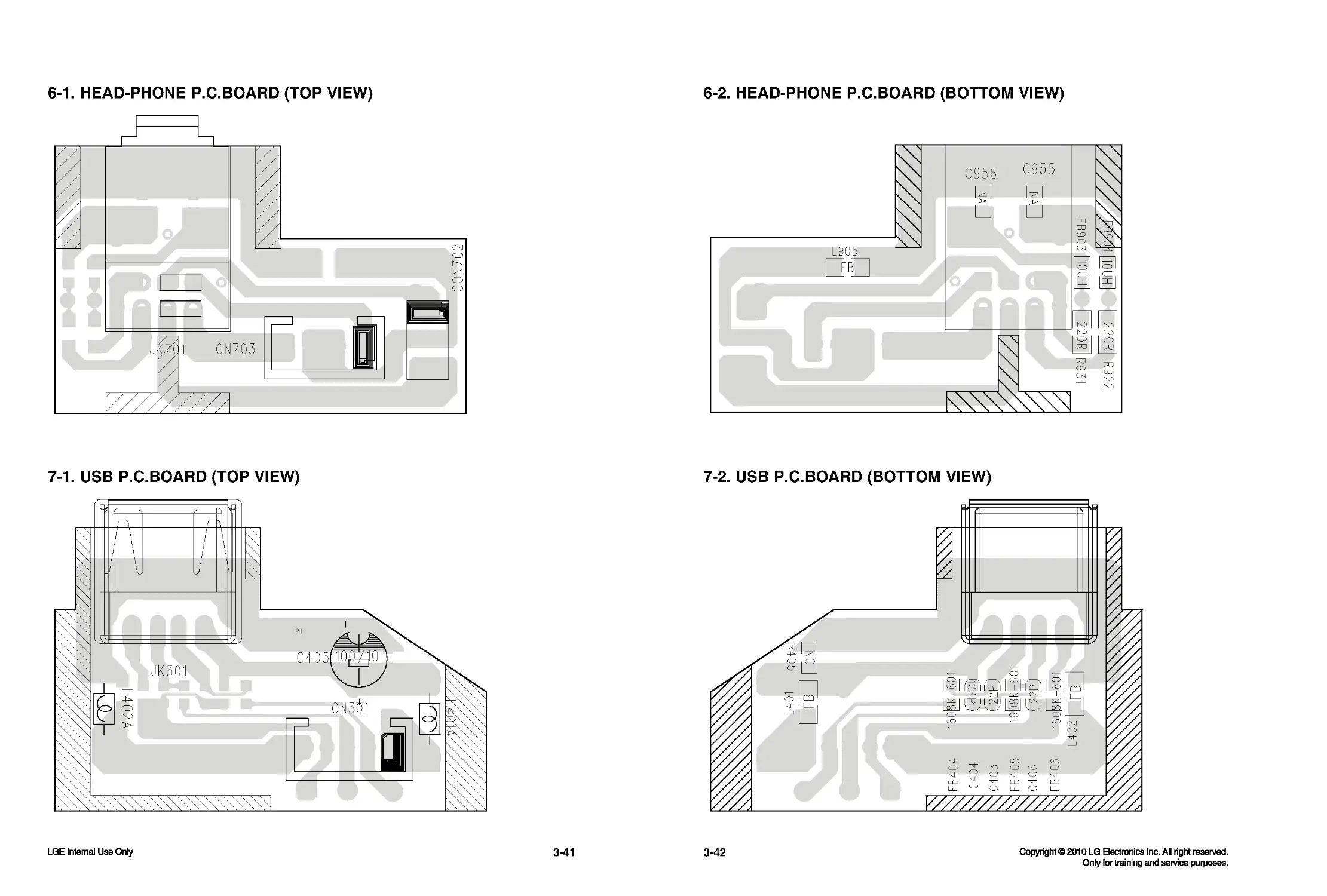
6-1. HEAD-PHONE P.C.BOARD (TOP VIEW)
6-2. HEAD-PHONE P.C.BOARD (BOTTOM VIEW)
7-1. USB P.C.BOARD (TOP VIEW)
7-2. USB P.C.BOARD (BOTTOM VIEW)
3-41
3-42