/






























Text
•••••
•••••
•••••
•••••
•••••
•••••
•••••
•••••
•••••
•••••
•••••
•••••
•••••
•••••
•••••
•••••
•••••
•••••
•••••
•••••
••
•••••
•••••
•••••
•••••
••••
•••••
•••••
•••••
•••••
•••••
•••••
•••••
•••••
•••••
•••
•••••
•••••
•••••
•••••
•••••
•••••
•••••
•••••
•••••
•••••
•••••
•••••
•••••
•••••
•••••
•••••
•••••
•••••
•••••
•••••
•••••
•••••
•••••
•••••
•••••
•••••
•••••
•••••
•••••
•••••
•••••
•••••
•••••
•••••
•••••
•••••
•••••
•••••
•••••
•••••
•••••
•••••
•••••
•••••
•••••
•••••
•••••
•••••
•••••
•••••
•••••
•••••
•••••
•••••
•••••
•••••
•••••
•••
••••••
••••••
XLM
A
••••••
COMPUTER HARDWARE AND SOFTWARE
•••••
•••••
•••••
•••••
•••••
•••••
•••••
•••••
•••••
•••••
•••••
•••••
•••••
•••••
•••••
•••••
•••••
•••••
•••••
•••••
••
•••••
•••••
•••••
•••••
••••
•••••
•••••
•••••
•••••
•••••
•••••
•••••
•••••
•••••
•••
•••••
•••••
•••••
•••••
•••••
•••••
•••••
•••••
•••••
•••••
•••••
•••••
•••••
•••••
•••••
•••••
•••••
•••••
•••••
•••••
•••••
•••••
•••••
•••••
•••••
•••••
•••••
•••••
•••••
•••••
•••••
•••••
•••••
•••••
•••••
•••••
•••••
•••••
•••••
•••••
• • • • • McGraw-Hill
•••••
Student Learning Outcomes
••••••
1.
2.
3.
Define IT and its two basic categories: hardware and
software.
Describe the categories of computers based on size.
Compare the roles of personal productivity, vertical
market, and horizontal market software.
© 2007 The McGraw-Hill Companies, Inc. All rights reser
•••••
•••••
•••••
•••••
•••••
•••••
•••••
•••••
•••••
•••••
•••••
•••••
•••••
•••••
•••••
•••••
•••••
•••••
•••••
•••••
••
•••••
•••••
•••••
•••••
••••
•••••
•••••
•••••
•••••
•••••
•••••
•••••
•••••
•••••
•••
•••••
•••••
•••••
•••••
•••••
•••••
•••••
•••••
•••••
•••••
•••••
•••••
•••••
•••••
•••••
•••••
•••••
•••••
•••••
•••••
•••••
•••••
•••••
•••••
•••••
•••••
•••••
•••••
•••••
•••••
•••••
•••••
•••••
•••••
•••••
•••••
•••••
•••••
•••••
•••••
• • • • • McGraw-Hill
•••••
Student Learning Outcomes
••••••
1.
2.
Describe the roles of operating system software and
utility software as components of system software.
Define the purpose of each of the six major
categories of hardware.
© 2007 The McGraw-Hill Companies, Inc. All rights reser
•••••
•••••
•••••
•••••
•••••
•••••
•••••
•••••
•••••
•••••
•••••
•••••
•••••
•••••
•••••
•••••
•••••
•••••
•••••
•••••
••
•••••
•••••
•••••
•••••
••••
•••••
•••••
•••••
•••••
•••••
•••••
•••••
•••••
•••••
•••
•••••
•••••
•••••
•••••
•••••
•••••
•••••
•••••
•••••
•••••
•••••
•••••
•••••
•••••
•••••
•••••
•••••
•••••
•••••
•••••
•••••
•••••
•••••
•••••
•••••
•••••
•••••
•••••
•••••
•••••
•••••
•••••
•••••
•••••
•••••
•••••
•••••
•••••
•••••
•••••
• • • • • McGraw-Hill
•••••
Introduction
••••••
Information
technology – any computer-based tool
that people use to work with information and support
the information and information-processing needs of
an organization
© 2007 The McGraw-Hill Companies, Inc. All rights reser
•••••
•••••
•••••
•••••
•••••
•••••
•••••
•••••
•••••
•••••
•••••
•••••
•••••
•••••
•••••
•••••
•••••
•••••
•••••
•••••
••
•••••
•••••
•••••
•••••
••••
•••••
•••••
•••••
•••••
•••••
•••••
•••••
•••••
•••••
•••
•••••
•••••
•••••
•••••
•••••
•••••
•••••
•••••
•••••
•••••
•••••
•••••
•••••
•••••
•••••
•••••
•••••
•••••
•••••
•••••
•••••
•••••
•••••
•••••
•••••
•••••
•••••
•••••
•••••
•••••
•••••
•••••
•••••
•••••
•••••
•••••
•••••
•••••
•••••
•••••
• • • • • McGraw-Hill
•••••
Technology Quick Tour
••••••
Hardware
– physical devices that make up a
computer (or computer system)
Software – set of instructions that hardware executes
to carry out a specific task for you
© 2007 The McGraw-Hill Companies, Inc. All rights reser
•••••
•••••
•••••
•••••
•••••
•••••
•••••
•••••
•••••
•••••
•••••
•••••
•••••
•••••
•••••
•••••
•••••
•••••
•••••
•••••
••
•••••
•••••
•••••
•••••
••••
•••••
•••••
•••••
•••••
•••••
•••••
•••••
•••••
•••••
•••
•••••
•••••
•••••
•••••
•••••
•••••
•••••
•••••
•••••
•••••
•••••
•••••
•••••
•••••
•••••
•••••
•••••
•••••
•••••
•••••
•••••
•••••
•••••
•••••
•••••
•••••
•••••
•••••
•••••
•••••
•••••
•••••
•••••
•••••
•••••
•••••
•••••
•••••
•••••
•••••
• • • • • McGraw-Hill
•••••
Six Categories of Hardware
••••••
1.
Input devices – used to enter information and
commands
© 2007 The McGraw-Hill Companies, Inc. All rights reser
•••••
•••••
•••••
•••••
•••••
•••••
•••••
•••••
•••••
•••••
•••••
•••••
•••••
•••••
•••••
•••••
•••••
•••••
•••••
•••••
••
•••••
•••••
•••••
•••••
••••
•••••
•••••
•••••
•••••
•••••
•••••
•••••
•••••
•••••
•••
•••••
•••••
•••••
•••••
•••••
•••••
•••••
•••••
•••••
•••••
•••••
•••••
•••••
•••••
•••••
•••••
•••••
•••••
•••••
•••••
•••••
•••••
•••••
•••••
•••••
•••••
•••••
•••••
•••••
•••••
•••••
•••••
•••••
•••••
•••••
•••••
•••••
•••••
•••••
•••••
• • • • • McGraw-Hill
•••••
Six Categories of Hardware
••••••
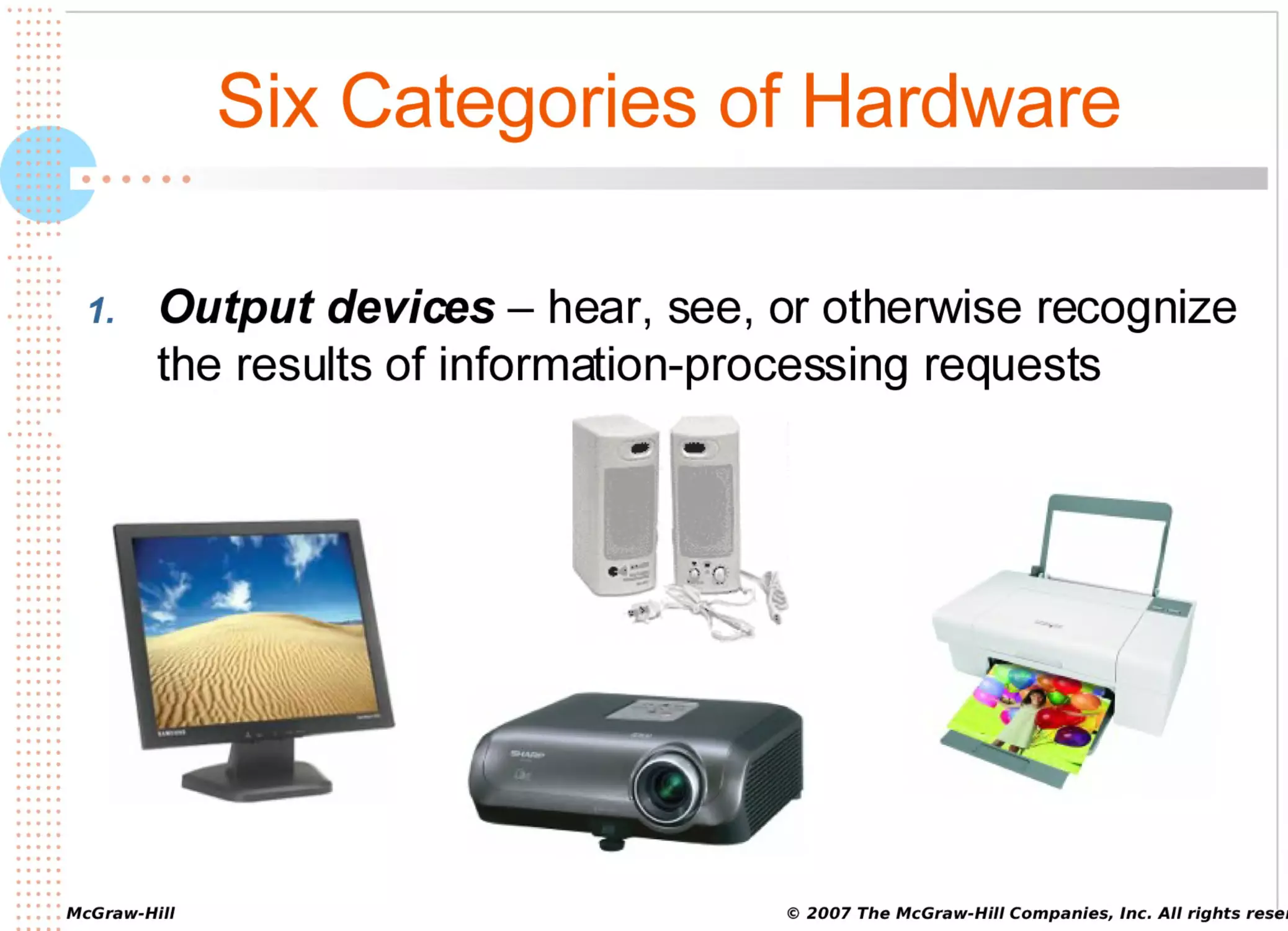
1.
Output devices – hear, see, or otherwise recognize
the results of information-processing requests
© 2007 The McGraw-Hill Companies, Inc. All rights reser
•••••
•••••
•••••
•••••
•••••
•••••
•••••
•••••
•••••
•••••
•••••
•••••
•••••
•••••
•••••
•••••
•••••
•••••
•••••
•••••
••
•••••
•••••
•••••
•••••
••••
•••••
•••••
•••••
•••••
•••••
•••••
•••••
•••••
•••••
•••
•••••
•••••
•••••
•••••
•••••
•••••
•••••
•••••
•••••
•••••
•••••
•••••
•••••
•••••
•••••
•••••
•••••
•••••
•••••
•••••
•••••
•••••
•••••
•••••
•••••
•••••
•••••
•••••
•••••
•••••
•••••
•••••
•••••
•••••
•••••
•••••
•••••
•••••
•••••
•••••
• • • • • McGraw-Hill
•••••
Six Categories of Hardware
••••••
1.
Storage devices – store information for use at a
later time (magnetic, optical, flash)
© 2007 The McGraw-Hill Companies, Inc. All rights reser
•••••
•••••
•••••
•••••
•••••
•••••
•••••
•••••
•••••
•••••
•••••
•••••
•••••
•••••
•••••
•••••
•••••
•••••
•••••
•••••
••
•••••
•••••
•••••
•••••
••••
•••••
•••••
•••••
•••••
•••••
•••••
•••••
•••••
•••••
•••
•••••
•••••
•••••
•••••
•••••
•••••
•••••
•••••
•••••
•••••
•••••
•••••
•••••
•••••
•••••
•••••
•••••
•••••
•••••
•••••
•••••
•••••
•••••
•••••
•••••
•••••
•••••
•••••
•••••
•••••
•••••
•••••
•••••
•••••
•••••
•••••
•••••
•••••
•••••
•••••
• • • • • McGraw-Hill
•••••
Six Categories of Hardware
••••••
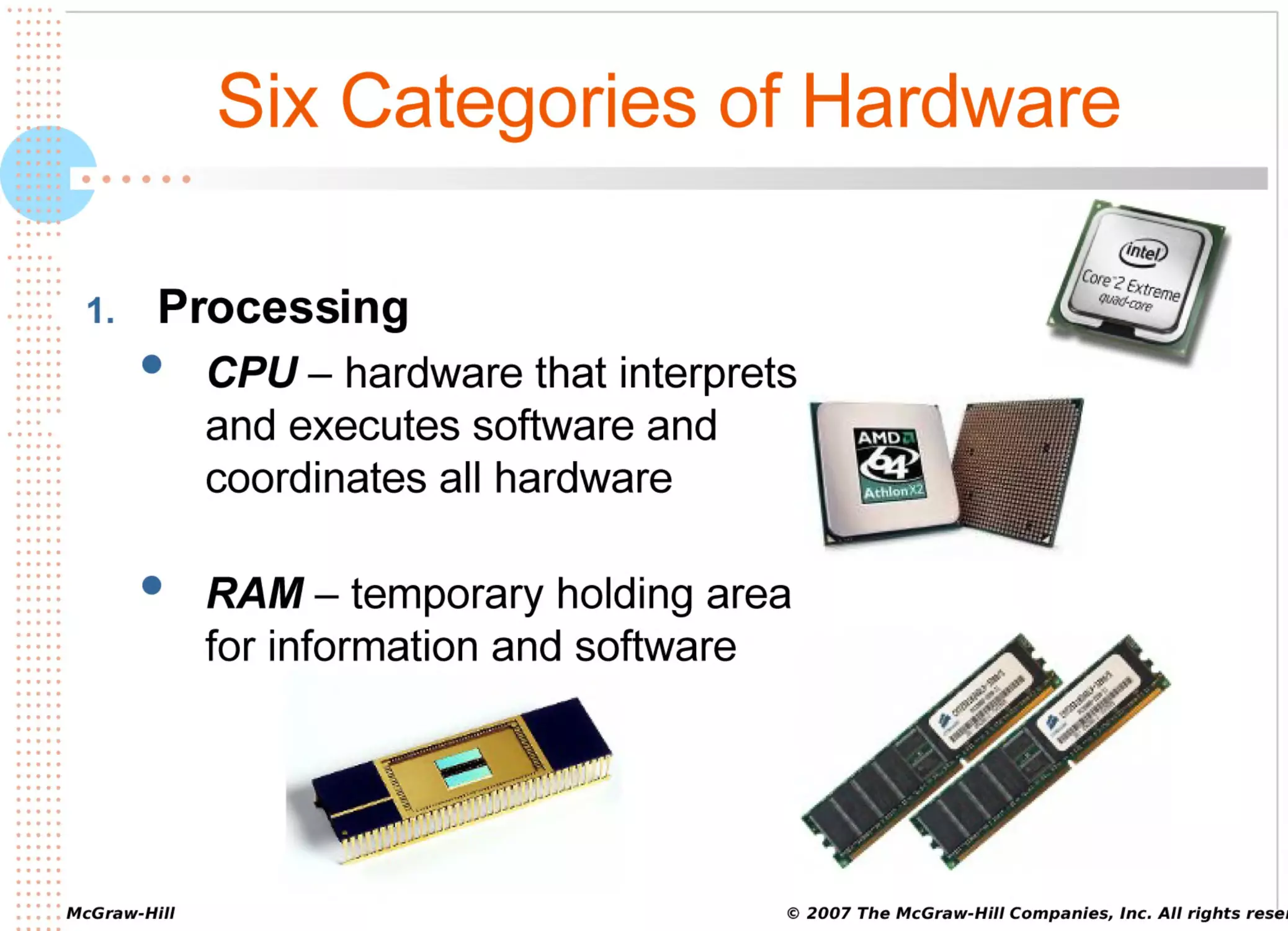
1.
Processing
CPU – hardware that interprets
and executes software and
coordinates all hardware
RAM – temporary holding area
for information and software
© 2007 The McGraw-Hill Companies, Inc. All rights reser
•••••
•••••
•••••
•••••
•••••
•••••
•••••
•••••
•••••
•••••
•••••
•••••
•••••
•••••
•••••
•••••
•••••
•••••
•••••
•••••
••
•••••
•••••
•••••
•••••
••••
•••••
•••••
•••••
•••••
•••••
•••••
•••••
•••••
•••••
•••
•••••
•••••
•••••
•••••
•••••
•••••
•••••
•••••
•••••
•••••
•••••
•••••
•••••
•••••
•••••
•••••
•••••
•••••
•••••
•••••
•••••
•••••
•••••
•••••
•••••
•••••
•••••
•••••
•••••
•••••
•••••
•••••
•••••
•••••
•••••
•••••
•••••
•••••
•••••
•••••
• • • • • McGraw-Hill
•••••
Six Categories of Hardware
••••••
1.
Telecommunications devices – send information to
and receive it from another person or computer in a
network
© 2007 The McGraw-Hill Companies, Inc. All rights reser
•••••
•••••
•••••
•••••
•••••
•••••
•••••
•••••
•••••
•••••
•••••
•••••
•••••
•••••
•••••
•••••
•••••
•••••
•••••
•••••
••
•••••
•••••
•••••
•••••
••••
•••••
•••••
•••••
•••••
•••••
•••••
•••••
•••••
•••••
•••
•••••
•••••
•••••
•••••
•••••
•••••
•••••
•••••
•••••
•••••
•••••
•••••
•••••
•••••
•••••
•••••
•••••
•••••
•••••
•••••
•••••
•••••
•••••
•••••
•••••
•••••
•••••
•••••
•••••
•••••
•••••
•••••
•••••
•••••
•••••
•••••
•••••
•••••
•••••
•••••
• • • • • McGraw-Hill
•••••
Six Categories of Hardware
••••••
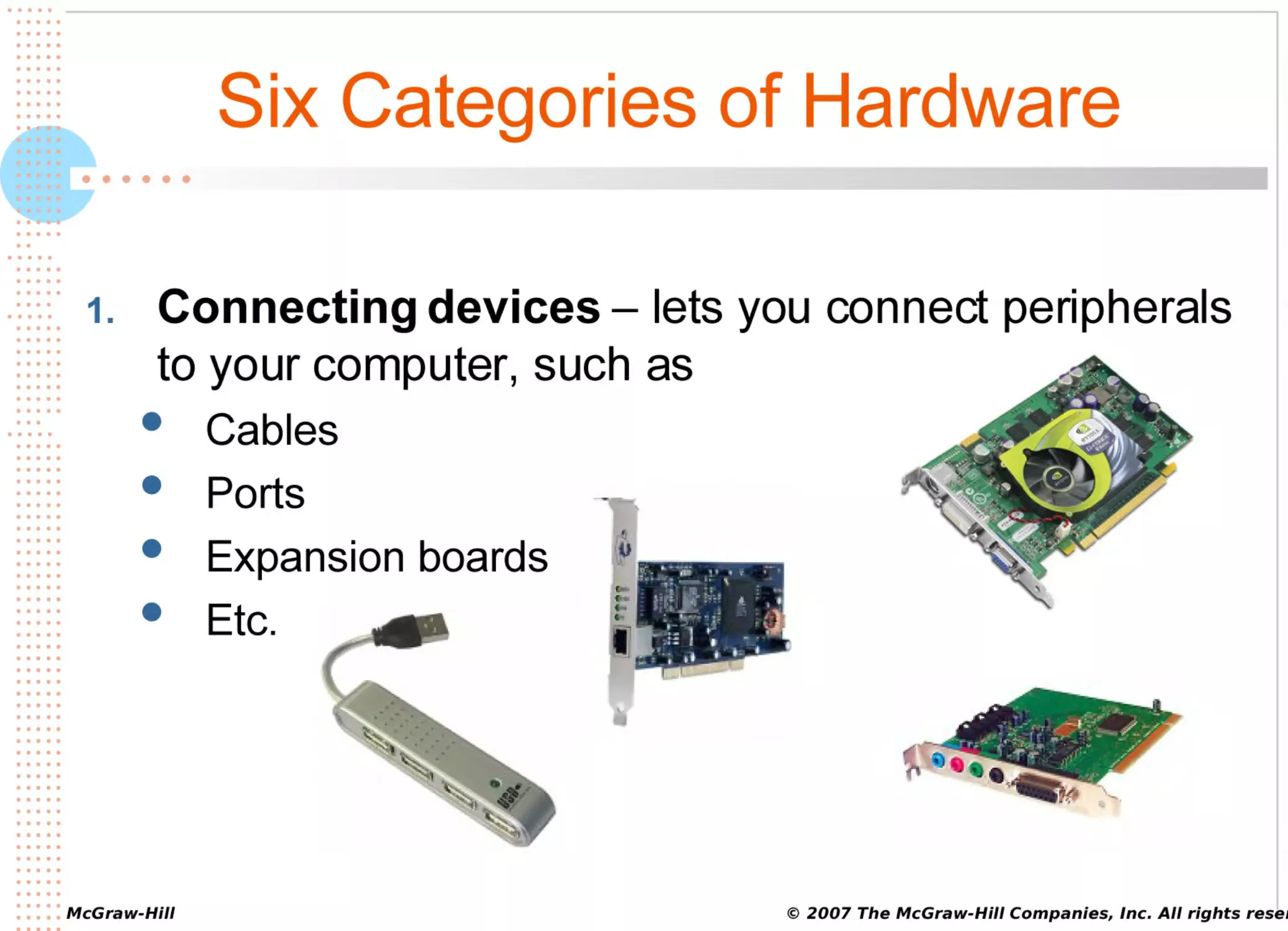
1.
Connecting devices – lets you connect peripherals
to your computer, such as
Cables
Ports
Expansion boards
Etc.
© 2007 The McGraw-Hill Companies, Inc. All rights reser
•••••
•••••
•••••
•••••
•••••
•••••
•••••
•••••
•••••
•••••
•••••
•••••
•••••
•••••
•••••
•••••
•••••
•••••
•••••
•••••
••
•••••
•••••
•••••
•••••
••••
•••••
•••••
•••••
•••••
•••••
•••••
•••••
•••••
•••••
•••
•••••
•••••
•••••
•••••
•••••
•••••
•••••
•••••
•••••
•••••
•••••
•••••
•••••
•••••
•••••
•••••
•••••
•••••
•••••
•••••
•••••
•••••
•••••
•••••
•••••
•••••
•••••
•••••
•••••
•••••
•••••
•••••
•••••
•••••
•••••
•••••
•••••
•••••
•••••
•••••
• • • • • McGraw-Hill
•••••
Two Major Categories of Software
••••••
1.
Application software – enables you to solve
specific problems or perform specific tasks
© 2007 The McGraw-Hill Companies, Inc. All rights reser
•••••
•••••
•••••
•••••
•••••
•••••
•••••
•••••
•••••
•••••
•••••
•••••
•••••
•••••
•••••
•••••
•••••
•••••
•••••
•••••
••
•••••
•••••
•••••
•••••
••••
•••••
•••••
•••••
•••••
•••••
•••••
•••••
•••••
•••••
•••
•••••
•••••
•••••
•••••
•••••
•••••
•••••
•••••
•••••
•••••
•••••
•••••
•••••
•••••
•••••
•••••
•••••
•••••
•••••
•••••
•••••
•••••
•••••
•••••
•••••
•••••
•••••
•••••
•••••
•••••
•••••
•••••
•••••
•••••
•••••
•••••
•••••
•••••
•••••
•••••
• • • • • McGraw-Hill
•••••
Two Major Categories of Software
••••••
1.
System software – handles tasks specific to
technology management and coordinates the
interaction of all technology devices
Two main types of system software
Operating system software
Utility software
© 2007 The McGraw-Hill Companies, Inc. All rights reser
•••••
•••••
•••••
•••••
•••••
•••••
•••••
•••••
•••••
•••••
•••••
•••••
•••••
•••••
•••••
•••••
•••••
•••••
•••••
•••••
••
•••••
•••••
•••••
•••••
••••
•••••
•••••
•••••
•••••
•••••
•••••
•••••
•••••
•••••
•••
•••••
•••••
•••••
•••••
•••••
•••••
•••••
•••••
•••••
•••••
•••••
•••••
•••••
•••••
•••••
•••••
•••••
•••••
•••••
•••••
•••••
•••••
•••••
•••••
•••••
•••••
•••••
•••••
•••••
•••••
•••••
•••••
•••••
•••••
•••••
•••••
•••••
•••••
•••••
•••••
• • • • • McGraw-Hill
•••••
Types of System Software
••••••
Operating system
software – controls application
software and manages hardware devices
Utility software
– provides additional functionality to
your operating system
Anti-virus
Screen
saver
Etc.
© 2007 The McGraw-Hill Companies, Inc. All rights reser
•••••
•••••
•••••
•••••
•••••
•••••
•••••
•••••
•••••
•••••
•••••
•••••
•••••
•••••
•••••
•••••
•••••
•••••
•••••
•••••
••
•••••
•••••
•••••
•••••
••••
•••••
•••••
•••••
•••••
•••••
•••••
•••••
•••••
•••••
•••
•••••
•••••
•••••
•••••
•••••
•••••
•••••
•••••
•••••
•••••
•••••
•••••
•••••
•••••
•••••
•••••
•••••
•••••
•••••
•••••
•••••
•••••
•••••
•••••
•••••
•••••
•••••
•••••
•••••
•••••
•••••
•••••
•••••
•••••
•••••
•••••
•••••
•••••
•••••
•••••
• • • • • McGraw-Hill
•••••
Personal Productivity Software
••••••
Personal
productivity software – helps you perform
personal tasks
Writing
memos (word processing)
Creating graphs (spreadsheet)
Creating slide presentations (presentation)
Software
suite – several applications bundled
together (usually productivity software)
© 2007 The McGraw-Hill Companies, Inc. All rights reser
•••••
•••••
•••••
•••••
•••••
•••••
•••••
•••••
•••••
•••••
•••••
•••••
•••••
•••••
•••••
•••••
•••••
•••••
•••••
•••••
••
•••••
•••••
•••••
•••••
••••
•••••
•••••
•••••
•••••
•••••
•••••
•••••
•••••
•••••
•••
•••••
•••••
•••••
•••••
•••••
•••••
•••••
•••••
•••••
•••••
•••••
•••••
•••••
•••••
•••••
•••••
•••••
•••••
•••••
•••••
•••••
•••••
•••••
•••••
•••••
•••••
•••••
•••••
•••••
•••••
•••••
•••••
•••••
•••••
•••••
•••••
•••••
•••••
•••••
•••••
• • • • • McGraw-Hill
•••••
Vertical & Horizontal Market Software
••••••
Vertical
market software – application software for a
specific industry
Patient-scheduling
software
Restaurant management software
Horizontal
market software – application software
suitable for use in many industries
Payroll,
inventory, and billing
© 2007 The McGraw-Hill Companies, Inc. All rights reser
•••••
•••••
•••••
•••••
•••••
•••••
•••••
•••••
•••••
•••••
•••••
•••••
•••••
•••••
•••••
•••••
•••••
•••••
•••••
•••••
••
•••••
•••••
•••••
•••••
••••
•••••
•••••
•••••
•••••
•••••
•••••
•••••
•••••
•••••
•••
•••••
•••••
•••••
•••••
•••••
•••••
•••••
•••••
•••••
•••••
•••••
•••••
•••••
•••••
•••••
•••••
•••••
•••••
•••••
•••••
•••••
•••••
•••••
•••••
•••••
•••••
•••••
•••••
•••••
•••••
•••••
•••••
•••••
•••••
•••••
•••••
•••••
•••••
•••••
•••••
• • • • • McGraw-Hill
•••••
Computer Categories (by size)
••••••
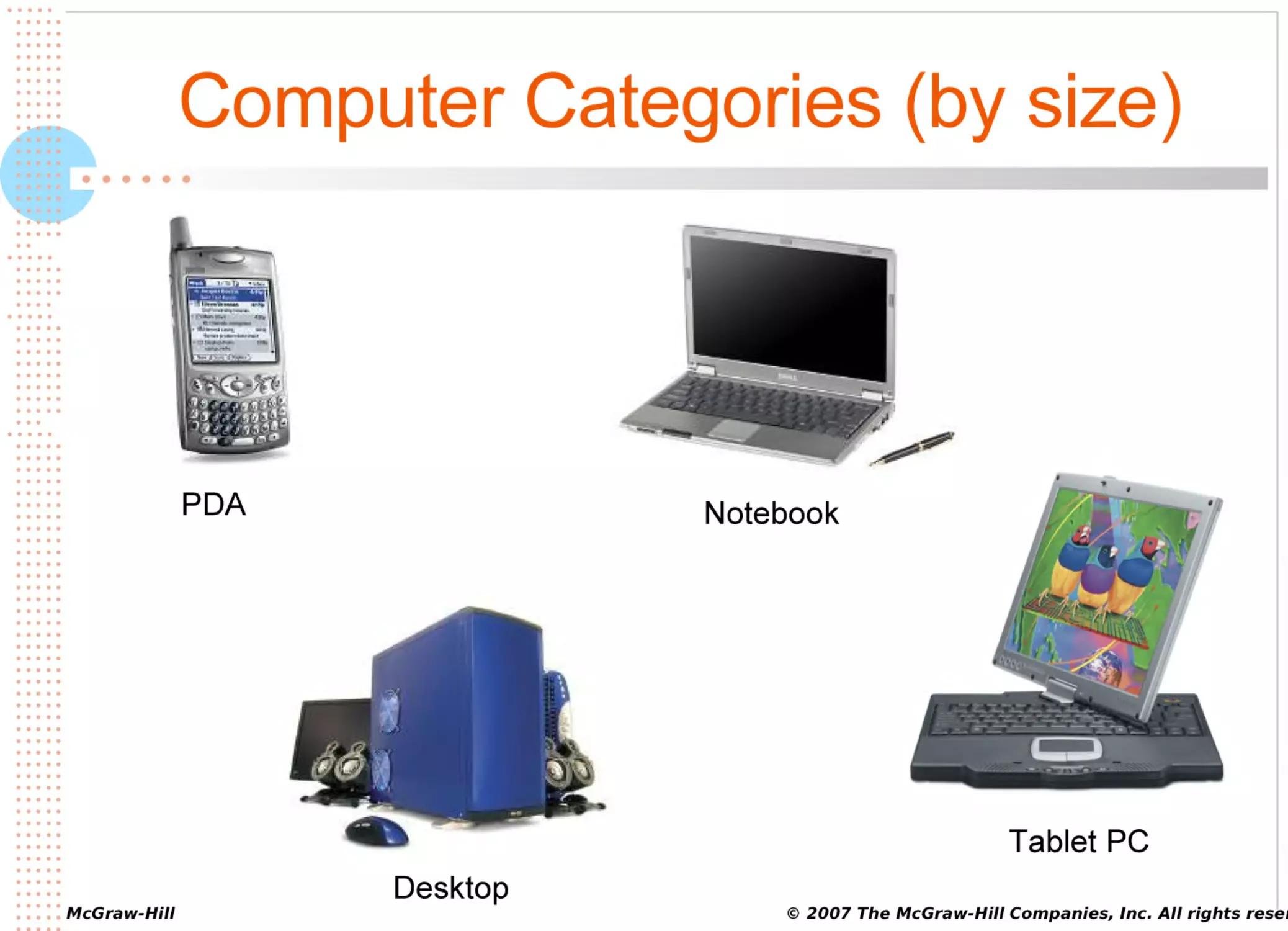
Personal
digital assistant (PDA) – small handheld
computer for personal tasks like appointment
scheduling and address book maintenance
Tablet PC – pen-based computer with the functionality
of a notebook or desktop
Notebook computer – small, portable, fully functional,
battery-powered computer
Desktop computer – most popular type of personal
computer
© 2007 The McGraw-Hill Companies, Inc. All rights reser
•••••
•••••
•••••
•••••
•••••
•••••
•••••
•••••
•••••
•••••
•••••
•••••
•••••
•••••
•••••
•••••
•••••
•••••
•••••
•••••
••
•••••
•••••
•••••
•••••
••••
•••••
•••••
•••••
•••••
•••••
•••••
•••••
•••••
•••••
•••
•••••
•••••
•••••
•••••
•••••
•••••
•••••
•••••
•••••
•••••
•••••
•••••
•••••
•••••
•••••
•••••
•••••
•••••
•••••
•••••
•••••
•••••
•••••
•••••
•••••
•••••
•••••
•••••
•••••
•••••
•••••
•••••
•••••
•••••
•••••
•••••
•••••
•••••
•••••
•••••
• • • • • McGraw-Hill
•••••
Computer Categories (by size)
••••••
PDA
Notebook
Tablet PC
Desktop
© 2007 The McGraw-Hill Companies, Inc. All rights reser
•••••
•••••
•••••
•••••
•••••
•••••
•••••
•••••
•••••
•••••
•••••
•••••
•••••
•••••
•••••
•••••
•••••
•••••
•••••
•••••
••
•••••
•••••
•••••
•••••
••••
•••••
•••••
•••••
•••••
•••••
•••••
•••••
•••••
•••••
•••
•••••
•••••
•••••
•••••
•••••
•••••
•••••
•••••
•••••
•••••
•••••
•••••
•••••
•••••
•••••
•••••
•••••
•••••
•••••
•••••
•••••
•••••
•••••
•••••
•••••
•••••
•••••
•••••
•••••
•••••
•••••
•••••
•••••
•••••
•••••
•••••
•••••
•••••
•••••
•••••
• • • • • McGraw-Hill
•••••
Computer Categories (by size)
••••••
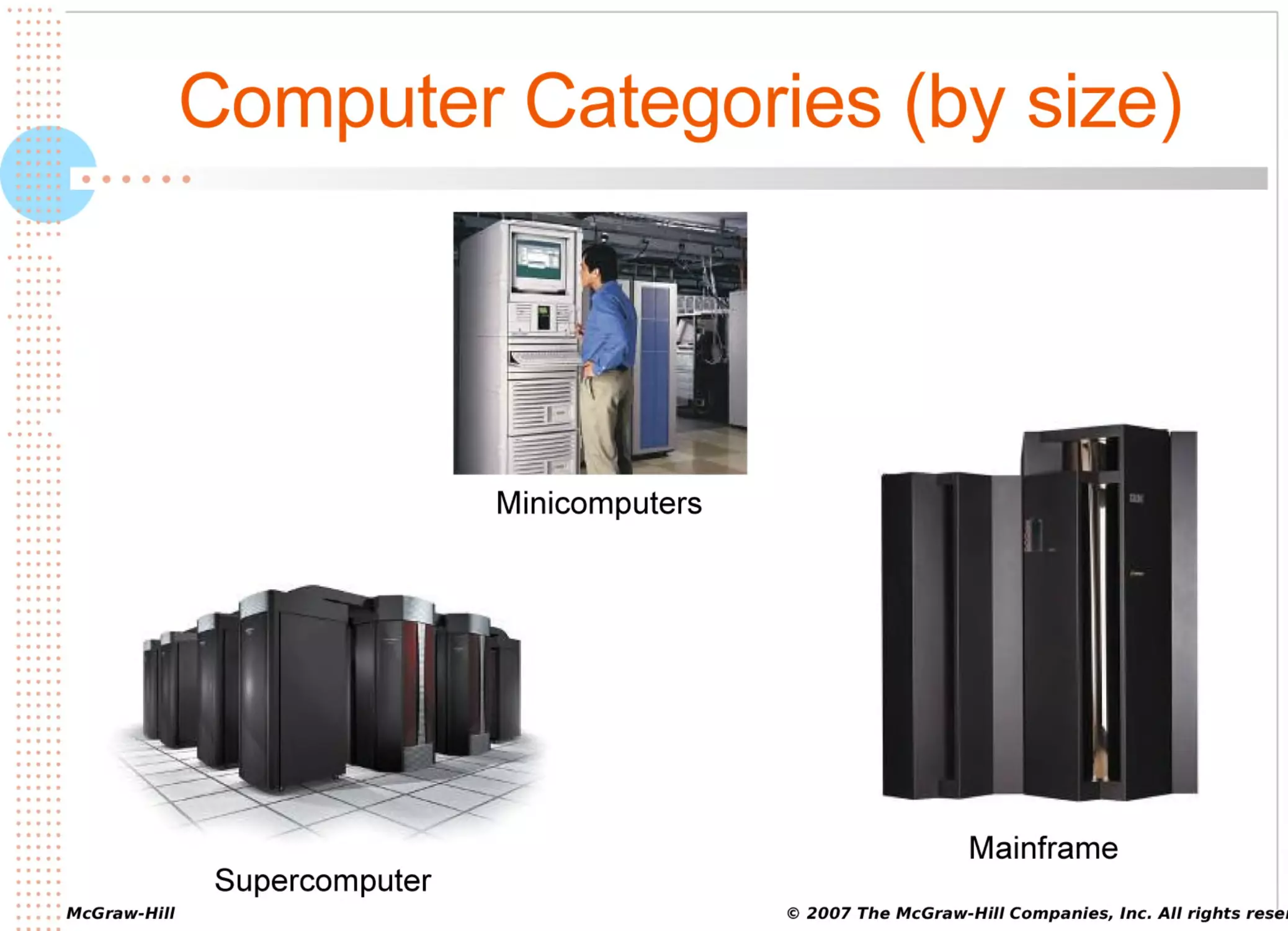
Minicomputer
(mid-range computer) – meets needs
of several people simultaneously in a small or
medium-sized business
Mainframe computer – meets needs of hundreds of
people in a large business
Supercomputer – fastest, most powerful, and most
expensive type of computer
© 2007 The McGraw-Hill Companies, Inc. All rights reser
•••••
•••••
•••••
•••••
•••••
•••••
•••••
•••••
•••••
•••••
•••••
•••••
•••••
•••••
•••••
•••••
•••••
•••••
•••••
•••••
••
•••••
•••••
•••••
•••••
••••
•••••
•••••
•••••
•••••
•••••
•••••
•••••
•••••
•••••
•••
•••••
•••••
•••••
•••••
•••••
•••••
•••••
•••••
•••••
•••••
•••••
•••••
•••••
•••••
•••••
•••••
•••••
•••••
•••••
•••••
•••••
•••••
•••••
•••••
•••••
•••••
•••••
•••••
•••••
•••••
•••••
•••••
•••••
•••••
•••••
•••••
•••••
•••••
•••••
•••••
• • • • • McGraw-Hill
•••••
Computer Categories (by size)
••••••
Minicomputers
Supercomputer
Mainframe
© 2007 The McGraw-Hill Companies, Inc. All rights reser
•••••
•••••
•••••
•••••
•••••
•••••
•••••
•••••
•••••
•••••
•••••
•••••
•••••
•••••
•••••
•••••
•••••
•••••
•••••
•••••
••
•••••
•••••
•••••
•••••
••••
•••••
•••••
•••••
•••••
•••••
•••••
•••••
•••••
•••••
•••
•••••
•••••
•••••
•••••
•••••
•••••
•••••
•••••
•••••
•••••
•••••
•••••
•••••
•••••
•••••
•••••
•••••
•••••
•••••
•••••
•••••
•••••
•••••
•••••
•••••
•••••
•••••
•••••
•••••
•••••
•••••
•••••
•••••
•••••
•••••
•••••
•••••
•••••
•••••
•••••
•••••
•••••
Grid Computing at GSU
••••••
Posted: August 31, 2006
Associated Press
Southern Schools Form Computer Grid
ATLANTA (AP) - It traces the shape of star systems millions of
miles away, magnifies the inner workings of the tiny molecules
in prescription drugs, and can perform billions of calculations
per second. It's a high-speed supercomputer grid that's being
assembled by a group of Southern universities starting with
Georgia State University in Atlanta and Louisiana State
University in Baton Rouge. Texas A&M will join the list by the
fall, and eventually, 24 colleges in 15 states will be connected
through the network. The project was announced August 11.
Whole article at:
http://www2.gsu.edu/~wwwexa/news/archive/general/06_0831-com
•••••
•••••
•••••
•••••
•••••
•••••
•••••
•••••
•••••
•••••
•••••
•••••
•••••
•••••
•••••
•••••
•••••
•••••
•••••
•••••
••
•••••
•••••
•••••
•••••
••••
•••••
•••••
•••••
•••••
•••••
•••••
•••••
•••••
•••••
•••
•••••
•••••
•••••
•••••
•••••
•••••
•••••
•••••
•••••
•••••
•••••
•••••
•••••
•••••
•••••
•••••
•••••
•••••
•••••
•••••
•••••
•••••
•••••
•••••
•••••
•••••
•••••
•••••
•••••
•••••
•••••
•••••
•••••
•••••
•••••
•••••
•••••
•••••
•••••
•••••
• • • • • McGraw-Hill
•••••
Can You…
••••••
1.
2.
3.
Define IT and its two basic categories: hardware and
software.
Describe the categories of computers based on size.
Compare the roles of personal productivity, vertical
market, and horizontal market software.
© 2007 The McGraw-Hill Companies, Inc. All rights reser
•••••
•••••
•••••
•••••
•••••
•••••
•••••
•••••
•••••
•••••
•••••
•••••
•••••
•••••
•••••
•••••
•••••
•••••
•••••
•••••
••
•••••
•••••
•••••
•••••
••••
•••••
•••••
•••••
•••••
•••••
•••••
•••••
•••••
•••••
•••
•••••
•••••
•••••
•••••
•••••
•••••
•••••
•••••
•••••
•••••
•••••
•••••
•••••
•••••
•••••
•••••
•••••
•••••
•••••
•••••
•••••
•••••
•••••
•••••
•••••
•••••
•••••
•••••
•••••
•••••
•••••
•••••
•••••
•••••
•••••
•••••
•••••
•••••
•••••
•••••
• • • • • McGraw-Hill
•••••
Can You…
••••••
1.
2.
Describe the roles of operating system software and
utility software as components of system software.
Define the purpose of each of the six major
categories of hardware.
© 2007 The McGraw-Hill Companies, Inc. All rights reser
•••••
•••••
•••••
•••••
•••••
•••••
•••••
•••••
•••••
•••••
•••••
•••••
•••••
•••••
•••••
•••••
•••••
•••••
•••••
•••••
••
•••••
•••••
•••••
•••••
••••
•••••
•••••
•••••
•••••
•••••
•••••
•••••
•••••
•••••
•••
•••••
•••••
•••••
•••••
•••••
•••••
•••••
•••••
•••••
•••••
•••••
•••••
•••••
•••••
•••••
•••••
•••••
•••••
•••••
•••••
•••••
•••••
•••••
•••••
•••••
•••••
•••••
•••••
•••••
•••••
•••••
•••••
•••••
•••••
•••••
•••••
•••••
•••••
•••••
•••••
• • • • • McGraw-Hill
•••••
Software – Intellectual Interface
••••••
Personal
productivity software – helps you perform
personal tasks
Writing
memos (word processing)
Creating graphs (spreadsheet)
Creating slide presentations (presentation)
Software
suite – several applications bundled
together (usually productivity software)
© 2007 The McGraw-Hill Companies, Inc. All rights reser
•••••
•••••
•••••
•••••
•••••
•••••
•••••
•••••
•••••
•••••
•••••
•••••
•••••
•••••
•••••
•••••
•••••
•••••
•••••
•••••
••
•••••
•••••
•••••
•••••
••••
•••••
•••••
•••••
•••••
•••••
•••••
•••••
•••••
•••••
•••
•••••
•••••
•••••
•••••
•••••
•••••
•••••
•••••
•••••
•••••
•••••
•••••
•••••
•••••
•••••
•••••
•••••
•••••
•••••
•••••
•••••
•••••
•••••
•••••
•••••
•••••
•••••
•••••
•••••
•••••
•••••
•••••
•••••
•••••
•••••
•••••
•••••
•••••
•••••
•••••
• • • • • McGraw-Hill
•••••
Personal Productivity Software
••••••
Word
processing – helps you create letters, memos,
and other basic documents
Spreadsheet – helps you work with numbers, perform
calculations and create graphs
Presentation – helps you create and edit information
that will appear in slides
Desktop publishing – extends word processing by
including design and formatting techniques to enhance
the appearance of the document
© 2007 The McGraw-Hill Companies, Inc. All rights reser
•••••
•••••
•••••
•••••
•••••
•••••
•••••
•••••
•••••
•••••
•••••
•••••
•••••
•••••
•••••
•••••
•••••
•••••
•••••
•••••
••
•••••
•••••
•••••
•••••
••••
•••••
•••••
•••••
•••••
•••••
•••••
•••••
•••••
•••••
•••
•••••
•••••
•••••
•••••
•••••
•••••
•••••
•••••
•••••
•••••
•••••
•••••
•••••
•••••
•••••
•••••
•••••
•••••
•••••
•••••
•••••
•••••
•••••
•••••
•••••
•••••
•••••
•••••
•••••
•••••
•••••
•••••
•••••
•••••
•••••
•••••
•••••
•••••
•••••
•••••
• • • • • McGraw-Hill
•••••
Personal Productivity Software
••••••
Personal
information management (PIM) – helps
you create and maintain to-do lists, appointments,
calendars, etc.
Personal finance – helps you maintain your
checkbook and handle other personal finance tasks
Web authoring – helps you design and develop Web
sites
Graphics – helps you create and edit photos and art
Communications – helps you communicate with
others
© 2007 The McGraw-Hill Companies, Inc. All rights reser
•••••
•••••
•••••
•••••
•••••
•••••
•••••
•••••
•••••
•••••
•••••
•••••
•••••
•••••
•••••
•••••
•••••
•••••
•••••
•••••
••
•••••
•••••
•••••
•••••
••••
•••••
•••••
•••••
•••••
•••••
•••••
•••••
•••••
•••••
•••
•••••
•••••
•••••
•••••
•••••
•••••
•••••
•••••
•••••
•••••
•••••
•••••
•••••
•••••
•••••
•••••
•••••
•••••
•••••
•••••
•••••
•••••
•••••
•••••
•••••
•••••
•••••
•••••
•••••
•••••
•••••
•••••
•••••
•••••
•••••
•••••
•••••
•••••
•••••
•••••
• • • • • McGraw-Hill
•••••
Personal Productivity Software
••••••
Database
management system (DBMS) – helps you
specify the logical organization for a database; access
and use the information within a database
The focus of…
Chapter
3
Extended Learning Module C
Extended Learning Module J
© 2007 The McGraw-Hill Companies, Inc. All rights reser
•••••
•••••
•••••
•••••
•••••
•••••
•••••
•••••
•••••
•••••
•••••
•••••
•••••
•••••
•••••
•••••
•••••
•••••
•••••
•••••
••
•••••
•••••
•••••
•••••
••••
•••••
•••••
•••••
•••••
•••••
•••••
•••••
•••••
•••••
•••
•••••
•••••
•••••
•••••
•••••
•••••
•••••
•••••
•••••
•••••
•••••
•••••
•••••
•••••
•••••
•••••
•••••
•••••
•••••
•••••
•••••
•••••
•••••
•••••
•••••
•••••
•••••
•••••
•••••
•••••
•••••
•••••
•••••
•••••
•••••
•••••
•••••
•••••
•••••
•••••
• • • • • McGraw-Hill
•••••
Vertical & Horizontal Market Software
••••••
Vertical
market software – application software for a
specific industry
Patient-scheduling
software
Restaurant management software
Horizontal
market software – application software
suitable for use in many industries
Payroll,
inventory, and billing
© 2007 The McGraw-Hill Companies, Inc. All rights reser
•••••
•••••
•••••
•••••
•••••
•••••
•••••
•••••
•••••
•••••
•••••
•••••
•••••
•••••
•••••
•••••
•••••
•••••
•••••
•••••
••
•••••
•••••
•••••
•••••
••••
•••••
•••••
•••••
•••••
•••••
•••••
•••••
•••••
•••••
•••
•••••
•••••
•••••
•••••
•••••
•••••
•••••
•••••
•••••
•••••
•••••
•••••
•••••
•••••
•••••
•••••
•••••
•••••
•••••
•••••
•••••
•••••
•••••
•••••
•••••
•••••
•••••
•••••
•••••
•••••
•••••
•••••
•••••
•••••
•••••
•••••
•••••
•••••
•••••
•••••
• • • • • McGraw-Hill
•••••
System Software
••••••
Operating
system software
Microsoft
Windows Vista
Mac
OS
Linux – open-source operating system
© 2007 The McGraw-Hill Companies, Inc. All rights reser
•••••
•••••
•••••
•••••
•••••
•••••
•••••
•••••
•••••
•••••
•••••
•••••
•••••
•••••
•••••
•••••
•••••
•••••
•••••
•••••
••
•••••
•••••
•••••
•••••
••••
•••••
•••••
•••••
•••••
•••••
•••••
•••••
•••••
•••••
•••
•••••
•••••
•••••
•••••
•••••
•••••
•••••
•••••
•••••
•••••
•••••
•••••
•••••
•••••
•••••
•••••
•••••
•••••
•••••
•••••
•••••
•••••
•••••
•••••
•••••
•••••
•••••
•••••
•••••
•••••
•••••
•••••
•••••
•••••
•••••
•••••
•••••
•••••
•••••
•••••
• • • • • McGraw-Hill
•••••
Multitasking
••••••
Multitasking
– working with more than one application
at a time
© 2007 The McGraw-Hill Companies, Inc. All rights reser
•••••
•••••
•••••
•••••
•••••
•••••
•••••
•••••
•••••
•••••
•••••
•••••
•••••
•••••
•••••
•••••
•••••
•••••
•••••
•••••
••
•••••
•••••
•••••
•••••
••••
•••••
•••••
•••••
•••••
•••••
•••••
•••••
•••••
•••••
•••
•••••
•••••
•••••
•••••
•••••
•••••
•••••
•••••
•••••
•••••
•••••
•••••
•••••
•••••
•••••
•••••
•••••
•••••
•••••
•••••
•••••
•••••
•••••
•••••
•••••
•••••
•••••
•••••
•••••
•••••
•••••
•••••
•••••
•••••
•••••
•••••
•••••
•••••
•••••
•••••
• • • • • McGraw-Hill
•••••
Utility Software
••••••
Utility
Software – adds functionality to operating
system software
Anti-virus
software – detects and removes or
quarantines computer viruses
Crash-proof software – helps save information if your
system crashes
Uninstaller software – removes software from your
hard disk
Disk optimization software – organizes information on
your hard disk
Spam blocker – filters unwanted e-mail
© 2007 The McGraw-Hill Companies, Inc. All rights reser
•••••
•••••
•••••
•••••
•••••
•••••
•••••
•••••
•••••
•••••
•••••
•••••
•••••
•••••
•••••
•••••
•••••
•••••
•••••
•••••
••
•••••
•••••
•••••
•••••
••••
•••••
•••••
•••••
•••••
•••••
•••••
•••••
•••••
•••••
•••
•••••
•••••
•••••
•••••
•••••
•••••
•••••
•••••
•••••
•••••
•••••
•••••
•••••
•••••
•••••
•••••
•••••
•••••
•••••
•••••
•••••
•••••
•••••
•••••
•••••
•••••
•••••
•••••
•••••
•••••
•••••
•••••
•••••
•••••
•••••
•••••
•••••
•••••
•••••
•••••
• • • • • McGraw-Hill
•••••
Hardware – Physical Interface
••••••
Representation
of information
Binary
digit (bit) – smallest unit of information your
computer can process
Byte – eight bits or the number of bits it takes to
represent one natural character
ASCII (American Standard Code for Information
Interchange) – coding system that personal computers
use
© 2007 The McGraw-Hill Companies, Inc. All rights reser
•••••
•••••
•••••
•••••
•••••
•••••
•••••
•••••
•••••
•••••
•••••
•••••
•••••
•••••
•••••
•••••
•••••
•••••
•••••
•••••
••
•••••
•••••
•••••
•••••
••••
•••••
•••••
•••••
•••••
•••••
•••••
•••••
•••••
•••••
•••
•••••
•••••
•••••
•••••
•••••
•••••
•••••
•••••
•••••
•••••
•••••
•••••
•••••
•••••
•••••
•••••
•••••
•••••
•••••
•••••
•••••
•••••
•••••
•••••
•••••
•••••
•••••
•••••
•••••
•••••
•••••
•••••
•••••
•••••
•••••
•••••
•••••
•••••
•••••
•••••
• • • • • McGraw-Hill
•••••
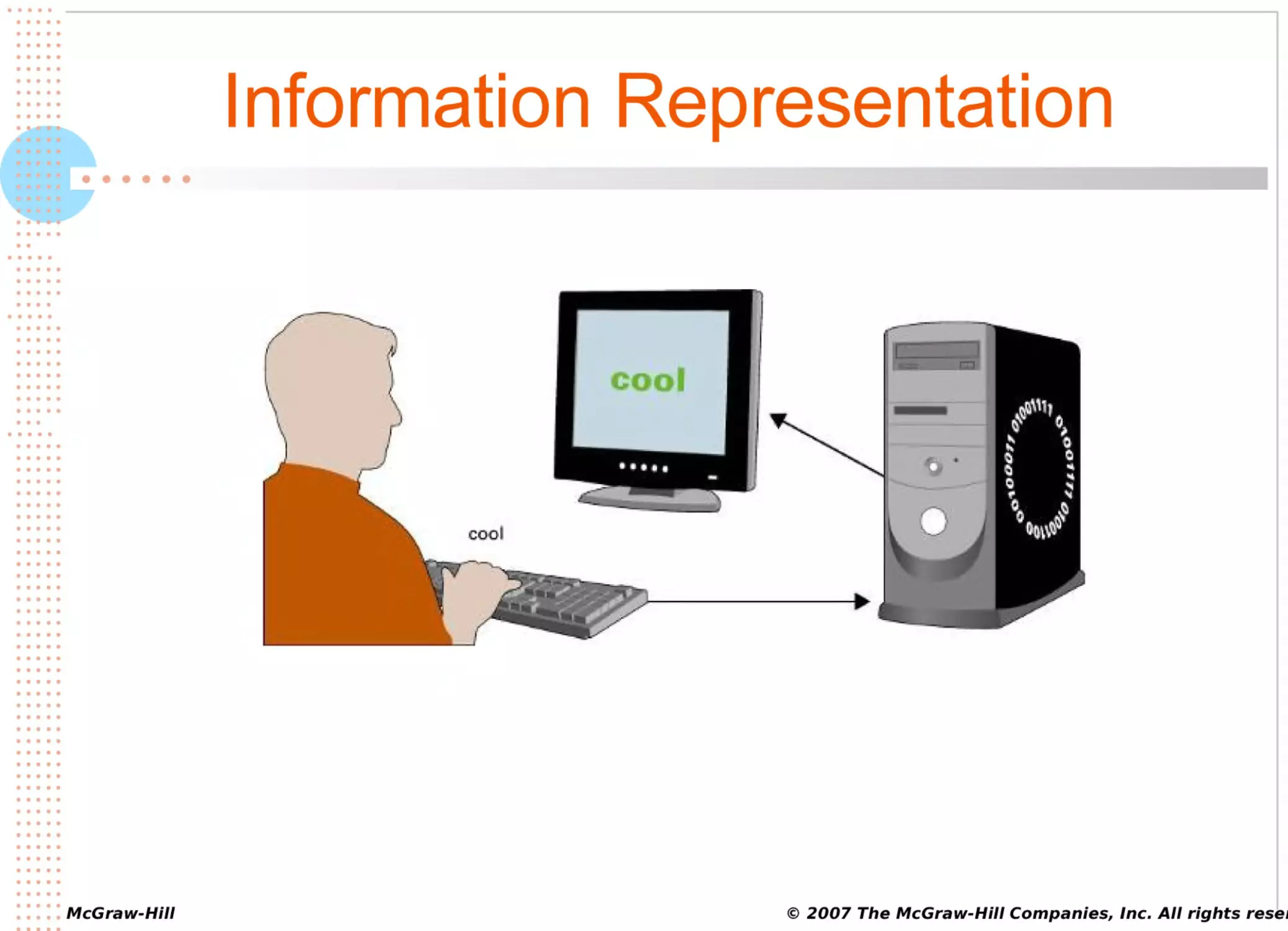
Information Representation
••••••
© 2007 The McGraw-Hill Companies, Inc. All rights reser
•••••
•••••
•••••
•••••
•••••
•••••
•••••
•••••
•••••
•••••
•••••
•••••
•••••
•••••
•••••
•••••
•••••
•••••
•••••
•••••
••
•••••
•••••
•••••
•••••
••••
•••••
•••••
•••••
•••••
•••••
•••••
•••••
•••••
•••••
•••
•••••
•••••
•••••
•••••
•••••
•••••
•••••
•••••
•••••
•••••
•••••
•••••
•••••
•••••
•••••
•••••
•••••
•••••
•••••
•••••
•••••
•••••
•••••
•••••
•••••
•••••
•••••
•••••
•••••
•••••
•••••
•••••
•••••
•••••
•••••
•••••
•••••
•••••
•••••
•••••
• • • • • McGraw-Hill
•••••
Common Input Devices
••••••
© 2007 The McGraw-Hill Companies, Inc. All rights reser
•••••
•••••
•••••
•••••
•••••
•••••
•••••
•••••
•••••
•••••
•••••
•••••
•••••
•••••
•••••
•••••
•••••
•••••
•••••
•••••
••
•••••
•••••
•••••
•••••
••••
•••••
•••••
•••••
•••••
•••••
•••••
•••••
•••••
•••••
•••
•••••
•••••
•••••
•••••
•••••
•••••
•••••
•••••
•••••
•••••
•••••
•••••
•••••
•••••
•••••
•••••
•••••
•••••
•••••
•••••
•••••
•••••
•••••
•••••
•••••
•••••
•••••
•••••
•••••
•••••
•••••
•••••
•••••
•••••
•••••
•••••
•••••
•••••
•••••
•••••
• • • • • McGraw-Hill
•••••
Common Input Devices
••••••
© 2007 The McGraw-Hill Companies, Inc. All rights reser
•••••
•••••
•••••
•••••
•••••
•••••
•••••
•••••
•••••
•••••
•••••
•••••
•••••
•••••
•••••
•••••
•••••
•••••
•••••
•••••
••
•••••
•••••
•••••
•••••
••••
•••••
•••••
•••••
•••••
•••••
•••••
•••••
•••••
•••••
•••
•••••
•••••
•••••
•••••
•••••
•••••
•••••
•••••
•••••
•••••
•••••
•••••
•••••
•••••
•••••
•••••
•••••
•••••
•••••
•••••
•••••
•••••
•••••
•••••
•••••
•••••
•••••
•••••
•••••
•••••
•••••
•••••
•••••
•••••
•••••
•••••
•••••
•••••
•••••
•••••
• • • • • McGraw-Hill
•••••
••••••
Input Devices – Information &
Commands
Keyboards
– most frequently input devices for
notebooks and desktops to enter information and
commands
Stylus – most frequently used input devices for PDAs
and tablet PCs to enter information and commands
© 2007 The McGraw-Hill Companies, Inc. All rights reser
•••••
•••••
•••••
•••••
•••••
•••••
•••••
•••••
•••••
•••••
•••••
•••••
•••••
•••••
•••••
•••••
•••••
•••••
•••••
•••••
••
•••••
•••••
•••••
•••••
••••
•••••
•••••
•••••
•••••
•••••
•••••
•••••
•••••
•••••
•••
•••••
•••••
•••••
•••••
•••••
•••••
•••••
•••••
•••••
•••••
•••••
•••••
•••••
•••••
•••••
•••••
•••••
•••••
•••••
•••••
•••••
•••••
•••••
•••••
•••••
•••••
•••••
•••••
•••••
•••••
•••••
•••••
•••••
•••••
•••••
•••••
•••••
•••••
•••••
•••••
• • • • • McGraw-Hill
•••••
Input Devices – Commands
••••••
Pointing
Device – used to input commands
Mouse
– device you use to click on icons and buttons
Trackball – similar to a mechanical mouse, but with the
ball on top
© 2007 The McGraw-Hill Companies, Inc. All rights reser
•••••
•••••
•••••
•••••
•••••
•••••
•••••
•••••
•••••
•••••
•••••
•••••
•••••
•••••
•••••
•••••
•••••
•••••
•••••
•••••
••
•••••
•••••
•••••
•••••
••••
•••••
•••••
•••••
•••••
•••••
•••••
•••••
•••••
•••••
•••
•••••
•••••
•••••
•••••
•••••
•••••
•••••
•••••
•••••
•••••
•••••
•••••
•••••
•••••
•••••
•••••
•••••
•••••
•••••
•••••
•••••
•••••
•••••
•••••
•••••
•••••
•••••
•••••
•••••
•••••
•••••
•••••
•••••
•••••
•••••
•••••
•••••
•••••
•••••
•••••
• • • • • McGraw-Hill
•••••
Input Devices – Commands
••••••
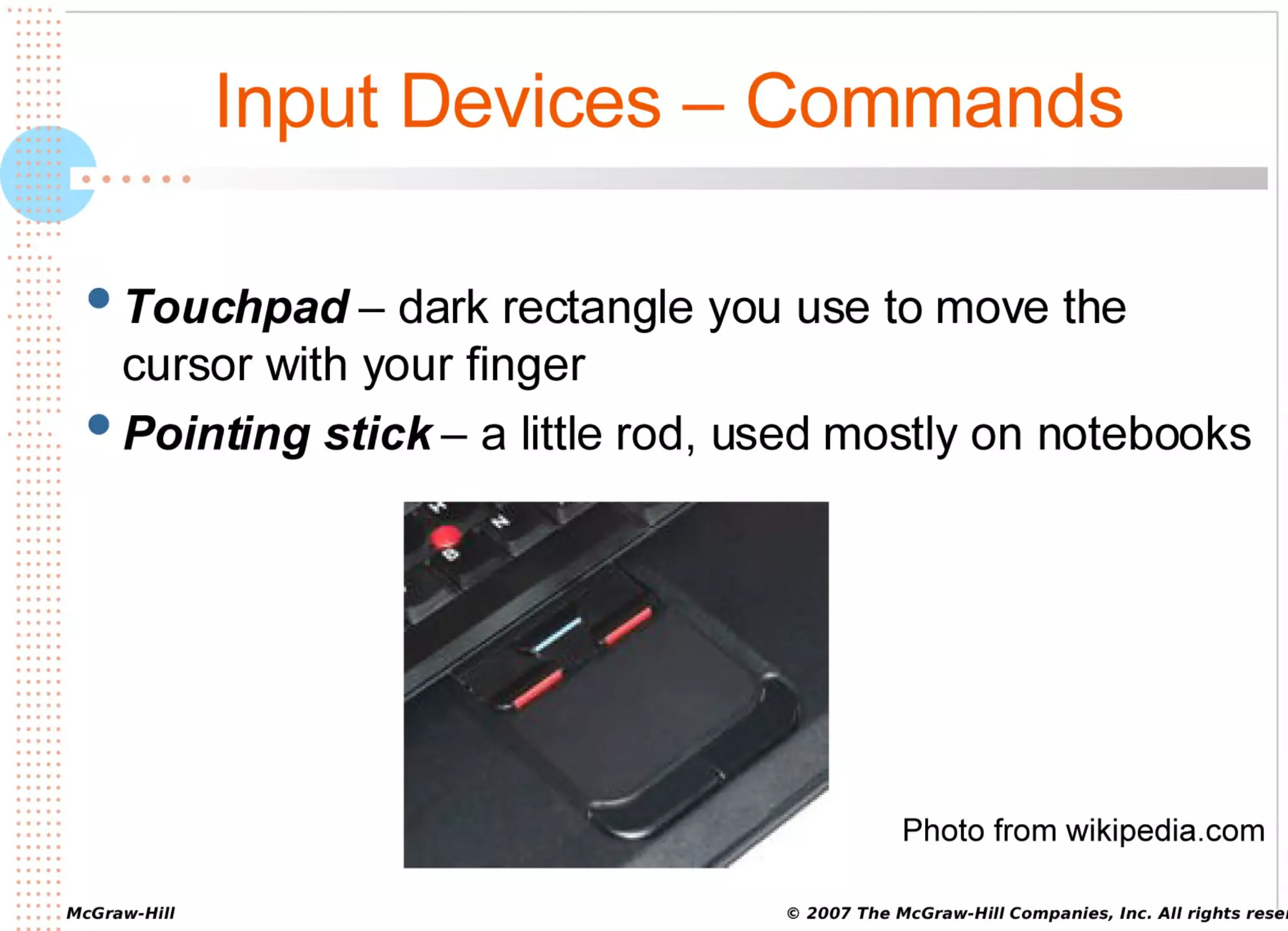
Touchpad
– dark rectangle you use to move the
cursor with your finger
Pointing stick – a little rod, used mostly on notebooks
Photo from wikipedia.com
© 2007 The McGraw-Hill Companies, Inc. All rights reser
•••••
•••••
•••••
•••••
•••••
•••••
•••••
•••••
•••••
•••••
•••••
•••••
•••••
•••••
•••••
•••••
•••••
•••••
•••••
•••••
••
•••••
•••••
•••••
•••••
••••
•••••
•••••
•••••
•••••
•••••
•••••
•••••
•••••
•••••
•••
•••••
•••••
•••••
•••••
•••••
•••••
•••••
•••••
•••••
•••••
•••••
•••••
•••••
•••••
•••••
•••••
•••••
•••••
•••••
•••••
•••••
•••••
•••••
•••••
•••••
•••••
•••••
•••••
•••••
•••••
•••••
•••••
•••••
•••••
•••••
•••••
•••••
•••••
•••••
•••••
• • • • • McGraw-Hill
•••••
Input Devices – Game Controllers
••••••
Game
controller – used for gaming to control screen
action
Gaming
wheel – steering wheel and foot pedals for
virtual driving
Photo from logitech.com
© 2007 The McGraw-Hill Companies, Inc. All rights reser
•••••
•••••
•••••
•••••
•••••
•••••
•••••
•••••
•••••
•••••
•••••
•••••
•••••
•••••
•••••
•••••
•••••
•••••
•••••
•••••
••
•••••
•••••
•••••
•••••
••••
•••••
•••••
•••••
•••••
•••••
•••••
•••••
•••••
•••••
•••
•••••
•••••
•••••
•••••
•••••
•••••
•••••
•••••
•••••
•••••
•••••
•••••
•••••
•••••
•••••
•••••
•••••
•••••
•••••
•••••
•••••
•••••
•••••
•••••
•••••
•••••
•••••
•••••
•••••
•••••
•••••
•••••
•••••
•••••
•••••
•••••
•••••
•••••
•••••
•••••
• • • • • McGraw-Hill
•••••
Input Devices – Game Controllers
••••••
Joystick
– controls action with a vertical handle and
programmable buttons
Gamepad – device with programmable buttons, thumb
sticks, and a directional pad
Photo from wikipedia.com
© 2007 The McGraw-Hill Companies, Inc. All rights reser
•••••
•••••
•••••
•••••
•••••
•••••
•••••
•••••
•••••
•••••
•••••
•••••
•••••
•••••
•••••
•••••
•••••
•••••
•••••
•••••
••
•••••
•••••
•••••
•••••
••••
•••••
•••••
•••••
•••••
•••••
•••••
•••••
•••••
•••••
•••
•••••
•••••
•••••
•••••
•••••
•••••
•••••
•••••
•••••
•••••
•••••
•••••
•••••
•••••
•••••
•••••
•••••
•••••
•••••
•••••
•••••
•••••
•••••
•••••
•••••
•••••
•••••
•••••
•••••
•••••
•••••
•••••
•••••
•••••
•••••
•••••
•••••
•••••
•••••
•••••
• • • • • McGraw-Hill
•••••
Scanners
••••••
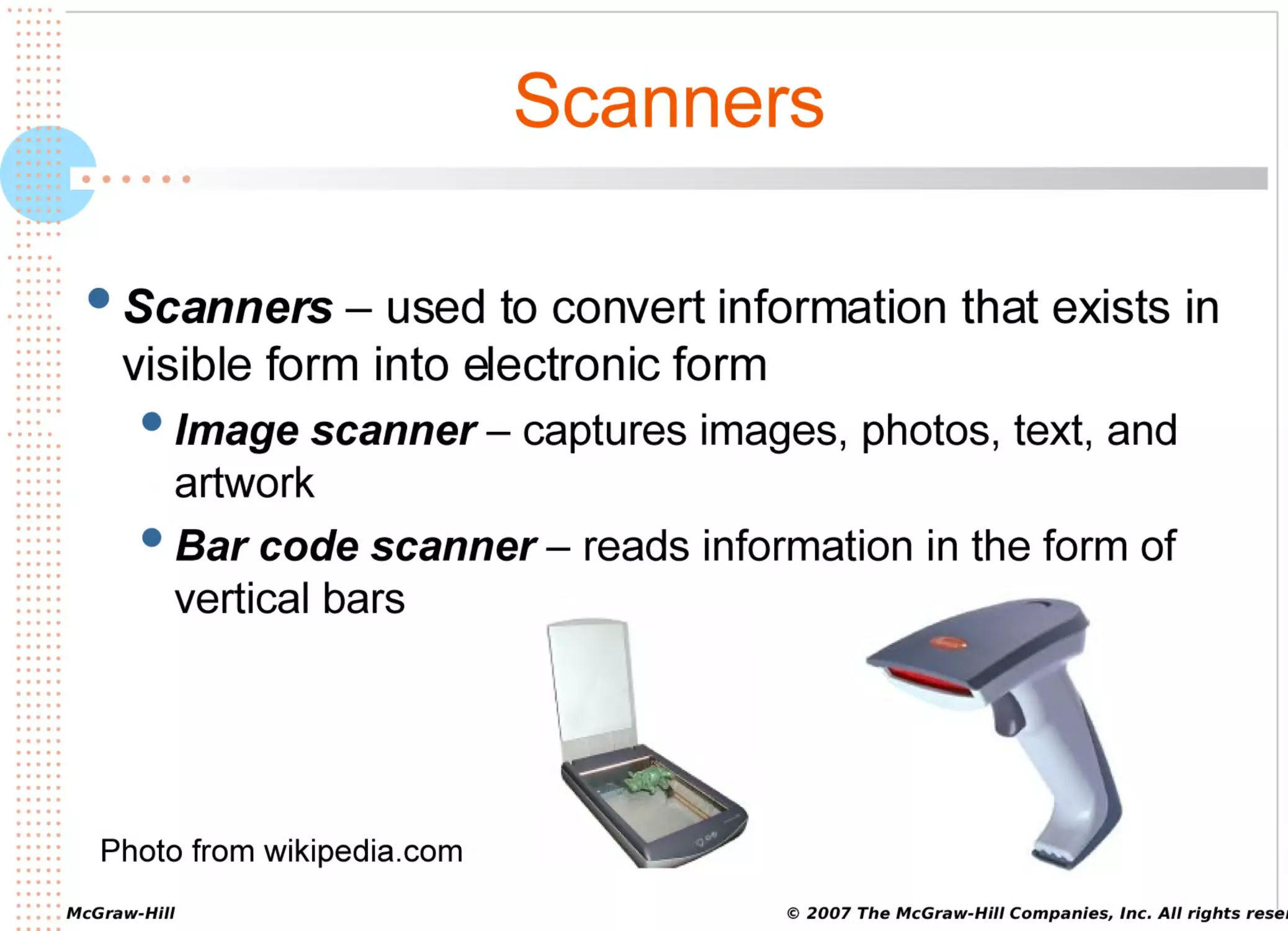
Scanners
– used to convert information that exists in
visible form into electronic form
Image
scanner – captures images, photos, text, and
artwork
Bar code scanner – reads information in the form of
vertical bars
Photo from wikipedia.com
© 2007 The McGraw-Hill Companies, Inc. All rights reser
•••••
•••••
•••••
•••••
•••••
•••••
•••••
•••••
•••••
•••••
•••••
•••••
•••••
•••••
•••••
•••••
•••••
•••••
•••••
•••••
••
•••••
•••••
•••••
•••••
••••
•••••
•••••
•••••
•••••
•••••
•••••
•••••
•••••
•••••
•••
•••••
•••••
•••••
•••••
•••••
•••••
•••••
•••••
•••••
•••••
•••••
•••••
•••••
•••••
•••••
•••••
•••••
•••••
•••••
•••••
•••••
•••••
•••••
•••••
•••••
•••••
•••••
•••••
•••••
•••••
•••••
•••••
•••••
•••••
•••••
•••••
•••••
•••••
•••••
•••••
• • • • • McGraw-Hill
•••••
Scanners
••••••
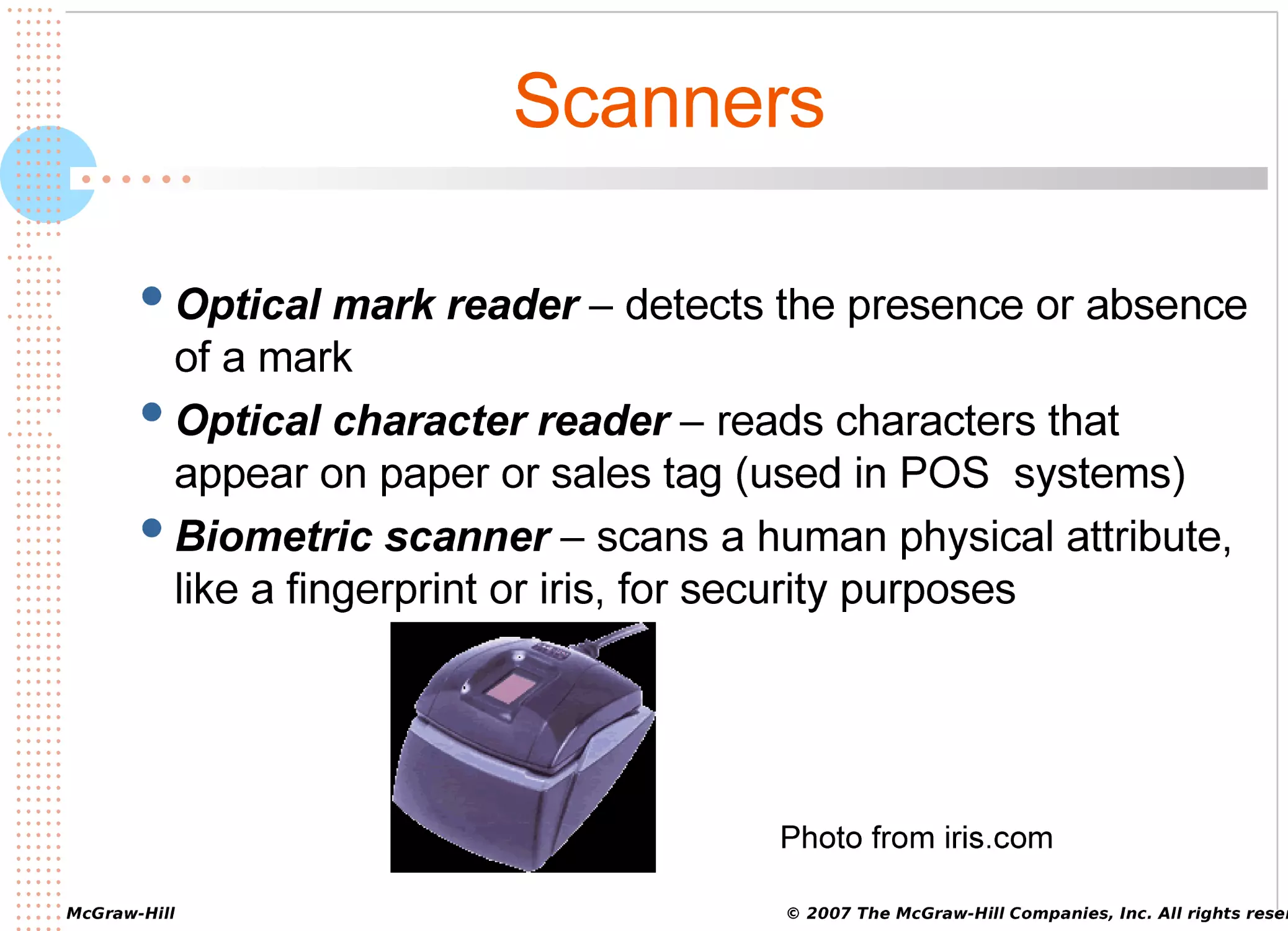
Optical
mark reader – detects the presence or absence
of a mark
Optical character reader – reads characters that
appear on paper or sales tag (used in POS systems)
Biometric scanner – scans a human physical attribute,
like a fingerprint or iris, for security purposes
Photo from iris.com
© 2007 The McGraw-Hill Companies, Inc. All rights reser
•••••
•••••
•••••
•••••
•••••
•••••
•••••
•••••
•••••
•••••
•••••
•••••
•••••
•••••
•••••
•••••
•••••
•••••
•••••
•••••
••
•••••
•••••
•••••
•••••
••••
•••••
•••••
•••••
•••••
•••••
•••••
•••••
•••••
•••••
•••
•••••
•••••
•••••
•••••
•••••
•••••
•••••
•••••
•••••
•••••
•••••
•••••
•••••
•••••
•••••
•••••
•••••
•••••
•••••
•••••
•••••
•••••
•••••
•••••
•••••
•••••
•••••
•••••
•••••
•••••
•••••
•••••
•••••
•••••
•••••
•••••
•••••
•••••
•••••
•••••
• • • • • McGraw-Hill
•••••
Digital Cameras
••••••
Digital
camera – captures still image or video as a
series of 1s and 0s
Digital
still camera – digitally captures still images in
varying resolutions
Digital video camera – captures video digitally
Webcam – captures digital video for the Web
© 2007 The McGraw-Hill Companies, Inc. All rights reser
•••••
•••••
•••••
•••••
•••••
•••••
•••••
•••••
•••••
•••••
•••••
•••••
•••••
•••••
•••••
•••••
•••••
•••••
•••••
•••••
••
•••••
•••••
•••••
•••••
••••
•••••
•••••
•••••
•••••
•••••
•••••
•••••
•••••
•••••
•••
•••••
•••••
•••••
•••••
•••••
•••••
•••••
•••••
•••••
•••••
•••••
•••••
•••••
•••••
•••••
•••••
•••••
•••••
•••••
•••••
•••••
•••••
•••••
•••••
•••••
•••••
•••••
•••••
•••••
•••••
•••••
•••••
•••••
•••••
•••••
•••••
•••••
•••••
•••••
•••••
• • • • • McGraw-Hill
•••••
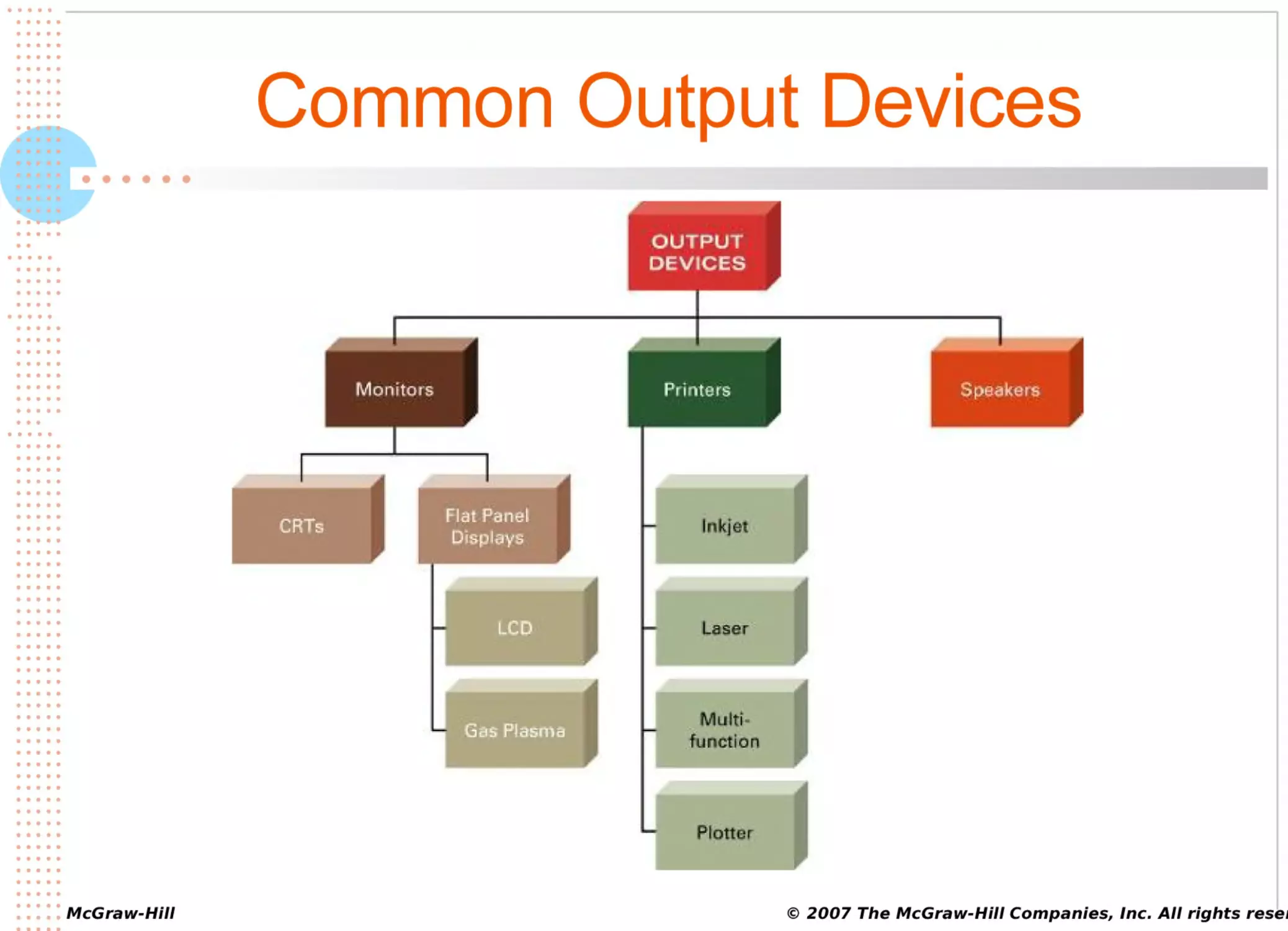
Common Output Devices
••••••
© 2007 The McGraw-Hill Companies, Inc. All rights reser
•••••
•••••
•••••
•••••
•••••
•••••
•••••
•••••
•••••
•••••
•••••
•••••
•••••
•••••
•••••
•••••
•••••
•••••
•••••
•••••
••
•••••
•••••
•••••
•••••
••••
•••••
•••••
•••••
•••••
•••••
•••••
•••••
•••••
•••••
•••
•••••
•••••
•••••
•••••
•••••
•••••
•••••
•••••
•••••
•••••
•••••
•••••
•••••
•••••
•••••
•••••
•••••
•••••
•••••
•••••
•••••
•••••
•••••
•••••
•••••
•••••
•••••
•••••
•••••
•••••
•••••
•••••
•••••
•••••
•••••
•••••
•••••
•••••
•••••
•••••
• • • • • McGraw-Hill
•••••
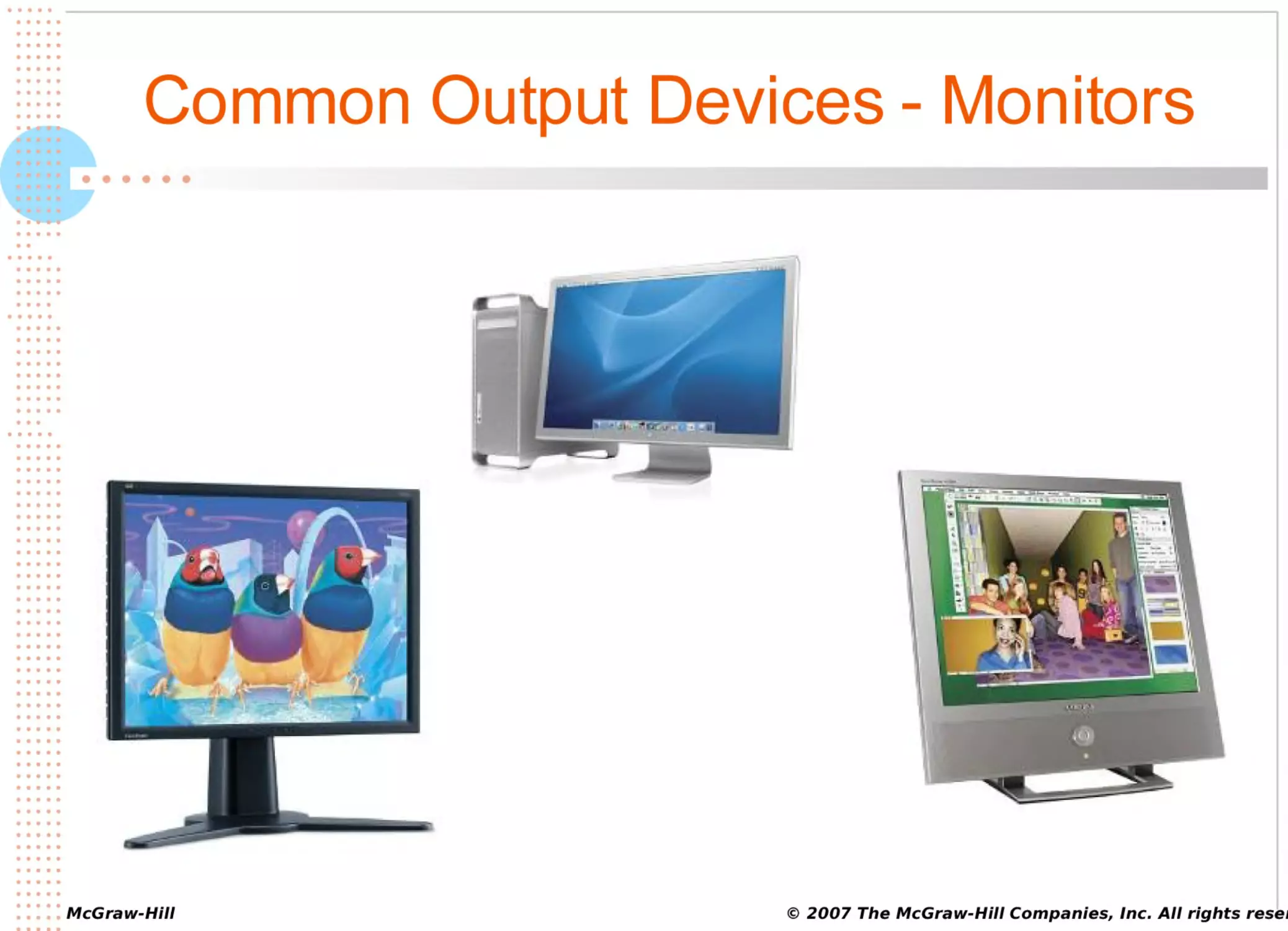
Common Output Devices - Monitors
••••••
© 2007 The McGraw-Hill Companies, Inc. All rights reser
•••••
•••••
•••••
•••••
•••••
•••••
•••••
•••••
•••••
•••••
•••••
•••••
•••••
•••••
•••••
•••••
•••••
•••••
•••••
•••••
••
•••••
•••••
•••••
•••••
••••
•••••
•••••
•••••
•••••
•••••
•••••
•••••
•••••
•••••
•••
•••••
•••••
•••••
•••••
•••••
•••••
•••••
•••••
•••••
•••••
•••••
•••••
•••••
•••••
•••••
•••••
•••••
•••••
•••••
•••••
•••••
•••••
•••••
•••••
•••••
•••••
•••••
•••••
•••••
•••••
•••••
•••••
•••••
•••••
•••••
•••••
•••••
•••••
•••••
•••••
• • • • • McGraw-Hill
•••••
Monitors
••••••
CRT
– monitors that look like traditional TV sets
Flat-panel display – thin, lightweight monitors that
take up much less space than CRTs
© 2007 The McGraw-Hill Companies, Inc. All rights reser
•••••
•••••
•••••
•••••
•••••
•••••
•••••
•••••
•••••
•••••
•••••
•••••
•••••
•••••
•••••
•••••
•••••
•••••
•••••
•••••
••
•••••
•••••
•••••
•••••
••••
•••••
•••••
•••••
•••••
•••••
•••••
•••••
•••••
•••••
•••
•••••
•••••
•••••
•••••
•••••
•••••
•••••
•••••
•••••
•••••
•••••
•••••
•••••
•••••
•••••
•••••
•••••
•••••
•••••
•••••
•••••
•••••
•••••
•••••
•••••
•••••
•••••
•••••
•••••
•••••
•••••
•••••
•••••
•••••
•••••
•••••
•••••
•••••
•••••
•••••
• • • • • McGraw-Hill
•••••
Monitors
••••••
Two types of flat-panel displays
1.
2.
Liquid crystal display (LCD) monitor – sends
electricity through crystallized liquid between layers of
glass or plastic
Gas plasma display – sends electricity through gas
trapped between layers of glass or plastic
© 2007 The McGraw-Hill Companies, Inc. All rights reser
•••••
•••••
•••••
•••••
•••••
•••••
•••••
•••••
•••••
•••••
•••••
•••••
•••••
•••••
•••••
•••••
•••••
•••••
•••••
•••••
••
•••••
•••••
•••••
•••••
••••
•••••
•••••
•••••
•••••
•••••
•••••
•••••
•••••
•••••
•••
•••••
•••••
•••••
•••••
•••••
•••••
•••••
•••••
•••••
•••••
•••••
•••••
•••••
•••••
•••••
•••••
•••••
•••••
•••••
•••••
•••••
•••••
•••••
•••••
•••••
•••••
•••••
•••••
•••••
•••••
•••••
•••••
•••••
•••••
•••••
•••••
•••••
•••••
•••••
•••••
• • • • • McGraw-Hill
•••••
Monitor Considerations
••••••
Viewable
image size (VIS) – the size of the image on
a monitor
Resolution of a screen – the number of pixels it has
Pixels (picture elements) – the dots that make up the
image
Dot pitch – the distance between the centers of two
like-colored pixels
© 2007 The McGraw-Hill Companies, Inc. All rights reser
•••••
•••••
•••••
•••••
•••••
•••••
•••••
•••••
•••••
•••••
•••••
•••••
•••••
•••••
•••••
•••••
•••••
•••••
•••••
•••••
••
•••••
•••••
•••••
•••••
••••
•••••
•••••
•••••
•••••
•••••
•••••
•••••
•••••
•••••
•••
•••••
•••••
•••••
•••••
•••••
•••••
•••••
•••••
•••••
•••••
•••••
•••••
•••••
•••••
•••••
•••••
•••••
•••••
•••••
•••••
•••••
•••••
•••••
•••••
•••••
•••••
•••••
•••••
•••••
•••••
•••••
•••••
•••••
•••••
•••••
•••••
•••••
•••••
•••••
•••••
• • • • • McGraw-Hill
•••••
Printers
••••••
© 2007 The McGraw-Hill Companies, Inc. All rights reser
•••••
•••••
•••••
•••••
•••••
•••••
•••••
•••••
•••••
•••••
•••••
•••••
•••••
•••••
•••••
•••••
•••••
•••••
•••••
•••••
••
•••••
•••••
•••••
•••••
••••
•••••
•••••
•••••
•••••
•••••
•••••
•••••
•••••
•••••
•••
•••••
•••••
•••••
•••••
•••••
•••••
•••••
•••••
•••••
•••••
•••••
•••••
•••••
•••••
•••••
•••••
•••••
•••••
•••••
•••••
•••••
•••••
•••••
•••••
•••••
•••••
•••••
•••••
•••••
•••••
•••••
•••••
•••••
•••••
•••••
•••••
•••••
•••••
•••••
•••••
• • • • • McGraw-Hill
•••••
Printers
••••••
Resolution
of a printer – the number of dots per
square inch (dpi) it produces
Types
Inkjet
printer – makes images by forcing ink through
nozzles
Laser printer – forms images using the same
electrostatic process that photocopiers use
Multifunction printer – scan, copy, and fax, as well as
print
Plotter – forms output by moving pen across paper
© 2007 The McGraw-Hill Companies, Inc. All rights reser
•••••
•••••
•••••
•••••
•••••
•••••
•••••
•••••
•••••
•••••
•••••
•••••
•••••
•••••
•••••
•••••
•••••
•••••
•••••
•••••
••
•••••
•••••
•••••
•••••
••••
•••••
•••••
•••••
•••••
•••••
•••••
•••••
•••••
•••••
•••
•••••
•••••
•••••
•••••
•••••
•••••
•••••
•••••
•••••
•••••
•••••
•••••
•••••
•••••
•••••
•••••
•••••
•••••
•••••
•••••
•••••
•••••
•••••
•••••
•••••
•••••
•••••
•••••
•••••
•••••
•••••
•••••
•••••
•••••
•••••
•••••
•••••
•••••
•••••
•••••
• • • • • McGraw-Hill
•••••
Common Storage Devices
••••••
© 2007 The McGraw-Hill Companies, Inc. All rights reser
•••••
•••••
•••••
•••••
•••••
•••••
•••••
•••••
•••••
•••••
•••••
•••••
•••••
•••••
•••••
•••••
•••••
•••••
•••••
•••••
••
•••••
•••••
•••••
•••••
••••
•••••
•••••
•••••
•••••
•••••
•••••
•••••
•••••
•••••
•••
•••••
•••••
•••••
•••••
•••••
•••••
•••••
•••••
•••••
•••••
•••••
•••••
•••••
•••••
•••••
•••••
•••••
•••••
•••••
•••••
•••••
•••••
•••••
•••••
•••••
•••••
•••••
•••••
•••••
•••••
•••••
•••••
•••••
•••••
•••••
•••••
•••••
•••••
•••••
•••••
• • • • • McGraw-Hill
•••••
Capacity of Storage Devices
••••••
Megabyte
(MB or M or Meg) – about 1 million bytes
Gigabyte (GB or Gig) – about 1 billion bytes
Terabyte (TB) – about 1 trillion bytes
© 2007 The McGraw-Hill Companies, Inc. All rights reser
•••••
•••••
•••••
•••••
•••••
•••••
•••••
•••••
•••••
•••••
•••••
•••••
•••••
•••••
•••••
•••••
•••••
•••••
•••••
•••••
••
•••••
•••••
•••••
•••••
••••
•••••
•••••
•••••
•••••
•••••
•••••
•••••
•••••
•••••
•••
•••••
•••••
•••••
•••••
•••••
•••••
•••••
•••••
•••••
•••••
•••••
•••••
•••••
•••••
•••••
•••••
•••••
•••••
•••••
•••••
•••••
•••••
•••••
•••••
•••••
•••••
•••••
•••••
•••••
•••••
•••••
•••••
•••••
•••••
•••••
•••••
•••••
•••••
•••••
•••••
• • • • • McGraw-Hill
•••••
Magnetic Storage Media
••••••
Hard
disk – magnetic storage with one or more thin
metal platters sealed inside the drive
© 2007 The McGraw-Hill Companies, Inc. All rights reser
•••••
•••••
•••••
•••••
•••••
•••••
•••••
•••••
•••••
•••••
•••••
•••••
•••••
•••••
•••••
•••••
•••••
•••••
•••••
•••••
••
•••••
•••••
•••••
•••••
••••
•••••
•••••
•••••
•••••
•••••
•••••
•••••
•••••
•••••
•••
•••••
•••••
•••••
•••••
•••••
•••••
•••••
•••••
•••••
•••••
•••••
•••••
•••••
•••••
•••••
•••••
•••••
•••••
•••••
•••••
•••••
•••••
•••••
•••••
•••••
•••••
•••••
•••••
•••••
•••••
•••••
•••••
•••••
•••••
•••••
•••••
•••••
•••••
•••••
•••••
• • • • • McGraw-Hill
•••••
Optical Storage Media
••••••
© 2007 The McGraw-Hill Companies, Inc. All rights reser
•••••
•••••
•••••
•••••
•••••
•••••
•••••
•••••
•••••
•••••
•••••
•••••
•••••
•••••
•••••
•••••
•••••
•••••
•••••
•••••
••
•••••
•••••
•••••
•••••
••••
•••••
•••••
•••••
•••••
•••••
•••••
•••••
•••••
•••••
•••
•••••
•••••
•••••
•••••
•••••
•••••
•••••
•••••
•••••
•••••
•••••
•••••
•••••
•••••
•••••
•••••
•••••
•••••
•••••
•••••
•••••
•••••
•••••
•••••
•••••
•••••
•••••
•••••
•••••
•••••
•••••
•••••
•••••
•••••
•••••
•••••
•••••
•••••
•••••
•••••
• • • • • McGraw-Hill
•••••
Optical Storage Media
••••••
Optical
storage media – plastic discs on which
information is stored, deleted, and changed using
laser technology
Two types
CDs
DVDs
© 2007 The McGraw-Hill Companies, Inc. All rights reser
•••••
•••••
•••••
•••••
•••••
•••••
•••••
•••••
•••••
•••••
•••••
•••••
•••••
•••••
•••••
•••••
•••••
•••••
•••••
•••••
••
•••••
•••••
•••••
•••••
••••
•••••
•••••
•••••
•••••
•••••
•••••
•••••
•••••
•••••
•••
•••••
•••••
•••••
•••••
•••••
•••••
•••••
•••••
•••••
•••••
•••••
•••••
•••••
•••••
•••••
•••••
•••••
•••••
•••••
•••••
•••••
•••••
•••••
•••••
•••••
•••••
•••••
•••••
•••••
•••••
•••••
•••••
•••••
•••••
•••••
•••••
•••••
•••••
•••••
•••••
• • • • • McGraw-Hill
•••••
CDs
••••••
CD-ROM
(compact disc read-only memory) –
information cannot be changed
CD-R (compact disc – recordable) – write one time
only
CD-RW (compact disc – rewritable) – save, change,
and delete files repeatedly
© 2007 The McGraw-Hill Companies, Inc. All rights reser
•••••
•••••
•••••
•••••
•••••
•••••
•••••
•••••
•••••
•••••
•••••
•••••
•••••
•••••
•••••
•••••
•••••
•••••
•••••
•••••
••
•••••
•••••
•••••
•••••
••••
•••••
•••••
•••••
•••••
•••••
•••••
•••••
•••••
•••••
•••
•••••
•••••
•••••
•••••
•••••
•••••
•••••
•••••
•••••
•••••
•••••
•••••
•••••
•••••
•••••
•••••
•••••
•••••
•••••
•••••
•••••
•••••
•••••
•••••
•••••
•••••
•••••
•••••
•••••
•••••
•••••
•••••
•••••
•••••
•••••
•••••
•••••
•••••
•••••
•••••
• • • • • McGraw-Hill
•••••
DVDs
••••••
DVD-ROM
– high capacity; information cannot be
changed
DVD-R or DVD+R (DVD – recordable) – high
capacity; write one time only
DVD-RW or DVD+R (depending on manufacturer) –
save, change, delete repeatedly
© 2007 The McGraw-Hill Companies, Inc. All rights reser
•••••
•••••
•••••
•••••
•••••
•••••
•••••
•••••
•••••
•••••
•••••
•••••
•••••
•••••
•••••
•••••
•••••
•••••
•••••
•••••
••
•••••
•••••
•••••
•••••
••••
•••••
•••••
•••••
•••••
•••••
•••••
•••••
•••••
•••••
•••
•••••
•••••
•••••
•••••
•••••
•••••
•••••
•••••
•••••
•••••
•••••
•••••
•••••
•••••
•••••
•••••
•••••
•••••
•••••
•••••
•••••
•••••
•••••
•••••
•••••
•••••
•••••
•••••
•••••
•••••
•••••
•••••
•••••
•••••
•••••
•••••
•••••
•••••
•••••
•••••
• • • • • McGraw-Hill
•••••
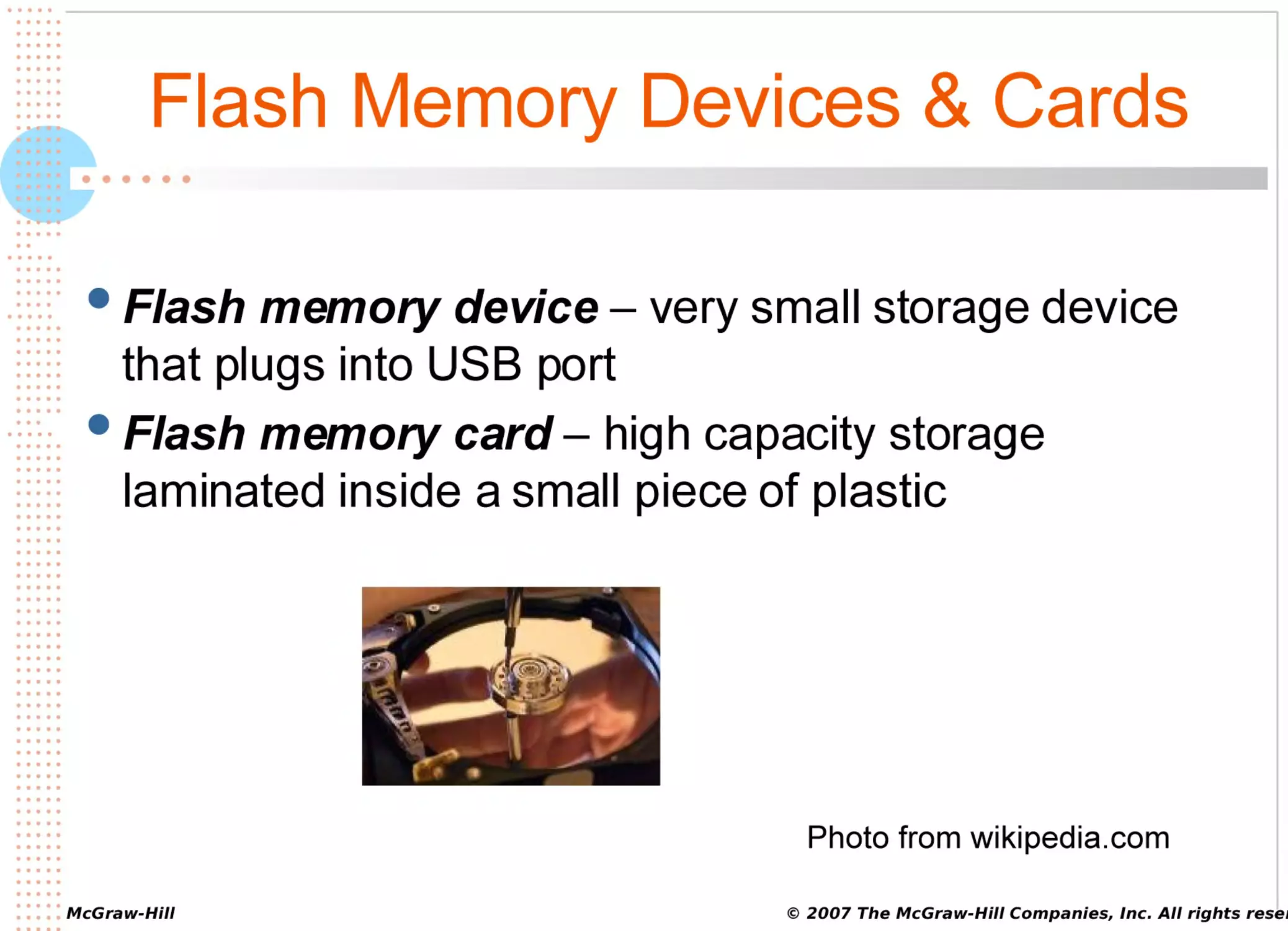
Flash Memory Devices & Cards
••••••
Flash
memory device – very small storage device
that plugs into USB port
Flash memory card – high capacity storage
laminated inside a small piece of plastic
Photo from wikipedia.com
© 2007 The McGraw-Hill Companies, Inc. All rights reser
•••••
•••••
•••••
•••••
•••••
•••••
•••••
•••••
•••••
•••••
•••••
•••••
•••••
•••••
•••••
•••••
•••••
•••••
•••••
•••••
••
•••••
•••••
•••••
•••••
••••
•••••
•••••
•••••
•••••
•••••
•••••
•••••
•••••
•••••
•••
•••••
•••••
•••••
•••••
•••••
•••••
•••••
•••••
•••••
•••••
•••••
•••••
•••••
•••••
•••••
•••••
•••••
•••••
•••••
•••••
•••••
•••••
•••••
•••••
•••••
•••••
•••••
•••••
•••••
•••••
•••••
•••••
•••••
•••••
•••••
•••••
•••••
•••••
•••••
•••••
• • • • • McGraw-Hill
•••••
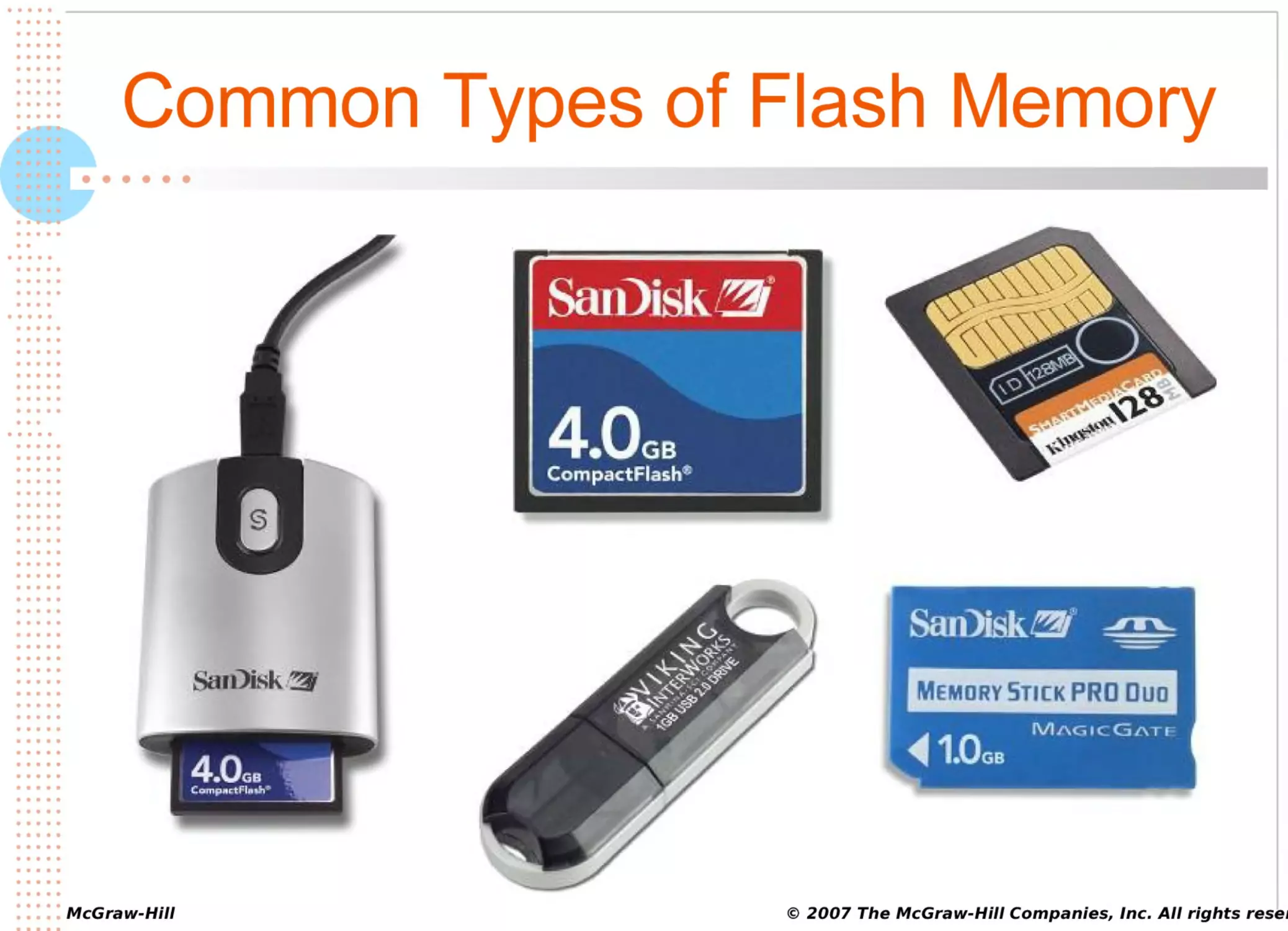
Common Types of Flash Memory
••••••
© 2007 The McGraw-Hill Companies, Inc. All rights reser
•••••
•••••
•••••
•••••
•••••
•••••
•••••
•••••
•••••
•••••
•••••
•••••
•••••
•••••
•••••
•••••
•••••
•••••
•••••
•••••
••
•••••
•••••
•••••
•••••
••••
•••••
•••••
•••••
•••••
•••••
•••••
•••••
•••••
•••••
•••
•••••
•••••
•••••
•••••
•••••
•••••
•••••
•••••
•••••
•••••
•••••
•••••
•••••
•••••
•••••
•••••
•••••
•••••
•••••
•••••
•••••
•••••
•••••
•••••
•••••
•••••
•••••
•••••
•••••
•••••
•••••
•••••
•••••
•••••
•••••
•••••
•••••
•••••
•••••
•••••
• • • • • McGraw-Hill
•••••
Flash Memory Cards
••••••
xD-Picture
(xD) card – rectangular; smaller than a
penny and about as thick with one curved side
Secure Digital (SD) card and MultiMediaCard
(MMC) – look the same but SD has copy protection;
are both larger and thicker than a quarter (but
rectangular)
© 2007 The McGraw-Hill Companies, Inc. All rights reser
•••••
•••••
•••••
•••••
•••••
•••••
•••••
•••••
•••••
•••••
•••••
•••••
•••••
•••••
•••••
•••••
•••••
•••••
•••••
•••••
••
•••••
•••••
•••••
•••••
••••
•••••
•••••
•••••
•••••
•••••
•••••
•••••
•••••
•••••
•••
•••••
•••••
•••••
•••••
•••••
•••••
•••••
•••••
•••••
•••••
•••••
•••••
•••••
•••••
•••••
•••••
•••••
•••••
•••••
•••••
•••••
•••••
•••••
•••••
•••••
•••••
•••••
•••••
•••••
•••••
•••••
•••••
•••••
•••••
•••••
•••••
•••••
•••••
•••••
•••••
• • • • • McGraw-Hill
•••••
Flash Memory Cards
••••••
CompactFlash
(CF) card – almost square; larger
than a half-dollar
SmartMedia (SM) card – rectangular; longer than CF
Memory Stick Media card – elongated card as wide
as a penny developed by Sony
© 2007 The McGraw-Hill Companies, Inc. All rights reser
•••••
•••••
•••••
•••••
•••••
•••••
•••••
•••••
•••••
•••••
•••••
•••••
•••••
•••••
•••••
•••••
•••••
•••••
•••••
•••••
••
•••••
•••••
•••••
•••••
••••
•••••
•••••
•••••
•••••
•••••
•••••
•••••
•••••
•••••
•••
•••••
•••••
•••••
•••••
•••••
•••••
•••••
•••••
•••••
•••••
•••••
•••••
•••••
•••••
•••••
•••••
•••••
•••••
•••••
•••••
•••••
•••••
•••••
•••••
•••••
•••••
•••••
•••••
•••••
•••••
•••••
•••••
•••••
•••••
•••••
•••••
•••••
•••••
•••••
•••••
• • • • • McGraw-Hill
•••••
CPU and RAM
••••••
© 2007 The McGraw-Hill Companies, Inc. All rights reser
•••••
•••••
•••••
•••••
•••••
•••••
•••••
•••••
•••••
•••••
•••••
•••••
•••••
•••••
•••••
•••••
•••••
•••••
•••••
•••••
••
•••••
•••••
•••••
•••••
••••
•••••
•••••
•••••
•••••
•••••
•••••
•••••
•••••
•••••
•••
•••••
•••••
•••••
•••••
•••••
•••••
•••••
•••••
•••••
•••••
•••••
•••••
•••••
•••••
•••••
•••••
•••••
•••••
•••••
•••••
•••••
•••••
•••••
•••••
•••••
•••••
•••••
•••••
•••••
•••••
•••••
•••••
•••••
•••••
•••••
•••••
•••••
•••••
•••••
•••••
• • • • • McGraw-Hill
•••••
CPU and RAM
••••••
CPU
and RAM work together to form the brain of your
computer
CPU speed measured in gigahertz (GHz)
GHz
– number of billions of CPU cycles per second
CPU (machine) cycle – retrieve, decode, and execute
instruction, then return result to RAM if necessary
© 2007 The McGraw-Hill Companies, Inc. All rights reser
•••••
•••••
•••••
•••••
•••••
•••••
•••••
•••••
•••••
•••••
•••••
•••••
•••••
•••••
•••••
•••••
•••••
•••••
•••••
•••••
••
•••••
•••••
•••••
•••••
••••
•••••
•••••
•••••
•••••
•••••
•••••
•••••
•••••
•••••
•••
•••••
•••••
•••••
•••••
•••••
•••••
•••••
•••••
•••••
•••••
•••••
•••••
•••••
•••••
•••••
•••••
•••••
•••••
•••••
•••••
•••••
•••••
•••••
•••••
•••••
•••••
•••••
•••••
•••••
•••••
•••••
•••••
•••••
•••••
•••••
•••••
•••••
•••••
•••••
•••••
• • • • • McGraw-Hill
•••••
CPU Components
••••••
Control
unit – directs what happens in the CPU and
the rest of your computer
Arithmetic logic unit (ALU) – performs arithmetic,
comparison, and logic operations
CPU cache – CPU memory where instructions wait
until they’re needed
CPU clock – beats to keep instructions and
information moving in synchronized fashion
© 2007 The McGraw-Hill Companies, Inc. All rights reser
•••••
•••••
•••••
•••••
•••••
•••••
•••••
•••••
•••••
•••••
•••••
•••••
•••••
•••••
•••••
•••••
•••••
•••••
•••••
•••••
••
•••••
•••••
•••••
•••••
••••
•••••
•••••
•••••
•••••
•••••
•••••
•••••
•••••
•••••
•••
•••••
•••••
•••••
•••••
•••••
•••••
•••••
•••••
•••••
•••••
•••••
•••••
•••••
•••••
•••••
•••••
•••••
•••••
•••••
•••••
•••••
•••••
•••••
•••••
•••••
•••••
•••••
•••••
•••••
•••••
•••••
•••••
•••••
•••••
•••••
•••••
•••••
•••••
•••••
•••••
• • • • • McGraw-Hill
•••••
System Bus
••••••
System
bus – electrical pathways that move
information between motherboard components,
especially between CPU and RAM
© 2007 The McGraw-Hill Companies, Inc. All rights reser
•••••
•••••
•••••
•••••
•••••
•••••
•••••
•••••
•••••
•••••
•••••
•••••
•••••
•••••
•••••
•••••
•••••
•••••
•••••
•••••
••
•••••
•••••
•••••
•••••
••••
•••••
•••••
•••••
•••••
•••••
•••••
•••••
•••••
•••••
•••
•••••
•••••
•••••
•••••
•••••
•••••
•••••
•••••
•••••
•••••
•••••
•••••
•••••
•••••
•••••
•••••
•••••
•••••
•••••
•••••
•••••
•••••
•••••
•••••
•••••
•••••
•••••
•••••
•••••
•••••
•••••
•••••
•••••
•••••
•••••
•••••
•••••
•••••
•••••
•••••
• • • • • McGraw-Hill
•••••
CPU and Ram at Work
••••••
© 2007 The McGraw-Hill Companies, Inc. All rights reser
•••••
•••••
•••••
•••••
•••••
•••••
•••••
•••••
•••••
•••••
•••••
•••••
•••••
•••••
•••••
•••••
•••••
•••••
•••••
•••••
••
•••••
•••••
•••••
•••••
••••
•••••
•••••
•••••
•••••
•••••
•••••
•••••
•••••
•••••
•••
•••••
•••••
•••••
•••••
•••••
•••••
•••••
•••••
•••••
•••••
•••••
•••••
•••••
•••••
•••••
•••••
•••••
•••••
•••••
•••••
•••••
•••••
•••••
•••••
•••••
•••••
•••••
•••••
•••••
•••••
•••••
•••••
•••••
•••••
•••••
•••••
•••••
•••••
•••••
•••••
• • • • • McGraw-Hill
•••••
CPU (Machine Cycle)
••••••
1.
2.
3.
4.
Retrieve: The control unit sends to RAM for the
instructions and information it needs
Decode: CPU gets the instruction out of cache and
examines it to see what to do
Execute: Does what the instruction says to do
Store: Sends the result of processing to be stored in
RAM if necessary
© 2007 The McGraw-Hill Companies, Inc. All rights reser
•••••
•••••
•••••
•••••
•••••
•••••
•••••
•••••
•••••
•••••
•••••
•••••
•••••
•••••
•••••
•••••
•••••
•••••
•••••
•••••
••
•••••
•••••
•••••
•••••
••••
•••••
•••••
•••••
•••••
•••••
•••••
•••••
•••••
•••••
•••
•••••
•••••
•••••
•••••
•••••
•••••
•••••
•••••
•••••
•••••
•••••
•••••
•••••
•••••
•••••
•••••
•••••
•••••
•••••
•••••
•••••
•••••
•••••
•••••
•••••
•••••
•••••
•••••
•••••
•••••
•••••
•••••
•••••
•••••
•••••
•••••
•••••
•••••
•••••
•••••
• • • • • McGraw-Hill
•••••
Notebook CPUs and RAM
••••••
Mobile CPU
– type of CPU that changes speed, and
therefore power consumption, in response to
fluctuation in use
RAM for notebooks comes in smaller modules than
RAM for desktops
© 2007 The McGraw-Hill Companies, Inc. All rights reser
•••••
•••••
•••••
•••••
•••••
•••••
•••••
•••••
•••••
•••••
•••••
•••••
•••••
•••••
•••••
•••••
•••••
•••••
•••••
•••••
••
•••••
•••••
•••••
•••••
••••
•••••
•••••
•••••
•••••
•••••
•••••
•••••
•••••
•••••
•••
•••••
•••••
•••••
•••••
•••••
•••••
•••••
•••••
•••••
•••••
•••••
•••••
•••••
•••••
•••••
•••••
•••••
•••••
•••••
•••••
•••••
•••••
•••••
•••••
•••••
•••••
•••••
•••••
•••••
•••••
•••••
•••••
•••••
•••••
•••••
•••••
•••••
•••••
•••••
•••••
• • • • • McGraw-Hill
•••••
Connectors and Ports
••••••
© 2007 The McGraw-Hill Companies, Inc. All rights reser
•••••
•••••
•••••
•••••
•••••
•••••
•••••
•••••
•••••
•••••
•••••
•••••
•••••
•••••
•••••
•••••
•••••
•••••
•••••
•••••
••
•••••
•••••
•••••
•••••
••••
•••••
•••••
•••••
•••••
•••••
•••••
•••••
•••••
•••••
•••
•••••
•••••
•••••
•••••
•••••
•••••
•••••
•••••
•••••
•••••
•••••
•••••
•••••
•••••
•••••
•••••
•••••
•••••
•••••
•••••
•••••
•••••
•••••
•••••
•••••
•••••
•••••
•••••
•••••
•••••
•••••
•••••
•••••
•••••
•••••
•••••
•••••
•••••
•••••
•••••
• • • • • McGraw-Hill
•••••
Ports and Connectors
••••••
Port
– place on your system unit, monitor, or keyboard
through which information and instructions flow to and
from computer
Connector – something like a cable; can also be
wireless
© 2007 The McGraw-Hill Companies, Inc. All rights reser
•••••
•••••
•••••
•••••
•••••
•••••
•••••
•••••
•••••
•••••
•••••
•••••
•••••
•••••
•••••
•••••
•••••
•••••
•••••
•••••
••
•••••
•••••
•••••
•••••
••••
•••••
•••••
•••••
•••••
•••••
•••••
•••••
•••••
•••••
•••
•••••
•••••
•••••
•••••
•••••
•••••
•••••
•••••
•••••
•••••
•••••
•••••
•••••
•••••
•••••
•••••
•••••
•••••
•••••
•••••
•••••
•••••
•••••
•••••
•••••
•••••
•••••
•••••
•••••
•••••
•••••
•••••
•••••
•••••
•••••
•••••
•••••
•••••
•••••
•••••
• • • • • McGraw-Hill
•••••
Ports and Connectors
••••••
Some
ports work with plug-and-play and hot-swap
ports and devices
Plug
and play – operating system feature that finds and
installs the driver for the device
Hot swap – operating system feature that allows you to
plug or unplug a device while the computer is running
© 2007 The McGraw-Hill Companies, Inc. All rights reser
•••••
•••••
•••••
•••••
•••••
•••••
•••••
•••••
•••••
•••••
•••••
•••••
•••••
•••••
•••••
•••••
•••••
•••••
•••••
•••••
••
•••••
•••••
•••••
•••••
••••
•••••
•••••
•••••
•••••
•••••
•••••
•••••
•••••
•••••
•••
•••••
•••••
•••••
•••••
•••••
•••••
•••••
•••••
•••••
•••••
•••••
•••••
•••••
•••••
•••••
•••••
•••••
•••••
•••••
•••••
•••••
•••••
•••••
•••••
•••••
•••••
•••••
•••••
•••••
•••••
•••••
•••••
•••••
•••••
•••••
•••••
•••••
•••••
•••••
•••••
• • • • • McGraw-Hill
•••••
Ports
••••••
USB
(universal serial bus) port – fits small, flat,
plug-and-play, hot-swap USB connectors
Firewire port (IEEE1394 or I-Link) – fits hot-swap,
plug-and-play Firewire connectors
Photos from wikipedia.com
© 2007 The McGraw-Hill Companies, Inc. All rights reser
•••••
•••••
•••••
•••••
•••••
•••••
•••••
•••••
•••••
•••••
•••••
•••••
•••••
•••••
•••••
•••••
•••••
•••••
•••••
•••••
••
•••••
•••••
•••••
•••••
••••
•••••
•••••
•••••
•••••
•••••
•••••
•••••
•••••
•••••
•••
•••••
•••••
•••••
•••••
•••••
•••••
•••••
•••••
•••••
•••••
•••••
•••••
•••••
•••••
•••••
•••••
•••••
•••••
•••••
•••••
•••••
•••••
•••••
•••••
•••••
•••••
•••••
•••••
•••••
•••••
•••••
•••••
•••••
•••••
•••••
•••••
•••••
•••••
•••••
•••••
• • • • • McGraw-Hill
•••••
Ports
••••••
PS/2
port – fits PS/2 connectors (used for keyboards
and mice)
Parallel port – fits parallel large flat parallel
connectors found on printers
Photos from wikipedia.com
© 2007 The McGraw-Hill Companies, Inc. All rights reser
•••••
•••••
•••••
•••••
•••••
•••••
•••••
•••••
•••••
•••••
•••••
•••••
•••••
•••••
•••••
•••••
•••••
•••••
•••••
•••••
••
•••••
•••••
•••••
•••••
••••
•••••
•••••
•••••
•••••
•••••
•••••
•••••
•••••
•••••
•••
•••••
•••••
•••••
•••••
•••••
•••••
•••••
•••••
•••••
•••••
•••••
•••••
•••••
•••••
•••••
•••••
•••••
•••••
•••••
•••••
•••••
•••••
•••••
•••••
•••••
•••••
•••••
•••••
•••••
•••••
•••••
•••••
•••••
•••••
•••••
•••••
•••••
•••••
•••••
•••••
• • • • • McGraw-Hill
•••••
Common Ports & Connectors
••••••
Serial
Ethernet
Parallel
Firewire
USB
© 2007 The McGraw-Hill Companies, Inc. All rights reser
•••••
•••••
•••••
•••••
•••••
•••••
•••••
•••••
•••••
•••••
•••••
•••••
•••••
•••••
•••••
•••••
•••••
•••••
•••••
•••••
••
•••••
•••••
•••••
•••••
••••
•••••
•••••
•••••
•••••
•••••
•••••
•••••
•••••
•••••
•••
•••••
•••••
•••••
•••••
•••••
•••••
•••••
•••••
•••••
•••••
•••••
•••••
•••••
•••••
•••••
•••••
•••••
•••••
•••••
•••••
•••••
•••••
•••••
•••••
•••••
•••••
•••••
•••••
•••••
•••••
•••••
•••••
•••••
•••••
•••••
•••••
•••••
•••••
•••••
•••••
• • • • • McGraw-Hill
•••••
Wireless Connections
••••••
Infrared
IR or IrDA (infrared data association) –
uses red light to send and receive information
Bluetooth – transmits information as radio waves for
a distance of 30 feet
WiFi (wireless fidelity) or IEEE 802.11a, b, or g –
transmits information as radio waves for a distance of
up to several miles
© 2007 The McGraw-Hill Companies, Inc. All rights reser
•••••
•••••
•••••
•••••
•••••
•••••
•••••
•••••
•••••
•••••
•••••
•••••
•••••
•••••
•••••
•••••
•••••
•••••
•••••
•••••
••
•••••
•••••
•••••
•••••
••••
•••••
•••••
•••••
•••••
•••••
•••••
•••••
•••••
•••••
•••
•••••
•••••
•••••
•••••
•••••
•••••
•••••
•••••
•••••
•••••
•••••
•••••
•••••
•••••
•••••
•••••
•••••
•••••
•••••
•••••
•••••
•••••
•••••
•••••
•••••
•••••
•••••
•••••
•••••
•••••
•••••
•••••
•••••
•••••
•••••
•••••
•••••
•••••
•••••
•••••
• • • • • McGraw-Hill
•••••
Expansion Cards, Slots, & Bus
••••••
© 2007 The McGraw-Hill Companies, Inc. All rights reser
•••••
•••••
•••••
•••••
•••••
•••••
•••••
•••••
•••••
•••••
•••••
•••••
•••••
•••••
•••••
•••••
•••••
•••••
•••••
•••••
••
•••••
•••••
•••••
•••••
••••
•••••
•••••
•••••
•••••
•••••
•••••
•••••
•••••
•••••
•••
•••••
•••••
•••••
•••••
•••••
•••••
•••••
•••••
•••••
•••••
•••••
•••••
•••••
•••••
•••••
•••••
•••••
•••••
•••••
•••••
•••••
•••••
•••••
•••••
•••••
•••••
•••••
•••••
•••••
•••••
•••••
•••••
•••••
•••••
•••••
•••••
•••••
•••••
•••••
•••••
• • • • • McGraw-Hill
•••••
Expansion Cards, Slots, & Bus
••••••
Expansion
card (board) – circuit board that you
insert into the expansion slot and connect to a
peripheral device
Expansion slot – long skinny socket on the
motherboard for expansion card
Expansion bus – pathways along which information
moves between devices (outside the motherboard)
and the CPU
© 2007 The McGraw-Hill Companies, Inc. All rights reser
•••••
•••••
•••••
•••••
•••••
•••••
•••••
•••••
•••••
•••••
•••••
•••••
•••••
•••••
•••••
•••••
•••••
•••••
•••••
•••••
••
•••••
•••••
•••••
•••••
••••
•••••
•••••
•••••
•••••
•••••
•••••
•••••
•••••
•••••
•••
•••••
•••••
•••••
•••••
•••••
•••••
•••••
•••••
•••••
•••••
•••••
•••••
•••••
•••••
•••••
•••••
•••••
•••••
•••••
•••••
•••••
•••••
•••••
•••••
•••••
•••••
•••••
•••••
•••••
•••••
•••••
•••••
•••••
•••••
•••••
•••••
•••••
•••••
•••••
•••••
• • • • • McGraw-Hill
•••••
Expansion for Notebooks
••••••
PC
Card – expansion card for a notebook
PC Card slot – opening on side or front of a notebook,
into which you plug a PC Card
© 2007 The McGraw-Hill Companies, Inc. All rights reser
•••••
•••••
•••••
•••••
•••••
•••••
•••••
•••••
•••••
•••••
•••••
•••••
•••••
•••••
•••••
•••••
•••••
•••••
•••••
•••••
••
•••••
•••••
•••••
•••••
••••
•••••
•••••
•••••
•••••
•••••
•••••
•••••
•••••
•••••
•••
•••••
•••••
•••••
•••••
•••••
•••••
•••••
•••••
•••••
•••••
•••••
•••••
•••••
•••••
•••••
•••••
•••••
•••••
•••••
•••••
•••••
•••••
•••••
•••••
•••••
•••••
•••••
•••••
•••••
•••••
•••••
•••••
•••••
•••••
•••••
•••••
•••••
•••••
•••••
•••••
• • • • • McGraw-Hill
•••••
PC Card for a Notebook
••••••
© 2007 The McGraw-Hill Companies, Inc. All rights reser
•••••
•••••
•••••
•••••
•••••
•••••
•••••
•••••
•••••
•••••
•••••
•••••
•••••
•••••
•••••
•••••
•••••
•••••
•••••
•••••
••
•••••
•••••
•••••
•••••
••••
•••••
•••••
•••••
•••••
•••••
•••••
•••••
•••••
•••••
•••
•••••
•••••
•••••
•••••
•••••
•••••
•••••
•••••
•••••
•••••
•••••
•••••
•••••
•••••
•••••
•••••
•••••
•••••
•••••
•••••
•••••
•••••
•••••
•••••
•••••
•••••
•••••
•••••
•••••
•••••
•••••
•••••
•••••
•••••
•••••
•••••
•••••
•••••
•••••
•••••
• • • • • McGraw-Hill
•••••
CAN YOU…
••••••
1.
2.
3.
Define IT and its two basic categories: hardware and
software.
Describe the categories of computers based on size.
Compare the roles of personal productivity, vertical
market, and horizontal market software.
© 2007 The McGraw-Hill Companies, Inc. All rights reser
•••••
•••••
•••••
•••••
•••••
•••••
•••••
•••••
•••••
•••••
•••••
•••••
•••••
•••••
•••••
•••••
•••••
•••••
•••••
•••••
••
•••••
•••••
•••••
•••••
••••
•••••
•••••
•••••
•••••
•••••
•••••
•••••
•••••
•••••
•••
•••••
•••••
•••••
•••••
•••••
•••••
•••••
•••••
•••••
•••••
•••••
•••••
•••••
•••••
•••••
•••••
•••••
•••••
•••••
•••••
•••••
•••••
•••••
•••••
•••••
•••••
•••••
•••••
•••••
•••••
•••••
•••••
•••••
•••••
•••••
•••••
•••••
•••••
•••••
•••••
• • • • • McGraw-Hill
•••••
CAN YOU…
••••••
1.
2.
Describe the roles of operating system software and
utility software as components of system software.
Define the purpose of each of the six major
categories of hardware.
© 2007 The McGraw-Hill Companies, Inc. All rights reser