/


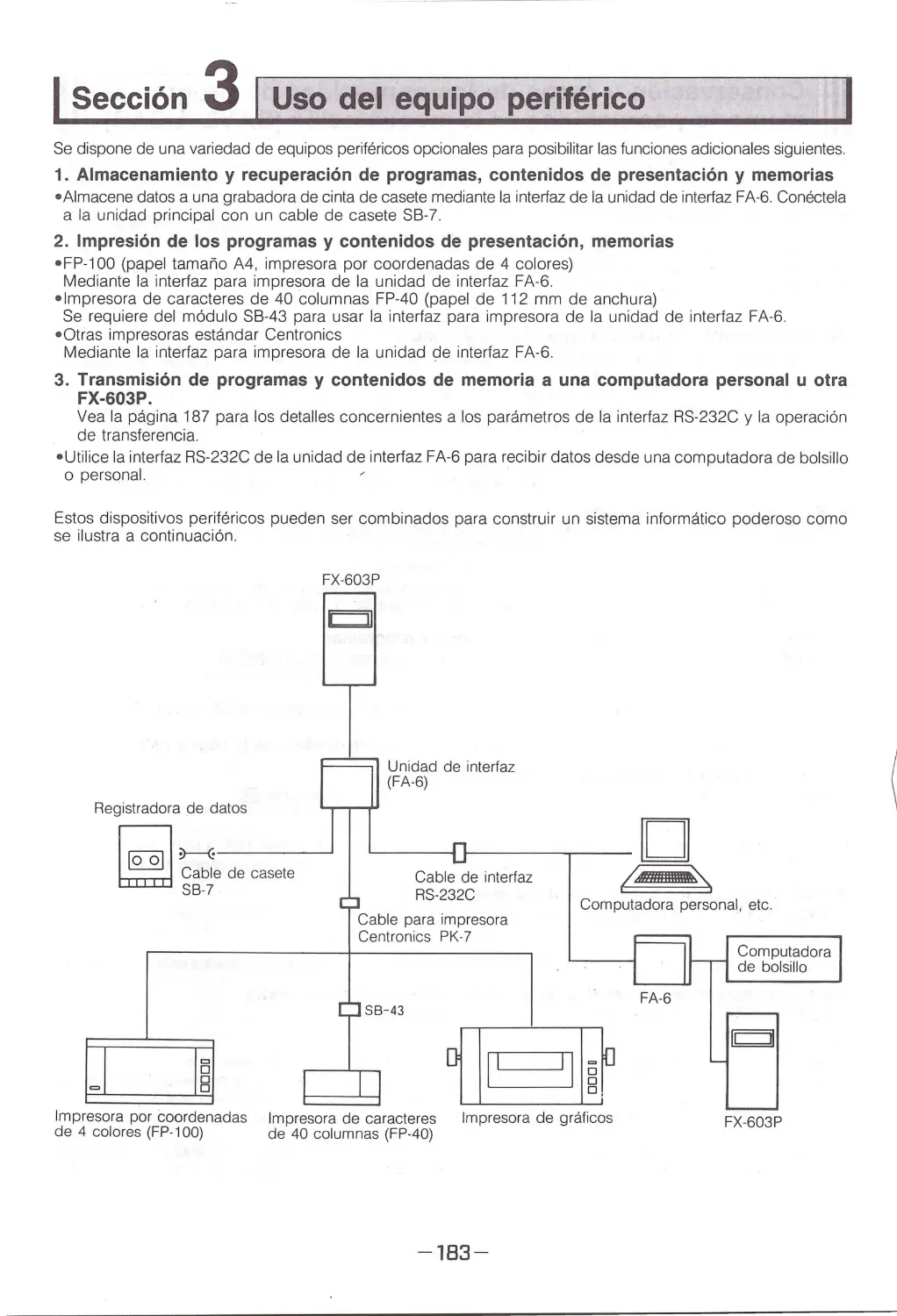
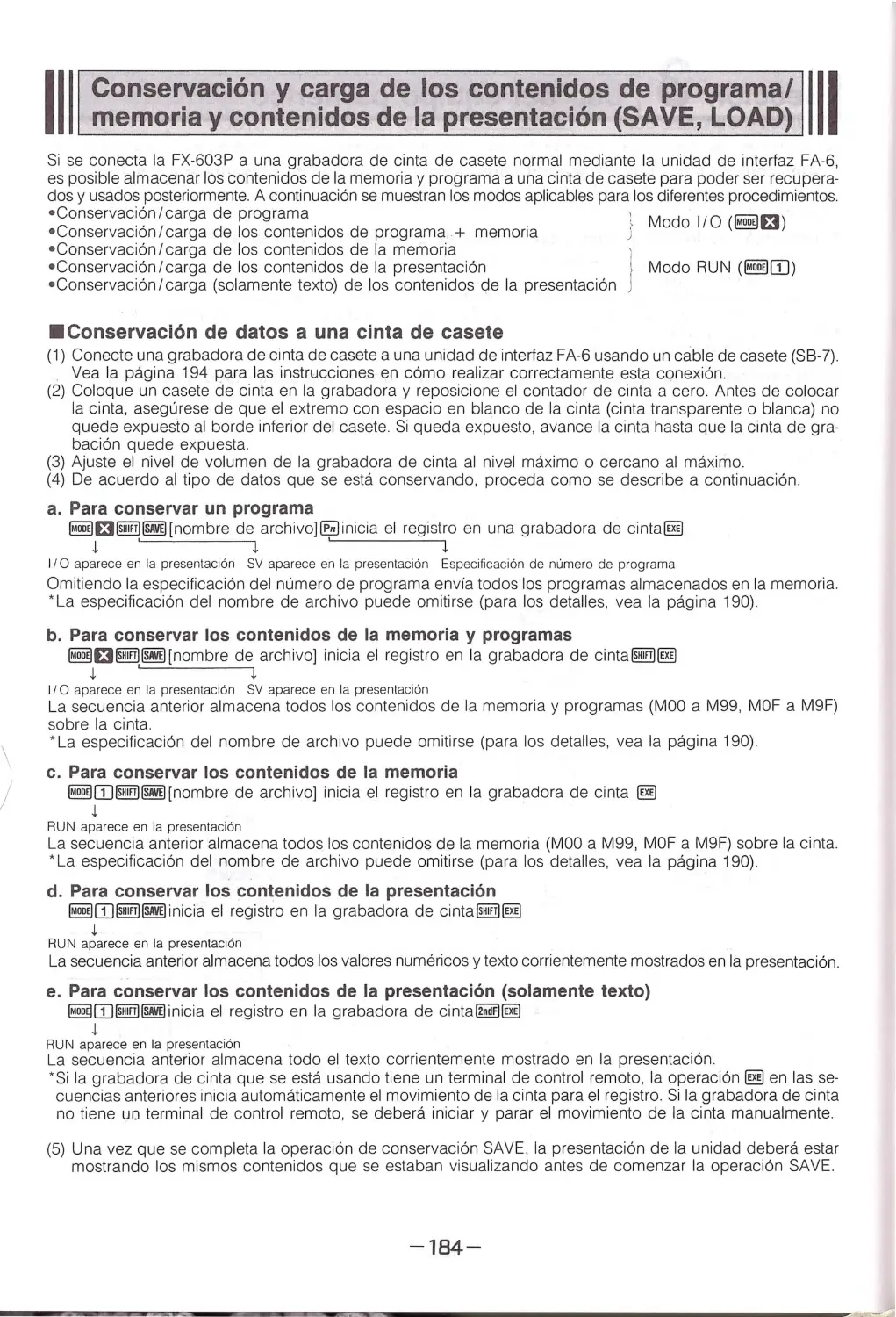
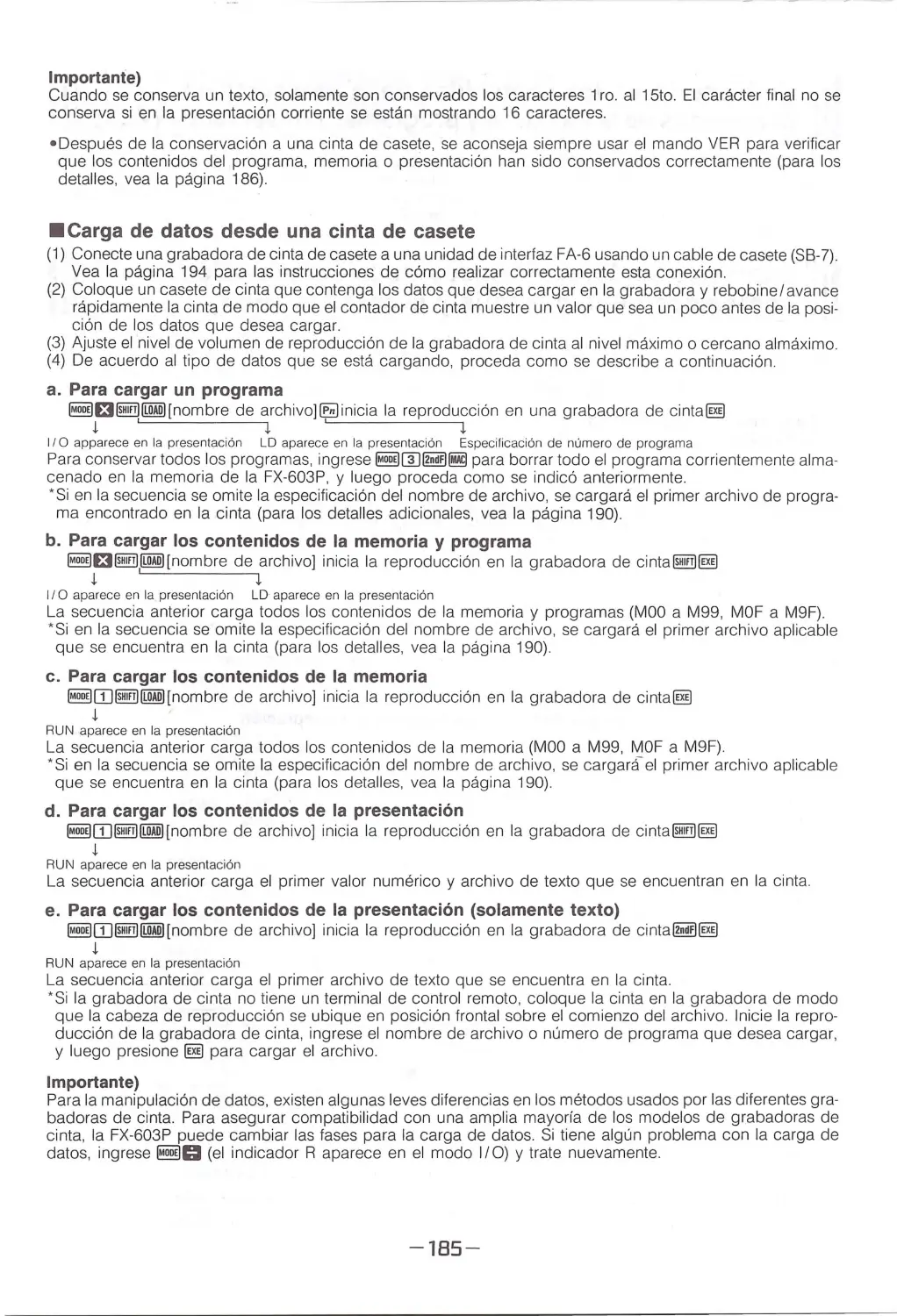
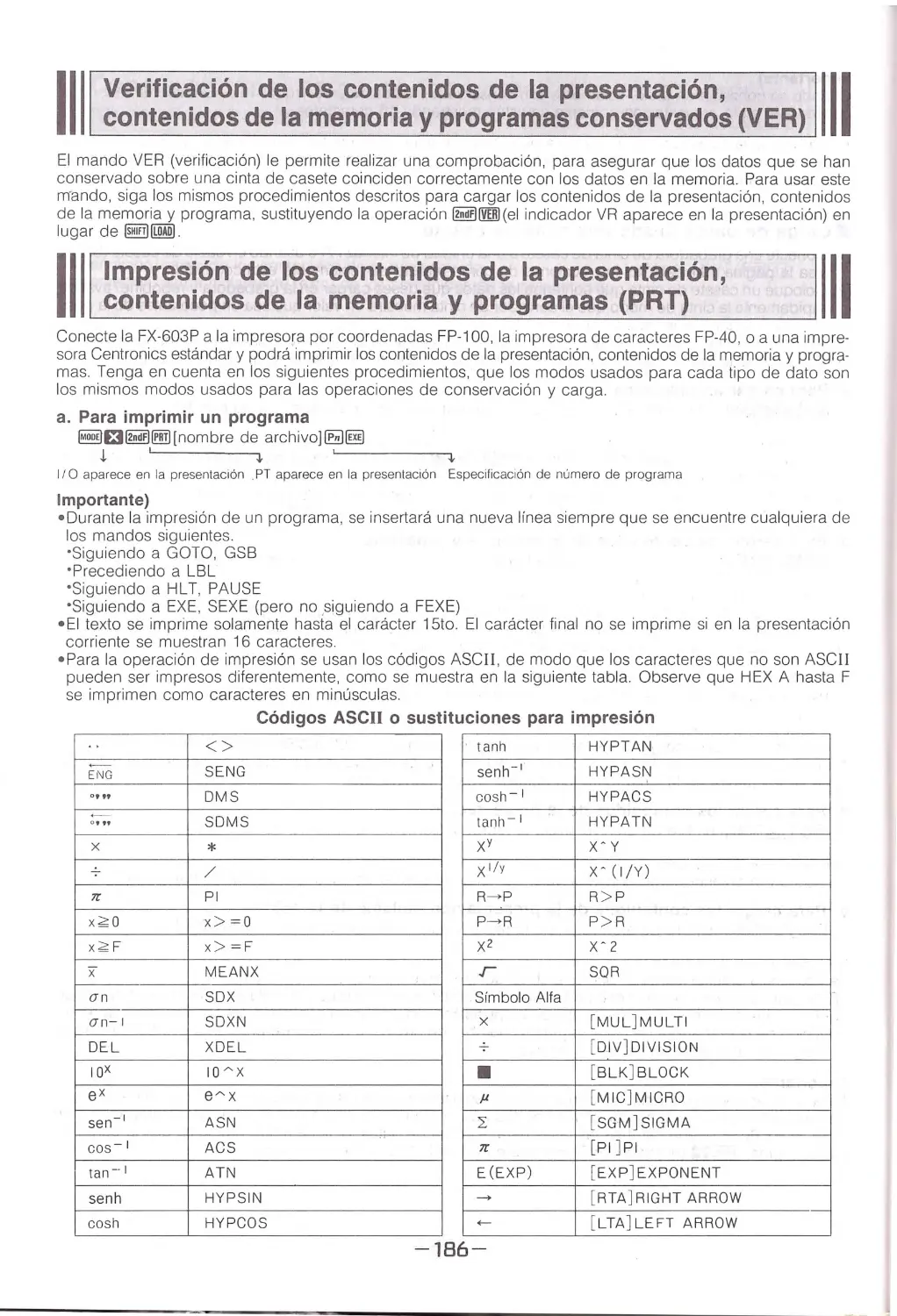

































Tags: electronics radio engineering




Text
                    PROGRAMMABLE SCIENTIFIC CALCULATOR
CALCULADORA CIENTIFICA PROGRAMABLE
•
INSTRUCTION MANUAL
MANUAL DE INSTRUCCIONES

• T he contents of this manual are subject to
change without notice.
• Note that other than personal use of this
manual without the permission of CASIO is
proh ibited under copyright laws.
• Unlawful copying of this manual in part or
in entirety is expressly forbidden.
• Casio Computer Co., Ltd. assumes no
responsibi lity for any damage or loss result-
ing from the use of this manual.
• Casio Computer Co., Ltd . assum e no
responsibility for any loss or claims b y th ird
parties which may arise th rough th o uso of
the FX -603P .
• Casio Computer Co., Ltd. assume s no
responsibility for any damage or loss
caused by deletion of data as a re sult of
malfunction, repairs, or battery replace-
ment. Be sure to back up all important data
on other media to protect against its loss.

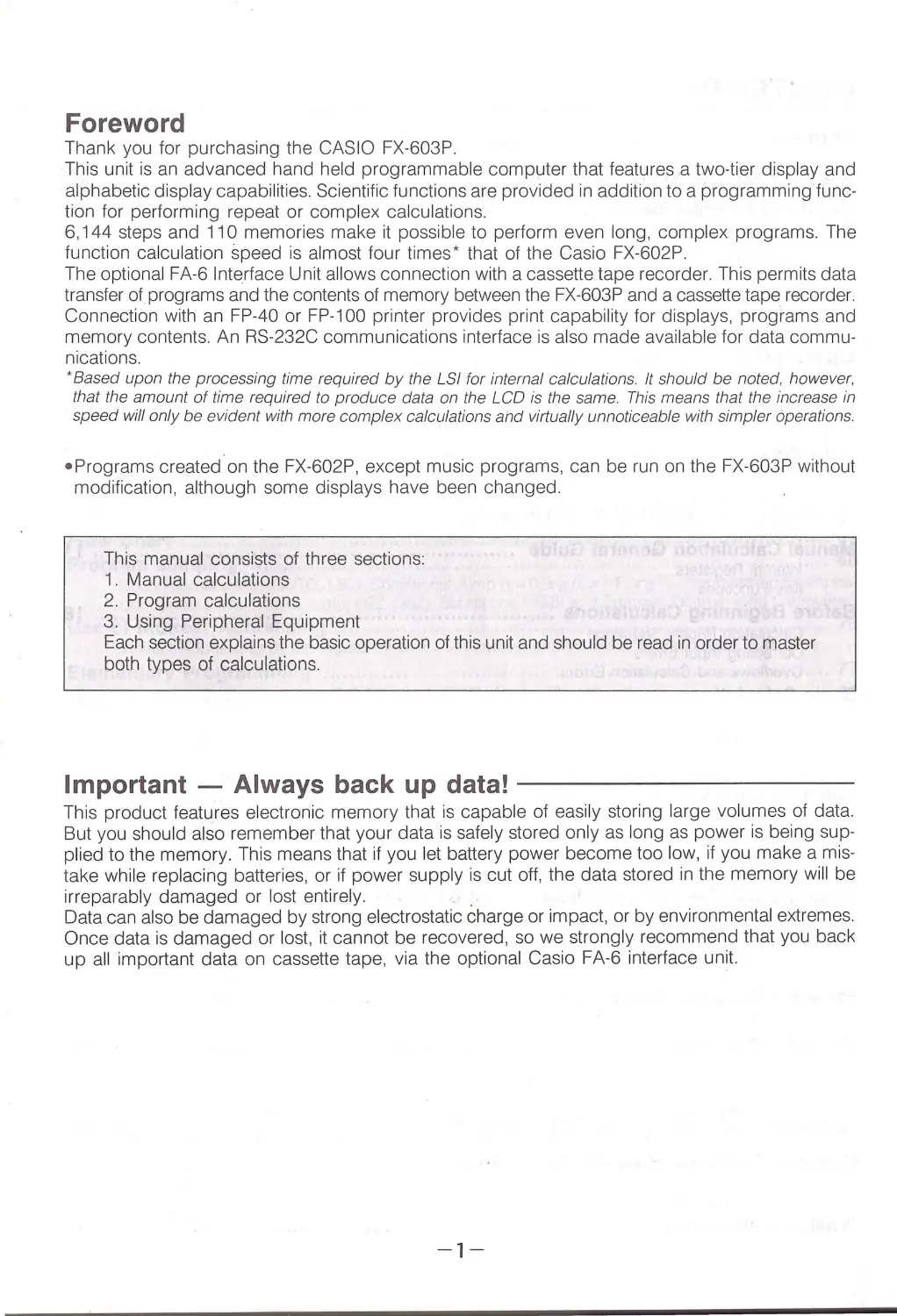
Foreword
Thank you fo r purchasing the CASIO FX-603P .
This unit is an ad vanced hand held p rogrammable comput er th at featu res a tw o-tier di splay and
alphab eti c di splay capabilities. Sc ientific fu nctions are provided in addition to a prog ramming func-
tio n for perf ormin g repeat or complex calcu lations.
6, 144 steps and 110 memories make it possible to perform even long, complex programs. The
function calcul ation speed is al most fou r times * that of the Casio FX-602P.
Th e optional FA-6 Interface Unit all ows connection with a cassette tape recorder. This permits data
transfer of programs and the conten ts of memory between the FX-603 P and a cassette tape recorder.
Connecti on wi th an FP -40 or FP -1 00 pri nter provides prin t capability for displays, programs and
memory conte nt s. A n RS -232C communications interface is also made available for data commu -
nications.
•Based upon the processing time required by the LSI for intern al calculations. It sh ould be noted, however,
that the amount of time requi red to produce data on the LCD is the same. Th is m eans th at the increase in
speed will only be evident with more complex calculations and vi rtually unnoticeable with simpler operatio ns .
• Prog rams c reated on th e FX-602P, except music programs, can be run on the FX-603P without
modification, alth ough some displays have been changed .
This manu al consists of three sections:
1. Manual calc ul ations
2 . Pr ogram calculations
3. Usin g Peripheral Equipment
Each secti on explains the basic operation of this unit and shou ld be read in order to master
both typ es of calculations.
Important - Always back up data! ---------- -
Th is p rod uct features electronic memory th at is capable of easily storing large volumes of data.
But you should also remember th at your data is safely stored only as long as power is being sup-
plied to the memory. This means that if you let battery power become too low, if you make a mis-
take while replacing batteries, or if power supply is cut off, the data stored in the memory will be
irreparably damaged or lost en ti re ly.
.
Data can also be damaged by str ong electrostatic charge or impact, or by environm ental extr emes.
Once data is damaged or lost, it cannot be recovered, so we strongly recommend that you back
u p all import ant data on cassett e tape, via the opti onal Casio FA-6 interface un it
-1-

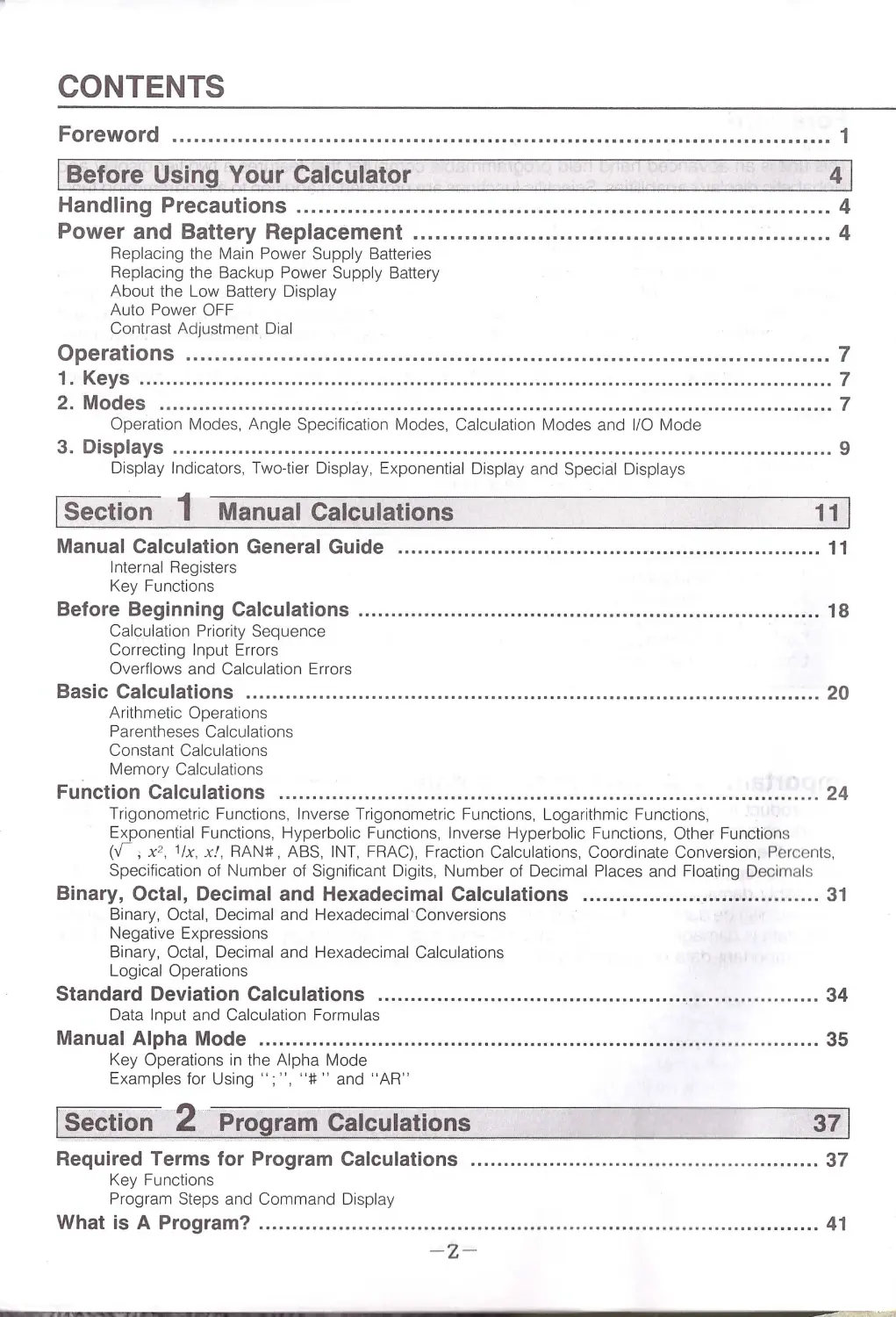
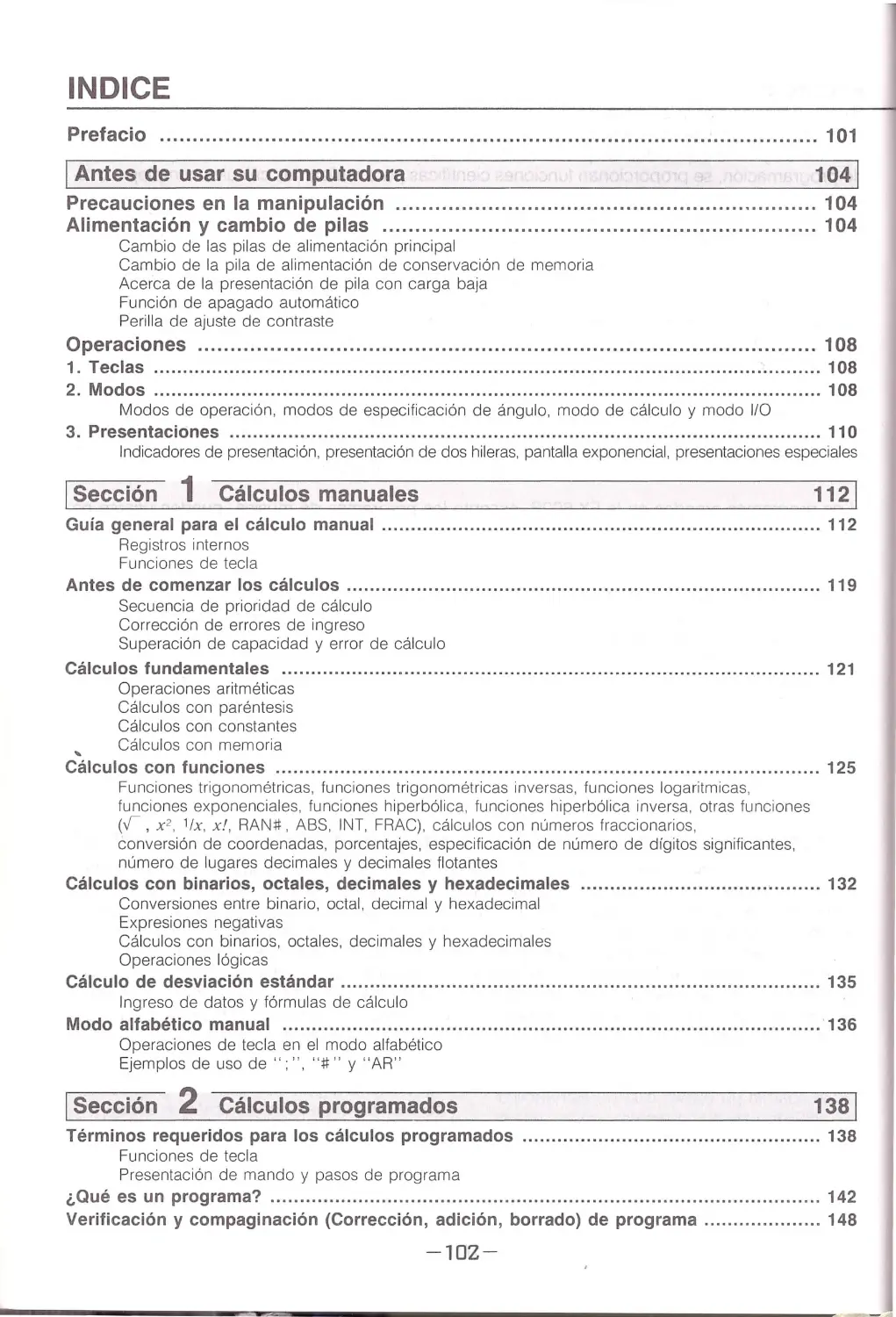
CONTENTS
Foreword ........ .... . .............. .................... ........................................... 1
IBefore Using Your Calculator
Handling Precautions ....................................... .................................. 4
Power and Battery Replacement ......................................................... 4
Replacing the Main Powe r Supply Batteri es
Replacing the Backup Power Supply Battery
About the Low Battery Displ ay
Auto Power OFF
Cont rast Adjustment Dial
Operations ................................ ................................................ .... .. .. 7
1. Keys ........................................ ........ . ............................ ...... . .... . ................ 7
2. Modes .................................... ..................................... ..................... .... . ... 7
Operation Modes. Angle Specification Modes, Calculation Modes a nd 1/0 Mode
3. Displays .................................................................................... ...... . .. ....... 9
Di splay Ind icat ors, Two-tie r Di splay, Exp on en ti al Di splay and Special Displays
ISection 1 Manual Calculations
111
Manual Calculation General Guide ...... ............... ... .. .. .................................. . . 11
Inte rn al Reg isters
Key Functio ns
Before Beginning Calculations ........................... . .... .. . .. ... .. .. . ..... . ...... .......... ... 18
Calcu lation Prior ity Seq ue nce
Correcting Input Errors
Overfl o ws a nd Calcu latio n Erro rs
Basic Calculations .................. ................ ..................................................... 20
Arithmetic Ope rations
Pa rentheses Ca lcu lations
Constant Calcu lations
Memory Ca lcu lations
Function Calculations ................... ..... . ...... .. .. ................... ............................ 24
Trigonometric Fu nctions, Inve rse Trigonomet ric Functions. Loga rithm ic Fu nctions,
Exp o nen ti al Fu nctio ns, Hy perbol ic Fun ctions, Inve rse Hype rbol ic Functions, Othe r Fun cti on s
(v; x 2, 1/x, x ! , RAN#, ABS, INT, FRAC), Fraction Calculations, Coordinate Conversion, Percents,
Specifi catio n of Number of Signifi c a nt Digits, Nu mber of Decim al Places and Floating Decimal s
Binary, Octal, Decimal and Hexadecimal Calculations ... ...... ... . ....... ... ..... ........ 31
Bin a ry, Octal, Decima l a nd Hexadecimal ·conversio ns
Negative Exp ressions
Binary, Octal , Decima l a nd Hexadecimal Cal c ulations
Logical Operations
Standard Deviation Calculations ..... .. .. .... ... .. ... ........ ....... ............................... 34
Data Input and Calculation Formulas
Manual Alpha Mode ... ......... ... ........ . ........... ... ............. ..... .. .. . .. .. .................... 35
Key Ope ratio ns in the Alp ha Mode
Examples for Using "; ", "ii" and "AR"
ISection 2 Program Calculations
Required Terms for Program Calculations ............. ........................................ 37
Key Functions
Program Steps and Command Display
What is A Program? ....... . ................ ................................ ............................. 41
-z-

Program Checking and Editing (Correction, Addition, Deletion) ....................... 46
Program Debugging ......................_. ... ... .. ... .. ... .. ... ... .. ... .. ... .. ... .. ... ... .. ... .. ... .. ... 50
Erasing Programs ........................................................................................ 53
Changing Program Numbers ......................................................................... 53
Constructing Programs ................................................................................ 53
Programming and Operation Rules ............................................................... 55
Form ul as
During Program Wr ite ("WRT" displayed)
During Program Execution ("RU N" disp layed)
Program with Remarks Display Using Text .................................................... 56
Text Prog ram Execution
Affect of Text Displays on Subsequent Displays
Using Text in Programs
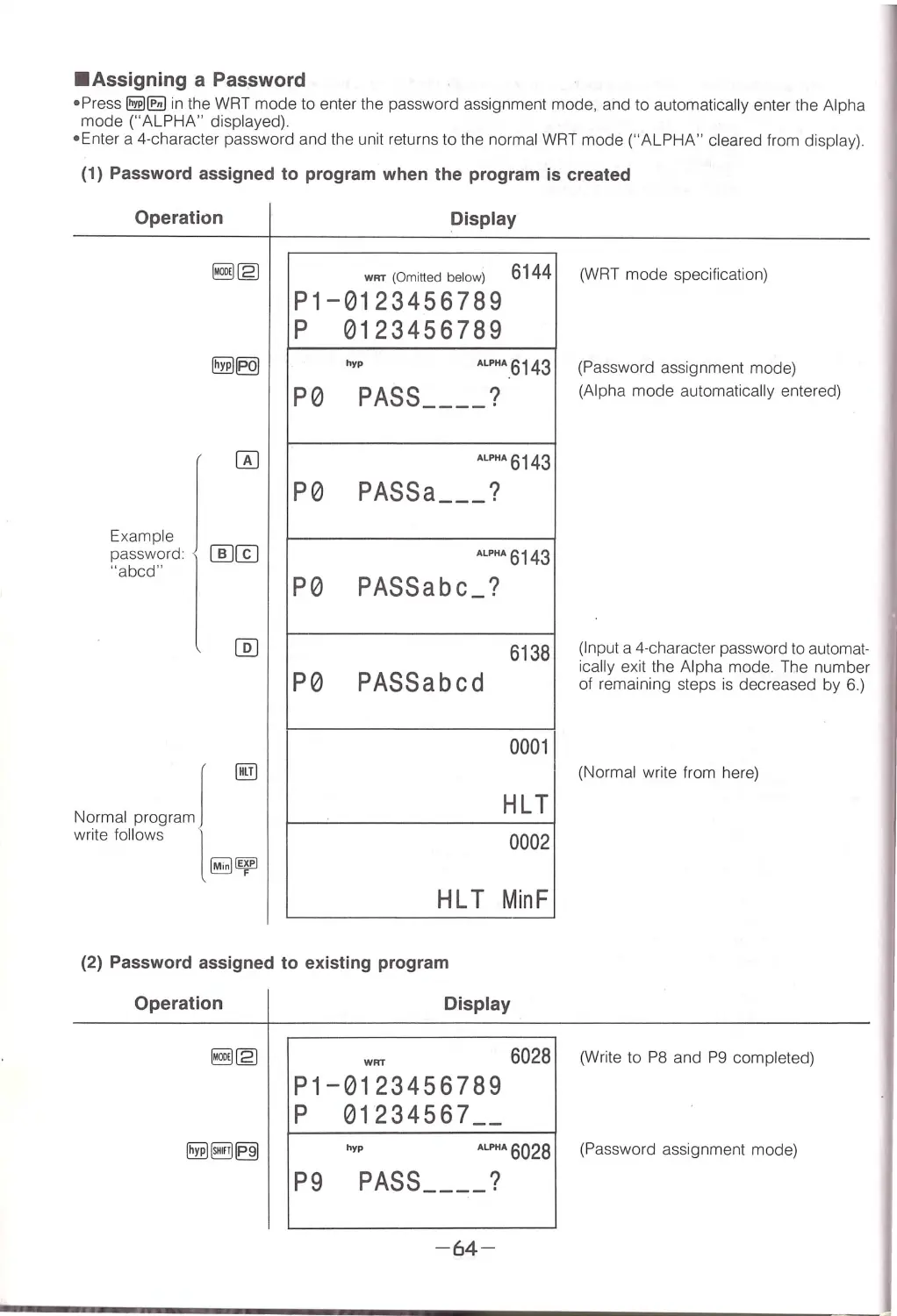
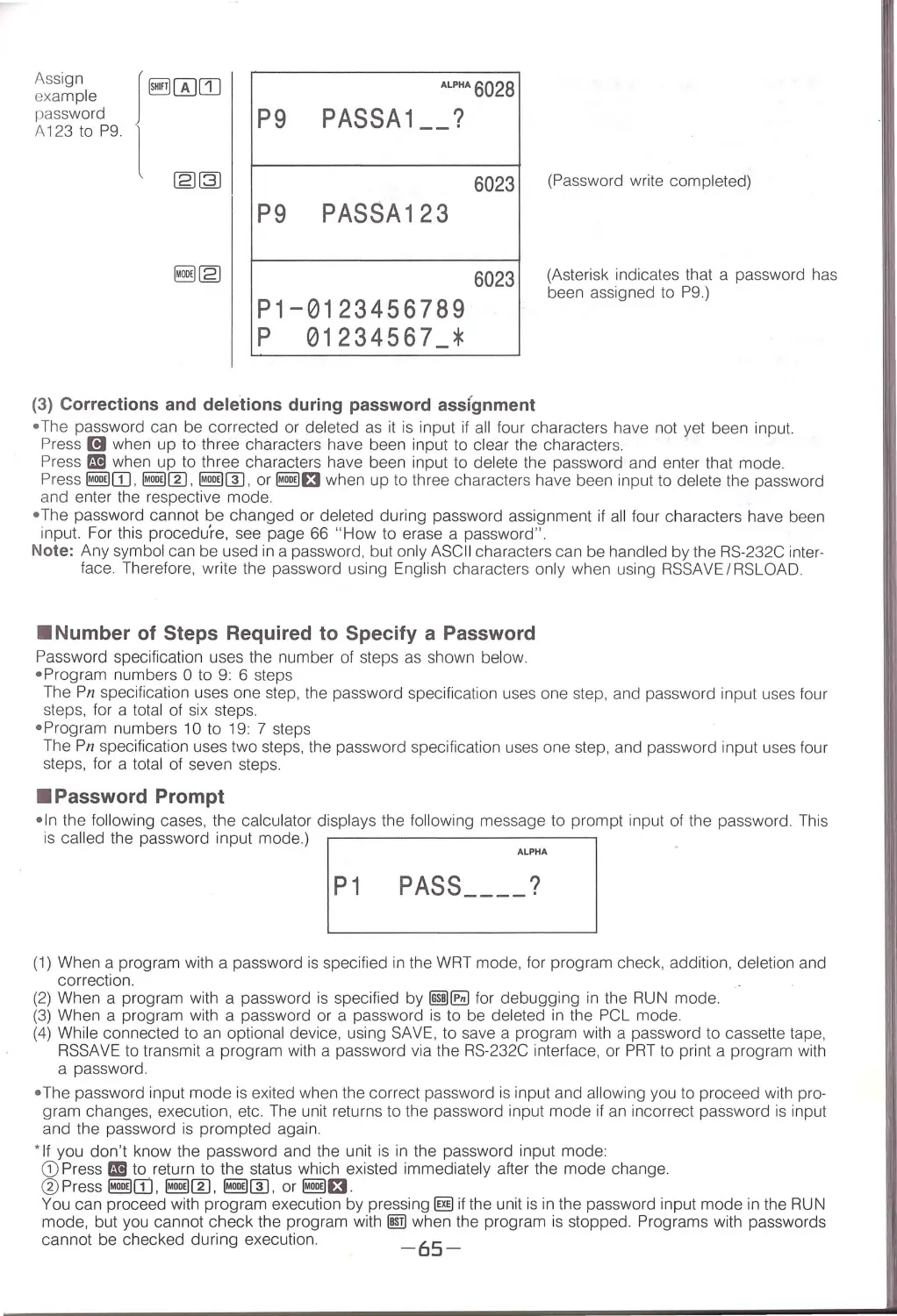
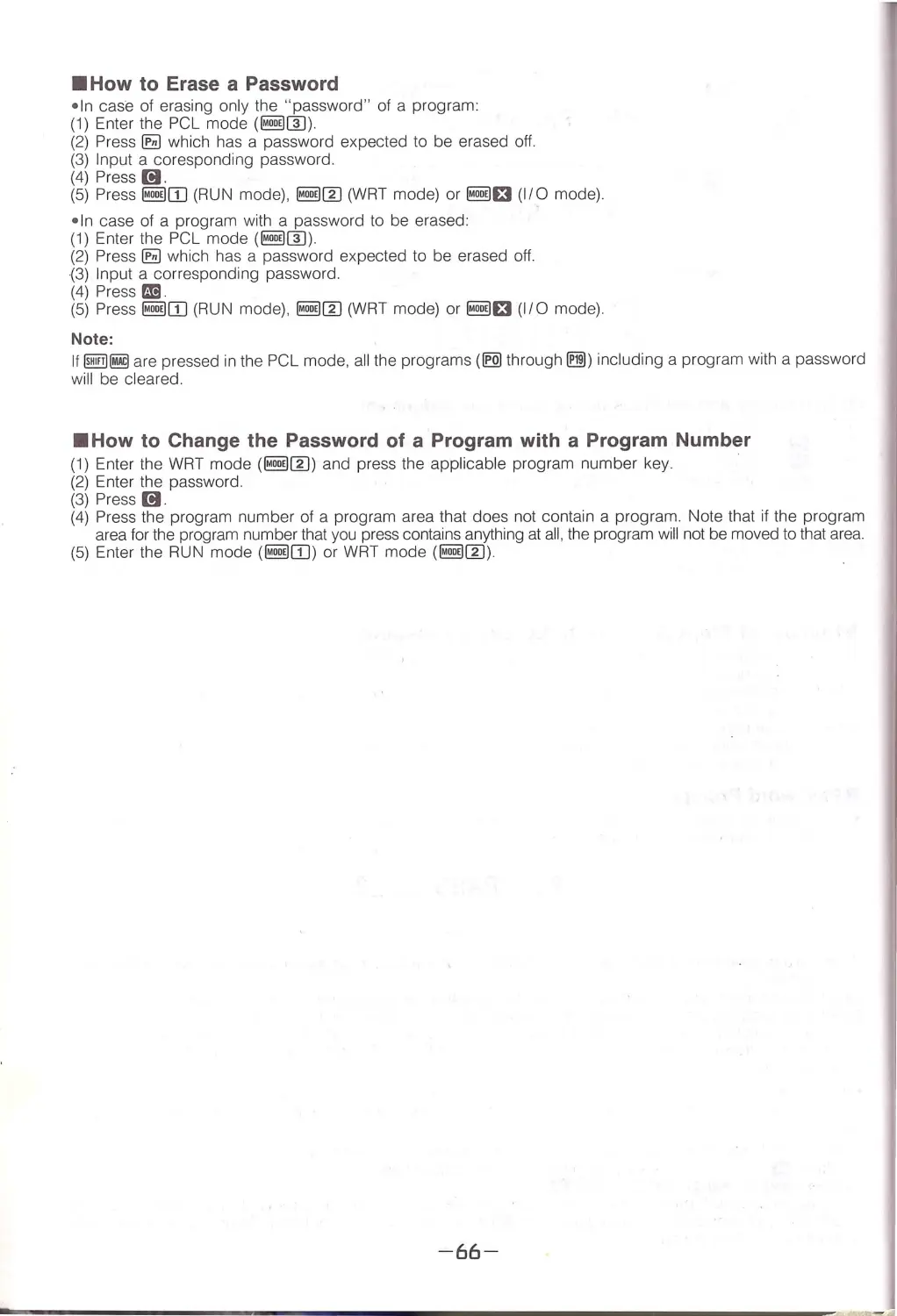
Passwords .................................................................................................. 63
Assigning a Password
Number of Steps Required to Specify a Password
Password Prompt
How to Erase a Password
How to Change the Password of a Program with a Program Number
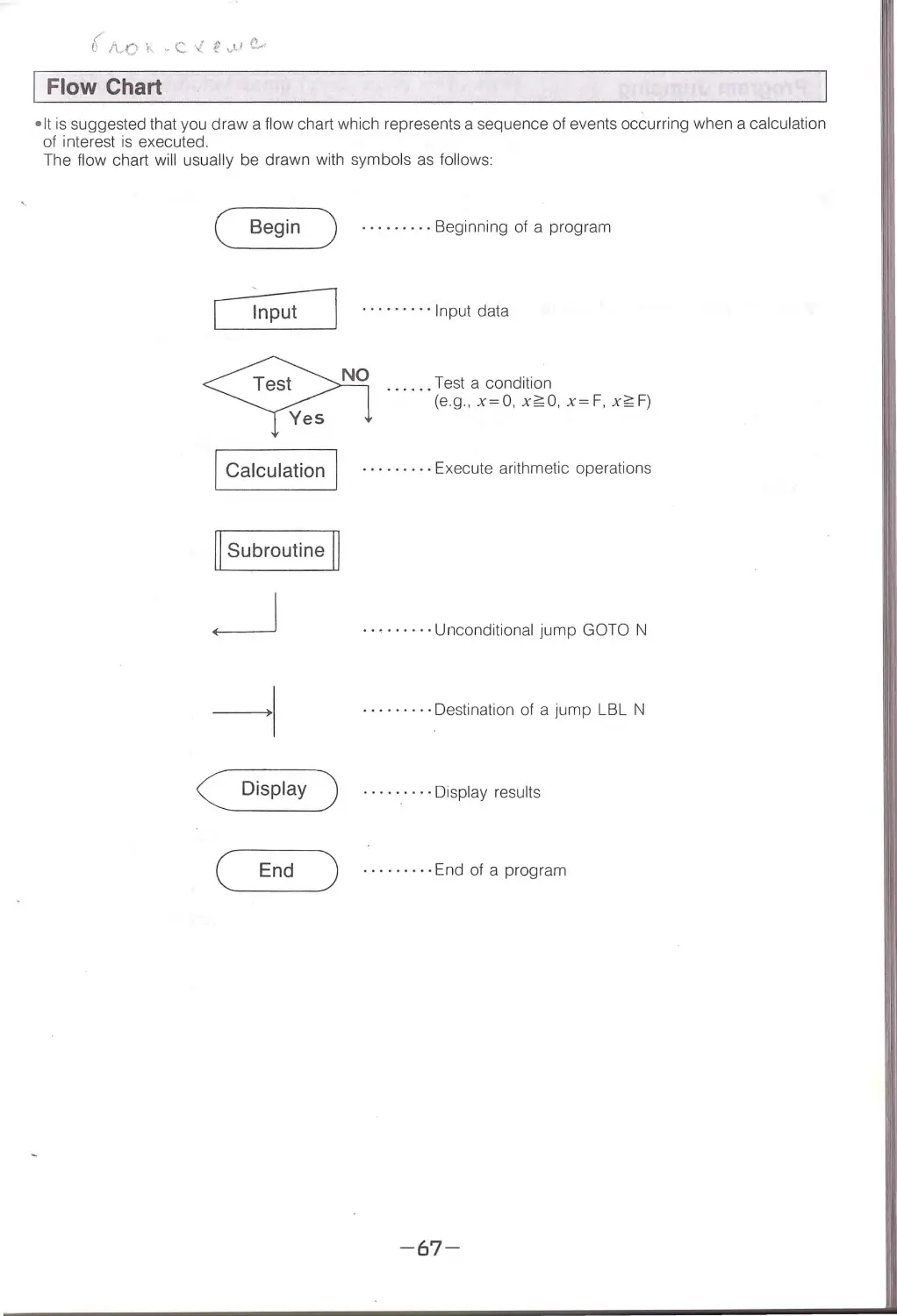
Flow Chart .................................................................................................. 67
Program Jumping ........................................................................................ 68
Unconditional Jump (GOTO, LBL), Conditional Jump (x= 0, x~ 0, x= F, x~ F) , Programming Examples,
Cond itiona l Jump (Count Jump) (ISZ, DSZ), Subroutine (GSB) and Program Incorporating Subroutines
Use of Indirect Addressing ........................................................................... 75
Indirect Addressing of Mn-register, Indirect Subroutine, Indirect Jump and Indirect Count Jump
Elementary Programming ............................................................................. 77
How the Unit Searches for GOTO and GSB Jump Destinations ....................... 80
ISection 3 Using Peripheral Equipment
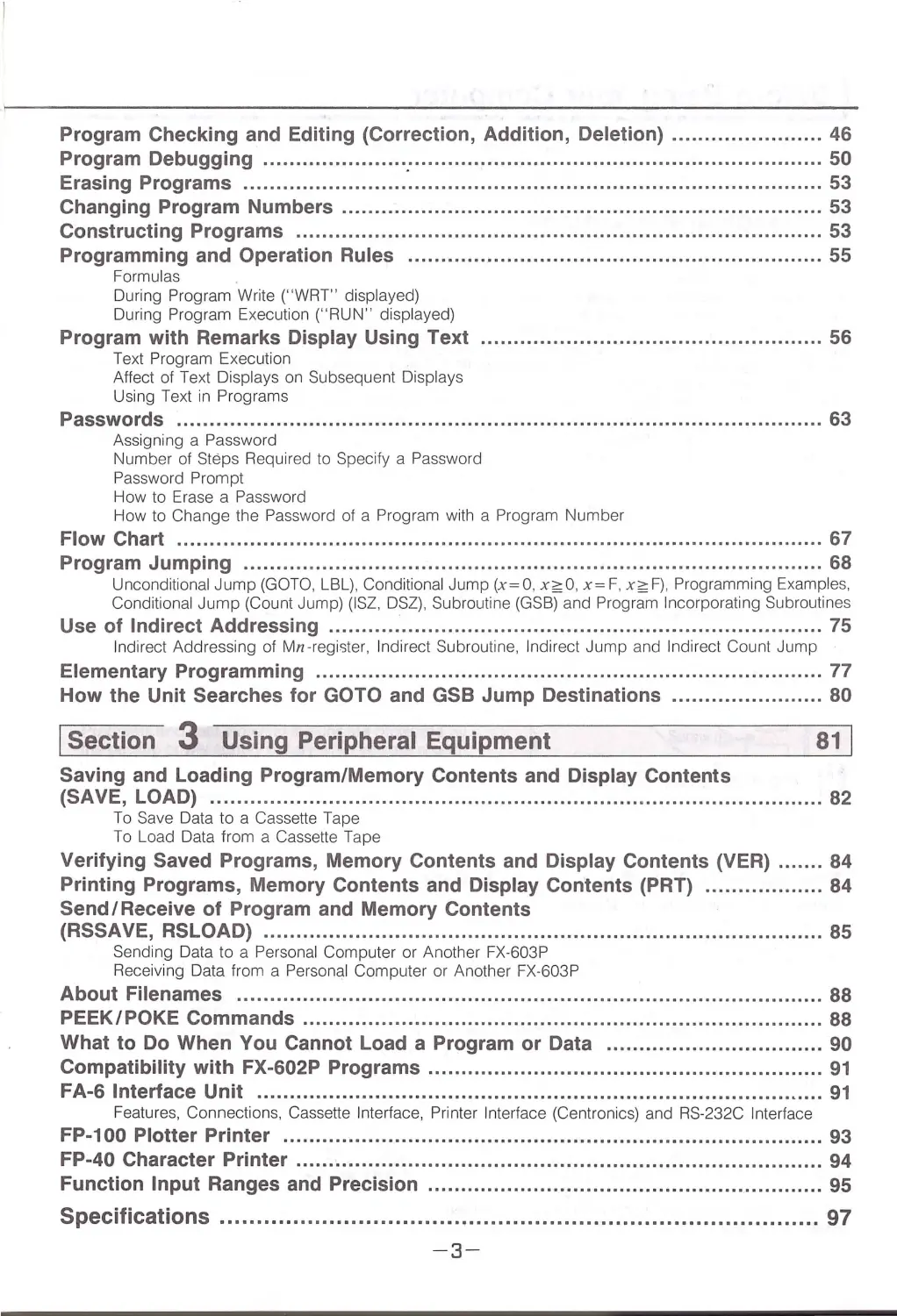
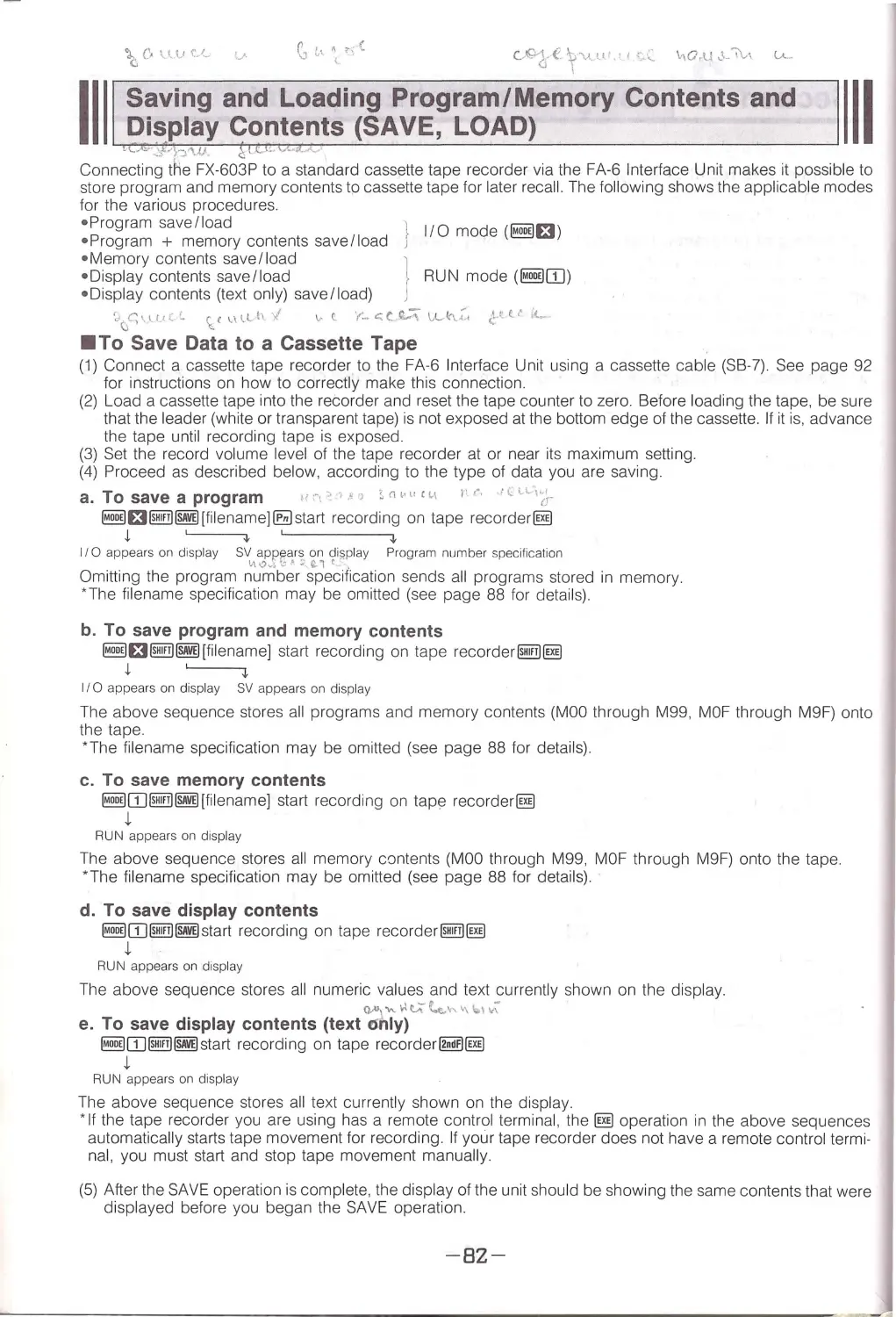
Saving and Loading Program/Memory Contents and Display Contents
(SAVE, LOAD) ............................................................................................. 82
To Save Data to a Cassette Tape
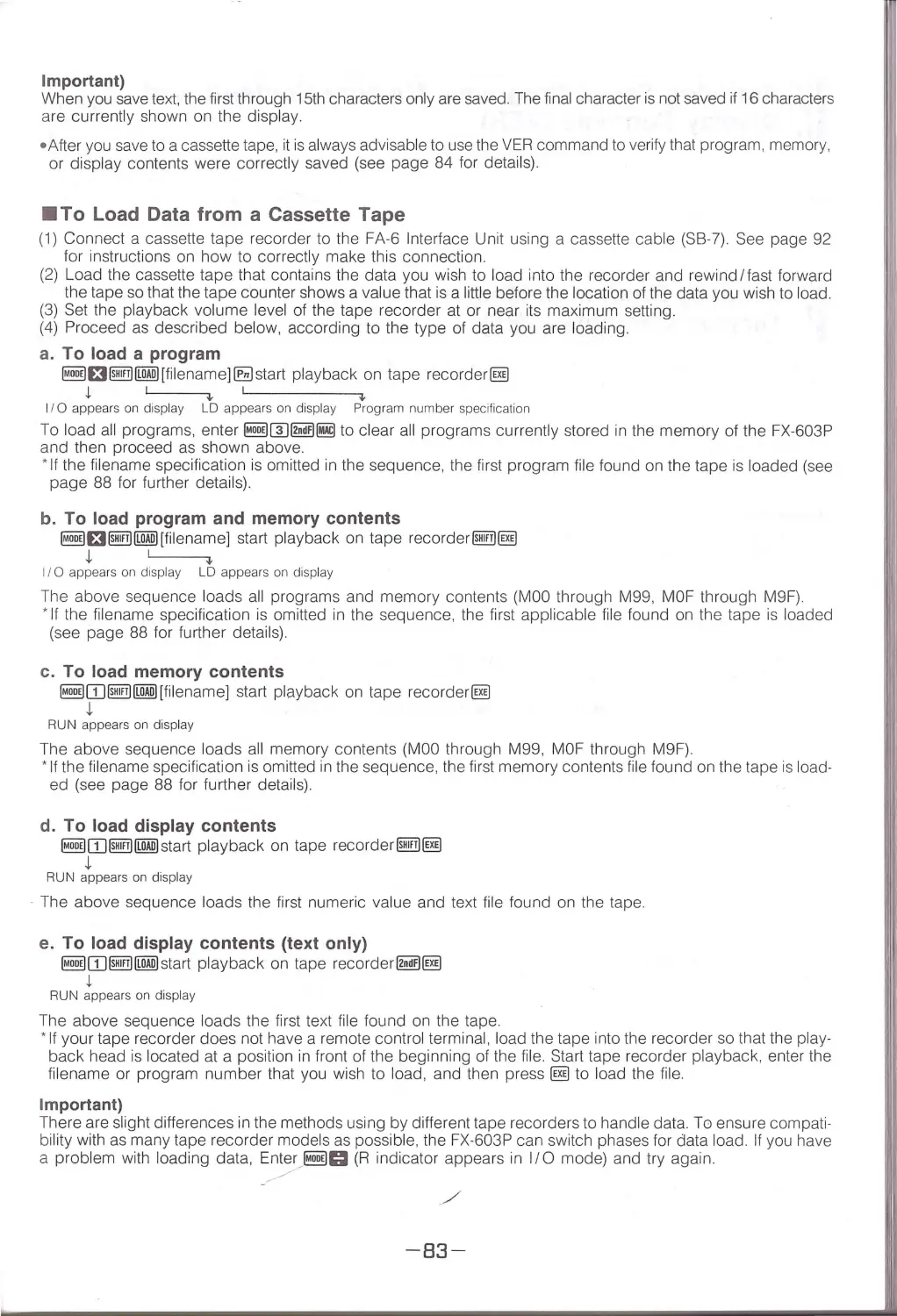
To Load Data from a Cassette Tape
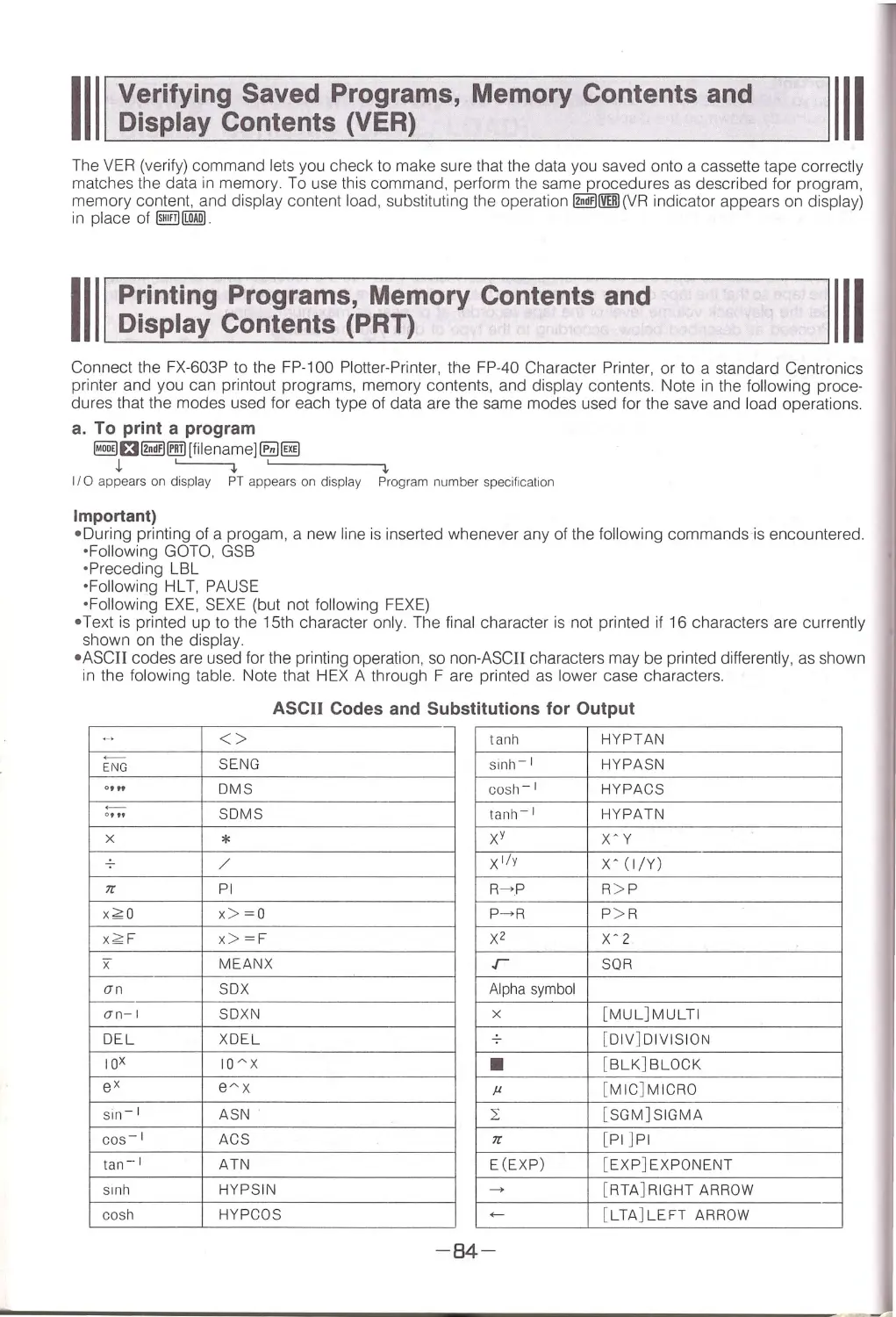
Verifying Saved Programs, Memory Contents and Display Contents (VER) ....... 84
Printing Programs, Memory Contents and Display Contents (PAT) .................. 84
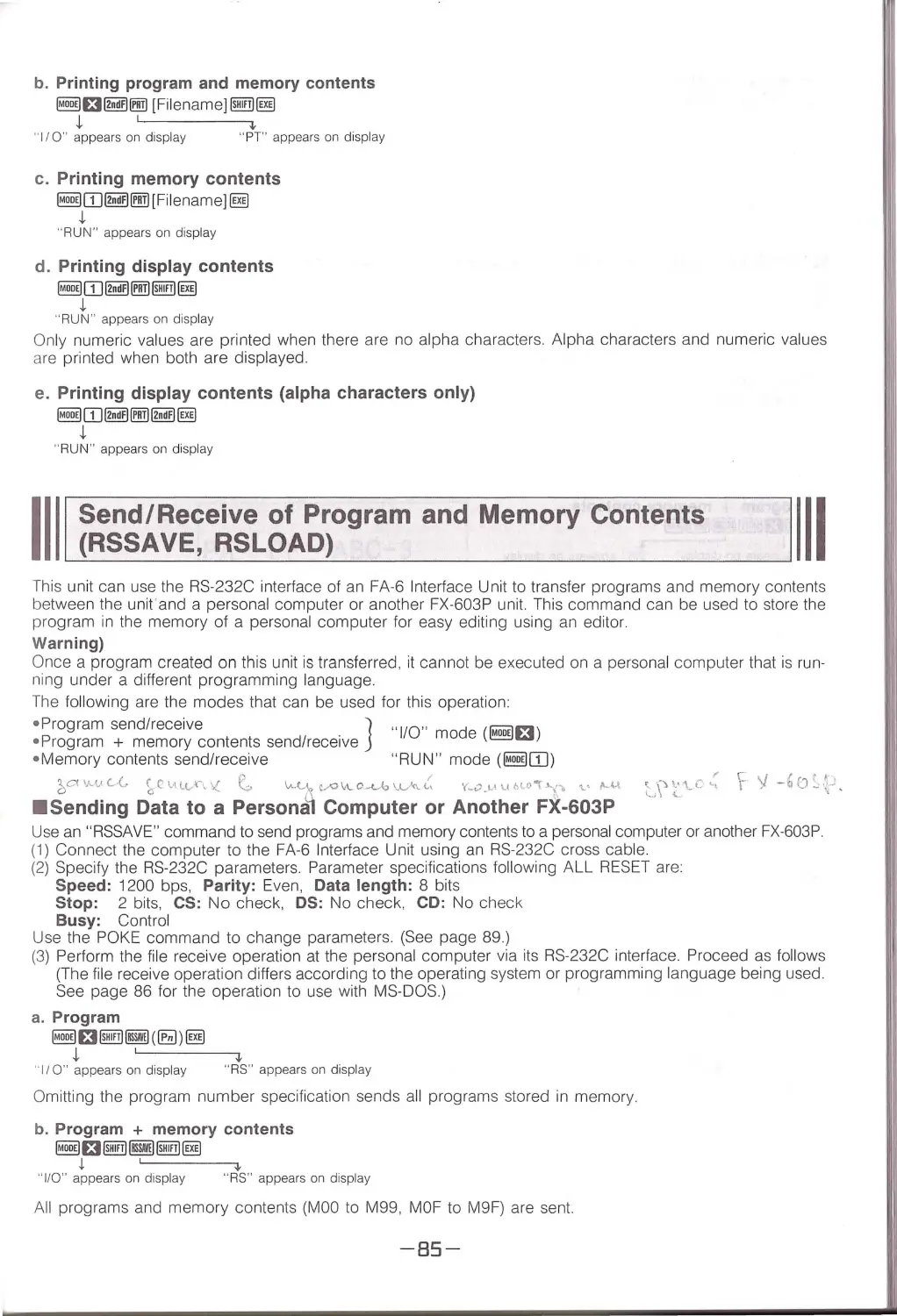
Send I Receive of Program and Memory Contents
(ASSAVE, RSLOAD) ..................................................................................... 85
Send ing Data to a Personal Computer o r Another FX-603P
Receiving Data from a Persona l Compute r or Another FX-603P
About Filenames ........................ ................................................................. 88
PEEK/POKE Commands ............................................................................... 88
What to Do When You Cannot Load a Program or Data ................................. 90
Compatibility with FX-602P Programs ............................................................ 91
FA-6 Interface Unit ...................................................................................... 91
Featu res, Connectio ns, Cassette Inte rface, Prin ter Interface (Centronics) and RS-232C Inte rface
FP-100 Plotter Printer .................................................................................. 93
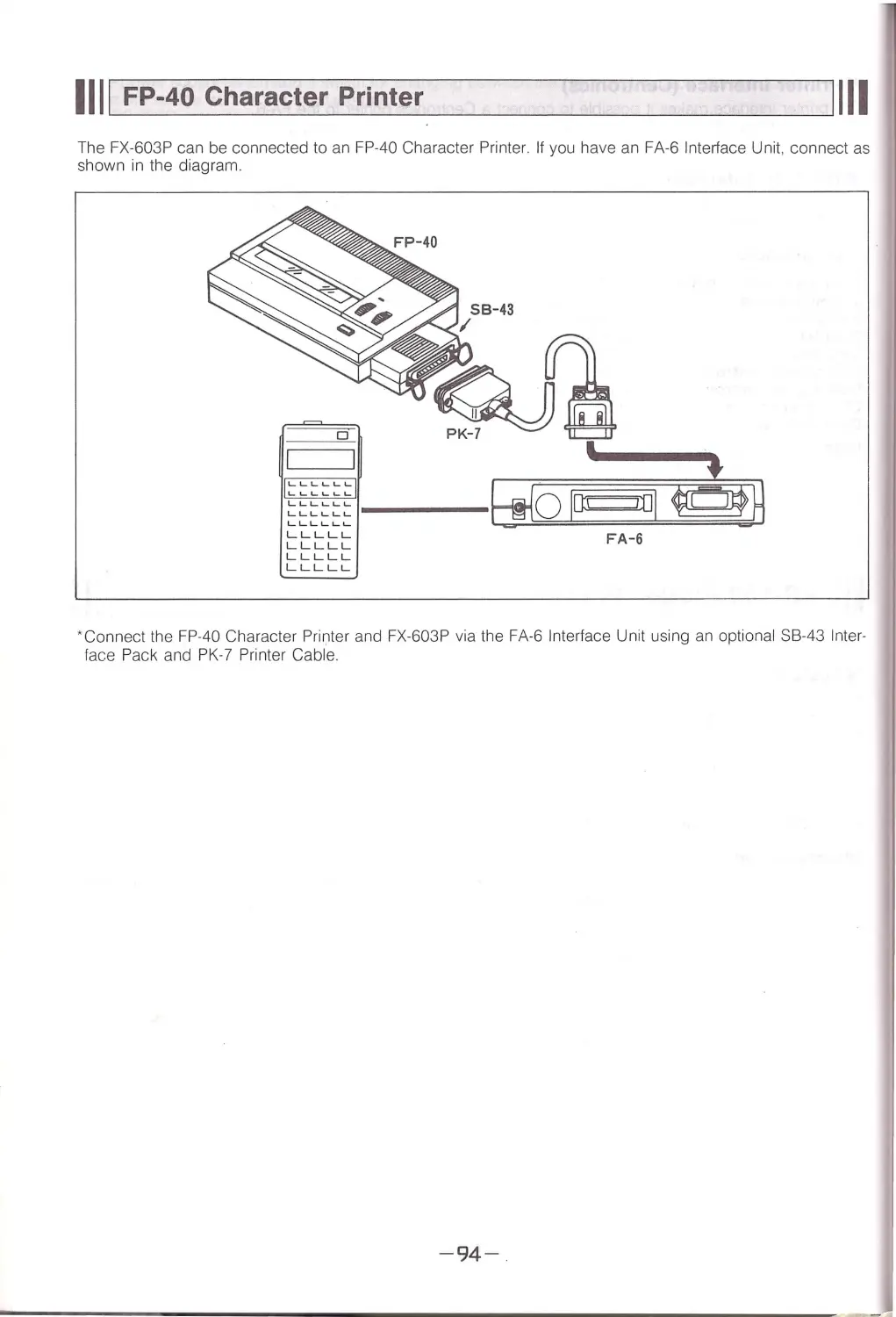
FP-40 Character Printer ................................................................................ 94
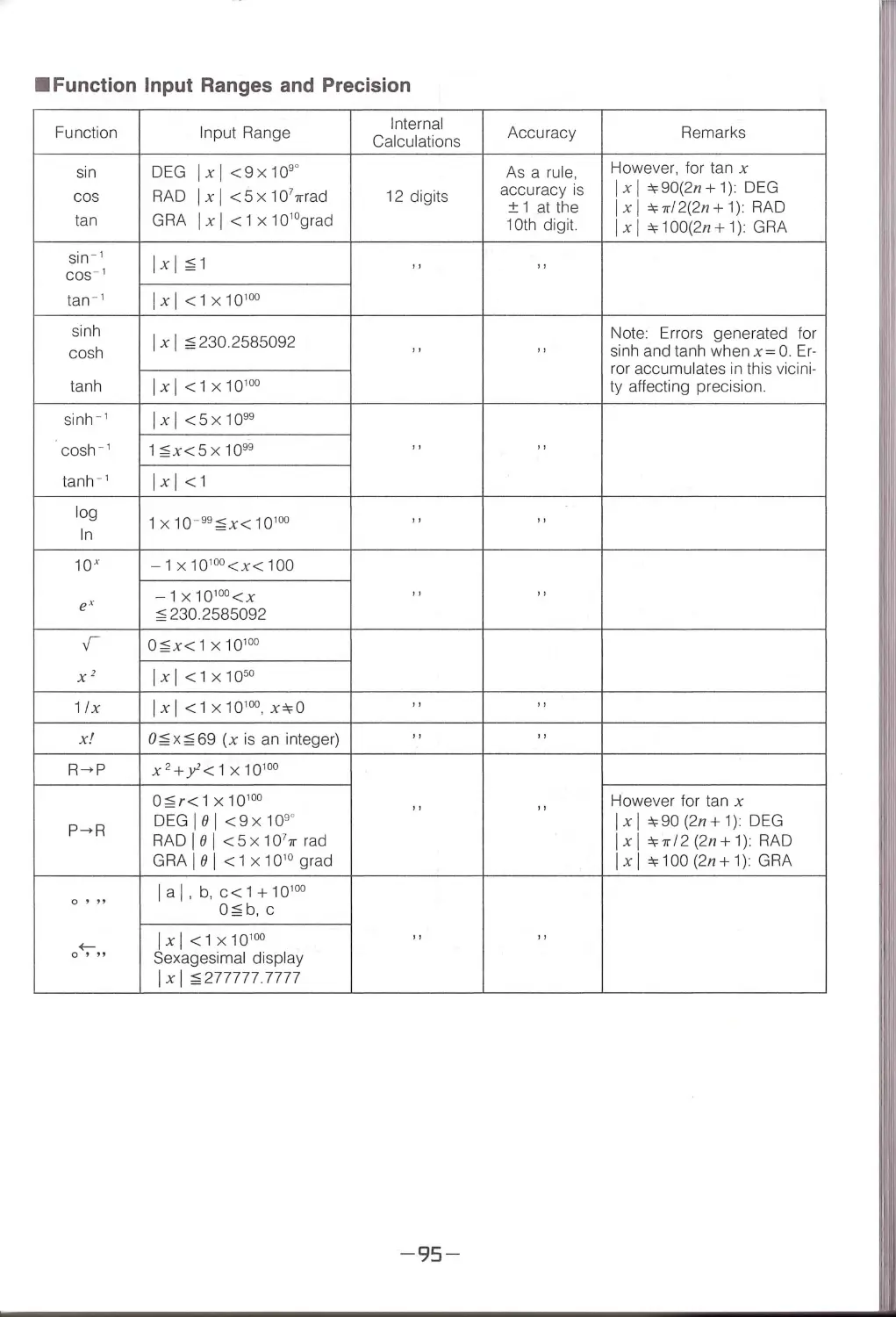
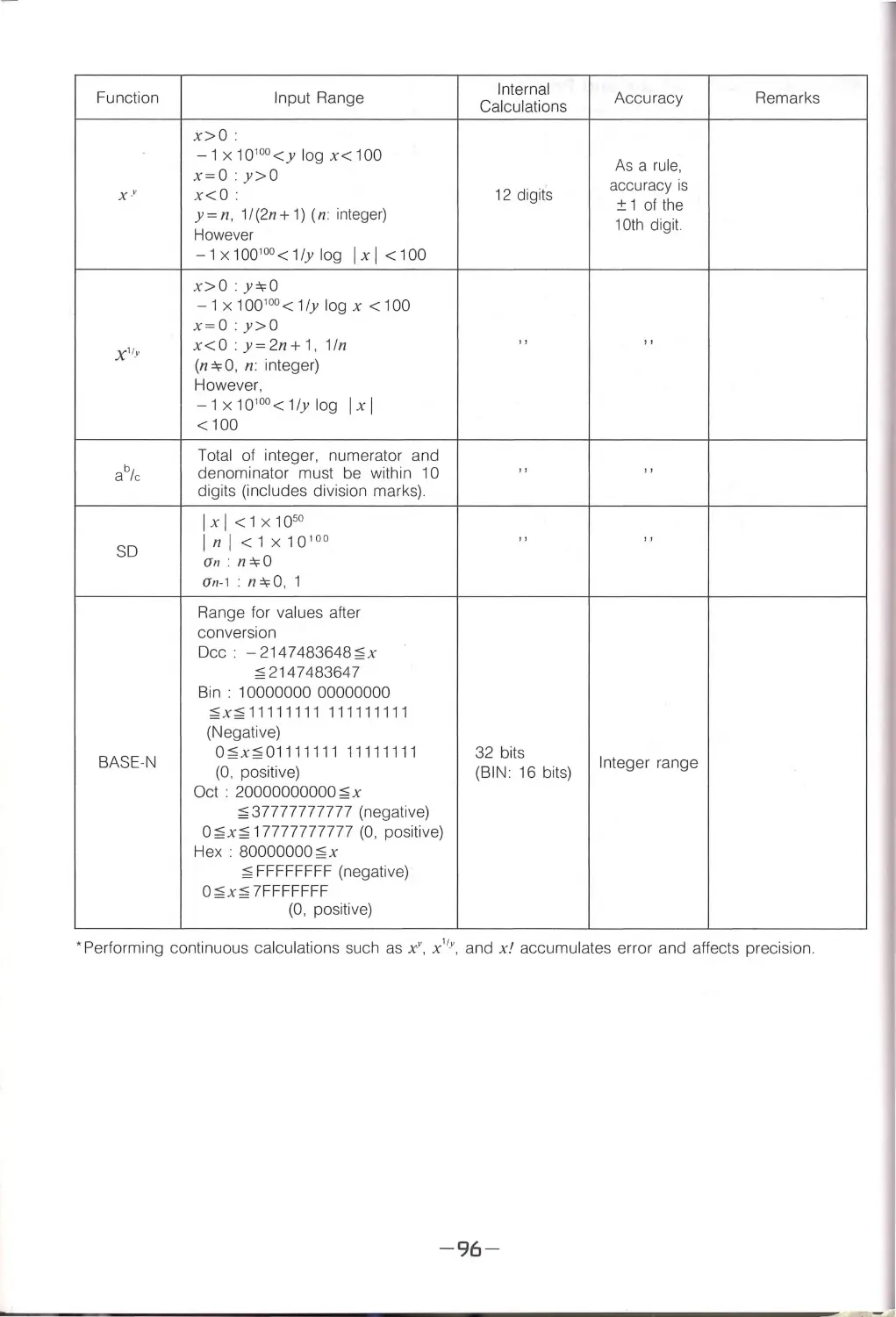
Function Input Ranges and Precision ............................................................ 95
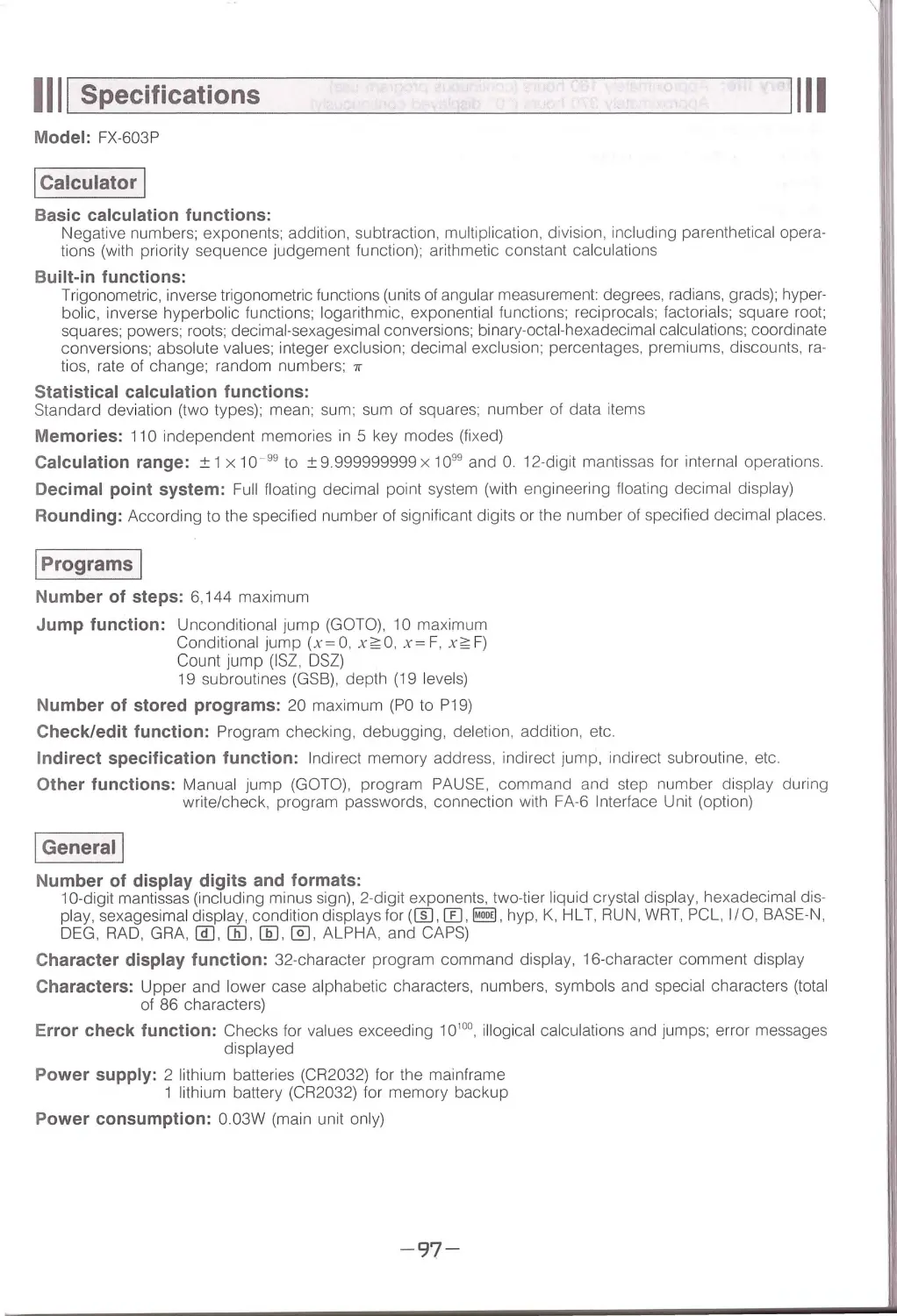
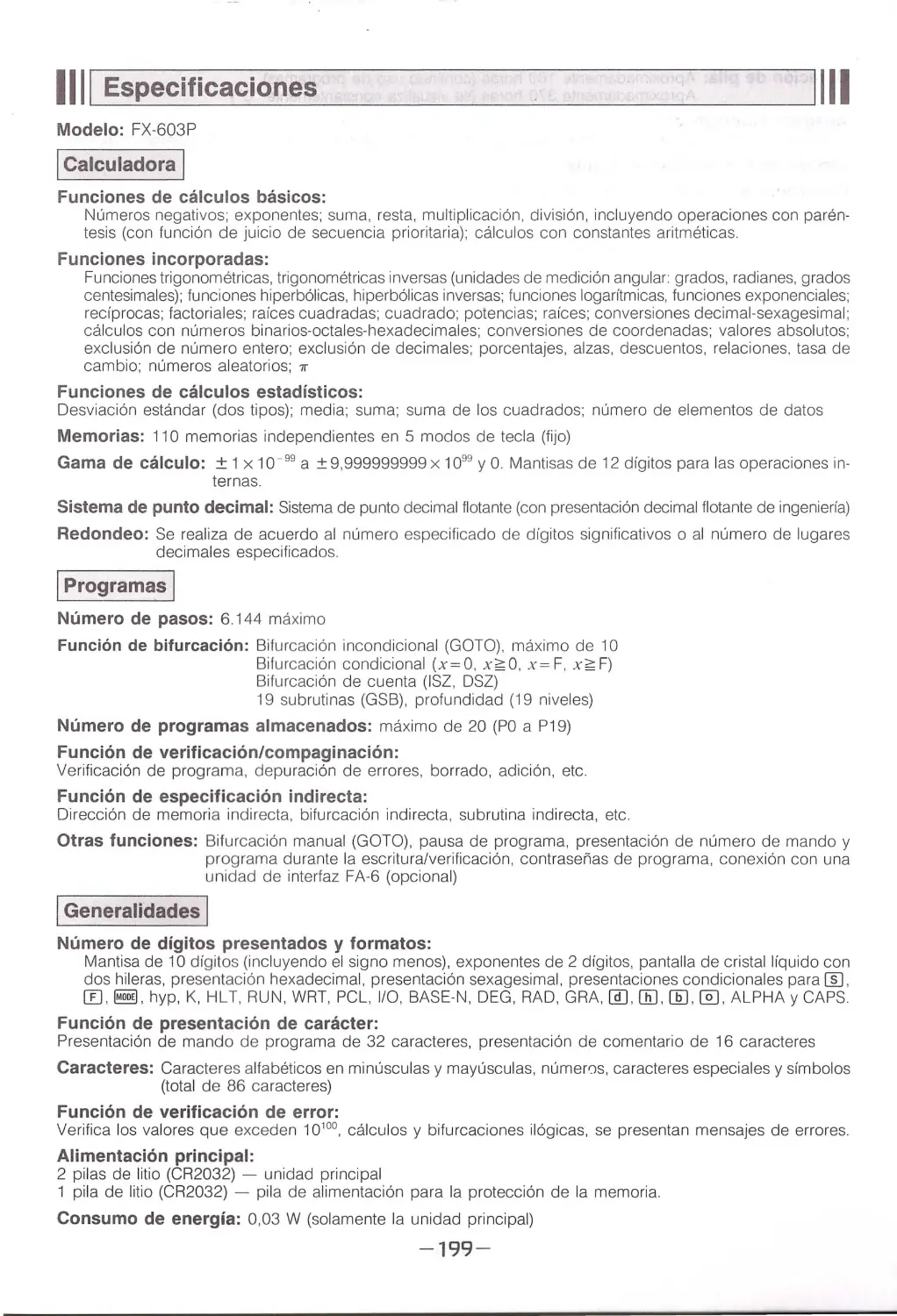
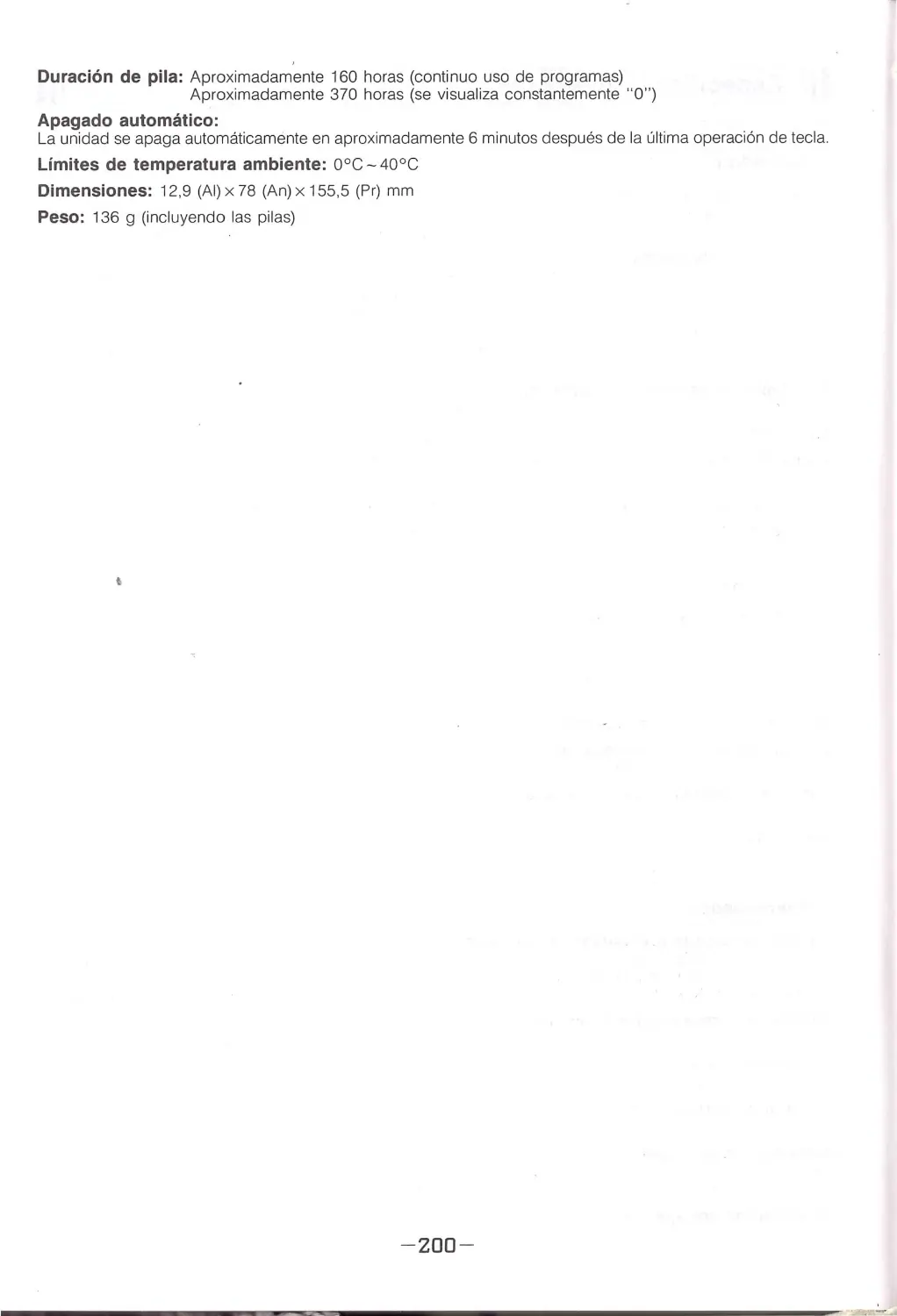
Specifications .................................................................................. 97
-3-

Before Using Your Computer ...
This unit was made possible by Casio's advanced electronics technology, intensive quality control, and a rigorous
inspection process . Please observe the fol l owing points to prolong service life.
1111 Handling Precautions
1111
•Be sure to keep the connector covered when it is not in use to protect it against dirt and dust Avoid touching
the connector at all times.
•When the "Low Battery'" message appears on the display as you are using the unit, replace the main power
supply batteries (A) as soon as possible.
•Be sure that the power switch is set to OFF when rep la cing batteries.
• I f the computer is exposed to a strong static electrical charge, its memory contents may be damaged or the
keys may stop working . In such a case, press the RESET button following the P button to clear the memory
and restore normal key operation.
• Be sure that the power of the computer is switched OFF whenever making any connection to another device .
• Never switch the power of the computer OFF while it is executing a program or perfo rming a calculation.
•Note that strong vibration or impact during prog ram execution can lead to termination of the execution or damage
of the computer 's memory contents.
•Using the computer next to a television or radio can cause interference with reception .
•Should servicing become necessary, contact your nearest Casio dealer.
•Th is unit is manufactured of precision electronic components, and should never be disassembled. Do not drop
it or otherwise subject it to sudden impact , or sudden temperature change. Be especial ly carefu l to avoid stor-
ing the unit or leaving it in ar eas exposed to high temperature, humidity or large amounts of dust When ex-
posed to lo w tempe ratures, the unit wi ll require more time to display results and may even fail to operate . The
display wi ll return to normal once normal tempe r atur e is attained.
•Do not use any adaptors other than the options specified for this unit
• Batteries should be replaced every two years even if the unit is not used for extended periods. Never leave
dead batteries in the battery compartment They can leak and cause damage to the unit
•Avoid using volatile liquids such as th inner or benzine to clean the unit. Wipe the unit wi th a soft, dry cloth
or a cloth that has been dipped in a neutral detergent so luti on and wrung out.
•Before assuming malfunction of the unit, be sure to carefu ll y reread this manual and ensure that the problem
is not due to insufficient battery power, programming or operational errors.
1111 Power and Battery Replacement
1111
Power is supplied to this unit by two lithium batteries (CR2032). A third lit hium battery (CR2032) is us ed as a
memory protection power supply.
•Replacing the Main Power Supply Batteries
About the "Low Battery!" Message
When the " L ow Battery!" message appears on the display as you are using the unit, rep lace the m ain power
supply batteries (A) as soon as possible . To avoid loss of memory contents, the unit wi ll automatically switch
OFF if you continue operation without changing batteries. If the unit switches OF F, yo u wi ll not be able to switch
it back ON unti l you replace batteries. Normal operation will be possible after you replace the main power sup-
ply batte ries (A).
• 1f, for some reason, all three batteries have been removed from the unit, reload the batteries in the batte ry
compa rtment, switch the power ON, and press the P button and then press the ALL RESET button with a
pointed object. All programs and data stored in the unit will be erased.
Cautions:
Incorrectly using batteries can cause them to burst or leak, possibly damaging the interior of the unit Note the
following precautions:
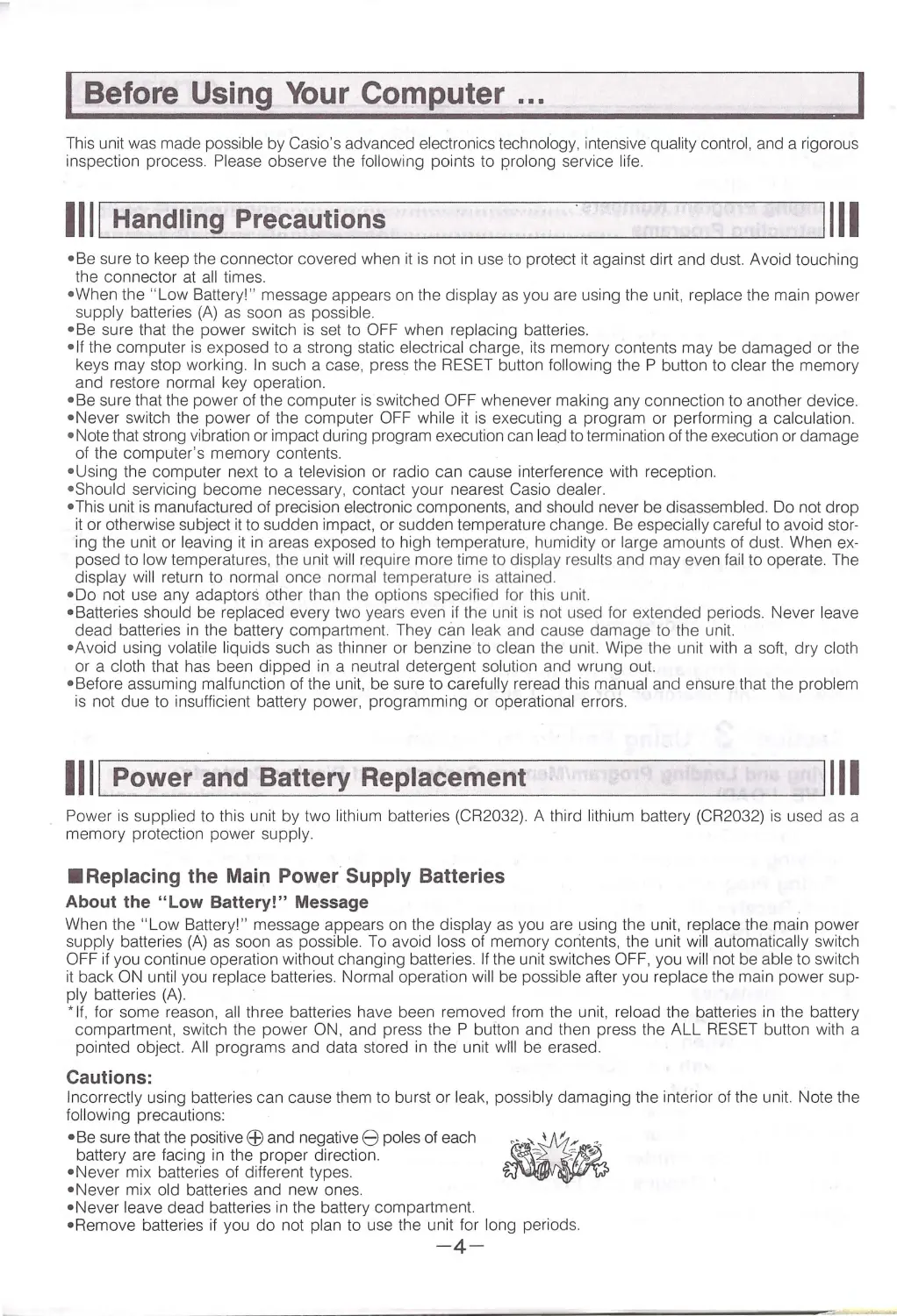
•Be sur e that the positive Efl and negative 8 poles of each ~-.':,I
1:;;. ;-
battery are facing in the proper direction .
•Never mix batteries of different types.
•Never mix old batteries and new ones.
•Never leave dead batteries in the battery compartment
• Remove batteries if you do not plan to use the unit for l ong periods.
-4-

• Replace batteries at least once every 2 years, no matter how much the unit is used during that period .
• Never try to recharge th e batte ries suppli ed with the uni t. ~
-'../ -
~ ~.;
·
• Do not expose batteries to direct heat, let them become
.
•
short ed, or try to take them apart.
'
"'
"'
Keep batteries out of the reach of small children . If swallowed, consult with a physician
immediately.
Main Power Supply Battery Precautions
• Never remove the main power supply batteries and the backup power supply battery from the unit at the
same time.
• Be sure that the power switch of the unit is in the OFF position before starting the battery replacement
procedure . Rep lacing batteri es with the power switch in the ON position wi ll cause programs and data
to be erased.
• Never set the power switch of the unit to the ON positio n whi le the main power supply batteries are re-
moved from th e unit or wh il e the battery holders are not sec urely installed. Doing so w ill cause data stored
in memory to be erased.
•Replace both batteries, and never mix new batteries with old o nes.
•Never remove all three batteries at the same time. If you do, all prog rams and data stored in the unit wi ll
be erased.
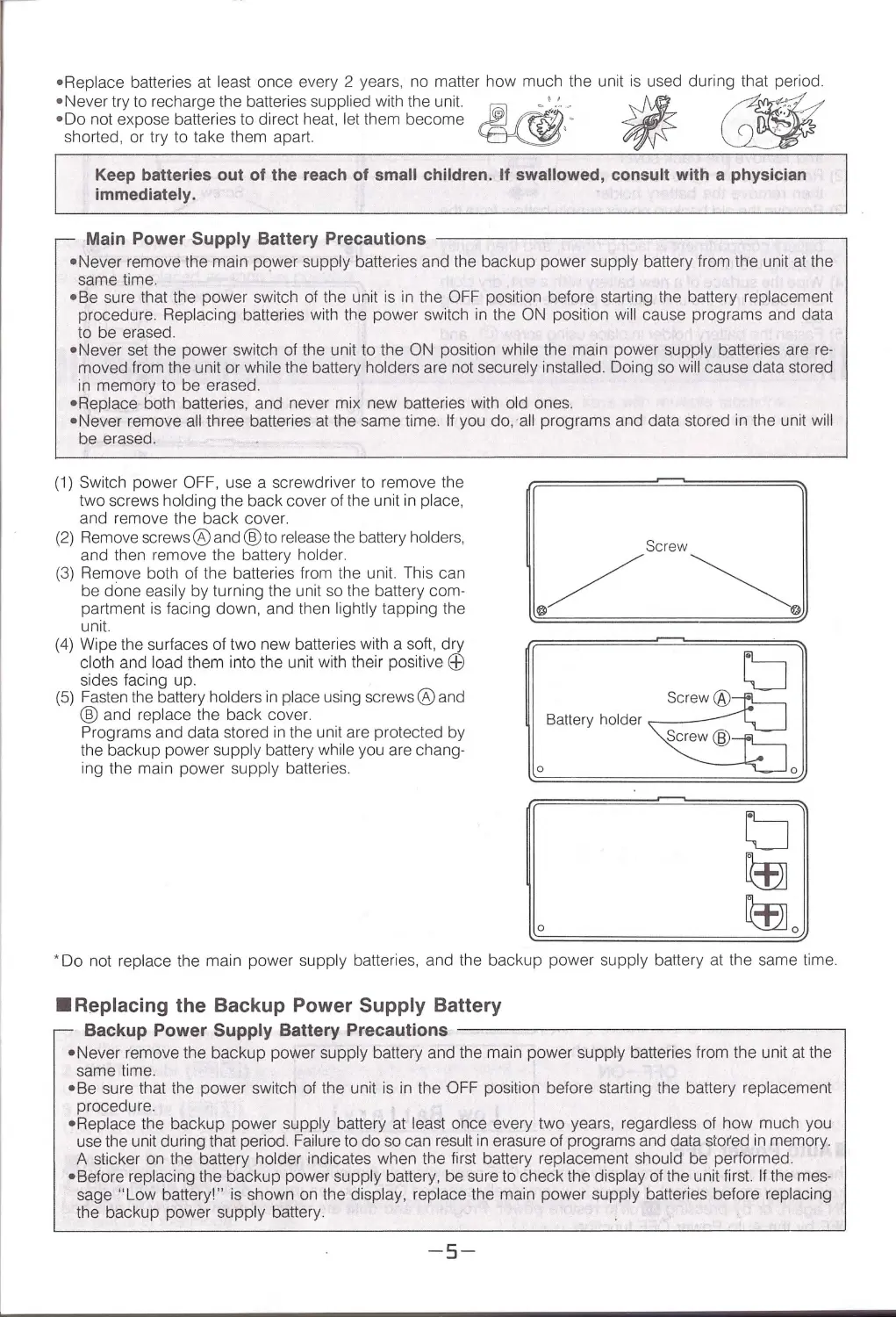
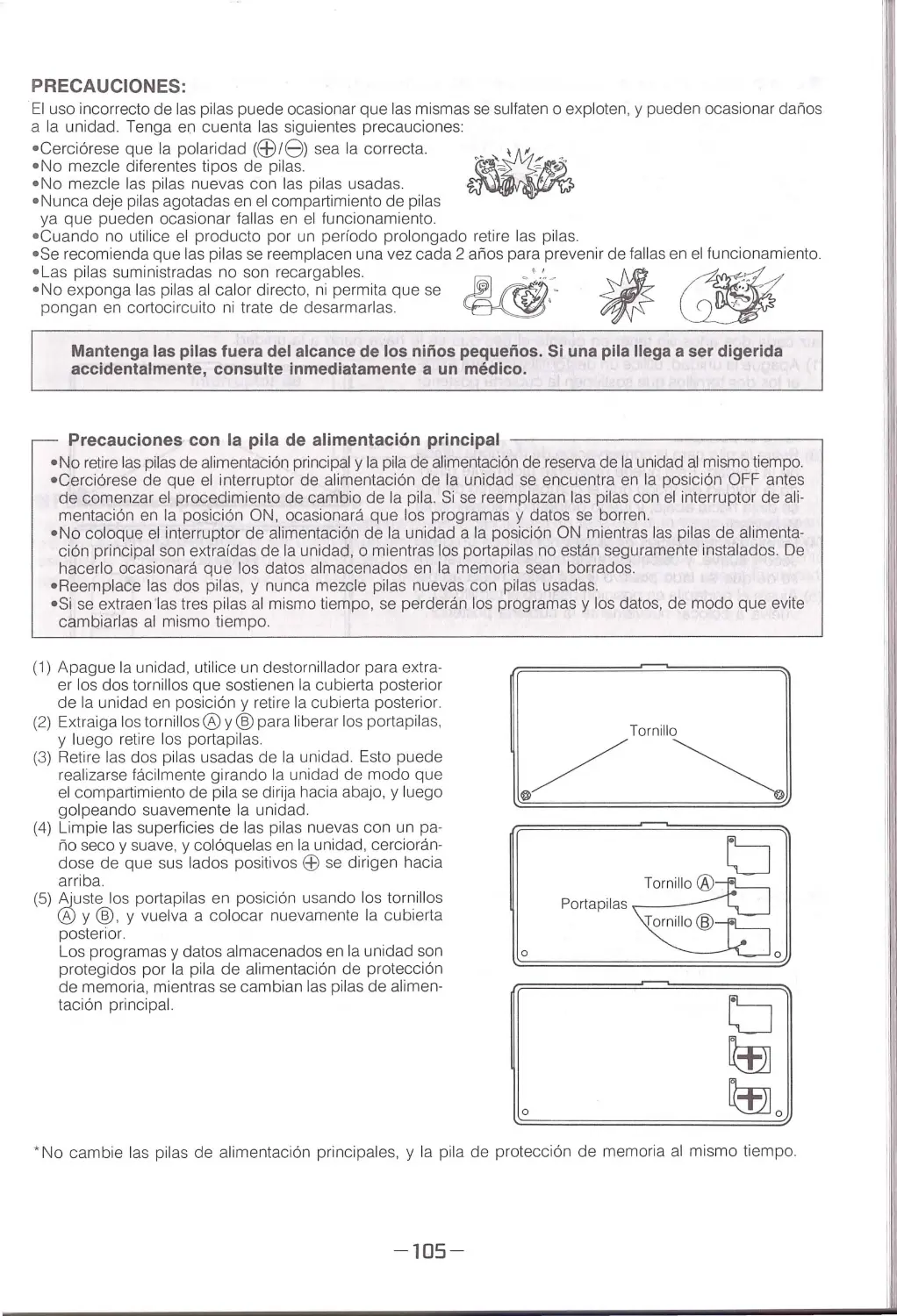
(1) Switch power OFF, use a screwd ri ver to remove the
two screws holding the back cover of the unit in place,
and re move the back cover.
(2) Remove screws® a nd@to release the battery holders ,
a nd then remove the battery holder.
(3) Remove both of the batte ri es from the unit. Thi s can
be done easily by turning the unit so the battery com-
partm e nt is facing down , a nd then lightly tapping the
unit.
(4) Wipe the surfaces of two new batteries with a soft, dry
cloth and load them into the u nit w ith their positive EB
sides facing up.
(5) Fasten the battery holders in place using sc rews® and
® and rep lace the back cover.
Pr ograms and data stored in the unit are protected by
the backup power supply batte ry whi le you are chang-
ing the main power supply batt eries.
0
[,
* Do not rep lace the main power supply batteries , and the backup power supply batt ery at the same time.
•Replacing the Backup Power Supply Battery
Backup Power Supply Battery Precautions -------------------- ,
•Never remove the backup power supply battery and th e main power su pply batte ries from the unit at the
same time.
• Be su re that the power switch of the unit is in the OFF position before starting the battery replacement
procedu re.
•Replace the backup power supply battery at least once eve ry two years, regardless of how much you
use the unit du rin g th at period. Failure to do so can result in erasu re of prog rams and data stored in memory .
A sti cker on th e battery holder indicates when the firs t batt ery replacement should be performed.
• Before replacing the backup power supply batte ry, be sure to check the display of the un it fi rst. If the mes-
sage " Low battery!" is shown o n the display, replace th e main power supply batteries before replacing
the backup power supply battery.
-
5-

The service life of the backup powe r su pply battery is two years. Rep lace this battery once every two years
no matter how much you use the unit.
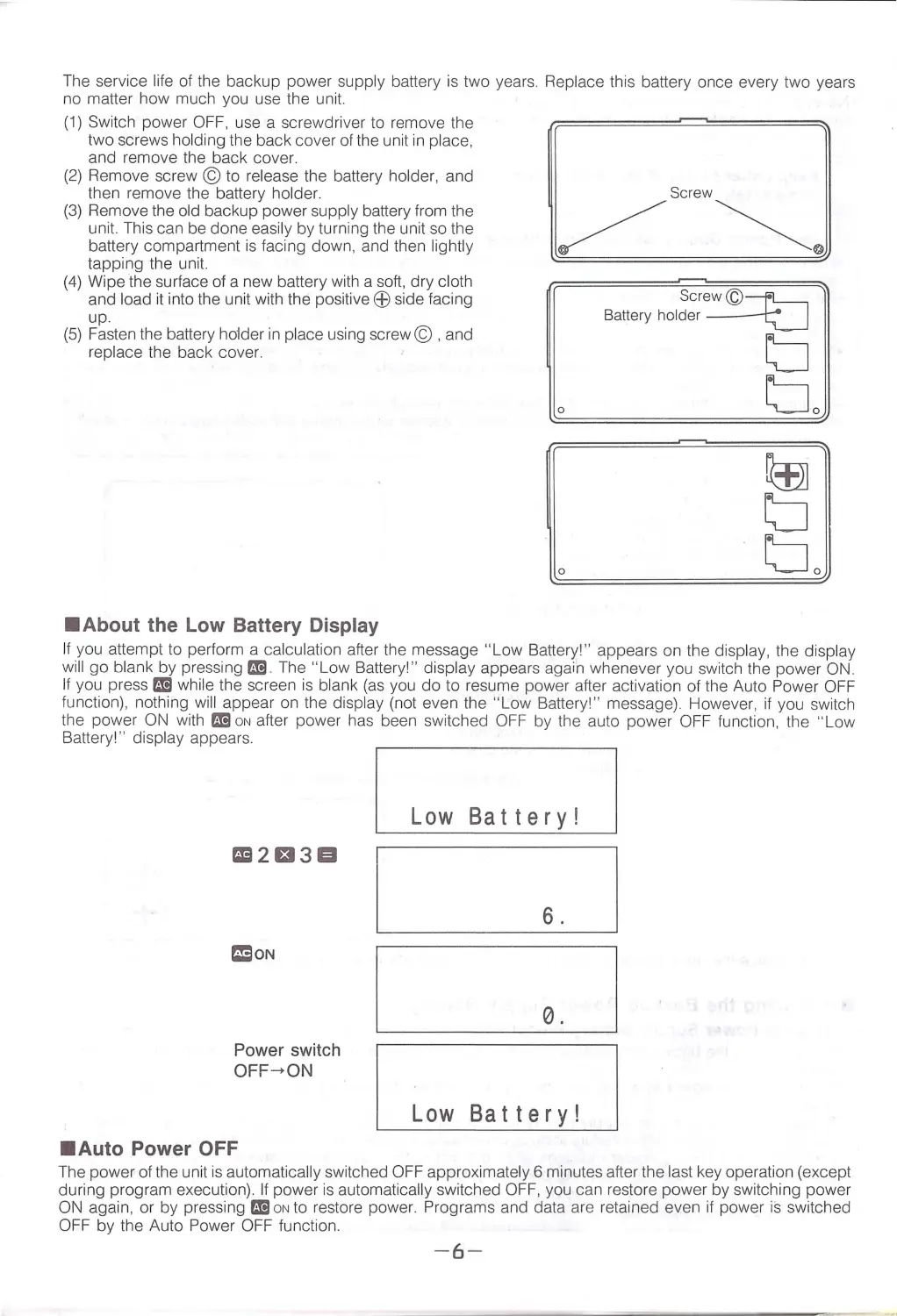
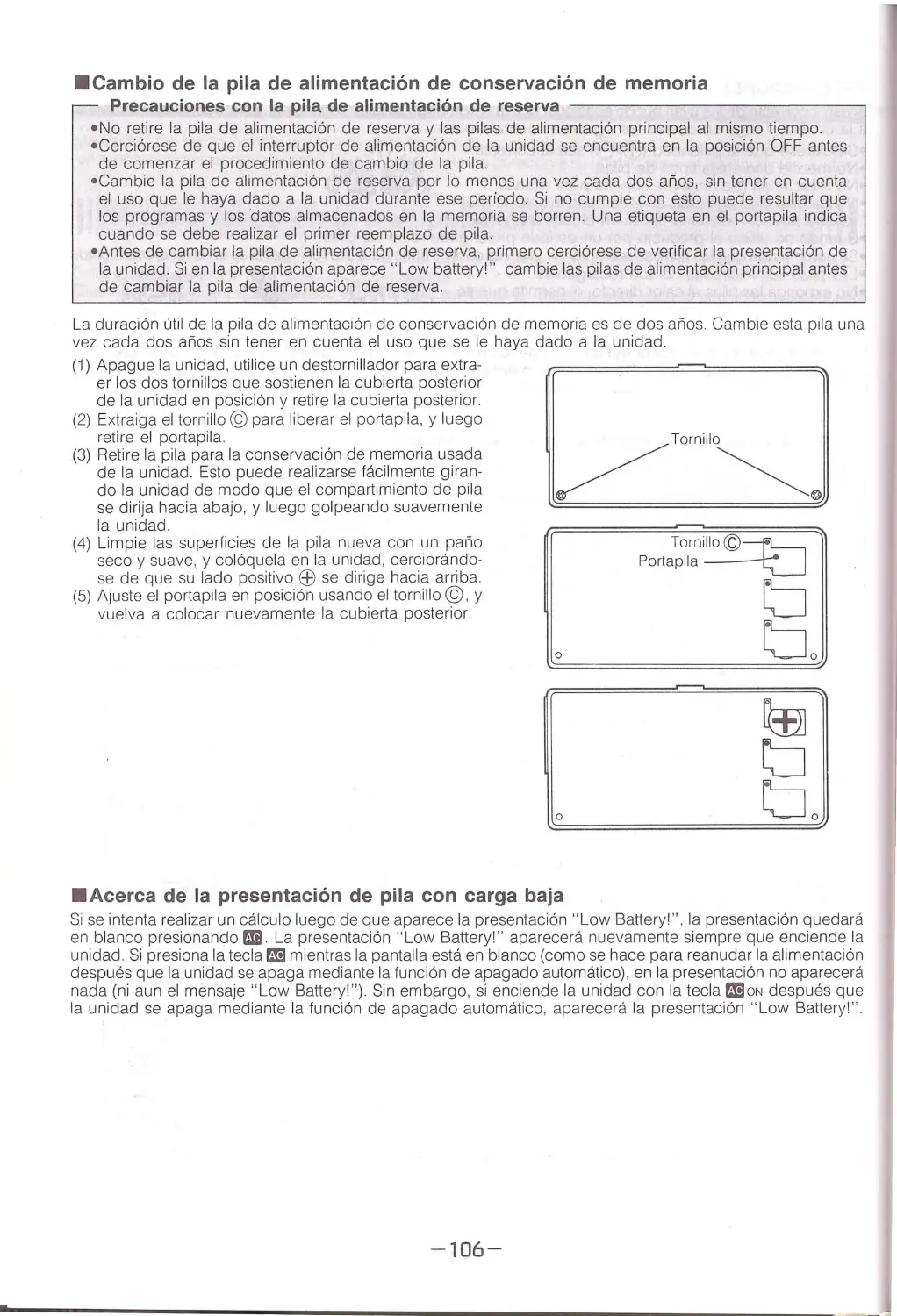
(1) Switch power OFF, use a screwdriver to remove the
two screws ho ldi ng the back cover of the unit in place,
a nd remove the back cover .
(2) Remove sc rew© to re lease the batte ry holder, and
then remove the battery holder.
(3) Remove the old back up power supp ly batte ry from the
un it. Th is can be done easily by turning the unit so the
battery compartment is facing down, and then lightly
tapping the uni t.
(4) Wipe the surface of a new batte ry with a soft, dry cl oth
and load it into the unit with the positive EB side facing
up.
(5) Fasten the battery holder in place using sc rew© , and
rep lace the back cover.
•About the Low Battery Display
0
Screw ©-r1:----i
Battery holder ---i;::__J
tJ
tJO
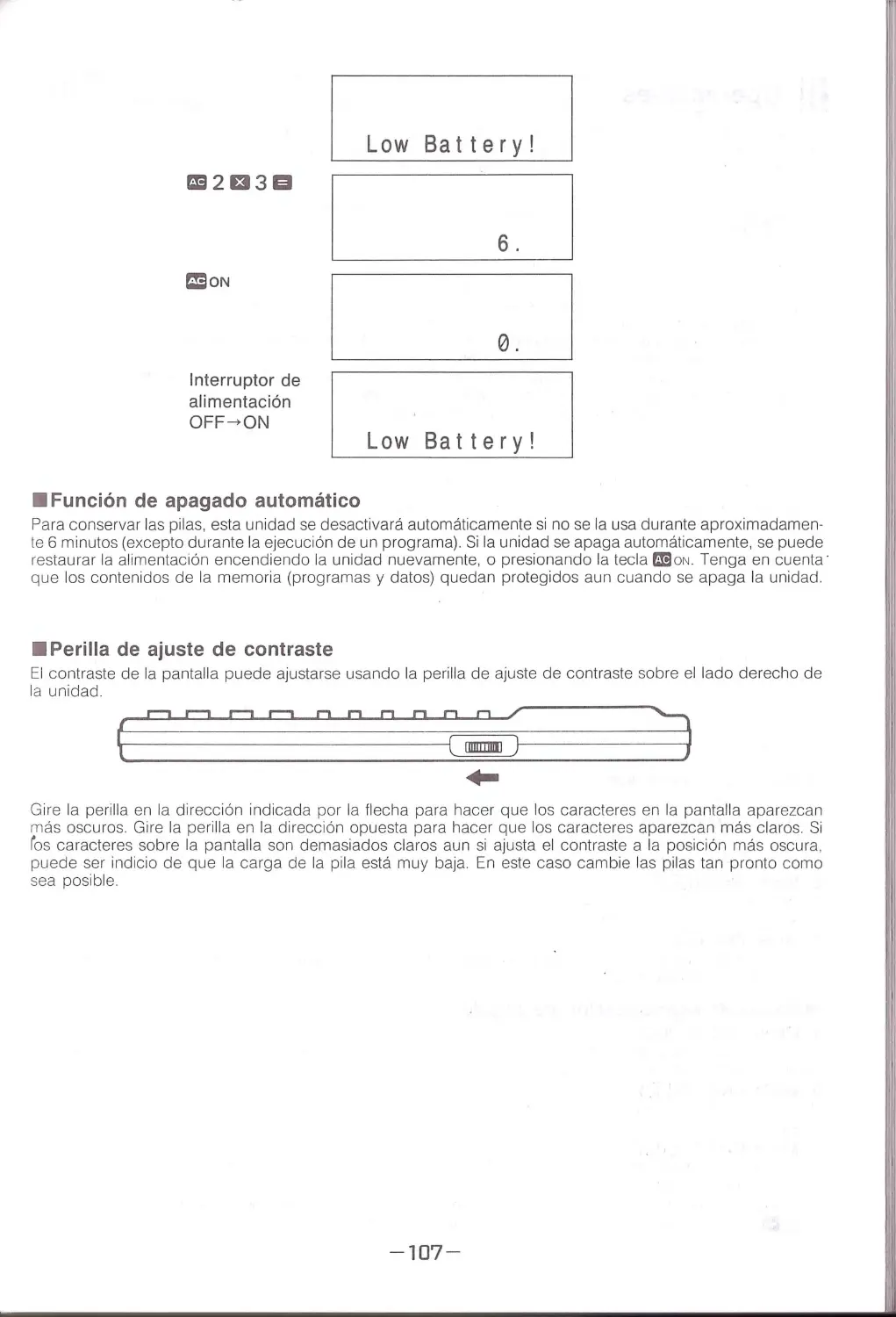
If you atte m pt to per form a calculation afte r the message " Low Batte ry!" appears on the display, th e display
wi ll go blank by pressing ma. The "Low Battery!" d isp lay appears again whenever you switch the power ON.
If you press ma whi le the scree n is blank (as yo u do to resume power after activation of th e Auto Power OFF
function) , nothing will appear on the display (not even the "Low Battery!" message). Howeve r , if you switch
the power ON with ma ON after power has been switched OFF by the auto power OFF function, the "Low
Battery1" disp lay appears .
GB2t33EI
Power swi tc h
OFF-+ ON
•Auto Power OFF
Low Battery!
6.
0.
Low Battery !
The power of the unit is au tomatically switched OFF approximately 6 minu tes after the last key ope ration (except
durin g p rogram execution). If power is automaticall y switched OFF . you can restore powe r by switching power
ON again, or by pressing ma ON to resto re power. Prog rams and data a re reta in ed even if power is switched
OFF by the Au t o Power OFF function.
-6-

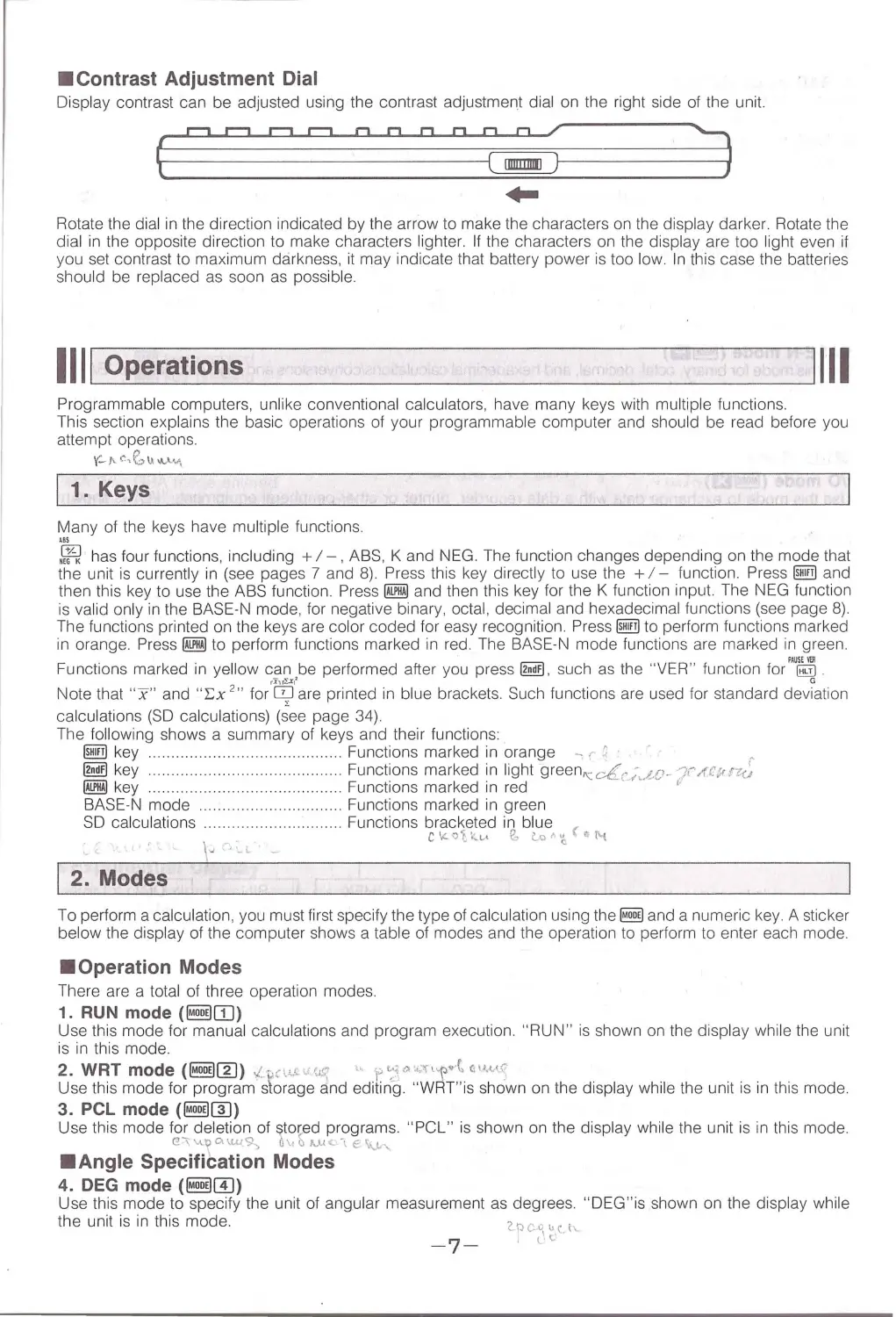
•Contrast Adjustment Dial
Display cont rast can be adjusted using the contrast adjustment dial on the right side of the unit.
r=JC1r=JC]OODO~
~
(--------_ ciiij1--------. 3
Rotate the dial in the direction indicated by the arrow to m ake the characters on the display darker. Rotate the
dial in th e opposite di r ection to make characters lighter. If the character s on the display are too light even if
you set contrast to maximum darkness, it may indicate that battery power is too low. In this case the batteries
should be replaced as soon as possible.
1111 Operations
1111
Programmable computers, unlike conventional calcul ators, have many keys with multiple functions.
This section explains the basic operations of your programmable computer and should be read befor e you
attempt operation s.
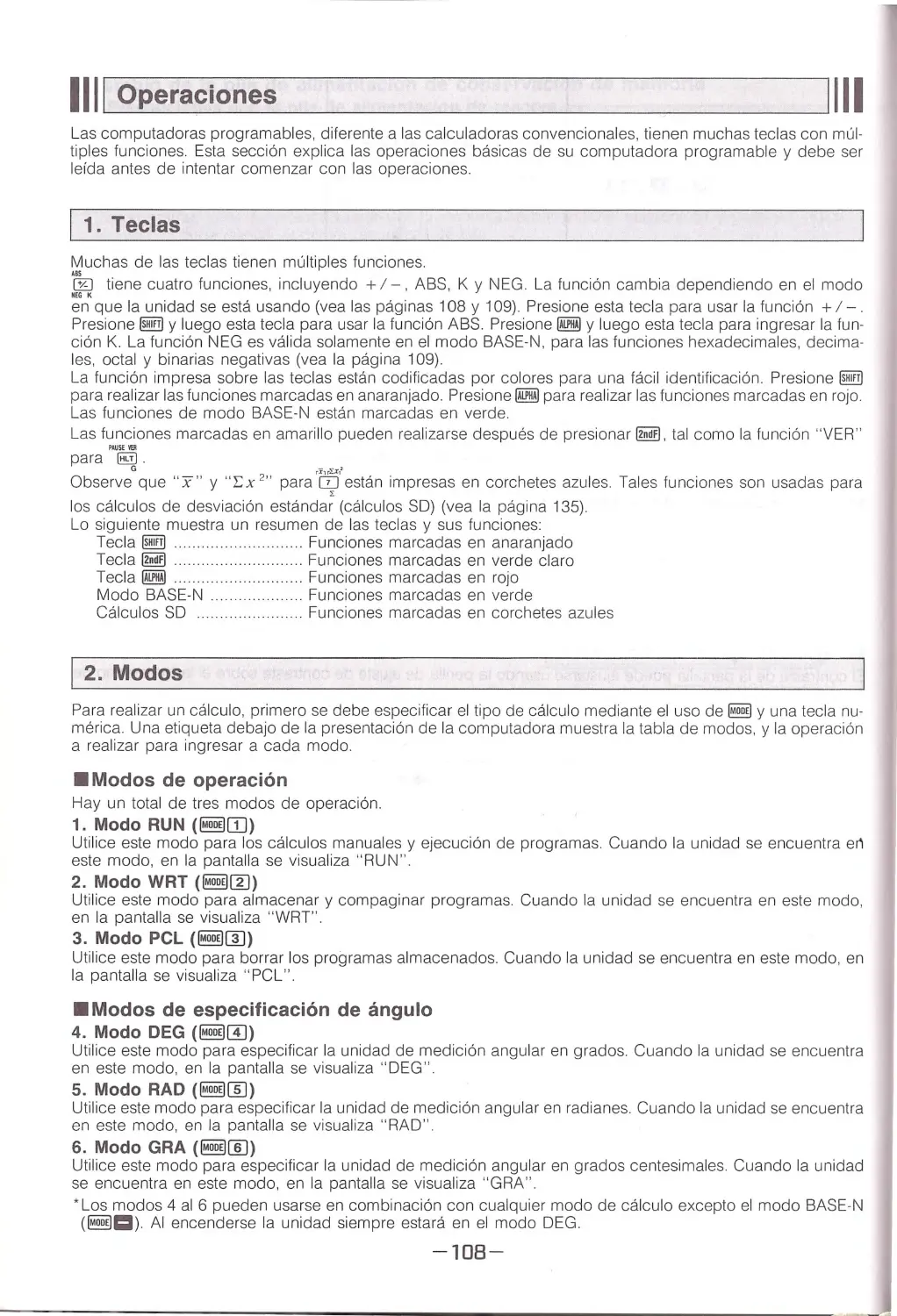
(-i 'c, E'.,u" "" "'
I 1. Keys
Many of the keys have multiple fu nctions.
:~ has four functions, including +I - , A BS, K and NEG. The function changes depending on the mode that
the unit is currently in (see pages 7 and 8). Press this key directly to use the + I - function. Press ~ and
then th is key to use the ABS function. Press @Ji!] and then this key for the K func tion i nput. Th e NEG function
is va lid only in the BASE-N mode, for negative binary , octal, decimal and hexadecimal functions (see page 8).
The functions printed on the keys are color cod ed for easy recognition. Press~ to perform functions marked
in orange. Press @Ji!] to perform func tions marked in red. The BASE-N mode functions are mafked in green.
Functions marked in yellow can be performed after you press~. such as the "VER " function tor"'~
Note that "x" and "L:x ,,, tor 'c;J''are printed in blue brackets. Such functions are used for standard deviation
calculations (SD calculations) (see page 34) .
The following shows a summary of keys and their functions:
@!IT! key ................... .. .. .. ... . ... .. ........ Functions marked in orange - r r:
,..
~key ........... ......
. . . . . . Functions marked in light gr een"'-dc;...t.u - 'JrAC;,rk,
@@ key
.. ....
Functions marked in red
'
BASE -N mode
..... Functions marked in green
SD calculations .
......
Functions bracketed in blue (
C\l.. 'OCkl.A ~ Lo <'· 'l
~ (\.\
2. Modes
To perform a ca lculation , you must first specify the type of calcu lation using the ~ and a numeric key . A sticker
below the display of the computer shows a table of modes and the operation to perform to enter each mode.
•Operation Modes
There are a total of three operation modes.
1. RUN mode (§@IIJ)
Use this mode for manu al calcu lation s and program execution. "RUN" is shown on the display while the unit
is in this mode.
2. WAT mode (§@rn) ,,: - c1~cc· (<-'
,.
1" ~~"' '-'~•-p..t a««c
Use this mode for program slorage and editing . "W RT "is shown on the display while the unit is in this mode.
3. PCL mode (§@[]])
Use th is mode for deletion of stored p r ograms. "PCL" is sh own on the display whi le the unit is in this mod e.
@.~\.1...~0.\J.A..(9-:-. 0\1 ~ 1..,. UoC-\ € \\J..·\ ,
•Angle Specification Modes
4. DEG mode (§@[!))
Use this mode to specify the u nit of angul ar measurement as degrees. "D EG"is shown on the display while
the unit is in this mode.
-7-
'2..pc_v1 v._ct'\.
;lt.

5. RAD mode (~(ID)
'(; vfo,; ), "','"'\? ~ /0 '1,""'·"-i
Use this mode to specify the unit of angular me~surement as tadia ns. " RA D " is shown on the disp lay whi le
the unit is in this mode.
6.GRAmode(~[[)) yt.1,1;b.... ; ~ -~' G "-\>"'~c.y
Use this mode to specify unit of angular measurement as grads. " G RA " is shown on the display while the unit
is in this mode.
• Modes 4 through 6 can be used in combination wi th any calculation mode except the BASE-N mode (~Cl).
The unit is always in the DEG mode after you switch power ON.
•Calculation Modes
COMP mode (~CJ)
Use this mode for arithmetic ca lculation or function calculation. The unit of angular measurement is show n on
the display, and the last unit specified rema ins in effect Nothing appears to indicate the COMP mode in the
BASE-N mode or any other mode.
-
BASE-N mode (~a)
Use this mode for binary, octal, decimal, and hexadecima l calculations/conversions and logic ca lcu lat ions. " BASE-
N" is shown on the display whi le the unit is in this mode.
•T he COMP mode and the "BASE-N" mod e cannot be used in combination. The unit is always in the COMP
mode after you switch power ON.
•110 Mode
1/0 mode (~El) o~.u.t"'
c. <;_0"'~"-~"'"'e"-f,"'"'"-~
\AAl>-~:/''-·
Use this mode to exchange data with a data recorder , printer or other peripheral equ ipment. " 1/0" is shown
on the display whi le the unit is in this mode.
., , , o..';L. n• ~:," ·~~~;,'-~' c
MT Reverse Mode(~~)
"YP
·
Use this mode to invert the phase when loading data from a data recorder. " R" is shown on the d isplay wh ile
the unit is in this mode.
• T he phase can be confirmed in the 1/0 mode.
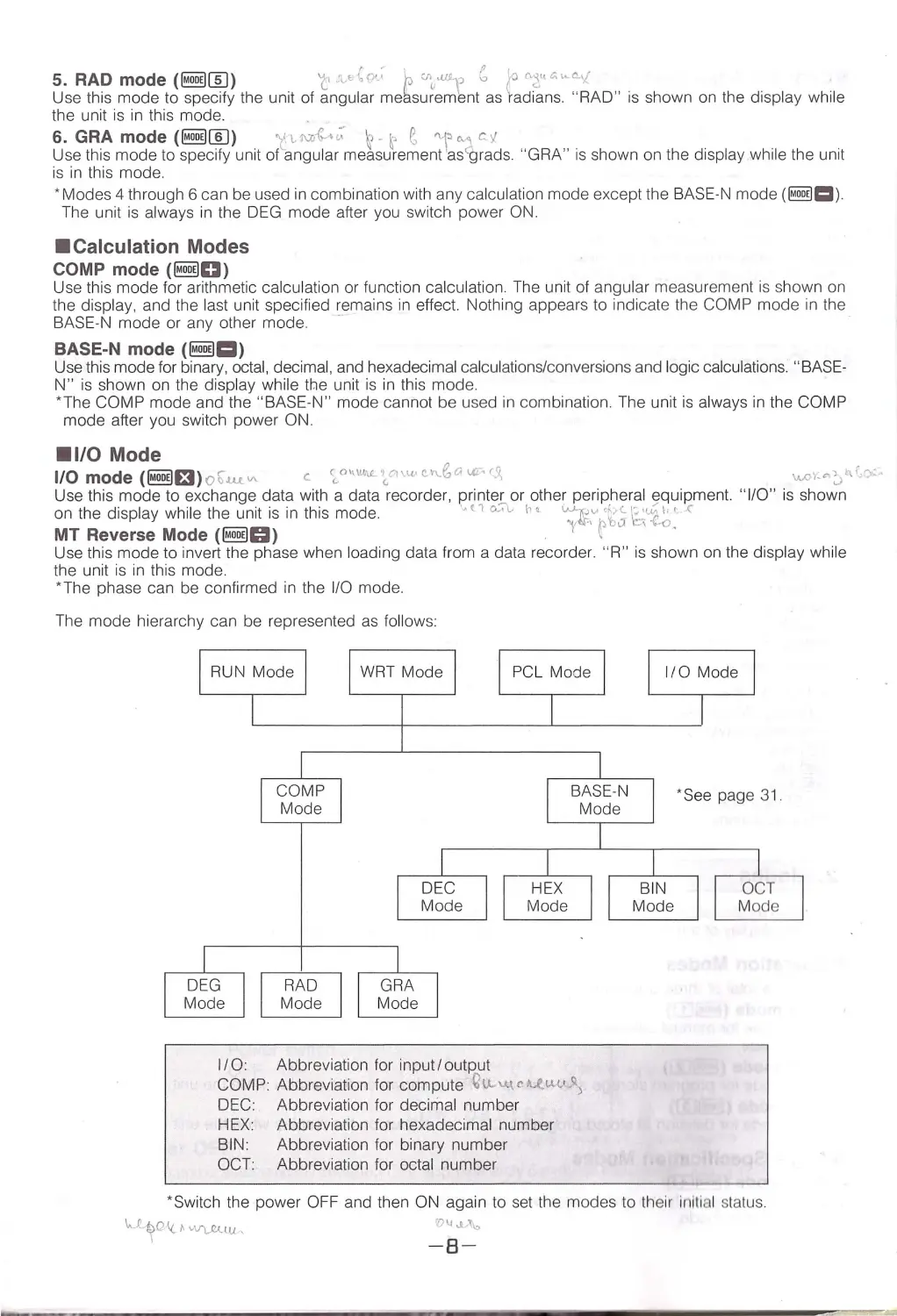
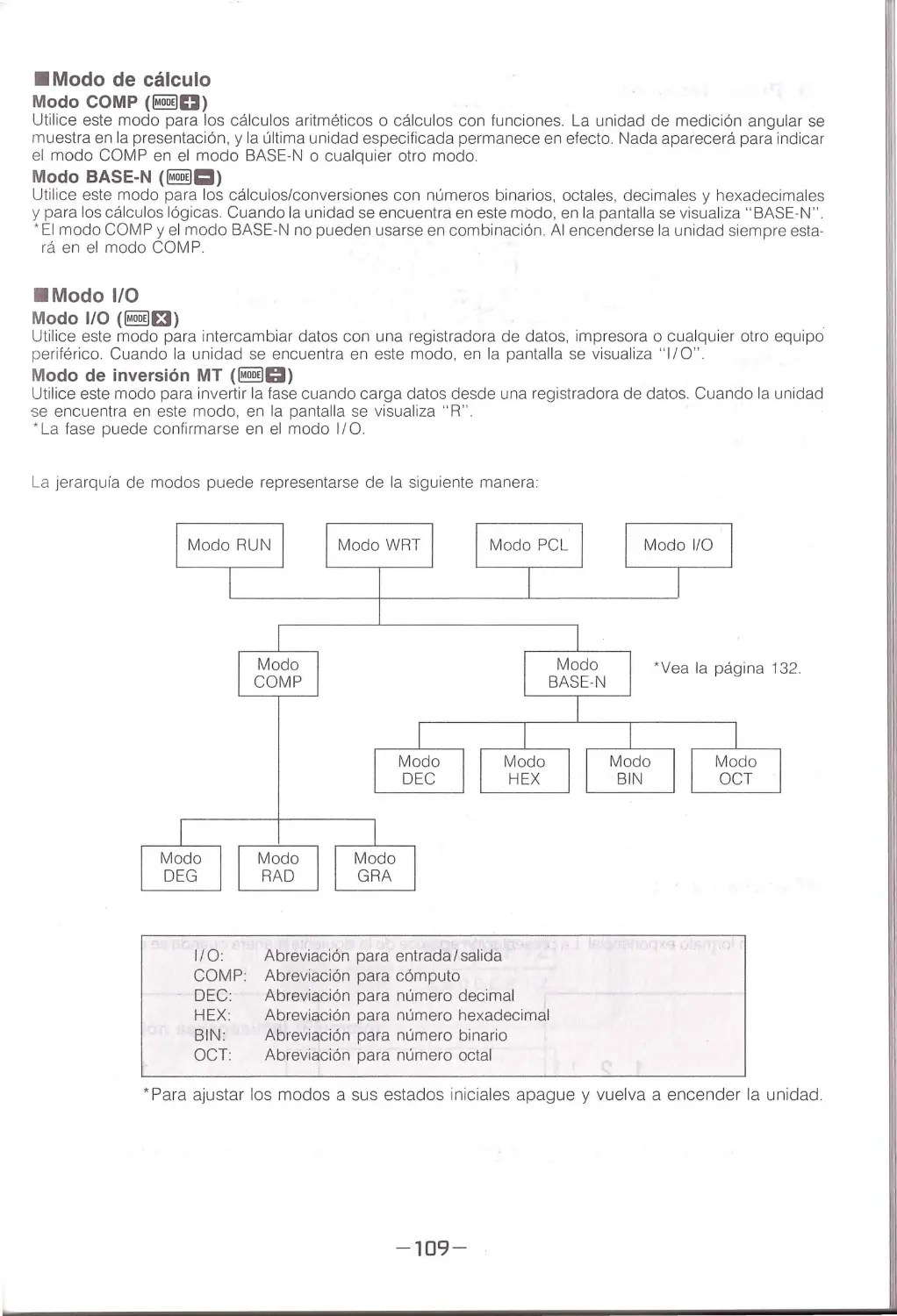
The mode hierarchy can be represented as follows:
RUN Mode
DEG
Mode
COMP
Mode
IRADl
~
WRT Mode
GRA
Mode
DEC
Mode
PCL Mode
HEX
Mode
BASE-N
Mode
1/0: Abbreviation for input/outP.ut
COMP: Abbreviation for compute Qu..\.l\ch.l!.l~< .\
DEC: Abbreviation for decimal number
HEX: Abbreviation for hexadecima l number
BIN: Abbreviation for binary number
OCT: Abbreviation for octal number
1/0 Mode
•See page 31.
BIN
Mode
OCT
Mode
·switch the power OFF and then ON again to set the modes to th eir initi al status.
-8-

3. Displays
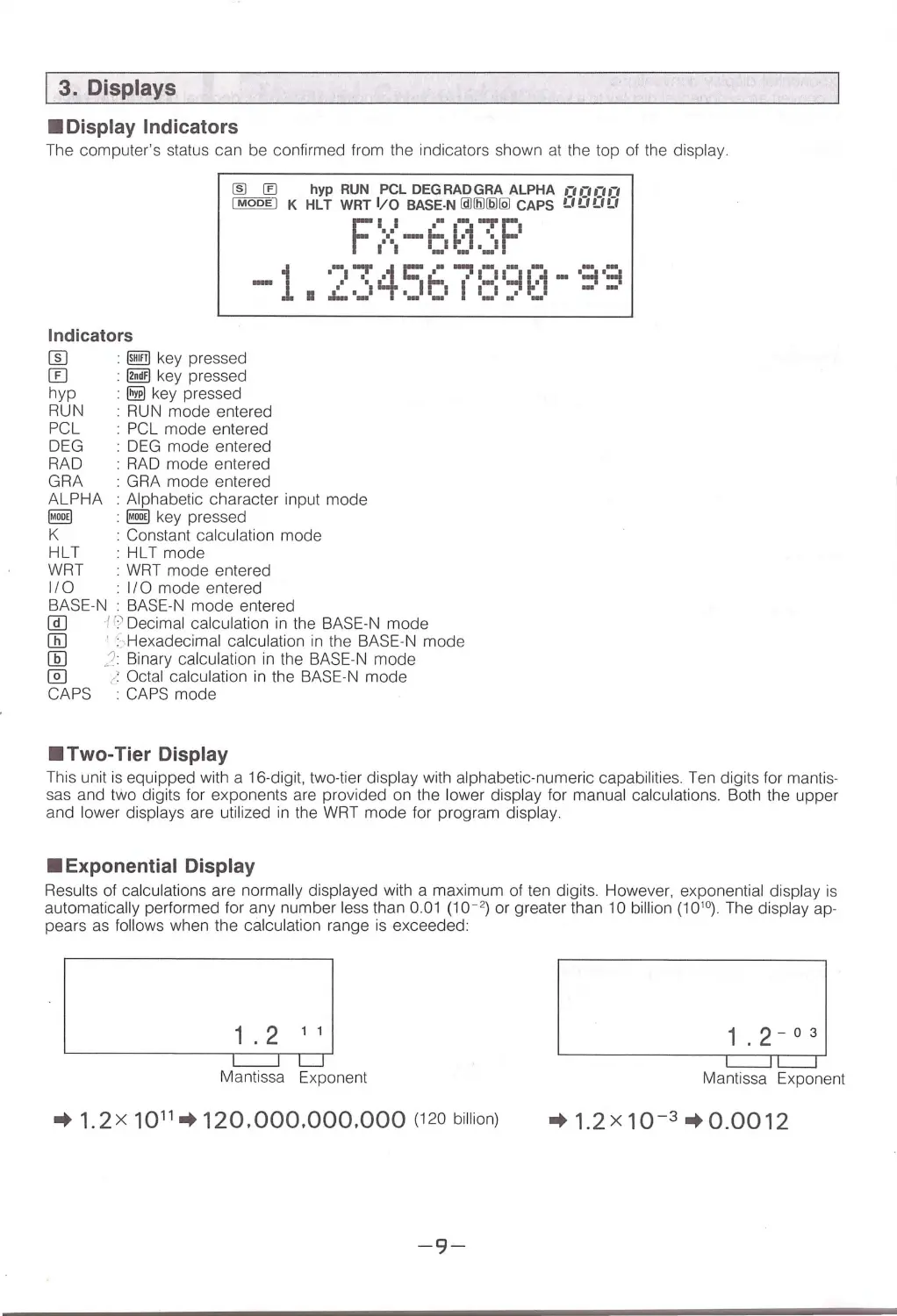
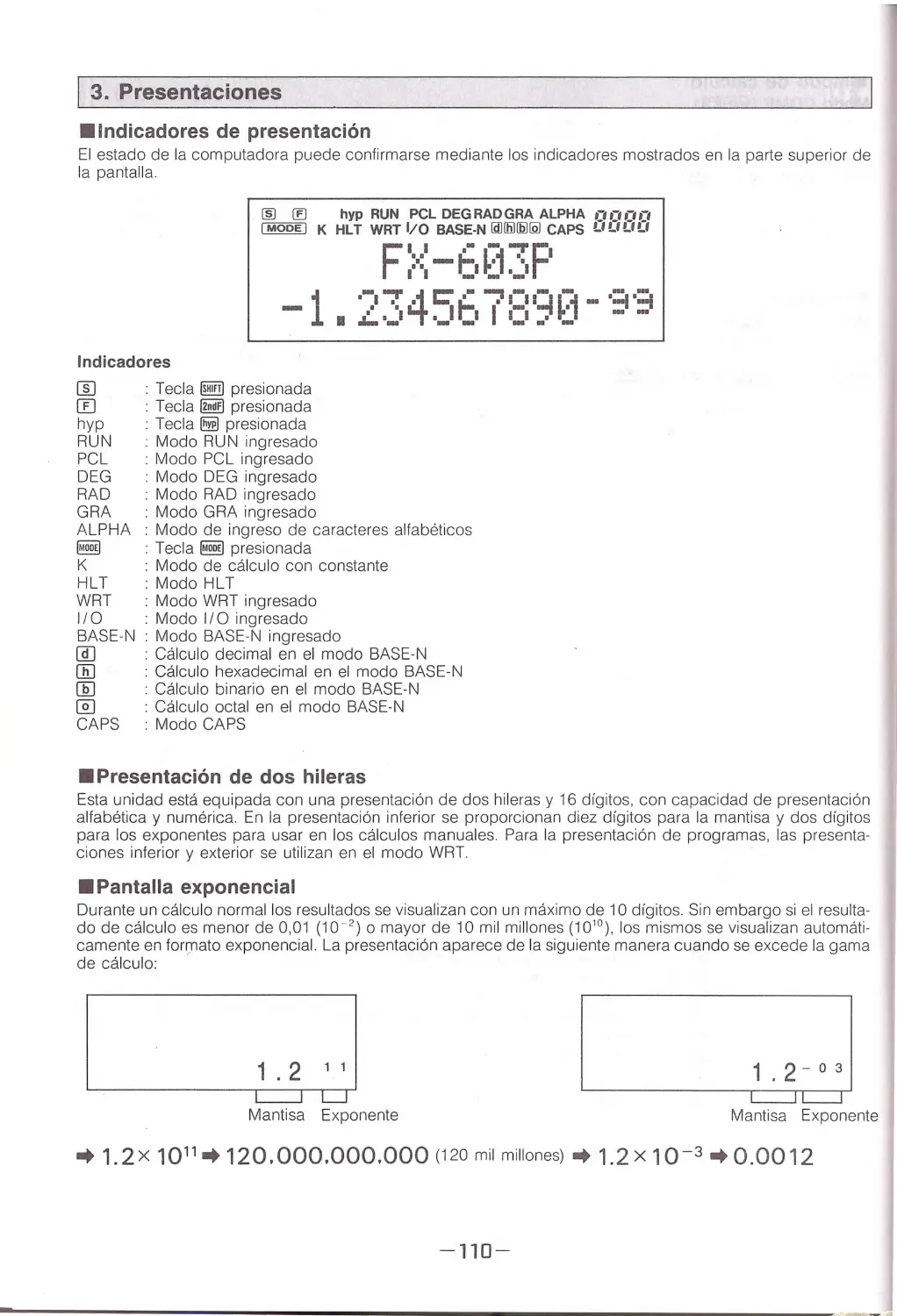
•Display Indicators
The computer's status can be confirmed from the indicators shown at the top of the display.
~®
hyp RUN PCL DEGRADGRA ALPHA , -, ,- ,, -, ,- ,
I MODE I K HLT WAT 1/0 BASE-N lail!ll1!2112J CAPS !) !) !) LI
Fii .---rF
,:•:I - ti ~.:1.~I I
-1 a ·-:i ":!' 4C' .- -:i 1=11-I- r1 - ·=i ·:::;
••
I •lhI1I...
-
'"
..... _
--
---
Indicators
rn
@@ key pressed
[[)
.
@!m key pressed
hyp
~ key pressed
RUN · RUN mode entered
PCL
.
PCL mode entered
DEG . DEG mode entered
RAD : RAD mode entered
GRA : GRA mode entered
ALPHA : Alphabetic character input mode
~
· ~ key pressed
K
: Constant calculation mode
HLT
· HL Tmode
WRT · WRT mode entered
II0
I/ 0 mode entered
BASE-N BASE -N mode entered
@]
i r:? Decimal calculation in the BASE-N mode
OD ' : -Hexadecimal calcu lation in the BASE-N mode
[fil ) : Binary calcu lation in the BASE-N mode
@J
/ Octal calculation in the BASE-N mode
CAPS : CAPS mode
•Two-Tier Display
This unit is equipped with a 16-digit, two-tier display with alphabetic-numeric capabilities. Ten digits for mantis-
sas and two digits for exponents are provided on the lower display for manual calcu lations. Both the upper
and lower displays are utilized in the WRT mode for program display.
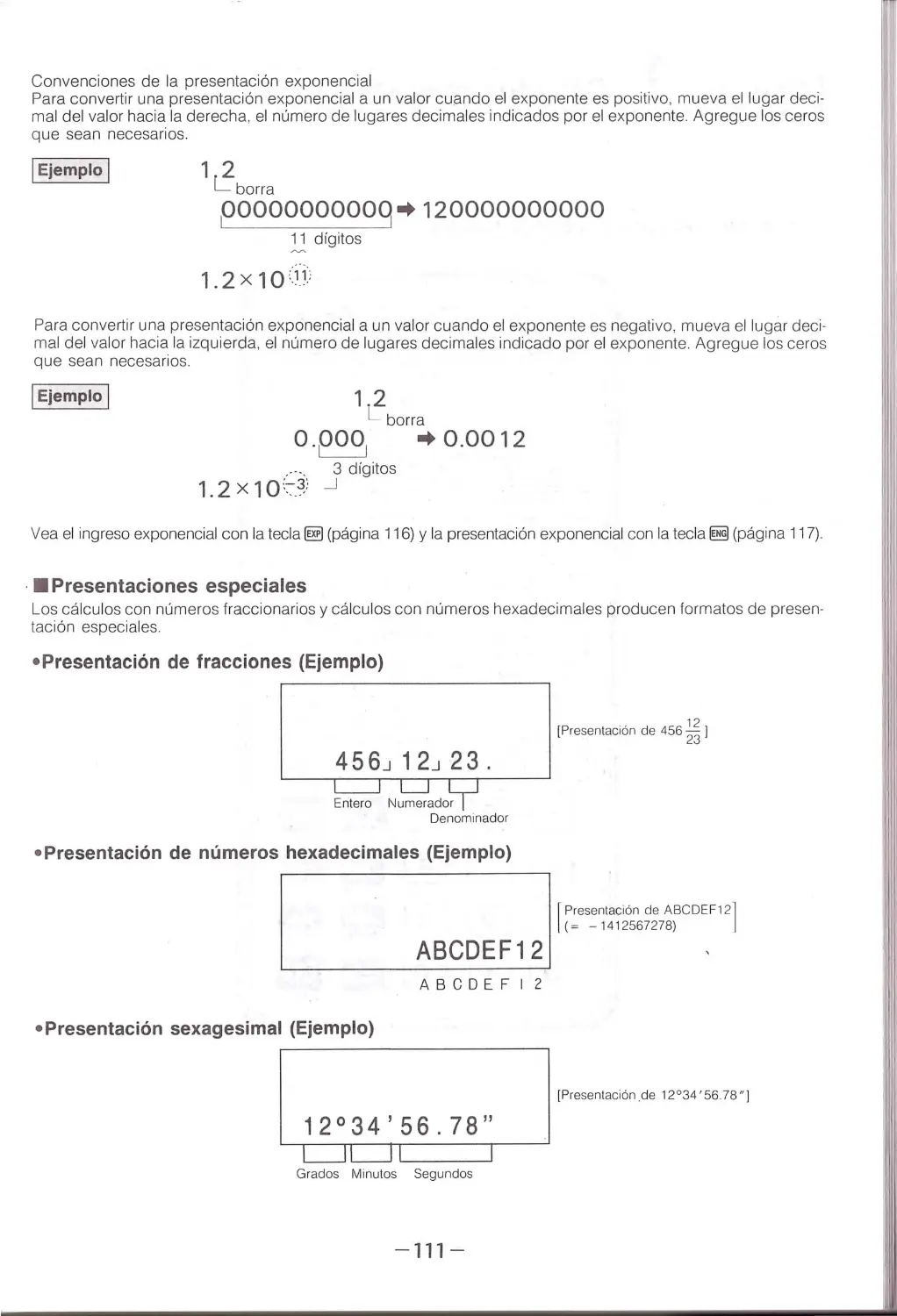
•Exponential Display
Results of calcu lations are norma lly displayed with a maximum of ten digits. Howeve r , exponential display is
automatically performed for any number less than 0.01 (10 - 2 ) or greater than 10 bi llion (10 10 ). The display ap-
pears as fo llows when the calculation range is exceeded:
1'2
c=:J
Mantissa
''
LJ
Exponent
-+ 1.2X 10 11 -+ 120.000 .000 .000 (120 billion)
-9-
L=:JL=:J
Mantissa Exponent
-+ 1.2x10⁻³
.. 0 .0012

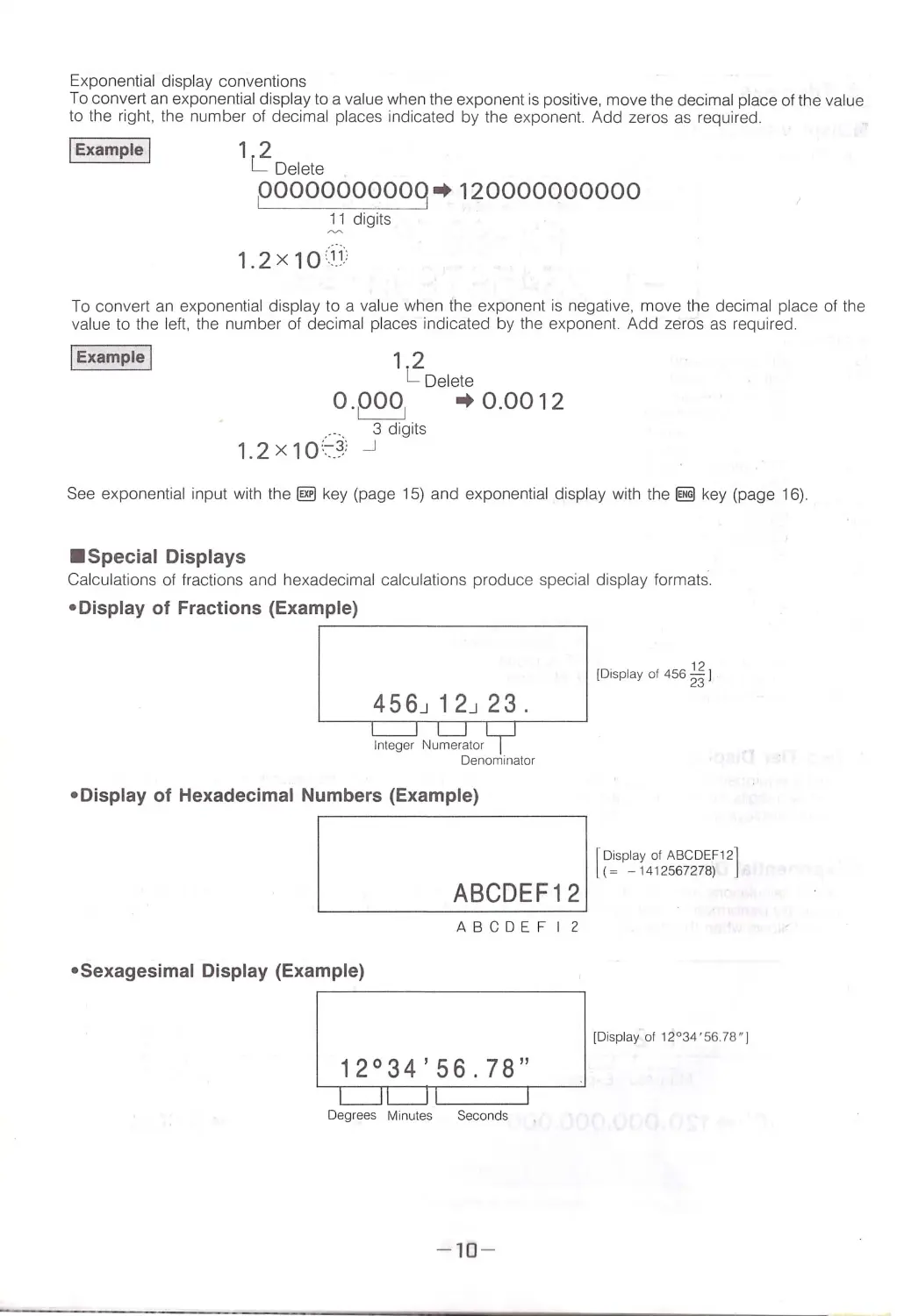
Exponential display co nventio ns
To convert an exponential display to a va lue when the expone nt is positive, move the decimal p lace of the value
to the right, the number of decimal p laces indicated by the exponent. Add zeros as required .
jExample I
12
l: Delete
poooooooooq~120000000000
_2; digits
1.2X10 11
To convert an exponential display to a va lue when the exponent is negative, move the decimal place of the
va lue to the left, the number of decimal places indicated by the expo nent. Add zeros as required.
jExample I
12
L Delete
o.poo1
~0.0012
.---.
3 digits
1.2 x 10 :::-_ 3,'
_J
See expone ntial input with the @] key (page 15) and exponentia l display wit h the 0 key (page 16).
•Special Displays
Calcu lations of fractions and hexadecimal calculations produce special display formats.
•Display of Fractions (Example)
456J12J23.
•Display of Hexadecimal Numbers (Example)
ABCDEF12
12
[Display of 456 23')
I
I-Display of ABCDEF12]
(=
-
1412567278) -
~~ ~~~~~~~~~~~
ABCDEF I 2
•Sexagesimal Display (Example)
[Display of 12 ° 34' 56 .78" 1
12°34'56.78"
Deg rees Minutes Seconds
-
10-

Section 1
ov-uc.•~
re...
' 1- , . G- ·~ ·~.:..r1v-·--~
Manual Calculations
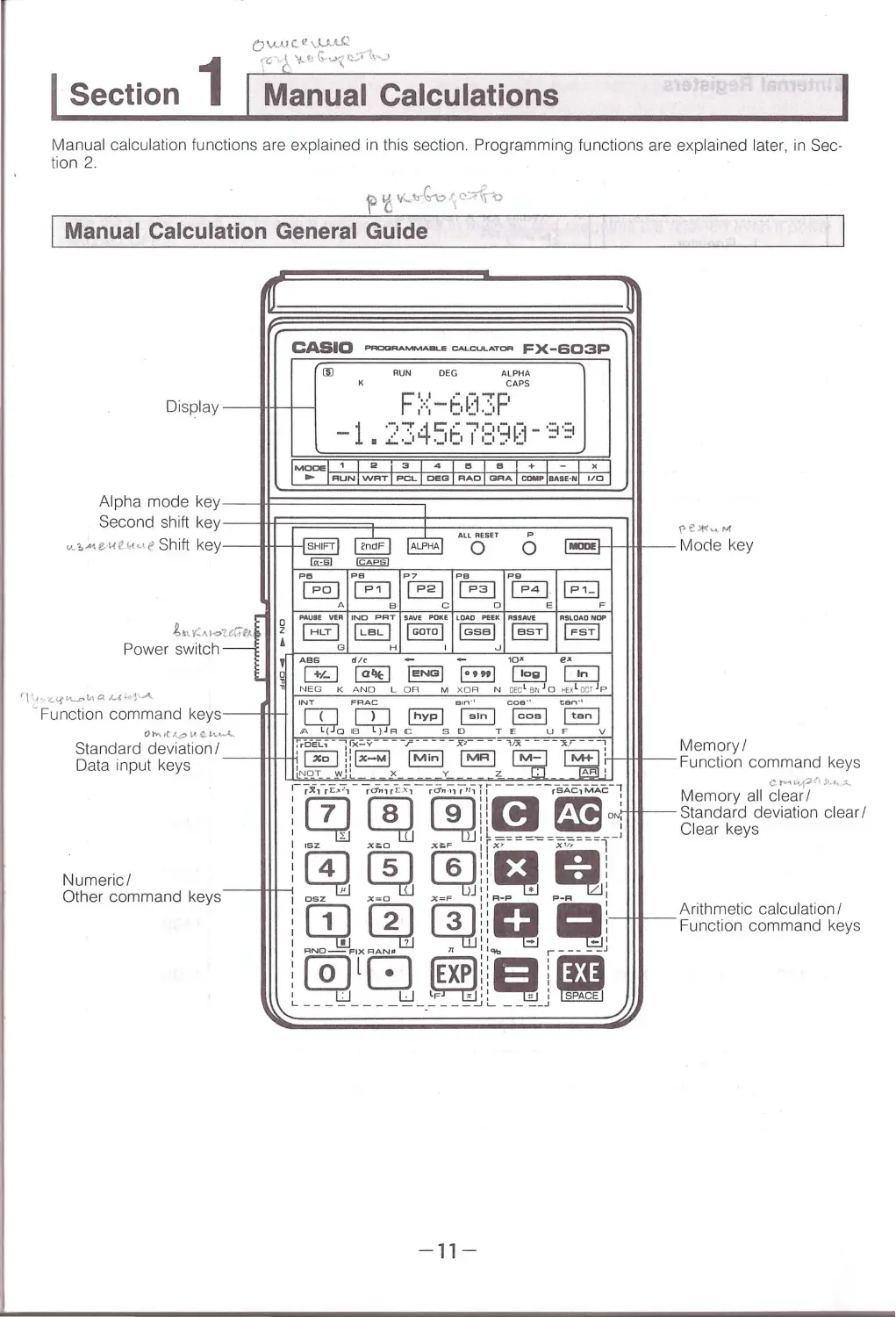
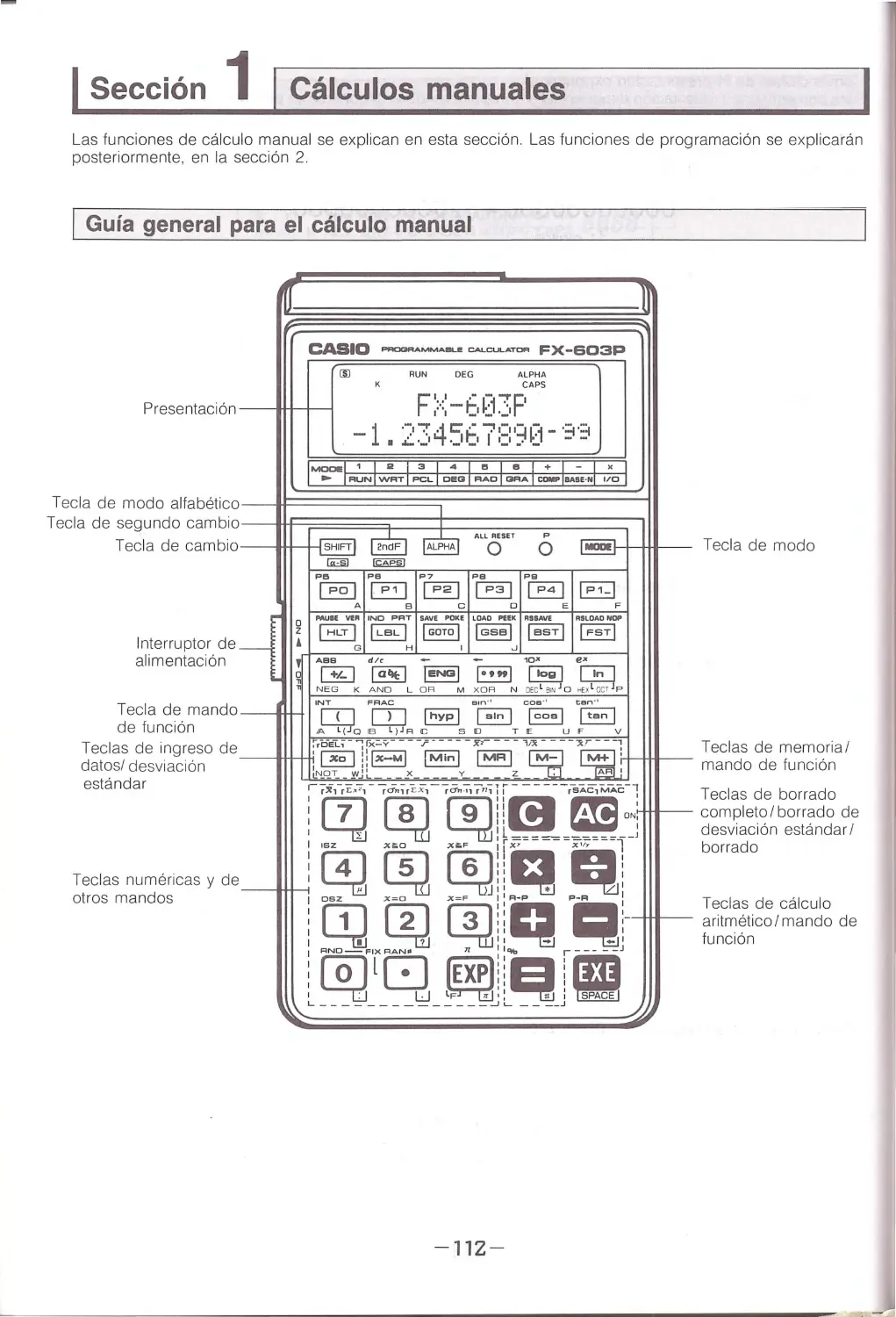
Manual calculation fu nctions are explained in this section . Programming functions are explain ed later, in Sec-
tion 2.
Manual Calculation General Guide
'IT
CASIO PRCIGRAMMAllL.E CN. .CUl. .ATOR FX-603P
(Il
RUN
DEG
ALPHA
K
CAPS
Display --ttt-+ - - .,
F>::-t .03F'
-1 I ''°'.I ~4c:;' ,• "";' i:ll:p-:-1 - ·=i ·=i
..:_._,
._1t1 I ,_, •· •-
-
-
MDDl!!I1I2i3I4Ietel+I-
x
..
IRUNIWRT I PCLI DEGI RAOI GRAICOMPIBAS£·N 1/ 0
Alpha mode key-_J~~~~~~~~==========~I
Second shift key---lfF~~~~j:::::=::t:========~
I
~~
v..,, . .,ei<eHc<e Shift key--tt1-t-1 SHIFT
J.,.,;:,..,,,a;e;o
Power switch -
I\'-'•
-.C..\.f t.\..pt,., Q. 1-l;,,•~...A,
' Function command keys-
fii3iJ
Pe
~A
PitoUH VER
IHLT I
G
ABS
GJ
NEG K
All RESET
p
0 0 MDIII!
~
PB
P?
PB
Pa
~@]~EJ§:;]
B
c
D
E
F
INC PRT SAVE POKE LDAO PHk RSSAVE
RSLOADNOP
jLeLI IGOTO I jGsal JasT I IFSTI
H
I
"
.,.
-
-
m•
..
IafltI jENGI l·•" I ~ ~
AND LOR M xoA N OEcl a:r.iJo tt:xlocr P
- 11-
(le~ ..... M
Mode key

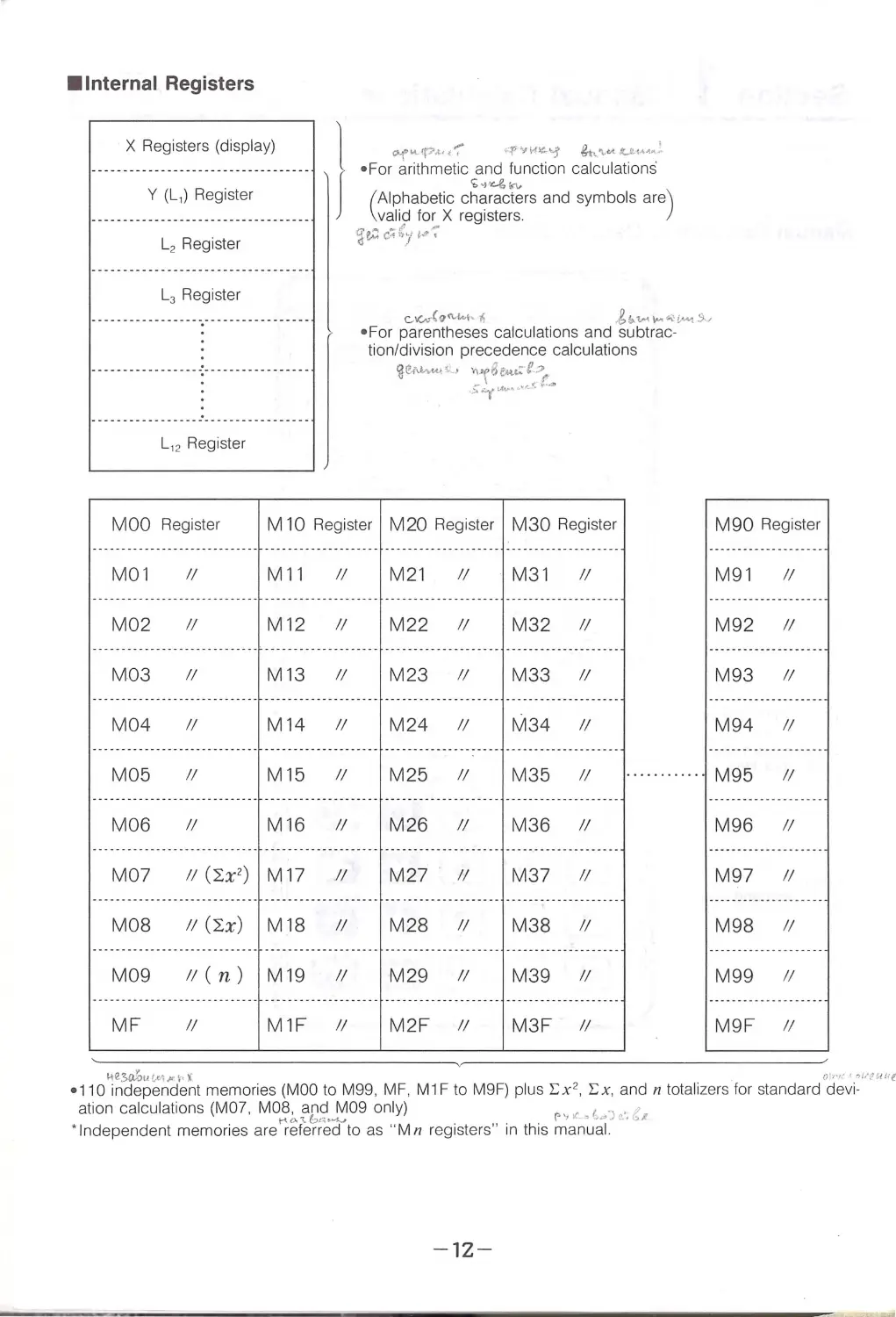
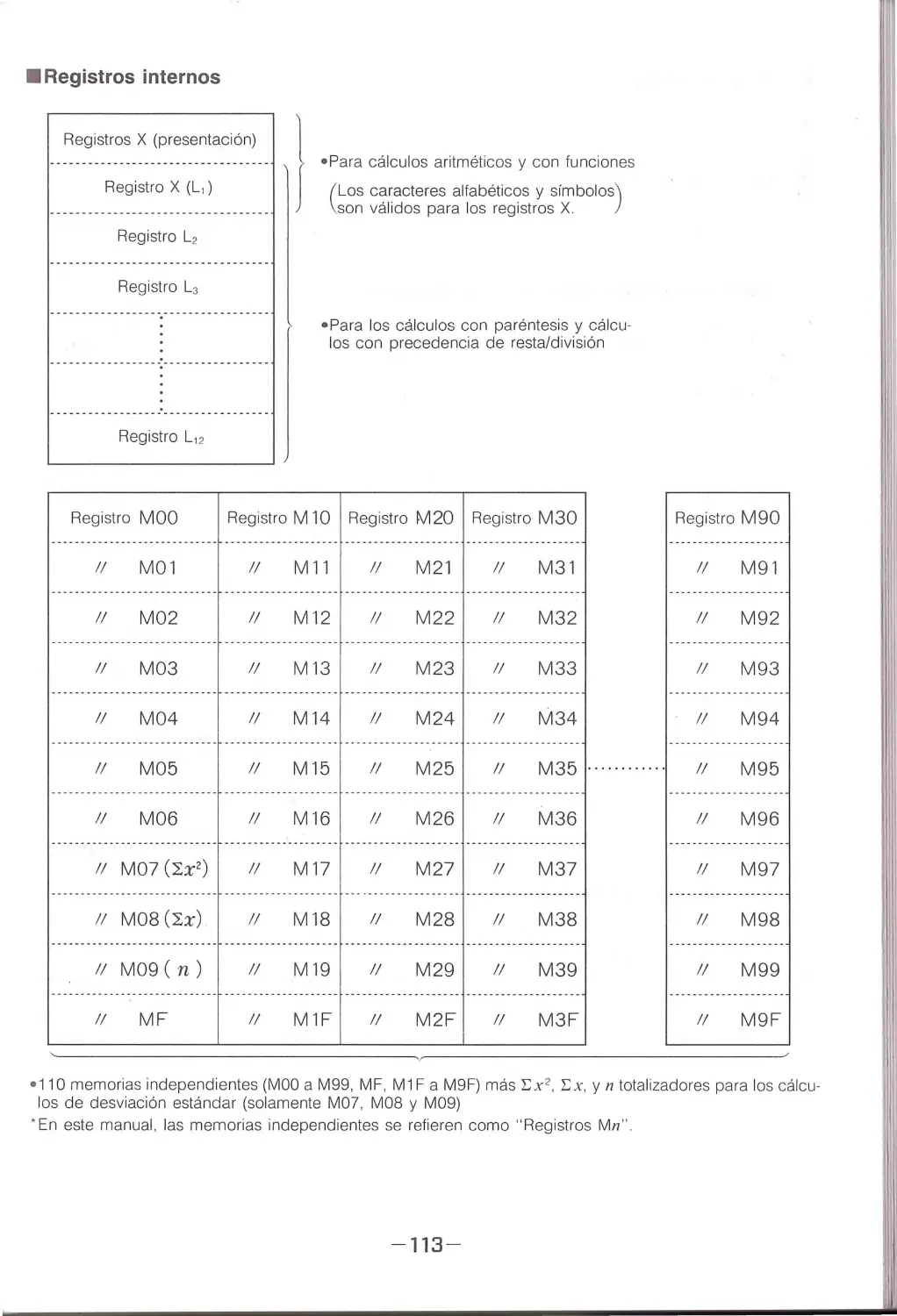
•Internal Registers
X Registers (displ ay)
)
Q<f' ""-'P°'M t ":°
..._p YH~\.j g._~'\.&A: U-1"'-t"l
• For arithmetic and function calculations
~~')"-& ¥"\.
Y (L,) Register
L2 Register
L3 Register
L, 2 Register
MOO Register
M01 II
M02 II
M03 II
M04 II
( Alphabetic characters and symbol s are)
valid for X registers.
~Z-0 c~~)' i.!'~
c.....v..-C~(\,t...\... lS
,gb.tM ~ ~l,......,!)~
•For parentheses calcul ations and subtr ac-
tion/division precedence calculations
~e~ut~ - ' \'"\6fM.t:-f.? 'r
.:;.~t.c..-~··~<'; ......
M 10 Register M20 Register M30 Register
M11 II
M21 II
M31 II
M12 II
M22 11
M32 11
M13IIM23IIM33II
M14 11
M24 11
M34 11
M90 Register
M91 II
M92 11
M93 II
M94 11
M05 II
M15 II M25 11
M35 11
············
M95 11
M06 II
M16 II M26 11
M36 II
M96 II
M07 II(:h') M17 JI
M27 11
M37 II
M97 II
M08 II(:h) M18 II M28 11 M38 II
M98 II
M09 II(n) M19 II M29 11
M39 II
M99 11
MF
II
M1F 11
M2F 11 M3F 11
M9F 11
1-te~u!,ut,v\·· i
O''l'1:<-, 1 ,. ·t1u1:e
•1 10 independent memories (MOO to M99 , MF , M 1F to M9F) plus Ex2, Ex, and n totali ze rs for standard devi-
ation calculation s (MO ?, MO~;. f~~.!:'.109 on ly)
r·,,,1,.,~io·. e~
' Independent memories are referred to as "Mn registe r s " in thi s m anu al.
-
12-

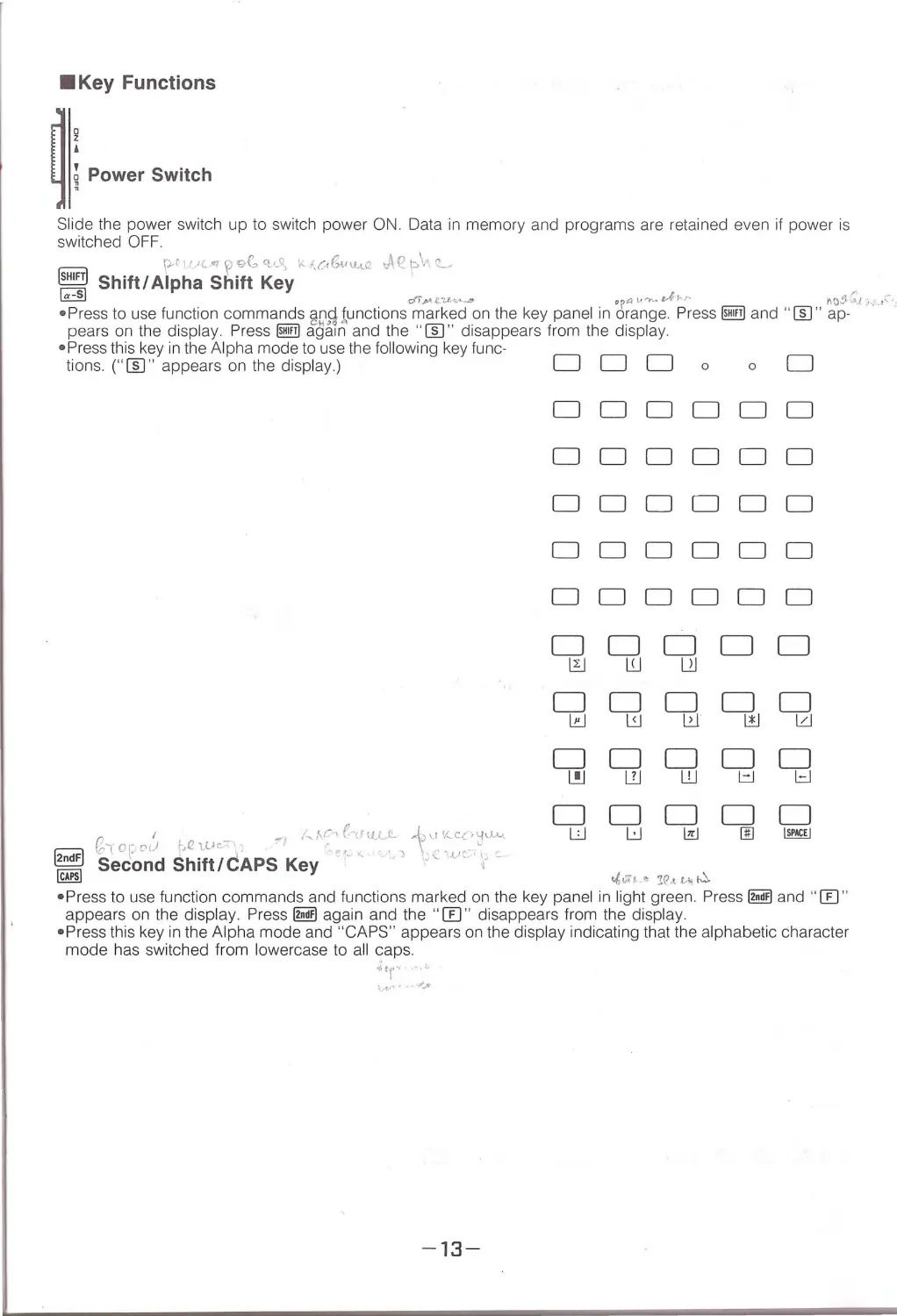
•Key Functions
~: Powe' sw;tch
Slide the power sw it ch up to sw itch power ON. Data in memory and programs are retained even if power is
swi tch ed OFF.
=
r-t1· •(., ? 9C, 'l. •.l l, K 1,c,Gv\L\.Q ,,\<!. p\' c
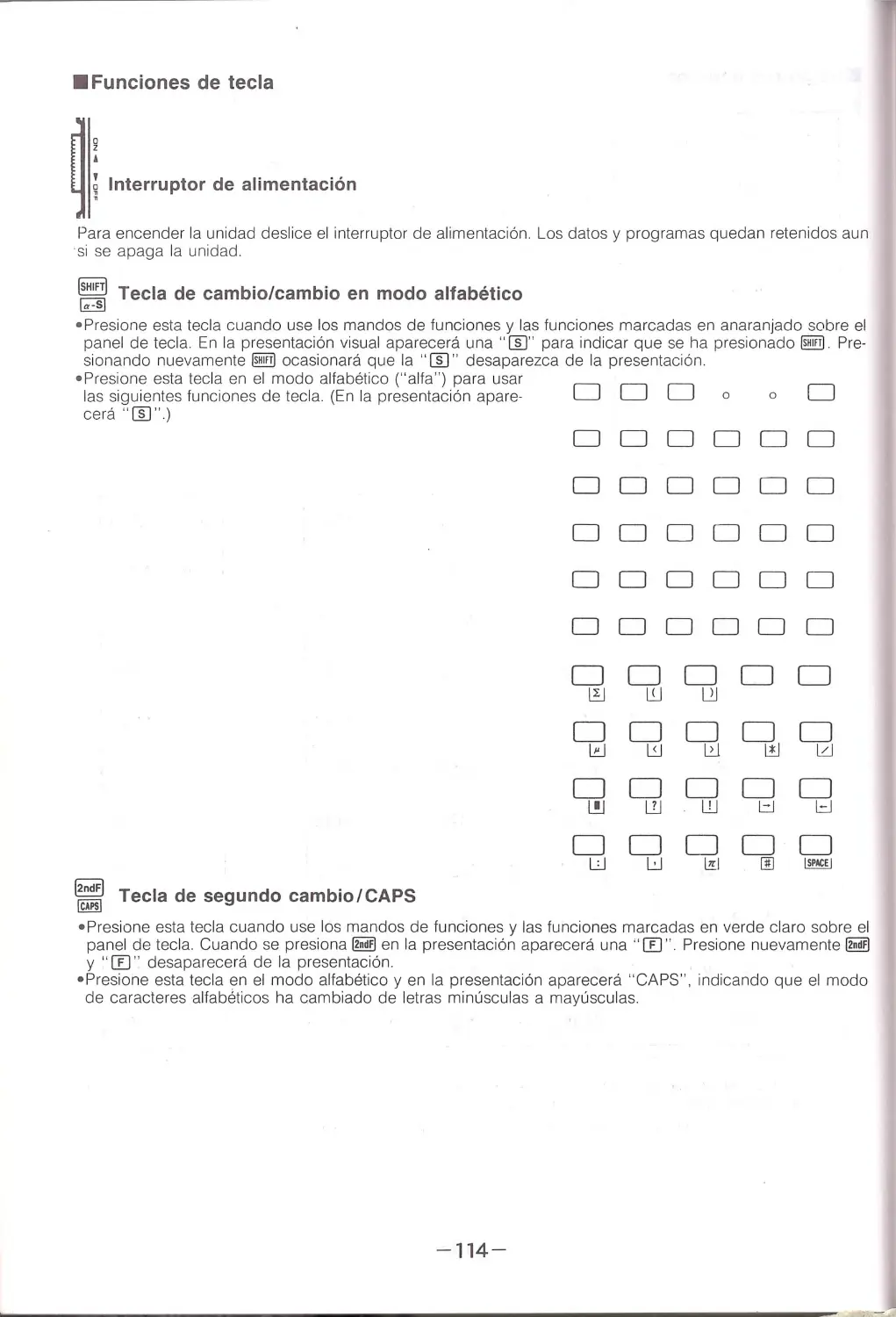
= Shift/ Alpha Shift Key
~
di.1A e-:,1.v- . . .a
op~l·~· tA"'"
r. o.? :;..J .,;1'·':
•Press to use function commands gn\t tunctions marked on the key panel in orange Press@ and "[[) " ap-
pears on the display. Press @ agai n and the " [[) " disappears fr om the display.
•Press this key in the Alpha mode to use the following key func-
tions. ( " [[) " appears on the display.)
0
I
-
/"V'.°~ (-lf11 ..L "-
. b_,, '1-<:.<>Cfci. -c\.
tc--lor..o{J ~~etuc.-\:
·... ,
.
,
\ ,~,.. -.....
DDD 0
DDDD
DDDD
DDDD
DDDD
DDDD
DDD
~wl_)J
DDD
l!:J
L:J
1.2. .l
DDD
L!J L1J w
DD
LJ
u
~ Second Shift/CAPS Key . '
.
·.-
'. ;,
~
t/i vr~ ~ :tCJ.t L-lo! ~
0
D
DD
DD
DD
DD
DD
DD
DD
l!J l'. J
DD
l=J
~
Drn
• Pres s to use function commands and functions marked on the key panel in li ght green. Press @!m and " [[) "
appears on the display. Press @!m agai n and the " [[) " disappears from the display.
•Press this key in the Alpha mode and "CAPS" appears on the display indicating that the alphabetic character
mode has switched from lo wercase to all caps.
Jtr~
-13-

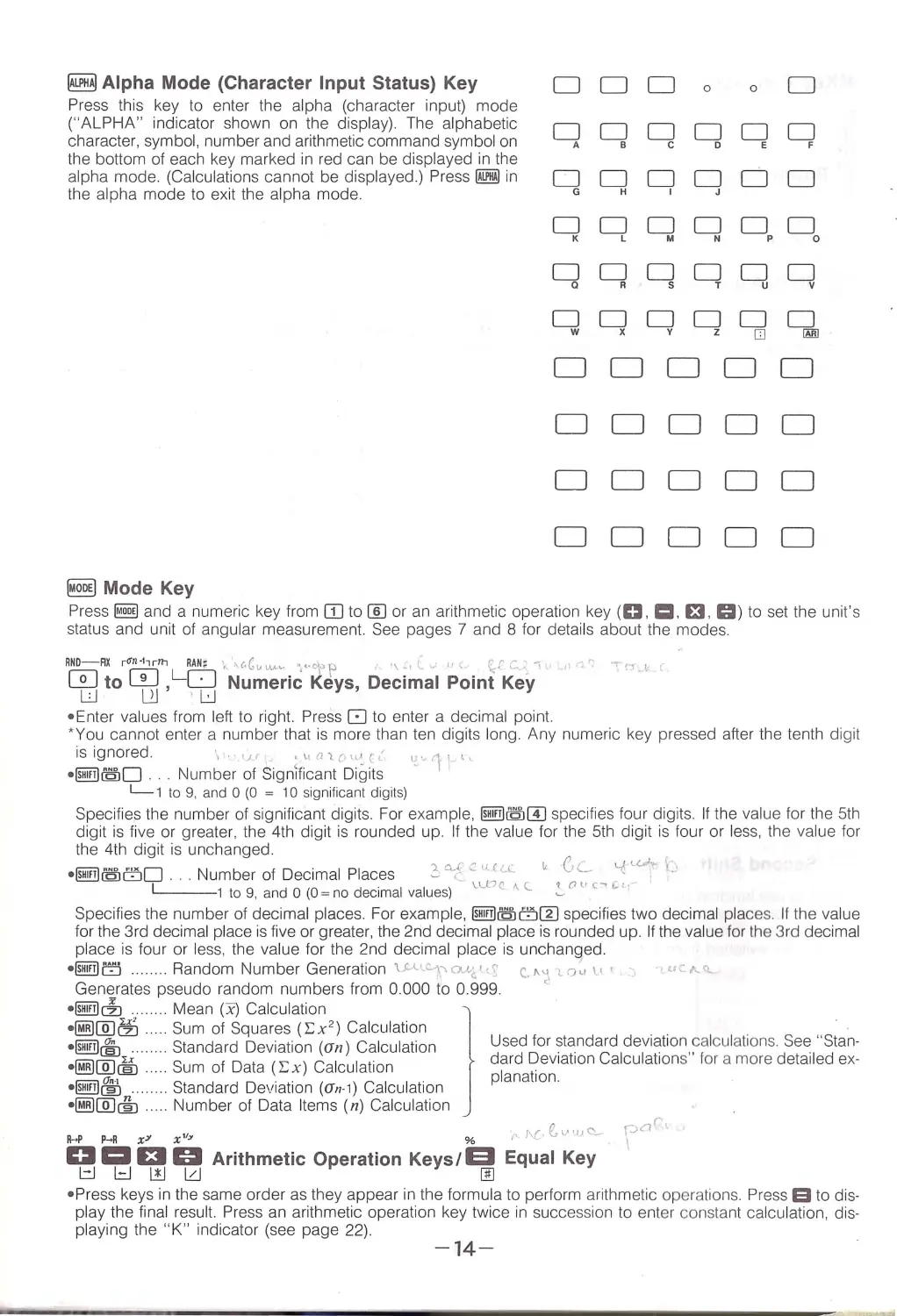
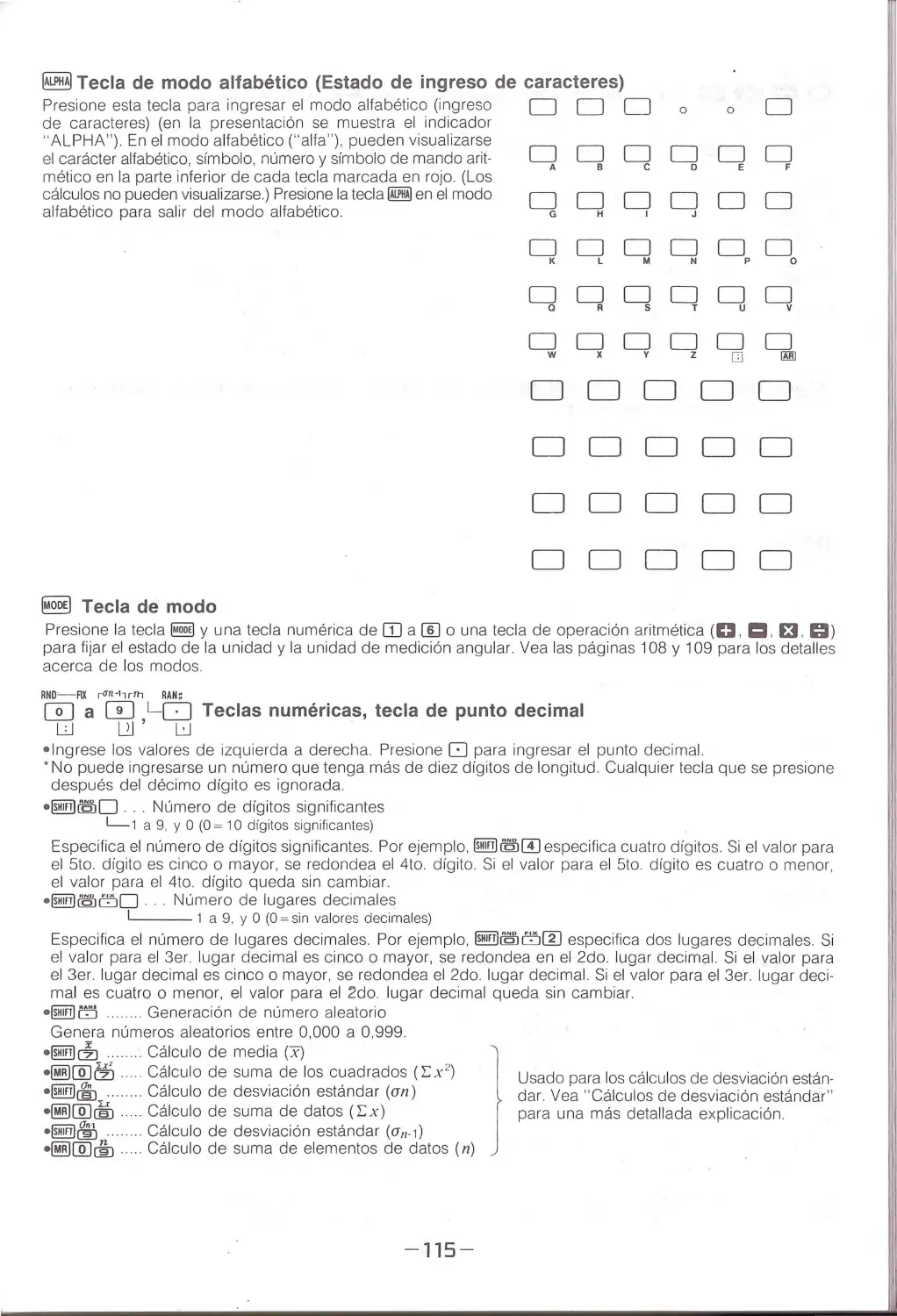
~Alpha Mode (Character Input Status) Key
DDD00D
Press th is key to enter the alpha (character input) mode
("ALPH A" indicator shown on the disp lay). The alphabetic
DDDDDD
character, symbol, number and arithm etic command symbol on
A
B
c
0
E
F
the bottom of each key marked in red can be displayed in the
[j
alpha mode. (Calcu lations cannot be displayed.) Press~ in D D D D
D
the alpha mode to exi t the alpha mode.
G
H
I
J
DDDDDD
K
L
M
N
p
0
DDDDDD
a
R
s
T
u
v
DDDDDD
w
x
y
z
0
00!]
DDDDD
DDDDD
DDDDD
DDDDD
~Mode Key
Press~ and a numeric key from OJ to!]] or an arithmetic operation key (IC}, 1:11. D . GI) to set the un it's
status and unit of angu lar measurement. See pages 7 and 8 for detail s about the modes.
RHO- AX rO'n ·11r1ll RAN:z •1• •\c.Guu,... .... " ., •·Cfp
'\ .,,
u\
\;.f . ":,.,, 1
0 to CD ,LO Numeric Keys, Decimal Point Key
LJ
L2J 'LJ
'
~.., ..~
• Enter values from left to right. Press [' .] to enter a decimal point.
* You cann ot enter a number that is mo re than ten digits lon g. Any numeri c key pressed afte r the tenth digit
is ignored.
1.1 r
i \.1n1.c·\LAc(
u.11_ l,
•llEiill@O Number of S1gn\t1cant D1g1ts
L-1 to 9. and 0 (0 = 10 significant digits)
Specifies the number of significant digits. For example, @Eiill@[f] specifies four d igits. If the va lue for the 5th
digit is five or greate r, the 4th digit is rounded up. If the value for the 5th digit is four or less, the value for
the 4th digit is unchanged .
• @Eiill@ oO . .. Number of Decimal Places
::,'\'<= " ('-C.
'
Ge ~L<h \.c
L__1 to 9, and 0 (0= no decimal values) 1.u?c ''-
' r><• c~ ~,.
Specifies the number of decimal places. For example, @Eiill@orn specifies two decimal places. If the value
for the 3rd decimal place is fi ve o r greate r, the 2nd decimal place is rounded up. If the value for th e 3 rd decimal
place is four or less , the value for the 2 nd decimal place is unchanged.
•@Eiillo ........ Random Number Generation VA'."-\>o.»<''~ C. ' " · <.o~ 11 •
Generates pseudo ra ndom numbe rs from 0.000 to 0 .999.
"
•llEiill&l ... .... . Mean (x) Calculation
1
·~i]]Efi .. .. Sum of Sq uares (l:x 2 ) Calculation
"
•llEiill&i:J
Standard Deviation (an) Calculation
Used for standard dev1at1on calculations See Stan-
·~ l]J~ .··. Sum of Data ( i::; x ) Calculation
d~rd ~ev1at1on Calcu lation s" for a more detailed ex-
•llEiill& ....... Standard De111at1on (an 1) Calculation
Pana ion
·~I]]@ .. . Number of Data Items (n) Calcu lation
A->P P....R xY
x 11:1
%
r· /\l· e\)'l)C'-
D 1:1El0 Arithmetic Operation Keys/El Equal Key
~~w~
00
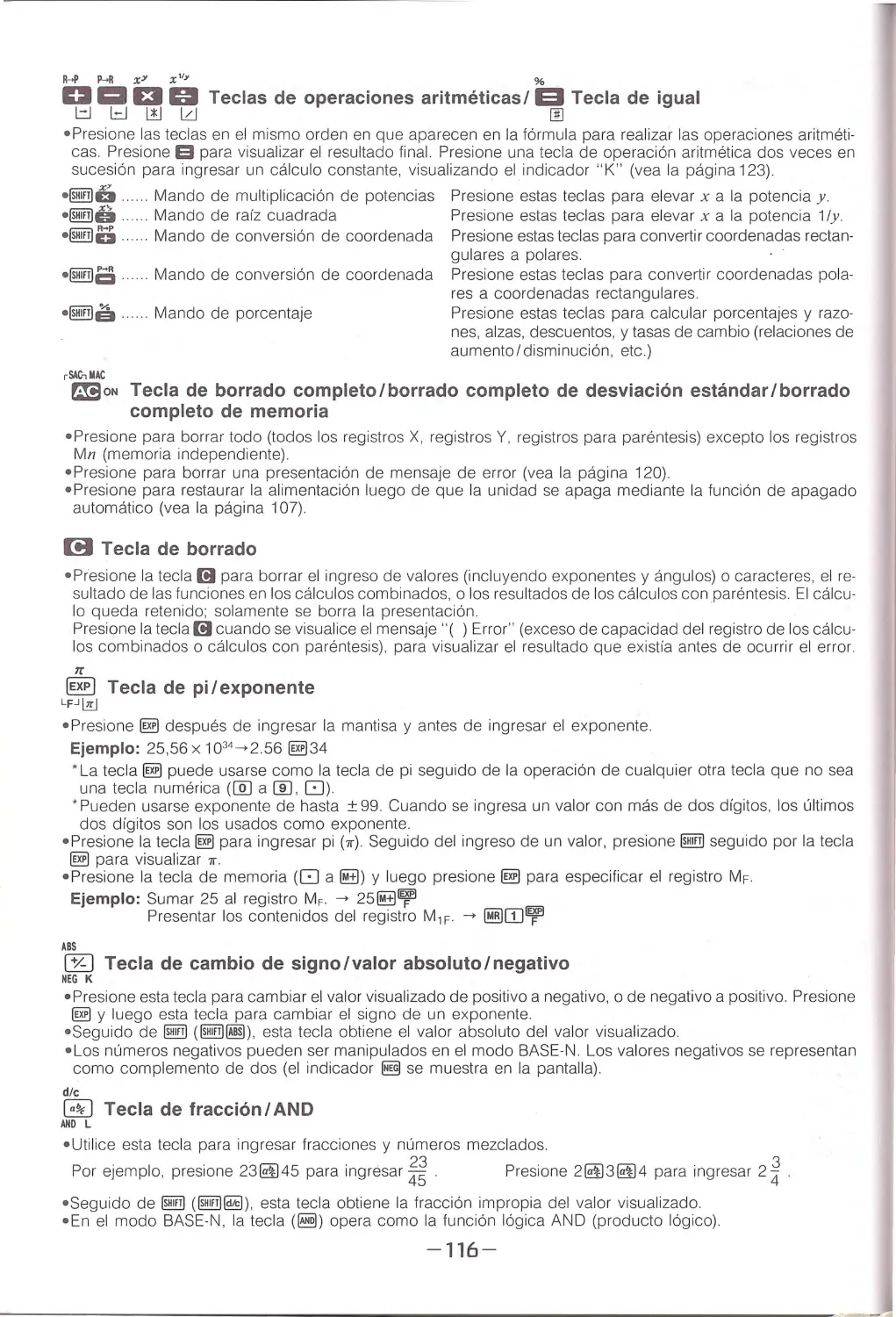
• Press keys in the same o rd e r as they appear in the formula to perform arithmetic operations . Press S to dis-
play the final res ult. Pre ss an a rithmetic operation key tw ice in succession to enter constant calculation, dis-
playi ng the "K " indicator (see page 22).
-14-

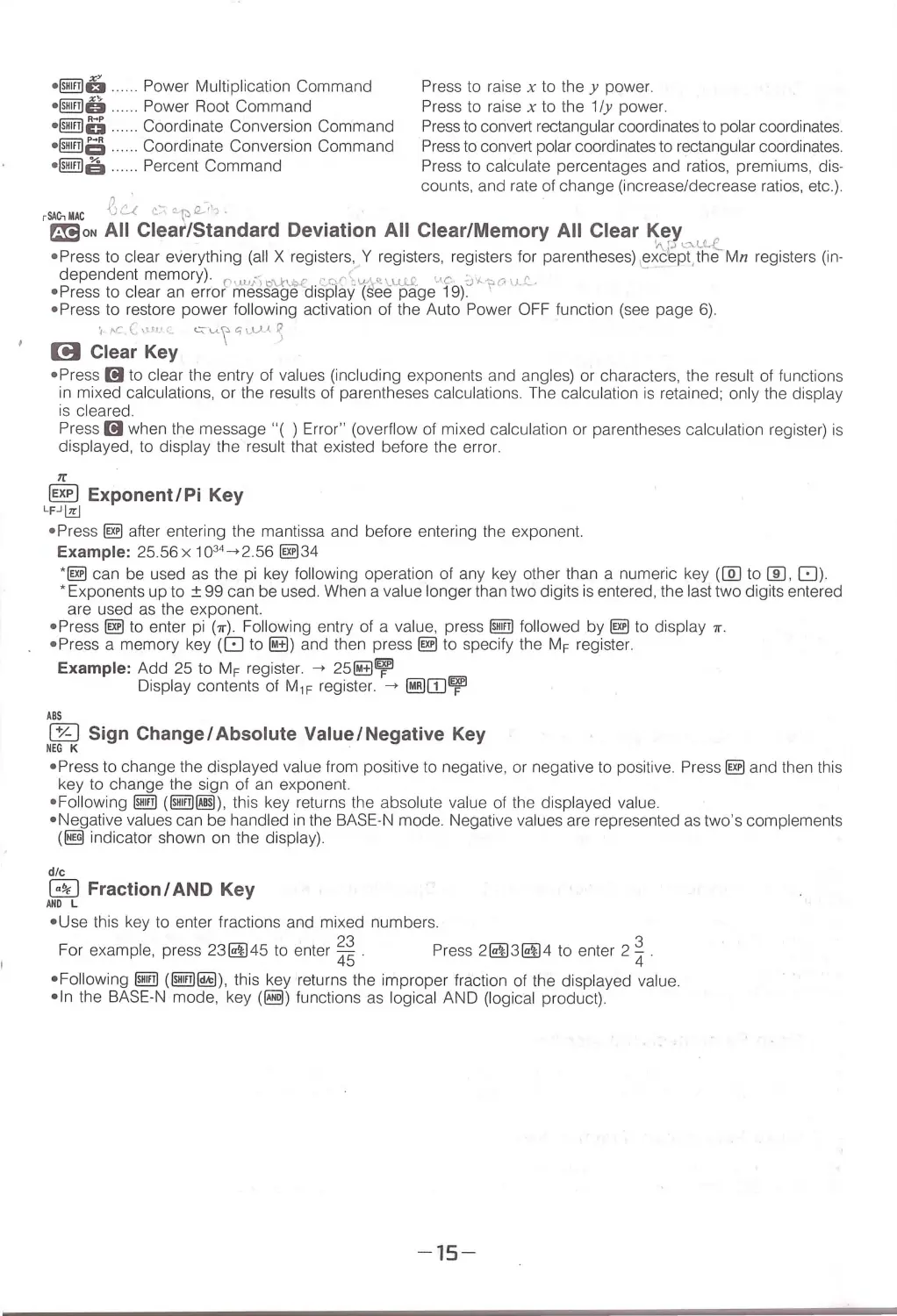
·~6 ..... . Power Mu ltiplication Command
·~o . .Power Root Command
Press to raise x to they power.
Press to raise x to the 1/y power.
·~u ......Coordinate Conversion Command
·~ Ci ...... Coordi nate Conve rsion Comma nd
·~I@. ...... Percent Command
j? ~·
-
-.
Press to convert rectangular coordinates to polar coordina tes.
Press to convert pola r coordinates to rectangular coordinates.
Press to calc ulate percentages and r atios, premiums, dis-
counts, and rate of change (inc rease/decrease ratios , etc .).
rSAC-,MAC
JU C c_~Q_i-
rm1oN All Clear/Standard Deviation All Clear/Memory All Clear Key
Y\f.l L"- U...( _
• Press to clear eve r yt hin g (al l X registers, Y registers, registers for parentheses) ,exc'e pt,the Mn reg isters (in-
dependent memory). 0 ""' " <>'-.h~ ccr\%•'-u ..1.£ c1c ,_ ,. ,, ,, 0 u.L -
...
• Press to clear an erro r message disp lay (see page 19).
'
• Press to restore power fol lowing activa ti on of the Auto Power OF F function (see page 6).
I ,..,c (1.lff .l 1_
~\...(_\ t:;\,\..l.( ~
[!I Clear Key
• Press 1!1 to clear the entry of values (including exponents and angles) or characters , the result of funct ions
in mixed calcu lati ons, or the results of pa rentheses calculations. The calculation is retained; on l y th e display
is cleared.
Press l!I when the message "( ) Error" (overflow of mixed calculation or parentheses calculation register) is
displayed, to display the result that existed before the error.
Tr
~ Exponent/Pi Key
LF.Jl7cJ
• Press@] after entering the mantissa and before entering the exponent.
Example: 25.56 x 1034 -+2.56 @)34
• @] can be u sed as the pi key following operation of any key other tha n a numeric key ([QJ to[[), 8).
• Exponents up to ± 99 can be used. When a valu e l onger than two digits is en tered , the last two digits entered
are used as the exponent.
• Press@] to enter pi (7r). Following entry of a va lue, press~ fol l owed by @] to display 7f.
• Press a memory key (8 to~) and then press@] to sp eci fy the MF register
Example: Add 25 to MF register .
-+ 25~~
Display contents of M 1F register.
-+ ~ITJ~
ABS
IB:l Sign Change/ Absolute Value/Negative Key
NEG K
• Pr ess to change the displayed va lue from positive to n egative , or negative to positive . Press@] and then this
key to chan ge the sign of an exponent.
• Fo ll owing ~ (~[ill]), this key returns the absolute va lue of the displayed value .
• N egative va lu es can be handled in the BASE-N mode. Negative va lu es are represented as two ' s complements
( ~ indicator shown on the display) .
die
8J Fraction/ AND Key
ANO L
• U se this key to enter fractio ns and mixed numbers.
For example, press 23~45 to enter~;.
Press 2~3~4 to enter 2 ~
•Fo l l ow in g ~(~@) , this key r eturns the improper frac tion of the displayed value.
•In the BASE-N mode, key (~) functions as logical AND (logical product).
-15-

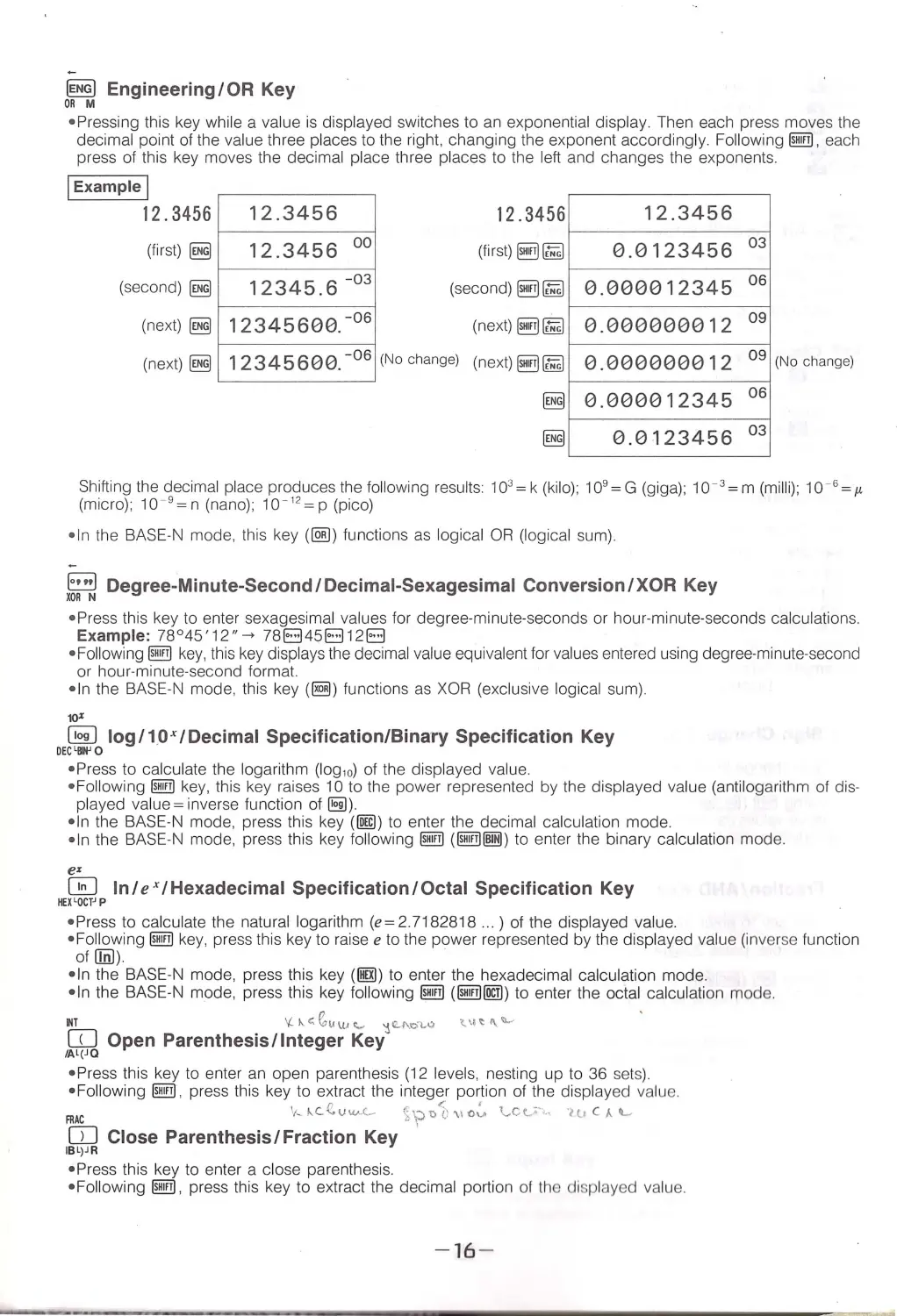
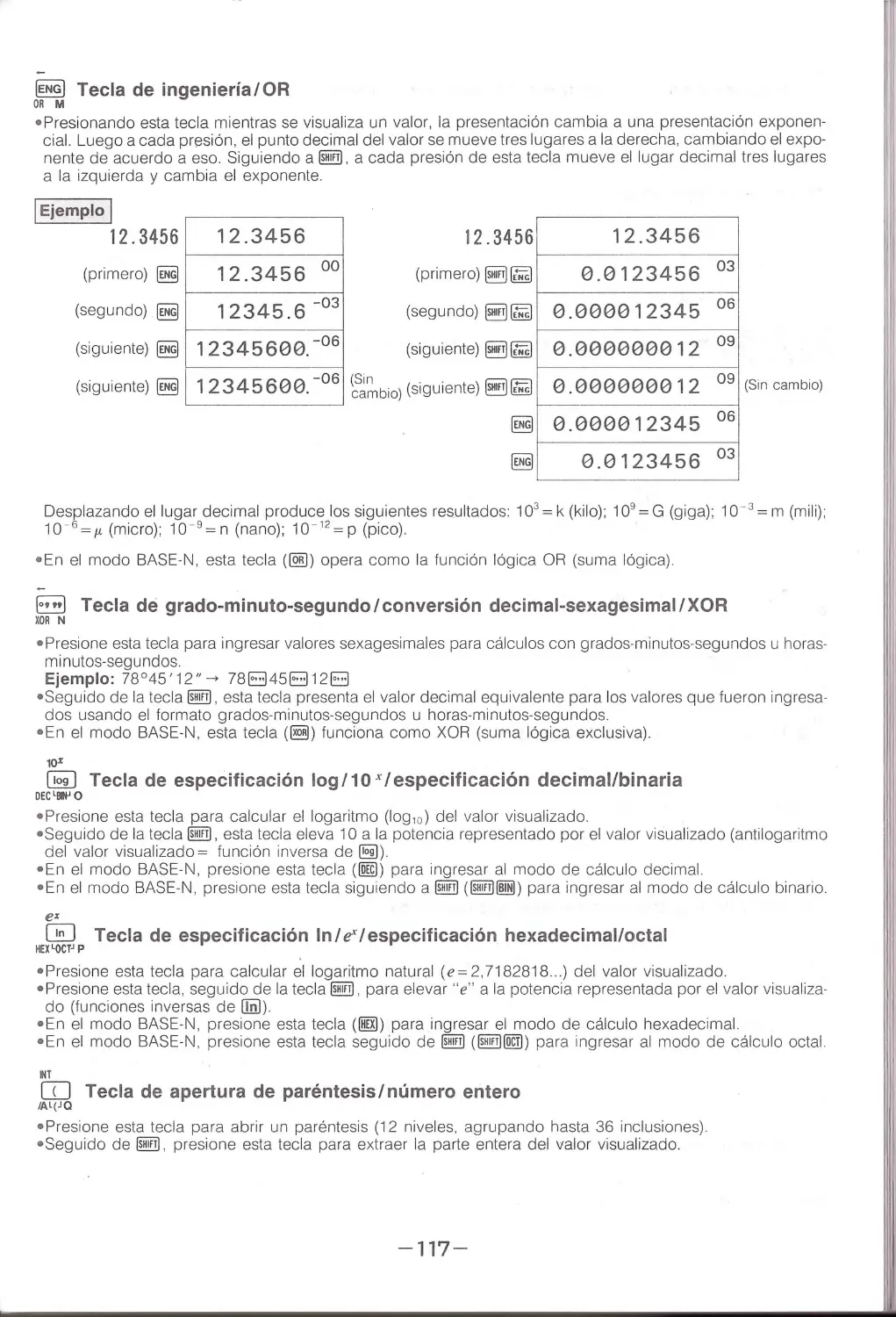
~ Engineering/OR Key
ORM
•Pressing this key whi le a value is displayed switches to an exponential display. Then each press moves th e
decimal point of th e va lue three places to the right , changing the exponent accordi ng ly. Follow ing @iill . each
p ress of this key moves the decimal place three places to the left and changes the exponents.
!Example I
12 . 3456
(fir st)~
(second)~
(next)~
(next)~
12.3456
12.3456 00
12345.6 -03
12345600. -
06
12345600. -
06
12 .3456
(first)~~
(second)~~
(next)~~
(No chang e) (next)~~
1 2.3456
0.0123456 03
0.000012345 06
0 .000000012 09
0.000000012 09 (N o change)
0.000012345 06
0.0123456 03
Sh ifting the decimal place produces the following results: 103 = k (kilo); 109 = G (giga); 10- 3 = m (milli); 10- 6 =1<
(micro); 10-9 = n (nano); 10- 12 = p (pico)
•In the BASE·N mode, thi s key (IEJ) functions as logical OR (logical sum) .
-
8 Degree-Minute-Second/Decimal-Sexagesimal Conversion/XOR Key
XOR N
•Press thi s key to e nter se xag esim al va lues for d egree-m inute-second s or hour-minute-sec ond s calcu lation s.
Example: 78 ° 45'12 "- + 78El45El12EI
• Fol lowing @iW key, this key displays the decimal valu e equivalent for values entered using deg ree-minute-second
or hour-minute-second format.
• In the BASE-N mode, this key (~) functions as XOR (exclusive logical sum).
10•
~ log/1,0x/Decimal Specification/Binary Specification Key
DEC ' llll' O
•Press to calculate th e logarithm (log,0) of th e displayed value.
• Following @iW key, this key raises 10 to the power represented by the displayed value (antilogarithm of dis·
played value = inverse function of 151).
• In the BAS E-N mode, press thi s key (!Qrn) to enter the decimal calcu lati o n mode.
•In the BAS E-N mode, press th is key fol lowing @iW ( @iill@ffi ) to enter the binary calculation mode .
e•
0 In I exI Hexadecimal Specification I Octal Specification Key
IEX tOCTJP
•Press to calculate th e natural logarithm (e=2 .7182818 .. . ) of th e displayed value.
• Following @iW key, press this key to raise e to th e power represe nted by the di splayed value (in ve rse fu nctio n
of Olil)
• In th e BAS E-N mode , press thi s key (!llil) to e nter the hexadecimal calcu lation mode.
• In the BASE-N m ode , press thi s key following @iW (@iill @l) to enter th e octal c alc ulati on mod e.
~T
'lk<e,uu,._,
1 <-1\c>t.<>
'-~<I\"-'
[[] Open Parenthesis/Integer Key
/Al(J Q
•Press this key to enter an open parenthesis (1 2 levels, nesting up to 36 sets).
• Following @iW, pres s this key to extract the integ e r portion of the displayed va lue.
n
<:
'
FRAC
't-'C." V"'"(- ~\='t>U \\Ov \.,Ct..''···
0
ll1 CAIL..
CO Close Parenthesis/Fraction Key
IBL)JR
•Press th is key to ente r a close pare nth esis.
•Following @iW , press this key to extract the decimal portion of the displayed value.
-
16-

~ Hyperbolic Key
a:s
• Press this key follo w ed by~. 1§1, or[§] to ca lculate the corresponding hyperbolic function (sinh , cosh , tanh)
of the disp layed value .
• Foll owing @!!I , press thi s key and then an inve rse hyperbolic key to ca lculate the corresponding inverse hype rbo lic
fu nction (sinh - ', cosh -' , tanh - 1) of the displayed value. This key operation can also be performed as 1§) key ,
followed by @!!I and then an in verse hyperboli c key .
sin- 1
cos·1
tan· 1
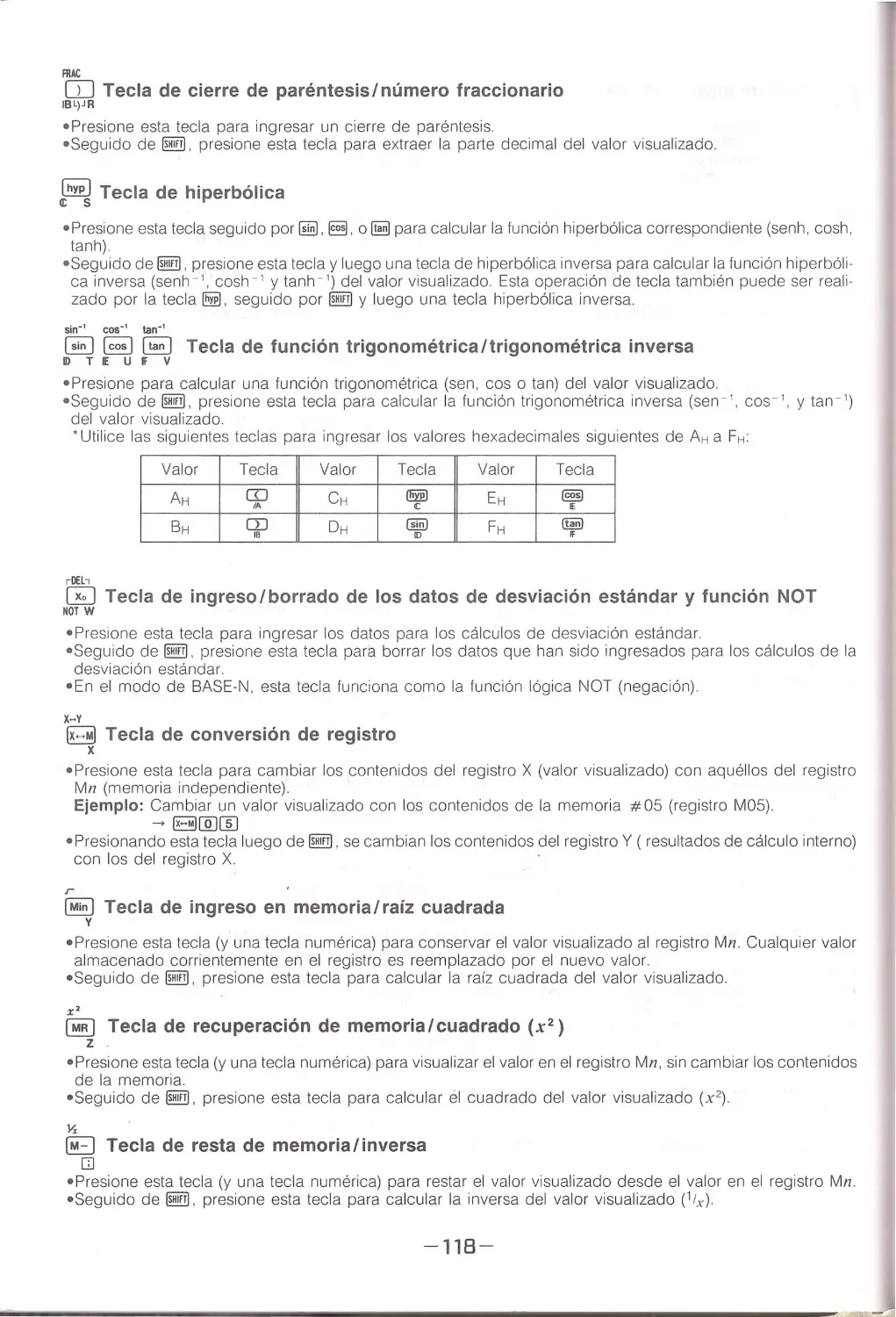
GG::l ~ ~ Trigonometric Function/Inverse Trigonometric Function Key
IDT.E UJV
• Press to ca lcu late a trigonometric functio n (sin , cos, or tan) for the displayed va lue.
• Fo llo wing @!!I, press this key to calculate an inverse trigonometric function (sin - 1
,cos-1
, ortan- ')forthedis-
played value.
ICc.·'' '
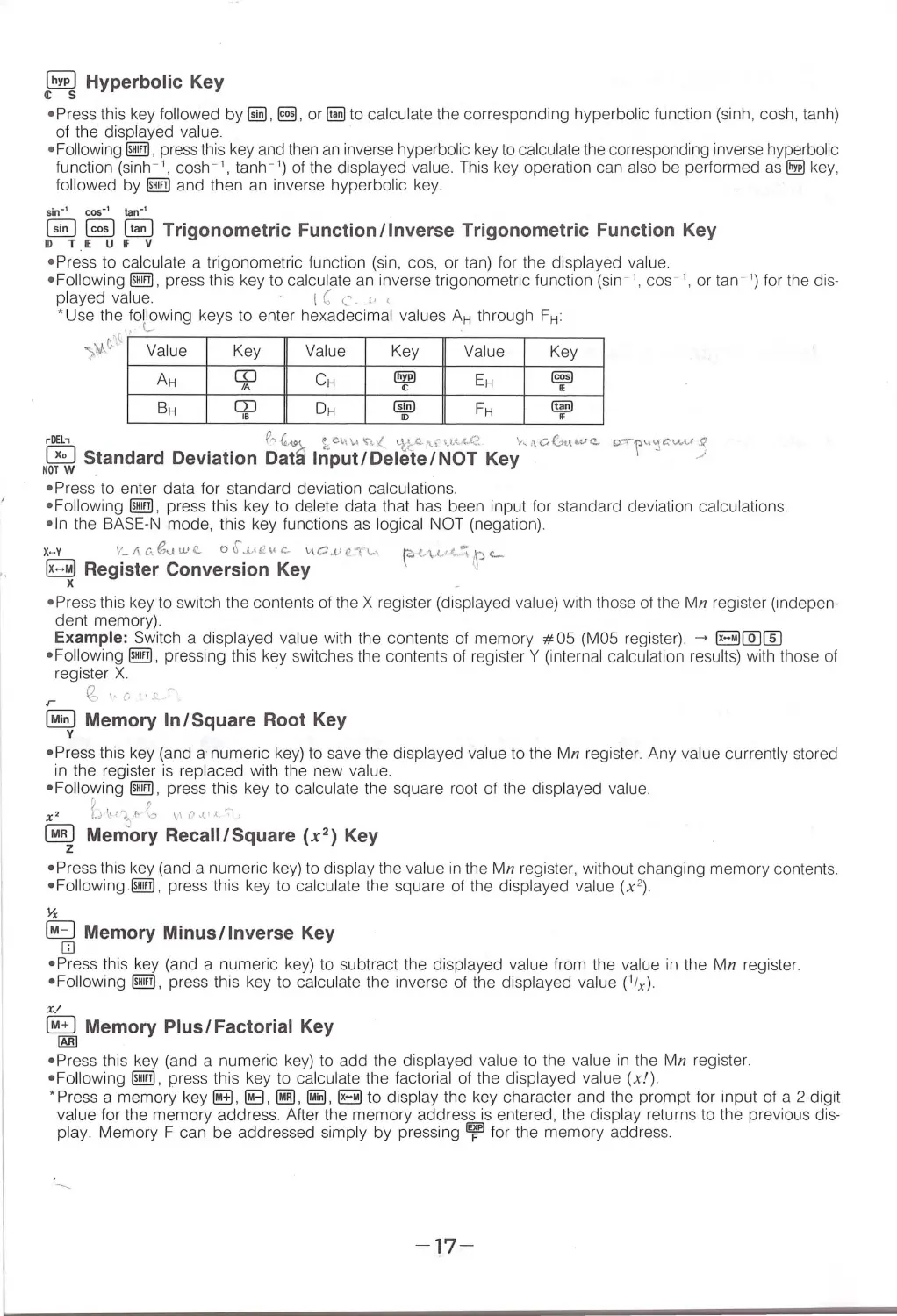
*Use the following keys to enter hexadecimal values AH through FH:
.~
.
~1l
;)A. Va lue
AH
BH
Key
Va lue
m
CH
IA
rn
DH
1B
Key
Value
Key
(!!W
EH
[§)
c
•
@!!)
FH
(§ID
"
•
~ Standard Deviation ~~ 1 ~~~~/0~ 1i\~tN10~ Ke;"' 00
""'"- "'"r~cv.u3
NOT W
• Press to enter data fo r standa rd deviation ca lculations.
• Following @!!I . press thi s key to de lete data that has been input for standard deviation ca lculations .
• In the BAS E-N mode, thi s key fun ct ions as logical NOT (negation).
x.... v
V_ I\c\<Suwe. o6.J....tf ,, c.-
\.i\O..t i e." t\.. \
~ Register Conversion Key
x
• Press this key to switch the contents of the X register (displayed value) with those of the Mn register (indepen-
dent memory).
Example : Switch a displayed value with the contents of memory #05 (MOS register). ~ B@J[[)
•Foll owing @!!I, pressing this key switches the contents of register Y (interna l calculation resu lts) with those of
register X
·
r
(S,.<·
".t ~
~ Memory In/Square Root Key
y
•Press thi s key (and a num eric key) to save the displayed va lue to the Mn register . Any value currently stored
in the register is replaced with the new value.
•Foll owing @!!I , p ress this key to ca lculate th e squa re root of the disp layed value.
?.I
r
-
x2
u >lit;t· \::>
1,1 o,t1.1
.
,
~ Memory Recall/Square (x2) Key
z
• Pr ess thi s key (and a numeric key) to disp lay the va lue in the Mn registe r , without changing memory contents .
• Followi ng @!!I . press th is key to calcu late the square of the displayed value (x2) .
Yx
~ Memory Minus/ Inverse Key
D
•P ress th is key (and a numeric ke y) to subtract the disp layed value from the va lue in the Mn register.
• Fol lowi ng @!!I , press thi s key to calcu late the inverse of the displayed value (1ix ).
X/
~ Memory Plus/Factorial Key
IAf!l
•Press this key (and a nume ric key) to add the d isplayed value to the value in the Mn register.
•Foll owing @!!I . press this key to calculate the factoria l of the disp layed va lue (x!).
* Pr ess a memory key~.~. ~.~ . B to display the key character and the prompt for input of a 2-digit
va lu e for the memory address. After the memory add ress is entered, the display returns to the previous dis-
play . Memory F can be add ressed simpl y by pressing ~ for the memory address .
-17-

o'l.) u~ l.{_1 ....
/_,
ALL !ESET ALL RESET 'Button
This button deletes all memory when it is p ressed whi le the unit is switched ON . Press the button with the tip
of a pointed object to delete all programs and data contained in memory. At this time, the unit enters its default
setting, which is RUN , COMP, DEG. If you find that the memory was not cleared when you pressed the ALL
RESET button, press the P button and then press the ALL RESET button again.
p
\'- \'.VC'
•
P Button
Press the P button for partial reset when normal operation of your unit has been prevented by strong electrostat-
ic charge. Partial reset retains memory contents.
<T',
c .\)
I Before Beginning Calculations
The unit must be in the RUN mode (@@[}]) to perform calculations. A unit of angular measurement m ay be
displayed even when a calculation does not involve an a ngle .
•Calculation Priority Sequence
•Th is unit performs calculations in accordance w ith the fol lowing calcu lation p ri ority sequence:
CD Functions
@ x", x11Y, R-+P, P-+R
@X,+
©+, -
@AND ]
@ OR, XOR (BASE-N mode only)
When the priority is the same, calculation is performed
from left to right. Expressions contained in paren-
theses have the highest priority.
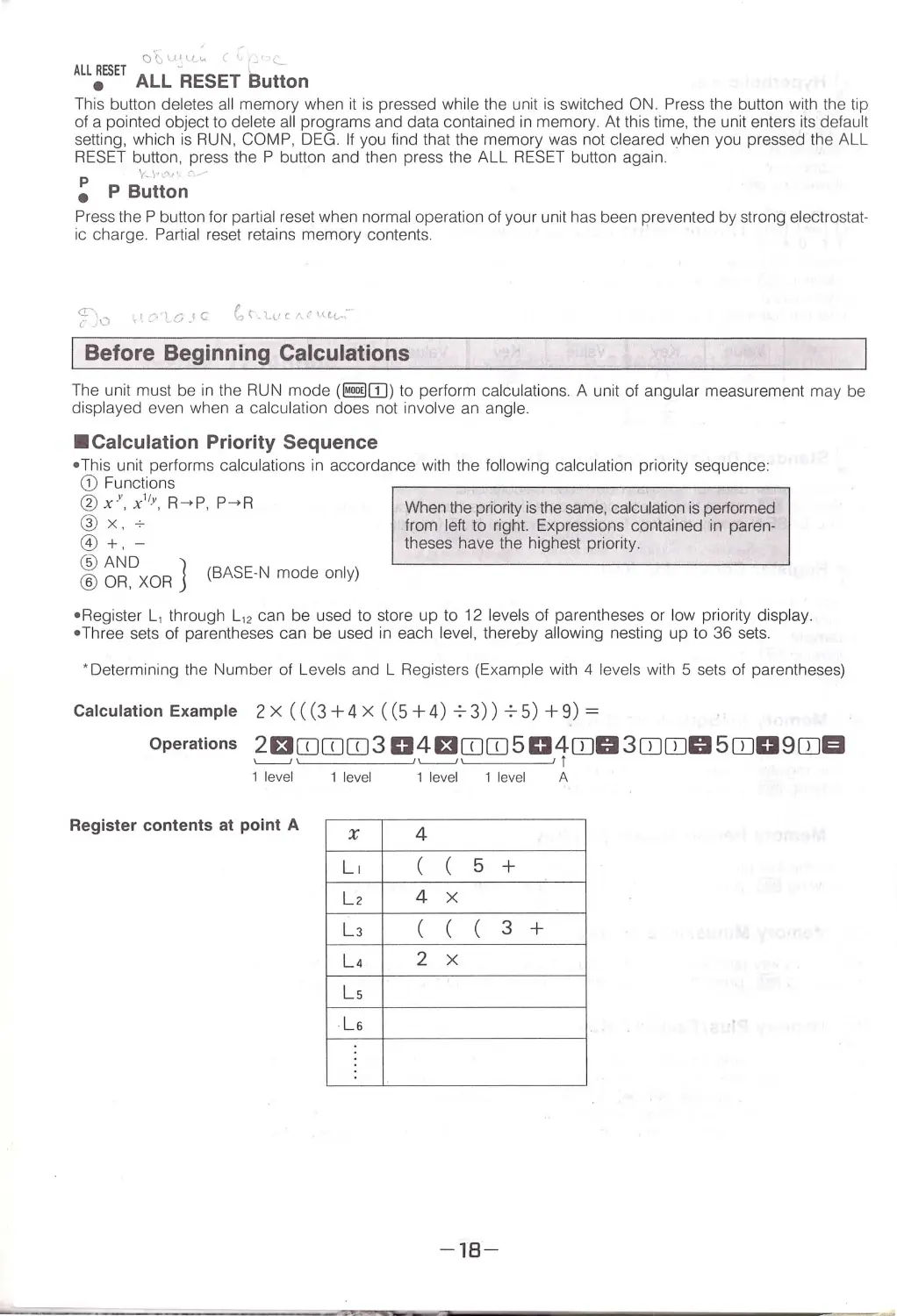
•Register L, through L, 2 can be used to store up to 12 levels of parentheses or low priority display .
• Three se ts of parentheses can be used in each level, thereby allowing nesting up to 36 sets .
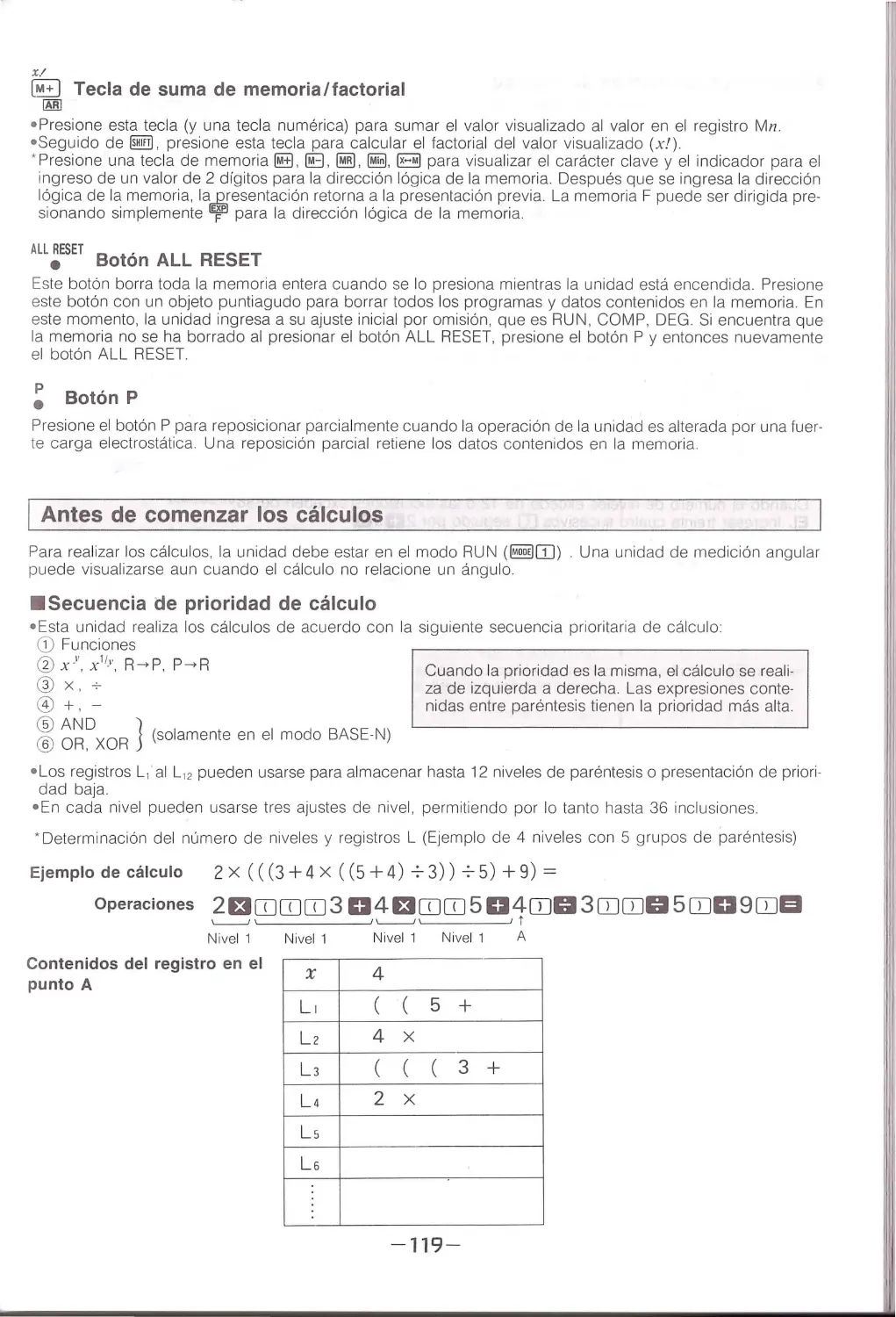
• Determi ning the Number of Leve ls and L Registers (Example with 4 levels with 5 sets of pa rentheses)
Calculation Example 2X(((3+4x ((5+4)73))75)+9)=
Operations 2EtOJOJOJ3 D 4 EtOJOJ5D 4mo3CDmo5mo9CIJEI
~~~~~~'------'
1
1 level
1 level
1 level 1 level
A
Register contents at point A
x
4
L1 ((5+
Lz
4x
LJ
(((3+
L4
2x
Ls
LG
-18-

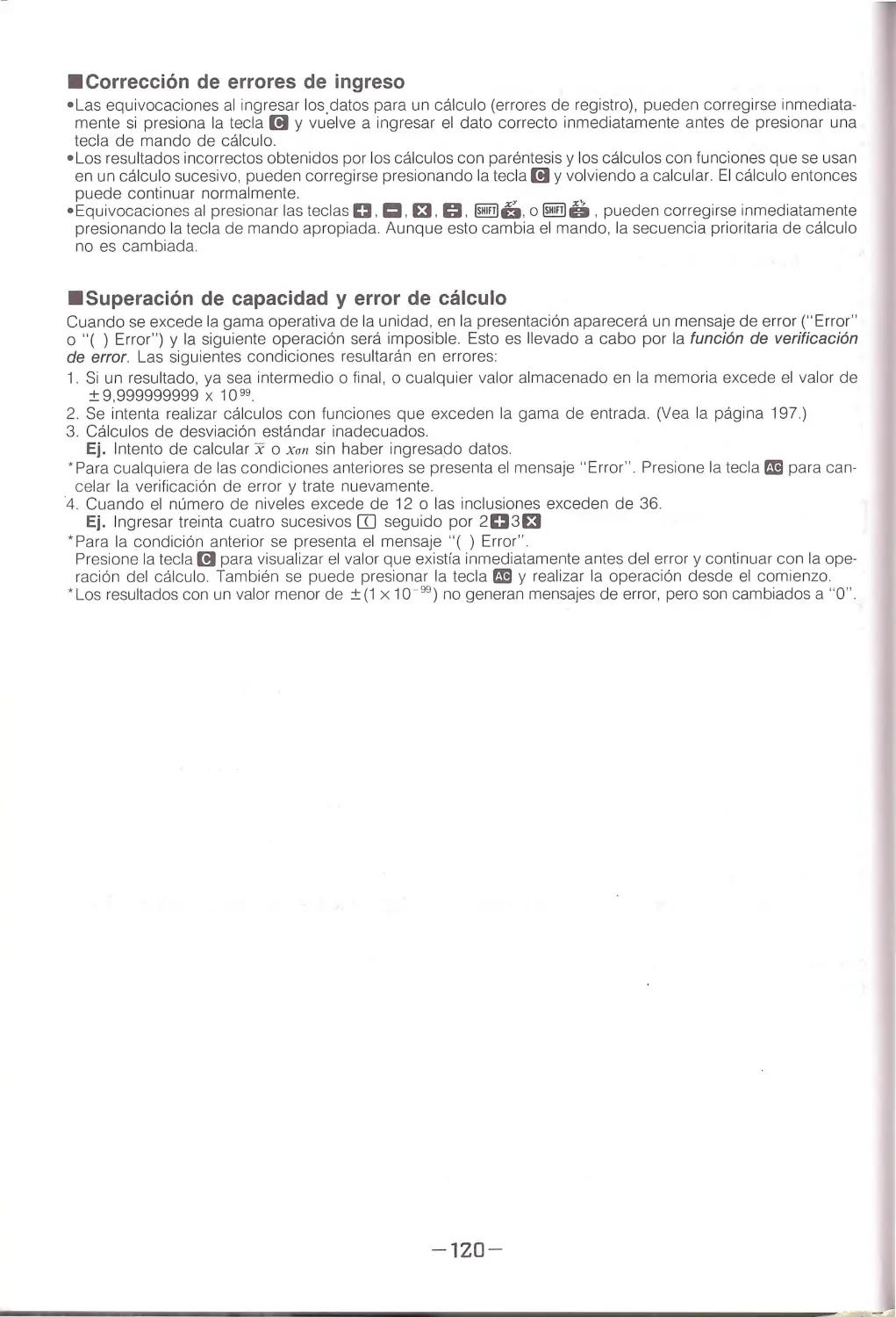
•Correcting Input Errors
•Mistakes in entering calculation data (registration errors) can be corrected immediately if you press (!I key
and re-enter the correct data before you press a calculation command key.
• Incorrect resu lts obtained by functio n ca lculations and parentheses calculations that are to be used in a suc-
ceeding calculation ca n be corrected by pressing (!I and recalculating. Calculation can then continue normally.
• M istakes in pressing D. ~.Et.~. llE!W6. or@!ill!Sikeys can be corrected by immediately pressing the
proper command key . Even though this changes the command, the calculation priority sequence is not changed.
• overflows and Calculation Errors
If the calculati o n range of the un it is exceeded, an err or message ("Error" or"( ) Error") appears on the display
and further operation is impossible. This is the error check function. The fol lowing conditions resu lt in errors:
1 Any result, intermediate or fina l , or any value in memory that exceeds a va lue of ± 9.999999999 x 1099 .
2. Any attempt to perform a function ca lculation that exceeds the input range. (See page 95.)
3 . Improper standard deviation ca lc ulations .
Ex. Attempting to calculate x or xan without input data.
* " Error" is displayed for any of th e above conditions. Press mil key to cancel error c h eck an d try again .
4. When the number of levels exceeds 12 or nesting exceeds 36.
Ex. Entering thirty-four successive [D's fo llo wed by 2D3£t
• " ( ) Error" is displayed for the above condition . Press (!I key to display the value that existed immediately
before the er ror and continue the ca lculation. You can also press mil key and pe rform the operation from the
beginning.
• Results with a va lue less than ± (1x10 - 99 ) do not produce error messages, bu t ar e changed to "O"
-19-

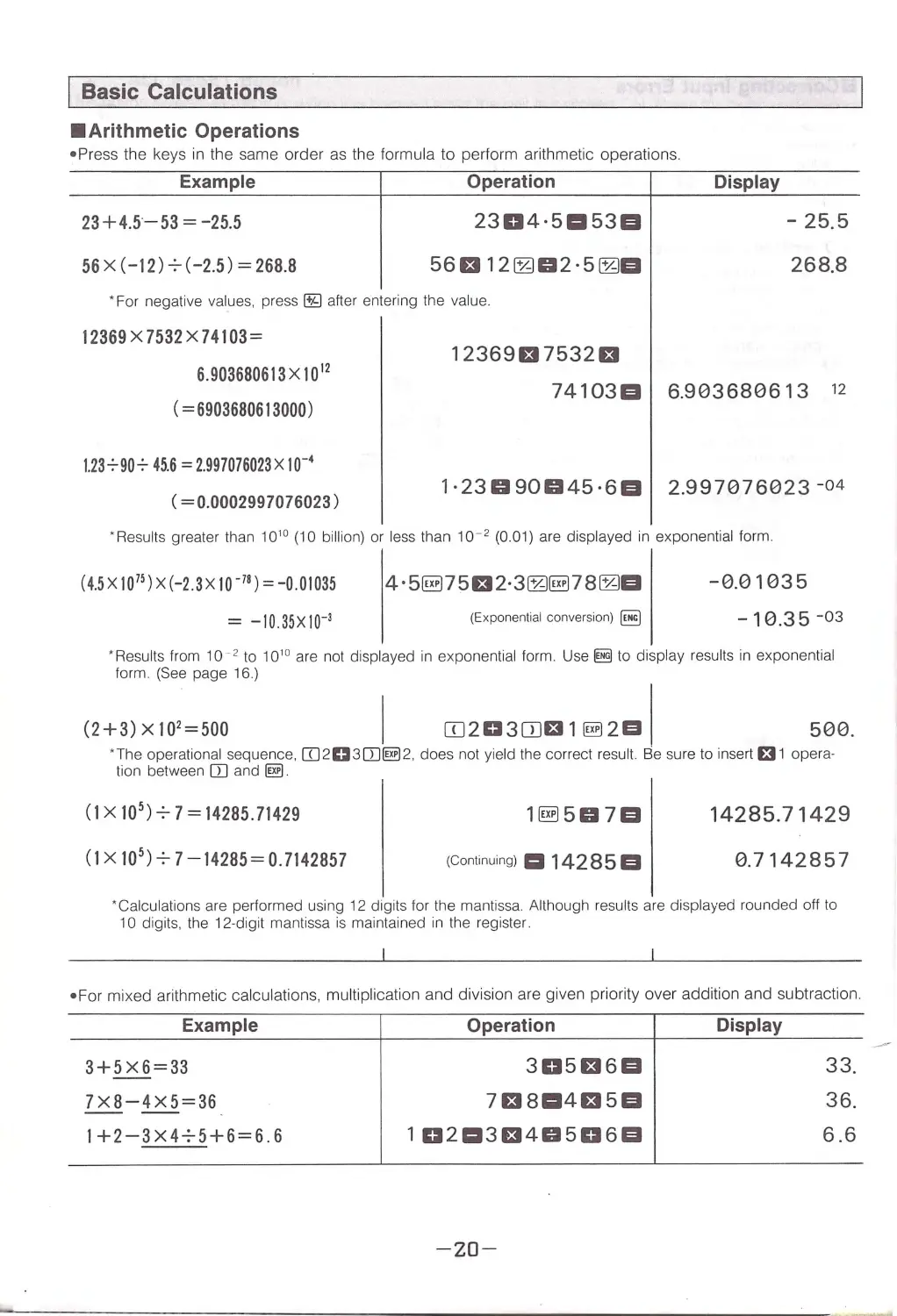
I Basic Calculations
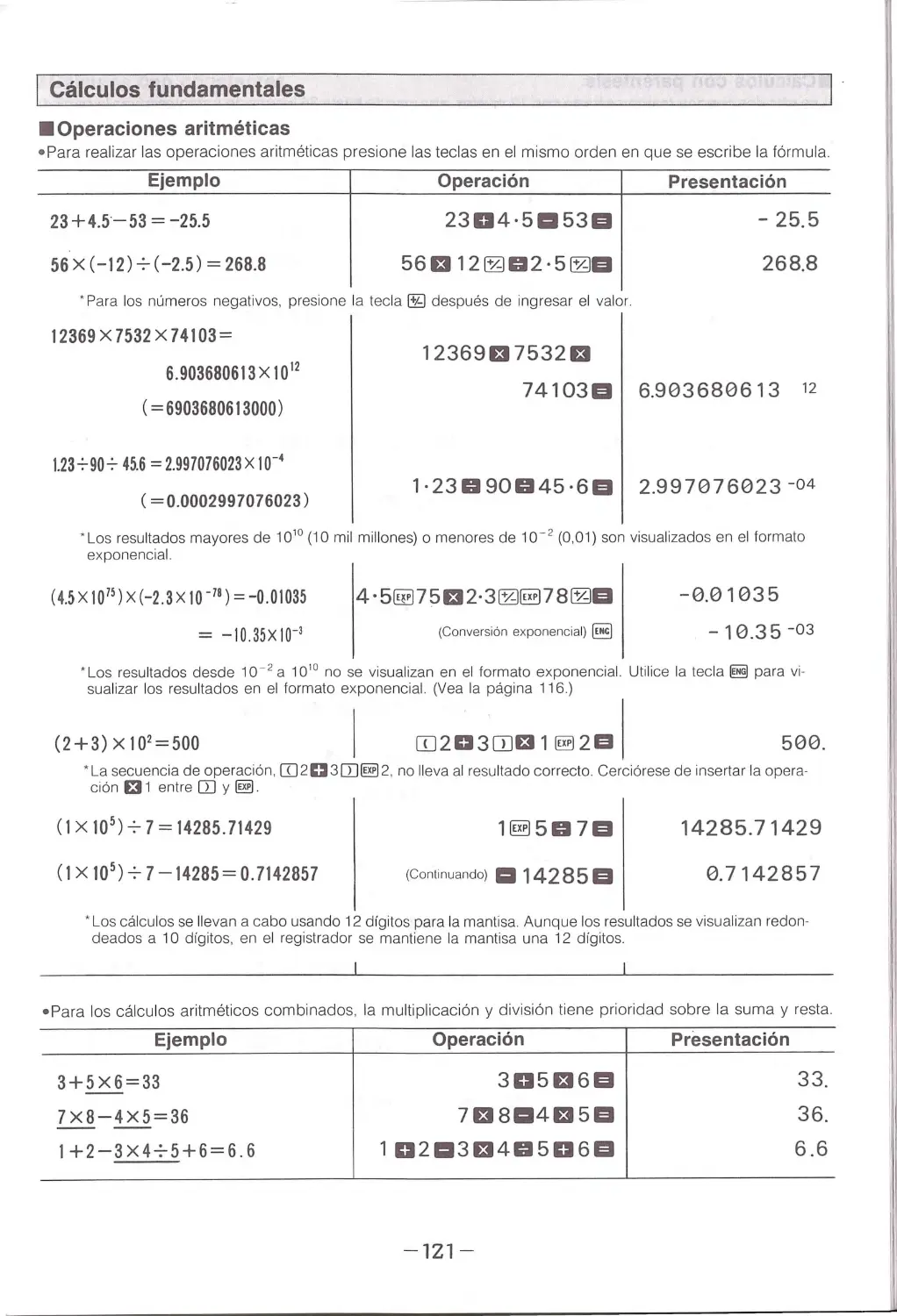
•Arithmetic Operations
•Press the keys in the same order as the formula to perform arithmetic operations.
Example
Operation
23+4.5 - 53 = -25.5
56 x (-12) 7 (-2.5) = 268.8
2304·51:153EI
56El 12fZJ02·5fZJEI
•For negative values, press ~ after entering the value.
12369 x 7532 x 74103=
12369Et7532Et
Display
-
25.5
268.8
6. 903680613x10 12
( = 6903680613000)
74103EI 6.903680613 12
1.237907 45.6 = 2.997076023X10-•
( = 0.0002997076023)
1·23090045 ·6EI 2.997076023 -o4
· Results greater than 10 10 (10 billion) or less than 10 - 2 (0.01) are displayed in exponential form.
(4.5X10 75 ) X(-2 .3X 10- 78 ) = -0 .01035
= -10.35X10⁻³
4 · 5§175El2·3fZJ§l78fZJEI
(Exponential convers ion) ~
- 0 .01035
- 10.35 -03
· Results from 10 - 2 to 10 10 are not displayed in e xponential form. Use~ to display results in exponential
form. (See page 16.)
(2+3) x 102 = soo
I ITJ2D3ITJt31~2m \
500.
' The operational sequence. [IJ2D3CD~2 . does not yield the correct result. Eie sure to insert t31 opera·
tion between ITl and ~.
(1x10⁵) 7 7= 14285. 71429
(1x10 5 )7 7-14285= 0.7142857
1§1507EI
(Continuing) Iii 142 8 5 El
14285.71429
0.7142857
' Calculations are performed using 12 digits for the mantissa. Although results are displayed round ed off to
10 digits, the 12-digit mantissa is maintained in the register
• For mixed arithmetic calculations, multiplication and division are given priority over addition and subtraction .
Example
3+5X6 = 33
7X8-4X5=36
1+2-3X475+6=6.6
Operation
305E16EI
7El8114E15EI
1D2113El40506EI
-20-
Display
33.
36.
6.6

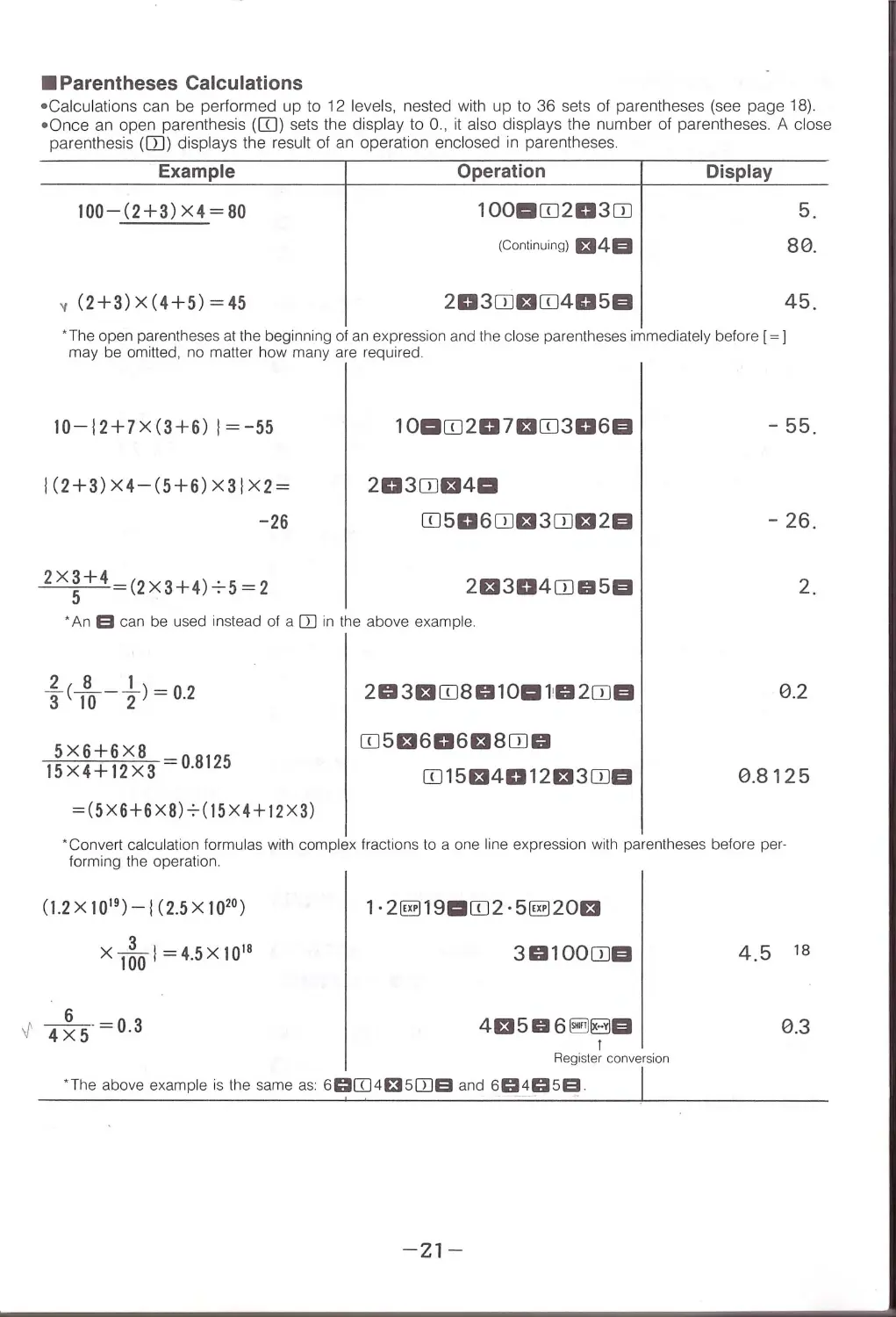
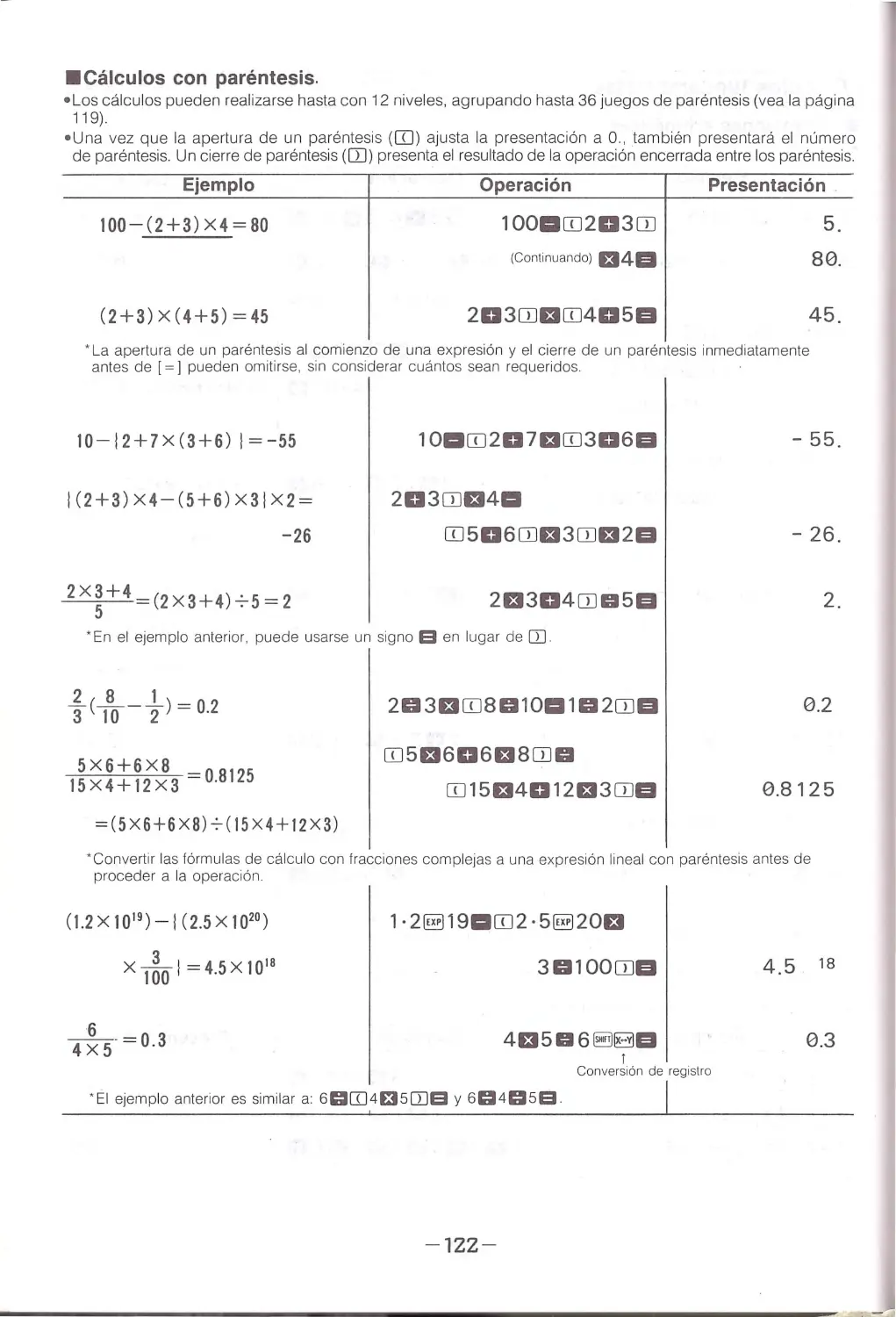
•Parentheses Calculations
• Calculations c a n be performed up to 12 levels, nested with up to 36 sets of parentheses (see page 18).
• O nce an open parenthesis (ITJ) sets the display to 0., it also d isplays the number of parentheses. A close
parenthesis ([I)) displays the resu lt of an operation enclosed in parentheses .
Example
Operation
Display
100-(2+3) X4 = 80
1ooarn203rn
(Co ntinuing) El4GI
v (2+3)x(4+5)=45
203ITJEIITJ405GI
5.
80.
45.
· The open parentheses at the beginning of an expression and the close parentheses immediately before [ =]
may be omitted, no matter how many are required.
10-l2+7X(3+6) l=- 55
I (2+3) X4-( 5+6) X3IX2 =
-26
1oarn201arn3o6a
203rnEt4a
ITJ506ITJEl30JEl2GI
2El304CDD5GI
'An B can be used instead of a Q] in the above example.
5X6+6X8
15X4+12X3 0.8125
= (5X6+6xa)-:-(15X4+!2X3)
203EIITJ8010a1!02CDGI
ITJ5El606El80JD
ITJ 15El4012El30JGI
-
55.
-
26.
2.
0.2
0.8125
' Convert calculation formula s with complex fractions to a one line expression with pa rentheses before per-
form ing th e operation.
(1.2X 10 19 )-1(2.5X10²°)
x 1~0 1=4.5X10¹⁸
1· 2§119aITJ2 · 5§120£1
30100CDGI
4El5D6 ~BGI
I
Register conversion
' T h e above exampl e is the sa me as: 60Q]4f35[}]9 and 6~4059
-21-
4.5 18
0.3

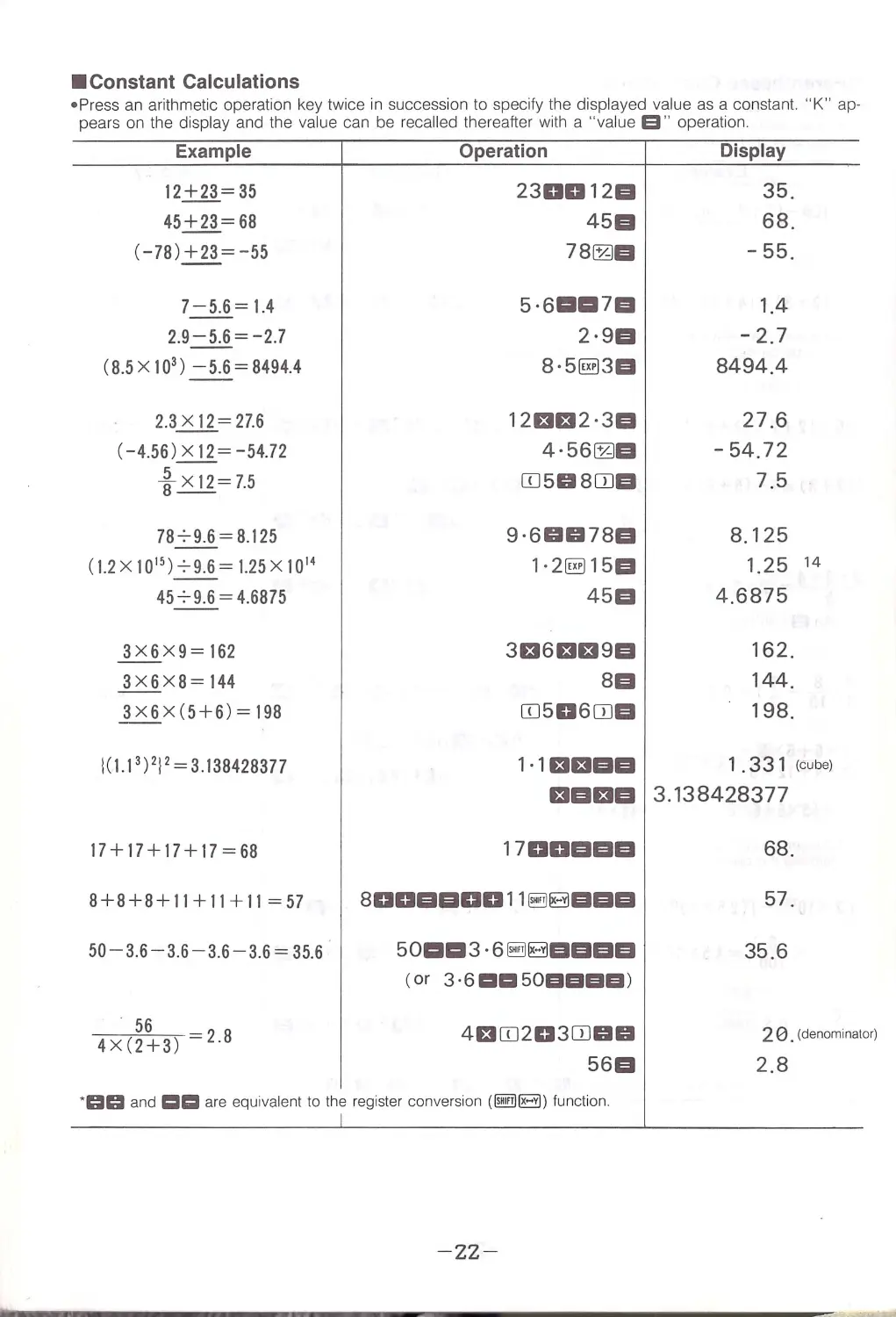
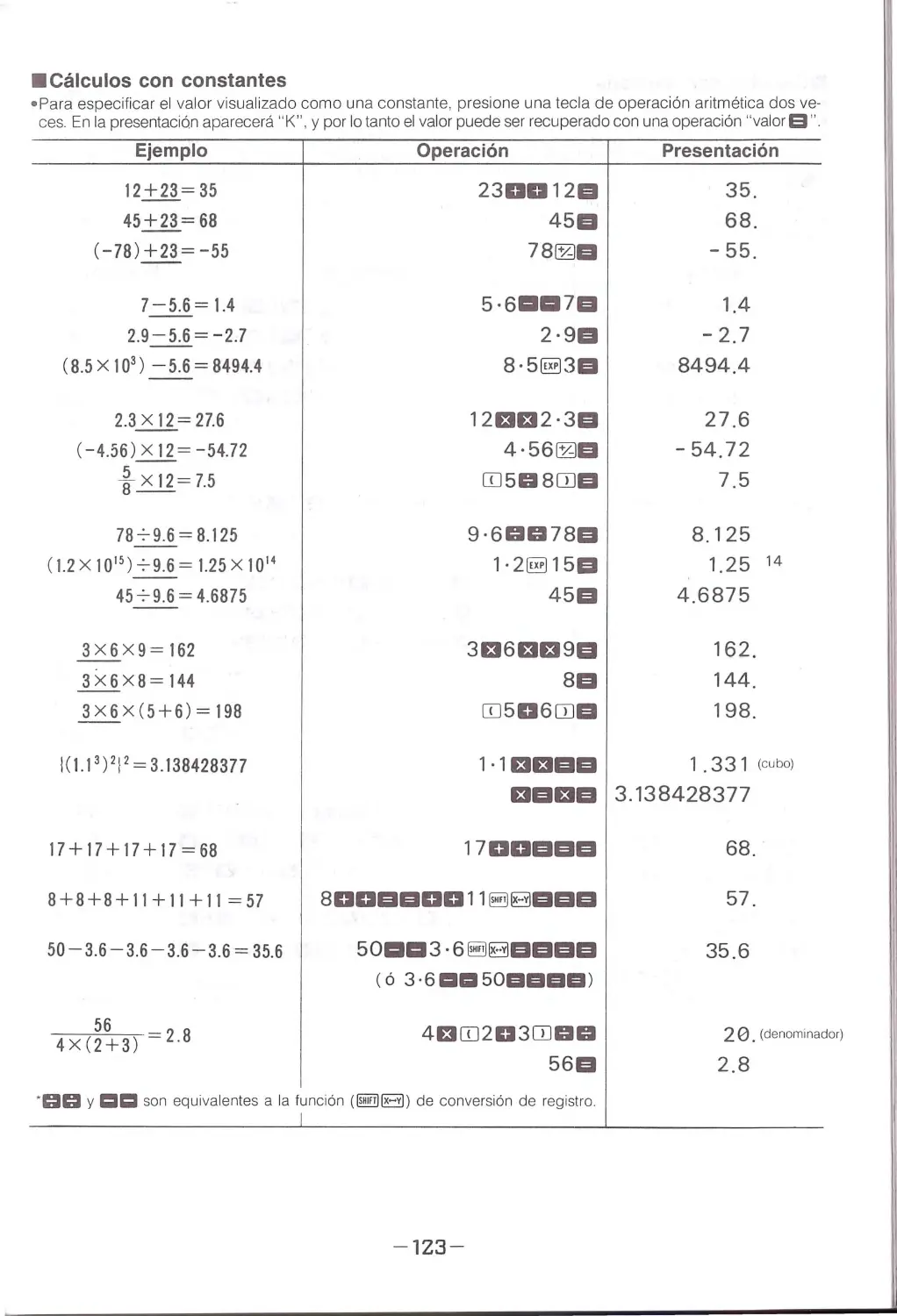
•Constant Calculations
• Press an a rithm etic operation key twice in succession to specify the displayed value as a constant. " K " ap-
pears on the display and the va lue can be recalled thereafter with a "value a " operation .
Example
12+23 = 35
45+23 = 68
(-78)+23=-55
7-5 .6= 1.4
2.9-5.6 = -2 .7
(8.5X10³ ) - 5 .6 = 8494.4
2.3 x 12=27.6
(-4.56) x 12 = -54 .72
~x12=7.5
7879.6 = 8.125
( 1.2 x 10 15 ) 79.6=1.25x10¹⁴
45 7 9.6 = 4.6875
3X6X9= 162
3X6X8= 144
3x6x (5+6)= 198
1(1.1 3 ) 212 = 3.138428377
17+17+17+17=68
8+8+8+11+11+11 = 57
50- 3.6 - 3.6-3.6 - 3.6 = 35.6
56
_4_X_(~2 +~3)~ = 2 .B
Operation
230012EI
45EI
78~EI
5-61111117EI
2·9EI
8 · 5§13EI
12EH32 · 3EI
4·56~EI
ITJ5GI 8CIJEI
9·6GIGl78EI
1·2§115EI
45EI
3El6EH39EI
8EI
ITJ506ITJEI
1· 1EIEIEIEI
EIEIEIEI
1700EIEIEI
80DEIEIDD11 ~BEIEIEI
501111113 · 6 ~BEIEIEIEI
(or 3 · 61:11:::1501HIEIEI)
4EIITJ203ITJGIGI
56EI
' GIGI and i::::::lc:::ll are equiva lent to th e re gister conve rsio n (~B) fun ction.
I
- zz-
Display
35_
68_
-55 _
1.4
-2.7
8494.4
27.6
-
54_72
7.5
8.125
1.25 14
4.6875
162.
144.
198.
1 . 331 (cube)
3.138428377
68.
57.
35.6
2 0 . (denominalor)
2.8

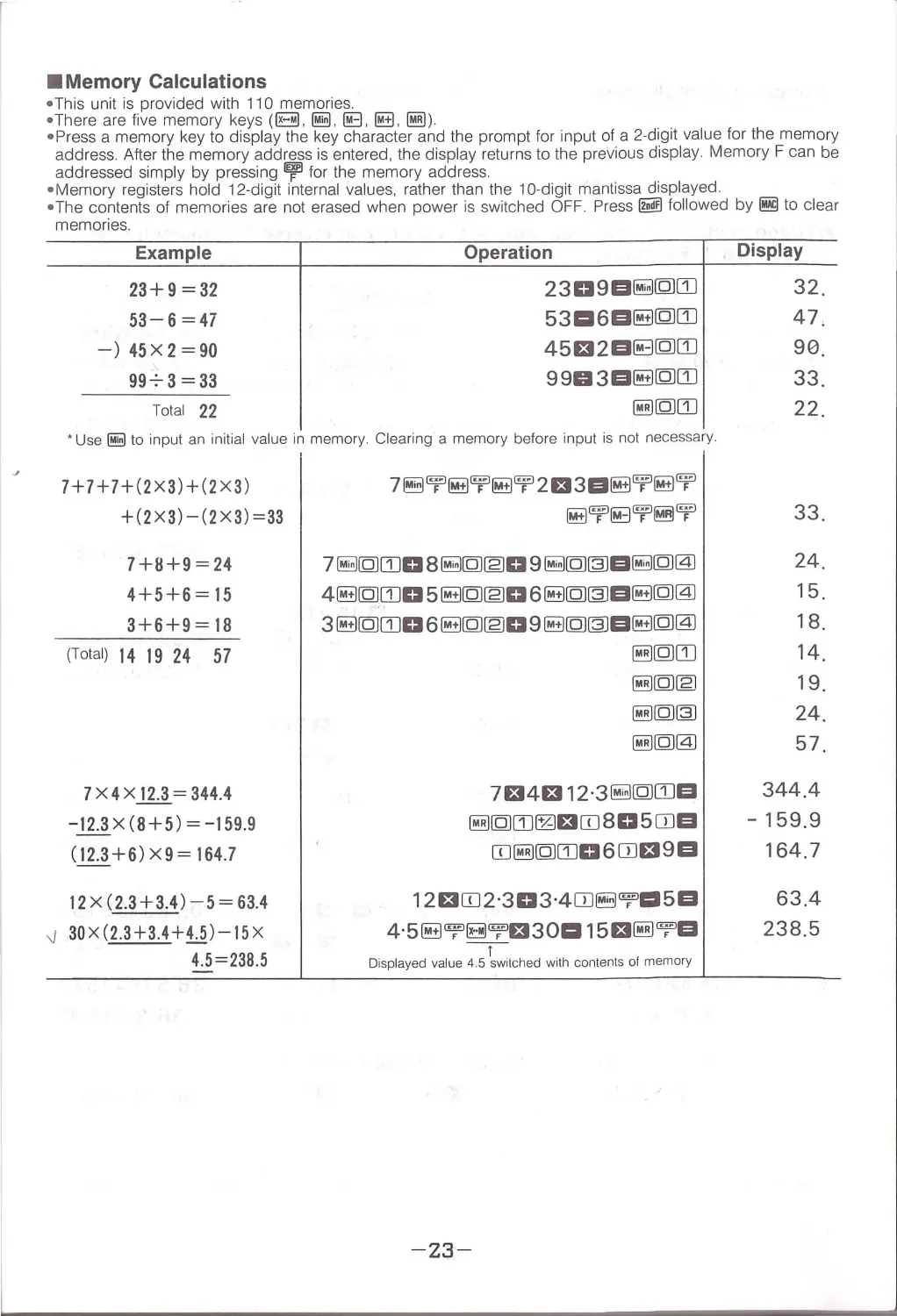
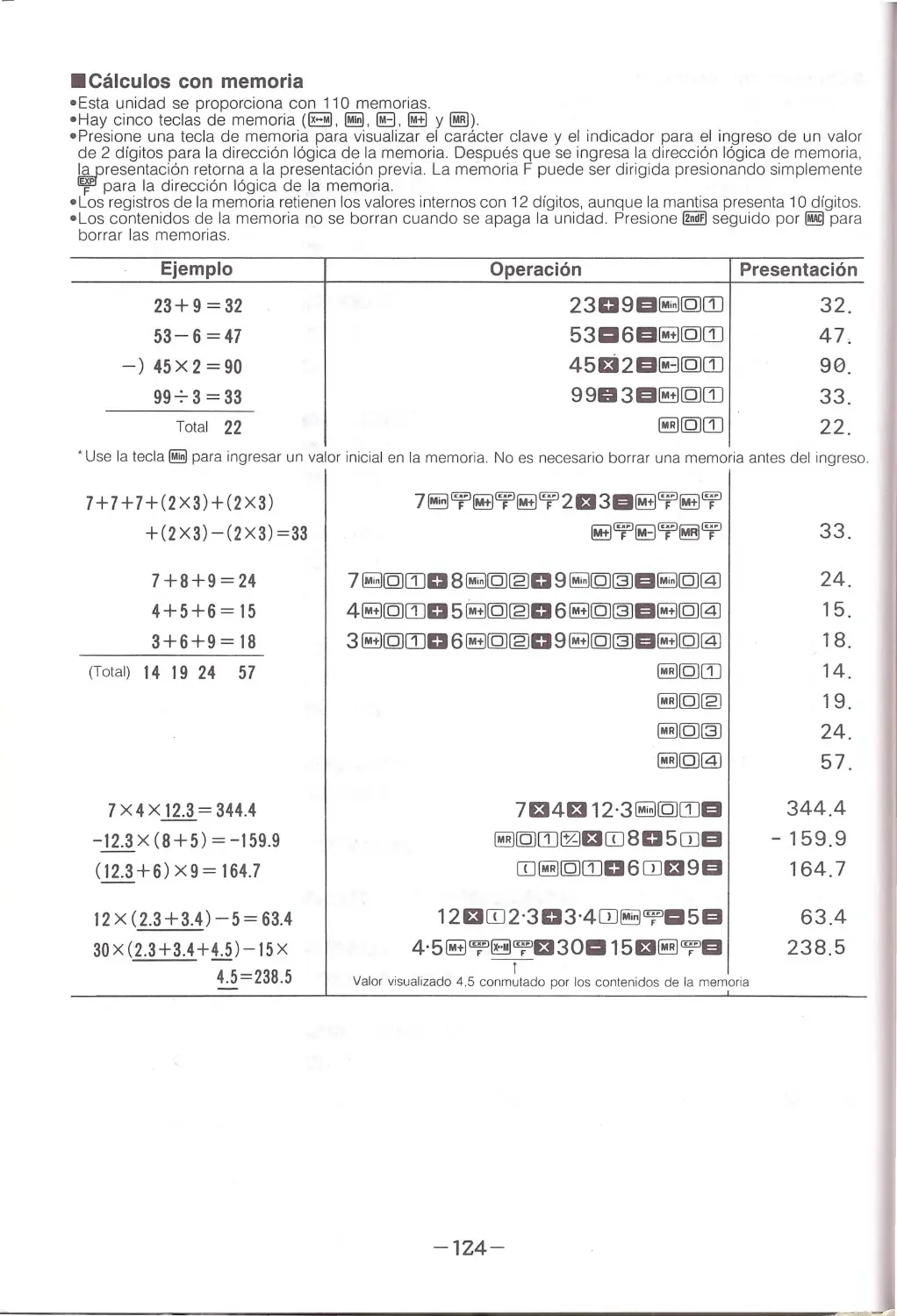
•Memory Calculations
• Thi s un it is provided with 11 0 memories.
•There are five memory keys (B. ~. ~. @±1. ~)
•Press a memory key to display the key character and the prompt for input of a 2-digit value for the memory
add ress. After the memory address is entered, the disp lay returns to the previous display. Memory F can be
add re ssed simply by pressing ~ for the memory address .
• Memory registers hold 12-digit interna l values, rather than the 10-digit mantissa displayed.
• T he contents of memories are not erased whe n power is switched OFF. Press~ fo llo wed by~ to clear
memories.
Example
Operation
23+9 = 32
2309D~[QJITJ
53-6=47
5311:16D~[QJITJ
-)45X2=90
45£t2D~[QJITJ
99-:-3=33
9903D~[QJITJ
Total 22
~[QJITJ
• U se ~ to input an initial valu e in memory. Clearing a memory before input is not necessary.
7+7+7+(2X3)+(2X3)
+(2X3)-(2X3)=33
7+11+9=24
4+5+6=15
3+6+9= 18
(Total) 14 19 24 57
7X4X12.3 = 344.4
-12.3x(8+5)= -159.9
(_!11+6) X9 = 164 .7
12 x (2.3+3.4)-5 = 63.4
-J
30X(2.3+3.4+4.5) - 15X
4.5 = 238.5
7~'T~'T~'T2£t3D~'T~'T
~'T~'T~'T
7~[QJITJ08~[QJ~09~[QJ~D~[QJ@
4~[QJITJ05~[QJ~06~[QJ~D~[QJ@
3~[QJITJ06~[QJ~09~[QJ~D~[QJ@
~[QJITJ
~[QJ[E]
~[QJ~
~[QJ@
7£14£112·3~[QJITJD
~[QJITJ~£tCIJ805CIJD
CIJ~[QJITJ06CIJ£t9D
12£tCIJ2·303·4CIJ~"f'l:l5D
4·5~"f'~"f'£t301:115£t~"f'D
-!-
Displayed value 4 .5 switched with contents ot memory
- 23-
Display
32.
47,
90.
33.
22.
33.
24.
15.
18.
14,
19.
24.
57.
344.4
-
159.9
164.7
63.4
238.5

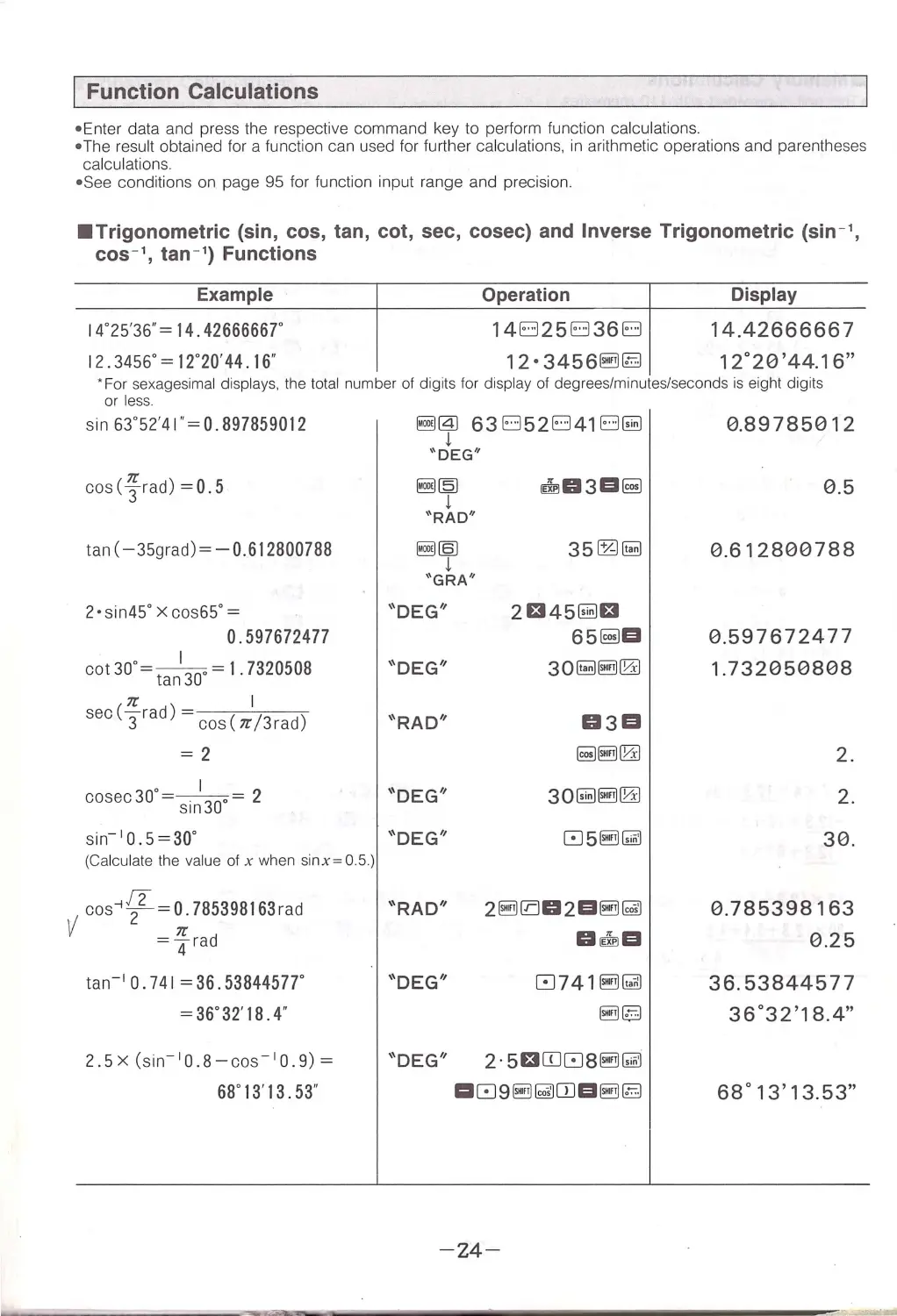
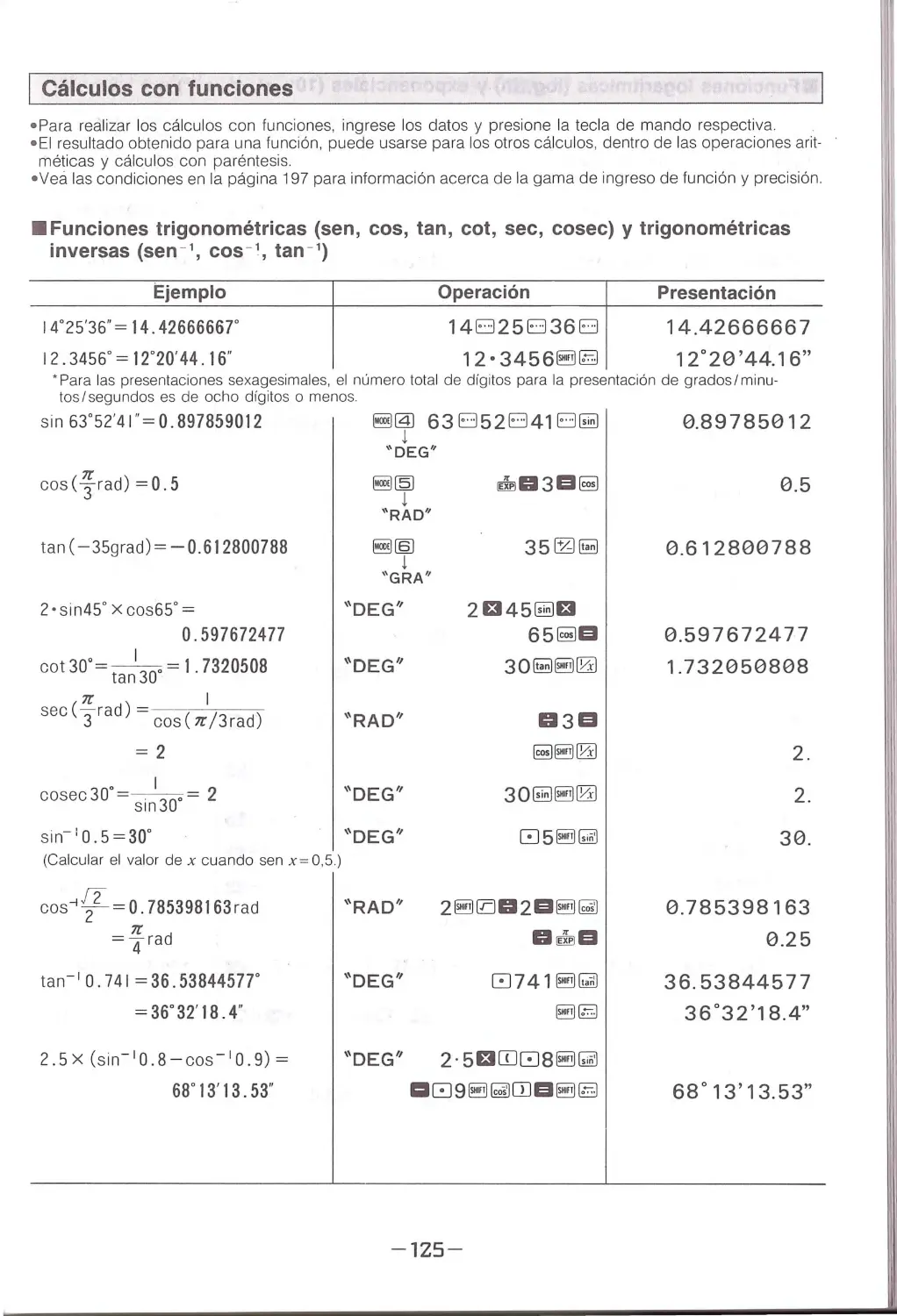
Function Calculations
• Enter data and press the respective command key to perfo rm function ca lculations.
• The result obtained for a function can used for further calculations, in arithmetic operations and parentheses
calculations.
• See conditions on page 95 for function input range and precision.
•Trigonometric (sin, cos, tan, cot, sec, cosec) and Inverse Trigonometric (sin - 1,
cos-', tan - 1) Functions
Example
14°25'36 " = 14. 42666667°
12.3456°= 12°20'44 . 16"
Operation
14El25El36El
12. 3456~§
Display
14.42666667
12°20'44.16"
" For sexagesimal displays, the total number of digits for display of degrees/minutes/seconds is eight digits
or less.
sin 63°52'4 1" =0.897859012
cos <-}'. -rad) = 0. 5
tan (-35grad)= - 0.612800788
2 • sin45° x cos65° =
0.597672477
cot30° = tanl30•= I .7320508
7C
I
sec ( 3rad) =cos ( 7C /3rad)
=2
cosec30°= si~ 30.= 2
sin- 10 .5=30°
(Calculate the value of x when sinx=0.5.)
Vcos 1 ![ = ~ 785398163rad
=
4 rad
tan- 1 O. 741 = 36 . 53844577°
=3 6°32'18.4 "
2.5X (sin- 1 0.8-cos- 1 0.9) =
68°13· 13. 53"
~@) 63El52El41El~
l
\'DEG ' '
~~
l
" RAD"
~(§)
l
''GRA''
"DEG"
"DEG"
"RAD"
"DEG"
"DEG''
"RAD"
"DEG"
"DEG"
35~~
2Et45~£t
65~EI
2~002EI~~
DiillJEI
8741~l!!m
~§]
2. 5£tITJ88~~
-24-
0.89785012
0.5
0.612800788
0.5976724 77
1.732050808
2.
2.
30.
0.785398163
0.25
36. 53844577
36°32'18.4"
68°13' 13.53"

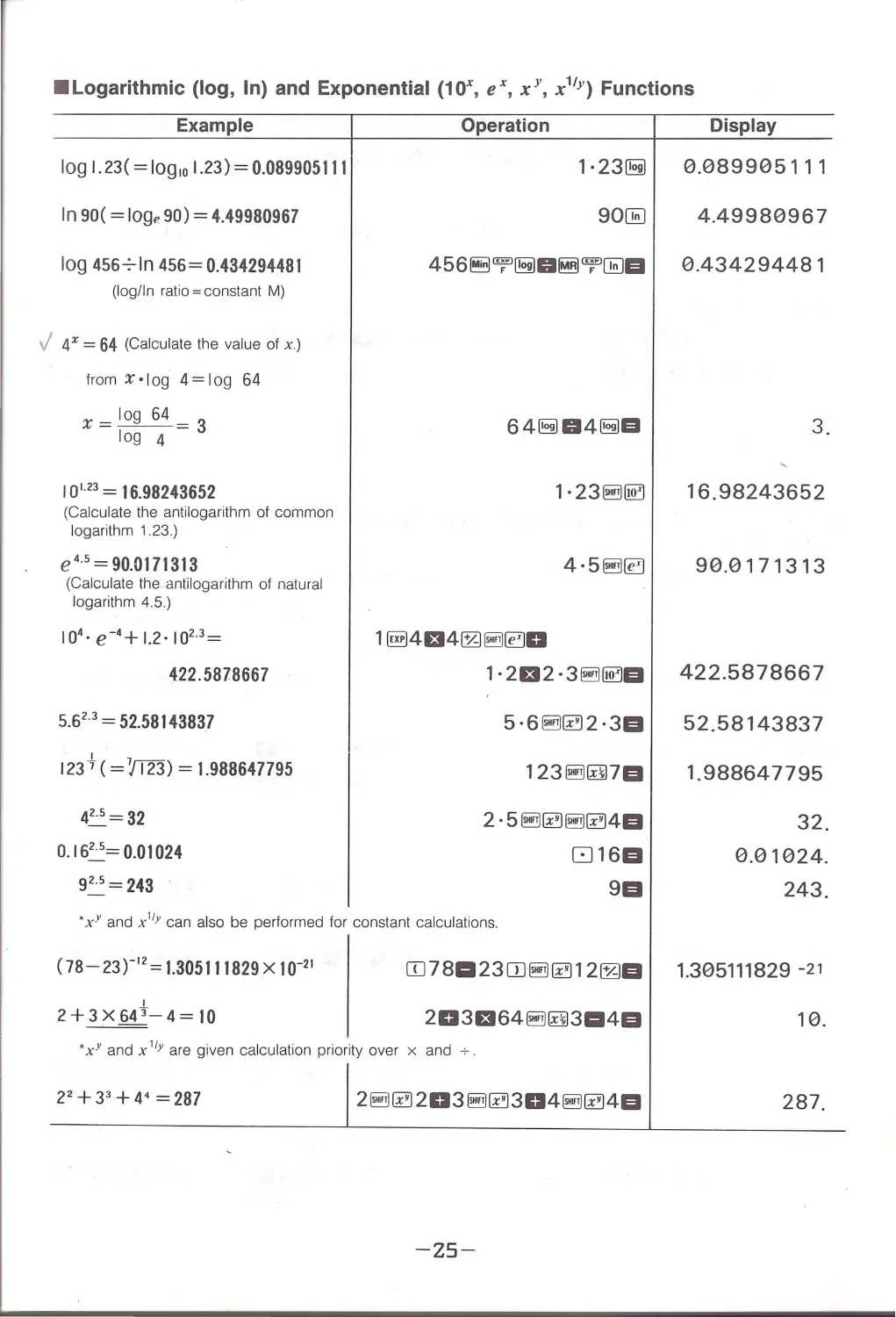
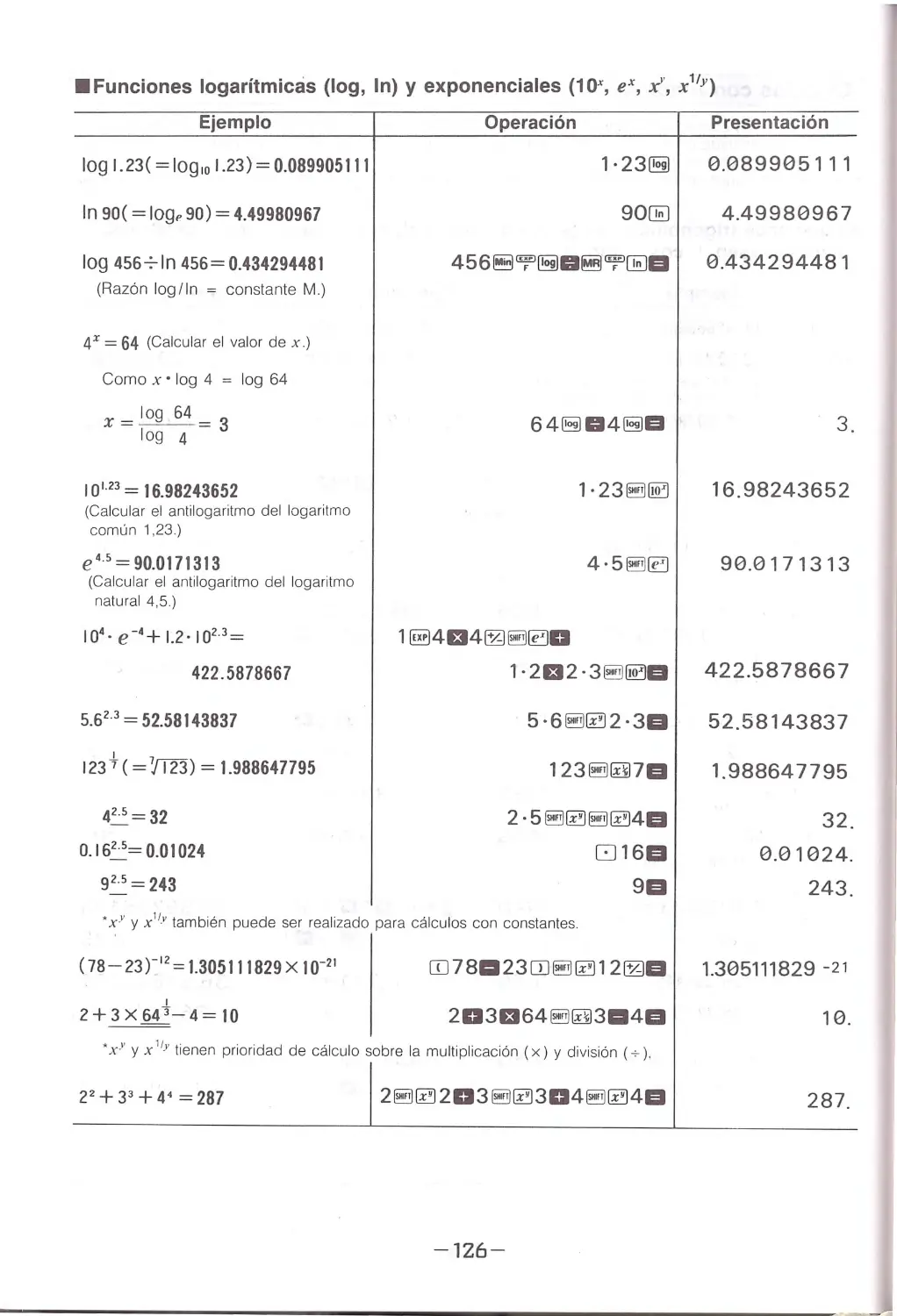
•Logarithmic (log, In) and Exponential (10\ eX, xY, x 11Y) Functions
Example
log 1.23 ( = log 10 1.23) = 0.089905111
In 90( =l og, 90) = 4.49980967
log 4567 1n 456=0.434294481
(log/In ratio= constant M)
./
4x = 64 (Calculate the value of x.)
from x·Iog 4=Iog 64
x=log64=3
log 4
I01 23 = 16.98243652
(Calculate the antilogarithm of common
logarithm 1.23.)
e• 5 = 90.0171313
(Calculate the antilog arithm of natu ral
logarithm 4 .5. )
104• e -•+ l.2·102·3=
422 . 5878667
5.6 23 = 52.58143837
123 +(= 7/T23 ) = 1.988647795
4=== 32
0. 1 6~= 0.01024
92·5 = 243
Operation
1. 23(5)
90~
6 41§J 041§JEI
1·23§!il~
1§14134~ 1§1~0
1·2f32·31§1~EI
5 ·61§1~2 · 3EI
1231§1gj 7EI
816EI
9EI
• x " and x 11' can also be performed for constant calculations.
Display
0.089905111
4.49980967
0.434294481
3.
16.98243652
90.0171313
422.5878667
52.58143837
1.988647795
32.
0 .01024.
243.
<1s- 23r'2
= 1.305111829 x 10- 21
OJ781123CDl§1~12~EI 1.305111829 -2 1
I
2+3x643-4= 10
203f3641§1gj3114EI
10.
•x" and x 11Y are given calculation priority over x and .;.
22 +33 +4• =287
/ 2~~203 ~~ 304 ~ ~4EI
287.
- 25-

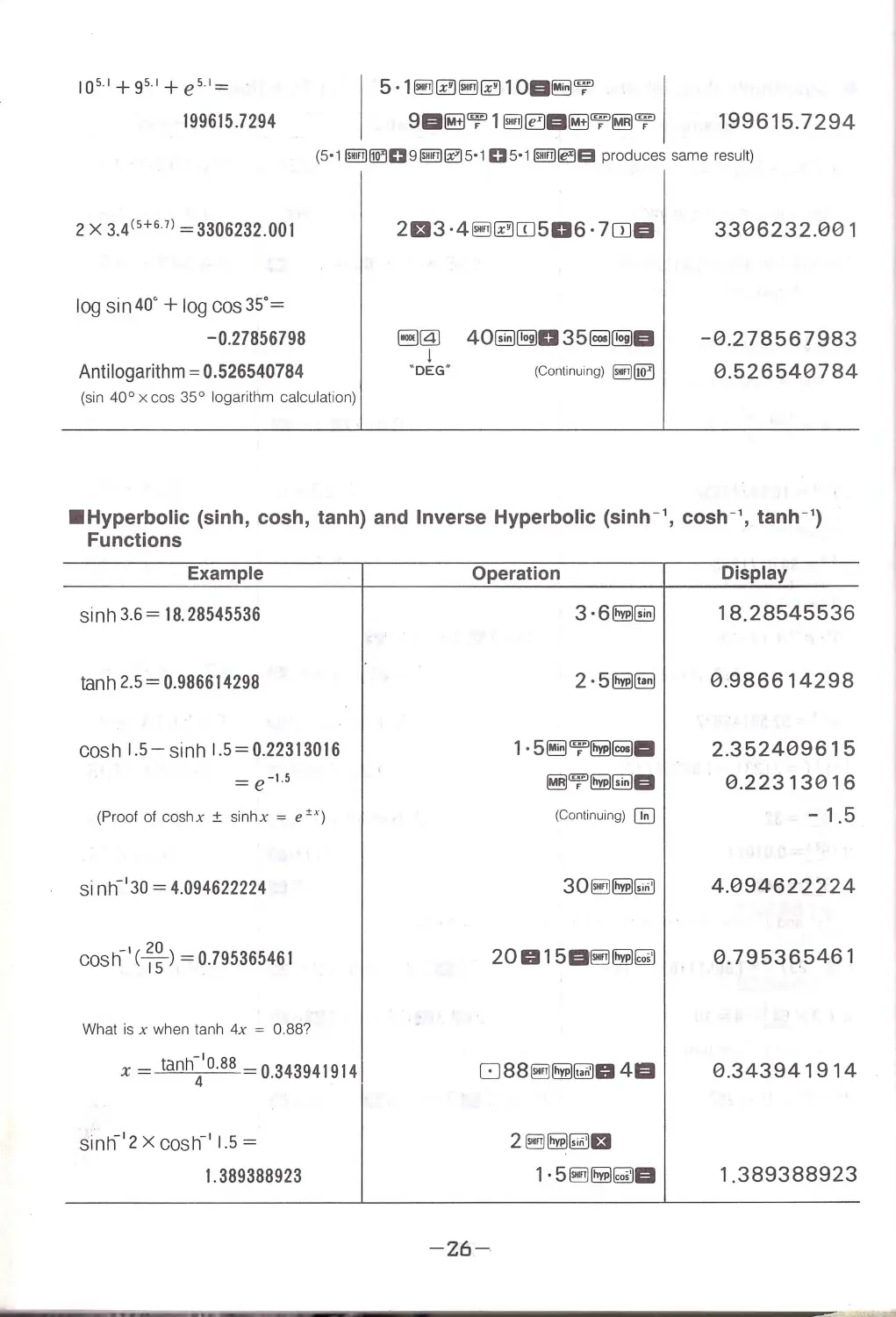
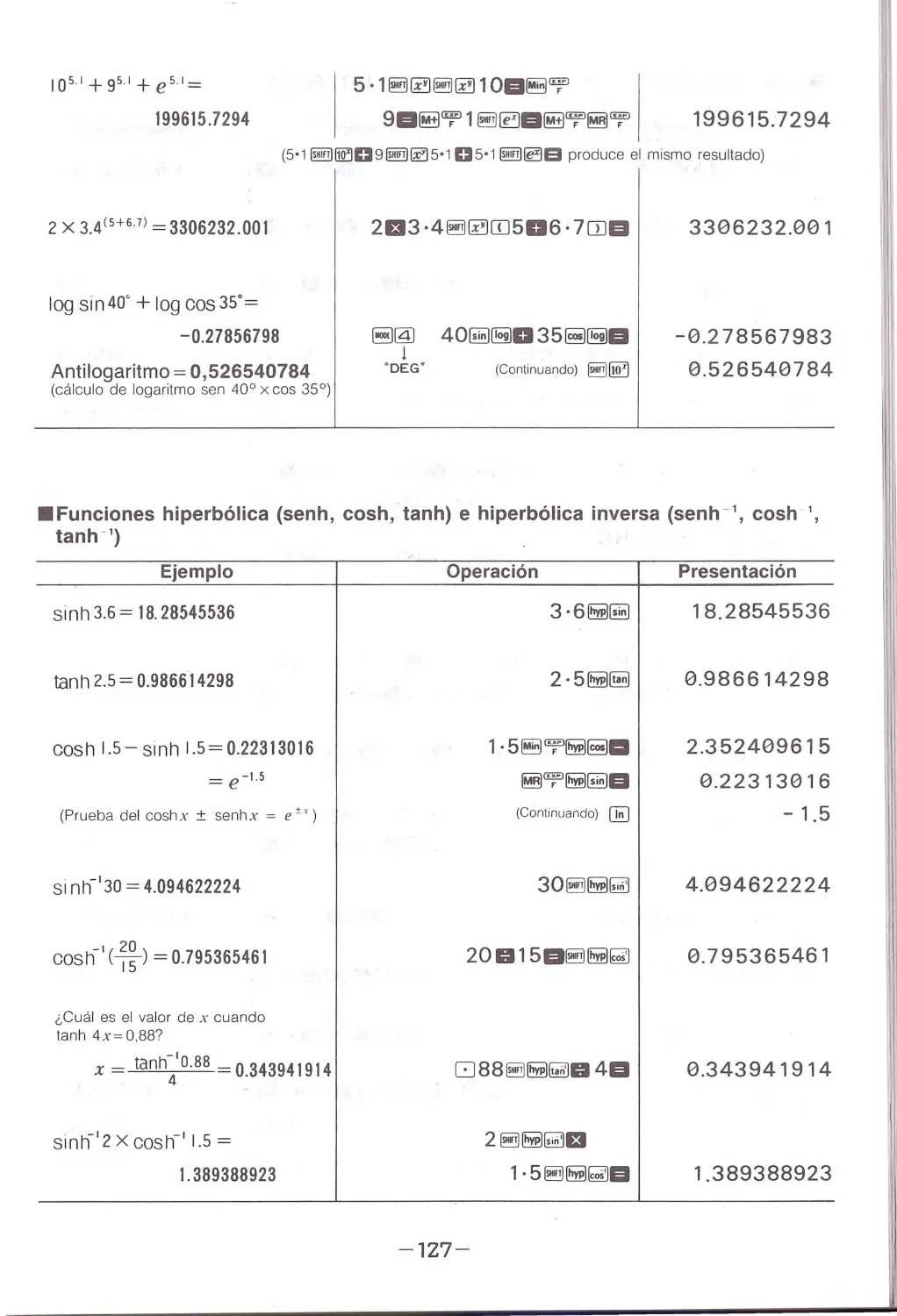
1os· '+9s'+ es'=
199615.7294
I
5·1~~ @!ii ~1 OD~'T
9D~'T 1~!aD~'T~'T
199615.7294
(5·1 ~~D9~~5·1 05·1 ~ ~a produces same resul t)
2 x 3.4(S+67) =3306232.001
log sin 40° +log cos 35° =
- 0.27856798
Ant ilogarithm= 0.526540784
(sin 40° x cos 35° logarithm calculation)
2El3 ·4~~ITJ506 · 7CDD
8@ 40~[§)035~[§JD
j
· oEG"
(Continuing) @!ijl!Qj
3306232.001
-0 .278567983
0.526540784
•Hyperbolic (sinh, cosh, tanh) and Inverse Hyperbolic (sinh-', cosh-', tanh- 1)
Functions
Example
s inh 3.6 = 18. 28545536
tan h 2.5 = 0.986614298
cos h 1.5 -sin h l. 5=0.22313016
(Proof of coshx ± sinhx = e ,,.)
s inh- 130 = 4.094622224
_,(20)
cos h 15 = 0.795365461
What is x when tanh 4x = 0.88?
x - ta nh~' 0·88 -0.343941914
sinn'2x cosh_, 1.5 =
1. 389388923
Operation
-
26-
3·6~~
2·5~~
1·5~7'~~-
~'T~~D
(Continuing) IJ;;:J
30~~~
20015D@!il ~~
2~~~EI
1·5 ~~~D
Display
18.28545536
0.986614298
2 .352409615
0.22313016
-
1.5
4.094622224
0 .79536.5461
0 .343941914
1.389388923

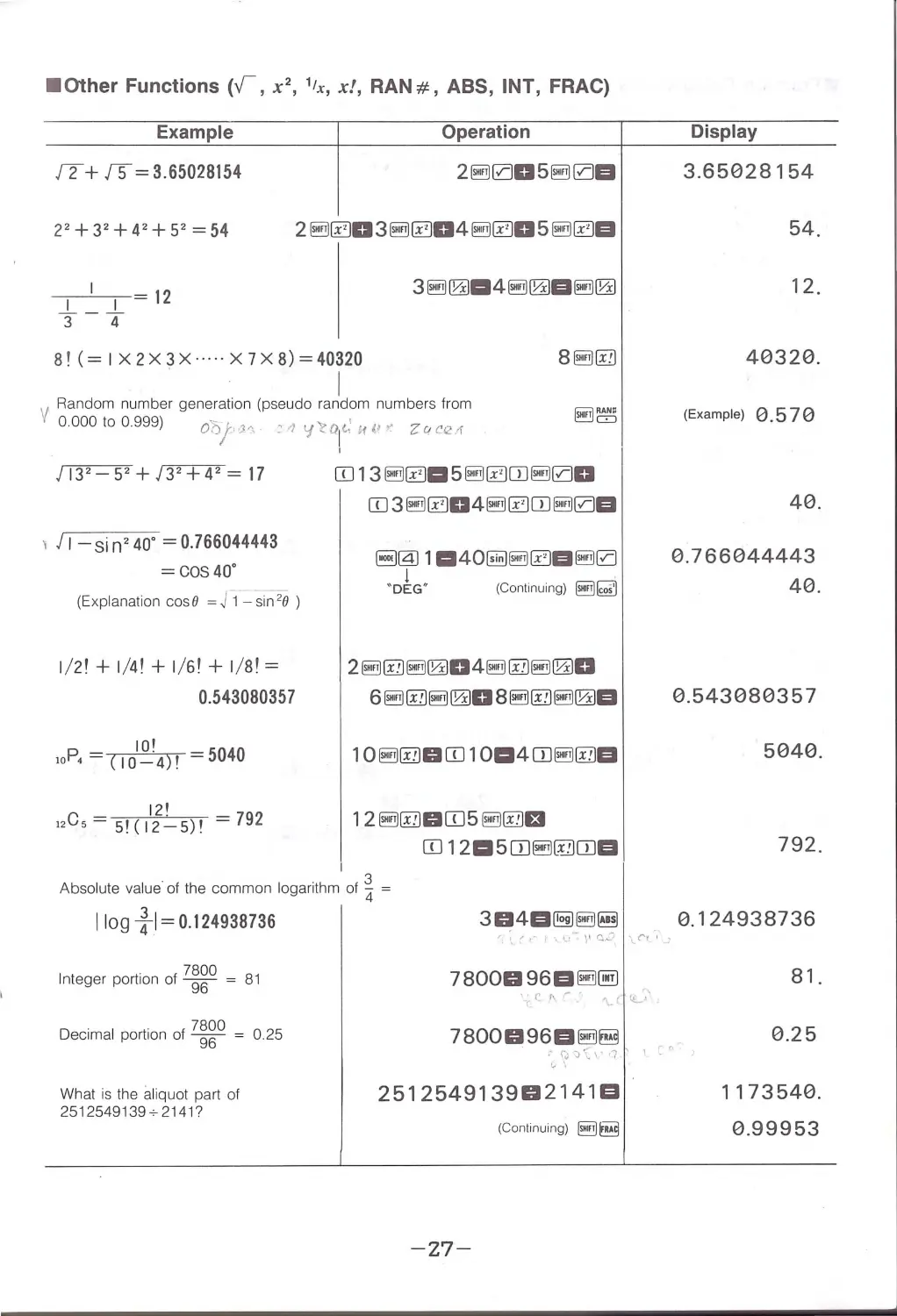
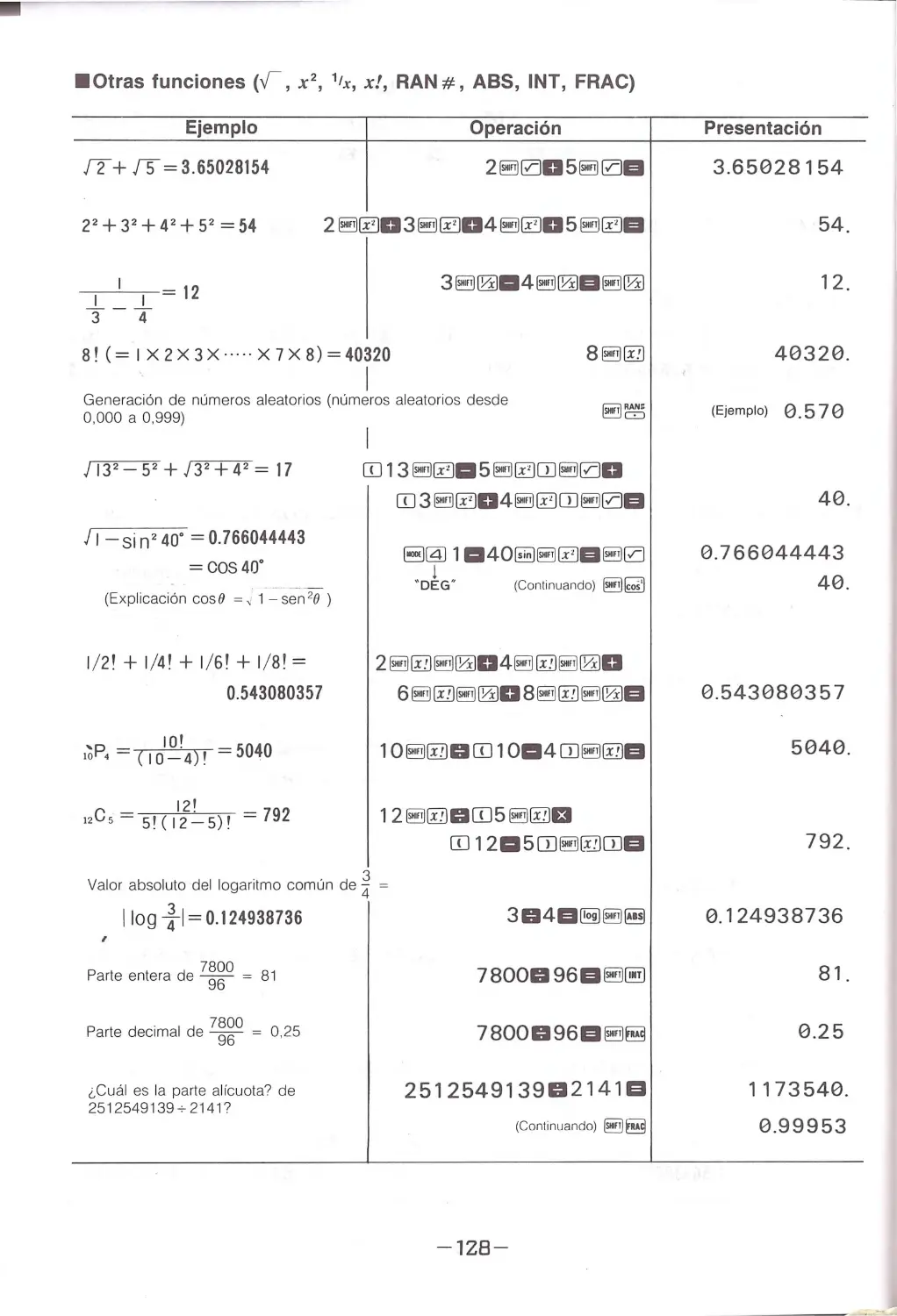
• Other Functions (v, x2, 1tx, x!, RAN#, ABS, INT, FRAC)
Example
Operation
12+ 15= 3.65028154
2~005§!il0EI
22+32+42+5 2 = 54
8!(= IX2X3X·····X7X8)=40320
.
I
V Random number generation (pseudo random numbers from
0.000 to 0.999) Ob/•!h
, ..1 •{l'.O( if,,_
z0c12_1
) 132-52 +)32+ 42 =17
1 J 1- si n 240° = 0.766044443
= CO S40°
(Explanation cos 8 =Fi - ~in 28 )
1/21+1/41+1/61+1/81=
0.543080357
JOI
10P, = c10_·
4)1 =5040
12'
12Cs= s1(12_5)1 =792
ITJ13~~-5~~0J~00
ITJ 3 @ii ~D 4@iJ ~OJ §!il0EI
~@l 1a4o~~~E1§!il0
·o~G· (Continuing) @ii~
2@iJ@@iJ~04@iJ@@iJ~0
6@iJ@@iJ~08@iJ@@iJ~EI
12~@DITJ5~@EI
ITJ 12a5DJ~~OJEI
.
3
Absolute value of the common logarithm of 4 =
I log ~ I= o.124938736
.
7800
Integer portion of 96 = 81
Decimal portion of 7~~0 = 0 .25
What is the aliquot part of
2512549139+2141?
\I' ,·
,_ .--
\' c.:'
{'f'
7800096EI~~
,rf\..-
c lL... ·'
7800096EI~~
:\,;J-::::\ ,,' 1
c"
251254913902141 El
(Continuing) @i]~
- 27-
Display
3.65028154
54.
12.
40320.
(Example) 0.570
40.
0.766044443
40.
0.5430803 5 7
5040.
792.
0.124938736
81.
0.25
1173540.
0.99953

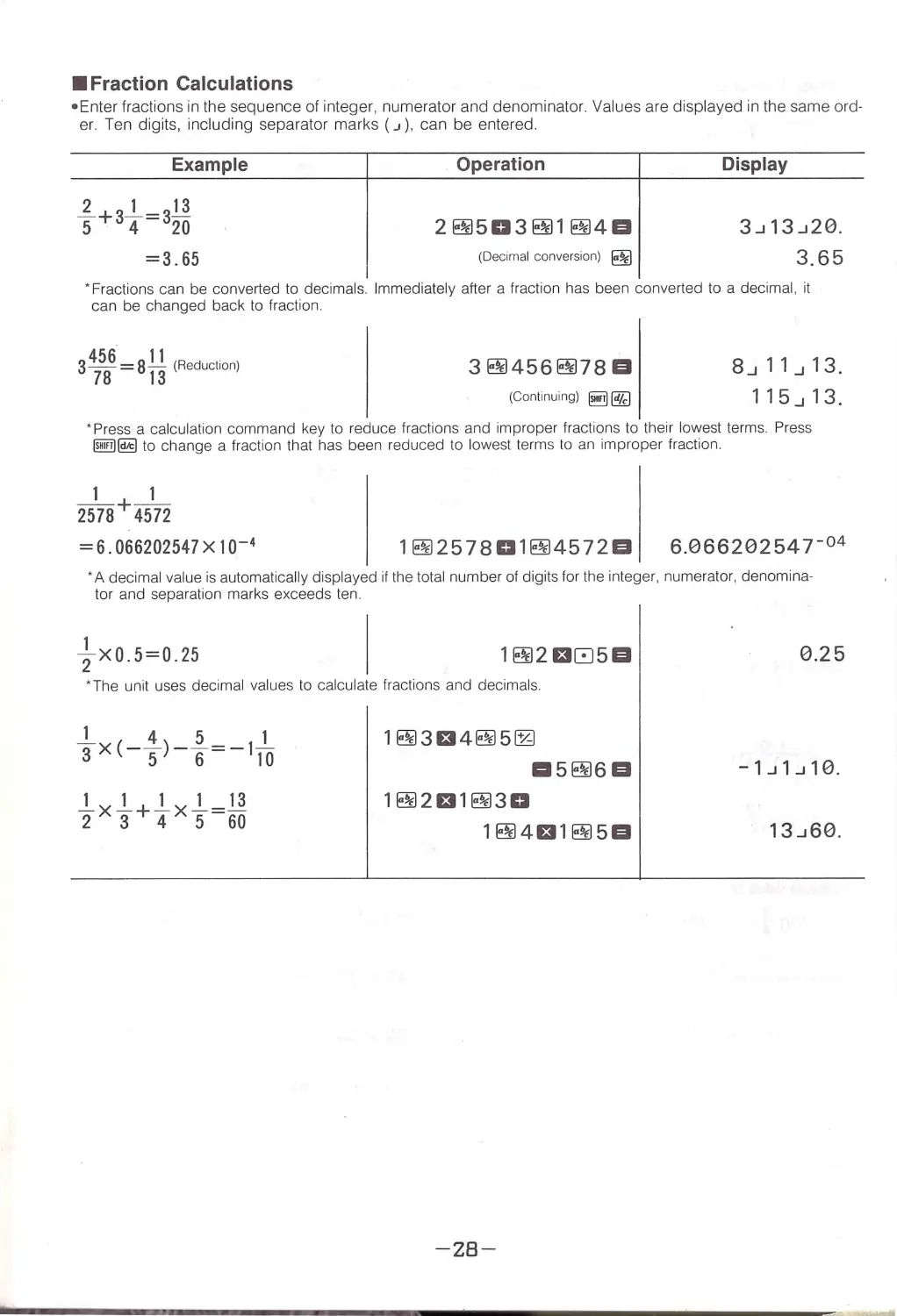
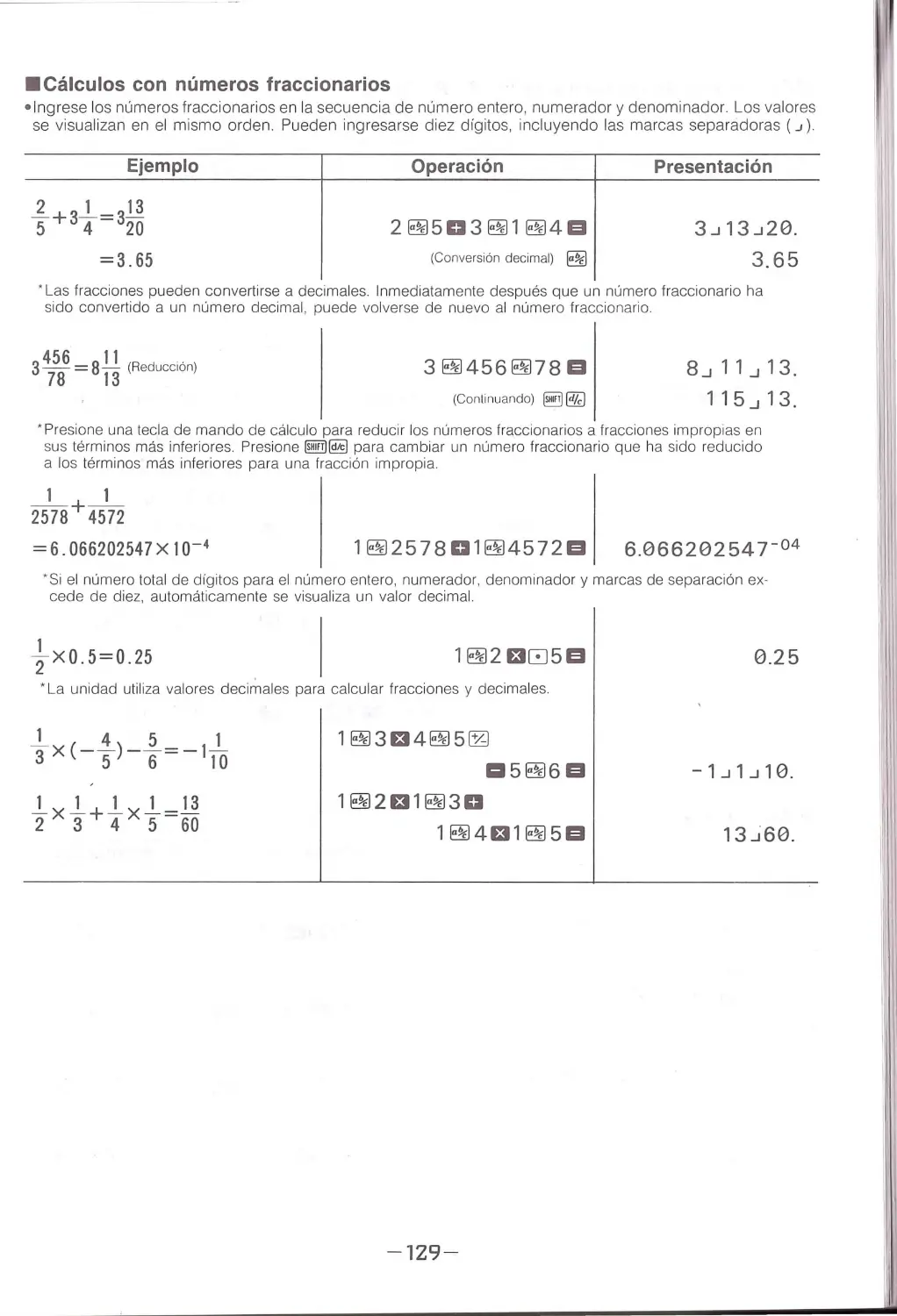
•Fraction Calculations
• Enter fractions in the sequence of integer, numerator and denominator. Values are displayed in the same ord-
er . Te n digits, including separator marks ( J ) , can be entered.
Example
1-+3_.! _ = 3!1
5420
=3 .65
Operation
2~503~1~4B
(Decimal conversion) ~
Display
3_J13_J20.
3.65
·Fractions can be converted to decimals. Immediately after a fraction has been converted to a decimal, it
can be changed back to fraction.
3456 = 81! (Reduction)
78 13
3~456~78B
(Continuing) §!ij @ZJ
8_J11_J13.
115_J13.
• Press a ca lculation command key to reduce fractions a nd improper fr act io ns to thei r lowest terms. Press
llfilill@ to change a fraction that has been reduced to lowest term s to an improper fraction .
1
1
2578+ 4572
= 6.066202547X 10 - 4
1~257801~4572B 6.06620254 r 04
·A decimal value is automatically displayed if the total number of digits for the integer, numerator, denomina-
tor and sepa ratio n marks exceeds ten.
1
2X0.5 = 0.25
1~2t305B
• The unit uses decimal values to calculate fractions and decimals.
1~3t34~5~
1:15~6B
1~2t31~30
1~4t31~5B
-28-
0.25
-1 _J1_J10 .

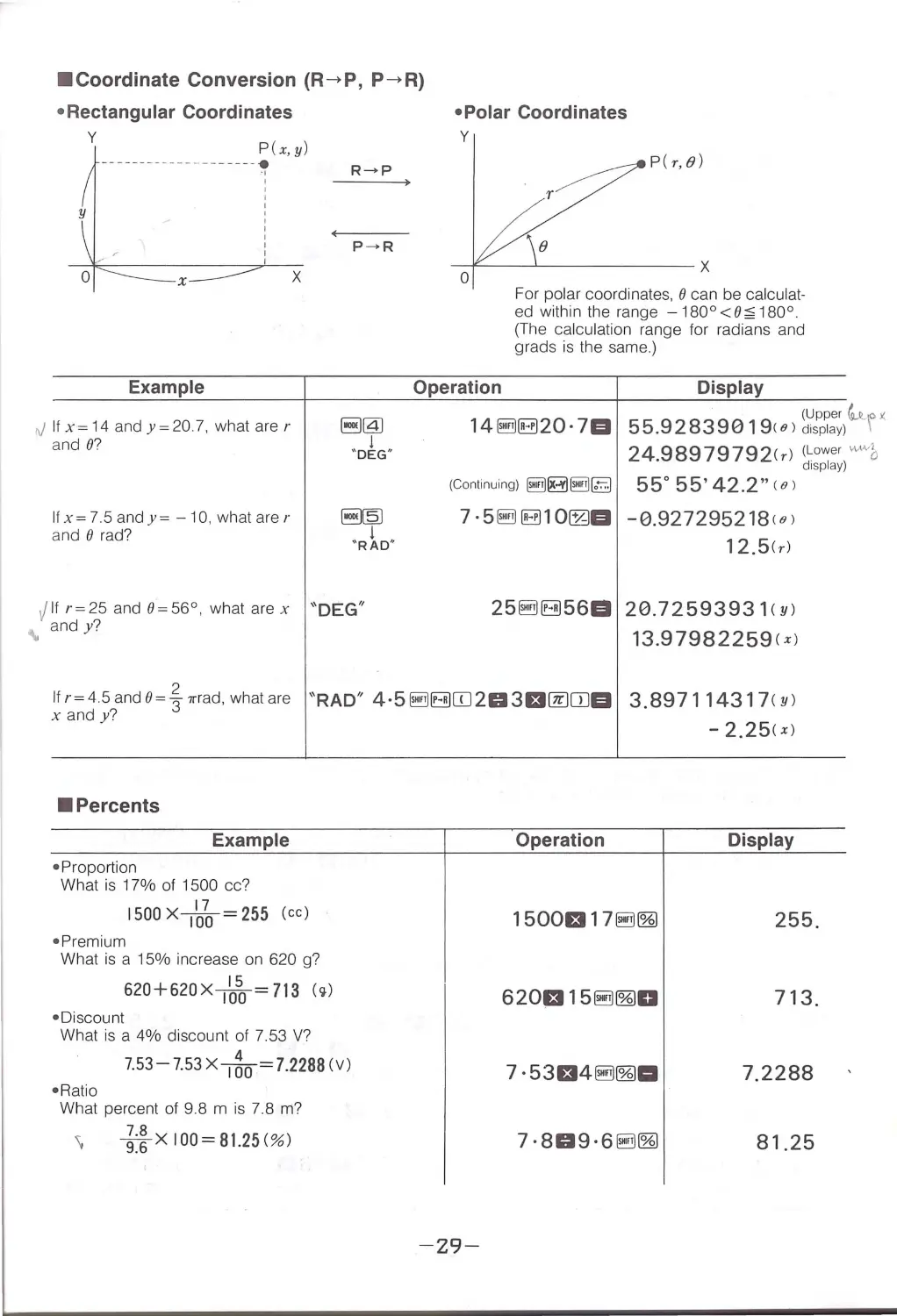
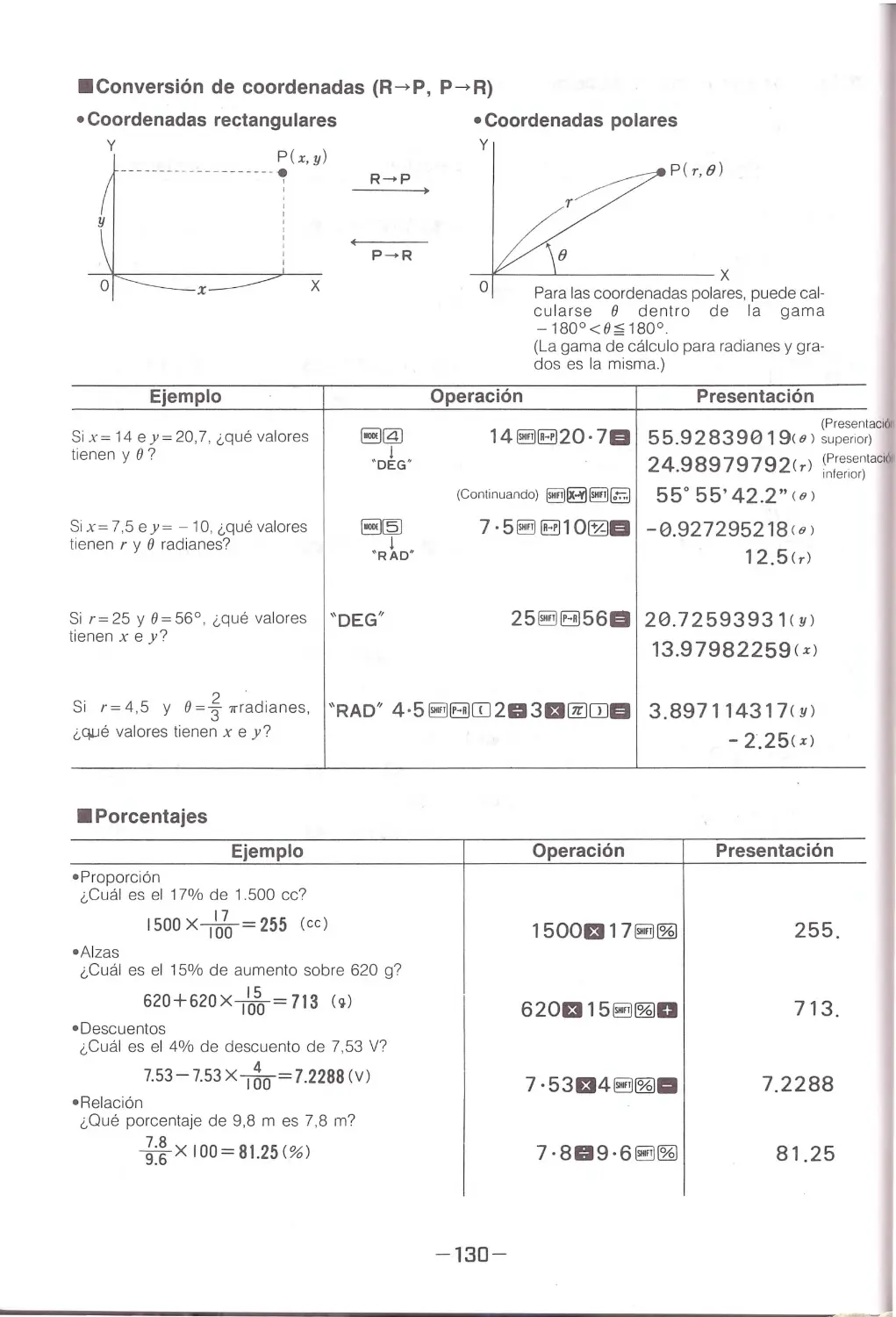
• Coordinate Conversion (R->P, P->R)
• Rectangular Coordinates
y
P(x, y)
--------------
------~
I
Example
rJIfx=14andy=20.7, whatarer
and 8?
Ifx=7.5andy= - 10.whatarer
and O rad?
x
R~P
.jIfr=25and0=56°, whatarex
"D EG"
"
and y?
• Polar Coordinates
y
P (r,B)
r
8
-i<---~-------x
0
Operation
For polar coordinates. 8 can be calculat-
ed within the range -180°<8~180°.
(The calcu lat ion ra n ge for r adians and
grads is the same.)
Display
(Upper ~'°'
55.92 83 90191 e) disp lay) \
24.98979792(rl (L owe r ""'"b
disp lay )
(Co nt inu ing) [Siiii)~ [Siiii) [B 55° 55' 42.2" 18 )
7 · 5 [Siiii) B10~EI - 0.927295218 10)
12.5(r)
25 [Siiii) IBJ56EI 20.72593931 ( Yl
13.97982259( x )
Ifr= 4.5 and o= ~,,-rad, what are
x andy?
" R AD" 4 ·5 [Siiii) IBJITJ2 0 3El@ITJEI 3.897114317(y)
-
2 . 25(x)
• Percents
Example
• Proportion
What is 17% of 1500 cc?
17
1500 XIQ0= 255 (cc)
• Prem ium
What is a 15% increase on 620 g?
• Discount
15
620+620XIOO= 713 (,.)
What is a 4% discount of 7.53 V?
4
7.53 -7.53 X '""j()Q= l.2288 (V)
• Ratio
What percent of 9.8 m is 7.8 m?
"'
~:~ x 100= 81.25(%)
Operation
Display
1500El17 [Siiii) ~
255 .
620£115@il~0
713.
7. 53El4@il~ll
7. 2288
7·809·6@il~
81.25
-29-

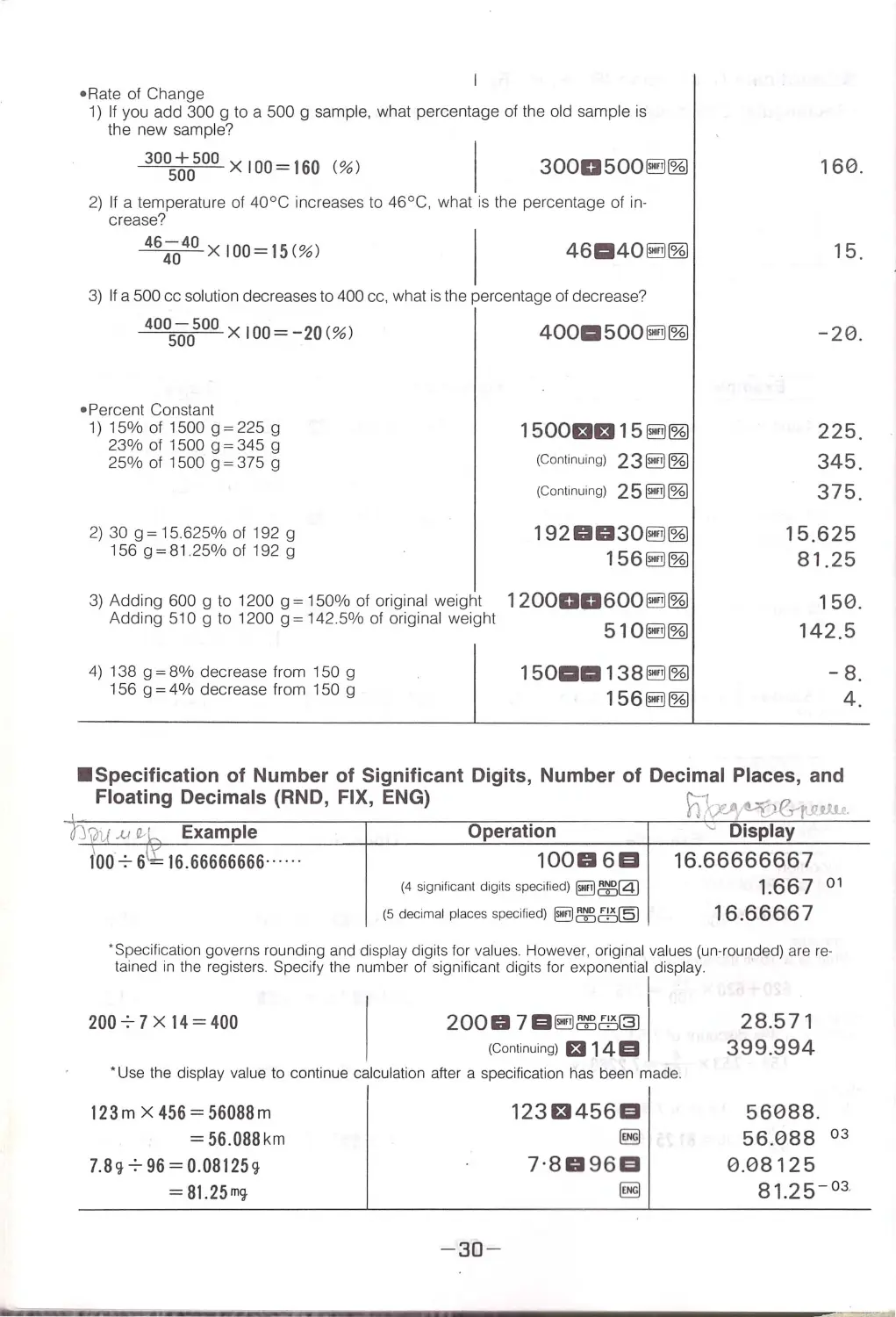
•Rate of Change
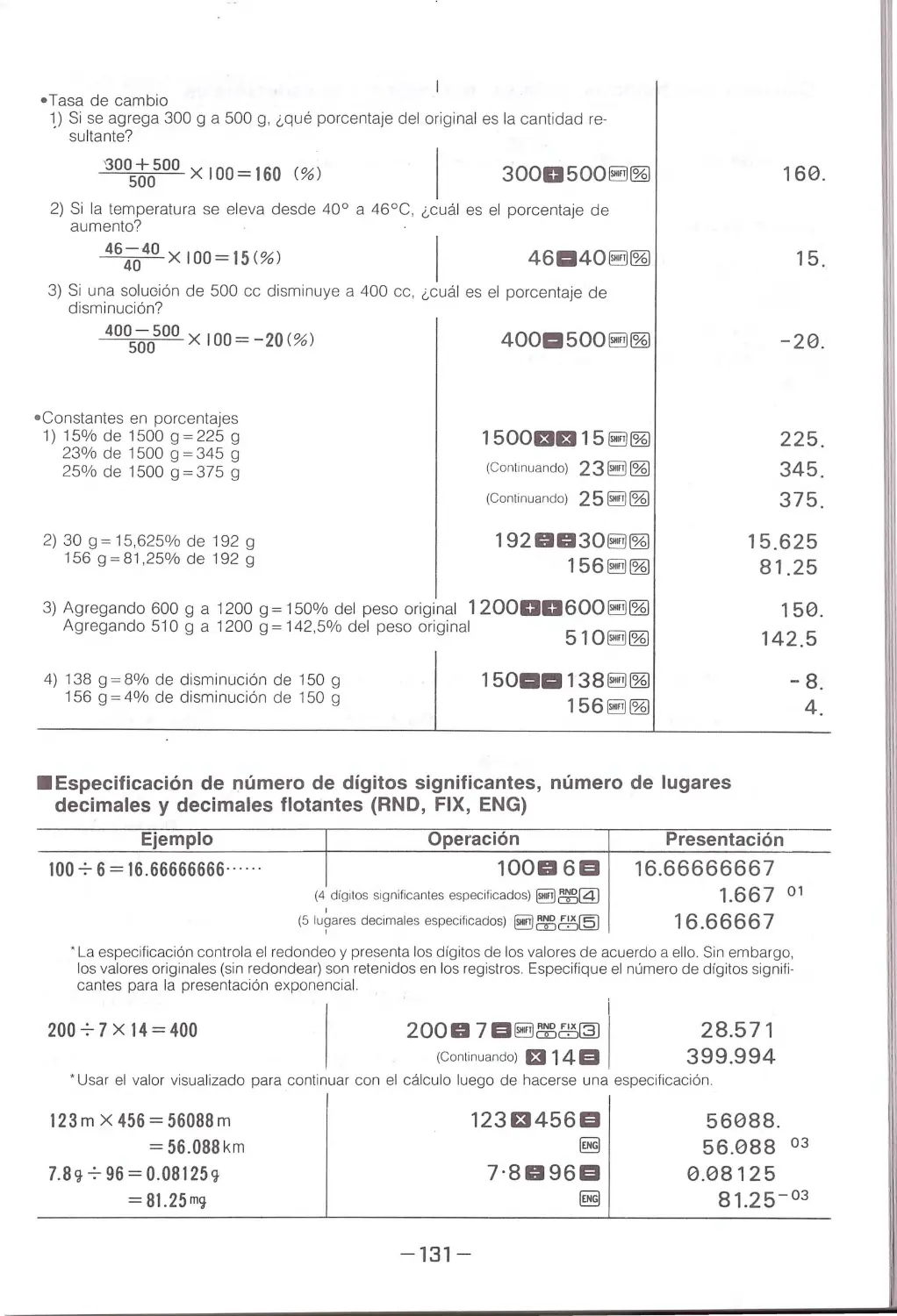
1) If you add 300 g to a 500 g sample, wh at percentage of the old sample is
the n ew sample?
30057J0500 x 100 = 160 (%)
I 3000500~~
2) If a temper atu r e of 40°C increases to 46°C, what is the percentage of in-
crease?
464Q40 x 100 = 15<%)
46a4o~~
3) If a 500 cc solution decreases to 400 cc. what is the percentage of decrease?
400500500x100 = -20(%)
• Percent Constant
1)15%of1500g=225g
23%of1500g=345g
25%of1500g=375g
2) 30g=15.625% of 192 g
156g=8125%of192g
3) Adding 600 g to 1200 g = 150% of original weight
Adding 510 g to 1200g = 142.5% of original weight
4) 138 g = 8% decrease from 150 g
156 g = 4% decrease from 150 g
4ooa5oo§!il~
1500131315 §!i]~
(Continuing) 23 §!i] ~
(Continuing) 25~~
1920030~~
156~~
120000600@!il~
510~~
15oaa138~~
156~~
160.
15.
- 20.
225.
345.
375.
15.625
81.25
150.
142.5
-8.
4.
•Specification of Number of Significant Digits, Number of Decimal Places, and
I
Floating Decimals (RND, FIX, ENG)
n~E:',--rJ1.u.Le
OJ\hi ..(,/ a,t _ Example
Operation
~ Display
1100 -:- 6~ 16.66666666 .... · ·
1ooo 6 a 16.6666666 7
(4 sig nificant digits specified) @!il~@)
1.667 01
(5 decimal places specified) §!i]~ffi@
16 .66667
· Specification governs rounding and di splay digits for va lues. Howeve r, original values (un-rounded) ar e re ·
tained in the regi sters . Specify th e numb er of significant digits for exponential display.
200-:-7x14=400
I
2000 7El~~ffi@J I
(Con tinuing) 13 14El
· Use th e display va lue to continue calculation after a specification has been made.
123mX456=56088 m
= 56.088km
7.8'! 7 96 = 0.08125'!
= 81.25m<t
-30 -
12313456EI
~
7 ·8096EI
~
28.571
399.994
56088.
56.088 °3
0.08125
s 1.25- o3

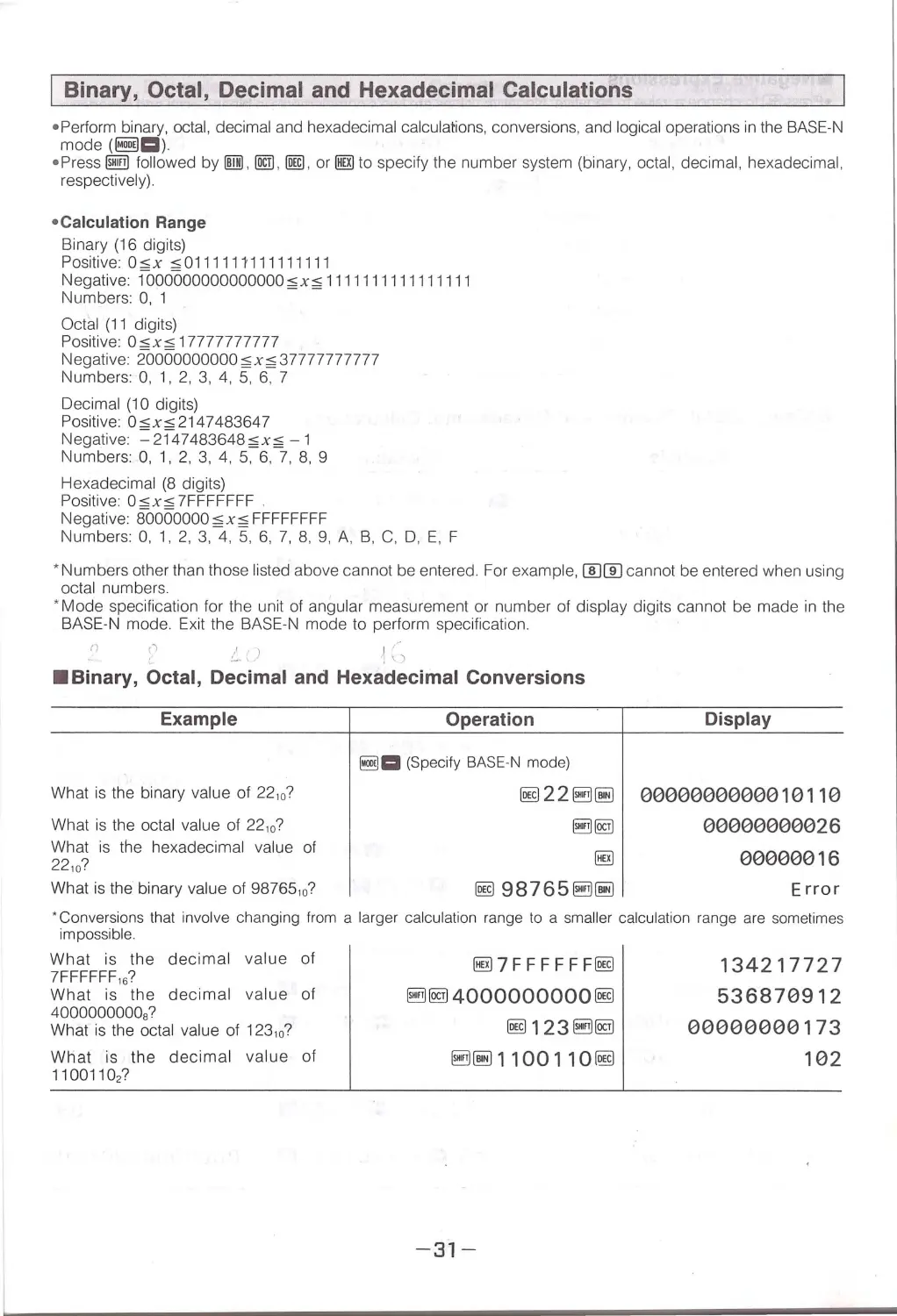
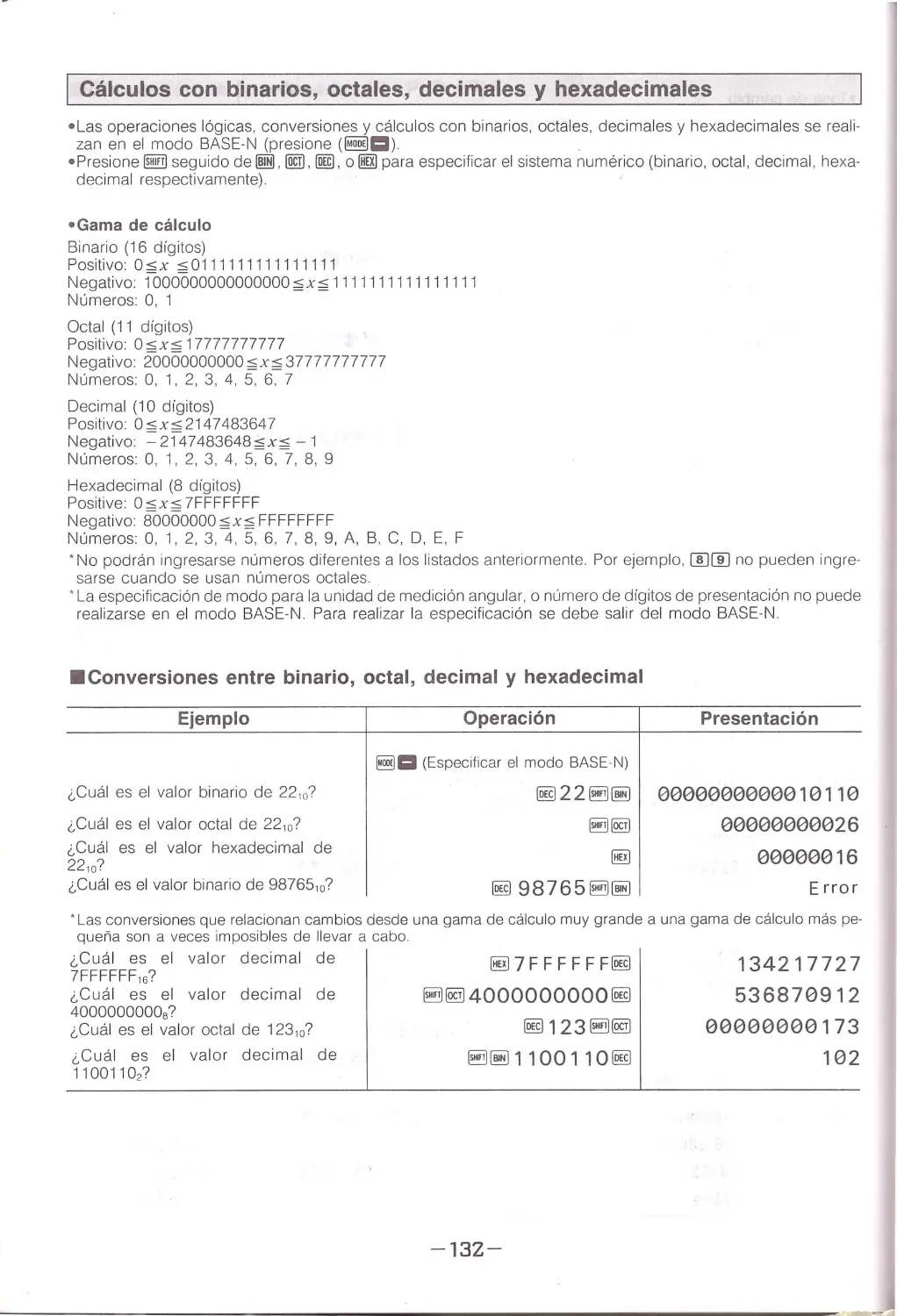
I Binary, Octal, Decimal and Hexadecimal Calculations
• Perform binary, octal, decimal and hexadecimal calculations , conversions , and logical operations in the BASE-N
mode (~c::ll)
• Press @E!IB fol lowed by lill), !@ , @) , or IBrn to specify the number system (binary, octal, decimal , hexadecimal ,
respectively).
• Calcu lation Range
Binary (16 digits)
Positive: Osx ,,;0111111111111111
Negative: fooooooooooooooo;;;x;;; 1111111111111111
Numbers: 0 , 1
Octal (11 digits)
Positive: 0 sx s 17777777777
Negative: 20000000000 ;;;x;;; 37777777777
Numbers:0,1,2,3,4,5,6,7
Decimal (1 O digits)
Positive Osxs2147483647
Negative =2147483648;;;x;;; - 1
Numbers0,1,2,3,4,5,6,7,8,9
Hexadecimal (8 digits)
Positive: 0 sxs 7FFFFFFF
Negative: BOOOOOOO;;; x;;; FFFFFFFF
Numbers0,1,2,3,4,5,6,7,8,9,A,B,C,D,E,F
*Numbers other than those listed above cannot be entered. For example, [IDl]J cannot be ente red when using
octal numbers.
* Mode specification for the unit of angular measurement or number of display dig its cannot be made in the
BASE-N mode. Exit the BASE-N mode to perform specification.
f)
('\
~-)
·~ ;")
•Binary, Octal, Decimal and Hexadecimal Conversions
Example
What is the binary value of 22 ,0 ?
What is the octal value of 22, 0?
What is the hexadecimal value of
22 10?
What is the binary value of 9876510?
Operation
Display
~a (Specify BASE-N mode)
~22B~ 0000000000010110
~@]
00000000026
§!)
00000016
~ 98765 ~~
Error
'Conversions that involve changing from a larger calculation range to a sma ll er calculation range are sometimes
impossible.
What is the decimal value of
7FFFFFF, 6 ?
What is the decimal value of
40000000008?
What is the octal value of 123 10?
What is the deci mal value of
11001102?
§!17 FF FF FF~
B@l 4000000000 ~
~123~@1
~~1100110~
-31-
134217727
536870912
00000000173
102

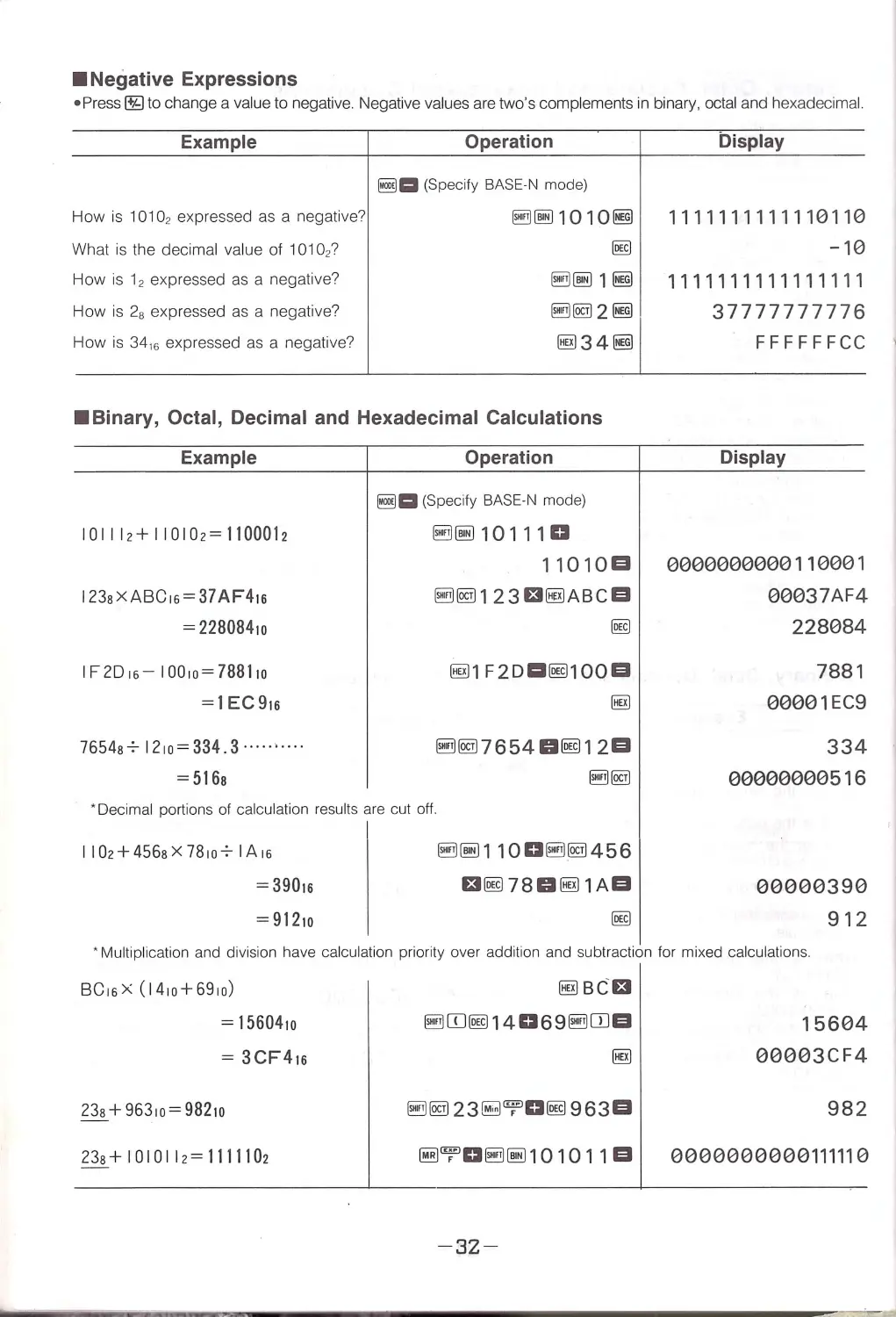
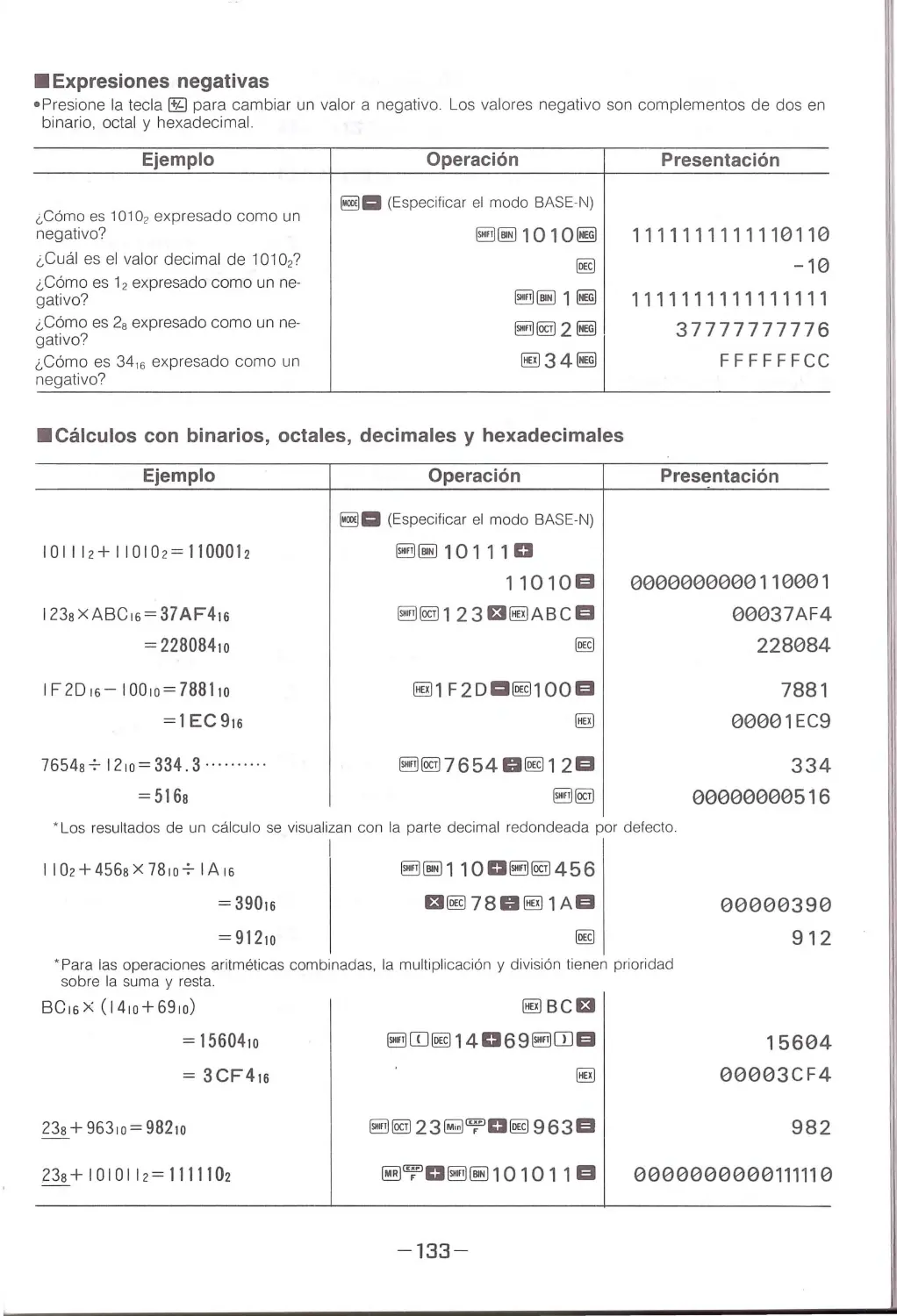
•Negative Expressions
• Press ~ to change a value to negative. Negative values are two's complements in binary, octal and hexadecim al.
Example
How is 10102 expressed as a negative?
What is the decimal value of 101027
How is 12 expressed as a negative?
How is 28 expressed as a negative?
How is 3416 expressed as a negative?
Operation
~a (Speci fy BASE·N mode)
~~1010~
I@
~~1~
~~2~
~34~
•Binary, Octal, Decimal and Hexadecimal Calculations
Example
10 111 2+ 11010 2= 1100012
I23sX ABC 16= 37 AF416
= 2280841 0
IF ZD1 6- I00 10 = 7881io
= 1 EC916
76548'~ 1210= 334 .3 ........ ..
= 516a
Operation
~a (Speci fy BASE·N mode)
~ ~ 101110
11010EI
§!il~1 23£1~ABCEI
I@
~1 F2 Dl:ll@100EI
§!il~ 7654Gll@12EI
• o ec imal portions of calcul ation res ults are cut ott .
I I02+456sX 78107 IA16
= 39016
=91210
§!il ~1100~~456
£11@78Gl~1 A EI
Display
1111111111110110
-10
1111111111111111
37777777776
F FFFFFCC
Display
0000000000110001
00037AF4
228084
7881
00001 EC9
334
00000000516
00000390
912
• Multipl ication and division have calc ulation priority over additio n and subtraction for mi xe d calcul at ions.
BC16X ( 1410+69 10)
= 1560410
= 3CF41s
23s+963 10=982 10
23s+ I0I0II2= 1111102
~BCEI
~Eill@1406 9 ~ITlEI
~'T'O§!il~ 10 10 11 El
-32-
15604
00003CF4
982
0000000000111110

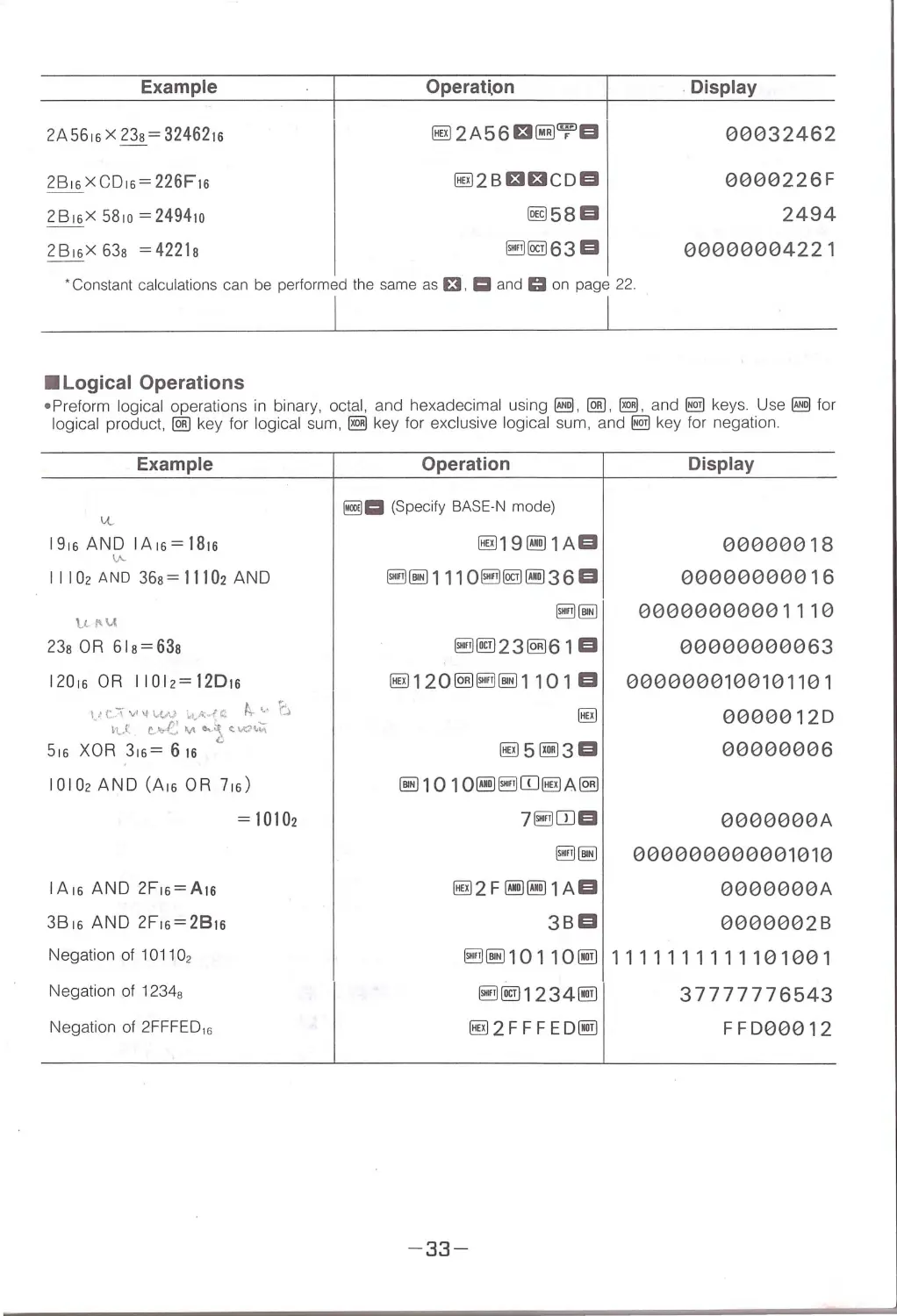
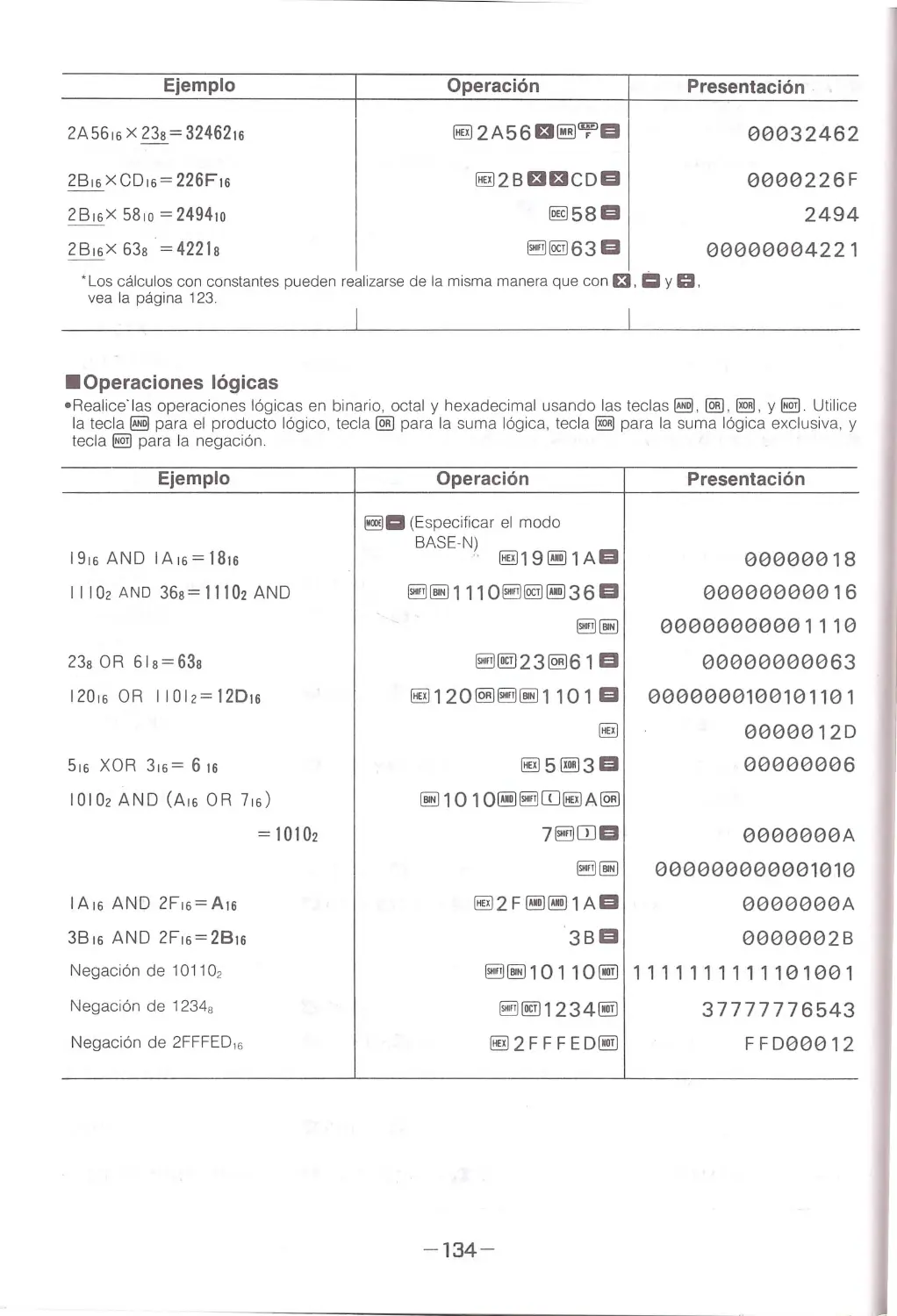
Example
Operatlon
. Display
2A56 16x 23s = 3246216
~2A56£t~'TEI
00032462
28 16x CD16 = 226F16
~2B£t£tCDEI
0000226F
2B16X 5810 =2494 10
@ill 58 El
2494
2B16X 63s =4221s
~ @J63EI
00000004221
· Constant calculations can be performed the same as El. i= and C:I on page 22 .
•Logical Operations
• Preform logical operations in binary, octal, and hexadecimal using!@,@] , ~. and§!) keys. Use I@ for
logical product, @] key for logical sum , ~ key for exclusive logical sum, and §!) key for negatio n.
Example
CL
1916 A ND I A16= l81s
\A-
1I102 A ND 36s=11102AND
tll'U
23s OR 6 1s=63s
12016 OR I IOl 2= 12D1s
\ ! r "-{ v1 \f \..(,AJ irt~-~vfC f+ .._, (...\
h.J: t. ....,f.: M '-} _ ic. \A:n~
516XOR316= 616
10102AND (A16 OR 716)
IA16AND 2F16= A1s
3816 AND 2F16= 2B1s
Negatio n of 10 1102
Negation of 12348
Negation of 2FFF ED, 6
= 10102
Operation
Display
~1:1 (Specify BASE-N mode)
~19@11 AEI
00000018
~~ 111O~@J@l3 6 El
0000000001 6
~~ 00000000001110
~ @123~61 El
00000000063
~120~~~1101 El 0000000100101101
~
00000120
~5~3EI
00000006
~101O@l~CD~A~
7~ITJEI
3BEI
0000000A
000000000001010
0000000 A
0000002B
~~10110@1 1111111111101001
-33 -
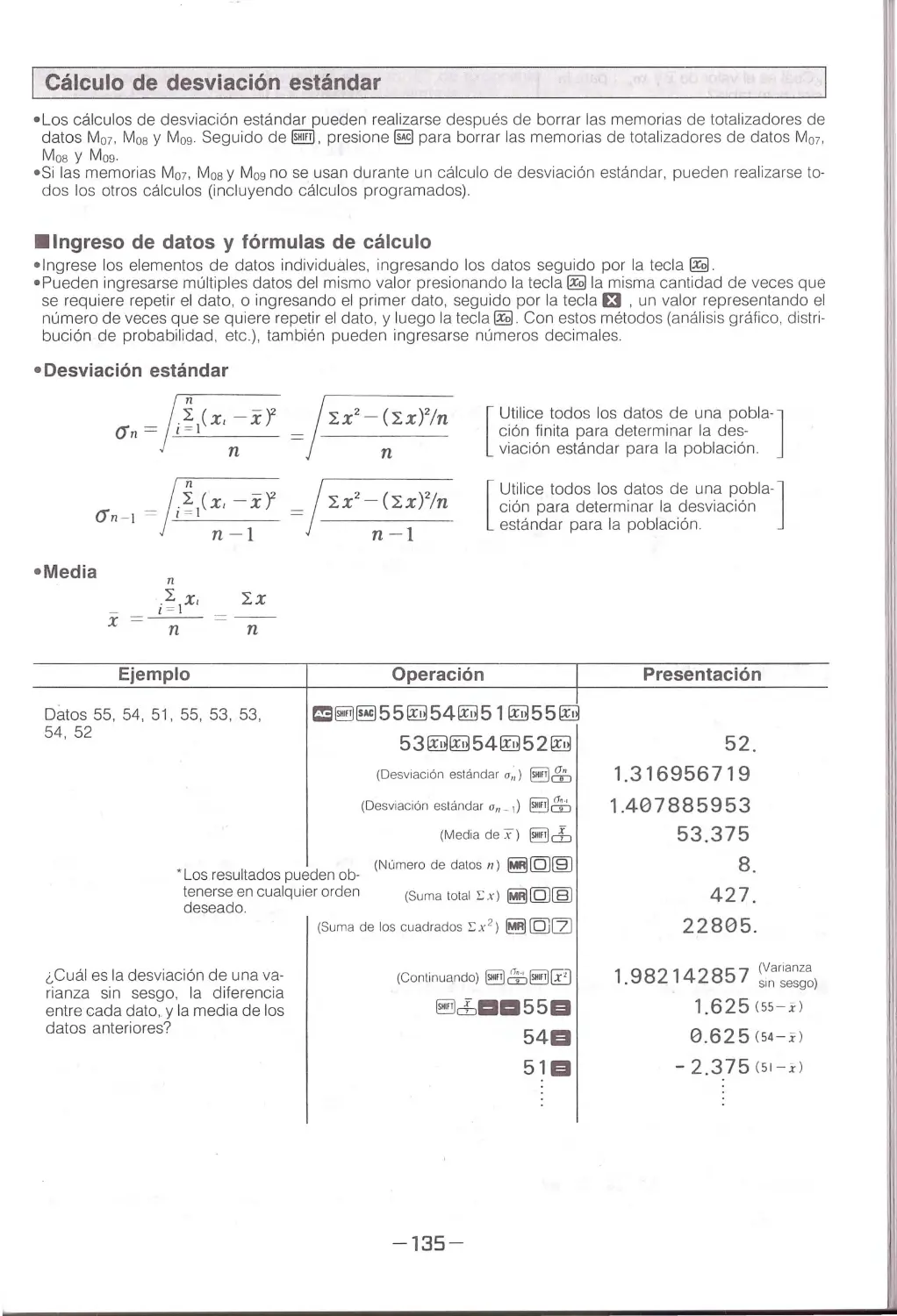
~@11234@1
~2F FFED @l
37777776543
FFD00012

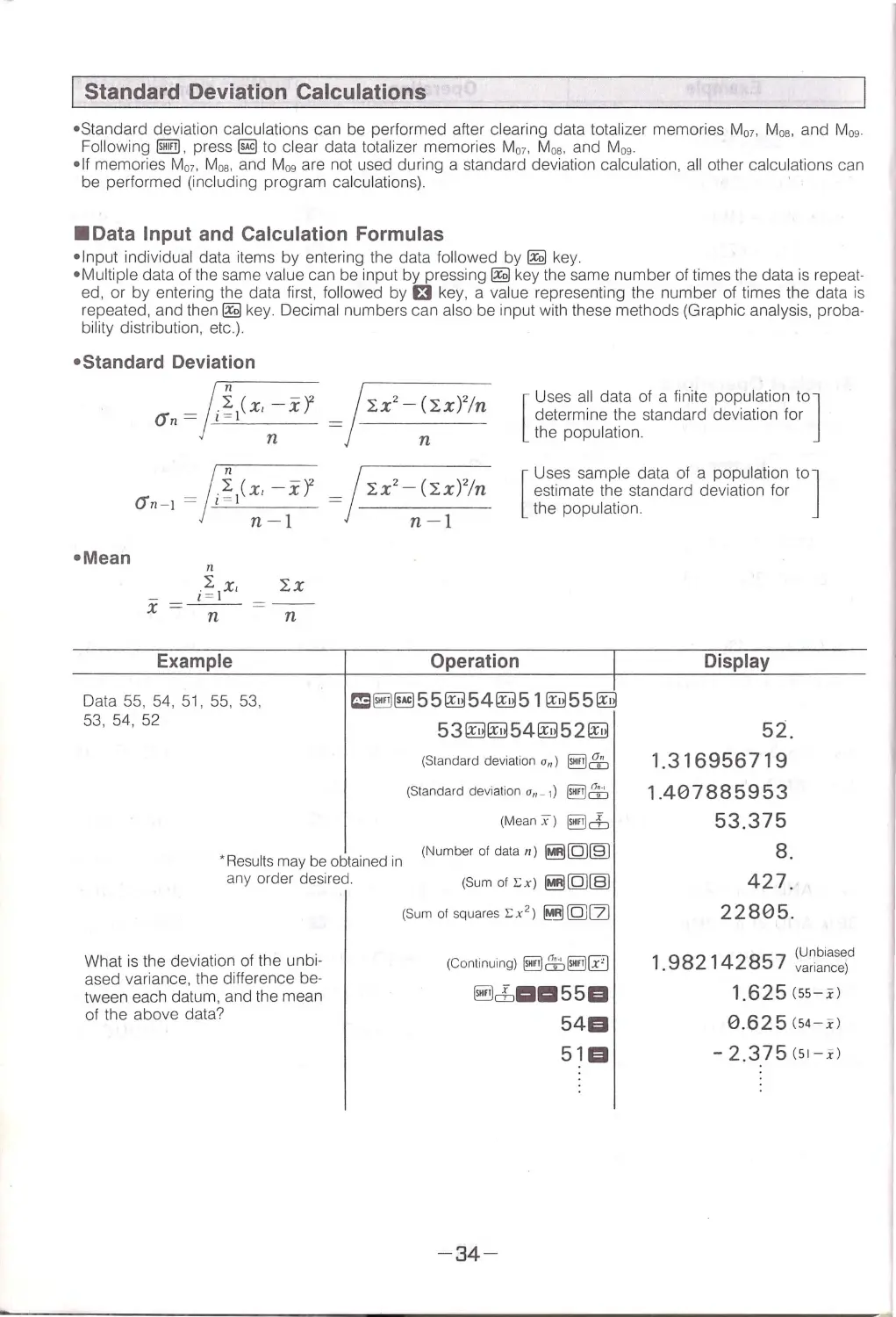
Standard Deviation Calculations
•Stand ar d deviation calculations can be perf ormed after clearing data total izer memories M07 , Mos. and M0g.
Fol l owing~ . press@) to clear data totalizer memori es M07 , Mos. and M0g.
•I f memories M0, , Mos. and M09 are not used during a standard deviati on calculation, all other calcu lations can
be performed (including program calcu lation s).
·
•Data Input and Calculation Formulas
•Input individual data items by entering the data fo ll owed by~ key.
•Multiple data of the same val u e ca n be input by pressing~ key the same number of times the data is repeat·
ed, or by ent eri ng the data first , fol l owed by £t key, a va lue representing the number of times the data is
repeated, and then~ key. Decimal numbers can al so be input with these methods (Graphic analysi s, proba·
bility dist ribution, etc.).
•Standard Deviation
n
<Jn=
l.~ 1(x, -xr
n
lx2 - (lx)2/n
n
[
Uses all data of a finite population to]
determ in e the standard deviation for
the population.
;g 1(x, -x'f = /1x2 -(1x)2/n
n-1
n-1
[
U ses sample data of a population to]
estimate the standard deviation for
the population .
•Mean
n
=
;~ix'
xn
Example
Data 55, 54, 51, 55 , 53,
53, 54, 52
lx
n
Operation
f:S~§l551!!l541!!l51 l!!l551!!l
53[!J[!J 541!!l5 2 [!J
(Standard deviation a,,) ~ &::,
(Standard deviation 0 11 - 1) ~ti)
(Mean x) ~d:,
· Results may be obtained in
any order desi red.
(Number of data 11 ) ~[QJ[§]
(Sum of Ex) ~[QJ~
What is the deviation of the unbi·
ased variance, th e difference be·
tween each datum, and the mean
of the above data?
(Sum of sq uares i::x 2 ) ~[QJ[Z)
(Continu ing) ~ffi~ [£)
~c±iaa 55EI
54EI
5El
-34-
Display
52.
1.316956719
1.407885953
53.375
8.
427.
22805.
(Unbiased
1.982142857 variance)
1.625 (55-. i)
0.625 (54 -i)
-
2.375 (51-x)

What is x and xa,, _ , for the following
table?
Class
Value Frequency
Number
1
110
10
2
130
31
3
150
24
4
170
2
5
190
3
Total
70
~~1101310~
1301331 ~
1501324~
170~~
190~~~
~[Q]§]
~cb
~&
*Erroneous data clear/correction I (Correct data operation: 51 ~)
CD If 50 ~ is ente red . press @Ifill and enter the cor rect data.
0 If 49 ~ was entered p reviously , press 49 @Ifill and enter the correct data.
@ If 51 Et is entered , press 1 ~ or t?il and enter the correct data.
*Erroneous data clear/correction II (Correct data operation: 130£131 ~)
CD If 120£1 is entered, press m and enter the correct data.
0 If 120£131 is entered, press mand enter the correct data.
@ If 120 £130~ is entered. press 120f:t30@lfil) and enter the correct data.
110.
130.
150.
170.
190.
70.
137.7142857
18.42898069
© If 120 £130~ was entered previously, press 120f:t30@lfil) and enter the cor r ect data.
I Manual Alpha Mode
The Alpha mode is generally used when creating programs, and wil l be described in details later on in this
manual. It can also be used for manual calculations to confirm operations, as described b elo w
•Press ~ key in the RUN mode to enter the Alpha (character input) mode ("ALPHA" indicator appears on
the display).
•The Alpha mode differs from the normal mode (when "ALP HA" is not displayed in the RUN mode) . Wh ile
the No rmal mode can be used to perform general calculations, the Alpha mode is a display mode on ly . The
Alpha mode is used to display remarks and the unit of measurement for results obtained by AR, #, and othe r
commands.
•All keys except ~, 1IDJ, lilll . @ . ~, l!I. t?il and §) keys become character or symbol input keys in the
Alpha mode. Characters and symbols are marked in red on the panel surface.
•Characte rs and symbols displayed in the Alpha mode are called "text"
• Text is shown on the upper display screen.
•Key Operations in the Alpha Mode
@ID : Press to use function commands and functions marked on the key panel in light green. Press ~ and
"III" appears on the display. Pr ess ~ again and the "III " disappears from the display.
Press this key in the Alpha mode and "CAPS" appears on the display indicating that the alphabetic character
mode has switched from lowercase to all caps. (The unit is set to lowercase characters afte r ALL RESET
Orm key Ope ration),> I,•,, c
,•J
')
o
IEQJ through ~ (Exclusive of ~, IIDJ, lilll@ and ~) :
v.,. ' •"".
"
Pressing of these keys wi ll result in display of the alphabet in the lower case: pressing them after keying
in Bl will cause display of alphabet in the upper case. .
[IJ through[[), [QJ, c:J, Cl, 1:1, Et, GI:
.,~
'
Pressing of these keys will result in display of numbers or symbols.
Pressing them after keying in Bl will result in the display of key signs shown below the respective keys.
@) : Pressing of this key wil l show exponent sign "E" in the display.
Pressing it after keying in Bl will show the symbol "71" "
a : Pressing of this key will show the "=" sign.
-35-

\,{ !l'\.lo.-::i -.J......
'1--1 -.r ~tv.-.,
81iml:
~~""'""" '\.,C-t..U.~"~~.,;< JJ...e>c.. ""10 g 'lo"nnrr
~\l,,';?e_"- Pressing of this key will generate one space in the display.
' [ §!]OJ,[§!)(]],[§!)[[], [§!)£1 and [§!)Cl: \.. ~u.''
Pressing of these keys will put the calc ~or in 'lhe "RUN" , "WRT ', "PCL" and "1/0" m o d es .
(Changing of unit of angle, execution of [§!)['. ] ['. ] etc. are not possible.)
§),[ill] and lilll:
Same function as in the NORMAL mode.
@@ : Cl ?ar~ - AL'PHA mode.
l'f1 : Command for continuing displayed data. The alphabetical character following the " ; " will b e link ed to
alphabetical character immediately before it.
~ : Memory substitution command. Will substitute contents of specified memory into the ch ar ac ter data and
display it as alphabetical character data.
-
8l'T :
1a.u.t k 11...
Display substitution command. Will substitute displayed number(s) into the alphabetical ch arac ter data ,
and display it as alphabetical character data.
(!) : Clears displayed data . (Will not clear the ALPHA mode.)
rJ3 : Clears both the display and the ALPHA mode.
•Examples for Using " ; '', "#" and .'. ' AR"
\1'o r /\e...to _{;oAe..f\"l-1 '"
• For displaying " ABC" and "abc " in succession (with calculations being performed intermed iately) .
~ 7~CAllID~~
abcABC
0.
m~_~_CfilCfil@J~ 3a201 e~~m I
~~~~~~~~~~~~~
•When having resu lt of " 23 x 5 " being displayed with assigning of unit "x= D D D km".
115.
a:l23t35B~~OOS§JOO[k]@J~ I
x=115km
~~~~~~~~~~~~~
•When having contents of MF-register (already inputted in first example above) being displayed as "FX - D D DP" .
IFX-603P
0.
-36 -

I Section 2 IProgram Calculations
This sectio n focuses o n programmi ng . Spe nd a little time mas teri ng the techniques desc ribed here and your
c alcu lat ions wi ll become more logical and efficie nt.
Required Terms for Program Calculations
· see pages 13 through 18 and 35 through 36 for an explanation of keys required for manual calculations.
Jr---------------- Connector
I])
RUN
DEG
ALPHA
K
CAPS
F::·::-t.03F'
-1 ·-:0 ~4c:- ... -:i r:u-1- i".'1- ·=i ·=i
• ..:.. ·-'
.Jt•I ,_, ... ~.,.
-
-
p
0
Pr og ramkeys ---- . ....-. . .;je;ol j8P1j j7P2I j8P3J j
9
P4 1 IP1_I;
~_A
____
a ____c
____ .o
____ J;: ____B
•
~l1DI IND ~,.. S~V E RJK"l LdAO' Pffi RiSAVI! - RSLOAO ifOiil'
~ !IHLTI ILeLI loorol IGsel lesTI IF s Tl>+:-H- -- Programcommandkeys
•
L_
G
ti
I_
_
___
'
ABS
d/c
-
-
10"
e..
o ~ Iall!,I leNGI B ~ r;;;-1
~NEGKANDLORMXORN ci;cLBfl 0 ~p
1rn T~·r I IhypI •1n~ln I Cr=~·I tj~:n I
AL---.fcio e
)JR c
s0
TE
uF
v
·~ 1;...1 IM•n l T-- 1rMdl r'till
NOT W
X
y
Z
•
A
-37 -

•Key Functions
~Mode keys
·~CD ... "RUN" (RUN Mode)
Use this mode to perform program execution and manual calculations.
·~[]] ... "WA T" (Write Mode)
Use this mode to write programs into the calculator and for checking, additions , deletion s, and editing.
·~[]] ... "PCL" (Program Clear Mode)
Use this mode to clea r a specific program or all programs.
·~[!) ... "DEG" (Degree Mode)
Use this mode to specify degrees as the unit of angular measurement.
·~[]] ... "RAD" (Radian Mode)
Use this mode to specify radians as the unit of angular measurement.
·~[[) ... "GRA" (Grad Mode)
Use this mode to specify grads as the unit of angular measurement.
·~£1 ... "1/0" (110 Mode)
Use this mode for data communications with a cassette recorder, printer, personal computer or other
peripheral.
·~~ ... "R " (MT Reverse Mode)
Use this mode ~C?,c~verse ~he phase when using a cassette tape recorder.
·~ ... .... Alpha Mode EntrylExit ' '' -ot.Lo6"
Use this key to enter or exit character input status (Alpha mode). (See page 35 .)
"ALP HA" appears on the display in the Alpha mode.
PS
P9
~ to ~Program Number Keys (Symbol=~)
A
E
Press a key from ~to(§], or press IE@ followed by a key from ~ to~ to specify a program number from
P5 to P9. You must specify a program number for program calculations.
@ Program Number Keys (Symbol=~)
F
Press~ and a key from [QJ to[[] to specify a program number from P10 to P19. You must specify a program
number for program calculations
~Hyperbolic/Password Specification Key
•Use this key as a command key for hyperbolic and inverse hyperbolic functions.
•In the Write mode(~[]]), press this key fo llowed by §ii (program number) to specify a program as including
a password.
• A password is a secret code consisting of any four Alpha mode characters and symbols . Use English charac-
ters only to specify the password when using RSSAVE/RSLOAD (see page 85). Assign a password to a pro-
gram when you do not want anyone to have access to your program, or to prevent a program from being
altered or accidentally erased. Program contents cannot be viewed or changed by a user who does not know
the password. Calculations can use programs that have passwords, without specifying the password.
DSZ
ISZ
X=O I~O x=F x~F
/_f\ve, \,\«.f " 't'- " O~\,\~ 'l( ~O·"" " uA)
OJ CD CD 0 CTI CD Numeric/Condition Command Keys
,,
L!J~W~L!Jl2..I
Use the numeric keys to input values in the "WRT " and "RUN" modes. In the "WRT" mode. IE@ followed by
one of thes~~t~ e~! t r_x<\!1_e CO)[~:'ISJcflOQipg conditional command.
•@ ~ ... u:ecreliii!nt ana Skip ~n ~ero noo ,._ .; •. <-:
,~'"'
Decrements the Moo register. Skips the next command when the Moo register is 0, or reads next com-
'X( ~;!,,d,.. w.~;i ~, me Mo? register is not o.
• @jig) .. . hrcrem'l!i'it ana Skip on Zero
Q. C /\vi
\.( /\<A
'2 \C .cU.L.' <..
Increments the Moo register. Skips the next command when the Moo register is 0, or reads next com -
mand when the Moo register is not 0. .
''t"' ""\(,._
• @§) ... Reads the next command when the X register (display) is 0, or sKips tlle next command when the
X register is not 0.
•@@ ... Reads the next command when the X register (display) is positive or 0, or skips the next command
when the X register is negative.
• @§) ... Reads the nex t command when the values of the X register and MF register are equal, or skips
the next command when those values are different.
•@Ifill ... Reads the next command when the value of the X register is greater than or equal to the value of
the MF register, or skips the next command when the value of the X register is less than the value
in the MF register.
-3 8-

rSAC,MAC
r.l3 oN All Clear I Standard Deviation Calculation All Clear/Memory All Clear Key
•Press this key to clear all registers except the Mn register. Press to cancel program calculation during execu-
tio n (ind icator on display).
• In the WRT mode, press th is key to clear everything except the Mn register.
• In the PCL mode, press this key to delete the specified program only.
(!I Clear Key
•Press th is key to clear the disp lay.
•In the WR T mode, press this key to clea r disp lay of a program's command step . "C " , itself, cannot be used
in a program.
PAUSE VER ~e\ C\l.AJO't~Q_.
l>t pe-(~ { }' \.......-..~.
~ Halt/Pause/Verify Key
G
•Press this key during program execution to halt th e program.
• In the WRT mode, press this key to stop p rogram execution to input data or disp lay results. When this com-
mand is encountered, " HLT" is displayed and program execution is stopped.
•Following @!W , press this key to temporarily stop program execution. When this command is encountered ,
program execution is stopped for approximately one second and then resumed automatica lly.
•In the RUN mode or 1/0 mode, ~ followed by this key checks program and memory contents recorded
on cassette tape.
,
IND PRT ~- )(~' l''"'f\
~ Label/Indirect / Print Key
H
• In the WRT mode, p ress thi s key to write the jump destin ation number fo r an unconditional jump.
•Foll owi ng @!W , press th is key to spec ify the indirect address of a memory and the indirect destination number
for a manual jump.
• In the WRT mode , press this key following @!W to specify the memory, unconditional 1ump and indirect address
of the subrou tine.
•Press ~ followed by this key in the RUN mode or 1/0 mode to print the program , memory contents or display.
SAYE P()(E
~0.it" U:J b ~l "--
\,CO cU C: l!-Ll' I\ J..().J. 'C
c~g(<i rt,:: o' < S;:_ t \<( 1_,cCc.1
~ GotoISaveIPoke Key
I
•P ress this key to perform a manual jump wh il e p rogram execution is stopped by a " HL T " command .
•In the WRT mode, press this key to wri te an unconditional jump command.
• While connected to an FA-6 , press this key following @!W to record the contents of the Mn register to cassette tape.
•In the WRT mode, press this key following @!W to write a command to record the contents of the Mn register
to cassette tape.
• Following@!W , p ress this key in the 1/0 mode w h ile connected to a FA-6 to record a program stored in memory
to cassette tape.
•In the WRT mode, ~ fo ll owed by this key w rites data to the specified address.
LOAD PEEK
~ vvr'\f' r-;
. 'i,
~0.A.f-r-
\l.N J..,I (1 ll..Ll'\· , v> ,l~1 (,
~ Gosub/Load/Peek Key
J
•Press this key to perfo rm program debug (see page 50).
• In the WRT mode , p ress this key to write a subroutine call command.
).,
(_
•W hi le connected to an FA-6, press t~s key following @!W to return data from a cassette tape to the Mn register.
• In the WRT mode, p ress this key fo ll owing @!W to write a command to recall data recorded on a cassette tape
to the Mn register.
•W hi le connected to a FA-6 , press this key following @!Win the I /0 mode to reca ll program contents recorded
on cassette tape.
•Press ~ followed by this key in the RUN mode to call memory contents specified by an address.
RSSAYE
<'Jc;(: ,ll'··
.J... .,I;
RS- \'-( c:,..C'( c\ Sp-\Cc- 1-o ..\&-i"
~ Back Step / RSSAVE Key
''('•.:or·(-. ' i• CO'"i".
~,, ' 1c'
"
\, '.)'I '.(! ') rI1 ;_( '.L' ._
(.·'~\.:)
•Press this key du rin g debug to see the program command that was el< ecuted. The execution command is
d isplayed while the key is pressed.
•P ress this key to return to the previous step in a program bei ng written or checked in the WRT mode. Press
and hold down th e key to back step at high speed .
•In the RUN or 1/0 mode, p ress this key fo ll owing @!W to send the contents of memory and programs to a
pe rsona l computer or anoth er FX-603P throug h an RS-232C terminal.
-39-

RSLOAD NOP
~ Forward Step/RSLOAD/NOP Key
•Press this key during debug to execute the program step-by -step.
/
• Press this key in the WRT mode when checking the program to advance to the next step of th e program .
Press and hold down the key to forward step at high speed .
/
•In the RUN or 1/0 mode, press this key following~ to receive the memory conte7fs and programs from
a personal computer or another FX-603P , via the RS-232C port .
•In the WRT mode, M followed by this key writes an NOP command into the prog/am. This command ad-
vances the program one step only and has no effect on the program. Use the NOP command as a dummy
command to ignore a skip after writing an ISZ or DSZ, or to debug a program./
~ n. Lu> I\ 1. ,lU/tb
~ Execute Key
{
•Press th is key to restart the program while " HLT " is displayed, indicating a hCjlt in program execution.
,
•In the WRT mode, press this key to write a command to establish a link with the r -6 linkage for programmed
input or output of data from a cassette tape .
C~nn~~tor
~
• l "'frlcon'rtMlton w1th the FA-6 Interface Unit. 1!?. r~c< ~.),A fA- 6 .
•Program Steps and Command Display
• Th is unit has a range of 6, 144 steps a nd a maxim um of 20 programs (PO to P19) can be stored in memory.
•T he number of the program being used and th e number of remaining steps can be confirmed as follows.
~~'~§]
or~EI
89
67*9
5500
Y--<>" - ~
~c;: CA !;, '\.UJ..l . < . C,.\ ""-~"'-.,,._g
Number of remaining steps
'\H 1;,0 A<i.," (,c," ' ·"&
·
\\)0-UJllp~ "'·(>·~pc>.IJJ., ~~'J..\<'2.
~~--~-~---~-- used program number (asterisk in-
dicates program with password)
l\.-'"d'-''l 1' f~''.~ l~\"°'\..\'Ja.u.o.(_ c.. 1,,\ e-~~o ~\O...v...
• During writin g or checking of a program, commands that have been w ri tten are show n on the display. Th e
number of the command located at the lower ri ght of the display is shown in the upper rig ht.
Step number of "2" at far right of
lowe r display
~'f?O (e I\
One space between steps
• During debugging (see page 50), the current program number is shown to the left of the upper display. The
program number is separated from th e commands in the program by a space.
F
One space to separates prog ram number and command
MinF3vx
x2=HLT2
0012
MR
v
~-----Program number

• Basically, each function requires a sing le step, b ut there are some commands where a. single function requ ires
multiple steps .
• One function / one step
Numbers (0 to 9), ( ,), +I - , calculation keys (+, - , x, + ), ( ) , scientific functions (sin, cos, log, etc.), let-
ters," .", HLT, PAUSE, NOP, RND. EXE , SEXE, PO to P9, MOO to M19, MF, MIF, etc.
• One function / two steps
Fractions, FIX, BASE-N commands, VER , PRT , RSSAVE , RSLOAD , FEXE , P10 to P19 , GSB10 to GSB19 ,
memories above M20
• One function/six steps
P~E~ o~.n1d PgK~ ~2,,s~eps,+~~v ~\eps for 4-dig it address)
,
Ste ps are also" required to specify a program number and enter a password.
• Program number PO to P9: 1 step
•Program numbe r P10 to P19 : 2 steps
•Password entry (per program): 5 steps
Example: Program number 12 , which has a password , uses 7 steps (2 steps + 5 steps).
I What Is A Program?
• T he foll owi ng outlin es the fu ndamental steps for creating a prog ram.
(1) Preparation
Consider the problem and determine the formula.
(2) Programming
Incorporate the formu la into a program.
(3) Program Input
Store the finished program in the calculator.
(4) Program Execution
Execute the program to perform the calcu lation.
The fol lowing examples il lustrate this procedure.
Example: Find the surface area and volume of a regular octahedron when the length of one side is given.
Length of
Surface a rea (S)
Volume (V)
one side (a)
10cm
(
)cm 2
(
)cm 3
7
(
)
(
)
15
(
)
(
)
(1) Formulas
For surface area S, volu me V, and o ne side a, the formulas for calculating Sand V of a regul a r octahedron are:
S= 2.J3a2
G ~\Wt•..(
' ' (~J\';r.~o~r~'ll'r}!:'~ p '-\ '\. \A.v4 >'LC· /lD ',· v , '-' '" · J
,;;
~ ~c:\.lc...,( \~;"--(, dc "._,, ' i
The key operation to manually calculate the· above formula is:
'~•,'.
'
Pc..r I.«
2£t3@ 0£t Numeric value a@~a-+ S
2@0 0313 Numeric valu e a@63S -+ V
./.(J'"'-'
\"'.'
In the above example, numeric va lue a is used twice, so it ma ke s sense to store it in memory F before the
calculations.i,, ·; .., ., , , .- .1 ~ ,
·1
· 1 ""c >••uN umeric value a ~~2£t3@0£t~~@~a -+ S
p,,, >) 2@003£t~~~63S-+ v
With th is unit, the operations performed for manual C'lalcu lations can be used as they are in a program. Once
program execution starts , it will continue without stopping. You must use the "HLT" command \p stop the p ro-
gram to input data and to display results .
~. "' .. 0 IA..tl,,,
~·oe?CT,u cl.I
-~,~ (.:(,~._Q .-c , ,> - I
l\
'(. -~,..n -41- (
( (,,trr\'fl(~
r'
t._x...
\ - "'D(._Llv\ \'""
.l
__

To store the previous program in PO:
{,'- ,br; PO
-
i
HLT, Min F, 2, x, 3,SHIFTr, X,MR F, SHIFTx 2 , =, HLT, 2,SHIFTr, +, 3, x,
i
i
-
1,.., 1 ': 111 ;1~ 1Program
,U'· 1t'~
number
To input
data
To see the result
"'
·
......
required
"f ll'; '
rG '"·:
.
~...'·~ t .o.'"r-1·_, ...
MR F, SHIFTx', 3, =, HLT,
i
To see the result
(21 steps)
ti ~\ l~! .,A \-'A (.).''.\" ·@'-.
j C(~
· commas have been in serted between steps in this manual and the supplemental program library for easier
understanding.
(3) Program Input
To store a program in the calculator...
(1) Enter ~rn to select th e WRT mode.
If a program is already stored under the number you want to use to store a program, you must
change the number or delete the previous program. (See Erasing Programs, and Changing Pro-
gram numbers, page 53.)
(2) Press the keys to enter commands as they appear sequentially in the program. Press 8 and
re-enter the correct data if you make a mistake.
Operation
Display
WRT
6144
P1-0123456789
p 0123456789
WRT (Omitted below) 6143
P0
0001
HLT
0002
HLT MinF
0003
HLT.MinF 2
t3
0004
HLTMinF2x
-42-
,·

0005
HLTMinF2x3
0006
HLTMinF2x3r
Et
0007
H
LTMinF2x3rx
0008
HLT M
inF2x3rxMRF
0009
HL T MinF
2x3rxMRFx2
a
0010
HLT MinF 2
x3rxMRFx2=
0011
HLTMinF2x3
rxMRFx2=HLT
0012
HLTMinF2x3r
xMRFx2=HLT2
0013
TMinF2x3rx
MRFx2=HLT2r
0014
MinF2x3rxMR
Fx2=HLT2r.;.
0015
F2x3rxMRF
x2=HLT2r.;.3
Et
0016
2x3rxMRFx2
= HLT2r.;.3x
-43 -

Operation
Display
0017
3vxMRFx2=H
LT2v.;.3 xMRF
0018
x MRF x2 =HLT
2v.;.3 xMRFXy
0019
MRFx2 =HLT2
v
3xMRFxy3
0020
RFx2 =HLT2v
·'
3xMRFxy3=
0021
2
=HLT2v 3
xMRFxy3=HLT
RUN
0.
• 1n the WRT mode, each press of a key stores the command assigned to that key into the program memory
as part of a program. The command stored into memory as wel l as the number of steps used up to that point
are shown on the display. Also note that program execution stops automatically when the end of the program
is reached, so a HL T command at the end of the program is not necessa ry.
(4) Program Execution
To use the stored program and perform calculations:
(1) Enter ~OJ to select the RUN mode.
(2) Specify the program number(~ to~.~~ to~~.~@] to~[[]).
(3) If the program is stopped by a "HLT " command, inpu t data (or read the resu lt) and press@].
(4) Respecify the program number if you want to repeat the calculation.
(5) Press ~OJ to stop program execution or clear "H LT" .
.
-4 4-

The surface (S) and volume (V) for the regular octahedron in the sample problem are calcu lated as:
Operation
(Prog ram number
~
specification)
10~
(Continuing)
(To repeat the
~
calculation)
(a)
7~
(Co ntinuing)
(a)
15~
I
Length of
Surface area (S)
one side (a)
10cm
(346.4101615)cm 2
7
(169.7409791)
15
(779.4228634)
Display
AUN
0.
AUN (Omilled below)
HLT
0.
346.4101615
471.4045208
471. 4045208
169.7409791
161.6917506
161.6917506
779.4228634
- 45-
Volume (V)
(4 71.4045208)cm3
(161.6917506)
(1590.990258)
( Not required if already in the )
"RUN" mode.
(S when a= 10)
(V when a= 10)
(S when a= 7)
(V when a= 7)
(S when a= 15)

Operation
(Ends program
calculat ion)
Display
(V when a= 15)
1590.990258
RUN
0.
~ " HLT " disappears
• If execution is ha lted by HLT, enter data or read the resu lt and then press @)
Program Checking and Editing (Correction, Addition, Deletion)
Example:
Find the surface area and volume of a reg ul a r tetrahedron when the length of one side is given.
Length of
Surface area (S)
Volume (V)
one side (a)
10cm
(173.2050808)cm2
(1 17.8511302)cm3
7.5
(97.42785793)
(49.71844555)
20
(692.820323 )
(942.8090416)
(1) Formulas
For surface area S, volume V, and one side a, the formulas that calculate Sand V for a regular tetrahedron are:
S =/3a2
(2) Programming
The foll owing procedure sto res numeric value a in memory F and assigns to prog ram number P1.
Pl. HLT Min F
3 SHIFT v
I
X MRF SHIFTx2
I
HLT 2 SHIFT v
I
2
= HLT / (20 steps)
X MRF SHIFTxY
I
3
This program may be e nte red into th e calcu lator anew. Howeve r , b eca use th is program is simi la r to the pro-
gram for a reg ular octahedron on page 41 , it is easie r to edit our original program.
(3) Program Check and Edit
Select the WRT mode, specify the program number , and press lllil or !ill) to display th e number of steps and
program contents. Di splay the step you want to change in the previously input program.
Fi rst, compare both the octahedron program and the tetrahedron program.
1. Change the prog ram number from PO to P1 .
2. Delete "2, x ".
3. Change the "3" of "-o-, 3, x," to "1 , 2,"
-46-

Operation
~\J,
(C~ll prog ram PO .) ~
Change p rogram
number
(Program check) . @TI
C.. t ( V \,('I(,'''·
(Program c hec k
@TI
Abbreviated below)
(Delete "2" .)
(Delete "x" .)
Cf]
Display
WRT
6122
P1-0123456789
p _123456789
WAT (Omitt ed below) 6122
P0
6122
p
6122
P1
0001
HLT
0002
HLT MinF
0003
HLT MinF 2
0002
HLT MinF
0003
HLT MinF x
0002
HLT MinF
0003
HLT MinF 3
- 47-
(Moves program PO to prog ra m P1 , may
be om itted if you do not want to maintain
contents of prog ram PO.)
\.
\
(M oves to previous command when "2 "
disappears.)

Operation
Display
0004
HLTMinF3r
Presslillltoadvanceto"2v+".
0012
HLTMinF3y xMR
Fx2 =HLT2y7
0013
TMinF3y xMRF
x2=HLT2y73
(Delete " 3" .)
W
0012
HLTMinF3y xMR
Fx2 =HLT2y7
(Addition)
ITJ
0013
TMinF3y xMRF
x2=HLT2y71
(Additi on)
~
0014
MinF3yxMRFx
2
=HLT2y712
0015
inf3yxMRFx2
=HLT2y712x
Pr ess lilll to advance to "3 =HLT " .
0020
=
HLT2y 12
xMRFxy3=HLT
(Look at beginning [ill)
6122
of program .)
P1
(Look at b eginning [ill)
of program .)
0001
HLT
-48-
(Can also hold down lill]. If you go too far,
press lillJ to return.)
(HLT is 20th step .)
(Return to beginning; number of remain -
ing st eps display)

(Look at beginning @D
0002
o f program.)
HLT MinF
(Back up one step.) @]
0001
HLT
(Back up one step .) @]
6122
P1
(Back up one step .) @]
0020
=HLT2..;
12
xMRFxy3=HLT
(Back up one step.) @]
0019
Fx2 =HLT2..;
.;.
12xMRF
RUN
Summary of Program C~eck ~'l Q.... -
(1) Press ~[]] to ente r the WRT mode.
xy3=
0.
(2) Enter the number of the program you wa nt to check.
(3) Press IIDJ or lill] to display a command.
Hold do wn IIDJ /@!J to scro ll through the program.
Note: See page 65 for checks of programs with passwords.
Summary of Program Editing
(1) Use program c heck to display the step to be edited.
(Return to begi nning; numbe r of remain-
ing steps display)
(Program chec k from program end)
(2) For deletions, display the step you want to delete and press m.
(3) For modifications, display the step you want to change, delete with m, and ente r the correct data.
(4) For additio ns, display the step immediately preceding the addition and then en ter the additional
step. Addition s w hi ch cause the maximum number of steps to be exceeded cannot be saved.
•Additions a nd deletio ns may be perfo rm ed in any order. Performing additions and deletions auto-
matically changes the number of steps in the program.
- 49-

(4) Program Execution
Operation
(Program number
IEIJ
specification)
10~
~ repeated below
I Program Debugging
Display
RUN
(Not requ ired if already in " RUN " mode.)
0.
RUN (Omitted below)
HLT
0.
(S when a= 10)
173. 2050808
(Vwhena=10)
117.8511302
Program debugging is accomplished by entering simple data fo r program execution and executing the pro-
g ram one step at a time Program er ror s are detected by checking the program at each step.
Summary of Debugging
(1) Press ~[IJ to enter the RUN mode.
(2) Press lillJ a nd enter the number of the program you want to debug.
(3) Each press of lillJ executes one step of the p rogram. Input data and press lillJ when "HLT " ap-
pears on the display.
(4) Press and hold down@) to display the program command that was executed and the number
of steps.
(5) Perform (3) and (4) as required to check the program.
*(3) and (4) can be performed even during normal program execution (from the position th e prog ram
was stopped by HLT) . ~can be pressed during debugging to resume normal program executio n.
Note: See page 65 for debugging of programs with password s.
Example: Debugging the previou s program .
Operation
(Debug start)
Ci ""?°"
.
!>.'\ _, "'-l"' '\. \!,(.:: .•
L rv'\ \cr"> .Oll 1i
P1
Display
RUN
0.
RUN (Omitted below)
-50-
(Not required if al ready in "RUN " mode .)

(Data)
2
9 I'.\·. \,(,\\,l
(
(Press and hol d down @!)
to check c ommand .)
P1
HLT
0.
HLT
2.
2.
3.
1. 732050808
0004
HLTMinF3v
1. 732050808
2.
4.
6.92820323
HLT
6.92820323
2.
-51. -
(HLT is 1st step.)
(Input simple data.)
H ..( ~{'"L.(A x:
(Min F is 2nd step.)
(Value "3" is 3rd step.)
(Vis 4th step .)
(x is 5th step.)
(MRF is 6th step.)
(x 2 is 7th step.)
(= is 8th step.)
(HLT is 9th step.) S when a=2
(Value "2" is 10th step.)

(Press and hold down to ~
check command.)
(Press and hold down to ~
check command.)
(Press and hold down to ~
check command .)
(Press and hold down to ~
check command.)
1.414213562
1.414213562
0012
P1MinF3vxMR
Fx2 =HLT2v.;.
1.
12.
0.11785113
0015
P13vxMRFx2
=HLT2v.;.12x
2.
0016
P1xMRFx2=HL
T2v.;.12xMRF
2.
0017
P1RFx2 =HLT2
v
12xMRFx1
HLT
0.942809041
-52-
(V is 11th step.)
( 7 is 12th step.)
(Value " 1" is 13th step.)
(Value " 2 " is 14th step.)
( x is 15th step.)
(MRF is 16th step.)
(x ,. is 17th step.)
Vwhena=2

Erasing Programs
•Erasing All Programs '
Enter the PCL mode (~00) and then press @m~.
Note: Programs with passwords will also be deleted.
Values in independent memories (Mn r egister) will not be erased. Clear the Mn register us·
ing @m~ illJh&~N mode.
•Erasing a Single45rograrli"-f -"' -U1..
Enter th e PCL mode and specify the program number ((Brlil ).
Note: See page 66 for the procedure to delete programs with passwords.
Changing Program Numbers
A program number from PO to P19 is required at the beginning of all programs, and1he same program number
c annot be used for two different programs. If PO is already used by a program and you want to store another
program under PO, change the program number of the program in memory to make PO available for the new
program.
To Change a Program Number
(1) Press ~[]] to enter the WRT mode and then specify the current program number for the pro·
gram you want to renumber.
·
(2) Press l!1
(3) Specify the new program number.
If the number specified is al ready being used for storage of a p r ogram, you won't be able to
store the program. Use a number that is currently available.
(4) Enter the RUN mode (~OJ) or the WRT mode (~[]])
Example 1: Change program number PO to program number P9.
~m~m@~~rn
Example 2: Move program number PS to program number P6.
~(]]@~l!J@~~[j]
Note: See page 66 for details on handli ng programs with passwords.
Constructing Programs
In this section , a number of possible methods for solving a particular problem are given, along with their relative
strengths and weaknesses .
Example:
Calculate the length of arc (/) and the length of chord a for a sector with
a central angle of e 0 and radius (r).
l rnB
·
B
=~
a=2rsin 2
it
.
~\ ~2
-53-

•Procedures
Procedures
Program
Sequence I \1 ,, "It}
I
~
PO MOOE 4, HLT,
2 r@!
Min01,X ,HLT,
A
3 (}@!-->l
Min02,X ,SHIFT7l:,
1'8,0,=,HLT,
.'
4
@--a
MR02,+,2, =,sin, X,2, X,MR01,
(PO)
=
'
24 steps+1 step
Sequence
Ir~
PO MOOE 4, Min 01, X, HLT,
B
2 (}@)-->l
Min02,x,SHIFT7l:, -;-, 1,8,0, = , HLT,
3 @!->a
MR 02,
.'
2, =, sin, X,2,X,MR01,
(PO)
=
'
23steps+1 step
Sequence
I r ~[Q)CIJ
2 (} ~[Q)~
c
3 ~---l POMOOE4,MR01,X ,SHIFT7l:, X ,MR02,
1'
/
.'
8, 0, =, HLT,
(PO)
4
@!->a
MR 02, +, 2, =, sin, X, 2, X, MR 01, =, 22steps+1 step
Seque nce
Ir~
PO Min 01,
1 step
2 II~
P1 Min02,MOOE4,
2 steps
D
3 ~---l P2 MR 01, X,~lfT1C, X,MR02,+,1,8,O,=,1G"p;("°]
4
~--a P3 MR 02,
-:-'2,
·
2
Pl
=
'
sm,X,
, X,MR01, 10steps PZ
P3
=
'
Total 23 steps+4 steps
•Strengths and Weaknesses of Programs
Program A (Standard Program)
•A fter the program number is specified, standardization using a data~ or~ operation makes the p r ogram
easy to u nderstand.
•Many othe r programs can be inco rporated into this program (maximum of 20) .
•Small number of steps .
•Partial changes of data or viewing of partial results is impossible because the procedure is fixed.
Program B (Variation of Program A)
,:,~,"' ,,,,·~v'
c110°,,, ,..;;
•Standardization is no t as good as in program A. Other aspects are the same as program A.
Program C (complicayap 1 dm~, input)
,
•Program Chas the smallest ·numb.er of steps.
1
•Many other programs can be inctJrp'or§ted ' /n'to t~is Qr9Q!<j!Q(
•Data must be rnput to many memorres. before the program can be executed. Data input is troublesome and
prone to mistakes.
'
c '· .tJ_)~,
~·. \.•
Ol1M..•. \'.
..q.~1
\ t,O -U,'~ 9 {; <'"'\ 1; :.(
,.,
J.
Progra'!' ~l"tt~~ fy_ncti~n ,!~r""-aH vt.. .
,1... -
:c
--i
•
\_ r-
,_
)
•Data rnput can be performed. at any pornt rn the program because~ has many functions. This is also true
for viewing of results .
!; ~ ''"r",.
-. e;o ~·c ,..., ..t, ,,
Q.. \ O'\ ~ ,(,..,.
. 'r'-
CL '-,'
-54-

(I~
"f
c
\~
•Partial changes~of data and vieyvi n~ _of suqseq u eJ;; result s are{,extremely easy.
•Program D ha s the greatl:i st nti m~er-df step'$' '' -
''-' ,.,, .,.
.
·~is insufficient fo r programs that ha ve a lot of input data and calcu lation re sul ts .@~ must be used when
there are six or more program numbers.. -
co,;~ ._e ,zc"'
•Program D is not suitable for h an dl ing multiple programs.
t<'{'
'\./.) <..u~ C."..
The variou s strengths and weakness of the different types of programs make it impossible to sta te w hic h type
1s the best.
Type A is used for general explanatio ns in this manual an d the suppleme ntal library, while type Dor other types
are used for calculations .
\· ';_)•. ell.C:... · . -. <. .\ s_)
\..
'
I Programming and Operation Rules
•Formulas
•Formul as can be incorporated into programs as they are performed manually (true algebraic logic).
•Programmed functions can be incorporated into prog ram s.
• Th ere is no limit to the length of a formula.
•Any number of constants can be inc luded in one formul a. Mantissas are limited to ten digits and exponents
are li mited to two digits. On e digit is one step (decimal point, +I - , and exponent are also one step eac h) .
•Constant calculations ( + +, xx, x , . x , . , etc.) can be incorporated into programs and execution is th e same
as manual calculation.
},•\k.UC(,
•During Program Write ("WRT" displayed)
•T he keys that are operational immediately after entry into the WRT mode are ~ to lBJ , @~to@~ . ~~
to ~~, ~[]l ~ 13 and ~ (fo r programs with passwo rd s).
•T he step number displayed when "WRT" appears on the display is the write step number, except for~ at
the beginning of th e program . The Pn is also w ritt en into program memory . Th is uses one or two steps. For
program s with passwords , six or seven steps are used.
• If the w rite step disappears during program w rit e, further w ri ting is impossible, but prev iously en tered data
is not erased.
•The function input range and parentheses level overflow are not checked during "WRT " , but these errors can
be generated during program execution.
•Press ~tolBJ , @~to@~ , ~(]]to~~ (Pn specification) , ~CD to ~[]]or ~ 13 in "WRT" to fin ish
program w riting. You may then writ e to a new program number or switch to a different mode.
• Th e last HLTin the program i s not necessary . If there is no HLT, the last command is exec uted and th e p ro-
gram ends as displ ayed.
•During Program Execution ("RUN" displayed)
• If a ~ key is pressed for a program that does not e xist in memory , no action is taken
•Manual calculation (interrupt calculation) can be performed before or during the start of program execution
w hen the program is stopped . Manual calculation result s can be input as data and display re sults can be u sed
in calculatio ns. However , when the program is stopped during execution of a fo rmula or when a displayed
va lu e is to be used in a subsequent calculation , you must perform the interrupt calculation and return to the
previous sta tus before re-starting the program.
• Press r!!I wh en the p rog ram is stopped to retain th e prog ram step s, and to clear displayed valu es and calcu la-
tio n commands. Pr ess r!!I during execu ti on (wh en on ly symbols are shown on the display) to terminate pro-
gram exec ution. U se this feature to terminate prog rams tha t hav e extremely long program calcu lations or endl ess
loops.
•Press lffi!] during prog ram execution (wh en on ly symbol s are shown on th e display) to susp end prog ram exe -
cution at the step that was being executed. Thi s is the same as pressing lffi!] during a pause. Use thi s proce-
dure to debug program s during execution.
•Th e foll owing conditions cause errors ("Error " displayed) during program execution:
(1) A calculation re sult or memory contents with too many digit s.
(2) A function or a result in excess of the input range.
(3) A non-ex istent jump destination specifi ed by~ .
(4) A n on-existent subroutin e specified by B ((3) and (4) produce "Go Error" display.)
(5) Overflow of Ln reg ister for parenth eses and calcul ations du ring exec uti on. {This produ ces a"( ) Err or" display.)
All of th e abov e stop prog ram execution , and display th e "Error " message al ong with the program ste p nu mber
that cau sed the error . Exit the error conditions by p ressing r!!I (l!I can also be used in 5) and press@] to check
the command code th at cau sed the erro r.
* Programs with passwords cannot be checked.
• W hen te xt is used for comments, the display disappears du ring program execu tion.
-SS-

Programs with Remarks Display Using Text
• See the Manual Alpha Mode on page 35 for details concerning text objectives , and key operations during
the Alpha mode.
• P ress ~ to ent!?r the Alpha mode in the RUN mode, after IEJ specification in the WRT mode, or after a save,
load or PRT specification in the I/ 0 mode. This permits input of text.
•" A LPH A " is shown on the right of the upper display while the unit is in the Alpha mode.
•Selecting the Alpha mode in the WRT mode displays " "" " ,, " is displayed when Alpha mode is exited,
and the characters betwee n """ a nd ",, .. are all text. Numbe rs a nd calculation sy mbols a re displayed as
is a nd calculations a re not affected.
I
Alpha mode start
WRT
0008
I
I
Text Alpha mode exit
(Continuing above ope ration) ~ ITJ~
I """
HLT
12x3~
0.
~operation in this manual and the supplementary library is denoted by "AL .for Alpha mode st art
and AL" for Alpha mode exit.
•Text Program Execution
• Write text in a program and execute the program to display text as described below.
1. When there are 16 or fewer c haracters . a ll of th e characters a re d isplayed as the te xt prog ram is executed.
2 . When there are 17 or more characters, the fir st 11 characters are displayed for a pproxim at ely two sec onds,
a nd then the characters scroll to the left in approximately half-second interva ls until all characters have been
shown. Th e last 16 characters remain on the display at the end of te xt display.
Example: Write text "AL abcdefghijklmn ... xyz AL " to P3.
~ITJE] ->
RUN
-
ALPHA
abcdefgh
....... /
1 \ .......
jklmnop
0.
-
56-
Displayed when there is more text
to be displayed (approxim ately 2
seco nd s)

RUN
bcdefgh i j k lmnopq
0.
RUN
cdefgh jklmnopqr
0.
Text scro ll s off left side of display
RUN
jklmnopqrstuvwxy
0.
RUN
klmnopqrstuvwxyz
0.
Text scrolls to the left in approxi-
mately half-second inte r vals
End of text display
Note: Press !Hill while text is scrolling to the left to suspend movement. Then , each press of [ill] scrolls the text
to the left, one character at a time. Press !ilil to return to character scrol ling.
• A fter text prog ram execution, the prog ram executes the next command and the text display continues and
the lower ca lc ul ation display is also retained.
Note: U se thi s function to display contents and the name of a ca lculation as r emarks du ring long program
ca lcu lations.
• The lower ca lcu lat ion display is not affected by text program execution , so text and numbers can be handled
at the same time without creating a special program.
• Affect of Text Displays on Subsequent Displays
The fol lowing examples illustrate the affect of text displays on the displays of subsequent operations.
(1) Text display
Once text is displayed, it remains displayed even if it is fo ll owed in the program by numeric input, fu nction exe-
cution, or a ca lc ul ation command.
Example: Program the fol lowing in program area PO and execute.
PO "AL , a,=, AL ", MR01, (, 123,), SHIFT PAUSE,+, 30, sin
Ia=
I
r~~~r;ent~· ~; ~~m~~' 1
,,,,
01 ("123")
123.
~~~~~~~~~~~~~
0.5
-5 7-

(2) Clearing text displayed during program execution
a. Text is cleared by the display of a new calculation result or numeric input.
Example: Program the following in program area PO and execute. Then enter the value 789.
PO"AL,a, =,AL",123, x,456,
7 8 9 (Register)
I~··---~I ,p,og,,m '~""'
-
56088.
.
).., of\,,:, f:iC ob
~-----------~ (New entry)
·-
789.
b. While program execution is stopped by a H!- T command, pressing the @] key to advance to the
next command clears the text display.
Example: Program the fo ll owing in program area PO and execute Pres s @I follow in g execution of the HLT
command.
POAC,"AL, i,n, p,u. t, a-SSPACE, CAPSA, AL",HLT,MinOO
123 (Register)
•
HLT
I (Pro.mpt for input) .
°lvlC\ C [.._CL,.:~ Q_ <.:.'~).
~i_n_p_u_t_A
___
0_·_~ c
v
HLT
input A
123.
123.
(Input of 123)
(Execution resumed)
~1(\..\),,0/\.. ,(fo\\J.1 .£ _ ,.
c. Input of new text while text is displayed clears the initially displayed text.
Example: Program the fo ll owing in program area PO and execute. Then ente r the c haracter "d "
PO"AL,a,b,c,AL"
~rn~
(Program resu lt)
0.
ALPHA
(New input)
0.
-58-

Note : Starting ne w text input with a semicolon causes the new text to be appended to the end of the existing text.
Example: Program the following in program area PO and execute. Then enter " ; d"
PO"AL,a,b,c,AL"
~rn~
I~•_b _c
_____
0_._~I {Pmg"m ''" "" '
I~•_b _c_d _ ___~·-···-~1 {New iopc•)
(3) Clearing a text display
a. Press the (!I key to clear text from the display at any time while inputting text in the ALPHA mode.
Example : Enter the following "a b c" 123 " (!I
~[]J[fil©~
123~
ALPHA
123.
ALPHA
123.
Note : Pressing the l!I key while the unit is not in the ALPHA mode causes the numeric input only to be cleared.
Example: Enter the following "a b c" 123 (!I
~[]J[fil©~
123
123.
0.
b. Pressing the FD key while inputting text in the ALPHA mode clears the text and exits the ALPHA mode.
Exampl e: Enter the fol l owing. "a b c" 123 " FD
~[]J[fil©~
ALPHA
123~
123.
-
59-

0.
Note: Even though the ALPHA mode is exited by pressi ng the mil key , the te xt that was clear ed from the dis-
p lay is sti ll r etained intern.al ly.· Re-entering the ALPHA mode and then inputti ng a sem icol on displays the
text that was originally cleared.
Example: Enter the foll owing. " ab c" 123 mil
i23
I•bc
_____.I .
.
~123.· I
' ~ @J lli)@]~
ALPHA
0.
c. While text and numeric input is displayed, entering a null (by pressing@@ twice without input) causes
the text to be cleared from the display. The text that was cleared can be recalled to the display
by inputting a semicolon.
Example: Enter the following. "a b c" 123 mil
~@.]lli)@]~
la be
123
123.
~~
123.
~~
l•bc
ALPHA
123.
-6 0-

• Using Text in Programs
Note that text operations are described here us ing example routines. Some of these routines can be used alone
as a program, but most are meant to be incorporated as part of a larger program. You can make changes
1n these example routines to suit the needs of your program
• Text can be used to display messages that prompt for input of desired data.
Example 1: ~@IDCIJIKJ0@J[f]§!Wcl0~ffiIJ~05
This routine results in the display illustrated below. The value input in response to this prompt is stored in memory
M05 when §] is pressed.
A
0.
Example 2: ~@ID(]]2§i['[J~ffiI]~01 ~ITl2§1['[J~ffiI]~02 .
This routine produces the fo ll owing display.
0.
The value input in response to this prompt is stored in memory M01 when§] is p ressed, and then the following
prompt appears.
0.
Input he re is stored in memory M02 when §] is pressed.
• Tex1 can also be used with results to more clearly indicate the meaning of the va lu es that are shown on the display.
CD The AR command recalls a numeric value from a memory and inserts it into text. Once the value
is mixed with the text, it is handled as text itself, and so it cannot be used in further calculations.
Example 3: ~@ID[[)B'W~lfmlIBJ[Q)~ffiII .....
This routine recalls the contents of the MF register (123) , and inserts it between the text "B = " and "kg" , producing
the fol lowing display.
0.
E
I
r;;;;;;;i@±J r:. -, ,O@±J ""'"''""'
(M01: 123)
xamp e 4: ~AR 01 e3 : AR 02~i!!l!J ..... M02 456
This routine recalls the contents of memory M01 (123) and memory M02 (456), and displays them separated
by a colon.
1123:456
0.
' You can use any number of AR comma nds within text.
- 61-

@00 is used to reserve a digit position within text for the display of a value. Each 00 represents a
digit or a position for the decimal point.
Example 5: l@[[)~§l(ill) 3~0S8100810081008100810081008JOO~IHTII .
This ro utine causes the contents of memory MF to be rounded off to three decimal places, and then rese r ves
seven positions for display of the va lue.
A=DDD . ODD
ODD . DOD
Seven places were rese rved because one extra place is required for the decimal point.
· Each 00 reserves one position. D eci mal points .mantissa positive/negative signs, exponents symbols, expo-
nent positive/negative sign s, and degr ee symbols all tak e up one position each .
Example 6: lill]1 ~[i@[@OO~@IDIXJ81008101YJ§l00~
~~r@IID1
To make a count data in MOO displayed like
D.
Note: The underlined section can also be programm ed using the AR com mand as fo ll ows.
~@IDIXJ~OO§i[!J(Y)~OO~
•For both AR and # , the decim al point is not displayed when the valu e being handled is an integer.
Example 7: ~00~8HIDS8JOO~IHTII
Th is routine displays the value of .,, .
n=3 .141592654
3 . 141592654
' I f the number of digits of the value being displayed is greater than the number of places reserved, the full
value is displayed.
' Up to 99 places can be reserved using #
Note: If the text display produ ced u sing # or AR is lo nger than 17 ch aracters, the display sc roll s to the l eft
u ntil all of the ch aracter s ar e displayed.
Example 8: 1 23@)3@~0W@J@J0ITJ0001JCDS8100~
The display that result s fr om the above contains more than 17 character s, and so it sc rolls to the left as illu st rat-
ed below.
~,/
--
ALPHA
abcdefghi = 1 . 23E -
1.23-o3
··ab·.
cdefgh =1.23 E- 03
1.23 - 03
-
62-

( 3) Using a semicolon in the first position of text results in the text being appended to the end of previ-
ously displayed text, without going to a new line.
Example 9: ..... 1Hill~01 ~~OO~OO@IDCil~!Wcl~
1Hill~02
~~~(ID~(ID(]]~!Wcl~!Hill~03
~@fl~OO~OO@J~!Hill .. ...
f his routine reserves two digits for the yea r , month, and date , and assig ns the contents of M01, M02, and M03.
DOMDOD
DD
Example 10: ..... ~@IDOO~ooa~l@o5~§1[!] 2~~@fl~OO@ID(]]~!Hill .
To make a result ing data in M05 ro unded off at the two places of decimals and then displayed with n-th index
(nth: MOO), like
Passwords
X!ITJ=DDDDDm
DDDDD
•A password is a sec ret code consisting of any four Alpha mode ch aracters and symbols. Use Engli sh cha rac-
te rs only to specify the password when using RSSAVE / RSLOAD (see page 85). Ass ign a pass word to a pro·
g ram when you do not want anyone to have access to you r p rogram, or to prevent a prog ram fr om being
altered or accidentally erased. Program contents cannot be viewed or changed by a user who does not know
the password. Ca lcu lations can use prog ram s th at ha ve pa sswo rd s, without specify ing the password.
• Each program number in this unit can be assig ned a password, an d 5 steps a re required fo r each passwor d .
This means that program numbers PO through P9 require 6 steps , and P10 through P19 requi re 7 steps when
they are assigned password s.
• Any valid Alpha mode character can be used in a password. Th is includes upper and lowe rcase c haracters ,
numbers, sym bols and spaces. A passwo rd can have four identical characters (such as " JJJ J ") .
•T he following three operations can be perform ed.
G) Passwo rd s ca n be assigned to prog rams w hen the progra m is c reated.
@ Passwords can be assigned to existing programs .
@ Passwords can be deleted from p rogra ms.
Add ition ally ,
G) Passwords can be changed duri ng program writing.
@ The password input mode can be canceled without deleting the password.
@ Some o r all prog rams with passwords can be deleted.
@ A program number can be changed after a password ·has been assigned to a program.
-
63-

•Assigning a Password
• Press ffi)~ in the WRT mode to enter the password assignment mode, and to automaticall y enter the Alpha
mode ("ALPHA " displayed) .
•Ente r a 4-character password and the unit returns to the norma l WRT mode ("ALPH A" clea red from display).
(1) Password assigned to program when the program is created
Operation
Example
password: [[)@
"abed "
Normal program
w rite follows
Display
wRT (Omitted below) 6144
P1-0123456789
p 0123456789
hyp
ALPHA.6143
P0 PASS ____ ?
ALPHA6143
P0 PASSa ___ ?
ALPHA 6143
P0 PASSabc_?
6138
P0 PASSabcd
0001
HLT
0002
HLT MinF
(2) Password assigned to existing program
Operation
Display
WRT
6028
P1-0123456789
p 01234567 __
(WRT mode specification)
(Password assignment mode)
(Alpha mode automatical ly entered)
(Input a 4-cha racter password to automat-
ica ll y exit the Alpha mode. The numbe r
of remaining steps is decreased by 6.)
(Normal w rite from here)
(Write t o PB and P9 completed)
hyp
ALPHA 6028 (Password assignment mode)
pg PASS ____ ?
- 64-

As sign
exam ple
pa ssword
A123toP9.
ALPHA 6028
pg PASSA1 __ ?
6023
pg PASSA123
6023
P1-012345678g
p 01234567_*
(3) Corrections and deletions during password assignment
(Password write completed)
(Asterisk indicates that a password has
been assigned to P9.)
•T he passwo rd can be corrected or deleted as it is input if all four characters have not yet been input.
Press (!I when up to three characters have been input to clear the characters .
Press ma when up to three characters have been input to delete the password and enter that mode.
Press ~IJJ. ~rn . ~I]] . or ~El when up to three characters have been input to delete the password
and enter the respective mode.
•T he passwo rd cannot be changed or deleted during password assignment if all four cha racters have been
input For thi s procedu're, see page 66 "How to erase a passwo rd " .
Note: Any symbol can be used in a password, but on ly ASCII characte rs can be handled by the RS-232C inter-
face. Therefore, wr ite the password using English characters only when using RSSAVE/RSLOAD.
•Number of Steps Required to Specify a Password
Password specification uses the number of steps as shown below.
• Program numbers 0 to 9: 6 steps
The Pn specification uses one step, the password specification uses one step, and password input uses four
steps, for a total of six steps.
• Prog ram numbers 10 to 19: 7 steps
The Pn specification uses two steps, the password specification use s one step, and password input uses four
steps, for a total of seven steps.
•Password Prompt
•In the follow in g cases, the ca lcu lator displays the following message to prompt input of the password. This
is ca lled the password input mode.)
ALPHA
P1 PASS ____ ?
(1) When a program with a password is specified in the WRT mode, for program check, addition, deletion and
correction.
(2) When a program wit h a password is specified by [ill)~ for debugging in the RUN mode.
(3) When a program wi th a password or a password is to be deleted in the PCL mode.
(4) Whi le connected to an optional device, using SAVE, to save a program with a password to cassette tape,
RSSAVE to transmit a p rogram wi th a password via th e RS-232C interface , or PRT to print a program with
a password.
• The password input mode is exited when the correct password is input and allowing you to proceed with pro-
gram changes, execution, etc. The unit returns to the password input mode if an incorrect password is input
and the password is prompted again.
* If you do n 't know the password a nd the unit is in the passwo rd input mode:
Ci) Press ma to return to the status which ex ist ed immediately afte r the mode change.
@ Press ~m, ~rn , ~I]], or ~El.
You can proceed with program execution by pressing@] if the unit is in the password input mode in the RUN
mode, but you ca nno t check the prog ram w ith lilll when the program is stopped. Programs with passwords
cannot be checked during execution.
- 65-

•How to Erase a Password
•In case of erasing only the "password" of a program:
(1) Enter the PCL mode ( ~III )
(2) Press ~ which has a password expected to be e rased off.
(3) Input a coresponding password.
(4) Press (!) .
(5) Press ~OJ (RUN mode), ~00 (WRT mode) or ~£1 (1/0 mode).
• In case of a p rogram with a passwo rd to be erased:
(1) Enter the PCL mode (~III).
(2) Press ~ which has a passwo rd expected to be erased off.
{3) Input a correspond ing passwo rd .
(4) Press FD.
(5) Press ~OJ (RUN mode) , ~00 (WRT mode) or ~ £1 (1/0 mode) .
Note:
If ~ @9 a re p ressed in the PC L mode, all the programs (IEQI throug h [lli)) including a program with a password
will be cleared.
•How to Change the Password of a Program with a Program Number
(1 ) Enter the WRT mode (~00) and press the applicable program number key.
(2) Ente r the password.
(3) Press (!) .
(4) Press the p rog ram number of a p rogram a rea that does not contain a program . N ote th at if the p rogram
area for the program number that you p ress contains anythi ng at all, the program wi ll not be moved to that a rea .
(5) Enter the RUN mode (~OJ) or WRT mode (~00).
-6 6-

Flow Chart
• It is suggested that you draw a flow chart which represents a sequence of events occurring when a calculation
of interest is executed.
The flow chart wil l usuall y be drawn with symbols as fol lows:
( Begin )
·········Beginningofaprogram
~ ·········Input data
.. .... Test a condition
(e .g ., x=O, x~O. x=F, x~F)
I Calculation
· · · . . . . . · Execute arithmetic operations
IISubroutine I[
· · ···· · ··Unconditional jump GOTO N
~1 ·········Destination of a jump LBL N
·····:···Displayresults
( End ) ..... · · ··Endofaprogram
- 67-

Program Jumping
There are four kinds of jump commands as foll ows.
(1) Unconditional jump to a designated destination: GOTO, LBL
(2) Conditional jump which reads and skips the next command, depending on the contents of the X-reg ister
(display): x= 0, x~O. x= F, x~ F
.3) Condition al jump (count jump) which r eads and skips the next command, depending on the contents of
the Mn -r egister (independent memories): DSZ, ISZ
(4) Subroutin e unconditionally jumping to the designated destination and returning back: GSB
These commands can be used independently or in combination.
•Use of Unconditional Jump (GOTO, LBL)
•G OTO N causes control to jump to LBL N of the program unconditional ly.
•N is a digit of O through 9.
•GOTO N and LBL N can be used anywhere in a program, and 10 pairs
of jumps can be used, depending on values of N.
•Mor e than one GOTO N with a same number can be used in a program,
whi le LBL N with a same number is limited to only one to be used in a
program.
• In case of no L BL N destined for GOTO N, execution of the program results
in error .
• If @filID[fil ([QJ through[[]) are pressed manually, manual iump is made. If
no .LBL N is destined in this case , it results in no command.
-68 -
Program
GOT04
LBL4
GOT02
LBL2
GOT02
GOT02
Jump

•Use of Conditional Jump (x=O, x~O, x=F, x~F)
• Fo r the conditiona l jump, if a comparison between X-register (displayed value) and "numeral O" or "M F -register
va lue" results in "Yes", the next command can be read in, while if " No ", the next command (the whole
alphabetical -comments, if so) can be skipped out.
• T he re are four commands of this type as fol lows.
x= 0: Test is made if the content of the X-register is zero.
x~O: Test is made if the content of the X-reg ister is zero or positive.
x= F: Test is made if the contents of the X- and MF-register are equal.
x~ F: Test is made if th e content of the X-register is equal to or greater than that of the MF-register.
•Basic programming
Example 1: If data in M04 is zero, jump to LBL 1.
······MR04,SHIFTx-O,GOTO1,- ········ LBL1······
• LBL 1 may be before GOTO 1.
NO
MR04
x-o
GOTO 1
LBL 1
Yes
LBL1 I+---~
Example 2: If data in M04 is other than zero, jump to LBL 1:
.. ····MR04,SHIFTx-O,GOTO9,GOTO1,LBL9,- ········ LBL1
• LBL 1 may be before GOTO 1.
MR04
x-o
NO
GOT09
Yes
GOTO 1
LBL 9
Yes
LBL 1
LBL 1
- 69-

Example 3: If data in MOS is zero or positive, execute program A, while if negative, execute program B.
.. ··· ·MR05,SHIFTx~,GOTO9,IProgram:§]GOTO8,LBL9, J Program AILBL8, ···.. ·
MR05
x~o
NO
GOT09
Yes
IProg~am BI
LBL9
GOTOS
LBL9
Program B
IProg;am AI
LBLB
LBLB
Example 4: If data in MOS is positive. display the alphabetical comm ent, whil e if zero or negative, skip it.
...... M R05, SHIFT x-O,GOTO9 , SHIFT ~O ·~L alphabetical AL", LBL 9 , ......
'
' c omment
'
MR05
x-o
NO
GOT09
x"o
NO
"Alpha"
LBL9
Yes
Yes
Alphabetical
comment
* For an alphabetical comment .the
whole commands ( " AL-AL ") is
regarded as one
LBL 91~---_J
-
70-

{-! o.U: O_t '"'U. (
'<., -.~ M c 'J'-'-C.
Example 5: To retrieve the la rgest value registered amo ng- M01 through M03.
\'-
\
'i
02_
I~ O?J -_:_
--- -- -MR01,MinF,MR02,SHIFTXll:F ,MinF,MR03,SHIFTXll:F ,MinF,MRF,HLT ,---
MR 01
M01-4MF
MinF
MR 02
x~r
NO
MinF
Yes
MR03
x~r
M02. ~MF
NO
MinF
Yes
MRF
HLT
M03-4MF
..
MRF
(Reference)
~(})· .<.Le1-t.Aot u.t-<
:!)' c-
' tl<.L(__
In case of retri eving the sma llest va lue registered among M01 thro ug h M03:
-- -- -- MR01,'Y- ,MinF,MR02,'Y- , SHIFTXll:F ,MinF,MR03,'Y- , SHIFTXll:F ,MinF,
MR F, 'Y-, HLT , -- -------
- 71-

•Programming Examples, Using the Conditional and Unconditional Jumps
Example: To obtain the root s of quadratic eq u ation in diff erent ways for rea l an d im agin ary roots.
Coefficients
No.
Equation
Roots
a
bc
(1)
8x2+ 6x+ 1=0 '
861
(-0.25, - 0.5)
(2)
2x 2 + 26x+89=0
2 26 89 (-6.5±1.5i)
(3)
2x2- 28x+98=0
2-2898 (
7
)
•Solution: The roots ofax2+bx+c=0 arex= - b±VD whereD=b 2-4ac
2a
•Programming ( ~(]] )
,,
0-
""'
c.
PO HLT, Min01 , HLT,Min02, HLT,Min03,
2, X ,MR01, = ,Min05,
MR02, SHIFT x2 , -
, 4,x 'Si)
MR01, X ,MR03, = ,Min04,
SHIFT ~, GOTO 1 ,
'/
abc input
2 a calculation
} (b 2 - 4ac) calculation
To LBL 1 when D~O
Id.Ci 'f '·
Repeati ng displays
PO
na ry number parts ~--~'
LBL2,MR02, Y- , 7,MR05,= "AL,a-Stt,)
.
.
MR05 = '~L a-S# a-SSPACE
(with" i " display) of
AL", 0., SHIFTFM1SE , MR04,Y- , SHIFTr,7 , ofthe real andimagi-
'
·
'
'
'
'
imagi nary roots
i,AL'; 0,SHIFTflMISE ,GOTO2,
v
LBL1,MR~2, Y- , + ,MR04,SHIFTr, = ,
7 , MR05, =, HLT,
MR02 , Y-, -,MR04, SHIFTr, =,
7,MR05,= ,HLT,
} Real root 1
} Real root 2
•Execution ( ~ (I])
(I)
~ 8 I!!!)
6 I!!!)
I l!!!J~-0 .25
l!!!l~ -0 . 5
(2)
~ 2 I!!!)
261!!!)
891!!!) ~ -6 .5 and 1.5i
are displayed
alterna tely at
interval of
about a second .
-72 -
(3)
~ 2 I!!!)
28 ~I!!!)
981!!!) ~ 7
l!!!l ~ 7
End

\
pc·(JI\.
•Conditional Jump (Count Jump) (ISZ, DSZ)
• T here are ISZ of positive count and DSZ of negative count in the commands of this type, and both use MOO-registe r
(Memory No. 00).
• ISZ adds "+ 1" to the contlent of the MOO-register , w hil e DSZ deducts " - 1" from the content of the MOO-register.
If the content of the MOO-register is not zero, the next command is executed; otherwise it (the whole alphabeti-
cal comments, if so) is skipped.
•If a same program is repeatingly used (this is called a loop), these commands are ve ry useful.
Examples: To run in a loop 7 times.
I
'vo0
, With DSZ: ········· 7 ,Min00 , LBL
.... .. .. · SHIFTDSZ GOTO 1 ........·
I
I +·0
I
6 times
MOO";:O
7
MinOO
LBL 1
DSZ
GOTO 1
} The program in
thi s area is
executed 7 times
MOO=O
7-4 MOO
LBL 1
7 times
With ISZ: ......... 7 , "/-.
,Min00 ,L~L 1, ........· SHIFTISZ,GOTO1
6 times
MOO~O
7 "/-.
MinOO
LBL 1
ISZ
GOTO 1
Th e program in
---""-
this area is
- --- -7'
executed 7 times
MOO=O
(Referem;e)
.
-7~Moo
Use of ISZ for program which requires counting saves steps. In th is case MOO-memory should be used for counting .
If it makes 1 M + 00, "1 " always rema in s in th e display (X-register). However, display remain s unchanged with
the u se of ISZ, and "1 " increases only inside the MOO.
-73 -

•Use of Subroutine (GSB)
A program may consist of a main-routine and subroutines. The main-routine composes the central framework
in prog ramming. A subroutine is a self-contained part of the main-routine , which can be incorporated as many
times as necessary. It can also be incorporated anywhere in the main-routine and even in different ones. In
other words, a subroutine performs a certain self-contained part of job which may be requested many times
in the main-routine. Use of subrou tines makes programming easier and reduces the number of steps.
Main-routine
Subroutine
PO
P3
GSBP3
P4
P1
P5
GSB P2
P2
GSBP4
GSBP1
GSBP5
1st level
2nd level
3rd level
4th level
•Once GSB Pn are incorporated in a program , they jump into other Pn programs wherever requiring , from
their assigned locations . After completing the execution of destined program, they return back to the steps
of original program, which are the next to their departure.
• Pn is any one of PO through P19.
•G SB Pn may be located anywhere in a program.
Note: In case of GSB Pn to be loc ated in a pair of parentheses, if a cl osing pare nth esis not being a pair with
an opening parenthesis or equal sign i s assigned on a subroutine, the main-routine is closed with a
parenthesis
• I f program Pn which is referred to by GSB Pn is undefined, execution resu lts in error.
•G OTO N and LBL N used in a subroutine are effective only in that subroutine.
(The destination of jump GOTO in a mai n-routine cannot be located in a subroutine.)
•To call another subroutine out of a subroutine will be possible up to 19 le ve ls, but above them, GSB command
will be disregarded .
(Subroutine depth ( = level) is up to 19th level.)
•Program incorporating subroutines
Example: Let's make the common part of the " regul ar octahedron" and " regu l ar tetrahedron" programs (ex-
ampled on pages 41 and 46) into the subroutines.
Regular octahedron PO HLT,Min F ,2 , X ,GSBSHIFTP9,3 ,GSB SHIFTPB,HLT ,
Regular tetrahedron: P1 HLT, Min F , GSB SHIFT P9 , 1 , 2, GSB SHIFT PB , HLT,
8 steps
7 steps
Subroutine SHIFT P9 3, SHIFT r, x , MR F , SHIFT X 2 , =, HLT, 2, SHIFTY-,-;-, 10 steps
Subroutine:SHIFTPB X ,MR F ,SHIFTxY ,3, = ,
5 steps
-74~

Regular octahedron
Regular tetrahedron
PO
HLT
Min F
2
x
GSB pg
3
GSB PB
HLT
Subroutine
P1
HLT
Min F
GSB pg
12
GSB PB
HLT
The total number of steps of the two main programs are 43 steps (21 + 20 + 2 (PO , P1) = 43), and it is reduced
to 34 steps (S + 7 + 10 + 5 + 4 (PO, P1 , SHIFT P9 , SH IFT PS)= 34) by using the subroutines. Operation remains
unchanged as described on pages 45 and 50.
I Use of Indirect Addressing
IND is the command of indirect addressi ng for designating a register or a destination of Jump. Tactful use of
this indirect command function greatly contributes to the efficient programming.
•Indirect Addressing of Mn-register
• Use IND together with register commands (X - M , Min , MR , M - , M +) to assign the Mn-register indirectly.
• SHIFT JND~ M + n (J1: 2-digit) will address a register indicated by the content of the Mn-register to execute
M + (The same effect can be produced even by step-by -step operation .)
•If another memory command is assigned in place of above M + , each of them can be executed.
Example:
"
.
P"'\ "' ,,~, •0 \',
~"'O'i'
SH IFT IND x-MOS executes x-M05 when 5 1s located in MOS.
•"n"isanyoneof00through99andF,1Fthrough9F.
• If the Mn-register contains a number other than 00 through 99 , top 2-digit above the decimal point without
minus sign can be registered.
Example 1: If - 156 is located in MOS , SHIFT IND MROS will execute MR15.
Example 2: If - 0 .56 is located in MOS, SHIFT IND MROS will execute MROO.
,.,
• 1~~;~~~~ ;~brO~-tin~G~- r" yC,L' .U .! /s. ( '1c•<f.(t1, ••\ 'i ~·Lt.{'!1-cr-1{''~·
- ! .SJ:UEJ IND GSB 0 will call a Pn program identical with the content of the memory No. 00 (MOO-register) as
a subroutin"e
---
Example: If 3 is located in MOO, SH IFT IND GSB 0 will execute GSB P3.
- 75-

•Use of Subroutine (GSB)
A program may consist of a main -routin e and subro utines. Th e main-routine composes the central framework
in prog ram ming. A subroutine is a self-c o ntained part of the main-routine, w h ich can be incorporated as many
times as necessary . It can also be incorporated anywhere in the main-routine and eve n in different ones. In
other words, a subroutin e performs a certain sel f-contained part of job which may be requested many tim es
in the main-routine. Use of subroutines makes programming easier and reduces the number of steps.
Main-routine
Subroutin e
PO
P3
GSBP3
P4
Pl
P5
GSBP2
P2
GSBP4
GSB Pl
GSBP5
1st level
2nd level
3rd level
4th level
• Once GSB Pn are incorporated in a program, they jump into other Pn programs where ve r requiring , from
their assigned locations. Afte r completing the execution of destined program , they return back to the st eps
of original program, which are the next to their departure.
• Pn is any one of PO through P19.
• G SB Pn may be located a nywhere in a prog ram.
Note: In case of GSB Pn to be located in a pair of parentheses, if a closing parenthesis not being a pair with
an opening parenthesis or equal sign is assigned on a subroutin e, th e main-routine is closed with a
pare nthesi s.
• If program Pn which is refe rred to by GSB Pn is undefined, execution results in error.
• GOTO N and LBL N used in a subroutine are eff ective on ly in that subroutine .
(The destination of jum p GOTO in a main-routine cannot be located in a subroutine.)
•To c all another subroutine o ut of a subroutin e wi ll be possible up to 19 levels , but above them, GSB command
w ill be disregarded .
(Subroutin e d epth ( = level) is up to 19th level.)
•Program incorporating subroutines
Example: Let 's ma ke th e common part of th e " regu la r octahedron" and " regu lar tetrahedron " programs (ex -
ampled on pages 41 and 46) into the subroutines.
Regularoctahedron PO HLT,Min F ,2 , X ,GSBSHIFTpg,3 ,GSB SHIFTPB,HLT ,
Regular tetrahedron Pl HLT, Min F ,GSB SHIFT pg , 1 , 2,GSB SHIFT PB , HLT ,
8 step_s
7 steps
Subroutine SHIFTpg 3,SHIFTr, X ,MR F ,SHIFTX2, =, HLT,2 ,SHIFTr,7 , 10steps
Subroutine:SHIFTPB X ,MR F ,SHIFTxY ,3, = ,
5 steps
-
74--

Reg ular octahedron
PO
HLT
Min F
2
x
GSB pg
3
GSB P8
HLT
Subroutine
Regular tet rahedron
P1
HLT
Min F"
GSB pg
12
GSB PB
HLT
The total number of steps of the two main programs a re 43 steps (21 + 20 + 2 (PO , P1) = 43), a nd it is reduced
to 34 steps (B + 7 + 10 + 5 + 4 (PO, P1 , SH IFT P9, SHIFT PB) = 34) by using the subroutines. Operation remains
unchanged as described on pages 45 and 50.
I Use of Indirect Addressing
IND is the command of indirect add ressing for designating a register or a destination of jump. Tactfu l use of
this indirect command function g reatl y contributes to the effic ient program m ing.
•Indirect Addressing of Mn-register
• Use IND together with register commands (X .... M , Min , M R, M - , M +) to assign the Mn-register indirectly.
!SHIFT JND_, M + n .( .n: 2-digit) will add ress a registe r indicated by the content of the Mn-regi ster to execute
M + (The same effect can be produced even by step-by -step operation.)
• If another memory command is assigned in place of above M + , each of them can be executed.
Example:
<,
pc') ~· c•·c ,_r \I, !Vlot'
SHIFT IND x... MOB executes x... M05 when 5 is lod ted i~ MOB.
•"n " is any one of 00 through 99 and F, 1F through 9F.
• If the Mn-register contains a number other than 00 through 99, top 2-d igit above the decimal point wi th out
minus sign can be reg istered.
Example 1: If - 156 1s located in MOB, SHIFT IND MROB will execute MR1 5.
Example 2: If - 0 .56 is located in MOB, SHI FT IND MROB wil l execute MROO.
\
,..,
.,~~;~~~~ ~·~bro~-tin~~-> ?,-,, \-' c , L' -tu (>,
( ·,_,,d.( LI •'"\ i (\...'L-V-.;:: !r- t: (''...{ • i \ )
- ! .StllEJ IND GSB O_wil l call a Pn program id entical with the content of the memory No. 00 (MOO -register) as
a subroutine. -
--
Example: If 3 is located in MOO, SH IFT IND GSB 0 wil l execute GSB P3.
-75-

• If a number other than 0 through 19 is located in MOO, " n " of Pn can be determined with the top digit number
above the decimal point without minus sign.
•SH IFT IND GSB 0 will be disregarded if no relevant Pn program is found.
PO
(If 3 is located
in MOO)
P1
IND
GSB 0
P2
P3
P4
•Indirect Jump
V ~~ ~·: ':rt.U_) .. .
I
r:.
•SHJEL llOJD_G.DLO n is the command of jumping to a LBL n identical with th e content of the memory No. On
{Mon-regi ste r) --
• " n " is any one of 0 through 9 (1-digit number).
Example: If 5 is l ocated in M03, SH IFT IND GOTO 3 will execute GOTO 5 to jump to LBL 5.
IND
GOT03
LBL4
LBL 5
(If 5 is located in M03,
GOTO 5 wi ll be executed.)
• I f a number other than 0 through 9 is loc ated in Mn, "n" of LBL n can be determined with the top digit number
above the decimal point without minus sig n.
Example: If 0.1 is located in M05, SHIFT IND GOTO 5 will assign "O" to " n" and jump to LBL O
•SHIFT IND GOTO n wil l be disregar ded if no re levant LBL n is defined.
•Indirect Count Jump
•SH IFT IND SHIFT ISZ or SHI FT IND SHIFT DSZ will cause ISZ or DSZ to operate on the memory register desig-
nated with the co nte nt of the memory No . 00 (MOO-registe r) , According to the r esulting content , judgement
will be made whether to execute or skip the n ext command (the whole alphabetical comments, if so).
Example 1: If 5 is located in MOO and 100 in M05, SHIFT IND SHIFT DSZ wi ll decrement 100 in M05 to 99.
Example 2: If 3 is l ocated in MOO and - 1 in M03, SHIFT IND SHIFT ISZ will increment - 1 M03 to "O" , skip-
ping the ne xt command.
•For the Mn- register to be assigned when a number other than 0 through 99 is located in MOO, see " Indirect
addressing of Mn -register ".
-76-
;

Elementary Programming
,,
I
f\.B;;.j1LA
,U-try~c.q.v 'octCU.f..{;.~~J,,u•. !-fa_v.LC.C...~ct ...tkLt-1. u·
Example 1: To obtain the sum and difference between tlt e largest and the smallest numbers out of
various input data: (x~F)
w0 -'-' -' --(l
l
• P rogram
PO 9,EXP, 9, 9,Min02, ~,Min01
LBL 1 ..!!!~ gJ_,Mi'! F , AC,' 'HLT,
/
'''·
'(_,,.,,,,.t-
' SHIFT X~F, Min ' 01, Min f::.,
---v-- \- -0') '; " '1i" 1--
•Flow chart
PO
Initialization
MR 02, SHIFT x~F >c.Pt'I R F, Min 021 GOTO 1 , 20 steps
9X 10 99 -+M02
- 9X 1099-+MOl
yY\ 0.. x
h'1'Y1
P1 MR01,+,MR02,=,''.AL,W,A,
•Operation
; , a-S SPACE, a-S #,AL:', HLT,
MR01 , -,MR02,=,''.AL, S,A,
; ,a-SSPACE,a-S #,AL:', HLT,
Data [!!!]
Data [!!!]
Repeat this.
At the end
~ :--->Sum
[!!!] :---> Difference
24 steps
-77-
M0 1-+Mf
Data-+ x
X-+ MF
M02-+ x
x-M02
''
• The flow chart of program P1 is omitted .

t.y -" .Lee. {o0 €, C0\\,
c
'
Example 2: To input the classification codes (1 to 9) and data, and to summarize data per code:
(IND, DSZ)
• Program
• F low chart
PO 2ndF MAC,
c ,.,., '\
LBL1,. AC,HLT, -
, 1 ,0, =,Min00,AC,HLT,
SHIFT IND, M+00,GOT01,
14 steps
P1 9,MinOO,
j,2,~
LBL1,1,0, - ,MROO, = ,'~L, a-S :#,
a-S : , AL ", SHIFT IND, MROO,
'~L, ; ,a-S:# ,AL''. HLT,
'-SHIFT DSZ,, GOTO1 ,
• O peration
Code I!!!)
Data I!!!)
Repeat this.
At the end
~········· Sum of code 1 data
l!!!J ········· Sum of code 2 data
l!!!J ········· Sum of code 9 data
21 steps
-78-
PO
Memory all cl ear
Code
Code 10 -+ MOO
Data
D ata -+M+n
P1
9->MOO
~suit
8 times
End

" '" "-" -8.c(,cJ:c1t-t\Lt.v- "' -
Example 3: To input data into nine (1 through 9) M-registers sequentially and display the data.
• Program
PO 9, MinO O,
LBL 1, AC , HLT ! SHIR IND, MinQQ.1
_.1
SHIR DSZ, GOTO 1,
9, Min OO,
LBL 2, SHIR IND, MR 00 , SHIR PAUSE,
SHIR _DSZ, GOTO 2 ,
• Operation
D ata 1 [!!!)
Data 2 [!!!)
17 steps
Data g [!!!] ...... ... Data will be displayed
sequentially at interva l of
a second.
-
79-
• F low chart
PO
9 ---> MOO
~-ta
8 times ------'----~
Data-+ Mn
9---> MO O
~......_
8 times
Data
End

How the Unit Searches for GOTO and GSB Jump Destinations
P3
GOTOO
LBL 0
: Execution
P2
I
I
:cvI
GOTO causes a backward
search for the specified label ,
from the GOTO command. If
the label is not found when the
search reache s the beginning
of the program, the search is
continued in a forward direc-
tion, following the GOTO
command .
·secause of the above, less
time is required when the
jump destination is located in
the program before the
GOTO command.
-BO -
Pl
P5
GSBPO
PO
: Execution
..
PB
GSB causes a search for the
specified program number,
starting from the beginning of
the progr am. Once the object
program number is located ,
that program is executed up to
the point that a different pro·
gram number is encountered
At that point execution returns
to the point immediately follow·
ing the GSB command.

\'\..C ·,? e "l" e ~,,.,'.; '(\.,<l.C
"ii<~I- €--o
ISection 3 I Using Peripheral Equipment
1A variety of optior:ial peripheral equipment is avai lable to make the following additional functions possible.
2e<•. U::W.U.
k>(>..1cr'\;
1. Storage and reC"all of program, memories, and display contents
• Store to a cassette tape recorder via the cassette interface of an ,FA -6)nterface Unit. Connect to the main unit
with an SB-7 Cassette Cable .
~-
2. Printing of programs, memories, and display contents
• FP - 100 (A4 size paper. 4 -color plotter printer)
Via the printer interface of an FA-6 Interface Unit.
• FP - 40 40-column character printer (paper - 112 mm width)
An SB-43 Interface Unit is requi r ed to use the p rinter interface of an FA-6 Interface Unit.
• Other Centronics standard printers
Via th~ p£il}ter interface of an FA-6 Interfac e Unit.
"·,
"'< 9 r:.f;'--o..:
V\~ it. --' \.!!:. .
.
U 1·.....,,
U\
3 . Transmission of programs and memory contents to a personal computer or another F -603P.
See page 85 for details concerning RS-232C parameters and the transfer operation.
• Use the RS-232C interface of an FA-6 Interface Unit to receive data from a persona l or pocket computer.
These peripheral devices can be combined to build a powerful computing system as ill ustrated below .
\l\J\V.C:A t,i;~ L
~c "''' -'''- '--
Data recorder
[ii] ~ette cable
SB-7
FX-603P
Interface
unit (FA-6)
'- -- --- I .-----~ D
RS-232C cable
~
Personal computer , et$
'(,1.J J,
K-•.u11i.·~.:,.\l~
4-color plotter-
printer (FP-100)
40-column character printer
(FP-40)
Graphic printer, etc .
"l?o..4'-\.\llC. t Kv~
1"·r""\'
- Bl-
Pocket compute r
FA -6
FX-603P

._.
Ill Saving and Loading Program/Memory Contents and Ill
~D~i~s~pl~a~y_C_o~n=te~n~t_s_(S_A_V~E_,_LO~A_D_)~~~~~~~~
.
~-...~.i.-'}·:.iW~
Connecting tfie FX-603P to a standard cassette tape recorder via the FA-6 Interface Unit makes it possible to
store program and memory conte nts to cassette tape for later recall. Th e following shows the applicable modes
for the various procedures.
•Program save/ load
•Program + memory contents save/ load
•Memory contents save/load
•D isplay contents save/load
•Display contents (text only) save/load)
1/0 mode (~£1)
RUN mode (~II))
'd(lc,,.u _r tl \:_, 1.\Lt.ll Y
v t 'f- i:::c.~ \J......l'\.;,, tt. ti• k- .
•To Save Data to a Cassette Tape
(1) Connect a cassette tape recorder to the FA-6 Interface Unit using a cassette cable (SB-7). See page 92
for instru ctions on how to correctl y make thi s connection.
(2) Load a cassette tape into the record er and reset the tape counter to zero. Before l oading the tape, be sure
that the leader (whi te o r tran sparent tape) is not exposed at the bottom edge of the cassette. If it is, advance
the tape until recording tape is exposed.
(3) Set the record volume level of the tape recorder at or near its maximum se ttin g.
(4) Proceed as described below, according to the type of data you are saving .
a. To save a program
1:·\::. 1 .",,
~l1~, 0 c 1..~ 11t» Jtll- '
1;.j-
~ f3 @~[filename]~ start recording on tape recorder@)
"
~
I I 0 appears on display S~t~~~~r~ ~~ 1i~~lay Program number speci fic ation
Omitting the program number specification sends all programs sto red in memory .
*The fi l ename specification may be omitted (see page 88 for details).
b. To save program and memory contents
~f3@~[filename] start recording on tape recorder@@)
"
'---------<.
I I 0 appears on display SV appears on display
The above seq uence stores all programs and memory contents (MOO through M99, MOF through M9F) onto
the tape.
*The fi l ename specification may be omitted (see page 88 for detail s).
c. To save memory contents
~IIJ@~[fi lename] start recordin g on tap e recorder@)
l
RUN appears on display
The above sequence stores al l memory cc>ntents (MOO through M99, MOF through M9F) onto the tape.
*The filename specification may be omitted (see page 88 for detail s). ·
d. To save display contents
~IIJ@~start recording on tape recorder@@)
l
RUN appears on display
The above se qu enc e store s all num eric value s and tex t currently shown on th e display.
Q.»J ""'- \<t t.kt~"' ~\ ~'..;::.
e. To save display contents (text only)
~IIJ@~start record ing on tape recorder~@)
l
RUN appears on display
The above se quence stores al l text currently sh own on the display .
* If the tape recorder yo u are u sing has a rem ote control termin al , th e @) operation in th e above se quences
au tom ati cally start s tape movement for rec ording. If your tape rec order does not hav e a remote control term i-
nal, you mu st start and stop tap e movement manual ly.
(5) After the SAVE operation i s complete, the display of the unit should be showing th e same contents that we re
displayed before you began the SAVE operation.
-82 -

Important)
When you save text, the first through 15th characters only are saved. The final character is not saved if 16 character s
a re currently sho wn on the display.
• After you save to a cassette tape, it is always advisable to use the VER command to verify that program , memory ,
or display contents were correctly saved (see page 84 for details).
• To Load Data from a Cassette Tape
(1) Connect a cassette tape recorder to the FA-6 Interface Unit using a cas sette cable (SB-7). See page 92
for instructions on how to correctly make this connection.
(2) Load the cassette tape that conta ins the data you wish to load into the recorder and rewind/fast forward
the tape so that the tape counter shows a va lue that is a little before the location of the data you wish to load.
(3) Set the playback volume level of the tape recorder at or near its maximum setting.
(4) Proceed as described below , according to the type of data you are loading.
a. To load a program
~Et@!illl@l[filename]!Bstart playback on tape recorder~
!
~
I/ 0 appears on display LO appears on display Program number specification
To load al l programs , enter~[]]~~ to clear all programs currently stored in the memory of the FX-603P
a nd then proceed as shown above.
• 1f the filename specification is omitted in the sequence , the first program file found on the tape is loaded (see
page 88 for further details).
b. To load program and memory contents
~Et@!illl@l[filename] start playback on tape recorde r @!ill~
t
~
I / 0 appears on display LD appears on display
The above sequence loads all programs and memory contents (MOO through M99, MOF through M9F) .
' I f the fi lename specification is omitted in the sequence , the first applicable file found on the tape is loaded
(see page 88 for further details).
c. To load memory contents
~ITJ@!illl@J[fi l ename] start playback on tape recorder~
t
RUN appears on display
The above sequence loads all memory contents (MOO through M99 , MOF through M9F).
• 1f the fi lename specification is omitted in the sequence , the first memory contents file found on the tape is load ·
ed (see page 88 for further detai ls).
d. To load display contents
~[IJ@!illl@)start playback on tape recorder@!ill~
t
RUN appears on display
-
The above sequence loads the first numeric value and text file found on the tape .
e. To load display contents (text only)
~[IJ@!illl@)s tart playback on tape recorder~~
!
RUN appears on displa y
The above sequence loads the first text file found on the tape.
• 1f your tape reco rder does not have a remote control terminal , load the tape into the recorder so that the play -
back head is located at a position in front of the beginning of the file. Start tape recorder playback , enter the
fi lename or program number that you wish to load, and then press ~ to load the file.
Important)
There are slight differences in the methods using by different tape recorders to handle data. To ensure compati-
bility with as many tape recorder models as possible , the FX -603P can switch phases for data load. If you have
a problem with loading data, Enter _~GI (R indicator appears in 1/0 mode) and try again.
-83-

Ill Verifying Saved Programs, Memory Contents and
Ill
Display Contents (VER)
The VER (verify) command lets you check to make sure that the data you saved onto a cassette tape correctly
matches the data in memory. To use this command , perform the same p r oced ures as described for program,
memory content , and display content load, substituting the operation ~!llil (VR indicator appears on display)
in place of ~@QI.
Ill Printing Programs, Memory Contents and
Ill
~D_i_s_p_la_y_C_o_n_t_e_nt_s_(_P_R_T_> ~~~~~~~~~~~------'
Con n ect the FX-603P to the FP-100 Plotter-Printer, tile FP -40 Character Printer, or to a standard Centronics
printer and you can printout programs , memory contents, and display content s. Note in the foll owing proce-
dures that the modes u sed for each type of data are the same modes used for the save and load operations.
a. To print a program
~El~lffil[fi lename]~~
i
~
~~~~~~
JI 0 appears on display PT appears on display Program nu mber specification
Important)
•During printing of a progam , a new line is inserted whe never any of the following commands is encountered .
· Foll owing GOTO, GSB
·Preceding LBL
•Foll owing HLT, PAUSE
· Foll owing EXE, SEXE (but not foll owing FEXE)
•Text is printed up to th e 15th character on ly. The final ch aracter is not printed if 16 ch aracte r s are currently
shown on the display.
•ASCII codes are used for the printing operation , so non-ASCII characters may be printed differently, as shown
in th e folowing table. Note that HEX A th rough F are printed as lower case characters .
ASCII Codes and Substitutions for Output
..
<>
tanh
HYPTAN
ENG
SENG
sin11 - 1
HYPASN
o,,,
OMS
cosil- 1
HYPACS
Otft
SDMS
tan11 - I
HYPATN
x
*
Xy
x·v
/
x1/y
x· (l/Y)
7t
Pl
R~.P
R>P
x;;;; o
x> =O
P~R
P>R
x;;;;F
x> =F
x2
x·z
x
MEANX
./
SOR
an
SOX
Alpha symbol
an-1
SD XN
x
[MU L]MULTI
DEL
XDEL
[ DIV ] DIVISION
Iox
10~x
•
[ BLK] BLOCK
ex
e~x
μ
[ MIC] M ICRO
sin- 1
ASN
2
[ SGM ]SIGMA
cos- 1
ACS
7t
[Pl]Pl
tan-· I
ATN
E(EXP)
[EXP] EXPONENT
sinh
HYPSIN
~
[ RTA]RIGHT ARROW
co sh
HYPCOS
+---
[ LTA ] LEFT ARROW
-84-

b. Printing program and memory contents
~Et~@fl [Filename]@!ill@l
l
·· 1I O " appears on display
"PT " appears on display
c. Printing memory contents
~[]]~~[Filename]@]
l
" RUN" appears on display
d. Printing display contents
~[]]~~@!ill@]
l
" RUN " appears on display
Only numeric values are printed when there are no alpha characters . Alpha characters and numeric values
are p rinted when both ar e displayed.
e. Printing display contents (alpha characters only)
~[]]~~~@]
l
" RUN" appears on display
Ill Send/Receive of Program and Memory Contents
Ill
~<~R_S_SA_V_E_,_R_S_L_O_A_D)'---~~~~~~~~~~~
This unit can use the RS-232C interface of an FA-6 In terface Unit to transfer programs and memory contents
between the unit' and a personal computer or another FX-603P unit. This command can be used to store the
p rogram in the memory of a personal computer for easy editing using an editor.
Warning)
Once a program created on this unit is transfe rr ed, it cannot be executed on a personal computer that is run-
ning under a different programming language.
The following are the modes that can be used for this operation:
• Program send/receive
1 "1/0" mode (~Et)
• Prog ram + memory contents send/receive J
• Memory contents se nd / r eceive
"RUN" mode (~[]])
2JCf \j....(j (_{.;
~c \ALvt-~ \{_ l,
v..u..,. c.,-01.<\..C'~ \.V "<\ (.
y_._..,~t...t \..!MO,.~- .,.. ..
i'-4t
• Sending Data to a Persona~ Computer or Another FX-603P
Use an "RSSAVE" command to send programs and memory contents to a personal computer or another FX-603P .
(1) Connect the computer to the FA-6 Interface Unit using an RS-232C cross cable.
(2 ) Specify the RS-232C parameters. Parameter specifications following ALL RESET are:
Speed: 1200 bps, Parity: Even, Data length: 8 bits
Stop: 2 bits, CS: No check, OS: No check, CD: No check
Busy: Cont r ol
Use the POKE command to change pa ra meters. (See page 89.)
(3) Perform the file receive operation at the pe r sonal computer via its RS-232C interface. Proceed as follows
(The file receive operation differs according to the operating system or programming language being used.
See page 86 for the operation to use with MS-DOS.)
a. Program
~Et@!ill~(~)@l
l
·· 1I O" appears on display
" RS " appears on display
Omitting the program number specification sends all programs stored in memory.
b. Program + memory contents
~Et@!ill ~@!ill@]
J.
" 1/0 " appears on display
" RS " appears on display
All programs and memory contents (MOO to M99, MOF to M9F) are sent.
-85-

c. Memory contents
§@[[)~~@)
L
" RUN" appears on display
•Memory contents are sent as decimal values in exponential display format.
(4) Once the transmission i s complete, the display returns to the status it was in immediately preceding the data
transmission .
.,, ., .,_,c" ,, ,..
•Receiving Data from a Personal Computer or Another FX-603P
Use an " RSLOAD " command to r eceive programs and memory contents from a personal computer or another
FX -603P.
(1) Connect the computer to the FA-6 Interface Unit usin g an RS-232C cross cable.
(2) Speci fy the RS-232C parameters .
(3) Perform one of the operations described bel ow to enter the rece ive standby mode.
a. Programs
§@El~~(~)@)
L
··1
10" appears on display
"RL" appea rs on display
Omitting the progr am number specification receives all programs stored in memory. Prior to th is, use the follow-
ing oper ation to delete all programs currently stored in the memory of the FX-603P: §@[]J[iill]~.
b. Program + memory contents
§@£1~~~ @)
L
· '1/0 " appears on display
" RS " appears on display
Al l programs and memory contents (MOO to M99, MOF to M9F) are re ceived. Pnor to this, use the following
operation to del ete all programs currently stored in the memory of the FX -603P: §@[]J[iill]~
c. Memory contents
§@OJ~~@)
L
·· RUN " appears on display
(4) Perform the fi le send operation at the personal computer to start the receive operation. Once the r eceipt
is complete , the display r etu rn s to the status it was in immediately preceding the data receipt.
Note: When performing data communications via the RS-232C interface, password s assigned to programs can
only be made up of ASCII characters .
'The methods used to connect the RS-232C cable and r eceive fi le s created on personal computers vary de-
pending on the type of personal computer, language and operating system. Famil iarize yourse lf with the per-
sonal compute r and communications procedures before performing this operation.
Example: Transfer the program (PO) on page 42 from the main unit to a personal computer using the MS-DOS
COPY command.
(1) Switch the personal computer power ON .
(2) Boot MS-DOS.
(3) Specify th e RS-23 2C parameters for the personal computer as shown bel ow (if SPEED and EXE parameters
are available) .
"SPEED. RO 1200 BS PE S2" Q)
(4) Input the following on th e personal computer:
" COPY AUX TEST" Q)
(5) Enter §@El~~~@) to se nd program P1 and cr eate a TEST fi le on the personal computer.
(6) Ch eck the contents of the TEST file.
"TYPE TEST" Q)
-86 -

>TYPE TEST
Program Li st
Pl
HLT
MinF2x3.rxMRFx2
HLT
2.r
3xMRFXy3=HLT
END
·"All Program List" is displayed when all programs are sent.
' Note th at the RS-232C can only ha ndle passwords created using ASCII characte rs.
' T he following shows the displays that appear du ri ng sto rage, reca ll, print a nd RS-232C receipt of programs,
memory co ntents and d isplays.
• Storage, recall , print and receipt of programs
~IP_A_· _P_F _ _A_s_c_-_3_~1 r;,:':'~~:~ ABG-3)
If specify the p rogram number, " Pn " appears on d isplay.
• Storage, recall, print and receipt of programs + memory contents
I~P_A__A _F_1_2_3_._~I {Fil' "'m' 1231
If specify the program number, " Pn" appears on d isplay .
• Storage, recall, print and receipt of memory contents and displays
.__ __
o_F
___
1_2_3_._
__ .I''" ' "'m' 1231
-87-

111 1About Filenames
1111
Programs and other memory contents can be stored under filenames. A fi lename can consist of three numeric
c ha ra cters or six alphabetic characters. The fi lename can be omitted when sav ing a file, which results in the
fi le being saved under a fil ename that consists of blanks on ly.
Example: Save a fi le in program area PO, under the filename ABC-3.
§@ £1 ~~~~tepl~~.1:1 3~~Start recording of (cassette) recorder~
* If you omit the fil ename when recalling the fi le, th e fir st file of the same type (program or memory) found on
the tape that has the same attributes is recalled as th e default.
\.0o -' ·f-L''
~,Clt«,<c(, br.C -1 C.-
'0
l),•.Q '
110V G' C~:. Vv"\
<./
V"'
/\
..t)('.\ LLt.t• t.11 VJ ,tL~
-...
"
111 1PEEK/POKE Commands
1111
This unit has a tota l of 8 kbytes (8, 192 steps) of memory capacity, incl uding 6 kbytes (6, 144 steps) for the program-
ming a rea and 880 bytes for the independent memory areas. Addresses are a ll otted within these memories
in byte sequence. You can read data from a specific address using the PEEK command , and write data to
an address with the POKE command.
•PEEK
Use this command to read the memory contents at a specifi c address. There are three ways to specify an add ress:
1 PEEK 2345 (di rectl y reads va lue at specified address)
2. PEEK MR15 (reads value at address specified by val ue of independent mem ory "MR15")
3. PEEK IND MR10 (reads value at address in indirectly specified memory; see indi rect specification on page 75)
*The address unit is one byte, so the memory contents are also read in one byte units.
•POKE
Use thi s comma nd to w ri te data to a specific address. The address shou ld be specifi ed within the range of
0000 to 8191 , while data can be writte n as d ecimal integers within th e ra nge of 0 to 255 (O~n <25 6)
Example: 123 POKE 2345 (w rites data "123" at address "2345")
' The address unit is one byte, so the write data is also one byte.
'I llegal address or input data specifications are converted to a legal form automatically. Values in the BASE-N
mode are converted to decimal values and processed .
Example: BB 8 <isl POKE 23456
L L Uses first four digits and specifies add ress "2345"
" B BS" eq uals decim al nu mber 3000. Since th e range is 0 thro ugh 255, thi s is converted to 30.
Notes)
• Addresses 8192 to 9998 are pseudo addresses and data cannot be read from or written to these
addresses. Never specify addresses 9980 to 9998 because doing so will destroy memory contents.
• Be very careful when using POKE to change memory contents. Certain changes in memory can cause
uncontrollable execution.
•PEEK/POKE Command Expansion Function
This unit can be expanded with the PEEK I POKE com mand to include the foll owing fu nctions .
1. Changing of storage/recall sp eed a nd phase of cassette tape recorder
2. RS -2 32C parameter specification
3. Code output for Centronics printer
• Changing of storage/ recall speed and phase of cassette tape recorder
Th is unit can change the read speed and phase of the tape recorder used for storage and recall of programs.
Select th e binary mode and specify memory address "0891" to read the data contents with a PEEK command.
The data appears as follows (when not MT Reverse) :
(Address"0891") 00000000 00000II0
I~
----C Read speed
!____ , Unu sed
Phase
~~~~~~~~~~~· Unused
-
BB-

Use the POKE statement to change the data as fo ll ows:
G) Store/reca ll speed (tape transfer speed)
110: 300 BPS
100: 1200 BPS
0 Phase (phase when reading from tape)
0: Positive
1. Reve rse
Note : Data cannot be recalled if the speeds do not match. See Impo rtant on page 83 for details about phases.
Example: Cha nge to 1200 BPS, positive p hase.
~ l:l ~lllil 00000100 ~[@) 089 1
' Following ALL RE SE T, the speed is 300 BPS, and the phase is positive.
' Store/ reca ll speed and phase remain in effect u nti l they are alte red or ALL RESET is performed.
• Specifying RS-232C Parameters
This unit all ows you to specify the RS-232C parameters. Use the PEEK command to read the data at memory
ad dresses 0892 and 0893.
(Address"0892") 00OOO00011100100
~~:::dParity
Data
~------ Stop
~----------- Unused
(Address"0893")0000000000000010
r
unused
Busy
Unused
cs
CD
~------ OS
~----------- Unused
Parame ters are speci fi ed by cha nging the conte nts of addresses 0982 and 0983.
G) Speed (data transfer speed)
010: 4800 BPS
011: 2400 BPS
100 1200 BPS
101. 600 BPS
110: 300 BPS
111. 150 BPS
0 Parity (c hecks whether or not data is correctly sent)
00 a nd 01: No parity bit
10: Eve n
11. Odd
@ Data (determi nes number of bits needed per characte r)
0: JIS 7 bits
1: J IS 8 bits (J IS = Japan Ind ustrial Standard)
@ Stop (indicates the end of a cha racter)
0:1bit
12bits
-
89-

® Bu sy (Busy, (XON /XO FF), te m porary halt of data trans fer)
0: Don't use
1. U se (ha lt s data t ransfer when tra nsfer speed is too fast and resumes data t ransfe r)
@ CS (C lear to send (CTS))
0: Don't use
1: U se (data t ransfer wa its until CS goes from OFF to ON)
0 CD (Car ry detect)
1: Don't use
0: Use (data receive when CD is OFF causes " OP Error " )
® OS (Data set ready (DS R))
0 Don't use
1: Use (data receive when OS is OFF causes " OP Error " )
For send, waits until OS goes to ON.
Example: Cha nge speed from 1200 BPS to 2400 BPS fo llowing ALL RESET.
~ l:l ~lllil 111 000 11 ~(1ffi) 0892
* Foll owing ALL RESET
Speed : 1200BPS, Parity : EVEN, Data : 8 bits
Stop: 2 bits, Busy: XON, CS : OFF, CD:OFF, DS: OFF
* RS-232C parameters remain in effect unti l they are changed or ALL RESET is performed.
• Output Code for Centronics Printer
Anytime you w rite a value within the range of 0 through 255 into memory address 9999 , the corresponding
ASC II code is output to the Centronics printer con nec ted to the FA-6 Interface Unit
Example: Print " J" on a Ce nt ronics p rinter.
~ l:l!Hm7D ~lili!l 9999
• After output of the printe r code, subsequent operation depends on the printer specifications. Use the abov e
procedure only after familiarizing yours elf with you r printer.
111 1What to Do When You Cannot Load a Program or Data IIll
•From a cassette tape
Fol lowi ng execution of the LOA D command , if the unit stays in the load mode (symbols on ly shown on the d is-
play) a nd the tape contin u es to advance , check for the fo llowing causes and take the appropriate actions .
(1) Poor conn ection between the tape recorder and interface (FA-6)
Connect the units secure ly and make su re th at the RS-232C/ MT switc h of the FA -6 is set to MT.
(2) Record level set too low during the save operation
After saving data to a tape, be sure to use the VER command to varify that the save operation was complet-
ed successfu ll y. When using a battery powered tape recorde r , i nsuff icient batt ery power may ma ke it im -
possib le to save data at a prope r leve l.
(3) Playback level too low
Ad jus t the playback vo lume to find the best level. If you sti ll have the same problem afte r adjusting the play -
bac k level, t ry us i ng a differe nt tape recorde r w ith grea ter output capacity.
(4) Diferent phase used for recording and playback
Th is problem occu rs if diff erent tape recorders are used for reco rding and playback and one of the tape
recorders is equipped with a phase swi tch . Use a tape recorde r wit h a phase switch when loading (p laying
bac k) the prog ram and make sure that the switch is in the same setting as that used when the program
was saved (reco rded).
(5) Different data transfer speed used for recording and playback
This problem is caused by trying to use a speed of 1200 BPS to load a program saved at 300 BPS.or vice
versa. Make sure that you use the same speed as that used when sav ing the prog ram.
(6) Tape leader not skipped during save operation
The tape leader cannot record anything, so loading is impossible. To avoid th is problem, use the VER com-
mand to verify that the save operation was completed successfully.
-9 0-

• If an "OP Error" occur s foll owing execution of the LOAD com m and, c h eck for the fol l owing causes and take
the appropriate actions.
(1 ) Programs or data impossible to read because tape recorder heads are dirty
Clean off the tape recorder heads and pinch roll er.
(2) Playback level too high
Adjust the playback volume to find the best level. A level that is too low makes the signal susceptible to
noi se, wh il e a level that is too high can be distorted.
(3) Error generated because tape is cracked, bent, stretched, or damaged by exposure to magnetism
Be careful when handling and storing cassette tapes. Avoid stori ng tapes in areas exposed to magnetism
(near speakers, tel evisions, radios, monitors), high temperatures (which can lower the tape's ability to retain
magnetism), or lar ge amounts of dust.
(4) Error generated by playback noise on tape
Try saving data connecting only the red plug of the cassett e cable (S B- 7) , and connecting only the white
plug of the cable for l oading data. Use a differ ent tape recorder or cassette tape.
• Via the RS-232C interface
Following execution of the RS L OAD command, if the unit stays in the load mode (symbols only shown on the
di splay) and th e tape continues to advance, or if an "OP Error " occurs foll owing execution of the L OAD com-
mand, check for the fol l owi ng causes and take the appropriate actions.
(1) RSLOAD command being used differs from type of RSSAVE command used to save data
Check the type of data you are trying to receive and perform the proper operation.
(2) Mismatch of RS-232C parameters
Make sure that the par ameters of the sending and receiving units match.
(3) Incorrect format in program or memory contents being received
Confirm that format of program or memory contents being received is correct.
(4) Parity error or framing error
Check the RS-232C parameters and try again.
11 11 Compatibility with FX-602P Programs
1111
Programs created on the FX-602P can be run on this unit without modification. Data recorded on a cassette
ta pe with an FX-602P can be read with a "LOAD " command. " IN V E XE" used by the FX -602P is converted
to " SEXE" at that time. Program compatibility is determined in accordance with the following.
• FX - 502P --+ FX -602P --+ FX -603P unit (compatible)
• FX -603P
--+ FX -602P or FX-502P (not compatible)
• FX-502P --+ FX -603P (not compatible)
• Direct tran sfer from FX-502P cann ot be performed.
Notes:
• The 1/0 unit in the FX-602P uses the FA-2, so a printer for an FX-602P cannot be used.
• Th is unit can perform any program the FX-602P can perform , with the exception of " music"
• W hen read ing al l programs, enter ~W~~ . Perform thi s procedure after first deleting all programs in the
FX-603P.
•The data transfer speed of the FX-602P is 300 BPS, so be sure to set this speed when loading data that has
b een saved u sing the FX -602P.
11 11 FA-6 Interface Unit
1111
• Features
Th e FA -6 In terfa ce Unit features a cass ett e interfac e, 'RS-232C interface , Centronics int erfa ce, and C entroni cs
print er interface.
-91-

• T he power supply switch and a switch for changing between the RS-232C inte rface and the cassette inter-
face are on the front of the interface unit.
An RS-232C interface, printer interface, and cassette interface termina l , as well as an AC connector are locat-
ed on the back of the unit.
A battery holder is also incl uded on the back of the u nii To replace the batteries, remove the cover and
take out the dead batteries . Insert the new batteries, matching the EB and e marks on the batteries with
those in the battery holder. See the FA-6 Interface Unit User's Manual fo r details.
FA-6
•Connections
MT connector RS-232C connector
Printer connector
MT I RS-232C switch
l '-'~°"'""c"
~-----im1 l$R
When installing the FX -603P onto the FA -6 Interface Unit, b e sure that the power supply switches for both units
are OFF. Once the FX-603P is installed on the FA-6 , swi tch o n the FA-6 Interface Unit first, and then the FX-603P.
•Cassette Interface
The cassette interface is used to record data and programs to, and read data and programs from cassette tape.
Use an optiona l SB-7 Cable to connect the FA -6 with a cassette tape recorder. Connect the red cable to the
" MIC" or "LINE IN " jack, and the w hite cable to the " EAR" or "LINE OUT" jack of the tape recorder. Connect
the black cable to the "REM" jack, if the tape recorder is equipped with a remote control function. Set the
MT/RS-232C switch to MT when using the cassett e interface.
FA-6
EAR: Output (ea rphone) . . white plug
REM: Remote control black plug
MIC : Input (microphon e)
red plug
Cassette tape reco rder jacks
Note: If the tape recorder being used does not have a
remote control function, leave the black plug dis-
connected.
When recording programs and data to a cassette, first set the cassette tape recorder to record and then exe-
c ute a "SAVE" or other command on the FX-603P . When reading from cassette tape, first execu te a "LOAD"
or other command on the FX-603P and then set the cassette tape recorder to playback.
-92-

•Printer Interface (Centronics)
The printer interface makes it possible to connect a Centron ics printer to the FA-6 .
· use an optional PK-7 Printer Cable to connect a printer to the FA-6 Interface Unit.
• RS-232C Interface
The RS-232C Interface is used for data communications. Move the MT I RS-232C switch to RS-232C when using
the RS-232C interface .
ISpecifications I
Communications method: Start -stop synchronous (asynchronous) full duplex mode only
Transfer speed:
150, 300, 600, 1200, 2400, 4800 BPS
Parity bit:
Odd, even, no parity
Data bit:
7or8bits
Stop bit:
1or2bits
CTS signal control:
Control, ignore
DSR signal control:
Control , ignore
CD signal control:
Contro l, ignore
Busy control:
XON/XOFF control , no control
Note: Use a cross cable when connecting the inte rface unit to another FX-603P via the RS-232C or the RS-232C
of a personal computer .
1111 FP-100 Plotter Printer
1111
The optional FP-100 4-color plotter printer can be used for multi-color p rinting of programs and calculation resu lts.
•Features
•4-color print (black, red , blue , green)
•Character styles: italics
•Print resolution: (0.2 mm/step)
•Paper: Width: 100-216 mm
Thicknes s: 0.07 - 0.3 mm
•Roll paper: Outside diameter: 40 mm max.
Inside diameter: 12 mm min.
•Character size: (256 varieties from 1 O mm x 1.2 mm (SO,O) to 16.0 mm x 19.2 mm (S15, 15))
•Connection
Connect the printer and the FX -603 P through an FA -6 Interface Unit using an optiona l PK-7 Printer Cable.
•Use only the Casio PK- 7 Printer Cable.
-93-

111 1FP-40 Character Printer
1111
The FX-603P can be connected to an FP-40 Character Pri nter. If you have an FA-6 Interface Unit, con n ect as
shown in the diagram .
LLLLL
LLLL L
L LLLL
LLL LL
FA-6
'Conn ect the FP-40 Char acter Printe r and FX-603P via the FA-6 Interface Unit using an option al SB-43 Inte r-
face Pack and PK-7 Printer Cable.
-94 -

•Function Input Ranges and Precision
Function
Input Range
Int ernal
Accuracy
Remarks
Calcu lations
sin
DEG Ix I <9x 10•0
As a rule,
Howeve r, for tan x
cos
RAD IxI<5x10⁷rrrad
12 digits
accuracy is Ix I ~90(2n + 1) DEG
±1 at the
IxI ~rr/2(2n+1) RAD
tan
GRA lxl < 1 x10'0grad
10th digit.
lxl ~100(2n+1) GRA
sin- 1
lxl~1
cos- 1
"
"
tan-1
IxI<1x10100
sinh
I x I ~ 230.2585092
Note: Errors gene rat ed for
cosh
"
"
sinh and tanh when x = 0. Er-
ror accum ul ates in thi s vicini-
tanh
lxl <1 x 10'00
ty affecting precision.
sinh-1
lxl <5x 1099
cosh - 1 1~ x<5x 1099
"
"
tanh-1
lxl <1
log
1 x 10-••~x< 10100
"
"
In
1ox
-
1 X10100 <x< 100
-
1X10100<x
"
"
ex
~ 230.2585092
v
O~x< 1x 10100
x'
IxI <1x1050
1/x
l xl <1x10100,x~O
"
"
x!
O~x~69 (x is an integer)
"
"
R-+ P
x2+y1<1x10100
O~r<1x10'00
"
"
Howeve r for tan x
P-+R
DEG IeI <9x 1090
IxI~90(2n+1) DEG
RADIeI<5x107" rad
I x I ~rr/2(2n+1): RAD
GRAIeI<1x 10¹⁰grad
lxl ~100(2n+1) GRA
0'"
lal.b.c < 1+10'00
O~b. c
IxI <1x 10'00
"
"
+---
0'"
Sexagesimal display
Ix I ~2177n7777
-95-

Function
In put Rang e
Internal
Accu racy
Rem arks
Calculations
x>O:
-1x10100 <y log x< 100
As a rule,
x=O:y>O
xY
x<O·
12 di gits
accuracy is
±1ofthe
y= n , 1/(2n+ 1) (n integer)
10th digit.
Howeve r
-
1x 100100< 1/y log Ixi< 100
x>O:y~O
-1x100100< 1/y log x < 100
x=O:y>O
x<O:y=2n+1, 1/n
"
"
xi'y
(n~O . n: integer)
However ,
-1x10100 < 1/y log lxl
< 100
a ble
Total of integer, numerator and
denominator must be withi n 10
"
"
digits (includes division mark s).
lxl< 1 x 1050
InI<1x10'oo
"
"
SD
<Jn· n~O
an- 1
.
n~O. 1
Range for valu es after
conversion
Dec.
-2 14 7 483648;:'ix
;:'i2 147483647
Bin· 10000000 00000000
;:'ix;:'i1 11 11111 11111 1111
(Negative)
BASE-N
O;:'ix;:'i 01111111 11111111
32 bits
Integer range
(0 , positive)
(BIN 16 bits)
Oct : 20000000000 ;:'i x
;:'i 37777777777 (n egative)
O;:'ix;:'i 17777777777 (0 , positive)
Hex 80000000;:'ix
;:'i FFFFFFFF (negative)
0 ;:'ix ;:'i 7FFFFFFF
(0 , positive)
· Performing continuous calculations such as x' . x "" . and x ! accumulates error and affects precision.
-96-

111 1Specifications
1111
Model: FX-603P
ICalculator I
Basic calculation functions:
Negative numbers; e xpon ents; addition , subtracti on , mu ltiplication , divi sion , inclu ding parenthetic al oper a-
tions (with priority sequence ju dgem ent function); arith metic constant c alc ulations
Built-in functions:
Trigonometric, inverse trigonometric functions (un its of angula r measurement: degrees, radia ns, grads); hype r-
bolic, inve rse hyperbolic functi o ns; logarithmic, exponential fu nctions; reciproca ls; factorial s; sq ua r e root;
squares; powers; roots; decimal- sexagesimal conversions; binary -octal-hexadecimal calculations; c oordinat e
conversions; absolute values; integ er excl u sion; decimal exclusio n; percentag es , premium s, di scount s, r a-
tios, rate of change; random nu m bers; 7f
Statistical calculation functions:
Standard deviation (two types); mean; sum; sum of squares; number of data items
Memories: 110 ind epen dent mem ories in 5 k ey m odes (fixed)
Calculation range: ::+:: 1x10- 99 to ::+:: 9 .999999999 x 1099 and 0. 12-di git m antissas for internal op eration s.
Decimal point system: Fu ll flo ating decimal point syst em (with engineering fl oating decimal displ ay)
Rounding: Accordi ng to the sp ecifi ed number of signific ant dig its or the number of speci fi ed decimal places.
jPrograms I
Number of steps: 6 ,144 maximum
Jump function: Unconditional jump (G OTO), 10 maximum
Conditional 1ump (x= O, x~O. x = F, x~F)
Count jump (ISZ, OSZ)
19 subr outi nes (GSB), depth (19 lev els)
Number of stored programs: 20 m aximum (PO to P19)
Check/edit function: Program checki ng, d eb ug gi ng , deletion, ad diti o n, etc.
Indirect specification function : Indirect memory address, indir ect j ump, indirect subrou tine , etc.
Other functions: M anu al jump (GO TO), p r ogr am PAUSE, com mand and step nu m ber display during
write/ch eck, program p assword s, connection with FA-6 Interface Unit (opti o n)
IGeneral I
Number of display digits and formats:
10-digit mantissas (including minus si gn) , 2 -digit exponents, two-tier liquid c r ystal display , hexadecimal dis-
play, se xagesim al display, condition displays for((]] , [[],~, hyp, K , HLT, RUN , WRT , PC L, I/ 0 , BASE-N ,
DEG, RAO, GRA, @ , lli), [fil, @], ALPHA, and CAPS)
Character display function: 32-char ac ter p r og ram comm a nd display, 16-c haracter com m ent display
Characters: Upper an d low er c ase alp h ab eti c char acters, numbers, symbol s and special ch aracters (t otal
of 86 characters)
Error check function: Checks for valu es exceeding 10100 , ill ogical calc ulation s an d jumps; erro r m essages
displayed
Power supply: 2 lithium b atte ri es (CR 2032) for th e mainf rame
1 lithium b atter y (CR2032) for m emory backup
Power consumption: 0 .03W (main unit on ly)
-97-
\

Battery life: Approximately 160 hours (continuous program use)
Approximately 370 hours ("O " displayed continuously)
Auto power off: Power i s automatically switched off approximately 6 minutes after the last operation.
Ambient temperature range: 0°C-40°C (32°F - 104°F)
Dimensions: 12.9 mm (H) x 78 mm (W)x155.5 mm (D) (1/2"(H)x3"(W) x 6 1/s" (D))
Weight: 136 g (4.8 oz) including batteries
-98 -

• Los contenidos de este manual están su-
jetos a cambios sin previo aviso.
• Tenga en cuenta que el empleo de este
manual para un fin distinto al de uso per-
sonal, sin permiso de CASIO, está prohi-
b ido bajo la ley de propiedad literaria.
• La copia fuera de la ley de todo o parte de
este manual está estrictamente prohibida.
• CASIO Computer Co., Ud . no podrá ser
responsabili zada por ninguna clase de
daños ni pérdidas resultantes del uso de
este manual.
• CASIO Computer Co , Ud. no podrá ser
responsabil izada por ninguna pérdida ni
reclamo por parte de terceros, que pudiera
tener lugar a causa del uso de la FX-603P .
• CASIO Computer Co , Ud. no podrá ser
responsabilizada por ninguna clase de da-
ños ni pérdidas causadas por el borrado
de datos, como resultado de un funciona-
miento defectuoso, reparaciones, o re-
emplazo de las pilas . Asegúrese de hacer
un registro de reserva de todos los datos
im portantes en otro medio de almacena-
miento, para protegerlos d e las pérdidas.
-100-

Prefacio
Muchas gracias por la compra de la CASIO FX-603P .
Esta unidad es una avanzada computadora programable de mano, que presenta una pantalla de
dos hil eras y tiene capacidad de presentación de caracteres alfabéticos. Además de una función
de programación, se proporcionan funciones c ientíficas para realizar los cálculos complejos o re -
petidos.
Una capacidad de 6.144 pasos y 11 O memorias ha c en posible aun realizar programas la rgos y
c omplejos. La velocidad de cálculo con función es casi cuatro veces más que la velocidad de
la Casio FX -602P.
La unidad de interfaz opcional FA-6 permite la co nexión con una registradora de cinta de casete.
Esto permite la transfere ncia de datos de los programas , y los co ntenidos de la memoria entre
la FX-603 P y una registradora de c inta de casete . La conexión a una impresora FP-40 o FP -100
proporciona la capacidad de impresión para las presentaciones, programas y conten idos de la
memoria. También se dispone de una interfaz de comunicación RS-232C para la comun icación
de datos.
' Basado en el tiempo de procesamiento requerido por el circuito integrado LSI para realizar los cálculos inter-
nos. Debe notarse, sin embargo , que el tiempo para producir los datos en la pantalla de cristal liquido (PCL)
es el mismo. Esto significa que el aumento de velocidad solamente será evidente con cálculos más comple-
¡ós , y prácticamente será imperceptible con las operaciones más simples.
• Los prog ramas creados en la FX-602 P, excepto los programas de música , pueden usarse en
la FX -603 P sin mod if icac ión, aunq ue algu nas p resentaciones han sido camb iadas.
Este manual consiste de tres secciones:
1. Cálculos manuales
2. Cá lculos prog ramados
3. Uso del equ ipo periférico
L' . . as tres secciones expl ican la operación de esta unidad y deben ser leídas para compren-
der los dos tipos de cá lc ul os.
Importante - ¡Siempre realice copias de reserva de sus datos!
Este p rod ucto p resen ta una memoria electrónica que es ca paz de almacenar grandes vo lúmenes
de datos. Pero también debe rec or dar q ue sus datos están seg ur amente almacenados en tanto
la memoria se mantiene energizada. Esto sig ni fica que si per mi te que la energía de las pilas se
debi li te excesivamente, si comete un a equivocac ión mi entras cambia las pi las, o si corta la ali me n-
tación, los datos almace nados en la memori a serán dañados irreparablemente o perdidos por
completo . Los datos tam bién pue den se r dañados por fuertes cargas electrostáticas o impactos,
o por condicio nes am bienta les ex tr emas . Un a vez q ue los datos de dañan o pierden , no pueden
rec uperarse, d e modo q ue recomendamos con sumo énfasis q ue rea li ce copias de reserva d e
todos los datos im port antes en una ci nta de casete, mediant e la unidad de inte rfaz opcional Casio
FA-6 .
-101-

INDICE
Prefacio .................................................................................................... 101
1 Antes de usar su computadora
1041
Precauciones en la manipulación ................................................................ 104
Alimentación y cambio de pilas .................................................................. 104
Cambio de las pilas de alimentación principal
Cambio de la pi la de alimentación de conservación de memoria
Acerca de la presentación de pi la con carga baja
Función de apagado au tomático
Per illa de a1uste de contraste
Operaciones .............................................................................................. 108
1. Teclas .................................................................................................................. 108
2. Modos ...................... ................... .. ................................................................... .... 108
Modos de operación , modos de especificación de ángulo, modo de cálcu lo y modo 1/0
3. Presentaciones ............................................................................................ .. .. ..... 11 O
Indicadores de presentación, presentación de dos hileras, pantalla exponenc ial. presentaciones especiales
1 Sección 1 Cálculos manuales
112 1
Guia general para el cálculo manual ................................ ............ ............................... 112
Registros internos
Funciones de tecla
Antes de comenzar los cálculos .. .... .... .............................. .. ...... ............................ ..... 119
Secuencia de priori dad de cálcu l o
Corrección de er rores de ingreso
Superación de capacidad y error de cálculo
Cálculos fundamentales ................. .... ........... ...... ........... ............................... ............ 121
Operaciones ari tméticas
Cálculos con paréntesis
Cálcu los con constantes
,
Cál culos con memoria
Cálculos con funciones ......... ...... .. .. ...... ......... ............................ ..... ...................... .. .. 125
Funciones trigonométricas , fun ciones trigonométricas inver sas, func iones l oga rítmicas ,
funcion es exponencial es , funcion es hiperbóli ca . funcion es hiperbólica inversa. otr as funciones
(v , x 2, 1/x, x!, RANll , ABS, INT , FRAC), cálculos con números fraccionarios ,
conversión de coordenadas, porcentajes, especificación de número de dígitos significantes ,
número de lugares decima les y decimales flotantes
Cálculos con binarios, octales, decimales y hexadecimales ........................ ................. 132
Conversiones entre binario, octal, decimal y hexadecimal
Expresiones negativas
Cálculos con binarios, octales, decimales y hexadecimales
Operaciones lóg icas
Cálculo de desviación estándar ................ .... ................ .. ......... ... ..................... ........... 135
Ingreso de datos y fórmu l as de cálcu lo
Modo alfabético manual ............................................................................................ 136
Operaciones de tecla en el modo alfabético
Ejemplos de uso de" ; ", "11" y "AR"
1 Sección 2 Cálculos programados
1381
Términos requeridos para los cálculos programados .......................................... ......... 138
Fun cion es de tecla
Presentación de mando y pasos de programa
¿Qué es un programa? .............................................................................................. 142
Verificación y compaginación (Corrección, adición, borrado) de programa .................... 148
-102-

Depuración de errores de programa ........................................................................... 152
Borrado de programas .......................... ....... .......... ........................... ........................ 155
Cambio de los números de programa ..................................................... .................... 155
Construcción de programas ......... .. .... ........................................................................ 155
Reglas de operación y programación .................... ..... .. ....... .... ............. ...................... 157
Fórmulas
Durante la escr itura de un programa (se visualiza "WRT")
Durante la ejecución de un programa (se visualiza "RUN")
Programas con presentación de observaciones mediante texto .................................... 158
Ejecución de programa de texto
Efecto de presentaciones de texto en las presentaciones subsiguien tes
Uso de textos en programas
Contraseñas ............................................................................................................. 165
Asignación de una contraseña
Cant idad requerid a de pasos para especificar una contraseña
Indicador de contra seña
Cómo borrar una contraseña
Para cambiar la contraseña de un programa con un número de programa
Diagrama de operaciones .......................................................................................... 169
Salto de programa ............ ... ................ .. . .......................................................... . ....... 170
Salto incondicional (GOTO, LBL) , salto condicional (x= O, x~O. x= F , x~ F),
ejemplos de programación, salto condicional (salto de cuenta) (ISZ, DSZ),
subrutina (GSB) y programas que incluyen subrutinas
Uso de la dirección indirecta ..................................................................................... 177
Dirección indirecta del registro Mn , subruti na indirecta, sa lto indirecto y salto de cuenta indi recto
Programación elemental .. .. ................................. .................. ................................ .... . 179
Cómo la unidad busca por los destinos de bifurcación GOTO y GSB .. ........ ... .............. . 182
1 Sección 3 Uso del equipo periférico
Conservación y cargo de los contenidos de programa/memoria y contenidos de la
presentación (SAVE, LOAD) ................................ ................................ .............. ......... 184
Conservación de datos a una cinta de casete
Carga d e datos desde una cinta de casete
Verificación de los contenidos de la presentación, contenidos de la memoria y
programas conservados (VER) .................................................. ... .... .......................... 186
Impresión de los contenidos de la presentación, contenidos de la memoria y
programas (PRT) ..................... ..... .......... ....... ... .... .................... ... .... .......... ........ .. ...... 186
Envío /recepción de los contenidos de la memoria y de programa
(RSSAVE, RSLOAD) ... . .... ... ............ .. .... .. .......... ................ .......... .... ........ ................... 187
Envio de datos a una computadora personal u otra FX-603P
Recepción de d atos desde una computadora personal u otra FX -603P
Acerca de los nombres de archibo ...... ... ....................... .. ............................... ...... .. .... 190
Mandos PEEK/POKE ............................... .. ... .................... ........ .. ........................ ...... . 190
Cuando no se pueden cargar datos o un programa .... ...... . ........ .. ................................ 192
Compatibilidad con los programas de la FX-602P .......................................... . ........... .. 194
Unidad de interfaz FA-6
... ............................ .. .. .. .. ...................................................... 194
Características, conexiones , interfaz de casete, interfaz de impresora (Centronic s) e interfaz RS-232C
Impresora por coordenadas FP-100 ................. .. ... .............................. .............. .......... 196
Impresora de caracteres FP-40 ... . ..................... .. .... .... .................... ..... ..... .... . ........... . 196
Precisión y gamas de ingreso de funciones ........ .............. ... ...... . .... ............................ 197
Especificaciones ....... . ... . .... .................... .......... .......................................... 199
- 103-

__
A_n_te_s
__
d_e
__
u_sa _r
__
s_u_c _o_m
__
p_u_ta_d_o _r_a
__
.._._______________I.
Esta unidad fue hecha posible por la avanzada tecnología el ectrónica de Casio, el control de calidad intensivo
y un proceso de inspección riguroso. Para brindar una larga duración a su un idad observe los siguientes puntos.
1111 Precauciones en la manipulación
1111
•Asegúrese de mantener cubierto el conector cuando no se utilice, para protegerlo de la suciedad y el polvo.
Evite tocar el conector bajo cualquier circunstancia.
•Cuando en la presentación aparece el mensaje " Low Battery ' " mientras está usando la unidad, cambie las
pilas (A) de la alimentación p rincipal tan pronto como sea posible.
•Cuando se cambian las pilas, cerciórese que el interruptor de alimentación está en la posición de apagado OFF.
•Si la computadora es expuesta a fuertes cargas electrostáticas, los contenidos de la memoria pueden llegar
a dañarse o las teclas pueden quedar inoperativas. En tal caso, presione el botón RESET siguiendo el botón
P, para borrar la memoria y reanudar la operación de tecla normal.
•Asegúrese de que la alimentación de la computadora es té desactivada cuando efectúe cualqui er conexión
a otro dispositivo.
•Nunca d esactive la al imentación de la computadora durante la e¡ecución de un p rograma. ni cuando se llevan
a cabo las operaciones de cálculo.
•Tenga en cuenta que las fuertes vibraciones o impactos durante la ejecución de un p rograma, puede llevar
a la terminación de la ejecución o alterar los contenidos de la memoria de la computadora.
• El uso de la computadora cerca del aparato de radio o de televisión puede causar interferencia a la recepciones.
•Si es necesario un servicio, comuníquese con su distribuidor Casio más cercano.
•Esta u nidad se fabrica con componentes electrónicos de precisión, y nunca debe ser desarmada. No la deje
caer ni la someta a fuertes impactos ni a cambios repentinos de temperatura. Tenga especial precaución de
evitar guardar la unidad o dejarla en áreas expuestas a alta temperatura, humedad o mucho p olvo. Cuando
se la expone a bajas temp eraturas, la unidad requerirá más tiempo para la presentación de las respuestas
y la pantall a puede aun llegar a fa llar completamente. La pantalla volverá a la normalidad una vez que se
retorna a una temperatura normal.
• No uti lice adaptadores que no sean los especificados par a esta unidad.
•Las pil as deben cambiarse cada 2 años, aun si la unidad no es usada por largos períodos. No deje pilas
agotadas en el compartimi ento de pila. Pueden producirse fugas y daños a la unidad.
•Para la limpieza de la unidad, evite usar líquidos volátil es tales como diluyentes o bencinas. Limpie con un
paño seco y suave, o con un paño que haya sido humedecido en una solución de detergente neutro y posteri-
ormente estr u¡ado.
•Antes de suponer una falla de funcionamiento de la unidad. cerciórese de vol ver a leer cuidadosamente este
manual y asegurarse de que el problema no se debe a insuficiente carga de la pila, errores de operación
o programación.
1111 Alimentación y cambio de pilas
1111
La alimentación a esta unidad se suminist ra mediante dos pilas de litio CR-2032. Un a te rcera pila de litio CR-2032
se utiliza para la protección de la memoria.
•cambio de las pilas de alimentación principal
Acerca del mensaje "Low Battery!"
Cuando el mensaje " Low Batteryl" aparece en la present ación mientras está usando la unidad , cambie las
pilas (A) de la alimentación principal tan pronto como sea posible Para evitar la pérdida de los contenidos,
la unidad se apagar á automáticamente si continúa la operación sin realizar el cambio de pil as. Si la unidad
se apaga, no podrá encenderla de nuevo hasta que cambie las pilas. La operación n ormal será posible des-
pués que cambie las pi las (A) de la alimentación principal.
*Si por alguna ra zón se retiran l as tres pilas de la unidad, colóquelas de nuevo en el compartimiento , encienda
la unidad y pre sio ne el botón P y lu ego presione el botón de ALL RESET con un objeto puntiagudo. Todos
los datos y programas almacenados en la unidad se rán borrados.
-104-

P RECAUCIONES:
El uso incorrecto de las pilas puede ocasionar que las mismas se sulfaten o exploten , y pueden ocasionar daños
a la unidad. Tenga en cuenta las siguientes precauciones:
• Ce rciórese que la polaridad (ffii8) sea la correcta.
~'
• No mezcle diferentes tipos de pilas.
···~ :; -··
• No mezcle las pilas nuevas con las pilas usadas.
• Nunca deje pilas agotadas en el compartimiento de pilas
ya que pueden ocasionar fallas en el funcionamiento.
• Cuando no utilice el producto por un período prolongado retire las pilas.
• Se recomienda que las pilas se reemplacen una vez cada 2 años para preveni r de fallas en el funcio n amiento .
• No exponga las pilas al calor directo, ni permita que se ~ ~f/.
"
• Las pilas suministradas no son recargables.
''
~~
-
pongan en cortocircuito ni trate de desarmarlas.
~~
..¡ ,
Mantenga las pilas fuera del alcance de los niños pequeños. Si una pila llega a ser digerida
accidentalmente, consulte inmediatamente a un médico.
Precauciones con la pila de alimentación principal
•No retire las pilas de alimentación principal y la pi la de alimentación de reserva de la unidad al mismo tiempo.
•Cerciórese de que el interruptor de alimentación de la unidad se encuentra en la posición OFF antes
de comenzar el procedimiento de cambio de la pi la. Si se reemp lazan las pilas con el interruptor de ali-
mentación en la posición ON, ocasionará que los programas y datos se borren.
•No coloque el interruptor de alimentación de la unidad a la posición ON mientras las pi las de alimenta·
ción principal son extraídas de la unidad, o mientras los portapilas no están seguramente in sta lados. De
hacerlo ocasionará que los datos almacenados en la memoria sean borrados.
•Reemplace las dos pilas , y nunca mezcle pilas nuevas con pilas usadas.
•Si se extraen 'las tres pi las al mismo tiempo, se perderán los programas y los datos, de modo que evite
cambiarlas al mismo tiempo.
(1) Apague la unidad . utilice un destornillador para ext r a-
er los dos tornillos que sostienen la cubierta posterior
de la unidad en posición y retire la cubierta posterior.
(2) Extraiga los torni llos® y@ para liberar los portapilas ,
y luego retire los portapilas .
(3) Retire las dos pilas usadas de la unidad . Esto puede
realizarse fáci lmente girando la unidad de modo que
el compartimiento de pila se diriia hacia abajo , y luego
golpeando suavemente la unidad.
(4) Limpie las supe rficies de las pi las nuevas con un pa-
ño seco y suave, y colóquelas en la unidad , cercio rán-
dose de que sus lados positivos ('. fl se dirigen hacia
ar r iba.
(5) ~uste los portapilas en posición usando los torn illos
(6) y@, y vue l va a colocar nuevamente la cubierta
posterior.
Los programas y datos almacenados en la unidad son
protegidos por la pila de alimentación de protección
de memoria, mientras se cambian las pi las de alimen-
tación p rincipal.
@/
Portapilas
o
lo
Tornillo
~
tJ
~"[
• No cambie las pilas de alimentación principales, y la pila de protección de memoria al mismo tiempo.
-105-
1
I¡

•Cambio de la pila de alimentación de conservación de memoria
Precauciones con la pila de alimentación de reserva
• No retire la pi la de alimentación de rese rva y las pilas de alimentación principal al mismo tiempo.
•Cerciórese de que el interruptor de alimentación de la unidad se encuentra en la posición OFF antes
de comenzar el procedimiento de cambio de la pi la.
• Cambie la pi la de al imentación de reserva por lo menos una vez cada dos años , sin tener en cuenta
el uso que le haya dado a la unidad durante ese periodo. Si no cumple con esto puede resultar que
los programas y los datos almace nados en la memoria se borren. Una etiqueta en el portapi la indica
cuando se debe realizar el primer reemp lazo de pila.
• Antes de cambiar la pila de alimentación de reserva , primero cerciórese de verificar la presentación de
la unidad. Si en la prese ntación aparece " Low batteryl ", cambie las pilas de alimentación principal antes
de cambia r la pi la de alimentación de rese rva.
La du ración útil de la pi la de alimentación de conservación de memoria es de dos años. Cambie esta pila una
vez cada dos años sin tener en cuenta el uso que se le haya dado a la unidad.
(1) Apague la unidad, utilice un destornil lador para ex t ra-
er los dos tornil los que sostienen la cubierta posterior
de la unidad en posición y retire la cubierta posterior.
(2 ) Extraiga el tornillo © para liberar el portapila , y luego
retire el portapi la.
(3) Retire la pila para la conservación de memoria usada
de la unidad. Esto puede real izarse fáci lmente gi ran-
do la unidad de modo que el compartim iento de pila
se dirija hacia abajo, y luego golpeando suavemente
la unidad.
(4) Limpie las supe rficies de la pi la nueva con un paño
seco y suave , y colóquela en la unidad , cerciorándo-
se de que su lado positivo EB se dirige hacia a r riba.
(5) Ajuste el portapila en posición usando el tornillo© . y
vuelva a colocar nuevamente la cubierta posterior.
/Tornillo~@
o
Tornillo ©--fl:--i
Portapila ---r;:__J
tJ
t~l
•Acerca de la presentación de pila con carga baja
Si se intenta realizar un cálculo luego de que aparece la presentación "Low Batteryl" , la presentación quedará
en blanco presionando mil La presentación " Low Batteryl " aparecerá nuevamente siempre que enciende la
unidad. Si pres iona la tecla mil mientras la pantalla está en blanco (como se hace para reanudar la alimentación
después que la unidad se apaga mediante la función de apagado au tomático) , en la presentac ión no aparecerá
nada (ni aun el mensaje " Low Batteryl") . Sin emba rgo , si enciende la unidad con la tecla miloN desp ués que
la unidad se apaga mediante la función de apagado automático , aparecerá la presentación "Low Batteryl " .
- 106-

t:D2f33D
Interruptor de
alimentación
OFF -+ ON
•Función de apagado automático
Low Battery!
6.
0.
Low Battery!
Para conservar las pilas, esta unidad se desactivará automáticamente si no se la usa durante aproximadamen-
te 6 minutos (excepto durante la ejecución de un programa). Si la unidad se apaga automáticame nte, se puede
restaurar la alimentación encendiendo la unidad nuevamente, o p resio na ndo la tecla rl!loN . Tenga e n cuenta·
que los contenidos de la memoria (programas y datos) q uedan protegidos aun cua ndo se apaga la unidad .
•Perilla de ajuste de contraste
El contraste de la pantalla puede ajustarse usando la perilla de ajuste de contra ste sobre el lado derecho d e
la unidad .
r=lr=ir=lr=innnn~
::::i
- - - -- - - {- -- --- -l -GiiDl----------13
..
Gire la perilla e n la dirección indicada por la flecha para hacer que lo s ca racteres en la pantall a aparezcan
más oscuros . Gire la perilla en la d irección opuesta para hace r que los caracteres apare zcan m ás claros . Si
Íos caracteres sob re la pantalla son demasiados claros aun si ajusta el contraste a la posición más oscura ,
puede ser ind ic io de que la carga de la pila está muy baja . En este caso cambie las pi las tan pronto como
sea posible.
-107-

111 1Operaciones
1111
Las computadoras programables, dife rente a las ca lculadoras convencionales, tienen muchas teclas con múl-
tiples funciones. Esta sección explica las operaciones básicas de su computadora programable y debe ser
leida antes de intentar comenzar con las operaciones.
j 1. Teclas
Muchas de las teclas tienen mú lt iples funciones.
'fui tiene cuatro funciones , incluyendo + I - , ABS, K y NEG. La función cambia dependiendo en el modo
~'n' que la unidad se está usa ndo (vea las páginas 108 y 109). Presione esta tecla para usar la función + / -
.
Presione~ y luego esta tecla para usar la función ABS. Presione l!IBi!J y luego esta tec la para ingresar la fun-
ción K . La función NEG es válida solamente en el modo BASE-N , para las funciones hexadecimales, decima-
les, octal y bina rias negativas (vea la página 109).
La función impresa sob re las teclas están codificadas por colores para una fácil identificación. Presione ~
para rea lizar las funciones marcadas en anaranjado. Presione l!IBi!J para realizar las funciones marcadas en rojo .
Las funciones de modo BASE-N están marcadas en verde.
Las funciones marcadas e n amari llo pueden rea lizarse después de presionar~, tal como la función "VER"
""""'
para ~
G
rXirU 11
Observe que "x" y "l:x 2 " para c;i están impresas en corchetes azules. Tales funciones son usadas para
los cálcu los de desviación estándar (cá lculos SO) (vea la página 135).
Lo sigu iente muestra un resumen de las teclas y sus funciones:
Tecla~
.... ....
Funciones marcadas en anaranjado
Tecla~ .......... ..... ..... Func iones marcadas en verde claro
Tecla l!IBi!J .
... ..
Funciones marcadas en rojo
Modo BASE-N
.. . . . Funciones marcadas en ve rde
Cálculos SO
. .. . . Funciones marcadas en corchetes azules
2. Modos
Para realizar un cálculo, primero se debe especificar el tipo de cálcu lo med iante el uso de~ y una tecla nu-
mérica. Una etiqueta debajo de la presentación de la computadora muestra la tab la de modos. y la operación
a realizar para ingresar a cada modo.
•Modos de operación
Hay un total de tres modos de operación .
1. Modo RUN ( §°@[IJ )
Uti lice este modo pa ra los cálcu los manuales y ejecución de programas. Cuando la un idad se encuentra er1
este modo, en la pantal la se vis ualiza "RUN"
2. Modo WRT (§°@W )
Uti lice este modo para almacenar y compagina r programas. Cuando la unidad se encuentra en este modo,
en la pantalla se visualiza "WRT ".
3. Modo PCL (§"@ []] )
Utilice este modo para borrar los programas almacenados. Cuando la unidad se encuentra en este modo , en
la pantalla se visualiza " PCL".
•Modos de especificación de ángulo
4. Modo DEG ( §"@ @])
Uti lice este modo pa ra especificar la unidad de medición angular en grados. Cuando la unidad se encuentra
en este modo, en la pantalla se visualiza "OEG"
5. Modo RAD (§°@W)
Ut ilice este modo para especificar la unidad de medición angu lar en radianes. Cuando la unidad se encuentra
en este modo, en la pantalla se visualiza " RAO"
6. Modo GRA ( §"@[[) )
Util ice este modo para especificar la unidad de medición angu lar en grados centesimales. Cuando la unidad
se encuentra en este modo, en la pantalla se visualiza " GRA " .
* Los modos 4 al 6 pueden usarse en combinación con cualquier modo de cálculo excepto el modo BASE-N
(~1:::1). Al encenderse la unidad siemp re esta rá en el modo DEG.
- 108-

•Modo de cálculo
Modo COMP ('aD)
Utilice este modo para los cálculos aritméticos o cálculos con funciones . La unidad de medición angular se
muestra en la presentación, y la última unidad especificada permanece en efecto. Nada aparecerá para indicar
el modo COMP en el modo BASE-N o cualqu ier otro modo.
Modo BASE-N ('aa>
Utilice este modo para los cálculos/conversiones con números binarios, octales, decimales y hexadecimales
y pa ra los cálculos lógicas. Cuando la unidad se encuentra en este modo, en la pantalla se visualiza "BASE-N"
'El modo COMP y el modo BASE-N no pueden usarse en combinación. Al encenderse la unidad siempre esta-
rá en el modo COMP.
•Modo 1/0
Modo 1/0 ('aEl)
Uti lice este modo para intercambiar datos con una registradora de datos, impresora o cualquier otro equipo
periférico . Cuando la unidad se encuentra en este modo, en la pantalla se visualiza "11 O"
Modo de inversión MT ('aGI)
Utilice este modo para invertir la fase cuando carga datos desde una registradora de datos. Cuando la unidad
se encuentra en este modo, en la pantalla se visualiza "R "
' La fase puede confirmarse en el modo 1/0.
La ¡erarquia de modos puede representarse de la siguiente manera
Modo RUN
Modo
DEG
1/0:
Modo
COMP
IModol
~
Modo WRT
Modo
GRA
Modo
DEC
Modo PCL
Modo
HEX
Modo
BASE-N
COMP:
Abreviación para entrada I salida
Abreviación para cómputo
DEC:
HEX
BIN:
OCT:
Abreviación para número decimal
Abreviación para número hexadecimal
Abreviación para número binario
Abreviación para número octal
Modo 1/0
'Vea la página 132.
Modo
BIN
Modo
OCT
'Para ajustar los modos a sus estados iniciales apague y vuelva a encender la unidad.
-109-

3. Presentaciones
•Indicadores de presentación
El estado de la computadora puede confirmarse mediante los indicadores mostrados en la parte superior de
la panta lla .
!ID (El
hyp RUN PCL DEG RAD GRA ALPHA 1) 1) 1) 1)
1MODE 1 K HLT WRT 1/0 BASE·N lall!!J1611QJ CAPS !.11..l ! .l !.I
F::·::-6ü3P
-1 ·~1 ~4C'.::: ...,i:iqi-:-1- ·:i·:i
1 ....._ 1
._11_1 1 ·-·
-·
.._
Indicadores
rn
[[)
hyp
RUN
PCL
DEG
RAD
GRA
ALPHA
~
K
HLT
WRT
1/0
BASE-N
@]
llil
[fil
~
CA PS
: Tecla ~ presionada
· Tecla ~ presionada
: Tecla ~ presionada
Modo RUN ingresado
· Modo PCL ingresado
.
Modo DEG ingresado
.
Modo RA D ing resado
· Modo GRA ing r esado
.
Modo de ingreso de ca racteres alfabéticos
· T ecla~ presionada
.
Modo de cálcu l o con co nsta nte
· Modo HLT
.
Modo WRT ingresado
.
Modo 1/0 ingresado
· Modo BASE·N ingresado
: Cálculo decimal en el modo BASE·N
: Cálculo hexadecimal en el modo BASE·N
.
Cá lcu lo binario en el modo BASE- N
· Cá lculo octal en el modo BASE·N
·Modo CAPS
•Presentación de dos hileras
Esta un idad está eq ui pada co n un a presentación de dos hileras y 16 dígitos, con capacidad de p r esentación
alfabé ti ca y numérica. En la p r esentación inferior se proporcion an diez dígitos para la mantisa y dos dígitos
para los exponentes para usar en los cálculos ma nual es. Para la presentación de programas, las presenta·
ciones inferi or y exterior se utilizan en el modo WRT.
•Pantalla exponencial
Du r ante u n cá lcul o no rmal los r esultados se visua li zan con un máximo de 1O dígitos . Sin emba r go si el resulta·
do de cálculo es menor de 0,01 (10 - 2 ) o mayor de 1Omil millones (10' o ), los mismos se visualizan automáti·
ca m ente en f or~a t o expone ncial. La p resentac ión apar ece de la siguiente maner a cua ndo se excede la gama
de cá lcul o:
1.2 11
L-=:J LJ
Mantisa Expone nte
L=:J c::::J
Mantisa Exponente
o+ 1.2X 10¹¹ o+120.000.000.000 (120 mi l mi llones) o+ 1.2X10⁻³ o+ 0.0012
-
110-

Convenciones de la presentación exponencial
Para convertir una presentación exponencial a un va lor cu¡¡ndo el exponente es positivo, mueva el lugar deci-
mal del valo r hacia la derecha, el número de lugares decimales indicados por el exponente. Agregue los ceros
que sean necesarios .
!Ejemplo 1
12
L borra
poooooooooq~120000000000
;;_ dígitos
1.2X10 11'
Para convertir una presentación exponencial a un valor cuando el exponente es negativo , mueva el lugar deci-
mal del valo r hacia la izquie rda, el número de lugares decimales indicado por el exponente. Agregue los ceros
que sean necesarios.
!Ejemplo 1
1.2
L borra
o.poo1
~0.0012
...
3 dígitos
1. 2 X 10'.::-3,' _J
Vea el ingreso exponencial con la tecla@] (página 116) y la presentación exponencial con la tecla~ (página 117).
· •Presentaciones especiales
Los cálculos con números fraccionarios y cá lcu los con números hexadecimales producen formatos de presen-
tación especiales.
•Presentación de fracciones (Ejemplo)
[Presentación de 456 ~)
456J 12J23.
L__J L.J L,-J
Entero Numerador 1 .
Denominador
•Presentación de números hexadecimales (Ejemplo)
1
1
rPresentación de ABCDEF121
(~ - 14 12567278)
ABCDEF12
,
~~~~~~~~~~~~~
ABCDEFI 2
•Presentación sexagesimal (Ejemplo)
[Presentación .de 12°34 '56.78"]
12°34'56.78"
L_J L_J lc_____,1
Grados Minutos Segundos
-111-
1
1
11
!
11

1Sección 1 I Cálculos manuales
Las funciones de cál culo manual se explican en esta secc ión. Las fu ncion es de p rogramac ión se explic arán
posteriormente, en la sección 2.
Guía general para el cálculo manual
.]
CASIO PROGRAMMA.lll ..a! CAl...CULATCF FX-603P
CIJ
RUN
DEG
ALPHA
K
CAPS
Presentación --IH-+-+ --<
F::-:: -t.03F'
-1 . ·-:·~4c::- .- ... ,i:.. ::¡~:-1 - ·::¡·::¡
..:... ._1
._Iti11_1
..•
-
-
-
.....:x:. 1
a
3
"'
e
e
+
-
x
...
"'..,,=N*'w~R=T+=PC=L+OIE=C>±Ro':A~C+=C>R~A+.,_
=±-,.~..~
. •+c,~, c=-1
Tecla de modo alfa bético-J~~~~~~~~~==========:il
Tecla de segundo cambio--lfff~~~~~=:::::::~========:;--,
éJ ~ AllRESET p
Tecla de cambio -~~-1--1 SHIFT
In te rru ptor de_
al imentación
-
¡¡
¡¡¡o¡¡¡
PO
~A
_ ,.,,.,
1HLT1
G
ABB
@
~
PO
~B
JNC PRT
ILeLI
H
d"
@hl
o o .....
P7
..
í8P4 1
~~
1p1_¡
e
e
E
F
SAV( POKl lOAD ''H'K AllAVE
ASlOAO lllOP
1Gornl IGsel lesT I 1FST I
'
.J
-
-
'o'
..
leNGI l••HI ~ ~
1--~~~~~~-~~~~~~~~~~-;
Tecla de mando-
·r-n ÍRA) 1 lhvpl .,...~In 1 ca T~~n 1
NEG K ANO LOR
M xoR N oecLs.N o f'ixloc1 P
defunción
A~ael)JAC so
TE
UF
V
Tecla de modo
Teclas de ingreso de
,,o-eL•-~rx::.v .r - - - - -x· -
-,~ ~~~
Teclas de memoria/
datos/ desviación ---o++-+-+<:J;;~Jt'¡¡ 1 x~ lx IM•n l 1MR lz ~ ~ ·
.. ..
, --+- -- mando de función
estánda r
,-- -
"'""'"'Tí
---
,sAc,MAc,
Teclas de borrado
! t7j 'CaJ (]Jil~-~M'=l_o~f - ~~~J~~1~~b~~;:~ga~?
: 'GJa' x[]J•c x(]Jc.F 11xq' q;cv,.
borrado
1
5 6 Jl,:,
•
:,
Teclas numéricas y de _ _ ,. ... __ .'
otros mandos
¡ Ci:] r2Jr3Ji!ei pi:li--
lr~J~lr~JJ~~~Jj__1Jijlti'
-112-
Teclas de cálculo
-
aritmético/mando de
función

• Registros internos
Reg istros X (presentación)
Registro X (L 1)
Regist ro L2
Registro L3
Reg istro L1 2
] •Par a cálculos ari tméticos y con funciones
( Los ca racte r es alfabéticos y símbol os)
son vá lidos para los registros X.
•Para los cá lcu los con paréntesis y cálcu -
los con p recedencia de resta/división
Registro MOO
Registro M 10 Registro M20 Registro M30
//
M01
//
M11
//
M21
!/ M31
11
M02
//
M12 // M22
//
M32
//
M03
//
M13 // M23 // M33
//
M04
//
M14 // M24
//
M34
//
M05
11
M15 // M25 // M35--
//
M06
//
M16 // M26 11 M36
11 M07 (h2)
11
M17 // M27
//
M37
11 M08 (¿x)
//
M18
//
M28 // M38
11 M09(n)
//
M19 !/ M29 11 M39
//
MF
//
M1F // M2F 11 M3F
Registro M90
//
M91
//
M92
// M93
//
M94
//
M95
!/ M96
//
M97
//
M98
11
M99
//
M9F
• 1 1O memorias independientes (MOO a M99, MF , M 1F a M9F) más i::x 2 , i::x, y n totalizadores para los cálcu-
los de desviación estándar (so lamente M07, M08 y M09)
• En este manua l , las memorias indepe ndientes se refieren como " Registros Mn" .
- 113-

•Funciones de tecla
~¡lnte"upto• de aUmentaolóo
Pa ra encender la unidad deslice el interruptor de alimentación. Los datos y programas quedan retenidos aun
si se apaga la unidad.
~ Tecla de cambio/cambio en modo alfabético
•Presione esta tecla cuando use los mandos de fu nciones y las func iones ma rcadas en anaran jado sobre el
panel de tec la. En la prese ntación visual aparecerá una " [[]" para ind icar que se ha presionado ~ Pre -
sionando nuevamente ~ ocasionará q ue la " W" desaparezca de la presentación.
•Presione esta tecla en el m odo alfabético ("alfa " ) para usa r
las siguientes funciones de tecla . (En la presentación apare-
cerá"[[)" .)
~ Tecla de segundo cambio / CAPS
oo
oo
oo
oo
oo
oo
oo
~ L!J
oo
l!:J
~
oo
L!J llJ
oo
u
u
oooo
oooo
oooo
oooo
oooo
oooo
ooo
L!J
ooo
l2l
l!J l' .J
ooo
L!J
l=J
l::J
ooo
l!!:I l!l ~
•Presione esta tecla cuando use los mandos de funciones y las funcio nes ma rcadas en ve rde claro sobre el
pa nel de tec la. Cuando se presiona lfüEl en la presentación a parece rá una " [[] " . Pre sion e nu evamente lfüE]
y "[[] " desaparecerá de la presentación.
•Presione esta tecla en el modo alfabético y e n la presentación aparecerá "CAPS" , indica ndo que el modo
de caracteres alfabéticos ha cambiado de let ras minú scu las a mayúscu las .
-
114-

~Tecla de modo alfabético (Estado de ingreso de caracteres)
Presione esta tecla para ingresar el modo alfabético (ingreso
oooooo
de ca racteres) (en la presentación se muestra el indicador
" A L PH A")- En el modo alfabético ("a lfa") , pueden visualizarse
oooooo
el ca rácter alfabético, simbolo, número y símbolo de mando arit-
mélico en la parte inferior de cada tecla marcada en rojo_ (Los
A
B
e
o
E
F
cálculos no pueden visualizarse.) Presione la tecla l!IBID en el modo o o o o o o
a lfabético para salir del modo alfabético.
G
H
1
J
oooooo
•
L
M
N
p
o
oooooo
a
R
s
T
u
V
oooooo
w
X
y
z
o
l!l!I
ooooo
ooooo
ooooo
ooooo
§@ Tecla de modo
Presione la tecla§@ y una tecla numérica de CD a[[] o una tecla de operación aritmética (D , ~, l3, Gil
para fijar el estado de la unidad y la unidad de medición angular. Vea las páginas 108 y 109 para los detal les
acerca de los modos.
RNO-AX rO'n ·t1rni RAN:
0 a CD LO Teclas numéricas, tecla de punto decimal
u
L>J' LJ
• Ingrese los valores de izquierda a derecha. Presione c:J para ingresar el punto decimal.
• No puede ingresa rse un número que tenga más de diez dígitos de longitud. Cualquie r tecla que se presione
después del décimo digito es ignorada.
· ~ @O Número de dig itos significantes
L__ 1 a 9, y O (O = 1O dígitos significantes)
Especifica el número de digitos significantes. Por ejemplo, ~@IIJ especifica cuatro digitos. Si el valor para
el 5to. digito es cinco o mayor, se redondea el 4to. digito. Si el valor para el 5to. digito es cuatro o menor,
el valor para el 4to. dígito queda sin cambiar.
·~1o180 Número de lugares decimales
L___ 1 a 9 , y O (O= sin valores decimales)
Especi fica el número de lugares decimales. Po r ejemp lo, ~@o[]] especifica dos lugares decimales. Si
el valor para el 3er. lugar decimal es cinco o mayor, se redondea en el 2do. lugar decimal. Si el valor para
e l 3er. lugar decimal es cinco o mayor , se redondea el 2do. lugar decima l. Si el valor para el 3er. lugar deci-
mal es cuatro o meno r , el valor para el 2do. lugar decimal queda sin cambiar.
·~El ........ Generación de número aleatorio
Genera números aleatorios entre 0 ,000 a 0,999 .
·~dJ __ Cá lculo de media (X)
1
·~[Q]Ef¡ Cá lculo de suma de los cuadrados ( L: x 2 )
·~@:¡ ___ Cálc ul o de desviación estándar (an)
·~ @] ~ _____ Cálculo de suma de datos (L:x)
·~~ .. Cálculo de desviación estándar (a,, .1)
·~@] @:¡ . . Cá lculo de suma de elementos de datos (n)
-1 15-
Usado para los cálculos de desviación están-
dar. Vea "Cálculos de desviación estándar"
pa ra una más detallada expl icación_

R-..f> P....ff
:r ;Y
z 11~
%
O 1:113 O Teclas de operaciones aritméticas/ E1 Tecla de igual
~~w~
00
•Presione las teclas en el mismo orden en que aparecen en la fó rmu la para real izar las operaciones aritméti-
cas. Presione a para visualizar el resultado final. Presione una tecla de operación ari tmética dos veces en
sucesión para ing resar un cálculo constante, visual izando el indicador "K" (vea l a página 123).
·~6 .. .... Mando de multiplicación de potencias Presio n e estas teclas para elevar x a la potencia y.
·~Ü ...... Mando de raíz cuadrada
Presione estas teclas para elevar x a la potencia 1/y.
·~ Ü ...... Mando de conversión de coordenada Presione estas teclas para convertir coordenadas rectan-
gulares a polares.
·~S .... .. Mando de conversión de coordenada Presione estas teclas para convertir coordenadas pola-
res a coordenadas rectangulares.
·~a ... .. .Mando de porcentaje
Presione estas teclas para calcular porcentajes y razo-
nes , alzas, descuentos, y tasas de cambio (relaciones de
au mento/ disminución, etc.)
rSAC,IUC
r.l!I oN Tecla de borrado completo/ borrado completo de desviación estándar/ borrado
completo de memoria
•Presione para borrar todo (todos los registros X, registros Y, registros para paréntesis) excepto los registros
Mn (memoria independiente).
•Presione pa ra borrar una presentación de mensaje de erro r (vea la página 120).
•Presione para resta u ra r la ali me ntación luego de que la unidad se apaga mediante la función de apagado
automático (vea la página 107).
(!JI Tecla de borrado
•Presione la tecla[!) para borra r el ingreso de valores (incluyendo exponentes y ángulos) o caracteres, el re-
sultado de las funciones en los cálculos combinados, o los re sultados de los cálculos con paréntesi s. El cálcu-
lo queda ret enido; solamente se borra la presentación.
·
Presione la tecla[!) cuan do se visualice el mensaje"( ) Error" (exceso de capacidad del registro de los cálcu -
los combinados o cálcul os con paréntesis) , para visualizar el resultado que existía antes de ocu rrir el error .
rr:
~ Tecla de pi / exponente
LFJl!éj
•Presione ~ después de ingresar la mantisa y antes de ingresar el exponente.
Ejemplo: 25,56x 1034 -+2 .56 ~34
• La tecla ~ puede usarse como la tecla de pi seguido de l a operación de cualquier otra tecla q ue no sea
una tecla num érica(@) a rn . c:J).
•Pueden usarse exponente de hasta ± 99. Cuando se ingresa un valor con más de dos dígitos, los últimos
dos dígitos son los usados como exponente.
•Presione la tecla ~ para ingresar pi (7í) . Segui do del ingreso de un valor, presione ~ seguido por la tecla
~ pa ra visualizar 7í.
• Presio n e la tecla de memoria ( 8 a ~) y luego p resione ~ para especifica r el registro MF.
Ejemplo: Suma r 25 al registro MF.
-+ 25~~
Presentar los contenidos del registro M 1F·
-+ ~ITJ~
ABS
00 Tecla de cambio de signo / valor absoluto / negativo
NEG K
•Presione esta tecla pa ra cambiar el va lor visualizado de positivo a negati vo, o de n egativo a positivo. Presione
~ y luego esta tecla para cambiar el signo de un exponente.
•Seguido de ~ ( ~ @]) , esta tecla obtie ne el valo r absoluto del va lor visualizado.
• L os números negativos pueden se r manipulados en el modo BASE -N . L os valores negativos se represe ntan
como complemento de dos (el indicador ~ se muestra en la pantalla).
die
Gil Tecla de fracción / ANO
ANO L
•Utilice esta tecla para i ngresar fracciones y números mezc lados.
Por ejemplo, presione 23@45 para ingresa r¡;
Presione 2@3@4 para ingresar 2 ~ .
•Seguido de~ (~~) . esta tecla obtiene la fracción impropia del valor visualizado.
•En el modo BASE-N , la tecla (~) opera como la función lógica AN O (producto lógico).
-116-

~ Tecla de ingeniería / OR
ORM
• Presionando esta tec la mient ras se visua liza un valor, la presentación cambia a una presentación exponen-
cial. Luego a cada presión, el punto d ecimal del valor se mueve t res lugares a la derecha, cambiando el expo-
nente de acuerdo a eso. Siguiendo a @ . a cada presión de esta tecla muev e el lugar decimal tres lugares
a la izquierda y cambia el exponente .
!Ejemplo 1
12.3456
(primero)~
(segu ndo)~
(siguiente) ~
(siguiente) ~
12 .3456
12.3456 00
12345.6 -03
12345600. -
06
12345600. -
06
12.3456
(primero) ~ [fü]
(seg u ndo) ~[fü]
(siguiente) ~[fü]
(Sin (. .t)=r=i
cambio) s1gU1en e ~ ~
12.3456
0 .0123456 03
0.000012345 06
0 .000000012 09
0.000000012 09 (Sin cambio)
0 .000012345 06
0 .0123456 03
Desplaza ndo el lugar decimal p roduce los siguientes resultados 103 = k (ki lo); 109 = G (giga); 10 - 3 = m (mi li);
10-6 =¡.t (micro); 10-9 = n (nano); 10-12 = p (pico).
• En el modo BASE-N , esta tecla (~) opera como la fun c ión lógica OR (suma lóg ica) .
8 Tecla de grado-minuto-segundo/conversión decimal-sexagesimal/XOR
XOR N
• Presione esta tecla para ingresar va lores sexagesimales para cálculos con grados-minutos-segundos u horas-
m i nutos-segundos .
Ejemplo: 78 ° 45' 1 2"~ 78El45El12El
• Seguid o de la tecla @ , esta tecl a presenta el valor decimal equivalente para los va lores que fueron ing resa-
dos usando el formato grados-minutos-segundos u horas-minutos-segundos .
• En el modo BASE·N , esta tec la (~) func iona com o XOR (suma lógica exclusi va).
10•
~ Tecla de especificación log I 1o x /especificación decimal/binaria
DEC'llll'O
• Pre sione esta tecla para calcular el logaritmo (log 10 ) del v alor visua lizad o .
• Seguido de la tecla @, esta tecla eleva 1O a la p otencia representado por el va lor v isualizado (anti logaritmo
del va lor v isuali zado= funci ón inversa de [§]) .
• En el modo BASE-N , presione esta tecla (!@) para ingresar al modo de cálculo decimal.
•E n el modo BASE-N , presione esta tecla siguiendo a @ (@IIDBJ) para ing resar al modo d e cálcu lo bina rio.
e•
~ Tecla de especificación ln/e'/especificación hexadecimal/octal
fE XLOCTJ P
• Presione esta tecla para calcular el logaritmo natu ral (e =2,7182818...) del valor vi sualizado.
• Presione esta tecla, seguido de la tecla@ . para elevar "e" a la potenc ia re presentada por el valor visua liza-
do (funciones inversas de [¡¡¡] )
• En el modo BASE-N , presione esta tecla ( ~ ) para ingresar el modo de cálculo hexadecimal.
• En el modo BASE-N , presione esta tecla seguido de @ (@!@) para ingresar al modo de cálculo octal.
~T
OJ Tecla de apertura de paréntesis/número entero
/AL(JQ
• Presio ne esta tecla para abrir un p aré ntesis (1 2 niveles, ag r upand o hasta 36 incl usio nes) .
•Seguido de @ . presione esta tecla para extraer la parte entera del valor visualizado.
-1 17-
1

FRAC
[J] Tecla de cierre de paréntesis/número fraccionario
IBL)JR
•Presion e esta tecla para ingresar un cierre de paréntesi s.
•Seguido de ~ , presione esta tecla para extraer la parte decimal del va lor vi sualizado.
~ Tecla de hiperbólica
• Pr esione esta tecla seguido por@!!),§] , o[§] para calcular la función hiperbólica correspondie nte (senh , cosh,
tanh).
•Segui do de ~, presion e esta tecla y lu ego una tecla de hiperb óli ca inve r sa para calcular la función hiperbóli-
ca inversa (senh - 1
, cosh - 1 y tanh - 1) del valor visualizado . Esta ope ración de tecla también puede se r reali-
zado por la tecla~. seguido por~ y lu ego una te cl a hiperbólica in vers a .
sin- 1
cos- 1 tan- 1
~ ~ ~ Tecla de función trigonométrica/trigonométrica inversa
ID TIUWV
• Presione para calcular una función trigon ométrica (sen, cos o tan) del valor visualizado.
•Seguido de ~ . pres ione esta tecla para calcu lar la func ión trigonométrica inversa (sen - 1
, cos-1
, ytan-1)
del valor visua li zado.
'Utilice las siguientes teclas para ingresar los va l or es hexadecimales siguientes de AH a FH:
Valor
Tecla
Valor
Tecla
Valor
Tecla
AH
m
CH
(1!W
EH
(§)
/A
e
•
BH
rn
OH
@ill
FH
~
"
"
•
rOEL,
~ Tecla de ingreso/borrado de los datos de desviación estándar y función NOT
NOT W
•Presione es ta tecla para ingresar los dato s par a los calcul as de desviación estandar.
•Seguido de ~ , presione esta tecla para borrar los datos que han sido ingresados para los calculas de l a
desviación estandar.
•En el modo de BASE-N , esta tecla funciona como la función lógica NOT (negación) .
X-Y
~ Tecla de conversión de registro
X
•Presione esta tecl a para cambiar los contenidos del regi st ro X (va lor visualizado) con aquéll os del registro
Mn (memoria independiente) .
Ejemplo: Cambiar un va l or vi suali zado con l os conten idos de la memoria #05 (regist ro MOS) .
.....
§][QJ []J
•Presionando esta tecla luego de~ , se cambian lo s contenidos del regi st ro Y ( re sul tados de calcu l o interno)
con los del registro X.
r
~ Tecla de ingreso en memoria/raíz cuadrada
y
• Presione esta tecla (y una tecla nu mérica) pa ra con se rv ar el va lor visuali za do al registro Mn . Cualquier valor
almacenado corri ent emente en el registro es reempla zado por el nu evo valor.
•Seguido d e ~, pr esione esta tecla para ca lcular la raíz cuad rada del va l or visuali zado.
x'
~ Tecla de recuperación de memoria/ cuadrado (x2 )
z
•Presione esta tecla (y una tecla numérica) para vi sual iza r el val or en el reg istro Mn, sin cambiar los conte ni dos
de la memoria.
•Seguido de ~ , pres ione esta tecla para ca lcu lar el cuadrado del va l or visualiza do (x 2 ).
Y,
~ Tecla de resta de memoria/inversa
CJ
•Presione esta tecla (y una tecla numérica) pa r a re sta r el va lor visualizado desde el valor en el registro Mn .
•Seguido de ~ . presione esta tecla par a calcu lar la inversa del valor visualizado (1ix).
-1 18-

Xi
~ Tecla de suma de memoria/factorial
!!ID
• Pr esion e esta tecla (y u n a tecl a numérica) para sumar el val or visualizado al val or en el registro Mn.
• Seguido de @:!ill . presione esta tecla par a calcular el factorial del va lor visualizado (xi).
' Presione una tecla de memoria@:!,~.~.~. B par a visual izar el carácter clave y el indicador para el
ingreso de un valor de 2 dígitos para la dirección lógica de la memoria. Después que se ingresa la dirección
lógica de la memoria, la&esentación retorna a la presentación previa. La memoria F puede ser dirigida pre-
sionando simplemente •-; , " para la dirección lógica de la memoria.
ALL !ESET Botón ALL RESET
Es te botón borra toda la memoria entera cuando se lo presiona mientras la unidad está encendida. Pr esione
este botón con un objeto puntiagudo para borrar todos l os prog r amas y datos contenidos en la memoria. En
es te momento, la uni dad ingresa a su ajuste ini cial por omisión, que es RUN , COMP. DEG. Si encuentra que
la memoria no se h a borrado al pr esionar el botón ALL RESET , presione el botón P y entonces nuevamente
el botón ALL RESET.
p
•
Botón P
Presion e el botón P para reposicionar parcialmente cuando la operación de la unidad es alterada por una fuer -
te carga electrostática. Una reposición parcial retiene los datos contenidos en la memoria.
Antes de comenzar 1'os cálculos
Pa ra realizar lo s cálculos, la unidad debe estar en el modo RUN (§@(]]) . Una unidad de medición angu lar
puede visualizarse aun cuando el cálculo no r elacion e un ángulo.
•Secuencia de prioridad de cálculo
•Esta unidad realiza los cálculos de acuerdo con la siguiente secuencia prioritaria de cálculo
CD Funciones
el) x·'', x11-", R -+ P, P-+R
@X, _,_
©+, -
Cuando la prioridad es la misma, el cálculo se real i-
za de izquierda a der echa. Las expresiones conte-
nidas ent re paréntesis tienen la prioridad más alta.
@ANO
J
® OR , XOR (solamente en el modo BASE-N)
•Los r egist ros L, al L ,2 pueden usarse para alm acenar hasta 12 niveles de paréntesis o presentación de priori-
dad baja.
•En cada nivel pueden usa r se tr es a1u stes de nivel , permitiendo por lo tanto hasta 36 inclusiones.
'Determinación del número de niveles y registros L (E1emplo de 4 niveles con 5 grupos de paréntesis)
Ejemplodecálculo 2X(((3+4X((5+4)73))75)+9)=
Operaciones 2EIOJOJOJ304EIOJOJ504ITJ03ITJITJ05ITJ09ITJEI
'------'
'------'
t
Nivel 1
Nivel 1
Nivel 1 Nivel 1 A
Contenidos del registro en el
punto A
X
L1
Lz
L3
L4
L5
L6
4
(
4
(
2
(5+
X
((3+
X
-1 19-

•Corrección de errores de ingreso
•Las equivocaciones al ingresar los.datos para un cálculo (errores de registro), pueden corregirse inmediata-
mente si presiona la tecla li y vuelve a ingresar el dato correcto inmediatamente antes de presionar una
tecla de mando de cálculo .
•Los resultados incorrectos obtenidos por l os cálculos con paréntesis y los cálculos con funciones que se usan
en un cálcul o sucesivo, pueden corregirse presionando la tecla li y volviendo a calcular. El cálculo entonces
puede continuar normalmente.
•Equivocaciones al presionar las tec las H.~. El. O . ~ 6. o~&, pueden corregirse inmediatamente
presionando la tecla de mando apropiada. Aunq ue esto cambia el mando, la secuenc ia prioritaria de cálculo
no es cambiada.
•Superación de capacidad y error de cálculo
Cuando se excede la gama operati va de la unidad, en la presentación aparecerá un mensaje de error ("Error"
o "( ) Error ") y la siguiente operación será imposible. Esto es llevado a cabo por la función de verificación
de error. Las siguientes condiciones resultarán en errore s:
1. Si un resultado, ya sea interm edio o final, o cualquier va lor almacenado en la memoria excede el va lor de
± 9,999999999 X 1Q99
2. Se intenta realizar cálculos con funciones q ue exceden la gama de entrada. (Vea la página 197.)
3. Cálculos de desviación estándar inadecuados.
Ej. Intento de calcular x o xan sin haber ingresado datos.
•para cualquiera de las condiciones anteriores se presenta el mensaje "Error". Presione la tecla fJil para can-
celar la verificación de error y trate nuevamente
· 4. Cuando el número de niveles excede de 12 o las inclusiones exceden de 36.
Ej. Ingresar treinta cuatro sucesivos [IJ seguido por 2H3EI
•Para la condición anterior se presenta el mensaje"( ) Error" .
Presione la tecla li para visual izar el valor que existía inmediatamente antes del error y continuar con la ope-
ración del cálculo. También se puede presionar la tecla fJil y realizar la operación desde el comienzo.
•Los resultados con un valor menor de ± (1 x 10 - 99 ) no generan mensajes de error, pero son cambiados a "O "
-120-

Cálculos fundamentales
•Operaciones aritméticas
•Para realizar las operaciones aritméticas presione las teclas en el m ismo orden en que se esc ribe la fórmu la .
Ejemplo
23+4.5 - 53 = -25.5
56 X(-12)7 (-2.5) = 268.8
Operación
2304·511153EI
56Et 12~02·5~EI
Presentación
-
25.5
268.8
· Para los números negativos, pres ione la tecla@;) después de ingresar el valor .
12369 X 7532 X 74103 =
6.903680613X10 12
( = 6903680613000)
1.237907 45.6 = 2.997076023X10 -4
( = 0 .0002997076023)
12369Et7532Et
74103EI 6.903680613 12
1·23090045 ·6EI 2.997076023 -o4
' Los resultados mayores de 1010 (1 0 mil millones) o menores de 10- 2 (0,01) son visualizados e n el formato
exponencial.
(4.5 X10 75 ) X(-2.3X 10- 78 ) = -0.01035
=
-10.35XI0- 3
4 · 5~75Et2·3 ~§1 7 8~EI
(Conversión exponencial) ~
-0.01035
-10.35 -03
'Los resultados desde 10- 2 a 1010 no se visualizan en el fo rmato exponencial. Utilice la tecla~ para vi·
sualizar los resultados en el form ato exponencial. (Vea la página 116.)
(2+3) x 102 =500
CIJ203CIJEI 1§l2S 1
500.
' La secuenc ia de operación , U]21C]31J]i!!E)2, no lleva al res ultado c orrecto. Ce rciórese de insertar la opera ·
ción El 1 entre IJ] y i!!E).
(1X10⁵) -:- 7=14285. 71429
1§1507EI
14285.71429
(1X10⁵ )-;- 7 -14285 = 0. 7142857
(Conti nuando) 1:1 142 8 5 El
0.7142857
· Los cálcu lo s se ll evan a cabo usando 12 dígitos para la mant isa . Aunque los resultados se visuali za n redon ·
deados a 1O dígitos. e n el regist rador se mantiene la mant isa u na 12 dígitos.
•Para los cálculos aritméticos combinados, la multiplicación y división tiene prioridad sobre la s u ma y rest a.
Ejemplo
3+5X6=33
7X8-4X5=36
--
--
Operación
305Et6EI
7El81:14Et5EI
1D21113Et40506EI
-121-
Presentación
33.
36.
6.6

•Cálculos con paréntesis.
•Los cálculos pueden r eal iza rse hasta con 12 niveles , agrupando hasta 36 juegos de par éntesis (vea la página
119).
•Una vez que la apertura de un paréntesis ([IJ) ajusta la presentación a O., también presentará el número
de paréntesis. Un cierre de paréntesis (W) presenta el resultado de la operación encerrada entre los paréntesis .
Ejemplo
Operación
Presentación .
100-(2+3) X4 = 80
1oomrn203m
(Continuando) f34EI
(2+3) X (4+5) = 45
203CDl3ITJ405EI
5.
80.
45.
·La apertura de un paréntesis al comienzo de una expresión y el cierre de un paréntesis inmediatamente
antes de [ ~] pueden omitirse, sin considera r cuántos sean requeridos.
I0-12+7X(3+6) 1=-55
1(2+3) X4-(5+6) X3 j X2 =
-26
2 x~+ 4 -(2X3+4)75 = 2
1omrn201arn3D6EI
203CDl3411
ITJ506CDl33CDl32EI
213304CDa5EI
•En el e1emplo anterior , puede usarse un signo El en lugar de (}].
5X6+6X8
15X4+12X3 0.8125
=(5X6+6X8)7( 15X4+12X3)
2a3arnsa1om1a2ma
CD51360613 8 CDO
CD15134012133 CDEI
-
55.
-
26.
2.
0.2
0.8125
'Convertir las fórmulas de cálculo con fracciones complejas a una expresión lineal con paréntesis antes de
proceder a la operación .
(1.2 X 10 19 )-1(2.5X10²o)
X l~O j=4.5X10¹⁸
30100CDEI
41351:116~BEI
r
Conversión de registro
'El ejemplo anterior es similar a: 61:11(]]4135(}]EI y 61:1141::115EI
-1 22-
4.5 18
0.3

• C álculos con constantes
• Para especificar el valor visualizado como una constante, presione una tecla de operación aritmética dos ve-
ces. En la presentación aparecerá "K ", y por lo tanto el v alor puede ser recuperado con una operación " valor B".
Ejemplo
Operación
12+23= 35
230012EI
45+23= 68
45EI
(-78)+23=-55
78~EI
7-5 .6= 1.4
5·61Hl7EI
2.9-5.6=-2.7
2·9EI
(8.5X10³) -5.6 = 8494.4
8 · 5~3EI
2.3X12= 27.6
12EH32 · 3EI
(-4.56) X 12= -54 .72
4·56~EI
t X 12=7.5
ITl 511:l18CIJEI
78-:-9 .6 = 8.125
9·6ll:llll:ll78EI
( 1.2 X 10 15 ) 79.6=1.25X101i
1·2~ 15EI
45 7 9.6 = 4.6875
45EI
3X6X9=162
3Et6EH39EI
3X6X8= 144
BEi
3 X 6X(5+6)=198
ITJ 506CIJEI
1(1.1 3 ) 212 = 3.138428377
1· 1EtEtEIEI
EtEIEtEI
17+ 17+ 17+ 17 =68
170DEIEIEI
8+8+8+11+11+11 =57
8DDEIEIDD11 ~BEIEIEI
50-3.6 - 3.6 - 3.6 -3.6 = 35.6
50 11113 · 6 ~BEIEIEIEI
(ó 3·6aa50EIEIEIEI)
56
2.8
4EtITJ 203CIJll:llll:ll
4X(2+3)
56EI
·a a y aa son equiva lentes a la función (llE!ITJB) de conversión de registro.
1
-123-
Presentación
35.
68.
-
55.
1.4
-
2.7
8494.4
27.6
-
54.72
7.5
8.125
1.25 14
4.6875
162.
144.
198.
1 . 331 (cubo)
3.138428377
68.
57.
35 .6
2 0. (denominador)
2.8

•Cálculos con memoria
•Esta unidad se proporciona con 110 memorias.
• Hay cinco teclas de memoria (8, ~.~.~y~).
• Presione una tecla de memoria para visualizar el ca rá cter clave y el indicador para el ingreso de un valor
de 2 d ígitos para la dirección lógica de la memoria . Después que se ingresa la dirección lógica de memoria ,
/&Presentación retorna a la presentación previa. La memoria F puede ser dirigida presionando simplemente
F para la dirección lógica de la memoria.
• Los registros de la memoria retienen los valores inte rnos con 12 dígitos, aunque la mantisa presenta 1Od íg itos.
• Los contenidos de la memoria no se borran cuando se apaga la unidad. Presione [füB seguido por~ para
borrar las memorias.
Ejemplo
Operación
Presentación
23+9= 32
2309El~[Q)[1]
32.
53-6 =47
531:16El~[Q)[1]
47,
-
)45X2=90
45Et2El~[Q)[1]
90.
99-;-3=33
9 90 3 El~[Q)ITJ
33.
Tot al 22
~[Q)ITJ
22.
• Use la tecla~ para ingresar un valor inicial en la memo ria. No es necesario bor rar una memoria antes del ingreso .
7+7+7+(2X3)+(2X3)
+ (2X3)-(2X3) =33
7+8+9=24
4+5+6 = 15
3+6+9 = 18
(Total) 14 19 24 57
7X4XJ2.3=344.4
-12.3X(8+5)= -159.9
(12.3+6) X9 = 164.7
12 X (2.3 +3.4)-5 = 63.4
30X(2 .3+3.4+4.5) - 15 X
4.5 = 238.5
7~9'~9'~9'2Et3El~9'~9'
~iy~iy~iy
7~[Q)ITJ08~[Q)~09~[Q)~El~[Q)@
4~[Q)ITJ05~[Q)~06~[Q)~El~[Q)@
3~[Q)ITJ06~[Q)~09~[Q)~El~[Q)@
~[Q)ITJ
~[Q)~
~[Q)~
~[Q)@
33.
24.
15.
18.
14.
19.
24.
57.
7Et4Et 12·3~[Q)ITJEI
344.4
~[Q)ITJG9EtITJ805ITJEI
-
159.9
ITJ~[Q)ITJ06 ITJ Et9EI
164.7
12EtITJ2·303·4ITl~'T'l:l5EI
63.4
4· 5~'T'~'T'Et301:115Et~'T'EI
238. 5
-
\-
Valor visualizado 4 ,5 conmut ado por los contenidos de la memoria
-124-

1 Cálculos con funciones
• Para realizar los cálculos con funciones, ingrese lo s datos y presione la tecla de mando respectiva.
• El resultado obtenido para una función , puede usarse para los otros cálcu los, dentro de las operaciones arit-
méticas y cálcu los con paréntesis.
• Veá las condiciones en la página 197 para información acerca de la gama de in greso de función y precisión.
•Funciones trigonométricas (sen, cos, tan, cot, sec, cosec) y trigonométricas
inversas (sen-', cos - ', tan - ')
Ejemplo
14°25'36" = 14 . 42666667°
12. 3456o = 12°20'44. 16"
Operación
148258368
12·3456~8
Presentación
14.42666667
12°20'44.16"
·Para las presentaciones sexages1males, el numero total de dígitos para la presentación de grados I mi nu -
tos/ segundos es de ocho dígitos o menos.
si n 63o52'41 "= 0.897859012
cos(~rad) =0.5
tan ( -35grad) = -0.612800788
2•sin45o x cos65o =
0.597672477
cot 30o = ____!__
30•= 1.7320508
tan
7í
1
sec(3rad) = cos(7r:/3 rad )
=2
cosee 30o = ____!_ _
30•= 2
S líl
~@] 63 8528418~
l
"D EG"
~~
l
" RAD"
~(§)
l
'' GRA''
"DEG"
"DEG"
"RAD"
"DEG"
35~~
2f345~f3
65~EI
sin- 1 0 .5=30o
"DEG"
(Ca lcular el va lor de x cuando sen x= 0,5.)
cos 4 !_[ =0 .785398163rad
= !l'.rad
4
tan- 1 O. 74 1=36. 53844577°
= 36o32'18'4"
2.5X (sin- 1 0.8-cos- 1 0 .9) =
68o 13' 13' 53"
"RAD"
"DEG"
0741~[i¡EJ
~IB
"DEG" 2 · 5f3ITJ08~~
-
125 -
0.89785012
0.5
0.612800788
0 .5976724 77
1.732050808
2.
2.
30.
0.785398163
0.25
36. 53844577
36°32'18.4"
68°13'13. 53"

•Funciones logarítmicas (log, In) y exponenciales (10X, ex, x'', x 11Y)
Ejemplo
log 1.23( = log ,0 1.23) = 0.089905111
In 90( = log, 90) = 4.49980967
log 456-:- ln 456 = 0.434294481
(Razón log/ln = constante M.)
4x = 64 (Calcular el valor de x.)
Comox•log4=log64
X=log64=g
log 4
10 1 23 = 16.98243652
(Calcular el antilogaritmo del logaritmo
común 1,23.)
e 4 5 = 90.0171313
(Calcular el ant1logaritmo del logaritmo
natural 4,5.)
422.5878667
5.6 2 3 = 52.58143837
123-t ( = '/123) = 1.988647795
4~=32
0.162 5= 0.01024
9== = 243
Operación
1. 23(§]
90~
6 41§J 041§JEI
1·23~~
1§!14El4~ ~la0
1·2El2 ·3~~13
5·6~~2·313
123~~713
81613
913
Prese ntación
0.089905111
4.49980967
0.434294481
3.
16.98243652
90.0171313
422.5878667
52.58143837
1.988647795
32.
0.01024.
243.
• x -" y x 11-" también puede ser realizado para calculas con constantes.
(78-23t12 = 1.305111829 X 10- 2 1
J_
2+ 3X643-4=10
CD78D230J~~12~13 1.305111829 -2 1
203El64~~3D413
10.
• x Y y x 11Y tienen prioridad de calculo sobre la multiplicación ( x) y división ( _ , _ ) .
22+3'+4•=287
2~~203~~304 ~ ~413
287.
- 126-

105.1+95.1+e5.1=
199615.7294
1
5·1~~§!!!~1 oa~"fl 1
9El~"fl 1~raa~"fl~"fl
199615.7294
(5· 1~~D9~~5·1 D5•1 ~~a produce el mismo re sul t ado)
2 X 3_4( 5+6 7> = 3306232.001
log s in 40o + log cos35o=
- 0.27856798
Antilogari tmo= 0,526540784
(cálculo de logaritmo sen 40 ° x c os 35°)
2133 ·4@!il~CD506 · 7ITJEI
~~ 40~(§]0 35~(§]EI
J
"D EG•
(Continuando) ~@'.']
3306232.001
-0 .278567983
0.526540784
•Funciones hiperbólica (senh, cosh, tanh) e hiperbólica inversa (senh - 1
,
cosh '
tanh - 1)
Ejemplo
sinh 3.6 = 18. 28545536
tanh 2.5 = 0.986614298
cosh 1.5 - s inh l.5=0.22313016
(Pruebadelcoshx ± senhx = e ,_,.)
si nh- 130 = 4.094622224
cosll ' ( ~~) = 0.795365461
¿Cuál es el valo r de x cuando
tanh 4x = 0.88?
x = tanh~' 0·88 -0.343941914
sinh-'2xcosh_, 1.5 =
1. 389388923
Operación
-127-
(Continuando) [§]
2 @!il ~~f3
1·5~~~a
Presentación
18.28545536
0.986614298
2.352409615
0 .22313016
-
1.5
4.094622224
0 .795365461
0 .343941914
1.389388923

•Otras funciones (v, x 2 , 1tx, x!, RAN #, ABS, INT, FRAC)
Ejemplo
Operación
12+ f5 = 3.65028154
22+32+42+52=54
~1 ~~1-= 12
3-4
8f(= 1X2X3X·····X7X8)=40320
1
Generación de numeras aleatorios (numera s aleatorios desde
0.000 a 0.999)
)132-52+)32+42 = 17
J1- si n2 40o =O. 766044443
= COS40o
(Explicación cos O =, 1 - sen 20 )
1/21+1/41+1/61+1/Sf=
0.543080357
121
12Cs= 51c 12 _ 5)1 =792
C013~~115~~ITJ~0D
CO 3 ~~04~~ITJ~ 0EI
8@ 11140~~~El~0
·o~G· (Continuando) ~~
2 ~ @ ~lP!ID4~@~lP!JD
6 ~@~lP!ID 8 ~@~lP!JEI
1O ~@DCO1 0114ITl ~@EI
12~@DITJ5~@13
CO 121150J~~ITJEI
Valor absoluto del logaritmo comun de ~ =
l iog ¡ 1=0.124938736
Parte entera de 7~~0 = 81
.
7800
Parte decimal de 96 = 0.25
¿Cuál es la parte alicuota? de
2512549139-; - 2141?
7800096EI ~ ~
7800096EI~~
251254913902141 a
(Continuando)~~
- 128-
Presentación
3.65028154
54.
12.
40320.
(Ejemplo) 0.5 70
40.
0.766044443
40.
0.543080357
5040.
792.
0.124938736
81.
0.25
1173540.
0.99953

•Cálculos con números fraccionarios
• Ingrese los números fraccionarios en la secuencia de número entero, numerador y denominador. Los va lores
se visualizan en el mismo orden. Pueden ingresarse diez dígitos, incluyendo las marcas separadoras ( J ).
Ejemplo
1-+3_! _=31a
5420
=3 .65
Operación
2~503~1~4EI
(Conversión decimal) ~
Presentación
3J13J20.
3.65
·Las fracciones pueden convertirse a decimales. Inmediatamente después que un número fraccionario ha
sido conve rti do a un número dec imal , puede volverse de nuevo al número fraccionario.
3456 = 8_! _! (Reducción)
78 13
3~456~78EI
(Continuando) §!] @J
8J11J13.
115J13.
• Presione una tecla de mando de cálculo para reducir los números fraccionarios a fracciones 1mp rop1as en
sus términos más inferiores. Presione !lEiill~ para cambiar un número fraccionario que ha sido reduc ido
a los términos más inferiores para una fracción impropia.
1
1
2578+ 4572
= 6. 066202547 X1o- 4
1 ~257801~4572EI 6.06620254 r 04
• S1 el número total de dígitos para el número entero, numerador, denominador y marcas de separación ex-
cede de diez. automát icamente se visualiza un valor decimal.
1
2X0.5 =0.25
1~2El05EI
·La unidad utiliza valores decimales para calcular fracciones y decimales
1~3Et4~5füJ
a5~6EI
1~2Et1~30
1~4Et1~5EI
- 129-
0.25

•Conversión de coordenadas (R--+P, P--+R)
•Coordenadas rectangulares
y
P(x,y)
--------------
------.,
'
Ejemplo
Six=14 ey=20,7,¿quévalores
tienen y e?
X
R~P
EJ[g]
J
"DEG"
Six=7,5ey= -10,¿quévalores
8(§]
tienen r y 0 radianes?
.R~o·
Si r = 25 y 0= 56°, ¿qué valores "DEG"
tienen x e y?
•Coordenadas polares
y
P(r,8)
- !<'.-------'- -- -- - -- X
o
Operación
Pa ra las coordenadas polares, puede cal-
cularse e dentro de la gama
- 180o<0~ 180°
(La gama de cálcu lo para radianes y gra-
dos es la misma.)
Presentación
14[§]l8J20· 7EI
(Presentac16'
55.92839019co) superior)
24 9897979 2( ) (Presentac1ó
•
r 1nlenor)
(Continuando) [§]~§iiil§ 55o 55'42.2"(8)
7 · 5[§] l8l10~EI -0.927295218co l
12.5Crl
25 §iiil~ 56EI 20.72593931 <Yl
13.97982259< x)
Si r=4 ,5 y 0=~1Tradianes, "RAD" 4·5§iiil~ITJ20313@CIJEI 3.897114317<Yl
¿qué valores tienen x e y?
_
2.25<xl
•Porcentajes
Ejemplo
•Proporción
¿Cuál es el 17% de 1.500 ce?
1500 X 1670 = 255 (ce)
•A lzas
¿Cuál es el 150/o de aumento sobre 620 g?
620 + 620X 16~ = 713 (<t)
•Descuentos
¿Cuál es el 40/o de descuento de 7,53 V?
4
7.53-7 .53 XIOQ=7.2288 (V)
•Relación
¿Qué porcentaje de 9,8 m es 7,8 m?
~:~X 100 = 81.25(%)
Operación
Presentación
15001317 §iiil ~
255.
6201315§iiil~0
713.
7·53f34§iiii~lil
7.2288
7 ·809·6 [§]~
81.25
- 130-

•Tasa de cambio
~) Si se agrega 300 g a 500 g, ¿q ué porcentaje del original es la cantidad r e-
sultante?
'3°0560500 x100 = 160 (%)
1
3000500~~
2) Si la temperatura se ele va desde 40° a 46° C , ¿cuál es el porcentaje de
aumento?
46.;Q 4o X 100=15(%)
1
461140~~
3) Si una soluGión de 500 ce disminuye a 400 ce, ¿cuál es el porcentaje de
disminución?
400500500 X I 00 = -20 (%)
•Constantes en porcentaj es
1) 15% de 1500 g=225 g
23%de1500g=345g
25% de 1500 g=375 g
2) 30g=15,625% de 192 g
156g=81,25%de192g
40011500@!j~
1500EH315 ~~
(Co ntinuando) 23 ~ ~
(Contin uando) 2 5 ~ ~
1920030 ~~
1568~
3) Agregando 600 g a 1200g = 150% del peso original 120000600 §!il~
Agregand o 510 g a 1200g = 142,5% del peso original
4) 138 g=8% de disminución de 150 g
156 g = 4% de disminución de 150 g
1501111138 8~
156 §!il~
160.
15.
- 20.
225.
345.
375.
15.625
81.25
150.
142.5
-8.
4.
•Especificación de número de dígitos significantes, número de lugares
decimales y decimales flotantes (RND, FIX, ENG)
Ejemplo
Operación
IOO76=16.66666666· ·····
1
10006EI
(4 dig11os significante s espec ificados)[§) ~@
'
(5 lu?ares decimales especificados) ~ ~ffi[§)
Presentación
16.66666667
1.667 Ol
16.66667
· La especificación controla el redondeo y presenta los dígitos de los va lores de acuerdo a ello. Sin embarg o,
los va lores original es (si n redondear) so n reten idos en lo s registros. Especifiqu e el número de dígitos sig nifi-
can tes para la pre se ntación expone nci al.
20077X14=400
20007El8~ffiQJ1· 28.571
(Continuando) Et 14EI
399.994
· Usar el va lor visua li zado para conti nuar con el cálcu lo lue go de hacerse una especificación .
123m X 456 = 56088m
= 56.088km
7.Blf -: - 96 = 0.08125ct
= 81 .25mg
123Et456EI
~
7 ·8096EI
~
-
131-
56088.
56.088 °3
0.08125
81.25-o3

Cálculos con binarios, octales, decimales y hexadecimales
•Las operaciones lógicas, conversiones y cálculos con binarios, octales, decimales y hexadecimales se reali-
zan en el modo BASE -N (presione (~CI).
•Presione @!ill seguido de@ffi, !@.[fil], o IBrn para especificar el sistema numérico (binario, octal, decimal, hexa-
decimal respectivamente) .
•Gama de cálculo
Binario (16 díg itos)
Positivo: O~x ~0111111111111111
Negativo 1000000000000000 ~x~ 1111111111111111
Números: O, 1
Octal (11 dígitos)
Positivo: 0:5x:517777777777
Negativo 2oooooooooo ~ x ~ 37777777777
Números:O,1,2,3,4,5,6,7
Decimal (1 O dígitos)
Positivo 0:5x:52147483647
Negativo =2147483648~x~ - 1
Números:O,1,2,3,4,5,6,7,8,9
Hexadecimal (8 dígitos)
Positive O:5x:5 7FFFFFFF
Negativo BOOOOOOO ~ x~ FFFFFFFF
Números:O,1,2,3,4,5,6,7,8,9,A,B,C,O,E,F
· No podrán ingresarse números diferentes a los listados ante riormente. Por ejemplo, rnCIJ no pueden ingre-
sarse cuando se usan números octales .
•La especificación de modo para la unidad de medición angular , o número de dígitos de presentación no puede
realizarse en el modo BASE-N. Para reali za r la especificación se debe salir del modo BASE-N .
•Conversiones entre binario, octal, decimal y hexadecimal
Ejemplo
¿Cuál es el va lor binario de 22 107
¿Cuál es el valor octal de 22 10?
¿Cuál es el valor hexadecimal de
2210?
¿Cuál es el va lor binario de 98765107
Operación
Presentación
~CI (Especificar el modo BASE -N)
~22~~ 0000000000010110
§!i]~
00000000026
~
00000016
~ 98765~~
Erro r
• Las co nversiones qu e relacionan cambios desde una gama de cálcu lo muy grande a una gama de cálculo más pe-
queña son a veces imposibles de ll evar a cabo.
¿Cuál es el valor decimal de
7FFFFFF,6?
¿Cuál es el va l or decimal de
4000000000,?
¿Cuál es el valor octal de 123,07
¿Cuál es el valor decimal de
11001102?
~7FFFFFF~
§!i]~ 4000000000 ~
~123~~
~~ 1100110~
- 132-
134217727
536870912
00000000173
102

•Expresiones negativas
•Presione la tec la l!f) para cambiar un va lor a negativo. Los valores negativo son complementos de dos en
binario, octal y hexadecimal.
Ejemplo
¿Cómo es 10102 expresado como un
negativo?
¿Cuál es el va lor decimal de 10102?
¿Cómo es 12 expresado como un ne-
gativo?
¿Cómo es 28 exp resado como un ne-
gativo?
¿Cómo es 34, 6 expresado como un
negativo?
Operación
~1:1 (Especificar el modo BASE-N)
~~1010~
@]
~~1~
§!i]§ 2 ~
~34~
•Cálculos con binarios, octales, decimales y hexadecimales
Ejemplo
1o1 1l 2+ 11o1o 2= 1100012
l23s XABC16 = 37AF41s
= 22808410
IF201G-I0010=788110
= 1EC91s
7654s7 1210= 334 .3
= 516s
Operación
~a (Especificar el modo BASE-N)
~~ 1o111 CJ
11010EI
~§123Et~ABCEI
@]
~1 F 2Dl:l@J100EI
~§76540@J12EI
~§
Presentación
1111111111110110
-10
1111111111111111
37777777776
FFFFFFCC
Presentación
0000000000110001
00037AF4
228084
7881
00001 EC9
334
00000000516
•Los res u ltados de un cálculo se visualizan con la parte decimal redondeada por defecto.
l I02+ 456sX 78107 IA16
= 39016
= 91210
~~110CJ§!il§456
Et@J 780~ 1 AEI
·Para las operaciones aritméticas combinadas, la multiplicación y división tienen prioridad
sob re la suma y resta.
BC15X (14 10 + 6910)
~BCEI
= 15604 10
= 3CF4 1s
23s +96310= 9821 0
~CIJ@J 14CJ69~ITJEI
~§23~~CJ@J963EI
00000390
912
15604
00003CF4
982
23s + 1O1O112= 11111 02
0000000000111110
-133-

Ejemplo
Operación
Presentación
ZA 5616 X 23s = 3246216
@l 2A56t3~11f'EI
00032462
ZB1G x CD 16 = 226F1s
@l2Bt3t3CDEI
0000226F
ZB15X 5810 =249410
~58EI
2494
ZB15X 63s =4221s
~§63EI
00000004221
· Los cálcu los con constantes pueden realizarse de la misma mane ra que con Et, 1:1 y c:ll .
vea la página 123.
•Operaciones lógicas
• Realice· las operaciones lógicas en binario, octal y hexadecimal usando las teclas~ , ~, [§), y §!] Utilice
la tecla ~ para el producto lógico, tecla~ para la suma lógica, tecla [§) para la suma lóg ica exclu siva, y
tecla §!] para la negación.
Ejemplo
1916 ANO IA15=l81s
11102 ANO 36s= 11102 ANO
23s OR 61s=63s
12015 OR 11012= 12D1s
516 XOR 315= 6 1s
10102 ANO (A1G OR 715)
IA16 ANO ZF15=A1s
3B1G ANO ZF 1G=2B1s
Negación de 101102
Negación de 12348
Negación de 2FFFED ,6
= 10102
Operación
~1:1 (Especificar el modo
BASE-N)
··
@l 19@l1AEI
~~1110~§@l36EI
Presentación
00000018
00000000016
~~ 00000000001110
~~23@61 El
00000000063
@l120@ ~~ 1101 El 0000000100101101
@l5@13EI
~ 1O1 Q @l~m @JA@
7~CIJEI
00000120
00000006
0000000A
~~ 000000000001010
@l 2F@l@l1AEI
3BEI
0000000A
00000028
~~ 1o110@1 1 111 11 111110100 1
~ ~1234@1
@l2FFFED@J
-134-
37777776543
FFD00012

Cálculo de desviación estándar
•Los cálculos de desviación estánda r pueden rea li zarse después de b orr ar las memorias de tota lizadores de
datos M07 , Moa y M09 Seguido de ~ . p r esione ~ para borrar las memorias de totalizadores de datos M07 ,
Moa y Mog.
•Si las memorias M07 , Moa y M09 n o se u san durante un cálculo de desviación estándar, pueden realizarse to-
dos los otros cá lculos (incluyendo cá lcu los programados).
•Ingreso de datos y fórmulas de cálculo
•Ing rese los elementos de datos individuales, ingresa n do los datos seguido po r la tecla~.
•Pueden ingresa r se múltiples datos del mismo va lor presionando la tecla~ la misma cantidad de veces que
se requie re repetir el dato, o i ng resando el primer dato, seguido por la tecla El , un valor representando el
n úmero de veces que se quiere repeti r el dato, y luego la tecla~ Con estos métodos (análisis gráfico, distri-
bución de probabil idad , etc.), también pueden ingresa r se números decimales.
• Desviación estándar
n
<J'n = '.~1(x, -x'f
n
n
<J'n-1
;~ 1(x, -x'f
n-1
•Medía
LX
i
n
Ejemplo
Datos 55, 54, 51, 55, 53 , 53,
54, 52
2x2 - (2x )2/n
n
=/2x2
-
( 2x)2/n
n-1
Operación
[
Util ice todos los datos de una p.obla - ]
ción finita para determina r la des-
viación estándar para la población.
[ Uti lice todos los datos de una pobla- ]
ción para determinar la desviación
estándar para la población.
Presentación
r::l~§]55§ 54§ 51IIiJ55§
53§ IIiJ54§ 52§
(Desviación estándar 0 11 ) ~&'.:i
(Desviación estándar 0 11 _ 1) ~ffi
(Media de x) ~e±,
(Numero de datos n) ~[Q)~
· Los resultados pueden ob-
52.
1.316956719
1.407885953
53.375
8.
427.
22805.
tenerse en cua lquier orden
(Suma total ¡; x) ~[Q)[B]
deseado.
¿Cuál es la desviación de una va-
rianza sin sesgo, la diferencia
entre cada dato, y la media de los
datos ante riores?
(Suma de los cuadrados ¡; x 2 ) ~ [QJCZJ
(Continuando) ~ffi§iJG
§lld:,1:11:155EI
54EI
5El
-
135 -
982 4285 7 (Varianza
1.1
sin sesgo)
1.625 (55-i)
0.625 (54-i)
-
2.375 (51-i)

¿Cuálesel valordexyxa,, _1 parala
siguiente tabla?
Número
Valor
Frecuencia
de clase
1
110
10
2
130
31
3
150
24
4
170
2
5
190
3
~~1101310~
110.
1301331 ~
130.
1501324~
150.
170~~
170.
190~~~
190.
l!fil[Q]~
70.
~cb
137.7142857
Total
70
~&
18.42898069
*Corrección /borrado de datos erróneos I (Operación de datos correctos: 51 ~)
G) Si se ingresó 50 ~ . presione ~lllil e ingrese el dato correcto.
@ Si previamente se ingresó 49~ , presione 49~[llil e ingrese el dato correcto.
@ Si se ingresó 51 EJ . presione 1 ~o mi e ingrese el dato correcto.
*Corrección/borrado de datos erróneos n (Operación de datos correctos: 130EJ31 ~)
G) Si se ing resó 120EJ, presione mi e ingrese el dato correcto .
@ Si se ing resó 120EJ31, presione mi e ingrese el dato correcto.
@ Si se ingresó 120EJ30~ . presione 120EJ30~[llil e ingrese el dato correcto.
@ Si previamente se ingresó 120i:J30~ . presione 120i:J30~[llil e ingrese el dato correcto .
Modo alfabético manual
El modo alfabético (" Alfa") se usa genera lmente cuando se crean programas, y será posteriormente descrito
en detal les en este manual. También puede usarse en los cálculos manuales para la confirmación de las opera -
ciones , como se describe a continuación.
•Presione la tecla~ en el modo RUN para ingresar al modo alfabético (ingreso de caracteres), el indicador
" ALP HA " aparece en la presentación.
• El modo al fabético difiere del modo manual ("ALPHA " no se visualiza en el modo RUN). Mientras el modo
norma l puede usarse para rea liza r cálculos generales, el modo alfabético es so lamente un modo de presenta-
ción. El modo alfabético se usa para visualizar observaciones y la unidad de medición para los resultados
obtenidos por AR, # y otros mandos.
•Todas las teclas excepto las teclas ~ , IIDl, lilll. ~, ~, SI. mi y @) se convierten en teclas de entrada
de símbolos o caracte res en el modo alfabético . Los caracteres y símbolos están marcados en color rojo sobre
la supe rficie del panel.
•Los caracteres y símbolos visualizados en el modo alfabético es lo que se denomina " texto " .
•E l texto se muestra en la presentación superior de la pantalla.
•Operaciones de tecla en el modo alfabético
~: Presione esta tecla cuando use los mandos de funciones y las funciones marcadas en verde claro sobre
el panel de tecla. Cuando se presiona ~ en la presentación apa rece rá una "IIl " . Presione nuevamente
~y " IIJ " desaparecerá de la presentación.
Presione esta tecla en el modo alfabético y en la presentación aparecerá "CAPS" , indicando que el modo
de caracteres alfabéticos ha cambiado de letras minúscu las a mayúsculas. (La unidad se ajusta a los ca-
racteres en minúsculas después de la operación de la tecla mi o ALL RESET.)
~hasta~ (Excluyendo~. IID], lilll~ e~):
La presión de estas teclas resu ltará en la p resentación del alfabeto en minúsculas. Presionándolas des-
pués de ~ resu ltará en la presentación del alfabeto en mayúscu las .
rn~~a00,00.8.H.~.EJ.~:
La presión de estas teclas resultará en la presentación de números o símbolos. Presionándolas después
de ~ resu ltará en la presentación de los signos indicados debajo de las tec las respectivas.
- 136-

@]: La p resión de esta tecla p resentará el signo " E " de exponente.
Presionándola después de 81 presenta rá el símbolo "7r"
S: La pres ión de es ta tecla presentará el signo " = "
lillffis~:
La presión de esta tecla generará un espacio en la presentació n .
~ITJ. ~w. ~rn. ~13 y ~GI:
La presión de estas teclas pondrá a la calculadora en los modos "RUN" , " WRT " y "PCL " y " 1/0" .
(E l cambio de la unidad de ángulo, ejecución de ~88 , etc., no es posible .)
~. lfül y lilll :
Igual función que en el modo NORMAL .
~: Borra el modo ALP HA.
~: Mando pa ra p resentac ión contin ua de datos. El carácter alfabético siguiente a " ; " estará ligado al carác-
ter alfabético inmediatamente anterior.
81~:
Mando para sustitución de memoria. Sustituye los contenidos de una memoria esp ecíf ica por datos de
caracteres y los presenta como datos de caracteres alfabéticos.
81Ejíl:
Mando de sustitución de presentación. Sustituye el (los) número(s) en pantal la por datos de caractere s
alfabéticos y los presenta como tales.
l!I: Bo r ra los datos presentados. (No borra el modo ALPHA .)
fJ3: Borra la presentación y el modo ALPHA.
•Ejemplos de uso de" ; ", "#"y "AR"
• Para presentar " ABC " y "abe " en sucesión (con realización intermedia de datos).
~ ~ l@CAJffi:l(C]~
abcABC
0.
m~oolfil©~3 a 2o1a~~m I
~~~ ~~ ~~~~~~ ~~
• Cuando se tiene el resultado de " 2.3 x 5" presentado con asignación de unidad "x= o o o km "
115.
a:l23El5El~l@OOEl§JEJílCKJ§J~ 1
x=115km
~~~~~~~~~~~~~
• Cuando se tiene los contenidos del registro MF (ya e ntrados en el primer ejemp lo anterior) presentado como
"FX-oooP"
IFX-603P
0.
- 137-
11
1¡
1
11

1 Sección 2 1 Cálculos programados
Esta sección exp li ca acerca de la programación. Tómese un poco de tiempo pa ra comprende r las técnicas
descritas aquí , de esta manera sus cálculos se rá n más lógicos y eficientes .
Términos requeridos para los cálculos programados
• Para una exp licación de las teclas requeridas pa ra los cálcul os ma nuales, vea las pági nas 11 4 a 119 y 136 a 137.
1
CASIO P'AOGIA•-.......... CA&..CU..AT OA FX-603P
(1)
AUN
OEG
ALPHA
'
CA PS
F'' .- -"TF
,:·:,-t.~.:.1 .~· 1
-1
·-:· -~'4 C' .-
"":'c..:¡ ~71 - ·=i ·=i
1L.·-·
·-'ti 1 1_1
..•
-
-
-
1~1~l w':nl~I O:ca l R:o1 0:... 1a:.. 1u;E·NI 1:01
isH1FTI J zndF 1 l•LPH•i
All REH.T
p
,..... ,
oo
[U¡) ~
Teclas de programa
rp15- -
PO
P7
¡8P3IjaP4Ia;
:~~@]
1
__A
---
a
____ e :; ____ .o
___
_ .i;:
-
---"'
- o [lO<lir""' tNO~T SAVCRIK"l Lói0Ñ;fi .......
"ILDAO ióiO'
z i 1HLT1 ILsLI 1GOTO1 IGss l )esTI 1 FsTI:
•
<3
-
ti
_
,
-
-
-
'
ABS
d'<
-
-
"'"
.. ..
~
~ [g) ia11tl leN>I l••HI [SJ ~
NEGKANO LOA
MXOA Noo:l81NotExlcc1p
INT
~r:!AC
••n·•
CO•"'
~...,.,
r:=Qrn ,hyp, 8
E!] 1tan 1
A
(ae }JAe
SD
TE
UF
V
rDEL1
x-v
r
x•
"X
X.'
~ ,,...... ,
IM1nl IMRI
~~
NOT w
.
y
z
r :l1ri:: ... 11
r<Y•11 rr:.x 1
rcYr1 ·•1 r n1
r BAC1 MAC
CTJ~~m~ON
@J~
X•F
!=I ~
~
~~
X=F
~qq
l=INO -
!=IX AAN•
@Jl~~ElUitl~
- 138-
11
Conector
Teclas de mando de
programa
Tecla de ejecución

•Funciones de tecla
~ Teclas de modo
·~CD ... " RUN" (Modo de funcionamiento)
Utilice este modo para realizar los cálculos manuales y ejecutar un programa.
·~rn ... "W RT" (Modo de escritura)
Util ice este modo para escribir programas en la calculadora y para verificar, agregar, borrar y com-
paginar.
· ~(]] ... " PCL" (Modo de borrado de programa)
Uti lice este modo para borrar un programa especifico o todos los programas.
· ~rn ... " DEG" (Modo de grado)
Uti lice este modo para especificar grados como la unidad de medición angular .
· ~[]] ... " RAD" (Modo de radián)
Utilice este modo para especificar rad ianes como la unidad de medición angular .
· ~!]] ... " GRA" (Modo de grado centesimal)
Uti lice este modo para especificar grados centesimales como la unidad de medición angu lar .
· ~El ... " 1/0" (Modo de entrada/salida)
Uti lice este modo para la comunicación de datos con un magnetófono de casete, impresora , com-
putadora personal u otro elemento periférico.
· ~GI ... "R " (Modo de inversión MT)
Utilice este modo para invertir la fase cuando se usa un magnetófono de caset e.
• !fi l@ • . • .• . Entrada I salida al modo alfabético
P5
P9
Utilice esta tecla para ingresar o salir del estado de ingreso de caracteres (modo alfabético) . (Vea
la página 136.)
En el modo alfabético, en la presentación aparece "ALPHA"
~ a ~Teclas de número de programa (PO-P9) (Símbolo=~)
A
E
Presione una tecla desde~ a ~ , o presione la tecla @!!! seguido por una tecla desde~ a~ , para especifi-
car un número de programa desde P5 a P9. Para los cálculos programados se debe especificar un número
de prog rama.
~ Tecla de número de programa (P10 a P19) (Símbolo=®il)
F
Presione la tecla~ y una tecla desde[[) a[[), para especificar un número de prog rama desde P1 O a P19.
Para los cálculos programados se debe especificar un número de programa.
~ Tecla de hiperbólica/especificación de contraseña
• Utilice esta te cla como un a tecla de mando para las funcion es hipe rbólicas e hiperbólicas inversas .
•En el modo de escritura (~[]] ), presione esta tecla seguido por la tecla ~ (número de programa) para
especificar un programa cuando se incluye una contraseña.
• Una contraseña es un código secr eto con sistente d e cuatro caracter es y símbolos del modo alfabético . Utilice
los ca racteres alfabéticos solamente para especificar la contraseña cuando se usa RSSAVE/RSLOAD (vea
la página 187). Asigne una contraseña a un programa cuando desee que nadie pueda acceder a su progra-
ma , o pa ra prevenir que un programa sea alterado o borrado accidentalmente. Los contenidos del programa
no p odrán se r vistos o cambiados por un usuario quien no conoce la contraseña. Los cálculos pueden usar
p ro gramas que tienen cont ras eñ as , sin la especificación de la contraseña.
OSZ ISZ
x=O X~O .t=F x&:F
CD 0 CD m OJ CD Teclas numéricas/mando de condición
l!J L!'.JL _?Jl..2J [_!J l .2. .I
Utilicelas teclas numéricas para ingresar los valores en los modos "WRT" y "RUN" . En el modo "WRT", pre-
si onando @!!) y cualquiera de estas teclas ingresa el mando condicional correspondiente .
• @!!!~ . .. Decremento y omisión en cero
Disminuye el reg istro Moo. Omite el siguiente mando cuando el reg ist ro Moo es O, o lee el siguien-
te mando cuando el registro Moo no es O.
• @!!J(lg) .• . Incremento y omisión en cero
Incr ementa el reg ist ro Moo. Omite el siguiente mando cuando el registro Moo es O, o lee el siguien -
te mando cuando el regi stro Moo no es O.
• @!!!§8 ... Lee el siguiente mando cuando el registro X (presentación) es O, u omite el siguiente mando cuan-
do el registro X no es O.
• @!!!@ . .. Lee el sigui ente ma ndo cuando el regi stro X (presentación) es p ositivo o O, u omite el sig ui ente mando
cuando el registro X es negativo.
•@!!!§} ... Lee el siguiente mando cuando los valores del registro X y registro MF son iguales, u omite el si-
guiente mando cuando los valores son diferentes .
- 139-

•@ @) ... Lee el sigu iente mando cuando el valor del regist ro X es mayor o igual al valor del registro MF,
u omite el siguiente mando cuando el valor del registro X es menor que el valor en el registro MF.
'i!30N Tecla de borrado completo/borrado completo de cálculo de desviación están-
dar/ borrado completo de memoria
•Presione esta tecla para borrar todos los registros excepto el registro Mn. Presione para cancelar el cálculo
prog ramado durante su ejecución (indicador en la presentación).
•En el modo WRT, presione esta tecla para borrar todo excepto el registro Mn.
•En el modo PCL , presione esta tecla para borrar solamente el programa especificado.
1!1 Tecla de borrado
•Presione esta tecla para borrar la presentación.
•En el modo WRT, presione esta tecla para borrar la presentación de un paso de mando del programa. La
tecla "C" , por sí misma , no puede usarse en un programa.
PAUSE 19
~ Tecla de suspensión/pausa/verificación
G
•Presione esta tecla durante la ejecución de un programa para suspender el programa.
•En el modo WRT, presione esta tecla para detener la ejecución del programa, para ingresar los datos o vi-
sualizar los resu ltados. Cuando este mando se encuentra en efecto, se visualiza " HLT " y la ejecución del
programa se detiene.
• Seguido de @. presione esta tecla para detener temporariamente la ejecución de un programa. Cuando
se encuentra este mando, la ejecución del programa se detiene por aproximadamente un segundo y luego
se reanuda automáticamente.
•En el modo RUN o modo 1/ 0 , ~seguido por esta tecla verifica el programa y los contenidos de la memoria
registrada en una cinta de casete.
llllPRT
~ Tecla de etiqueta/indirecto/impresión
H
•En el modo WRT, presione esta tecla para escribir el número de destino de la bifu rcación o salto para una
bifurcación incondicional.
• Seguido de@. presione esta tecla para especificar la direcc ión lógica indirecta de una memoria y el número
de destino indirecto para una bifurcación manual.
•En el modo WRT, seguido de[@) presione esta tecla para especificar la memoria , bifurcación incondicional
y dirección lógica indirecta de la subrutina.
•Presione~ seguido por esta tecla en el modo RUN o modo 1/0 para imprimir el programa, los contenidos
de la memoria o presentación.
SAVE PClCE
~ Tecla de Goto/Save/Poke
1
•Presione esta t ecla para realizar una bifurcación manual mientras la ejecución del programa está parada por
un mando "HLT "
•En el modo WRT, presione esta tecla para escribir un ma ndo de bifurcación incondicional.
• Mientras está conectada a una FA-6 , presione esta tecla siguiendo a @ . para regist ra r los conten idos del
reg istro Mn a la cinta de casete.
•En el modo WRT, presione esta tecla sigui e ndo a @. para escribir un mando que registre lo s conten idos
del regi stro Mn a una c inta de casete .
• Seguido de@ . presione esta tecl a en el modo 1/0 mientras está conectada a una FA-6 , para reg istra r un
prog rama almacenado en la memoria a una cinta de casete.
•En el modo WRT, ~ seguido por esta tecla esc ribe los datos a la dirección lógica especificada .
LOAD PEEK
~ Tecla Gosub/Load/Peek
J
•Pr3sione esta tecla para realizar la depuración de errores de un programa (vea la página 152).
•En el modo WRT , presione esta tecla para escribir un ma ndo de rec uperación de subrutina.
• Mientras está conectada a una FA-6 , presione esta tecla siguiendo a[@) para obtener los datos desde una
cinta de casete al registro Mn .
•En el modo WRT, presione esta tecla sigui e ndo a[@) en el modo I /O para escribi r un mando para recuperar
datos grabados en una cinta de casete al reg istro Mn.
• M ientras está conectada a una FA-6, presione esta tecla siguiendo a[@) en el modo 110, para recuperar
los contenidos de un programa registrado en una cinta de casete.
- 140-

•Presione~ seguido por esta tecla en el modo RUN, para recuperar los contenidos de la memoria especifi-
cada por una dirección lógica.
RSSAYE
~ Tecla retroceso de paso/RSSAVE
•Presione esta tecla durante una depuración de errores para ver el mando de programa que fue ejecutado.
El mando de ejecución se visualiza mientras la tecla está presionada.
• Presione esta tecla para retornar al paso previo en un programa que ha sido escrito o verificado en el modo WRT.
Presione y sostenga la tecla para volver al paso más rápidamente.
•En el modo RUN o 1/O, presione esta tecla siguiendo a~, para enviar los contenidos de la memoria y progra-
mas a una computadora personal u otra FX-603P a través de un terminal RS-232C.
RSLOAD NDP
~ Tecla de avance de paso/RSLOAD/NOP
•Presione esta tecla durante una depuración para ejecutar el programa paso por paso.
•Presione esta tecla en el modo WRT, cuando se verifica el programa para avanzar al siguiente paso del programa.
•En el modo RUN o modo 1/O, presione esta tecla siguiendo a~, para recibir los contenidos de la memoria
y programas desde una computadora personal u otra FX-603P mediante la toma RS-232C.
•En el modo WRT, presionando la tecla ~ seguido de esta tecla escribe un mando NOP en el programa.
Este mando avanza el programa solamente un paso, y no tiene efecto en el programa. Uti lice el mando NOP
como un mando simulado para ignorar una omisión después de escribir un ISZ o DSZ, o para depurar de
errores un programa.
~ Tecla de ejecución
•Presione esta tecla para reiniciar el programa mientras se visualiza " HLT", que indica una suspensión en la
e¡ecución del programa.
•En el modo WRT, presione esta tecla para escribir un mando para establecer un enlace con el enlace de
la FA-6 , para las entradas y sa lidas programadas de datos desde una cinta de casete.
Conector
• Para la conexión con la unidad de interfaz FA-6 .
•Presentación de mando y pasos de programa
• Esta unidad tiene una capacidad con una extensión de 6.144 pasos y en la memoria pueden almacenarse
un máximo de 20 programas (PO a P19).
• E l número del programa que se está usando, y el número de pasos restantes puede confirmarse de la si-
guiente manera.
~(g),~~
o~a
P1-01 3 56
1*34
5500
Número de pasos restantes
Número de programa usado (un as-
terisco indica que uti liza una
contraseña)
• Durante la escritu ra o verificación de un programa, los mandos que han sido escritos se muestran en la pre-
sentación. Durante dichas operaciones, el número de mando que normalmente se localiza en la parte inferior
derecha de la presentación, se muestra en la parte superior derecha.
HLT MinF 2
xMRFx2_=
x_3 r
HLT 2
-141 -
Número de paso "2" en la posición
más a la derecha de la presentación
inferior
Un espacio entre pasos

\
• Durante una depuración de errores (vea la página 152), el número de programa corriente se muestra en la
parte izquierda de la presentación superior. En el programa, el número de programa está separado de los
mandos por un espacio .
Fx2
Un espacio para separar el número de programa y mando
MinF 3
0012
VXMR
2v
= HLT
'-----
--
-
Núme ro de programa
•Básicamente, cada func ión requiere un solo paso , pero existen algunos mandos en donde una sola función
requ iere múltiples pasos.
• Una función/un paso
Números (O a 9), ( , ), + / - , teclas de cálculo (+, - , x, + ), ( ), funciones científicas (sen, cos, log, etc.),
letras, ". ", HLT, PAUSE, NOP, RND , EXE, SEXE, PO a P9, MOO a M19, MF, MIF, etc.
• Una función / dos pasos
Fracciones, FIX, mandos en BAS E-N , VER , PRT , RSSAVE, RSLOAD, FEXE , P10 a P19, GSB10 a GSB 19,
memorias sobre M20
• Una función / seis pasos
PEEK y POKE (2 pasos+ 4 pasos para una dirección de 4 dígitos)
Los pasos también son requeridos para especificar un número de programa e ingresar una contraseña.
• Número de programa PO a P9: 1 paso
• Número de programa P10 a P19 : 2 pasos
• Ingreso de programa (por p rograma): 5 pasos
Ejemplo: El programa número 12, que tiene una contraseña, utili za 7 pasos (2 pasos + 5 pasos) .
¿Qué es un programa?
• Lo siguiente bosqueja los pasos fundamenta les para la creación de un programa.
(1) Preparación
Conside ra r el programa y determinar la fórmula .
(2) Programación
Incorporar la fórmu la en un programa.
(3) Ingreso de programa
Almacenar el programa terminado en la calculadora.
(4) Ejecución del programa
Ejecutar el prog rama para realiza r el cálculo.
Los sig uientes ejemplos ilustra n el procedimiento.
Ejemplo: Hallar el área de la superficie y volu men de un octaedro regular , conociendo la longitud de un lado .
A
w
Longitud de
un lado (a)
10cm
7
15
Area de la superficie (S)
Volumen (V)
(
)cm 2
(
)cm 3
(
)
(
)
(
)
(
)
-142 -

(1) Fórmulas
Para el área de la superficie S, volumen V y un lado a, las fórmulas para calcu lar S y V de un octaedro regular son:
S=2J3ci
(2) Programación
La operación de tecla para calcular manualmente la fórmu la anterior es:
21331@1013 Valor numérico a l@l~a ___ .
S
21@10Gl313 Valor numérico a 1@163S ___ .
V
En el ejemplo anterior, se usa dos veces el valor numérico a , de modo que tiene sentido almacenarlo en la
memoria F. antes de hacer los cálculos.
Valor numérico a ~~21331@1013~~1@1~a ___ .
S
21@10Gl313~~1@163S ___ .
V
Con esta unidad , las operaciones realizadas para los cálculos manuales pueden usarse tal como son dentro
de un programa. Una vez que se inicia la ejecución de un programa , continuará sin detenerse. Para detener
el programa para el ingreso de los datos. y para visualizar los resultados, deberá usarse el mando " HL T "
Para almacenar el programa previo en PO:
PO
i
HLT, Min F, 2, X, 3,SHIFT..r, X,MR F, SHIFTx 2 , =, HLT, 2,SHIFT..r,
i
i
Núme ro de Para ingresar
Para ver el re sultado
programa
datos
reque rido
MR F, SHIFTx", 3, =, HLT,
(21 pasos)
i
Para ver el resultado
•
I 3,X,
' En este manua l y en la biblioteca de programa suplementaria, se insertan comas entre los pasos para una
más fácil comprensión.
-1 43-
11

(3) Ingreso de programa
Para almacenar un programa en la calculadora...
(1) Ingrese ~[g] para seleccionar el modo WRT
Si un programa ya se e ncuentra almacenado con el mismo número que desea usar para alma-
cenar el programa. debe cambiar el número o borrar el programa previo. 0Jea borrado de progra-
mas y cambio de los números de programa. página 155.)
(2) Presione las teclas para ingresar los mandos a medida que aparecen secuencialmente en el progra-
ma. Si ll ega a equivocarse, presione R y vuelva a ing resar el qato correctamente
Operación
Presentación
WRT
6144
P1-0123456789
p 0123456789
wRT (Omitido debajo) 6143
P0
0001
HLT
0002
HLT MinF
0003
HLT MinF 2
Et
0004
HLTMinF2 X
0005
HLTMinF2 X3
0006
HLTMinF2X3r
- 144-

Et
0007
H
LTMinF2X3vX
0008
HLT M
inF2X3vXMRF
0009
HL T MinF
2x3vXMRFx2
El
0010
HLT MinF 2
X3vXMRFx2=
0011
HLTMinF2X3
vXMRFx2=HLT
0012
HLTMinF2X3v
XMRFx2=HLT2
0013
TMinF2X3vX
MRFx2=HLT2v
0014
MinF2X3vXMR
11
Fx2=HLT2v-:-
0015
F2X3vXMRF
x2=HLT2v-:-3
Et
0016
2X3vXMRFx2
=HLT2V.;.3X
- 145-

Operación
~
a
Presentación
3vxMRFx2
LT2V 3X
0017
=H
MRF
xMRFx2
2v3X
0018
=
HLT
MRF xy
0019
MRFx2=HLT2
v
RF
2
X
3XMRF
x2 =HLT
3XMRFxy
=
HLT2v
MRFxy3=
RUN
xy3
0020
2v
3=
0021
3
HLT
0.
•En el modo WRT, a cada presión de tec la se almacena el mando asignado a esa tecl a en la memoria del
programa como parte de un programa. El mando almacenado en la memoria, asi como también el número
de pasos usados hasta ese punto, se muestran en la presentación. También, observe que la ejecución del
p rograma se detiene automáti cament e cuan do se alcanza el fin al del pro grama, d e modo q ue el mand o HLT
al fina l d el prog rama no e s necesario.
(4) Ejecución de un programa
Para usar un program a almacenado y realizar cálculos:
(1) Ingresar ~OJ para seleccionar el modo RUN.
(2) Especificar el núm ero d e programa (le.ID a ~ . @il!l~ para es p ecifi car @il!l~ . ®;)@] a ®;}(]]).
(3) Si el programa es detenido por un mand o " HLT ", ingrese datos (o lea el res ultado) y pres ione@}.
(4) Para volver a especifica r el número de programa, si desea repetir el cálcul o.
(5) Pr es ione ~[j] para d eten er la ejec ución d el programa o borrar " HLT " .
-
146-

En el problema de ejemplo, el área de la superficie (S) y volumen (V) para el octaedro regu lar se calcularon
de l a siguiente manera:
Operación
(Especi ficación de ~
númer o de programa)
10~
(Continuando)
(P ara repetir el
~
cálculo)
(a)
(Continuando)
(a)
15~
Longitud de
Area de la
un lado (a)
superficie (S)
10cm
(346,4101615)cm2
7
(169,7409791)
15
(779,4228634)
Presentación
AUN
0.
AUN (Omitido debajo)
HLT
0.
346.4101615
471.4045208
471.4045208
169.7409791
161.6917506
161 . 6917506
779 . 4228634
-
147-
Volume n (V)
f471 ,4045208)cm 3
(161 ,6917506)
(1590,990258)
(Nose requiere si se estáen)
el modo "RUN"
(S cuando a= 1O)
(V cuando a = 1O)
(Scuandoa=7)
(Vcuandoa=7)
(S cuando a= 15)

Operación
(Final iza el programa~GJ
de cálculo)
Presentación
(V cuando a= 15)
1590.990258
RUN
0.
-
" HL T" desaparece
·si la ejecución se suspende mediante HLT, ing rese los datos o lea el resu ltado y luego presione @!
Verificación y compaginación (corrección, adición, borrado)
de programa
Ejemplo:
Hallar el volumen y área de un tet raedo reg ular , cuando se proporciona la lo ngitud de un lado.
Longitud de
Area de la
Volumen (V)
un lado (a)
superficie (S)
10cm
(173,2050808)cm2
(11 7,8511302)cm3
7,5
(97,42785793)
(49,71844555)
20
(692,820323 )
(942,8090416)
(1) Fórmulas
Para el área de la superficie S, volumen V y un lado a, las fórmu las que calculan S y V para un tetraedo reg ular son
S= .í3a 2
(2) Programación
El sig uiente proced imie nto almacena el va lor numérico a en la memoria F, y se asigna al número de p rograma P1
P'1 HLT MinF 3 SHIFTv
'
X MRF SHIFTx2
=
HLT 2 SHIFT v
'
2
=
X MRF SHIFTxY
'
3
HLT / (20 pasos)
Este prog rama p ued e se r ahora in g resado e n la calculadora. Sin e mbargo, debido a qu e este p rogram a es
similar al programa para un octaedro regular en la página 142, es más fácil compaginar el programa o riginal.
(3) Compaginación y verificación de programa
Seleccione el modo WRT, especifique el número de programa, y presione lilll o~ para visualizar el número
de pasos y los co nten idos del programa. Visualice el paso que desea cambiar en el programa ing resa do pre-
viamente.
Pr imero, compare el programa del octaedro y el programa del tetraedo .
1. Cambiar el núme ro de programa desde PO a P1 .
2. Borrar "2, x"
3.Cambiarel"3"de""',3,x ,"a "1,2,".
- 148-

Operación
(Recupe ra el
lEQl
progra m a PO.)
w
Cambio del
núme ro de
p rograma
Eil
(Verif icación de
@TI
programa)
(Ver ificación de
@TI
prog rama
Abreviado debajo)
(Borrado de "2". ) W
(Borrado de" x ".) W
Presentación
WRT
612 2
P1-0123456789
p _123456789
W RT (Omitido deba¡o) 6122
P0
6122
p
6122
P1
0001
HLT
0002
HLT MinF
0003
HLT MinF 2
0002
HLT Mi nF
0003
HLT MinF X
0002
HLT MinF
000 3
HLT MinF 3
-
149-
(Cambio del programa PO al programa
P1, puede omiti rse si no desea mantener
los contenidos de l programa PO.)
(Cuando desapa rece "2 ", vue lve al man-
do p rev io.)

Operation
Dispaly
0004
HLTMinF3r
Presione lilll para ava nzar a "2 Y + ".
0012
HLTMinF3yXMR
Fx2 =HLT2y7
0013
TMinF3yXMRF
x2=HLT2y
3
(Borrado de "3 " .) W
0012
HLTMinF3yXMR
Fx2 =HLT2y7
(Adición)
lIJ
0013
TMinF3yXMRF
x2=HLT2y71
(Adición)
~
0014
MinF3yXMRFX
2=HLT2y712
0015
inF3vXMRFx2
=HLT2y712X
Presione lilll para avanzar a "3 = HLT"
(Observar el princi- @!]
pio del programa.)
(Observar al
@!]
comienzo del
programa.)
= HLT
2
XMRFxy
P1
0020
y
12
3=HLT
6122
0001
HLT
- 150-
(También puede mantener pulsado lilll.
Si se llega a pasar. presione lilll para
volver .)
(HLT es el 20mo. paso.)
(Retornar al principio; presenta el núme-
ro de pasos restantes)

(Observar al
@]
0002
com ienzo del
programa.)
HLT MinF
(Volver un paso
@!]
0001
atrás.)
HLT
(Volver un paso
@!]
6122 (Retornar al principio; presenta el núme ·
ro de pasos restantes)
atrás.)
P1
(Volver un paso
@!]
0020 (Verificación de programa desde el fin del
programa)
atrás .)
=HLT2r
12
XMRFxy3=HLT
(Volver un paso
@!]
0019
atrás.)
Fx2 =HLT2r7
12XMRFxy3
~ITJ
RUN
0.
Resumen de compaginación de programa
(1) Presione ~(I) para ingresar al modo WRT.
=
(2) Ingrese el número del programa que desea verificar.
(3) Presione lilll o lfil] para visua lizar un mando.
Sostenga presionado lilllilfill para ir desplazándose a través del programa.
Nota: Vea la página 167 para las verificaciones de programas con contraseña.
Resumen para la compaginación de programa
(1) Utilice la verificación de programa para visualizar el paso a ser compaginado.
(2) Para borrar. visualice el paso que desea borrar y presione I!).
(3) Para las modificaciones, visualice el paso que desea cambiar, bor re con l!J, e ingrese los datos
correctos .
(4) Para las adiciones, visualice el paso inmediatamente anterior a la adición, y entonces ingrese
el paso adicional. Las adiciones ocasionan que cuando se excede del número máximo de pa-
sos, las mismas no puedan ser conservadas.
•La adiciones y borrado pueden realizarse en cualquier orden. Cuando se borra y se realizan adi·
ciones, automáticamente cambia el número de pasos en el programa.
- 151-
1

(4) Ejecución de programa
Operación
(Especificación de lEIJ
número de
programa)
10~
~ se repite debajo
Presentación
RUN
0.
RUN (Omitido debajo)
HLT
0.
173 . 2050808
117.8511302
Depuración de errores de programa
(No se requiere si se encuentra en el mo-
do "RUN" .)
(S cuando a= 1O)
(V cuando a = 1O)
_
La depuración de errores de programa se cumple ingresando datos simples para la ejecución de un progra-
ma, y el programa se ejecuta de un paso a la vez. Los errores de programa se detectan verificando cada
paso del prog rama.
Resumen para la depuración de errores
(1) Presione ~[j] para ingresar al modo RUN.
(2) Presione ~ e ingresar el número del programa que desea depurar de errores.
(3) A cada presión de IIDJ se ejecuta un paso del programa. Ingrese los datos y presione IIDJ cuando
"HL T" aparece en la presentación.
(4) Presione y sostenga presionado !IDI para visualizar el mando del programa que fue ejecutado
y el número de pasos.
(5) Realice (3) y (4) de la manera adecuada para verificar el programa.
*(3) y (4) pueden realizarse aun durante la ejecución de un programa normal (desde la posición
en que se detuvo el programa usando HLT). Para reanudar la ejecución normal del programa du-
rante la depuración de errores, se debe presionar @J _
Nota: Vea la página 167 para la depuración de errores en los programas con contraseñas.
Ejemplo: Depuración de errores en el programa .
Operación
(Inicio d e la
d epurac ión)
P1
Presentación
RUN
0.
RUN (O mitido d ebajo)
-
152-
(No se requ iere si se está en el modo
"RUN".)

HLT
(H LT es el primer paso.)
0.
(Datos)
2
HLT
(Ingreso de datos simples)
2.
(Min F es el 2do. paso.)
2.
(El valor "3" es el 3er. paso.)
3.
(V es el 4to. paso.)
1. 732050808
(Presione y sostenga ~
presionado para
0004
verificar el mando.)
P1
HLTMinF3v
(x es el 5to. paso.)
1. 732050808
(MRF es el 6to. paso.)
2.
(x' es el 7mo. paso.)
4.
(=es el 8vo. paso.)
6.92820323
(HLT es el 9no. paso.) S cuando a= 2
HLT
6.92820323
(El va l or "2" es el 1Orno. paso.)
2.
-153-

(v es el 11 ro. paso.)
1.414213562
( + es el 12mo. paso.)
1.414213562
(Presione y sostenga
@!)
presionado para
verificar el mando.)
0012
P1MinF3rxMR
Fx2=HLT2r-:-
(Valor " 1 " es el 13er. paso.)
1.
(Valor " 2 " es el 14to. paso.)
12.
( x es el 15to. paso.)
0.11785113
(Presione y sostenga
@!)
p r esionado para
verificar el mando.)
0015
P13vXMRFx2
=HLT2r-:-12X
(MRF es el 16to. paso.)
2.
(Presione y sostenga
@!)
presionado para
ve rificar el mando.)
0016
P1XMRFx2=HL
T2r-:-12XMRF
(x " es 17mo. paso.)
2.
(Presione y sostenga
@!)
presionado para
0017
verificar el mando.)
P1RFx2 =HLT2
r
12XMRFxy
V cuando a =2
HLT
0. 942809041
-154-

Borrado de programas
•Borrado de todos los programas
Ingrese el modo PCL (~[I)) y luego presione ífüEJ~-
Nota: Los programas con contraseñas también serán borrados.
Los valores en las memorias independientes (registro Mn) no serán borrados. Borre el re-
gistro Mn usando [füEJ~ en el modo RUN.
•Borrado de un solo programa
Ingrese e l modo PCL y especifique el número de programa (~mi).
Nota: Vea la página 168 para el procedimiento de borrado de los programas con contraseñas.
Cambio de los números de programa
Al comienzo de todos los programas, se requiere de un número de prog rama desde PO a P19, y el mismo
número de programa no puede ser usado para dos programas diferentes. Si PO ya es usado por un programa,
y desea almacenar otro programa bajo el mismo número (PO), cambie el número de programa del programa
en la memoria , y permita que PO se encuentre disponible para el programa nuevo.
Para cambiar un número de programa
(1) Pres i one~!]] para ingresar el modo WRT, y luego especifique el número de programa actual
para el programa que desea volver a numerar.
(2) Presione (!I.
(3) Especifique el número de programa nuevo.
Si el número especificado ya está siendo usado para el almacenamiento de un programa, el
programa no podrá almacenarse. Utilice un número que se encuentre actualmente disponible.
(4) Ingrese el modo RUN (~CD) o el modo WRT (~!]]).
Ejemplo 1: Cambiar el número de programa PO al número de programa P9.
~w~r!lllfilffi~~CD
Ejemplo 2: Mover el número de programa P5 al número de programa P6.
~wllfilffi~r!lllfilffi~~CD
Nota: Vea la página 168 para los detalles en la manipulación de programas con contraseñas.
Construcción de programas
En esta sección, se proporcionan varios métodos posibles para resolver un problema particu lar dado, ¡unto
con sus relativas ventajas y desventajas.
Ejemplo:
r
Calcu lar la longitud de un arco(/) y la longitud de cuerda para un sector
a con un ángulo central de 8° y radi o (r).
l= nrB
180
- 155-
.
(}
a=2rsin 2

•Procedimientos
Procedimiento
Programa
Secuencia
1
EQ)
PO MOOE 4, HLT,
2r~
Min 01, X, HLT,
A
3 B~----l
Min02,X ,SHIFT7t,
1'8,0, =,HLT,
.'
4
~----a
MR02,+,2, =,sin, X,2, X,MR01,
(FD)
=
'
24 pasos+ 1paso
Secuencia
1 rEQ)
PO MOOE 4, Min 01, X, HLT,
B
2 B~----l
Min02,X,SHIFT7t,+,1,8,0, = , HLT,
3 ~----a
MR 02,
-:- '
2, =,sin, X, 2, X, MR 01,
{PO)
=,
23pasos+1 paso
Secuencia
1 r ~[QJIIJ
2 (} ~[Q)[g]
e
3 EQJ--->l POMOOE4,MR01,X ,SHIFT7t, X ,MR02,
1,
.,
8, 0, =, HLT,
{FD)
4
~----a
MR02,+,2, = , sin, X,2,X,MR01, =, 22pasos+1paso
Secuencia
1
r EQ)
PO Min 01,
1paso
2 ,<ji~
P1Min02,MOOE4,
2 pasos
D
3 ~---- l P2 MR 01, X, ~mr, X, MR 02, +, 1, B, O,=,'°"'" [Poi
4
~----a P3 MR 02, +' 2,
·
2
P1
=,sin,X,
, X,MR01, 10pasos P2
P3
=,
•Ventajas y desventajas de un programa
Programa A (Programa estándar)
Total 23 pasos+4 pasos
• Después de que se especifi ca un número de program a, usando una operación@) o@) dato permite que
el programa sea fácil de comprender.
•En este programa, pueden ser incorporados muchos otros programas (máximo de 20).
• Cantidad pequeña de pasos.
•Los cambios parciales de datos o la visualización parcial de los re sul tados es imposible, debido a que el
procedimiento es fijo.
Programa B (Variación del programa A)
• Estandarización no es tan buena como en el programa A. Otros aspectos so n simi lares al programa A.
Programa C (ingreso de datos complicado)
• El programa C tiene la menor cantidad de pasos.
•Muchos otros programas también pueden ser incorporados en es te programa.
• Los datos deben ingresarse a variadas memorias antes de que el programa sea ejec utado . El ingreso de
datos es complicado y expuesto a eq uivocaciones.
Programa D (formato de función del usuario)
• El ingreso de datos puede realizarse en cualquier punto en el prog rama, debido a q•Je ~ tiene muchas
funciones. Esto también es cierto para visualizar los resultados.
- 156-

•Los cambios parciales de datos, y la visualización de los resu ltados subsiguientes son extremadamente fáciles.
• E l programa O tiene un gran número de pasos .
• §il es insuficiente para los programas que tienen una gran cantidad de resultados de cálcu lo y datos ingre-
sados. llilll~ deben ser usados cuando hay seis o más números de programa.
•E l programa O no es adecuado para la manipulación de múltiples programas.
Las diversas ventajas y desventajas de los diferentes tipos de programas , hacen que sea imposible e~tablecer
que tipo es el mejor .
El tipo A es el que se usa para las explicaciones generales en este manual y la biblioteca suplementaria. mientras
el tipo O u otro tipo se usa para los cálculos.
1 Reglas de operación y programación
•Fórmulas
•Las fó rmulas pueden ser incorporadas en los programas a medida que son efectuadas manua lmente (lógica
algebraica verdadera).
•Las funciones programadas pueden ser incorporadas en los programas .
•No hay limite para la longitud de una fórmu la.
• En una fórmula pueden incluirse un núme r o cualquie r a de constantes. Las mant isas se limitan a diez digitos
y los exponentes se limitan a dos digitos. Un digito es un paso (punto decimal, + / - , y los exponentes son
también de un paso cada uno).
•Los cálculos con constantes ( + +, x x, x "x ' ', etc.) pueden se r in corporados en los programas , y se ejecu -
tan de la misma manera que en el cálcu lo manual.
• Durante la escritura de un programa (se visualiza "WRT")
•Las tecla s que pueden operars e inmediatamente después de ingresar en el modo WRT son IEQJ a~ . llilll~
a llilll~ . ~IEQJ a~~ . ~W. ~13 e~ (para los programas con contraseña s).
• El número de paso visualizado cuando aparece "WRT " en la presentación es el número de paso de la escritu -
ra . excepto para §¡] en el comienzo del programa. El Pn es también escri to en la memoria del programa.
Esto usa uno o dos pasos. Para los prog r amas con contraseñas, se usan seis o siete pasos.
•Si el paso de escritura desaparece durante la escritura del programa , es imposible una escritura posterior.
pero los datos ingresados previamente no son borrados.
•E l exceso de capacidad del nivel de pa r éntesis y la extensión de ent r ada de una función no son verificadas
durante " WR T " , pero estos errores pueden generarse durante la ejecución del pr ograma.
•Presione IEQJ a~. llill)~ a llilll~. ~@)a~~ (especificación Pn), ~CD. ~w. ~13 en " WRT " para
finalizar la escri tur a del prog r ama. Entonces podrá escribir a un número de programa nuevo o cambia r a
un modo diferente.
•La última HL Ten el programa no es necesaria. Si no hay HLT, se e1ecuta el último mando y el programa
fina li za de la mane r a visualizada.
•Durante la ejecución de un programa (se visualiza "AUN")
•Si se p r esiona una tecla §¡] para un programa que no existe en la memoria, no ocurre ninguna acción .
•Un cálcu lo manua l (interrupción de cálculo) puede realizarse antes o durante el inicio de la ejecución de un
programa, cuando el programa se encuentra detenido . Los resu ltados de los cálcu los manuales pueden ingre-
sarse como datos, y los datos visualizados pueden usarse en los cálculos. Sin embargo, cuando se detiene
el programa durante la ejecución de una fórmula, o cuando un valor visualizado va a ser usado en un cálculo
subsiguiente, deberá inte rrum pirse el cálcu l o y volve r al estado previo anterio r al inicio del programa.
•Presione a!I cuando el programa está detenido para retener los pasos del prog r ama, y para borrar los man-
dos de cálcu lo y los valores visualizados. Para finalizar la ejecución de un programa, presione la tecla a!I
du r ante la ejecución (cuando en la p r esentación solamente se muestran simbol os). Uti lice esta caracteristica
. para fina li zar los programas que tienen prog r amas de cálculo s extremadamente l ar gos o bucles sin fin.
•Para suspender la ejecución del programa en el paso en que se está ejecutando, presione la tec la lill!I durante
la ejecución del programa (cuando en la presentación solamente se muestran simbolos). Esto es simila r que
cuando se presiona lffi!I durante una pausa. Utilice este procedimiento para depurar errores de programas
durante la ejecución.
•Las siguientes condiciones ocasionan errores (se visualiza "Error") durante la ejecución del programa
(1) Un resul tado de cálcu l o o contenidos de memoria con demasiado digitos .
(2) Una función o resultado que excede la gama de ing r eso.
(3) Un destino de bifurcación no existente que se especifica med iante @Q!QJ .
(4) Una sub ru tina no existe nt e espec ificada por [ill). ((3) y (4) generan la presentación de "Go Error" . )
;5) Exceso de capacidad del r egistro Ln para un paréntesis y cá lcu los durante la ejecución. (Esto produce
una p re sentación de "( ) Error ". )
-157-

Todas las condiciones anterior es detienen la ejecución de un programa, y se visualiza el mensaje "Error" junto
con el número de paso del progr ama que ha causado el erro r. Salga de la condiciones de err or presionando
r..13 ([!I, también puede usarse en 5) y presione lillJ para verifica r el código de mando que ha ocasionado el error.
•Los progr amas co n contraseñ as no pueden se r verificados.
· cu ando se usa un texto para los comentarios, la pantalla desaparece durante la ejecución de un programa.
Programas con presentación de observaciones mediante texto
•Vea el modo alfabético manual en la página 136 para l os detall es concernien tes a los texto, y a las opera-
ciones de tecla durante el modo alfabético (A lfa) .
•Presion e la tecla ~ par a ing r esa r al modo alfabético en el modo RUN, después de l a especificación ~ en
el modo WRT, o después de u n a especificación de conservación, carga o PRT en el modo 1/0. Esto permite
el ingr eso de tex to.
•Cuando la unidad ingresa en el m odo alfabético, en la derech a de la presentación superi or se visua liza "AL PHA ".
•Seleccionando el modo al fabético en el modo WRT se vi sualiza" . .. . . Cuando se sale del modo alfabético ,
se visualiza " '"'. y todo el texto se encuentra entr e los caracteres entre " "" y " " " . Los números y símbol os
de cálcul o se visualizan ta l como son y los cálculos no son afectados.
WRT
0008
"12x3=" HLT
Inicio del modo alfabético
Texto Salida del modo
alfabético
(Continuación de la ope ración anterior) ~(TI®!]
1
"""
HLT
12x3~
0.
La operación de~ en este manual y la biblioteca suplementaria, se denomina "AL para el inicio
del modo alfabético y AL" para salir del modo alfabético.
•Fiecución de programa de texto
•Escribir el texto en u n program a y ejecutar el programa para visu aliza r el texto como se describe debaj o.
1 Cuando hay 16 ca racteres o menos, todos l os caracter es se visualizan a medida que se ej ec uta el progra-
ma de text o.
2. Cuan do hay 17 caracteres o más, los primeros 1 1 caracteres se visualizan por aproximadamente dos se-
gundos, y luego los caracteres se desplazan hacia la izquier da en interval os de aproximadamente medio
segu ndo, hasta mostrar todos l os caracteres . Los últimos 16 caracteres permanecen en la presen tación
al finalizar la presentación del texto.
Ejemplo: Escribir "AL abcdefghijklmn .. xyz AL" a P3.
~m~ -->
AUN
-
ALPHA
,,... /
1'
.......
abcdefghijklmnop
0.
-158-
Se visu aliza cuando hay más tex-
to para ser vi suali za do (aproxima-
damente 2 segundos)

RUN
bcdefgh jklrnnopq
0.
cdefgh jklrnnopqr
0.
El text o se desplaza sal iendo ha-
cia el lado izquierdo d e la presen-
tación
RUN
jklmnopqrstuvwxy
0.
RUN
klrnnopqrstuvwxyz
0.
El texto se desplaza hacia la iz -
quierd a aprox imadam ente en in-
tervalo s d e medio seg undo
Finalización de la presentación de
texto
Nota : Presione IHill mi entras el texto está siendo d esplazado hacia la izqui erd a para suspender el movimiento .
Luego, a cada presión de lilll el texto se desplaza hacia la izquierda, de un ca rácter a la vez. Presione
~ para volver al carácte r desplazado.
•Despu és de la ejecución de un programa, el prog ram a ejecuta el siguiente m ando, la prese ntación d e texto
c on ti nua y la presentación d e cálculo inf erior también q ueda reten ida.
Nota: Utilice esta funci ón par a visual izar lo s c ont enidos y el nombre de un cálcul o, como se observaron d u -
rante un program a con cálcul os lar g o s.
• La presentación del cálculo inferior no es afectada por la ejecución de un programa de texto, de modo que
el te xto y los núm eros pu eden se r manipul ad os de la misma manera sin c rear ningún p rog ram a especial.
•Efecto de presentaciones de texto en las presentaciones subsiguientes
Los siguientes ejemplos, ilu st ra n el efecto de la s presentaciones de tex to en la s pr esentaciones d e las opera-
cion es subsiguientes.
(1) Presentación de texto
Una vez que se visualiza el texto, el texto perm anece visualizado aun si se sigue en el programa por el ingreso
numérico, ejecución de función o un mando de cálculo.
Ejemplo: Program ar lo sigui ente en el áre a d e program a PO y ejecut ar .
PO"AL,a, = , AL",MR01,( ,123,),SHIFTPAUSE, +,30, sen
I··
123.
I··
0.5
-
159-
Cont enidos de la memoria
01 ("123") .

(2) Borrado de texto visualizado durante la ejecución de programa
a. El texto es borrado por la presentación de un resultado de cálculo nuevo o ingreso numérico.
Ejemplo: Programar lo siguiente en el área de programa PO y ejecutar. Luego ingresar el valor 789.
PO "AL, a, =, AL'', 123, x , 456,
(Resultado de programa)
56088.
789 (Registro)
(Ingreso nuevo)
789 .
b. Mientras la ejecución del programa está detenido por el mando HLT, presionando la tecla@] avan-
za al siguiente mando para borrar la presentación de texto.
Ejemplo: Programar lo siguiente en el área de programa PO y ejecutar. Presione@] siguiendo a la ejecu ción
del mando HLT.
POAC,"AL,i,n,p,u.t,a-SSPACE,CAPSA,AL",HLT,MinOO
1
""
input A
0.
(Indicación p ara el ingres o)
123 (Registro)
(Ingreso de 123)
HLT
input A
123.
(Ejecución rea nu dada)
123.
c. El ingreso del texto nuevo mientras se visualiza el texto, borra el texto visualizado inicialmente.
Ejemplo: Program ar lo siguiente en el ár ea d e program a PO y ej ecutar. Lu ego ingresar el ca rácter "d ".
PO"AL,a,b,c,AL"
~CIJ~
(Resultado de programa)
0.
ALPHA
(Ingreso nu evo)
0.
-160 -

Nota: Si se com ienza el ing r eso de un texto nuevo con un punto y coma, ocasiona que el texto nuevo se agre·
gue al fina l del texto existente.
Ejemplo: Programar lo siguiente en el área de programa PO y ejecutar. Luego ingresar el carácter" ;d".
PO"AL,a,b,c.AL"
~m~
(Resu ltado de programa)
0.
ALPHA
(Ingreso nuevo)
0.
(3) Borrado de presentación de texto
a. Presione la tecla l!I para borrar el texto desde la presentación en cualquier momento, mientras
se ingresa texto en el modo ALPHA.
Ejemplo: Ingresar l o siguiente. "a b c" 123 l!I
~@][fil@]~
ALPHA
123~
123 .
123.
Nota: Presionando la tecla l!I mientras la unidad no está en el m odo alfabéti co ALPHA ocasio na que se borre
solamente el ingreso numérico.
Ejemplo: Ingresar lo sigui ente. "a b c" 123 l!I
~@][fil@]~
123
123.
0.
b . Presionando la tecla fl!I mientras se ingresa el texto en el modo ALPHA borra el texto y se sale
del modo ALPHA.
Ejemplo: Ingresar lo siguiente. "a b c" 123 " rl!I
ALPHA
123~
123.
-161-

0.
Nota: Aunque se salga del modo ALPHA presionando la tecla flil, el texto que se borra de la presentación
queda todavía retenida internamente . Volviendo a ingresar al modo ALPHA y luego ing r esando un pun-
to y coma, se vuelve a visualizar el texto que había sido originalmente borrado.
Ejemplo: Ingresar lo siguiente. "a b c" 123 flil
~@][fil@]~
[abe
123
123.
ma
0.
~~
[abe
ALPHA
0.
c. Mientras se visualiza el ingreso numérico y texto, ingresando un carácter nulo (presionando dos
veces [illii!J sin ingreso), ocasiona que el texto sea borrado de la presentación. El texto que había
sido borrado puede ser recuperado en la pantalla ingresando un punto y coma.
Ejemplo: Ingresar lo sigu iente. "a b c" 123 flil
~@][fil@]~
[abe
123
123.
~~
123.
~~
[abe
ALPHA
123.
-162-

• Uso de textos en programas
Observe que las operac iones d e texto se d esc riben aquí usando rutinas de ejemplo. Algunas de estas rutinas
puede n usarse individualmente com o un programa , pero la mayoría son para ser incoporadas como pa rte d e
un p rog rama más grande. En estas ru tinas d e ejemplo, see pueden hac e r modificaciones pa ra adecuarse a
las necesidades de su programa.
• El text o puede usarse para presentar mensajes que indiquen para el ingreso de un dato deseado.
Ejemplo 1: ~@ill]OJ[]][EJ[[JIIJ8J!Wcl0~1Hill~05 .. .
Esta ruti na resu lta e n la presentac ión ilustra d a debajo. El ingreso de un valor en respuesta a este indicador
se almacena en la memoria M05 cuando se presiona ~ .
llNPUT A 0.
Ejemplo 2: ~@illl[IJ28)11J~!Hill~01 ~IYl2 ~11l~!Hill~02 .
Esta ru tin a produce la p rese ntación siguie nte .
0.
El ing reso del valor en respuesta a este indicad o r se almacena en la m emoria M01 cuando se p resiona~ .
y luego aparece el siguiente indicador.
0.
El ingreso aquí se almacena en la memoria M02 c ua ndo se pres i ona ~ -
•El texto también puede usarse con los resultados para indicar más claramente el significado de los valores
que se muestran e n la p resen tación.
G) EI mando AR recupera un valor ~umérico desde una memoria y la inserta en el texto. Una vez que
el valor es mezclado con el texto, es manipulado como texto propiamente dicho , y de este modo
no puede usarse en cálculos posteriores.
Ejemplo 3: ~@illJCIDS~~@illllKJ@J~IHill .
Esta ruti na recupera los contenidos del registro MF (123), y los inserta entre el texto "B ="y " kg " , p roduciendo
la prese ntac ión siguie nte.
0.
Esta rutina recu pera los contenidos de la memoria M01 (123) y la memoria rv102 (456), y los visualiza separada-
mente m edia nte dos puntos.
1123:456
0.
* Dent ro d el texto pu ede usarse cualqui e r número de los mandos AR .
-
163-
/

@00 se usa para reservar una posición de dígito dentro del texto para la presentación de un valor.
Cada 00 representa un dígito o una posición para el punto decimal.
Ejemplo 5: ~[rl@@~ [ill) 3~0S 8! 008!008!008!008!008!008! ~@) .
Esta rutina ocasiona que los conten idos de la memoria MF sean re dondeados a tres lugares decimales . y luego
reserva siete posiciones para la presentación del valor.
A=DD D. DDD
DDD. DDD
Se reservan siete lugares debido a que un lugar extra se req ui ere para el punto decimal.
·cada 00 reserva una posición. Los puntos decimales. signos positivo/negativo de mantisas , simbolos de ex-
ponentes, signos positivo/negativo de exponentes, y simbolos de grados, todos toman una posición cada uno.
Ejemplo 6: /@1 @@ ligj ~OO~@ID008!008!0CYJ8!00~
@@~@filID1
Para hacer que un dato de cuenta en MOO se v isualice como
'1
LJ.
Nota: La sección subrayada también puede ser program ada usando el m ando AR de la siguiente manera .
~@fil[K)~008)[!:J[Y)~OO~
• Para AR y # , el punto decimal no se visualiza cuando el valor que se está manipulando es un número entero.
Ejemplo 7: @@!ID~8l!IDS8!00~ @!
Esta ru tina presenta el valor de 1r.
n=3.141592654
3 . 141592654
· si el núm e ro de digitos del valor que se está visualizando es mayor que el nú mero de lugare s rese rvados ,
se visualiza el valor completo.
·Mediante el uso de # pueden reservarse hasta 99 lugares.
Nota: Si la presentación de te xto usando # o AR tiene una long itud mayor de 17 caracteres , la presentación
S3 desplaza hacia la izquierda ha sta que se visualizan todos los caracteres.
Ejemplo 8: 1.23@13@~0(IJ@J@J0ITJ[ID(li)OJS8!00~
La presentación que re sulta de lo a nterior conti ene más de 17 caracteres, y de este modo se desplaza hacia
la izquierd a como se ilustr a d ebajo.
abcdefgh i = 1.23E-
1.23 -o 3
ab cdefgh = 1.23E-03
1.23-03
- 164-

@Usando un punto y coma en la primera posición del texto, resulta en que el texto sea agregado
al final del texto previamente visualizado, sin ir a una nueva linea.
Ejemplo 9: . .. ffi) ~0 1 ~ 8! 008!00 @m!ITJ 8!1Wcl~
ffi)~02
~~ 8!00 8!00008! 1Wcl~ffil~ 03
~~8!008JOO[Q)~ffil ... ..
Esta rutina rese rva dos dígitos para el año, mes y fecha, y asigna los contenidos de M01 , M02 y M03.
DOM DDD
DO
Ejemplo 10: .. . ~@m!OO ~ oo a~ ~05 @1ill~(fil) 2~@1ill!!fl8!00@ml!ID~ ffil
Pa ra hace r que u n dato res u ltante sea redondeado a dos luga res decima les , y luego vis uali za do con índ ice
enésimo (n: MOO), como
Contraseñas
X[jj]=ODODDm
00000
• Una cont rase ña es un código secreto cons istente de cuatro caracteres y símbolos del modo alfabético. Uti lice
los caracteres a lfabéticos solamente para especificar la contraseña cuando se usa RSSA VE/RSLOAD (vea
la página 187). Asig ne una contraseña a u n programa cuando desee que nadie pueda acced er a su progra-
ma , o para preve nir q u e u n programa sea alte rado o borrado accidentalmente. Los contenidos del prog rama
no podrá n se r vistos o cambiados por un usuario quie n no conoce la contraseña . Los cálculos pueden usa r
programas q ue ti enen contraseñas , sin la especificación de la contraseña .
•Cada núm ero d e pro grama e n esta uni dad p ued e ser asignada a contraseñas, y para cada cont raseña se
req uiere n de 5 paso s. Esto significa q ue cuand o se asignan contraseñas, los números de programa PO a
P9 requieren 6 pasos, y P10 a P19 requieren 7 pasos.
• En la cont raseña puede usarse cualqu ier ca rácter del modo alfabético. Incluyendo caracte re s e n minúsculas
y mayúsculas, núme ros, símbolos y espacios. Una contraseña puede tener cuatro carac te res idénticos (tal
como "JJJJ ").
•Pueden ll evarse a cabo las siguientes tres operaciones.
CD Las contraseñas puede n asignarse a p rogramas en el momento de c rea rse el programa .
@ Las cont rase ñas p ueden asignarse a p rogramas existentes .
@ Las cont raseñas p ueden borrarse desde los programas.
Además,
CD Las cont rase ñas pueden cambiarse en el momento de escribirse el programa.
@El modo d e ingreso de la contrase ña puede se r cancelada sin borrar la contraseña.
@Pueden borrarse alg u nos, o todos los programas con cont raseñas.
@ Un número de programa puede ser cambiado después que se as ig na una contrase ña a un p rograma .
- 165-

•Asignación de una contraseña
• Para ingresar al modo de asignación de contraseña, y entrar automáticamente al modo a lfabético (se visuali-
za " ALPHA "), presione §llEJ en el modo WRT.
• Ingrese una contraseña de 4 caracteres y la unidad retornará al modo WRT normal ("ALPHA" se borra de
la presentación).
(1) Contraseña asignada a un programa en el momento de crearse el programa
Operación
Contraseña
de ejemplo [[JCIJ
" abcd"
Se sigue
escribiendo
el programa
normalmente
Prsentación
wRT (Om itido debajo) 6144
P1-0123456789
p 0123456789
hyp
ALPHA 6143
P0 PASS ____ ?
ALPHA 6143
P0 PASSa ___ ?
ALPHA 6143
P0 PASSabc_?
6138
P0 PASSabcd
0001
..
HLT
0002
HLT MinF
(Especificación de modo WRT)
(Modo de asignación de contraseña)
(El modo altabético es automáticamente
ingresado)
(Ingrese una contraseña de 4 caracteres
para salir automáticamente del modo al-
fabético. El número de pasos restante dis-
minuye en 6.)
(Escritura normal desde aqul)
(2) Contraseña asignada a un programa existente
Operación
Presentación
WRT
P1-0123456789
p 01234567 __
6028 (Escritura a P8 y P9 completada)
hyp
• LP H• 6028 (Modo de asignación de contraseña)
P9 PASS ____ ?
- 166-

EJemplo de ¡~WW
as1gnac1on de
la contraseña
A123 a P9
[g]~
ALPttA6028
pg PASSA1 __ ?
6023
pg PASSA123
6023
P1-0123456789
p 01234567_*
(Escritura de contraseña completada)
(El asterisco indica que se ha asignado
una contraseña a P9.)
(3) Correcciones y borrado durante la asignación de contraseña
• La contraseña puede ser corregida o borrada durante su ingreso, si los cuatro caracteres no han sido todavía
ingresados.
Para borrar los caracteres , presione [!) cuando se han ingresado hasta tres caracteres.
Presione tB cuando se han ingresado hasta tres caracteres para borrar la contraseña e ingrese el modo.
Presione ~ITJ, ~!]] , ~[]] , o ~El cuando se han ingresado hasta tres caracteres para borrar la contra-
seña e ingrese el modo respectivo.
• La contraseña no puede cambiarse o borrarse durante la asignación de contraseña si los cuatro caracteres
han sido ingresados. Para este procedimiento, vea la página 168 " Cómo borrar una contra señ a"
Nota: En una contraseña puede usa rse cualquier símbolo, pero para la interfaz RS-232C, solamente pueden
usarse los caracteres ASCII. Por lo tanto , cuando utilice RSSAVE/RSLOAD escriba la cont raseña usan-
do solamente caracteres alfabéticos.
•cantidad requerida de pasos para especificar una contraseña
La especificación de una contraseña utiliza los siguientes pasos.
• Números de programa O a 9: 6 pasos
La especificació n de Pn utiliza un paso, la especificación de contraseña utiliza cuatro pasos, y el ingreso de
la cont raseña util iza cuatro pasos, totalizando seis pasos.
• Números de programa 10 a 19: 7 pasos
La especificación de Pn utiliza dos pasos, la especificación de contraseña utiliza un paso , y el ingreso de
la contraseña utiliza cuatro pasos, totalizando siete pasos.
•Indicador de contraseña
•En los siguie nt es casos , la calculadora visualiza el siguiente mensaje para indicar el ingreso d e la contra seña .
(Esto es lo que se llama modo de ingreso de contraseña.)
ALPHA
P1 PASS ____ ?
(1) Cuando se especifica un programa con una contraseña en el modo WRT , para la verificación de programa ,
adición, borrado y corrección.
(2) Cuando se especifica un programa con una cont raseña mediante lilll~ para la depuración de errores en
el modo RUN.
(3) Cuando se va a borrar un programa con una contraseña en el modo PCL.
(4) Mientras está conectada a un dispositivo opcional, usando SAVE, para conservar un programa con una
contraseña a una cinta de casete, RSSAVE para transmitir un programa con una contraseña mediante la
interfaz RS-232C , o PRT para imprimir un programa con una contraseña.
•Se sale del modo de ingreso de contraseña cuando se ingresa la contraseña correcta , permitiendo proceder
con los cambios de programa , ejecución , etc. Si se ingresa una contraseña incorrecta y se indica para ingre-
sar una contraseña nuevamente, la unidad retorna al modo de ingreso de contraseña.
·si no conoce la contraseña y la unidad está en el modo de ingreso de contraseña:
(i) Presione f¡B para retornar al estado que existía in mediatamente después del cambio de modo.
@ Presione ~ITJ , ~rn, ~rn, o ~El.
- 167-

Se puede proceder con la ejecución del programa, presionando@) si la unidad está en el modo de ingreso
de contraseña en el modo RUN, pero no puede verificarse el programa con lfill cuando se detiene el programa.
Los prog ramas con contraseñas no pued·e ve ri ficarse durante la ejecución .
•Cómo borrar una contraseña
•En caso de borrar solamente la "contraseña" de un programa:
(1) Ingresar el modo PCL (~(]]).
(2) Presionar el §!) correspondiente a la contraseña que desea borrarse.
(3) Entrar la contraseña .
(4) Presionar l!I.
(5) Presionar ~(I] (Modo RUN), ~(]](M odo WRT) ó ~Et (Modo 1/0).
•En caso de borrar un programa con contraseña:
(1) Ingresar el modo PCL (~(]]).
(2) Presionar el No. de prog rama (§!!) con contraseña que desea borrarse.
(3) Entrar la contraseña.
·
(4) Presionar m!I
(5) Presionar ~(I] (Modo RUN), ~(]](Modo WRT) ó ~Et (Modo 1/0).
Nota:
Si se presionar ~@gen el modo PCL, se borrarán todos los programas (de~ a~). incluyendo un programa
con con tr aseña .
•Para cambiar la contraseña de un programa con un número de programa
(1) Ingresar el modo WRT (~(]])y presionar la tecla de número de programa aplicable.
(2) Ingresar la contraseña.
(3) Presione l!I.
(4) Presione el número de programa de un área de programa que n o contenga un programa. Observe que
si el área de programa para el número de programa que presiona, no contie n e algún elemento, el progra-
ma no será tran sfe rido a esa área.
(5) Ingrese el modo RUN (~(I]) o modo WRT (~(]]).
-168-

Diagrama de operaciones
•Se recomienda dibujar un diagrama de operaciones que represente una secuencia de procedimientos pro-
pios de la ejecución de cálculos de interés.
Dicho diagrama se dibujará usualmente con símbolos del siguiente modo:
eComienzo) · · · ··· ···Comienzo de un programa
[Eñ"trada J ·········Entrada de datos
Cálculos
11 Subrutina 11
_J
---1
Prueba de u na condición
(ej: x=O. x~O. x=F, x~F)
· · · · · · · · · Ejecución de operaciones ar itméticas
· · · · · · · · · SaltoincondicionalGOTON
··· ··· ··· DestinodeunsaltoLBLN
· · · •· · · · · Presentaciónderesultados
(~__F_in_~)
·········Findeunprograma
-169-

Salto de programa
Hay cuatro tipos de mandos de saltos:
(1) Salto incondicional a una destinación designada: GOTO, LBL
(2) Salto condicional que l ee y salta el mando sigu iente, dependiendo de los contenidos del reg istro X (pan-
talla): x=O, x~O. x=F, x~F
(3) Salto condicional (salto de conteo) que l ee y salta el mando siguiente , dependiendo de los contenidos del
registro Mn (memorias independientes): DSZ, ISZ
(4) Salto incondicional de subrutina a la destinación designada y retorno: GSB
Estos man dos pueden usarse independientemente o en combinación.
•Uso del salto incond.icional (GOTO, LBL)
•G OTO N produce un salto incondicional del programa a LBL N.
•N es un dígito entre Oy9.
•G OTO N y LB L N pueden usarse en cualquier parte en un programa, y
es posiple utilizar 10 pares de saltos, dependiendo de los valores de N .
•Más de un GOTO N con el mismo número puede usarse en un programa,
mientras que LBL N con el mi smo número está limitado a un so lo uso en
un prog rama .
•En caso de no haber LBL N destinado a GOTO N , la ejecución del progra-
ma resu ltará en error.
•Si se presionan IIBQJ[fil ([QJ a []]), se produce un sa lto manual. Si no se
destina LBL N en este caso, no habrá mando.
-170-
Programa
GOT04
Salto
LBL4
GOT02
LBL2
GOT02
GOT02

•uso del salto condicional (x=O, x~O, x=F, x~F)
•Para el salto condicional , si una compa ración ent r e el regist ro X (valor presentado) y " número O" o " valo r
del regist ro M F " resulta en "Yes" (SI), el mando siguiente puede leerse, mient ras que sí r esulta en "No", el
mando siguiente (sí fuera el caso de todos los comenta rios alfabét icos) puede omitirse .
•Hay cuatro mandos de este tipo:
x =O Se hace una prueba sí el contenido del registro X es cero .
x~O Se hace una prueba sí contenido del registro X es cero o positivo.
x= F Se hace una prueba sí los contenidos de los registros X y MF son iguales.
x~ F Se hace una prueba sí el conte nido del registro X es igual o mayor que el del registro MF.
•Programación básica
Ejemplo 1: Si los datos de M04 dan cero, saltar a L BL 1.
······MR04,SHIFTX-0,GOTÓ1,........·LBL 1 ......
• LBL 1 puede darse antes que GOTO 1
NO
Sí
NO
LBL 1
LBL1 1+---~
Ejemplo 2: Si los datos de M04 no dan cero, saltar a LBL 1.
.. .. .. MR04,SHIFTx-O ,GOTO9,GOTO1,LBL9,........· LBL 1
• LBL 1 puede darse antes que GOTO 1
MR04
x-o
Sí
NO
GOT09
GOTO 1
LBL 9
Sí
LBL 1
LBL 1
-
171-

Ejemplo 3: Si los datos de M05 dan cero o positivo, ejec utar el programa A, m ientras que sí dan negativo,
ejecutar el programa B .
··· .. ·MR 05, SHIFT ~, GOTO 9, 1Programa 81GOTO8, LBL 9, 1Programa Al LBL 8, ·· ....
MR05
x~o
NO
GOT09
Sí
LBL9
1 Programa B 1
GOT08
LBL9
Programa B
1 Programa A I
LBL8
LBL8
Ejemplo 4: Si los datos de M05 dan positivo, presentar el comentario alfabético, mientras que sí dan cero
o negativo, omitir.
······ MR 05,SHIFTx-O,GoTo9,SHIFT~ "AL comentario AL",LBL9,······
'
' alfabético '
NO
NO
MR05
x-o
GOT09
x~o
"Al fa"
LBL9
Sí
Sí
Comentario
alfabético
* Para un comentario alfabético,
todos los mandos ("AL -AL ")
son considerados como uno.
LBL 9 I<-----~
-172-

Ejemplo 5: Pa ra recupe rar el va lor mayor registrado entre M01 y M03.
·· ··· ·MR 01 ,MinF,MR02,SHIFTx~r,MinF,MR03 , SHIFTx~r,MinF,MRF,HLT, .. ·
MR 01
M01-MF
MinF
MR02
Xi1:F
Sí
NO
MinF
MR03
Xil:;F
M02-MF
NO
MinF
Sí
MRF
HLT
MQ3-4MF
MRF
(Referencia)
En caso de recuperar .el va lor menor registrado ent re M01 y M03 .
.. .. ··MR 01,Y- ,MinF,MR02,Y- , SHIFTx~r,MinF,MR03 ,Y- , SHIFTx~F,MinF,
MRF,Y- ,HLT,....·.. ..
- 173-

•Ejemplos de programación empleando saltos condicionales e incondicionales
Ejemplo: Para obtener en diferentes fo rmas raíces cuadradas reales o imaginarias de ecuaciones cuadráticas.
Coeficientes
No.
Ecuación
Raíces
a
bc
(1)
8x2+ 6x+ 1=0
861
(-0,25, - 0,5)
(2)
2x 2 +26x+89=0
2 26 89 (-6 ,5±1 ,5i)
(3)
2x2-28x+98=O
2-2898 (
7
)
•Solución: Lasraícesdeax2+bx+e=Osonx= - b
2±aYDdondeD=b2- 4ac
•Programación(~[]])
PO HLT,Min01, HLT,Min02, HLT,Min03,
2, X ,MR01, = ,Min05,
MR02,SHIFTX2, -
, 4,X,
MR01, X ,MR03, = ,Min04,
SHIFT 20, GOTO 1 ,
LBL2,MR02, Y-,-: - ,MR05,= "AL, a-SU,
AL", 0, SHIFTIWJSE, MR04, Y-, SHIFT V-,-:-,
MR05, =, ':4L, a-S #, a-S WE,
i , AL'; 0, SHIFT IWJSE , GOTO 2,
'
LBL 1,MR02, Y-,+ ,MR04,SHIFTV-, =,
-: - ,MR05, =, HLT,
MR02, Y-,
-
, MR04, SHIFT .¡ -, =,
-:- ,MR05,= ,HLT,
• Efocución (~CD)
(1)
IEQ) 8 @)
6@)
(2)
IEQ) 2 @)
26@)
Entrada de abe
Cálculo de 2 a
~Cálculo de (b 2-4ac)
)
Para LBL1 cuando D~ O
Repetició n de las
presentaciones de
los n úmeros reales o
imaginarios (con p re-
sentación de "i " ) de
l as raíces imagi -
narias.
} Raíz real 1
} Raíz real 2
(3)
IEQ) 2 @)
28~@)
1 @)--+-o . 25
@)--+-o . 5
89@)--+
-
6,5 y 1,5
presentan alter-
nadamente a in-
te rvalos aproxi-
mados d e un segundo
-174 -
PO
Fin

•Salto condicional (salto de cuenta) (ISZ, DSZ)
•Hay ISZ de conteo positivo y DSZ de conteo negativo en los ma ndos de este tipo, y ambos emplean el re-
gistro MOO (Memoria No . 00) .
•ISZ suma"+ 1" al conten ido del regist ro MOO, mientras que DSZ resta" - 1" del contenido del reg istro MOO.
Si el contenido de d icho registro no es cero se ejecuta el mando siguiente, de lo contrario (si fuera el caso
de todos los comentarios alfabéticos), se omi te.
•Estos mandos son muy útiles si se emp lea repetidamente el mismo programa (esto se denomina bucle).
Ejemplos: Ejecución en bucle 7 veces.
Con DSZ: ······ .. · 7 ,Min00 ,LBL 1 , ........· SHIFTDSZ,GOTO1, ........·
6 veces
MOO"<'O
7
MinOO
LBL 1
DSZ
GOTO 1
}
7~MOO
LBL 1
7 veces
El programa en esta
===?
área se ejecuta 7 veces
MOO=O
ConISZ: ........ · 7 , 'Y-- ,Min00 ,LBL 1,........· SHIFTISZ,GOTO1
6 veces
MOO"'<O
(Referencia)
7 'Y--
MinOO
LBL 1
ISZ
GOTO 1
El programa en esta
===?
área se ejecuta 7 veces
MOO=O
-
7--+ MOO
Cuando se usa ISZ para programas que requieren pasos de conteo, emplea r la memoria MOO. Si procede
1 M + 00, " 1" pe rmanece siempre en panta lla (registro X). Sin emba rgo, la presentación pe rmanece sin cam-
biar con el uso de ISZ, y "1 " aumenta sólo dentro de MOO.
- 175-

•Uso de subrutina (GSB)
Un programa puede cons istir de una rutina princ ipal y sub rutinas. La primera comprende la estructura central
de la programación. La subrutina es una parte autocon jugada de la rutina princ ipal y puede incorporarse tan -
tas veces como sea necesa rio y e n cualquier pa rt e de la misma, e incluso en diferentes rutinas. En otras pa-
labras, una subrutina rea liza cierta parte autoconjugada de trabajo que puede requer irse muchas veces en
la rutina principal. El empleo de subrutinas facil ita la programación y reduce el número de pasos.
Rutina principal
Subrutina
PO
P3
P4
Pl
P5
P2
GSBP4
GSB Pl
GSBP5
1er. nive l
2do. nive l
3er. nive l
4to. nivel
•Una vez que GSB y Pn se incorporan en un programa, saltan hacia otros Pn de programas siempre que sean
requeridos, desde sus ubicaciones asignadas. Después de completar la e1ecuc ión del programa destinado ,
retornan a los pasos del programa original que son los siguientes a la partida.
• Pn puede ser cualquiera entre PO y P19.
•GSB Pn puede ubicarse en cualquier parte en un programa.
Nota: En caso de ubicar BSB Pn entre un par de paréntesis, si el de cierre no coincide con el de abertura
o si se asigna el signo igual a una sub rutina, la rut ina principal se cierra con un paréntesis.
• La ejecución resultará errónea si el Pn de programa referido por GSB Pn es indefin ido.
•G OTO N y LB L N empleados en una subrutina son efectivos só lo en esa subrutina.
(La destinación del salto GOTO en una rutina principal no puede ubicarse en una subrutina.)
•E l llamado de otra sub rutina fuera de una subrutina será posib le hasta 19 niveles , pero sobre el lo , el mando
' G SB será desatendido.
(La profundidad de subrutina (=nivel) es posible hasta el 19no. nivel.)
•Programas que incluyen subrutinas
Ejemplo: Poner la parte común de los programas del octaedro regular y tetraedro regu lar (ejemplificados en
las páginas 142 y 148) en las subrutinas.
Octaedro regular: PO HLT,Min F ,2, X ,GSBSHIFTP9,3 ,GSB SHIFTP8,HLT ,
8 pasos
Tetraedro regular: P1 HLT ,Min F ,GSB SHIFTP9 , 1 ,2 ,GSB SHIFT P8 , HLT ,
7 pasos
Subrutina: SHIFTP9 3,SHIFT.¡-, X ,MR F ,SHIFTX2, =, HLT ,2 ,SHIFT.¡-, 7 , 1Opasos
Subrutina: SHIFTP8 X ,MR F ,SHIFTxY ,3, = ,
5 pasos
-
176-

Octaedro r egu lar
Tetraedo regu lar
PO
Subrutin a
Pl
HLT
HLT
Min F
Min F
2
GSB pg
X
12
GSB P9
GSB PB
3
HLT
GSB PB
HLT
Elnúmerototaldepasosdelosdosprogramases43(21+20+2(PO,P1)=43),ysereducea34(8+7+1O+5+4
(PO, P1, SHIFT P9, SH IFT P8) =34) mediante el empleo de subrutinas. L a operación permanece sin cambios
tal como se describe en las páginas 147 y 152.
Uso de la dirección indirecta
IND es el mando de dirección indirecta pa ra designar un registro o la destinación de un salto. El empleo p rudente
de esta función de mando indirecto contribuye eno rm emente a una programación eficaz.
•Dirección indirecta del registro Mn
•Usar IND jun to con los mandos de registro (X <-+M, Min, MR , M -, M +)para as ignar el registro Mn indirectamente.
•SH IFT IND, M + n (n: 2 dígitos) procederán a la dirección de un registro indicado por el conten ido del reg istro
Mn para ejecuta r M +. (E l mismo efecto se puede producir in cluso en la operación paso a paso.)
•Si se asigna otro mando de memori a en lu gar del anterior M +, cada uno de ellos puede ejecutarse.
Ejemplo:
SH IFT IND X<-+M08 ejecuta X<-+M05 cuando 5 se ubica en M08.
•"n" puede ser cualquiera entre 00 y 99 y F entre 1F y 9F.
•Si el registro Mn contiene un número fuera del margen entre 00 y 99, se puede n registra r 2 díg itos supe riores
sobre el punto decimal sin signo menos.
Ejemplo 1: Si -1 56 se ubica en M08, SH IFT IND MR08 ejecutará MR15.
Ejemplo 2: Si - 0 .56 se ubica en M08, SHIFT IND MR08 ej ectuará MROO.
•Subrutina indirecta
•SH IFT IND GSB O ll amará un programa idéntico Pn con el contenido de la memoria No. 00 (Registro MOO)
como subrutina.
Ejemplo: Si 3 está ubicado en MOO, SHI FT IND GSB O ejecutará GSB P3 .
-
177-

•Si se ubica en MOO un número que está fuera del margen entre O y 19 "n" de Pn puede determinarse con
el número del dígito superior sobre el punto decima l sin signo menos.
•SHIFT IND GSB O no se considerará sí no se encuentr a programa Pn pertinente .
•Salto indirecto
PO
(Si 3 está ubicado
en MOO)
P1
IND
GSB O
P2
P3
P4
• SHIFT IND GOTO n es el mando de salto a un L BL n idéntico al conten ido del No. de memoria On (Registro MOn).
•"n" es cualquiera entre O y 9 (número de 1 dígito).
Ejemplo: Si 5 está ubicado en M03, SH IFT IND GOTO 3 ejecutará GOTO 5 para sa ltar a LBL 5.
IND
GOT03
LBL3
LBL4
LBL 5
(Si 5 está ubicado en M03,
se ejecutará GOTO 5.)
•Si se ubica en Mn un número que está fuera del margen entre O y 9, "n" de LBL n se puede determinar
con el núm ero del d íg ito superior so bre el punto decimal sin sig no menos.
Ejemplo:
Si O, 1 está ubicado en M05, SHIFT IND GOTO 5 asignará "O " a "n " y saltará a LBL O.
•SHIFT IND GOTO n no se considerará si no se d efin e el L BL n pertinente.
•Salto de cuenta indirecto
• SHIFT IND SH IFT ISZ o SH IFT IND SHI FT DSZ activará ISZ o DSZ para operar en el registro de memoria
designado con el contenido de la memoria No. 00 (Registro MOO) . De acuerdo al contenido resu ltante, se
ju zg ará so bre la ejecución o sa lto d el mando siguiente (todos los comenta rios alfabéticos si fu e ra el caso) .
Ejemplo 1: Si 5 está ubicado en MOO y 100 en M05, SH IFT IND SHIFT DSZ disminuirá 100 a 99 en M05.
Ejemplo2:Si3 está ubicado en MOO y - 1 en M03,SHIFT INDSHIFT ISZaumentará - 1 a "O", en M03,
saltla ndo el mando siguiente.
• Para el registro Mn a asignarse cuando se ubica en MOO un número q ue excede el margen entre O y 99,
ver "Dirección indirecta del regi stro Mn. "
- 178-

Programación elemental
Ejemplo 1: Obtener la suma y diferencia entre los números mayor y menor de los diferentes datos
entrados: (xi';; F)
• Programa
PO 9,EXP,9,9,Min02,~,Min01,
LBL 1,MR 01, Min F, AC, HLT,
SHln x~r, Min 01, Min F,
• Diagrama de operación
PO
. Inicio
MR02,SHIRx~r,MRF,Min02,GOTO1, 20 pasos
P1 MR01, +,MR02,=,'~L,W,A,
9.X 10 99 -+M02
-9X 10 99 -+M01
; ,a-S SIWI, a-S #,AL", HLT,
MR01, - ,MR02,=,'~L, S,A,
• Operación
; ,a-SSPM:E,a-S #,AL", HLT, 24 pasos
·Datos [!!!]
Da to s [!!!]
Repetir esto.
Al final.
Ej]---+ Suma
[!!!]---+ Diferencia
-
179-
M01-+ Mf
Datos-+ x
X-+ Mf
M02-+ X
X--. M02
· s e ha omitido el diagrama de
operación del programa P1

Ejemplo 2: Entrada de los códigos de clasificación (1 a 9) y datos, y resumen de datos por código:
(IND, DSZ)
• Programa
PO 2ndF MAC,
LBL 1, AC, HLT, - , 1, 0, =,MinOO, AC, HLT,
SHIFT IND, M+00,GOT01,
P1 9,MinOO,
LBL 1, 1, 0, - ,MROO, =,':U, a-S #,
a-S:, AL", SHIFT IND, MROO,
'~L , ; ,a-S #,AL'; HLT,
SHIFT DSZ, GOT01 ,
• Operación
Código !!!!]
Datos !!!!]
Repetir esto
Al final
14 pasos
21 pasos
iB]········· Suma de los datos del código 1
l!!!J ········· Suma de los datos del código 2
l!!!J ········· Suma los datos del código 9
- 180-
• Diagrama de operación
PO
Borrado de toda
la memoria
Código
Código 10 ->MOO
Datos
Datos ->M + n
P1
9-+ MOO
~ltado
8 veces
Fin

Ejemplo 3: Entrada de datos en nueve registros M (1 a 9) secuencialmente y presentación de
los mismos.
•Programa
PO 9, MinOO,
LBL 1, AC, HLT, SHIFT 11110, MinOO,
SHIFT DSZ, GOTO 1 ,
9, MinOO,
LBL 2, SHIFT IND, MR 00, SHIFT PAUSE,
SHIFT DSZ, GOTO 2 ,
•Operación
Datos 1 ~
Datos 2 ~
17 pasos
Datos g ~......... Los datos se presenta·
rán secuencia lmente a
intervalos de un
segundo .
-
181-
•Diagrama de operación
PO
9---+MOO
¡G_tos-"
8 veces
Datos---+Mn
9---+ MOO
~...._______
8 veces
Datos
Fin

Cómo la unidad busca por los destinos de bifurcación GOTO y GSB
P3
GOTOO
LBLO l
; Ejecu ción
P2
Jj1
1
:®
1
GOTO ocasiona una bús-
queda en retroceso de la eti-
queta especificada, desde el
mando GOTO. Si la etiqueta
no se encuentra cuando la
búsqueda alca nza el comien-
zo del programa, la bú squeda
continúa en l a di rección de
avance , siguiendo el mando
GOTO.
• De acuerdo a lo anteri or, se
requiere de menos tiempo
cuando el destino de la bifur-
cación está localizado en el
programa antes que el man-
do GOTO.
-
182-
Pl
P5
GSBPO
PO
: Ejecución
P8
GSB ocasiona una búsqueda
por el número de programa
especificado, comenzando
desde el inicio del programa.
Una vez que se localiza el nú-
mero de programa objetivo ,
este programa es ej ecu tado
hasta el punto en que se en-
cuentra un número de progra-
ma diferente. En ese punto la
ej ecución retorna al punto in-
mediatamente siguiente al
mando GSB .

1 Sección 3 1 Uso del equipo periférico
1
Se dispone de una variedad de eq uipos perifé ricos opcionales pa ra posibil itar las funciones adicionales siguientes .
1. Almacenamiento y recuperación de programas, contenidos de presentación y memorias
•A lmacene datos a una grabadora de cinta de casete mediante la interf az de la unidad de inte rf az FA-6. Conéctela
a la unidad principal con un cable de casete SB-7 .
2. Impresión de los programas y contenidos de presentación, memorias
• FP-100 (papel tam año A4, impresora por coordenadas de 4 colores)
Mediante la int erfaz para impresora de la unidad de interfaz FA-6 .
• Impreso ra de caracteres de 40 colu m nas FP-40 (papel de 112 mm de a nc hura)
Se req uiere del módulo SB-43 para u sa r la interfaz para impresora de la unidad de inte rfaz FA-6 .
• Otras impresoras estándar Centro nics
Media nt e la interfaz para impresor a de la un idad de interfaz FA -6 .
3. Transmisión de programas y contenidos de memoria a una computadora personal u otra
FX-603P .
Vea la página 187 pa ra los detall es concern ientes a los parámetros de la interfaz RS-232C y la operación
de t ra nsfe rencia.
• Uti lice la interfaz RS-232C de la unidad de inte rf az FA-6 para rec ibir datos desde una computadora de bol sillo
o perso nal.
Estos dispositivos peri féri cos pueden se r combinados para const rui r u n sistema informático poderoso como
se ilustra a continu ac ión.
FX-603P
Registradora _de datos
~ ~e_d_e_c-as-e-te-~
SB-7
Unid ad de interfaz
(FA-6)
Computadora person al , etc .
FA-6
Computadora
de bol sillo
Impreso ra por coord enadas Impresora de ca racte res Impresora de gráficos
de 4 colore s (FP -100)
de 40 co lumn as (FP-40)
FX-603P
- 183-
(

\
/
111
Conservación y carga de los contenidos de programa/ 111
memoria y contenidos de la presentación (SAVE, LOAD)
Si se conecta la FX-603P a una grabadora de cinta de casete normal mediante la unidad de interfaz FA-6 ,
es posible almacenar los contenidos de la memoria y programa a una cinta de casete para poder ser recupera-
dos y usados posteriormente. A contin uación se muestran los modos aplicables para los diferentes procedimientos.
•Conservación/carga de programa.
.
Modo 1/0 (~El)
•Conservacron/carga de los contenidos de programa .+ memoria
•Conservación/carga de los contenidos de la memoria
•Conservación/carga de los contenidos de la presentación
Modo RUN (~ IIJ )
•Conservación/carga (solamente texto) de los contenidos de la p resentación
•Conservación de datos a una cinta de casete
(1) Co necte una grabadora de cinta de casete a una unidad de interfaz FA -6 usando un cable de casete (SB-7).
Vea la págin a 194 para las instrucciones en cómo realizar correctamente esta conexión.
(2) Coloque un casete de cinta en la grabadora y reposicione el contador de cinta a cero. Antes de col ocar
la cinta. asegúrese de que el extremo con espacio en bl anco de la cinta (cinta tr ansparent e o blanca) no
quede expuesto al borde inferior del casete. Si queda expuesto, avance la cinta h asta que la cinta de g ra-
bación quede expuesta.
(3) Ajuste el nivel de volumen de la grabadora de cinta al nivel máximo o cercano al má ximo.
(4) De acuerdo al tipo de datos que se está conservando, proceda como se describe a continuación.
a. Para conservar un programa
~El@~ [ nombre de archivo]~inicia el registro en una grabadora de ci nta~
¡
I / O aparece en la presentación SV aparece en la presentación Especificación de número de programa
Omitiendo la especificación del número de prog rama envía todos los programas almacenados en la memoria.
•La especificación del nombre de arch ivo puede omitirse (para los detal les. vea la página 190).
b. Para conservar los contenidos de la memoria y programas
~El@~[nom bre de archivo] inicia el regist ro en la g rabadora de cinta@~
¡
11 O aparece en la presentación SV aparece en la presentación
La secuencia anterior almacena todos los contenidos de la memoria y programas (MOO a M99, MOF a M9F)
sobre la cinta.
•La especific ación del nombre de arch ivo puede omitirse (para los detalles. vea la página 190).
c. Para conservar los contenidos de la memoria
~IIJ@~ [ nombre de archivo] inicia el registro en la grabadora de cinta ~
¡
AUN aparece en la presentación
La secuencia anterior almacena todos los conten idos de la memoria (MOO a M99, MOF a M9F) sobre la cinta.
• La especificación del nombre de archivo puede omitirse (para los detalles, vea la página 190).
d. Para conservar los contenidos de la presentación
~IIJ@~inicia el registro en la grabadora de cinta@~
¡
RUN aparece en la presentación
La secuencia anterior almacena todos los valores numéricos y texto corrientemente mostrados en la presen tación .
e. Para conservar los contenidos de la presentación (solamente texto)
~IIJ@~inicia el registro en la grabadora de ci nta[fü¡]~
¡
RUN aparece en la presentación
La secuencia an terior almacena todo el texto corrientemente mostrado en la presentación.
· si la g rabadora de cinta que se está usando tiene un terminal de control remoto, l a operación~ en l as se-
cuencias anteriores inicia automáticamente el movimiento de la cinta para el registro. Si la grabadora de cinta
no tiene uo te rmin al de control remoto , se deberá iniciar y parar el movimiento de la ci nt a manualmente.
(5) Una vez que se completa la operación de conservación SAVE, la presen tación de la unidad deberá estar
mostrando los mismos contenidos que se estaban visuali zando an tes de comenzar la operación SAVE .
- 184-

Importante)
Cuando se conserva un te xto, solamente son conservados l os caracteres 1ro. al 1Sto . El carácter final no se
conserva si en la presentación corrie nte se están mostrando 16 caracteres.
•Después de la conservación a una c inta de casete, se aconseja siemp re usar el ma ndo VER para verificar
que l os contenidos del programa, memoria o presentación ha n sido conservados correctamente (para los
detalles, vea la págin a 186).
•carga de datos desde una cinta de casete
(1) Conecte una grabadora de cinta de casete a una unidad de interfaz FA-6 usando un cable de casete (SB-7) .
Vea la página 194 para las instrucc iones de cómo realizar correctamente esta conex ión.
(2) Coloque un casete de cinta que co ntenga los datos que desea ca rgar en la grabadora y rebobine /avance
rápidamente la cinta de modo que el contador de cinta muestre un va lor que sea un poco antes de la posi-
ción de los datos que desea carga r.
(3) Ajuste el nivel de volumen de reprod ucción de la grabadora de cinta al nivel máximo o c erca no almáximo .
(4) De acuerdo al tipo de datos que se está cargando, proced a c omo se describe a continuación.
a. Para cargar un programa
~D~!illID[nomb re de arch ivo]~inicia la reproducci ón en una g rabadora d e cinta @)
L
11O apparece en la pre se nt ación LO apar ece en la presenta ción Especificación de número de programa
Para conserva r todos los programas, ingrese ~(I)~~ para borrar todo el programa corrient emente alma-
cenado en la memoria de la FX-603P, y lu ego proceda como se indicó anteriormente .
· si en la secuencia se omite la especificación del nombre de archivo, se cargará el primer a rch ivo de progra-
ma encontrado en la cinta (para los detall es adicionales, vea la págin a 190).
b. Para cargar los contenidos de la memoria y programa
~D~@ID [nombre de archi vo] inicia la reproducción en la grabadora de cinta~@)
L
1! O aparece en la presentación LO-aparece en la presentación
La secuencia ant erior carg a todos los conten idos de la memoria y programas (MOO a M99, MOF a M9F).
· si en la secuencia se om ite la especificación del nombre de arc hi vo , se cargará el primer archi vo aplicable
que se encuentra en la cinta (para los detall es, vea la página 190).
c. Para cargar los contenidos de la memoria
~[IJ~@ID[nombre de archivo] inicia la reproducción en la grabadora de cinta@)
L
RUN aparece en la presentación
La secuen cia anterior carga todos los contenidos de la memoria (MOO a M99, MOF a M9F).
· s i en la secuencia se om ite la especificación del nombre d e arc hi vo, se cargará- el p rimer arc h ivo aplicabl e
que se encuentra en la cinta (para los detall es, vea la página 190).
d. Para cargar los contenidos de la presentación
~[IJ~@ID[nombre de archivo] inicia la reprodu cción en la grabadora de cinta~@)
L
AUN aparece en la presentación
La secuencia anterior carga el primer valor numérico y archi vo de t exto que se encuentran en la cinta.
e. Para cargar los contenidos de la presentación (solamente texto)
~[IJ~@ID [ nombre de archivo] ini cia la reproducción en la g rabadora de ci nta ~@)
L
AUN aparece en la presentación
La secuencia anterior carga el prime r arch ivo de texto que se encuentra en la cint a.
'Si la grabadora de cinta no tiene un terminal de control remoto , coloque la cinta en la grabadora de modo
que la cabeza de reproducción se ubique en posición frontal sobre el comienzo del arc hivo. Ini cie la repro-
ducción de la grabadora de cinta, ingrese el nombre de archivo o número de programa que desea cargar,
y luego presione @) para cargar el arch ivo.
Importante)
Para la manipulación de datos, ex isten algunas leves difer encias en los métodos usados po r la s diferentes gra-
badoras de ci nta . Para asegurar compatibilid ad con una ampli a mayoría de los modelos d e grabadoras de
cinta , la FX -603P puede cambiar las tases para la carga d e datos . Si tiene algún problem a con la carga de
datos, ingrese~~ (el indicador R aparece en el modo 1/ 0) y trate nuevamente.
-185-

111 Verificación de los contenidos de la presentación,
111
contenidos de la memoria y programas conservados (VER)
El mando VER (verificación) le permite rea li zar una comprobación, para asegurar que los datos que se han
conservado sobre una cinta de casete coinciden correctamente con los datos en la memoria. Para usa r este
mando, siga los mismos procedimientos descritos para cargar los contenidos de la presentación, contenidos
de la memo ri a y programa, sustituyendo la operación ~lilll(el indicador VR aparece en la presentación) en
lugar de ~lillID
111 Impresión de los·contenidos de la presentación,
111
contenidos de la memoria y .programas (PRT)
'-----------=----=-----=---_:____:.__--
Conecte la FX-603P a la impresora por coordenadas FP-100, la impresora de caracteres FP-40, o a una impre-
sora Centronics estándar y podrá imprimi r los contenidos de la presentación, contenidos de la memoria y progra-
mas. Tenga en cuenta en los siguientes procedimientos, que los modos usados pa r a cada tipo de dato son
los mismos modos usados para las operaciones de conservación y carga.
a. Para imprimir un programa
~El~!illl[nombre de archivo]§!]§)
¡
~-----
1I O aparece en !a presentación .PT aparece en la presentación Especificación de numero de programa
Importante)
•Durante la impresión de un programa, se insertará una nueva línea siempre que se encuentre cualquiera de
los mandos siguientes.
· Siguiendo a GOTO, GSB
·Precediendo a LBL
•Siguiendo a HL T, PAUSE
· Siguiendo a EXE, SEXE (pero no siguiendo a FE XE)
• El texto se imprime solamente hasta el carácte r 15to. El carácter final no se imprime si en la presentación
corriente se muestran 16 caracteres.
•Pa ra la operación de impresión se usan los códigos ASCII, de modo que los caracteres que no son ASCII
pueden ser impr esos diferentemente, como se muestra en la siguiente tabla. Observe que HEX A hasta F
se imprimen como caracteres en minúsculas .
Códigos ASCII o sustituciones para impresión
..
<>
tanh
HYPTAN
·-
SENG
ENG
senh- '
HYPASN
o'"
DMS
cosh- 1
HYPACS
·-
SOMS
o'"
tanh-1
HYPATN
X
*
Xy
X'Y
/
Xl/y
x· (l/Y)
7r:
PI
R~P
R>P
X;¡; Ü
x> =O
P~R
P>R
x;;;;F
x> =F
xz
x·z
x
MEANX
r
SOR
an
SDX
Símbolo Alf a
cJn-1
SOXN
X
[MUL]MULTI
DEL
XDEL
[ DIV ] DIVISION
1ox
10 ~x
•
[ BLK] BLOCK
ex
e~x
μ
[ MIC ] MICRO
sen- 1
ASN
¿
[SGM]S IGMA
cos- 1
ACS
7r:
[PI]PI
tan·· 1
ATN
E(EXP)
[ EXP ] EXPONENT
sen h
HYPSIN
~
[R TA ] RIGHT ARROW
cosh
HYPCOS
~
[LTA]LEFT ARROW
-186-

b. Impresión de los contenidos de la memoria y del programa
~El~lffil [Nombre de archivo] ~§]
L
En la presentación aparece " 1/0 " En la presentación aparece " PT "
c. Impresión de los contenidos de la memoria
~[]]~lffil[Nombre de archivo]§]
L
En la presentación aparece " AUN "
d. Impresión de los contenidos de la presentación
~[]]~lill]~§]
L
En la present ación aparece " RUN "
Solamente se imprimen los valores numéricos cuando no hay caracteres alfabéticos. Los caracteres alfabéti-
cos y valores numéricos se imprimen cuando se visualizan los dos.
e. Impresión de los contenidos de la presentación (solamente los caracteres alfabéticos)
~[]]~lill]~§]
L
En la presentación aparece " RUN"
111 Envío/recepción de los contenidos de la memoria
111
~y~de~p_ro_g_ra_m~a_(R_S_S_A_V_E_,_R_S_L_O_A_D_)~~~~~~~
Esta unidad puede usar la inte rfaz RS-232C de la unidad de interfaz FA-6 para la transferencia de los conteni-
dos de la memoria y prográmas . entre la FX-603P y una computadora personal u otra unidad FX-603P . Este
mando puede usarse para almacenar programas en la memoria de una computadora personal, para una fácil
compaginac ión usando un editor.
Advertencia)
Una vez que se transfiere un programa c reado en esta unidad, no podrá ser e¡ecutado en una computadora
personal que opere bajo un lengua¡e de programación diferente .
Para esta ope ración se pueden usar los modos siguientes:
•Envio/recepción de programa
1 Modo "1/0" (~El)
•Envio/recepción de los contenidos de la memoria + p rograma J
•Envio/recepción de los contenidos de la memoria
Modo "RUN" (~[]])
•Envío de datos a una computadora personal u otra FX-603P
Uti lice el mando "RSSAVE" para enviar los contenidos de la memoria y programas a una computadora perso-
nal u otra FX-603P .
(1) Conecte la computadora a la unidad de interfaz FA-6 usando un cable c ruzado RS-232C.
(2 ) Espec ifiq ue los parámetros de la interfaz RS-232C . Las especificaciones de parámetro sig uiendo a la repo-
sició n completa (ALL RESET) son
Velocidad (Speed): 1200 bps. Paridad (Parity): Par. Longitud de dato (Data length): 8 bi ts
Parada (Stop): 2 bits , CS: Sin verificación, OS: Sin veri fi cación, CD: Sin verificación
Ocupado (Busy): Control
Uti lice el mando POKE pa ra cambiar los pa rámetros. (Vea la pág ina 191.)
(3) Rea lice la operación de recepción de arch ivo en la comp utadora personal mediante la interfaz RS-232C.
Proceda como sigue. (La operac ión de recepción de archivo d ifiere de ac ue rdo al sistema de ope ración
o lenguaje de programación que se está usando . Pa ra los procedimientos para el uso del sistema operativo
MS- DOS vea la página 188.)
a. Programa
~El~~(~)§]
L
En la presentación aparece " 1/0"
En la presentación aparece "RS "
Omitiendo la especificación del número de programa se envían todos los programas a lmacenados en la
memoria .
-187 -

b. Contenidos de la memoria + programa
~f3~~~@)
L
En la presentación aparece "110"
En la presentación aparece "RS"
Se envían todos los contenidos de la memo ria y programas (MOO a M99, MOF a M9F).
c. Contenidos de la memoria
~CD~~@I
L
En la presen tación aparece "RUN "
• Los contenidos de la memo ria se envían como valores decimales en el formato de presentación expone ncial.
(4) Una vez que la transmisión se completa, la presentación retorna al estado en que estaba inmediatamente
antes de la transmisión de datos.
•Recepción de datos desde una computadora personal u otra FX-603P
Uti lice el mando "RSLOAD" para recib ir los conten idos de la memoria y programas, desde una computadora
persona l u otra FX·603P .
(1) Conecte la computadora a la unidad de interfaz FA-6 , usando un cable cruzado RS-232C.
(2) Especifique los parámetros para la interfaz RS-232C .
(3) Realice una de las operaciones descritas debajo para ingresar al modo de espera de recepción.
a. Programas
~f3~~(~)@1
L
i
i
En la presentación aparece "1/0" En la presentación aparece "AL"
Omitiendo la especificación del número de programa se envían todos los programas almacenados en la me-
moria. Previo a esto, utilice la siguiente operación para borrar todos los programas corrientemente almacena-
dos en la memoria de la FX-603P ~@]11ill)~
b. Contenidos de la memoria + programa
~f3~~~@)
L
En la presentación aparece " 1/0" En la presentación aparece "RS"
Se reciben todos los contenidos de la memoria y programas (MOO a M99, MOF a M9F). Previo a esto, utilice
la siguiente operación para borrar todos los programas corrientemente almacenados en la memoria de la FX -603P:
~rnl1illl~
c. Contenidos de la memoria
~CD~~@I
L
En la presentación aparece "AUN "
(4) Realice la operación de envío de archivo en la computadora pe rsona l para comenzar la operación de re-
cepción. Una vez que la recepc ión se completa, la presentación retorna al estado en que estaba prev io
a la recepción de los datos.
Nota: Cuando real ice comunicaciones de datos med iante la interfaz RS-232C, las contraseñas asignadas a
los programas solamente pueden ser ingresadas con los caracteres ASCII.
• Los métodos usados para conectar el cable RS-232C y para recibi r lo archivos creados en una computadora
personal, var ían dependiendo en el tipo de computadora personal, sistema operativo y lenguaje. Familiaríce-
se con la computadora personal y los proced imientos de comunicación antes de realizar esta operación.
Ejemplo: Transferir el programa (PO) en la página 144 desde la unidad principal a una computadora persona l
usando el ma ndo COPY del sistema operativo MS-DOS .
(1) Encienda la computadora pe rsona l.
(2) Active la computadora bajo el sistema operativo MS-DOS.
(3) Especifique los parámetros de la interfaz RS-232C para la computadora personal como se muestra debajo
(si se disponen de los parámetros SPEED y EXE).
" SPEED. RO 1200 B8 PE S2"'i!!)
(4) Ingrese lo siguiente en la computadora personal:
"COPY AUX TEST" Q)
- 188-
______________________________________________________________________________________....,.,..._

(5) In grese ~ El ~ ~ ~ @) para enviar el p rograma P1 y crea r un archivo de prueba TEST en la computa-
dora perso nal.
(6) Ve rifique los co nte ni dos del archivo TEST.
"TYPE TEST" Ql
>TYPE TEST
Program Li st
Pl
HLT
MinF2X3rXMRFxz=HLT
2r.3XMRFXy3=HLT
END
· c uando se env ían todos los programas se visualiza "All Prog ram List"
·observe que l a in te rf az RS-232C solamente puede manipular contrase.ñas creadas con los caracteres ASCII.
•Lo siguiente muestra las presentaciones que aparecen durante el almacenamiento, recu perac ión y recepción
mediante la interfaz RS-232C de los co ntenidos de memoria. prog ramas y presen taciones .
•Almacenamiento, recuperación, impresión y recibo de programas
PF ABC-3
Programa O
(Nombre de arc hivo ABC - 3)
Si especifica el numero de prog ram a, "Pn" aparece en la presen tación.
•Almacenamiento, recuperación, impresión y recibo de programas + los contenidos de la
memoria
1~P_A
__
A_F
__
1_2_3_·--~ (Nombre de archivo 123)
Si especifica el numero de programa, "Pn" aparece en la presen tación.
•Almacenamiento, recuperación, impresión y recibo de los contenidos de la memoria y
presentaciones
DF 123.
(Nombre de arch ivo: 123)
-189-

1111 Acerca de los nombres de archivo
1111
Los programas y otros contenidos de la memoria pueden almacenarse bajo nombres de archivo . Un nombre
de archivo consiste de tres caracteres numéricos o seis caracteres alfabéticos. El nombre de archivo puede
ser omitido cuando se conserva un archivo. lo que resulta ra que el archivo que se conserva bajo un nombre
consista solamente de espacios en blanco.
Ejemplo: Conservar un archivo en el area de programa PO , ba10 el nombre de archivo ABC-3 .
~f3~~~1fil:"tepl~ ~Cl 3~~1nic io de reg istro de la grabadora de cinta de casete @]
· si en el mom ento de recuperar un archivo se om ite el nombre del archivo. el primer archivo del mismo tipo
(programa o memoria) e ncontrado en la cinta que tenga los mismos atributos se recupera por omisión.
1111 Mandos PEEK/POKE
1111
Esta unidad tiene un total de 8 kbytes (8.192 pasos) de capacidad de memoria , incluyendo 6 kbytes (6 .144
pasos) para el area de programación y 880 bytes p ara las areas de memoria independiente. Las direcciones
lógicas son permitidas dentro de estas memorias en secuencias de byte. Los datos se pueden leer desde una
dirección lógica especificada usando el mando PEEK , y también escribir a una dirección lógica con el mando
POKE .
•PEEK
Utilice este mando para leer los contenidos de la memoria en una dirección lógica especificada . Hay tres ma-
neras pa ra especificar una dirección:
1. PEEK 2345 (lee directamente el valor e n la dirección es p ec ifi cada)
2. PEEK MR15 (lee el valor en la d irecc ión especifi cada por el valor de la memoria ind ependie nte "MR 15")
3 . PEEK IND MR10 (lee el valor en la dirección dentro de la memoria especificad a indirectamente; vea la es-
pecificación ind irecta en la pagina 177) .
• La unidad de dirección lógica es un byte. de modo que los contenidos de la memoria son también leidos
en unidades de un byte .
•POKE
Utilice este mando para esc ribir los datos a una dirección lóg ica especifica. La dirección lógica debe ser esp e-
c ificad a dentro de una extensión de 0000 a 8 191 , mientras los datos pueden ser esc rit os como números e nt e-
ros decimal es dentro de una extensión de O a 255 (O~ n < 256)
Ejemplo: 123 POKE 2345 (escribe los datos de "123" en la dirección "2345")
• La unidad de dirección lógica es un byte, de modo que los datos esc ritos son también de un byte .
• Las especificaciones de datos de ingreso o direcciones lógicas ilegales son convertidas automaticamente a
una forma legal. Los va lores e n el modo BASE-N son convertidos a va lores decimales y procesados .
Ejemplo: 88 8 (16) POKE 23456
L L Utiliza los prime ros cuatro digitos y especifica la dirección "2345"
"B B8" es igual al número decimal 3000. Como la ex tens ión es d e Oa 255, esto se co nvierte a 30.
Notas)
• Las direcciones lógicas 8192 a 9998 son pseudo-direcciones y los datos no pueden ser leídos o escritos
a esta direcciones. No especifique las direcciones lógicas 9980 a 9998 debido que haciéndolo destruirá
los contenidos de la memoria.
• Tenga cuidado cuando utilice POKE para cambiar los contenidos de la memoria. Ciertos cambios
en la memoria pueden ocasionar una ejecución incontrolable.
•Función de ampliación de los mandos PEEK/POKE
Esta un idad puede se r ampliada con los mandos PEEK/ POKE para inclu ir las siguientes funciones.
1 Cam bio de la ve locidad d e almace nam ie nto / recuperación y fase de la grabadora de cinta de casete
2. Especificación d e parametros para la interfaz RS-232C
3. Código de sa li da para u na impreso ra Cent ron ics
-190-

• Cambio de velocidad de almacenamiento/recuperación y fase de la grabadora de cinta de casete
Esta unidad puede cambiar la velocidad de lectura y fase de la grabadora de cinta, usada para el almacena-
miento y recuperación de los programas.
Seleccione el modo binario y especifique la dirección de memoria "0891" para leer los contenidos de datos
con el mando PEEK. Los datos aparecen como sigue (cuando no hay inversión de MT)
(Dirección "0891 ") OOOOOOOO OOOOO 1 1O
--¡ -e Velocidad de lectura
L l______ .
Sin us ar
~ Phase
-------
-
Sin usar
Util ice la instrucción POKE para cambiar los datos de la siguiente manera:
G) Velocidad de almacenamiento/ recuperación (velocidad de transferencia por cinta)
110: 300 BPS
100: 1200 BPS
@ Fase (fase cuando se lee desde una cinta)
O: Positiva
1· Inversa
Nota: Los datos no pueden recuperarse si las velocidades no coinciden. Vea Importante en la página 185
para los detalles acerca de las fases.
Ejemplo: Cambiar a 1200 BPS, fase positiva.
~~@!!!!llill)000001 OO!füm@l)0891
'Siguiendo a la reposición completa (ALL RESET) , la velocidad es de 300 BPS, y la fase es positiva.
'La velocidad y fase permanecen en efecto hasta que las mismas son alteradas o se realiza la operación de
reposición comp leta (ALL RESET).
•Especificación de parámetros para la interfaz RS-232C
Esta unidad le permite especificar los parámetros para la interfaz RS-232C. Utilice el mando PEEK para leer
los datos en las direcciones lóg icas 0892 y 0893 de la memoria.
(Dirección "0892") OOOOOOOO111OO1OO
Velocidad
Sin usar
Paridad
Dato
~-------Parad a
~-----------Sin usar
(Dirección "0893") OOOOOOOOOOOOOO1O
-r Sin usar
Ocupado
Sin usar
es
CD
~------- OS
~-----------Sin usar
-
191-

Los pará m etros son especificados cambiando los contenidos de las di recc iones lóg icas 0892 y 0893.
G) Speed (ve loc idad de t ra nsfere nc ia de datos)
01 O: 4800 BPS
011: 2400 BPS
100: 1200 BPS
101: 600 BPS
110: 300 BPS
111 : 150 BPS
@ Pa rity (ve rifica si los datos son enviados correctamente)
00y01·Sinbitdeparidad
10: Even
11: Odd
@ Da ta (determina el número de bits necesarios po r carácter)
O: JIS 7 bits
1. JIS 8 bits (J IS=Normas In dust riales J aponesas)
@ Stop (indica el fin de un carácter)
O:1bit
1. 2 bits
® Busy (Busy, (XON/XOFF) , suspe nsión temporaria de t ra nsferencia de datos)
O: Sin usar
1. Usado (suspende la tr ansfe rencia de datos cuando la ve locidad de transferencia es demasiado le nta y
reanuda la transferencia de datos)
@ CS (Borrado para enviar (C TS))
O: Sin usar
1: Usado (la transf eren c ia de datos espe ra hasta qu e CS conmute de OFF a ON)
(f) CD (Detección de acarreo)
1: Sin usar
O: Usado (la recepción de dato s cuando CD está en OFF genera el " OP Error " )
® OS (Ajuste de datos preparado (DSR))
O: Sin usar
1: Usado (la recepción de datos CU!'Hldo OS está en OFF genera el " OP Error " )
Para el envio , espera hasta que OS se active (ON) .
Ejemplo: Cambia la velocidad desde 1200 BPS a 2400 BPS siguiendo a la operación de reposició n completa
(ALL RESET ).
~l:l ~lilll 11100011 (gill]IEill) 0892
• Sigu iendo a la operación ALL RESET
Velocidad (Speed): 1200BPS , Paridad (Parity): EVEN , Dato (Data): 8 bits
Parada (Stop): 2 bits , Ocupado (Busy): XON , CS: OFF , CD: OFF , DS : OFF
• Los parámetros de la interfaz RS-232C permanecen en efecto hasta que son cambiados o se reali za la opera-
ción de reposición completa (A LL RESET) .
• Código de salida para la impresora Centronics
Siempre que se esc ribe un va lor dentro d e la gama de O a 255 en la dirección de memo ria 9999 , se ge nera
y envía el código ASCII correspondiente a la impresora Centronics conectada a la unidad de interfaz FA-6 .
Ejemplo: Imp rimir " J" en una impresora Centronics.
~11:1@170 (gill]IEQill 9999
• o espués de la ge neración del código a la impresora, las subsiguientes operaciones dependen de las especi-
ficaciones de la impresora. Utili ce el proced imie nto ante rior so lamen te después de familia rizarse con su imp resora .
111 1Cuando no se pueden cargar datos o un programa
1111
•Desde una cinta de casete
Siguie ndo a la ejec ució n del mando LOAD, si la unidad permanece en E?I modo de carga (en la presentación
solamente se muest ran símbolos) y la cinta co ntinúa avanza ndo , ve rifique las sigu ie ntes causas probables y
tome las acciones apropiadas.
(1) Conexión deficiente entre la grabadora de cinta y la interfaz (FA-6)
Conecte las unidades seguramente y cerciórese que el interruptor RS-232C/MT de la FA -6 está en la posi-
ción MT.
- 192-

(2) Nivel de registro demasiado bajo durante la operación de conservación
Luego de conservar los datos a u na c inta , cerc ióre se de usar el m a ndo VER, para verificar que la opera-
ción de conservación fue completada exitosamente . Cuando use una grabadora de ci nta energizada a pi-
las , la al imentación insu ficiente de las pilas p uede hacer que sea imposible la conservac ión de datos en
un nivel apropiado.
(3) Nivel de reproducción demasiado bajo
Ajuste el volumen de reproducción para encontrar el mejo r nive l. Si todavía tiene el mismo problema des-
pués de ajustar el ni vel de reproducción, trate usando una grabadora de ci nta diferente con mayor capaci-
dad de sal ida.
(4) Fase diferente usada para el registro y reproducción
Este problema ocu rr e si se usan diferentes grabadoras de cinta de casete para el registro y re producción,
y una de la s grabadoras se equipa con un interruptor de fase. Utilice una g rabadora de c inta con un in-
terruptor de fase para cargar (vo lver a reproducir) el programa, y cerciórese de que el interru ptor se en-
cuentra en la misma posición util izada en el momento de conse rvar (regi st rar) el programa .
(5) Diferente velocidad de transferencia de datos usada para el registro y reproducción
Este problema es causado por trata r de usa r una velocidad de 1200 BPS para carga r un programa conser-
vado en 300 BPS , o viceversa. Ce rciórese de utilizar la misma velocidad que la usada para la c onservación
del programa.
(6) Extremo de cinta en blanco no omitida durante la operación de conservación
En el extremo en blanco de la cinta no puede registrarse nada , de modo que la carga es imposible . Pa ra
evitar es te problema , utili ce el man do VER para verificar que la operación de conservación fue completada
exitosame nte.
• Si se genera un "OP Error" siguien do a la ejecución del mando LOAD, verifique por las sig uientes causas
y tome las acciones apropiadas .
(1) Los programas y datos son imposibles de leer debido a que las cabezas de la grabadora de cinta
están sucias
Limpie las cabezas de la grabado ra de cinta y rodillo de p res ión.
(2) Nivel de reproducción demasiado alto
Ajuste el volum en de reproducción hasta encontrar el nivel. Un nive l demasiado bajo hace que la señal
sea se nsible a los r uidos , mientras que un nive l demasiado alto puede ll egar a d isto rsionarla .
(3) Error generado debido a que la cinta está fisurada, doblada, estirada o dañada por estar expuesta
al magnetismo
Tenga cuidado c ua ndo se manipulan o guardan las cintas de casete . Evite guardar las cintas en á reas
expue stas a magnetism o (cerca de altavoces, tel evisores , radios, monitores , etc.) , alta temperatura s (que
pueden dism inuir la capacidad de la cinta para retener los reg ist ros magnéticos) , o gran cantidad de polvo
o suciedad.
(4) Error generado por el ruido de reproducción en la cinta
Trate de conservar las cintas conectando solamente la clavija ro¡ a d el cable de casete (SB -7) , y co nec tand o
solame nte la clavija bl a nca del cable para cargar los datos. Utilice una grabadora d e cinta o ci nta d e casete
dife rente.
•Mediante la interfaz RS-232C
Siguie ndo a la ejecución del mando RSLOA D, si la unidad permanece en el modo de carga (en la p resentac ión
solame nte se visualiza n símbolos) y la cinta continú a avanzando , o si ocurre un "OP Erro r" sigu iendo a la eje-
cución del mando LOAD, ve ri fique por las causas siguientes y to me las acciones apropiadas.
(1) El mando RSLOAD que se está usando difiere del tipo de mando RSSAVE usado para conservar
los datos
Verifique el tipo de dato que está tratando de recibir y lleve a cabo la operación apropiada.
(2) Los parámetros de la interfaz RS-232C no coinciden
Cerciórese de que exista coincidencia de parámetros entre la unidad q ue transmite y la u nidad que recibe .
(3) Se recibe un formato incorrecto en los contenidos de la memoria .o programa
Confi rme q ue el for m ato d e los co ntenidos de la memoria o p rograma que se están recibiendo sea el corr ecto .
(4) Error de paridad o error de encuadre
Ve rifique los parámetros d e la int erfaz RS-232C y trate nuevame nte .
- 193-

1111 Compatibilidad con los programas de la FX-602P
1111
Los programas c reados en la FX-602P ta m bién p u eden ser usados en esta u nidad sin modificaciones . L os
datos registrados en u na cinta de casete con una FX-602P pueden se r leidos con el mando "LOAD"
En el momento de la lectura , " INV EXE " usado por la FX-602P es convertido a "SEXE" La com patibilidad
de programas se dete rm in a de acuerdo con lo, siguiente.
•FX-502P --> FX-602P __ , F X -603P (compatible)
•FX-603P
- - > FX-602P o FX-502P (no es compatible)
•FX-502P __, FX-603P (no es compatible)
*No puede realizarse un a tr ansferi rse directa desde una FX :502P
Notas
•La unidad 1/0 en la FX -602P utiliza la FA-2 , de modo que no puede usarse una impr esora para una FX-602P.
•Esta unidad pued e rea lizar ej ec utar programa que la FX-602P puede ejecutar, con l a excepción de "music"
•Cuando se leen todos los programas, ingrese ~[]JlfüB @g Reali ce este p r ocedimiento desp ués de borrar
todos l os programas en la FX-603P.
_
•La velocidad de transferencia de datos de la FX-602P es 300 BPS, de m odo que cerciórese de ajustar esta
velocidad cuando se cargan los datos que han sido conser vados usando la FX-602P .
111 1Unidad de interfaz FA-6
1111
•Características
La unidad 'de interfaz FA-6 presenta una interfaz de casete , interfaz RS-232C y una interfaz para impresora
Centronics.
• E l interruptor de alime ntación y el interruptor para conmutar entre la interfaz RS-232C y la interfaz de casete ,
se encuentran en la p arte delantera de la unidad de interfaz .
La interfaz RS-232C, inte rfaz de impr es or a, y te rm inal de int erf az de casete _as i como también u n conector
de CA se localizan en la parte posterior de la unidad.
En la parte poste ri or de l a unidad, también se incluye un portapi las . Para cambiar las pilas, retire la cubierta
y extraiga las pilas agotadas. Coloque las pilas nuevas, haciendo coincidir los polos EB y e en las pilas con
los del portapil as. Pa r a los detalles, vea el manu al del usuario de la unidad de interfaz FA-6 .
FA-6
•Conexiones
Conector MT Con ector RS-232C
Conector de impre sora
lnterr _uptor MT/RS -232C
F~=====""*F=l*n""te,,,,rr,,,,up"""ltor de alimentación
t#--i1did
Cuando se instala la FX-603P en l a un idad de interfaz FA-6, cerciórese de que los interruptores de al imentación
en las dos unidades están en la posición de apagado. Una vez que la FX -603P está instalada en la FA -6 , enc ienda
p ri mero la unidad de interfaz FA-6 y luego la FX -603P .
-194 -

•Interfaz de casete
La interfaz de casete se usa para registrar y leer los datos y prog ramas, desde y hacia u n a cint a de casete.
Utilice el cable SB-7 opcional para conectar la FA-6 a una grabadora de c inta de caset e. Conecte el cable
rojo a la toma "MIC" o "LINE IN ", y el cable blanco a la toma " EAR" o "LINE OUT" de la grabadora de cinta
de casete. Conecte el cable negro a la toma "REM" , si la grabadora de cinta también se eq uipa con una fun-
ción de control remot o . Cuando util ice la interfaz de casete , ajust e el interruptor MT/RS-232C a MT.
FA-6
EAR · Salida (auricular) . clavija blanca
REM. Control remoto . . clavija negra
MIC : Entrada (micrófono)
clavija roja
Tomas de la grabadora de ci nta de caset e
Nota: Si la g rabadora de cinta que se está usando no
tiene una función de control remot o , deje la cla-
vija negra desconectada .
Cuando se registran p rogramas y datos a un casete, primero ajuste la grabadora de c int a de casete para e l
registro, y luego ejecute la conservación "SAVE" u otro mando en la FX-603P. Cuando lea desde una cinta
de casete, p ri mero ejecute el mando de carga "LOAD " u otro mando e n la FX-603P, y luego a1ust e la grabado-
ra de cinta de¡ casete para la reproducción.
•Interfaz de impresora (Centronics)
La interfaz de impresora posibilita la conexión de una impresora Centronics m edia nte la FA -6 .
' Para conectar u na impresora a la unidad de interfaz FA-6 , uti li ce un cable de impresora P K -7 opcional.
•Interfaz RS-232C
La interfaz RS-232C se utiliza para las comunicaciones de datos Mueva e l interruptor M T/RS -232C a la posi-
ción RS-232C p ara usar la interfaz RS-232C.
1Especificaciones 1
Método de comunicación: Inicio-parada sincrónica (asincrónica) solamente modo duplex c ompleto
Velocidad de transferencia: 150, 300 , 600, 1200, 2400, 4800 BPS
Bit de paridad:
Par, impar, s in paridad
Bit de dato:
7u8bits
Bit de parada :
1o2bits
Control de señal CTS:
Control , ignorar
Control de señal DSR:
Control , ignorar
Control de señal CD:
Control, ignorar
Control de ocupación:
Control XON/XOFF, sin control
Nota: Cuando conecte la unidad de interfaz a otra FX-603P mediant e la interfaz RS-232C o la int e rfaz RS-232C
de una computadora personal, ut il ice un cable cruzado.
-195-

1111 Impresora por coordenadas FP-100
1111
La impresora por coordenadas con 4 colores FP-100 puede usarse para imprimir en múltiples colores los progra-
mas y resultados de cálculo.
•Características
• Impresión en 4 cuatro colores (negro, rojo, azul y verde)
• Estilo de caracteres: itálico
• Resolución de impresión: 0,2 mm/paso.
•Papel : Anch ura: 100- 216 mm
Espesor: 0,07 - 0 ,3 mm
Papel en rollo: Diámetro exterior: máx. 40 mm
Diámetro interior: mín. 12 mm
• Tamaño de caracteres: 256 variedades desde 1,0 mm x 1,2 mm (SO,O) a 16,0 mm x 19,2 mm (S15, 15)
•Conexión
Conecte.la impresora y la FX-603P a través de una unidad de interfaz FA-6 usando un cable de impresora
PK- 7 opcional.
' Solame nt e use el cable de impresora PK-7 de Casio.
1111 Impresora de caracteres FP-40
1111
La FX-603P puede conectarse a una impresora de caracteres FP-40. Si tiene una unidad de interfaz FA-6 , rea li-
ce la conexión de la manera indicada en el diagrama.
' Conecte la impresora de caracteres FP-40 y FX-603P mediante la unidad de interfaz FA-6 , usando el módulo
de inte rfaz opcional SB-43 y el cable para impresora PK-7 .
- 196-

•Precisión y gamas de ingreso de funciones
Función
Gama de ingreso
Cálculos internos
Precisión
Observaciones
sen
DEG 1X1 <9X 10⁹o
Como regla, Sin embargo, para x
cos
RAD 1x 1< 5 x 10⁷"rad
12 dígitos
la precisión 1x1"c90(2n+1) DEG
es ±1enel 1x1"e7r/2(2n+1) RAD
tan
GRA 1x1 < 1 x10¹⁰grad
décimo dígito. 1x 1"< 100(2n+ 1) GRA
sen-1
lxl ~1
cos-1
"
"
tan-1
1X1 <1X10100
senh
1X1 ~ 230.2585092
Nota: Los errores generados
cosh
"
"
para senh y tanh cuando x =O
Los errores que se acumulan
tanh
lxl<1x10100
aquí afectan la precisión.
senh-1
lxl <5x1099
cosh - 1 1~ x<5x10 99
"
"
tanh-1
lxl <1
log
1 X10 - 99~X< 10100
"
"
In
10x
-1x10100 <x<100
- 1x 10'00 <x
"
"
ex
~ 230.2585092
v
O~x< 1x10100
x'
1x1 < 1x1050
1/x
lxl <1x10100 ,x"c 0
"
"
xi
O~x~69 (x es un núm
"
"
ro entero)
R--+ P
x2+y'< 1 x 10'oo
O~r<1x 10100
Sin embargo, para tan x
DEG1O1<9x1090
"
"
1x1 "c90(2n + 1) DEG
P--+R
RADIOI < 5 x 10' "rad
1x1"c7r/2(2n+1) RAD
GRAIOI < 1 x 10'o grad
1x 1"e 100(2n+ 1) GRA
o'"
1a1, b , C< 1+10100
O~b.c
lxl < 1X10100
"
"
<---
o'"
Pre se nt ac ión sexagesimal
1X 1 ~ 277777 7777
-
197-

Función
Gama de ingreso
Cálculos internos
Prec isión
Observaciones
x>O:
-1x10100 <y log x< 100
x=O .y>O
Como regla,
xY
x<O·
12 dígitos
la precisión
y=n, 1/(2n+ 1) (n núme ro
es ±1enel
ente ro)
décimo dígito
Sin embargo,
'
-
1X100100 < 1/y log lxl < 100
x>O. Y"°O
-
1 x100100 < 1/y log x< 100
x=O y>O
x 11y
x<O :y=2n+1, 1/n
"
"
(n"°o · n número entero)
Sin embarg o,
-
1X10100< 1/ylog 1X1 <100
Total de números enteros , nume-
ab/c
rador y denominador deben esta r
"
"
dentro de 1O dígitos (incluyendo
las marcas de división).
lxl <1 x10⁵o
SD
1n1<1X10'oo
"
"
Cln.n"°o
an-1 : n"°0,1
Gama para los valores después de
la convers ión
Dcc: -2147483648~x
~2 14 7483647
Bin. 10000000 00000000
~x~11 1111 11 11 1111111
(N egati vo)
32 bits
Gama de
BASE-N
O~x~01111111 11111111
(B IN 16 bits)
números
(O, positivo)
ent eros
Oct 20000000000 ~X
~ 3777777777 (negativo)
O~x~ 17777777777 (O , positivo)
Hex : BOOOOOOO~x
~ FFFFFFFF (negati vo)
O~x~7FFFFFFF (O , positivo)
• L a operación de cálculos continuos tales como x" . x ''" . y x! acum ula errores, afectando la precisión.
-198-

1111 Especificaciones
Modelo: FX-603P
1 Calculadora 1
Funciones de cálculos básicos:
1111
Números negativos; exponentes; suma, resta, multiplicación. división, incluyendo operaciones con parén-
tesis (con función de juicio de secuencia prioritaria); cálculos con constantes aritméticas.
Funciones incorporadas:
Funciones trigonométricas, trigonométricas inversas (unidades de medición angular: grados, radianes, grados
centesimales); funciones hiperbólicas, hiperbólicas inversas; funciones logarítmicas. funciones exponenciales;
recíprocas; factoriales; raíces cuadradas; cuadrado; potencias; raíces; conversiones decimal-sexagesimal;
cálculos con números binarios-octales-hexadecimales; conversiones de coordenadas; valores absolutos;
exclusión de número entero; exclusión de decimales; porcentajes, alzas, descuentos, relaciones. tasa de
cambio; núme ros aleatorios; "
Funciones de cálculos estadísticos:
Desviación estándar (dos tipos); media; suma; suma de los cuadrados; número de elementos de datos
Memorias: 11 O memorias independientes en 5 modos de tecla (fi¡o)
Gama de cálculo: ± 1 x 10 - 99 a ± 9,999999999 x 1099 y O Mantisas de 12 dígitos para las operaciones in-
ternas.
Sistema de punto decimal: Sistema de punto decima l flotante (con presentación decimal flotante de ingeniería)
Redondeo: Se rea liza de acuerdo al número especificado de dígitos significativos o al número de lugares
decimales especificados.
1 Programas 1
Número de pasos: 6.144 máximo
Función de bifurcación: Bifurcación incondicional (GOTO), máximo de 1O
Bifurcación condicional (x=O . x~O. x= F . x~F)
Bifurcación de cuenta (ISZ. DSZ)
19 subruti nas (GSB), profundidad (19 niveles)
Número de programas almacenados: máximo de 20 (PO a P19)
Función de verificación/compaginación:
Verificación de programa, depuración de errores, borrado, adición, etc.
Función de especificación indirecta:
Dirección de memori a indirecta, bifurcación indi recta, subrutina indirecta, etc.
Otras funciones: Bifurcación manual (GOTO), pausa de programa, presentación de número de mando y
prog rama durante la escritura/verificación, contraseñas de programa. conexión con una
unidad de interfaz FA-6 (opcional)
1 Generalidades 1
Número de dígitos presentados y formatos:
Mantisa de 10 dígitos (incluye ndo el signo menos), exponentes de 2 dígitos, pantalla de cristal líquido con
dos hileras, presentación hexadecimal, presentación sexagesimal, presentaciones condicionales para[[],
[[), ~, hyp, K, HLT , RUN, WRT , PCL, 1/0, BASE-N , DEG, RAD, GRA, @J. llil . [fil , @] , ALPHA y CAPS.
Función de presentación de carácter:
Presentación de man do de programa de 32 ca racteres, presentación de comentario de 16 caracteres
Caracteres: Caracteres a lfabéticos en minúsculas y mayúsculas, númerris, ca racteres especiales y símbolos
(total de 86 caracteres)
Función de verificación de error:
Verifica los valores que exceden 10 100 , cálculos y bifurcaciones ilógicas, se presentan mensajes de errores.
Alimentación principal:
2 pi las de litio (CR2032) - unidad principal
1 pi la de litio (CR2032) - pila de alimentación para la protección de la memoria.
Consumo de energía: 0,03 W (solame nte la unidad principal)
- 199-

Duración de pila: Aproximadamente 160 horas (continuo uso de programas)
Aproximadamente 370 horas (se visual iza constantemente " O ")
Apagado automático:
La unidad se apaga automáticamente en aproximadamente 6 minutos después de la última operación de tecla.
Límites de temperatura ambiente: OoC- 40 oC
Dimensiones: 12 ,9 (A l) x 78 (An) x 155,5 (Pr) mm
Peso: 136 g (incluyendo las pi las)
- zoo-
____________________________..,,...,.__________ ____________________________________ ..-~-- ~

SA03016001A@@Printed in Japan

FX-603P
PllOGIUU1 LIBRARY
CASIO.

Library programs may n ot su it yo u r specific purposes but these p rograms are
designed to be used as a guide i n bui lding p rograms exactly su ited to perfor ming
t he ca lculations you need . The description of the program and the use of registers
a nd remarks w il l facilitate modification .
PLEASE NOTE
The programs in this library book are provided to be used freely; no licence
or permission for u se is req uired.
CASIO, however, disclaims all responsibility for any losses or missed profits
incurred through u se of these programs.
The program library is subject to addition and improvement without pri or
notice.
T his program library gives sample p rograms used in the CASIO FX-603P. Pro grams
are d iv ided according to eac h category .
For eac h program , o n e program example is giv en on a double-spread of lef t and
right pages (it may cont inue to the follow ing p ages) . The left- hand pages a re for
t he progr am name, formu la and e x ample (test data), key operation and re spec-
t ive display. The right -hand pages are for the contents of the programm ing,
contents in memories, notes and remarks. (Except M athematics-4 and
Statistics- 11)
To perform programmed ca lc ul ations, it is first necessary to correctly w ri t e (store)
t he program shown on the right-hand page into t he calculator.
To write a program, put the calculator in the WRT mode (press ~ ~ ~ ~
~@)as shown in the preparation lin e) . If t he program ar ea for write- in is
empty, ~ ~ ~ ~ (This operation clears all the program area) can be
omitted .
Foll owi ng completio n of the above preparatio n s, key in t he program i nstruct ions
for each line, reading from left to right. The punctuation symbols ( I ) are simply
to separate neighbo ring step and shou ld n ot be keyed in .

The Step column at the right edge of the Program co l umn shows the number of
steps displayed durin g the WRT mode. This number w ill be the same as the num-
ber of punctuation symbol s. The total number of the steps used in the program
(in c ludin g P No. settin g) are shown at the end of the Step column.
After writin g in eac h lin e of program, check the step number both in the Step
column and in the display of the ca l cul ator. Thi s wi ll all ow earl y detection of errors.
When enterin g a program, make sure that you d iscriminate between the follow-
ing symbo l s.
Letter "X ''. and multiplication symbo l "x"
Letter "O", and zero "O"
Letter " F" , and memory "F" ( ITfP)
Semicolons ( ~ I and colons ( ~ I
Letters "A" and "R", and command "AR"
When program writing is completed, now you can start execution of the program .
Put the calculator in the RUN mode ( §D[IJ I and perform Key Operation as shown
· on the bottom of the l eft-hand page. When using the samp l e data given, the correct
sampl e answer must be d isplayed. This all ows you to confirm that the program
is properly written in. Then, go on to perform the actual desired ca l culati ons.
When the Key Operation co lumn i s blank and there i s an entry in the Display
co lum n, this indicates an automatic change i n the d ispl ay (pause displ ay or
a lph abetical characters of 1 2 or more I continu in g from the display of the previo u s
operation .

-
2
3
4
Mathematics
Primefactoranalysis............................
Greatestcommonmeasure.........................
Calculationofremainder...........................
Complexarithmetics..............................
1
3
5
7
5 Transformation of coordinates . .... . .. ... . .. . . . . . ... 11
6 4-by-4determinant ..............................13
7 3variablelinearequations .....................
15
8 SolvingacubicequationbytheNewtonmethod .........17
9 Definite integral by the Simpson's rule ......... . ....... 19
1
2
3
4
5
6
7
8
9
Electrical engineering
/': , ,. + -> Y conversion ........... .. ....... . ...... . .... 21
Impedance of series and parallel c ircu its
.....
.
.
.
..
23
Impedanceofseriesresonancecircuit...............
25
Des ign of an active low -pass filter ..... . . . ......... . .. 27
Design of an active band-pass filter ... .. .. . .. . . . . ... .. 29
Impedance of transmission line .. . ... . ... .. . ......... 31
T-and71"-attenuators...............................33
Minimumlossmatching.......................... 35
Distributed constant c ircu it .......... ... .. . .. .
37
Mechanics
1 Canti lever under concentrated load ......... .. ...... . .. 39
2 Simp le beam under distributed load ...... ... .. .. ... ... 41
3 Beam fixed at both ends under concentrated load ..
43
4 Free v ibration ............................ . . . . . .. 45
5 Des ign of coil spring . . . . ....................... . . . 4 7

1
2
3
4
Physics/chemistry
Simplependulum................................
Parabolic movement . . .... .
Thermal conduction through layers . . ..... . .......... .
First- and second-order reaction speeds .. . .. . .... . ... .
Statistics
49
51
53
55
1 Geometricalandharmonicmeans.................... 57
2 n-monthmovingaverage(n~77)................... 59
3 Spearman's coefficient of rank correlation . . . . . . . . . .
61
4 Regression ana lysis (linear , exponential, logarithm ic, power) 63
5 Quadraticregressionanalysis..............
65
6 Normal distribution
.
.
.
.
.
.
.
.
.
.
.
.
.
.
.
67
7 x 2 distrib ution
... ..
.
.
.
..
.
.
.
..
.
...
.
...
..
.
..
....
69
8 F-distribution . . .
.
.
.
.
.
.
.
.
.
.
.
.
.
.
.
.
.
71
9 t-distribution . . . .
73
10 F-test .
.
.
.
.
.
.
.
.
.
.
.
.
.
.
.
.
.
.
.
.
75
11 t-test........................................ 77
12
1
2
3
m-by-ncontingencytable..........................
Medicine
Removal of urea . ... .
Surface area of a human body
Indication of red corpuscle ... . . . . .
81
83
85
87

•
Banking
Calculation for loan-repayment I
(equally divided monthly repayment) ............ . ... . .. 89
2 Calculation for loan-repayment II
3
4
5
6
7
1
2
(Interest on equally divided monthly repayment) .....
Calculation of compound annual interest ....
Calculation for discounting commercial bills
91
93
(by annual interest basis) . . ........ . ... ..... ........ 95
Calculating for depreciation . ..
Calculation of aggregate classification and prorating .. .. . .
Horizontal/vertical aggregate calculations
Navigation
Astronomical observation
Great circle navigation ... . .......... . . ... . . ...... .
Game
97
99
101
103
105
1 Secret number game . . ............ . ... . ...... . ... 107
2 Gophergame ..................................109
3
4
Shuffle-number game .. ....... .. . . . ...... .
Hit-and-blow game
1l1
113
5 Search-buggame ...............................115

CASIO PROGRAM SHEET
Program for
INo
I
Prime factor analysis
Mathematics- 1
Description
• Input the program written in the next page.
Pr i m e factors of arbitrary positive integers are se lected.
For1<m<10'0
prime numbers are selected starting with the sma l lest.
When "END " is di splayed, the program ends .
<Approach>
misdividedby2andd=3,5,7,9,11,13....(all
odd numbe rs) in that sequence, and divi sibi lity is
determined. Where d is a prim e nu mber, m;=m;_ 1 /d
is assumed, and division is repeated until Vmf+ 1 ::;;: d.
Example
Example 1
119=7 x 17
Example 2
1234567890 = 2x3x3x5x3607x3803
Step Data input operation
Read-out
Step Data input operation
Read-out
~[1]
7
@]
STARTX2 X3X 3 X 5
0.
5.
1
<Ex. I>
119 EQJ STARTX7
8
@] A RT X2X3X3 X 5X3607
7.
3607.
2
@] STARTX7X 1 7
9
@] X3X3X5X3607X3803
17•
3803.
3
@] S T ARTX7X 1 7XEND
10
@]
X 5X3607X3803XEND
17.
3803.
<E.x .2>
STARTX2
4
12 34567890 EQJ
2.
11
5
@] STARTX2X3
12
3.
6
@] S T ARTX2X3X3
13
3.
Remarks
The read-out of step 8 will appear after approx . 1 min. 10 sec .
..

IProgram for
Prime factor analysis
Program
Remark Step
Contents in
memories
~§)~~~[g]
00
1
POM;n011AC1'AL1CAPS 5 ITI AIRIT1AL"1GOTO2 1
10 01
m1
2 LBL 1 1MR 0117121 'AL1 ; 1X , a-s #1AL"1HLT1=1
21 02
d
3
M;n 011-11I=1Sllf1X· 01GOTO0 I
27 03
4 LBL 21MR 01171 2 , - ,S11JTFRAC1SllJTX· 01GOTO1 1
35 04
5 LBL3131M;n021
38 05
6 LBL 41MR 01 ,Sllfrr,M;n F 11 1M+ F1
44 06
51
07
7 LBL 51MR 01171MR 021SllJTX~ f1GOT071=1
08
8
SllfT FRAC 1SllJTX· 01GOTO8 1
54 09
9 LBL 6121M+021GOT051
58F
Jm+I
10 LBL 8 1MR 011: 1MR 02 1 X1MR021 1MR011 I
67 10
11
· SllJT X· 01GOTO 91GOT061
70 11
12 LBL 91MR 0117 1MR 02 1'AL1; 1Xl a-s #1AL"1HLT1
80 12
13
= 1Min 011GOTO 41
83 13
14 LBL 71MR 01 1"AL1 ; 1X1 a-sII1AL"1HLT 1
91 14
15 LBL 01 'AL1 ; 1X1E 1N1D1AL:'1
99 15
16
16
17
Total 100
17
18
18
19
19
20
1F
20
21
21
22
22
23
23
24
24
25
25
26
26
27
27
28
28
29
29
30
2F
31
32
33
34
35
36
37
Note
When division is completed in lines 7 - 8 , the resulting
numerical values are again checked in lines 10- 11 , and
confirmation made that these are indeed prime numbers. This
eliminates errors due to computer rounding of numbers.
2

CASIO PROGRAM SHEET
Program for
Greatest common measure
\No Mathematics- 2
I
Description
•Input the program wr i tten i n the next page.
Euclidean general division i s used to determine the greatest
commo n measure of two integers a and b.
For lal, lbl < 109 , positive values are taken as < 1010 .
<Approach>
n0 = max (lal, lbl)
n 1 =min (lal, lbll
~npJ
nk = nk·2
-
---
nk.J
nk.J
k=2,3...........
If nk = 0, then the greatest common measure (c) wi l l be
nk.J .
Example
Example 1
Example 2
Example 3
IF a= 238
a= 23345
a= 522952
b=374
b=9135
b = 3208137866
THEN
c=34
c=1015
c=998
Step Data input operation
Read-out
Step Data input operation
Read-out
~[IJ
7
<Ex.:l>
~
INPUT <a >
0.
0.
1
<Ex.I>
~INPUT <a>
8
INPUT <b>
0.
522952~
0.
2
238~ INPUT <b>
9 3208137866~ < c > =
0.
998.
3
374~
(C)=
10
34.
4
<Ex.2>
~
INPUT <a >
0.
11
5
23345~ INPUT < b >
12
0.
6
9135~
(c)=
13
1015.
Remarks
3

IProgram for
Greatest common measure
Program
Remark Step
Contents in
memories
~@l~~~[g]
00
1
PO
01
ano
2
AC1'AL1CAPS IINIPIU1T1a-SSl'ICE1a-s ( 1CAPSaI
10 02
bn1
3
a -s) 1A L '1HLT1 SllJT ABS1M;nOl1 M;nF r
16 03 nk{n k-2
-
/~t=f!nk-1l
4
ACr'AL1CAPSI1NIpIuITla-SSl'ICEra-S( 1CAPSbr
26 04
5
a -S ) 1AL"1HLT1 SllfT ABS1M; n 0 2 1
31 05
6
SllfT Xl:F1 X- M Ol 1M;n02 1
34 06
-
45
07
7 LBL 1 1MR01r7 1MR021=I SllfT INTrX 1MR021-1MROl 1=I
08
8
~ISllfTX•01GOT021
48 09
9
X-M021M;nOl1GOTOl 1
51F
10 LBL21MR021'AL1a-5 (1 Cla 5 >1-1AL"r
59 10
11
11
12
12
13
Total 60
13
14
14
15
15
16
16
17
17
18
18
19
19
20
lF
20
21
21
22
22
23
23
24
24
25
25
26
26
27
27
28
28
29
29
30
2F
31
32
33
34
35
36
37
N ote
4

CASIO PROGRAM SHEET
Program for
Calculation of remainder
INo
Mathematics-3
I
Description
• Input the program wri tten i n the next page.
This program determines the quotient (int ege r p ortion
of the an swer) and the remainder whi ch result from
division.
Example
Example 1
1007 7=14remainder2
Example2
2507 11 =22 remainder 8
Step Data input operation
Read-0ut
Step Data input operation
Read-0ut
!!@III
0.
7
1
<Ex .I>
lOOG]
8
100.
2
7~
14•
9
3
§]•.•2
10
2.
4 <Ex .2>
~250GJ
11
250.
5
11~
22.
12
6
§]...8
13
8.
Remarks
Steps 3 a nd 6 display remainders.
5

IProgram for
Calculation of remainder
Program
Remark Step
Contents in
memories
~@)~~~(g]
00
1
POM;n 011 Sllf1 X-Y1M;n021Sllf1X-Y1= 1SllfT INT 1HLT1X1 MR01 1
901
2
= 1M-021MR02I"ALI ·I ·I ·Ia-sII1Ar.:·1
18 02
3
03
4
Total 19
04
5
05
6
06
07
7
08
8
09
9
F
10
10
11
11
12
12
13
13
14
14
15
15
16
16
17
17
18
18
19
19
20
IF
20
21
21
22
22
23
23
24
24
25
25
26
26
27
27
28
28
29
29
30
2F
31
32
33
34
35
36
37
Note
6

Program for
Description
Example
7
CASIO PROGRAM SHEET
Complex arithmetics
I
No.
Mathematics-4
I
• Input the program written in page 9.
1. Sum and difference _,_ ~
z1+z2=(x, +x2)+i(y,+Y2)
z 1-z2= (x,-x2) + i(y, -Yi )
2. Product _, _ ~
01 =tan-I~
x,
02 =tan- i -2'2_
X2
z1x z2x .... x Zn= R ·eiO =(Rx cos&)+ i(R x sin&)
Input z 1through Zn. Then operate~ GJ
to obtain x and y.
3. Quotient ----> ~
;~ =~·ei(e,-e,I={ ~~ xcosle,-e,~ +if~ xsinle, -e ,I}
4. n -th power ----> ~
zn=rn.ein8=(rnxcosne)+i(rnxsinne)
5. n -th root ----> ~
'lfZ = ':./7·eiA =(Vrx cosA) +i(Vrx sinA)
[ A=~+ 3~0K(K=0,1,2, ...... , n - 1) ]
There are as many solution as "n" (k = 0, 1, .
. ..,n-1)
z, = 2 + _v"fi)_,_
z2=4-1
z 1+z2 =6+0.732i
Z1-Z2 = -2 + 2.732i
Z1XZ2 =9.732+4.928i
(zi} 5 = -1 1 8 --53.693i
( )'/,
2
.
z,
=-1 .5 4 -0 .5681
1.524 + 0.568i

Step Data input operation
Read-out
Step Data input operation
Read-out
~ITJ
0.
11
3 ~0~
0.
1
~
0.
12
4~
0.
2
2~
13
l~~ 9.73 2 050807
0.
4.9282032 3
3
3~0~
0.
14
5~
0.
4
4~
0.
15
2~
0.
5
l~~
16
3~0~
-
118
6.
-53
.69 3 57503
6
~ 0 . 732050807
17
2~
0.
7
~
-
2.
18
2~
0.
8
~
19
3~0~ - 1 . 524098309
2.732050808
-0 .568221484
9
BJ
20
~ 1 . 524098309
0.
0 . 568221484
10
2~
0.
21
Remarks
Step 5 displays (x) addition; Step 6 displays (y) addition; Step
7 displays (x) division; Step 8 displays (y) division; Steps 13,
16, 19, and 20 display (x) and (y).
8

IProgram for
Complex arithmetics
P rogram
Remar k Step
Con t ents in
me mories
~§)~@)~~
00
n
1
POAC1
101xir
2
2ndf MAC1HLT1X-M 011HLT1 X-M021 HLT1 X- M031HLT1X-M04 1
1002 Y'e
3
MR011 + 1MR03 1M-Ol1= 1HLT1MR021+ 1MR 041M-02 1= 1HLT1
22 03 x2 360/n
4
MR011HLT1MR0 2 1
25 04
y2
5
05
6
106
P1AC 1
7
07
7
GSB SllfT P81 GSB SllfT P7101 GSB SllfT P81 SllfT X-Y1 M+ 021
08
8
SllfT X-Y1X1MROl1=1GSB SllfT P 91
12 09
9
F
10 P2AC1
110
11
GSB SllfT P 8 1GSB SllfT P 7101GSB SllfT P 8 1SllfT X-Y1M- 021
711
12
SllfT X-Y17 1MR011 SllfT X-Y1- 1GSB SllfT P 9 1
13 12
13
13
14
P 3 M;n 00 1AC1GSB SllfT P 81 GSB SllfT P71 MR021X 1MR001= 1M;n021
914
15
MR01 1 SllfT X'1MR001= 1GSB SllfT P 91
14 15
16
16
17
P4M ;n 0 01 MOO£ 4 1AC1GSB Sllf1 P 81G SB SllfT P 71MR011 SllfTXt1MR001=1
917
18
M;n 0 11MR02 1 : 1MR 001-1M;n021 3 16 101 : 1MR 001-1M;n031
22 18
19 LBL 11MR 0 3 1M+ 021MR Ol 1GSB SllfT P 91HLT1 SllfT DSZ 1GOTO 11
30 19
20
lF
21
3
20
SllJT P 7 M;n011 Sllf1 X-Y1M;n 02 1
21
22
22
23 Sllf1 P8HLT1 SllfT R• P10 1HLT 1 I
523
24
24
25 Sllf1 P9 SllfT P• R1 MR 0 2 1- 1Sllf1 X-Y1
425
26
26
27
Total 114
27
28
28
29
29
30
2F
31
32
33
34
35
36
37
Rem arks
Enter MODE 4 and spec ify DEG .
9

I Program for
Program
Remark Step
Contents in
memories
00
1
01
2
02
3
03
4
04
5
05
6
06
07
7
08
8
09
9
F
10
10
11
11
12
12
13
13
14
14
15
15
16
16
17
17
18
18
19
19
20
IF
20
21
21
22
22
23
23
24
24
25
25
26
26
27
27
28
28
29
29
30
2F
31
32
33
34
35
36
37
Note
10

IProgram for
Complex arithmetics
Program
Remark Step
Contents in
memories
~@)~§9~(g)
00
n
1
POAC 1
101
xir
2
2ndf MAC 1HLT 1X-M 01 1HLT1X-M02 1HLT1X-M03 1HLT1 X-M041
10 02
y18
3
MR01 1+1MR031M- 0 11 -1HLT 1MR021+1MR041M-02 1- 1HLT1
22 03 x2 360/n
4
MR011HLT1MR021
25 04
y2
5
05
6
106
PlAC1
07
7
GSB SllfT P8 1GS8 SllfT P710 1GSB SllfT P 8 1SllfT X-Y1 M+021
708
8
SllfT X-Y1X 1MR01 1= 1GSBSllfTP91
12 09
9
F
10
P2AC1
110
11
GSB SllfT P81GSB SllfT P 710 1GSB SllfT P81SllfT X-Y1M- 0 2 1
711
12
SllfT X-Y17 1MR01 1 SllfTX-Y1=1GSB SllfTP91
13 12
13
13
14 P3 M ;n 00 1AC1GSB SllfT P81GSB SllfT P71MR 021X1MR 001= 1M;n02 1
914
15
MR 011SllfTX'1MR001=1GSB SllfT P91
14 15
16
16
17
P4M;n 001MOOE 4 1AC1GSB SllfT P 81 GSB SllfT P71MR01 1 SllfT Xt1MR 001 =I
917
18
M;n011MR021 : 1MR001-1M;n021316101: 1MR 001- 1M;n031
22 18
19 LBL 11MR 031M+ 0 2 1MR 0 11 GSB SllfT P 9 1HLT1SllfTDSZ1GOTO1 1
30 19
20
IF
21
3
20
SllfTP7M;n 01 1 SllfTX-Y1M;n02 1
21
22
22
23 SllfT P8HLT1SllfT R• P10 1HLT1 -1
523
24
24
25 SllfTP9 SllfT P• R1MR 021 - 1SllfT X-Y1
425
26
26
27
Total 114
27
28
28
29
29
30
2F
31
32
33
34
35
36
37
Remarks
Ente r MODE 4 and specify DEG .
9

I Program for
Program
Remark Step
Contents in
memories
00
1
01
2
02
3
03
4
04
5
05
6
06
7
07
08
8
09
9
F
10
10
11
11
12
12
13
13
14
14
15
15
16
16
17
17
18
18
19
19
20
IF
21
20
21
22
22
23
23
24
24
25
25
26
26
27
27
28
28
29
29
30
2F
31
32
33
34
35
36
37
Note
10

CASIO PROGRAM SHEET
Program for
INo
I
Transformation of coordinates
Mathematics-5
Description
• Input the program written in the ne xt page.
y
\
-
-
-
-
_
/_/ _\ P (x, y) _,.P(x', y')
_ ..,.
_, ,,.
I\
~x p (x,y) _.,.
p (x', y')
'
I
x' = (x- x0)cosa+(y-y0)sina
I
---
y = (Y-Y ol COSCl-( X-Xo )sina
v(xo.Yol
I
I
I
--
x
(0, 0)
Example
P(5,5Hxo,Yo)=(3,2)/a=20°
what is P(x', y')?
Step Data input operation
Read-out
Step Data input operation
Read-out
~ITJ
7
~y'=
0.
2. 1 35037576
1
~ x=0?
8
0.
2
5~ y=0?
9
().
3
5~ x0= 0?
10
0.
4
3~
y0=0?
11
0.
5
2~ a=0?
12
0.
6
20~x'=
13
2 . 905445672
Remarks
11

IProgram for
Transformation of coord inates
Program
Remark Ste p
Contents in
memories
~§l~@l~(gj
00
1
PO 2ndf MAC 1
101
x
2 LBL 1 1MR011"AL1 X 1= la-s *I la-s ? 1AL"1HLT1
10 02
y
3
Min011
11 03
XO
4
MR 021"AL1 Y I= Ia-s *I la-s ? 1AL"1HLT1
19 04
yo
5
M in021
20 05
a
6
MR03(AL1X I0 I= la-s *I la-s ? 1AL"1HLT1
29 06
x -xo
30
07
y-yo
7
Min03 1
08
8
MR041"AL1 YI0 I=1a-s *Ila-s ? 1AL"1HLT1
39 09
9
Min041
40F
10
MR05('Al1 a 1- 1«-S *I 1" s? 1A L"1HLT1
48 16
11
Min05 1
49 11
12
MR011 - 1MR03 1=1Min061MR02 1- 1MR041 - 1
58 12
13
Min071MR061 X 1MR051COS 1+ 1MR071X 1MR051 sin1
68 13
14
=1·'A L1 X 1a-s ' 1= 1AL".1HLT1
75 14
15
MR071 x 1MR051COS1- 1MR061 x 1MR051sin1 = I
85 15
16
·'ALIy1"-s •I=1Al"
0
1HLT1GOTO 1 I
92 16
17
17
18
Tot al 93
18
19
19
IE
F
20
20
21
21
22
22
23
23
24
24
25
25
26
26
27
27
28
28
29
29
30
2F
31
32
33
34
35
36
37
Note
12

r
CASIO PROGRAM SHEET
Program for
INo
I
4-by-4 determinant
Mathematics-6
Description
• Inpu t the program w ritten in the next page.
a,,
a12
a13
a,4
U21
a22
U23
U24
A=
U31
U32
U33
U34
a4,
U42
U43
U44
= (a11 an - a12a2il (a33U44 - a34U43 ) + (a13U21 - a, I U23) (a32U44 - U34U42)
+(a11U24 - a14a21) (a32U43 - U33U42) + (a12U23 - U13U22) (a31U44 - U34U41)
+(a ,4a22 -U12U24) (U31U43 -U33U41) + (a 13 a 24 -a14 a 23 ) (a3,a42 - a32a4 1)
Example
2
0
1
3
-1
2
-1
1
A=
=13
0
1
0
-2
1
-3
2
1
Step Data input operation
Read-Out
Step Data input operation
Read-0ut
~II)
9
3~@] a13?
0.
0.
1
~
a11?
10
l@l
a23?
0.
0.
2
2@1
a21?
11
1~@]
a33?
0.
0.
3
l~@l
a31?
12
@I •43?
0.
0.
4
@I
a41?
13
2@]
a14?
0.
0.
5
1@]
a12?
14
3@1
a24?
0.
0.
6
@I
a22?
15
l@l
a34?
0.
0.
7
2@1
a32?
16
2~@] a44?
0.
0.
8
1@]
a42?
17
l@l
A=
0.
13.
Remarks
13

IProgral'I) for
4-by-4 determinant
Progral'I)
Rel'l)ark Step
Contents in
memories
~@l~[ili]~(g)
00
1
PO 2ndf MAC 1
101
a11
2 LBL1111M+F1
402
a21
3 LBL2 11 I0 1M+ F1 Sllfl ISZ1AC,-AL1 a ,a-sAR F,a-s?I
14 03
a31
4
AL"1HLT1SllflIND 1M;n00 14 10 1SllfT X~f1GOT021GOT0 3 1
23 04
a<11
5 LBL314 10 1M- F141 SllflX- F1GOT041GOTO11
31 05
a12
6 LBL4101M;n 191
34 06
a22
43
07
aJ2
7
MR 16 1X 1MR 111-1MR 121X 1MR151=1 M;n 1 71
08
a12
8
MR061X1MR011-1MR021X 1MR051= 1M;n 181
52 09
a .13
9
GSB P11
53F
10
MR081X1MR151 1MRlp1X 1MR071- 1M;n 17 1
62 10
a,3
11
MR101X 1MR011-1MR021X 1MR09 1- 1M;n 181
71 11
aJJ
12
GSBP11
72 12
aJ<
13
MR 16 1X1MR031-1MR041X 1MR 151=1M;n 171
81 13
a""
14
MR 10 I X 1MR051-1MR061X 1MR091= 1M;n 181
90 14
a24
15
GSB P11
91 15
aJ1
16
MR1 2 1X 1MR071-1MR 081 X1MR 111 = 1M;n 171
100 16
aH
17
MR 141X 1MR 01 1- 1MR021 X1MR 1 3 1= 1M;n 181
109 17
18
GSBP11
110 18
19
MR04 1X1MR111-1MR1 21 X1MR03 1=1M;n 1 7 1
119 19
128
IF
20
MR 141X 1MR05 1- 1MR06 1X1MR 131=1M;n 181
129
20
21
GSBP11
21
22
MR08 1 X 1MR03 1- 1MR041X 1MR03 1=1 M;n171
138 22
23
MR 141X 1MR091 1MR10 1X1MR 13 1- 1M;n 181
147 23
24
GSBP11
148 24
25
'AL1A 1= 1AL"1
152 25
26
26
27
P1MR 171X1MR 18 1=1M+ 191
527
28
28
29
Total 159
29
30
2F
31
32
33
34
35
36
37
Note
14

r
CASIO PROGRAM SHEET
Program for
INo
I
3 variable linear equations
Mathematics- 7
Description
• I nput the program written in the next page.
a,x+b1Y+ c1z=d1
(1)
a1X+b1Y+C2Z=d2
(2)
a3x+b3Y+c3z=d3
(3)
d,b,c,
a,d,c,
d2b1C2
a1d2C2
d3b3C3
a3d3C3
d, -a,x-b,y
x=
--
---
y=
z=
c,
aIb,c,
aIb,c,
aibiC2
aib1C2
a3b3C3
a3b3C3
Example
-
-
-
x+y+z=6
2x+2y+z=9
-x+ y+z= 4
Step Data input operation
Read-out
Step Data input operation
Read-out
~ITJ
8
11!!!]
d2?
0.
1.
1
~
a1?
9
91!!!]
a3?
1.
1.
2
11!!!]
b1?
10
l ~I!!!]
b3?
1.
-
1.
3
!!!!]
c1?
11
11!!!]
c3?
1.
1.
4
!!!!]
d1?
12
!!!!]
d3?
1.
1.
5
61!!!]
a2?
13
41!!!]
x=
1.
1.
6
21!!!]
b2?
14
!!!!]
v=
2.
2.
·-
7
!!!!]
c2?
15
!!!!]
z=
2.
3.
Remarks
15

IProgram for
3 variable linear equations
Program
Remark Step
Contents in
memories
~@)~@]~(g)
00
1
PO 1n<lF MAC1 1 1 2 1Min001AC1
501
d3
2 LBL1111M+FI
802
C3
3
"AL1a1"- 5 AR F1 " - 5 ?1AL" 1HLT1SlllfTIND1
15 03
b:i
4
Min 001 SlllFT DSZ1
17 04
a"
5
·:11L1 b1 a-S AR F 1a-s?1AL"1HLT1SlllFllND1
24 05
'"
6
M1n001 Slllfl DSZ1
26 06
c2
07
b2
33
7
·:11L1 C 1" -s AR 1'" 1a-s ? 1AL.: . 1HLT1 SllJT IND1
08
a,
8
M1n001 SlllFT DSZ1
35 09
d1
9
·:11L1 d1 " - 5 AR F1 "-5 ? 1AL.: .1HLT 1SlllfTIND1
42F
10
M1n001 SHIFT DSZ 1GOTO11
45 10
Ci
11
1131Mln131GSB P 2141Mln171 11 GSBSlllfTP51GSBP21
54 11
b1
12
1 1Min171 3 1GSB SlllFT P513 1Min 171 4 1GSB SlllfT P51
62 12
a1
13
GSBP2 1MR 151-71MR141 =1Mln 17 1.:A L1 X 1= 1
71 13
14
AL"1HLT1
73 14
15
MR 1 6 1-71MR141=1Mln181·:AL1 Y 1=1
81 15
16
AL"1HLT1
83 16
17
( 1MR 111- 1MR 1 71X1MR121-1MR 181X1MR 09 1
93 17
x
18
) 1-71MR101= 1·:AL1Z1=1AL"1
101 18
y
19
19
20
Pl MR 121X1MR071X1MR021+1MR 111X 1MR061
9
lF
20
20
21
X 1MR 041+1MR 101 X 1MR081X1MR031- 1 ( 1MR 10 I
21
22
X1MR071X1MR041+1MR061X1MR03 1 X1MR121+ 1
31 22
23
MR021X1MR11 1 X1MR081 ) 1= 1SHIF T IND1Mln131
40 23
24
24
25
P21 1M+131GSBPl1
325
26
26
27
P 3SlllFTI ND1MR171 Min F 1SllWT IND1MR 181 SllITT IND1 M in1 7 1
727
28
MR F1 Sllf!IND1Mln181
10 28
29
29
30
P4
2F
31 LBL 1 14 1M+ 171M+ 18 1GSB P31 SllWT DSZ1GOT011
7
32
33 SHlfT P5Min 18121Mln001 GSB P31 GSB P41
5
34
35
Total 172
36
37
Note
16

CASIO PROGRAM SHEET
Program for
INo
I
Solving a cubic equation by the Newton method
Mathematics-a
Description
• Input the program written in the next page.
f(x)
~
f(xn)
II\ ;(1
Xn+ 1 =Xn- -~
f'(x)=f(x+h)-f(x)
h
x
I
~X2 X1 Xo
Xn will be taken as an approximate solution
f(x)=ax3+bx2+ ex+d
iflXn+1-Xn l<Eo.
<F lowchart>
CD+(] Calculate f(xn) and f(xn+ h) twice .
,j,
@ Calcu late f'(xn) and Xn+ 1.
YES
Display resu lt. --+ (j) Input another set of x 0 and h.
IXn+ 1-Xnl<10 - '
NO
Example
©
f(x)=x 3 +x2 -x-1
x0=0,fo=1x10⁻⁷
' h =0.01
Step Data input operation
Read-out
Step Data input operation
Read-out
~[IJ
7
2§)
h?
0.
2.
1
EQl
a?
8
0.01§)
x=
0.
1.00000002
2
1§)
b?
9
1.
3
§)c?
10
1.
4
l~§)
d?
11
-1.
5
§) E0?
12
-1.
6
1~7~§) x 0?
13
1.
-
07
Remarks
17

IProg ram for Sol ving a cubic equation by th e
Newton m ethod
Program
Remark Step
Contents in
memories
~@J~[ili)~(g]
00
1
PO''AL 1a1«-S ?1AL"1HLT1Min011
601
a
2
"AL 1b1 a-s?1AL"1HLT1Min021
12 02
b
3
'' AL1C1"- s? 1AL:' 1HLT 1Min031
18 03
c
4
''AL1d1 «- S? 1AL:' 1HLT1Min041
24 04
d
5
''A L1CAPSE 10 1" - s?1AL"1HLT1MinF1
31 05 xo---+xn +h
6 LBL 1 1''AL1CAPS X 10 l a-s? 1AL"1HLT1 Min051
39 06
h
7
''AL1CAPS h 1" -s? 1AL"1HLT 1Min061
45
07
x o--+ xn
08 f(xn)-->xn+ l
8 LBL21MR051Min0712 1Min001
50 09 f(x,,+h)--> f'(xn)
9 LBL3 1MR01 1X 1MR05 1SllfTX 21X1MR051+1MR021 XI
60F
£0
10
MR05 1Sllfl X 21+1MR03 1X 1MR051+ 1MR041-1
69 10
II
Min 091MR 06 1M+051
72 II
12
SllfT DSZ 1GOT04 1
74 12
13
GOTO51
75 13
14 LBL41MR091 Min08 1GOT03 1
79 14
15 LBL51 ( 1MR091- 1MR081 ) I 71MR061= 1Min091
89 15
16
MR071-1MR0817 1MR091= 1Min081-1MR07 1
98 16
17
= 1 SllJTABS 1 SllJTX~ f1GOT06 1GOTO 71
103 17
18 LBl6 1MR081Min051GOT02 1
107 18
19 LBL 7('AL 1X 1 =1AL"1MR071
113 19
20
IF
21
Total 114
20
21
22
22
23
23
24
24
25
25
26
26
27
27
28
28
29
29
30
2F
31
32
33
34
35
36
37
Note
If" -
" remains displayed perpetually the approximation does
not converge because start point Xo is wrong. Depress ffiill,
~ C1J , change the value of Xo and repeat operation from
step 7.
18

CASIO PROGRAM SHEET
Program for
INo
I
Definite integral by the Simpson's rule
Mathematics-9
Description
• Input the program written in the next page.
th{
I = a j(x)dx =3 Yo+ 4(v 1+ .Y3 + . .. +.Y2m-11+2(.Y2 +y4+ · · · -"2111-21 +)12111}
b-a
h=--
2m
The right-hand side of th e above equat ion can be transformed as follows.
h{
m
}
I =3 Yo+ ~ 1 (4.Y2i-1 + 2v21i -Yim
.
1
Let j(x)=~
Example 1
a=0,b =1,2m=10
I= r-2-1
_
cLx = 0 . 785398152
0x+1
Example 2
a=2,b =5,2m=20
I= f:x2: 1 dx =0.266252676
Step Data input operation
Read-out
Step Data input operation
Read-out
[!@ITJ
7
5§1
2m?
0.
5.
1
<Ex.I>
~
a?
8
I=
0.
20§) 0.266252676
2
0§) b?
9
0.
3
1§1
2m?
10
1.
4
10§1
I=
11
0.785398153
5
<Ex.2>
~
a?
12
0.
6
2§1
b?
13
2.
Remarks
19

IProgram for
Definite integral by the Simpson 's rule
Program
Remark Step
Contents in
memories
~§]~~~cg)
00 Numder ofrepetition!
1
PO
01
a
2 LBL 1 1.AL1a, a-s?1AL··1HLT1M;n011
702
b
3
.A L1 b ,a-s? 1AL··1HLT 1M;n021
13 03
2m
4
0
Al1 2 1m l a-s? 1AL··1HLT IMln031
20 04
hI>a
-z;;;-
5
MR011 M;n071GSBPl1M;n091
24 05
6
( 1MR021-1MR011) 171MR031=1M;n041
33 06
38
07
x
7
MR03171 2 I =1M;n001
08
8 LBL 2 MR041M+07 1GSBP l 1X14 1=1M+ 091
46 09
I
9
MR041M+071GSBPl1 X1 2 1 1M+091
53F
10
SllllTDSZ1GOT021
55 10
11
MR 02 1M;n071GSBPl1M-091
59 11
12
MR041X 1MR0917 13 I= I
65 12
13
0
AL1I I=1AL··1
69 13
14
14
15
P1MR07 1S111FTX'1+111=1S11111 Yx 1
615
16
16
17
Total 77
17
18
18
19
19
20
IF
20
21
21
22
22
23
23
24
24
25
25
26
26
27
27
28
28
29
29
30
2F
31
32
33
34
35
36
37
Note
20

CASIO PROGRAM SHEET
Program for
INo
I
£::. .. _.
Y conversion
Electrical engineering-1
Description
• Input the program written in the ne xt page.
b
a
b
a
R1
A
R4
vvv
Rs
P1
R1
R3
-----
P2
-
>R6
<>
c
c
1)6-+y
2)y-+6
R4=
RI•R2
R1=
R4Rs + RsR6 + R6R4
R 1 +R2+R3
Rs
Rs=
Ri·R3
Ri=
R4Rs + RsR6 + R6R4
R1+Ri+R3
R6
R6=
R3•R1
R3=
R4 Rs +RsR6+R 6 R4
R 1 +R2+R3
R4
Example
Example 1 R1 = 12 (.11)
Example2 R4 = 100 (.11)
R2 = 47 (.11)
Rs = 150 (.11)
R3 = 82 (.11)
R6 = 220 (.11)
Step Data input operation
Read-0ut
Step Data input operation
Remark
~CTI
7
<Ex.2>
INPUT R4 ?
0.
~
4.
1
<Ex.I>
INPUT R1 ?
INPUT R5 ?
IETI
1.
8
1001!!!1
100 .
2
121!!!1
INPUT R2 ?
9
1501!!!1
INPUT R6 ?
12.
150.
3
471!!!1
INPUT R3 ?
10
2201!!!1
ANS R1
47.
466.6666667
4
821!!!1
ANS R4
11
l!!!l
ANS R2
4.
318.1818 1 82
5
l!!!l
ANS R5
12
l!!!l
ANS R3
27.33333333
700.
6
l!!!l
ANS R6
13
6 , 978723404
Remarks
Step 1 is 6 --+ Y conversion; Step 7 is Y --+ 6 conversion.
21

IProgram for
6 +---+ Y Conversion
Program
Remark Step
Contents in
memories
~@)~@J~[g)
00 For Rn d isplay
1
P1
L\.- >Y
01
RI
2 LBL 1 1 1 1M;n001GSBP31HLT 1
502
Rz
3
GSB SllfT P51GSBP3 1HLT 1GSB ilifT P51GSBP31HLT 1
11 03
R3
4
GSB .SHfl P51MROl1+ 1MR021+ 1MR031=1M;n071
R4+R2+ R1 19 04
R4
5
GSBP4 1MR01 1X1MR02 171MR071=1HLT1
R4
27 05
Rs
6
GSBP4 1MR02 1 X1MR03171MR071= 1HLT1
Rs
35 06
R6
R6 44
07
RI +R z+R3
7
GSBP4 1MR03 1X1MR01 171MR071=1HLT1GOTO 11
08 R1Rs+Rs R6tR6R1
8
09
9
P2
Y --+LI.
F
10 LBL 114 1M;n001GSBP31HLT 1
510
11
GSB SllfT P51GSBP31HLT1GSB SllfT P51GSBP31HLT 1
11 11
12
GSBSllJT P51 1 1M;n001MR041X1MR051+ 1MR051X 1
20 12
13
MR061+ 1MR061X1MR041=1 M;n081
R1Rs+RsR6+R6R1 27 13
14
GSBP41MR081 7 1MR051=1HLT1
RI 3314
15
GSBP41MR08171MR061=1HLT1
Rz
39 15
16
GSBP41MR081 7 1MR041=1HLT1GOT0l 1
R3
46 16
17
17
18
P3
18
19
"AL1CAPS I I N 1P 1U1T1<>'-SSP!C£1R1"-SAR001"-SSP!C£1
Input di splay 10 19
12
lF
20
a-s? 1AL"t
20
21
21
22
P4
22
23
' AL1A 1N 1S 1a-SSP11C£1 R1 <t- 5 AR00 1AL"1
Output d isplay 8 23
24
Sll'TISZ 1
924
25
25
26 SllJTP5
26
27
SllfT IND1M;n001SllfTISZ1
327
28
28
29
Total 119
29
30
2F
31
32
33
34
35
36
37
Note
Input display: "INPUT Rn?" is displayed.
22

CASIO PROGRAM SHEET
Program for
INo
I
lnpedance of series and parallel circuits
Electrical engineering-2
Description
• Input the program written in the next page.
1. Series ----7 ~
2. Paral l el -----? ~
R
e
L
R
o-----J\l\A"------j ~
EB
Z=R+j(wl-
_2_I=x +jv
0
0
we
j2
12
1
IZI =
R +(wl--1
Z=
we
_!.__
+ilwe--1
-
I
1
R
wl
O=tan- ' (
wl- -)
_2._ _ ilwe--1
-1
we
=
R
wL
=x+jy
R
J., + lwe- _!.__ 12
R [D.J
L [mH)
R
wl
e [μF)
f [Hz)
1
IZI =
where w= 2rrf
J1
12
--; ; -r+lwe--1
R
wl
Example
8 =tan-• R (-1
-
-w e)
wl
1. Series
2 . Parallel
R=10(.Sl)
R=47(D.)
c= 5(μF)
c= 1(μF)
L=20(mH)
L=30(mH)
f =60(Hz)
f =50(Hz)
Step Data input operation
Read-out
Step Data input operation
Read-out
~ITJ
9
<Ex.2>
47EI)
R
0.
47.
1
<Ex.I>
lOEI) R
10
1~e
10.
1.
-
06
2
5~e
11
30E]i
L
5.
-
06
0.03
3
20~ L
12
50~
2n:f
0.02
314.1592654
4
60B)
2n:f
13
(§][§] x
376.9911184
1 .82725284
5
~x
14
~
y
10.
9.085264472
6
~
y
15
~
z
- 52 2.9766546
9.267193937
7
~
z
16
~
Phase
523.0722524
78.6282295
8
~
Phase
17
- 88 .90456299
Remarks
Step 13 displays Parallel x .
23

IProgram for
Impedance of series and parallel circuits
Program
Remark Step
Contents in
memories
~@)~~~~
00
1
PO'AL1CAPS s 1CAPS e I r I j 1e1CAPS S 1AL"1
Series 8 01
R
2
Sllfl PAUSE1MROl1Mln061
11 02
c
3
MR051x1MR03 1-1MR05 1SlllfTYx 1+ 1MR02 1
19 03
L
4
GSB SlllFT P61
20 04
f
5
05
w=2Tr(
06
6
Parall e l 10
x
smP5'ALICAPSpICAPSaIrIaIIIIIeIIIAL"1
SlllfT PAUSE 1MR05 1X1MR021-1MR05 1SlllfT Yx 1+ 1
18
07
y
7
we- c.v1L
08
8
MR031=1M1n081
21 09 (wc - c±)2+!h-
9
SllfT X 2 1+1MROl1 SllfT Yx 1S1lfT X 21=1Mln091
28F
10
X1MR011-1SlllFT Yx 1M1n061
33 10
11
MR 081"'/- . 1+1MR091GSB SlllFT P61
38 11
12
12
13 SllfT P6 =1Mln071'AL 1X 1AL"1MR 0 61HLT 1
Answer outpu t 7 13
14
SllfT R•P1'AL1Y1AL"1MR07 1HLT1
13 14
15
'A L 1CAPS Z 1AL" 1SllJT1=1HLT1
18 15
16
'A L1P1CAPSh 1 a15 1 e1AL:'1
25 16
17
SlllfT X-Y1
26 17
18
18
19
P1':AL1CAPSR1AL"1SlllFT PAUSE1MlnOl 1
519
20
IF
8
20
21
P2"AL1 C 1AL"1SlllfTPAUSE1EXP161 Y-1Mln021
21
22
Data input
22
23
P3'AL1 L 1AL" 1511111PAUSE1EXP 13 1"'/-1 Mln03 1
8L3
24
24
25
P4'AL121SlllF17!' 1 f1AL"1SllfTPAllSE1Mln041
725
26
XI 2IX1Silf17!' 1 = 1Mln051
13 26
27
27
28
Total 125
28
29
29
30
2F
31
32
33
34
35
36
37
Note
R, C, L and 27rf w i ll be displayed after each data is input.
24

CASIO PROGRAM SHEET
Program for
IN~
:I
Impedance of series resonance circuit
Electrical engineering-3
Description
• Input the program written i n the ne x t page.
R1
z-£}L
Resonance frequen c y fo =
1
2rryt'TC
11
1
-=-
+
w=2rrf
zR,
.
1
R1+/(wl - --)
we
R1R2(R1+R2)+ R
12.2
1
1 (wl --) +1R1 (wl- -)
Z=
we
we
=x+jy
2
12
(R1+R2) +(wl - - )
we
IZI =~
e= tan-1
- -2:'__
R=[DJ
L=[mH]
x
c=[μF] f=[Hz]
Example
R, = 20 (.11)
L=20(mH)
R1= 15 (.11)
f =60 (Hz)
c=0.5(μF)
Calculate f 0 of this r esonan ce ciru c it.
Step Data input operation
Read-out
Step Data input operation
Read-out
~rn
7
60~
x=
0.
19.99950118
1
~R1
8
~
y=
0.
-0 .075502238
2
20~ R2
9
~
Z=
20.
1 9.999 6 4369
3
15~ c
10
~
Phase=
15.
-
0.216302347
4
0.5~ L
11
5.
-
07
5
20~ 10=
12
1592.
6
f
13
1592.
Remarks
Step 5 displays pause; Step 10 displays (II).
25

IProgram for
lnpedance of series resonance circuit
Program
Remark Step
Contents in
memories
~~~~~~
00 (R1 + R2)1+ (wL-dc)1
1
PO':AL1 CAPS RI 1 1AL"1HLT1Min 0 11
601
R1
2
'' A L1R 1 2 1A L"1HLT1Min021
12 02
R2
3
'' AL 1 C 1AL "1HLT1EXP161 'Y - 1Min031
20 03
c
4
''AL1l 1 AL"1HLT 1 EXP 1 31~ 1M1n041
28 04
L
5
X 1MR03 1=1SHfT11 X 1 2 1 X1SHlf17Z' 1 = 1SHJT Yx 1
38 05
w 27rf
6
SHIFT RND 4 1Min F1
40 06
wL-±
' :AL1CAPS f I 0I=1AL"1SlifTPA11SE 1
46
07
R1+ R2
7
fo
''AL 1 f1AL"1HLT1X 121X 1Sllf17Z'1= 1Min051
08
x
8
56 09
y
9
X 1MR041 1MR051 SllJT Yx 1: 1MR03 1- 1Min061
65F
fo
10
MR011+1MR021-1M1n071SHflX2 1+1MR061 SllfT X 2 1
74 10
11
=1M in001
76 11
12
MR01 1 X 1 ( 1MR021X 1MR071+ 1MR061SHJT X 2 1 ) I
86 12
13
71MR001=I
89 13
14
'' AL 1X 1 =1AL"1Min081HLT1
x
94 14
15
SHIFT R• P 1 ( 1MR 011SllJlX2 1X 1MR 06171MR001 ) I
103 15
16
'' AL1y1= 1AL "1Min091HLT1
y
108 16
17
''AL1CAPS Z 1=1AL"1HLT1
z
114 17
18
''AL 1 P1CAP5h1a151 e1-1AL"1
8
122 18
19
Sllflx- Y 1'
123 19
20
IF
Total 124
20
21
21
22
22
23
23
24
24
25
25
26
26
27
27
28
28
29
29
30
2F
31
32
33
34
35
36
37
Note
26

CASIO PROGRAM SHEET
Program for
Design of an active low-pass filter
Description
R2
l
~
Tc,
~
+<r--v
v
R,
R3
VoP·Amp
E,
TC2
l
--
/\
Example
Calculate the values of R1, R2, R3 and C2 to
make up a low-pass filter with fc = 200 Hz,
At= 10 times andC1= 5μF.
Step Data input operation
Read-out
Step
~rn
0.
7
1
~
fc(Hz) ?
8
0.
2
200[i_i_[]
Af?
9
200.
-
-
3
lO[i_i_[]
C1(μF> ?
10
10.
4
5[i_i _[]
ANS R1C0hm>
11
11 . 25395395
·5
[i_i _[]
ANS R2C0hm)
12
112. 5395395
6
[i_i _[]
ANS R3C0hm)
13
10.23086723
Remarks
27
I
No.
I
Electrical engineering-4
E1
-
• Input the program written in t he next page.
+
-
w0= 27Tf0
R-
.J2
I- 2xAtx27TfcxcI
R ___R_2_
3- A1+1
R [DJ
C [μFl
A, [in times]
fc [Hz]
Data input opetation
Read-out
[i_i _[]
ANS C2CμF)
110.

IProgram for
Design of an active low-pass f ilter
Program
Remark Step
Contents in
memories
~~~[ili]~(g)
00 For Rn display
1
PO
01
fc
2 LBL1I·:11LIfICIa-s(ICAPSHICAPSZIa-s)1«-SSPIC!I
902
Al
3
a-s? 1AL.iHLT1M1nOl 1
13 03
C1
4
·:11L 1CAPS A 1CAPS f 1a·SSP!CE 1a-s ? 1AL..1HLT1M1n021
Data input 21 04
2rrfc
5
. AL1CAPS CI 1 la-s ( 1«-• μ1F1a-s)1a· SSl'!C!1a-s ?1
30 05
6
A L.j HLT1EXP 1 6 1°Y--IMin03 I
36 06
7
39
07
11M1n00 1GSBPl1
08
8
2 I X I SHIFT 7r IX 1MR011=1Mln041
2rrfc 46 09
9
21SHfTr1X1MR021x1MR041x1MR031=1SHIFI Yx 1
R1
56F
10
HLT1
57 10
11
GSB Pl1X 1MR 02 1-1HLT I
R2 6211
12
GSBP1171 ( 1MR021+1 1 1 ) I =1 HLT1
R3
71 12
13
.AL I
AINISIa-sSP!CE1CI21«-5(la-sμIFI
C28113
14
a-s)1AL..12IX1(1MR021+11I)I
90 14
JS
X 1MR03 1 X111EXP1 61= 1HLT 1GOT0 1 1
99 15
16
16
17
Pl.AL1CAPS A INI 5 1«-5SP!CE1R1" - 5AR001a--s ( I 0 I
ANSRndisplay 9 17
18
CAPS h 1m1 a -s )· 1AL.. 1SHfllSZ1
15 18
19
19
20
Total 116
lF
21
20
21
22
22
23
23
24
24
25
25
26
26
27
27
28
28
29
29
30
2F
31
32
33
34
35
36
37
Note
28

CASIO PROGRAM SHEET
Program for
INQ
I
Design of an active band-pass filter
Electrical engineering-5
Description
• Input the program written in the next page.
c,
r----i I
~R3
R,
C2
7'
+ ::;
,1
-
-
+
rlYop.
-
Amp
E,
·,. R2
E2
-
-
-
--=-
lo Center frequency of pass band
Q Resonance sharpness
Ao: Loop gain
Q
1
R=-
·
--
R1=
+C2)wo- _!__
1 IAolwoC1
0(C 1
R1
Q (_2_
1
)
R3=~
+-
Wo C1
C2
Example
lo = 5000 [Hz]
Ao=
80
Q=1200
C1= 0.001 [μF]
C2 = 0.005 [μF]
Step Data input operation
Read-out
Step Data input operation
Read-out
~ITJ
7
~
ANS R2(0hml
0.
4.421011577
1
EQJ f0
8
~
ANS R3(0hml
0.
45836623.61
2
5000~ A0
9
5000 .
3
80~
Q
10
80.
4
1200~ c 1
11
1200 .
5
0.001~ C2
12
1.
-
09
6
0.005~ ANS R 1 (Ohm)
13
477464.8293
Remarks
29

IProgram for
Design of an active band-pass filter
Program
Remark Step
Contents in
memories
~@J~~~(g)
00 For Rn display
1
PO
01
wo= 2rrfo
2 LBL 1 1''AL 1 f101AL"1HLT1M1nOl1
702
Ao
3
' ' AL 1CAPS A 1 01AL" 1HLT1Mln021
13 03
Q
4
" AL1Q1AL"1HLT1M1n031
Data in put
18 04
Ci
5
''A L1 CI 1 1 AL"1HLT1EXP16 I ~1M1n041
27 05
C2
6
''AL1C12 1 AL"1HLT1EXP16I~1Mln051
36 06
R1
43
07
7
MR 011X121X1Sltf1 7l 1=1Mln011
2rr(o
08
8
MR02171 21=1Sllfl/1M1nF1
49 09
9
MR031SHIFTX~F1GOT021GOTO 3 I
53F
10 LBL 21 11M1n001GSBP11MR031 : 1MR021: 1MR 011
R1
62 10
11
7 1MR 041- 1Mln061HLT 1
67 11
12
GSBP11MR031X 1MR01 1X1 ( 1MR041+1MR05 1 ) I
Rz
77 12
13
- 1MR 061SllfT Yx 1= 1S!WT Yx 1HLT 1
83 13
14
GSB P11MR 0317 1MR011 X 1 ( 1MR041SIWT Yx 1+1
R3
92 14
15
MR051Sllf!Yx1 ) 1=1HLT1GOT0 11
98 15
16 LBL31''ALIT1CAPSrIy1" -5SPICE1aIgIaI
107 16
17
iInla-s I 1AL"1
111 17
18
18
19
P1''AL1CAPSA 1N1S1a-sSPICE1R1«-SAR001a-s ( 10 1
919
14
lF
20
CAPS h 1m 1«-S) 1AL"1SlllFTISZ1
20
21
21
22
I Total 127
22
23
23
24
24
25
25
26
26
27
27
28
28
29
29
30
2F
31
32
33
34
35
36
37
Note
If Q < Jl:ol.calcu lation w il l not be made and " Try aga in! " displayed.
30

CASIO PROGRAM SHEET
Program for
!No
Impedance of transmission line
Electrical engineering-6
Description
• Input the program w ritten in the next page .
Q) Coax ial
@ Twin - lead
@ Single line
w)~
-d
-
-
y
D
D
"
K
D
2K
(D ~)
K
4D
Z1= -=== log -
z2= .. ./211og -ci + (cil -1
Z3= --log(- )
v t:r
d
Vfr
d
K=2 ~=138.059824
7T
[,loge
[-Y: Dielectric constant
Example 1
Example 2
Example 3
CD=
20mm
UD=
40mm
IT ~50mm
d-10mm
d-5mm
d=7mm
O= 1.7
O=1
o= 1.35
Step Data input operation
Read-out
Step Data input operation
Read-out
~rn
7
5fx]
E'
?
0.
5.
1
<Ex.I>
IE}]
Q(mm) ?
8
I fx]
ANS Z2C0hml
0.
332.0099903
2
20fx]
d(mm) ?
9
<Ex.3>
§)~
Q(mm) ?
20.
0.
3
lOfx]
E'
?
10
50fx]
d(mm) ?
10.
50.
4
I. 7fx]
ANS Z1COhmI
11
7fx]
E'
?
3 1. 87517862
7.
5
<Ex.2>
§)~
ocmm) ?
12
I. 35 fx]
ANS Z3C0hm l
0.
172 .9 981701
6
40fx]
d(mm) ?
13
40.
Remarks
Step 1 displays coaxial; Step 5 displays flat twin-lead; Step
9 displays single lin e.
31

IProgram for
Impedance of transmission line
Program
Remark Step
Contents in
memories
~~~[ilil~[g]
00 For Zn(Ohm)disp l ay
1
PO ''AL1CAPS D I ( 1CAPSm1m1 a-s)1 " - 5 Sl'!CE1 « -S? 1
801
D
2
''AL1HLT1M1nOl1
11 02
d
3
''AL1 d1«-S ( 1m1m 1a-S) 1«- 5 S!'!CE1
18 03
Jc;
4
a-s? 1Al' 1HLT1Min021
22 04
K
05
D
5
' 'A l1 EXP1 r 1« - S S!'!CE1«- S? 1AI.:'1
Data input 28
d
6
HLT1 SHfT l1Mln 031
31
06
7
36
07
MR01171MR021=1M1n051
08
8
1I3I8I•I0I5I9I8I2I41Mln041
47 09
9
F
10
P1
Coaxial
10
11 LBL 1 1GSBP01 1 1GSBP4 1
411
12
MR 051 l og1X1MR0417 1MR031-1HLT1GOTO1 I
13 12
13
13
14
P2
Twin-lead
14
15 LBL 1 1GSBP0 121GSBP41
415
16
MR05 1SIFIX'1 - 1 l 1=1Slll'Tl1+1MR051= 1
13 16
17
log1 XI 2 IX 1MR041 71MR 031= 1HLT1GOTO 1 1
23 17
18
18
19
P3
Sing lt: line
19
20
4
IF
LBL 1 1GSBP01 3 1GSBP41
MR05 1X141=1 logl X1MR 0417 1MR031=1
14
20
21
21
22
HLT1GOTOl1
16 22
23
23
24
P4
24
25
Mln001''AL1CAPSA IN IS 1« - SS!'!CE1Z1« - SAR 001 « - S ( I
925
26
0 1CAPSh Im1a-s ) 1AI.:'1
14 26
27
27
28
Total 118
28
29
29
30
2F
31
32
33
34
35
36
37
Note
• D and d should be given in the same unit (such as mm, cm,
or inches).
• For Twin-lead, input so that D ~ d.
• For Coaxial, if D < d, the answer will be negative.
32

CASIO PROGRAM SHEET
Program for
INo
I
T-and 7f -attenuators
Electrical engineering - 7
Description
• Input the program wr i tten i n the next page.
We design attenuators which match line impedances on each end and d ivide watt to 1/N .
Q) T-type - - ------- - ~
Qj1l"-type-------- - ~
R1
R2
R3
'·=- t
=-='·
z.~ I
NV'
fR, ~z
R3
R1
Zo?z,
Zo?Z 1
[N+1J
R1 =Z0 N-l
-R3
~I= ~J~:~J- ~3
R2= [N+1J
Z1--
-R3
N-1
~2=i [~:~J- ~3
2
1
2 Hi:
R3 = N-1~
-
=-
-
-
--
R3 N-1 ZoZ1
Example 1 Zo = 200
Example 2 Z0 = 100
Z1= 100
Z1= 50
N=50
N=100
Step Data input operation
Read-out
Step Data input operation
Read-out
~rn
9
Z0?
0.
1
<Ex.1>
~
T type
10
100§1
z1?
0.
100.
2
Z0?
11
50§1
N?
0.
50.
3
200§1
z1?
12
100§1 ANS R1COhml
200 .
136.2466105
4
100§] N ?
13
§] ANS R2C0hml
1 00.
56.98965817
5
50§1
ANS R1(0hml
14
§] ANS R3C0hml
167 . 3469388
350.0178567
6
§] ANS R2C0hml
15
63.26530612
7
§] ANS R3C0hml
16
40 . 81632653
8
<Ex .2>
~~
71: type
17
0.
Remarks
33

IProgram for
T-and Jr -attenuators
Remark Step
Contents in
memories
Program
00
For IND
1
PO..AL1 ;,a-SSl'i\111tIY1P1e,
701
Zoor;h-
902
Z1 or±-
Data input 17 03
N
25 04
R3or 1~3
32 05 N+l/N-1
34 06
07
7
08
8
P1
T-type
09
8F
10 10
14 11
12
12
13
P2
'lf-type
13
814
15 15
18 16
23 17
18
18
719
18
lF
20
27 21
20
X12171 ( 1MR031 -1 1 I ) 1Mln051 = 1Mln041
22
22
123
924
25
25
926
13 27
28
28
29
Total 126
29
30
2F
31
32
33
34
35
36
37
Note
• InputsothatZ0~z,.
• N must be a positive number other than N = 1.
34

CASIO PROGRAM SHEET
Program for
INo
I
Minimum loss matching
Electrical engineering-8
Description
• Input the program written in the next page.
R,
.
AAA
"
..
We calcu la te R 1 and R2 which match
Zo _____ ,.
R2 <--Z1
Z0 and Z 1 with loss minimized.
[Zo > Z1l
-
R1
z,
)1-~
=
R,=Zo
R
Zo
0
Minimum loss LM1N = 20 log ( J¥+~)[dB]
I
Example
CalculatethevaluesofR1, R2 and L MINforZ0 =500ohmsand
Z1 = 200 ohms.
Step Data input operation
Read-out
Step Data input operation
Read-out
~[1]
0'
7
1
IEQJ INPUT Z0 ?
8
0,
2
500~ INPUT z1 ?
9
500 .
3
200~ ANS R1(0hml
10
387.2983346
4
~
ANS R2(0hml
11
258.1988897
5
~
L mi n(d8)
12
8 . 961393328
6
13
Remarks
35

IProgram for
Minimum loss matching
Program
Remark Step
Contents in
memoiies
~~~@]~(g)
00
For IND
1
PO
01
Zo
2 LBL 1 1 AC1M1n001
302
Z1
3
GSB P11GSB P1171MR01 1=1Mln031
903
Z1/ Zo
4
1 1-1MR031=1Sllfll1M1n041
15 04 )l-Z17Zo
5
1 1M1n001
17 05
6
GSBP21MR 04 1 X 1MR 011= 1HLT 1
R1
23 06
7
GSBP21MR 02 171MR041=1HLT1
R2
29
07
8
·11L1CAPSL 1CAPSm1iIn1" -s ( Id 1CAPSBI
08
37 09
9
a-s ) 1AL·· 1
39F
10
MR031SllfTYx1 1l1-1Sllfl/1
45 10
11
+1MR03 1SllfTYx1SllfT 11-1log1
51 11
12
X12 1 01-1HLT1GOTO 11
LMI N
57 12
13
13
14
Pl ·11L1 I IN I P I U IT1"-SSl'IC!1 Z 1"-SAR001"-SSl'IC!1
Data input 10 14
15
a-s ? I A L··1HLT 1SHfT ISZ 1Sllfl IND 1Min 00 I
16 15
16
16
17 P2.:AL1 A I N I 5 la-5 Sl'IC!1R1a- 5 AR001"- 5 Sl'IC!1"-s (I 0 I
917
18
CAPS h Im 1"-s ) 1AL·· 1SHfT ISZ1
14 18
19
19
20
Total 90
lF
20
21
21
22
22
23
23
24
24
25
25
26
26
27
27
28
28
29
29
30
2F
31
32
33
34
35
36
37
Note
Input so that Zo > z,
1--f-
36

CASIO PROGRAM SHEET
Program for
INo
I
Distributed constant circuit
Electrical engineering-9
Description
• Input the program written in the next page.
-- -+[
Ldx
[+di ------>
Secondary constants
m
-
-
-
R: Resistance per unit length
-
-
-
"-I
-y
'"
t~,
Iv
Rdx
1V'dV
between two conductors [Wk ml
Gdx
L: Inductance per unit length
>
between two conductors [mH/km]
G : Leakage conductance per unit
--
-
-
-
-
v
length between two conductors [μ U / km]
14
J C : Capacitance per unit length
dx
I
between two conductors [μF/km]
Characteristic impedance Z 0
Propagation constant r
Zo=
/R+jwl
r=a+jf3
G +jwC
1
Attenuation constant a
( ) R2+w2 L2r
I
(JR2+w2L2 ·J G2+ w 2C2)2cos(~+¢2)
IZol =:JGi+w2c2 [.11]
Q=
2
¢=¢,-¢2[0l
[Np/km]
wl
Phase constant {3
¢1 =tan-1
R
(VR2+w2L2 ·J G2+w2C2)+sin (¢,+¢z )
{3=
we
2
¢2 = tan_,
G
[rad/km]
Example
R = 167 [Wkm]
L = 0.49 [mH/km]
c = 0.05 [μF /km]
G = 1.66 [μU /km]
f =1000[Hz] or60[Hz]
Step Data input operation
Read-out
Step Data input operation
Read-out
~rn
7
1000§] Z0(0hml
0.
729 . 150475
1
EQJ INPUT I
8
§]Phase
0.
-44. 32054367
2
R(Ohm / km)
9
§] Alpha
0.
0. 160910291
3
167§1
L(mH /k m)
10
§]Beta
167•
0 . 163040249
4
0.49§1
G(μMh o/ km)
11
4.9
-
04
5
1.66§1
CtμF / km)
12
1•66
-
06
6
0.05§1
f(Hzl
13
5.
-
08
Remarks
Step 8 displays (Ohm) (Zo); Step 9 d isplays Phase(¢); Step
10 displays Alpha (rx); Step 11 displays Beta (/1) .
37
~~-----------------------.-<e -·-"

IProgram for
Distributed constant c ircuit
Program
Remark Step
Contents in
memories
~@J~~~(g)
00
1
POGSBP31°AL1CAPS R ,a -S ( I 0 1CAPS h Im ,a-SI I
801
R
2
k 1m,a -s)1AL. 1HLT1M;n011
14 oz
L
3
0
AL1CAPS L ,a -s ( 1CAPSm1CAPS H ,a-SI 1CAPS k Im I
22 03
G
4
a-s) 1AL..1HLT1EXP 1 3 1Y- 1M;n021
29 04
c
5
..AL 1CAPS GIa-s( Ia-sμIM1CAPShI0 Ia-s/ I
Da ta input 37 05
w= 2rrf
6
kIm Ia-s ) IAl.jHLTI7 I6 1SllflIO'I=I
46
06 ) R2 +w2L2
07 J c2 +w2C2
7
47
M;n031
0
AL1CAPS c ,a-s ( ,a-SμIF ,a-s I 1CAPSk ImI
08
¢1
8
55 09
¢2
9
a-s ) 1AL01HLT1EXP161Y -1M;n041MOOE 4 1
63F
10 LBL 11.AL1 f , a -s ( 1CAPSH1CAPS z,a-s l1AL01HLT1
72 10
11
X 1 2IX I SlllFI7! I =1M;n051
2rrf
78 11
12
MR 011SHJI X 21+1MR 05 ~SHFI X 21X1MR 021
)R2+w2 L2 85 12
13
SHIFT X 2 1= 1SllfT r1M;n061
89 13
14
MR03 1SHWT X 2 1+1MR051SllfT X 2 1X1MR 041
)G2+w2C2 96 14
15
SllfT X 21= 1SlllFT r 1M;n071
100 15
16
MR 051x 1MR 021+1MR 011 =,SHJTtan' I
¢1
107 16
17
Min081
108 17
18
MR031SlllFTX· Q 1GOTO 2 1GOTO 3 1
G=O? 112 18
19 LBL21 9101M;n09 1GOT04 1
117 19
20 LBL 3 I MR 051 x 1MR 041+1MR 031 =1SHIFT tan' I
125
IF
¢2
21
126
20
M;n091
21
22 LBL41.AL1ZI0 ,a-s(I01CAPShIm,a-s )1AL·1
z
136 22
23
MR061'. 1 MR0 7 1-1SH1FTr1HLT 1
142 23
24
0
AL1CAPS P1CAPS hI a Is I e 1AL001
¢
149 24
25
( 1MR081-1MR091) 1+1 2 1=1HLT1
158 25
26
0
:AL1CAPS A 1CAPS I 1pIh1a1 AL0 1
a
165 26
27
GSB P 11cos1 GSB P2 1HLT 1
169 27
28
0
:AL1CAPSB1CAPS81t1 a1AL0 1
fJ
175 28
29
GSB p1,sin1GSBP21HLT1
179 29
30
GSBP3 1GOT01 1
181 2F
31
32
P1 ( 1MR081+1MR091) I '. I 2 1- 1
8
33
34
P2 X1 ( 1MR061 X 1MR071 ) 1SlllFT r1=1
8
35
36
P3 ·AL1CAPS I 1N1 P 1U1 T ,a-SSl\ICE1"-s
.1 1AL0 1s.iP111SE 1
10
37
Total 211
Note
•
Input frequency in the unit of Hz.
•
Input R, L, G, C and f, 1201, ¢, a and (3 will be displayed.
Repeat this procedure if necessary.
•
Leakage conductance G may be neglected (Input 0).
38

CASIO PROGRAM SHEET
Program for
Cantilever under concentrated load
Mechanics-1
I
Description
)x
E
I
a
p
• Input the program written in the next page.
Young's modulus [kg / mm 2 ]
Geometrical moment of inertia [mm 4 ]
Distance of concentrated load
from support [mm]
Load [kg]
Deflectiony [mm], Ang le of deflection S [ 0 ] , Bending moment M [kg· mm]
G) Q>x>a
Example
---
E
I
a
p
Pa3
Pa2
y - 6El -2Efx
[- P2aE2I J
S=tan-1
M=0 (shearingloadWs=0)
=
4,000 (kg/mm 2 )
=
5 (mm4)
=
30(mm)
=
2 (kg)
Step Data input operation
Read-out
~!IJ
0.
1
lEQl
0.
2 (E)
4000~
4000.
3 (I)
5~
5.
4 (a)
30~
30.
5 (P)
2~
0.
6 (x)
25~ Y=
-0 .67708 3333
Remarks
39
=
p3Pa2
y 6ETx·
-mx
S=tan-1{ ;;1(.x
-
2a)}
M=P(x- a)
(shearing load Ws = P)
What are def l ection, ang le of deflection, bending
moment and shearing load at x = 25mm and
x = 32mm?
Step Data input operation
Read-out
7
~
S=
-2 .505092867
8
~M=
-1 0.
9 (x)
32~ v=
-0 .99
10
~
S=
- 2 . 57657183
11
~
M=
0.
12
13

IProgram for
Cantilever under concentrated load
Program
Rema rk Step
Contents in
I
memories
~@)~~~[g]
00
1
PO HLT1MinOl 1HLT1 Min021HLT1 Min031 Min F lHLT1Min041
901
E
2
712171MROl 17 1MR02 1- 1Min0617131 - 1
20 02
I
3
Min071 0 1MOOE 4 1
23 03
a
4 LBL 1 1HLT1Min051 Slllfl Xi!f1GOTO 2 1GOTO 3 1
29 04
p
5 LBL 21MR071X1MR031SlllllX9I3I- 1MR061X1MR031
39 05
x
6
SHfT X 21X1MR 051GSB P11
43 06
P/ 2EI
P/6EI
MR061X 1MR03 1Sllfl X 2 1 =I~ 1 GSB P21
50
07
7
08
8
0 1GSB P31GOTO 1 1
53 09
9 LBL 3 1MR 071X1MR 051SHlfl X "1 3 1 1MR061X1MR031
63F
a
\0
X 1MR 051SHlfT X 21- 1GSB P11
68 10
11
MR061X1MR051X1( 1MR051-121 X 1MR0 3 1 ) I
79 11
12
= 1GSBP21
81 12
13
MR 041 X I ( 1MR051 - 1MR031 ) 1GSB P31GOTO1 I
90 13
14
14
15
P1'AL1y 1=1AL "1 =1HLT1
615
16
16
17
P2 'AL1 s,-,AL"1SHIFTtan'1HLT 1
617
18
18
19
619
P3'AL1CAPS M 1=1AL .: '1 =1HLT1
IF
20
21
Total 112
20
21
22
22
23
·-
23
24
24
2~, !
25
26
26
27
27
28
28
29
29
30
2F
31
32
33
34
35
36
37
Note
Following E, I, a and P, input x ·( <e,in mm) w hich the distance
between the support and a point of interest. Then the values
of y , Sand M will be displayed. Input other values of x as
necessary .
40

CASIO PROGRAM SHEET
Program for
I
Simple beam under distributed load
Mechanics-2
Description
• Input the program written in the next page.
y
I
w
f?J/I/~
2
/I
E Young's modulus [kg/mm2 ]
I Geometrical moment of inte rtia [mm 4 ]
) x Q Overall length ofbeam [mm]
W : Distributed load [kg/mm]
Defl ection
y = 2~:1 {Q3+ x2(x-2Q)}
[mm ]
Angleofdeflection S = tan-1 [ - 2~1 {Q3+x2 (4x- 6Q)}J [0 ]
Bending moment M=
Wx
-
-2
-
(x -Q) [kg·mm]
Shearing l oad
Ws=
Q
W(2-x)
[ kg]
Example
Step
1
2
3
4
5
6
E = 4,000 (kg/mm2 )
I=5(mm4)
Q=40(mm)
W = 0 .05 (kg/mm)
What are deflection , angle of defl ection, bending mom ent and
shearingloadatx=10mmandx=25mm7
Data input operation
Read-out
Step Data input operation
~w
0.
7
§)
~
0.
8
§)
(E)
4000§1
4000.
9
§)
(I)
5§)
5.
10
25§1
(I)
40§)
40.
11
§)
(W)
0.05§)
0.05.
12
§)
(x)
10 §1
Y=
13
§)
-
0.0593 7 5
Remarks
41
Read-out
S=
-0.262603817
M=
7.5
ws=
0.5
v=
-0 .0 771 48437
S=
0. 140255013
M=
g.375
Ws=
-
0.25

IProgram for
Simple beam under distributed load
Program
Remark Step
Contents in
memories
~@j~[••cJlMUll][g] '1
()
\N
~ 7" "'-'
00
1
PO HLT1M;nDl1HLT1M;n~021HLT 1 M;;031HLT 1 M;n041MOOE 41
~
901
E
2 LBL 1 1HLT1Mi.;051MR041712I4I71MR01171MR021 =I
21 02
I
3
"' 7- 1M;n06 1
~
23 03
l
4
MR03 1SIFI zY131=1M;n071 c
28 04
w
5
MR051X 1GSBP11- 12 1X1MR03 1) I ) 1·'AL1
38 05
x
6
4306 -W/24EI
YI =1At:·1= 1HLT1
[3
54
07
7
GSBP11X141-161X1MR031 l1 l1=f 'AL1
08
S 1=1AL··1Sllf1taii'1HLT1
8
59 09
9
MR041X1MR0517 I2 IXI ( 1MR051-1MR031 )I
70F
10
..A L1CAPS M 1 1At:·1 I"'7- 1HLT1
77 10
11
MR041X1 ( 1MR0317121- 1MR05 1 ) I
86 11
12
· 'A L 1W1CAPS S 1-1At:·1=1GOTO 1 I
93 12
13
13
14
P1 MR06 1X I ( 1MR 071+1MR051SIFI X'1XI ( 1MR 051
10 14
15
15
16
Total 105
16
17
17
18
18
19
19
IF
20
20
21
21
22
22
23
23
24
24
25
25
26
26
27
27
28
28
29
29
30
2F
31
32
33
34
35
36
3~
Note
Enter MODE 4 and specify DEG.
Repeat display of y, s, M , and Ws can be obtained following
input of E, I, £ , and W, by inputting any bend position x (mm)
intherangeotx<£.
42

CASIO PROGRAM SHEET
Program for Beam fixed at both ends under concentrated INo .
load
Mechanics-3
I
Description y
p
• Input the program written in the next page.
!E--a~
E Young's modulus [kg/mm 2 ]
~~I
~ l Geometrical moment of inertia [mm 4 ]
/
-------
4\
/ r--------_
~?.
a Distance of concentrated l oad from
a support [mm]
·;;
Q
'
,,
p Concentrated load [kg]
CD xSa
Deflection
y = P(£-a)2x2 j (Q 2)-3Q J
GE [Q3
lx.+a
a.
[mm]
Angleofdeflection s = tan- 1 [ P(Q- a)2x {
}l
2EIQ3
x(Q+2a)-2aQ .
[0l
Bending moment M = P(Q-a) 2 {
}
--Q -
3--
x(Q+2a)- aQ
[kg· mm]
Shear i ng load
Ws= P(Q- a)2(Q+2a)
Q3
[kg]
0 a<x<Q
Replace a with (Q - a) and x with (Q - x) in the above equations.
Example
E = 4,000 (kg/mm 2 ) a = 10(mm) What are deflection, angle of deflecti on,
I=5(mm4)
p=5(kg)
bending moment and shearing load at
Q = 40(mm)
x=20mmandx=5mml
Step Data input operation
Read-Out
Step Data input operation
Read-out
~[I]
0.
8
~ -0.089524582
1
~
0.
9
~
6.25
2 (E)
4000~
4000 .
10
~
0.78125
3 (])
5~
0.
11 (x)
5~ -0 .013183 595
4 (I)
40~
40.
12
~ -0.251786472
5 (a)
10~
10.
13
~
- 7.03125
6 (P)
5~
0.
14
~
4.21875
7 (x)
20~ -0.041666666
15
Remarks
Steps 7 and 11 display (y); Steps 8 and 12 display (S) ; Steps
9 and 13 display (M); Steps 10 and 14 display (Ws) .
43

'\
IProgram for
,..
Beam fixed at both ends under concentrated load
Program
1
Remark
Step
Contents in
I
memories
~~~~~~ \;.. 11 0
('p
00
1
PO HLT1X1HLT1=1M ;~-011 0 1HLT1 M;n02_1HLT1 M; n F, 1HLT1
11 01
EXI
2
7 1MR021Sllf1Xy13I=1Min031 0 1MOOE 4 1
19 02
l
3 LBL 1 1HLT1Miny041Sllf1Xi:f1G OTO2 1MR F 1M;n081MR041M;n091
28 03
p/ /3
4
GSB" Pl1GOTO 1 , (
0
30 04
n
5 LBL 2 1MR021- 1MR F I =I M;n081MR 021- 1MR .041 =I
40 05 al orl(L a)
P(l aF Pa2
6
M;n091 GSB Pl1GOTO 1 1
43 06 -,-_,- or~
07 l'(l a):.!x; Pn2(/ ><.)
2EJ/3 or 2EI /3
7
08 aorl-a
8
Pl MR 091X 1 ( 1MR021+ 121X1MR081 ) I= 1M;n041
1109 xorl x
9
MR021X1MR081 I M;n051MR031XI ( 1MR 021 I
21F
a
10
MR081 ) 1Sllfl X 21-1M;n061 : I 2 I : 1MR011 X1
31 10
11
MR 091- 1M;n071713IX1MR091
38 11
12
GSBP21 3 1X 1GSB P31 HLTI
43 12
13
MR071GSBP2121 X1GSBP3 1Slllll taii11HLT 1
50 13
14
MR 061GSBP21GSBP 3 1HLT 1
54 14
15
MR061 X1MR04171MR091= 1
60 15
16
16
17 P2X1(1MR041-1
417
18
18
19 P3MR05I)I=I
319
20
IF
Tota l 114
20
21
21
22
22
23
23
24
24
25
25
26
26
27
27
28
28
29
29
30
2F
31
32
33
34
35
36
37
Note
Enter MODE 4 and specify DEG .
Repeat display of y, s, and M, can be obtai ned followi ng in-
put of E, I , £,a , and P, by inputting any bend position x (mm)
intherangeofx< £.
44

CASIO PROGRAM SHEET
Program for
Free vibration
INo
Mechanics-4
I
Description
• Input the program written in the next page.
Weight of load w =
rr2
4 D1hb
/!II/I.I
w
Mass of l oad
m=
---
980
Spring constant K =
Gd4
----1 r- D
8ND 3
d
Natural vi b r ation freque ncy
f= ,A
-
2rr
m
h
d, D,01,h(cm) b (kg/cm3 )
~D1~
N Number of effective coi ls
G Shearing modulus (kg/cm2 )
Example
d = 0.5(cm)
Wha t is the natural frequ ency (f) ?
D=4 (cm)
Ifd is 0.4 and N is20 with theother dataunchanged,
N=10
what become f 7
G = 750,000 (kg/cm2 )
01= 25(cm)
h=7(cm)
b = 0.0077 (kg/cm3 )
Step Data input operation
Read-out
Step Dat a input operation
Read-out
~ITJ
10
25§]
h=
0.
25.
d=?
7§1
b=
1
Ell
0.
11
7.
2
0.5§1
0.5
12
0. 0077 §1
7. 7-03
D=?
~
f=
3
~
0.5
13
2 . 93082 2368
4
4§1
14
Ell
d=?
4.
2.930822368
5
E]
N=?
15
0.4§1
4.
0.4
6
10 §]
16
E] N=
10.
0.4
7
~ G=?
17
20~
10.
20.
18
~
f=
8
750000§1
75000.
1. 326338797
9
§iilEID D 1
19
75000.
Remarks
45

IProgram for
Free vibration
Program
Remark Step
Contents in
memories
~~~§£l~(g)
00
1
P1'AL1d1=1 « -S? 1AL" 1HLT1M;n011
701
d
2
02
D
3
P2'Al 1CAPS D 1=1 « - S? 1AL"1 HLT1M;n021
703
N
4
04
G
5
P3'AL1N 1=1 «- 5 ? 1AL"1HLT1M;n031
705
DI
6
06
h
7
07
b
7
P4'AL1 G1=1«-5 ? 1AL" 1HLT1 M;n041
08
K
8
09
m
9 Sllfl p5·Al 1D111 =1 « - 5 ?1AL" 1HLT 1M;n051
8F
10
"AL 1CAPS h 1- 1«- 5 ? 1AL"1HLT1M;n061
15 10
11
'AL1 b 1- 1«-5 ? 1AL"1HLT1M;n071
22 11
12
12
13
PO MR 041 X 1MR01 1Sllfl X " 14 1718 171MR03171
10 13
14
MR 021Sllfl zY131=1M;n 0 81
15 14
15
SllfT Jr 1X1MR051Sllfl X 21X 1MR06 1X1MR0717 I 4 I 7 I
26 15
16
91 8 1 D1=1M;n091
31 16
17
MR0817 1MR09 1=1Sllfl 1 17 1 2 17 1SllJT7r 1
40 17
18
"A L1 f1=1AL" 1 =1
45 18
19
19
20
Tota l 101
lF
20
21
21
22
22
23
23
24
24
25
25
26
26
27
27
28
28
29
29
30
2F
31
32
33
34
35
36
37
Note
46

CASIO PROGRAM SHEET
Program for
INo
I
Design of coil spring
Mechanics-5
Description
• Input the program written in the next page.
I'
1~0
d Wire diameter [mm]
-----7
I/
D Mean coil diameter [mm]
~ Na: Number of effective coi l s
G Shearing modulus [kg /m m 2 ]
y Deflection [mm]
p Load [kg]
--'?
d
K Spring constant [kg/mm]
pKy
Gd4
CD Input d
=
=
-
-
-
y
----+ P1
8NaD 3
® Input D ----+ P2
@Input Na ----+ P3
CD Calculate K and P ----+ PO
@ Input G ----+ P4
® Ca lcu lated
-- --+ P7
@Input Y ----+ P5
® Ca lculate D
----+ PS
@Input P ----+ P6
© Calcu late Na
----+ pg
Example
1.d
=
0.5 (mm)
2.D
=
5 (mm)
D=5(mm)
Na=10
Na=10
G = 4,000 (kg/mm2 )
G = 4,000 (kg/mm2 )
y =10(mm)
y =10(mm)
p = 0.25 (kg)
Whatare KandP?
Whatisd?
Step Data input operation
Read-out
Step Data input operation
Read-out
~rn
7
~
P=
0.
0.25
1
<Ex. I>
<Ex .2>
P=
(d)
0.5~
0.5
8 (P) 0.25 ~~
0.25
2 (D)
5~
9
~IE2)
d=
5.
0.5
3 (Na)
lOe]
10.
10
4 (G)
4000~
4 000..
11
5 (y)
lO ~!EID
10.
12
6
EQl K=
13
0.025
Remarks
47

IProgram for
Design of coil spring
Program
Remark Step
Contents in
memories
~~~@l~(g)
00
1
P1M;n011
101
d
2
oz
D
3
P2M;n02 1
103
Na
4
04
G
5
P3M;n031
105
y
6
06
p
07
1
7
P4 M;n051
08
8
09
9 SllFT P5M;n041
1F
10
10
11 SlllfT P 6M;n061
111
12
12
13
POMR011SHWT X"1 41X1MR041718 171MR021
913
14
Sll!IT X"1 3 17 1MR031
13 14
15
. AL 1C APS K 1=1 AL° ·1=1HLT1
19 15
16
X 1MR051
21 16
17
.A L1 P1- 1AL·· 1-1HLT1
27 17
18
18
19 SHFTP7 8 IX 1MR021Sllfl X"1 3 1X1MR031X1MR061
919
20
71MR0417 1MR051=1SllFTXt1 4 I
16
lF
. AL1CAPS d1=1AL°·1 =1HLT1
22
20
21
21
22
22
23 SlllFT P8 MR0 11Sllrf X"1 41X1MR041X 1MR0517 1 81 +1
10 23
24
MR0317 1MR061-1S111FT Xt1 31
16 24
25
..AL 1CAPS 0 1- 1AL··1-1HLT1
22 25
26
26
27 Slllllp9 MR01 1SllFT X"1 4 1X 1MR 041 X 1MR05 1+1817 1
10 27
28
MR021 Slllfl X"1 3171MR 061
15 28
29
. AL1N1CAPS a 1=1AL··1 = 1HLT I
22 29
30
ZF
31
Total 109
32
33
34
35
36
37
Note
48

CASIO PROGRAM SHEET
Program for
INo
I
Simple pendulum
Physics/ chemistry-1
DescriAtion
• Input the program written in the next page.
////////////
Period T = 2rr Jr'(sec.)
,
\
peod"l"rn
Xo-: -
Q: L ength of pendu l um (cm)
,
,
,_
980 (cm/sec . )
I
g:
"---~
t
x=X0xcos(360T)
Example
Let Q = 100 cm,x0 = 15° and t (int)= 0.2 sec.
What is the value of x at each time slot.
Step Data input operation
Read-out
Step Data input operation
Read-out
~rn
7
@] t2=
0.
0.4
1
~ I=?
8
X2=
0.
4.698535053
2 (e)
100@]
x0=?
9
Repeat these steps.
1 00.
3 (xo)
15@]
T=
10
2.007089923
4
@]
t(int)=?
11
2.007089923
5 (t (int))
0.2@]
t1=
12
0.2
6
X1=
13
1 2.15479382
Remarks
49

IProgram for
Simple pendulum
Program
Remark Step
Contents in
memories
~~~@j~[g]
00
1
PO 01Mtn07f'Al1 I 1=1a-5 ?1AL"1HLT1MtnOl1
Input e
901
Q
2
''Al I X I 0 I=la-s? 1AL"1HLT1Mtn021
Input xo
17 02
XO
3
MR011+1918101-1Sllfl 11X121 X1 SllfT Jr:1-1 Mtn031
30 03
T
4
''AL1CAPS T 1= 1AL"1MR031
35 04
t(int )
5
HLT1
Ou tput T
36 05
6
"AL1CAPS t l a-s (I j I n 1 tla-s)1=1
44
06
a-s ? 1AL"1HLT1Min041MOO£ 4 I 1 I MinOB 1
51
07
ti
7
lnq ut l(inl)
LBL 1 1''Al1 t la-s AR 081=1AL"1
08 Sull51:ript iof Iiand xi
8
57 09
9
MR 041M+ 07 1MR 071 SllJT PIUSE1
Output ti
61F
10
"Alt X 1a-SAR081-1AL"1
66 10
11
MR021XI(I( 1MR07171MR031)I
74 11
12
Silfl fRAC1X13 1 610 1 ) 1cos 1= 1HLT 1
Output xi 83 12
13
l 1M+081GOTOl 1
86 13
14
14
15
Total 87
15
16
16
17
17
18
18
19
19
lF
20
20
21
21
22
22
23
23
24
24
25
25
26
26
27
27
28
28
29
29
30
2F
31
32
33
34
35
36
37
Note
Enter MODE 4 and specify DEG.
When £ and x o have been input, Tis displayed .
After time interval t (int) is input, ti and xi will be displayed
repeatedly.
50

CASIO PROGRAM SHEET
Program for
INo
I
Parabolic movement
Physics/chemistry-2
Description
• Input the program written in the next page.
y
'
x= (V0 cos a)t
Vo~--
---
~"
Y=(V0sina)t-}gt2+h
""'
I
'\
\ (x,y)
g=9.8[m/s2]
\
(a=8)
h
\
\
Vo ["!Isl
\
\
_i _x
a
[0l
6t [sec.l
h
[m]
Example
Initi al velocity Vo= 130 (m/s)
Initial angle a = 25(0 )
Heighth=O(m)
6t = 0.5 (sec.)
Plot the trace of movement in intervals of 6t.
Step Data input operation
Read-out
Step Data input operation
Read-out
~[1]
7
§) y=
0.
26.24518701
1
EQJ V0=?
8
§)t=
0.
1.
2
130§1 a=?
9
§) x=
130.
117.8200123
3
25§1 h=?
10
§) y=
25.
50.040374 0 3
4
0§1 dt=?
11
0.
5
0.5§1 t=
12
0.5
6
§) x=
13
58 . 91000616
Remarks
51

IProgram for
Parabolic movement
Program
Remark Step
Contents in
memories
~~~[ili]~(g)
00
1
POMOOE4 1
101
Vo
2
'AL1CAPS VI 0I=1 <>-S?1 AL"1 HLT 1MinOl1
Input Vo
902
a
3
'AL 1CAPS a 1-1<>-s ? 1AL.: '1 HLT1Min021
Input a
16 03
h
4
'AL 1h 1-1 a- s ?1AL"1HLT1Min03 1
Input Ji
23 04
6.t
5
'AL1dIt I= 1<>-5? 1AL.:'1HLT1Min041
31 05
Variable
6
Min05 1
In put b./
32 06
LBL 1 1"AL1 t 1=1AL.:'1MR 051HLT I
39
07
7
Output t
08
8
'A L 1 X I=1AL "1MR011X1MR02 1COS 1
47 09
9
X 1MR 051= 1HLT I
Output .r
51F
10
'AL1 Y1- 1AL"1MR01 1X 1MR02 1sin 1
59 10
11
X 1MR051-14 I
·
19 1 X 1MR05 1SlllFT X ' 1+1MR031
70 11
12
-
1HLT 1
Output y
72 12
13
MR 04 1M+ 051GOTO 1 1
75 13
14
14
15
Total 76
15
16
16
17
17
18
18
19
19
20
IF
21
20
21
22
22
23
23
24
24
25
25
26
26
27
27
28
28
29
29
30
2F
31
32
33
34
35
36
37
Note
52

CASIO PROGRAM SHEET
Program for
INo
I
Thermal conduction through layers
Physics/chemistry- 3
Description
• Input the program written in the next page.
Tn (Cold side)
Heat loss
To -Tn
[Kcal/ hl
q=
£,
£2
/~-- +--+·
... + ___fu_
k1A
k2A
KnA
k : Thermal conduct ivity [Kcal/m · h ·d eg l
y
------- -
~A
k,
k1~
T,
qQ,
=To--
-
k1A
~cl-£:
q£2
T1=T,-k2A
----
Q
T 0 (Hotside)
1
qQ/J
A= xxy
Tn=Tn-1
-
k"A
Example
--
-
x =1[ml,y
= 1[ml,
T3
£, = 0.25[ml
k, = 1.2 [Kcal/m ·h ·dcgl
T,
___ >
I
> --------
£2 = 0.12[m]
k1 = 0.25 [K cal/m·h·dcg l
x
To
k1
k3
£3 = 0 .15[m]
k3 = 0.75 [Kcal/111·h·dcg]
\
k,
----:/
LetT0 = 900°C andT3= 100°C.
~ ~£3
y
.----</ £2
Calculate T1 andT2 •
Q,
Step Data input operation
Read-out
Step Data input operation
Read-out
~[1]
9
0. 751!!!)
INPUT 14
0.
3.
1
~ INPUT x
10
~[TI
INPUT T0
0.
3.
2
11!!!) INPUT y
11
9001!!!) I NPUT T n
1.
900.
3
!!!!) I NPUT 11
12
1001!!!) q=
1.
900.5628518
4
0 . 251!!!) INPUT k 1
13
!!!!) Tl=
0.25
712 . 3827392
5
1. 21!!!)
INPUT 12
14
!!!!) T2 =
5.
280.1125704
6
0 . 121!!!)
INPUT k 2
15
!!!!) T3=
0.12
1 00.
7
0 . 251!!!)
INPUT 13
16
4.
Repeat from step 2.
8
0 . 151!!!) INPUT k 3
17
0.15
Remarks
53

IProgram for
Thermal conduction through layers
Program
Remark Step
Contents in
memories
~@)~@)~[g]
00 Number of layers
1
PO
01 x-+Q1/ K1A
2 LBL 211ndfMAC 1GSBPl('AL1 i 1X1A L"1HLT1M1n011
Input x
902 Q2/K2A
3
GSB Pl1''AL 1 i I Y1AL" 1HLT 1X1MR011- 1
Input y
18 03 Q3/ K3A
4
M1n09 1
xXy-A 1904 Q4/K4A
5 LBL 3 1S11fTISZ 1
21 05 Qs/ KsA
Q6/ K6A
6
GSBPl('AL1
I 1«-5 AR00 1AL" 1HLT1 M1n071
Input ei
29 06
'I
7
GSBP11''AL1 i 1k1 " - 5 AR 00 1AL"1HLT 1M1n 08 1
Input ki
37
07
Ki-+Tn
08
Qi-+T o
8
MR07171MR08171MR09 1=1S11fTIN D1Mln001M+ F 1
46 09
A -+q
9
61 1MR00 1 1S11fTX•01GOTO 1 1GOTO 3 1
Input 6th layer? 53 F :L(Qi/K iA)
10 LBL 11GSBPl('AL1 i 1CAPST10 1A L:'1HLT1M1n071
Input T o
62 10
11
GSB P1f'AL 1 i 1 T 1CAPS n 1AL"1HLT1 M1n081
Input Tn
70 11
12
''A L1 q I = I AL:'1( 1MR071- 1MR081
78 12
13
) 171MR FI= 1M1n091HLT1
Out put q
84 13
14
MR001= 1Mln FI 01M1n001
MO clear
89 14
15 LBL 41SllJTISZ1MR001S11flx-r1GOTO2 I
n-th layer ? 94 15
16
''AL1CAPS T 1" - 5 AR001 =1AL"1MR071- 1MR091
102 16
17
X 1SllfTIND 1MR001-1M1n071HLT1GOTO4 1
Output Ti 109 17
18
18
19
Pl ''AL1 I 1 N 1 P1U1T1 «-S~C!1AL"1
819
20
IF
I
21
Total119
20
21
22
22
23
23
24
24
25
25
26
26
27
27
28
28
29
29
30
2F
31
32
33
34
35
36
37
Note
Up to six l ayers are permitted.
Input £ and k of each layer. Operate !IBID III . A nd input To
and Tn.
If the number of layers is six, !IBID III is not necessary. In-
put To and Tn immediately.
(Si x layers are set on the ninth line of the program. By chang-
ing this value, input becomes possible up to any ar bitrary
number of layers.)
54

CASIO PROGRAM SHEET
Program for
INo
I
First- and second-order reaction speeds
Physics/chemistry-4
Description
• Input the program written in t he next page.
(1) First-order r e act i on-+~
(2) Second-order reaction - ~
K;=
_,_Qa
(A) a~b
t;nm1
t+= Q!!._2
K;=--1
-
Qn
b(a-x)
--
-
K
t;(a-b)
a (b-x)
-
LK;
1
bmi
[ mol/Q- t]
K=
= t;(a- b) Q,, a(b-a+m; )
11
K Velocity constant
(B) a=b
a
Initial concentr ation
K·=
x
=~
1 t; a(a-x) t;am;
m; Concentra t ion after t;
t; Time in minutes
a, b: Initial concen tration
_L
x : Variation of concentration after t i
t 2 Half life
Example
~
Minute
0
10
20
30
50
~·--- ----·
Current
34.75 28.45 23.35 15.85 13.05
concentration
I
Obtain first-order reaction K;, n , K and t' based on the above t able.
Step Data input operation
Read-out
Step Data input operation
Read-out
~w
7
20~ K2=
0.
0.0198 7 9 129
1
ED
a?
8 Input all data
After K4 displayed .
0-
2
34.75~ m l
9
~
34.75
4.
3
28.45~ t 1
10
~
28.45
0. 0214 09 275
4
10~
Kl=
11
~
0.020003141
32. 3760224
5
~ m2?
12
-
3-
6
23.35~ t 2?
13
23-35
Remarks
Step 9 displays number of data items (n); Step 10 displays
mean value (k); Step 11 displays half-li fe (t-1 / 2).
55

r
IProgram for
First- and second-order r eact ion speeds
Program
Remark Step
Contents in
memories
r!.@@)~§Sr!.@[g]
00
n
1
P1 2o1FMAC1GSB P31
Input(/
201
a
2 LBL 1 1Sllf1 ISZ1GSBP41GSB Sllf1 P51
Input mi.ti 6 02
b
3
MR01171MR031 =I ln171MR041= 1M+061HLT1
lnpul h: i
16 03
1m
4
MR001-141 =1Sllf!X=01GOTO 2 1GOTO 1 1
-lth element ofdata ? 23 04
ti
5 LBL 21M+001MR001HLT1
()utput 11
27 05
6
MR 06171MR001= 1HLT 1
Output :i Ki 32 06
L:Ki
Slllfl Yx1X 12 1In1= 1HLT1
Output t+ 38
07
7
08
8
09
9
P2 2ndfMAC 1G SBP3 1
Input a
2F
10
0
'AL1b 1a-s? 1AL. 1HLT 1Min021
Input b
810
11 LBL 1 1SfffTISZ1GSBP41
Input mi.ti 11 11
12
MR011-1MR 021=1SllfTX=01GOTO 2 1
a..:_ b ?
17 12
13
GSBSHfTP51MR021X1MR03171MROl171 ( 1MR021
26 13
14
- 1M ROl1+1MR031 ) 1=1 ln171MR0417 1 ( 1
37 14
15
MR011-1MR021 ) 1= 1HLT1GOTO 1 I
Output Ki 44 15
16 LBL 21GSBSlllFTP5 1 ( 1MROl 1- 1MR03 1 ) 171MR04171
54 16
17
MR0117 1MR031-1HLT1GOTO 1 1
Output Ki 60 17
18
18
19
P3.' AL1 a 1a-s ?1AL001HLT1MinO l1
Input r1
619
20
1F
21
P4 ..AL1m1 a- s AR 001 a-s ? 1AL.1HLT1 Min031
Input mi
7
20
21
22
0
'AL1 t 1"-5 AR001"-s ?1AL0 1HLT1M1n041
Input ti
14 22
23
23
24 Sllflp5·' AL 1CAPS K 1" - 5 AR001-1AL
0
1
I( /d isplay 5 24
25
25
26
Total 128
26
27
27
28
28
29
29
30
2F
31
32
33
34
35
36
37
Note
~ Operation:
The number of data (4) in the sample prodlem
~a(@b(@
is set on the 4th line in the program.
m1(@t1@l->Ki
Note that, since the number of program steps
(@ m2@lti(@->Ki
has been held less than 1 28, output comments
and repeated in the following. n , k,x are not d i splayed.
56

-
CASIO PROGRAM SHEET
Program for
INo
I
Geometrical and harmonic means
Statistics- 1
Description
• Input the program written in the next page.
1
CD Geometrical m ea n
Gm=(X1·X2
...· Xn)n
-+~
®
n
Ha rmo nic mean
Hm=
1
1
1
~
-+-+·
+- -+
x, X2
Xn
Example
What is t he geometrical mean (Gm) of 2, 3.5, 6.1, 1 .2 and 3.9?
What is the harmonic mean (Hm) of 2, 3 .5, 6.1, 1.2 and 3.9?
Step Data input operation
Read-0ut
Step Data input operation
Read-0ut
~[I]
8 (Hm)
~XC1I
0.
1.
1 (Gm)
ED
x(1)
9
2§!] XC2I
1.
0.5
2
2§!] XC2I
10
3.5§!]
X(3I
2.
0 . 285 714285
3
3. 5§!]
XC3I
11
6.1§!]
XC41
7•
0.1 63934426
4
6.1§!]
XC41
12
1. 2§!]
XC5I
42.7
0.833333333
5
1.2§!] X C5 I
13
3. 9§!]
XC6I
51•24
0. 256410256
6
3. 9§!]
XC6I
14
8ITJ
Hm=
1 99.836
2 . 451 710736
7
8[1] Gm =
15
2.88492645 1
Remarks
57
___ ___ ________;_,, •·,:,.

IProgram for
Geometrical and harmonic means
Program
Remark
Step
Contents in
memories
~~~@)~(g]
00
1
Pl 2odl MAC 1 1 1M;n001M;nOl 1
401
2 LBL 31·'AL 1CAPS X 1a-s ( 1"-5 AR 001«- 5 ) 1At·1HLT1X1
13 02
3
MR011-1M;nOl1SllFl lSZ 1GOT0 31
18 03
4 LBL 11MROl1SHllTXt1 ( 1MR001-1l 1 ) 1=1·'AL1 G I
29 04
5
CAPSm 1=1At·1
32 05
6
06
3
07
7
P2 2ndFMAC1 1 1Min001
) 1At·1HLT1SHIFIYx1
08
8 LBL31·'AL;CAPSX1"-s(1"-5AR001«-5
12 09
9
M+ 01 ;S!lfl ISZ ;GOTO 3 1
15F
10 LBL 1 1 ( 1MR001 1 11) 1-71MROl 1-1.'A L1H1CAPSm1
27 10
11
-1At·1
29 11
12
12
13
Total 63
13
14
14
15
15
16
16
17
17
18
18
19
19
20
lF
20
21
21
22
22
23
23
24
24
25
25
26
26
27
27
28
28
29
29
30
2F
31
32
33
34
35
36
37
Note
Depress~and CD after data input.
And Gm and Hm will be displayed.
58

CASIO PROGRAM SHEET
Program for
INo
I
n-month moving average ( n ~ 77)
Statistics- 2
Description
•Input the program written in the next page .
Yo=
Y1+Y2+Y3+···+Yn
n
Yn=
Yn+1+Yn+2+···+yn+n
(n~77)
n
Example
Month112345
'
j,:~ 8~ 9
IO
II#1314 ~
Data I559 571 721 806 722 957 768 626 758 620 503 852 819 911.759
Calculate 12-month moving averages Y0 , Y1 , Y2 and Y3.
Step Data input operation
Read-out
Step Data input operation
Read-out
~[1]
7
722!!!!]
y6
0-
6-
1
IEQ) n =?
8
0.
2
12!!!!] y 1
9
852!!!!]
Y=
1-
705.25
3
559!!!!]
y2
10
819!!!!]
Y=
2-
726.9166667
4
571!!!!]
y3
11
911!!!!]
Y=
3.
755.25
5
721!!!!]
y4
12
4.
6
806!!!!]
y5
13
5-
Remarks
Step 9 displays mean ,(Yo); Step 10 displays (Y1); Step 11
displays (Y2).
59

IProgram for
n-month moving average ( n £ 7 7)
Program
Remark Step
Contents in
memories
~@)~~~~
00
For DSZ
1
PO 2odf MAC1.AL 1n 1=, a- s ? 1AL00 1HLT1Mln001
801
2
Min1F1
902
3 LBL11MR 1 F1 - 1MR 001+111= 1·AL 1Y 1" -s**1
19 03
4
AL001HLT1SilfllND1M1n001M+ F 1SIFIDSZ1GOTO 1 1
26 04
5 LBL21MR 1 F1Mln 00 1
29 05
6 LBL31MR F1 7 1MR 1 F1=(AL1CAPS Y 1= 1AL
0
.1HLT1
39 06
7
M+ F ,Sllf11No ,x -M 00 1M- F 1SlifTDSZ1GOTO 31GOTO 21
46
07
08
8
09
9
Total 47
F
n- month sum
10
10
11
11
12
12
13
13
14
14
15
15
16
16
17
17
18
18
19
19
20
IF
n
21
20
21
22
22
23
23
24
24
25
25
26
26
27
27
28
28
29
29
30
2F
31
32
33
34
35
36
37
Note
60

CASIO PROGRAM SHEET
Program for
INo
Spearman's coefficient of rank correlation
Statistics-3
I
Description
• Input the program wri t ten in the next page .
r=1 -
6l:(A- 8)2
n3-n
Example
No.
A
B
1
5
6
2
4
7
3
3
3
4
7
5
5
2
1
6
1
2
7
6
4
Calculate rank correlation
coefficient for the above.
Step Data input operation
Read-0ut
Step Data input operation
Read-out
~rn
0.
7
1
IEQ) A1
8
1.
2
58 B1
9
1.
3
68 A2
10
2.
4
11
5
48 AB
12
8.
6 After all
Ellr=
13
data input
0.642857 142
Remarks
61

IProgram for
Spearman's coefficient of rank correlation
Program
Remark Step
Contents in
memories
l!@~~[ili]l!@(g]
00
n count
1
PO 2ndf MAC I
1 01 2:(A-B)2
2 LBL 1 1Slllfl ISZ 1MR 001.AL1CAPS A Ja-s II 1AL..1HLT I -1
10 02
3
MR001.AL1BJa-sII1AL.. 1HLT 1= 1SlllFT X 21
18 03
4
M+011GOTO 1 J
20 04
5
05
6
p1 S111FT osz 111 - 161 X1M R011 7 1 ( 1MR001 SllfTX'131
11
06
7
- 1MR001 ) 1=1·AL 1CAPS r 1=1AL.. 1
19
07
08
8
09
9
Total 41
F
10
10
11
11
12
12
13
13
14
14
15
15
16
16
17
17
18
18
19
19
20
lF
21
20
21
22
22
23
23
24
24
25
25
26
26
27
27
28
28
29
29
30
2F
31
32
33
34
35
36
37
No te
62

CASIO PROGRAM SHEET
Program for
Regression analysis
No.
I
(linear, exponential, logarithmic, power)
Statistics-4
Description
• Input the p rogram written in the next page.
Regression
Linear
Exponential
Logarithmic
Power
Program
rn~
@:)~
~~
@~
Formula
y=a+bx
y=a·eb-'"
y =a+ blnx
y=a·xb
(lny =Ina+ bx)
(ln y =Ina+ blnx)
*Enter a value from 1 through 4 and then press ~to select a Particular regression formu l a.
For examp le, enter @~to se lect the power regressi on.
Coefficient A= J _ (n-bL,X )
11
L,XY -
_1_ L,X·L,Y
* X, Y and A of each regress ion are as follows:
Coefficient b
n
I~
LX2- _1_ (L,X)2
Linear Exponential L ogarithmic Power
11
x
Xi
Xi
InXi
lnxi
L,XY - X·L,Y
=
L,X 2 - X·L,X
y
Yi
lny i
Vi
lnyi
A·'LY + b'LXY -
_1_ (L,Y )2 A
a
Ina
a
Ina
Determ i nati ng
r2=
11
coefficient
L,y2 - _1_ (L,Y )2
11
Example
Exponential regress i on
I~1234
x=4.2
..... . Whatisy?
Xi
1.4
1.9
2.6
3.4
x=5.1
.
..... What isy?
Yi
2.9
2.2
1.6
0.9
Step
~ [}]
0.
6
1
2rEQJ x 1
7 After all .
~a=
1.
data input
6.629189137
2
1.48 y1
8
~b=
1.
0.575066534
3
2.98
x2
9
~ r2=
2.
0.989782458
4
1.9 8
v2
10
4.28 y=
2.
0.592267464
5
2.28
x3
11
5.18
y=
3.
0.352975429
Remarks
63

IProgram for Regression analysis {linear,exponential,
logarithmic, power)
Program
Remark Step
Contents in
memories
~~~~~(g)
00
1
PO 1ndf MAC1M;n011M;n021 41M+021
501
2 LBL 0 1Sfffl ISZ 1MR00 ('AL 1 X 1"-s 111AL"1HLT 1
13 02
3
Slllfl i ND1GOTO 1 1
15 03
4 LBL41
16 04
5 LBL31ln1
18 05
6 LBL21
19 06
07
LBL 1 1XD1X1MR001"'AL1 Y 1« - S II 1AL" "1HLT1
28
7
08
8
SllJTiND1GOTO 2 1
30 09
9 LBL81
31F
10 LBL6 1In1
33 10
11 LBL71
34 11
12 LBL 5 1M+ 051M;n 0 3 1=1M+061MR03 1Silfl X 21M+ 041 GOTO 0 1
43 12
13
13
14
Pl 11M;n001MR061-1Sllfl X IX 1MR 051=I7 I ( I
10 14
15
MR071- 1SllflX1X 1MR081 )I= 1M;nFI
18 15
16
MR05171MR09 1-1MR F 1 X 1Slllfl X 1=1M;n031
27 16
17
SHfliND1GOTO 2 1
29 17
18 LBL 0 1"'AL1 a 1- 1AL" "1HLT1MR03 1 X 1MR051 +I
39 18
19
MR F1"'AL1 b 1=1AL "jHLT 1 X1MR061
47 19
20
-1MR051
Sllfl X '1 -7 1MR 091 =1+1 ( 1MR041-1
57
lF
MR051Sllf!X'1-71MR091) 1= 1·' AL 1 r121= 1
67
20
21
21
22
AL""1HLT1SHfT I ND 1GOTO 1 1
71 22
23 LBL 91"'AL1Y1 =1AL"1HLT1SillfTIND 1GOTO 11
79 23
24 LBL 41
80 24
25 LBL31InI
82 25
26 LBL21
83 26
27 LBL 11X1MRF 1+1MR03 1=1Sillfli ND1 GOT0 21
91 27
28 LBL8I
92 28
29 LBL 61SHfl e x1
94 29
30LBL71
95 2F
3 1 LBL 51SllfTDSZ1GOT091GOTO 01
99
32
33
Tot al 144
34
35
36
37
Note
64

CASIO PROGRAM SHEET
Program for
Description
Example
Quadratic regression analysis
y = ax2 +bx+c
a = Six' vi S1xxl - S1xvl S1xx' I
SixxiSix' x'I -1Sixx'If2
SixviS1x2 x'1-Six'viSixx'I
b=
SixxiSix' x2I- jSixx'If2
Ly,
Lx,
Lx,2
c=---b-
--a -
-
n
n
n
1
2
3
4
5
xi
1
5
81115
Yi2130415470
Analyse the quadratic regression
for the above data, and est im ate
ywhenx =18andx=22.
Step Data input operation
Read-out
~ ITJ
0.
1
~x1
1.
2
18
y1
1.
3
218 x2
2.
4
58 v2
2.
5
308 x3
3.
6
Remarks
Step
7
8
9
10
11
12
13
Statistics- 5
I
• Input t he program wr itten in the ne xt page.
=
Lx;2- (Lx;)2
n
LX; •L Yi
=
L XiYi - ----
n
LX; •LX/
Sixx'I=Lx;3----- -
n
2
L x;2 ·LY;
Six'vi=Lx;Yi------
n
Data inpu t operation
Read-out
Input xi.yi.
Afterall .
~a=
data input
0.08966913
~b=
2.142880 11 7
~c=
18.23781087
188 y=
85 . 8624513
228 y'F
108.7810327
Step 8 displays (a); Step 9 displays (b); Step 10 displays (c);
Step 11 displays (y) ; Step 12 displays (y).
65

IProgram for
Quadratic regression analysis
Program
Remark Step
Contents in
memories
~@)~~~(g)
00 N umlx:r
oflerms S (x, x)
1
PO 1ndf MAC1
101
a
2 LBL 1 1Sllfl ISZ 1MR 001·AL1 X l a-s It 1AL.. 1HLT1XD 1
10 02 L:x i2yi S(x2,y)
3
X I X I=I=1M+061 =1M+051
17 03 L:x iyi S(x,y)
4
MR00(AL1Y1« -5 It1AL.. 1HLT1M+041=1
25 04 L:yi
5
M+ 031=1M+ 021AC1GOTO 1 1
30 05 L:xi 4 S(x2,y2)
6
06 L:x i 3 S(x,x2)
07 L:xi 2
7
P1 Sllfl x I x I X1MR041=1M-03 1
6
8
08 L:xi
MR07 1=1M-061
909
n
x
9
MR07 171MR 091XIX1MR041= 1M -021
17F
c
10
MR07 1-1M -051
20 10
11
MR071 1Sllfl X IX 1MR081- 1Mln001X1MR051-1
30 11
12
MR061Sllf!X 2 1-1+1+1 ( 1MR02 1X1MR001-1
40 12
13
MR031X1MR061) 1=1MlnOl (AL 1 81=1
49 13
14
AL..1HLT1
51 14
15
( 1MR031X1MR051-1MR 02 1X1MR06 1 ) 1=1
61 15
16
M1n001.AL1 b 1=1AL..1HLT 1
67 16
17
MR 04171MR 091-1MR001X 1SIFI X 1-1MR011 XI
77 17
18
MR07 171MR091 =1Min F (AL 1CI= I
85 18
19
.Al t
86 19
20 LBL 1 I HLTtMln 091SllFT X 2 1X1MR01 1+1MR09 1X 1MR 00 1+I
97
IF
21
104
20
MR F 1=1'A L1Y1 =1AL" 1GOTO1 I
21
22
22
23
Total136
23
24
24
25
25
26
26
27
27
28
28
29
29
30
2F
31
32
33
34
35
36
37
Note
66

CASIO PROGRAM SHEET
Normal distribution
Statistics-6
Program for
I
Description
• Input the p rogram written in the next page .
Example
You can obta i n normal distribution function <I> (x)
(by Hastings' best app roximation).
t
Q>(x) = f_ ~ </>1dx
x'
1-~
<I> =
-
-
eL
t
V2iT
p = 0.2316419
C 1 = 0 .31938153
C2= -
0.356563782
C3 = 1.78147937
c.=
- 1 .821255978
C5 = 1.330274429
Calculate the values of¢ (x) at x = 1.18 and x = 0.7.
Step Data input operation
Read-0ut
Step Data input operation
(!@[1]
0.
7
1
1.18~ 0 . 880999696
8
2
0.7~ 0 . 758036136
9
3
10
4
11
5
12
6
13
Remarks
Steps 1 and 2 display ¢ (x).
67
x
Read-0ut

IProgram for
Normal distribution
Program
Remark Step
Contents in
memories
~~~~~(g)
00
1
P OM;n0 11 X 1 · 121311161411191+111=1
13 01
x
2
SlllfT Yx 1M;n021 ( 121X1 SHJT 7r 1 ) 1Sllfl l1Sllf1Yx1 X1
23 oz
t
3
( 1MR 011Sllfl X 2171 2 I~ I ) ISllFT e'1-1M;n031
33 03
¢t
4
1I- 1MR03IXI ( I 131119131811 15131
47 04
5
X 1MR02I-1
·
I3I5I6I5I6I3I7I8I2IXI
61 05
6
MR021SllFTX21+I1I.I7I8I1I4I7I9I3I7I
74 06
7
X1MR021SllfT x'131-11 1 · 181 21 1121 51 51
87
07
08
8
9I7I8IX1MR021SllflX'14I+I1I I3I3I0I
100 09
9
2I7I4I4I2I9IX1MR021SllflX'15I)I-1
112 F
10
10
11
Total 113
11
12
12
13
13
14
14
15
15
16
16
17
17
18
18
19
19
20
IF
20
21
21
22
22
23
23
24
24
25'
25
26
26
27
27
28
28
29
29
30
2F
31
32
33
34
35
35
37
Note
68

CASIO PROGRAM SHEET
Program for
INo
I
x 2 distribution
Statistics- 7
Description
x 2 d istribution probabili ty density function .
__.!:_ _ 1
2
f(x)=
x
v
v
22r(~le2
2
x ~ 0, v is the degree of freedom
v:even
r(__l'. _) =( _!:'__-
1)I
2
2
.
v
odd
r(__I'._ l=(~ -1)(~-2)
2
2
2
1
...
(2) · v:rr
x 2 d istribution
x
2x
[1+A ,
xk
· · (v+2kJ
P(x)=f~f(t)dt=-
11- f(x)
(v+2)(v+4)·
f(x )
* C alcu latio n terminates when two successive
11\
pa rt ia l sums are equal.
n
xk
~
Sn=z:
(v+2)
(v+2k)
~
k=l
...
.
~~ Example
Calculate the values of f(x ) and P(x)
atx=8.1andv=4.
0
x
Step Data input operation
Read-0ut
Step Data input operation
Read-0ut
~ITJ
0.
7
1
~
x
8
0.
2
8.lB
v
9
8.1
3
4B
f(8.1)=
10
0.035280308
4
B
p(8.1)=
11
0.9 1 2017008
5
It takes about 12 seconds
12
6
13
Remarks
69

IPr ogram for
x 2distribution
Program
Remark Step
Content s in
memories
~§)~~~[g)
00
~;->P (x )
1
PO 1odF MAC 1
101
x
2
' AL 1X 1AL"1 HLT 1Min01(AL1 V 1AL" 1
902
v
3
HLT 1Min02 1Min081 · 15 1Min F 1
15 03
+
4
MR021: I 2 I- IMin031 11 1-1Min041MR011 : 1
26 04
~1
5
2 1=1Min051MR011Sllfl X '1MR04 17 I 2 1SHIFT X ' 1
35 05
+
6
MR03 17 1MR 051s.l e'1=1Min 0 6 1MR03 1SlifTFRAC1
43 06
f (x)
SllfTX· 01 GOT02 1
07
k
7
45 08
v+2
8
MR041 Min 031GOTO 5 1
48 09
v+2k
9 LBL 2 1MR0617 1MR041s.l X!1=1M1n 061'AL1 f I
57F
l
~
2--J.~
10
a-s ( 1" -SAR011<>-S ) 1- 1AL"1HLT1GOTO 7 I
64 10
11 LBL4 11 1M- 041MR031X 1MR041= IMin031MR041
73 11
12 LBL 5 1s.TX- F1GOTO 6 1
76 12
13
GOTO4 1
77 13
14 LBL 6 1MR0617 1MR03 17 1 SllfT7C 1Sllfl 1 1= 1Mln 06(AL1
87 14
15
f1«-5 (1"-5AR011"-s)1=1AL"1HLT1
94 15
16 LBL7111Mln0910 1MinFI
99 16
17 LBL 8 1 1 1M+071 2 1M+081X1MR09 1-1M1n091
109 17
18
MR0 11s.T X ' 1MR07 171MR 09 1= 1M+00 1
116 18
19
MR00 1Sllfl X- F1 GOTO 9 1
119 19
20
Min F 1GOTO8 1
121
lF
21
134
20
LBL9I+I1I= IXI2IX1MR01171MR021X1MR061=I
21
zz
'Al1CAPS P1" - s ( 1«-5 AR011"- s)1= 1AL"1
141 22
23
23
24
Total 142
24
25
25
26
26
27
27
28
28
29
29
30
2F
31
32
33
34
35
36
37
Note
Error w ill be displayed when v > 141 .
70

CASIO PROGRAM SHEET
Program tor
INo
I
F-distribution
Statistics-a
Description
• Input the program w ritten in the ne x t page.
Y 11\
f( ~)
~-1
~..L
~
c
y 2 (_11!_) 2
O(x)
2
112
dy
=
IJ L+ 1/2
f(~)f(_!2)(1+~y)- 2-
__,O(x)
2
2
112
'//
,
11 1 and 11 2 are the degree of freedom.
x
Either 11 1 or 11 2 is even. If both are even, take the smal ler one.
CD 111 : even
v,
v-2]
O(x)=t2 ~ 112
112(112+2) (1-t)2+ .
112(112+2) ... (112+!11 - 4) (1 - t)_ ,
_
2_
+-(1-t)+- ---
....
+
2
2·4
2·4.
....
(111 - 2)
@112:even
v,
[1+;1t
111 (111+2) t 2+ .
111 (111+ 2) ... (111+112-4) v~ - 2
J
O(x) = 1 -(1-t) 2
+
...
.+
t
~2-
2·4
2·4.
....
(112-2)
t=
112
112+ ll1X
Example
---
Calculate O(x) for x = 2.71,111= 6 and 112= 7.
CalculateO(x)forx =4.12,111 =4 and112= 10.
Step Data input operation
Read-0ut
Step Data input operation
Read-0ut
~ [1]
7
4G
v2
0.
4.
1
IEQJ
x
8
lOG
Q(x)=
0.
0 .• 03158204 3
2
2.71§1
v1
9
2.71
3
6§1 v2
10
6..
4
7§1
Q(x)=
11
0 . 109077599
5
IEQJ
x
12
0 . 109077599
6
4.12§1 v 1
13
4.12
Remarks
71

IProgram for
F-distribution
Program
Remark Step
Contents in
memories
~@)~[ili]~(g)
00
Q(x)
1
PO 1ndfMACi''AL1X1A L" "1HLT1M;nOli''AL1V1
801
x
2
11AL"1HLT1M;n02f'AL 1V I21AL" "1HLT1
17 02
VJ
3
M;n031+1 ( 1MR031+1MROl1X1MR021 l1=1
27 03
v2
4
M;n061 1 1M;n001M;n091M;n F I
32 04
i'iumeratc1r
5
MR031+12 1=1M;n051MR0217121= 1lilFfFRAC 1
42 05 ¥--+ik111 1111i 1rn1 ~ 1r
6
SIFf X•O 1GOTO 1 1
44 06
t
48
07
tor1-t
7
MR 05,SllfTFRAC 1:.TX•O 1GOTO 5 1
08
Count
8
01GOTO9I
50 09 T1:·rn1~ of (}Ix f
9 LBL 1 1MR051SilfTFRAC1SIFfX•01GOTO 2 I
55 F 1--+"'~2 orv~2
10
GOTO41
56 10
11 LBL 2 1MR 021-1MR 031-1SIFfXi:01GOTO 5 I
63 11
12 LBL 4 10 1M;nOl 1M;n051MR 031M;n041 1 I - 1MR 061 :!: I
73 12
13
M;n07 1 ( 1MR021-12 1 ) 1+ 12 1=1:.TX-F1GOT0?1
84 13
14
M;nF 1GOTO6 1
86 14
15 LBL 5 1 1 1M;nOl 1 01M;n051MR02 1Mm041MR061M;n071
95 15
16
( 1MR031-12 1 l1712 1=1SIFfX- F1GOT071M;nF1
106 16
17 LBL6 I 1IM+081MRoa,mx-r1GOTO7 I
112 17
18
21M+051MR09 1 X1MR04171MR051X1MR07 1=I
122 18
19
M;n.091M+ 001 2 1M+ 041GOTO 6 1
127 19
139
lF
20 LBL71MR091X1MR041+1 ( 1MR05 1+12 1 l1X1MR071
= 1M+001MROl1:.TX·01GOT081
144
20
21
21
22
1 1-1MR 061=1M;n071 1 1-1MR001X 1MR071
154 22
23
SIFf zYI ( 1MR021 : 12 1 ) 1- 1GOT091
162 23
24 LBL81MR001X1MR061SIFf XY1 ( 1MR031: 121 l1-1
173 24
25 LBL 9 f'AL1 Q ,a-s ( ,x,a-s) 1-1AL""1
181 25
26
26
27
Total 182
27
28
28
29
29
30
2F
31
32
33
34
35
36
37
Note
72

CASIO PROGRAM SHEET
Program for
INo
I
t-distribution
Statistics - 9
Description
• Inp ut the program written in the next page.
+I
2
v+1
I(x,v) =
Jxr(T)(1 +L) --2 -
I
dy
I (x,v) I
-x
VWr(L)
_/~;JM~
2
x>O, v : Degree of freedo m
G) v: even
-x
0
x
I(x,v)=sine{
I2
I·3
4
I·3·5
....
(v-3)
cos"- 2e}
1+- cos e+--cos e+···+
2
2·4
2·4 ·6
...
.
(v-2)
@v:odd
I(x, v)= 26
v=I
-
7f
.1§.._ + _2_case [sine {1+fcos2e+ · ··
2·4 ..
(v- 3) COSV- 3 e}]
or
..+
7f
7f
1·3
..
...
(v- 2)
:v>1
e~ tan-' (F)
Example
Obtain I, when x = 2.13 and v =10.
Step Data input operation
Read-0ut
Step Data in~ut operation
Read-Out
~rn
0.
7
1
~x
8
0.
2
2.13~ v
9
2.13
3
10~ I=
10
0.940978732
4
11
5
12
6
13
Remarks
73

IProgram tor
t- distribution
Program
Remark Step
Contents in
memories
~@)~~~(g)
00
Sum
1
PO MOOE 511odFMAC('AL1X1AL"1HLT1MinOl1
701
x--->8
I---
02
2
':AL1V1AL"1HLT1Min021
12
)I
3
16 03
2/J
1 1Min F 1Min091Min001
-,,-
4
MR01171MR021Slllfl 1 1= 1SlllFTtan'1MinOl1COS1SHlfl X'1
25 04
5
Min061MR021+ 1 2 1=1SfflflfRAC 1SlllFTX•01GOT021
33 05
6
2Ix1MR011+1Sllfl 7t I= 1Min031MR02 1SHlfl x- r I
42 06
cos28
07 Numeralor calcula ti on
7
GOTO61
43 Denominator calcu lat ion
08
8
MR021-1l1=1MinF131Min071
50 09
n- th term
9 LBL 8 121M+081MR081SHlfTX- f1GOTO 91
56 F 1--->v or v-1
10
MR09 1X1MR081: 1MR071X1MR061-1Min091
65 10
11
M+001 2 1M+071GOTO 8 1
69 11
12 LBL 2 1MR021Min F1 1 1Min07 1
74 12
13 LBL 3 I 2 1M+081MR 081SHlfT x-r 1GOTO 4 I
80 13
14
MR091X1MR07171MR081X1MR06 1=I Min091
89 14
15
M+001 21M+07 1GOT031
93 15
16 LBL 4 1MR 01 1sin1x1MR 00 I= 1GOTO 0 I
100 16
17 LBL61MR031GOTO01
103 17
18 LBL 9 I 2 I+ I SHlfT 7t1x 1MR01 1COS1x1MR011sin1x 1MR001
115 18
19
+1MR031=1
118 19
20 LBL 01':AL1CAPSI1=1 AL"1
123
1F
21
20
21
22
Total 124
22
23
23
24
24
25
25
-
26
26
27
27
28
28
29
29
30
2F
31
32
33
34
35
36
37
Note
Enter MODE 5 and specify RAD.
74

CASIO PROGRAM SHEET
Program tor
F-test
INo
Statistics-10
I
Description
• Input the program written in the ne xt page.
We test null hypothesis Ho; a 1 2 = a12 for population variance a 2 of two
normal populations N (μ1, a12)and N (μ2, a22).
x= {X1'X2' .
...
·
·
·
·, XnI}
y={Y1,Yi,···· · · · ·,Yn2}
(Unbiased variance of x F1 = (a111 - il2
Unbiased variance of y F 2 = (a11 2-11 2
Unbiased variance ratio
{"" ;, cejmed if F0 ~ ;: > F<i>' (_£)
<P, 2
H.
'fF
Fi < F<i>' ( _.f_)
o1saccepted1 0=~
<P, 2
where </> 1 = n 1- 1, ¢2 = n 2 -1, F:: (x) is F-distribution, and E the leve l of significance.
Example
AI15.2I10.4I12.3I14.5I18.6I16.3I14.3I13.6
BI18.6I19.3I16.3I19.4I16.0I
I
I
IsaA2 = a82inthiscase?
Fo( ~~~(~) where Fl(0 025)~9 07
.!}
aA
2
=as
2
Step Data input operation
Read-out
Step Data input operation
Read-out
~[1]
7
18.68
y2
0.
2.
1
~x1
8
19.38
y3
1.
3.
2
15.2 8
x2
9
2.
3
10.48
x3
10
16.08
y6
3.
6.
4
11
~ P1=
7.
5
13.68
x9
12
8
P2=
9.
4.
6
IETIy1
13
~ FO=
1.
2.258793838
Remarks
Step 11 display (¢1); Steri 12 displays (¢2); Step 13 displays
(Fo).
75
'~-

IProgram for
F-test
Program
Remark Step
Contents in
memories
~~~@]~[g)
00
PO 1ndf MAC1
101
2 LBL 11SlilfTISZ1MR00 fAL 1X1 a -sII 1AL"1HLT1XD 1
10 02
3
GOTO11
11 03
4
04
5
P 1MR001Min011W1Cln - •1 WlX 21M in021SHifTSAC1 0 1Min001
805
6 LBL 1 1Sllfl lSZ1MR00fAL1 Y1« - 5 II 1AL"1HLT1XD 1
17 06
18
07
7
GOTO11
08
8
09
9 P2 2 1M-01 1MR01fAL1pI1 I 1AL"1
8F
10
HLT1 2 1M-001MR00fAL1 p I 2 1-1
16 10
11
AL"1HLT1
18 11
12
MR02171SllFI Cln- '1 Wl X 21=1'AL1CAPS F 10 1- 1
27 12
13
AL"1
28 13
14
14
15
Tot al 60
15
16
16
17
17
18
18
19
19
20
IF
21
20
21
22
22
23
23
24
24
25
25
26
26
27
27
28
28
29
29
30
2F
31
32
33
34
35
36
37
Note
76

--
CASIO PROGRAM SHEET
Program for
t-test
Description
CD Test for m eanμ
-+~
We test null hypothesis Ho; μ1=μ2 for
pop ul ation mea n μ of two normal popula-
tionsN(μ1,o12)andN(μ2,o22).
(Populat ion variances o 1 2 and o2 2 are
unknown.)
XIx1x2·•••
·
·
x17
YIY1Y2···
Yn
D;=Xi -Yi
-
In
D=-L Di
11i=I
Statistics-11
I
• I npu t the program written in the next page.
Test for difference d of means
-+~
We test null hypothesis Ho; μ1- μ2 = d
for the difference of means of two norm al
popu lations.
X={XI,X2····· , XnJ}
_
I 111
,x=-
LXi
n1i=I
-
I I/~
y=(Y1,Y2 ·····,Y112},y=-L Yi
n2i=I
x-v- ct
t= j-1
- + _I_ JLXP- nIx2+LYi2- 112y2
n1
n2
n, +n2 -2
oo=j LDi2 - :-(LDi)2
i5
E
Fort¢(:z lof<j> =n 1 +n2 -2
H o is accepted when -t</>(__£_ _ )<t<t¢ ( __£__) .
t= ----
__£Q_
~
Let the le ve l of sig nificance bee and t-distri -
bution of degree of fr eedom <I> be to (x).
.
E
E
Ho 1s accepted when - t</> (2) <t<t¢ (2 ).
Ho is rejected otherwise.
where¢=n - 1
Ho is rejected otherw ise.
Example 1
12345678910
A43414148444540454641
B41403748424241424743
Will resu lts of measureme nt vary with A and B 7
-+ t~1.7
t9 (0.025) = 2.262
Le =5%
E
E
μ1 =μ2 isaccepted from - t</>(T )<t< t</>(2 )
Example 2
77
A;
B;
15.2 I 10.4112.3 I~ 18.6116.3 /
14.3 J 13.6 ~
18.6 J19.3I16.3I19.4I16.0I
AreAandBdifferent7-+μ1 =μ2(d=O)
μ1 =μ2isrejectedfrom
t<- t 11 (0 .025) ~ -2.201
2
2
--
...-

Step Data input oper ation
Read-out
Step Data input operation
Read-out
§][TI
10
15.28 x 2
0.
2.
1 <Ex. I>
~x1
11
1.
2
438 y1
12
13.68
x9
1.
9.
3
418 x2
13
~y1
2.
1.
4
418 y2
14
18 .68
v2
2.
2.
5
15
6
438 x11
16
16.08
y6
11.
6.
7
IE:iJ P=
17 (d)
o~ P=
9.
11.
8
81=
18
81=
1.717911381
-2 .791214443
9
<Ex .2>
~x1
19
1.
Rem ark s
Step 7 and 17 display phase (¢);
Step 8 and 18 display (t).
78

IProgram for
t-test
Progra m
Remark Step
Contents in
memor ies
~~lfn.dD§fj~(g)
00
1
PO 2ndf MAC1
101
x;
n1
2 LBL 1 1MR091+111=fAL1X1" - s ll 1AL"1HLT1
11 02
y;
2xi 2
3
M;n011MR09 1+11 1- i'AL 1Y i a-s ll1AL"1
20 03
x
4
HLT1 M ;n 021MR01 1- 1MR 021 =1XD 1GOTO1 I
28 04
d
5
05
n1 + n2-2
6
P1 MR091 - 11 1=1·AL1 P 1= 1AL"1HLT1
906
2Di2 2yi2
SllfT 11X1Sllfl X 1+1SHJTOn1 =1'AL1t I=1
18
07
7
08 2Di
2:y i
8
AL"1
19 09
n
n2
9
F
10
P2 2ndf MAC1
110
11 LBL 1 1MR09 1+ 1 11-f AL 1X1"-s ll 1AL"1HLT1X D1
12 11
12
GOTO11
13 12
13
13
14
P3MR091M;n011MR07 1M;n 021Sllfl X 1M;n031SllfT SAC1
714
15 LBL 1 1MR091+1 1 1=fAL1Yi" - s ll 1AL"1HLT1X o1
18 15
16
GOTO1I
19 16
17
17
18
P4M;n041MR011+1MR091 - 12 I= 1M;n051
818
19
"A L1 P 1= 1AL" 1HLT1
13 19
20
( 1MR031-1SHfTX1- 1MR 041) 1-7 -1 ( 1MROl 1
23
1F
SllfTYx 1+ 1MR091Sllfl Yx1) ISHJT r 1+ 1 ( I ( 1MR021
33
20
21
21
22
- 1MR01 1X1MR 0 31SHfTX'1 + 1MR07 1- 1MR091XI
43 22
23
SHf1X1SlllX21)1:1MR051)1Sllf1/ 1- 1
51 23
24
"AL1t1-1AL"1
55 24
25
25
26
Total 139
26
27
27
28
28
29
29
30
2F
31
32
33
34
35
36
37
Not e
79

I Program for
Program
Remark Step
Contents in
memories
00
1
01
2
02
3
03
4
04
5
05
6
06
7
07
08
8
09
9
F
10
10
11
11
12
12
13
13
14
14
15
15
16
16
17
17
18
18
19
19
20
lF
20
21
21
22
22
23
23
24
24
25
25
26
26
27
27
28
28
29
29
30
2F
31
32
33
34
35
36
37
Note
80

CASIO PROGRAM SHEET
Program for
INo
I
m-by-n contingency table
Statistics - 12
Description
• Input the program wr itten in the next page.
Calculate an arbitrary contingency table as far as 5 by 5.
~12 ........j
···········
n
Total
A, X11 X12
........
X1i ........ X1n NA1
A2 x21 X22
........
X2i ···· ···· X2n NA2
A3 x31
x32 ...... . . X3i ........ X3n NA3
A; X;1 x;2
I
... . ....
X1j ........ Xjn NA;
Am Xm1 Xm2 ....... . Xmi ........ Xmn NAm
Total N, N2
........
Ni ........ Nn N
N
n
2
N
n
2
Nn
2
!:Jj_
X2i +
L Xmi
x2=--
L
+-- L
.. ..
+--
-- -N
NA1 i=1 Ni
NA2 i=1 Ni
NAmi=1 Ni
m
Nn
2
=
L--LXij-N
i=1 NA; i=1 Ni
Example
~123 4
A,4517
A22934
A31756
Calculate x 2 of the above 3-by-4 contingency table.
Step Data input operation
Read-0ut
Step Data input operation
Read-Out
~w
7
48 x3'4
0.
1.
1
~
m
68 X=
0.
8
6.6108177
n
2
38
3.
9
3
48
x1'1
10
1.
4
48
x
2'1
1.
11
5
28x3'1
12
1.
6
13
Remarks
Step 8 displays (X 2 ).
81

IProgram for
m-by -n contingency table
Program
Remark Step
Contents in
memories
~@)~~~(g)
00
1
PO''" MAC 1
101
2
. :AL 1m 1AL.1 HLT1 Min FI M;n 021
702
3
·:11L1n 1AL.. 1HLT1M;nOl121M;n00 1
14 03
4
1 1M;n58 1Min591
19 04
5 LBL21.:AL 1X1a-SAR58 1a-s, , a-SAR 591AL.. 1HLT 1Min031
30 05
6
M+ 1 F 1 3 1M+021MR03 1SllfTX'1SllfTIND1Min02 1
37 06
46
07
7
3 161M+021MR031SllfT IND1M+02 1 3191M-02 1
08
8
1 1M+ 581SllfTIND1SlifTDSZ 1GOTO 2 1
52 09
9
SlifT DSZ 1SllfTIND1SlifTDSZ1GOT031
56F
10
GOTO41
57 10
11 LBL 3 1GSBPl 1MR F 1Min02 1 0 1Min 1F11 1Min581M+591
68 11
12
GOTO21
69 12
13 LBL41GSBPl11171Min0015171Min581MR571Min1F1
81 13
14 LBL 61 1 1M-581SllfTIND 1MR58 1M+1 F 1SlifT DSZ1GOT061
91 14
15
2 1M;n00 1MR F1 Min02101M;n 60 1
98 15
16 LBL 5 13 19 1M+021MR021- 1 1 181=1Min011
108 16
17
SllfTIND1MROl 1-T 1SllfTIND 1MR021 - 1M+ 601
116 17
18
3 I 9 1M- 021Sllfl1No ,Sllfl osz 1GOTO 5 I
122 18
19
MR 601-11 1= 1X 1MR1F 1= 1
130 19
20
134
lF
·:11L 1CAPS X 1=1AL.. 1
20
21
21
22
Pl 2 1Min001MR F 1Min02 1
422
23 LBL 1 1MR021+ 121 1 10=1Min601
11 23
24
3 1M+02 1SllfTIN D1MR021-T1MR 1F 1 -1 SllfTIN D 1M+601
20 24
25
31M-02 1Slif11N D1 SlifT DSZ1GOTO 11
25 25
26
26
27
Total 161
27
28
28
29
29
30
2F
31
32
33
34
35
36-
37
Note
82

-
CASIO PROGRAM SHEET
Program for
INo
I
Removal of urea
Medicine-1
Description
• Input the program written i n the next page.
Urine generation rate Vt =
V [mQ]
---
t [min]
(The factor of correction Vt* by the body surface area (BSA) of a client is~-;; Vt)
CD When Vt> 2 : Maximum removal Cm [mQ / min] and percentage mean normal <Cm>
Cm= UVt
B
<Cm>= 1.33 Cm
0 When Vt? 2. Standard removal Cs [mQ/ minl and percentage mean normal < Cs>
ufo;"
Cs=--
8--
<Cs>= 1.85 Cs
u Urea concentration in u r ine )
B Urea concentration in b lood
In any but the same unit
Example 1
Example 2
-
---
Vt= 1.8 mQ/min
Vt=2.5m~/min
U = 912 mg/ 1QOmQ
U = 823 mg/ 1QQmQ
B =25 mg/1QQmQ
B =22 mg/1QOmQ
Ca lculate Cs and <Cs> of a person whose data
BSA=2.1 1m2
are given above.
Ca lculate Cm and <Cm> for a
person whose data are give n a bove.
Step Data input operation
Read-out
Step Data input operation
Read-out
~[1]
9
2 . 51ilil
INPUT u
0.
2.5
I NPUT Vt
INPUT B
1
~
0.
10
8231ilil
B23.
<Ex .I>
INPUT u
221ilil
I NPUT
2
1. Slilil
1.8
11
22.
INPUT B
BSAor0
3
9121ilil
91 2.
12
22.
INPU T
13
2. lllilil
V t*=
4
251ilil
25.
2 . 049763033
BSAor0
14
liliJ
Cm=
5
25.
76 .6 7977 165
Cs=
15
§!]
<Cm> =
6
Olilil
48.94305589
101 .9840963
7
liliJ
(cs)=
16
Repeat from step 2 .
90 .5446534
8 <Ex. 2>
§]lili) I NPU T Vt
17
0.
Remarks
83

IProgram for
Removal of urea
Program
Remark Step
Contents in
memories
~~~@l~(g]
00
1
PO
01
2 LBL 01GSB P21"AL1 ; 1CA PS V 1CAPS I 1AL " 1HLT1Min F 1
902
u
3
GSB P21 "AL1: 1CAPS U 1AL " 1HLT 1Min 021
16 03
B
4
GSB P2 i"AL1; 1 B 1AL"1 HLT1 Mi n 031
23 04 BSAor0
5
GSB P2,SHIFT PAUSE1"AL1B 1S1A1a-sSPACE1CA PS 01
31 05
6
r 1a-sSPACE 1o 1AL" I HLT 1Min 041
37
06
39
07
7
SHIFT .t ..0 1GOTO 11
08
8
"AL ,CAPS v ,CAPS 1, a-s *, =,AL" , SHIFT PAUSE,
46 09
9
11•17 13 1 : 1MR041X 1MRF1 1Min F1HLT1
Vt * calcu lation 57 F VI, V1,'/VIor filt '
10 LBL 112 1SHIFT x?F1GOTO 21
61 10
11
''.AL1CAPS C 1CAPS 111 1-1AL"1 SHIFl PAUSE 1GSB Pl 1
Cm calculation 68 11
12
''.AL,a-s <1CAPS c 1CAPS Ill ,a-s ) ,- I AL"1 SHIFT PAUSE,
76 12
13
11•I3I3I=IHLTIGOTO0I
<Cm> C< dcu !atinn 83 13
14 LBL 2 1''.A L1CAPSC1CAPS s 1-1AL"1SHIFT PAUSE 1
90 14
15
MR F 1SHIFT.f 1MinF1 GSB Pl 1
Cs calculati on 94 15
16
''.AL,a-s <,CA PS c 1CAPS ·' ,a-s >,=I AL " ISHIFT PAUSE,
102 16
17
11•I8151=1HLT1GOTO0I
< Cs > cakul;t1i1111 109 17
18
18
19
19
20
lF
Pl MR02 1 X 1MRF 17,MR031 =1HLT 1 X 1
20
21
821
22
22
23
P 2''.A L1CAPSl1N1P1U1T1a-s SPACE1AL"1
823
24
24
25
Total 128
25
26
26
27
27
28
28
29
29
30
2F
31
32
33
34
35
36
37
Note
The presence or abse nce of BSA corrections is determined
automatically by whether 0 i s input or not in steps 6 and 13
on the left page.
84

..
CASIO PROGRAM SHEET
Program for
INo
I
Surface area of a human body
Medicine-2
Description
• Input the program written in the next page.
Du Bois 's formula
BSA (D) = ho.ns (cm) x wo.42s (kg) x 71.84 x 10 -4 [m2]
Boyde's formu l a (The DuBois's formula will produce l arge error for a ch ild when
BSA is smaller than 0.6 m2.)
BSA (B) = h0.3 (cm) x W I0.7285-0.0188 log wl (g) x 3_207 x 10-4 [m2]
* For this program, height is input in centimeters and weight in k il ograms.
When BSA< 0.6 , BSA is computed automaticall y using Boyde's formu l a.
To f i nd for reference the BSA computed through Boyde's formula , press
l@YID [I) .
Example
Ca l cu l ate the surface area of a person who measures 171.9 cm h i gh and weights 61.8 kg.
Step Data input operation
Read-0ut
Step Data input operation
Read-0ut
~Ci]
0.
7
1
~ INPUT h-+cm
8
0.
2
171. 9lilll
INPUT·w~k9
9
171.9
3
61. S[ill)
BSA(D)=
10
1 .730260272
4
@YID (I]
BSA(B)=
11
1.719450589
5
[ill)
I NPUT h-+ cm
12
1 .7 1 9450589
6
13
Remarks
85

IProgram for
Surface area of a human body
Program
Remark Step
Contents in
memories
~@)~~~[g)
00
1
PO
01
h
2 LBL3 , GSBP11 "AL, .:, 1i,a-s -+,c,
702
W(kg )
3
m 1AL" I HLT 1Min 011
11 03 IOOOW (g)
4
GSB Pl1"AL1 : ICAPSwIa-s-+1CAPSk IgI
18 04 BSA(D )
5
AL"1 HLT1 Min 021
21 05 0 7285-0 0188\og Wg
6
x I3ISlllnJOII=IMin03I•I6IMinFI
29
06
7
711I'I814IEXP141Y-. IX I MR011SlllFTX",
~
07
' I7I2I5IXIMR021SlllFTXyI'14I2I5I
08
8
BSAID)
--2!_
calculati on
09
9
= 1Min 041
53
0.6
F
10
SlllFT X~F 1GOTO 2 1
55 10
11
GOTO 11
56 11
12 LBL 21"AL1CAPS BI s I A I a-s {ID I a-s )i 1AL''i SlllFI PAUSE 1
67 12
13
MR 041 HLT 1GOTO 31
70 13
14 LBL1i''ALIBIsIAIa-s(IBIa-s )I- IAL"ISlllFTPAUSEI
81 14
15
'171 2181 51-1' 10111 8181X 1MR031
94 15
16
logI=IMin0513I.12I0I7IEXP14IY-IxI
BSA(B)
106 16
17
MR03ISlllFTx"IMR051x IMR011SlllFTx"I.I3I=I
calculati on
115 17
18
HLT 1GOTO 31
117 18
19
19
20
lF
21
P1 "AL1I1NIp1U IT I a-s SPACE1AL 11 1
8
20
21
22
22
23
Total 127
23
24
24
25
25
26
26
27
27
28
28
29
29
30
2F
31
32
33
34
35
36
37
Note
86

-
Program for
Description
Example
CASIO PROGRAM SHEET
Indication of red corpuscle
Medicine-3
I
• Input the program written in the nex t page.
''
Redcellcount·C[10'/mm' J
o Hematocrit : Hct [%]
"
Hemoglobin in 100 m£ of blood: Hb [9/1oom ~ l
1. Mean corpus c ul ar volume : Vm
2. Part of hemoglobin in a blood cell
Hbx10
Hm= --
C--[10-12g=picog]
3. Mean quantity of hemoglobin in 100 mQof blood
Hbx100
Hbm= -
-
--
[g / 10ornQ l
Hct
Calculate Vm, Hm and Hbm for a person whose data are 2.03 x 10⁶ /mmJ for red
cell count, 2 2.3% for H ct and 14. 5g/ 100m Qfo r Hb.
Step Data input operation
Read-0ut
Step Data input operation
Read-0ut
~CD
7
lillJ
INPUT c
0.
65.02242152
~
INPUT c
8
1
0.
2
2 . 031illl
INPUT Hc t
9
2.03
3
22. 31illl
INPUT Hb
10
22.3
4
14 . 51illl
Vm=
11
109.85 2 2167
5
lillJ
Hm=
12
71.42857143
6
lillJ
Hbm =
13
65.02242152
Remarks
87

IProgram for
Indication of red corpuscle
Program
Remark Step
Contents in
memories
~@)~§9~(g)
00
1
PO
01
c
2 LBL 11GSB P11 "AL 1; 1CAPS C 1AL"1HLT1 Min 011
802
Hct
3
GSBP11"AL1;1HICAPSc1I1AL"1
15 03
Hb
4
HLT 1Min 02 1
17 04
5
GSB P11 "AL 1; 1CAPS H 1CAPS b 1AL" 1HLT1 Min 031
25 05
6
' 'A L 1CAPS V 1CAPS1111=1AL "1 SllfT PAUSE 1
31
06
MR02IX11I0I7IMR01I=1HLT1
07
7
\'m calculation 39 08
" AL 1CAPS H 1CAPS111I=IAL " 1SlilFT PAUSE 1
8
45 09
9
: 1MR021X1MR031 1HLT,1
I-I m calculation 51 F
10
" AL 1CAPS H 1CAPS b 1111 1 1AL" 1Slilfl PAUSE 1
58 10
11
MR03IXI1I0I0I:IMR02I IHLTI
67 11
12
GOTO 11
I lbm c alculation 68 12
13
13
14
14
15 Pl"ALICAPS1,NIpIuITIa-sSPACEIAL"1
815
16
16
17
17
18
Total 78
18
19
19
20
lF
20
21
21
22
22
23
23
24
24
25
25
26
26
27
27
28
28
29
29
30
2F
31
32
33
34
35
36
37
Note
When the number of SHIFT PAUSE is increased in the 31st,
45th, and 58th steps, the time for disp lay of V"' =, Hm =, and
Hbm = is extended.
88

CASIO PROGRAM SHEET
Program for Calculation for loan-repayment I
INo
I
(equally divided monthly repayment)
Banking-1
• Input the program written in the ne xt page.
Description
i
P= PV 1-(1 +i)-n
-->~
P: Amount of monthly repayment . . ~
PV= p 1-(1 +.i)-n
PV:Amountofloan ....... . . . . .
~
--> (§]
l
i: Monthly interest (input data is
I (l-i· PV) --> ~
an nual interest)
.......
...
~
n=- n
p
In (1+i)
n: Numb er of times of repayment . . ~
The amount o f repayment wi ll be ca l culated
in units of 1,000 Yen by counti ng 500 Yen
or more as 1,000 Yen and disregarding the
rest.
Example 1:
We borrow 3 million Yen at an annual interest of 7.65% for 10 years .
What is the amo unt of monthly repayment ?
Example 2:
What is the amount of monthly repayment under the same l oan
cond i tions as Example 1 but t h at the an nu al interest is 5.05% 7
Example 3:
With a monthly repayment of ¥ 45,000 , annual i nterest of 7.5%,
and term of l oan of 15 years, how much money can be borrowed?
Example 4:
For a loan of ¥6,000,000 at an nual interest of 5.5% and
monthly payments of ¥84,000, how many months (years) w ill
it take to repay the loan in full?
Step Data input operation
Read-out
Step Data input operation
Read-out
~ITJ
8
15~
n=
0.
(n)
180.
1
<Ex.I>
300 IE]]
9
j=
(PV)
3000000.
(i)
7.51E]
0.625
2
7.65E]
•=
10
~IE§] PV =
(i)
0.6375
4854304.
3
10~
n=
11
<Ex.4>
600 IE]]
(n)
120.
(PV)
6000000.
4
§01§] P=
12
5.5~ •=
36000.
(i)
0.458333333
5
<Ex. 2>
5.05~ •=
13
84000 IEQJ
P=
(i)
0.420833333
(P)
84000.
6
~!§] P=
14
~EZI M=
32000.
87.
7
<Ex.3>
45 000 IEQJ P=
15
(ili) Y=
(P)
45000 .
7.25
Remarks
Steps 4 and 6 display the amount due; Step 10 displays the
loan amount; Step 14 displays the number of months; Step
15 displays the number of years.
89

IProgram for
Calculation for loan-repayment I
(equally divided monthly repayment)
Program
Remark Step
Contents in
memories
~@)~~~(g]
00
p
l
P1 EXP 1 4 1Min011
301
PV
2
02
n
3
P2 X 1 1 I 2I= 1Min02('Al1n I = 1Al"1
903
i
4
04
05
5
P3 7 11 121 0 10 1X 1Min0312 1Sllf110' 1=i'Al1
11
6
14 06
I 1=1Al"1
07
7
08
8
PO Min001.Al1CAPS P 1=1Al" 1
509
9
F
10 SllfT PSGSB P41X 1MR 011-1Min00 17 I 3 1S11f1 !0'1 +I • I 5 I
11 20
11
-1SlllFllNT1X I 3 ls.I !0'1-1 .AL 1 P1- 1
20 11
12
Ai.:·1
21 12
13
13
14 m P6 GSB P41SlllFT Yx 1x 1MR001Gsem P91Min011.AL1 p I
814
15
V 1=1 AL"1
11 15
16
16
17 s.Tp7 1 , 1MR031 X 1MR011: 1MR001- 1 ln1+1
10 17
18
GSBSlllfl P81 In ,Y- 1Gse m P91Min021.AL1 M I = I
18 18
19
AL"1HLT 1+ 1 1 1 2 1=1"Al1Y1=1
27 19
20
28
lF
AL"1
20
21
21
22
P4MR0317 1 ( 1 1 1-1GSBS1if1PS 1SlllFTX' 1MR02 1Y-1=1
10 22
23
23
24 S11flp9 -1Min05 1+1 • 151-1s.T INT1
724
25
25
26 SllfTPS(I11+1MR03I)I
526
27
27
28
Tot al 123
28
29
29
30
2F
31
10
32
33
34
35
36
37
Note
~ = Amount of repayment
1When pressed after
E:!J = Amount of loan
llEi1]], each answer
~= Term of loan
J can be determined.
~= Rate of interest
~ [Q) [Q) allows a check of amount of repayment before
fractions are processed.
~ [Q) [1J allows check of amount of loan before fractions are
processed .
90

-
CASIO PROGRAM SHEET
Program for
Calculation for loan-repayment II
INo
Banking-2
I
(Interest on equally divided monthly repayment)
Description
• I nput the program written in the next page.
Th is program determines interest i from PV =P 1 - (1 .+ i)-n
l
(Method) Newton's approximate expressions are used.
.
.
f(ik)
l(k+I) =lk - -
-
f(ik)
/rikJ =Pv-f-(1 - (1 +i) - n)
f'(ik) =Pv-f{n(1 + i)- n - 1
-
1- (1ti)-n}
[Pre lim inary va l ues]
p
PV
i101 =w-7P Considered as converge n ce
where li(k+J) -ikl ~ 10-8
~ - Amount of month ly repayment (P)
~ - Amount of loan (PV)
~ - Number of months (n)
~ - Monthly interest (i%)
Example 1:
¥3,000,000 was borrowed, and returned over a period of 15
years with month ly repayments of ¥28,000 . What was the
interest rate (in %)7
Example 2:
Recalculate Example 1 for a period of 200 months.
Example 3:
¥54,000,000 was borrowed, and returned over 150 months at
month ly repayments of ¥490 ,000. What was the interest rate?
Step Data input operation
Read-out
Step Data input operation
Read-out
~CTI
7
~~ i <Ml=
0.
0.703781279
1
<Ex .1>
300~
8
@I i <Yl=
(PV)
3000000 .
8.445375348
2 (n) 15[8]12[3~
n=
9 <Ex.3>
5400~
180.
(PV)
54000000.
3
28000~ P=
10 (P) 490000~ P=
28000.
490000.
4
~~ i <Ml=
11 (n)
150~ n=
0.634252963
1 50.
5
@I
i(Yl=
12
~~ i <Ml=
7.611035557
0 . 432302894
6
<Ex.2>
200~
n=
13
@I i <Yl=
(n)
200.
5.187634729
Remarks
Steps 4 , 7, and 12 display the monthly interest; Steps 5, 8,
and 13 display the annual interest rate.
91

IProgram tor Calculation for loan-repayment II
(Interest on equally divided monthly repayment)
Program
Remark Step
Contents in
memories
~@)~~~[g]
00
p
1
Pl EXP1 41Min01 1
301
PV
2
02
n
3
P0Min00 1'AL1CAPS P 1-1AL"1
503
i
4
04
i(Hl)
5
P2 Min 021'AL 1CAPS n 1AL"1
505
ik
P/i
6
06
I+ ik
07
7 SllfTPS 8I~ 1Sllfl I0' 1Min F 1
4 08 (I+ik)- "
8
MR0017 1MR 011- 1MR01171MR02 1Sllfl X 217 1
13 09 I- (I+;k)-"
9
MR001=1Min04 1
16F
Ix10-s
10 LBL 1 1MR041Min051-1 ( 1MROl 1-1 ( 1MR0017 1MR05 1
27 10
11
)1Min061X1(111- 1(I(111+1MR051)I
39 11
12
Min071Sllfl X' 1 MR02 1 ~ I ) 1Min081 ) 1Min091 ) 171
49 12
13
( 1MR0 11 -1MR06 1 X I ( 1MR021X1MR08 171
59 13
14
MR071- 1MR09 17 1MR05 1 ) I ) 1=1Min041-1
69 14
15
MR051= 1SllJT ABS1SllJTX<: F1GOTO1 1
74 15
16
MR041Min03 1X1 2 1SllJTto'1 = 1'AL 1 i1 «- 5 ( 1
83 16
17
CAPSM1« - 5 ) 1-1Al" 1HLT1X11 121-1'AL1
93 17
18
CAPSj,a-s (1CAPSy1«-S )I 1AL"1
99 18
19
19
Total 116
lF
20
20
21
21
22
22
23
23
24
24
25
25
26
26
27
27
28
28
29
29
30
2F
31
32
33
34-
35
36
37
Note
92

CASIO PROGRAM SHEET
Program for
Calculation of compound annual interest
Banking-3
I
Description
•Input the program written in the next page.
Example:
1. Calculation of present va l ue of compound i nterest annuity 1
1 - (l+i)n-
A. End -of -term payment-> ~ (formula) P = R --o'i~~-
1
.
1- (1+i)n
B. Beg i nning-of-term payment -> ~ (formu l a) P = R(l+t)
i
2. Ca l culation of fu ll -term value of compound interest annuity
A. End-of-term payment-> ~ (formu l a) S = R (l + i)_n
-
l
l
(1+i)n - 1
B. Beg i nni ng-of-term payment-> ~ (formula) S = R( l+i)
i
r=
(1+i)n-1
3. Ca l culation of accumulated funds-> = (formula) FV = PMT~~1-r---
P: Present value of annuity
S: Full-term va l ue of annuity
R:Amountofannuity·· · ···~ i : Interest· . . ·· ···· ·~
n: Period· ·· ············ ·· ·· ~
FV: Full-term va lue of compound int erest
PMT: Amount accumulated ······· ·· · ~
The answer is rounded off (under 0.5 cut off, 0.5 and above rounded u p) to the
nearest yen.
In order to prov i de a yearly annuity of ¥350,000 for the
next 10 years, how much present value is required? Assume
yearl y interest of 5.5%, and determine the amounts required
for end-of-term and first-of-term payme n ts respectively.
How much present value is required to provide the same
annuity for 20 years?
How much to provide an annuity of ¥ 1,000,000 for 20 yea rs?
Step Data input operation
Read-0ut
Step Data input operation
Read-0ut
~ITJ
7
~
P=
0.
4 182634.
1 (R) 350000IEQ] R =
8
~
P=
350000.
441 2679.
2 (i)
5 . 5[ETI
i=
9
1000000 IEQ] R =
0.055
(R)
1 0 00000.
3 (n)
10 IE1l
n=
10
~
P=
10.
11 95038 2.
4
1§1 P=
11
~
P=
2638169.
12607654.
5
~P=
12
2783268 .
6 (n)
20~
n=
13
20-
Remarks
Steps 4, 7, and 10 display end of period payment; Steps 5,
8, and 11 d i spl ay beginning of peri od payment.
93

IProgram for
Calculation of compound annual interest
Program
Remark Step
Contents in
mem ori es
~~~(ili)~(g)
00 R(PMT)
1
POM;n001'AL 1CAPS R 1=1AL "1
501
i
2
02
n
3
Pl 71 2 1SlllFT !0'1=1M;nO l1 GSB SilJT P91 M ROl1'AL1
803
l+i
4
CAPS i 1= 1AL"1
11 04 (l+i)"
5
05
6
P2M;n021GSB SilJT P91MR021'AL1 n1=1
606
8
07
7
AL.:'1
08
8
09
9 Sllfl pg (I 1 1+ 1MR011 ) 1M;n031SilfT z Y1MR021=1M;n041
10F
10
( 11 1 1MR041 SilfT Yx 1) 1 : 1MR011- 1M;n051
20 10
11
( 1MR041-11 I )1+1MROl 1-1M;n061
29 11
12
12
13 P3 MR 001X1MR 05 1GSB SilfT P8 1'AL 1CAPS P 1=1
713
14
AL"1
814
15
15
16
P4 MR001 X 1MR03 1 X1MR05 1GSB SilfT P8 1'AL1 PI = I
916
17
AL"1
10 17
18
18
19 SHfT P5 MR 001 X 1MR 061GSB SllJT P81'AL1 SI= I
719
20
9
lF
AL"1
20
21
21
zz SHfT P6 MR 001 X 1MR 031X1MR06 1GSB SlifT P8 1'A L 1 S 1=1
922
23
AL"1
10 23
24
24
25 SHFTPB+ 1• I51-1SilfTINT1
525
26
26
27
Total102
27
28
28
29
29
30
2F
31
32
33
34
35
36
37
Note
Interest is given as annual interest, in % units.
94

CASIO PROGRAM SHEET
Program for
Calcu lation of compound a nnual interest I No
Banking - 3
I
Descr i ption
• Input the program written in the next page.
1. Calculation of present value of compourid interest annuity
1
A. End -of-term payment-+ (§]
1 - (1+i)n-
(formula) P = R
.
l
1
B . Beg i nning-of -term payment -+ ~
.
1- (1+i)n
(formula) P = R(1+l)
i
2 . Calculation of full -term value of compound interest annuity
A. End-of-term payment-+ ~ (formula) S=R (l +i)_n
-
1
l
B. Beginning-of-term payment -+ ~ (formula) S = R( 1+i) (1 + i)n. -
1
l
3. Calculat ion of accumu l ated funds -+ ~
(1+i)n- 1
(formula) FV =PMT
1
P: Present value of annu ity
S: Fu ll- term v alue of annuity
R: Amount of annuity ······ ~ i : Interest······· · ·· ~
n: Period······ ········ ···· · ~
F V : Full-term v alue of compo und i nterest
PMT: Amount accumulated ·· ·· ······ ~
The ans w er is rounded off (under 0.5 cut off, 0 .5 and above round ed up) to the
nearest y en .
Example:
In order to provide a yearly annuity of ¥ 350,000 for the
ne x t 10 y ears, how much present value is required? Assum e
yearly i nterest of 5 .5%, and determ i ne the amounts r equired
for end-of-term and first-of-term payments respective l y.
How much p resent value is required to provide the same
annuity for 20 years7
How much to provide an annuity of ¥ 1,000,000 for 20 ye ar s?
Step Data input operation
Read-out
Step Data input operation
Read-out
~rn
7
~
P=
0.
4182634.
1 (R ) 350000~
R=
8
Bl
P=
350000 .
4412679.
2 (i)
5.5E]
I=
9 (R ) 1000000~
R=
0.055
1000000 .
3 (n)
10~
n=
10
~
P=
10.
1195038 2 .
4
~
P=
11
Bl
P=
2 638169.
12607654 .
5
Bl
P=
12
2783268 .
6 (n)
20~
n=
13
20.
Rem arks
Steps 4, 7 , and 10 d isplay end of period payment; Steps 5,
8, and 11 display beginning of period payment .
93

IProgram for
Calculation of compound annual interest
Program
Remark Step
Contents in
memories
[!!@@]~§9[!!@(g]
00 R(PMT)
1
POM;n001.AL1CAPS R 1= 1AL.. 1
501
i
2
oz
n
3
P1 712 1SlifTI0' 1= 1M;nOl1GSBa!P9 1MROl 1. AL 1
803
l+i
4
CAPSi I-
, At:·1
11 04 (l+i)"
5
05
06
6
P2M;n02 1GSBa!P9 1MR02i°AL1n 1= 1
6
7
8
07
AL.. 1
08
8
09
9 SllfT pg ( 11 I+ 1MR 0 11 ) 1M;n03 1Sllfl X 91MR021=1M;n04 1
10F
10
( 1 l 1 1MR041Sllf1Yx 1 ) 1 : 1MROl1-1M;n051
20 10
11
( 1MR04 1- 1 l1)1+1MROl1-1M;n061
29 11
12
12
13
P3 MR 001X1MR 051GSB a! P81.AL 1CAPS P 1=1
713
14
AL.. 1
814
15
15
16
P4 MR00 1X 1MR031X1MR 051GSB SlifT P81.AL1 P 1=I
916
17
AL..1
10 17
18
18
19 SllJTP5MR001X 1MR06 1GSBSlifTP8 1·AL 1S1=1
719
20
9
IF
AL.. 1
21
20
21
22 SillfT P6MR001 X 1MR031X1MR061GSB SlifT P8 1.AL1 SI= I
922
23
At:·1
10 23
24
24
25 Sllfl ps +1 • 15 1- 1SllfTINT1
525
26
26
27
Total 102
27
28
28
29
29
30
2F
31
32
33
34
35
36
37
Note
Interest is given as annual inte rest, in % units.
94

CASIO PROGRAM SHEET
Program for Calculation for discounting commercial bills INo
(by annual interest basis)
Banking-4
I
Description
• Input the program written i n t he next page.
a,
b,
x--,-00x CI-7365=d1
a : Value of bill
b Annual interest(%)
c
Number of days
bn
.
anX1OOXCn7365 =dn
d Discount charge
Ian
Idn
e
Commission
Ian-Idn-e=f
Ian : Total value of bil ls
Idn: Total interest
The discount charge and commiss ion
wi ll be rounded off to units of yen.
f Net money receivable
Example
a (Yen)
b (%)
c (Days)
d (Yen)
1
1,258,250
8.00
56
15,443
2
3,697, 120
8.75
115
101,924
3
876,32 1
7.50
83
14,945
Ian
5,831,69 1
~ Idn
132,312
e
750
f
5,698,629
Step Data input operation
Read-out
Step Data input operation
Read-out
~CD
7
1151!!!]
d2=
0.
10 19 24.
1
~a1
8
8763211!!!] b 3
0.
87632 1.
2
12582501!!!] b 1
9
7 . 51!!!]
c3
1258250.
7.5
3
81!!!] c 1
10
831!!!]
d3=
8.
14945.
4
561!!!]
d1
11
IE})
:ka3=
15443.
583 1691.
-
5
36971201!!!] b2
12
[!!!]
:kd3=
3697120 ,
13 231 2.
--
6
8.751!!!] c 2
13
7501!!!]
f=
8.75
5698629 .
Remarks
95

IProgram for Calculation for discounting commercial bills
(by annual interest basis)
Program
Remark Step
Contents in
memories
[!@§)~@l[!@[g)
00
1
P02ndf MAC1
101
a
2
SIFffSZ 1''AL1 a I 1 1AL"1
602
L:an
3 LBL 1 1HLT1M;n 01 1M+02(AL1b 1"-5 AR001AL" 1HLT1
15 03
b
4
M;n031'AL 1C 1" - 5 AR001AL"1HLT1X 1MR 01 1
23 04
L:d11
5
X 1MR03 1+ 1 3 I 6 1 510I0 1= 1SilflfNT 1M+041
34 05
6
' AL 1d 1« - 5 AR001=1AL"1SIFI ISZ 1
40 06
41
07
7
GOTO11
08
8
09
9
P1Sllflosz 1MR 021'AL 1a-S 2: I a 1<>-5 AR001- 1
7F
10
AL"1HLT1-1MR 041'AL1a-s L, Id I
14 10
11
a-5 AR 00 1=1AL:' 1HLT1-1MR04 1= 1"AL 1
22 11
12
f 1= 1AL"1
25 12
13
13
14
Total 68
14
15
15
16
16
17
17
18
18
19
19
lF
20
20
21
21
22
22
23
23
24
24
25
25
26
26
27
27
28
28
29
29
30
2F
31
32
33
34
35
36
37
Note
96

CASIO PROGRAM SHEET
Program for
Calculating for depreciation
ro Banking-5
I
Description
• Input the program written in the ne xt page .
P; Purchase cost
n; Service life
r; Residua l value (%)
m; Sett lement of accounts in times per year
R; Rate of depreciation
O; Amount of depreciat ion
G) Fixed instalment method~~
@ F ixed percentage method ---->~
1
1
R=-
(Round off at the fourth
R=1-rnr:n
n
decimal place)
O=PxR
Whenm=2,R=Y2n.Roundupthe
BookvalueS=P-0
fourth decimal d igit.
Total depreciation T
O=P(1- - r )xR
100
Ex. 1 . Calculate 0 by the fixed instalment
Settlement [ Depreciation
Book value
method w hen p = 1,000,000 Yen,
of accounts I
value0
s
r=10%,n=6,andm=1.
1st
I 319000
681000
~-
~- -1-~~- - ·-
2nd
217239
463761
3rd
I
147939
315822
Ex. 2 . Tabulate depreciation va lu e by the
~~r_l 00747
f ixed percentage method w h en
215075
P=1,000,000Yen,r =10%,n =3,
t;,~. 68608
I
146467
-
andm=2.
- +-- - 4~!22
99745
900255
-------
Step Data input operation
Read-out
Step Data input operation
Read-out
~ITJ
8
10§]
n
0.
0.1
1
<Ex. I>
EI)
p
9
m
0.
3§1
3.
2
1000000§1
r
10
2§1 01=
1000000.
319000.
3
10§1
n
11
§I Sl=
0.1
681000 .
4
6§] m
12
§I 02=
6.
217239.
5
1§1 0=
13
149400 .
6
<Ex.2>
~
P=
14
56=
149400 .
§I
99745 .
7
1000000§1
r
15
T=
1000000 .
§I
900255 .
Remarks
97

IProgram for
Calculating for depreciation
Program
Remark Step
Contents in
memories
~~~~~~
00
1
Pl GSB P31
101
2
M;n F 1MR031SllFT Yx 1X1 3 1Sllfl I0'1GSB P01
802
3
1 1SllfT x-r 1GOTO 1 I
11 03
4
MR051+ 1 21X13 1SllFT1ox1+1• 1 51GSBP01
21 04
5 LBL 1 1MR011X1 ( 1 11-1MR02 1) 1X1MR051= 1
32 05
6
36 06
'AL1CAPS Q 1=1AL"1
07
7
08
8
P2GSB P31X1MR031=1M;n001
509
9
11 1MR 021S11FTXt 1MR001 1SlllFTRND 3 1M;n051
13F
10 LBL 111 1M+061MR011X1MR051-1SlllFTINT1M;n071M+081
23 10
11
'AL 1Q1«-5 AR06 1-1AL"1HLT1
29 11
12
MR Ol1-1MR 071= 1M;nOl 1'AL1 S 1"-5 AR061 =I
38 12
13
AL"1HLT1Sllflosz 1GOTO 1 I
42 13
14
MR08 1'AL1 T1 =1AL "1
47 14
15
15
16
PO = 1SllfTINT171 3 1SlllFT !Ox1=1M;n051
716
17
17
18
P3 2ndf MAC 1
118
19
' AL 1P 1AL "1HLT1M;nOl 1'AL1CAPS r 1AL"1HLT 1
10 19
20
+12 1SlllFT !0 ' 1=1M;n021'AL1n1AL"1HLT1
19
lF
20
25
21
M;n031"AL 1m1AL"1HLT1M;n 04 1
21
22
22
23
Total 119
23
24
24
25
25
26
26
27
27
28
28
29
29
30
2F
31
32
33
34
35
36
37
Note
98

CASIO PROGRAM SHEET
Program for Calculation of aggregate classification and INo.
Banking-6
I
prorating
Description
• Input the program written in the next page.
Item
Amount %
Perform aggregate class ification after inputting data
1
of all bills, and determine amount and pe rcentage
2
of each amount.
3
The percentage will be obtained to the second
decimal place by rounding off the third deci mal .
N
Total
Example
Code Amount
3
2,870
2
1,960
5
3,850
7
2,690
9
1,890
Code Amount
%
5
1,250
1
7,820
12.67
8
3,300
2
5,720
9.27
7
1,960
3
10,080
16.33
1
2,500
4
6,120
9.92
2
2,310
..
5
9,470
15.34
6
3,190
6
3,190
5.17
5
4,370
7
4,650
7.53
3
5,360
8
7,180
11.63
1
2,220
9
7,490
12.14
8
3,880
Total 61 ,720
100
2
1,450
4
6,120
9
3,600
9
2,000
1
3,100
3
1,850
Step Data input operation
Read-0ut
Step Data input operation
Read-<:>ut
~w
7
After all
T=
0.
datainput ~
61720.
1
~No.?
8
l!!!l
No. 1=
0.
7820.
2
3i!!!l
No . 3 -DATA?
9
l!!!l
P=
3.
12.67
3
2870i!!!l No. ?
10
l!!!l
.
No.2=
2870.
5720.
4
21!!!l
No . 2 -DATA?
11
2.
5
19601!!!l
No.?
12
l!!!l
P=
1960.
12.14
6
Repeat these steps
13
l!!!l
TP=
1 00.
Remarks
Step 7 displays the total; Step 8 displays Code 1 total ; Step 9 displays Code 1 rate ; Step 10
displays Code 2 total; Step 12 displays Code 9 rate; Step 13 displays total rate.
99

IProgram for Calculation of aggregate c lassification and
prorating
Program
Remark Step
Contents in
memories
~~~@l~[g)
00
1
PQ1ndf MAC 1
101
2 LBL 1 fAL1CAPS N 1CAPS 0 I• l a -s? 1AL"1HLT1Mln001SllflX ~ F1
11 02
3
Min F 1'AL1CAPS N 1CAPS 0 I • 1a-SAR001« -•-1CAPS D 1A1
20 03
4
T 1A1<>-S? 1AL"1HLT1 5WT IND1M+001GOTO 1 1
28 04
5
05
6
P1MRF1M1n001AC1
306
8
07
7 LBL 1 1+15WTIND1MR00 1Sllflosz1
08
8
GOTO 1 1=1'Al1 TI= 1AL"1HLT1SWllSZ1
16 09
9
: I 4 1SWT 10'1 -1X-M011GSB P41SWllSZ1
23F
10
X-M021GSBP41M+0212 IMin001SllfTx- F1GOTO3 I
30 10
11 LBL 2 1SllfTISZ15WTIND1MR001GSBP41M+021
36 11
12
MR 001SWT X- F1GOTO 3 1GOTO 2 1
40 12
13 LBL31MR021'AL1 T1 P1=1AL"1
47 13
14
14
15 P4 'AL1N1CAPS01•1 « -SAR001=1AL"1HLT1
815
16
7 1MR01 1+1 • 1 51= 15WTINT171 21SWIJ0' 1= 1
19 16
17
' A L1CAPS P 1=1AL:'1HLT1
24 17
18
18
19
Total 102
19
20
IF
20
21
21
22
22
23
23
24
24
25
25
26
26
27
27
28
28
29
29
30
2F
31
32
33
34
35
36
37
Note
100

CASIO PROGRAM SHEET
Program f o r
Horizontal/vertical aggregate calculations I No
Banking-7
I
Description
• Input the program written in the next page.
~X1X2X3X4...
...
...
Xn Total
Y1
Yi
Y3
Ym terms are arbitrary.
Xn terms are 73terms or less.
Ym
Total
Example
~X1
X2
X3
X4
X5
Total
Y1
23
26
2
50
32
133
Y2
19
46
11
19
10
105
Y3
79
54
22
30
86
271
Y•
35
11
15
12
5
78
Ys
19
11
39
20
21
110
Y6
77
71
58
92
26
324
Y7
23
50
36
47
41
197
Ys
2
39
24
9
16
90
Y9
17
38
50
37
53
195
Total 294
346
257
316
290
1503
Step Data input ope ration
Read-out
Step Data input operation
Read-out
~ITJ
8
19~
v2-x2?
0.
1.
1 (n)
5~
y1-x1?
9
Repeat these steps
5.
2
23~
v1-x2?
10 After all data input IE}) x 1 =
1.
294.
3
26~
v1-x3?
11
~ x2=
1.
346.
4
2~
v1- x47
12
~x3=
1.
257.
5
50~
v1-x5?
13
~ x4=
1.
316.
6
32~
y1=
14
~ x5=
133.
290.
7
~
v2-x1?
15
~ LX=
5.
1503.
Remarks
Step 1 d isplay s (y1 , x 1) input; Step 2 d isplays (y1, x2) input;
St ep 6 displays (y1 horizontal sum); Steps 10 t hrough 14dis-
play vertical .sums of x1 t hrough x5; Step 15 displays total.
101
------------ ~ .

IProgram for
Horizontal/vertical aggregate calculations
Program
Remark Step
Contents in
memories
~~~@l~(g)
00
1
PO1ndfMAC1M;nF 1GOTO21
301
2 LBL 11'AL1Y1"-5 AR 1F1-1X1«-SAR 2F 1«-S? 1
12 02
3
AL"1HLT1SHfTIND 1M+001 M+ 3 FI 1 1M+ 2 F 1
21 03
4
Sllflosz 1GOTO 1 I
23 04
5
MR 3 F 1'AL1Y 1"-5 AR 1F1 =1AL"1HLT1
31 05
6 LBL2111M+1F1M;n2 F101M;n3F1MRF1M;n001GOTO1I
42 06
07
7
08
8
Pl MR F 1M;n00101M;n 1F 1M;n 2 F 1
609
9 LBL1I11M+1F1SilfTIND1MR001M+2F1
13F
10
'AL1X 1«-5 AR 1 F1- 1AL"1HLT1
19 10
11
SilfTDSZ 1GOTOl 1
21 11
12
MR 2F1'AL1 «- •2: 1X 1=1AL"1
27 12
13
13
14
Total 72
14
15
15
16
16
17
17
18
18
19
19
20
lF
21
20
21
22
22
23
23
24
24
25
25
26
26
27
27
28
28
29
29
30
2F
31
32
33
34
35
36
37
Note
102

CASIO PROGRAM SHEET
Program for
Astronomical observation
INo
I
Navigation-1
Description
• Input the program written in the next page.
We use the first equatoria l system.
Zeni th
Latitude of observer ijJ, +90°- -90 °
'o~~ ""°'''"
(Identify south latitude by a minus sign.)
pt
I
~
Declinat i on Ii; +90°- -90°
I
'
',
1
1
Hour angle t
(Id entify south of the equator by a minus
'"""""'
···...
.
~~
sign.I
',E
I
'
Ii
Hour angle t, Measure hour angle from
'<~<,' ·
.-
Azimuth A
th e intersection of the equator and meri-
Ii
,-
N
·A"
S
di an in the direction of the diurnal motion
Horizon~Xj~ Equator of the celestial sphere.
Altitude h; Angle between the horizon
Observer
,./ w
and a star. Identify the lower half of the
Altitude h
celestial sphere by a minus sign.
Azimuth A; Measure from north toward
/.μ, 5, t - A decimal number (degree, minute, second) I
east along the horizon.
J,
~
h= sin-1 [sinijJsino+cosijJcosIicostI
= cos-1 [
sino - siniJ;sinh
I
a
cosij;cosh
{3:0- a
sint?0
A=
sint<0
Example 1
Example 2
Calculate h and A of the star whose
Ca l cualte Ii and t of a star whose altitude is
decl in atio n is 12°14'54" and hour
61° and azimuth 246° at 41°21'34" N Lat.
angle 25°39 '2 1"at 41°21 '34" N Lat.
Step Data input operation
Read-0ut
Step Data input operation
Read-0ut
~ITJ
7
41'21341illl
Dlh'
0.
(</>)
41 .35944444
<Ex.J>
~
p?
8 (h)
6llilll
tIA'
1
0.
61'
41. 21341illl
Dlh'
9
2461illl
h ID=
2 (</>)
41 . 35944444
25 ° 27 '46.16"
12' 14541illl
tIA?
10
lilll
Alt=
3 (g)
1 2 . 24833333
29 ° 22'35.07"
4
25.392llilll
h ID=
11
(t)
53 ° 15'37.82"
5
lilll
Alt=
12
225°1'5 '07"
6
<Ex.2>
@~
p?
13
0.
Remarks
103
-- -··
.. ...

IProgram for
Astronomical observation
Program
Remark Step
Contents in
memories
~§]~@)~[g]
00
1 POMOO£41
101
c/J
2
"A L1CAPS P1a-S?1AL"1HLT1
602
0
3
GSB SHIH pg 1Min 01 1
803
t
4
"AL IDIa-sIICAPS hIa-s?IAL"IHLTIGSBSHIFT pgIMin02I
17 04
h
5
"AL1IIa-sI ICAPS AIa-s?IAL"IHLTIGSBSHIFTpgIMin03I
26 05
a
6
MR011sinIx IMR02IsinI+IMR01IcosIxIMR02IcosI
37
06
X 1MR031COS1= 1SHIFT siii.1
1Min 04 1SHIFT a--::. 1
07
7
44 08
8
"AL I CAPS
hIa-sIICAPSDI= IAL"IHLTI
51 09 For subroutine
9
(IMR02IsinI- IMR011sinIxIMR04IsinI)I+I
62F
10
MR 011cos1 : 1MRQ41cos1- 1SHIFT co511Min051
70 10
11
MR03IsinISHIFTx~oIGOTO3IMR05IGOTO4I
76 11
12 LBL31316I0I- IMR051- I
83 12
13 LBL41SHIFT·"· 1"AL1AIa-sIICAPS II=IAL"1
91 13
14
14
15 SHIFT pg Min 09 1SHIFT INT 1+ 1( 1MR 09 1SHIFT FRAC 1X 12 1SHIFT 10' 1) 1
10 15
16
Min091SHIFTINT1+16I0I+IMR09ISHIFTFRACI+I3I6I
21 16
17
=1
22 17
18
18
19
Total 115
19
20
lF
20
21
21
22
22
23
23
24
24
25
25
26
26
27
27
28
28
29
29
30
2F
31
32
33
34
35
36
37
Note
<P (Psi) is displayed as P.
o (Delta) is displayed as D.
For (<f!, h, A) -> (o, t), (o, t) is determined by inputting h too
and A tot.
Use the decimal-like representation for the input format of
angle, i.e . 12 .3456 for 12 °34' 56 ".
104

CASIO PROGRAM SHEET
Program for
INo
I
Great circle navigation
Navigation-2
Description
• Input the program written in the next page.
When the terrestrial latitudes and longitudes of two points are given , this prog r am allows to
calculate the shortest d istance between the two points and the azimuth (from north toward
east) at the start point.
Ni
D
-~Gee•;Ci"le)
(NI• Eil
(N2, E1)
D: Distance between two points (in nautical miles)
1 nautical mile= 1.852 km
8;: Azimuth at the start point (The azimuth will change with sail ing.)
D =60cos-1 { sinN1sinN2+cosN1cosN2cos(E2- E1l}
8;
_
{ •ioN, - •ioN, '"' (,fo)
=COS I
sin~~) cosN 1
}
{'
sin(E2-E1 )~0
I
'
8
=
360- 8;; sin(E2- E1)<0
* North latitude and east longitude should be expressed by positive nu mbers , and south
latitude and west longitude by negative numbers. However, Lat. 90° N (north pole) and
Lat. 90°S (south pole) can not be input.
Example
(Lat. 33°53'30"S, Long . 18°23'10"E) ~ (Lat. 40° 27'10"N , Long . 73° 49'40"W)
Step Data input operation
Read-out
Step Data input operation
Read-out
~[1]
0.
7
1
~
NI?
8
0.
2
33.533~[ill]
E1?
9
-
33.89166667
3
18.23I[ill]
N2?
10
18.38611111
4
40. 27I[ill]
E2>
11
40 .4 5277778
5
73 . 494~[ill] D=
12
6763.092554
6
[ill] T =
13
304°28'46 .4 "
Remarks
105

IProgram for
Great circle navigation
Program
Remark Step
Contents in
memories
~~~§9~[g]
00
1
POMOO£41
101
N,
2
"Alt CAPS N,1,a-s?IAL"IHLTIGSB SHIFT pgIMin 01,
902
E,
3
"AL1E1 1 Ia-s?IAL"IHLT IGSBSHIFT pgIMin 02,
17 03
N,
4
"AL1 NI 2 Ia-s?IAL"IHLT IGSBSHIFTpgIMin03I
25 04
E,
5
"AL,EI2,a-s ? IAL"IHLTIGSBSHIFT pgIMin 04,
33 05
E, E,
6
-
IMR02I=IMin05I
37
06
0/60
07
D
7
MR01,sinIxIMR031sinI+ IMR01,cosIxIMR03IcosI
48
B,
08
8
X 1MR 051COSI=ISHIFT cos'IMin061XI6I0I=IMin071
59 09 For subroutine
9
"AL1D1=1 AL"1HLT1
64F
10
(IMR 03IsinI 1MROl1sin1X1MR061cos1)1•I
75 10
11
MR 061 sinI : I MR 011COS1-ISHIFT cos'IMin 081
83 11
12
MR051sinISHIFT '"oIGOTO1,316I0I- I
91 12
13 LBL 11 MR 081 = 1SHIFT o+-; -;, 1"AL1T1 = 1AL"1
99 13
14
14
15 SHIFT pg Min 091 SHIFT INT 1+ 1( 1MR 091SHIFT FRAC 1X 12 1SHIFT !Ox1) 1
10 15
16
Min09,SHIFTINTI7 1610I+IMR 09ISHIFT FRACI7 I3I6I
21 16
17
=,
22 17
18
Total 123
18
19
19
20
IF
20
21
21
22
22
23
23
24
24
25
25
26
26
27
27
28
28
29
29
30
2F
31
32
33
34
35
36
37
Note
B (Theta) is displayed as T.
• Accuracy deteriorates for D which is smaller than 1 nauti-
cal mile.
• Use the d ecimal-like representation for the input format of
angle, i .e . 12 .3456 for 12°34'56 " .
106

CASIO PROGRAM SHEET
Program for
'('
t'-',1'
INo
I
Secret number game
Game-1
Description
• Input the program written in the next page.
The calculator holds a secret number whose va lue is anywhere between 0 and 50. You have to guess
that number by using messages as crossreferences . As you enter a guess (input a number) the
calculator gives you a clue as to the genera l area of the secret number.
Example
-- --
Let the secret number be 25.
1st message
I 0<0 >50. 1(The secret number is between 0 and 50.)
Lojer limit I
Upper l imit
If you input 35
2nd message
I0<0 >35. I(The secret number is between 0 and 35.)
If you input 15
3rd message
I15<0 >35.[(Thesecret numberis between 15 and35.)
If you input 25
4th message
I
HIT !
Su bsequenty
I
3. [ (The secret number is h it at the third tr ial.)
Step Data input operation
Read-out
Step Data input operation
Read-out
~[IJ
0.
7
1
IEQJ GAME START
8
0.
2
0<x>50
9
10.
3
35~0<x>35
10
35.
4
15~15<x>35
11
35.
5
25~ HIT
12
25.
6
13
Remarks
Note that operation and results may vary from that shown
above.
107

I Program for
Secret number game
Program
Remark Step
Contents in
memories
~~~~~[g) ~y
00
1
PO'ALICAPSGIAIMIEIa-sSl\\C[ISITIAIRITIAL:'1
12 01
2
SllfTPllJS!11ndfMAC1AC15 I 0 1Min081Min021Sllfl,RAN.• 1Sllfl_RANl1
21 02
3
X 1 21SHfi10' 1 =1SllflfNT 1 M in06 1 -1MR081-1'Sllflx~o ,
31 03
4 """~OTO11GOTO21
33 04
5 LBL 1 1,\l'fin061 ,,
35 05
6 LBL 2· rMin 7F 1''ii L 1a- SARQ1 1a- SSlllC£ 1a-s ( 1a- SSl\\CE 1 X I
43 06
a-SSlllC[ 1a-s) 1a-SSlllC£ 1a-5AR02 iA L" 1SllflPllJS! 1,SllflX- F1
50
07
7
)(
08
8
GOTO21
51 09
9 'f. . -·, M in081 1 1M+091MR081-1MR06 1 =1Sllf!X~01GOT041
60F
10
Sllflx~o 1GOTO 3 1MR 08 I Min01 1GOTO 2 I
65 10
11 LBL 3 1MR081Min02 1GOT021
69 11
12 LBL 4 1'AL1H1 I IT 1AL "1MR091
76 12
13
13
14
Total 77
14
15
15
16
16
17
17
18
18
19
19
20
lF
20
21
21
22
22
23
23
24
24
25
25
26
26
27
27
28
28
29
29
30
2F
31
32
33
34
35
36
37
Note
108

CASIO PROGRAM SHEET
Program for
INo
I
Gopher game
Game-2
Description
•Input the program w ritten in the next page.
The idea is to rid an area of gophers (represented by numbered squares) by eliminating each one
as it appears. The game tests your wits and reflexes. Numbers come onto the display to show the
position of the hidden gopher and you must press the correct key within one second to score a hit.
There are three sim il ar games, expl ained below.
1. ~program
3 (Z)I(§] @)
Message I A, B
1=L
,
v~
i
('-101.....
I
'
@]~[§]
I
t
\A oJl..4)..~" "'-.~
2
Number of gophe r s stil l to catch Column
I
Horizontal position A "r ~( 1,,V .(_ 'YQ\A...\
11 [I) (ID @)
Vertical position JL., i· · 1 Lei 1.LV\1.t..1;1.'~ n
(.. "
12
3
Example
Row
~-0
-
-
-
Lets say a" 1, 2:9 " is displayed. This means th e 1st column and 2nd row and there are 9
gophers to go. This means pressing the number 2 within a second will catch one gopher.
If the input is not made fast enough, the chance is lost . When the se ries of squares has been
completed the displ ay shows your number of catches.
2. lEiJ program
Messag e IA
cI
.
,.,_ ,,, c
In this g ame, divid e the di splayed
•
u(
number (A) by four and input the
I
L~ Number of remaining problems residual.
> !~umber in questi on
If "6:8" is displayed for ex ·
amp l e, depress key @) .
3. ~program
This is the same as the[Ei) program but that the number (A) may have two digits.
'"I "1 t'111~( p)(t..){,
Step Data input operation
Read-out
Step Data input operation
Read-out
~rn
0.
8
3.
1
~
1•1 :10
9
~
7 :10
0.
9.
2
rn1.1 :10
10
7 :10
1
~
3.
3
2.3 :9
11
1
4
[§)2•3 :9
12
6.
5
13
2:1
1.
6
3.1 :1
14
(g)2:1
8.
2.
7
lZl
3.1 :1
15
7.
5.
Remarks
Steps 1, 3, 6, 9, and 12 display messages for approximately one second. In Steps 4, 7, 10, and 13.
enter a value in response to display message within one second. Steps 8 and 14 display the
number of correct answers in a single game (10 problems) .
109
1.......~-=--...-=================----------------------..-. ·~·-J .1r-·

IProgram for
Gopher game
Program
Remark Step
Contents in
memories
~§]~~~cg)
00
1 SllfT P9 SllJTRANI I X 1MR08 1=1SllfTINT1
501
2
02
"\j 3 SHfT P7
03
4 LBL11- I4I =1SllflXO:fIGOTO1I
604
5
05
6 SllfT p51ndfMAC 1 1I0 1M;n00 1M;n08 1
506
07
7
-
.
I,
08
8 SllfT P!j
'
09
LBL l ) 1 GSBSilfTP9 ~ M;n0117 1 41=1SllflfRAC1X1 4i=1SllfTINT1
9
11F
10
' rifo 02'1
12 10
11
9 1-1·:AL 1«-5 AR Ol 1«-SSPACE1 «-S ; 1«- 5AR00 1
19 11
12
AL.. 1SllJTPAIJSE1M-021MR02 1Sllfl X·0 1GOTO 3 1
25 12
13 LBL 2 1ll*T DSZ1GOTO 1 1GOTO 4 1 .,
29 13
14 LBL3111M+091GOTO21
33 14
15 LBL4 1MR091
35 15
16
μ2\
16
I
17
POGSBSllJT P61 4 1M;n ~
7PZ
317
18 LBL 1 1G SBSllfT P9,1SHfT xo: r l,GsBSllJT ?'7 1SllfTX·0 1GOTO 1 1M;nOl 1
10 18
19 LBL 2 ; GSB SllfT P9 1,Sllfl XO: f 1'GSB SllfT J'l.:TJSIFr X•0 1GOTO 2 1M;n02 1
17 19
20
AC1':AL1"-SAROl 1" -s ' 1 J~if.R02 1 a-SSPAC£ 1 a-s : 1
24
IF
a--s AR 001AL.. 1S11fTPA1JSE1 M;n071
28
20
21
21
22 LBL3·I(1MR011-I1I)IXI3I+1MR02I-1MR07I=I
41 22
23
SllJTX·0 1GOT06 1
43 23
24 LBL 5 1SllfTDSZ 1GOTO 1 1GOTO 7 1
47 24
25 LBL6111M+091GOIO51
51 25
26 LBL 7 f:AL1AL..1MR091
55 26
27
27
28
P1 GSB SllfT P6jGSBSlifT P51 ':AL 1AL.. 1
428
29
"
29
30
P2GSB SHfT P61 1 1010 1M ;n 08 1GSBSlifT P5 1
62F
31
32
Tota l 123
33
34
35
36
37
Note
110

CASIO PROGRAM SHEET
Program for
Shuffle-number game
INo
Game-3
I
Description
• Input the program written i n the next page.
The objectiv e is to place the shu ffl ed number in ascend ing order w ith the le a st number of steps.
The digits from 1 to 9 will appear in shuffled form, you must rearrange them in p r oper o rder by
depre ss ing the right keys to make the changes a s shown b e low. There a r e nine deg rees of difficulty
and a code should be selected first ( 1 =eas iest, 9 = hardest) and ~ pressed . The sh u ffled numbers
w ill then be displayed and can be rearranged by use of the~ to§) keys w h ich m ak e the following
movements:
~···· · ·· ·000000000
~
~ .....
·00 0000000
~
Digits will be interchanged as shown at left depending on
~····· ·0 00000000 the key depressed.
LbLJ
§) ......
·0 000000 00
L!::::~__l
Complete the g ame w ith the least number of key p resses.
Variations: 1. Follow the reve rse seque nce if yo u can r e membe r it .
2. See if you can input the initial number directly.
Step Data input operation
Read-0ut
Ste~ Data input operation
Read-0ut
~CD
0.
10
To retry with 451287639.
1 (degreeofdiffi cu lt yi 2~ LEVEL 3
11 l'llhdigi tl 4~[Q] ITJ
2.
4.
2
451236789.
12 IHlh digit I 5~[Q]~
5.
3 (reverse )
~
43 2 156789 .
13
4 (reve r~· )
EI]
1 23 456789.
14 lb\ digit! 9~[Q]§J
9.
5 tdegree11fdifftcullrt 3~ LE VEL 3
15
~~
3.
451287639.
6
345 1 29876.
16 (reverse)
~
451236789.
7 (rt'\'t•rst.·)
~
345126789 .
17 (rever se )
~
432156 789.
8 (l't.'\"t'rSt.')
EI]
15 4 326789.
18 (reveF~el
EI]
123456 78 9 .
9 (reverse)
~
123456789.
19
Remarks
Steps 1 and 5 are degree of difficu lty.
Steps 4, 9, and 18 end the program .
111

IProgram for
Shuffle-num be r game
Program
Remark Step
Contents in
memories
~~~@l~(g)
00
1 SllfT PS 9 1Min001AC1
3 01 9th digit of target value
2 LBL 1 1+1SllfT IND1MR 00 1X1MR001'/ -. 1SHFT 10" 1 =1SHfT DSZ1
13 02 8thdigit of target value
3
GOTO11XI91SllflIO"I=I
18 03 7th digit of target va lue
4
04 6th digit of target va lue
5 SllfT P6 MR Ol 1X-M 041Min Ol 1MR 021X-M03 1Min 02 1
6 05 5th digit of targetvalue
6
06 4thdigi t of target value
SllJI P7 MR 021X- M051Min021MR03 1X-M041Min031
6
07 3rd digit of target va lue
7
08 2nd digit of target value
8
09 !st digit of target value
9 SHfT PB MR051X-M081Min05 1MR 061X-M07 1Min 06 1
6F
Target va lue
10
10
11 SllfT P9 MR 061X-M091Min061MR07 1X-M081Min 071
611
12
12
13
P1 GSBSllJI P61GSBSllJI PS1
213
14
14
15
P2GSBSllJI P71GSBSllJI PS1
215
16
16
17
P3 GSB SllJI P81GSBSllJI PS 1
217
18
18
19
P4 GSB SHfT P9 1GSB SHfT PS 1
219
20
11
IF
PO Min F 1'AL 1CAPS L 1E1V1E1L1a-5 SP11C!1 a-s II 1AL" 1AC1
21
13
lO
9 1Min00 1
21
22 LBL 1 1MR001SHfTIND1Min001SHfTOSZ1GOTO 1 1MR F 1Min00 1 0 1
22 22
23 LBL31MinFI
24 23
24 LBL 4 I SllfT RAN•1 SHfTRAN• 1x I 1 I 0 1-1SllJllNT1SllJT x- r 1GOTO 4 I
34 24
25
X-MF 1 6 1X- MF 1SllJI Xi:f1 GOTO 2 1
39 25
26
+ I4 I= 1SllflXi:FIGOTO 2 1+ 13 I= I
47 26
27 LBL 2 1X- M001SllJTX-Y1SllJTIND1GSB01SllJTX-Y 1X-M00 1SlifTOSZ 1
55 27
28
GOTO 3 1GSBSlifT PS 1Min F 1
58 28
29
29
30
Total 118
2F
31
20
32
33
34
35
36
37
Note
112

CASIO PROGRAM SHEET
Program for
Hit-and-blow game
INo
Game-4
I
Description
Guess a 4-digit number
• Input the program written in the ne x t page.
Operation :
.
1) Let the ca l cu l ator hold a four-digit number by the following operation.
Key operati on : ~, [I) (The calculator is now in the RUN mode), !Bl (A four-
digi t random number consistin g of different digits is generated and h eld by the cal-
cu lator.)
2) Guess the number the calculator holds by inputting a four-digit number.
Key operation: 0, 0, 0, 0, ~ ( O: numeric key).
3) The ca l cu l ator judges whether you are right or not .
Example : Let us assume the ca l cu l ator holds "1234".
If your guess is "5432" (key operation:(§), @ , ~, @I, ~ ), the calcu l ator d i sp l ays:
I102'1III(1hitand2blows)
I
L__ Means first tria l
Number of right digits but in wrong positions (ca l led
"blows", "4" and "2" in this case)
Number of r i ght digits in r ight positions (cal l ed "hits",
"3" in this case)
Referring to the message displayed, you make a guess severa l t imes until the ri ght
number is reached.
When your guess "hits " the secret numbe r (key operati on: [I), @I , ~, @, ~),th e
ca lculator displays:
I40O'nII
I (You have succeeded at t h en-th t ri al .)
Now the game ends.
To restart the game with a n ew secret number, depress !Bl.
Step Data input operation
Read-out
Step Data input operation
Read-out
~[1]
7
12341EQJ
?:?:?:?
0.
4.0'6"
1
~
?:?:?:?
8
-
'
0.
1~
?:?:?:?
2
54321EQJ
1•2.1"
9
0
I-?:?:?:?
3
89011EQJ
0.1'2"
10
,-, .
I__,
?:?:?:?
4
52311EQJ
2.1 '3"
11
A•
I-' -'
?:?:?:?
5
7241 IEQJ
1•2'4"
12
ro
j _./
?:?:?:?
6
12361EQ)
3.0'5"
13
Remarks
Step 2 is (1 hit, 2 blows); Step 3 is (1 hit, 2 blows); Step 4
is (2 hits, 1 blow); Step 5 is ( 1 hit, 2 blows); Step 6 is (3 hits);
Step 7 indicates (correct on 6th try)_
113

IProgram for
Hit-and-blow game
Program
Remark Step
Contents in
memories
~~~@)~[g]
00
1 SllfTP5XI1I0I=I
401
2
\:) (Q
02
3
P4 2ndfMAC 1 1 1M1n001
303
4 LBL 1 1SHfTRAN• 1~RAN•\GSBSllJT P51SllfTINT1 Min F 1SllfTIND1 M1n00 1
11 04
5
MR001MlOS 1
13 05
6 LBL 2 1(1 1M- Q5'1MR 05)SllflX=O1GOTO 3 1
19 06
SllfllND 1MROS 1SllfTX - f 1GOTO 11GOT021
24
07
7
08
8 LBL 3 I 4 1Mln F 11MR 001Sllfl x-r 1GOTO 4 1Sllfl ISZIGOTO 1 I
32 09
9 LBL 4 1SilfTIND1MR001X 1 ( 1MR001 11 I ) 1H1t0x1+ 1
43F
10
SllJTOSZ 1GOT04 1X-M08 1AC ( AL 1a-s ? 1" s: 1" -s ?1
51 10
11
a-s : 1a-s? 1a-S : 1a-s? iAL"i
56 11
12
?s
I
12
13
POM1n07 1 3I6 I 0I0 1Sllf1Yx 1M+09\MR071 +1 41
10 13
14
M ln07 1SllfTHlx 1=1Mln061 O!Mln05\ ,
-,
16 14
15 LBL 1 1 41M1n001MR06\GSBH1P5 1.M1n06 1Sllfi1NT 1M lnF1
24 15
16
M-06 1
25 16
17 LBL 2 1Sllfj lND !M R 00 1Sllfl x- r1GOTO 4 1H1DSZ 1GOTO 2 I
32 17
18 LBL 3 1 11M-071MR071H1X=0 1GOTO6 1GOTO 1 1
39 18
19 LBL 4 1MR 07 1- 1MR 001=1SllfTX =0 1GOTO 5 I
46 19
20
610 1H1Yx 1M+051GOTO 3 1
51
IF
21
55
20
LBL 51 11M+051GOTO31
21
22 LBL 6 1MR091M+051MR051Hl 0
.:'.: I
60 22
23
23
24
Total 123
24
25
25
26
26
27
27
28
28
29
29
30
2F
31
32
33
34
35
36
37
Note
114

CASIO PROGRAM SHEET
Program for
\A,
-, (,_{'" ·,
l\L(., '
Search-bug game
Game-5
I
Description
• Input the program written i n the ne xt page.
Step
1
2
3
4
5
6
0
1
2
i3
n4
2.. 5
c
36
::l
7
8
9
----> line
0123456789
*
I
*
*
*
*
Contents o f m essage:
Fi ve bugs hide in 100 boxes arranged in a sq uare as
show n at left. You try to catch them with a net.
Place your net on a box by designating its column
and row positions. Then the calculator displays a
message. Referring to the message, guess where the
bugs hi de, the bug wil l move away to a n e ighboring
box. Itmayfleetoafarboxifitstaysattheedgeof
the squa re when the net is p lace d close.
pg~mwm······5bugshide
Search Bugs · · · · · preparat ion comple t ed
~ \.I'~" \. r V,.
'}~·I
Righ't ~n:rTL . .•. . . . captured
WroiN~-fi~·~ . . .. .. . missed
"(
c\
.
,
Ri/Wr~ n:m .. . .. . . captured ontheline but missed onthecolumn
Wr/Ri ~ n :m .. . .... captured on the column but missed on the line
·,,,-'
-
\.""'· '
'
Number of tri als
Number ot'~~~a ~tured b~~s
Data input operation
Read-out
Step Data input operation
Read-out
~CD
0.
7
~ nwm
8
0.
Search Bugs
9
5.
(5th lin e/
5 .4 ~ Wrong-5: 1
10
4th column)
0.1
(6th line/
6.4~ Ri /Wr- 5:2
11
4th col umn)
0.
(7thli"eI 7.3~
Rign1-4:3
12
.3rd column)
0.
13
Remarks
115

IProgram for
Search-bug game
Program
Remark Step
Contents in
memories
~@)~@l~(g)
00
1 SllfT P7 Slil1RANU 1X1MR 1F1=1SllFTINT1
501
2
P"i
02
3 SilfTPSMR071-11, - ,S1111X•01GOTO1 1·:AL1CAPSR 1CAPS j I
903
4
a- s I ,CAPS W1CAPS r , a -s - , a -SAROS,a --S: ,a-SAR091
16 04
5
At:j GOTO 2 1
18 05
6 LBL 1 ,·:AL 1CAPS w1CAPS r ,a--s I 1CAPS R 1CAPS i ,a-s - ,a-s AROB 1
27
06
30
07
7
a-s : , a-SAR09 1At:· 1
08
8 LBL21
31 09
9
p+
F
10
POMin0615 1Min001 1 1M+09 10 1Min071
710
11 LBL 2 1MR 1 F 1M in F 1SlllTIND1MR 00 1Slll1Xi:f 1GOTO 8 1SlllTINT1 - 1
16 11
12
MR 06 1SlllTINT 1= 1Slll1 ABS1 Min F 1MR 061Slil1FRAC 1- 1
24 12
13
SHfTIND 1MR001Slil1FRAC1 =I
28 13
14
SllfT ABS1M+ F I 0 1Sllf1x - F1GOTO 3 I 1 1Slll1x- F1GOTO 6 I
36 14
15
• I 1 ,S1111x-rIGOTO6I
40 15
16 LBL 8 1Slil1DSZ 1GOTO 21GOrn 4 1
44 16
17 LBL 61MR F 1Min071GSBSlll1P71 ,·+ 1 2 1- 1Sllf1FRAC1SllJTX•01
53 17
18
GOT071 11
55 18
19 LBL 71M in061GSB,SllfTP7u 7 1 21SllfTFRAC1SllfTX· O , . 11 I
65 19
67
IF
20
SllfTIND 1GOTO 6 I
20
72
2 1 LBL 0 1SllfTIND1M+001SllfTIND 1M+00 1
21
22 LBL 1 1SllfTIND1M-001MR 1F1Min F 1SllfTIND 1MR001SllfT x ;: r, 1 I
81 22
23
__9 1SllfTIND1M 00 1SllfTIND 1MR 00 1Sllfl ABS 1SllfTIND1Min001
89 23
24
IGSBSlllFT P81GOTO 5 I
91 24
25 LBL 3 1MR 1F1SHlfTIND 1M+001 1 1M-08 1.:AL1CAPSR 1CAPS j 1
100 25
26
gIhIt,a-s
-
,a-SAR08ia-S : I
106 26
27
a-SAR09 1At:·1GOTO 5 I
109 27
28 LBL 4 (:AL 1CAPSW1CAPS r 10 1n1 9 ,a-s
-1
117 28
29
a-SAR08 1a-s: 1a-SAR09 1At:· 1
121 29
30 LBL51
122 2F
31
Continued to next page
32
33
34
35
36
37
Note
116

IProgram for
Search-bug game
Program
Remark Step
Contents in
memories
PB
00
1
P4 2ndfMAC1 1 1Mm001 1 101M;n 1 F_1
-
601
2 LBL 1 f:AL Im 1AL:' 1MRQQ.jM;n061GSB SllfT P71Sllf!IND1
14 02
3
M;n00 1GSBSllfT P 7ir-:- 1MR 1F1-1 "AL1m1
21 03
4
W 1AL" 1SllfT IND!Mf 00 1SllfT IND1MR00 1M;n F 1
28 04
5
':AL 1n 1W 1m1AL"1
33 05
6 LBL 2 I 11M-06 1MR06 1SllfTI~01GOTO 3 ·1SllfTIND1MR06 1SHIFTx - r1
42 06
07
7
GOTO11GOTO21
44 08
8 LBL 3 1MR 00IM;n F I 5 1SllFTx-o1Sllflx-r 1GOTO 4 1S11fl ISZ 1GOTO 1 I
52 09
9 LBL 4 151Mm08 1':AL 1CAPSS1CAPS e 1a Ir I c I
61F
10
h 1« -SSPICE1CAPS B 1CAPS U I 9 I S 1AL"1
68 10
11
11
12
Total 230
12
13
13
14
14
15
15
16
16
17
17
18
18
19
19
20
IF
21
20
21
22
22
23
23
24
24
25
25
26
26
27
27
28
28
29
29
30
2F
31
32
33
34
35
36
37
Note
117

SA03012001A ® Printec